

Page 1

RunData User Guide
PS1081
8 port 10/100Mbps PoE switch
Page 2

PS1081 User Manual
Overview
The 8 port 10/100Mbps PoE switch with 48V/2A external power, provides
a easier installation way for your PoE devices (IP cameras,VoIP,wireless
AP,etc.).And it can detect your PoE devices according to PoE
standard.So the users do not need to worry about the PoE switch will
damage their PoE devices.The max transmission distance is 100 meters
with Cat5 cables.Ideally,shorter cable would reduce the power
degradation over the cables; with high quality cables also can reduce
power loss.Plug & play design make the installation quite easy,users do
not need any configuration,which make this PoE switch a very good
choice for IP cameras,wireless AP,VoIP users.
Key features
• 9 10/100Mbps Auto-Negotiation RJ45 ports with 8 PoE port
• Complies with IEEE802.3af standards
•Each port support auto-negotiation-10/20, 100/200Mbps (Fast Ethernet)
•Bandwidth 1.8Gbps
•Max power for single PoE port is 15.4W
•Supports automatically detect function to protect the system when the
system power is overloaded or there is non-PoE device
•LED indicators for monitoring power, link,activity and speed
•48V/2A external power adapter,power over 12(+) 36(-)
•Supports IEEE802.3ax flow control for Full Duplex and back-pressure
for Half Duplex mode
Page 3

Technical Specification:
Standard &
Protocols
IEEE802.3, 802.3u, 802.3af, 802.3x
CSMA/CD, TCP/IP
Basic Function
Wire-speed Performance
MAC Address Auto-Learning and Auto-aging
IEEE802.3x flow control for Full-Duplex Mode and
back-pressure for Half-Duplex Mode
Power supply
100-240 V, 50/60 Hz,with 48V/2A power adapter
Transfer Method
Store-and-Forward
Interface
8 10/100/Mbps RJ45 ports ,Auto-negotiation,Auto
MDI/MDIX)
Network Media
•10Base-T: UTP category 3, 4, 5 cable (max 100m)
EIA/TIA-568 100Ù STP (maximum 100m)
•100Base-Tx: UTP category 5, 5e cable (max 100m)
EIA/TIA-568 100Ù STP (max 100m)
•1000Base-T: UTP category 5, 5e cable (max 100m)
Indicators
Power, Link/Act ( 10/100Mbps)
Certificates
FCC, CE, RoHS
Environment
Operating Temperature: 0°C~40°C
Storage Temperature: -10°C~70°C
Operating Humidity: 10%~90% non-condensing
Storage Humidity: 5%~90% non-condensing
Dimensions
225*121*35 mm
Security Standard
CE/LVD
Warranty
One year
Package content
8 port PoE switch
Datasheet
Power cord (optional type)
Page 4
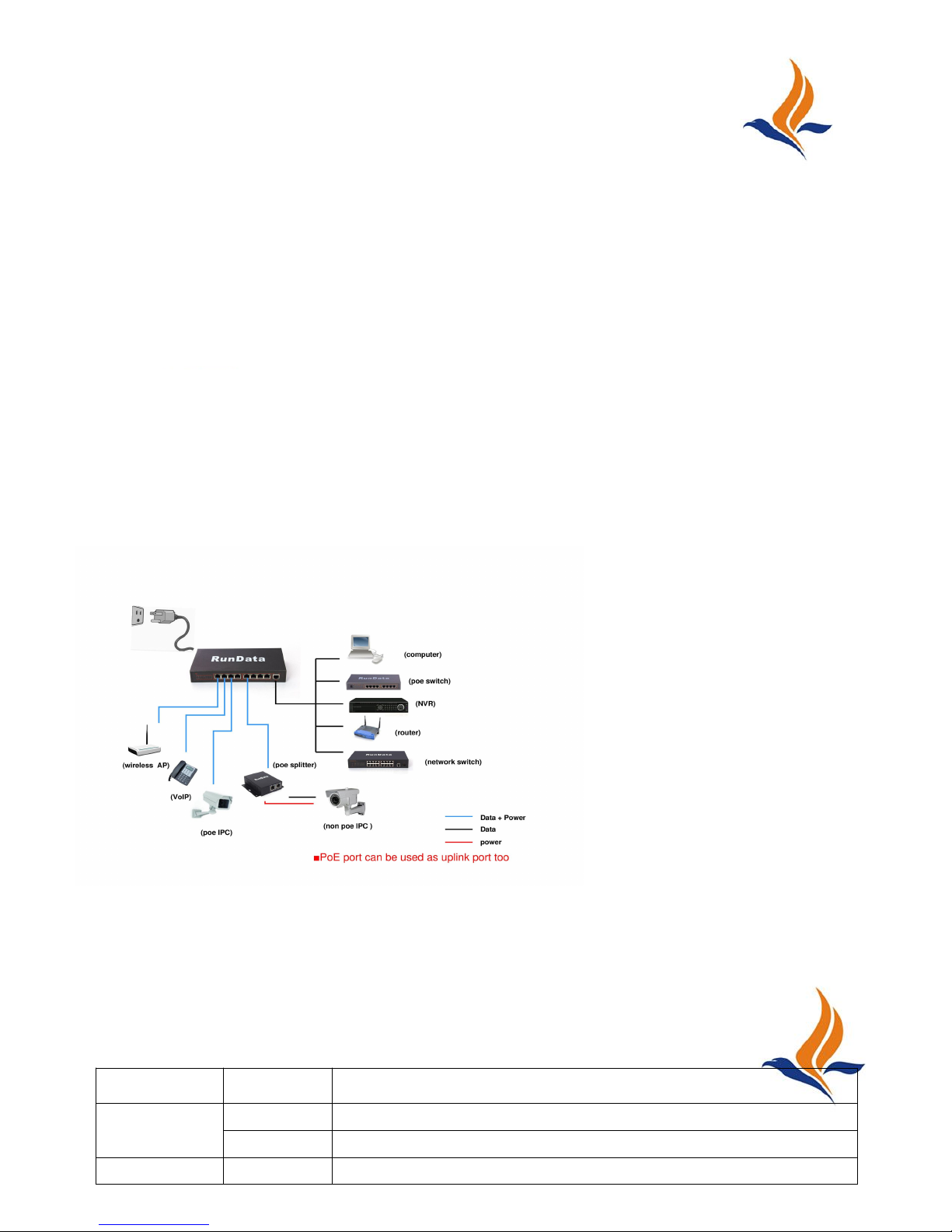
User Guide:
1.Check the PoE switch
Please check the enclosure,RJ45 ports,LED indicators ,make sure they are ok.
Connect the PoE switch with power,make sure the initialization of PoE switch is
available as below:
PoE indicator is off at the beginning when power connected
POW indicator is on and keeps
Other indicators will be on ,then off after one or two seconds
2.Connection cables:
Connected the Switch to Computer or other PD( like IP camera, wireless AP) by
CAT5 or 6 cables
Connected the external power adapter to Switch and the power cord to AC plug
Installation
LED Indicator:
Indicator
Status
Indication
Power
On (red)
The Switch is powered on.
Off
The Switch is powered off.
On (red)
PoE function is normal
Page 5

电力线
POW+DATA
DATA
PoE
Off
No PD is connected to the corresponding
Port or the CAT5 cables damaged
Link
On
(Yellow)
PD is connected correct and a valid link is established on the
port.
Off
No PD is connected to the corresponding port or PoE
function is unavailable or the CAT5 cables damaged
Caution :
1) All operation should be provided only by a qualified service technician.
2) Make sure the PDs you connected to the Switch are compliant with
IEEE 802.3af.
3) Make sure the power is off before unplugging the power adapter.
4) Makes sure all PoE PDs power consumption is less than total power
5) Please avoid any heavy thing placed on the Switch.
6) Do not use this product near water, for example, in a wet basement or
near a swimming pool.
7) Avoid using this product during an electrical storm. There may be a
remote risk of electric shock from lightning.
8) For outdoor use, the Switch itself should be housed inside a
protective enclosure.
9)Cutting power during a firmware upgrade can damage your device.
10)Only use attachments/accessories specified by the manufacturer.
11)Opening the switch or tampering with the warranty sticker can void
your warranty.
 Loading...