

Page 1
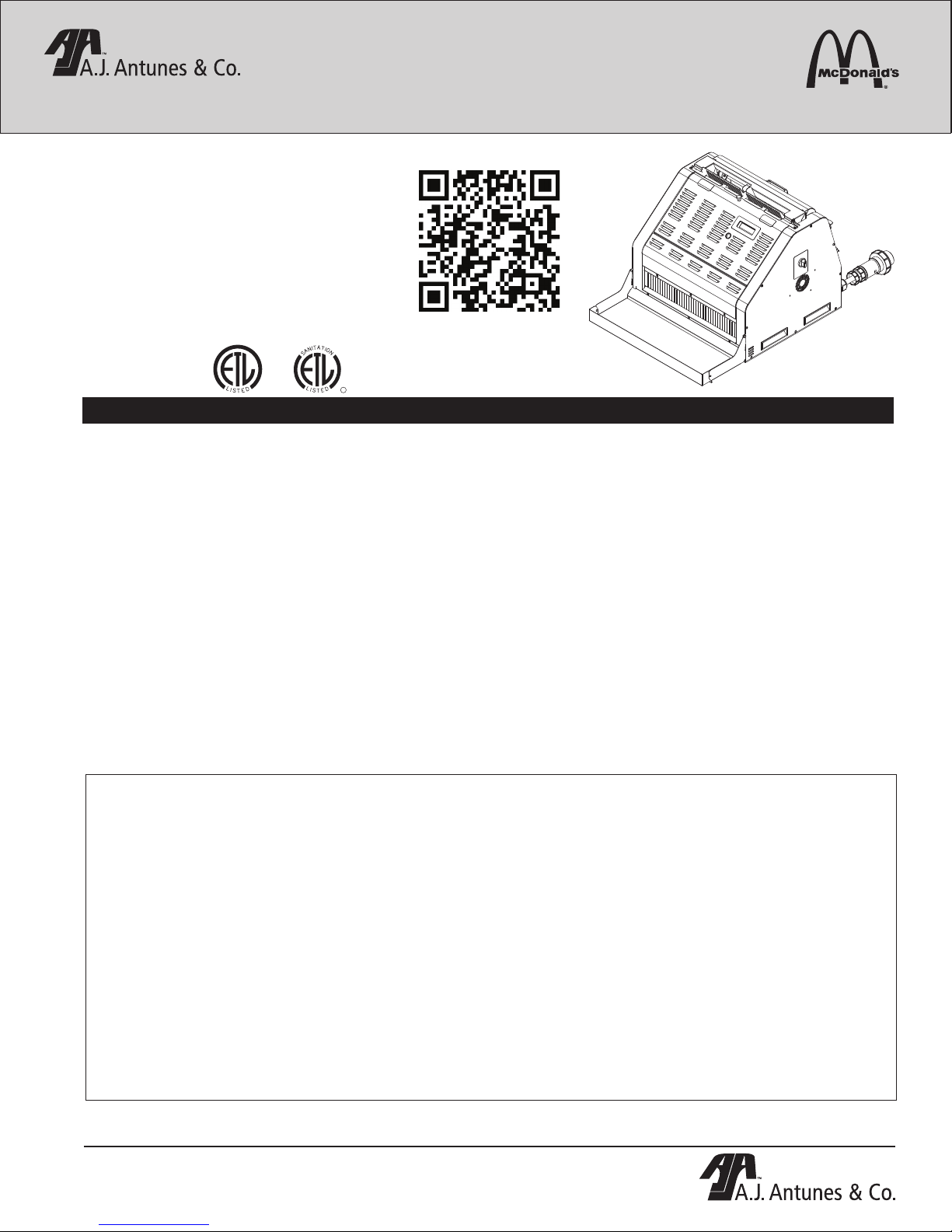
UNIVERSAL TOASTER
C
S
T
E
MODEL UTX-200L
Manufacturing Number 9210805 & 9210806
Place this manual in the Toaster section
of your Equipment Manual.
Manufactured exclusively for
McDONALD’S®
BY
A.J. ANTUNES & CO.
180 KEHOE BLVD.
CAROL STREAM, ILLINOIS 60188, U.S.A.
PHONE: 1-630-784-1000
TOLL FREE: 1-877-392-7854
FAX: 1-630-784-1650
www.ajantunes.com
A
T
T
I
I
O
N
N
A
S
US
L
I
D
S
E
T
L
CM
D
I
TABLE OF CONTENTS
Owner Information .....................................................2
General ......................................................................2
Warranty Information .................................................2
Service/Technical Assistance ....................................2
Specifications .............................................................3
Electrical Specifications & Plug Configuration ..........3
Pass Through Time ...................................................3
Dimensions ................................................................3
Important Safety Information ....................................4
Installation ...................................................................5
Operation .....................................................................7
Operating Instructions ...............................................7
Switching Between Muffin and Bagel Mode ..............7
Breakfast to Lunch Change-over...............................8
Product Labels and Toasting Product .......................9
Bun Thickness Compression Control Knob Settings 10
A.J. Antunes & Co.
UTX-200 & CTX-200
Scan with mobile device or enter URL
for product and service information.
http://tiny.cc/ajaUTX-CTX
UNIVERSAL TOASTER UTX-200L
Adjusting Toasting Quality .......................................10
Viewing the Program Mode Settings .......................11
Universal Toaster Settings .......................................11
UTX-200L Unit Status Mode ...................................12
Changing the Display Language .............................12
Purging Products from the Toaster ..........................12
Shutting down the UTX-200L ..................................13
Reset to Factory Defaults ........................................13
Adjusting the Upper and Lower I.R. ........................14
Maintenance ..............................................................15
DAILY: Cleaning the Accessories, Release Sheet, and
Vertical Conveyor Belt .............................................15
WEEKLY & SEMI ANNUALLY: Clean Cooling Fans 16
Troubleshooting .......................................................17
Replacement Parts ...................................................19
The Antunes Food Service Equipment Division of A.J. Antunes & Co. provides the following limited warranty to the original purchaser of all McDonald’s Equipment.
All components are warranted against defects in the material and workmanship for a period of two (2) years from date of original installation.
If any part becomes defective during the period of this Warranty, Antunes Food Service will pay labor costs to an Authorized Service Agent to replace the part plus
travel expenses.
WARRANTY EXCLUSIONS
• The cost of Installation.
• Equipment that has been damaged due to shipment. Purchaser should
make damage claim directly upon carrier.
• Alteration, misuse, abuse.
• Improper storage or handling.
• Improper maintenance.
• Failure to follow proper Installation instructions, including electrical
connection.
Antunes Food Service reserves the right to make changes in design or add improvements on any products. The right is always reserved to modify Equipment
because of factors beyond our control and government regulation. Changes to Equipment do not constitute a warranty charge.
This warranty is exclusive and is in lieu of all other warranties, expressed or implied, including any implied warranty of merchantability or fitness for a particular
purpose, each of which is expressly disclaimed. The remedies described above are exclusive, and in no event shall A.J. Antunes & Co. or any of its Divisions be
liable for special consequential or incidental damages for the breach or delay in the performance of this warranty.
This manual is for the exclusive use of licensees and employees of McDonald’s Systems, Inc..
P/N 1010992 Rev. K 03/15
McDonald’s
LIMITED WARRANTY
• Improper or unauthorized repairs.
• Scheduled Maintenance procedures as outlined in your MRC Card.
• This Warranty does not cover Consumable items. NOTE: The Conveyor Belt
wraps are consumable items that can be easily adjusted or replaced according to the Maintenance Section of this product’s Owner’s Manual.
• Water pressure problems or contamination problems such as foreign material
in water lines or inside solenoid valves due to an incoming water source.
• Freight, foreign, excise, municipal or other sales or use taxes.
• Consequential damages such as loss of profit, loss of time, the cost of repairing or replacing other property which is damaged, or any other incidental
damage of any kind.
© McDonald’s Corporation All Rights Reserved
1
Page 2

UNIVERSAL TOASTER UTX-200L
OWNER INFORMATION
General
This manual is produced for the Universal Toaster.
The Universal Toaster is designed to toast a variety
of buns (crowns and heels), bagels, and muffins. Its
unique design allows the toaster to automatically switch
temperatures and conveyors based on the choice
of toasting zones made by the user. The Universal
Toaster uses a combination of contact, impingement,
and radiant toasting technologies to provide an evenly
toasted product.
This manual provides the safety, installation, and
operating procedures for the Universal Toaster. We
recommend that this manual be read prior to installing
and operating the unit.
The Universal Toaster is manufactured from the finest
materials available and assembled to Roundup’s strict
quality standards. This unit has been tested at the
factory to ensure dependable trouble-free operation.
Warranty Information
Please read the full text of the Limited Warranty in this
manual.
If the unit arrives damaged, contact the carrier immediately and file a damage claim with them. Save all
packing materials when filing a claim. Freight damage
claims are the responsibility of the purchaser and are
not covered under warranty.
The warranty does NOT extend to:
• Damages caused in shipment or damage as a
result of improper use.
Service/Technical Assistance
If you experience any problems with the installation or
operation of your unit, contact your Authorized Service
Agency.
Fill in the information below and have it handy when
calling your Authorized Service Agency for assistance.
The serial number is on the specification plate located
on the rear of the unit.
Purchased From:
Date of Purchase:
Model No.:
Serial No.:
Mfg. No.:
Network ID Number:
Refer to the service agency directory packaged with
your manual and fill in the information below:
Authorized Service Agency
Name:
Phone No.:
Address:
Use only genuine Roundup replacement parts in this
unit. Use of replacement parts other than those supplied by the manufacturer will void the warranty. Your
Authorized Service Agency has been factory trained
and has a complete supply of parts for this toaster.
• Installation of electrical service.
• Normal maintenance as outlined in this manual.
• Malfunction resulting from improper maintenance.
• Damage caused by abuse or careless handling.
• Damage from moisture into electrical components.
• Damage from tampering with, removal of, or
changing any preset control or safety device.
IMPORTANT! Keep these instructions for future reference. If the unit changes
ownership, be sure this manual accompanies the equipment.
You may also contact the factory at 1-877-392-7854
(North America only), or 630-784-1000 if you have
trouble locating your nearest Authorized Service
Agency.
2
P/N 1010992 Rev. K 03/15
McDonald’s
Page 3
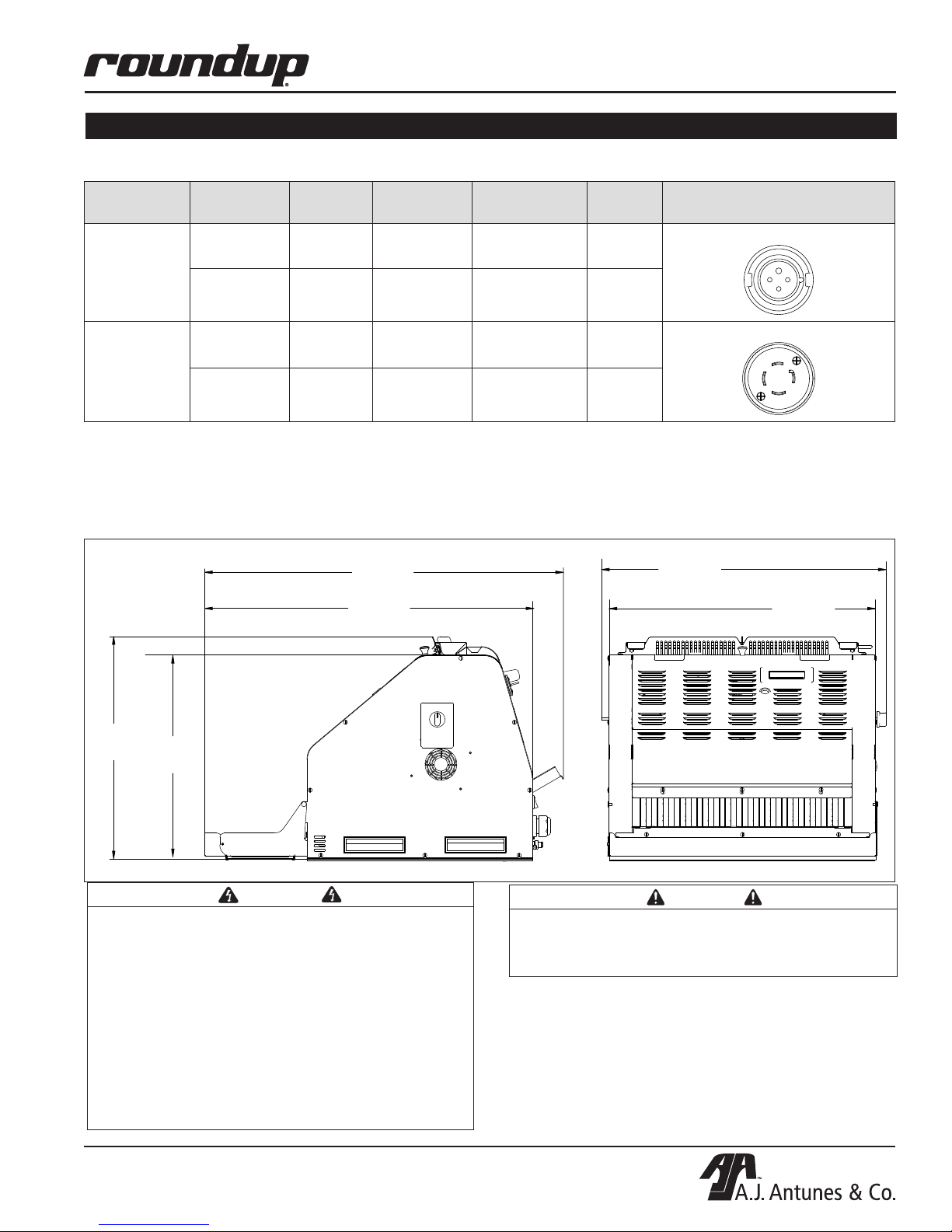
SPECIFICATIONS
25-3/4”
Electrical Specifications & Plug Configuration
Model &
Mfg. No
UTX-200L
9210805
Line
Voltage
Phase Power
208 V 3 8.6 kW 24 60
240 V 3 10 kW 24 60
UNIVERSAL TOASTER UTX-200L
Max Amps/
Line
Freq.
Plug Description and
Conguration
Pin & Sleeve 3 phase
208 V 3 8.6 kW 24 60
UTX-200L
9210806
240 V 3 10 kW 24 60
Pass Through Time
For all UTX-200 units the pass through time is
22 seconds (+/- 2 seconds).
Dimensions
31-3/4”
(806 mm)
29”
(737 mm)
19-3/4”
(501 mm)
18-1/4”
(463 mm)
NEMA L15-30P
(654 mm)
24”
(610 mm)
WARNING
ELECTRICAL SHOCK HAZARD. FAILURE TO
FOLLOW THE INSTRUCTIONS IN THIS MANUAL
COULD RESULT IN SERIOUS INJURY OR DEATH.
• Electrical ground is required on this appliance.
• Do NOT modify the power supply cord plug. If
it does not fit the outlet, have a proper outlet
installed by a qualified electrician.
• Do NOT use an extension cord with this
appliance.
• Check with a qualified electrician if you are
unsure if the appliance is properly grounded.
P/N 1010992 Rev. K 03/15
McDonald’s
CAUTION
All electrical connections must be in accordance
with local electrical codes and any other applicable codes.
3
Page 4
UNIVERSAL TOASTER UTX-200L
IMPORTANT SAFETY INFORMATION
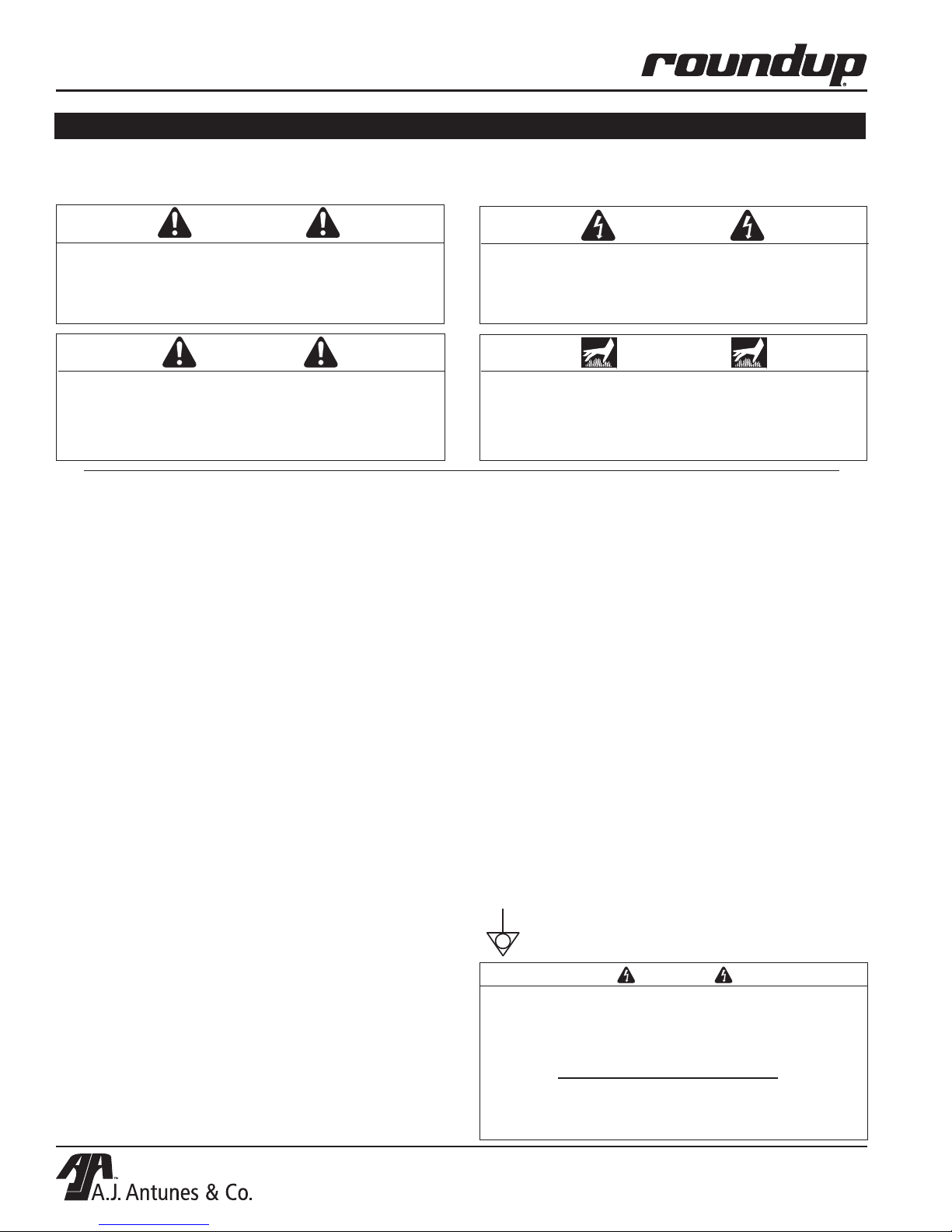
Throughout this manual, you will find the following safety words and symbols that signify important safety
issues with regards to operating or maintaining the equipment.
WARNING
GENERAL WARNING. Indicates information
important to the proper operation of the equipment. Failure to observe may result in damage to
the equipment, severe bodily injury or even death.
CAUTION
GENERAL CAUTION. Indicates information important to the proper operation of the equipment.
Failure to observe may result in damage to the
equipment.
In addition to the warnings and cautions in this manual,
use the following guidelines for safe operation of the
unit.
• Read all instructions before using equipment.
• For your safety, the equipment is furnished with
a properly grounded cord connector. Do NOT
attempt to defeat the grounded connector.
• Install or locate the equipment only for its intended use as described in this manual. Do NOT use
corrosive chemicals in this equipment.
• Do NOT operate this equipment if it has a damaged cord or plug, if it is not working properly, or
if it has been damaged or dropped.
• This equipment should be serviced by qualified
personnel only. Contact the nearest Authorized
Service Agency for adjustment or repair.
• Do NOT block or cover any openings on the unit.
• Do NOT immerse cord or plug in water.
• Keep cord away from heated surfaces.
• Do NOT allow cord to hang over edge of table or
counter.
• Do NOT operate unit on a combustible counter
top.
• Do NOT clean this appliance with a water jet.
The following warnings and cautions appear throughout
this manual and should be carefully observed.
• Turn the power off, wait for the cool-down procedure to complete its cycle (45 minutes), and
unplug the power cord before performing any service or maintenance on the unit.
WARNING
ELECTRICAL WARNING. Indicates information
relating to possible shock hazard. Failure to
observe may result in damage to the equipment
and/or severe bodily injury or death.
WARNING
HOT SURFACE WARNING. Indicates information
important to the handling of equipment and parts.
Failure to observe caution could result in personal
injury.
NOTE: Turning off the power switch does NOT turn
off all power to the unit. When the unit is plugged
in and turned off, an LED light will flash to indicate
that the power cord is plugged in.
• The procedures in this chapter may include
the use of chemical products. These chemical
products will be highlighted with bold face letters followed by the abbreviated HCS (Hazard
Communication Standard). See Hazard
Communication Standard manual for the appropriated Material Safety Data Sheets (MSDS).
• The equipment should be grounded according to
local electrical codes to prevent the possibility of
electrical shock. It requires a grounded receptacle with separate electrical lines, protected by
fuses or circuit breaker of the proper rating.
• Bread may burn. Therefore toasters must not be
used near or below curtains or other combustible
walls and materials. Failure to maintain safe
operating distances may cause discoloration or
combustion.
This equipotentiality symbol shows
external functional grounding connection.
WARNING
To avoid possible personal injury and/or damage to the unit, all inspections, tests, and repair
of electrical equipment should be performed
by QUALIFIED SERVICE PERSONNEL. The unit
MUST be shut down and UNPLUGGED before any
internal servicing, except when electrical tests are
required. Use extreme care during electrical circuit tests. Live circuits will be exposed.
4
P/N 1010992 Rev. K 03/15
McDonald’s
Page 5
UNIVERSAL TOASTER UTX-200L
UNIVERSAL TOASTER
C
T
I
S
L
US
E
D
A
S
D
L
I
S
T
E
CM
O
I
N
N
I
T
A
T
Remove the knob
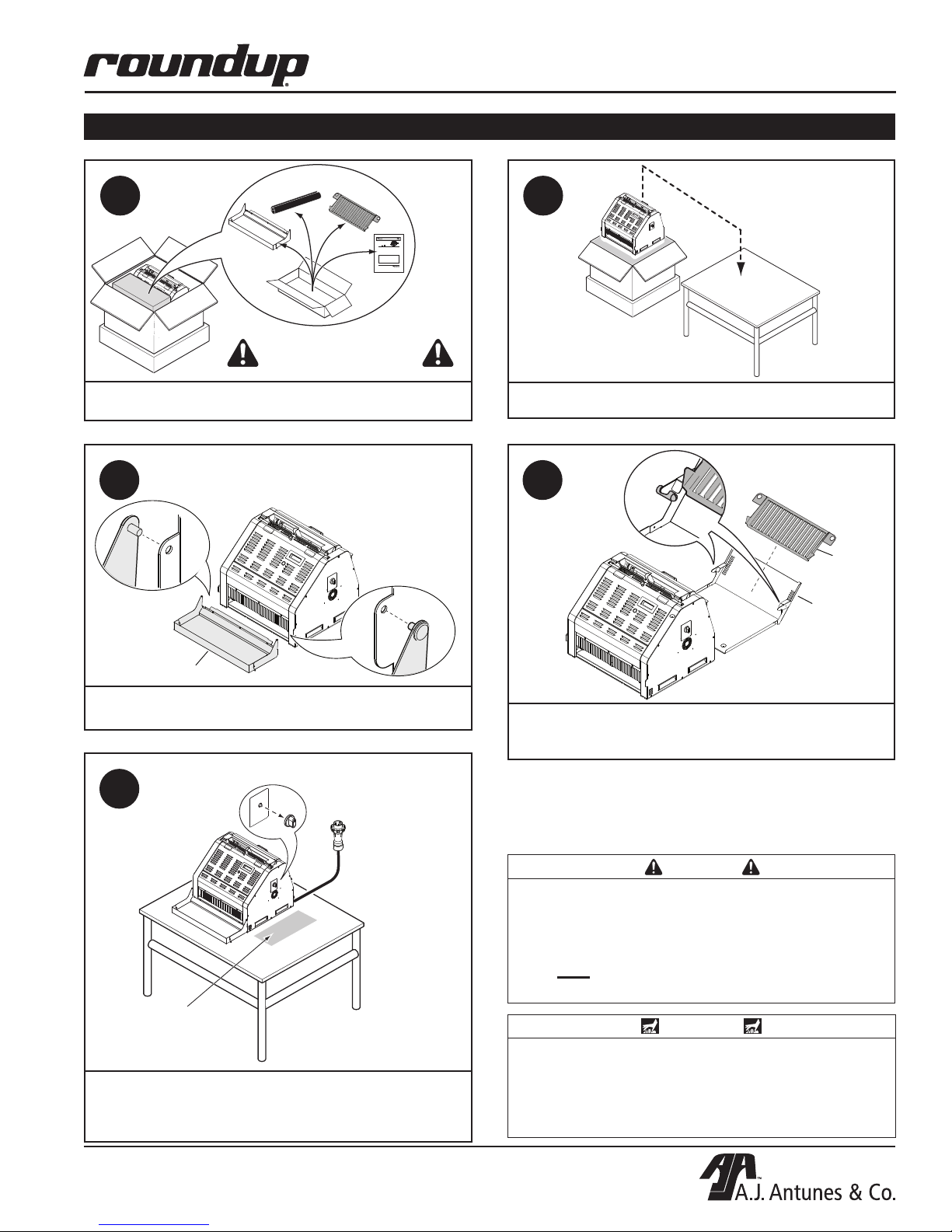
INSTALLATION
1
Bun
Buffer
Release
Sheet (2)
Breakfast
Chute
Manufacturing Number 9210800 and 9210802
Place this manual in the Toaster section
of your Equipment Manual.
Manufactured exclusively for
McDONALD’S®
A.J. ANTUNES & CO.
180 KEHOE BLVD.
CAROL STREAM, ILLINOIS 60188, U.S.A.
PHONE: 1-630-784-1000
TOLL FREE: 1-877-392-7854
FAX: 1-630-784-1650
www.ajantunes.com
Owner Information .....................................................2
General ......................................................................2
Warranty Information .................................................2
Service/Technical Assistance ....................................2
Specifications .............................................................3
Electrical Specifications & Plug Configuration ..........3
Dimensions ................................................................3
Important Safety Information ....................................4
Installation ................................................................... 5
Unpacking ..................................................................5
Location .....................................................................5
Assembling the Unit ..................................................6
Operation ..................................................................... 7
Operating Instructions ...............................................7
Breakfast to Lunch Change-over ..............................7
The Antunes Food Service Equipment Division of A.J. Antunes & Co. provides the following limited warranty to the original purchaser of all McDonald’s Equipment
manufactured and purchased after January 1, 2003.
All components are warranted against defects in the material and workmanship for a period of two (2) years from date of original installation, not to exceed 30 months
from date of shipment from our factory.
If any part becomes defective during the first two (2) years after the original installation date, Antunes Food Service will pay negotiated straight time labor costs to an
Authorized Service Agent to replace the part, plus travel expenses up to 50 miles/80 km, 1 hour each way (100 miles/160 km, 2 hours round trip).
WARRANTY EXCLUSIONS
• The cost of Installation.
• Equipment that has been damaged due to shipment. Purchaser should
make damage claim directly upon carrier.
• Alteration, misuse, abuse.
• Improper storage or handling.
• Improper maintenance.
• Failure to follow proper Installation instructions, including electrical connec-
tion.
• Improper or unauthorized repairs.
Antunes Food Service reserves the right to make changes in design or add improvements on any products. The right is always reserved to modify Equipment
because of factors beyond our control and government regulation. Changes to Equipment do not constitute a warranty charge.
This warranty is exclusive and is in lieu
pose, each of which is expressly disclaimed. The remedies described above are exclusive, and in no event shall A.J. Antunes & Co. or any of its Divisions be liable
for special consequential or incidental damages for the breach or delay in the performance of this warranty.
This manual is for the exclusive use of licensees and employees of McDonald’s Systems, Inc..
P/N 1010904 09/06
McDonald’s
Owner’s
Manual
MODEL UTX-200
BY
TABLE OF CONTENTS
of all other warranties, expressed or implied, including any implied warranty of merchantability or fitness for a particular pur-
© McDonald’s Corporation All Rights Reserved
UNIVERSAL TOASTER UTX-200
Product Labels and Toasting Product .......................8
Bun Thickness Compression Control Knob Settings 9
Viewing the Program Mode Settings ......................10
Adjusting Toasting Quality ......................................10
Universal Toaster Settings .......................................11
UTX-200 Unit Status Mode .....................................11
Purging Products from the Toaster .........................12
Shutting down the UTX-200 ...................................12
Maintenance ..............................................................13
Cleaning the Accessories, Release Sheet, and
Vertical Conveyor ...................................................13
Troubleshooting .......................................................15
Replacement Parts ...................................................17
Wiring Diagram .........................................................35
LIMITED WARRANTY
• Scheduled Maintenance procedures as outlined in your MRC Card.
• Consumables such as Grill Covers (Release Sheets), gaskets, Conveyor Belt
Wraps, O-Rings, and light bulbs.
• Overtime or Holiday charges.
• Mileage over 50 miles/80 km (100 miles/160 km round-trip), or travel time
over two (2) hours.
• Freight, foreign, excise, municipal or other sales or use taxes.
• Consequential damages such as loss of profit, loss of time, the cost of repair-
ing or replacing other property which is damaged, or any other incidental
damage of
any kind.
1
DO NOT DISCARD
ACCESSORIES BOX!
Open the Large Box. Remove and open the Accessory Box.
Set accessories, parts, and manual aside.
NOTE: Wash all metal
3
accessories prior to
installation!
2
Remove UTX-200L from box. Place in desired location.
Wipe down the entire unit with a clean damp cloth.
4
Breakfast
Chute
Crumb
Tray
Bun Buffer
Wash all metal accessories in hot, soapy water and allow to
air dry. Attach Bun Buffer to front of unit.
closest to the CTX-200
5
NOTE: CTX-200
can be placed
to the left or right
of UTX-200
Plug the power cord into the appropriate outlet.
If CTX-200L is present: Remove Compression Knob from
side of the UTX-200L closest to the CTX-200.
Do NOT discard the knob.
P/N 1010992 Rev. K 03/15
McDonald’s
Plug the
Power Cord
into the
appropriate
outlet
Insert Breakfast Chute over Crumb Tray TAB END FIRST.
Hook the chute over the top of Crumb Tray. Slide Crumb Tray
fully into unit.
NOTE: If any parts are missing or damaged,
contact Technical Service IMMEDIATELY at 1-877392-7854 (North America only), or 630-784-1000.
CAUTION
1. Provide at least 1 inch (25.4 mm) clearance on
both sides of the UTX-200L (or CTX-200L if used
with the UTX-200L) from any combustible wall or
surface. Leave front and back open.
2. Do NOT operate unit on a combustible surface
or counter top.
WARNING
Use caution while the unit is operating. The unit
and accessories will be hot to the touch. Use Heat
Resistant Gloves when removing any accessories
while the unit is operating. Personal injury may
result.
5
Page 6
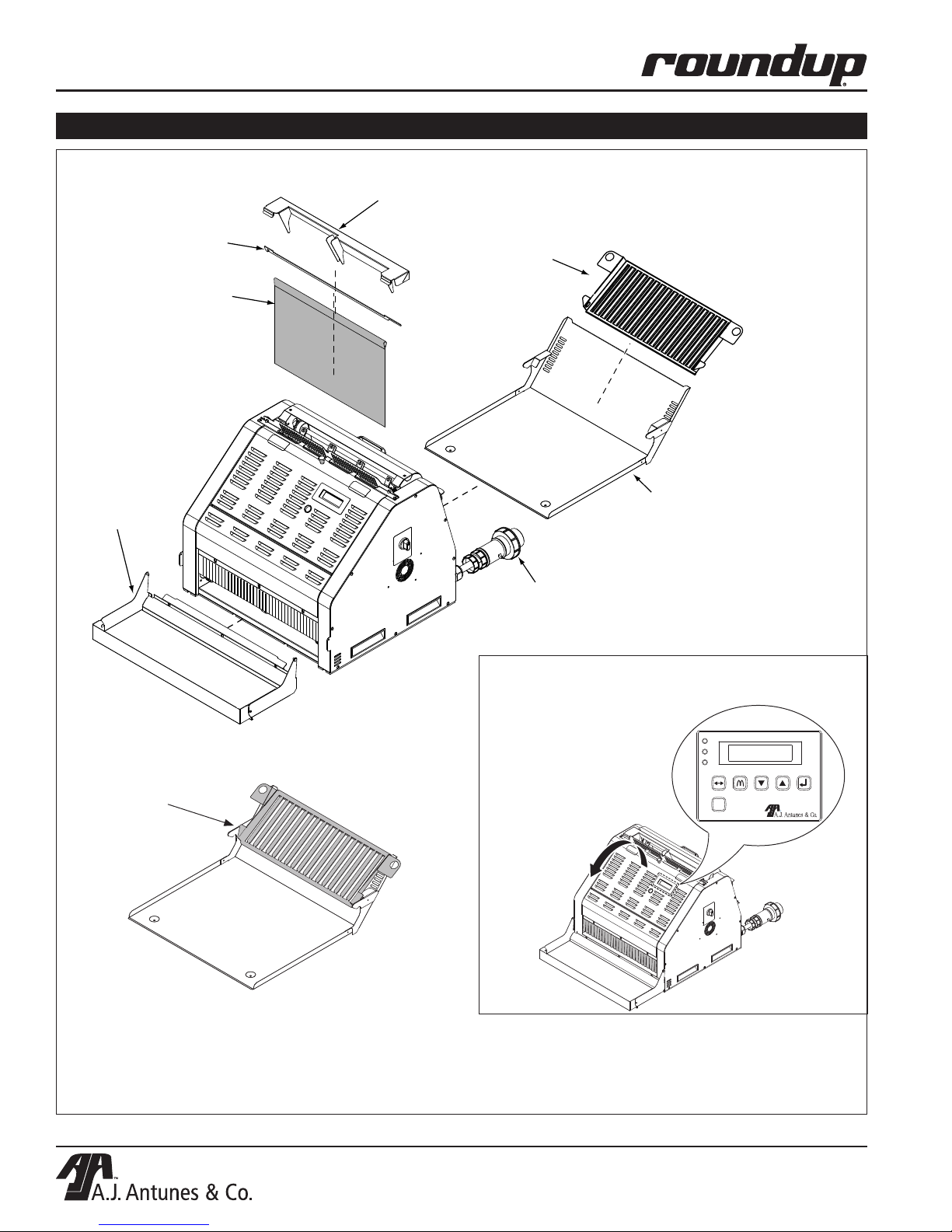
UNIVERSAL TOASTER UTX-200L
INSTALLATION (continued)
Bun Feeder
Release Sheet
Retainer Bar
Platen
Release Sheet
Breakfast
Chute
Bun Buffer
The Breakfast Chute
should be installed
as shown.
Unit Crumb
Tra y
Power
Cord
NOTE: To access the
Control Panel, open the
front cover. This
reveals the full
Control Panel (Inset).
I/R
PLTN
MOTOR
ADJUST
UT
BREAKFAST/LUNCH
PRGM
NEXTPREV
SELECT
NOTE: When installing the Release Sheet, make
sure it is not caught in the conveyor. Additional
Release Sheets can be obtained through your
Authorized Service Agency.
Figure 1. Universal Toaster Components
6
P/N 1010992 Rev. K 03/15
McDonald’s
Page 7

UNIVERSAL TOASTER UTX-200L
Muffin Wait
PRGM
MOTOR
PLTN
UT
I/R
NEXTPREV
SELECT
BREAKFAST/LUNCH
ADJUST
Muffin Ready
PRGM
MOTOR
PLTN
UT
I/R
NEXTPREV
SELECT
BREAKFAST/LUNCH
ADJUST
OPERATION
Operating Instructions
NOTE: To ensure proper operation, toast some test
product at the start of each day or whenever the
unit mode is changed.
NOTE: The UTX-200L has three operational modes:
Bagel and Muffin (breakfast) and Lunch (crowns
and heels). The unit always starts up in Muffin
Mode.
NOTE: If the toasting quality needs adjustment,
refer to Adjusting Toasting Quality in the Operation
section of this manual.
1
SELECT
SELECT
Power ON
3
After the system check, the unit displays the Muffin Wait
message. The Muffin Wait message means the unit is
warming up. This stage lasts approximately 20 minutes.
4
Turn the Power Switch On.
The unit “clicks” three times. This is normal.
2
I/R
PLTN
MOTOR
BREAKFAST/LUNCH
I/R
PLTN
MOTOR
BREAKFAST/LUNCH
Antunes UTX-200
#####, #####, #####
ADJUST
PRGM
UT
Testing 20
#####, #####, #####
ADJUST
PRGM
UT
NEXTPREV
SELECT
NEXTPREV
SELECT
The unit start up mode includes a 20-second system check.
The unit displays
this message for
approximately 2
seconds.
The bottom line
refers to the
current software
version
The unit performs
a 20 second
system check.
The bottom line
refers to the
current software
version
The unit displays the Muffin Ready message when it
reaches proper operating temperature for Breakfast.
Switching Between Muffin and Bagel Mode
1
SELECT
SELECT
Press one of the Muffin/Bagel Selector buttons to switch
between Muffin and Bagel mode.
McDonald’s
P/N 1010992 Rev. K 03/15
7
Page 8

UNIVERSAL TOASTER UTX-200L
Lunch Ready
PRGM
MOTOR
PLTN
UT
I/R
NEXTPREV
SELECT
BREAKFAST/LUNCH
ADJUST
Muffin Ready
Press UT for Lunch
PRGM
MOTOR
PLTN
UT
I/R
NEXTPREV
SELECT
BREAKFAST/LUNCH
ADJUST
OPERATION (continued)
Breakfast to Lunch Change-over
Follow these steps to change from Breakfast mode to
Lunch mode:
NOTE: Do NOT toast any lunch products until the
unit displays the Lunch Ready message.
1
Location of the UT
Breakfast/Lunch
Button
Muffin Ready
UT
3
I/R
PLTN
MOTOR
BREAKFAST/LUNCH
The unit warms up the toaster Platen for Lunch mode. The
unit display the Muffin Ready / Lunch Wait message.
ADJUST
UT
Muffin Ready
Lunch Wait
PRGM
NEXTPREV
SELECT
4
Press the UT Breakfast/Lunch button once to prepare the
unit for Lunch mode.
2
COMPRESSION
6
7
1
2
Set the Bun Thickness Compression Control knob to 3.
This is used in Lunch mode ONLY.
5
4
3
When the unit reaches lunch operating temperature,
it displays the message above. Press the UT Breakfast/
Lunch to start Lunch mode.
5
The unit is ready for lunch operation when the
Lunch Ready message appears.
8
P/N 1010992 Rev. K 03/15
McDonald’s
Page 9

UNIVERSAL TOASTER UTX-200L
OPERATION (continued)
Product Labels and Toasting Product
The UTX-200L can toast Bagels, Muffins, Bun Crowns,
and Bun Heels, but not all products are inserted into the
toaster the same way.
Product Labels are placed on the toaster to illustrate
where and how specific products should be inserted for
proper toasting.
If the
Product
Label reads:
Heel
Crown
Muffin
Bagel
Items 1, 2, and 3 in this section show how to insert
product and product toasting routes.
Then insert the product as follows:
Insert Heel with the cut side facing
the Platen. Refer to the appropriate
Product Label
Insert Crown with the cut side facing
the Platen. Refer to the appropriate
Product Label
Insert the Muffin into the Breakfast
Chute with the cut side face UP.
Insert the Bagel into the Breakfast
Chute with the cut side face UP.
2
3
TOASTING CROWNS AND HEELS
Cut Side of
Heel and Crown
(Facing forward)
Crowns
Heels
SELECT
Bagels OR
Muffins
NOTE: Always toast some test product at the start
of each day or whenever the unit mode is changed
to ensure proper toasting operation.
1
Cut Side of
Muffin Or Bagel
(Facing up)
TOASTING MUFFINS OR BAGELS
SELECT
Insert Heels on the left side of the toaster only. Insert
Crowns on the right side only.
IMPORTANT
The unit can toast 4 bagels or muffins across
at a time. However, bagels and muffins should
NOT be placed in the unit together. Use the
Muffin Bagel Selector buttons to enter the
appropriate mode for bagels or muffins.
NOTE: For all UTX-200 units, the product passthrough time is 22 seconds (+/- 2 seconds).
P/N 1010992 Rev. K 03/15
McDonald’s
9
Page 10

UNIVERSAL TOASTER UTX-200L
Light Buns Dark
PRGM
MOTOR
PLTN
UT
I/R
NEXTPREV
SELECT
BREAKFAST/LUNCH
ADJUST
OPERATION (continued)
Bun Thickness Compression Control Knob
Settings
During Lunch operation only, the UTX-200L uses a
Bun Thickness Compression Control Knob for proper
toasting of heels and crowns (Figure 2).
For best toasting quality, set the Bun Thickness
Compression Control Knob to 3.
NOTE: The Bun Thickness Compression Control
Knob is NOT used during breakfast mode.
COMPRESSION
6
7
1
Recommended
Bun Thickness
Compression
Control Knob
settings (used
in Lunch mode
ONLY)
2
Figure 2. Bun Thickness Compression Control
The UTX-200L and the CTX-200L are designed to
sit side by side. The CTX-200L can be placed on the
right or left side of the UTX-200L by putting the Bun
Thickness Compression Control Knob on the side of the
UTX-200L that is NOT flush against the CTX-200L.
This allows you to customize unit placement to your
preference by placing the Bun Thickness Compression
Control Knob on either side of the UTX-200L. If used,
the CTX-200L must be placed on the opposite side of
the UTX-200L Bun Thickness Compression Control
Knob.
5
4
3
Adjusting Toasting Quality
The toasting quality of the UTX-200L can be adjusted to
provide a lighter or more darkly toasted product. Follow
these steps to adjust toasting quality:
1. Open the Front Cover to access the Control Panel
(Figures 3 and 4).
I/R
PLTN
MOTOR
ADJUST
PRGM
NEXTPREV
UT
BREAKFAST/LUNCH
Figure 3. Accessing the UTX-200L Control Panel
2. Press and release the ADJUST button (Figure 4).
3. Use the PREV and NEXT buttons to adjust the
toasting quality to lighter or darker respectively
(Figure 4).
NOTE: Pressing the PREV button decreases toasting darkness. Pressing the NEXT button increases
toasting darkness. There are ten adjustment increments in each direction. Two bars will be lit when
the adjustment is in the center.
SELECT
10
Figure 4. Adjusting Toasting Quality
P/N 1010992 Rev. K 03/15
McDonald’s
Page 11

UNIVERSAL TOASTER UTX-200L
OPERATION (continued)
4. Test one or two buns to verify that the product is
toasting with the desired quality.
5. If the toasting quality needs further adjustment,
repeat Steps 2 through 4 as necessary.
6. Press the PRGM button when the adjustment is
complete to return to Ready mode.
NOTE: This setting is maintained when the unit is
powered off.
7. Press the PRGM button to exit.
Viewing the Program Mode Settings
Follow these steps to view the Program Mode:
NOTE: Do NOT change these settings.
1. From any operation mode (Bagel Ready, Bagel
Wait, Muffin Ready, Muffin Wait, Lunch Ready or
Lunch Wait) open the Front Cover and press and
hold the PRGM button for 3 seconds.
2. The following appears on the display:
Program Muffin (or Bagel or Lunch)
Press Select
3. Press the SELECT button and use the NEXT or
PREV buttons to scroll through the following cat-
egories (Refer to the Universal Toaster Settings
section for more information on these categories):
• Speed
• Platen Mode (Default setting is Always On)
• Units (F/C) (Default setting is F)
• Platen Temp
• IR Lower %
• IR Upper %
WARNING
Do NOT press the NEXT or PREV buttons at this
time. This may change the default settings and
affect the normal operation of the unit!
The Bagel and Muffin Program use the following three
settings:
• Speed
• IR Lower%
• IR Upper %
The Lunch Program uses the following four settings:
• Speed
• Platen Temp
• IR Lower %
• IR Upper %
Universal Toaster Settings
The following tables shows the recommended settings
for the UTX-200L Universal Toaster:
LUNCH
Setting Value
Bun Thickness Compression
Control knob
Platen Temperature 570°F (299°C)
IR Percent Upper 60%
IR Percent Lower 0%
Lunch Speed
(22 Seconds)
MUFFIN
3
5720
4. When you reach the desired category, press the
Select button ONCE. This causes the value to
blink, indicating the value is in Edit mode.
5. Press the PREV or NEXT button while the value
is blinking, to change the setting.
6. When you are finished viewing settings, press the
PRGM button or wait 10 seconds and the unit will
return to the Operation Mode (Bagel Ready, Bagel
Wait, Muffin Ready, Muffin Wait, Lunch Ready or
Lunch Wait).
NOTE: The unit will exit the Program Mode after 10
seconds of inactivity.
P/N 1010992 Rev. K 03/15
McDonald’s
Setting Value
IR Percent Upper 80%
IR Percent Lower 50%
Muffin toasting speed
(95 seconds).
BAGEL
Setting Value
IR Percent Upper 80%
IR Percent Lower 50%
Bagel toasting speed
(55 seconds)
NOTE: It is recommended that these settings
remain unchanged.
11
200
340
Page 12

UNIVERSAL TOASTER UTX-200L
Lunch Ready
PRGM
MOTOR
PLTN
UT
I/R
NEXTPREV
SELECT
BREAKFAST/LUNCH
ADJUST
OPERATION (continued)
UTX-200L Unit Status Mode
This mode provides feedback on how the unit’s systems are performing. No adjustments can be made in
this mode. Also, the display will remain on the selected
screen in this mode until you switch screens or exit Unit
Status Mode.
Follow these steps to view the Unit Status mode.
1. From any operation mode (Bagel Ready, Bagel
Wait, Muffin Ready, Muffin Wait, Lunch Ready or
Lunch Wait), open the Front Cover and press and
hold the ADJUST button for 3 seconds.
2. The following appears on the display in sequence
(use the NEXT and PREV buttons to scroll
through these items):
• Temp-Platen-Set Pt
• Run Time
• Blower Temp
(temperature of the air coming out of the blower)
• Controls Temp
(air temperature inside the electrical enclosure)
• Fan Speed % of Normal
L: (Left Fan), C: (Center Fan), R: (Right Fan)
• Speed-Motor-Set-Pt
• Lower IR
(The set point current value appears on the top
line. The actual current value appears on the
lower line)
• Upper IR
(The set point current value appears on the top
line. The actual current value appears on the
lower line)
• Smart Kitchen
Network Not Detected
3. Press the PRGM button once. This exits the Unit
Status Mode and returns to the current operation
mode screen.
Changing the Display Language
Follow these steps to change the display language
between English and Spanish:
1. At any time during power off (but connected to
power), cool down, warm-up, or normal operation,
press the SELECT button.
2. Press the NEXT button to select the desired
language and then release the button.
3. After 3 seconds, the change is stored into
memory.
Purging Products from the Toaster
NOTE: The unit must be in a READY or WAIT mode
in order to purge products.
There are two ways to purge products from the unit:
1. FACING FRONT OF UNIT:
With the unit in any READY or WAIT mode, open
the Front Cover. Press and hold the NEXT arrow
button until the product is purged from the unit
(Figure 5).
Once the product is purged, release the NEXT
button and the unit will return to normal operating
speed.
Figure 5. Purging Products: Front of Unit
2. FACING REAR OF UNIT:
With the unit in a READY or WAIT mode, you
can also press and hold BOTH MUFFIN/BAGEL
selector buttons together to purge product from
the unit. These buttons are located at the rear of
the unit (Figure 6).
Once the product is purged, release both
MUFFIN/BAGEL selector buttons.
These procedures temporarily speed up the unit to
purge products out to the front of the toaster.
12
P/N 1010992 Rev. K 03/15
McDonald’s
Page 13

UNIVERSAL TOASTER UTX-200L
OPERATION (continued)
MUFFIN/BAGEL
Selector Buttons (on
both sides of rear of
unit).
SELECT
SELECT
Figure 6. Purging Products: Rear of Unit
NOTE: Product is always purged out of the front of
the Toaster using the NEXT button or the MUFFIN/
BAGEL selector buttons. It is NOT possible to
purge product backwards through the unit.
Reset to Factory Defaults
Inadvertent changes to the settings of the UTX-200
could affect how the unit operates. If a fault message
appears, it is recommended that you first attempt to
restore the settings to the factory defaults. This will
restore all settings and parameters to McDonald’s
corporate specifications.
NOTE: The UTX-200 should NOT be unplugged
during normal operation or during the 45-minute
cool down period.
Follow these steps to reset the Factory Defaults:
1. Turn the Power Switch off. The red light on the
switch turns off.
2. Turn the Power Switch on.
3. Listen for the unit to click three times, then
immediately press and hold the PREV and
NEXT buttons until the display reads Factory
Defaults Set.
NOTE: The display will then go blank.
Shutting down the UTX-200L
Follow these steps to shut down the toaster:
1. Turn the Power Switch off.
2. The unit enters cool down mode and displays
OK to Clean. The fans continue to run. This
cool down mode continues for 45 minutes and
shuts the unit down automatically when complete.
IMPORTANT
Do NOT unplug the power cord when the unit is
in cool down mode. Wait for the 45-minute cool
down period to complete before unplugging the
power cord.
WARNING
To avoid possible personal injury and/or damage to the unit, all inspections, tests, and repair
of electrical equipment should be performed by
QUALIFIED SERVICE PERSONNEL. The unit MUST
be shut down and UNPLUGGED before performing
any internal service, except when electrical tests
are required. Use extreme care during electrical
circuit tests. Live circuits will be exposed.
4. Turn the Power Switch off and then back on.
5. Wait for the 20-second countdown to complete.
NOTE: The unit will then display Muffin Wait.
6. Preheat the unit and test for proper operation.
NOTE: If after resetting the Factory Defaults the
unit continues to display a fault/error message, turn
the power off and unplug the power cord. Wait a
few seconds and then plug the power cord back in.
Then repeat steps 2 through 6. If the unit still
displays a fault/error message, immediately call
your Authorized Service Agency for assistance.
P/N 1010992 Rev. K 03/15
McDonald’s
13
Page 14

UNIVERSAL TOASTER UTX-200L
Light Buns Dark
PRGM
MOTOR
PLTN
UT
I/R
NEXTPREV
SELECT
BREAKFAST/LUNCH
ADJUST
OPERATION (continued)
Adjusting the Upper and Lower I.R.
If toasted muffins and/or bagels are too light and the
toasting quality is at the darkest setting, you may need
to increase the Upper and Lower I.R. percentages from
their default settings.
NOTE: The Muffin and Bagel modes must always
have the same Upper and Lower I.R. settings.
1. While in Muffin Ready mode, open the Front
Cover and press and hold the PRGM button for 3
seconds to go into Program mode.
NOTE: The unit will exit Program mode after 10
seconds of inactivity.
2. The following appears on the display:
Program Muffin
Press Select
3. Press the SELECT button and then press the
NEXT button once to display the Upper I.R. set-
ting. It should read 80%.
4. Press the SELECT button once to go into Edit
mode. The value should start blinking.
5. Press the NEXT button twice to increase the
Upper I.R. setting to 84%.
6. Press the SELECT button to store the new Upper
I.R. setting.
7. Press the NEXT button once to display the Lower
I.R. setting. It should read 50%.
8. Press the SELECT button once to go into Edit
mode. The value should start blinking.
9. Press the NEXT button twice to increase the
Lower I.R. setting to 54%.
10. Press the SELECT button to store the new Lower
I.R. setting.
11. Press the PRGM button to exit Program mode.
12. Press the Bagel Selector button on the rear of the
toaster to select Bagel mode.
13. While in Bagel Ready mode, press and hold the
PRGM button for 3 seconds to go into Program
mode.
14. The following appears on the display:
Program Bagel
Press Select
15. Repeat steps 3 through 11 to adjust the Upper
I.R. setting to 84% and the Lower I.R. setting to
54%.
16. Once outside of Program mode, press the
ADJUST button (Figure 7).
17. Use the PREV and NEXT buttons to bring the
toasting quality indicator into the center of the
range (Figure 7).
NOTE: Two bars will be lit when the adjustment is in
the center (Figure 7).
Figure 7. Adjusting Toasting Quality
18. Press the PRGM button when the adjustment is
complete to return to Ready mode.
19. Close the Front Cover and allow the unit to warm
up for 10 to 20 minutes.
20. Test one or two muffins and bagels to ensure the
product is toasting with the desired quality.
21. If these settings do not give the desired results,
you may use the same steps to increase or
decrease the Upper and Lower I.R. settings, or
you may use the ADJUST button to make the
toasting quality lighter or darker.
NOTE: If the unit is reset to the factory default,
these new Upper and Lower I.R. settings will need
to be re-entered.
14
P/N 1010992 Rev. K 03/15
McDonald’s
Page 15

UNIVERSAL TOASTER UTX-200L
MAINTENANCE
WARNING
The unit will remain hot to the touch while it is
cooling down. Personal injury and burns may
result from touching the unit before it is finished
cooling down. Wear Heat Resistant Gloves!
DAILY: Cleaning the Accessories, Release
Sheet, and Vertical Conveyor Belt
NOTE: Do NOT wash accessories in the Power
Soak machine.
CLEANING THE ACCESSORIES AND TOASTER
1. Turn the Power Switch off. The red light on the
switch turns off (if present).
2. The unit enters cool down mode and displays
OK to Clean. The fans continue to run. This
cool down mode continues for 45 minutes and
shuts the unit down automatically when complete.
NOTE: You do NOT need to wait for the count down
to complete. Continue with the cleaning steps as
soon as you see OK to Clean.
3. Wearing Heat Resistant Gloves, remove the
following items from the unit (refer to Figure 1):
• Breakfast Chute (Rear of unit)
• Bun Feeder (Top of unit)
• Bun Buffer (Front of unit)
• Unit Crumb Tray (Rear of unit)
• Release Sheet Retainer Bar and Release
Sheet (Top of unit)
WARNING
Do NOT wash any of the accessories in a Power
Soak Machine or any other mechanical washer.
Damage to the accessories may result. Wash all
accessories by hand in the sink.
CLEANING THE RELEASE SHEET
1. Remove the Release Sheet from the Release
Sheet Retainer Bar and inspect both sides of the
Release sheet.
NOTE: Replace the Release Sheet if it is overly
worn, creased, or torn.
2. Lay the release sheet on a clean, flat, dry surface. Spray EXCEED Glass and Multi-Purpose
Cleaner (HCS) on a clean, dry towel.
3. Wipe the Release Sheet firmly from top to bottom
over its entire surface.
4. Immediately repeat this procedure with a clean,
dry towel dampened with water.
5. Finally, wipe the entire Release Sheet with a clean
towel dampened with KAYQUAT II™ Sanitizer
Solution (HCS) and allow to air dry.
6. Turn the Release Sheet over and repeat Steps 2
through 5 on the reverse side.
CLEANING THE VERTICAL CONVEYOR BELT
NOTE: Wear Heat Resistant Neoprene Gloves.
1. Face the rear of the unit. Turn the two Back Panel
Release Latches (Figure 8) to the vertical position
and open the Back Panel.
WARNING
The Horizontal Conveyor Belt and the Vertical
Conveyor Belt continue to turn during Cleaning
mode. To stop the belts, press the UT button. To
temporarily advance the belts during cleaning,
press and hold both MUFFIN/BAGEL buttons as
desired. Release to stop the belts again. Be sure
to press UT again to resume.
4. Set the Release Sheet Retainer Bar and the
Release Sheet aside.
5. Wash the Breakfast Chute, Bun Feeder, Bun
Buffer, and Crumb Tray in the three compartment
sink.
6. Wipe down the outside of the toaster with a clean,
sanitized towel dampened with KAYQUAT II™
Sanitizer Solution (HCS).
P/N 1010992 Rev. K 03/15
McDonald’s
15
Page 16

UNIVERSAL TOASTER UTX-200L
LOCKED UNLOCKED
MAINTENANCE (continued)
Release Latches (on
BOTH sides of the rear of
the unit) are locked when
in the horizontal position.
Turn both latches to the
vertical position to open
and unlock the Back
Panel.
SELECT
LOCKED UNLOCKED
(Horizontal) (Vertical)
SELECT
Figure 8. Back Panel Release Latches
2. Apply McD© Heavy Duty Degreaser (HCS) on
a clean, sanitizer soaked grill cloth. Wipe the
exposed part of the Conveyor Belt with the grill
cloth from side to side. Use the master links for
reference (Figure 9).
b. Use a no-scratch pad to spread a light coating
of grill cleaner over the entire exposed part of
the conveyor belt.
c. Lightly scrub the belt with the non-scratch pad
until clean.
6. Install the Release Sheet onto the Release Sheet
Retainer Bar and install onto unit.
NOTE: Rotate the Release Sheet from side to side
daily to extend the life of the Release Sheet.
7. Reattach all accessories to the unit (Figure 1).
NOTE: Check the Release Sheet to make sure it is
draped properly over the Platen.
Release Latches (on
BOTH sides of the rear of
the unit) are locked when
in the horizontal position.
Close the Back Panel
and turn both latches to
the horizontal position to
secure the Back Panel.
(Horizontal) (Vertical)
Screws
Figure 9. Master Links
3. Press and hold both MUFFIN/BAGEL selector
buttons on the back of the unit (Figure 6) until to
uncleaned portion of the belt is exposed. Repeat
Step 2 on the uncleaned portion of the belt.
4. Rinse/wipe the vertical Conveyor Belt with
the grain (Side to side) using KAYQUAT II™
Sanitizer Solution (HCS) and allow to air dry.
NOTE: Do NOT leave the Back Panel open any
longer than it takes to complete these cleaning
procedures. Refer to the cleaning label located on
the back of the unit.
5. Follow this step only if the vertical conveyor belt
does not become clean after steps 2 through 4:
a. Open a packet of McD Hi-Temp Grill Cleaner
(HCS). Empty the contents on an entrée base.
SELECT
SELECT
Figure 10. Back Panel Release Latches
8. Verify that the Bun Thickness Compression
Control knob is set to 3 (Figure 2).
9. Close the Back Panel and lock the Back Panel
Release Latches (Figure 10).
10. Place the toaster back into operation.
WEEKLY & SEMI ANNUALLY: Clean
Cooling Fans
Refer to the document UTX-200 Cooling Fan and
Blower Motor Cleaning Instructions (P/N 1011059)
and follow the directions in that document to clean
the cooling fans, blower motor, and electrical compartment. This document provides Weekly & Semiannual tasks.
NOTE: It is very important to keep the cooling
fans, blower motor, and electrical compartment
clean and in top operational mode. Do not ignore
these cleaning steps.
16
P/N 1010992 Rev. K 03/15
McDonald’s
Page 17

UNIVERSAL TOASTER UTX-200L
TROUBLESHOOTING
CAUTION
To avoid possible personal injury and/or damage to the unit, all inspections, tests, and repair of electrical
equipment should be performed by QUALIFIED SERVICE PERSONNEL. The unit MUST be shut down and
UNPLUGGED before servicing, except when electrical tests are required. Use extreme care during electrical
circuit tests. Live circuits will be exposed.
Problem Possible Cause Corrective Action
No Display and/or no light on the
Power Switch.
Unit displays one of the following
messages:
Upper IR Heater Fault
or
Lower IR Heater Fault
Unit displays the following message:
Conveyor Motor Fault
Unit displays the following message:
SSR Failure - System Stopped
Unit displays the following message:
Platen Temp Fault
Unit not plugged in. Plug the power cord into the appro-
priate outlet.
Hi-Limit thermostat is tripped. Reset Hi-Limit.
Circuit Breaker tripped. Reset Circuit Breaker.
Power Cord and/or plug are
damaged.
Inoperable Power Switch.
Failed heater. Allow about 10 minutes for the
Wire disconnected in IR circuit.
Control wires to the Solid State
Relay are disconnected.
The Solid State Relay has failed.
Retainer Ring not locked on plug. Plug power cord in tightly and lock
Product is getting stuck in the
conveyor system or the conveyor
system is jammed.
The motor controller circuit has
failed or is inoperable.
A relay has failed preventing proper
heater control.
A heater or relay in the Platen circuit has failed.
Contact your maintenance person or
Authorized Service Agency.
toaster to self adjust.
Adjust the toast quality setting. Refer
to the Operation section of this
manual.
the Retainer Ring.
Check and clear the vertical and
horizontal conveyors for any stuck
product. Refer to the Operation and
Maintenance sections of this manual
for proper compression settings and
cleaning procedures.
Call your Authorized Service Agency
for service.
The toaster cannot be operated with
this kind of failure. Contact your
Authorized Service Agency for
service.
The conveyors will continually adjust
speed to compensate for low Platen
temperature. If the Platen cannot
maintain 525ºF (274°C), the unit will
signal an error and stop operating. If
this happens, contact your Authorized
Service Agency for service.
P/N 1010992 Rev. K 03/15
McDonald’s
17
Page 18

UNIVERSAL TOASTER UTX-200L
TROUBLESHOOTING
Problem Possible Cause Corrective Action
Unit displays the following message:
Platen Fail
NOTE: A Thermocouple which has
become grounded will cause erratic
controller behavior.
Unit displays the following message:
Platen SSR Fail
The overtemp thermocouple temperature is greater than 250ºF (121°C) but
less than 350ºF (177°C). Unit
displays the following message:
Main Blower Fault
The Thermocouple in the Platen
circuit has failed.
A control relay has a short or the
Thermocouple is not pushed into
Platen correctly.
There is a problem with the main
convection blower.
The toaster cannot be operated in
Lunch mode with this type of failure.
Contact your Authorized Service
Agency for service.
The toaster will open the C1 contactor, disabling the toaster. Contact
your Authorized Service Agency for
service.
Unit will operate normally but this
issue should be addressed by an
Authorized Service Agency.
The overtemp thermocouple temperature is greater than 350ºF or an open
thermocouple condition exists. Unit
displays the following message:
IR Sensor Fail
Cooling fan speed error. Unit displays
one or more of the following messages:
Left Fan Fault
Ctrl Hsg Fan Fault
Right Fan Fault
Product sticking in vertical conveyor
or product not toasted properly.
Unit displays the following message:
WARNING! Power Fault
Unplug now!!!
There is a problem with the main
convection blower.
Cooling fan failure. The toaster will operate normally
Dirty Release Sheet. Clean the Release Sheet according
Bun Thickness Compression
Control knob is set incorrectly.
Product inserted incorrectly into
vertical conveyor.
Unit may not be in the proper operation mode.
Contactor and control relay failures.
Unit has detected IR current or
rising Platen temperature with the
power off.
The toaster will shut down. Allow
the toaster to cool and the restart. If
this condition persists, contact your
Authorized Service Agency for
service.
until the compartment ambient temperature exceeds 150ºF (66°C). At
this point the toaster will shut down.
Contact your Authorized Service
Agency for service.
to the Maintenance section of this
manual.
Set the Bun Thickness Compression
Control knob is set to 3.
Refer to the Operation section in this
manual for proper operation procedures. Also refer to the product labels
on the unit.
When toasting Muffins or Bagels,
the unit must be in Breakfast Mode.
When toasting Buns, the unit must
be in Lunch Mode. Refer to the
Operation section of this manual.
Immediately unplug the power cord
and call your Authorized Service
Agency for service. The unit must not
be operated with this kind of failure.
18
P/N 1010992 Rev. K 03/15
McDonald’s
Page 19

UNIVERSAL TOASTER UTX-200L
REPLACEMENT PARTS
CAUTION
To avoid possible personal injury and/or damage to the unit, all inspections, tests, and repair of electrical
equipment should be performed by QUALIFIED SERVICE PERSONNEL. The unit MUST be shut down and
UNPLUGGED before servicing, except when electrical tests are required. Use extreme care during electrical
circuit tests. Live circuits will be exposed.
UTX-200L Components
4
5
3
2
1
For additional replacement parts, contact your
Authorized Service Agency.
You may also contact the factory at
1-877-392-7854 (North America only), or
630-784-1000.
6
8
Item Part No. Description Qty.
1 0011898 Assy., Bun Buffer 1
2 7000496 Release Sheet, Platen 1
(One pre-installed,
3* 7000495 Release Sheet, Platen 1
(package of 10)
3 0504310 Bar, Holding 1
4 0021500 Bun Feeder Weldment 1
5 0504371 Breakfast Chute 1
6 0021497 Crumb Tray Weldment 1
7 0700698 Power Cord Assy., 3 Ph 250V, 30A 1
(Mfg.
0700711 Power Cord Assy, 3 Ph, 1
T
(Mfg No. 9210806 only)
8 2100253 Knob, 1/4” Shaft, Push-On 2
* Not Shown
No. 9210805 only)
wist Lock L15-30P
2 packaged)
P/N 1010992 Rev. K 03/15
McDonald’s
19
Page 20

 Loading...