

Page 1
POWER
READY
STEAMING
CYCLE
START
CAUTION
"HOT"
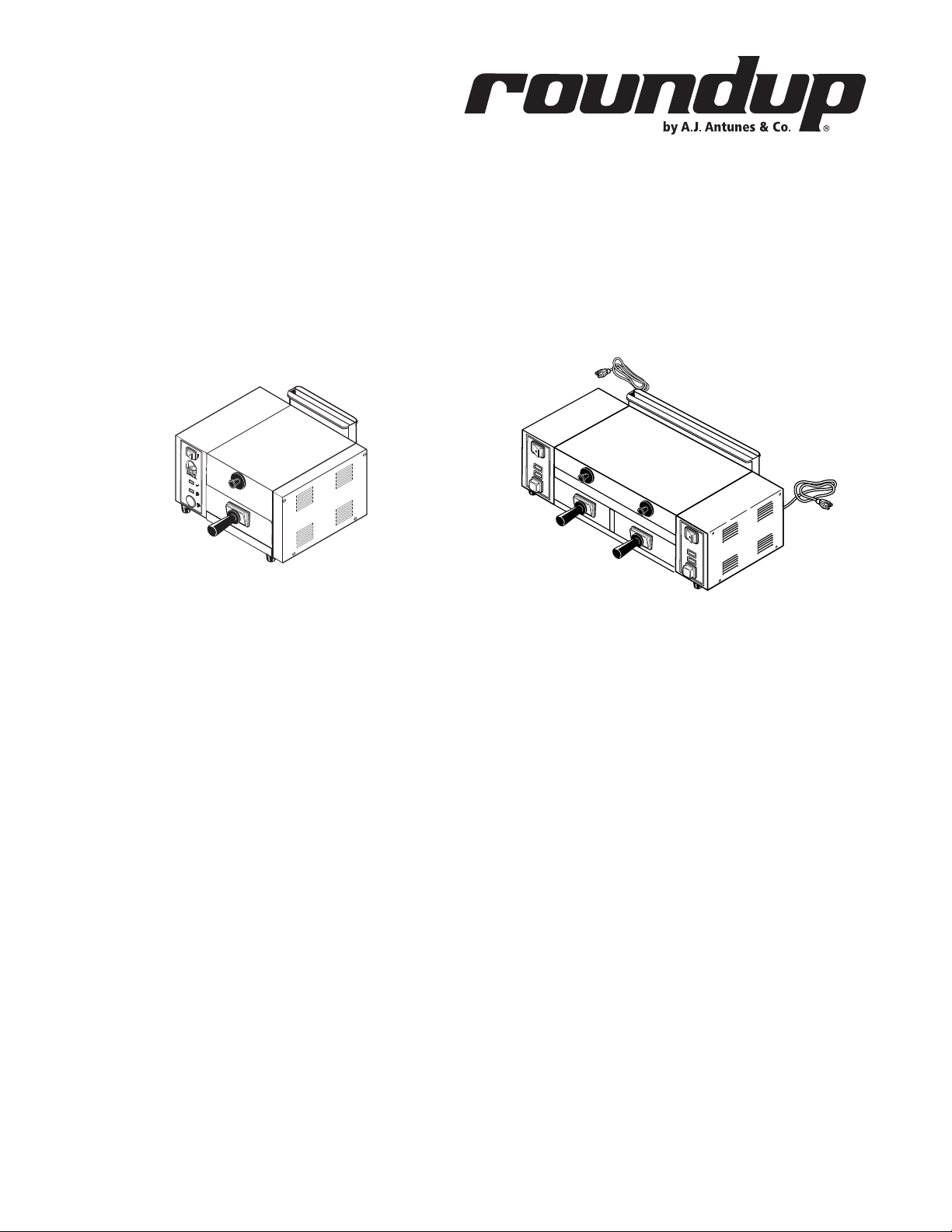
TBS-1X TBS-2X
Taco Bell Steamer
TBS-1X & TBS-2X
owner’s manual
Manufacturing Numbers:
9100400, 9100402, 9100410 & 9100412
www.ajantunes.com
P/N 1010698 Rev. I 03/12
Page 2
Table of Contents
General .................................................. 2
Warranty Information ............................. 2
Service/Technical Assistance ...................2
Important Safety Information ................. 3
Warnings ................................................ 3
Specifications ......................................... 4
Shipping Weight ..................................... 4
Capacities ............................................... 4
Unpacking .............................................. 5
Equipment Setup .................................... 5
INSTALLATION ........................................ 6
OPERATING INSTRUCTIONS ................... 7
Daily Cleaning ........................................ 8
Monthly Maintenance ............................ 8
Troubleshooting...................................... 10
Replacement Parts ..................................12
Replacement Parts – TBS-1X & TBS-2X ..13
Wiring Diagram ...................................... 15
Notes ...................................................... 16
Limited Warranty .................................... 17
IMPORTANT
A.J. Antunes & Co. reserves the right
to change specifications and product
design without notice. Such revisions do
not entitle the buyer to corresponding
changes, improvements, additions or
replacements for previously purchased
equipment.
IMPORTANT
Keep these instructions for future reference. If the unit changes ownership,
be sure this manual accompanies the
equipment.
GENERAL
The Taco Bell Steamer produces steam using
plain tap water for quick heating and reconstituting of food items. Simple push-button
action delivers a fully adjustable impulse
of steam. Because the amount of steam is
consistent, it removes the guesswork and
produces a uniform finished product from one
operator to another.
This manual provides the safety, installation,
and operating procedures for the Taco Bell
Steamer. We recommend that all information contained in this manual be read prior to
installing and operating the unit.
Your Taco Bell Steamer is manufactured from
the finest materials available and assembled
to Roundup’s strict quality standards. This
unit has been tested at the factory to ensure
dependable trouble-free operation.
WARRANTY INFORMATION
Please read the full text of the Limited
Warranty printed on the back cover of this
manual.
If the unit arrives damaged, contact the carrier immediately and file a damage claim
with them. Save all packing materials when
filing a claim. Freight damage claims are the
responsibility of the purchaser and are not
covered under warranty.
• The warranty does NOT extend to:
• Damages caused in shipment or dam-
age as result of improper use.
• Installation of electrical service.
• Installation of plumbing or water
supply, or water pressure regulator (if
applicable).
• Calibration, adjustment, or maintenance.
• Normal maintenance as outlined in
this manual.
• Consumable parts such as gaskets,
rubber feet, labels, O-rings, etc.
• Malfunction resulting from improper
maintenance or improper/incorrect
voltage supply.
• Damage caused by abuse or careless
handling.
• Damage from moisture into electrical
components.
• Damage from tampering with, removal
of, or changing any preset control or
safety device.
SERVICE/TECHNICAL
ASSISTANCE
If you experience any problems with the
installation or operation of your unit, contact
your local Roundup Authorized Service Agency.
Fill in the information below and have it
handy when calling your Authorized Service
Agency for assistance. The serial number is on
the specification plate located on the rear of
the unit.
Purchased From
Date of Purchase
Model Number
Serial Number
Manufacturing Number
Use only genuine Roundup replacement parts
in this unit. Use of replacement parts other
than those supplied by the manufacturer will
void the warranty. Your Authorized Service
Agency has been factory trained and has a
complete supply of parts for this unit.
Visit www.ajantunes.com or contact the factory at 1-630-784-1000 to locate your nearest
Authorized Service Agency.
Refer to the service agency directory packaged
with your manual and fill in the information
below.
Authorized Service Agency
Name
Phone Number
Address
2
P/N 1010698 Rev. I 03/12
Page 3

IMPORTANT SAFETY
INFORMATION
Use the following guidelines for safe operation of the unit.
• Read all instructions before using
equipment.
• For your safety, the equipment is furnished with a properly grounded cord
connector. Do not attempt to defeat
the grounded connector.
• Install or locate the equipment only
for its intended use as described in
this manual. Do not use corrosive
chemicals in this equipment.
• Do not operate this equipment if it
has a damaged cord or plug, if it is
not working properly, or if it has been
damaged or dropped.
• This equipment should be serviced by
qualified personnel only. Contact your
nearest Authorized Service Agency for
adjustment or repair.
• Do not block or cover any openings on
the unit.
• Do not immerse cord or plug in water.
• Keep cord away from heated surfaces.
• Do not allow cord to hang over edge
of table or counter.
• Turn the power off, unplug the power
cord, and allow unit to cool down
before performing any service or
maintenance on the unit.
• The procedures in this manual may
include the use of chemical products.
These chemical products will be
highlighted with bold face letters followed by the abbreviated HCS (Hazard
Communication Standard). See Hazard
Communication Standard manual for
the appropriated Material Safety Data
Sheets (MSDS).
• The equipment should be grounded
according to local electrical codes to
prevent the possibility of electrical
shock. It requires a grounded receptacle with separate electrical lines,
protected by fuses or circuit breaker of
the proper rating.
• All electrical connections must be in
accordance with local electrical codes
and any other applicable codes.
• Do not clean this appliance with a
water jet.
WARNINGS
Be advised of the following warnings when
operating and performing maintenance on
this unit.
• If the supply cord is damaged, it must
be replaced by the manufacturer or its
service agent or a similarly qualified
person in order to avoid a hazard.
• Do not modify the power supply cord
plug. if it does not fit the outlet, have
a proper outlet installed by a qualified
electrician.
• Do not use an extension cord with this
appliance.
• Electrical ground is required on this
appliance.
• Check with a qualified electrician if
you are in doubt as to whether the
appliance is properly grounded.
• If a chemical cleaner is used, be sure
it is safe to use on cast aluminum.
Observe all precautions and warnings
on product label.
• Inspection, testing, and repair of electrical equipment should only be performed by qualified service personnel.
• This equipment is to be installed to
comply with the basic plumbing code
of the Building Officials and Code
Administrators, Inc. (BOCA) and the
Food Service Sanitation Manual of the
Food and Drug Administration (FDA).
• On direct water hook-up units, water
pressure must not exceed 30 psi (2.1
kg/cm2 or 207 kPa). Higher water
pressures will cause poor performance, excessive condensation, and
flooding of the Steam Generator. To
reduce water pressure, install a water
pressure regulator and set water pressure to 20–30 psi (1.4–2.1 kg/cm2 or
138–207 kPa). Contact your equipment supplier to purchase a Water
Pressure Regulator.
• To ensure proper steaming characteristics, some calcium/mineral deposits
must be present on the generator
surface. If, during cleaning, the surface
does become free of calcium/mineral
deposits, add plain tap water to the
surface and allow it to boil off. This
may have to be repeated several times
to ensure proper steaming characteristics by creating a thin layer of deposits
on the surface.
• Do not use a sanitizing solution or
abrasive materials. The use of these
may cause damage to the stainless
steel finish.
• Chlorides or phosphates in cleaning agents (e.g. bleach, sanitizers,
degreasers or detergents) could cause
permanent damage to stainless steel
equipment. The damage is usually in
the form of discoloration, dulling of
metal surface finish, pits, voids, holes,
or cracks. This damage is permanent
and not covered by warranty.
• The following tips are recommended
for maintenance of your stainless steel
equipment:
• Always use soft, damp cloth for
cleaning, rinse with clear water
and wipe dry. When required,
always rub in direction of metal
polish lines.
• Routine cleaning should be done
daily with soap, ammonia detergent, and water.
• Stains and spots should be
sponged using a vinegar solution.
• Finger marks and smears should be
rubbed off using soap and water.
• Hard water spots should be
removed using a vinegar solution.
P/N 1010698 Rev. I 03/12
3
Page 4
SPECIFICATIONS
A
S
D
L
I
S
T
E
CM
O
I
N
N
I
T
A
T
C
T
I
S
L
US
E
D
D
L
I
S
T
E
C US
I
N
T
E
R
T
E
K
B
POWER
READY
STEAMING
CYCLE
START
CAUTION
"HOT"
C
A
Model No.
TBS-1X
TBS-2X
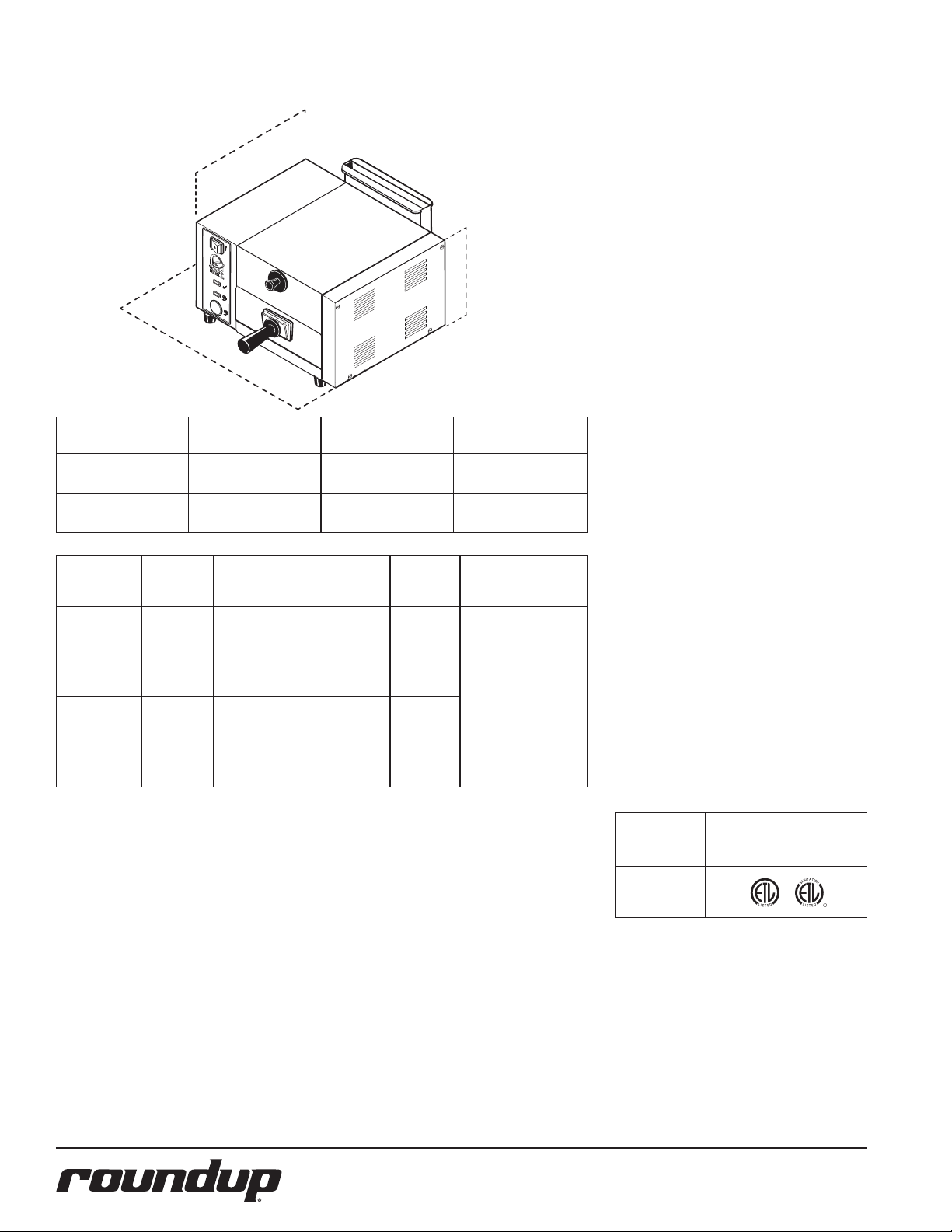
Width
(A)
14.15”
(359 mm)
25.75”
(654 mm)
Model No. Volts Watts Amps Hertz Plug Description
TBS-1X
9100410
TBS-2X
208 3300 15.9 50/60
9100400
(per side)
TBS-1x
9100412
TBS-1X
220-240 3300 13.8-15 50/60
9100402
(per side)
Depth
(B)
9.7”
(246 mm)
9.7”
(246 mm)
Height
(C)
13.4”
(340 mm)
13.4”
(340 mm)
6-20P Non-Locking
20 Amp., 250 VAC.
SHIPPING WEIGHT
TBS-1X Series 36 lbs (16.3 kg)
TBS-2X Series 62 lbs (28.1 kg)
CAPACITIES
TBS-1X Series One Taco Bell Product
TBS-2X Series Two Taco Bell Products
Model &
Mfg. No.
TBS-1X
Agency Approvals
TBS-2X
4
P/N 1010698 Rev. I 03/12
Page 5
UNPACKING
1. Remove unit and all packing materials
from shipping carton.
2. The box should contain the following
• Taco Bell Steamer
• Handle & Handle Guard
(Qty. 2 for TBS-2X)
• Water Quick Disconnect Kit
(Qty. 2 for TBS-2X)
• Water Measuring & Calibration Kit
NOTE: If any parts are missing or damaged, contact Antunes Technical Service
IMMEDIATELY at 1-877-392-7854 or
1-630-784-1000.
3. Remove all packing materials and
protective
coverings from the unit.
4. Remove and wash the Spatula(s) and
Liner(s) (Figure 1) in soap and water.
Rinse with clean hot water and allow
to air dry.
5. Wipe all surfaces of the unit with a
hot damp cloth.
NOTE: Do NOT use a dripping wet cloth.
Wring out before use.
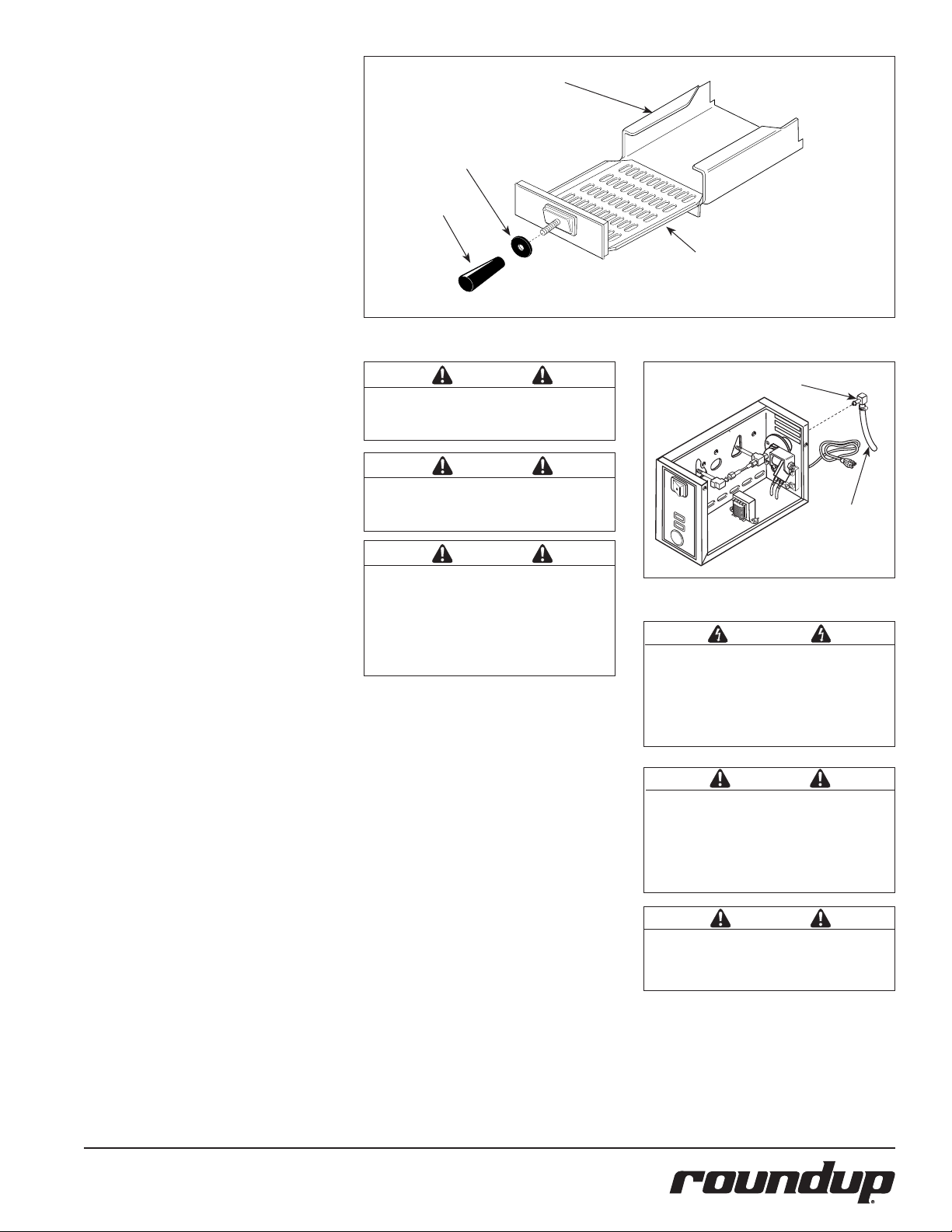
6. Assemble the Handle and Handle
Guard to the Spatula(s) (Figure 1).
7. Re-install Spatula(s).
EQUIPMENT SETUP
GENERAL
When placing the unit into service, pay attention to the following guidelines:
• Make sure the power is off and the
unit is at room temperature.
• Do NOT block or cover any openings
on the unit.
• Do NOT immerse cord or plug in
water.
• Keep cord away from heated surfaces.
• Do NOT allow cord to hang over edge
of table or counter.
ELECTRICAL
1. Place the unit on a sturdy, level table
or other work surface. Make sure the
power is off.
2. Connect the unit to the power supply.
Liner
Guard
Handle
Figure 1. Spatula Assembly
CAUTION
The TBS-2X has two power cords. Connect
each plug to a receptacle that is connected
to an individual circuit.
CAUTION
All electrical connections must be in accordance with local electrical codes and any
other applicable codes.
CAUTION
Water pressure must not exceed 30 psi (2.1
kg/cm2 or 207 kPa). Higher water pressures
may cause poor performance or flooding.
To reduce water pressure, install a water
pressure regulator, and set water pressure to
20–25 psi (1.4–1.7 kg/cm2 or 138–172 kPa).
PLUMBING
NOTE: Taco Bell Corporation REQUIRES
installation of a Water Demineralizer
system for supplying water to this equipment. To purchase the water filtration
system, contact the approved equipment
distributor.
NOTE: Flexible Tubing (not supplied) for
water hookup should be a minimum 1/4”1
(6.5 mm) I.D.
1. Connect the Flexible Tubing to the
Quick Disconnect Insert using the supplied hose clamp.
2. Push the Quick Disconnect Insert into
the female fitting on the back of the
unit until it clicks
(Figure 2).
NOTE: The TBS-2X has two fittings on the
back of the unit; one for each side.
Spatula
Quick Disconnect Insert (provided)
Flexible
Tubing
(not included)
Figure 2. Connecting Water Supply (back of unit)
WARNING
ELECTRICAL SHOCK HAZARD.
Be sure to read all information and
follow all safety procedures in the important
safety information section of this manual
before performing any of these steps.
CAUTION
This equipment is to be installed to comply with the basic plumbing code of the
Building Officials and Code Administrators,
Inc. (BOCA) and the Food Service Sanitation
Manual of the Food and Drug Administration
(FDA).
CAUTION
Connect this unit to cold water supply line
only. Connecting this unit to a hot water
supply line will void the warranty.
P/N 1010698 Rev. I 03/12
5
Page 6

INSTALLATION
TBS-1X
TBS-2X
CYCLE
START
I
N
C
R
E
A
S
E
D
E
C
R
E
A
S
E
0
9
8
7
6
5
4
3
2
1
I
N
C
R
E
A
S
E
D
E
C
R
E
A
S
E
0
9
8
7
6
5
4
3
2
1
CALIBRATION
Top Cover
A Water Measuring and Calibration Kit is supplied with your unit and consists of:
• Two 24” Tubes
• One Measuring Cup
CAUTION
This procedure exposes hot surfaces. Use
extreme care when performing procedure as
to avoid personal injury.
1. Turn the power off and allow the unit
to cool down before proceeding.
2. Remove the Top Cover, Generator
Cover, and Diffuser Plate (Figure 3).
3. Insert the slanted end of the
Calibration Tube into Steam Generator
hole and push in fully (Figure 4).
NOTE: If tube will not push in easily,
the hole could be clogged with mineral
deposits. Use a flat-bladed screwdriver to
clear deposits out of the holes.
4. Put other end of Calibration Tubes into
the Calibration Cup (Figure 4).
5. Turn the power on.
6. Press the CYCLE START button and
run two complete cycles to purge all
air from the tubes.
NOTES: Water may come out of the
Calibration Tubes with force. Hold the
tubes and cup firmly.
7. Empty all water from the cup, then
reinsert the tubes back into the cup.
8. Press the CYCLE START button to
run one cycle. The cup should contain
0.8 oz (25 ml or 25 cc) water. If the
cup contains more or less than this
amount, proceed to Step 9.
9. With the unit positioned at the edge
of its location surface (Edge of the
counter, table, etc.) slide the steamer
forward approximately 3” to expose
the Water Volume Control on the button of the unit (Figure 5).
10. Using a small screwdriver (Figure 5),
carefully and slowly adjust the control
clockwise to increase or counterclockwise to decrease the amount of water
volume used per cycle.
11. Repeat steps 7 through 10 until the
proper amount of water level in the
cup is achieved.
NOTE: If steamer does not steam properly after calibration, refer to the
Troubleshooting section of this manual.
Generator
Cover
Diffuser
Figure 3. Steamer Components
Slanted End
POWER
READY
STEAMING
CYCLE
START
CAUTION
"HOT"
Figure 4. Calibration Tube and Cup
Figure 5. Water Volume Adjustment
NOTE: If the Calibration Kit is missing, use the Calibration Chart (Figure 11) to figure
the approximate volume. Turn the water volume control to 0. Determine your water
pressure and locate it on the chart (left side), then look to the right to find the volume
closest to 0.8 oz. (25 ml or 25 cc). Turn adjustment clockwise to setting shown at top of
chart.
6
P/N 1010698 Rev. I 03/12
Page 7

OPERATING INSTRUCTIONS
START
CYCLE
STEAMING
READY
TM
POWER
R
NOTE: Steam generator must be calibrated before initial use. See the section
titled Calibration in the Installation section of this manual.
1. Turn the power on and allow the unit to
preheat for approximately 20-30 minutes (Figure 6).
NOTE: The Green Ready Light (Figure 6)
will flash during warm-up. The flashing
light will become steady when the unit
is up to temperature. If the Green Ready
Light continues to flash after warm-up, or
starts to flash during operation, see the
Troubleshooting section in this manual.
NOTE: Do NOT push the CYCLE START
button during warm-up. The flashing
Green Ready Light indicates unit is not
up to temperature. If the CYCLE START
button is pressed while the green light is
flashing, nothing will happen.
2. Pull out the Spatula and place the
product to be steamed onto the
Spatula.
3. Push the Spatula fully into the
steamer.
4. Press and release the CYCLE START
button The Green Ready Light will go
out and the Yellow Steaming Light will
come on and remain lit for the entire
steaming cycle.
5. At the end of the steaming cycle
(approximately 7 seconds), an audible
signal will sound for 3 seconds and
the Green Ready Light will come back
on, indicating the product is ready to
be served.
6. Carefully remove the steamed product.
Power Switch
Green Ready Light
Yellow Steaming Light
Cycle Start Button
Figure 6. TBS-1X Operating Controls
HI-LIMIT THERMOSTAT
A hi-limit thermostat will turn off electrical power to the generator and Transformer circuits if the
unit overheats. Turn unit off and allow to cool; the hi-limit thermostat will automatically reset
when the unit cools down. If the unit continues to shut off due to overheating, contact your
Roundup Authorized Service Agency.
WARNING
To avoid injury, use caution when pulling
the Spatula out from unit. Be sure to allow
steam to escape before putting hands or
face over the steamer.
P/N 1010698 Rev. I 03/12
7
Page 8

WARNING
Turn the power off, unplug the power cord,
and allow the unit to cool down before
performing any service or maintenance. The
TBS-2X has two power cords. Make sure
both power cords are unplugged.
CAUTION
Chlorides or phosphates in cleaning agents
(e.g. bleach, sanitizers, degreasers or detergents) could cause permanent damage to
stainless steel equipment. The damage is
usually in the form of discoloration, dulling
of metal surface finish, pits, voids, holes,
or cracks. This damage is permanent and
NOT covered by warranty. The following tips
are recommended for maintenance of your
stainless steel equipment:
• Alwaysusesoft,dampclothforcleaning, rinse with clear water and wipe dry.
When required, always rub in direction
of metal polish lines.
• Routinecleaningshouldbedonedaily
using soap, detergent, and water.
• Stainsandspotsshouldberemoved
using a vinegar solution.
• Fingermarksandsmearsshouldbe
rubbed off using soap and water.
• Hardwaterspotsshouldberemoved
using a vinegar solution.
DAILY CLEANING
1. Turn the power off, unplug the power
cord(s), and allow the unit to cool
down before proceeding.
2. Check the Water Quick Disconnect
Fitting and all hose clamp connections
for leakage. If leakage is apparent,
tighten all clamps or replace part if
required.
3. Remove the Top Cover, Spatula(s), and
Liner(s) (Figure 7).
4. Remove Chimney from rear of unit by
sliding upward and away from unit
(Figure 7).
5. Clean the Top Cover, Spatula(s),
Liner(s), and Chimney in hot soapy
water, rinse in clear water, and wipe
dry.
6. Clean the chamber(s) of any product
spills.
7. Clean entire unit with a clean, hot,
damp cloth (not dripping wet) and
wipe dry.
8. Re-install Chimney, Liner(s), Spatula(s),
and Top Cover.
MONTHLY MAINTENANCE
Your steamer utilizes an open steam
Generator. Water sprayed onto the Generator
surface flashes into steam immediately, but
the minerals in the water do not steam;
they stay on the Generator surface. A small
amount of mineral deposits are needed for
proper operation, but a build-up of excessive mineral deposits causes poor steaming
efficiency and excessive moisture (wet steam)
and will eventually severely hinder the steam-
ing action.
CLEANING STEAM GENERATOR
1. Turn the power off, unplug the power
cord(s), and allow the unit to cool
down before proceeding.
2. Remove Top Cover from unit.
3. Remove Wing Nut and Generator
Cover (Figure 7).
4. Remove Steam Diffuser.
5. Examine all Steam Ports (Figure 7). If
mineral deposits have formed, place
a flat blade screwdriver or wire brush
into openings. Use a twisting motion
to scrape openings clean.
NOTE: If the mineral deposits come off in
flakes or in layers, build-up is excessive.
CAUTION
Do NOT use a sanitizing solution or abrasive
materials. The use of these may cause damage to the stainless steel finish.
CAUTION
If a chemical cleaner is used, be sure it is
safe to use on cast aluminum. Observe all
precautions and warnings on product label.
Top Cover
TBS-1X
Spatula
Liner
Top Cover
TBS-2X
Chimney
TBS-2X
Chimney
TBS-1X
Generator
Cover
Wing Nut
Diffuser
Steam
Ports
Steam Generator
Figure 7. Steamer Components
8
P/N 1010698 Rev. I 03/12
Page 9

6. Use a brass or stainless steel wire
"HOT"
CAUTION
STEAMING
CYCLE
START
READY
POWER
CYCLE
START
I
N
C
R
E
A
S
E
D
E
C
R
E
A
S
E
0
9
8
7
6
5
4
3
2
1
I
N
C
R
E
A
S
E
D
E
C
R
E
A
S
E
0
9
8
7
6
5
4
3
2
1
brush and small scraper to loosen and
remove excessive deposits from the
Generator surface. If deposits are still
excessive and/or difficult to remove,
go to Step 7.
7. Pour delimer solution (not supplied)
onto the Generator surface. Be sure
to follow the delimer manufacturer’s
directions for proper mixture and
use; it must be safe to be used on
aluminum.
CALIBRATION
A Water Measuring and Calibration Kit is supplied with your unit and consists of the following items:
• Two 24” Tubes
• One Measuring Cup
CAUTION
This procedure exposes hot surfaces. Use
extreme care when performing procedure as
NOTE: If the Calibration Kit is missing, use
the Calibration Chart (Figure 11) to figure
the approximate volume. Turn the water
volume control to 0. Determine your
water pressure and locate it on the chart
(left side), then look to the right to find
the volume closest to 0.8 oz. (25 ml or 25
cc). Turn adjustment clockwise to setting
shown at top of chart.
to avoid personal injury.
CAUTION
If a chemical cleaner/delimer is used, be sure
it is safe to use on cast aluminum. Observe
all precautions and warnings on the product
label.
8. Remove the delimer solution from the
Generator and rinse with clear water
to remove traces of delimer.
9. Clean the following parts in hot,
detergent water, then rinse in clear
water and wipe dry:
•Spatula•Chimney•TopCover
•Liner•Diffuser•GeneratorCover
1. Turn the power off and allow the unit
to cool down before proceeding.
2. Remove the Top Cover, Generator
Cover, and Diffuser Plate (Figure 3).
3. Insert the slanted end of the
Calibration Tube into Steam Generator
hole and push in fully (Figure 8).
NOTE: If tube will not push in easily,
the hole could be clogged with mineral
deposits. Use a flat-bladed screwdriver to
clear deposits out of the holes.
4. Put other end of Calibration Tubes into
Figure 8. Installing Calibration Tubes
the Calibration Cup (Figure 9).
10. Clean Steam Chamber of any product
spills.
11. Clean unit surface with a hot, clean,
damp cloth (not dripping wet) and
wipe dry.
12. Re-install all parts and fasten the
Generator Cover.
NOTE: To ensure proper steaming characteristics, some mineral deposits must
be present on the Generator surface. If
during cleaning, the surface does become
free of mineral deposits (bare aluminum),
add plain tap water to surface and allow
to boil off.
NOTE: In soft water areas, it may be necessary to add a small amount of lime to
Generator surface to season it. This will
ensure proper steaming characteristics
by producing a thin coating of mineral
deposits on the surface. Seasoning mixture consists of 75 ml baking soda, 75 ml
lime, and 1 gallon water. Pour 1/4” deep
of seasoning mixture onto hot Generator.
After mixture is converted to steam, the
remaining loose powder can be removed.
13. Plug in power cord(s) and water
line(s).
P/N 1010698 Rev. I 03/12
5. Turn the power on.
6. Press the Cycle Start button and run
two complete cycles to purge all air
from the tubes.
NOTES: Water may come out of the
Calibration Tubes with force. Hold the
tubes and cup firmly.
7. Empty all water from the cup, then
reinsert the tubes back into the cup.
8. Press the Cycle Start button to run one
cycle. The cup should contain 0.8 oz
(25 ml or 25 cc) water. If the cup contains more or less than this amount,
proceed to Step 9.
9. With the unit positioned at the edge
of its location surface (Edge of the
counter, table, etc.) slide the steamer
forward approximately 3” to expose
the Water Volume Control on the button of the unit (Figure 10).
10. Using a small screwdriver (Figure 10),
carefully and slowly adjust the control
clockwise to increase or counterclockwise to decrease the amount of water
volume used per cycle.
11. Repeat steps 7 through 10 until the
proper amount of water level in the
cup is achieved.
NOTE: If steamer does not steam properly after calibration, refer to the
Troubleshooting section of this manual.
9
Figure 9. Water Measurement
Figure 10. Water Volume Adjustment
Setting
Number
Amount of Water
used at Setting
1 20 ml
2 21 ml
3 22 ml
4 23 ml
5 24 ml
6 25 ml (Default Setting)
7 26 ml
8 27 ml
AT 20 PSI (recommended)
9 28 ml
0 29 ml
Figure 11. Calibration Chart
Page 10

TROUBLESHOOTING
WARNING
To avoid possible personal injury and/or damage to the unit, inspection, test, and repair of electrical equipment should be performed by qualified
service personnel. The unit should be unplugged when servicing, except when electrical tests are required. Use extreme care during electrical circuit
tests. Live circuits will be exposed. If the troubleshooting steps listed do not solve your machine problem, contact an Authorized Service Agency for
further assistance.
Problem Possible Cause Corrective Action
Unit steams, but requires 2 or
more cycles to melt cheese.
Unit heats but does not steam. Low or no water pressure in water line. Remove the Quick Disconnect Insert from the rear of the unit.
Generator surface temperature is too low. Verify Generator surface temperature to be
380°F–420°F.
Insufficient or excessive calcium deposits on
Generator surface.
Generator Cover is warped or loose. Verify that the Generator Cover Wing Nut is tight. If noti-
Low water pressure. Verify Water Pressure regulator is set to 20–30 psi. Adjust
Water Volume Adjustment is set too low. Calibrate unit for proper water volume. Refer to the
Generator Steam Ports are restricted. Verify that the Steam Ports are not restricted. Clean accord-
Generator surface is bare. Generator surface must have a thin calcium coating for proper
Solenoid Valve Coil is open. Verify that there are 8-20 Ohms on the coil.
Control Board inoperable or
problematic.
Verify Generator surface has a thin calcium coating for proper
steaming. Refer to the Maintenance section of this manual.
cable steam excapes around the Generator Cover, replace the
Generator Cover.
accordingly.
Maintenance section of this manual.
ingly.
steaming. Refer to the Maintenance section of this manual.
While holding into an empty cup, press the white plastic tip.
Strong steady water flow should be noted. If so, re-engage
firmly into the unit. If not present, or low pressure, contact
your maintenance person or plumber.
Verify 24 VAC to Solenoid Valve Coil when the Cycle Start button is pushed.
Excessive condensation in Food
Compartment.
NOTE: Wires must be left attached to valve and voltage is only
read for a split second.
If there is no voltage, replace the Control Board
Quick Disconnect is not fully engaged at rear of
unit or is damaged.
Cycle Start button inoperable. Verify continuity when the button is pressed. If there is no
Water pressure is too high. Verify Water Pressure Regulator is set to 20–30 psi. Adjust
Water Volume Adjustment is set too high. Calibrate unit for proper water volume. Refer to the
Remove and re-engage the Quick Disconnect firmly until a click
is heard. Replace if damaged.
continuity replace the button.
accordingly.
Maintenance section of this manual.
10
P/N 1010698 Rev. I 03/12
Page 11

TROUBLESHOOTING (continued)
Problem Possible Cause Corrective Action
Unit only leaks water when
powered off.
Unit only leaks water when
powered on.
No heat and the Green Ready Light flashes
continuously.
Unit does not operate, power switch is on, but
light is off.
Green Ready Light and Yellow Steaming Light
turn on and off intermittently.
Solenoid Valve is leaking due to debris
trapped within its plunger and seat.
Solenoid Valve is installed incorrectly. If the Solenoid Valve was replaced, verify that the “IN”
Control Board inoperable or problematic.
Generator is open. Verify that there are 13 Ohms for a 208 volt generator
Solid State Relay not closing. Verify that there is 7-10 VDC on relay
Control Board inoperable or problematic.
Loose, burnt, or broken wires in heater
circuit.
Circuit is wired incorrectly. Verify that all wiring matches the Wiring Diagram in this
Unit unplugged. Plug Power Cord into the appropriate outlet.
Circuit breaker is off. Reset the circuit breaker.
Power Cord defective or
inoperable.
Power Switch defective or inoperable.
Hi-Limit is tripping because of an overheating Generator.
Hi-Limit is tripping prematurely. If the Hi-Limit trips within 380°F–420°F, replace the
Disassemble the Solenoid Valve and clean out the plunger.
Reassemble and test. If the a leak is still present, replace
the Solenoid Valve.
and “OUT” labels on the valve correspond to the water
flow.
If 24 VAC is measured across the Solenoid Valve Coil
for over 2 seconds (with wires still attached to the coil),
replace the Control Board.
and 17.5 Ohms for a 240 volt generator (plus or minus 1
Ohm). Replace if the generator fails test.
terminals 3 (+) 4(-). If present, check for line voltage
across relay terminals 1 and 2.
If present, replace the relay.
Verify that there is 7-10 VDC on terminals T5 & T3. If not
present, replace the Control Board.
Repair or replace wires.
manual.
Check for continuity.
Verify that the generator surface temperature is between
380°F–420°F. If the temperature is above 420°F, contact
your maintenance person or Authorized Service Agency.
Hi-Limit thermostat.
P/N 1010698 Rev. I 03/12
11
Page 12

REPLACEMENT PARTS
3
4
4
5
6
7
8
10
11
12
13
14
15
16
17
18
19
20
23
24
25
26
27
28
29
30
31
32
33
35
37
38
39
40
41
42
43
44
45
46
46
46
46
46
47
47
48
49
50
51
52
53
54
57
55
56
58
1
9
2
21
59
60
61
Former TBS-2X
Momentary Switch
NOTE: Use item # 14 for
all replacements of this part.
NOTE: This Exploded View displays the TBS-2X. The TBS-1X is virtually the same except
with half the components. Refer to the next page for a Parts List that details the types of
parts used in each unit as well as the number of parts used in that unit.
12
P/N 1010698 Rev. I 03/12
Page 13

REPLACEMENT PARTS – TBS-1X & TBS-2X
Item Part Description Qty.
No.
1 0011229 Top Cover Assy. 1
0011198 Top Cover Assy. 1
2 7000150 Calibration Kit 1 1
3 2100250 Guard, Knob, Top Cover 1 2
4 0503087 Cover, Control
Housing 1
2 0503226 Cover, End Housing 1
5 2100247 Knob 1 2
6 0503085 Cover, Generator 1 2
7 0503592 Diffuser 1 2
8 0300129 Stud 1 2
9 7000430 Generator Kit,
(Incl. #7, 8, 49, 56, &
Qty. 3 of #55 & Qty 2 of #27) 1 2
10 4010137 Power Switch 1 2
11 0021110 Corner Filler 4 4
12 4060363 Indicator Light, Yellow,
(Steaming Light) 1 2
13 4060362 Indicator Light, Green
(Ready Light) 1 2
14 7000841** Piezo Switch Kit, Cycle Start 2
15 0503315 Liner, Cavity 1 2
16 0020341 Spatula 1 2
17 2100249 Guard, Handle 1 2
18 2100107 Handle 1 2
19 210K230 Bumper Recess 1” Leg Kit
(Incl. parts for 4 legs) 1 1
210K123 4” Leg Kit (Incl. 1 leg) 4 4
210K134 4” Leg Kit (Incl. 4 legs) 1 1
20 4070113 Control Board 1 2
21 4050135 Thermocouple Assy. 1 2
23 4040145 Solenoid Valve, 24 VAC 1 2
24 2000202 Tube, Inlet 1 2
25 2000203 Tube, Restrictor 1 2
26 4030222 Hi-limit Thermostat 1 2
27 2190107 Pipe (see Note 2) 2 4
28 2080117 Connector,
Quick Disconnect Female 1 2
29 7000139 Connector,
Quick Disconnect Male 1 2
30 405K125 Relay, Solid State 1 2
31 4050180 Heat Sink 1 2
32 0700452 Power Cord 1 2
33 040K251 Strain Relief 1 2
TBS-1X TBS-2X
Item Part Description Qty.
No.
35 0021133 Chimney 1 1
0021136 Chimney 1 1
36 0700554 Wire Set (not shown) 1 2
37 7000136 Terminal Block Kit 1 2
(Includes #38, 50, & 51)
38 100P967 Label, Marking 1 2
39 2040146 Tee, Female 1 2
40 2040145 Elbow, Female 1 2
41 7000319 Transformer 1 2
42 0503093 Retainer, Thermocouple 1 2
43 1000975 Label, Control Panel TBS-2X Units 2
1001441 Label, Control Panel TBS-1X Units 1
44 0503171 Bracket, Mounting 1 2
45 2040103 Valve Connector 1 2
46 308P103* Screw, #8-32 x 1/4” 1 1
47 308P105* Screw, #8-32 x 1/2” 1 1
48 308P104* Screw, #8-32 x 3/8” 1 1
49 306P136* Screw, #8-32 x 5/8” 1 1
50 306P123* Screw, Stainless Steel,
#6-32 x 7/8” 1 1
51 306P101* Nut, Hex, #6-32 1 1
52 308P143* Nut, Hex, KEPS, #8-32 1 1
53 3048105* Nut, Hex, Zinc, #4-40 1 1
54 300P102* Nut, Tinnerman, #8-32 1 1
55 306P134 Screw, #6-32 x 3/8” 3 3
56 325P170* Wingnut, Cast Iron, 1/4”-20 1 1
57 020P117* O-ring 1 1
58 362P102* Lock Washer, Toothed 1 1
60 7000299 Nut (3-Pak) See Note 1 1 1
61 7000695 Water Fitting Kit 1 2
(Incl. #24, 25, 39, 40, & 45)
* Only available in packages of 10.
NOTE 1: This special wrench nut is required to separate the stem from
the solenoid valve on older solenoid valves
NOTE 2: Always use thread seal tape on threads and tighten until very
snug.
** Part # 14 should be ordered for replacement of the TBS2X Cycle Start button and for the TBS-1X Cycle Start Button.
TBS-1X TBS-2X
P/N 1010698 Rev. I 03/12
13
Page 14

REPLACEMENT PARTS – TBS-1X & TBS-2X (continued)
OPTIONAL WATER PRESSURE REGULATOR KIT (P/N 7000314)
4
1
2
3
1/4
NPT
6
30
40
20
200
kPa
300
100
10
50
0
400
0
60
psi
2
General: This kit protects your equipment from any foreign debris
in the water line that could get into the food, damage the unit’s
solenoid (causing the unit to leak or flood) and also prevents
excessive and/or fluctuation water pressure from interfering with
the equipment’s proper and consistent operation.
The 7000134 Regulator Kit consists of the
following items:
Ref. Part No. Description Qty.
1 0503849 Bracket 1
2 2040130 Male Adapter, Barbed - 1/4” 2
5
3 2090127 Strainer - 1/4 NPT 1
4 2170113 Regulator, Pressure 1
5 2170114 Gauge, Water Pressure 1
6 2190129 Nipple, 1/4 NPT x 1/4” NPT 1
7 2110104 Clamp, Worm Drive
2
(not shown)
8 1010790 Instruction Sheet
1
(not shown)
14
P/N 1010698 Rev. I 03/12
Page 15

WIRING DIAGRAM
UNLESS OTHERWISE SPECIFIED:
NOTE: ALL WIRES TO BE 14 GA. TFE-200°C
HEATER
{COLOR WIRE}= 18 GA. TFE-200°C
<COLOR WIRE>= 18 GA. AWM-105°C
(COLOR WIRE)= 14 GA. AWM-105°C
[COLOR WIRE]= 22 GA. TFE-200°C
RELAY
SOLENOID
WHT
THERMOSTAT
HI-LIMIT
THERMOCOUPLE
( BLK )
WHT
WHT
BLK
SWITCH
5
2
4
1
POWER
BLK
WHT
GRN
GRN/YEL
BLOCK
TERMINAL
POWER
CORD
TRANSFORMER
8
6
10
( BLK )
{ WHT }
< WHT >
2
1
4
5
BLK
2
1
[ WHT ]
[ BRN ]
[ WHT ]
GND
SWITCH
MOMENTARY
T5
+3
-4
[ BLK ]
[ BLK ]
[ RED ]
[ BLK ]
[ YEL ]
T1
T2
T3
T4
BOARD
T6
T7
CONTROL
P/N 1010698 Rev. I 03/12
15
Page 16

LIMITED WARRANTY
Equipment manufactured by Roundup Food Equipment Division of A.J. Antunes & Co. has been constructed of the finest materials available and manufactured to high quality standards. These units are warranted to be free from electrical and mechanical
defects for a period of one (1) year from date of purchase under normal use and service, and when installed in accordance with
manufacturer’s recommendations. To insure continued operation of the units, follow the maintenance procedures outlined in the
Owner’s Manual. During the first 12 months, electro-mechanical parts, non-overtime labor, and travel expenses up to 2 hours (100
miles/160 km), round trip from the nearest Authorized Service Center are covered.
1. This warranty does not cover cost of installation, defects caused by improper storage or handling prior to placing of the Equipment.
This warranty does not cover overtime charges or work done by unauthorized service agencies or personnel. This warranty does
not cover normal maintenance, calibration, or regular adjustments as specified in operating and maintenance instructions of this
manual, and/or labor involved in moving adjacent objects to gain access to the equipment. This warranty does not cover consumable/wear items. This warranty does not cover damage to the Load Cell or Load Cell Assembly due to abuse, misuse, dropping of
unit/shock loads or exceeding maximum weight capacity (4 lbs). This warranty does not cover water contamination problems such
as foreign material in water lines or inside solenoid valves. It does not cover water pressure problems or failures resulting from
improper/incorrect voltage supply. This warranty does not cover Travel Time & Mileage in excess of 2 hours (100 miles/160 km) round
trip from the nearest authorized service agency.
2. Roundup reserves the right to make changes in design or add any improvements on any product. The right is always reserved to
modify equipment because of factors beyond our control and government regulations. Changes to update equipment do not constitute a warranty charge.
If shipment is damaged in transit, the purchaser should make a claim directly upon the carrier. Careful inspection should be made of the
3.
shipment as soon as it arrives and visible damage should be noted upon the carrier’s receipt. Damage should be reported to the carrier.
This damage is not covered under this warranty.
4. Warranty charges do not include freight or foreign, excise, municipal or other sales or use taxes. All such freight and taxes are the
responsibility of the purchaser.
5. THIS WARRANTY IS EXCLUSIVE AND IS IN LIEU OF ALL OTHER WARRANTIES, EXPRESSED OR IMPLIED, INCLUDING ANY IMPLIED
WARRANTY OR MERCHANTABILITY OR FITNESS FOR A PARTICULAR PURPOSE, EACH OF WHICH IS HEREBY EXPRESSLY DISCLAIMED. THE REMEDIES DESCRIBED ABOVE ARE EXCLUSIVE AND IN NO EVENT SHALL ROUNDUP BE LIABLE FOR SPECIAL CONSEQUENTIAL OR INCIDENTAL DAMAGES FOR THE BREACH OR DELAY IN PERFORMANCE OF THIS WARRANTY.
 Loading...