

Page 1
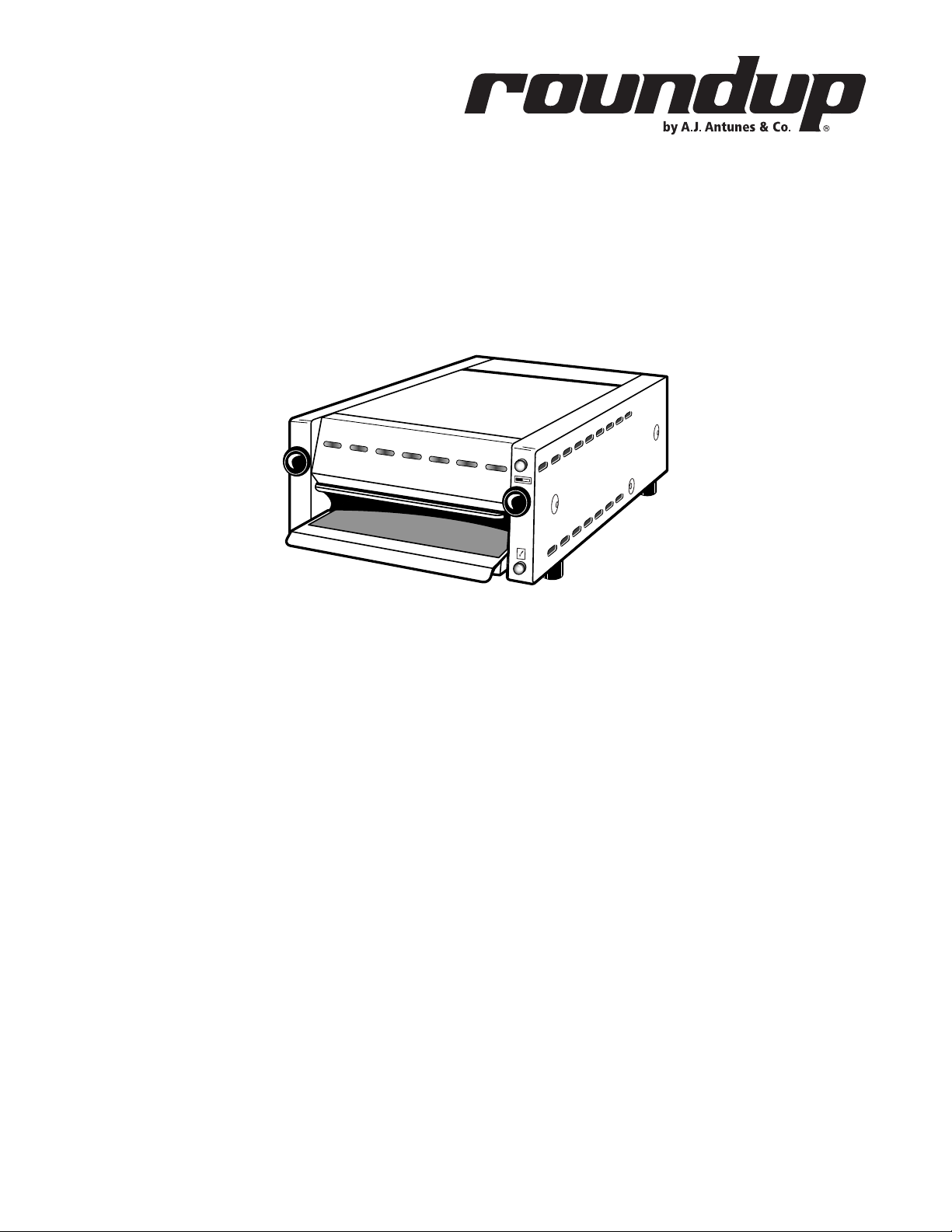
MT-12
Partial
Load
READY
muffin toaster
owner’s manual
Manufacturing Numbers:
9200139, 9200146, 9200148
www.ajantunes.com
P/N 1010918 Rev. E 03/13
Page 2
Table of Contents
General .................................................. 2
Warranty Information ............................. 2
Service/Technical Assistance ................... 2
Important Safety Information ................. 3
Warnings ................................................ 3
Specifications ......................................... 4
Installation ............................................. 5
Operation ............................................... 6
Hi-Limit Reset Button ............................. 7
Maintenance Schedule ........................... 7
Function of Diagnostic LEDs ................... 7
Diagnostic Flow Chart ............................ 8
Troubleshooting...................................... 9
Wiring Diagram ...................................... 11
Replacement Parts ..................................12
Notes ...................................................... 14
Limited Warranty .................................... 16
IMPORTANT
A.J. Antunes & Co. reserves the right
to change specifications and product
design without notice. Such revisions do
not entitle the buyer to corresponding
changes, improvements, additions or
replacements for previously purchased
equipment.
IMPORTANT
Keep these instructions for future reference. If the unit changes ownership,
be sure this manual accompanies the
equipment.
GENERAL
The Muffin Toaster Model MT-12 is designed
to toast 6 full English muffins (12 halves) at
one time. A temperature sensing solid state
control measures the internal temperature
of the toaster and adjusts the toasting time
automatically to toast muffins faster during
heavier use. The toaster signals the operator
with an audible beep and a ready light when
muffins are ready.
The toaster is capable of producing up to 324
muffins per hour. 6 muffin halves or less is a
partial load and 7 - 12 muffin halves is a full
load.
To conserve energy, when the toasting chamber is empty, the toaster idles at 600 watts.
This represents a 75% reduction in operational power consumption.
This manual provides the safety, installation,
and operating procedures for the unit. We
recommend that all information contained in
this manual be read prior to installation and
operation.
This unit is manufactured from the finest
materials available and is assembled to
Roundup’s strict quality standards. It has
been tested at the factory to ensure dependable trouble-free operation.
WARRANTY INFORMATION
Please read the full text of the Limited
Warranty in this manual.
If the unit arrives damaged, contact the carrier immediately and file a damage claim
with them. Save all packing materials when
filing a claim. Freight damage claims are the
responsibility of the purchaser and are not
covered under warranty.
SERVICE/TECHNICAL
ASSISTANCE
If you experience any problems with the
installation or operation of your unit, contact
your local Roundup Authorized Service Agency.
Fill in the information below and have it
handy when calling your Authorized Service
Agency for assistance. The serial number is
on the specification plate located on the rear
Purchased From
Date of Purchase
Model Number
Serial Number
Manufacturing Number
of the unit.
Use only genuine Roundup replacement parts
in this unit. Use of replacement parts other
than those supplied by the manufacturer will
void the warranty. Your Authorized Service
Agency has been factory trained and has a
complete supply of parts for this toaster.
Visit www. ajantunes.com or contact the factory at 1-630-784-1000 to locate your nearest
Authorized Service Agency.
The warranty does not extend to:
• Damages caused in shipment or damage as result of improper use.
• Installation of electrical service.
• Normal maintenance as outlined in
this manual.
• Malfunction resulting from improper
maintenance.
• Damage caused by abuse or careless
handling.
• Damage from moisture into electrical
components.
• Damage from tampering with, removal
of, or changing any preset control or
safety device.
2
Refer to the service agency directory packaged
with your manual and fill in the information
below.
Authorized Service Agency
Name
Phone Number
Address
P/N 1010918 Rev. E 03/13
Page 3

IMPORTANT SAFETY
INFORMATION
Use the following guidelines for safe operation of the unit.
• Read all instructions before using
equipment.
• For your safety, the equipment is furnished with a properly grounded cord
connector. Do not attempt to defeat
the grounded connector.
• Install or locate the equipment only
for its intended use as described in
this manual. Do not use corrosive
chemicals in this equipment.
• Do not operate this equipment if it
has a damaged cord or plug, if it is
not working properly, or if it has been
damaged or dropped.
• This equipment should be serviced by
qualified personnel only. Contact the
nearest Roundup authorized service
facility for adjustment or repair.
• Do not block or cover any openings on
the unit.
• Do not immerse cord or plug in water.
• Keep cord away from heated surfaces.
• Do not allow cord to hang over edge
of table or counter.
• Turn the unit off, unplug the power
cord, and allow unit to cool down
before performing any service or
maintenance on the unit.
• The procedures in this manual may
include the use of chemical products. These chemical products will
be highlighted with bold face letters
followed by the abbreviated HCS
(Hazard Communication Standard).
See Hazard Communication Standard
manual for the appropriated Material
Safety Data Sheets (MSDS).
• The equipment should be grounded
according to local electrical codes to
prevent the possibility of electrical
shock. It requires a grounded receptacle with separate electrical lines,
protected by fuses or circuit breaker of
the proper rating.
• Bread may burn. Therefore toasters
must not be used near or below curtains or other combustible walls and
materials. Failure to maintain safe
operating distances may cause discoloration or combustion.
• Do not clean this appliance with a
water jet.
WARNINGS
Be advised of the following warnings when
operating and performing maintenance on
this unit.
• If the supply cord is damaged, it must
be replaced by the manufacturer or its
service agent or a similarly qualified
person in order to avoid a hazard.
• Do not modify the power supply cord
plug. if it does not fit the outlet, have
a proper outlet installed by a qualified
electrician.
• Do not use an extension cord with this
appliance.
• Check with a qualified electrician if
you are in doubt as to whether the
appliance is properly grounded.
• If a chemical cleaner is used, be sure
it is safe to use on cast aluminum.
Observe all precautions and warnings
on product label.
• Hot toasting surfaces will be exposed
during maintenance steps. Use
extreme care to avoid personal injury.
• Inspection, testing, and repair of electrical equipment should only be performed by qualified service personnel.
• Chlorides or phosphates in cleansing agents (e.g. bleach, sanitizers,
degreasers or detergents) could cause
permanent damage to stainless steel
equipment. The damage is usually in
the form of discoloration, dulling of
metal surface finish, pits, voids, holes,
or cracks. This damage is permanent
and not covered by warranty. The
following tips are recommended for
maintenance of your stainless steel
equipment:
• Always use soft, damp cloth for
cleaning, rinse with clear water
and wipe dry. When required,
always rub in direction of metal
polish lines.
• Stains and spots should be
sponged using a vinegar solution.
• Finger marks and smears should
be rubbed off using soap and
water.
• Check with a qualified electrician if
you are in doubt as to whether the
appliance is properly grounded.
• Do not use an extension cord with this
appliance.
• Electrical ground is required on this
appliance.
P/N 1010918 Rev. E 03/13
3
Page 4
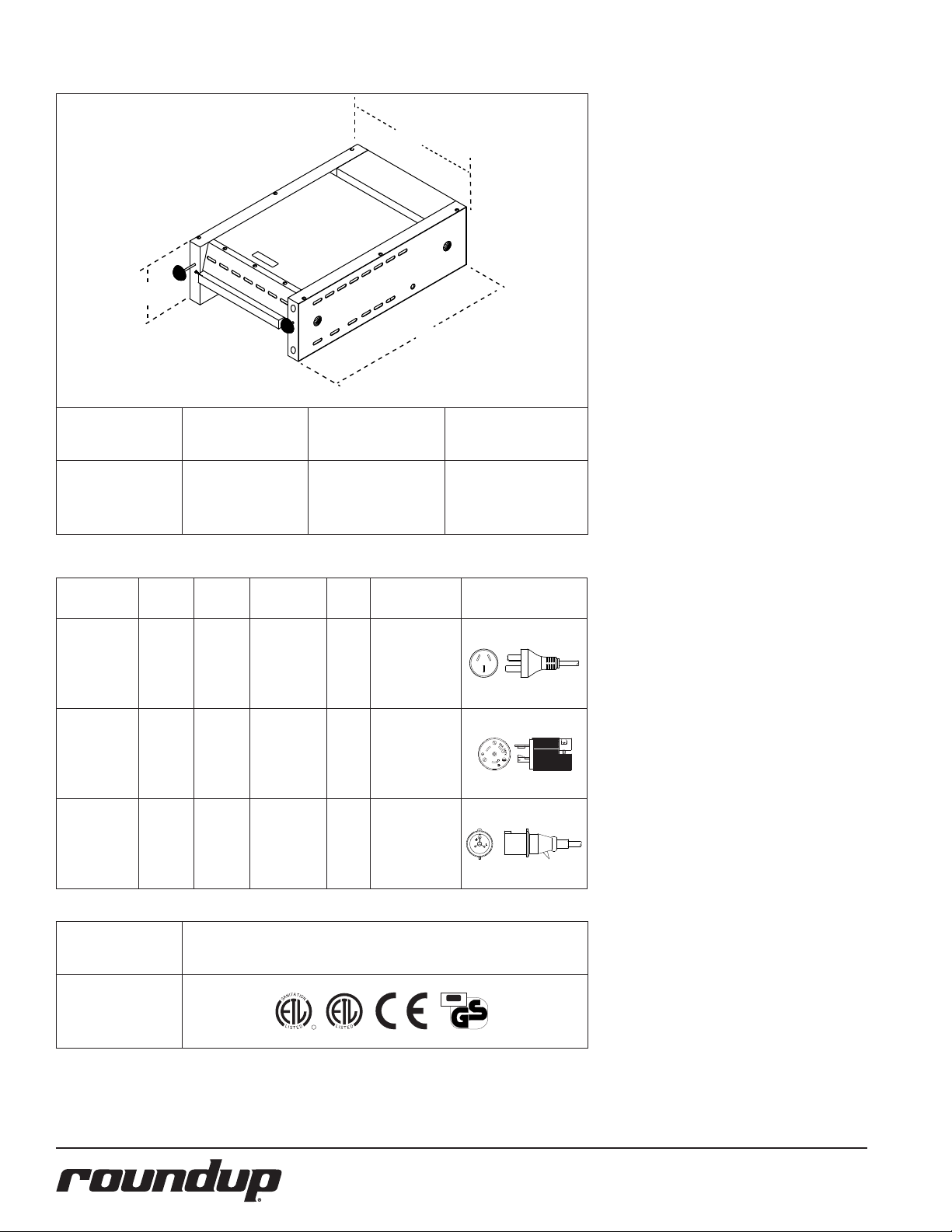
SPECIFICATIONS
C
A
B
Model &
Mfg. No.
MT-12
9200139
9200146
9200148
Model &
Mfg. No.
MT-12
9200139
(Australia)
MT-12
9200146
(US &
Canada)
MT-12
9200148
(Europe)
Width
(A)
15 5/8”
(397 mm)
Volts Watts Amps Hertz
220-
240
3400 15.4 - 14.2 50/60
208 3400 16.3 50/60
220-
240
3400 15.5 - 14.2 50/60
Depth
(B)
26 5/8”
(676 mm)
Description
Australian
Twist Lock
Pin & Sleeve
Plug
AS3112
Plug
20 Amp.,
250 VAC.
Straight
L6-20P,
20 Amp.,
250 VAC
IEC-309
16 Amp.,
230 VAC
(Europe)
Height
(C)
8 1/8”
(207 mm)
Configuration
3
0
A
.
2
5
0
V
R
.
R
Model &
Mfg. No.
MT-12
9200139
9200146
9200148
Agency Approvals
A
T
T
I
I
O
N
N
A
S
C
US
L
I
L
I
D
CM
D
S
T
S
E
E
T
ITS
Testing & Certification
geprufte
Sicherheit
4
P/N 1010918 Rev. E 03/13
Page 5
INSTALLATION
Partial
Load
READY
1. Remove unit and all packing materials
from shipping carton.
2. Open the large box. It should contain
the following items:
• Muffin Toaster with Crumb Tray
• Information Packet
3. Remove information packet.
4. Remove all packing materials and protective coverings from the unit.
NOTE: If any parts are missing or damaged, contact Antunes IMMEDIATELY at
1-630-784-1000 or in the U.S. or Canada,
1-800-253-2991 toll free.
5. Clean the toaster with a damp cloth.
Remove and clean the Crumb Tray
and Removable Plate (refer to the
Maintenance secton of this manual).
When placing the toaster into service, pay
attention to the following guidelines.
• Make sure the unit’s power On/Off
switch is off and the toaster is at
room temperature before plugging in
the power cord.
• Do not block or cover any openings
on the unit.
• Do not immerse the power cord or
plug in water.
• Keep the power cord away from
heated surfaces.
• Do not allow the power cord to hang
over edge of table or counter.
Plug the power cord into the appropriate
power outlet. Refer to the specification
plate for the proper voltage.
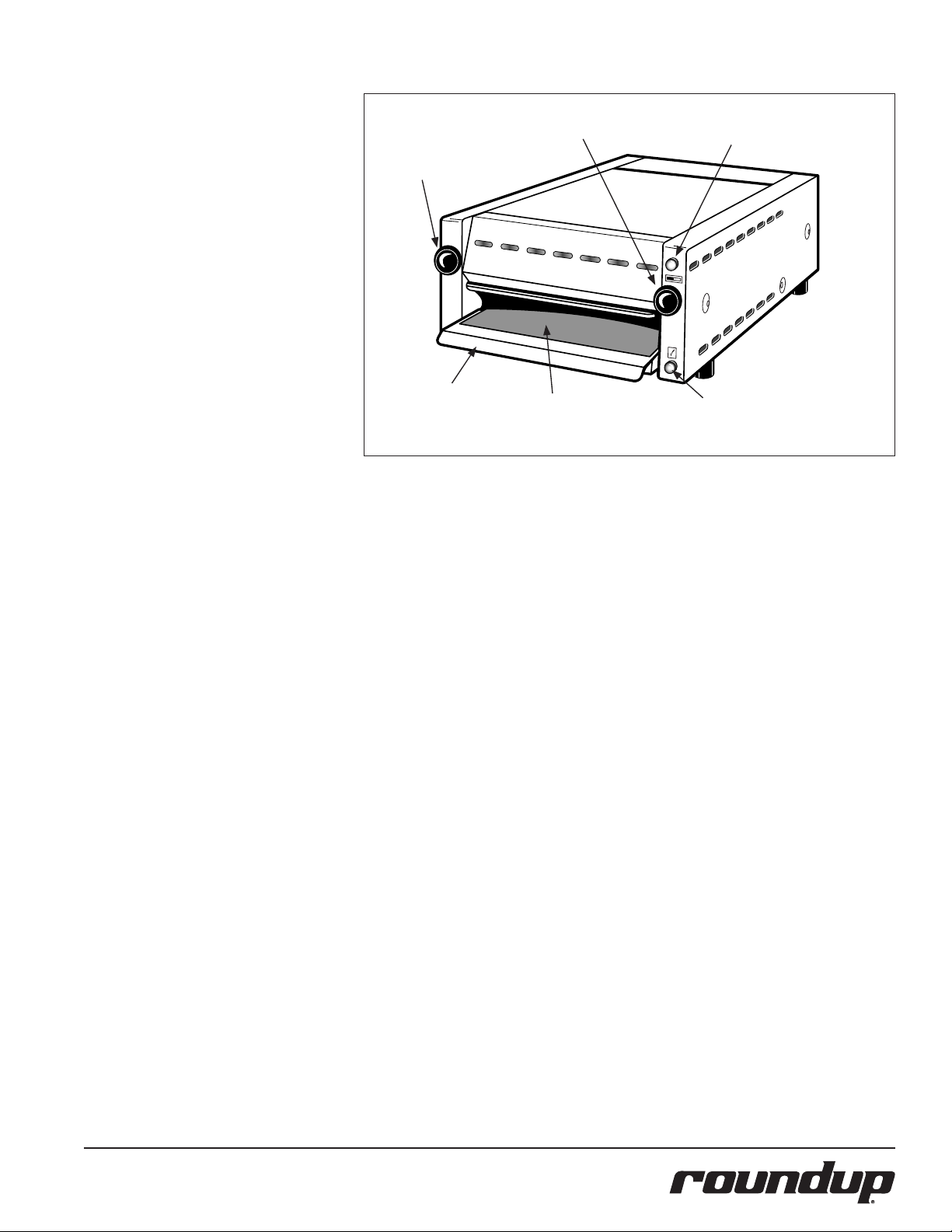
Front Door
Control Knob
Crumb
Tray
Partial Load Timer Control Knob
Removable
Plate
Figure 1. Muffin Toaster MT-12
Indicator Light
(Amber)
Indicator Light (Green)
P/N 1010918 Rev. E 03/13
5
Page 6

OPERATION
1
A
Turn
Power Switch ON
(Back of Unit)
Partial
Load
READY
The unit beeps twice and both
Allow the unit to warm up for
B
lights blink twice.
30 minutes.
NOTE: If the self-test fails, a series of beeps
will sound (see the Diagnostic Flow Chart).
2
FULL LOAD = 7 - 12
muffin halves
4
A
Push the Front Door
Control Knob IN
to UNLOCK
and open the
Front Door.
Partial
Load
READY
Next, slide the
B
loaded Spatula
into the unit.
The Crumb Tray and Removable Plate will
be very hot when the unit is in operation. Do NOT use the Crumb Tray and
Removable Plate as a means to load/
unload product from the unit.
5
Pull the Front Door
A
Control Knob OUT
to close and LOCK
the Front Door.
7
Carefully insert the
Spatula into the unit.
This transfers the
the product onto
the spatula.
8
A
Push the Front Door
Control Knob IN
to UNLOCK
and open the
Front Door.
B
9
Remove the
Spatula out of
the unit carefully.
Partial
Load
READY
Partial
Load
READY
PARTIAL LOAD = 1 - 6
muffin halves
NOTE: Always use a Spatula to insert and
remove product from the unit. This is the
only approved method for loading and
unloading product into the toaster.
3
Partial
Load
Press the
Partial Load button
ONLY when toasting
a partial load
of product.
NOTE: When the Amber light is on, a Partial
Load Cycle is selected. When this light is
off, a Full Load Cycle is selected.
READY
Partial
Load
Next, pull out the
B
Spatula. The locked
door keeps the
product inside the
toaster.
READY
Do NOT toast product with the Spatula
inserted in the toaster.
6
Partial
Load
READY
TOASTING TIMES:
Full Load = 90 - 130 seconds
Partial Load = 85 - 125 seconds
NOTE: The indicator lights blinks and
the Audio Signal beeps when the toast
cycle completes.
Remove product from the spatula. The
unit is ready for another cycle.
6
P/N 1010918 Rev. E 03/13
Page 7

HI-LIMIT RESET BUTTON
Partial
Load
READY
A hi-limit thermostat will turn off electrical
power to the heater and control circuits if the
unit overheats. To reset the thermostat, allow
sufficient time (about 45 minutes) for the unit
to cool down, remove the cap and press the
red reset button located on the side of the
unit (Figure 2).
If the unit requires continuous resetting, contact your Authorized Service Agency.
Full Load Temp.
Timer Adjustment
Rear Panel Diagnostic LEDs
2
1
5
3
4
6
7
Figure 4. Diagnostic LEDs
Hi-Limit
Reset
Button
Figure 2. Hi-Limit Reset Button
MAINTENANCE SCHEDULE
DAILY – CLEAN CRUMB TRAY
1. Turn the Rocker Switch (power on/off)
to OFF and unplug the power cord.
2. Allow the toaster and plate to cool
sufficiently to handle.
3. From the front of the toaster, raise the
Crumb Tray, and remove it from the
unit (Figure 1).
4. Lift the Removable Plate from the
Crumb Tray (Figure 1).
5. With a clean, damp cloth, wash the
top surface of the Removable Plate.
6. Inspect the Removable Plate for excessive carbon build-up (use coloration of
the bottom of the plate for reference).
If there is only a slight carbon buildup, proceed to step 8.
7. If excessive build-up of carbon exists,
remove with a griddle cloth.
8. Wipe the Removable Plate clean with
a paper towel dampened with sanitizing solution.
9. Reinstall the Removable Plate into the
Crumb Tray, reinstall the Crumb Tray
into the toaster, and plug the power
cord into the appropriate power outlet.
Partial Load Temp.
Timer Adjustment
Figure 3. Timer Adjustments
MONTHLY – CHECK CALIBRATION
NOTE: You will need a stopwatch
1. Turn the Rocker Switch (power on/off)
to ON and allow the unit to preheat
for approximately 30 minutes.
2. Close the front door and wait for the
Audio Signal to beep. When the Audio
Signal beeps, open the Front Door, then
close it again. When the Audio Signal
beeps a second time, open the Front
Door.
3. Load 12 muffin halves into the toaster,
close the Front Door, and start and
start the stopwatch.
4. Check the time on the stopwatch when
the Audio Signal beeps.
NOTE: The Audio Signal should beep and
the Ready light should come on within 90
to 130 seconds.
5. Open the Front Door to stop the Audio
Signal and to turn off the Ready light.
6. Remove muffins and reload with 6
muffin halves.
7. Close the Front Door, press and release
the Partial Load Control Knob on the
right front of the toaster until the
Amber light is lit (Figure 1). Start the
stopwatch.
8. Check the time on the stopwatch when
the Audio Signal beeps.
NOTE: The Audio Signal should beep and
the Ready Light should come on within 85
to 125 seconds.
9. Open the Front Door to stop the Audio
Signal and to turn off the Ready light.
10. If the times are correct, calibration is
complete. If the times are not correct,
adjust the timers located at the rear of
the toaster (Figure 3).
FUNCTION OF DIAGNOSTIC
LEDS
This section describes the Diagnostic LEDs and
their functions. The Diagnostic LEDs (Figure 4)
are found at the back of the unit.
Full Load Switch Light - ON when the
1
Full Load Switch is closed.
Thermocouple Fault - ON when the
2
thermocouple is disconnected or
damaged. The toaster will not heat.
Solid State Relay On - ON when
3
power is sent to the Solid State Relay.
This LED pulses rapidly during operation.
Ready Light - ON when power is sent
4
to the Ready Light.
Partial Load Switch - ON when the
5
Partial Load Switch is closed.
Audio Signal - ON when power is
6
sent to the Audio Signal.
Partial Load Light - ON when power
7
is sent to the Partial Load Light.
P/N 1010918 Rev. E 03/13
7
Page 8

DIAGNOSTIC FLOW CHART
Turn toaster on, toaster
performs self-test
Yes
Toaster Passes Self-
test
Yes
Both indicator lights flash and an Audio
Signal beeps twice to indicate success-
ful self-test
Yes
Heats to more than 105°F (65°C)
but less than 750°F (400°C) in 30
minutes
No
BEEP CODES
2 Beeps = Voltage too low
3 Beeps = Toaster temperature more than 750°F
(400°C) after 30 minutes
4 Beeps = Toaster temperature less than 150°F (65°C)
after 30 minutes
5 Beeps = Thermocouple disconnected or broken
NOTE: All beep codes are followed by a 2 second
pause, then repeated.
Less than 150° F (65°C) (Control
turns solid state relay off). Audio
No
signal beeps 4 times, waits 2
seconds, beeps 4 times, waits 2
seconds, and continues until unit
is turned off
No
IMPORTANT
Beep Codes
(errors) can occur any
time during operation.
More than 750°F (400° C) (con-
trol turns solid state relay off)
Audio signal beeps 3 times, waits
2 seconds, beeps 3 times, waits 2
seconds and continues until unit
is turned off
Yes
Yes
Heats to more than 105°F (65°C)
but less than 750°F (400°C) in 30
minutes
Yes
Partial Load (85-125 sec) or
Unit beeps 2 times per second until front door is opened.
NOTE: Push partial load control knob to turn off partial load light.
Yes
Product toasted properly
No
Toaster times-out for:
Full load (90-130 sec.)
Door is opened during cook cycle
- Audio Signal beeps once every
second door is open
Refer to
Troubleshooting
No
Yes
Door is open for more than 8 consecutive seconds
during cook cycle - Audio Signal beeps very
rapidly 15 times - cook cycle is automatically
cancelled.
No
Product is too
light
Refer to Troubleshooting
No
Product is too
dark
8
P/N 1010918 Rev. E 03/13
Page 9

TROUBLESHOOTING
Problem Possible Cause Corrective Action
Muffins too light or too dark at Audio
Signal.
Toaster does not operate properly
when it is initially installed.
Toaster does not operate after the
replacement of a Control Board.
Toaster will not operate (no heat and
no fan operation) and Rocker Switch
not lit.
Toaster not heating (but fan is working.)
Fan not running but toaster is heating. Fan is dirty or defective. Clean or replace defective fan.
No Audio Signal, but Ready Light
works.
No Ready Light but Audio Signal
works.
No Audio Signal or Ready light on
either Full or Partial Load cycles.
Front Door will not open or close
properly.
Heating element/coil is on continuously
Only Half the element coil is working Loose/defective electrical wiring connection. Check wiring connections at element/coil
Using refrigerated or frozen muffins. Muffins must be at room temperature before toast-
ing. Allow a two day old rotation when using fresh
muffins.
Incorrect setting or regional preference dictates an
adjustments of the timer. Approximate times are:
Partial Load - 85-125 seconds
Full Load - 90-130 seconds
Toaster selected/shipped is not for the electrical service as this location.
One or more electrical service dip switches are
improperly set for the locations electrical service.
Rocker Switch (Power On/Off) not On Confirm that the Rocker Switch is ON.
No Power. Circuit Breaker is off or tripped. Reset Circuit Breaker. Contact your maintenance
Rocker Switch is inoperable. Replace Rocker Switch.
Poor plug to receptacle connection. Lock plug into receptacle.
Damaged or defective power cord. Inspect power cord, replace if needed.
Damaged or defective plug, and/or pins. Inspect plug and pins. Replace if needed.
Damaged or defective receptacle. Inspect receptacle. Call your electrician.
Loose electrical connection. Contact your maintenance person or Authorized
Hi-Limit control is tripped or defective. Turn toaster off for 30 minutes and then reset. If
Loose/defective electrical connections. Contact your maintenance person or Authorized
Heating element/coil is broken/open.
Solid State Heater Relay is defective.
Control Board is defective.
Defective Audio Signal. If Audio Diagnostic LED is on but there is no Audio
Defective Ready Light. If Ready Light Diagnostic LED is on, but the ready
Control Board is Defective. Replace the Control Board.
Door Push Rod is Damaged. Remove left cover and check Door Push rod for free
Defective Solid State Relay. Contact your maintenance person or your
Defective Control board.
Heating element/coil is broken/open Replace the heating element/coil.
Adjust full or partial load timers as needed. Refer
to the Maintenance section of this manual.
Check toaster identification plate and refer to the
Electrical Specifications of this Manual.
Refer to the Dip Switch setting instructions provided
in this manual.
person or Authorized Service Agency if it trips again.
Service Agency for service.
the Hi-Limit control trips repeatedly, contact your
maintenance person or Authorized Service Agency.
Service Agency.
Signal, replace the Audio Signal.
light is not, replace the ready light.
movement of door. Straighten or replace rod as
required.
Have your maintenance person or Authorized
Service Agency straighten or replace the Door Push
Rod as required.
Authorized Service Agency.
P/N 1010918 Rev. E 03/13
9
Page 10

Dip Switch Settings
MADE IN U.S.A.
ANTUNES CONTROLS
SFT00-0216-B
1
YELLOWRED
1
2
PARTIAL
DS1
-
+
LED
DONE
SW
PARTIAL
BUZZER
ON
SSR
THERM.
FAULT.
SW
FULL
PARTIAL
FULL
200
HIGH
B
D
A
C
LOW
220
+
-
DS1
C35
C31
J3
J2
C7
C22
C4
C12
C8
C18
C2
C1
C6
C5
C27
C15
C19
C11
C23
C28
C21
C30
C24
C33
C29
C34
C26
C16
C20
C32
C25
C17
C9
C13
C3
C14
C10
CRY1
CR8
CR10
CR9
BR2
BR1
L2
L6
L5
L3
U5
L4
L1
CR13
CR14
CR15
CR16
CR17
CR18
CR19
U2
U4
U3
U1
R27
R29
R46
R41
R51
R31
R20
R43
R40
R44
R38
R36
R47
R49
R42
R52
R50
R39
R14
R37
R24
R23
R10
R48
R54
R53
R13
R4
R34
R7
R21
R5
R2
R18
R11
R8
R15
R33
R22
R45
R12
R32
R9
R6
R3
R17
R35
R30
1 432
P1
1
P2
1
P4
U6
Q3
Q2
Q1
Q4
VAR1
VAR2
VRL1
P3
1
2
3
R16
R1
1
2
3
LOW HIGH
200220
A B
C D
Check your Control Board assembly to
insure the Dip Switch settings are correct.
NOTE: Refer to the table below for a listing of Manufacturing numbers that use
the 220 or 200 setting.
DO NOT USE HIGH SETTING.
Mfg. No. 200 or 220? LO or High?
9200139 220 LO
9200146 200 LO
9200148 220 LO
Control Board
10
P/N 1010918 Rev. E 03/13
Page 11

WIRING DIAGRAM
P/N 1010918 Rev. E 03/13
11
Page 12

REPLACEMENT PARTS
Item Part No. Description Qty. Item Part No. Description Qty. Item Part No. Description Qty.
1 0502891 Cover, Left 1
2 0800298 Rod, Door 1
3 0400283 Insulation, Side 2
4 0502868 Guide, Actuator 1
5 210K230 Bumper, 1 Leg Kit
(pack of 4) 1
6 0502884 Pan, Base 1
7 2100132 Knob, Black 2
8 0020186 Front Door 1
9 05K2880 Plate, Removable 1
10 0502889 Crumb Tray 1
11 0502871 Retainer, Heater 1
12 7000114 220V Heating Element 1
(Mfg. No. 9200139 &
9200148)
7000113 200V Heating Element 1
(Mfg. No. 9200146)
13 0502885 Panel, Face 1
14 0502881 Housing, Top 1
15 0502890 Cover, Right 1
16 4050180 Heat Sink 1
17 7000315 Relay, Solid State, 1
Double Pole
18 7000542 Switch, Rocker Kit 1
(Power On/Off)
19 0400315 Strain Relief 1
20 0700697 Power Cord - Aust. 1
20A, 250V
0700552 Power Cord - Domestic 1
20 Amp Twist Lock
0700437 Power Cord - Int’l. 1
16 Amp IEC-309
22 0502886 Panel, Rear 1
23 7000664 Control Board Kit 1
24 7000156 Audio Signal 1
25 050K128 Sensor Bracket Kit 1
26 0011036 Fan Assy. 1
27 4010103 Micro Switch 1
28 7000342 Indicator Light Kit, 1
Green & Amber
30 0800297 Rod, Partial 1
31 7000344 Hi-Limit Kit 1
32 0502873 Bracket, Hi-Limit 1
33 4010171 Switch, Push-Push 1
34 7000348 Thermocouple 1
35 406K006 Terminal Block Kit 1
36 4010170 Transformer 1
37 1000936 Label, Front Panel 1
38 0600113 Spring, Front Door 1
39 040P119* Bushing, Shorty, 5/8” 1
40 7000401 Bushing & Retainer Kit 1
41 301P106* Weld Nut 1
42 306P102* Lockwasher, #6 1
43 306P115 Screw, #6-32 x 1” 1
44 306P123* Screw, #6-32 x 7/8” 1
45 306P130* Nut, Hex, KEPS, #6-32 1
46 308P103* Screw, #8-32 x 1/4” 1
47 308P124* Screw, #8-32 x 1/2”, 1
One-way
48 308P133* Screw, #8-32 x 1/4” 1
49 308P143* Nut, Hex, KEPS, #8-32 1
50 308P151* Screw, SEMS, 10
#8-32 x 5/16”
51 306P104* Screw, #6-32 x 1/4” 1
52 300P117* Washer, Retaining 1
53 040P111* Bushing, Shorty, 1/2” 1
54 310P140* Washer, Flat, #10 1
55 4060374 Ground Lug 1
56 0020995 Side Panel (RH) 1
Weldment
57 0020996 Side Panel (LH) 1
Weldment
58 4070106 Relay Board, 25 Amp. 1
* Available only in packages of 10.
View A-Next Page
46
50
1
9
7
5
13
11
50
7
10
6
8
40
28
57
14
50
50
56
46
53
12
Partial
Load
28
37
3
50
5
40
H
33
32
50
52
30
31
15
12
P/N 1010918 Rev. E 03/13
Page 13

1
2
3
4
5
7
16
17
18
22
23,
24
25
26
27
34
35
36
20
38
39
40
40
41
58
42
43
44
45
46
46
48
49
50
57
50
50
50
50
50
51
52
54
19
55
View A
NOTE: Refer to the Replacement
Parts list in this manual for a
complete list of cord and plug
configurations
REPLACEMENT PARTS (continued)
Item Part No. Description Qty. Item Part No. Description Qty. Item Part No. Description Qty.
1 0502891 Cover, Left 1
2 0800298 Rod, Door 1
3 0400283 Insulation, Side 2
4 0502868 Guide, Actuator 1
5 210K230 Bumper, 1 Leg Kit
(pack of 4) 1
6 0502884 Pan, Base 1
7 2100132 Knob, Black 2
8 0020186 Front Door 1
9 05K2880 Plate, Removable 1
10 0502889 Crumb Tray 1
11 0502871 Retainer, Heater 1
12 7000114 220V Heating Element 1
(Mfg. No. 9200139 &
9200148)
7000113 200V Heating Element 1
(Mfg. No. 9200146)
13 0502885 Panel, Face 1
14 0502881 Housing, Top 1
15 0502890 Cover, Right 1
16 4050180 Heat Sink 1
17 7000315 Relay, Solid State, 1
Double Pole
18 7000542 Switch, Rocker Kit 1
(Power On/Off)
19 0400315 Strain Relief 1
20 0700697 Power Cord - Aust. 1
20A, 250V
0700552 Power Cord - Domestic 1
20 Amp Twist Lock
0700437 Power Cord - Int’l. 1
16 Amp IEC-309
22 0502886 Panel, Rear 1
23 7000664 Control Board Kit 1
24 7000156 Audio Signal 1
25 050K128 Sensor Bracket Kit 1
26 0011036 Fan Assy. 1
27 4010103 Micro Switch 1
28 7000342 Indicator Light Kit, 1
Green & Amber
30 0800297 Rod, Partial 1
31 7000344 Hi-Limit Kit 1
32 0502873 Bracket, Hi-Limit 1
33 4010171 Switch, Push-Push 1
34 7000348 Thermocouple 1
35 406K006 Terminal Block Kit 1
36 4010170 Transformer 1
37 1000936 Label, Front Panel 1
38 0600113 Spring, Front Door 1
39 040P119* Bushing, Shorty, 5/8” 1
40 7000401 Bushing & Retainer Kit 1
41 301P106* Weld Nut 1
42 306P102* Lockwasher, #6 1
43 306P115 Screw, #6-32 x 1” 1
44 306P123* Screw, #6-32 x 7/8” 1
45 306P130* Nut, Hex, KEPS, #6-32 1
46 308P103* Screw, #8-32 x 1/4” 1
47 308P124* Screw, #8-32 x 1/2”, 1
One-way
48 308P133* Screw, #8-32 x 1/4” 1
49 308P143* Nut, Hex, KEPS, #8-32 1
50 308P151* Screw, SEMS, 10
#8-32 x 5/16”
51 306P104* Screw, #6-32 x 1/4” 1
52 300P117* Washer, Retaining 1
53 040P111* Bushing, Shorty, 1/2” 1
54 310P140* Washer, Flat, #10 1
55 4060374 Ground Lug 1
56 0020995 Side Panel (RH) 1
Weldment
57 0020996 Side Panel (LH) 1
Weldment
58 4070106 Relay Board, 25 Amp. 1
* Available only in packages of 10.
P/N 1010918 Rev. E 03/13
13
Page 14

NOTES
14
P/N 1010918 Rev. E 03/13
Page 15

NOTES (continued)
P/N 1010918 Rev. E 03/13
15
Page 16

LIMITED WARRANTY
Equipment manufactured by Roundup Food Equipment Division of A.J. Antunes & Co. has been constructed of the finest materials available and manufactured to high quality standards. These units are warranted to be free from electrical and mechanical
defects for a period of one (1) year from date of purchase under normal use and service, and when installed in accordance with
manufacturer’s recommendations. To insure continued operation of the units, follow the maintenance procedures outlined in the
Owner’s Manual. During the first 12 months, electro-mechanical parts, non-overtime labor, and travel expenses up to 2 hours (100
miles/160 km), round trip from the nearest Authorized Service Center are covered.
1. This warranty does not cover cost of installation, defects caused by improper storage or handling prior to placing of the Equipment.
This warranty does not cover overtime charges or work done by unauthorized service agencies or personnel. This warranty does
not cover normal maintenance, calibration, or regular adjustments as specified in operating and maintenance instructions of this
manual, and/or labor involved in moving adjacent objects to gain access to the equipment. This warranty does not cover consumable/wear items. This warranty does not cover damage to the Load Cell or Load Cell Assembly due to abuse, misuse, dropping of
unit/shock loads or exceeding maximum weight capacity (4 lbs). This warranty does not cover water contamination problems such
as foreign material in water lines or inside solenoid valves. It does not cover water pressure problems or failures resulting from
improper/incorrect voltage supply. This warranty does not cover Travel Time & Mileage in excess of 2 hours (100 miles/160 km) round
trip from the nearest authorized service agency.
2. Roundup reserves the right to make changes in design or add any improvements on any product. The right is always reserved to
modify equipment because of factors beyond our control and government regulations. Changes to update equipment do not constitute a warranty charge.
3.
If shipment is damaged in transit, the purchaser should make a claim directly upon the carrier. Careful inspection should be made of the
shipment as soon as it arrives and visible damage should be noted upon the carrier’s receipt. Damage should be reported to the carrier.
This damage is not covered under this warranty.
4. Warranty charges do not include freight or foreign, excise, municipal or other sales or use taxes. All such freight and taxes are the
responsibility of the purchaser.
5. THIS WARRANTY IS EXCLUSIVE AND IS IN LIEU OF ALL OTHER WARRANTIES, EXPRESSED OR IMPLIED, INCLUDING ANY IMPLIED
WARRANTY OR MERCHANTABILITY OR FITNESS FOR A PARTICULAR PURPOSE, EACH OF WHICH IS HEREBY EXPRESSLY DISCLAIMED. THE REMEDIES DESCRIBED ABOVE ARE EXCLUSIVE AND IN NO EVENT SHALL ROUNDUP BE LIABLE FOR SPECIAL CONSEQUENTIAL OR INCIDENTAL DAMAGES FOR THE BREACH OR DELAY IN PERFORMANCE OF THIS WARRANTY.
 Loading...