

Page 1
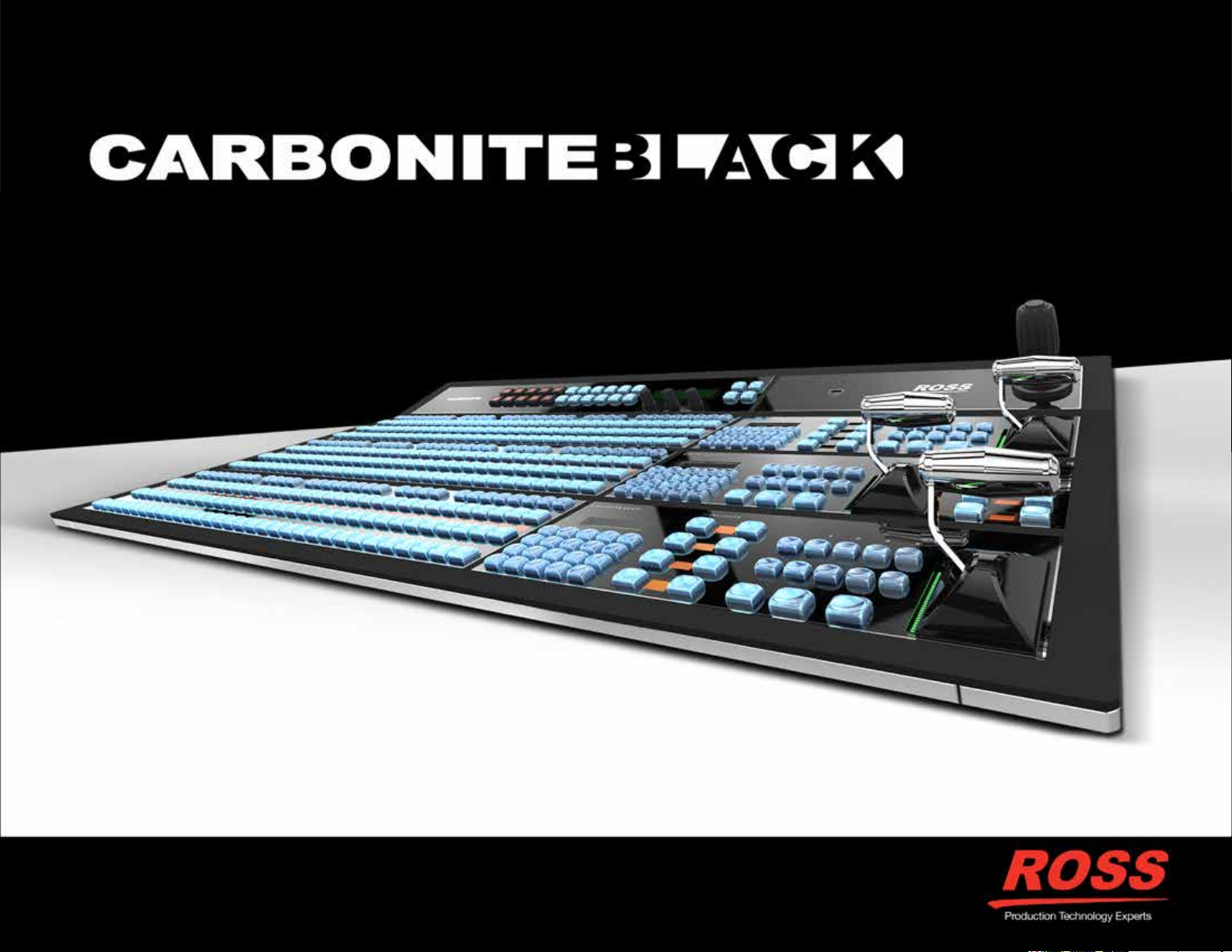
Carbonite Black
The Production Powerhouse.
Page 2
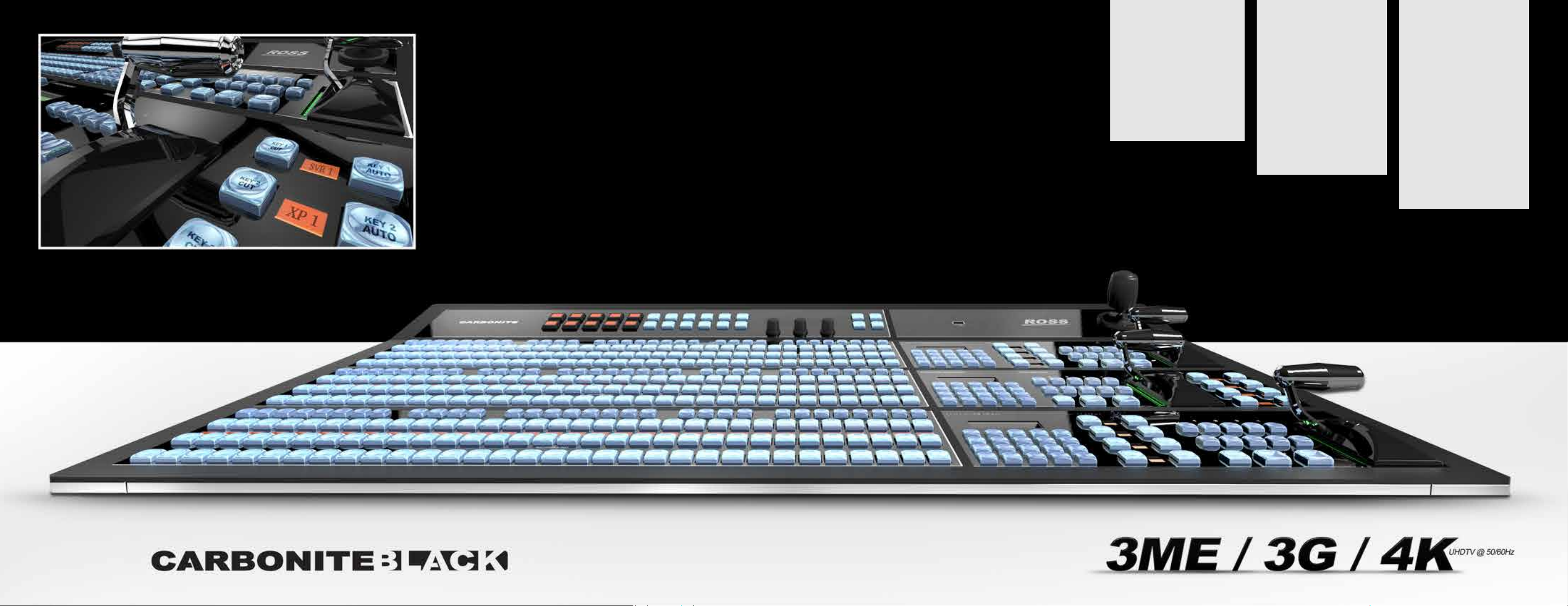
Ergonomic Obsession.
Do More
• The biggest creative feature
set for mid-size productions.
• Beautiful, ergonomic design
that is faster and easier to
use than competitive models.
• Handles 1080P and 4K
productions without requiring
expensive upgrades.
Save Money
• Carbonite provides
exceptional production value
from Ross which is well
known as one of the best
value brands in the industry.*
• Free lifetime technical advice
by telephone and email free forever!
• Continuous feature
improvements via free
software updates.
Choose Wisely
• Carbonite is backed by
Ross, a solid company
committed to production
switcher development with a
40+ year history.
• Ross ships the most
production switchers in
2ME and up sizes – this
popularity makes it easier
to hire and retain operations
sta.
• Choose great support Ross annually receives
among the highest ratings
for customer support.*
*Source: Devoncroft Big Broadcast Survey
Page 3
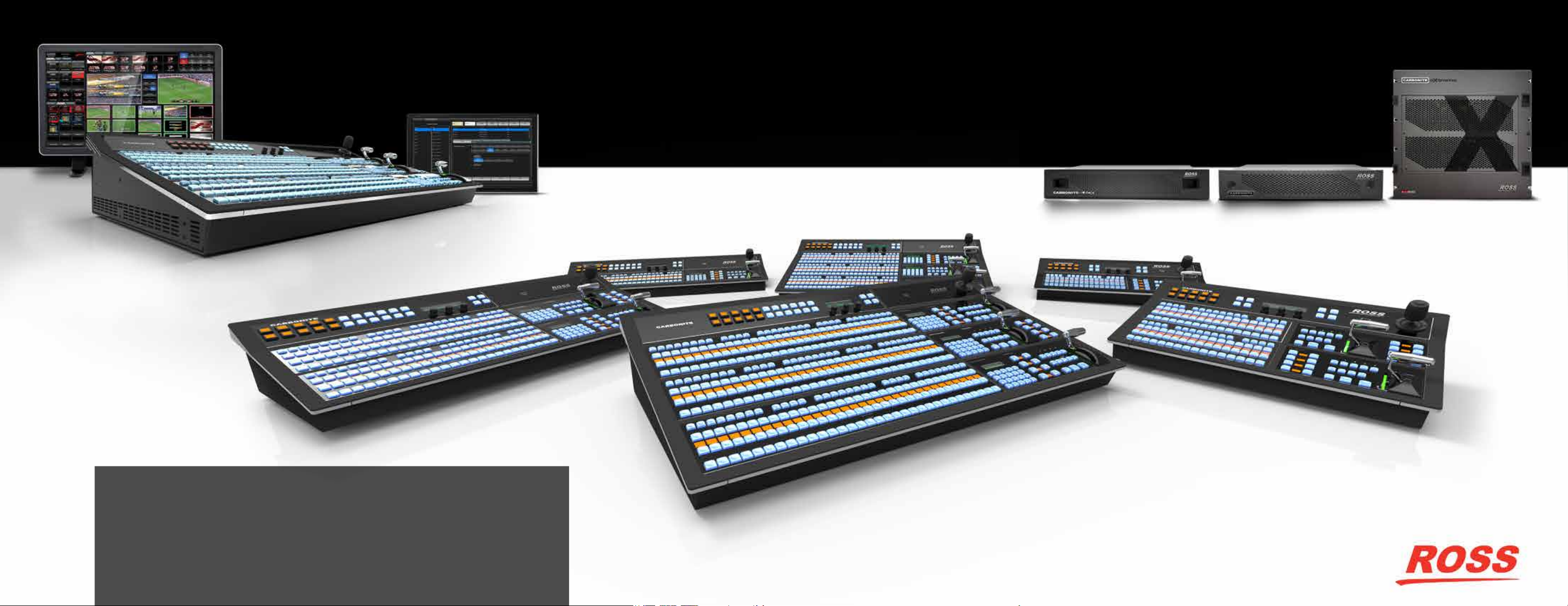
Carbonite ViewControl
Carbonite Extreme™
DashBoard™ Touchscreen
Optional
Meet The Carbonite Black Family.
Carbonite Black™
Carbonite Black Plus™
Carbonite™
Carbonite Plus™
Carbonite MultiMedia™
Bigger, Better, Beautiful.
The most successful production switcher ever just got better.
The new Carbonite Black processing engine brings expanded I/O and ME count, providing 3Full MEs,
36 inputs, and 22 outputs – plus all of the superior features found in our other Carbonite models such
as MiniMEs, MultiScreen, 3G and UHD (4K) format support. New Carbonite Black panels not only look
beautiful but are a joy to operate.
Carbonite has been the favored choice of many media organizations with production requirements
for a mid-sized 1, 2 or 2.5 ME production switcher. For many larger productions, operators have
expressed the desire for an expanded version of Carbonite that retains all the familiar, highly desirable
features and capabilities. Carbonite Black is the answer to that request and delivers even more.
A stunning new look that is ergonomically superb.
• Restyled legendary Ross Faders
• Up to 3 Full ME Rows
• Up to 32 source select buttons
• Ethernet connectivity
• Button per function for fast and ecient production
Page 4
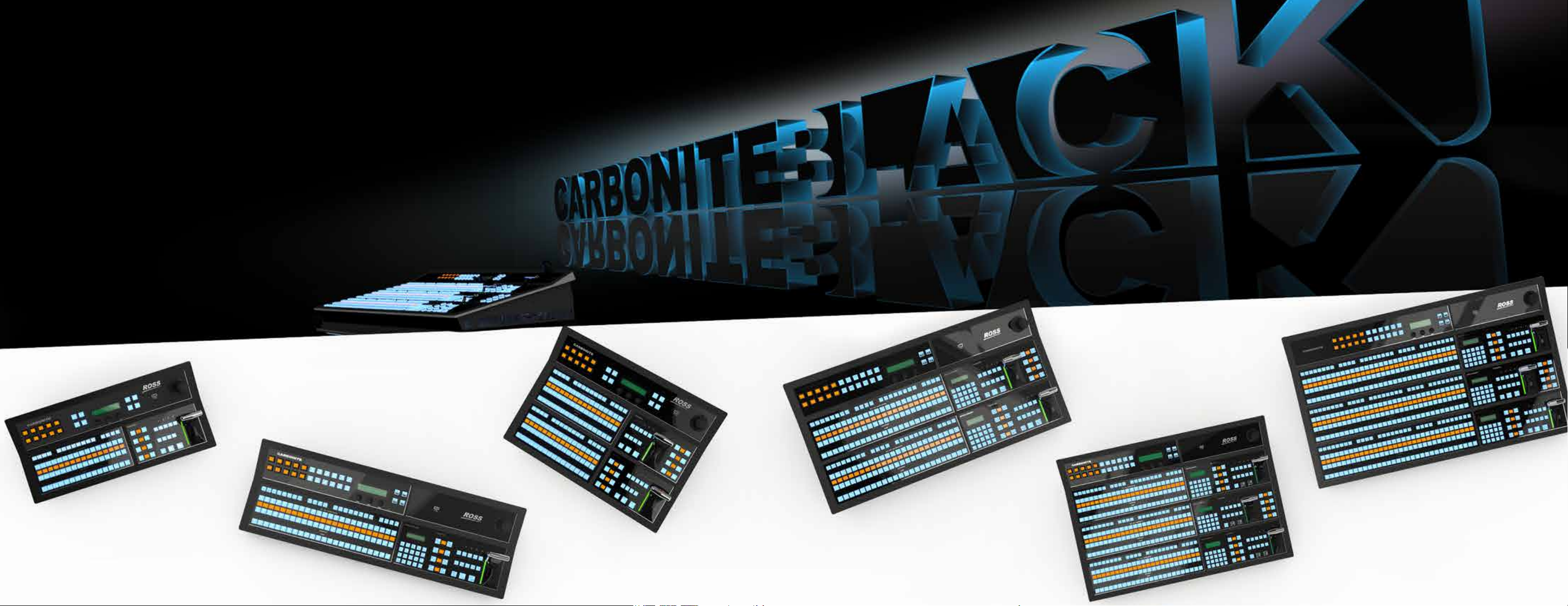
A Panel to Suit Your Production.
Carbonite Black 1S
• 24 Button 1 ME Row
• Eects Memory Keypad
Carbonite Black 3S
• 24 Button 3 ME Rows
• Eects Memory Keypads
Carbonite Black 1
• 16 Button 1 ME Row
• Global Memory Control
Carbonite Black 2
• 16 Button 2 ME Rows
• Global Memory Control
Carbonite Black 3X
• 32 Button 3 ME Rows
• Eects Memory Keypads
Carbonite Black 2S
• 24 Button 2 ME Rows
• Eects Memory Keypads
Page 5
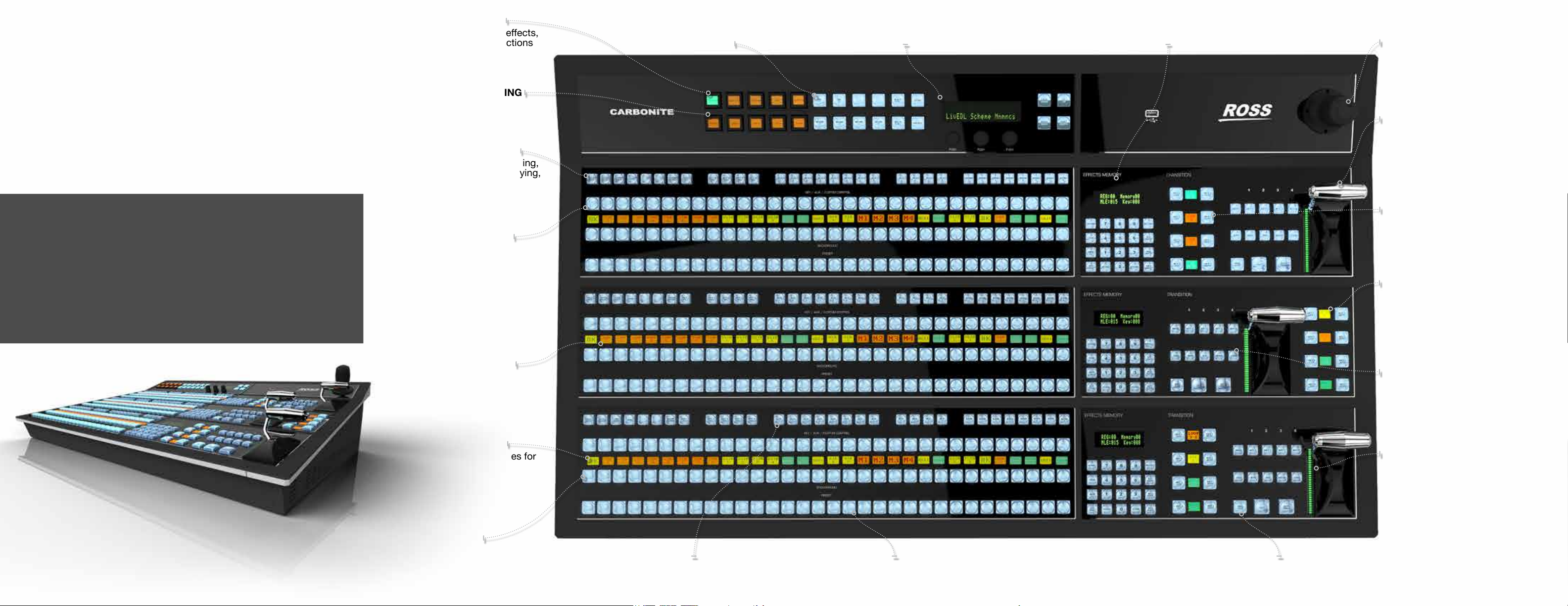
Your Control Center.
The Combination Of Beauty And Operational Elegance.
Carbonite Black panels are not only a joy to behold, they are also
intuitive and easy to use. Every panel operates identically, if you know
one - you know them all. For every task you need to perform there is a
dedicated button - no searching or stepping through menus.
Operators simply love Carbonite as even the most complex tasks can
be performed quickly - an essential feature in modern live production.
There is a Carbonite panel to suit every application, from small ight
packs to large control room installations – Carbonite is the clear
choice.
No other production switcher family can oer the choice or
exibility that Carbonite brings.
MULTI-PURPOSE BUTTONS
• Quickly select patterns, DVE eects,
memories, media, or menu functions
POWERFUL MACRO EDITING
• Easy to create, amazing to use
KEY TYPE SELECTIONS
• Choose between self-keying,
linear keying, chroma keying,
and DVE picture in picture
keying
TOP BUS DELEGATION
• Reassign the top bus to keyer,
AUX bus, or macro recall control
DIRECT ACCESS TO MEMORIES
• MemoryAI™ Recalls make for
impressive productions
HIGHLY VISIBLE MENU
• Intuitive auto-follow menu
ME EFFECTS MEMORY CONTROL
• Instant access to individual ME eects memories.
HIGH END 3-AXIS JOYSTICK
• Position wipes, patterns, washes,
camera control and DVE eects
LEGENDARY ROSS FADER
• Robust and Guaranteed for Life
DEDICATED CUT AND
AUTO TRANS BUTTONS
• Rapid live keyer control
SOURCE MNEMONICS
• Show current source names
for every keyer
Carbonite Black 3X Panel shown
(32 crosspoints)
SOURCE MNEMONICS
• Name sources, select text size,
choose color and even invert
MACRO NAMES
• Give macros names for
worry-free recall during live
productions
PANEL GLOW
• User-adjustable for various
lighting environments
SELECTION CONTROL
• Congurable AUX, ME, MiniME
& MultiScreen control selection
16 / 24/ 32 WIDE SELECTOR BUS
(Depending on panel) 32 wide on Carbonite Black 3X
• Access to every internal and external source in the switcher
ADVANCED TRANSITION
TYPE SELECTION
• Choose from dissolve, wipe,
DVE, and MediaWipe™
Transitions
TRUE NEXT TRANSITION AREA
• Rapid selection of all keyers
with full preview
ROLL CLIP
• Automatically roll a clip cued
on Preview bus with next transition
Page 6
Sports
Applications.
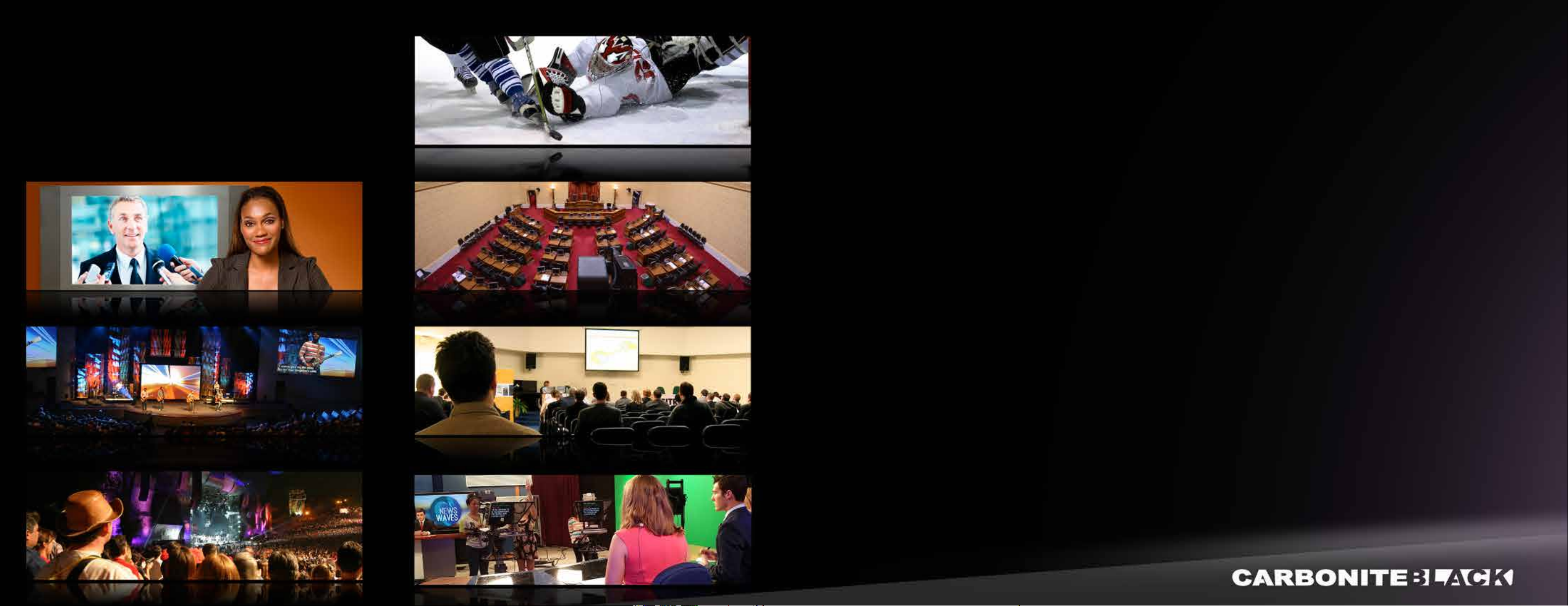
Carbonite is used daily in a wide variety of production
applications. Our engineers have incorporated feedback from
our diverse group of users, resulting in a capable, powerful and
feature rich production switcher. Whatever your creation, you can
be assured that Carbonite will give you all the horsepower you
need to produce beautiful, crisp, clean television.
Broadcast
Live Events
Worship
Legislative Control Systems
Corporate
Education
Rich Feature Set.
Powerful MEs
Carbonite packs major eects and keying power
into 2 MEs. Each ME has 4 powerful keyers with
luma, linear, Chroma and DVE key types as well
as an additional 5th hidden keyer for animated
Media Wipe and DVE transitions. Each ME can
access the 2 advanced UltraChrome™ chroma
keyers. Two advanced pattern generators per ME
are available for wipes, pattern masks and color
washes. Each ME also provides a clean feed
output.
LiveAssist
A powerful Ross DashBoard LiveAssist™
control interface combines with Carbonite’s
MediaManager browser to provide intuitive control
over switcher settings, Media Store graphics and
animations. With simple access from PC and
MAC, DashBoard and MediaManager are the
perfect Carbonite companions.
ViewControl
With ViewControl, it is now possible to create an
entire production from a simple and very intuitive
interface. Complex transition elements are
shown as thumbnails surrounding the live source
windows. Running the show is now as simple as
touching the screen.
4 Channel MediaStore™
Four independent media player channels are
available switcher-wide. Stills, logos and animated
graphics can be played out from the on-board
8GB memory and can be loaded via USB storage
devices. The Media-Store™ can also be managed
directly over Ethernet via Carbonite’s browserbased graphics tools.
4 or 8 Channels of DVE
4 or 8 high quality 2D DVE channels are available
system-wide. When set to 4 channels the DVEs
‘oat’ within the system architecture allowing all to
be assigned to a single ME or distributed across
both MEs as the production demands. These
DVEs are also available for ME DVE transitions
and have dedicated selection in the ME transition
area.
TM
& MediaManager™
A great looking production requires a complete set of tools.
Carbonite’s unmatched power and easy-to-use feature set will get the job done.
MediaWipes™ with Audio Playback
MediaWipes™ add powerful animated transition
capabilities with audio playback from the
Carbonite MediaStores™. Create compelling,
animated graphic transitions and control them
simply from a dedicated ME transition area
selector.
MultiViewers - Total Monitoring Solution
Two congurable MultiViewers (up to 32 windows)
are included in Carbonite’s standard feature
set. These clean, low latency MultiViewers have
access to all external and internal sources. Source
naming and tally assignment automatically follow
window routing selections. The MultiViewer
clock can be locked to house time via Time
code. Carbonite Black Plus includes 3 additional
16 window MultiViewers for input and output
monitoring providing the ability to monitor up to
80 sources.
Multi-Format Production
Carbonite’s video processing engine can be set
for Standard or High Denition production. In
addition, the standard system includes 6 internal
frame synchronizers and format converters which
allow mixed SD and HD formats to be seamlessly
incorporated into your production. The Carbonite
Plus / Carbonite Black Plus and MultiMedia
versions have dedicated converter/synchronizers
on every input. Carbonite Black Plus includes 12
outputs with Format Conversion
Proc Amps and Color Correction
All inputs on the Carbonite Plus / Carbonite
Black Plus and MultiMedia frames have video
processing and color correction controls for input
matching or to add creative are. Carbonite Black
Plus adds output Proc Amps and Color Correction
to 12 outputs, ideal for on-set display correction.
MultiMedia Inputs
The Carbonite MultiMedia version has special
input groups that accept analog and HDMI inputs
as well as SDI. These inputs employ advanced
format conversion designs that provide very high
quality conversion for progressive and computer
display formats with low latency.
UltraChrome™ Advanced Chroma Keying in
Every ME
Our UltraChrome™ chroma keyer uses new Ross
technology to perform detailed keying in the most
demanding conditions.
Eects Memory with MemoryAI™
Carbonite’s powerful and truly unique intelligent
resource management system allows stored
keys and backgrounds to be recalled to preview
without disturbing what is currently on-air. This
system enables multiple ‘scenes’ to be stored and
recalled in a manner that would normally require a
much larger multi-ME switcher.
Custom Control Macros
The combination of macro event management
with timelines. Fast, Powerful & editable macros
that can do almost anything. Record events,
recalls, pauses, holds and control devices, directly
from the panel or the DashBoard GUI.
LiveEDL™
Another unique Ross feature; during your live
production Carbonite can generate an industry
standard Edit Decision List (EDL). Production
decisions can then be seamlessly transferred to a
Non Linear Editor to recreate the event timeline.
With Carbonite, getting an as-run edit into post is
as simple as a few mouse clicks.
RossTalk Protocol & Device Control
Direct control of external devices is simple with
Carbonite. Control Servers, Robotic Cameras,
select Audio Mixers and, of course, our award
winning XPression 2D / 3D graphics system.
MiniMEs
Following pages.
Page 7
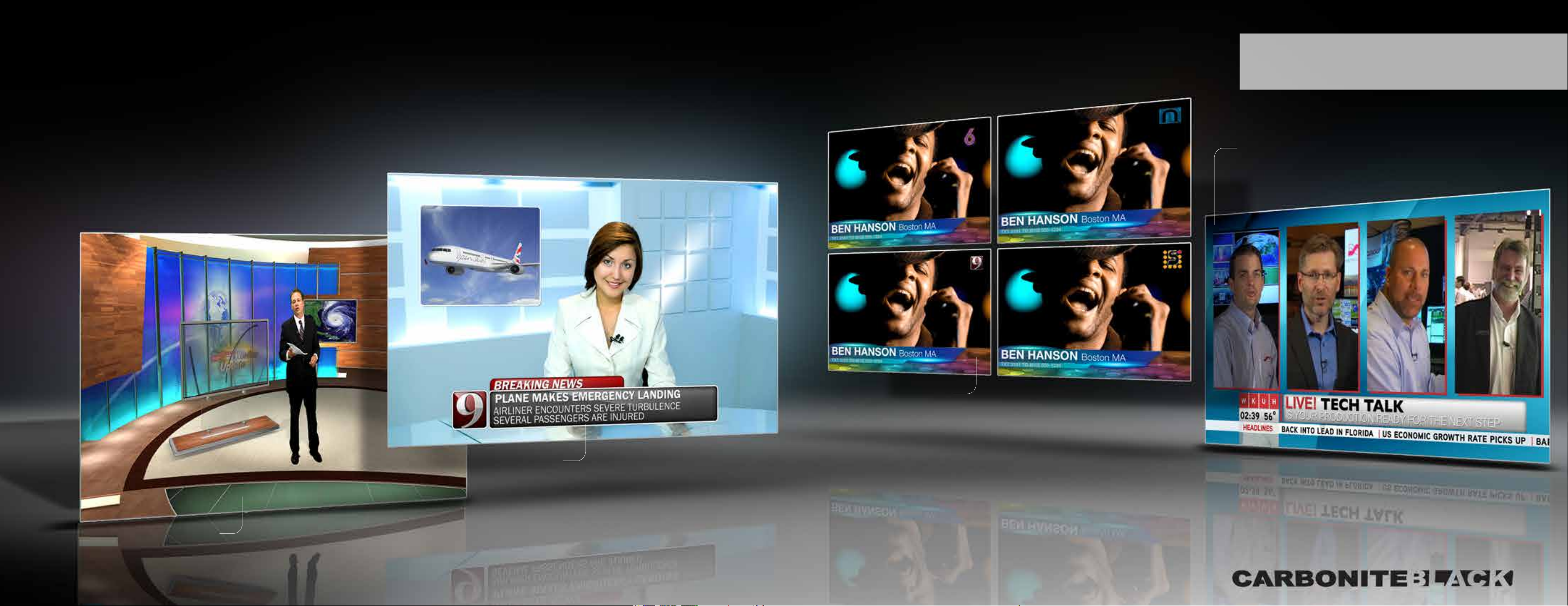
MiniMEs are a new class of operational ‘devices’ within the production switcher architecture. These
are very powerful eects modules that include an independent Mixer and 2 Keyers, 1 standard Keyer
and 1 specically for DVE boxes. MiniME modules do not reside in a xed position in the signal ow –
they are not Upstream, Midstream or Downstream – they ‘oat’ and can be used anywhere in the signal
path. They reside in a resource ‘pool’ to be used anywhere in the system for additional dissolves and
key layers, which are immediately released as soon as the transition or eect is complete. There are
4 MiniMEs in the system, as they are automatically attached when required they can be assigned to
multiple locations – and all four can be used simultaneously.
MiniMEs are completely independent of Carbonite MEs. All of Carbonite’s
standard ME resources are available without compromise.
Carbonite MiniME™
Carbonite MiniMEs
Available in all Carbonite systems - regardless of age
or conguration. MiniMEs have their own dedicated
key resources which are in addition to ME keyers.
Midstream Key Layering
Add more key layers between MEs, i.e. Build a 4 box layout on
ME1, feed it into a MiniME and then add a lower third to it. The
composited output can now be called up on the second ME or
used as a second program output.
Pre-Chroma Keying
Composite chroma key sources over a background with
Carbonite’s awesome UltraChrome keyer and simply select that
input during production. Perfect for weather and virtual sets, no
need to tie up an ME.
Downstream Keying
A MiniME can also be a downstream keyer/mixer, just assign
program or any other input and key source. With 4 MiniMEs
there can be 4 entirely dierently branded program outputs in
addition to standard ME outputs – no clean feeds involved. Of
course MiniMEs are also perfect for independent On-Set display
management.
Pre-Keying
With a MiniME you can Pre-Key on a direct input source.
Simply assign a key graphic to the input source and
whenever that source is selected it will be pre-built with
the assigned key – no ME involved. Perhaps you want to
add an OTS DVE and a graphic to a camera input, same
deal – whenever and wherever that source is selected
it will be a pre-built layered image. MiniMEs can be
attached to any number of inputs and up to 4 pre-keyed
sources can be used simultaneously.
Page 8
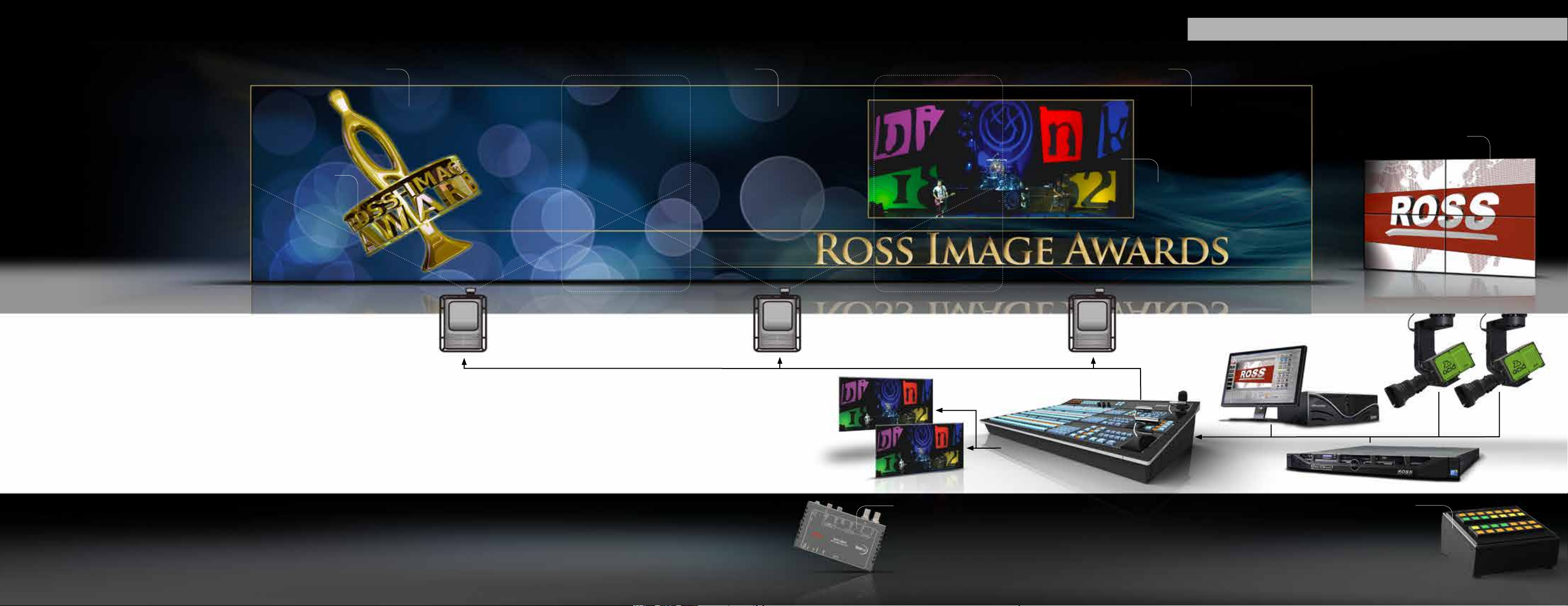
Carbonite MultiScreen™
Perfect for IMAG and Live Events - Screen Processing with Minimum Delay
Compelling Multi-Screen Production
Say goodbye to complex and
expensive multi-screen image
processors. Carbonite MultiScreen
delivers compelling multi-screen
production with ease - and, remarkably,
it is a standard feature in Carbonite
Production Switchers.
Features
OUTPUT 1 KEY
BLEND AREAOUTPUT 1 OUTPUT 2
Triple Projectors with edge blending
Pre-prepared background sources from MediaStore™
BLEND AREA
OUTPUT 3
MULTIPLE DISPLAYS
• With bezel compensation
OUTPUT 2 and 3 DVE (linked)
Camera(s)
Manage Up To 4 Separate Screens Simultaneously
• Create visually stunning content for up to 4 projectors on
a single screen with edge blending
• Scale outputs across multiple displays perfectly with bezel
compensation
• Integrated visual control of screens in 1x2, 2x1, 1x3,
3x1,1x4, 4x1 and 2x2 congurations
• Produce MultiScreen and program outputs simultaneously
• Simple setup and straightforward operation
• DashBoard GUI Controls via PC or MAC
MiniMEs - The Carbonite MultiScreen Secret
The MiniME is an incredibly powerful addition to this production powerhouse. A MiniME is a small Mix
Eects processor that has access to all of Carbonite’s internal and external sources – independent of the
main MEs. MiniMEs have background processing for edge softening and access to scaling via Carbonite
DVEs. In addition each MiniME has two keyers and independent mixing.
Broadcast Quality
• Broadcast level visual eects in a multi-screen
environment
• Serious production power across all outputs
• Lip sync friendly with low latency – 1 frame of
delay max
• Dramatic cross screen transitions
• Scale a single background across all screens
• Full resolution multi-screen backgrounds from
graphics systems and Media-Stores
Cost Eective
• MultiScreen is FREE with all Carbonite
Production Switchers
• Built in control for Video Servers, Audio
Mixers, Robotic Cameras and Graphics
Systems
• Optional LiveCG Character Generator
• Integrated Media-Stores for built-in
background slides, animations and keys
Carbonite MiniMEs
• Four MiniMEs in every Carbonite
• Linked control for MultiScreen production
• Independent control for on-set and secondary outputs
• Selectable edge softening for Edge Blended displays
• Simple operation via Carbonite Custom Controls
Main Program Output
Clean Feed Output
GearLite SDI To HDMI Conversion
Our GearLite SDI to HDMI converter is the simple
solution for MultiScreen connections. This high quality yet
inexpensive module allows the direct connection to your
display’s HDMI or DVI-D inputs from Carbonite’s serial
digital outputs via a single BNC cable.
Carbonite Switcher
Graphics System
Video Server
Carbonite SideShot - Custom Control Shot Box
Manage your Stage and On-Set MultiScreen production with the
SideShot Custom Control macro shot box. Carbonite custom
controls can be programed to manage all of the elements of your
production and assigned to SideShot keys - complete with highly
visible control mnemonics.
With SideShot your MultiScreen event can be operated
independently from your Carbonite panel.
Page 9
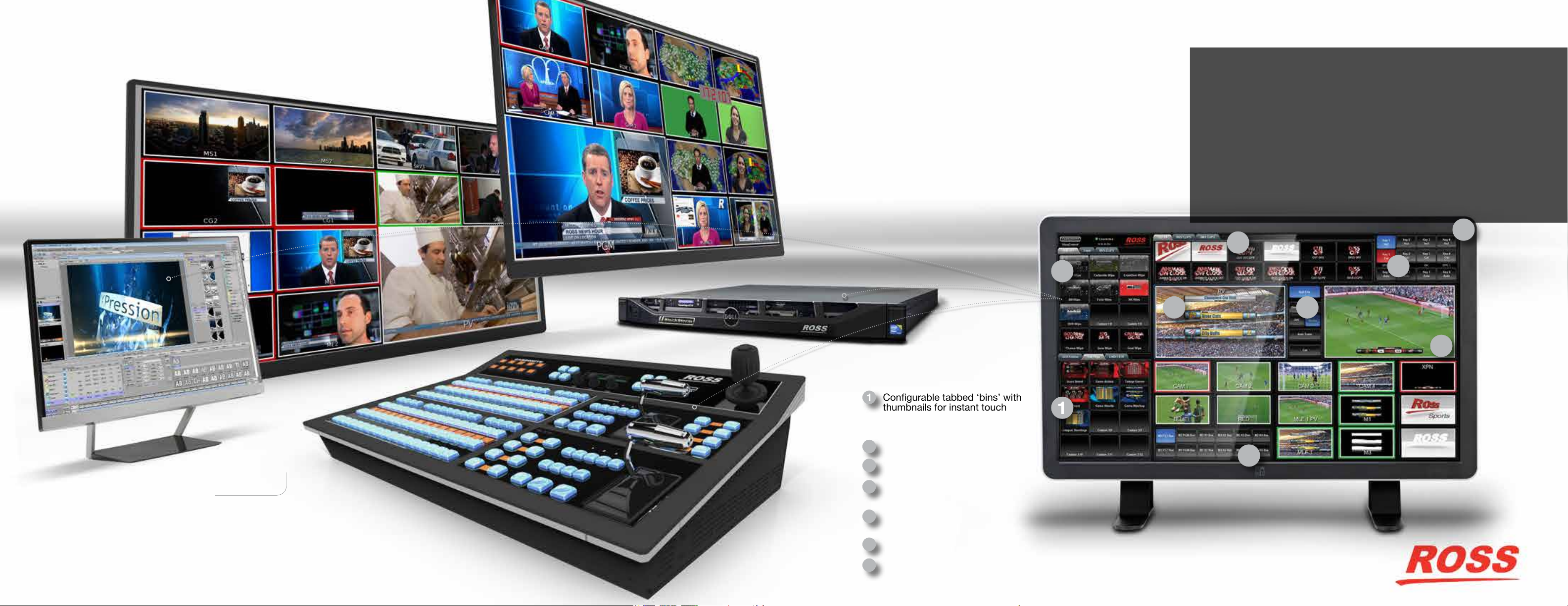
Carbonite Production Systems
Carbonite ViewControl™
ViewControl™
Carbonite Studio Systems integrate production switching with powerful
XPression 3D graphics and BlackStorm video server playout via our
RossTalk and AMP Ethernet protocols. Add the remarkable patent
pending ViewControl touch screen application via DashBoard and every
production element is visually displayed for instant touch selection.
ViewControl is much more than just touching sources and bringing them
to air, this is a sophisticated and highly integrated system that can easily
perform seriously complex productions.
Whatever your production tasks a Carbonite Studio System with
ViewControl will accomplish them perfectly every time. No other
production solution can provide seamless and ecient control. The whole
is truly greater than the sum of the parts.
7
1
Carbonite Production Systems
A Carbonite 1, 2 or 3 ME switcher combined with a Ross Video
Server, and our stunning XPression 3D Character Generator and
Motion Graphics System.
Whatever your production requires - Ross Video oers every component
needed to build a Studio System package tailored for you.
Congurable tabbed ‘bins’ with
1
thumbnails for instant touch
selection of custom production
elements
Next Transition Selection
2
3
Transition & Roll Clip Controls
Direct Key Cut & Auto Control Area
4
with Source Mnemonics
Touch Selectable low latency
5
MultiViewer windows
6
Switcher Bus Destination Selection
7
ViewControl Conguration Settings
(1 frame delay)
1
1
4
2 3
5
6
Page 10
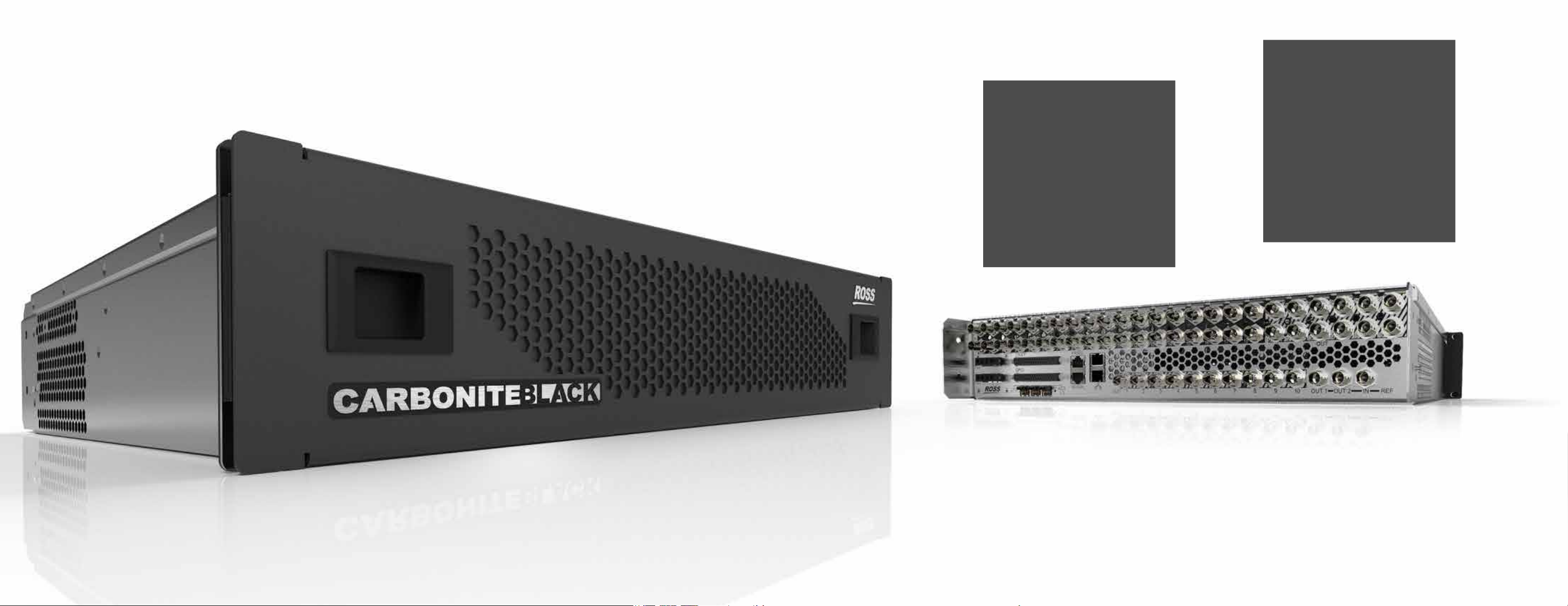
CARBONITE BLACK FRAME
Minimum space, Maximum power.
• 2 Rack Units – standard BNCs
• 36 inputs
• 22 outputs
• 3 full MEs with 4 Keyers
• 8 DVEs (4 in Frame Sync mode)
• 4 MiniMEs with 2 MultiScreen Modes
• 2 MultiViewers
• 4 MediaStore channels
• SD, HD, 3G & UHD (4K) processing
• 6 Frame Synchronizers & Format converters
• ViewControl – touchscreen production control
• DashBoard control integration
• XPression motion graphics integration
• BlackStorm video clip player integration
CARBONITE BLACK PLUS FRAME
Minimum space, Maximum power.
• 2 Rack Units – standard BNCs
• 36 inputs
• 22 outputs
• 3 full MEs with 4 Keyers
• 8 DVEs
• 4 MiniMEs with 2 MultiScreen Modes
• 5 x 16 window MultiViewers
• 4 MediaStore channels
• SD, HD, 3G & UHD (4K) processing
• Frame Synchronizers & Format converters on
all inputs
• 12 Outputs with Format Conversion, Proc Amps
& Color Correction
• ViewControl – touchscreen production control
• DashBoard control integration
• XPression motion graphics integration
• BlackStorm video clip player integration
Carbonite Black / Carbonite Black Plus
Page 11
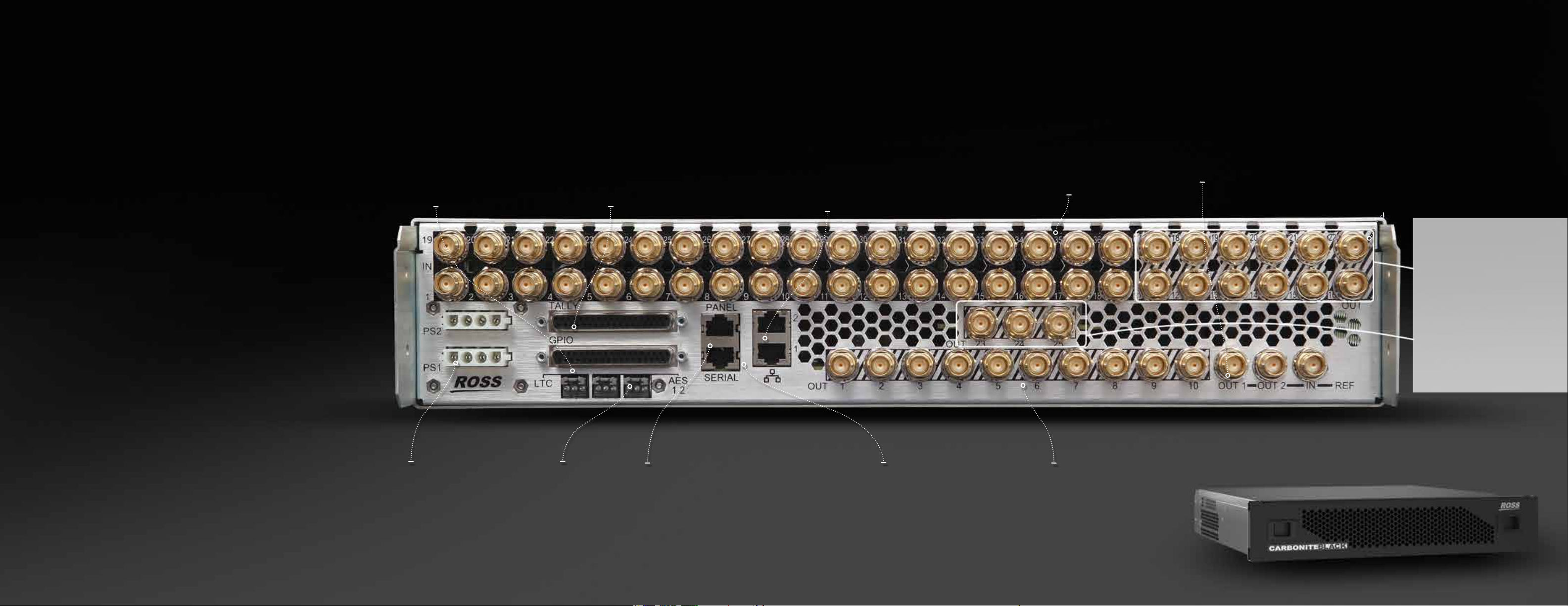
Carbonite Black
A production powerhouse in just 2RU.
Three full MEs with MiniMEs and Multi-Denition support
based on our renowned large switcher technology.
Includes the same awesome features of Carbonite, the
new Carbonite Black processing engine adds more inputs,
outputs and ME power.
As standard the Carbonite Black engine has 36 multi-format
SDI inputs and 22 outputs that can manage SD, HD, 3G
and UHD (4K) signals. It is available in either 2 ME or 3 ME
congurations and always includes MiniMEs, that brings
the eective ME count to 6 or 7!
In addition to this new engine’s expanded video I/O we
have added AES digital audio outputs for audio playback
from the internal media stores.
The processing power provided within Carbonite Black
allows this mid-size platform to outperform larger
switchers with substantially higher price tags.
Carbonite Black Plus models take things even
further-providing the additional monitoring,
conversion, color correction and proc amps required
to tackle the most complex and demanding
productions.
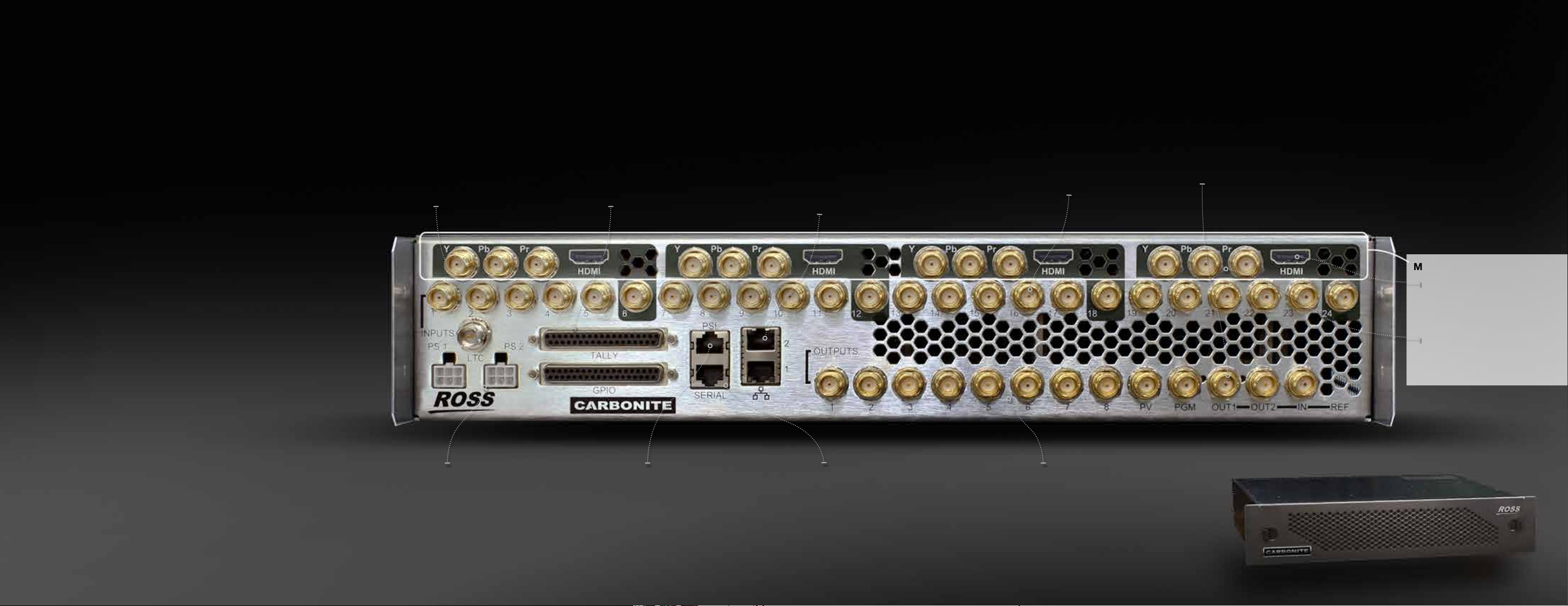
TIME CODE INPUT
• For use with LiveEDL™
Standard Feature - Exclusive
to Ross Video
GPI/O AND TALLY INTERFACE
• 34 Tally connections and 34 GPI/O
individually selectable to input or
output
Carbonite Black / Carbonite Black Plus
ETHERNET CONNECTIVITY
• For panel connections and use with
ViewControl, DashBoard LiveAssist, XPression
Live CG, LiveEDL, FTP, browser-based GUI,
diagnostics and more!
36 SD/HD/3G INPUTS
• Supporting all popular
digital video formats
BUILT-IN SYNC GENERATOR
• Simplies system timing
CARBONITE BLACK PLUS
FRAME ONLY
12 Processing Outputs
• Down / Cross Conversion,
color correction & Proc Amps
• Perfect for on-set display
adjustment
Input Source Monitoring
• 3 x 16 window
MultiViewer outputs
(12 inputs and 4 outputs
per multiviewer)
OPTIONAL REDUNDANT POWER
• With solidly locking connectors
for maximum reliability
AES DIGITAL AUDIO OUTPUTS
• For audio playback from
MediaStores.
CONTROL PANEL CONNECTION
• Standard CAT-5 shielded cable
(for connection to legacy Carbonite panels)
SERIAL INTERFACE
• For editor and RS-422 control
22 ASSIGNABLE OUTPUTS
• Dual assignable MultiViewers
• Multiple outputs are essential for
multi-screen and live to tape
applications
Page 12
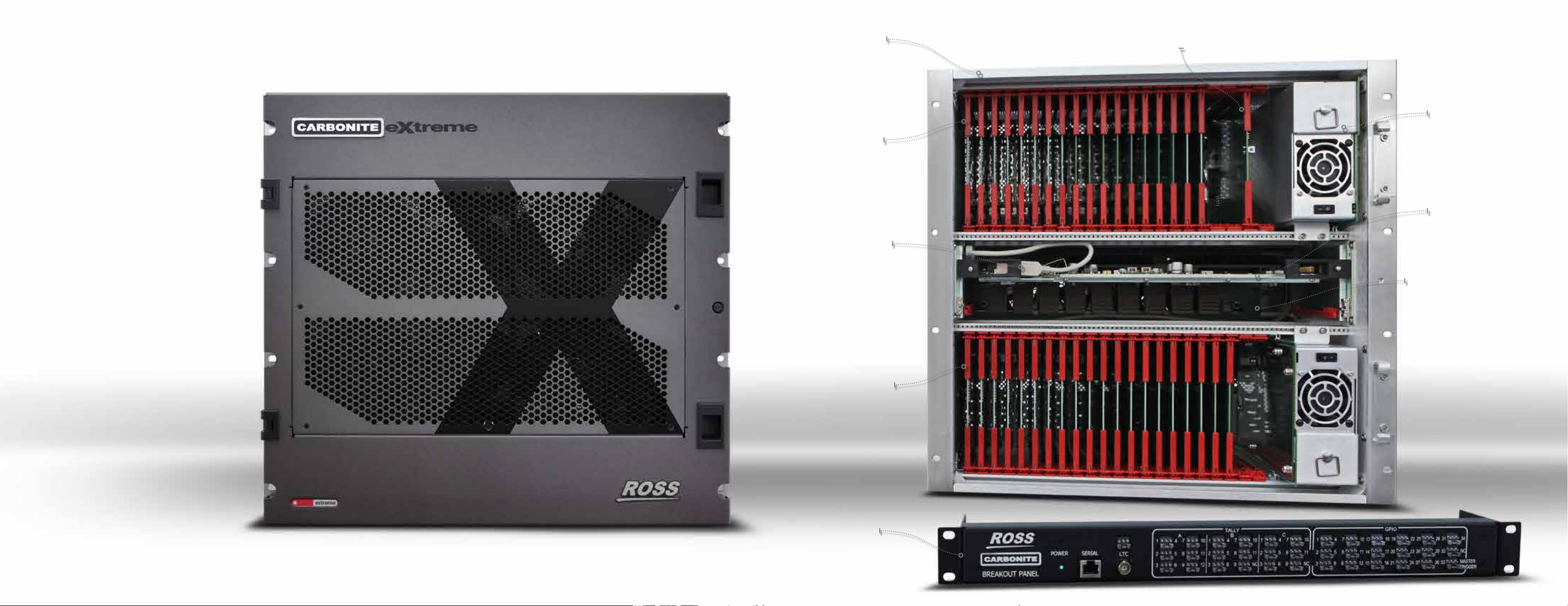
Carbonite Extreme
Powerhouse Switcher and Router
combined, The Carbonite eXtreme is a true
revolution in production system design. This
unique package provides unprecedented
system exibility and multi-destination
management - It’s a Ross rst.
Carbonite eXtreme breaks away from the
traditional production switcher architecture.
Production switchers are typically designed
around the task of delivering a single Program
output from multiple input sources, however
many production systems today are required
to deliver outputs to multiple screens, onset displays and signal distribution systems.
This is particularly true for live production of
worship & stage events as well as within larger
facilities and multi-site complexes.
eXtreme is a truly revolutionary production
tool. It has all of the horsepower of Carbonite
wrapped inside a highly congurable
signal routing & management system. This
combination is ideal for mobile production
vehicles as it simplies installation and
operation immensely, while also oering
tremendous exibility and signicant system
cost savings.
The eXtreme chassis can be congured with
an I/O of up to 144 x 144 in increments of
8. With eXtreme it is now simple to manage
complex productions across multiple output
destinations!
eXtreme is available with any Carbonite
control panel and destination based signal
routing control is simply managed with our NK
router panels. Of course eXtreme can also be
congured as a Studio System with XPression
graphics systems, BlackStorm playout servers
and DashBoard control.
With Carbonite eXtreme you have a
complete ‘state of the art’ production
system with full signal management.
Nothing like this has ever been seen before,
it is another Ross rst and a real game
changer!
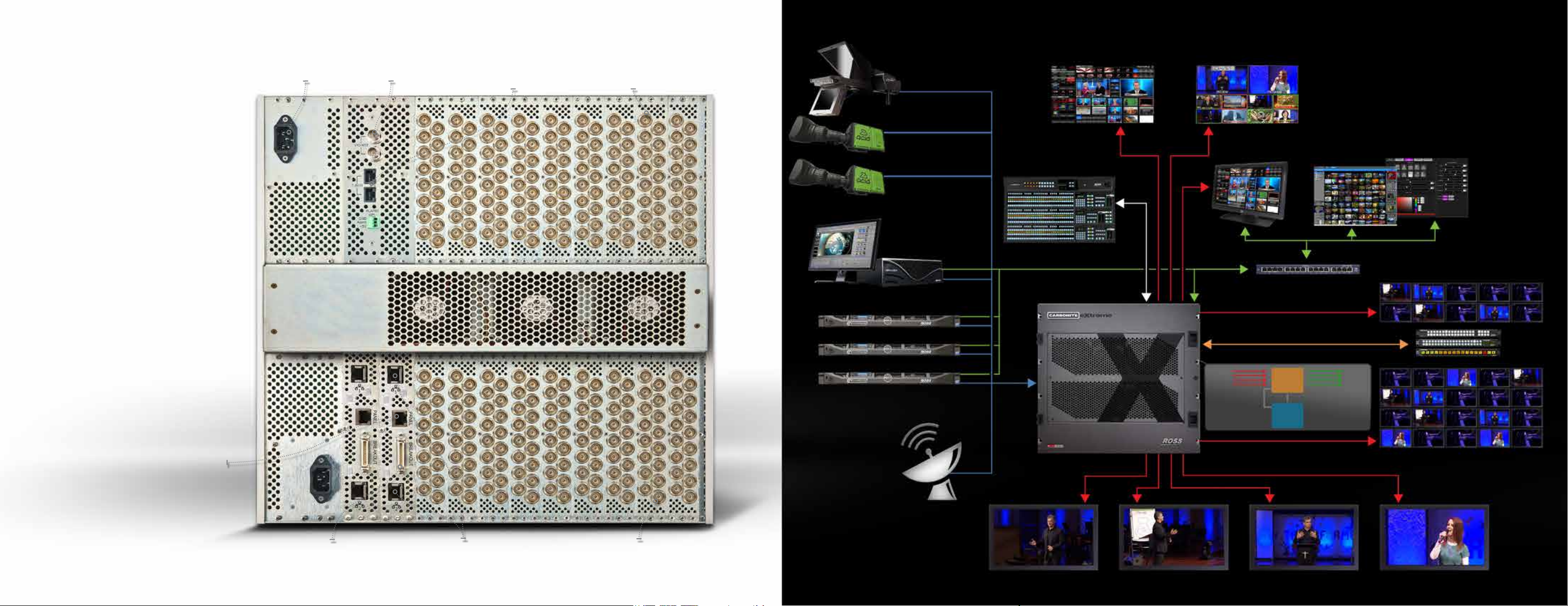
Carbonite Extreme
Power Packed
10RU Frame
Input Modules
(8 inputs per card)
USB Connector
for Storage
Devices with
extension to
rear for internal
or external
connection
Output Modules
(8 outputs per card)
Rack Mount
Break Out for
Tally, GPI/O,
TimeCode and
Serial port
Router Controller Module
Redundant
Power Supply
(Optional)
Carbonite
Switcher /
Routing Matrix
Module
Slot for second
Carbonite switcher /
routing matrix module
- used for redundant
operation, an additional
2 / 2.5 ME production
switcher, or, use as
two more 16 window
MultiViewers.
Page 13
Carbonite Extreme
Carbonite Extreme
The Multi-Destination Revolution!
Carbonite eXtreme eliminates the complex
wiring and signal management associated
with larger production systems. It is essentially
designed from two fully integrated sub-systems:
A congurable routing sub-system, with up to
144 physical inputs and outputs and a 2 ME
Carbonite production switcher sub-system.
The Carbonite control panel has access to
any of the physical inputs together with input
mnemonics and all physical and internal
inputs are selectable on any physical output
via DashBoard and NK router control panels.
Internally the routing system is 154 in by 168
out, allowing any destination to receive any
physical input or switcher output.
Of course signal routing, production switcher,
XPression graphics, BlackStorm servers and
third party device controls are all integrated
via our Dashboard control systems, greatly
simplifying installation, setup up and operations.
Add our new DashBoard Panel Builder and you
can create your own user interface to run your
productions exactly the way you want to. You
can even create simple task specic control
points for inexperienced operators or volunteer
users.
Power Connectors Reference Input TBus Interface
(For NK Router Panels)
Input Connectors
(16 per connector strip)
Cameras
Graphics Systems
SD and HD DVRs,
VCRs, Servers
Carbonite Control Panel
Carbonite Extreme
Frame
Inputs
Panel
Comm
Ethernet
144
Physical
Inputs
Carbonite Outputs
Example Layout
ViewControl, Live Assist
Dashboard Mac and PC
Network Router
Multiple Outputs
TBUS Link x20
Routing
Switcher
Subsystem
Carbonite Inputs
Carbonite
Switcher
Subsystem
144
Physical
Outputs
NK Router Panels
Connection to Carbonite
Control Panel
Connection for Tally,
GPI/O Breakout Box
Dual Ethernet Ports
• For separating control
and house networks
Output Connectors
(16 per connector strip)
Multiple Outputs
Remote Feeds
Page 14
CARBONITE / CARBONITE PLUS / CARBONITE MULTIMEDIA
Carbonite
A production powerhouse in just 2RU.
Two full MEs with Multi-Denition support based on our renowned
Vision switcher technology.
Carbonite+ and Carbonite MultiMedia frames add signal
management features to this Production Powerhouse.
Carbonite Plus
Including the same awesome features of Carbonite, the new
Carbonite+ 2RU processing engine includes Frame Synchronization
and Format Conversion for every input as well as increasing the
number of available DVEs from 4 to 8. Just like Carbonite, the +
frame is available with 16 or 24 active inputs, with all inputs now
simultaneously capable of accepting unreferenced signals and
converting SD (625 or 525) to HD 1080i format with aspect ratio
choices.
TIME CODE INPUT
• For use with LiveEDL™
Standard Feature - Exclusive
to Ross Video
GPI/O AND TALLY INTERFACE
• 34 Tally connections and 34 GPI/O
individually selectable to input or
output
ETHERNET CONNECTIVITY
• For use with ViewControl,
DashBoard LiveAssist, XPression
Live CG, LiveEDL, FTP, browser-
based GUI, diagnostics and more!
16 OR 24 SD/HD INPUTS
• Supporting all popular
digital video formats
BUILT-IN SYNC GENERATOR
• Simplies system timing
MULTIMEDIA FRAME ONLY
HDMI
• Direct connection of
computer input with
built-in HQ scaling
Additional DVEs allow every ME key to have a DVE assigned,
making it possible to display 8 boxes on screen simultaneously
or transition between quad box layouts.
CARBONITE MULTIMEDIA
Also a 2RU processing engine with the functionality of the
Carbonite+. In addition MultiMedia adds up to 4 shared SDI/HDMI/
Analog inputs that incorporate new high quality / low latency format
conversion features.
These new MultiMedia connections allow input from computers (PC
& MAC) as well as provide support for legacy analog devices such
as Standard Denition DVD players, cameras and VCRs. New scan
conversion technology allows these inputs to accept Interlaced or
Progressive formats with diering pixel resolution and aspect ratio and
seamlessly convert them to the native format of your production.
OPTIONAL REDUNDANT POWER
• With solidly locking connectors
for maximum reliability
CONTROL PANEL CONNECTION
• Standard CAT-5 shielded cable
SERIAL INTERFACE
• For editor and RS-422 control
ANALOG
• Composite and
Component analog
inputs
8 ASSIGNABLE AUX, 1 PROGRAM, 1 PREVIEW
• Dual assignable MultiViewers
• Multiple outputs are essential for multi-screen
and live to tape applications
Page 15
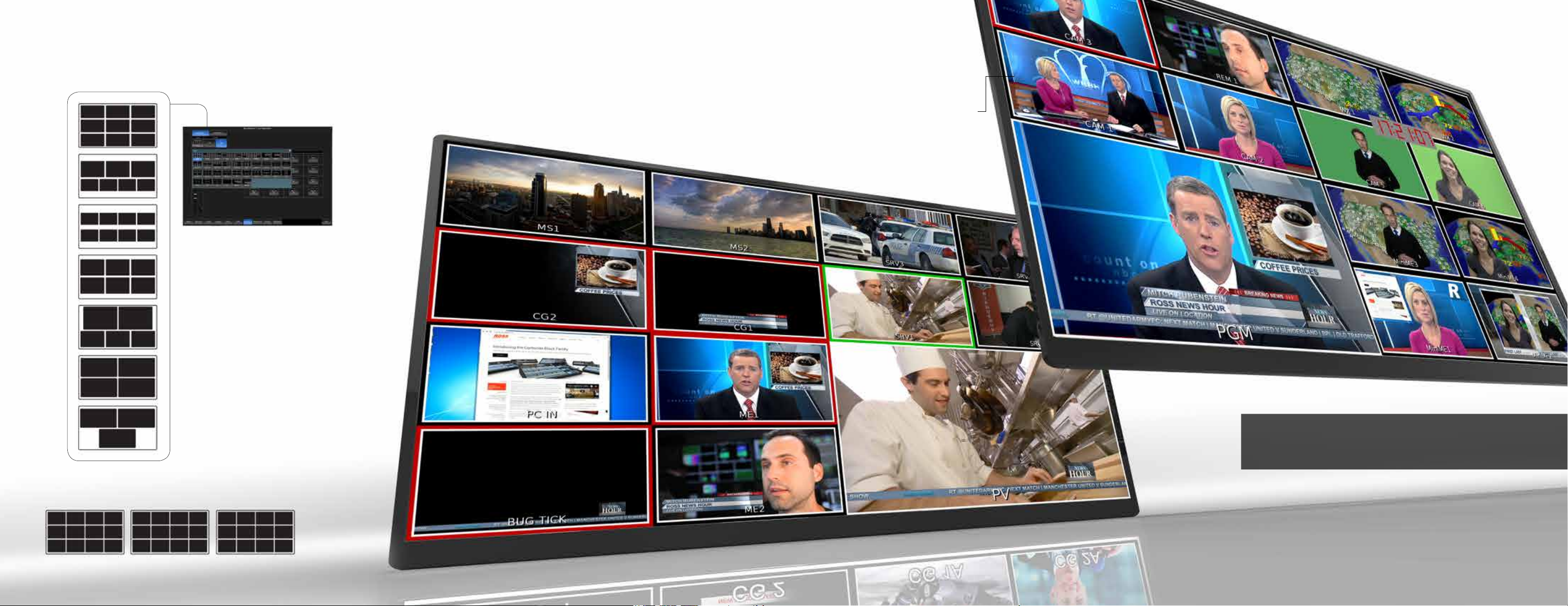
Enhanced MultiViewers
Easily select your preferred
MultiViewer layout with the
Dashboard Control Panel.
MultiViewer™ LAYOUTS:
• 16 Windows
• 13 Windows (4 Layouts)
• 10 Windows (5 Layouts)
• 9 Windows
• 8 Windows
• 7 Windows (2 Layouts)
• 6 Windows (3 Layouts)
• 5 Windows (2 Layouts)
• 4 Windows (3 Layouts)
• 3 Windows (4 Layouts)
• 2 Windows (2 Layouts)
• 1 Window
Powerful MultiViewers
Carbonite MultiViewers have been engineered to provide the best possible
monitoring solution for your production.
Each MultiViewer has user selectable layouts with the individual choice of border,
tally and UMD label display for each source. In addition, a user congurable clock
can be sized and positioned anywhere on the multiviewer screen, locked to house
time code or internal reference.
INDIVIDUAL WINDOW OPTIONS:
• Source label on / o
• Border on / o
• Aspect ratio marker on / o
• Red On-Air Tally on / o
• Green Preview Tally on / o
Carbonite MultiViewers
When Carbonite is operating in Standard Denition, MultiViewer
outputs can be selected as native SD or as 1920 x 1080 HD
format to maximize display quality.
Carbonite Black Plus adds 3 x 16 MultiViewers!
Monitor up to 12 source inputs and 4 outputs each.
Page 16
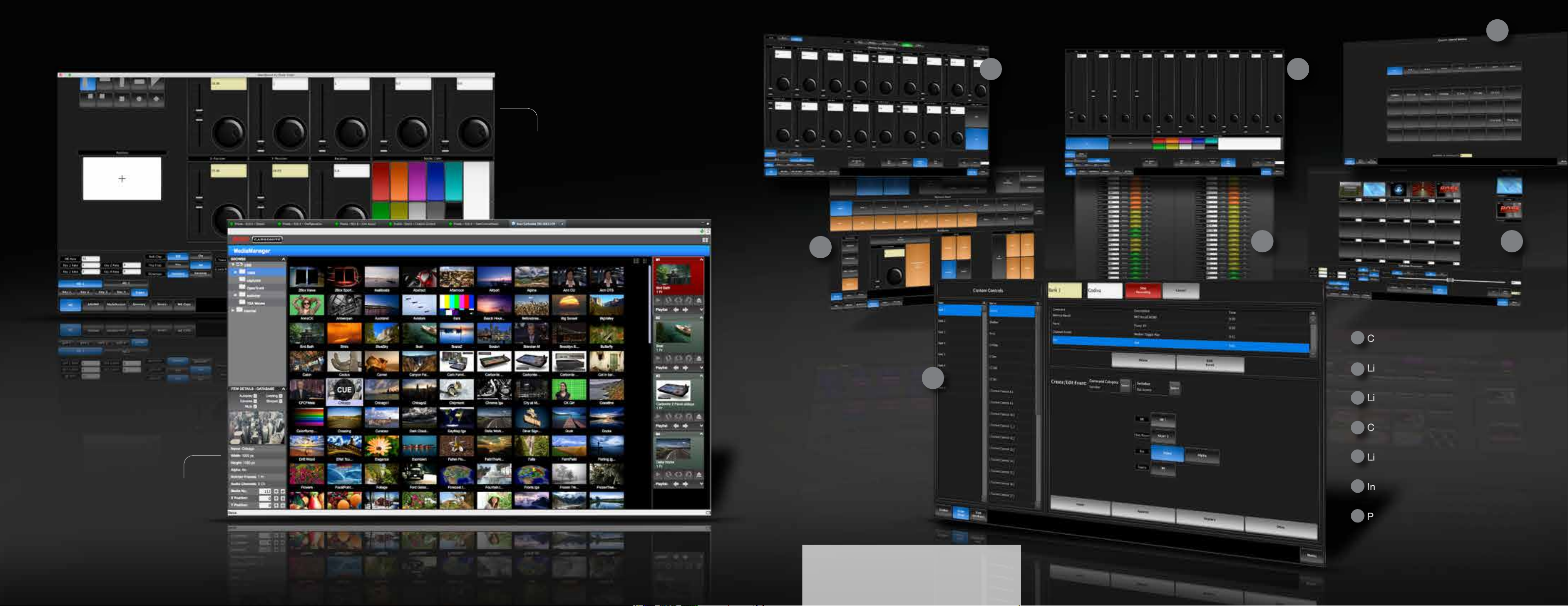
Carbonite DashBoard and LiveAssist™
4
2 3
LiveAssist™
Take control over switcher functions.
Setup Keyers, MediaWipe transitions
and much more via this intuitive
DashBoard interface.
MediaManager™
Easily manage stills and animations in
Carbonite Media Stores via the feature
rich MediaManager GUI. Accessible
within Dashboard or via your Web
Browser.
5
1
6 7
1
Custom Control Editor
LiveAssist ChromaKey Control
2
LiveAssist DVE Key Control
3
Custom Control ShotBox
4
5
LiveAssist Memory Store Attributes
6
Input Conguration
7
Panel Builder
Carbonite DashBoard and LiveAssist
Every tool a technical director or producer
could ask for – at your ngertips.
Page 17
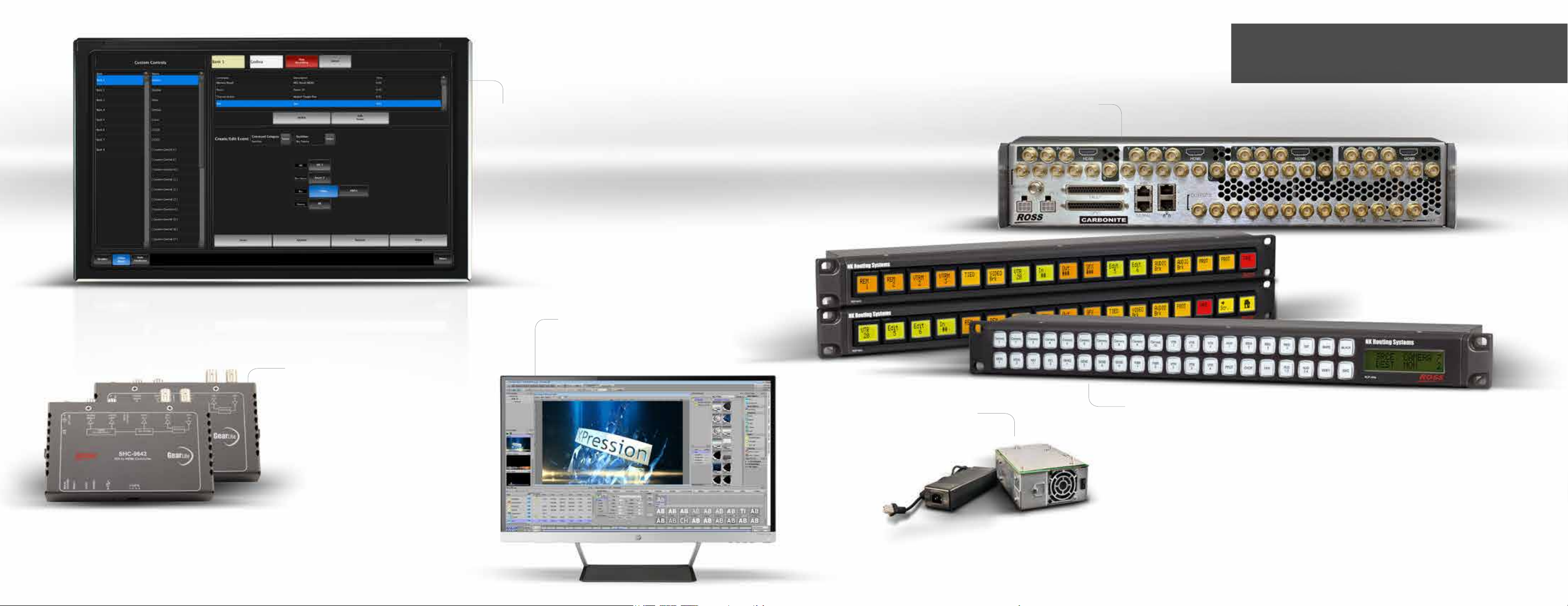
GEARLITE SDI TO HDMI CONVERSION
Our GearLite SDI to HDMI converter
is the perfect MultiViewer companion.
This high quality yet inexpensive module
allows the direct connection to your
display’s HDMI input from Carbonite’s
serial digital outputs via a single BNC
cable.
AUDIO MIXER MIDI INTERFACE
GearLite SMC-9901 Serial to MIDI
converter for Audio Follow control of
Yamaha 01V-96 and DM1000 Mixers.
Carbonite Options
DashBoard Touch Computer
The perfect control
companion for Carbonite.
XPRESSION LiveCG™
XPression Live CG is an economical way
to enhance your production with eyecatching graphics. Simply load XPression
Live CG Software onto your own
Windows PC, connect it to Carbonite via
an I/P network, and you have a tightly
integrated CG / Production Switcher
System. Graphics are rendered directly
into Carbonite’s Media-Store™, keeping
video inputs free for cameras and other
video sources.
SOFTWARE INPUT UPGRADE
A 16 input Carbonite frame can be upgraded to 24 inputs.
REDUNDANT POWER SUPPLIES
Redundant PSUs for both the
Carbonite Engine and Control Panel
can easily be added either at time of
purchase or later when required.
Carbonite Options and Accessories
Carbonite comes fully featured right out of the box. The
following are a few options that can be added to your Carbonite
system for a perfect t into your production workow.
CONTROL PANELS FOR AUX CONTROL & EXTREME ROUTING SYSTEM
RCP-NK1
A simple and cost-eective control panel ideally suited as an XY or cut-bus
control panel. It includes 40 soft, fully programmable back-lit keys arranged in a
32 + 8 conguration for convenient function key layout.
RCP-ME
This panel provides the ability to create menus, enabling the grouping of sources
and destinations based on physical requirements (studios, edit suites, QC racks)
or categories (servers, cameras, monitors).
RCP-QE
Ideal for use in OB vans or production houses where congurations change
regularly, unlimited congurations enable fast and simple customized setups of
each panel. This panel oers 17 colored back-lit graphic LCD keys with multiple
menus.
Page 18
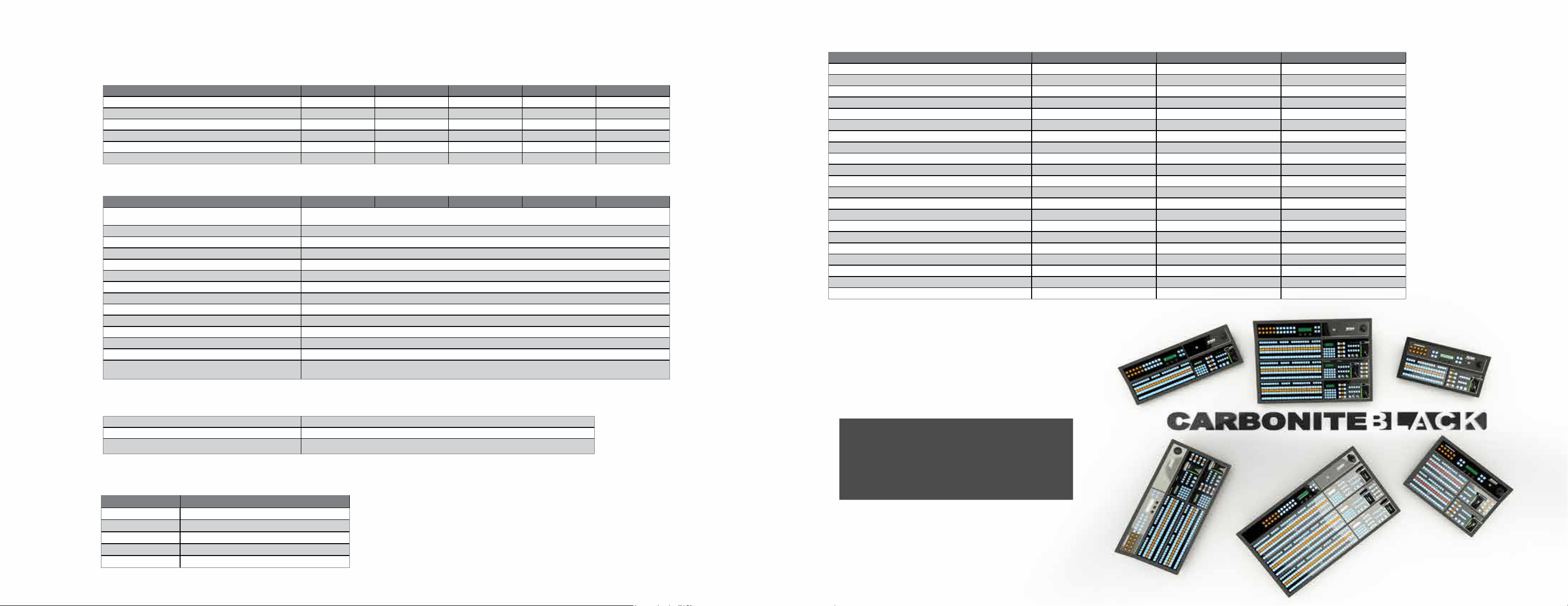
Basic Specications
Control Panels
Key Features Carbonite Black 1 Carbonite Black 1S Carbonite Black 2 Carbonite Black 2S Carbonite Black 3S / 3X
DIRECT ACCESS CROSSPOINT BUTTONS 16 24 16 24 24 / 32
NUMBER OF ME ROWS 1 1 2 2 2
ME EFFECTS MEMORY KEYPAD No - Global only 1 per ME + Global No - Global only 1 per ME + Global 1 per ME + Global
THEME-ABLE PANEL GLOW RGB BUT TONS
8 CHARACTER INPUT AND KEY SOURCE COLOR MNEMONICS
CUSTOM CONTROL MACRO BUTTONS WITH SPLIT ROW MNEMONICS 64 96 64 96 96 / 256
Operational Features
Key Features Carbonite Black 1 Carbonite Black 1S Carbonite Black 2 Carbonite Black 2S Carbonite Black 3S / 3X
NUMBER OF KEYS PER ME
NUMBER OF KEYS PER MiniME 2 per MiniME
NUMBER OF KEYS ON HALF ME (No .5 ME on Carbonite Black Engine) 2 DSK + Media Wipe
TOTAL KEYERS IN MiniME MODE 1ME = 13, 2ME = 18, 3ME = 23
TOTAL KEYERS IN 2.5 ME MODE (No .5 ME on Carbonite Black Engine) 13
ULTRACHROME KEYERS (FLOATING) 2
NUMBER OF MediaStores™ (CAPACIT Y 8GB) 4
SUPPORTED MEDIA FILE TYPES Stills: .BMP | Stills & Animations: .JPG .JPEG (no Alpha), TGA & PNG (with Alpha) & 48k WAV audio les
BROWSER-BASED GRAPHICS MANAGEMENT
PATTERN GENER ATORS
EFFECTS MEMORY WITH MemoryAI™ 100 per ME
ANIMATED MediaWipes™
DIRECT MediaStore RENDER VIA ETHERNET
LiveEDL™
(GENERATES AN EDIT DECISION LIST FOR USE IN POST PRODUCTION)
• • • • •
• • • • •
5
(4 + 1 Transition Key)
•
2 per ME
•
•
•
Frames
Key Features Carbonite / Plus / MultiMedia Carbonite Black / Plus Carbonite eXtreme
MULTI-DEFINITION INPUTS 16 or 24 36 From 24 to 144
MULTI-DEFINITION OUTPUTS 10 22 From 16 to 144
NUMBER OF MEs 1, 2 or 2.5 2 or 3 1, 2 or 2.5
NUMBER OF MiniMEs 4 4 4
NUMBER OF MultiViewers™ WITH TALLY AND SOURCE NAMES 2 (Up to 32 windows) 2 x 16 window / 5 x 16 window 2 (Up to 32 windows)
INTERNAL FORMAT CONVERTERS / FR AME SYNCHRONIZER 6* / All Inputs / All Inputs 6* / 36 6*
NUMBER OF FLOATING DVEs 8 or 4* / 8 / 8 8 or 4* / 8 8 or 4*
INPUT PROC AMPS No / All Inputs / All Inputs No / Yes
INPUT COLOR CORRECTORS No / All Inputs / All Inputs No / Yes
OUTPUT COLOR CORRECTORS / PROC AMPS / FORMAT CONVERSION
SELECTABLE SDI / HDMI / ANALOG INPUTS No / No / 2 or 4 No / No
HQ FORMAT CONVERTERS (I TO P & COMPUTER RESOLUTIONS) No / No / 2 or 4 No / No
NUMBER OF GPI/O 34 34 34
NUMBER OF TALLIES 34 34 34
REMOVABLE STORAGE MEDIA - (Accessible via FTP) USB USB USB
TIME CODE INPUT Yes (LTC) Yes (LTC) Yes (LTC)
ETHERNET PORTS 2 2 2
REFERENCE INPUT Black or Tri-Level Black or Tri-Level Black or Tri-Level
INTERNAL REFERENCE GENERATOR
INDEPENDENTLY CONFIGUR ABLE REFERENCE OUTPUTS 2 2 None
EDITOR PORT 1 (RS-422) 1 (RS-422) 1 (RS-422)
-
• • -
12 (Plus Frame Only)
-
-
-
-
-
* User selectable 6 FCFS & 4 DVE channels
or 0 FCFS & 8 DVE channels.
** In 3G mode Plus and MM frames with 24
inputs have 12 format converters / frame
synchronizers and there are 9 in 16 input
system.
Control Interfaces
DashBoard LiveAssist™
ViewControl™ - VISUAL PRODUC TION CONTROL
ROBOTIC CAMERA CONTROL
Signal Processing Standards
FORMAT LINE / FRAME RATES
STANDARD DEFINITION 480i/59.94, 576i/50
HIGH DEFINITION 720P & 1080I 50/59.94
1080 PSF 23.98, 25 & 29.97
1080P 29.97 (1.5Gb) & 50 / 59.94 (3Gb)
UHD / 4K 4x Quad Link (MultiScreen Mode)
•
•
•
Highly powerful and eciently designed,
Carbonite delivers unprecedented performance
in a remarkably cost-eective package.
Carbonite sets the bar as the world standard for
mid-sized production switchers.
Carbonite delivers Pure Production Power!
Page 19
 Loading...