

Page 1
User Guide
00821-0100-6129, Rev AB
Emerson Smart Wireless 4.6
June 2016
Emerson™ Smart Wireless Gateway 4.6 User
Guide
Introduction . . . . . . . . . . . . . . . . . . . . . . . . . . . . . . . . . . . . . . . . . . . . . . . . . . . . . . . . . . . . . . page 1
®
HART
adapter support . . . . . . . . . . . . . . . . . . . . . . . . . . . . . . . . . . . . . . . . . . . . . . . . . . . . page 1
Custom user security roles . . . . . . . . . . . . . . . . . . . . . . . . . . . . . . . . . . . . . . . . . . . . . . . . . page 2
Stale data configuration . . . . . . . . . . . . . . . . . . . . . . . . . . . . . . . . . . . . . . . . . . . . . . . . . . . page 3
1.0 Introduction
This document is designed to assist users with the new navigation within the Smart Wireless
Gateway Firmware. Only the updates for this version of the firmware are included in this
document.
2.0 HART® adapter support
2.1 System Settings>Protocols>HART
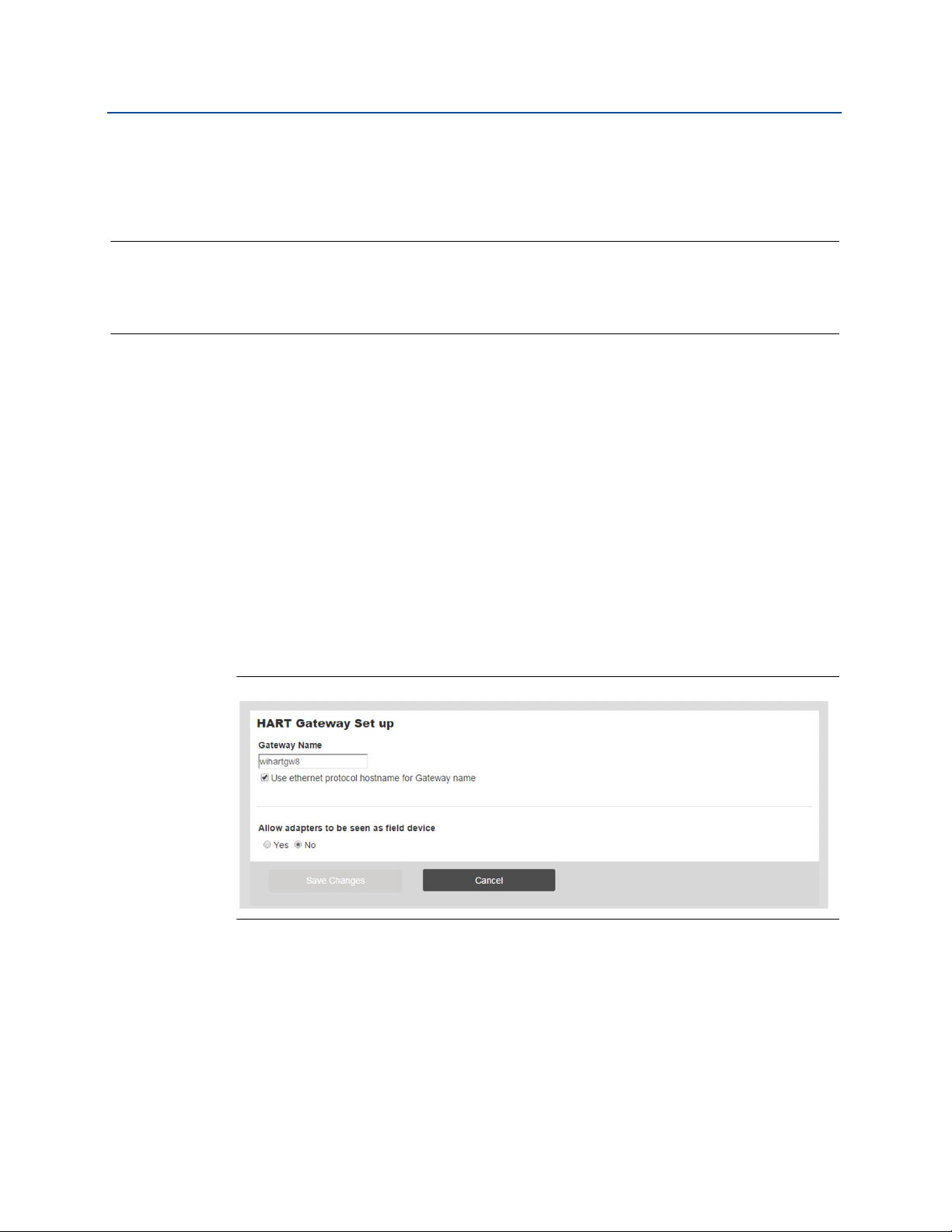
The HART adapter control has returned to the firmware in version 4.6. The control allows all
the HART adapters on the network to be shown as devices on the device page. This will also
change the device count on the page if there are any adapters on the network.
Figure 1-1. HART Gateway Set up Page
Emerson Smart Wireless 4.6
1
Page 2
Emerson Smart Wireless 4.6
June 2016
3.0 Custom user security roles
3.1 System Settings>Users>User Accounts
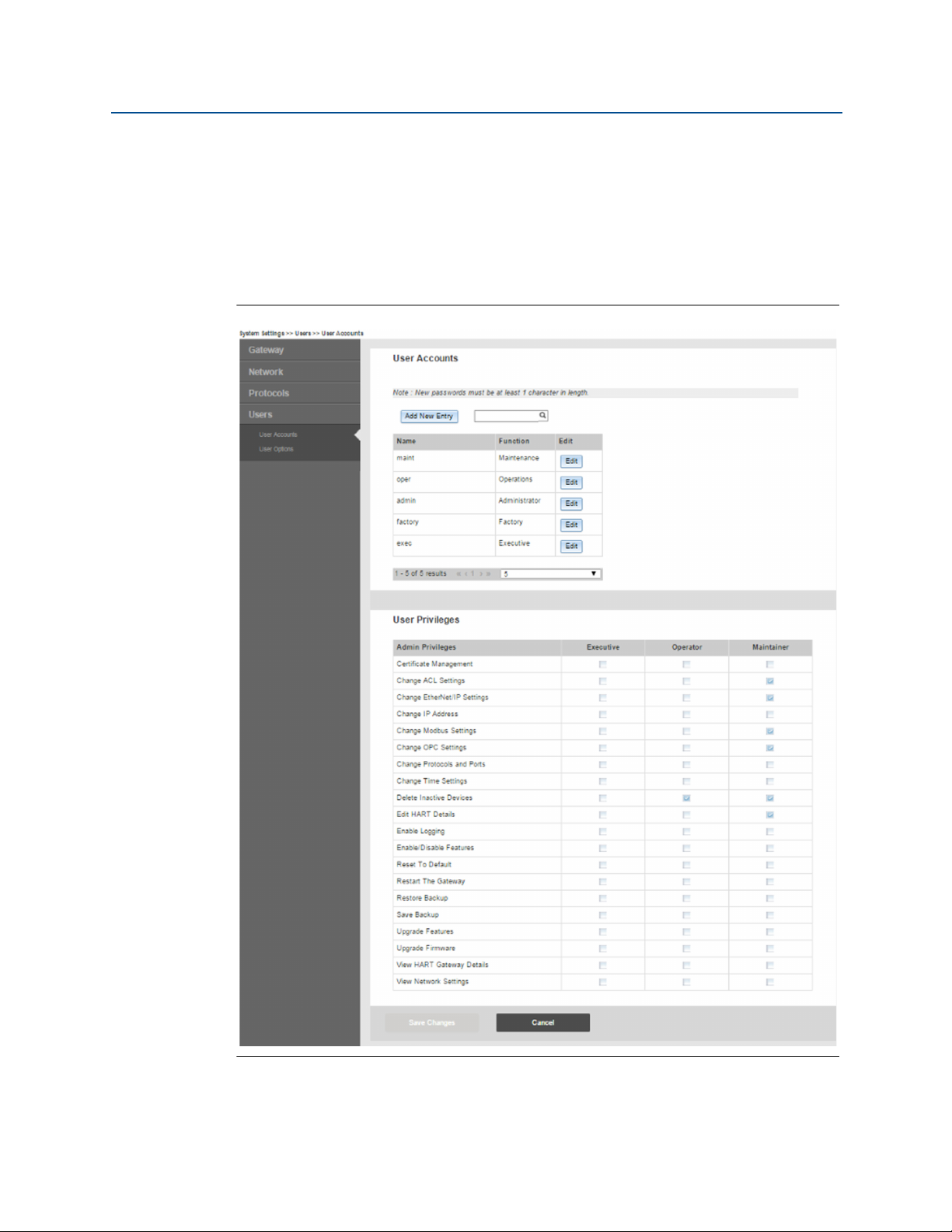
The user functions Executive, Operator, and Maintenance all have customizable User
Privileges. Admin privileges can be selected for each user function type in the table on the
User Accounts page. To see the list of customizable roles, log in as the admin user.
Figure 1-2. User Accounts Page
User Guide
00821-0100-6129, Rev AB
2
Emerson Smart Wireless 4.6
Page 3

User Guide
00821-0100-6129, Rev AB
Emerson Smart Wireless 4.6
4.0 Stale data configuration
4.1 System Settings>Network>Network Settings
The Gateway will set the value of HART_Tag.*_HEALTHY to 'false' (0) if the field device
publishes a variable status of 'bad' indicating the value's quality cannot be guaranteed. The
default setting of the firmware will set the value of HART_Tag.*_HEALTHY to 'false' (0) if a
burst message containing an updated value of the variable is not received within a
minimum timeout of 90 seconds of the expected receive time or eight missed updates,
whichever is longer. These two values are configurable in the Network Settings page of the
Gateway Firmware (see Figure 1-3).
Figure 1-3. Network Settings Page
June 2016
The minimum number of missed updates can now be set to as low as 2, and the minimum
timeout can be set to 0 seconds. This means that if a device is set with a 1-second update
rate, and the stale data is configured to its minimum (2 missed updates and 0 second
timeout), the Gateway will set the value 'false' (0) to the HART_TAG.*_HEALTHY in 2 seconds.
Note
Modifying the defaults should only be used for special situations. Changing the settings
below the default settings could cause false reports of a 'bad' connection during any short
term network disruption. For this reason, use caution when changing the stale data settings
from the default and make sure to verify your configuration before setting it up for
production.
Emerson Smart Wireless 4.6
3
Page 4

Emerson Smart Wireless 4.6
June 2016
Figure 1-4 shows example register values during a simulated field device failure. In this
example, a standard wireless pressure transmitter set for an update period of four seconds is
manually reset at t=140s to simulate an intermittent failure. Note that the PV holds the last
value until the Gateway's stale timer expires 90 seconds later. In this example, the Gateway
Modbus
point values if an error is detected.
Figure 1-4. Register Values during Simulated Field Device Failure
User Guide
00821-0100-6129, Rev AB
®
communication interface is configured to return a value of NaN for all floating
4
Emerson Smart Wireless 4.6
Page 5

User Guide
00821-0100-6129, Rev AB
Emerson Smart Wireless 4.6
June 2016
Emerson Smart Wireless 4.6
5
Page 6

Global Headquarters
Emerson Process Management
6021 Innovation Blvd.
Shakopee, MN 55379, USA
+1 800 999 9307 or +1 952 906 8888
+1 952 949 7001
RFQ.RMD-RCC@EmersonProcess.com
North America Regional Office
Emerson Process Management
8200 Market Blvd.
Chanhassen, MN 55317, USA
+1 800 999 9307 or +1 952 906 8888
+1 952 949 7001
RMT-NA.RCCRFQ@Emerson.com
Latin America Regional Office
Emerson Process Management
1300 Concord Terrace, Suite 400
Sunrise, FL 33323, USA
+1 954 846 5030
+1 954 846 5121
RFQ.RMD-RCC@EmersonProcess.com
User Guide
00821-0100-6129, Rev AB
June 2016
Europe Regional Office
Emerson Process Management Europe GmbH
Neuhofstrasse 19a P.O. Box 1046
CH 6340 Baar
Switzerland
+41 (0) 41 768 6111
+41 (0) 41 768 6300
RFQ.RMD-RCC@EmersonProcess.com
Asia Pacific Regional Office
Emerson Process Management Asia Pacific Pte Ltd
1 Pandan Crescent
Singapore 128461
+65 6777 8211
+65 6777 0947
Enquiries@AP.EmersonProcess.com
Middle East and Africa Regional Office
Emerson Process Management
Emerson FZE P.O. Box 17033
Jebel Ali Free Zone - South 2
Dubai, United Arab Emirates
+971 4 8118100
+971 4 8865465
RFQ.RMTMEA@Emerson.com
Linkedin.com/company/Emerson-Process-Management
Twitter.com/Rosemount_News
Facebook.com/Rosemount
Youtube.com/user/RosemountMeasurement
Google.com/+RosemountMeasurement
Standard Terms and Conditions of Sale can be found at:
www.Emerson.com/en-us/pages/Terms-of-Use.aspx
The Emerson logo is a trademark and service mark of Emerson Electric Co.
Rosemount and Rosemount logotype are trademarks of Emerson Process
Management.
HART is a registered trademark of the FieldComm Group.
Modbus is a registered trademark of Gould Inc.
All other marks are the property of their respective owners.
© 2016 Emerson Process Management. All rights reserved.
 Loading...