

5900 Instruction for Installation, Configuration, and Operation of Proof Test Function with Reference Reflector
Table of contents
 Loading...
Rosemount 5900 Instruction for Installation, Configuration, and Operation of Proof Test Function with Reference Reflector Manuals & Guides
Page 1

Manual Supplement
00809-0200-5900, Rev AC
November 2019
Rosemount™ 5900
Instruction for Installation, Configuration, and Operation of
Proof Test Function with Reference Reflector
Page 2

Page 3

Manual Supplement
00809-0200-5900, Rev AC
Contents
1Section 1: Introduction
2Section 2: Installation
Contents
November 2019
1.1 Section overview . . . . . . . . . . . . . . . . . . . . . . . . . . . . . . . . . . . . . . . . . . . . . . . . . . . . . . .2
1.2 Service support. . . . . . . . . . . . . . . . . . . . . . . . . . . . . . . . . . . . . . . . . . . . . . . . . . . . . . . . .2
1.3 Installation procedure . . . . . . . . . . . . . . . . . . . . . . . . . . . . . . . . . . . . . . . . . . . . . . . . . . .3
2.1 Overview . . . . . . . . . . . . . . . . . . . . . . . . . . . . . . . . . . . . . . . . . . . . . . . . . . . . . . . . . . . . . .5
2.2 Safety messages. . . . . . . . . . . . . . . . . . . . . . . . . . . . . . . . . . . . . . . . . . . . . . . . . . . . . . . .5
2.3 Installation considerations . . . . . . . . . . . . . . . . . . . . . . . . . . . . . . . . . . . . . . . . . . . . . . .6
2.4 Installing the Reference Reflector for Parabolic Antenna . . . . . . . . . . . . . . . . . . . . .7
2.4.1 Reference Reflector Kit . . . . . . . . . . . . . . . . . . . . . . . . . . . . . . . . . . . . . . . . . . . . 7
2.4.2 Tank Geometry - Parabolic Antenna . . . . . . . . . . . . . . . . . . . . . . . . . . . . . . . . . 9
2.4.3 Installing the Reference Reflector . . . . . . . . . . . . . . . . . . . . . . . . . . . . . . . . . .11
2.5 Installing the Reference Reflector for Array Antenna . . . . . . . . . . . . . . . . . . . . . . .18
2.5.1 Reference Reflector Kit . . . . . . . . . . . . . . . . . . . . . . . . . . . . . . . . . . . . . . . . . . .18
2.5.2 Tank Geometry - Array Antenna. . . . . . . . . . . . . . . . . . . . . . . . . . . . . . . . . . . .20
2.5.3 Installing the Reference Reflector . . . . . . . . . . . . . . . . . . . . . . . . . . . . . . . . . .23
3Section 3: Configuration of Reference Reflector
3.1 Overview . . . . . . . . . . . . . . . . . . . . . . . . . . . . . . . . . . . . . . . . . . . . . . . . . . . . . . . . . . . . .29
3.2 Safety messages. . . . . . . . . . . . . . . . . . . . . . . . . . . . . . . . . . . . . . . . . . . . . . . . . . . . . . .29
3.3 Configuration using TankMaster WinSetup . . . . . . . . . . . . . . . . . . . . . . . . . . . . . . .30
3.3.1 Introduction. . . . . . . . . . . . . . . . . . . . . . . . . . . . . . . . . . . . . . . . . . . . . . . . . . . . .30
3.3.2 Considerations . . . . . . . . . . . . . . . . . . . . . . . . . . . . . . . . . . . . . . . . . . . . . . . . . .30
3.3.3 Configuration procedure. . . . . . . . . . . . . . . . . . . . . . . . . . . . . . . . . . . . . . . . . .31
Contents
i
Page 4

Contents
November 2019
Manual Supplement
00809-0200-5900, Rev AC
4Section 4: Operation
4.1 Overview . . . . . . . . . . . . . . . . . . . . . . . . . . . . . . . . . . . . . . . . . . . . . . . . . . . . . . . . . . . . .39
4.2 Safety messages. . . . . . . . . . . . . . . . . . . . . . . . . . . . . . . . . . . . . . . . . . . . . . . . . . . . . . .39
4.3 Proof Test operation . . . . . . . . . . . . . . . . . . . . . . . . . . . . . . . . . . . . . . . . . . . . . . . . . . .40
4.3.1 Proof Test status . . . . . . . . . . . . . . . . . . . . . . . . . . . . . . . . . . . . . . . . . . . . . . . . .43
4.4 Scheduling. . . . . . . . . . . . . . . . . . . . . . . . . . . . . . . . . . . . . . . . . . . . . . . . . . . . . . . . . . . .44
4.4.1 Pop-up message . . . . . . . . . . . . . . . . . . . . . . . . . . . . . . . . . . . . . . . . . . . . . . . . .45
4.5 History . . . . . . . . . . . . . . . . . . . . . . . . . . . . . . . . . . . . . . . . . . . . . . . . . . . . . . . . . . . . . . .46
4.6 Reports. . . . . . . . . . . . . . . . . . . . . . . . . . . . . . . . . . . . . . . . . . . . . . . . . . . . . . . . . . . . . . .47
4.6.1 Viewing a report . . . . . . . . . . . . . . . . . . . . . . . . . . . . . . . . . . . . . . . . . . . . . . . . .48
4.7 Removing a Reference Reflector . . . . . . . . . . . . . . . . . . . . . . . . . . . . . . . . . . . . . . . . .50
5Section 5: Service and Troubleshooting
5.1 Safety messages. . . . . . . . . . . . . . . . . . . . . . . . . . . . . . . . . . . . . . . . . . . . . . . . . . . . . . .51
5.2 Troubleshooting. . . . . . . . . . . . . . . . . . . . . . . . . . . . . . . . . . . . . . . . . . . . . . . . . . . . . . .52
5.3 Tank spectrum . . . . . . . . . . . . . . . . . . . . . . . . . . . . . . . . . . . . . . . . . . . . . . . . . . . . . . . .53
ii
Contents
Page 5

Manual Supplement
Reference Reflector for
Proof Testing
Reference Reflector for
Proof Testing
ROSEMOUNT 5900 WITH PARABOLIC ANTENNA ROSEMOUNT 5900 WITH ARRAY ANTENNA
00809-0200-5900, Rev AC
Section 1: Introduction
November 2019
Section 1 Introduction
The Rosemount 5900 Radar Level Gauge is designed with functionality that lets you proof test
high alarms and verify correct product surface measurement. The Rosemount 5900 allows you
to combine continuous product level monitoring with proof testing at regular intervals. It is
based on a dedicated Reference Reflector that introduces a radar echo at a predefined position
in the tank.
Figure 1-1. The Rosemount 5900 can be equipped with an optional Reference Reflector that allows proof
testing the gauge on a regular basis.
Introduction
1
Page 6

Section 1: Introduction
November 2019
1.1 Section overview
This document is a supplement to the Rosemount 5900S Reference Manual (Document No.
00809-0100-5900).
The sections in this reference manual supplement provide information on installing, operating,
and maintaining the Rosemount 5900 Proof Test System. The sections are organized as follows:
Section 1: Introduction gives a brief introduction to the Rosemount 5900 Proof Test function
and the recommended installation procedure.
Section 2: Installation provides instructions on how to install the Reference Reflector on the
Rosemount 5900 with Parabolic Antenna and Array Antenna.
Section 3: Configuration contains instructions on how to calibrate and configure the
Rosemount 5900 Proof Test function.
Section 4: Operation provides instructions for how to use the proof test function.
Section 5: Service and Troubleshooting provides troubleshooting techniques for the most
common operating problems.
Manual Supplement
00809-0200-5900, Rev AC
1.2 Service support
For service support contact the nearest Emerson Process Management/Rosemount Tank Gauging
representative. Contact information can be found on the web site www.Emerson.com.
2
Introduction
Page 7

Manual Supplement
Review installation considerations.
See “Installation considerations” on page 6.
Mount the Proof Test Reference Reflector.
See “Installing the Reference Reflector for Parabolic Antenna” on
page 7 and “Installing the Reference Reflector for Array Antenna”
on page 18.
Wire the Rosemount 5900
(1)
gauge.
Ensure covers and cable gland/conduit connections are tight.
Configure the Rosemount 5900 for proof testing.
See Section 3: Configuration of Reference Reflector
Verify operation.
(1) See the Rosemount 5900S Reference manual (Document No. 00809-0100-5900 or the
Rosemount 5900C Reference manual (Document No. 00809-0100-5901)
00809-0200-5900, Rev AC
1.3 Installation procedure
Follow these steps for a proper installation of the Reference Reflector for Proof Testing a
Rosemount 5900 Radar Level Gauge.
Section 1: Introduction
November 2019
Introduction
3
Page 8

Section 1: Introduction
November 2019
Manual Supplement
00809-0200-5900, Rev AC
4
Introduction
Page 9

Manual Supplement
00809-0200-5900, Rev AC
Section 2 Installation
Overview . . . . . . . . . . . . . . . . . . . . . . . . . . . . . . . . . . . . . . . . . . . . . . . . . . . . . . . . . . . . . . . . . . page 5
Safety messages . . . . . . . . . . . . . . . . . . . . . . . . . . . . . . . . . . . . . . . . . . . . . . . . . . . . . . . . . . . . page 5
Installation considerations . . . . . . . . . . . . . . . . . . . . . . . . . . . . . . . . . . . . . . . . . . . . . . . . . . . page 6
Installing the Reference Reflector for Parabolic Antenna . . . . . . . . . . . . . . . . . . . . . . . . . page 7
Installing the Reference Reflector for Array Antenna . . . . . . . . . . . . . . . . . . . . . . . . . . . . . page 18
2.1 Overview
The information in this section covers installation of Reference Reflector for proof testing the
Rosemount 5900 Radar Level Gauge.
2.2 Safety messages
Section 2: Installation
November 2019
Procedures and instructions in this section may require special precautions to ensure the safety
of the personnel performing the operation. Information that raises potential safety issues is
indicated by a warning symbol ( ). Refer to the following safety messages before performing
an operation preceded by this symbol.
Failure to follow safe installation and servicing guidelines could result in death or
serious injury:
Make sure only qualified personnel perform the installation.
Use the equipment only as specified in this manual. Failure to do so may impair the
protection provided by the equipment.
Do not perform any service other than those contained in this manual unless you are
qualified.
High voltage that may be present on leads could cause electrical shock:
Avoid contact with leads and terminals.
Make sure the main power to the 2460 System Hub is off and the lines to any other external
power source are disconnected or not powered while wiring the 2460.
Electrical shock could cause death or serious injury:
Use extreme caution when making contact with the leads and terminals.
Installation
Handle the wire and assembly with care to avoid permanent bends.
5
Page 10

Section 2: Installation
November 2019
2.3 Installation considerations
Before you start installing the Reference Reflector, ensure that the following items are
considered in order to fulfill the installation requirements for the Reference Reflector at the
desired position:
Maximum product level in the tank
High Alarm position
Minimum / maximum distance between Gauge Reference Point and Reference
Reflector
See “Tank Geometry - Parabolic Antenna” on page 9 and “Tank Geometry - Array Antenna” on
page 20 for further information on tank geometry and position of the Reference Reflector.
Note
The Reference Reflector for Array Antenna may need to be removed to allow product sampling
through the Still-pipe.
Manual Supplement
00809-0200-5900, Rev AC
6
Installation
Page 11

Manual Supplement
Nut M8
Spring washer
Washer
Nut M8
M8 terminal
Wire Ø 4 mm
Length 5 m
Wire Ø 4 mm
Length 5 m
M8 terminal
Nut M12
Spring washer
Weight
M6 screw (x2)
Allen key size 3
00809-0200-5900, Rev AC
Section 2: Installation
November 2019
2.4 Installing the Reference Reflector for Parabolic Antenna
The Reference Reflector is installed under the antenna. It is attached to a wire fixed to the
Parabolic Antenna. The Reference Reflector introduces a radar echo that is used for proof testing
the Rosemount 5900 Radar Level Gauge. Proof testing can be performed without the need to
open the tank.
2.4.1 Reference Reflector Kit
The Reference Reflector is delivered with all parts needed for proper installation on a Rosemount
5900 with Parabolic Antenna. The Reference Reflector kit includes the following parts:
Wire assembly
Weight assembly
Reference Reflector
Ring Clamping assembly
Figure 2-1. Wire and Weight Assembly
Installation
7
Page 12
Section 2: Installation
M6 cylinder nut M6 screw
Clamping ring
November 2019
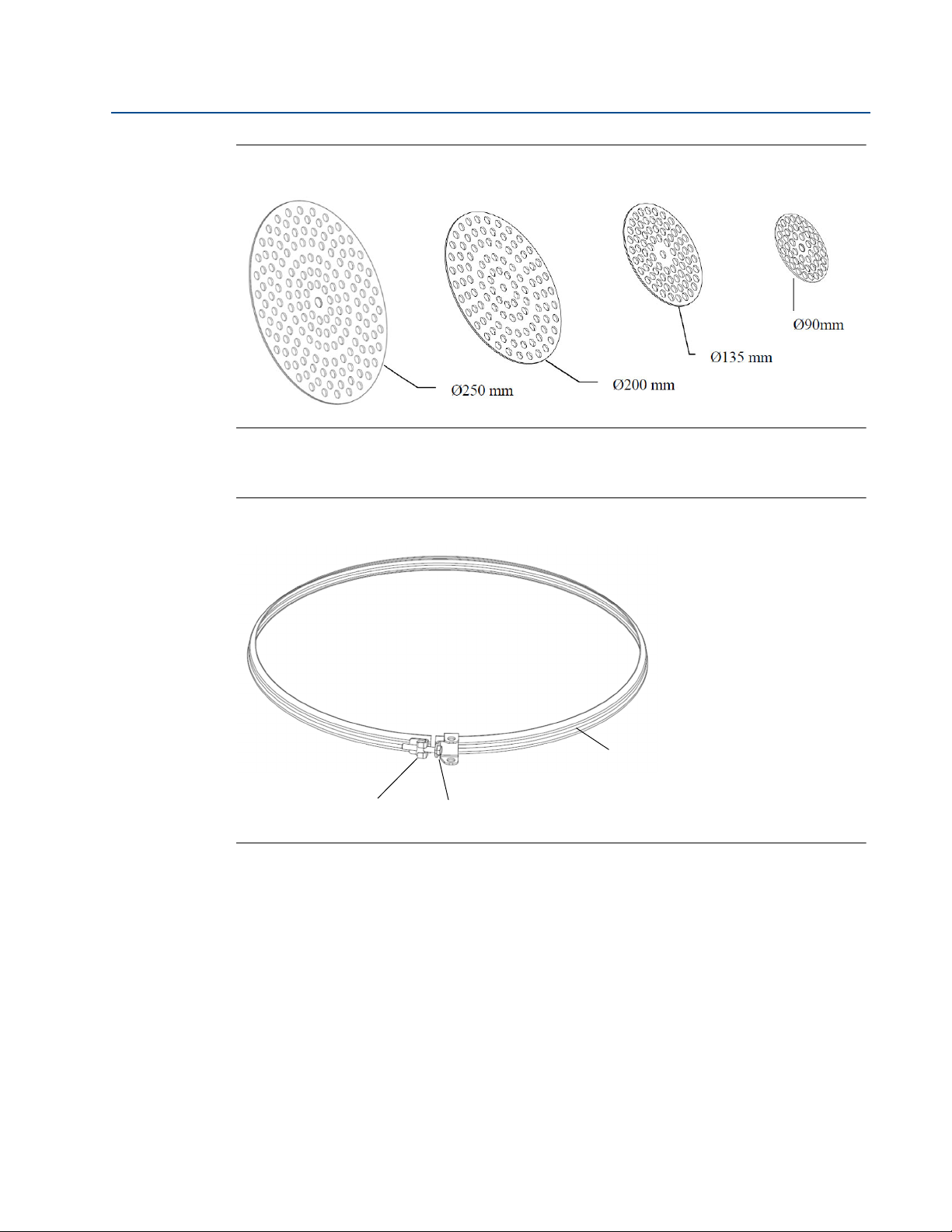
Figure 2-2. Reference Reflector
Figure 2-3. Clamping Ring
Manual Supplement
00809-0200-5900, Rev AC
8
Installation
Page 13
Manual Supplement
Wire
Distance
Reference Reflector (RR) Distance
Minimum: 600 mm
Maximum: 5000 mm
Reference Reflector (RR) Position
Minimum 500 mm
3
4
1
2
Zero Level
Max. product level
Gauge Reference Point
00809-0200-5900, Rev AC
2.4.2 Tank Geometry - Parabolic Antenna
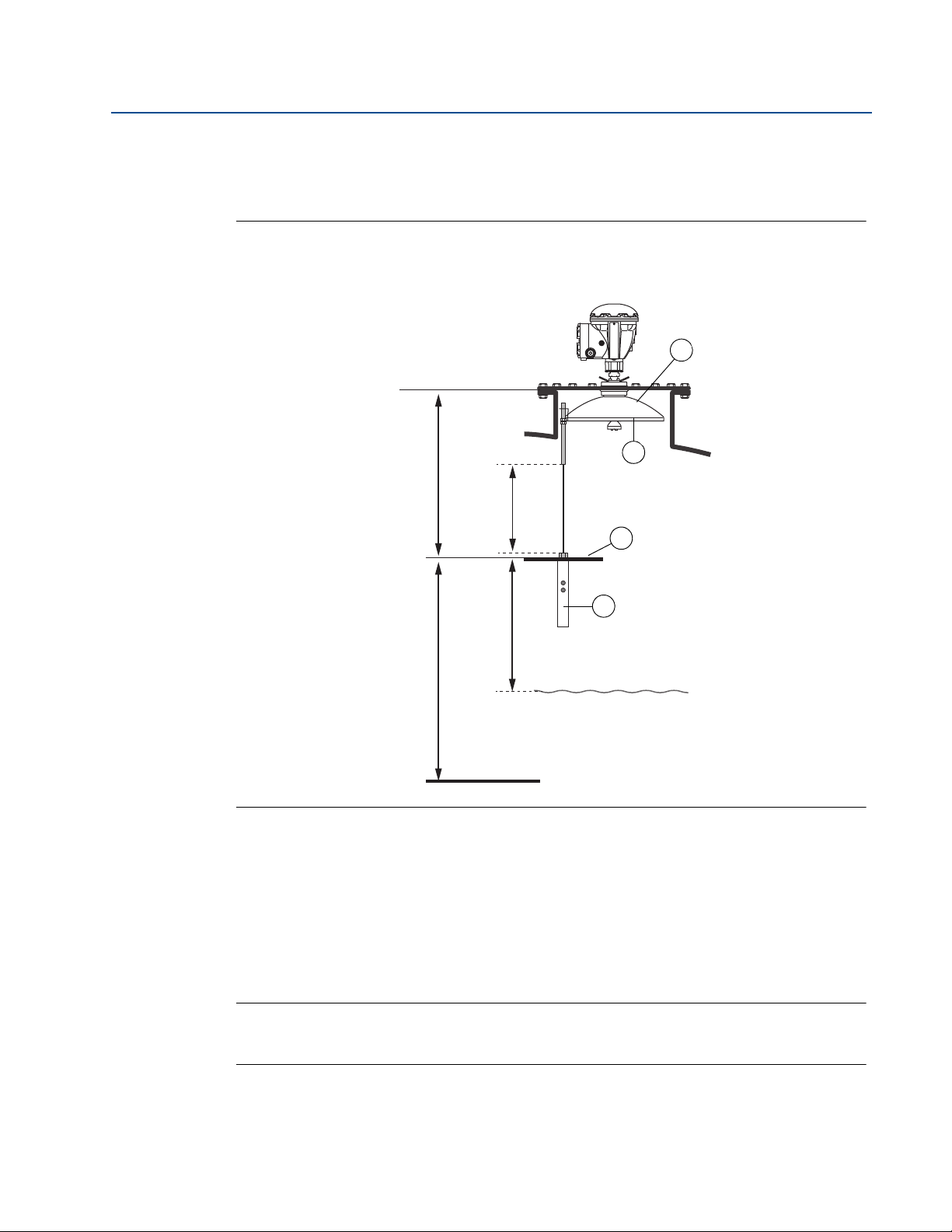
Figure 2-4. Tank geometry for Rosemount 5900 with Parabolic Antenna and Proof Test
Reference Reflector.
Section 2: Installation
November 2019
1. Reference Reflector (RR). Maximum inclination 2.5°.
2. Weight
3. Clamping ring
4. Parabolic antenna
Note
See “Safety Instrumented System (SIS)” on page 10 for installation requirements in Safety
Instrumented Systems (SIS).
Installation
9
Page 14
Section 2: Installation
4
21
Max. product level
Gauge Reference Point
3
5
November 2019
Manual Supplement
00809-0200-5900, Rev AC
Safety Instrumented System
(1)
(SIS)
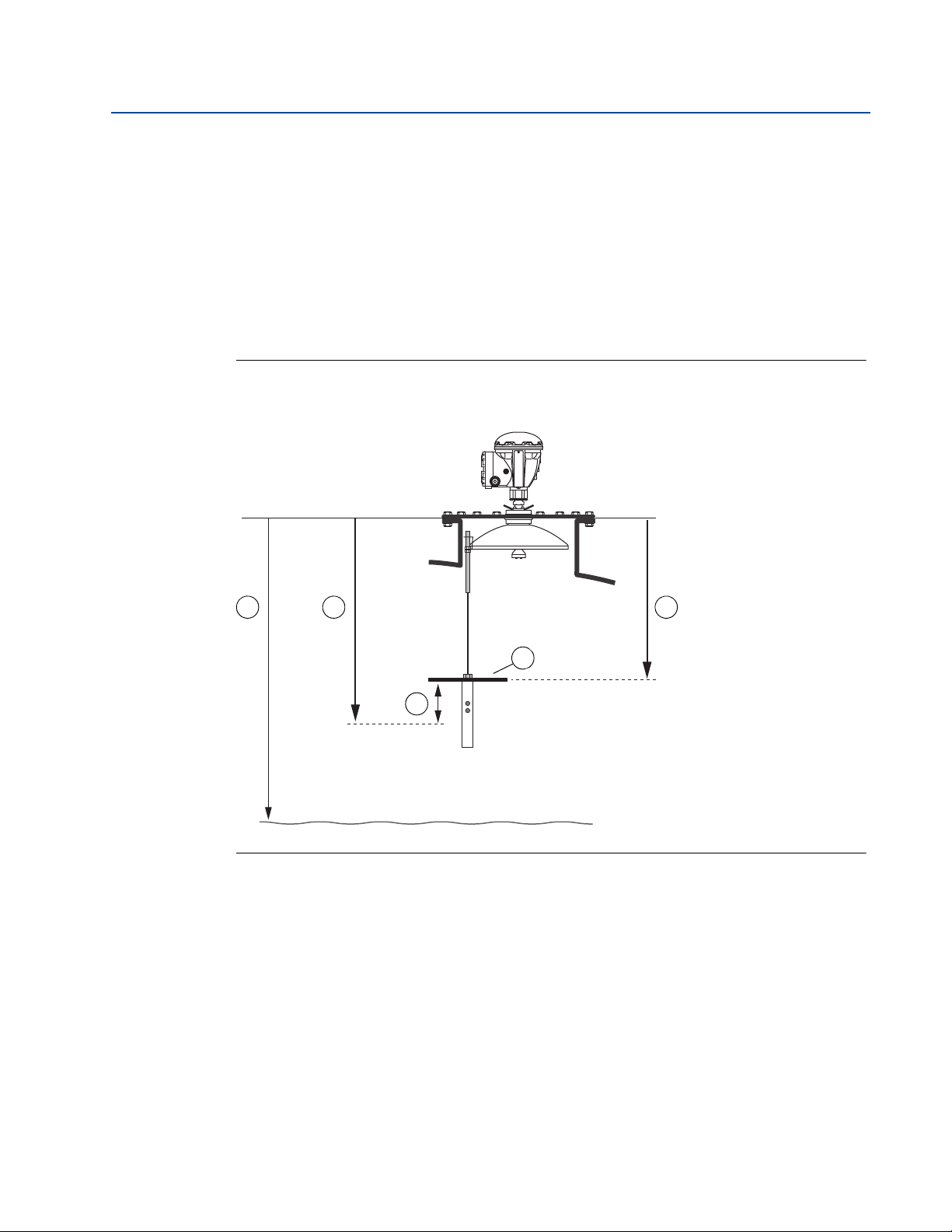
1. Decide position of SIL High Alarm.
2. Find a position for the Reference Reflector (RR) that fulfills the following requirements:
a. Minimum 500 mm above SIL High Alarm Limit.
b. Distance RR - Gauge Reference Point: 600 to 5000 mm.
c. Minimum 500 mm to maximum product level.
Figure 2-5. Tank geometry for Rosemount 5900 with Parabolic Antenna and Proof Test
Reference Reflector in Safety Instrumented System (SIS).
1. SIL Surface Distance
2. SIL High Alarm Limit
3. Distance RR - Gauge Reference Point: 600 to 5000 mm
4. Minimum distance RR - SIL High Alarm = 500 mm
5. Reference Reflector (RR)
(1) See the Rosemount 5900 and 2410 Safety Manual (Document No. 00809-0200-5100) for information on how to install and con-
figure the Rosemount 5900 Radar Level Gauge and 2410 Tank Hub in a Safety Instrumented System.
10
Installation
Page 15

Manual Supplement
1
4
1. Reference Reflector (RR)
2. M12 Nut. Torque=18 Nm
3. Spring washer
4. Weight
3
2
00809-0200-5900, Rev AC
2.4.3 Installing the Reference Reflector
The length of the wire that holds the Reference Reflector needs to be calculated before the
Reference Reflector can be installed in the tank. The wire must be long enough to allow the
Reflector to be properly positioned in the tank including the weight that is attached under the
Reflector.
Handle the wire and assembly with care to avoid permanent bends.
1. Specify the position of the Reference Reflector (RR) and calculate the Reference
Reflector Distance (see Figure 2-4 on page 9).
2. Choose the appropriate reflector size. As a result of the radar beam geometry, a smaller
reflector can be used further away from the radar gauge. There are four different
Reference Reflectors to choose from depending on the Reference Reflector Distance as
shown in Table 2-1.
Section 2: Installation
November 2019
Table 2-1. Reference Reflector Size for Various Distances
Reference Reflector Distance (mm) Diameter (mm)
600 RR Distance < 2000 250
2000 RR Distance < 3000 200
3000 RR Distance < 4000 135
4000 RR Distance < 5000 90
3. Mount the appropriate Reference Reflector on the weight.
4. Tighten the M12 nut to a torque value of 18 Nm.
Installation
11
Page 16

Section 2: Installation
1
2
Wire Distance
1. Reference Reflector (RR)
2. Weight
M6 x 2
Allen key size 3
Torque=2.5 Nm
Cut the wire 0 - 150 mm
under the weight
November 2019
5. Calculate the required Wire Distance. See “Wire Distance calculation” on page 15.
6. Feed the wire through the weight and the Reference Reflector (RR).
Manual Supplement
00809-0200-5900, Rev AC
12
7. Position the weight so the calculated Wire Distance is obtained.
8. Tighten the two screws (size M6) to a torque value of 2.5 Nm.
9. Cut the wire. You may leave 0 to 150 mm of the wire below the weight.
Installation
Page 17

Manual Supplement
Parabolic antenna
A - A
M6 Screw
Torque = 2.3
Clamping ring
A
A
Clamping ring
Parabolic antenna
Nut M8
Torque = 8 Nm
Tank center
Nut M8
Spring washer
Washer
Wire
M8 terminal
Clamping ring
Antenna
00809-0200-5900, Rev AC
10. Mount the clamping ring (see Figure 2-3 on page 8) on the Parabolic Antenna. Ensure
Section 2: Installation
November 2019
that the Reference Reflector is directed towards the center of the tank as illustrated in
Figure 2-4 on page 9.
11. Mount the M8 terminal (which holds the weight and Reference Reflector) on the
clamping ring.
12. Tighten the M8 nut to the specified torque of 8 Nm.
Installation
13
Page 18

Section 2: Installation
Reference Reflector (RR)
Tank center
Parabolic antenna
Tank wall
November 2019
13. Ensure that:
the Reference Reflector is correctly aligned towards the center of the tank
inclination of Reference Reflector is less than 2.5°.
Figure 2-6. Align the Reference Reflector
Manual Supplement
00809-0200-5900, Rev AC
14
Installation
Page 19

Manual Supplement
1
2
Wire Distance
1. Reference Reflector (RR)
2. Weight
00809-0200-5900, Rev AC
Wire Distance calculation
There are two different connections available for the Parabolic Antenna; the Welded and the
Clamped versions. Since the vertical position of the flange will differ slightly for these two
connections, you will have to use different formulas for calculating the proper Wire Distance in
order to obtain the correct position (Reference Reflector Distance) of the Reference Reflector.
Figure 2-7. Wire Distance
Section 2: Installation
November 2019
Installation
15
Page 20

Section 2: Installation
60 mm
Flange
Antenna
W
Ga
November 2019
Welded tank connection
Use the following formula to calculate the required Wire Distance for the welded connection:
Wire Distance=RR + Ga -W - 194 (mm)
where
W= see Figure 2-8 on page 16
Ga= thickness of the flange gasket (see Figure 2-8 on page 16)
RR= Reference Reflector Distance (see Figure 2-4 on page 9)
Figure 2-8. Welded Connection
Manual Supplement
00809-0200-5900, Rev AC
16
Installation
Page 21

Manual Supplement
T = flange thickness
Ga
00809-0200-5900, Rev AC
Clamped tank connection
Use the following formula to calculate the required Wire Distance for the clamped connection:
Wire Distance=RR + Ga + T - 243 (mm)
where
T= flange thickness (see Figure 2-9)
Ga= thickness of the flange gasket (see Figure 2-9)
RR= Reference Reflector Distance (see Figure 2-4 on page 9)
Figure 2-9. Clamped Connection
Section 2: Installation
November 2019
Installation
17
Page 22

Section 2: Installation
Nut M12
Spring washer
Weight
M6 screw (x2)
Allen key size 3
Bronze rod
Wire 4 mm
Length 8 m
November 2019
Manual Supplement
00809-0200-5900, Rev AC
2.5 Installing the Reference Reflector for Array Antenna
2.5.1 Reference Reflector Kit
The Reflector is delivered with all parts needed for proper installation on a Rosemount 5900
with Array Antenna. The Reference Reflector kit includes the following parts:
Wire assembly
Weight assembly
Reference Reflector
Safety Wire
Flexible Ring
Figure 2-10. Wire and Weight Assembly
18
Installation
Page 23

Manual Supplement
Open space to allow
hand dipping
Note!
The reflector may need to be
removed for product sampling
through the pipe.
To secure the Reference
Reflector during installation
in Still-Pipe
M6 Nut
Rod attachment
The Flexible Ring provides an
attachment point in the Still-Pipe for
the wire and weight assembly
00809-0200-5900, Rev AC
Figure 2-11. Reference Reflector
Figure 2-12. Safety Wire
Section 2: Installation
November 2019
Installation
Figure 2-13. Flexible Ring
19
Page 24

Section 2: Installation
Wire Distance
Reference Reflector (RR) Distance
Minimum: 1000 mm
Maximum: 8000 mm
Reference Reflector (RR) Position
Min. 500 mm
4
5
Zero Level
Max. product level
Gauge Reference Point
1
3
2
November 2019
2.5.2 Tank Geometry - Array Antenna
Figure 2-14. Tank Geometry for Rosemount 5900 with Array Antenna Fixed Version and
Proof Test Reference Reflector.
Manual Supplement
00809-0200-5900, Rev AC
20
1. Array antenna
2. Flexible Ring
3. Bronze Rod
4. Reference Reflector (RR). Maximum inclination 2.5
°.
5. Weight
Note!
See “Safety Instrumented System (SIS)” on page 22 for installation requirements in Safety
Instrumented Systems (SIS).
Installation
Page 25

Manual Supplement
Wire Distance
Reference Reflector (RR) Distance
Minimum: 1000 mm
Maximum: 8000 mm
Reference Reflector (RR) Position
Min. 500 mm
4
5
Zero Level
Max. product level
Gauge Reference Point
1
2
3
00809-0200-5900, Rev AC
Figure 2-15. Tank Geometry for Rosemount 5900 with Array Antenna Hatched Version and
Proof Test Reference Reflector.
Section 2: Installation
November 2019
1. Array antenna
2. Flexible Ring
3. Bronze Rod
4. Reference Reflector (RR). Maximum inclination 2.5
5. Weight
Note!
See “Safety Instrumented System (SIS)” on page 22 for installation requirements in Safety
Installation
Instrumented Systems (SIS).
°.
21
Page 26

Section 2: Installation
4
21
Max. product level
Gauge Reference Point
5
3
November 2019
Manual Supplement
00809-0200-5900, Rev AC
Safety Instrumented System
(1)
(SIS)
1. Decide position of SIL High Alarm.
2. Find a position for the Reference Reflector (RR) that fulfills the following requirements:
a. Minimum 500 mm above SIL High Alarm Limit.
b. Distance RR - Gauge Reference Point: see Figure 2-16 and Table 2-2.
c. Minimum 500 mm to maximum product level.
Figure 2-16. Tank geometry for Rosemount 5900 with Array Antenna and Proof Test
Reference Reflector in SIS System (SIL).
Table 2-2. Tank Geometry Parameters for Array Antenna in Safety Instrumented Systems
Item Description Item Description
1 SIL Surface Distance 4 Minimum distance RR - SIL High Alarm Limit: 500 mm
2 SIL High Alarm Limit 5 Reference Reflector (RR)
3 Distance RR - Gauge Reference Point.
(1) See Rosemount 5900 and 2410 Safety Manual (Document No. 00809-0200-5100) for information on how to install and configure
the Rosemount 5900 Radar Level Gauge and 2410 Tank Hub in a Safety Instrumented System.
22
Array antenna 6 inch: 1100 to 8000 mm
Array antenna 8 inch: 1400 to 8000 mm
Array antenna 10 inch: 1800 to 8000 mm
Array antenna 12 inch: 2000 to 8000 mm
Note! These requirements are applicable for both the fixed and
hatched versions of the Array antenna.
Installation
Page 27

Manual Supplement
1
3
1. Reference Reflector (RR)
2. Spring washer
3. Weight
M12 Nut
Torque = 18 Nm
2
00809-0200-5900, Rev AC
2.5.3 Installing the Reference Reflector
You need to calculate the length of the wire that holds the Reference Reflector before the
Reference Reflector can be installed in the tank. The wire must be long enough to allow the
Reflector to be properly positioned in the tank including the weight that is attached under the
Reflector.
Handle the wire and assembly with care to avoid permanent bends.
1. Specify the position of the Reference Reflector (RR).
2. Calculate the Reference Reflector Distance. This is the distance from the Gauge
Reference Point to the Reference Reflector as illustrated in Figure 2-14 on page 20 and
Figure 2-15 on page 21.
Section 2: Installation
November 2019
3. Mount the Reference Reflector on the weight.
4. Tighten the M12 nut to a torque value of 18 Nm.
Installation
23
Page 28

Section 2: Installation
1
2
Wire Distance
1. Reference Reflector (RR)
2. Weight
M6 x 2
Torque=2.5 Nm
Cut the wire 0 - 150 mm
under the weight
Bronze rod
November 2019
5. Calculate the Wire Distance as described in “Wire Distance calculation” on page 27.
6. Feed the wire through the weight and Reference Reflector (RR).
Manual Supplement
00809-0200-5900, Rev AC
24
7. Position the weight to the correct Wire Distance.
8. Tighten the two screws. Torque=2.5 Nm.
9. Cut the wire 0 to 150 mm below the end of the weight.
Installation
Page 29

Manual Supplement
D
90 mm
M6 NUT
Torque=5 Nm
D
Flexible ring
Flexible ring
Rod
attachment
Rod attachment
00809-0200-5900, Rev AC
10. Install the Flexible Ring at the top of the Still-pipe. The ring can be adjusted to fit a wide
11. Ensure that the Flexible Ring fits tightly inside the pipe.
12. Tighten the M6 nut to the specified torque value of 5 Nm.
Section 2: Installation
November 2019
range of Still-Pipe inner diameters according to Table 2-3.
Table 2-3. The Flexible Ring Fits a Wide Range of Still-pipe Inner Diameters
Inner diameter (D)
6 inch pipe 8 inch pipe 10 inch pipe 12 inch pipe
152 - 164 mm 195.5 - 210.2 mm 254.5 - 268 mm 298.4 - 318.1
Installation
25
Page 30

Section 2: Installation
November 2019
13. Fasten one end of the Safety Wire to the Bronze Rod and the other end to the tank.
14. Lower the weight and reflector into the Still-pipe to the full length of the wire.
15. Put the wire into the rod attachment through the slot.
Manual Supplement
00809-0200-5900, Rev AC
26
16. Lower the Bronze Rod until it stops as illustrated below.
17. Remove the Safety Wire from the Bronze Rod.
Installation
Page 31

Manual Supplement
00809-0200-5900, Rev AC
Wire Distance calculation
Use the following formulas to calculate the required Wire Distance.
Array Antenna hatch version:
Wire Distance=RR - Ga - 362 (mm)
Array Antenna fix version:
Wire Distance=RR - 324 (mm)
where
Ga= thickness of the flange gasket
RR= Reference Reflector Distance (see Figure 2-14 on page 20 and Figure 2-15 on page 21)
Section 2: Installation
November 2019
Installation
27
Page 32

Section 2: Installation
November 2019
Manual Supplement
00809-0200-5900, Rev AC
28
Installation
Page 33

Manual Supplement
00809-0200-5900, Rev AC
Section 3: Configuration of Reference Reflector
November 2019
Section 3 Configuration of Reference
Reflector
Overview . . . . . . . . . . . . . . . . . . . . . . . . . . . . . . . . . . . . . . . . . . . . . . . . . . . . . . . . . . . . . . . . . . page 29
Safety messages . . . . . . . . . . . . . . . . . . . . . . . . . . . . . . . . . . . . . . . . . . . . . . . . . . . . . . . . . . . . page 29
Configuration using TankMaster WinSetup . . . . . . . . . . . . . . . . . . . . . . . . . . . . . . . . . . . . . page 30
3.1 Overview
The information in this section covers configuration and calibration of the Reference Reflector
for proof testing the Rosemount
™
5900 Radar Level Gauge.
3.2 Safety messages
Procedures and instructions in this section may require special precautions to ensure the safety
of the personnel performing the operations. Information that raises potential safety issues is
indicated by a warning symbol ( ). Refer to the following safety messages before performing
an operation preceded by this symbol.
Failure to follow safe installation and servicing guidelines could result in death or
serious injury:
Make sure only qualified personnel perform the installation.
Use the equipment only as specified in this manual. Failure to do so may impair the
protection provided by the equipment.
Do not perform any service other than those contained in this manual unless you are
qualified.
Physical access
Unauthorized personnel may potentially cause significant damage to and/or
misconfiguration of end user’s equipment. This could be intentional or unintentional and
needs to be protected against.
Physical security is an important part of any security program and fundamental to
protecting your system. Restrict physical access by unauthorized personnel to protect end
user’s assets. This is true for all systems used within the facility.
Configuration of Reference Reflector
29
Page 34

Section 3: Configuration of Reference Reflector
November 2019
Manual Supplement
00809-0200-5900, Rev AC
3.3 Configuration using TankMaster WinSetup
3.3.1 Introduction
The Rosemount 5900 is configured by using the TankMaster Winsetup configuration program.
WinSetup supports standard configuration of the Rosemount 5900 Radar Level Gauge as well as
configuration of the Reference Reflector for Proof Test applications.
See the Tank Gauging System Configuration Manual
TankMaster WinSetup software to configure a Rosemount Tank Gauging system.
Note
The Proof Test function requires gauge firmware version 1.B9 or higher and Rosemount
TankMaster 6.E1 or higher .
Proof test features
The Rosemount 5900 Proof Test function in TankMaster Winsetup includes the following
functions:
Configure proof test
Perform proof test
View proof test history
Schedule proof tests
3.3.2 Considerations
The following requirements and recommendations must be considered when using the
Rosemount 5900 Proof Test function:
for more information on using the
30
Do not perform calibration of Proof Test function during activities in the tank, for
example when it is filled or emptied.
Do not perform calibration of Proof Test function during extreme environmental
conditions.
Proof Test calibration must be repeated whenever configuration of tank geometry
parameters has been changed. This may for example include parameters such as
Calibration Distance or Pipe Diameter.
For Still-Pipes the slots must not be wider than one inch (1”)
Configuration of Reference Reflector
Page 35

Manual Supplement
Proof Test
00809-0200-5900, Rev AC
3.3.3 Configuration procedure
The Proof Test function needs to be configured prior to any proof test can be performed. This
means calibrating the reference reflector by specifying the actual position of the reflector and
the nominal amplitude of the reflected radar signal.
Configuration also includes setting up the approved amplitude range (Min./Max. Amplitude
Factor) and allowed deviations from the calibrated reflector position (Tolerance). This step
needs to be done for physical as well as simulated reference reflectors.
Ensure that a standard configuration of the Rosemount 5900 is performed prior to the proof test
configuration.
To configure a Rosemount 5900 with Reference Reflector for Proof Test applications do the
following:
1. Ensure that the TankMaster WinSetup program is up and running.
2. In the Winsetup workspace, click the right mouse button on the Rosemount 5900
device icon and select the Proof Test option.
Section 3: Configuration of Reference Reflector
November 2019
Configuration of Reference Reflector
31
Page 36

Section 3: Configuration of Reference Reflector
November 2019
3. The Proof Test window appears. It lets you perform proof tests, view previous tests, and
schedule future tests. There are two different versions:
Option Proof Test Window
SIL2 Model Code S
and non-SIL
Manual Supplement
00809-0200-5900, Rev AC
SIL3
4. Click the Reference Reflector Configuration/Configuration button to open the
Reference Reflector Configuration window:
32
Configuration of Reference Reflector
Page 37

Manual Supplement
00809-0200-5900, Rev AC
Section 3: Configuration of Reference Reflector
November 2019
5. In case no previous Proof Test configuration has been performed, or if the Proof Test
calibration has been reset, the status message “ Not Calibrated” will be displayed.
6. The Proof Test Configuration window lets you specify calibration parameters for the
Reference Reflector. It also lets you set up the approved amplitude range and approved
deviations from the calibrated reflector position.
Configuration of Reference Reflector
33
Page 38

Section 3: Configuration of Reference Reflector
November 2019
7. In the Calibrate Reference Reflector pane, enter the actual position of the Reference
Reflector (RR) in the RR Distance field. The RR Distance value will be used by the level
gauge as a starting point when searching for the Reference Reflector. A position
between 0.5 m and 8.0 m below the Tank Reference Point is allowed depending on the
antenna type that is used. See Section 2: Installation for more information.
8. Specify the desired Distance Tolerance value. This is the region around the specified
RR Distance within which the level gauge searches for a radar echo when calibrating the
Reference Reflector (see Figure 3-1 on page 38). The default value is 0.3 m.
9. Click the Calibrate button.
Manual Supplement
00809-0200-5900, Rev AC
10. Click Yes. Now the level gauge starts searching for the Reference Reflector. When the
search is finished, the Calibrate window appears showing the distance to the Reference
Reflector and the amplitude of the reflected radar signal.
11. Verify that the radar echo originates from the Reference Reflector and not from any
other object in the tank. The measured Distance and Amplitude values will be used as
reference values when future Proof Tests are performed.
34
Configuration of Reference Reflector
Page 39

Manual Supplement
00809-0200-5900, Rev AC
12. For Safety Instrumented Systems (SIL) verify that the amplitude is within the following
13. Click the Save button to store the current calibration.
Section 3: Configuration of Reference Reflector
November 2019
recommended range:
Rosemount 5900 with Parabolic antenna: 600 to 1200 mV
Rosemount 5900 with Array antenna (Still-Pipe): 1000 to 3500 mV
Rosemount 5900 with simulated antenna: approximately 600 mV
14. In case the product surface is too close to the Reference Reflector during the
calibration, a warning message will appear allowing you to choose whether to cancel or
to save the calibration data.
See Section 2: Installation for information on requirements for minimum distance
between Reference Reflector and product surface.
15. If calibration failed you may consider the following:
Check that the actual position of the reference reflector (RR) is within the search
window given by the calibration parameters RR Distance and Distance Tolerance.
Verify that the reference reflector is horizontal within the specifications for maximum
inclination (see “Tank Geometry - Parabolic Antenna” on page 9.
Verify that there are no disturbing objects near the reference reflector that may
interfere.
Configuration of Reference Reflector
35
Page 40

Section 3: Configuration of Reference Reflector
November 2019
16. Return to the Proof Test Configuration window and proceed with configuration of
Reference Reflector Settings.
Manual Supplement
00809-0200-5900, Rev AC
17. Normally, the default settings of Min./Max. Amplitude Factors and Tolerance can be
used without any changes. Proof tests must be within these limits in order to be
approved. If needed, these settings can be changed.
18. Verify that Reference Reflector Status is OK. RR Status will be OK as long as the actual
distance (Echo Distance) and amplitude (Echo Amplitude) are within the specified
tolerances as specified in the Reference Reflector Settings pane. Click the Apply button
to store the parameters.
19. Specify the desired Default Test Time. This value will be used as the default value in the
Level Sensor Test window. The actual test time can be changed when running the test.
20. If Reference Reflector Status is OK, click the OK button to close the Proof Test
Configuration window. Now the level gauge is ready for Proof Testing.
36
Configuration of Reference Reflector
Page 41

Manual Supplement
00809-0200-5900, Rev AC
Example
Table 3-1 shows an example of a proof test configuration for a Rosemount 5900 Radar Level
Gauge with Reference Reflector. Table 3-2 shows the actual distance and amplitude as
measured by the Rosemount 5900 gauge.
In the example, the measured distance to the Reference Reflector (Echo Distance) is 2.020 m.
This is within the approved distance range as shown in Table 3-1. The amplitude of 450 mV
(Echo Amplitude) is within the approved amplitude range. See also Figure 3-1 on page 38.
Table 3-1. Configuration
Section 3: Configuration of Reference Reflector
November 2019
Parameter Configuration
Min. Amplitude Factor
Max. Amplitude Factor
Tolerance
Calibrated Amplitude
Calibrated Distance
Approved amplitude
Approved distance
0.25
2.5
0.06 m
400 mV
2.000 m
100 to 1000 mV
1.940 to 2.060 m
Table 3-2. Measurements
Parameter Measurement
Echo Distance 2.020 m
Echo Amplitude 450 mV
Note
For Safety Instrumented Systems (SIL) the amplitude should be within the recommended
range:
- Rosemount 5900 with Parabolic antenna: 600 to 1200 mV.
- Rosemount 5900 with Array antenna (Still-Pipe): 1000 to 3500 mV.
Configuration of Reference Reflector
37
Page 42

Section 3: Configuration of Reference Reflector
Approved amplitude
Distance
Tolerance
Calibrated Distance
Distance
Echo
Amplitude
Calibrated Amplitude
Max. amplitude
Min. amplitude
Product surface
November 2019
Figure 3-1. Proof Test Calibration
Manual Supplement
00809-0200-5900, Rev AC
38
Table 3-3. Configuration Parameters for a Proof Test Setup
Parameter Description
Calibrated Amplitude Amplitude of the measurement signal that was reflected by the
Reference Reflector during calibration.
calibration.
Rosemount 5900 searches for a radar echo when calibrating the
Reference Reflector.
proof test.
Calibrated Distance Distance to the Reference Reflector measured by the gauge during
Distance Tolerance The region around the specified RR Distance within which the
Approved Amplitude Approved range of signal amplitudes during a proof test.
Min./Max. Amplitude Minimum and maximum amplitude values that will be allowed during a
RR Distance Distance from the Gauge Reference Point to the reference reflector (RR).
Configuration of Reference Reflector
Page 43

Manual Supplement
00809-0200-5900, Rev AC
Section 4 Operation
Overview . . . . . . . . . . . . . . . . . . . . . . . . . . . . . . . . . . . . . . . . . . . . . . . . . . . . . . . . . . . . . . . . . . page 39
Safety messages . . . . . . . . . . . . . . . . . . . . . . . . . . . . . . . . . . . . . . . . . . . . . . . . . . . . . . . . . . . . page 39
Proof Test operation . . . . . . . . . . . . . . . . . . . . . . . . . . . . . . . . . . . . . . . . . . . . . . . . . . . . . . . . page 40
Scheduling . . . . . . . . . . . . . . . . . . . . . . . . . . . . . . . . . . . . . . . . . . . . . . . . . . . . . . . . . . . . . . . . . page 44
History . . . . . . . . . . . . . . . . . . . . . . . . . . . . . . . . . . . . . . . . . . . . . . . . . . . . . . . . . . . . . . . . . . . . page 46
Reports . . . . . . . . . . . . . . . . . . . . . . . . . . . . . . . . . . . . . . . . . . . . . . . . . . . . . . . . . . . . . . . . . . . . page 47
Removing a Reference Reflector . . . . . . . . . . . . . . . . . . . . . . . . . . . . . . . . . . . . . . . . . . . . . . page 50
4.1 Overview
This section contains information on the Light Emitting Diodes (LED) on the front of the
Rosemount 2460 System Hub.
Section 4: Operation
November 2019
4.2 Safety messages
Procedures and instructions in this section may require special precautions to ensure the safety
of the personnel performing the operations. Information that raises potential safety issues is
indicated by a warning symbol ( ). Refer to the following safety messages before performing
an operation preceded by this symbol.
Failure to follow safe installation and servicing guidelines could result in death or
serious injury:
Make sure only qualified personnel perform the installation.
Use the equipment only as specified in this manual. Failure to do so may impair the
protection provided by the equipment.
Do not perform any service other than those contained in this manual unless you are
qualified.
Operation
39
Page 44

Section 4: Operation
Proof Test
November 2019
4.3 Proof Test operation
Prior to running a Proof Test you will have to ensure that the Proof Test function is properly
calibrated and configured as described in Section 3: Configuration of Reference Reflector.
Manual Supplement
00809-0200-5900, Rev AC
To run a proof test for a Rosemount
1. Ensure that the TankMaster
™
5900 with Reference Reflector do the following:
™
WinSetup program is up and running.
40
2. In the TankMaster Winsetup workspace, click the right mouse button on the
Rosemount 5900 device icon and choose the Proof Test option.
3. The Proof Test window appears. It lets you perform various tasks such as performing
Proof tests, viewing Proof Test history, and schedule future Proof Tests.
Operation
Page 45

Manual Supplement
SIL2 MODEL CODE S AND NON-SIL SIL3
00809-0200-5900, Rev AC
Section 4: Operation
November 2019
4. To perform a proof test, select the check box for Reference Reflector test, and click the
Start Guided Proof Test button. For SIL3 gauges; in the Level Sensor (ATG) pane click
the Test button.
5. The High Level Alarm Test window lets you start a proof test if a proof test configuration
is performed. In case the Start Proof Test button is disabled you will have to make a
calibration of the Reference Reflector first. See Section 3: Configuration of Reference
Reflector for more information.
Operation
41
Page 46

Section 4: Operation
November 2019
6. The following measurement data is presented:
Manual Supplement
00809-0200-5900, Rev AC
Parameter Description
Level Distance from the Zero Reference Point to the product surface or the
Reference Reflector, respectively
Ullage Distance from the Gauge Reference Point to the product surface
Distance Distance from the Gauge Reference Point to the Reference Reflector
Amplitude Amplitude of the radar signal reflected by the product surface or the
Reference Reflector, respectively.
7. Specify duration of the test in the Proof Test Time field. It can be set to any value
between 30 seconds and 60 minutes. The default value is 120 seconds.
8. Ensure that device status is OK. See different status messages that may appear
according to Table 4-1 on page 4-43.
9. Click the Start Proof Test button to perform the test for the specified Proof Test Time.
10. Note the Warning that appears when starting the Proof Test. Ensure that the necessary
actions are taken in order to maintain safety during the test.
42
11. When the proof test is finished you will have to fill in a proof test form in order to create
a report (see “Proof Test Report” on page 49). A report in PDF format will be created
automatically and will be available from the Proof Test History window. See “Viewing a
report” on page 48.
Operation
Page 47

Manual Supplement
00809-0200-5900, Rev AC
4.3.1 Proof Test status
Table 4-1. Proof Test Status Options
Status options
Proof Test Active
Test Finished
Test Ended by User
RR Not Found
RR not Calibrated
Level Surface Too Close
Proof Test Status not Available
Section 4: Operation
November 2019
Operation
43
Page 48

Section 4: Operation
SIL2 MODEL CODE S AND NON-SIL SIL3
Type an email address in this field
November 2019
4.4 Scheduling
You may specify a scheduling interval in order to be reminded when it is time for a new Proof
Test. There are two reminder options available:
e-mail
pop-up window
To specify scheduling options and reminder settings:
1. Open the Proof Test window.
Manual Supplement
00809-0200-5900, Rev AC
44
2. Click the Scheduling button.
3. Enter the desired date, time, and scheduling interval.
4. Choose one or both of the reminder options; Pop-up Message and/or E-mail. The
More button opens the Email Details window which lets you type a subject line and a
message text for the email reminder.
Operation
Page 49

Manual Supplement
00809-0200-5900, Rev AC
4.4.1 Pop-up message
The Reminder pop-up message will appear at the scheduled time.
Figure 4-1. Pop-up Message with Reminder to Perform Proof Test
In case you choose to accept, you will be directed to the Proof Test window in order to start the
Proof Test procedure as described in Section 4: Proof Test operation“Proof Test operation” on
page 40.
Section 4: Operation
November 2019
You may choose to skip the test altogether by clicking the Skip This Test button, or you may let
WinSetup remind you later by choosing one of the options in the Remind In drop-down list:
1 Day, 1 Week, or 1 Month.
Figure 4-2. If Proof Test Is Skipped You May Choose To Be Reminded Later
Operation
45
Page 50

Section 4: Operation
November 2019
4.5 History
The Proof Test History function lets you view previously performed proof tests for a device. You
can also view tests that were interrupted resulting in no report creation.
Figure 4-3. Proof Test History
Manual Supplement
00809-0200-5900, Rev AC
46
Using Back and Forward buttons, or selecting the test date, you may navigate through the
tests. The following information about test parameters will be shown:
RR Status
Proof Test Status
Echo Distance
Echo Amplitudes
Date
Performed By
Approved By
Note
Test reports are available by pressing the Show Test Report button, see “Viewing a report” on
page 48.
Operation
Page 51

Manual Supplement
SIL2 MODEL CODE S AND NON-SIL SIL3
00809-0200-5900, Rev AC
4.6 Reports
When a proof test is finished a report will be generated. For SIL3 you will have to fill in a
questionnaire in order to create the report.
1. When prompted, fill in the proof test report form.
Section 4: Operation
November 2019
2. Click the Save button to store the proof test form.
3. A report in PDF format will be created automatically. It will be available from the Proof
Test History window. See “Viewing a report” on page 48.
Operation
47
Page 52

Section 4: Operation
Show the selected report
Select a test report
November 2019
4.6.1 Viewing a report
Reports in Adobe Acrobat pdf format are available via the Proof Test History window.
To view a report:
1. In TankMaster WinSetup, click the Rosemount 5900 icon and select the Proof Test
option to open the Proof Test window.
2. In the Level Sensor (ATG) pane, click the History button.
3. In the Proof Test History window, select the desired test.
Manual Supplement
00809-0200-5900, Rev AC
48
4. Click the Show Test Report button. Acrobat Reader opens and displays a report for the
selected proof test.
Operation
Page 53

Manual Supplement
SIL2 MODEL CODE “S” AND NON-SIL SIL3
00809-0200-5900, Rev AC
The report includes device information and device status. There is also information regarding
the result of the proof test, for example whether alarms did sound or if emergency shutdown
was activated.
Figure 4-4. Proof Test Report
Section 4: Operation
November 2019
Operation
49
Page 54

Section 4: Operation
November 2019
4.7 Removing a Reference Reflector
There may be a situation when you would like to remove the Reference Reflector and disable the
Proof Test function. Then you can use the Reset function to remove all Proof Test calibration
data. This ensures that there is no data stored in the Rosemount 5900 database that may
interfere with the current measurements.
1. Open the Proof Test window and click the Configuration button.
2. In the Reference Reflector Configuration window, click the Reset button to open the Reset
window.
Manual Supplement
00809-0200-5900, Rev AC
50
3. The Reset window shows the current Reference Reflector calibration data for the
Rosemount 5900 Radar Level Gauge.
4. Click the Reset button to clear all calibration data. Status will be changed to Not
Calibrated.
Operation
Page 55

Manual Supplement
00809-0200-5900, Rev AC
Section 5: Service and Troubleshooting
November 2019
Section 5 Service and Troubleshooting
Safety messages . . . . . . . . . . . . . . . . . . . . . . . . . . . . . . . . . . . . . . . . . . . . . . . . . . . . . . . . . . . . page 51
Troubleshooting . . . . . . . . . . . . . . . . . . . . . . . . . . . . . . . . . . . . . . . . . . . . . . . . . . . . . . . . . . . . page 52
Tank spectrum . . . . . . . . . . . . . . . . . . . . . . . . . . . . . . . . . . . . . . . . . . . . . . . . . . . . . . . . . . . . . page 53
5.1 Safety messages
Procedures and instructions in this section may require special precautions to ensure the safety
of the personnel performing the operations. Information that raises potential safety issues is
indicated by a warning symbol ( ). Refer to the following safety messages before performing
an operation preceded by this symbol.
Failure to follow safe installation and servicing guidelines could result in death or
serious injury:
Make sure only qualified personnel perform the installation.
Use the equipment only as specified in this manual. Failure to do so may impair the
protection provided by the equipment.
Do not perform any service other than those contained in this manual unless you are
qualified.
High voltage that may be present on leads could cause electrical shock:
Avoid contact with leads and terminals.
Make sure the main power to the 2410 Tank Hub is off and the lines to any other external
power source are disconnected or not powered while wiring the 2460.
Service and Troubleshooting
51
Page 56

Section 5: Service and Troubleshooting
November 2019
5.2 Troubleshooting
Table 5-1 provides summarized troubleshooting suggestions for the most common operating
problems.
Table 5-1. Troubleshooting Chart
Symptom Possible cause Action
Manual Supplement
00809-0200-5900, Rev AC
Reference Reflector (RR) not
found
Proof Test could not be started Product surface too close to the RRMake sure that the product surface is below the
Proof Test was aborted
unexpectedly
RR calibration could not be
performed
Incorrect configuration
RR inclination too high Adjust the RR and make sure that the RR is
The Reference Reflector is
within the Hold Off region
Wrong search window due to
using incorrect reference
system
RR Calibration could not be
performed
Write protection is enabled Disable write protection
Check RR Distance
Check Distance Tolerance
horizontal within specified limit see Section 2:
Installation.
Check that the reflector is installed according to the
instructions in Section 2: Installation. Ensure that it
is installed according to the requirements for
minimum Reference Reflector Distance.
Ensure that distances are measured in the correct
reference system as described in “Tank Geometry -
Parabolic Antenna” on page 9 and “Tank Geometry
- Array Antenna” on page 20. Note for example,
that the Gauge Reference Point is located at the
flange of the tank nozzle.
See “RR calibration could not be performed”.
maximum level that is allowed for RR calibration,
see Section 2: Installation.
Reference Reflector does not
appear in the Tank Scan
window
(1) See “Tank spectrum” on page 53
52
(1)
Tank Signal Mean (TSM)
function (near-zone
improvement) filters away the
Reference Reflector
Enable Peak Labels by checking the box
Service and Troubleshooting
Page 57

Manual Supplement
00809-0200-5900, Rev AC
5.3 Tank spectrum
The Tank Scan function is a useful tool to verify that the Rosemount™ 5900 level gauge is able to
locate the product surface and the reference reflector. It lets you locate possible disturbing
objects, and you may also check that amplitude thresholds are properly set so that the
Reference Reflector echo is not filtered away.
Figure 5-1. Tank Spectrum with Radar Echoes from Reference Reflector and Product
Surface.
Section 5: Service and Troubleshooting
November 2019
Note
Simulated reference reflector will not be shown in tank scan.
Service and Troubleshooting
53
Page 58

Section 5: Service and Troubleshooting
Properties
November 2019
To open the Tank Scan window:
1. In the WinSetup workspace, click the right mouse button on the device icon.
Manual Supplement
00809-0200-5900, Rev AC
2. Choose the Properties option.
3. Select the Advanced tab an click the Tank Scan button.
54
Service and Troubleshooting
Page 59

Manual Supplement
00809-0200-5900, Rev AC
Index
Index
November 2019
A
Amplitude Factors . . . . . . . . . . . . . . . . . . . . . . . . . . . . . 36
C
Calibrate button . . . . . . . . . . . . . . . . . . . . . . . . . . . . . . . 34
Calibrate window . . . . . . . . . . . . . . . . . . . . . . . . . . . . . . 34
Clamped tank connection . . . . . . . . . . . . . . . . . . . . . . . 17
Clamping ring . . . . . . . . . . . . . . . . . . . . . . . . . . . . . . . . . 13
Configuration . . . . . . . . . . . . . . . . . . . . . . . . . . . . . . . . . 29
D
Distance Tolerance . . . . . . . . . . . . . . . . . . . . . . . . . . 34, 35
F
Flexible Ring . . . . . . . . . . . . . . . . . . . . . . . . . . . . . . . . . . 25
H
History . . . . . . . . . . . . . . . . . . . . . . . . . . . . . . . . . . . . . . 46
I
Installation . . . . . . . . . . . . . . . . . . . . . . . . . . . . . . . . . . . . 5
Introduction . . . . . . . . . . . . . . . . . . . . . . . . . . . . . . . . . . . 1
M
Max. Amplitude Factor . . . . . . . . . . . . . . . . . . . . . . . . . . 36
Min. Amplitude Factor . . . . . . . . . . . . . . . . . . . . . . . . . . 36
P
Proof Test Configuration window . . . . . . . . . . . . . . . . . 33
R
Reference Reflector . . . . . . . . . . . . . . . . . . . . . . . . . . . . 23
Parabolic Antenna. . . . . . . . . . . . . . . . . . . . . . . . . . 11
Reference Reflector kit. . . . . . . . . . . . . . . . . . . . . . . . . . . .7
Reminder . . . . . . . . . . . . . . . . . . . . . . . . . . . . . . . . . . . . 44
RR Distance . . . . . . . . . . . . . . . . . . . . . . . . . . . . . . . 34, 35
S
Safety Wire . . . . . . . . . . . . . . . . . . . . . . . . . . . . . . . . . . . 26
Scheduling . . . . . . . . . . . . . . . . . . . . . . . . . . . . . . . . . . . 44
Service Support . . . . . . . . . . . . . . . . . . . . . . . . . . . . . . . . .2
Support. . . . . . . . . . . . . . . . . . . . . . . . . . . . . . . . . . . . . . . .2
T
Tank Geometry
Array Antenna
Parabolic Antenna. . . . . . . . . . . . . . . . . . . . . . . . . . . .9
Tolerance . . . . . . . . . . . . . . . . . . . . . . . . . . . . . . . . . . . . 36
. . . . . . . . . . . . . . . . . . . . . . . . . . . . . 20
W
Welded tank connection . . . . . . . . . . . . . . . . . . . . . . . . 16
Wire Distance . . . . . . . . . . . . . . . . . . . . . . . . . . . . . . 12, 15
Wire Distance Calculation . . . . . . . . . . . . . . . . . . . . 15, 27
clamped tank connection. . . . . . . . . . . . . . . . . . . . 17
Welded tank connection . . . . . . . . . . . . . . . . . . . . 16
O
Operation . . . . . . . . . . . . . . . . . . . . . . . . . . . . . . . . . . . . 39
Index
Index-1
Page 60

Index
November 2019
Manual Supplement
00809-0200-5900, Rev AC
Index-2
Index
Page 61

Page 62

Global Headquarters and Europe Regional Office
Tank Gauging
Emerson Automation Solutions
Box 150
(Visiting address: Layoutvägen 1)
SE-435 23 Mölnlycke
+46 31 337 00 00
+46 31 25 30 22
sales.rtg@emerson.com
North America Regional Office
Tank Gauging
Emerson Automation Solutions
6005 Rogerdale Road
Mail Stop NC 136
Houston TX 77072
United States
+1 281 988 4000 or +1 800 722 2865
sales.rtg.hou@emerson.com
Latin America Regional Office
Emerson Automation Solutions
1300 Concord Terrace, Suite 400
Sunrise, FL 33323, USA
+1 954 846 5030
+1 954 846 5121
RFQ.RMD-RCC@Emerson.com
Manual Supplement
00809-0200-5900, Rev AC
November 2019
Linkedin.com/company/Emerson-Process-Management
Asia Pacific Regional Office
Emerson Automation Solutions
1 Pandan Crescent
Singapore 128461
+65 6777 8211
+65 6777 0947
Enquiries@AP.Emerson.com
Middle East and Africa Regional Office
Tank Gauging
Emerson Automation Solutions
P.O Box 20048
Manama
Bahrain
+973 1722 6610
+973 1722 7771
RFQ.RMTMEA@Emerson.com
Twitter.com/Rosemount_News
Facebook.com/Rosemount
Youtube.com/user/RosemountMeasurement
© 2019 Rosemount\ Inc. All rights reserved.
Emerson Terms and Conditions of Sale are available upon request. The
Emerson logo is a trademark and service mark of Emerson Electric Co.
Rosemount is a mark of one of the Emerson family of companies. All
other marks are the property of their respective owners.
Loading...