

Page 1

blak Integrated Amplifier
Manual
blak Integrated Amplifier
& Integrated Amplifier USB
MANUAL
Roksan Audio Ltd
CLASSIFICATION: General Use
All specifications are liable to change without notice. E&OE
Roksan Audio Ltd, Jubilee Close, Townsend Lane, London, NW9 8TR, United Kingdom
Registered in England | Number: 3089229 | VAT Number: 719 3079 23 | Director: T Hashemi
ROKSAN AUDIO
Website: www.roksan.co.uk | email: info@roksan.co.uk
Tel: +44 (0)20 8900 6801 | Fax: +44 (0)20 8205 2644
1
Page 2

blak Integrated Amplifier
Manual
This manual is divided into the following sections
and covers the following products:
• blak Integrated Amplifier
• blak Integrated Amplifier USB
• Safety Instructions (accompanying card)
CONTENTS
• Introduction
• Safety Certification
• Cautions
• Installation
• Setup
• Operation
• Troubleshooting
• Guarantee
• Specifications
All specifications are liable to change without notice. E&OE
Roksan Audio Ltd, Jubilee Close, Townsend Lane, London, NW9 8TR, United Kingdom
Registered in England | Number: 3089229 | VAT Number: 719 3079 23 | Director: T Hashemi
Website: www.roksan.co.uk | email: [email protected]
Tel: +44 (0)20 8900 6801 | Fax: +44 (0)20 8205 2644
Roksan Audio Ltd
CLASSIFICATION: General Use
ROKSAN AUDIO
2
Page 3

blak Integrated Amplifier
Manual
INTRODUCTION
Congratulations on your purchase of the Roksan blak Integrated Amplifier / Integrated
Amplifier USB.
This amplifier is designed and manufactured to the highest specification and rigorously
tested to reward you with many years of listening pleasure.
Your blak amplifier is an integral part of your system. Its correct installation, set-up and
operation will have a significant influence on the performance of the entire hi-fi installation.
Please read the contents of this manual thoroughly. It will help you to understand your hi-fi
equipment better and further enhance your listening pleasure.
UNPACKING
Included in the packing of your blak amplifier you will find:
• One mains lead fitted with the correct mains power plug for your country.
• One Roksan R7 remote control
After removing these items please retain all packing material. Correct packing is necessary for
future transportation of your blak Integrated Amplifier.
MAINTENANCE
After disconnecting the blak Integrated Amplifier from the mains supply, the cabinet and
front panel may be cleaned with a lightly dampened soft cloth or chamois leather.
Avoid using abrasive substances or solvents.
EU DIRECTIVES
This product is designed to comply with the legal provisions of EU Directives 89/3336/EC
and 72/23/EC. The standards which have been applied are those which were in force at the
time of the introduction of this product. This product bears the CE mark. This product must
be earthed. Please ensure that other equipment connected to it is earthed according to the
manufacturer’s instructions.
Roksan Audio Ltd
CLASSIFICATION: General Use
All specifications are liable to change without notice. E&OE
Roksan Audio Ltd, Jubilee Close, Townsend Lane, London, NW9 8TR, United Kingdom
Registered in England | Number: 3089229 | VAT Number: 719 3079 23 | Director: T Hashemi
ROKSAN AUDIO
Website: www.roksan.co.uk | email: [email protected]
Tel: +44 (0)20 8900 6801 | Fax: +44 (0)20 8205 2644
3
Page 4

blak Integrated Amplifier
Manual
CAUTIONS
AC MAINS SUPPLY
Your blak Integrated Amplifier is set to operate from a fixed supply voltage which is marked
on a label next to the mains input plug. Before connecting the mains lead please check that
your mains supply corresponds to the label as below:
230V Products: Voltage Range 220V – 240V
115V Products: Voltage Range: 110V – 120V
100V Products: Voltage Range: 90V – 110V
The mains lead supplied with this product has an IEC mains socket which plugs into the IEC
connector on the unit’s rear panel. The other end is normally attached to the appropriate
mains plug for your country. In the UK this is the standard UK13A plug.
This plug should ordinarily not be removed from the lead. If you do remove it, please dispose
of it safely so that it cannot be plugged into a mains socket whilst in a potentially dangerous
condition. We suggest that you obtain from your dealer a complete set of replacement leads.
Should you move to another area where either the mains voltage or the mains plug are
different from those as supplied with your Integrated Amplifier, please contact the appointed
Roksan distributor for assistance.
Please observe correct mains polarity at all times.
The Integrated Amplifier mains fuse is located on the rear panel next to the IEC mains connector. This must only be replaced by the fuse of the type and rating as described on the fuse
rating label on the rear panel of the unit.
This product requires connection to earth (ground). The earth wire (in the UK this is colour
coded green/yellow) of the mains cable supplied with your Integrated Amplifier must be
connected to a suitable earthing point established for this purpose by your electricity supply
company. If you are in any doubt, consult a qualified electrician.
If the equipment is likely to be unattended for some time, unplug it from the mains supply.
Roksan Audio Ltd
CLASSIFICATION: General Use
All specifications are liable to change without notice. E&OE
Roksan Audio Ltd, Jubilee Close, Townsend Lane, London, NW9 8TR, United Kingdom
Registered in England | Number: 3089229 | VAT Number: 719 3079 23 | Director: T Hashemi
ROKSAN AUDIO
Website: www.roksan.co.uk | email: [email protected]
Tel: +44 (0)20 8900 6801 | Fax: +44 (0)20 8205 2644
4
Page 5

blak Integrated Amplifier
Manual
GENERAL CAUTIONS
FCC WARNING
This equipment may generate or use Radio Frequency energy. The user may lose the right to
operate this equipment if unauthorised modifications are made.
INTERFERENCE
Properly installed, this unit should not cause harmful interference to radio communications.
There is, however, no guarantee that such interference will not occur in a specific installation.
If interference arises (which you can determine by switching the unit off and on) you could try
to remedy matters by using the following methods:
• Re-orient or re-locate the receiving antenna.
• Increase the distance between the amplifier and receiver.
• Connect the unit to a different mains circuit from that of the receiver.
• Consult your Roksan appointed dealer or an experienced Radio/TV technician for help.
and advice.
LOCATION
Your blak Integrated Amplifier should be located in a well ventilated area and kept away from
sources of heat, dust and humidity and from direct sunlight. The integrated Amplifier may be
positioned either as a free standing unit or along side another audio/video product. Never
allow liquids or other objects to fall into the unit.
This unit contains no user serviceable parts. DO NOT remove any panels or attempt to service
it yourself. Unauthorised servicing will void the warranty.
Roksan Audio Ltd
CLASSIFICATION: General Use
All specifications are liable to change without notice. E&OE
Roksan Audio Ltd, Jubilee Close, Townsend Lane, London, NW9 8TR, United Kingdom
Registered in England | Number: 3089229 | VAT Number: 719 3079 23 | Director: T Hashemi
ROKSAN AUDIO
Website: www.roksan.co.uk | email: [email protected]
Tel: +44 (0)20 8900 6801 | Fax: +44 (0)20 8205 2644
5
Page 6
blak Integrated Amplifier
Manual
INSTALLATION
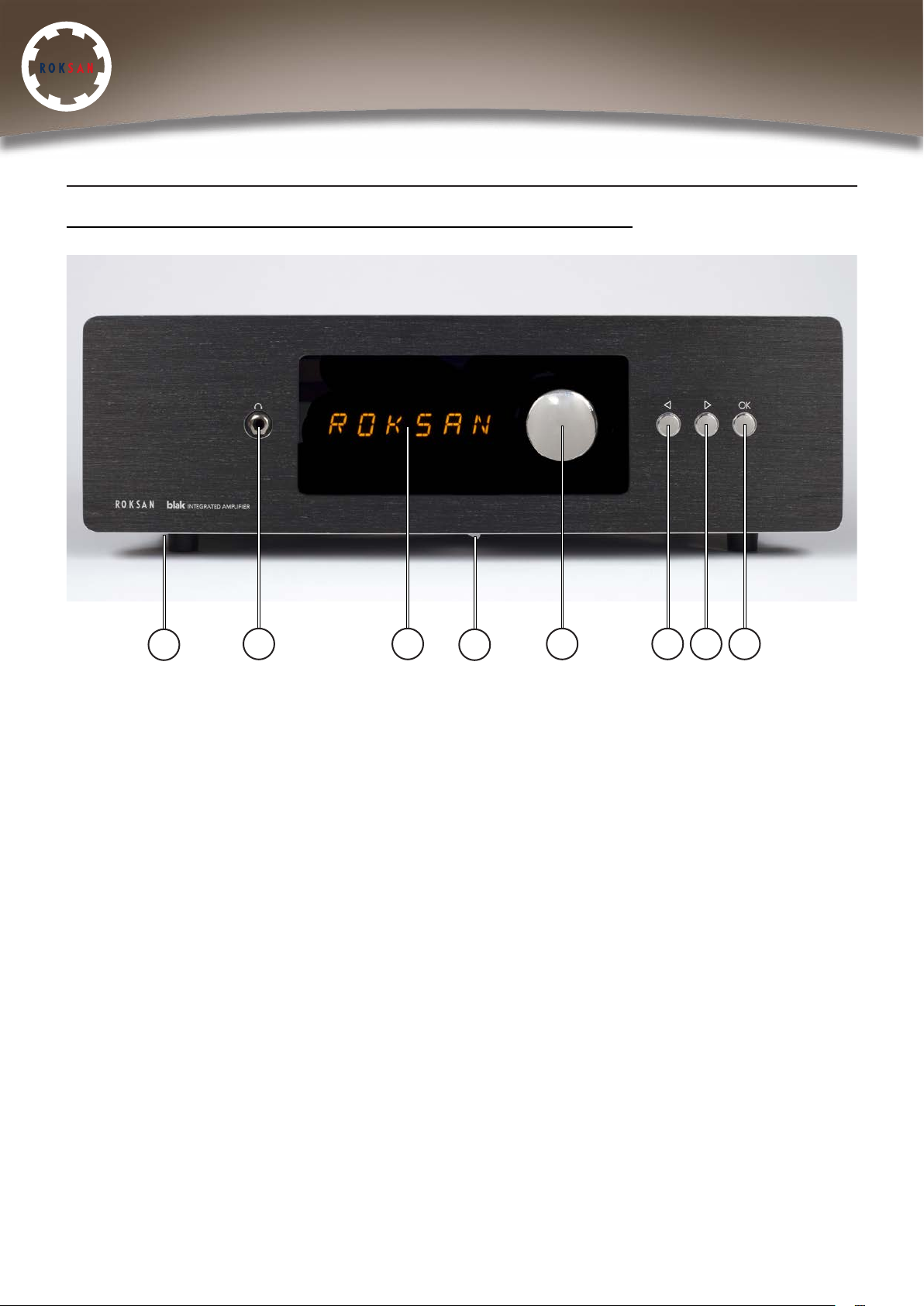
blak INTEGRATED AMPLIFIER/USB - FRONT PANEL VIEW
1
• 1. AC Mains Power Switch
• 2. Headphone socket
• 3. LED display
• 4. Headphone switch
• 5. Volume control
• 6. Input selector button (back)
• 7. Input selector button (forward)
• 8. ‘OK’ button
2 3
4
5 6 7 8
Roksan Audio Ltd
CLASSIFICATION: General Use
All specifications are liable to change without notice. E&OE
Roksan Audio Ltd, Jubilee Close, Townsend Lane, London, NW9 8TR, United Kingdom
Registered in England | Number: 3089229 | VAT Number: 719 3079 23 | Director: T Hashemi
ROKSAN AUDIO
Website: www.roksan.co.uk | email: [email protected]
Tel: +44 (0)20 8900 6801 | Fax: +44 (0)20 8205 2644
6
Page 7
blak Integrated Amplifier
Manual
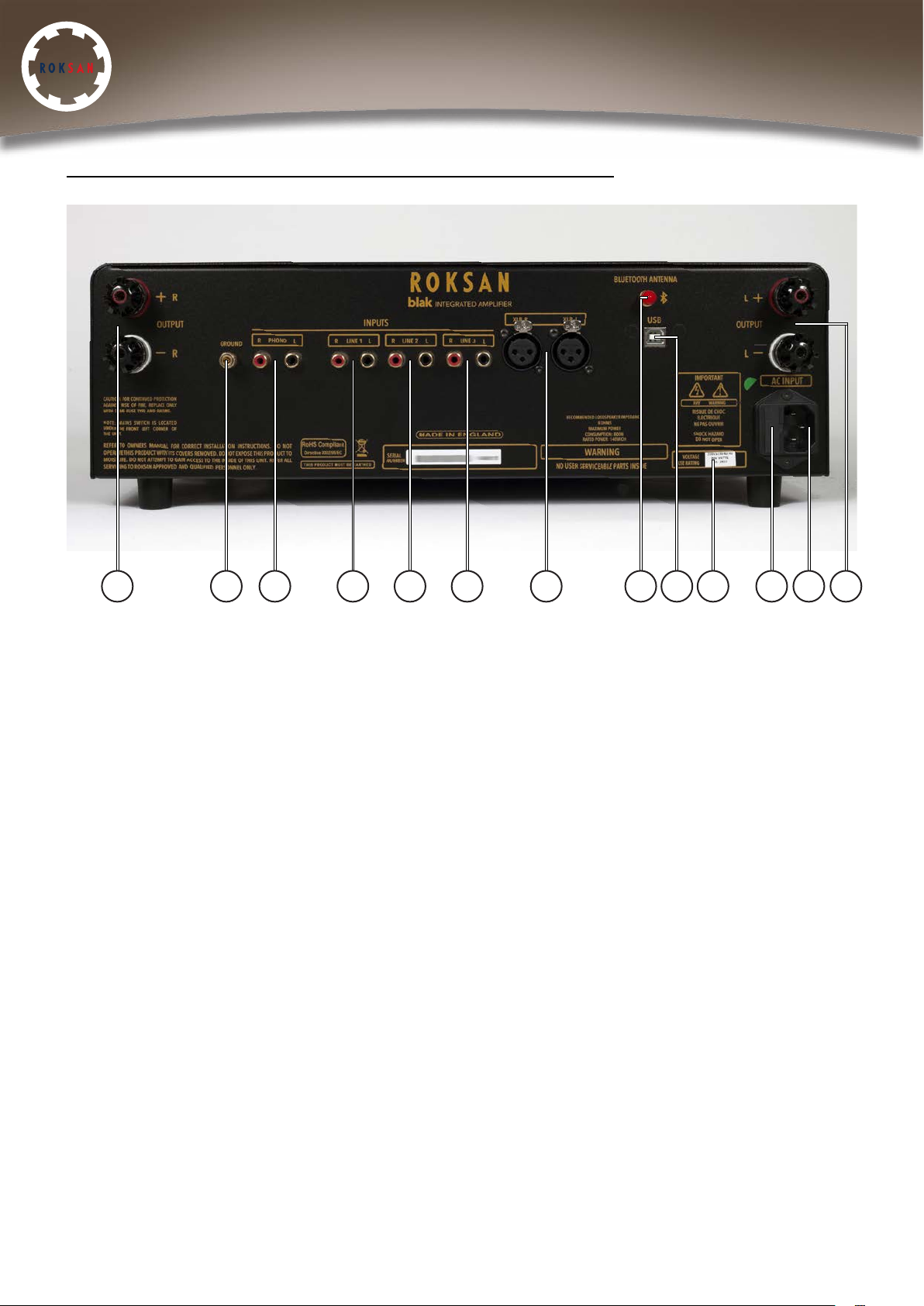
blak INTEGRATED AMPLIFIER/USB - REAR PANEL VIEW
10 11 12 13 14 15 16 17 18 19 20 21 22
• 10. Right loudspeaker output
• 11. Earth ground for phono input
• 12. Phono input (Moving Magnet)
• 13. Line 1 input
• 14. Line 2 input
• 15. Line 3 input
• 16. Balanced XLR input
• 17. Bluetooth antenna
• 18. USB ‘type B’ input (NOTE: only operational with USB version)
• 19. Voltage & fuse label
• 20. AC mains fuse holder
• 21. AC mains socket
• 22. Left loudspeaker output
All specifications are liable to change without notice. E&OE
Roksan Audio Ltd, Jubilee Close, Townsend Lane, London, NW9 8TR, United Kingdom
Registered in England | Number: 3089229 | VAT Number: 719 3079 23 | Director: T Hashemi
Roksan Audio Ltd
CLASSIFICATION: General Use
ROKSAN AUDIO
Website: www.roksan.co.uk | email: [email protected]
Tel: +44 (0)20 8900 6801 | Fax: +44 (0)20 8205 2644
7
Page 8

blak Integrated Amplifier
Manual
SETUP
CONNECTING MAINS POWER
Please refer to the front & rear panel views.
The moulded IE connector or the supplied mains lead should be plugged into socket (21) on
the rear of the unit first and then plugged into the mains supply. The mains power switch (1) is
on the front under side of the amplifier. This switch can be left on; if however the amplifier is
likely to be unattended for a long period of time, switch it off and unplug the mains lead from
the wall.
SIGNAL CONNECTIONS
There are 6 inputs on your blak Integrated Amplifier. Three are line level and will accept
virtually all currently available source components, the other three are a phono input, aptX
Bluetooth wireless input and in the USB Version only (which houses an internal high quality
DAC) a ‘type B’ USB input.
The Phono input is factory set for Moving Magnet cartridges to accommodate record players
fitted with MM phono cartridges.
All the inputs use gold plated RCA phono connectors and should be connected according to
the standard convention.
• Right Channel - Red
• Left Channel - Black or White
Also in accordance with standard practice, the upper row of phono sockets carries the left
channel and the lower row carries the right channel.
MC INPUT CONNECTION
If you wish to use a Moving Coil cartridge, an in-line MC step-up transformer should be
connected to the Phono Input. Alternatively a dedicated phono stage can be connected to a
line level input. For advice and demonstration of Roksan state of the art turntable
reproduction systems contact your authorised retailer.
Roksan Audio Ltd
CLASSIFICATION: General Use
All specifications are liable to change without notice. E&OE
Roksan Audio Ltd, Jubilee Close, Townsend Lane, London, NW9 8TR, United Kingdom
Registered in England | Number: 3089229 | VAT Number: 719 3079 23 | Director: T Hashemi
ROKSAN AUDIO
Website: www.roksan.co.uk | email: [email protected]
Tel: +44 (0)20 8900 6801 | Fax: +44 (0)20 8205 2644
8
Page 9

blak Integrated Amplifier
Manual
LOUDSPEAKER CONNECTIONS
The right and left loudspeakers are connected to the amplifier via the rear panel binding
posts. Carefully observe polarity ensuring that the RED (+) speaker terminal is connected to
the RED (+) amplifier terminal and the BLACK (-) speaker terminal to the BLACK (-) amplifier
terminal. When both left and right channels are connected to the relevant speaker terminals
the amplifier is ready for use.
IMPORTANT NOTE:
For optimum performance it is recommended to use high quality inter-connect cable such as
Roksan HDC-03A High Definition Analogue Cable.
For optimum performance it is recommended to use high quality cable such as Roksan HDC
03S High Definition Loudspeaker Cable. Many speaker cables such as the Roksan HDC-03S
are directional. Please observe this characteristic. DO NOT use a speaker cable with
conductor size less than 16 AWG (1.6mm Diameter). The binding posts accept conductor
sizes up to 12 AWG.
HEADPHONE CONNECTION
To listen through headphones, connect a 6.35mm 1/4 inch Stereo Jack Plug to the
headphone socket (2).
OPERATION
SWITCHING ON
The mains power switch is located on the front left under side of the amplifier. This switch can
be left ON for normal operation. If unattended for a long period of time (going on a short
break, holidays etc.) the mains power should be switched OFF and the power cord
disconnected from the mains power input. When switched ON, your blak Integrated
Amplifier will go into standby mode, which is characterized by a single light illuminated on
the highest value volume LED. Pressing the OK button will take the amplifier out of standby (if
you wish to regress to standby mode, press the OK button twice in short succession).
OUTPUT SELECTION
For loudspeaker output, the headphone switch (4) should to be toggled to the left. For
headphones ouput, the switch should be toggled to the right.
Roksan Audio Ltd
CLASSIFICATION: General Use
All specifications are liable to change without notice. E&OE
Roksan Audio Ltd, Jubilee Close, Townsend Lane, London, NW9 8TR, United Kingdom
Registered in England | Number: 3089229 | VAT Number: 719 3079 23 | Director: T Hashemi
ROKSAN AUDIO
Website: www.roksan.co.uk | email: [email protected]
Tel: +44 (0)20 8900 6801 | Fax: +44 (0)20 8205 2644
9
Page 10

blak Integrated Amplifier
Manual
VOLUME CONTROL
The volume control on the blak is a precision device. It follows algorithmic law so that its
response approximates that of the human ear. The series of LEDs around the volume control
indicates the volume level. When the volume control is at 0, the output is automatically
muted. Turning the volume knob will take the unit out of mute mode.
The volume can also be muted by pressing the MUTE button on the R7 remote control. When
unmuted, the volume will return to it’s previous level.
FRONT PANEL CONTROL
The INPUT Selector Buttons (4) and (5) shift through a list of the inputs one click at a time.
Pressing OK will confirm the selection, otherwise the unit will revert to the current selection.
The blak Integrated Amplifier has an input selection memory. When switched on, it will
automatically recognise the previous input selection. The selected input will show in the LED
display window.
Pressing the OK button twice in quick succession will take the unit into standby. Pressing it
once will bring the unit out of standby.
BLUETOOTH CONNECTION AND PAIRING
Make sure your device’s Bluetooth is enabled and select the Bluetooth input on the
amplifier. This will select the Bluetooth source and the characters ‘BT’ will flash continuously
on the display. When your device has found the amplifier, ‘Roksan blak’ will appear on your
device. Next, connect to pair your device. When paired or connected ‘BT’ will stop
flashing and remain on. You are now ready to stream music to the blak from the paired
device. If your device is aptX compatible and contains high resolution audio files, then these
will be streamed in the original high quality bit rate through the blak amplifier.
Whilst streaming Bluetooth data, if you wish to revert to another input, simply use the input
selectors to the desired choice and press OK as normal. You will then have to re-connect the
device but pairing is not necessary.
USING THE INTERNAL DAC AND CONNECTING TO THE USB PORT
(USB VERSION ONLY)
The USB input can be used with a Windows or Mac operating system computer using a USB
B-type connector cable. Select the USB input using the input selection buttons and press ‘OK’.
NOTE: It’s always recommended to use a directly connected USB socket. For example, front
panel USB connections on desktop pcs often have a substandard internal wiring that can
cause degradation to the USB signal.
Roksan Audio Ltd
CLASSIFICATION: General Use
All specifications are liable to change without notice. E&OE
Roksan Audio Ltd, Jubilee Close, Townsend Lane, London, NW9 8TR, United Kingdom
Registered in England | Number: 3089229 | VAT Number: 719 3079 23 | Director: T Hashemi
ROKSAN AUDIO
Website: www.roksan.co.uk | email: [email protected]
Tel: +44 (0)20 8900 6801 | Fax: +44 (0)20 8205 2644
10
Page 11
blak Integrated Amplifier
Manual
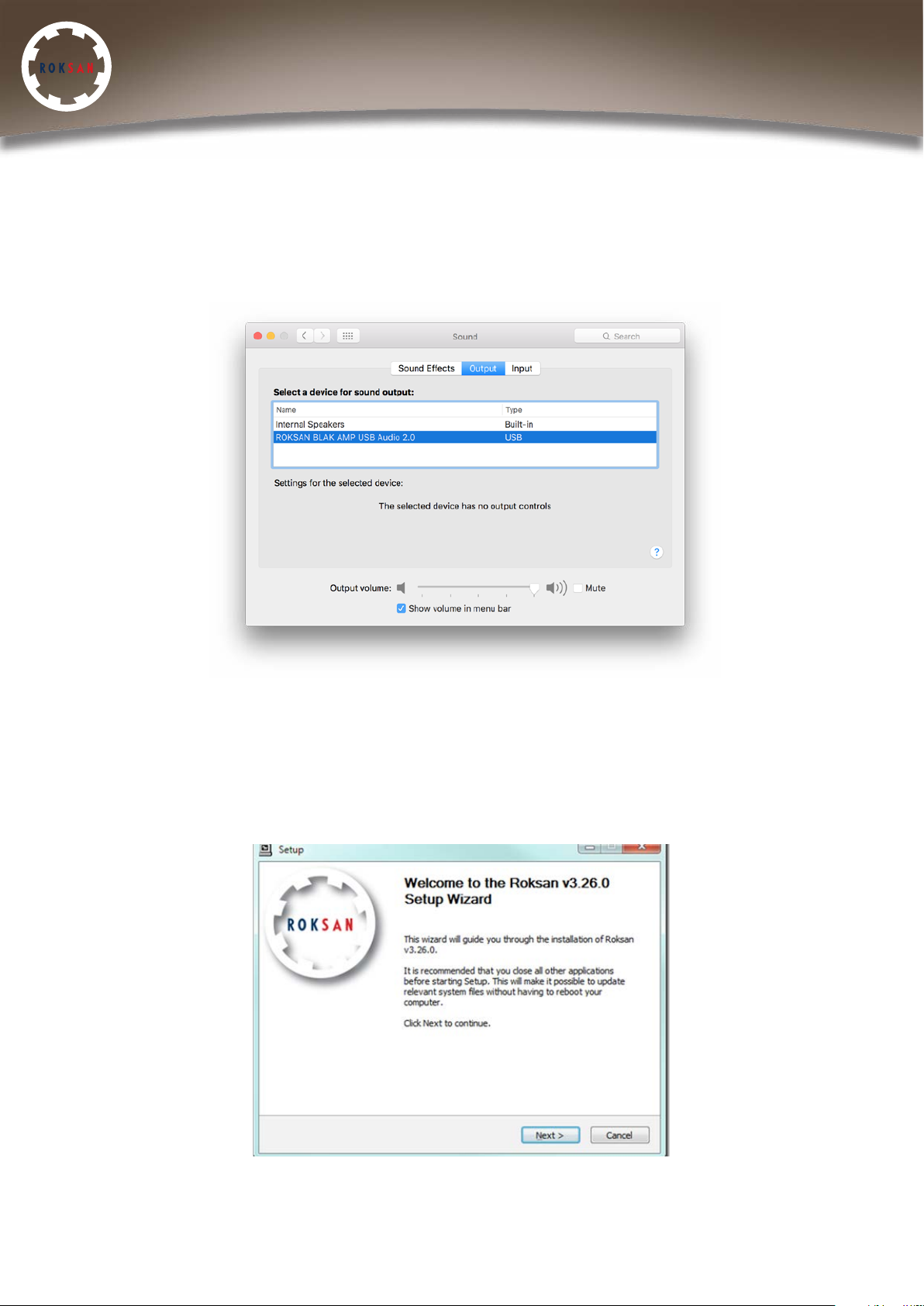
MAC OPERATING SYSTEM:
There is no setup required, driver installation occurs automatically when the DAC is
first connected to the MAC.
To select the blak Amp USB as your current Playback Device navigate to System Preferences
> Sound, then choose the Output tab and select “Roksan blak Amp DAC USB Audio 2.0 (or
1.0 depending on the interface)”.
WINDOWS OPERATING SYSTEM:
The driver can only be installed on PCs using Windows 7 onwards, and therefore USB inputs
will not work on PCs with older versions of Windows.
You must install the Roksan driver software before connecting the blak Amp USB to your PC.
To do this run the latest version of the driver setup software which can be found on our
website. The Setup Wizard will guide you through the process.
Roksan Audio Ltd
CLASSIFICATION: General Use
All specifications are liable to change without notice. E&OE
Roksan Audio Ltd, Jubilee Close, Townsend Lane, London, NW9 8TR, United Kingdom
Registered in England | Number: 3089229 | VAT Number: 719 3079 23 | Director: T Hashemi
ROKSAN AUDIO
Website: www.roksan.co.uk | email: [email protected]
Tel: +44 (0)20 8900 6801 | Fax: +44 (0)20 8205 2644
11
Page 12
blak Integrated Amplifier
Manual
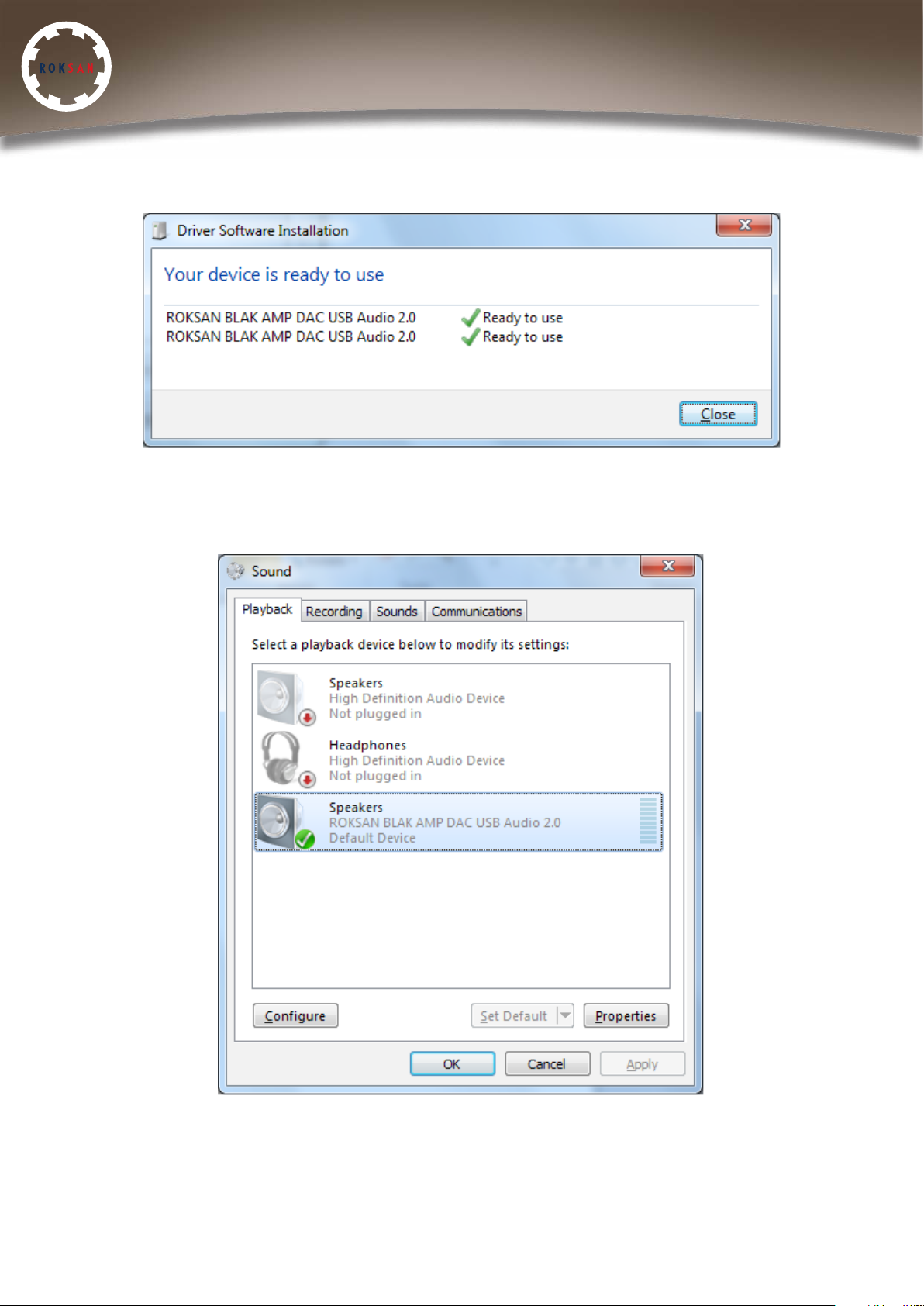
To initialise the driver installation switch on your blak Amp USB and connect it to your PC via
a USB cable. A pop-up window will now appear installing this driver automatically.
To select as your current Playback Device navigate to Control Panel > All Control Panel Items
> Sound and select the Playback Tab. Select “Roksan blak Amp DAC USB Audio 2.0/1.0” (You
can right-click and “Set as Default Device” if desired).
Roksan Audio Ltd
CLASSIFICATION: General Use
All specifications are liable to change without notice. E&OE
Roksan Audio Ltd, Jubilee Close, Townsend Lane, London, NW9 8TR, United Kingdom
Registered in England | Number: 3089229 | VAT Number: 719 3079 23 | Director: T Hashemi
ROKSAN AUDIO
Website: www.roksan.co.uk | email: [email protected]
Tel: +44 (0)20 8900 6801 | Fax: +44 (0)20 8205 2644
12
Page 13
blak Integrated Amplifier
Manual
DSD PLAYBACK
The advanced Texas Instruments DAC platform supports PCM sample rates up to 192 kHz
and also DSD (Direct Stream Digital) information for both DSD64 (1x) and DSD128 (2x).
This is only possible using a computer connected to the blak Integrated Amplifier USB (via
the USB input) input using a music player program that is able to read DSD files. Numerous
programs that can achieve this are available to download.
NOTE: With all digital music files, playback capability is dependent on the playback engine
and software used.
ADJUSTING DISPLAY BRIGHTNESS
Press and hold the OK button on either the front panel or remote until ‘ROKSAN’ appears in
the display. Use the Input Selection buttons to adjust the brightness of the display.
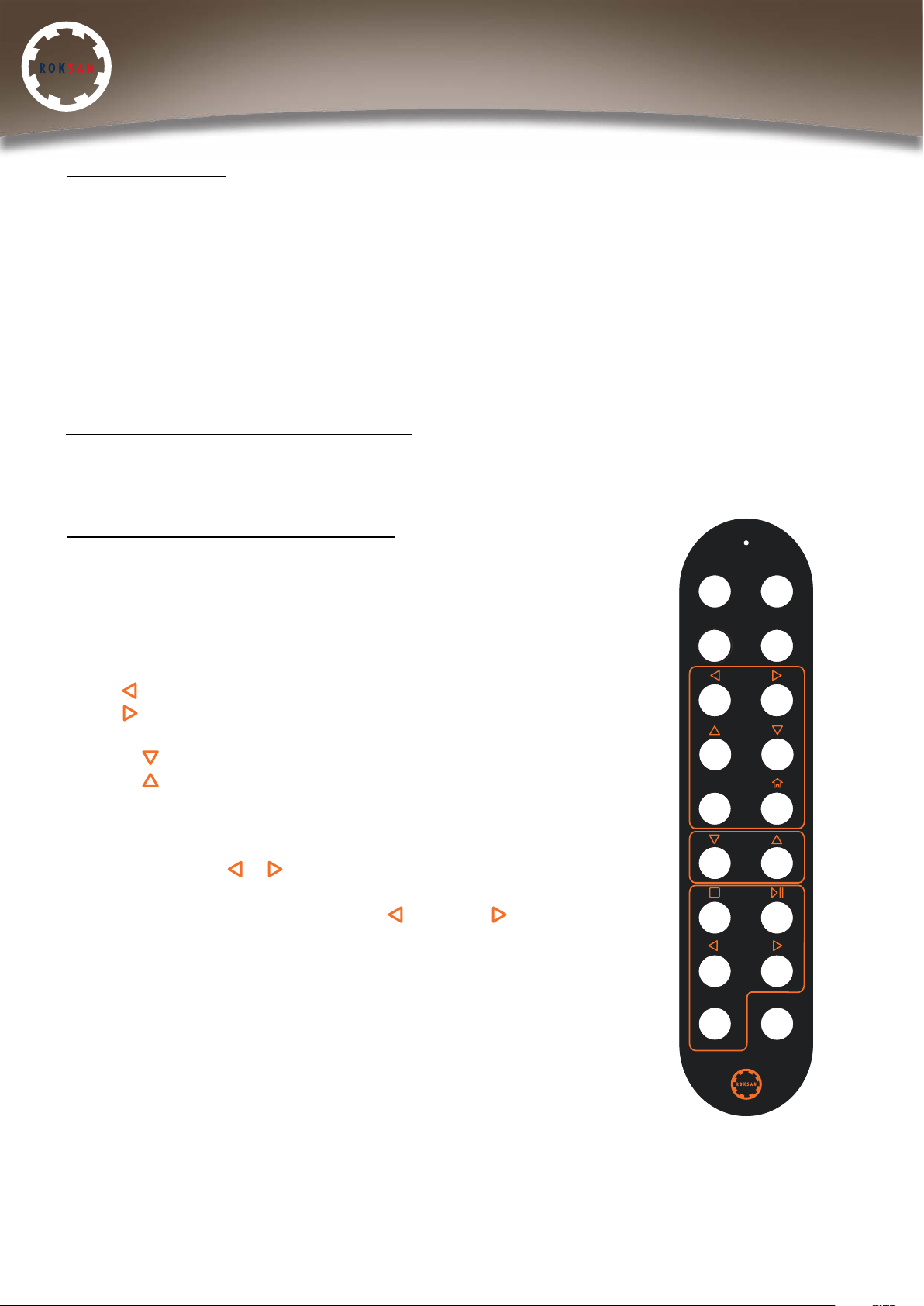
REMOTE CONTROL FUNCTIONS
The blak Integrated Amplifier/Integrated Amplifier USB uses the
Roksan R7 remote control. Below is an outline of the functions
available.
Amp: Press and hold to bring amplifier in and out of standby
Mute: Mutes volume
Input ( ): Scroll input left
Input ( ): Scroll input right
OK: Confirm input selection
Volume ( ): Decrease volume
Volume ( ): Increase volume
BT: Direct bluetooth input function
NOTE: You must press ‘OK’ to confirm the desired input after
selection with the ( & ) buttons. The BT button will directly take
you to the wireless Bluetooth input. You do not need to press OK to
confirm. Pressing either the Input left ( ) or right ( ) buttons will
return to line/phono inputs.
AMP DAC
BT STREAMER
INPUT
OK
VOLUME
CD
TRACK
Roksan Audio Ltd
CLASSIFICATION: General Use
All specifications are liable to change without notice. E&OE
Roksan Audio Ltd, Jubilee Close, Townsend Lane, London, NW9 8TR, United Kingdom
Registered in England | Number: 3089229 | VAT Number: 719 3079 23 | Director: T Hashemi
ROKSAN AUDIO
Website: www.roksan.co.uk | email: [email protected]
Tel: +44 (0)20 8900 6801 | Fax: +44 (0)20 8205 2644
SHUFFLE MUTE
13
Page 14

blak Integrated Amplifier
Manual
TROUBLESHOOTING
If you suspect that your Roksan blak Integrated Amplifier is not operating properly, you
should check all the connections carefully. Pay particular attention to speaker phasing and
channel connections. Phono plugs should be fully inserted - a frequent cause of problems
is due to the phono plug surrounds not making proper contact. Below are some commonly
encountered problems with suggestions for possible cures. The list is not exhaustive: If you
have any unresolved problems, please consult Roksan or your appointed Roksan dealer or
distributor.
SYMPTOM LIKELY CAUSE SUGGESTED REMEDY
• No power • AC Mains lead not inserted
properly
• Unit not switched on
• Ensure AC Mains lead is
fully inserted
• Switch unit on (on the front
underside)
• No output on one or
both channels
• Very low sound output
• Poor speaker imaging,
lack of Bass output
• Amplifier in standby mode
(LED on display)
• Missing or bad input
signal connection Incorrect
speaker connection
• Wrong input selected
• Loudspeakers connected
out of phase
• Amplifier muted or volume
set to 0
• Check that amplifier is out
of standby mode
• Check all input
connections
• Check speaker output
connections on rear panel
• Select correct input,
ascertain source is working
• Check polarity of speaker
connections (especially
important if Multi-wiring,
Multiamping)
• Hum from speakers • Incorrect grounding • Check Mains polarity and
grounding on all connected equipment
Roksan Audio Ltd
CLASSIFICATION: General Use
All specifications are liable to change without notice. E&OE
Roksan Audio Ltd, Jubilee Close, Townsend Lane, London, NW9 8TR, United Kingdom
Registered in England | Number: 3089229 | VAT Number: 719 3079 23 | Director: T Hashemi
ROKSAN AUDIO
Website: www.roksan.co.uk | email: [email protected]
Tel: +44 (0)20 8900 6801 | Fax: +44 (0)20 8205 2644
14
Page 15

blak Integrated Amplifier
Manual
GUARANTEE
Your Roksan blak product is guaranteed against any defect in materials and workmanship for
a period of five years from the date of purchase.
This guarantee only becomes effective once your product has been registered within
fourteen days of purchase. Roksan reserves the right to ask for a copy of your purchase
invoice.
This guarantee excludes:
• Damage caused due to accident, misuse, neglect and incorrect installation, adjustment or
repair.
• Liability for damage or loss during transit from the retailer or purchaser to Roksan or its
authorised distributor for the purposes of repair or inspection.
Carriage costs to Roksan shall be borne by the consignor. All claims under this warranty must
be made through an authorised Roksan retailer. If equipment returned for repair to Roksan
is found on inspection to comply with the product specification, Roksan reserves the right to
make a charge for examination and return carriage. Unauthorised servicing will void this
guarantee. Warranty will only be valid when the product is bought through the authorised
retailer. All the warranty issues will be dealt through the selling retailer.
Warranty registration can be done online at: http://www.roksan.co.uk/rw.php
Roksan Audio Ltd
CLASSIFICATION: General Use
All specifications are liable to change without notice. E&OE
Roksan Audio Ltd, Jubilee Close, Townsend Lane, London, NW9 8TR, United Kingdom
Registered in England | Number: 3089229 | VAT Number: 719 3079 23 | Director: T Hashemi
ROKSAN AUDIO
Website: www.roksan.co.uk | email: [email protected]
Tel: +44 (0)20 8900 6801 | Fax: +44 (0)20 8205 2644
15
Page 16

blak Integrated Amplifier
Manual
SPECIFICATIONS
Inputs 3 x RCA line inputs
1 x Pair analogue XLR inputs
1 x USB type-B input 24/192 & DSD compatible (only operational with ‘USB’ Version)
MM phono input
aptX Bluetooth input
MM input – gain, 76.75dB@1kHz, input impedance 47k ohm, 150pF
Line & XLR inputs - input impedance 24k ohm XLR, 40k ohm RCA
Gain @ 1kHz, 8ohm 36,75dB
THD @ 1W, 8ohm, 5kHz < 0.02%
@ 12W, 8ohm, 5kHz < 0.035%
Power output @ 1kHz, 8ohm > 150W
@ 1kHz, 4ohm > 230W
Frequency response @ -3dB, 12W, 8ohm from < 20Hz to more than 80kHz
Channel balance @ 1kHz, 8ohm, 12W better than 0.3dB
Cross talk @ 1kHz, 8ohm < -104dB
S/N @ 1kHz, 8ohm, 1W > 76dB
Dimensions (H x W x D) 140 x 440 (inc. faceplate) x 309mm / 140 x 400 (chassis) x 309mm
Weight 14kg
Rated Power Consumption 480W
Maximum Power Consumption 800W
Roksan Audio Ltd
CLASSIFICATION: General Use
All specifications are liable to change without notice. E&OE
Roksan Audio Ltd, Jubilee Close, Townsend Lane, London, NW9 8TR, United Kingdom
Registered in England | Number: 3089229 | VAT Number: 719 3079 23 | Director: T Hashemi
ROKSAN AUDIO
Website: www.roksan.co.uk | email: [email protected]
Tel: +44 (0)20 8900 6801 | Fax: +44 (0)20 8205 2644
16
Page 17

blak Integrated Amplifier
Manual
Roksan Audio Limited
Jubilee Close
Townsend Lane
London
NW9 8TR
+44 (0)20 8900 6801
www.roksan.co.uk
Roksan Audio Ltd
CLASSIFICATION: General Use
All specifications are liable to change without notice. E&OE
Roksan Audio Ltd, Jubilee Close, Townsend Lane, London, NW9 8TR, United Kingdom
Registered in England | Number: 3089229 | VAT Number: 719 3079 23 | Director: T Hashemi
ROKSAN AUDIO
Website: www.roksan.co.uk | email: info@roksan.co.uk
Tel: +44 (0)20 8900 6801 | Fax: +44 (0)20 8205 2644
17
 Loading...