

Rointe DALIS, Dalis 200DHW4, Dalis 200DHWI4, Dalis 260DHW4, Dalis 260DHWI4 Instruction Manual
Page 1
INSTRUCTION MANUAL
Information, operation & installation
DALIS
Digital electric unvented heat pump
Page 2

Please read this instruction manual carefully to ensure correct installation and operation.
It is important that the installer reads and understands these instructions and unpacks and
familiarises themselves with the equipment before commencing the installation. Failure to
observe these instructions will make the guarantee invalid.
CONTENTS
1. Introduction ....................................................................................................................................... 2
2. Disclaimer ......................................................................................................................................... 3
3. Regulations ....................................................................................................................................... 3
4. Mandatory installation kits ............................................................................................................... 3
5. Safety information and warnings ..................................................................................................... 4
6. Technical information ....................................................................................................................... 6
7. Before installation ............................................................................................................................. 8
8. Installation ....................................................................................................................................... 12
9. Commissioning ............................................................................................................................... 24
10. Programming ................................................................................................................................. 25
11. Maintenance .................................................................................................................................. 39
12. Troubleshooting ..............................................................................................................................41
13. Product disposal .............................................................................................................................41
14. Guarantee conditions .................................................................................................................... 42
15. Commissioning record .................................................................................................................. 44
16. Guarantee certificate ..................................................................................................................... 45
17. Service record ............................................................................................................................... 47
1. Introduction
Thank you for choosing Rointe. The Dalis heat pump is designed to produce sanitary domestic hot
water, through the use of heat pump technology. This model consists of a compressor, evaporator,
condenser and a throttle valve. A liquid / refrigerant gas flows inside this product.
The product is manufactured from high quality components and meets all health and safety require-
ments. Before installing and / or using this product, carefully read this manual. This manual must be
kept with the product at all times, even if the ownership of the product changes.
If you have any questions on this product, please contact our Technical Support department by phon-
ing 0203 321 5929 or send an email to support@rointe.co.uk.
IMPORTANT: This product has been manufactured for domestic hot water as part of a pressur-
ised water heating system. Rointe will not take responsibility for safe operation of this product
outside of the scope of intended use.
The symbol represents important information or a warning. Please read these carefully.
2
Page 3

DALIS
Digital electric unvented heat pump
2. Disclaimer
This manual has been thoroughly verified, however in some instances non-compliance can occur.
Therefore we (Rointe) accept no liability for complete conformity.
We reserve the right to carry out modifications to the product’s construction, characteristics or its
data at any time. Therefore, we do not accept any liability claims attributable to instructions, figures,
drawings or descriptions, without prejudice to errors of any kind.
We will not be held responsible for damages attributable to incorrect installation, product misuse or
improper use, or as a consequence of unauthorised repairs, modifications or replacement.
3. Regulations
The equipment can only be installed and commissioned for use within domestic water closed heating
systems, according to the BS EN 12828 standard. It adheres to the following directives:
• Directive 2011/65/UE on use of hazardous substances in electronic equipment (RoHS).
• Directive 2014/30/UE Electromagnetic compatibility (EMC).
• Directive 2014/35/EU Low Voltage Directive (LVD).
• Directive 2009/125/CE Ecodesign requirements.
• Directive 2010/30/UE Energy labelling.
• Directive 2012/19/UE on waste electrical and electronic equipment (WEEE).
3.1. Protection degree
The product has a Protection Degree of IPX4.
3.2. Refrigerant/coolant used
The type of refrigerant used is: HFC-R134a. This device contains fluorinated greenhouse gases
included in the Kyoto protocol. Do not discard these gases into the environment. Maintenance and
disposal operations must be carried out by qualified personnel only.
4. Mandatory installation kits
IMPORTANT
As this product is an unvented domestic hot water heater, it is mandatory that it be
installed using a Rointe installation kit and by a professional with a valid Unvented
Water Heater Installer certification. The installation kits are NOT supplied with this
product. They must be purchased separately. They comply with Building Regulations
Section G3.
Please contact us on 0203 321 5929 if you have not purchased an appropriate
installation kit for this product BEFORE installation.
The T/P valve is factory fitted with the product as standard.
3
Page 4
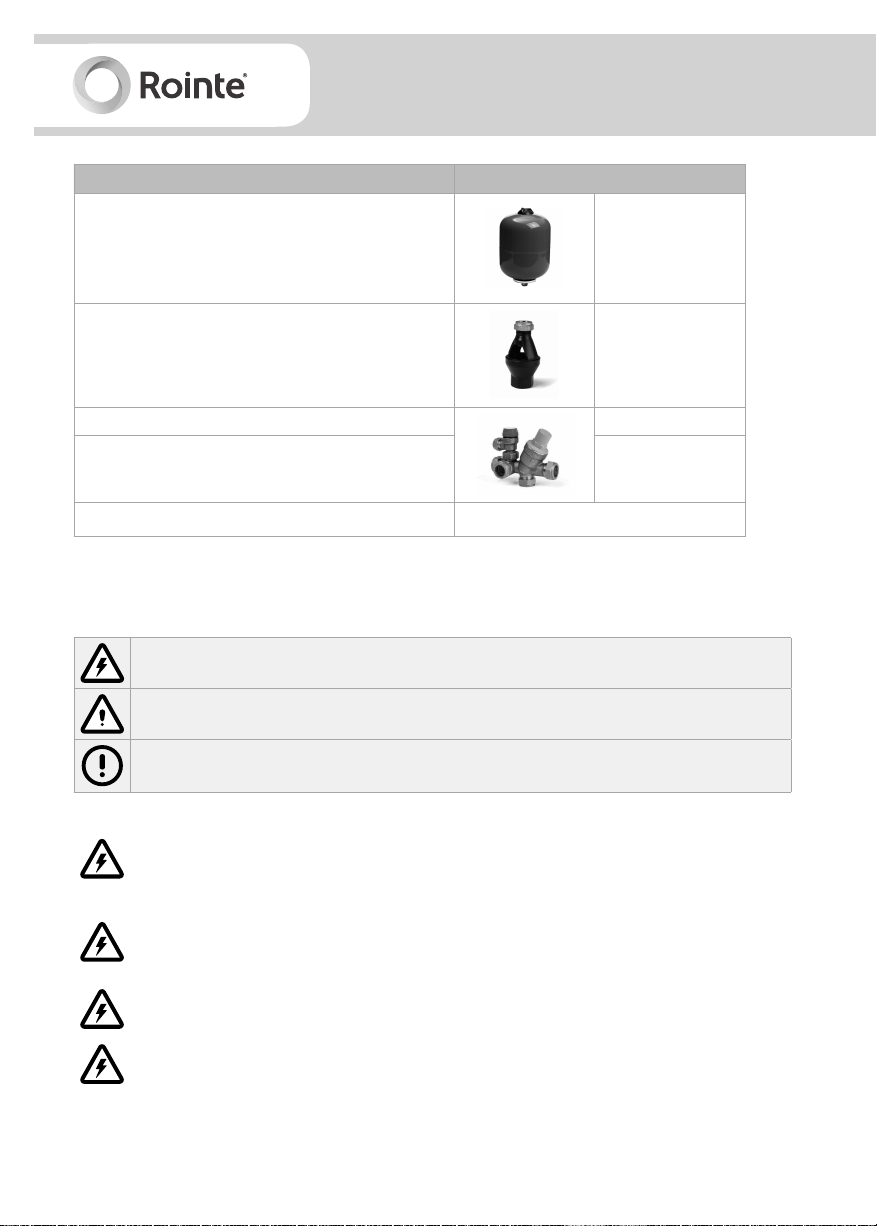
Fittings supplied with installation kit (sold separately) KITW03
Expansion vessel
Tundish 15 - 22 mm
Pressure reducing valve 0.35 Mpa
Safety relief valve 0.60 Mpa
EAN CODE 8436045914354
18 litres
(0.1 Mpa)
5. Safety information and warnings
Please read this information carefully. If you have any questions, please contact us.
This symbol indicates a safety warning or a hazard of an electrical nature.
This symbol indicates general warnings of actions that could result in damage to the
product or injury to the installer/user/person.
This symbol indicates information or advice for operation of the product.
Do not open or disassemble the product when it is connected to a power supply. Isolate
all electrical supplies from the product before commencing work. Danger of electric
shock!
The maintenance of this appliance must be carried out by suitable qualified persons
only. It is recommended to maintain the product on an annual basis. Isolate all power
supplies from the product before commencing work. Danger of electric shock!
It is important that the tundish is positioned away from any electrical components.
Means for electrical disconnection must be incorporated in the fixed wiring in
accordance with wiring rules.
4
Page 5
DALIS
Digital electric unvented heat pump
Before removing the cover from the product isolate the appliance using the isolating
switch. Danger of electrical shock! Only use suitable electrically insulated equipment
when working inside product housing.
Do not touch the equipment when barefoot or with wet or damp body parts.
This product must only be installed and operated by competent adults. Children must
not play with the product. The product must not be cleaned, nor any maintenance
made by children.
No isolating device may be fitted between the inlet group and the cold water inlet on
the cylinder, as by doing so impor tant safety devices could be isolated.
Do not sit on, rest anything on, move from an upright position or place anything inside
the product.
The cylinder must be filled with water before switching on. Failure to do so will damage
the heating element and the guarantee will be invalid.
The appliance should be installed in a place where it is not exposed to damp, frost or
ice and is not at risk of being splashed with water. Do not spray or pour water into the
product.
This product has not been designed, nor is it intended for use within hazardous
environments (due to the presence of potentially explosive atmospheres – according to
ATEX standards or with a requested IP level exceeding that of the product) or in
applications that require (fault-tolerant, fail-safe) safety characteristics such as in
circuit-breaking systems and/or technologies or in any other context in which the
malfunctioning of an application could cause death or injury to people or animals or
serious damage could be caused to objects or the environment.
If the product fails, it could cause damage to people or animals, or cause damage to
objects or the environment. If necessary, please provide an independent monitoring
system with alarm functions to avoid such damages.
We (Rointe) are not responsible, under any circumstances, if the product is used for
purposes other than those for which it is intended, or improper use of the product.
5
Page 6
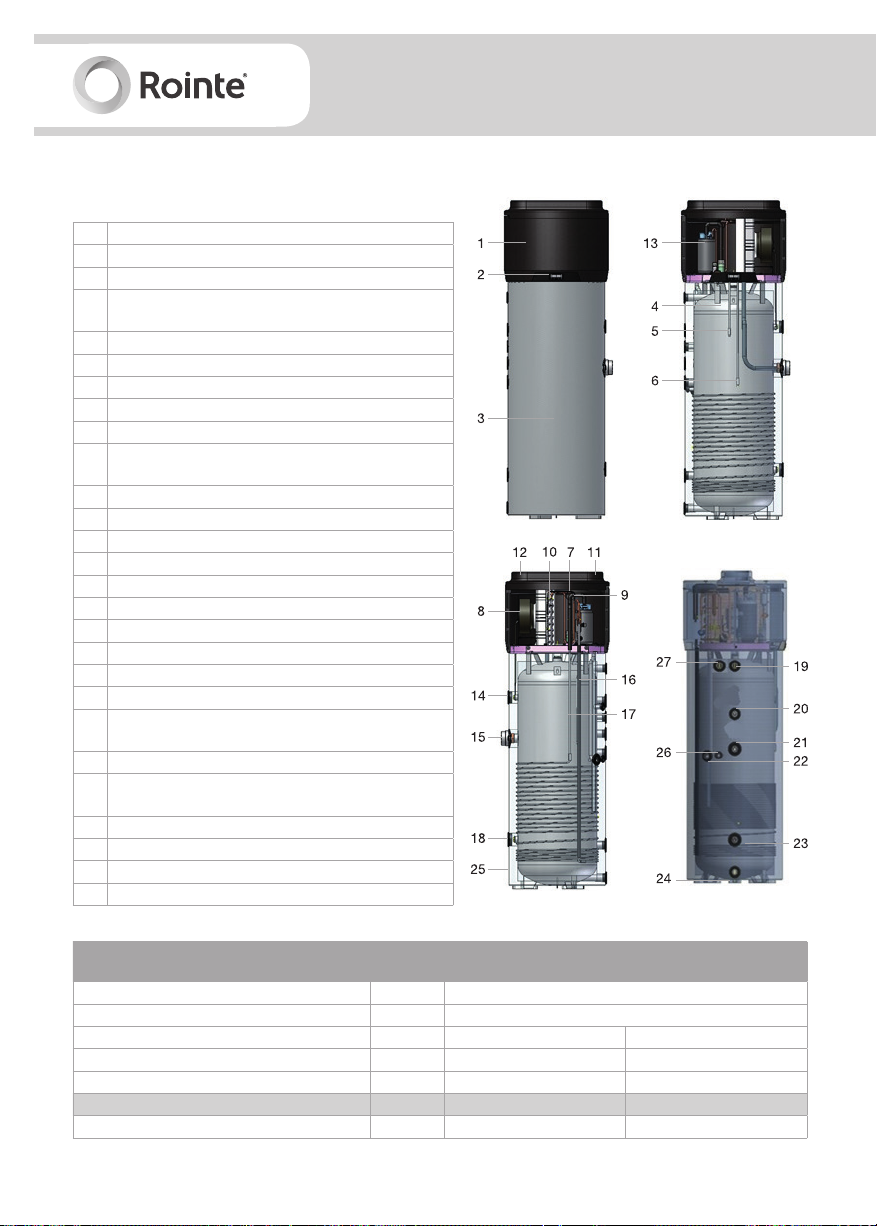
6. Technical information
6.1. Construction characteristics
1 Heat pump 1.6 Kw
2 Control panel
3 ABS casing
Steel tank (water heater) enamelled according to EN
4
standards (capacity: 200 / 260 litres)
5 Upper probe
6 Lower probe
7 Refrigerant recharge
8 Air recirculation fan
9 Throttle valve with double capillary tube
High-efficiency finned evaporator coil. Volume of
10
liquid deposited is regulated by a thermostatic valve.
11 Air inlet (160 mm)
12 Air outlet (160 mm)
13 Hermetically-sealed rotary compressor
14 Replaceable magnesium anode
15 Electric heating element
16 Condensation pump discharge line
17 Condensation return
18 Replaceable magnesium anode
19 Hot water outlet connection joint (G 1”)
20 Recirculation mounting (G ¾”)
Input coil for solar thermal power system
21
(G 1”1/4; 1 m2 exchange surface)
22 Condensatation discharge pipe (G 1/2”)
Ouput coil for solar thermal power system
23
(G 1”1/4; 1 m2 surface)
24 Cold water inlet connection joint (G 1”)
25 50 mm polyurethane insulation
26 ½”G fitting for probe immersion sleeve
27 Pressure and temperature relief valve G1/2”
Description
Thermal power yield kW 1.6
Total thermal power kW 3.1
Heating time (1) h:m 07:16 09:44
Heating time in BOOST mode (1) h:m 03:48 04:57
Thermal losses (2) W 105 76
Dimensions (diameter x height x depth)
Ø mm 650 650
6
Unit of
measure
mm 650 x 1,714 x 600 650 x 2,004 x 600
Dalis
200DHW4
Dalis
200DHWI4
Dalis
260DHW4
Dalis
260DHWI4
Page 7
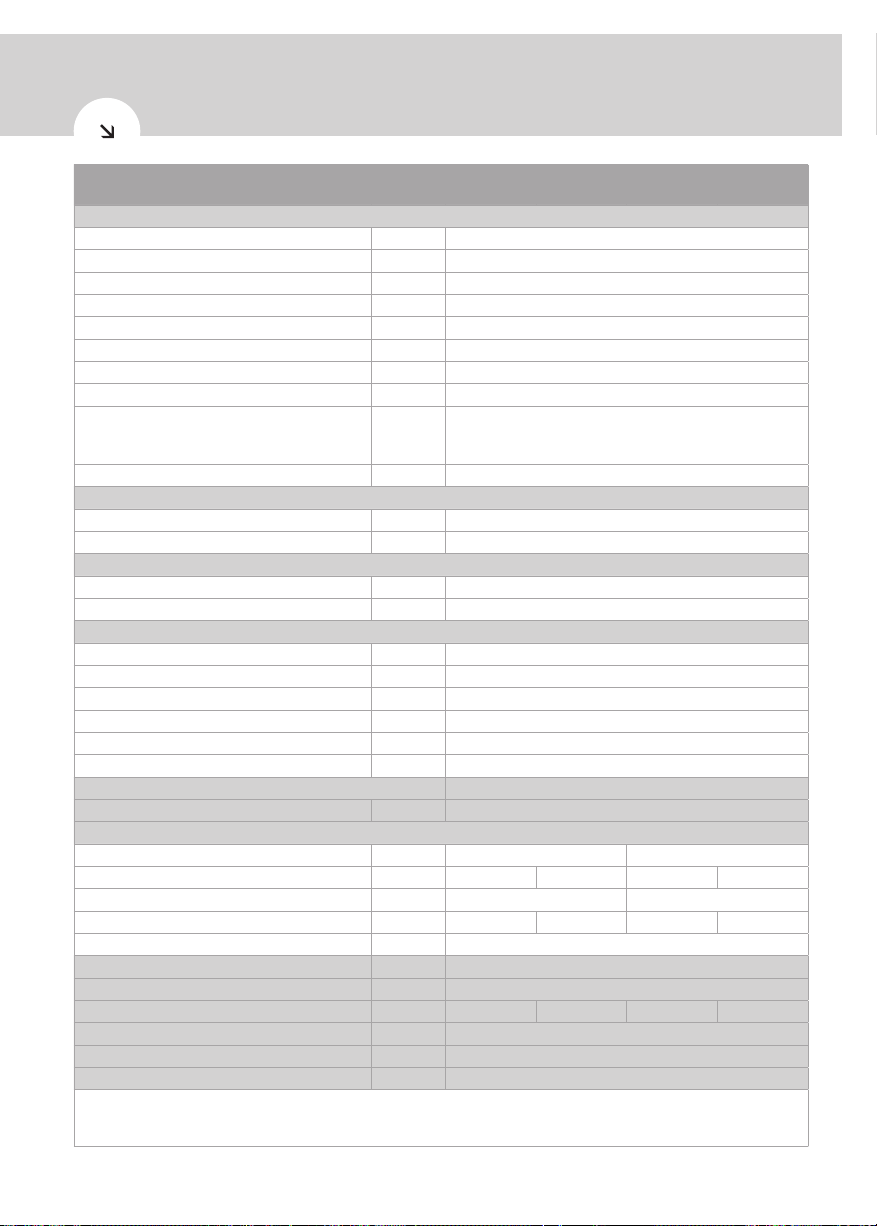
DALIS
Digital electric unvented heat pump
Description
Unit of
measure
Dalis
200DHW4
Dalis
200DHWI4
Dalis
260DHW4
Dalis
260DHWI4
Electrical data
Power supply V 1/N/230
Frequency Hz 50
Degree of protection - IPX4
Max. absorption
Average power absorption kW
kW 0.50
0.37
Heating element + max. absorption kW 2
Power kW 1.5
Max. current A 2.3
16A T fuse / 16A automatic switch, characteristic C
Overload protection A
(to be expected during installation on power supply
systems
Internal protection - Single safety thermostat with manual reset
Functions
Temperature min. ÷ max. air intake 90% R.H. °C 4 ÷ 43
Min. ÷ max temperature installation site °C 4 ÷ 43
Working temperature
Max. programmable temperature - ECO °C 56
Max. programmable temperature - AUTO °C 70
Compressor (rotary) & fan (centrifugal)
Compressor protection - Thermal circuit breaker with automatic reset
Ejection outlet diameter mm 160
Revolutions per minute RPM 1,420
Nominal air capacity m3/h 350
Max. pressure head available Pa 100
Motor protection - Internal thermal circuit breaker with automatic reset
Condenser
Refrigerant R134a (load)
g 900
Wrapped externally, not in contact with water
Water storage
Capacity litres 200 260
Actual water storage capacity Vm litres 199 194 254 246
Max. volume hot water Vmax (3) litres 276 342
Connection coil solar thermal power system m2 n/a 0.9 m
2
n/a 0.9 m
Cathodic protection mm 2 x Mg anode Ø33 x 250; G1 1/4”
Insulation
Defrosting
Empty weight / when filled with water
- 50mm high density polyurethane foam
- Passive with air
Kg 81 / 280 92 / 286 93 / 347 110 / 356
Sound power indoors Lw(A) (4) dB (A) 59
Automatic anti-legionella cycle (5) - YES
Maximum working pressure
(1) temperature of incoming air supply 20°C (max.15°C), temperature of water heater storage environment 20°C, water heated from
10°C to 55°C, (according to EN 16147-2011). (2) measurements carried out according to EN 12897-2006. (3) measurements carried
out according to EN 16147-2011. (4) measurements carried out according to EN 12102-2013. (5) Automatic activation - 30 day cycle.
bar 7
2
7
Page 8
7. Before installation
IMPORTANT
Failure to observe these instructions will invalidate the guarantee. Handling / instal-
lation of this product is subject to the Health & Safety At Work act. This product must
be installed by a qualified professional that is certified for Unvented Water Heater
installation. Do not attempt to install this product yourself if you are not qualified.
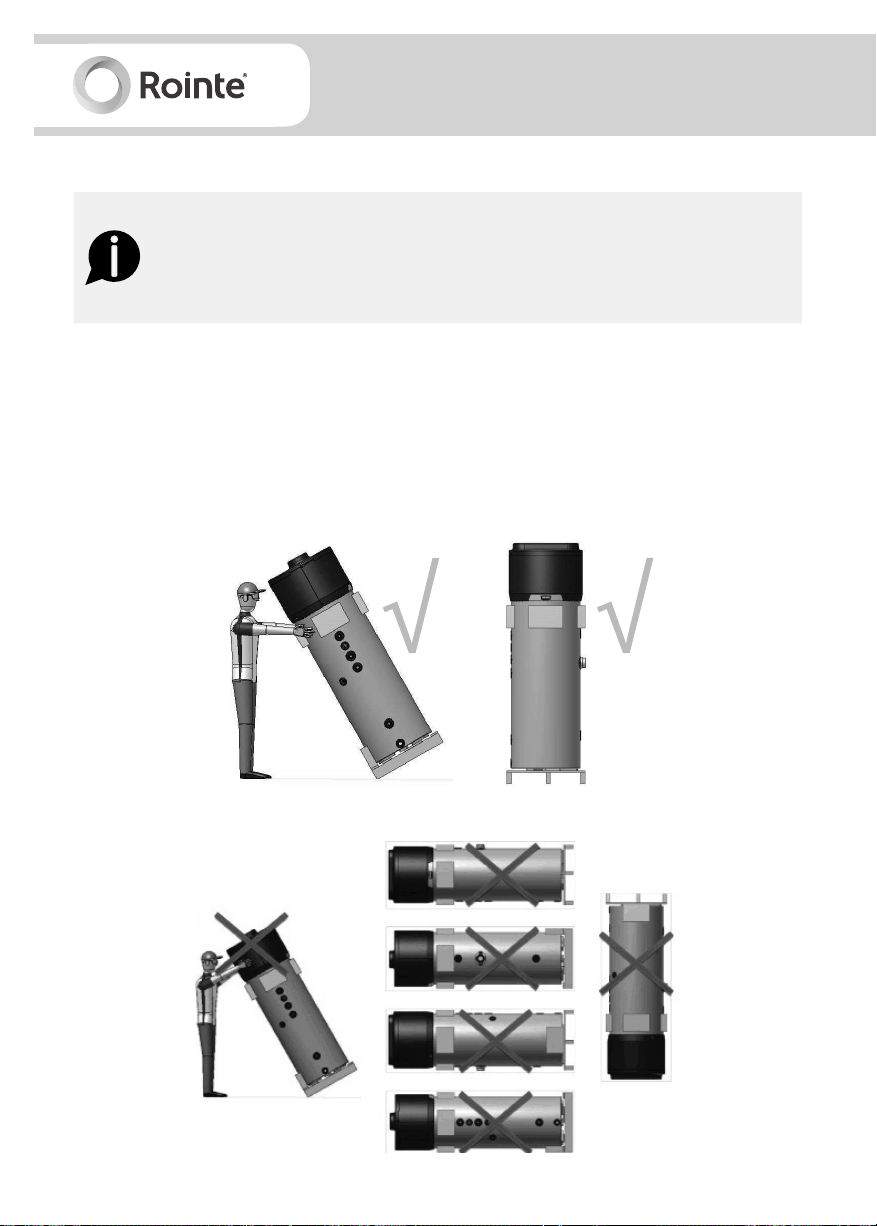
7.1. Handling and transport
• You must not put any type of pressure on the upper part of the device, as it is not structural in
nature. The product must be transported and handled in the upright position only. The screen
should be facing the upper side. If tipped, the centre of gravity will shift. Please handle with care.
• The equipment can only be transpor ted horizontally during the last kilometre, taking care to
place some supports on the underside of the product in order not to lean against upper parts.
Positions allowed for transport/handling:
Positions NOT allowed for transport / handling:
8
Page 9

DALIS
Digital electric unvented heat pump
7.2 . P a cka g i ng
• If the product is not installed immediately, it should remain in its protective packaging with all
pipe/end caps in place to prevent damage or dir t deposits.
• The equipment is supplied in a cardboard box, fixed to a pallet with screws. When removing the
screws from underneath the pallet, DO NOT tilt the product.
• Use a forklift or pallet truck to unload the equipment: these should have a load capacity of at
least 250 kg. Do not drop or lower the product suddenly.
• Unpacking the product must be carried out with care so the product does not become damaged.
Ensure all the supplied fittings have been removed from the packaging.
• Keep packaging out of reach of children. Make sure that the appliance is intact and not damaged.
If in doubt, do not use or install the product and contact us.
7.3. Location
Please adhere to the following conditions when choosing a location to install the product:
• Must be installed in a damp, frost-free environment, with containment systems in case of serious
water leaks.
• Must have structural integrity that is sufficiently robust to support the product weight when the
tank is full of water, plus a flat and level surface on which to install the product.
• Must allow access to water mains supply, hot and cold water pipework and a suitable electrical
supply.
• Be readily available for connection to condensation discharge pipe.
• Be sufficiently ventilated and illuminated (if necessary) and in a space of at least 20m3.
Figure 2 - minimum installation space
9
Page 10
The product MUST NOT be installed in locations where:
• The air intake contains solvents, explosive matter, grease, dirt or dust/aerosol particles.
• It is outdoors, in rooms exposed to frost, ice or damp, or in rooms where there is a lot of steam/
vapour (e.g. a bathroom).
• It is sat on floor slabs containing wooden beams e.g. attics, to avoid mechanical vibrations.
• It is prohibited to connect vented exhaust hoods to ventilation systems.
Care must be taken when installing the product in a garage or outbuilding. All exposed pipework must
be sufficiently insulated to avoid frost or ice damage.
When installing the product, ensure that all labels are visible and pipework does not restrict any work
that needs to be carried out on the various components.
Ensure the product sits flat and level on a horizontal surface as shown in figure 2.
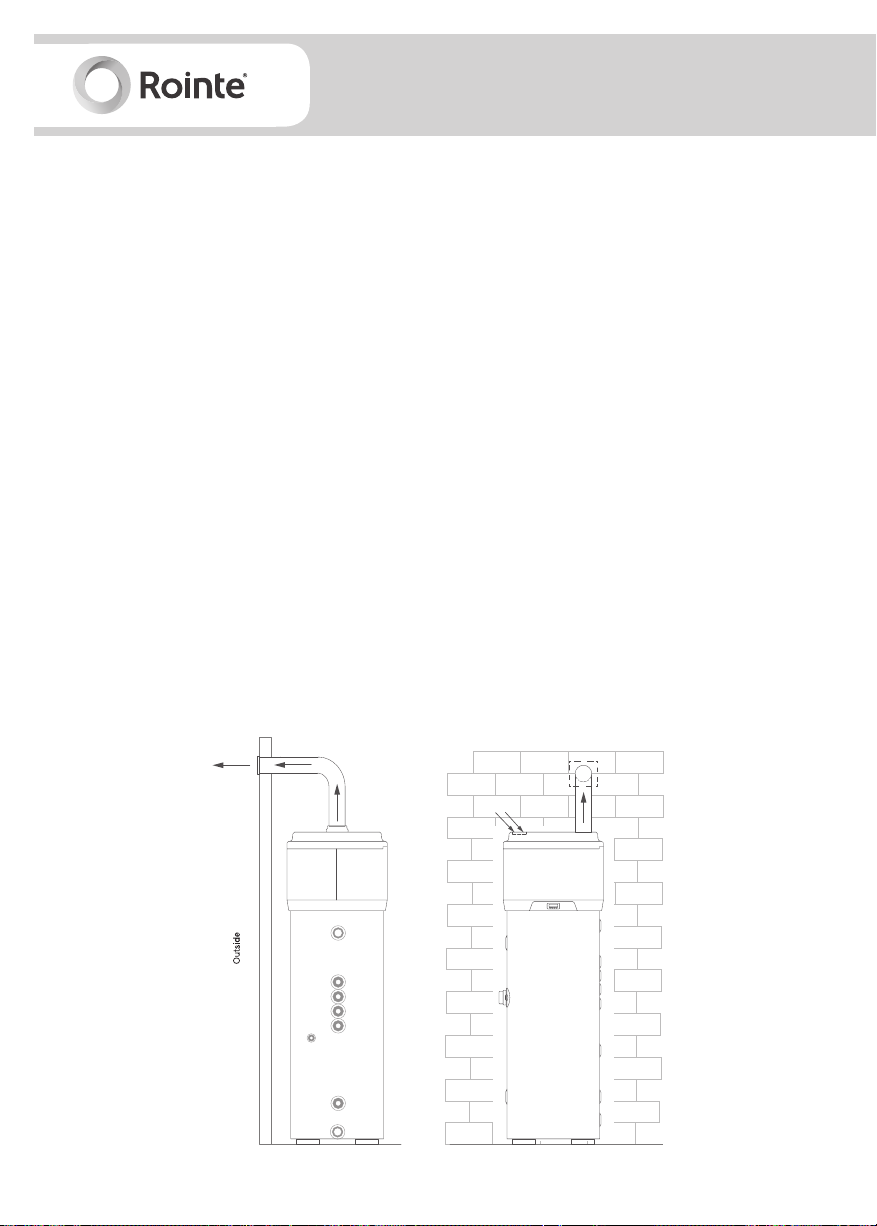
7.4. Ventilation
The product requires adequate ventilation (see figure 3). Install air ducts ensuring each one:
• Does not weigh down the product itself and allows for maintenance work.
• Is suitably protected to avoid foreign objects or materials getting inside the product.
• Does not exceed the recommended maximum length of 6 metres (with 2 x 90º elbow junctions).
• The total maximum allowable pressure drop for all components, including feed-throughs for
mounting on an external wall, in the pipe system does not exceed 100 Pa.
Figure 3 - Air duct for model with upper outlets
10
Page 11
DALIS
Digital electric unvented heat pump
• During operation, the heat pump tends to lower the ambient temperature if the external air duct
is not carried out.
• An appropriate protection grid must be installed in line with the discharge pipe conveying air
to the outside, with the aim of avoiding foreign bodies from entering the equipment. In order to
guarantee maximum device performance, the grid chosen must ensure low pressure loss.
• In order to avoid the formation of condensate, insulate the air discharge pipes and the air duct
cover connections with steam-tight thermal cladding of an adequate thickness.
• If it is considered necessary in order to prevent flow noise, sound mufflers can be mounted. Fit
the pipes and connections to the heat pump with vibration damping systems.
WARNING
The simultaneous operation of an open flue firebox (e.g. an open flue fireplace) or
combustion chamber together with the product will cause a dangerous drop in am-
bient pressure. This could cause the blackflow of exhaust gas into the environment
itself.
Do not use the product with an open flue firebox or combustion chamber. Use only
sealed (approved) chamber fireboxes or combustion chambers with a separate duct
for combustion air.
Keep the doors of the room closed and hermetically sealed if they do not have a
supply of combustion air in common with inhabited areas.
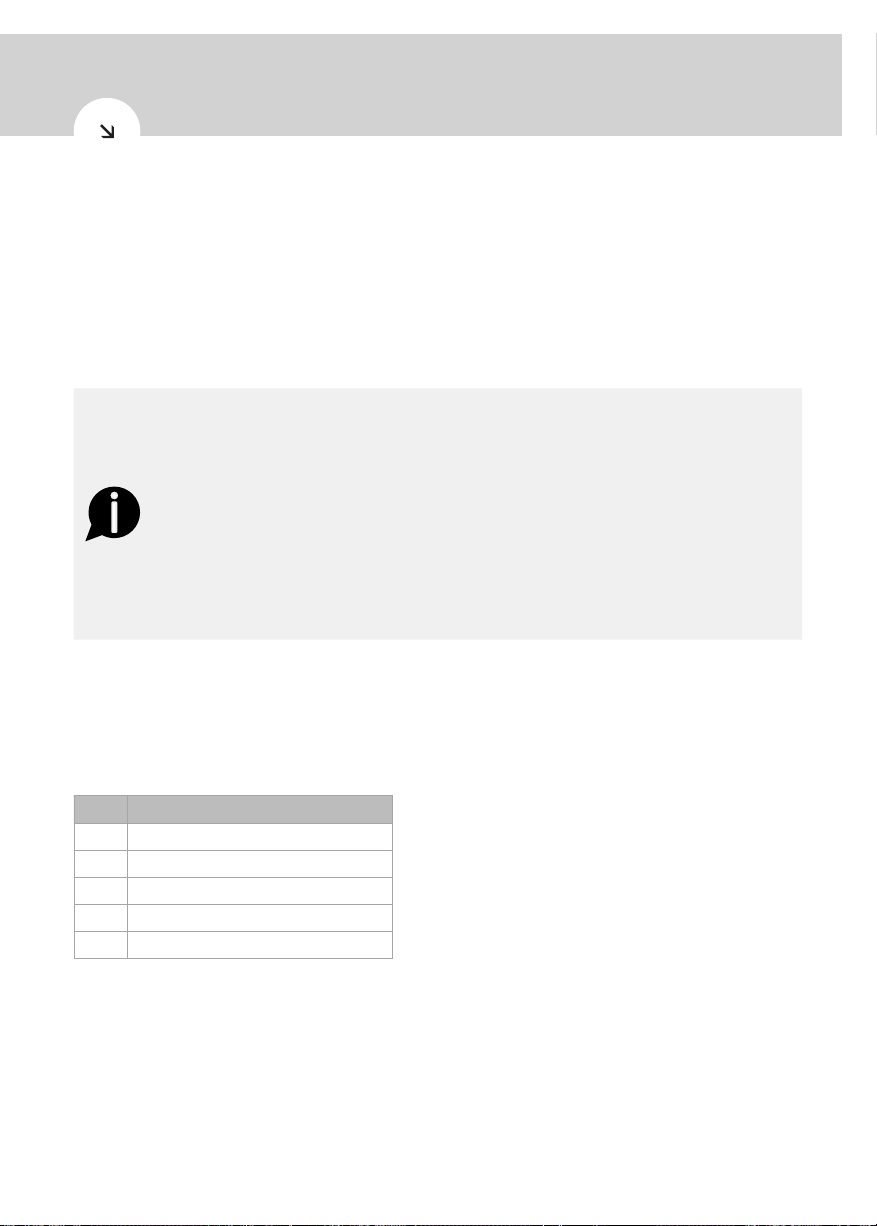
7.4.1. Ventilation accessories
Suitable ventilation accessories are available on the market, which are designed for simple and
efficient heat pump water connections. See below for ventilation accessories required for successful
and correct installation:
Item Part
1
Semi-rigid pipe - 160mm Ø lg 2m
2
90º insulated elbow - 160mm Ø
3
Collars for attaching to wall
4
Connectors for insulated pipe
5
Horizontal terminal for insulated pipe
11
Page 12
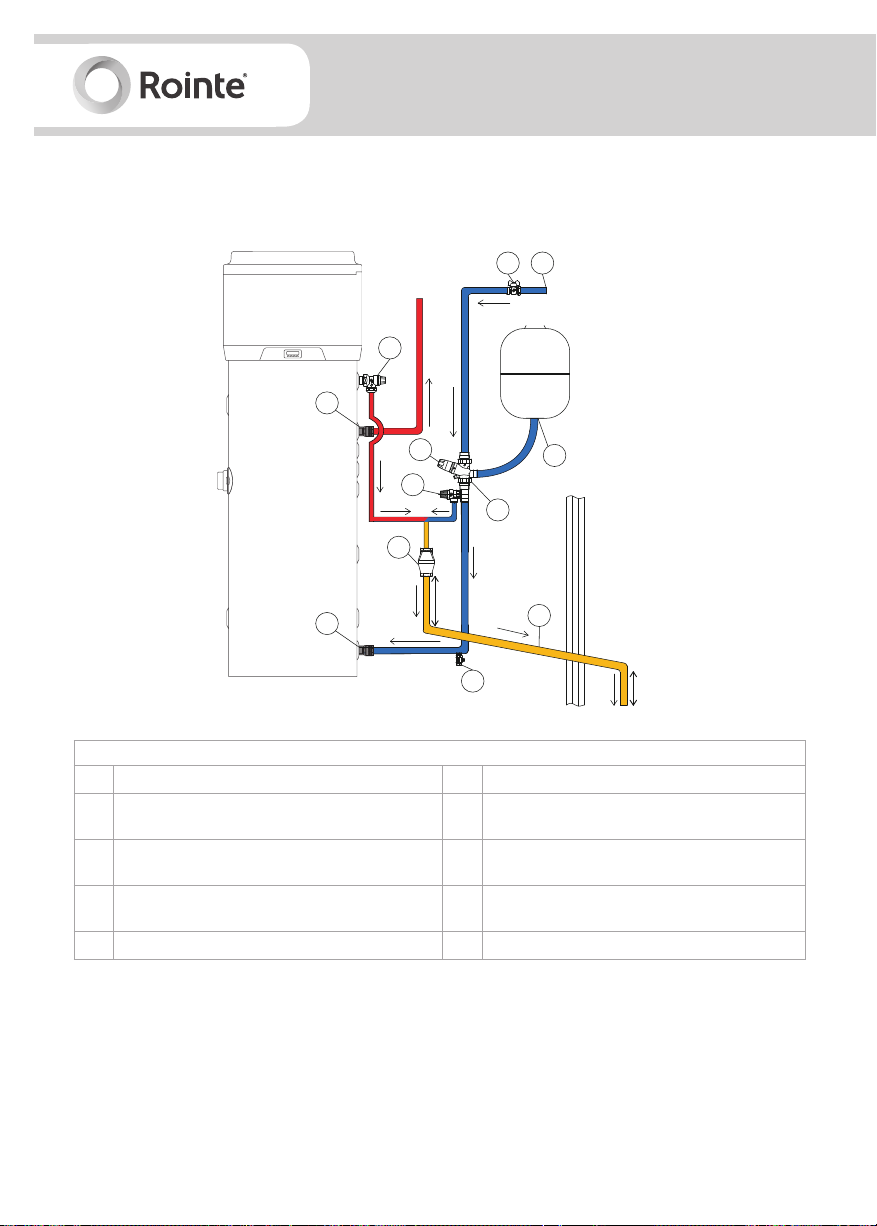
8. Installation
100 mm MAX
8.1. Installation diagram
Figure 5 - installation
11
Hot water outlet
2
1
Water flow
10
CW
3
5
8
to tap
9
4
11
Cold water inlet
300 mm MIN
7
6
DESCRIPTION OF INSTALLATION ITEMS
1
Mains cold water supply
2
Stop cock (not supplied)
Pressure reducing valve - (supplied in mandatory
3
installation kit, see section 4)
Check valve & expansion relief valve - (supplied
4-5
in mandatory installation kit, see section 4)
6
Discharge pipe 22 mm
7
Drain valve (not supplied)
Tundish - (supplied in mandatory installation kit,
8
see section 4)
Expansion vessel - (supplied in mandatory
9
installation kit, see section 4)
10 T/P relief valve (included)
11 Electrolytic fittings (included)
When carrying out the installation you must take care, so that:
• Extra pressure is not applied to the product e.g. by leaning on it.
• Foreign bodies and materials cannot enter inside the product.
• The selected pressure protection grid ensures low pressure loss.
• The air discharge pipes and roof connections are isolated with steam-tight thermal coating to
avoid condensation.
12
Page 13
DALIS
Digital electric unvented heat pump
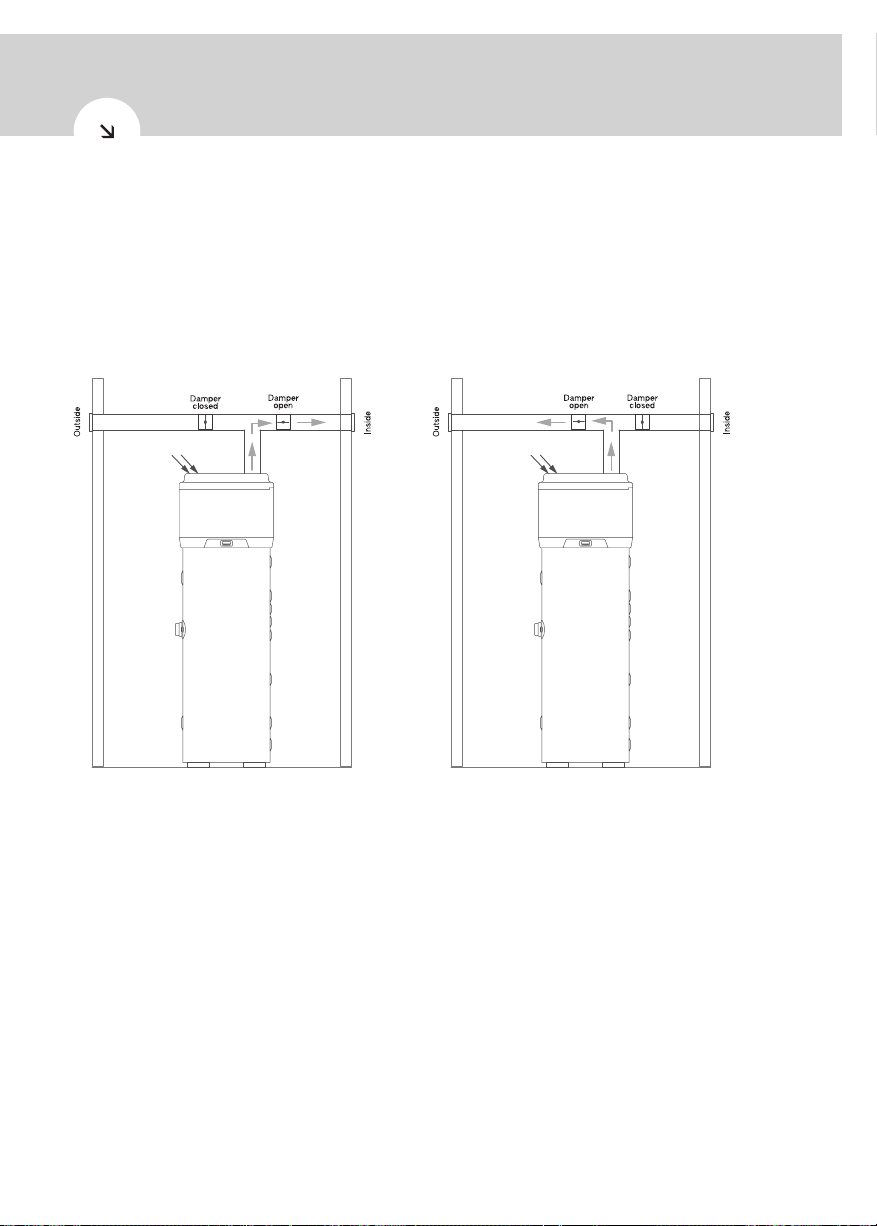
8.2. Non-standard installations
One of the unique features of heat pump heating systems is that they create a considerable drop in
air temperature usually expelled outdoors. The expelled air, in addition to being colder than the air in
the environment, is also fully dehumidified. This means that the flow of air can be fed back inside the
building again to cool rooms or spaces during warmer months, such as the summer. A dual air outlet
pipe should be installed, with 2 dampers attached, so that the expelled air flow can be directed either
indoors or outdoors - see figure 6a and 6b.
Figure 6a - installation in summer Figure 6b - installation in winter
8.3. Cold water supply
For safe per formance of the product, the tank should be directly fed by an uninterrupted supply pipe
that connects to the pressure reducing valve with a maximum supply pressure of 0.9 MPa - see figure
5. The product should not be used with a supply pressure below 0.15 MPa and a flow rate of less than
20 litres per minute. The following criteria must also be met:
• Cold water supply must come directly from the cold water mains after the mains stop valve to
the p rop e r t y.
• The inside diameter of the cold water pipework must be at least 19mm.
• Pipework should meet the water supply regulations for wholesome water.
13
Page 14
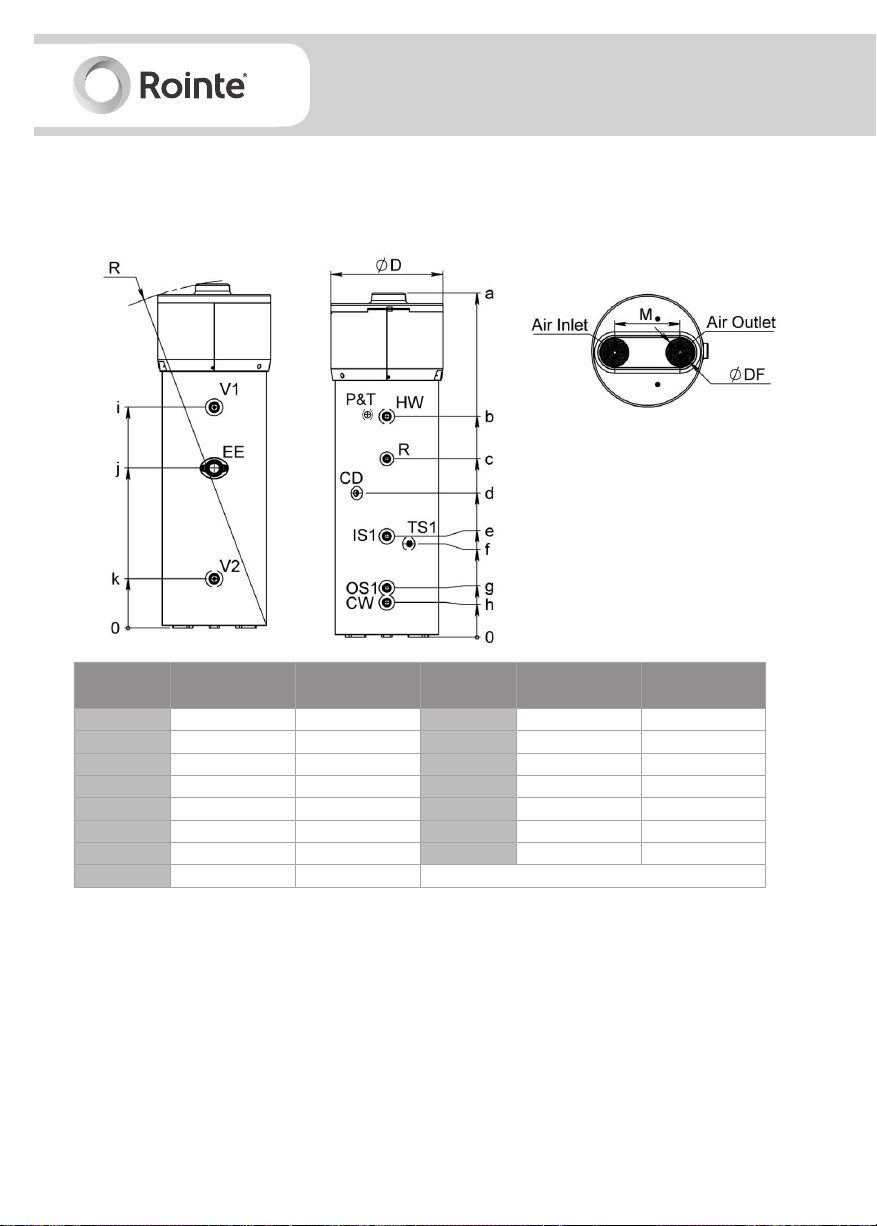
8.4. Connections
8.4.1. Overall dimensions
Figure 7 - overall dimensions
Dimensions
(+/- 5mm)
a
b
c
d
e
f
g
h
200 litres model 260 litres model
1,717 2,004
1,001 1,286
769 1,065
769 839
674 674
644 644
287 287
202 202
Dimensions
(+/- 5mm)
i
j
k
R
ØD
ØDF
M
200 litres model 260 litres model
1,000 1,286
716 931
287 287
1,751 2,025
650 650
160 160
380 380
8.4.2. Water supply connections
Connect the cold water inlet and outlet pipes to the appropriate connection points (see figure 8).
14
Page 15
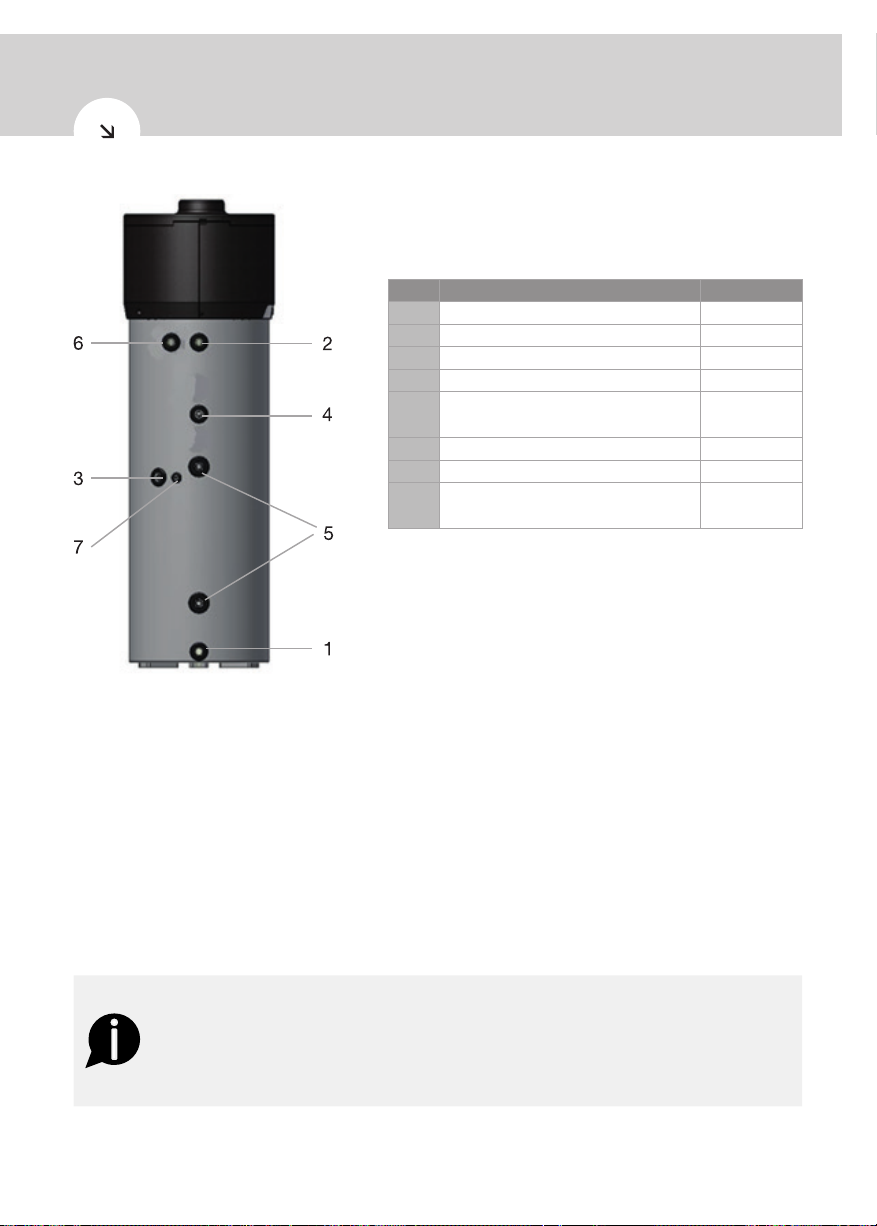
Figure 8 - overall dimensions
DALIS
Digital electric unvented heat pump
No.
1
CW: cold water inlet pipe G1”
2
HW: hot water outlet pipe G1”
3
CD: condensation drain 1/2”
4
R: recirculation pipe G 3/4”
IS1: Solar thermal power inlet coil
5
OS1: Solar thermal power outlet coil
6
P&T: T/P valve G1/2”
7
TS1: immersion sleeve probe G 1/2”
V1 / V2: protective anodes
-
EE: Heating element
Description Connection
G1”
G1 1/4”
G1 1/2”
A dirt/impurities filter must be installed in the cold water pipe inlet. The product must not operate with
a water hardness below 12ºF or hardness above 25ºF. If this is the case, then a suitably calibrated and
monitored water softener must be used.
This product is equipped with a pressure and T/P valve that complies with the BS EN 1490:2000
standard. It is factory set to operate on 7 bars pressure and a temperature of 90ºC.
The T/P safety valve for protection against over pressure and temperature must be operated regularly
to remove lime scale deposits and check it is not blocked. For more information on the T/P valve
please see section 8.9.
In case an expansion vessel is not installed, make sure that the cold water intake does not contain
any non-return valves.
WARNING
This product is capable of producing domestic hot water over 60ºC. To protect
against burns, we recommend a thermostatic mixing valve (sold separately) be in-
stalled in the hot water pipe. Also ensure there is no human burn risk at drain pipe
connecting T/P valve.
See figures 9a and 9 b for an example of a water supply connection.
15
Page 16

Figure 9a - water supply connection
1
2
3
4 Heat pump
5
6
7
8
9
Water inlet pipe
Shut-off valve
Automatic thermostat mixing valve
Recirculation pump
Spring check valve
Hot water outlet pipe
Drain tap
Expansion vessel
Figure 9b - T/P safety valve to drainage
16
10
T/P safety valve
11
Inspectable end of discharge pipe
Page 17

8.4.3. Solar power system integration
Figure 10 - example of a solar power system integration
DALIS
Digital electric unvented heat pump
1
Cold water intake pipe
2
Solar power system pump and accessories
3
Solar collectors/panels
4 Heat pump
5
Recirculation pump
6
Spring check valve
7
Drain tap
8
Solar thermal power coil
9
Hot water outlet pipe
8.5. Pipework and taps
The pipe runs should be executed as short as possible. Unused pipework should be removed and all
remaining lagged in accordance with regulatory requirements to prevent heat loss and condensation.
All pipework connections must be made according to figure 5. A drain cock (not supplied) should be
fitted in the position shown in figure 5. All taps and fittings should have a rated operating pressure of
0.6 Mpa (bar) or above.
8.6. Pressure reducing valve
The pressure reducing valve should be installed in the cold water supply to the product, above the
tundish and pointing in the direction as shown in figure 5. The pressure reducing valve can be con-
nected to a maximum supply pressure of 0.9 Mpa.
17
Page 18

8.7. Expansion vessel
The expansion vessel is mandatory on this product and is available within the installation kit (sold
separately) described in section 2. It MUST be fitted to the safety group and positioned with the
entry point at the bottom (see figure 5). We recommend to mount the expansion vessel higher than
the water heater to avoid draining the water heater when maintaining and replacing the expansion
vessel. It is important to check the pre-charge pressure of the expansion vessel membrane before
filling the cylinder. The expansion vessel should be pressurised to 0.15 or 0.3 MPa at all times.
8.8. Expansion relief valve
The expansion relief valve must be installed between the pressure reducing valve and the product
(see figure 5). No other valve should be fitted between this valve and the cylinder. The expansion
relief valve contains a non return valve. The discharge pipework from the expansion relief valve must
be installed constantly falling to an open point of discharge. It is recommended to combine it with
the discharge of the T/P valve (see figure 5).
8.9. T/P valve
The T/P valve (temperature and pressure relief valve) is supplied factory fitted as part of the product,
to meet the requirements of the G3 building regulations. It complies with the BS EN 1490 standard.
The valve is pre-calibrated to lift at 0.7 MPa or 90ºC. The T/P valve should not be removed or modified
in any way and if done so, will render the guarantee invalid.
The outlet of the T/P valve should be routed in 15mm copper piping, in a downward direction along-
side the product to the tundish. The outlet of the expansion relief valve must be T’d into this pipe
before the tundish. This is so any water exiting either valve can drain through the tundish (see figure
11).
The T/P valve must be discharged directly or by way of a manifold via a short length of pipe (D1) into a
tundish. The discharge pipe must be installed in a continuous downward direction and in a frost free
environment. Water may drip from the discharge pipe and this pipe must be left open to the
atmosphere. The diameter of the discharge pipe (D1) should not be less than the nominal outlet size
of the safety device e.g. T/P valve.
Where a manifold is used it should be sized to accept and discharge the total discharge from all D1
discharge pipes connected.
8.10. Tundish
The tundish should be vertical and located in the same space as the product and clearly visible to
the user. It must be fitted in close proximity to the safety device and close to the electrical current
carrying the wiring. There should be no more than 600mm of pipe between the valve outlet and the
tundish (see figure 11).
18
Page 19

Figure 11 - tundish and discharge pipe
8.11. Discharge pipe arrangement (D2)
DALIS
Digital electric unvented heat pump
WARNING
Discharge will consist of scalding water and steam. Asphalt, roofing felt and
non-metallic rainwater goods may be damaged by such discharges.
Please see figure 11 for diagram of discharge (D2) pipe arrangement. The discharge pipe from the
tundish should:
• Terminate in a safe place, where there is no risk to persons in the vicinity of the discharge.
• Be manufactured of metal or other material that is clearly demonstrated to be capable of safely
withstanding temperatures of the water discharged.
• Be clearly and permanently labelled to identify the product and its performance standard.
• Be at least one size larger than the normal outlet size of the safety device, unless its total
hydraulic resistance exceeds that of a straight pipe 9m long, i.e. discharge pipes between 9m
and 18m equivalent resistance length should be at least two sizes larger than the normal outlet
size of the safety device, between 18m and 27m and at least three sizes larger and so on.
• Have a vertical section of pipe at least 300mm long below the tundish, before any elbows or
bends in the pipework and installed in a continuous fall.
• Have discharges visible at both the tundish and the final point of discharge. Where this is not
possible or practical, here are some examples of acceptable discharge arrangements:
- Ideally below a fixed grating and above the water seal in a trapped gully.
19
Page 20

- External surfaces such as car parks, hard standings, grassed areas etc. are acceptable
providing that where children play or humans/animals otherwise come into contact with
discharges, a wire cage or similar guard is positioned to prevent contact whilst maintaining
visibility.
- Discharge at high level, e.g. into a metal hopper and metal down pipe with the end of the
discharge pipe clearly visible (tundish visible or not) or onto a roof capable of withstanding
high temperature discharges of water and 3 m from any plastic guttering system that would
collect such discharges (tundish visible).
- Where a single pipe serves a number of discharges such as in blocks of flats, the number
served should be limited to not more than six systems so that any installation discharging
can be traced reasonably easily. The single common discharge pipe should be at least one
pipe size larger than the largest individual discharge pipe to be connected. If unvented hot
water storage systems are installed where discharges from safety devices may not be appar-
ent (i.e. in dwellings occupied by blind, or disabled people), consideration should be given to
the installation of an electrically operated device to warn when discharge takes place.
IMPORTANT
Rointe do not take responsibility for any damage caused from discharges.
Figure 12 - sizing table for copper discharge (D2) pipe for common temperature relief valve outlets
Valve outlet size
(diameter, inches)
G 1/2 15
G 3/4 22
Min. size of discharge pipe
before tundish (mm)
Min. size of discharge pipe
D2 after tundish (mm)
22 9
28 18
35 27
28 9
35 18
42 27
Max. allowed length of pipe
after tundish (m)
8.11.1. Calculated example
The example below is for a 1/2” diameter temperature relief valve with a discharge pipe (D2) having
4 x 22mm elbows and a length of 7m from the tundish to the point of discharge.
The maximum resistance allowed for a straight length of 22mm copper discharge pipe (D2) from a
1/2” diameter temperature relief valve is 9.0m. Subtract the resistance for 4 x no 22mm elbows at
0.8m each = 3.2m.
The maximum permitted length equates to: 5.8m, which is less than the actual length of 7m, there-
fore, calculate the next largest size.
Maximum resistance allowed for a straight length of 28mm pipe (D2) from a 1/2” diameter tempera-
ture relief valve equates to: 18m. Subtract the resistance for 4 x 28mm elbows at 1.0 each = 4m.
Therefore the maximum permitted length equates to: 14m. As the actual length is 7m, a 28mm
diameter copper pipe will be satisfactory.
20
Page 21

DALIS
Digital electric unvented heat pump
8.12. Drain valve
We recommend a drain valve is installed (not supplied) in the lowest point of the cold water feed to
the product. This allows the product to be drained in a controlled manner if necessary (see figure 5).
8.13. Condensation drain connections
Condensation formed during operation of the heat pump should flow through a purpose-built outlet
pipe (G 1/2”) that passes inside the insulating casing and emerges on the side of the appliance.
Connect it to a duct via a siphon so that the condensation should flow as it should.
Figure 13a - example of condensation discharge Figure 13b - example of condensation
pipe c on n e ct io n via a s ip h on dischar g e pipe c on n e ct io n via si ph o n
with a water shut-off valve
8.14. Electrical fittings
The product is supplied already wired for the mains power supply. It is powered through a flexible
cable and a socket/plug combination (figure 14). An earthed Type G socket (UK) with separate pro-
tection is needed for the connection to the mains power supply.
Figure 14 - type G socket and plug
21
Page 22

IMPORTANT
The power supply to which the product will be connected must be protected by an
adequate residual current circuit breaker.
The type of residual current circuit breaker must be chosen by evaluating the type
of electric equipment to be used on the entire system.
With reference to the connection to the mains power supply and the safety equip-
ment (e.g. residual current circuit breaker), it must comply with standard IEC 60364-
4- 41.
The power supply must comply with all regulations in the country of product instal-
lation, as well as IEE Wiring regulations.
IMPORTANT
If the power cable is damaged, please contact us on 0203 321 5929. Please do not
shorten, modify or alter the power cable or plug without authorisation from Rointe.
It will render your guarantee invalid.
8.14.1. Remote connections
The product can be connected to other remote energy systems (solar panels and solar thermal
power). The user interface has two digital inputs with the following functions:
• Digital 1
When a dry contact is closed between terminals 30 and 31 (brown/yellow cable wires) and the
water temperature as measured by NTC1 is greater than SP8, the product stops. The product
starts again when the contact is released and the time set under C13 is reached, or immediate-
ly if the lower probe temperature is below SP8.
• Digital 2
When a dry contact is closed between terminals 31 and 32 (green/white cable wires) and the
heat pump reaches the temperature set under SP5 (pre-set to 62ºC), the nominal hot water
temperature is increased by 7ºC. For example, if you want to increase the temperature from
62ºC to 75ºC, you can specify that by accessing parameter SP6 in the settings where there is
sufficient solar panel electrical energy. The increase in temperature from 62ºC to 75ºC should
be made using the electric heating element (if SP6 is equal to SP5, the resistor is never activat-
ed).
For connection to digital inputs, the product is provided with an additional 4-core cable that has al-
ready been linked to the circuit board of the user inter face (placed inside the equipment - figure 14).
The remote links to any energy systems must be carried out by a qualified installer (junction boxes,
terminals and connection cables).
22
Page 23

DALIS
Digital electric unvented heat pump
Figure 14 - remote connection cables
To access the 4-core cable for remote connection it is necessary to remove the upper cover of the
product (see section 11.1. - figure 16), and take the cable outside through the dedicated opening
that is already present on the back cover, as indicated in figure 14.
Figure 15 - example of a remote connection
23
Page 24

8.14.2. Wiring diagram
Figure 15 - wiring diagram
9. Set up - commissioning
IMPORTANT
Check the product is connected to the earth cable.
Check that the line voltage corresponds to that indicated on the product identifica-
tion label/plate.
The tank must be filled with water before the product is switched on or connected
to a power supply.
See below for step by step guide on commissioning:
1) Fill the boiler by opening the water inlet tap and check that there are no leaks from gaskets,
pipes, joins or connections. Tighten the bolts or connections where necessary.
2) Do not exceed the maximum permitted pressure indicated in section 6 (technical informa-
tion).
24
Page 25

Digital electric unvented heat pump
3) Check that the water circuit safety equipment is working.
4) Connect the plug to the power socket.
5) When the plug is inserted, the product will be in stand-by mode. The display will remain
switched of f and the power key will be illuminated.
6) Press the power key. The equipment starts up in “ECO” mode (default setting), 5 minutes
after pressing the key.
10. Programming
10.1. Control panel
Fi
DALIS
10.1.1. ON / Stand-by button
• Switches the product on. When the product is switched on, it shows the status it was in when it
was previously switched off.
• Switches the product into stand-by. In stand-by the product can switch on in certain time slots
and independently enable the anti-legionella and defrost functions.
10.1.2. SET button
• Confirms choices, parameters or values.
10.1.3. Down button
• Scrolls down list of various parameters.
• Reduces the value of a parameter e.g. temperature.
10.1.4. Up button
• Scrolls up list of various parameters.
• Increases the value of a parameter e.g. temperature.
25
Page 26

10.2. Display screen
10.2.1. Display screen information
Symbol Item Description
If this is lit, the compressor is active.
Compressor LED
Defrost LED If this is lit, defrosting is in progress.
MF LED If this is lit, the electric heating element is active.
Fan LED If this is lit, the fan is active.
Maintenance LED If this is lit, maintenance of the air filter is required (if present).
If this is flashing:
- The compressor start-up procedure is in progress.
- The modification of the operating set points is in progress.
If this is lit, check the list of alarms and follow the procedure indicated in this
manual.
If this is lit, the product is in stand-by mode.
If this is flashing, the product has been switched on/off manually during a
switching on/off period in a certain time slot.
Loc
dEFr
Anti
ObSt
ECO
Auto
Alarm LED
ºCelsius LED If this is lit, the temperature will be measured in degrees (ºC).
ºFahrenheit LED If this is lit, the temperature will be measured in fahrenheit (ºF).
ON / Stand-by LED
n/a Not used
The keyboard is locked.
The defrosting procedure is in progress and it is NOT possible to enable any other function.
The anti-legionella function cycle is in progress.
The overboost function is active.
The economy function is active.
The automatic function is active.
10.3. Operating modes
• AUTOMATIC mode
This mode mainly uses the renewable energy of the heat pump. As a suppor t measure the electric
heating elements can be enabled and are activated if the water temperature is below a certain level,
or in the event where a temperature exceeding 62°C is required.
26
Page 27

DALIS
Digital electric unvented heat pump
• ECONOMY mode
This mode only uses the renewable energy of the heat pump without activating the electric heating
elements. It takes longer to enable but has considerable energy saving characteristics.
• OVERBOOST mode
This mode heats the water quickly by the using both the heat pump and the electric heating elements.
This function can be activated manually when the water temperature in the tank is below 40°C. At the
end of the heating process, the function is automatically disabled and the product is automatically
reset to AUTOMATIC or ECONOMY mode depending on which of these two functions was previously
programmed.
• ANTI-LEGIONELLA mode
This function is used as an antibacterial treatment to eliminate harmful bacteria by increasing the
water temperature to 60ºC. This function is activated automatically every 30 days, regardless of the
current mode in use.
• DEFROSTING mode
This function is necessary in order to eliminate frost deposits, which prevent the transfer of heat. This
function is enabled automatically when the device is used at low ambient temperatures.
IMPORTANT
When the equipment is turned on for the first time, it is programmed by the manufac-
turer to operate in the economy mode, with a water temperature value of 55°C. This
ensures energy saving using the renewable energy sources of the heat pump only.
Please note that the use of this function enables the user to save an average energy
saving of approximately 70% compared to other standard electric water heaters.
10.4. Basic management
10.4.1. Switch on/off manually
Press the button. The on/stand-by LED light will switch on/off. The equipment can also be
switched on / off during certain time slots; see parameters HOn and HOf.
If switching on/off manually, this always has priority over programmed time intervals.
If the keypad has been locked or an advanced function is in progress, it will not be possible to switch
the product on/off.
Each time the product is turned on, a series of internal inspections will be carried out before activating
the heat pump. The compressor indicator light will blink as these inspections take place. Once
the verification period has passed (approximately 5 minutes), the indicator will remain lit meaning the
unit is on.
10.4.2. Setting the day and time
To set the day and time:
27
Page 28

• Make sure that the keypad is not locked and that no other advanced procedure is in progress.
• Press and release the button. The screen will show the first available code.
• Press either the or button until “rtc” appears on the screen.
• You will now need to set the correct day of the week. Press and release the button. The
day is shown as 1 ... 7 (the number 1 is Monday). The screen will show “dd” followed by the two
numbers that represent the day.
• Use the or buttons within 15 seconds to select the correct day.
• You will now need to set the correct hour. Press and release the button. The screen will
show “hh” followed by the two numbers that represent the time. The time is displayed in 24-hour
format.
• Use the or buttons within 15 seconds to select the correct time.
• You will now need to set the correct minutes. Press and release the button. The display will
show “nn”, followed by the two numbers that represent the minutes.
• Use the or buttons within 15 seconds to select the correct minutes.
• Then press and release the button to save your settings, or do not carry out any other
operation for 15 seconds.
• To exit the procedure: press and release the button or do not carry out any operation for
60 seconds.
10.4.3. Programming the time slots for switching the product on / off
Before you can configure time slots for switch on/off, you must program the correct/current day and
time as described in section 10.4.2. previously.
• Make sure that the keypad is not locked and that no other advanced procedure is in progress.
• Press and release the button. “SP1” will appear on the screen.
To program the first time interval:
• Press and release either the or button within 15 seconds to select “HOn1” (the first
time on) and / or “HOf1” (the first time off). Select “HOn2” and “HOf2” for the second on / off
time.
• Press and release the button.
• Press and release either the or button within 15 seconds.
• Press and release the button or do not carry out any other operation for 15 seconds.
To program a time slot on a specific day of the week:
• After the previous procedure has been carried out, press either the or button and then
release within 15 seconds to select “Hd1” (switch on time for day 1/Monday) and / or “Hd2. ..7“
(switching on time for days 2 to 7 / Tuesday to Sunday).
• Press and release the button.
28
Page 29

DALIS
Digital electric unvented heat pump
• Press either the or button within 15 seconds to select “1” (the first switch on / off time)
or “2” (the second switch on / off time).
• Press and release the button or do not carry out any other operation for 15 seconds.
• To exit the procedure before its completion: do not carry out any operation for 15 seconds or
press the button and then release it.
• When programming becomes active, the symbol will flash. Carefully evaluate enabling of
time slot operation in order to avoid malfunctions caused by users.
10.4.4. Lock / unlock the keypad
To lock the keypad:
• Make sure that no other advanced procedure is in progress.
• Press the and buttons together for 1 second. “Lock” will appear on the screen.
• If the keypad is locked, it will not be possible to carry out any kind of operation on the control
panel. If you press a key, “Lock” will appear on the screen.
To unlock the keypad:
• Press the and buttons together for 1 second. “UnL” will appear on the screen and you
can use the keypad again.
10.4.5. Changing the operating mode
AUTOMATIC mode
To start the AUTOMATIC mode manually:
• Make sure that the keypad is not locked and that no other advanced procedure is in progress.
• Press the button. “Auto” starts flashing.
• Press the button to confirm and start the automatic operating mode.
• To exit the procedure: press the button without changing the mode.
ECONOMY mode
To start the ECONOMY mode manually:
• Make sure that the keypad is not locked, that no other advanced procedure is in progress and
that the equipment is not in OVERBOOST mode.
• Press the button. “ECO” starts flashing. Press the button to confirm and start the ECO
operating mode.
• To exit the procedure: press the button without changing the mode.
OVERBOOST mode
To start the OVERBOOST mode manually:
• Make sure that the keypad is not locked and that no other advanced procedure is in progress.
29
Page 30

• Press the button. “ECO” or “AUTO” starts flashing. Press either the or button until
“Obst” starts to flash on the screen.
• Press the button to confirm and start the OVERBOOST operating mode.
• To exit the procedure: press the button without changing the mode.
10.4.6. Temperature programming for ECO operating mode (SP1)
To set the temperature for ECONOMY mode:
• Make sure that the keypad is not locked and that no other advanced procedure is in progress.
• Press and release the button. “SP1” will appear on the screen. Press and release the
button again. The compressor indicator light starts flashing.
• Press either the or button within 15 seconds to set the temperature. The parameters
r3, r4 and r5 will be visible.
• Press and release the button, or do not carry out any other operation for 15 seconds. The
compressor indicator light will disappear. Press and release the button.
• To exit the procedure before completion, do not carry out any operation for 15 seconds (all
changes made will be saved).
10.4.7. Temperature programming for AUTOMATIC operating mode (SP2)
• Make sure that the keypad is not locked and that no other advanced procedure is in progress.
• Press and release the button. “SP1” will appear on the screen. Press either the or
button until “SP2” appears on the screen.
• Press and release the button again. The compressor indicator light starts flashing.
• Press either the or button within 15 seconds to set the temperature. The parameters
r1, r2 and r5 will be visible.
• Press and release the button, or do not carry out any other operation for 15 seconds. The
compressor indicator light will disappear. Press and release the button.
• To exit the procedure before completion, do not carry out any operation for 15 seconds (all
changes made will be saved).
10.4.8. Viewing the operation status
To view the current operating status:
• Make sure that the keypad is not locked and that no other advanced procedure is in progress.
• Press the button . Either Auto, ECO, Obst or Anti will appear on the screen within 3 sec-
onds depending on the current active operating state.
10.5. Advanced management
The following instructions are reserved for specialised technical assistance personnel.
30
Page 31

DALIS
Digital electric unvented heat pump
10.5.1. Different operating mode start conditions
Each mode of operation must meet specific conditions to be activated:
• AUTOMATIC mode
The condition to activate this function is as follows: lower probe <SP2 - r0 (hysteresis).
• ECONOMY mode
The condition to activate this function is as follows: lower probe <SP1 - r0 (hysteresis).
• OVERBOOST mode
The condition to activate this function is as follows: lower probe <SP3 and upper probe <SP3. When
a temperature higher than SP3 is detected, the overboost operating mode is terminates and the pre-
viously established operating mode is restored.
10.5.2. Screen
If the product is “ON”, during normal operation the display will show the temperature set (parameter
P5):
• If P5 = 0, the display will show the temperature of the upper part of the tank.
• If P5 = 1, the display will show the active working set point.
• If P5 = 2, the display will show the temperature of the bottom of the tank.
• If P5 = 3, the display will show the evaporator temperature.
• If the equipment is in the “stand-by” state, the screen will turn off.
10.5.3. Alarms & errors
A “UtL” alarm (fan fault) will display on the screen and emit an audible signal that can be turned off
by pressing any button on the controller. If a “UtL” alarm occurs, you must contact our Technical
Support team on 0203 321 5929. An alarm is never cancelled unless the device is switched off or put
in stand-by mode. The heat pump operating mode is automatically disabled and the electric heating
elements enabled in order to ensure the continuity of the hot water supply.
Alarms:
Code Description
Minimum temperature alarm - the equipment will continue working normally.
Solution:
AL
AH
- Check the temperature associated with the alarm.
- Parameters displayed on the screen: A0, A1, A2 and A11.
Maximum temperature alarm - the equipment will continue working normally.
Solution:
- Check the temperature associated with the alarm.
- Parameters displayed on the screen: A3, A4, A5 and A11.
31
Page 32

Code Description
Digital input alarm - the compressor will shut off. Defrosting will not activate.
Solution:
id
iSd
FiL
UtL
- Check the causes that led to the activation of the inputs (possible short circuit in signal cables).
- See the parameters: i0; i1 and i2.
Blocked equipment alarm - the compressor will shut off. Defrosting will not activate.
Solution:
- Check the causes that led to the activation of the digital input.
- See the parameters: i0; i1; 18 and i9.
- Turn the product off, then on again or disconnect the product from the electrical network.
Ventilation filter verification alarm (if present)
Solution:
- Check how clean the filter is. To turn off the alarm message, press any button on the keypad.
Possible fan fault - the compressor and fan will turn off. Heating occurs through electric elements.
Solution:
- See parameters SP10 and C14.
- Check fan conditions.
Errors:
Code Description
Pr1
Pr2
Pr3
Top probe error - the product stops working.
Solution:
- Check that the type of probe conforms to the settings of parameter P0.
- Check that the probe is intact.
- Check the probe connection.
- Check the temperature of the upper part of the product.
Bottom probe error - the product stops working.
Solution:
- The same as in the previous situation, but with respect to the probe in the lower part of the
tank.
Evaporator probe error - the product stops working.
Solution:
- The same as in the previous situation, but with respect to the evaporator probe.
Once the cause of the alarm/error has been fixed, normal operation of the product will be restored.
10.5.4. Defrost mode
The defrost mode can be activated automatically when the evaporator temperature is lower than that
programmed in parameter d17 (only if P4 has a value other than 0).
In any case, between one defrosting procedure and another, the compressor must have been left on
for a period longer than or equal to the minutes d18, otherwise, the request to activate the defrosting
procedure will not be accepted.
32
Page 33

DALIS
Digital electric unvented heat pump
If P4 = 1, d2 represents the temperature of the evaporator above which the defrosting procedure is
completed. Vice versa, if P4 = 0 or P4 = 2, the parameter d2 is not taken into consideration.
If during the defrosting procedure the evaporator or the probe is higher than the set threshold by
means of parameters d2 and P4 = 1, the request to activate the defrosting procedure will not be
accepted.
The thawing procedure consists of three stages:
• Defrosting stage: the d3 parameter establishes the maximum length of the stage. Output status:
- The compressor is active if d1 = 1, otherwise it is switched off.
- The defrosting relay is active if d1 = 0 or d1 = 1, otherwise it is switched off.
- The fans are switched on if d1 = 2, otherwise they are switched off.
• Dripping stage: the d7 parameter establishes the length of the stage. Output status:
- The compressor is switched off.
- The defrosting relay is active if d1 = 0 or d1 = 1, otherwise it is switched off.
- The fans are switched off.
• Drying stage: the d16 parameter establishes the length of the stage. Output status:
- The compressor acts according to parameter d8.
- The defrosting relay is active if d1 = 0 or d1 = 1, otherwise it is switched off.
- The fans are switched off.
If the “anti-legionella” or “overboost” functions are in progress, the defrosting procedure will not be
activated.
10.5.5. Configuration parameter settings
To carry out the procedure:
• Make sure that the keypad is not locked and that no other advanced procedure is in progress.
• Press and hold the buttons for 4 seconds. The screen will show “PA” (password).
• Press and release the button.
• Press either the or button within 15 seconds to set “-19” on the display screen.
• Press and release the button, or do not carry out any operation for 15 seconds.
• Press and hold the buttons for 4 seconds. The screen will show the “SP1” parameter.
To select a parameter:
• Press either the or button.
To change a parameter:
• Press and release the button.
• Press either the or button to increase or decrease the value of the parameter (within
15 seconds).
33
Page 34

• Press and release the button, or do not carry out any operations for 15 seconds.
To exit the procedure:
• Press and hold the buttons for 4 seconds. or do not carry out any operations for 60
seconds (any changes will be saved).
Switch the product off and then on again to make the changes made to the parameters effective/active.
10.5.6. Restore factory settings
To carry out the procedure:
• Make sure that the keypad is not locked and that no other advanced procedure is in progress.
• Press and hold the buttons for 4 seconds. The screen will show “PA” (password).
• Press and release the button.
• Press either the or button within 15 seconds to set “149” on the display screen.
• Press and release the button, or do not carry out any operation for 15 seconds.
• Press and hold the buttons for 4 seconds. The screen will show the “dEF” parameter.
• Press and release the button.
• Press either the or button within 15 seconds to set “1”.
• Press and release the button, or do not carry out any operation for 15 seconds. The display
will show “dEF” flashing for 4 seconds, after which the product will exit this operation.
• Disconnect the product from the electrical network.
10.5.7. Compressor operating hours
The device is capable of memorizing up to 9,999 hours of compressor operation. If the number of
hours exceeds “9,999” it flashes. To display the operating hours of the compressor:
• Make sure that the keypad is not locked and that no other advanced procedure is in progress.
• Press and release the button. The screen will show “CH”.
• Press the button to see the hours.
• Press and release the button.
To exit the procedure:
• Keep the button pressed or do not carry out any operation for 60 seconds. Alternatively
press and release the button.
10.6. Specific operations
The product is provided with a verification system of the environmental conditions concerning the
temperatures of the external incoming air. The below is necessary to avoid the product working with
the heat pump mode out of specification, which may cause faults to the compressor and the conse-
quent interruption of the product’s functions.
34
Page 35

DALIS
Digital electric unvented heat pump
At each start up, the fan is activated for a time set up to 1 minute (parameter C12). After this time,
the system measures the incoming air temperature. If the temperature is equal to or lower than the
parameter SP9 (4ºC), the conditions for activation of the product are not met, therefore the electric
heating elements are activated. The heat up process continues with the help of the electrical heating
elements until the set point established with the ongoing active cycle is reached.
The system verifies every 120 minutes, the environmental conditions and activates the heat pump
mode only when conditions are adequate for its operation.
10.7. Product parameters
Description Code Unit Min. Max. Default Notes
Password PA 0
H20 set HOT eco
cycle
H20 set HOT auto
cycle
H20 set cold SP3 ºC / ºF 10.0 r2 45.0
H20 set for heat
pump stop
H20 set for enabling
of photovoltaic
systems
H20 set antifreeze SP7 ºC / ºF 0 40.0 10.0
Set point solar
thermal cycle
Set cold evaporator SP9 ºC / ºF -25.0 25.0 -4.0
Set damaged
evaporator
Upper probe
calibration
Lower probe
calibration
Evaporator probe
calibration
Type of probe PO ---- 0 1 1
Decimal point P1 ---- 0 1 1 1 = display decimal point per temp.
Unit of
measurement
Function
associated with
evaporator probe
SP1 ºC / ºF r3 r4 55.0
SP2 ºC / ºF r1 r2 55.0
SP5 ºC / ºF r1 SP2 56.0
SP6 ºC / ºF 40.0 100.0 75.0
SP8 ºC / ºF 0 100.0 40.0
SP10 ºC / ºF -50.0 25.0 -25.0
CA1 ºC / ºF -25.0 25.0 2.0
CA2 ºC / ºF -25.0 25.0 0.0
CA3 ºC / ºF -25.0 25.0 0
P2 ---- 0 1 0
P4 ---- 0 2 2
Function reserved for specialised
technical staff
0 = PTC
1 = NTC
2 = PT1000
0 = ºC
1 = ºF
0 = Disabled
1 = Defrosting start-stop
2 = Defrosting start
35
Page 36

Description Code Unit Min. Max. Default Notes
0 = Upper probe
Local display data P5 ---- 0 3 0
Remote display data P6 ---- 0 3 0
Display data refresh
time specified in
tenths of a second
Work set hysteresis r0 ºC / ºF 0.1 30.0 7.0
Minimum auto cycle
set point
Maximum auto cycle
set point
Minimum eco cycle
set point
Maximum eco cycle
set point
Work set change lock r5 ---- 0 1 0
Delay in equipment
start up
Delay as from last ON C1 min. 0 240 5
Delay as from last
OFF
Minimum ON time C3 sec 0 240 0
No. compressor
operating hours req.
for maintenance
Delay air temperature
sample taking for
cold evaporator test
Minimum delay
between fan start-up
and compressor activation for incoming
air temperature check
Timeout solar thermal
cycle
Delay for damaged
fan check
Defrosting type d1 ---- 0 2 2
P8 1/10 sec 0 250 5
r1 ºC / ºF 10.0 r2 40.0
r2 ºC / ºF r1 100.0 70.0
r3 ºC / ºF 10.0 r4 40.0
r4 ºC / ºF r3 100.0 56.0
C0 min. 0 240 5
C2 min. 0 240 5
C10 hour 0 9999 0 0 = function excluded
C11 min 0 999 120
C12 min 0 240 1
C13 min 0 240 20
C14 min -1 240 20 -1 = disabled function
1 = Operation setpoint
2 = Lower probe
3 = Evaporator probe
0 = Upper probe
1 = Operation set-point
2 = Lower probe
3 = Evaporator probe
1 = it is not possible to change the set
point; it can only be seen.
Compressor protections
0 = with heating element
1 = with hot gas
2 = with compressor stopped
36
Page 37

Digital electric unvented heat pump
Description Code Unit Min. Max. Default Notes
Evaporator temperature to conclude
defrosting procedure
(only if P4=1)
Maximum duration of
defrosting procedure
Automatic defrosting
start threshold (evaporator temperature)
Minimum compressor
start up time to start
deforsting procedure
Minimum level probe
alarm (only AL1
warning)
Minimum alarm set
(only AL1 warning)
Type of minimum
level alarm (only AL1
warning)
Maximum level
probe alarm (only AH
warning)
Maximum alarm set
(only AH warning)
Type of maximum
level alarm delay
(only AH warning)
Minimum level AL1
alarm delay due to
equipment start-up
(only warning)
AL1 and AH temperature alarm delays
(only warning)
Alarm hysteresis A11 min 0.1 30.0 2.0
Heating element start
up interval (antilegionella)
Anti-legionella
function set
Duration of antilegionella cycle
Solar thermal input
enabling (digital 1)
d2 ºC / ºF -50.0 50.0 3.0
d3 min 0 99 20
d17 ºC / ºF -50.0 50.0 -2.0
d18 min 0 240 60
A0 ---- 0 2 0
A1 ºC / ºF 0.0 50.0 10.0
A2 ---- 0 1 0
A3 ---- 0 2 0
A4 ºC / ºF 0.0 199.0 90.0
A5 ---- 0 1 0
A6 min 0 240 120
A7 min 0 240 15
H0 days 0 99 30
H1 ºC / ºF 10.00 199.0 60.0
H3 min 0 240 2
i0 ---- 0 2 2
0 = upper probe
1 = lower probe
2 = evaporator probe
0 = disabled
1 = absolute
0 = upper probe
1 = lower probe
2 = evaporator probe
0 = disabled
1 = absolute
0 = input disabled
1 = pressure input
2 = digital 1 input
DALIS
37
Page 38

Description Code Unit Min. Max. Default Notes
Type of solar thermal
input contact (digital 1)i1 ---- 0 1 0
High/low pressure
end compressor
protection
Photovoltaic input
enabling (digital 2)
Type of photovoltaic
input contact (digital 2)i4 ---- 0 1 0
Number of digital
input alarms per
equipment block
Time for digital input
alarm counter reset
Buzzer enabling u9 ---- 0 1 1
Switching on time for
Monday
Switching on time for
Tuesday
Switching on time for
Wednesday
Switching on time for
Thursday
Switching on time for
Friday
Switching on time for
Saturday
Switching on time for
Sunday
Time for first switch
on timeslot
Time for first switch
off timeslot
Time according to
timeslot switch on
Time according to
timeslot switch off
Equipment address LA ---- 1 247 247
Baud Rate Lb ---- 0 3 2
i2 min 0 120 0
i3 ---- 0 1 1
i8 ---- 0 15 0
i9 min 1 999 240
Hd1 ---- 1 2 1
Hd2 ---- 1 2 1
Hd3 ---- 1 2 1
Hd4 ---- 1 2 1
Hd5 ---- 1 2 1
Hd6 ---- 1 2 2
Hd7 ---- 1 2 2
HOn1 ---- 00:00 23.59 --:-- --:-- = function excluded
HOF1 ---- 00:00 23.59 --:-- --:-- = function excluded
HOn2 ---- 00:00 23.59 --:-- --:-- = function excluded
HOF2 ---- 00:00 23.59 --:-- --:-- = function excluded
0 = active if contact is closed
1 = active if contact is open
0 = input disabled
2 = input enabled
0 = active if contact closed
1 = active if contact open
0 = buzzer disabled
1 = buzzer enabled
1 = HOn1-HOF1
2 = HOn2-HOF2
1 = HOn1-HOF1
2 = HOn2-HOF2
1 = HOn1-HOF1
2 = HOn2-HOF2
1 = HOn1-HOF1
2 = HOn2-HOF2
1 = HOn1-HOF1
2 = HOn2-HOF2
1 = HOn1-HOF1
2 = HOn2-HOF2
1 = HOn1-HOF1
2 = HOn2-HOF2
0 = 2400
1 = 4800
2 = 9600
3 = 19200
38
Page 39

DALIS
Digital electric unvented heat pump
Description Code Unit Min. Max. Default Notes
Parity LP ---- 0 2 2
RESERVED E9 ---- 0 2 0
11. Maintenance
IMPORTANT
Any repair, replacement or modification of the product must be carried out by qualified personnel. Inadequate repairs can put the user and others in serious danger. If
your product needs to be repaired, please contact us.
Before carrying out any maintenance operation, make sure that the product is not
and cannot be accidentally connected to the mains. Disconnect the product from the
power source before performing any cleaning or maintenance operations.
11.1. Readjustment of safet y equipment
The product is equipped with a safety thermostat. With manual reset, the product switches off in case
of overheating. To restore protection it is necessary to:
• Disconnect the product from the electrical network and then remove the air ducts.
• Remove the top cover by loosening the respective fixing screws - see figure 16.
• Manually reset the safety thermostat activated from the top (figure 17). The central pin of the thermostat protrudes approximately 4 mm.
• Reassemble the top cover that has been previously removed.
0 = NONE
1 = ODD
2 = EVEN
IMPORTANT
Activation of the safety thermostat could be due to a fault associated with the control
panel or lack of water in the tank. Carrying out repair operations on parts that perform
safety functions endangers the safe operation of the product. Replace defective components with original spare parts only.
The intervention of the thermostat excludes the operation of the electric heating elements but not the
heat pump system within the permitted operating limits.
39
Page 40

Figure 16 - top cover removal Figure 17 - resetting the safety thermostat
Click
11.2. Inspections
Visual inspection of the general condition of the product and its systems, as well as inspection of the
absence of leaks and the ventilation filter is recommended on a quarterly basis. This must be con-
ducted by qualified professional. Inspection of the tightening of bolts, nuts, flanges and water supply
connections that may have been loosened by vibration, is recommended on an annual basis. This
must be conducted by a qualified professional. We also recommend to check the integrity status of all
magnesium anodes - see section 11.3. below.
11.3. Magnesium anodes
The magnesium anode (Mg), also called “sacrificial” anode, prevents any parasitic current generated in
the product, which can cause corrosion processes on the surface of the product.
In fact, magnesium is a metal with a lower electrochemical potential compared to the material that covers the inside of the water heater, therefore, it attracts the negative charges that are formed during the
heating of the water causing corrosion. Therefore, the anode “sacrifices” itself corroding in place of the
deposit. The water heater has two anodes; the first is mounted on the bottom and the second on the
top of the tank (the area most affected by corrosion).
The integrity of magnesium anodes should be checked at least once every two years (we recommend
the magnesium anodes are checked at least once per year). The operation must be carried out by qualified personnel. Before performing the inspection, you must:
• Close the cold water inlet. Empty water from the water heater (see paragraph 11.5).
• Loosen the upper anode and check its corrosion condition. If more than 30% of the anode surface
has suffered corrosion, it must be replaced.
• Carry out the same operation for the lower anode.
The anodes have adequate sealing joints to prevent water leakage. It is recommended to use anaerobic
sealant for compatible threads for use in sanitary and heating systems. The joints must be replaced
both in the case of an inspection and in the case of replacement of anodes with new joints.
40
Page 41

DALIS
Digital electric unvented heat pump
11.4. Emptying the water heater
It is advisable to drain the water from inside the water heater if it should remain unused for a certain
period of time, especially at low temperatures. It is sufficient to disconnect the water supply inlet connection. Alternatively, during the installation stage of the system, it is advisable to install a drain trap
with a connection to a hose. It is important to empty the system in order to avoid freezing water if the
product is unused for a period of time.
12. Troubleshooting
If you encounter problems, without the occurrence of any of the alarms or errors described in the
relative paragraphs, please check if the problem can be easily solved using the table below, BEFORE
requesting technical assistance.
Issue Possible cause
The heat pump does not work. Absence of electrical connection / there is no electricity.
The compressor and / or the fan do not work. The scheduled safety period has not ended.
The heat pump continuously switches on and off. Incorrect programming of parameters / set point and /
The heat pump remains continuously on and does not
switch off.
The electric heating element does not switch on. Please do not intervene. Please contact Technical
The plug is not inserted correctly in the outlet.
The programmed temperature has been reached.
or hysteresis values.
Incorrect programming of parameters / set point and /
or hysteresis values.
Support.
IMPORTANT
In the event that the user fails to solve the problem, turn off the equipment and contact us to request Technical Suppor t, specifying the model and serial number of the
purchased product.
13. Product disposal
IMPORTANT
This equipment contains fluorinated greenhouse gases. Maintenance and disposal
operations must only be carried out by qualified personnel.
Under the European Directive 2012/19/UE on Waste Electrical and Electronic Equipment (WEEE), the
product cannot be disposed of in the usual council bins and containers. They must be separated to
optimise the recover y and recycling of all of the components and materials and reducing the impact
to human health and the environment. The symbol of the container crossed out over a horizontal line
is marked on all of ROINTE products to remind the consumer of the obligation to separate them on
disposal. The consumer should contact the local authority or original point of sale to learn more about
the correct disposal of this product. The unauthorised removal of the device by the user may lead to
administrative sanctions imposed on the user by the applicable legislation.
41
Page 42

14. Rointe Product Guarantee
In this section, we hereby describe the guarantee conditions, which the buyer acquires, on buying this
product from ROINTE. These conditions comply with all the rights construed in the national legislation
in force, as well as any additional rights and guarantees, which are offered by ROINTE.
Any incident that you might detect in your ROINTE product can be sorted by the product seller or
quickly by the manufacturer. Please contact ROINTE by telephoning 0203 321 5929 fo r Technic a l
Suppor t. Alternatively, you can email ROINTE at support@rointe.co.uk, through which we will instruct
you on how to solve the incident.
You will need to state the product reference (located on the label indicating product features),
serial number, proof of purchase and the type of incident at hand when contacting us so that
we can check the guarantee. In addition, please at tach a copy of the product invoice.
14.1. ROINTE guarantees that there are no material defects of design or manufacture at the time of
original acquisition and guarantees the inner steel cylinder for a period of 60 months and any electronic
and electrical components for 24 months, provided that they have not been modified in any way.
14.2. If during the guarantee period, the product does not work correctly under normal use, and any
design, material or manufacturing defect is found, ROINTE will repair or substitute the product as it
may see fit, in accordance with the terms and conditions as follows:
14.2.1. The guarantee is only applicable if the original guarantee is issued by the seller and when the
said guarantee is filled in correctly including product reference, series number (marked on the product’s
label indicating technical features), purchase date and the seller’s stamp, and either registered on our
website at www.rointe.co.uk or returned completed to ROINTE within 90 days of installation. ROINTE
reserves the right to reject the guarantee service when this information has been removed or modified
after the original product purchase.
14.2.2. The guarantee is only applicable if the product has been installed by a competent person
in accordance with this installation manual and all current regulations and codes of practice at the
time of installation.
14.2.3. The guarantee is only applicable to those cases that concern material, design and manufacturing
defects, and under no circumstances covers damage to the product for the following reasons:
14.2.3.1 Damage caused by negligence and/or misuse of the product, i.e. used for other
42
Page 43

DALIS
Digital electric unvented heat pump
purposes that are not construed as its normal use or for not respecting the instructions of use and
maintenance given by ROINTE as well as incorrect installation or use of the product that may not
comply with the current technical standards of safety.
14.2.3.2. Corrosion of any part of the product caused by direct exposure to salt water. When
the product is installed no more than 200m from the coast the guarantee for damages caused by
corrosion the period will be reduced by 50%.
14.2.3.3. Any unauthorised modification of the product or repairs of the product carried out
by third parties or unauthorised technicians or opening of the product by third parties or unauthorised
people.
14.2.3.4. Any accidents that are deemed outside the control of ROINTE, such as (but not
limited to): lightning, fires, floods, natural disasters, public disorder, atmospheric or geologic phenomena
etc.
14.2.3.5. Faults that result from an incorrect installation. Guidance can be found within the
recommendations for installation, by Rointe and in the installation manual. If in doubt, please contact
ROINTE.
14.2.3.6. Aesthetic wear and tear produced by use, the cleaning of lime scale accumulation,
revision and substitution of the magnesium anode as well as other operations of maintenance of the
product. Such repairs will be charged to the user.
14.2.4. Any repairs or substitutions that are included in this guarantee do not allow any additions
or new periods of guarantee.
14.2.5. Any repairs or substitutions covered under this guarantee must be parts that are functionally
equivalent. The defective parts or parts removed or replaced shall become the proper ty of ROINTE.
14.2.6. The product must be installed in a way that allows access for our technicians should they
need to gain access to the product for repair or maintenance. The user/client is responsible for any
costs or organisation required to provide access to the products for their repair and/or substitution.
14.2.7. The product has been installed indoors, in a frost free environment and has solely been used
for the purpose of heating potable water that complies with current (at time of installation) regulations
and standards and is not fed with water from a private source.
14.2.8. The product has not been subjected to excessive pressure or electrolytic actions from
dissimilar materials or attack from salt deposits.
14.3. The Technical Service department of ROINTE will advise you if you need to purchase any parts
not covered under the guarantee or out of guarantee.
14.4. This guarantee will be null and void if the product: has been manipulated, modified and/or
repaired in any way and/or by unauthorised persons. This guarantee will also be void if the product
is not correctly installed.
14.5. This guarantee is not transferable and does not include claims due to frost or limescale damage.
14.6. Proof of purchase will be required to ROINTE for any claim.
14.7. This guarantee does not affect your statutory rights.
43
Page 44

14.8. This guarantee does not affect the buyer’s legal rights stipulated in the current national legislation,
nor affects those rights against the distributor or installer that could come for th in compliance with
the purchase contract.
14.9. In the absence of a national legal legislation applicable, this guarantee shall prevail and may be
construed as the buyer’s only protection. ROINTE, its offices, distributors and installers may not be
held responsible for any accidental damage that emerges due to infringement of any rules implicitly
related to this product.
For help about the product or guarantee, please contact ROINTE by telephoning 0203 321 5929 for
Technical Support or by email at support@rointe.co.uk.
15. Commissioning Record
CUSTOMER DETAILS
NAME:
ADDRESS:
POSTCODE: TELEPHONE NO.
INSTALLER DETAILS
COMPANY NAME: DATE:
ADDRESS:
POSTCODE: TELEPHONE NO.
INSTALLER NAME: REGISTRATION NO.
SIGNATURE:
COMMISSIONING ENGINEER (if different)
COMPANY NAME: DATE:
ADDRESS:
POSTCODE: TELEPHONE NO.
ENGINEER NAME: REGISTRATION NO.
SIGNATURE:
CYLINDER/PRODUCT DETAILS
MODEL: CAPACITY (l)
SERIAL NO.
44
Page 45

PU R C H A SE DATE:
Nº SERIES:
COUNTRY:
Cut along the dotted line
CERTIFICATE OF GUARANTEE
CERTIFICATE OF GUARANTEE
REFERENCE:
USER:
HOME ADDRESS:
TOWN: POSTCODE:
COUNTY:
TELEPHONE: EMAIL:
In the event of any defect being detected in the product within the period of guarantee, you must fill in the below Certificate
of Guarantee and send it to us stamped together with a copy of the sales invoice via email to support@rointe.co.uk
or to the following postal address: INDUSTRIAS ROYAL TERMIC, S.L., C/E, Parcela 43, 30140 Santomera (Murcia, Spain).
SELLER’S STAMP:
NB: This certificate of Guarantee MUST be completed in full in order to obtain guarantee rights. The purchase date and seller’s
stamp are compulsory. Please attach a copy of your sales invoices. In addition, for new constructions include the Certificate of
First Occupation.
45
Page 46

Page 47

DALIS
17. Service record
SERVICE RECORD DETAILS
Before completing the appropriate Service Record below, please ensure you have carried out the
service as described in the manufacturer’s instructions and in compliance with all relevant codes of
practice.
It is recommended that your hot water system is serviced regularly and that your service engineer
completes the appropriate Service Record below.
SERVICE 1 DATE SERVICE 2 DATE
ENGINEER NAME ENGINEER NAME
TELEPHONE NO. TELEPHONE NO.
REG NO. REG NO.
SIGNATURE SIGNATURE
SERVICE 3 DATE SERVICE 4 DATE
ENGINEER NAME ENGINEER NAME
TELEPHONE NO. TELEPHONE NO.
REG NO. REG NO.
SIGNATURE SIGNATURE
SERVICE 5 DATE SERVICE 6 DATE
ENGINEER NAME ENGINEER NAME
TELEPHONE NO. TELEPHONE NO.
REG NO. REG NO.
SIGNATURE SIGNATURE
SERVICE 7 DATE SERVICE 8 DATE
ENGINEER NAME ENGINEER NAME
TELEPHONE NO. TELEPHONE NO.
REG NO. REG NO.
SIGNATURE SIGNATURE
47
Page 48

ROINTE UK
Catalyst House,
720 Centennial Court, Centennial Park
Elstree, Herts, WD6 3SY
T. 0203 321 5928
F. 0208 953 5861
Technical Support
T. 0203 321 5929
E: support@rointe.co.uk
www.rointe.co.uk
MDAHPUK18V1
 Loading...