

Page 1

Quick Start Guide
Microwave Signal Generator
R&SSMR20
1104.0002.20
R&SSMR27
1104.0002.27
Printed in Germany
R&SSMR30
1104.0002.30
R&SSMR40
1104.0002.40
Test and Measurement Division
1104.3360.62-01- 1
Page 2

Dear Customer,
R&S® is a registered trademark of Rohde & Schwarz GmbH & Co. KG.
Trade names are trademarks of the owners.
Page 3

R&S SMR Contents
Contents
1 Putting into Operation .................................................................................... 1.1
General Instructions ...................................................................................................................1.1
Unpacking the Instrument ........................................................................................................1.1
Setting up the Instrument .........................................................................................................1.1
Supply Voltage.............................................................................................................................1.2
How to Ensure EMC ....................................................................................................................1.2
Power Fuses ................................................................................................................................1.2
Switching On/Off the Instrument ...............................................................................................1.2
Initial Status..............................................................................................................................1.2
RAM With Battery Back-Up.........................................................................................................1.3
Preset Setting ..............................................................................................................................1.3
Functional Test ............................................................................................................................1.3
Mounting into a 19" Rack ...........................................................................................................1.3
Explanation of Front and Rear Panel ........................................................................................1.4
Elements of the Front Panel.....................................................................................................1.4
Elements of the Rear Panel .....................................................................................................1.9
2 Short Tutorial .................................................................................................. 2.1
Sample Setting for First Users ...................................................................................................2.1
3 Manual Operation............................................................................................ 3.1
Design of the Display ..................................................................................................................3.1
Basic Operating Steps ................................................................................................................3.2
Calling the menus.....................................................................................................................3.2
Selection and Change of Parameters ......................................................................................3.3
Quick Selection of Menu (QUICK SELECT) ............................................................................3.4
Use of [FREQ] and [LEVEL] Keys............................................................................................3.5
Use of [RF ON/OFF] and [MOD ON/OFF] ...............................................................................3.5
Changing Unit of Level .............................................................................................................3.5
Correction of Input....................................................................................................................3.6
List Editor.....................................................................................................................................3.7
Select List.................................................................................................................................3.9
Delete List ................................................................................................................................3.9
Edit List...................................................................................................................................3.10
SAVE/RECALL – Storing/Calling of Instrument Settings ......................................................3.15
Menu Summary..........................................................................................................................3.16
4 Index ................................................................................................................ 4.1
1104.3430.12 3 E-3
Page 4

Page 5
Before putting the product into operation for
the first time, make sure to read the following
Safety Instructions
All plants and locations of the Rohde & Schwarz group of companies make every effort to keep the
safety standard of our products up to date and to offer our customers the highest possible degree of
safety. Our products and the auxiliary equipment required for them are designed and tested in
accordance with the relevant safety standards. Compliance with these standards is continuously
monitored by our quality assurance system. The product described here has been designed and tested
in accordance with the EC Certificate of Conformity and has left the manufacturer’s plant in a condition
fully complying with safety standards. To maintain this condition and to ensure safe operation, observe
all instructions and warnings provided in this manual. If you have any questions regarding these safety
instructions, the Rohde & Schwarz group of companies will be happy to answer them.
Furthermore, it is your responsibility to use the product in an appropriate manner. This product is
designed for use solely in industrial and laboratory environments or in the field and must not be used in
any way that may cause personal injury or property damage. You are responsible if the product is used
for an intention other than its designated purpose or in disregard of the manufacturer's instructions. The
manufacturer shall assume no responsibility for such use of the product.
The product is used for its designated purpose if it is used in accordance with its product documentation
and within its performance limits (see data sheet, documentation, the following safety instructions).
Using the product requires technical skills and a basic knowledge of English. It is therefore essential
that the product be used exclusively by skilled and specialized staff or thoroughly trained personnel with
the required skills. If personal safety gear is required for using Rohde & Schwarz products, this will be
indicated at the appropriate place in the product documentation.
Observe
product
documentation
Supply
voltage
ON/OFF
Weight
indication for
units >18 kg
Standby
indication
Symbols and safety labels
Danger of
electric
shock
Warning!
Hot
surface
PE terminal Ground
Direct
current
(DC)
Alternating
current (AC)
Direct/alternating
current (DC/AC)
Ground
terminal
Device fully
protected by
double/reinforced
insulation
Attention!
Electrostatic
sensitive
devices
1171.0000.42-03.00 Sheet 1
Page 6

Safety Instructions
Observing the safety instructions will help prevent personal injury or damage of any kind caused by
dangerous situations. Therefore, carefully read through and adhere to the following safety instructions
before putting the product into operation. It is also absolutely essential to observe the additional safety
instructions on personal safety that appear in relevant parts of the product documentation. In these
safety instructions, the word "product" refers to all merchandise sold and distributed by the Rohde &
Schwarz group of companies, including instruments, systems and all accessories.
Tags and their meaning
DANGER
WARNING
CAUTION This tag indicates a hazard carrying a low risk of minor or moderate
ATTENTION
NOTE
These tags are in accordance with the standard definition for civil applications in the European
Economic Area. Definitions that deviate from the standard definition may also exist in other economic
areas or military applications. It is therefore essential to make sure that the tags described here are
always used only in connection with the related product documentation and the related product. The
use of tags in connection with unrelated products or documentation can result in misinterpretation and
thus contribute to personal injury or material damage.
This tag indicates a definite hazard carrying a high risk of death or
serious injury if not avoided.
This tag indicates a possible hazard carrying a medium risk of death or
(serious) injury if not avoided
injury if not avoided.
This tag indicates the possibility of incorrect use that can cause damage
to the product.
This tag indicates a situation where the user should pay special attention
to operating the product but which does not lead to damage.
.
Basic safety instructions
1. The product may be operated only under
the operating conditions and in the
positions specified by the manufacturer. Its
ventilation must not be obstructed during
operation. Unless otherwise specified, the
following requirements apply to
Rohde & Schwarz products:
prescribed operating position is always with
the housing floor facing down, IP protection
2X, pollution severity 2, overvoltage
category 2, use only in enclosed spaces,
max. operation altitude 2000 m above sea
level, max. transport altitude 4500 m above
sea level.
Unless specified otherwise in the data
sheet, a tolerance of ±10% shall apply to
the nominal voltage and of ±5% to the
nominal frequency.
2. Applicable local or national safety
regulations and rules for the prevention of
accidents must be observed in all work
performed. The product may be opened
only by authorized, specially trained
personnel. Prior to performing any work on
the product or opening the product, the
product must be disconnected from the
supply network. Any adjustments,
replacements of parts, maintenance or
repair must be carried out only by technical
personnel authorized by Rohde & Schwarz.
Only original parts may be used for
replacing parts relevant to safety (e.g.
power switches, power transformers,
fuses). A safety test must always be
performed after parts relevant to safety
have been replaced (visual inspection, PE
conductor test, insulation resistance
measurement, leakage current
measurement, functional test).
3. As with all industrially manufactured goods,
the use of substances that induce an
allergic reaction (allergens, e.g. nickel)
such as aluminum cannot be generally
excluded. If you develop an allergic
reaction (such as a skin rash, frequent
sneezing, red eyes or respiratory
difficulties), consult a physician immediately
to determine the cause.
1171.0000.42-03.00 Sheet 2
Page 7

Safety Instructions
4. If products/components are mechanically
and/or thermically processed in a manner
that goes beyond their intended use,
hazardous substances (heavy-metal dust
such as lead, beryllium, nickel) may be
released. For this reason, the product may
only be disassembled, e.g. for disposal
purposes, by specially trained personnel.
Improper disassembly may be hazardous to
your health. National waste disposal
regulations must be observed.
5. If handling the product yields hazardous
substances or fuels that must be disposed
of in a special way, e.g. coolants or engine
oils that must be replenished regularly, the
safety instructions of the manufacturer of
the hazardous substances or fuels and the
applicable regional waste disposal
regulations must be observed. Also
observe the relevant safety instructions in
the product documentation.
6. Depending on the function, certain products
such as RF radio equipment can produce
an elevated level of electromagnetic
radiation. Considering that unborn life
requires increased protection, pregnant
women should be protected by appropriate
measures. Persons with pacemakers may
also be endangered by electromagnetic
radiation. The employer/operator is
required to assess workplaces where there
is a special risk of exposure to radiation
and, if necessary, take measures to avert
the danger.
7. Operating the products requires special
training and intense concentration. Make
certain that persons who use the products
are physically, mentally and emotionally fit
enough to handle operating the products;
otherwise injuries or material damage may
occur. It is the responsibility of the
employer to select suitable personnel for
operating the products.
8. Prior to switching on the product, it must be
ensured that the nominal voltage setting on
the product matches the nominal voltage of
the AC supply network. If a different voltage
is to be set, the power fuse of the product
may have to be changed accordingly.
9. In the case of products of safety class I with
movable power cord and connector,
operation is permitted only on sockets with
earthing contact and protective earth
connection.
10. Intentionally breaking the protective earth
connection either in the feed line or in the
product itself is not permitted. Doing so can
result in the danger of an electric shock
from the product. If extension cords or
connector strips are implemented, they
must be checked on a regular basis to
ensure that they are safe to use.
11. If the product has no power switch for
disconnection from the AC supply, the plug
of the connecting cable is regarded as the
disconnecting device. In such cases, it
must be ensured that the power plug is
easily reachable and accessible at all times
(corresponding to the length of connecting
cable, approx. 2 m). Functional or
electronic switches are not suitable for
providing disconnection from the AC
supply. If products without power switches
are integrated in racks or systems, a
disconnecting device must be provided at
the system level.
12. Never use the product if the power cable is
damaged. Check the power cable on a
regular basis to ensure that it is in proper
operating condition. By taking appropriate
safety measures and carefully laying the
power cable, ensure that the cable cannot
be damaged and that no one can be hurt by
e.g. tripping over the cable or suffering an
electric shock.
13. The product may be operated only from
TN/TT supply networks fused with max.
16 A (higher fuse only after consulting with
the Rohde & Schwarz group of companies).
14. Do not insert the plug into sockets that are
dusty or dirty. Insert the plug firmly and all
the way into the socket. Otherwise, this can
result in sparks, fire and/or injuries.
15. Do not overload any sockets, extension
cords or connector strips; doing so can
cause fire or electric shocks.
16. For measurements in circuits with voltages
V
> 30 V, suitable measures (e.g.
rms
appropriate measuring equipment, fusing,
current limiting, electrical separation,
insulation) should be taken to avoid any
hazards.
17. Ensure that the connections with
information technology equipment comply
with IEC 950/EN 60950.
18. Unless expressly permitted, never remove
the cover or any part of the housing while
the product is in operation. Doing so will
expose circuits and components and can
lead to injuries, fire or damage to the
product.
1171.0000.42-03.00 Sheet 3
Page 8

Safety Instructions
19. If a product is to be permanently installed,
the connection between the PE terminal on
site and the product's PE conductor must
be made first before any other connection
is made. The product may be installed and
connected only by a license electrician.
20. For permanently installed equipment
without built-in fuses, circuit breakers or
similar protective devices, the supply circuit
must be fused in such a way that suitable
protection is provided for users and
products.
21. Do not insert any objects into the openings
in the housing that are not designed for this
purpose. Never pour any liquids onto or into
the housing. This can cause short circuits
inside the product and/or electric shocks,
fire or injuries.
22. Use suitable overvoltage protection to
ensure that no overvoltage (such as that
caused by a thunderstorm) can reach the
product. Otherwise the operating personnel
will be endangered by electric shocks.
23. Rohde & Schwarz products are not
protected against penetration of water,
unless otherwise specified (see also safety
instruction 1.). If this is not taken into
account, there exists the danger of electric
shock for the user or damage to the
product, which can also lead to personal
injury.
24. Never use the product under conditions in
which condensation has formed or can form
in or on the product, e.g. if the product was
moved from a cold to a warm environment.
25. Do not close any slots or openings on the
product, since they are necessary for
ventilation and prevent the product from
overheating. Do not place the product on
soft surfaces such as sofas or rugs or
inside a closed housing, unless this is well
ventilated.
26. Do not place the product on heatgenerating devices such as radiators or fan
heaters. The temperature of the
environment must not exceed the maximum
temperature specified in the data sheet.
27. Batteries and storage batteries must not be
exposed to high temperatures or fire. Keep
batteries and storage batteries away from
children. Do not short-circuit batteries and
storage batteries.
If batteries or storage batteries are
improperly replaced, this can cause an
explosion (warning: lithium cells). Replace
the battery or storage battery only with the
matching Rohde & Schwarz type (see
spare parts list). Batteries and storage
batteries must be recycled and kept
separate from residual waste. Batteries and
storage batteries that contain lead, mercury
or cadmium are hazardous waste. Observe
the national regulations regarding waste
disposal and recycling.
28. Please be aware that in the event of a fire,
toxic substances (gases, liquids etc.) that
may be hazardous to your health may
escape from the product.
29. The product can be very heavy. Be careful
when moving it to avoid back or other
physical injuries.
30. Do not place the product on surfaces,
vehicles, cabinets or tables that for reasons
of weight or stability are unsuitable for this
purpose. Always follow the manufacturer's
installation instructions when installing the
product and fastening it to objects or
structures (e.g. walls and shelves).
31. Handles on the products are designed
exclusively for personnel to hold or carry
the product. It is therefore not permissible
to use handles for fastening the product to
or on means of transport such as cranes,
fork lifts, wagons, etc. The user is
responsible for securely fastening the
products to or on the means of transport
and for observing the safety regulations of
the manufacturer of the means of transport.
Noncompliance can result in personal injury
or material damage.
32. If you use the product in a vehicle, it is the
sole responsibility of the driver to drive the
vehicle safely. Adequately secure the
product in the vehicle to prevent injuries or
other damage in the event of an accident.
Never use the product in a moving vehicle if
doing so could distract the driver of the
vehicle. The driver is always responsible for
the safety of the vehicle. The manufacturer
assumes no responsibility for accidents or
collisions.
33. If a laser product (e.g. a CD/DVD drive) is
integrated in a Rohde & Schwarz product,
do not use any other settings or functions
than those described in the product
documentation. Otherwise this may be
hazardous to your health, since the laser
beam can cause irreversible damage to
your eyes. Never try to take such products
apart, and never look into the laser beam.
1171.0000.42-03.00 Sheet 4
Page 9
Informaciones de seguridad
Por favor lea imprescindiblemente antes de
la primera puesta en funcionamiento las
siguientes
Informaciones de seguridad
El principio del grupo de empresas Rohde & Schwarz consiste en tener nuestros productos siempre al
día con los estandards de seguridad y de ofrecer a nuestros clientes el máximo grado de seguridad.
Nuestros productos y todos los equipos adicionales son siempre fabricados y examinados según las
normas de seguridad vigentes. Nuestra sección de gestión de la seguridad de calidad controla
constantemente que sean cumplidas estas normas. El presente producto ha sido fabricado y
examinado según el comprobante de conformidad adjunto según las normas de la CE y ha salido de
nuestra planta en estado impecable según los estandards técnicos de seguridad. Para poder preservar
este estado y garantizar un funcionamiento libre de peligros, el usuario deberá atenerse a todas las
informaciones, informaciones de seguridad y notas de alerta. El grupo de empresas Rohde & Schwarz
está siempre a su disposición en caso de que tengan preguntas referentes a estas informaciones de
seguridad.
Además queda en la responsabilidad del usuario utilizar el producto en la forma debida. Este producto
solamente fue elaborado para ser utilizado en la industria y el laboratorio o para fines de campo y de
ninguna manera deberá ser utilizado de modo que alguna persona/cosa pueda ser dañada. El uso del
producto fuera de sus fines definidos o despreciando las informaciones de seguridad del fabricante
queda en la responsabilidad del usuario. El fabricante no se hace en ninguna forma responsable de
consecuencias a causa del mal uso del producto.
Se parte del uso correcto del producto para los fines definidos si el producto es utilizado dentro de las
instrucciones de la correspondiente documentación de producto y dentro del margen de rendimiento
definido (ver hoja de datos, documentación, informaciones de seguridad que siguen). El uso del
producto hace necesarios conocimientos profundos y conocimientos parciales del idioma inglés. Por
eso se deberá tener en cuenta de exclusivamente autorizar para el uso del producto a personas peritas
o debidamente minuciosamente instruidas con los conocimientos citados. Si fuera necesaria
indumentaria de seguridad para el uso de productos de R&S, encontrará la información debida en la
documentación del producto en el capítulo correspondiente.
Símbolos y definiciones de seguridad
Ver
documentación de
producto
Informaciones
para
maquinaria
con uns peso
de > 18kg
Peligro de
golpe de
corriente
¡Advertencia!
Superficie
caliente
Conexión a
conductor
protector
Conexión
a tierra
Conexión
a masa
conductora
¡Cuidado!
Elementos de
construcción
con peligro de
carga
electroestática
El aparato está
protegido en su
totalidad por un
aislamiento de
doble refuerzo
potencia EN
MARCHA/PARADA
Indicación
Stand-by
Corriente
continua
DC
Corriente
alterna AC
Corriente
continua/alterna
DC/AC
1171.0000.42-03.00 Sheet 5
Page 10

Informaciones de seguridad
Tener en cuenta las informaciones de seguridad sirve para tratar de evitar daños y peligros de toda
clase. Es necesario de que se lean las siguientes informaciones de seguridad concienzudamente y se
tengan en cuenta debidamente antes de la puesta en funcionamiento del producto. También deberán
ser tenidas en cuenta las informaciones para la protección de personas que encontrarán en el capítulo
correspondiente de la documentación de producto y que también son obligatorias de seguir. En las
informaciones de seguridad actuales hemos juntado todos los objetos vendidos por el grupo de
empresas Rohde & Schwarz bajo la denominación de „producto“, entre ellos también aparatos,
instalaciones así como toda clase de accesorios.
Palabras de señal y su significado
PELIGRO Identifica un peligro directo con riesgo elevado de provocar muerte o
lesiones de gravedad si no se toman las medidas oportunas.
ADVERTENCIA Identifica un posible peligro con riesgo medio de provocar muerte o
lesiones (de gravedad) si no se toman las medidas oportunas.
ATENCIÓN Identifica un peligro con riesgo reducido de provocar lesiones de
gravedad media o leve si no se toman las medidas oportunas.
CUIDADO Indica la posibilidad de utilizar mal el producto y a consecuencia
dañarlo.
INFORMACIÓN Indica una situación en la que deberían seguirse las instrucciones en el
uso del producto, pero que no consecuentemente deben de llevar a un
daño del mismo.
Las palabras de señal corresponden a la definición habitual para aplicaciones civiles en el área
económica europea. Pueden existir definiciones diferentes a esta definición en otras áreas económicas
o en aplicaciones militares. Por eso se deberá tener en cuenta que las palabras de señal aquí descritas
sean utilizadas siempre solamente en combinación con la correspondiente documentación de producto
y solamente en combinación con el producto correspondiente. La utilización de las palabras de señal
en combinación con productos o documentaciones que no les correspondan puede llevar a
malinterpretaciones y tener por consecuencia daños en personas u objetos.
Informaciones de seguridad elementales
1. El producto solamente debe ser utilizado
según lo indicado por el fabricante referente
a la situación y posición de funcionamiento
sin que se obstruya la ventilación. Si no se
convino de otra manera, es para los
productos R&S válido lo que sigue:
como posición de funcionamiento se define
principialmente la posición con el suelo de la
caja para abajo , modo de protección IP 2X,
grado de suciedad 2, categoría de
sobrecarga eléctrica 2, utilizar solamente en
estancias interiores, utilización hasta 2000 m
sobre el nivel del mar, transporte hasta
4.500 m sobre el nivel del mar.
A menos que se especifique otra cosa en la
hoja de datos, se aplicará una tolerancia de
±10% sobre el voltaje nominal y de ±5%
sobre la frecuencia nominal.
2. En todos los trabajos deberán ser tenidas en
cuenta las normas locales de seguridad de
trabajo y de prevención de accidentes. El
producto solamente debe de ser abierto por
personal perito autorizado. Antes de efectuar
trabajos en el producto o abrirlo deberá este
ser desconectado de la corriente. El ajuste,
el cambio de partes, la manutención y la
reparación deberán ser solamente
efectuadas por electricistas autorizados por
R&S. Si se reponen partes con importancia
para los aspectos de seguridad (por ejemplo
el enchufe, los transformadores o los
fusibles), solamente podrán ser sustituidos
por partes originales. Despues de cada
recambio de partes elementales para la
seguridad deberá ser efectuado un control de
seguridad (control a primera vista, control de
conductor protector, medición de resistencia
de aislamiento, medición de medición de la
corriente conductora, control de
funcionamiento).
1171.0000.42-03.00 Sheet 6
Page 11

Informaciones de seguridad
3. Como en todo producto de fabricación
industrial no puede ser excluido en general
de que se produzcan al usarlo elementos
que puedan generar alergias, los llamados
elementos alergénicos (por ejemplo el
níquel). Si se producieran en el trato con
productos R&S reacciones alérgicas, como
por ejemplo urticaria, estornudos frecuentes,
irritación de la conjuntiva o dificultades al
respirar, se deberá consultar inmediatamente
a un médico para averigurar los motivos de
estas reacciones.
4. Si productos / elementos de construcción son
tratados fuera del funcionamiento definido de
forma mecánica o térmica, pueden generarse
elementos peligrosos (polvos de sustancia
de metales pesados como por ejemplo
plomo, berilio, níquel). La partición elemental
del producto, como por ejemplo sucede en el
tratamiento de materias residuales, debe de
ser efectuada solamente por personal
especializado para estos tratamientos. La
partición elemental efectuada
inadecuadamente puede generar daños para
la salud. Se deben tener en cuenta las
directivas nacionales referentes al
tratamiento de materias residuales.
5. En el caso de que se produjeran agentes de
peligro o combustibles en la aplicación del
producto que debieran de ser transferidos a
un tratamiento de materias residuales, como
por ejemplo agentes refrigerantes que deben
ser repuestos en periodos definidos, o
aceites para motores, deberan ser tenidas en
cuenta las prescripciones de seguridad del
fabricante de estos agentes de peligro o
combustibles y las regulaciones regionales
para el tratamiento de materias residuales.
Cuiden también de tener en cuenta en caso
dado las prescripciones de seguridad
especiales en la descripción del producto.
6. Ciertos productos, como por ejemplo las
instalaciones de radiación HF, pueden a
causa de su función natural, emitir una
radiación electromagnética aumentada. En
vista a la protección de la vida en desarrollo
deberían ser protegidas personas
embarazadas debidamente. También las
personas con un bypass pueden correr
peligro a causa de la radiación
electromagnética. El empresario/usario está
comprometido a valorar y señalar areas de
trabajo en las que se corra un riesgo
aumentado de exposición a radiaciones para
evitar riesgos.
7. La utilización de los productos requiere
instrucciones especiales y una alta
concentración en el manejo. Debe de
ponerse por seguro de que las personas que
manejen los productos estén a la altura de
los requerimientos necesarios referente a
sus aptitudes físicas, psíquicas y
emocionales, ya que de otra manera no se
pueden excluir lesiones o daños de objetos.
El empresario lleva la responsabilidad de
seleccionar el personal usuario apto para el
manejo de los productos.
8. Antes de la puesta en marcha del producto
se deberá tener por seguro de que la tensión
preseleccionada en el producto equivalga a
la del la red de distribución. Si es necesario
cambiar la preselección de la tensión
también se deberán en caso dabo cambiar
los fusibles correspondientes del prodcuto.
9. Productos de la clase de seguridad I con
alimentación móvil y enchufe individual de
producto solamente deberán ser conectados
para el funcionamiento a tomas de corriente
de contacto de seguridad y con conductor
protector conectado.
10. Queda prohibida toda clase de interrupción
intencionada del conductor protector, tanto
en la toma de corriente como en el mismo
producto. Puede tener como consecuencia el
peligro de golpe de corriente por el producto.
Si se utilizaran cables o enchufes de
extensión se deberá poner al seguro, que es
controlado su estado técnico de seguridad.
11. Si el producto no está equipado con un
interruptor para desconectarlo de la red, se
deberá considerar el enchufe del cable de
distribución como interruptor. En estos casos
deberá asegurar de que el enchufe sea de
fácil acceso y nabejo (según la medida del
cable de distribución, aproximadamente
2 m). Los interruptores de función o
electrónicos no son aptos para el corte de la
red eléctrica. Si los productos sin interruptor
están integrados en construciones o
instalaciones, se deberá instalar el interruptor
al nivel de la instalación.
1171.0000.42-03.00 Sheet 7
Page 12

Informaciones de seguridad
12. No utilice nunca el producto si está dañado el
cable eléctrico. Compruebe regularmente el
correcto estado de los cables de conexión a
red. Asegure a través de las medidas de
protección y de instalación adecuadas de
que el cable de eléctrico no pueda ser
dañado o de que nadie pueda ser dañado
por él, por ejemplo al tropezar o por un golpe
de corriente.
13. Solamente está permitido el funcionamiento
en redes de distribución TN/TT aseguradas
con fusibles de como máximo 16 A
(utilización de fusibles de mayor amperaje
sólo previa consulta con el grupo de
empresas Rohde & Schwarz).
14. Nunca conecte el enchufe en tomas de
corriente sucias o llenas de polvo. Introduzca
el enchufe por completo y fuertemente en la
toma de corriente. Si no tiene en
consideración estas indicaciones se arriesga
a que se originen chispas, fuego y/o heridas.
15. No sobrecargue las tomas de corriente, los
cables de extensión o los enchufes de
extensión ya que esto pudiera causar fuego
o golpes de corriente.
16. En las mediciones en circuitos de corriente
con una tensión de entrada de U
> 30 V se
eff
deberá tomar las precauciones debidas para
impedir cualquier peligro (por ejemplo
medios de medición adecuados, seguros,
limitación de tensión, corte protector,
aislamiento etc.).
17. En caso de conexión con aparatos de la
técnica informática se deberá tener en
cuenta que estos cumplan los requisitos de
la EC950/EN60950.
18. A menos que esté permitido expresamente,
no retire nunca la tapa ni componentes de la
carcasa mientras el producto esté en
servicio. Esto pone a descubierto los cables
y componentes eléctricos y puede causar
heridas, fuego o daños en el producto.
19. Si un producto es instalado fijamente en un
lugar, se deberá primero conectar el
conductor protector fijo con el conductor
protector del aparato antes de hacer
cualquier otra conexión. La instalación y la
conexión deberán ser efecutadas por un
electricista especializado.
20. En caso de que los productos que son
instalados fijamente en un lugar sean sin
protector implementado, autointerruptor o
similares objetos de protección, el circuito de
suministro de corriente deberá estar
protegido de manera que usuarios y
productos estén suficientemente protegidos.
21. Por favor, no introduzca ningún objeto que
no esté destinado a ello en los orificios de la
caja del aparato. No vierta nunca ninguna
clase de líquidos sobre o en la caja. Esto
puede producir corto circuitos en el producto
y/o puede causar golpes de corriente, fuego
o heridas.
22. Asegúrese con la protección adecuada de
que no pueda originarse en el producto una
sobrecarga por ejemplo a causa de una
tormenta. Si no se verá el personal que lo
utilice expuesto al peligro de un golpe de
corriente.
23. Los productos R&S no están protegidos
contra el agua si no es que exista otra
indicación, ver también punto 1. Si no se
tiene en cuenta esto se arriesga el peligro de
golpe de corriente para el usario o de daños
en el producto lo cual también puede llevar al
peligro de personas.
24. No utilice el producto bajo condiciones en las
que pueda producirse y se hayan producido
líquidos de condensación en o dentro del
producto como por ejemplo cuando se
desplaza el producto de un lugar frío a un
lugar caliente.
25. Por favor no cierre ninguna ranura u orificio
del producto, ya que estas son necesarias
para la ventilación e impiden que el producto
se caliente demasiado. No pongan el
producto encima de materiales blandos como
por ejemplo sofás o alfombras o dentro de
una caja cerrada, si esta no está
suficientemente ventilada.
26. No ponga el producto sobre aparatos que
produzcan calor, como por ejemplo
radiadores o calentadores. La temperatura
ambiental no debe superar la temperatura
máxima especificada en la hoja de datos.
1171.0000.42-03.00 Sheet 8
Page 13

Informaciones de seguridad
27. Baterías y acumuladores no deben de ser
expuestos a temperaturas altas o al fuego.
Guardar baterías y acumuladores fuera del
alcance de los niños. No cortocircuitar
baterías ni acumuladores. Si las baterías o
los acumuladores no son cambiados con la
debida atención existirá peligro de explosión
(atención celulas de Litio). Cambiar las
baterías o los acumuladores solamente por
los del tipo R&S correspondiente (ver lista de
piezas de recambio). Las baterías y
acumuladores deben reutilizarse y no deben
acceder a los vertederos. Las baterías y
acumuladores que contienen plomo,
mercurio o cadmio deben tratarse como
residuos especiales. Respete en esta
relación las normas nacionales de
evacuación y reciclaje.
28. Por favor tengan en cuenta que en caso de
un incendio pueden desprenderse del
producto agentes venenosos (gases, líquidos
etc.) que pueden generar daños a la salud.
29. El producto puede poseer un peso elevado.
Muévalo con cuidado para evitar lesiones en
la espalda u otras partes corporales.
30. No sitúe el producto encima de superficies,
vehículos, estantes o mesas, que por sus
características de peso o de estabilidad no
sean aptas para él. Siga siempre las
instrucciones de instalación del fabricante
cuando instale y asegure el producto en
objetos o estructuras (por ejemplo paredes y
estantes).
31. Las asas instaladas en los productos sirven
solamente de ayuda para el manejo que
solamente está previsto para personas. Por
eso no está permitido utilizar las asas para la
sujeción en o sobre medios de transporte
como por ejemplo grúas, carretillas
elevadoras de horquilla, carros etc. El
usuario es responsable de que los productos
sean sujetados de forma segura a los medios
de transporte y de que las prescripciones de
seguridad del fabricante de los medios de
transporte sean tenidas en cuenta. En caso
de que no se tengan en cuenta pueden
causarse daños en personas y objetos.
32. Si llega a utilizar el producto dentro de un
vehículo, queda en la responsabilidad
absoluta del conductor que conducir el
vehículo de manera segura. Asegure el
producto dentro del vehículo debidamente
para evitar en caso de un accidente las
lesiones u otra clase de daños. No utilice
nunca el producto dentro de un vehículo en
movimiento si esto pudiera distraer al
conductor. Siempre queda en la
responsabilidad absoluta del conductor la
seguridad del vehículo. El fabricante no
asumirá ninguna clase de responsabilidad
por accidentes o colisiones.
33. Dado el caso de que esté integrado un
producto de laser en un producto R&S (por
ejemplo CD/DVD-ROM) no utilice otras
instalaciones o funciones que las descritas
en la documentación de producto. De otra
manera pondrá en peligro su salud, ya que el
rayo laser puede dañar irreversiblemente sus
ojos. Nunca trate de descomponer estos
productos. Nunca mire dentro del rayo laser.
1171.0000.42-03.00 Sheet 9
Page 14
Safety Instructions - Informaciones de seguridad
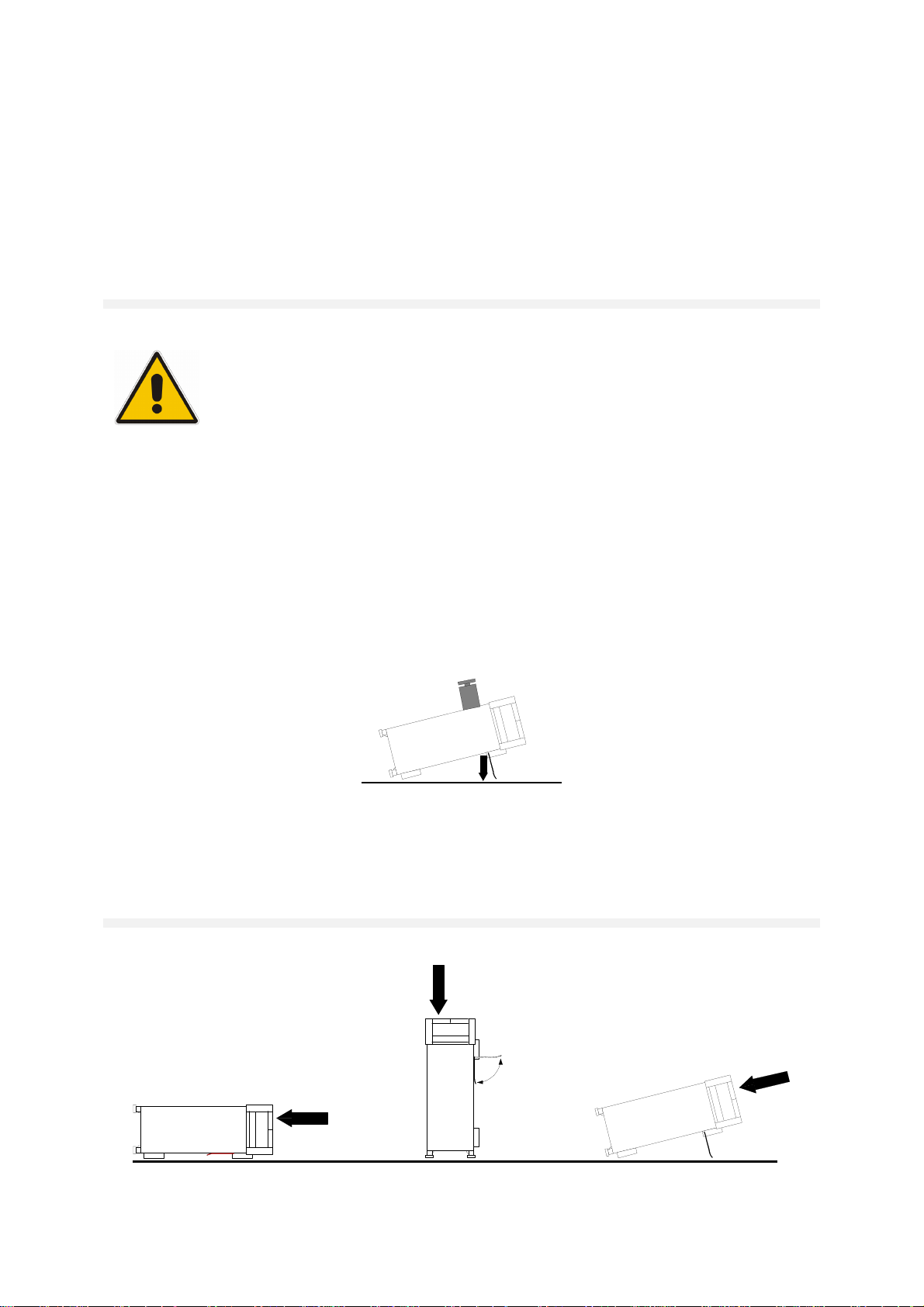
Safety Instructions for Instruments with Fold-Out
Feet
WARNING
Danger of injury
The feet may fold in if they are not folded out completely or if the instrument is
shifted. The feet may break if they are overloaded.
Fold the feet completely in or completely out to ensure stability of the instrument and
personal safety.
To avoid injuries, never shift the instrument when its feet are folded out.
The overall load (the instrument's own weight plus that of the instruments stacked on
top of it) on the folded-out feet must not exceed 500 N.
Place the instrument on a stable surface. Secure the instruments stacked on top of it
against slipping (e.g. by locking their feet on the top front frame).
When the instrument is standing on its folded-out feet, do not work under the
instrument and do not put anything under it, otherwise injuries or material damage
could occur.
<500 N
The instrument can be used in each of the positions shown here.
1171.0300.32 E/Esp-1
Page 15
Safety Instructions - Informaciones de seguridad
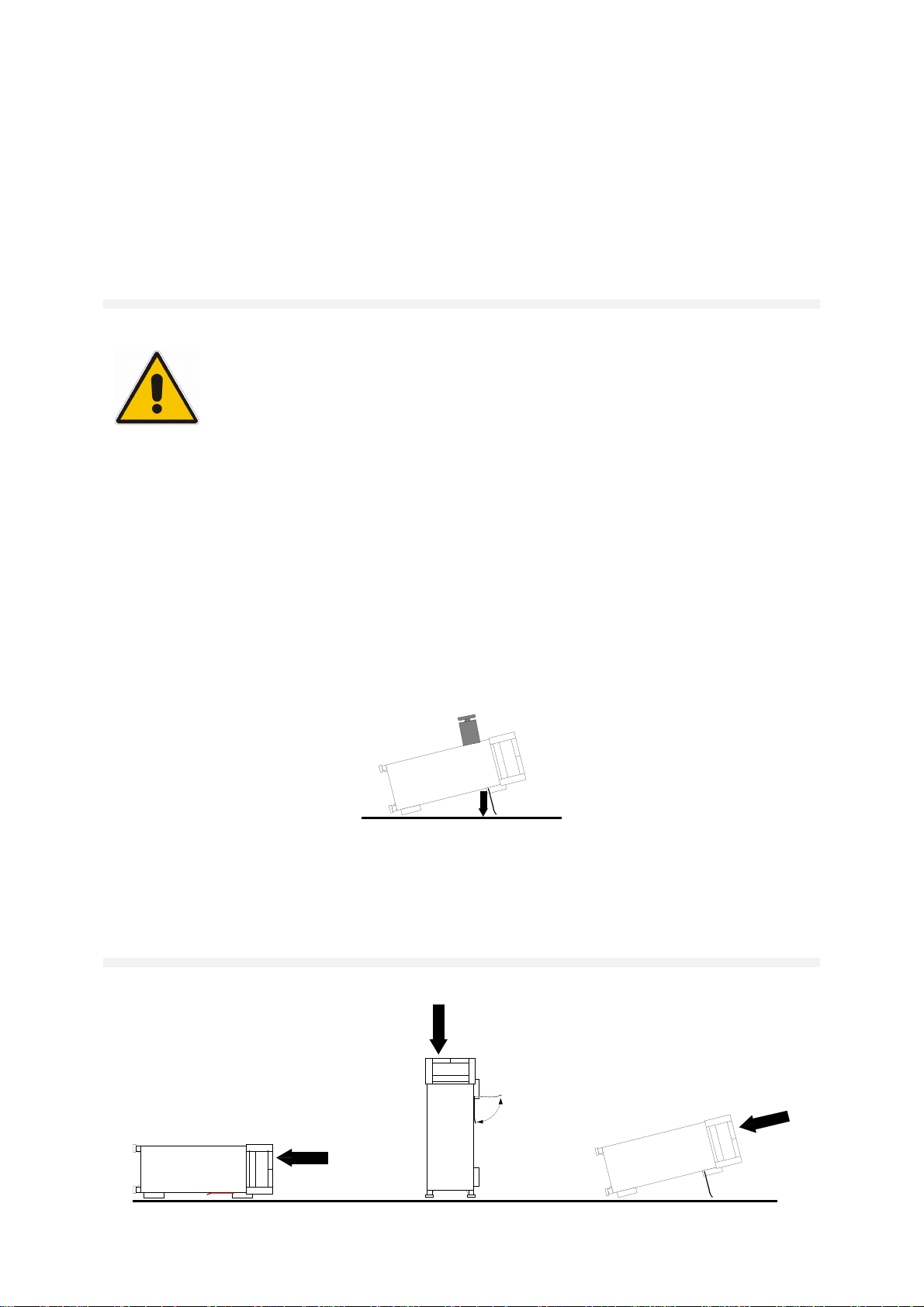
Informaciones de seguridad para aparatos con
telepiés
ADVERTENCIA
Peligro de heridas
Los telepiés pueden doblarse hacia adentro si no han sido desdoblados por
completo o si el aparato es movido. Los telepiés pueden romperse si son
sobrecargados.
Doblar los telepiés por completo hacia afuera o hacia adentro. De esta manera se
puede asegurar la estabilidad del aparato y a la vez la seguridad de las personas.
No mover nunca el aparato con los telepiés desdoblados, para evitar heridas.
El peso total equilibrado (peso própio más el de los aparatos posicionados sobre
este) ejercido sobre los telepiés no deberá exceder a los 500N.
Posicionar el aparato sobre una superficie estable. Los aparatos puestos encima de
esté deben estar asegurados para que no resbalen (por ejemplo fijando los piés del
aparato en el listón del marco de delante arriba).
Por favor no manipulen debajo del aparato y no pongan nada debajo de este
cuando esté posicionado sobre los telepiés desdoblados, ya que si no pueden
originarse heridas o daños en objetos.
<500 N
El aparato puede ser puesto en funcionamiento en cualquiera de las posiciones
aquí descritas.
1171.0300.32 E/Esp-1
Page 16
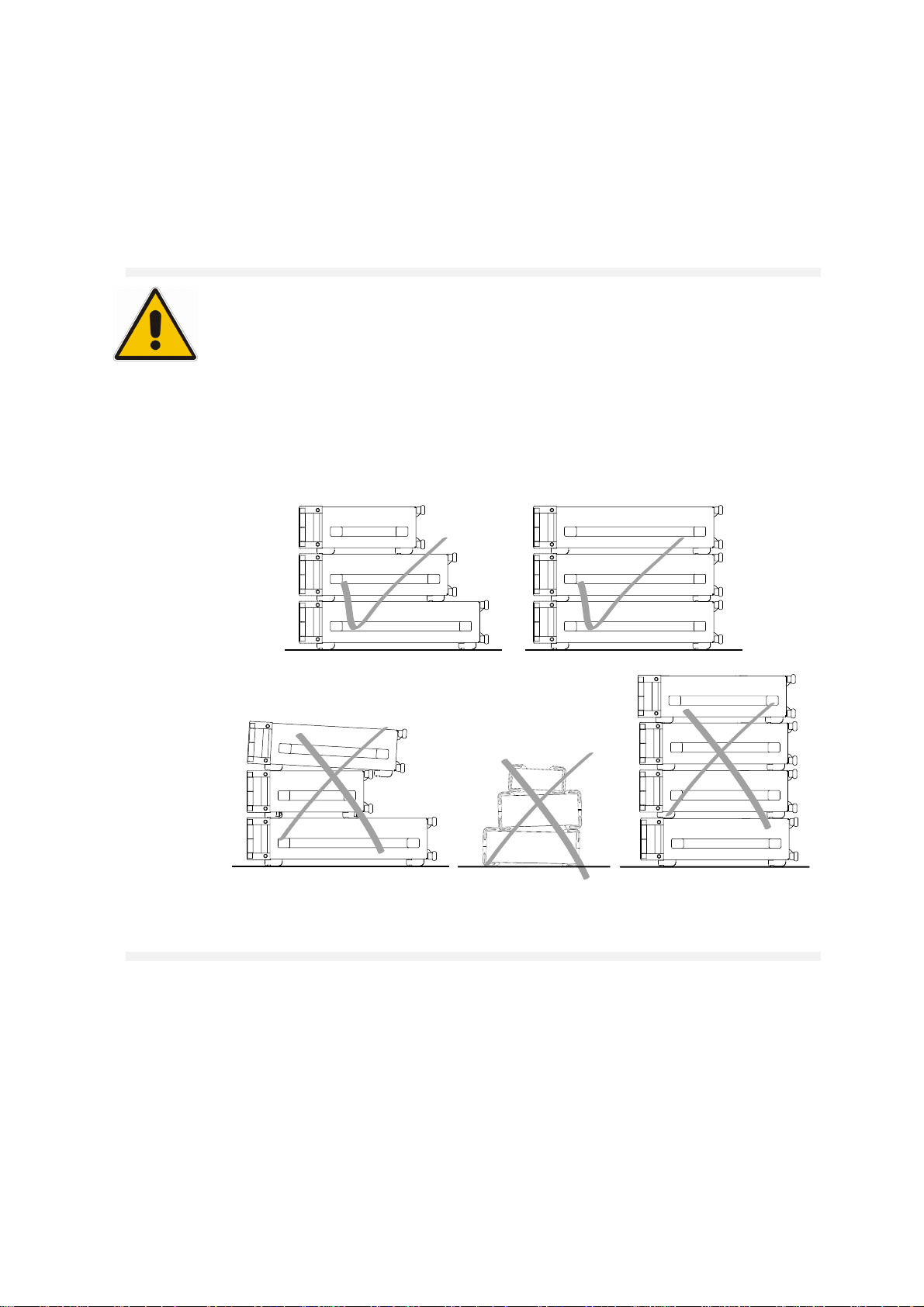
Safety Instructions - Informaciones de seguridad
Safety Instructions for Stacking Instruments
WARNING
Danger of injury
Instruments may slip if they are stacked on top of each other.
Place the instrument on a stable, even surface. Stack the instruments according to
their size, with the largest instrument on the bottom. Do not stack more than three
instruments directly on top of each other. Instruments may only be stacked if their
feet and housing allow horizontal stacking. If these conditions are not met, the instruments must be installed in a rack in order to avoid the risk of personal injury and
material damage.
Incorrect order Incompatible feet Too many instruments
stacked
1171.0300.22 E/Esp-1
Page 17
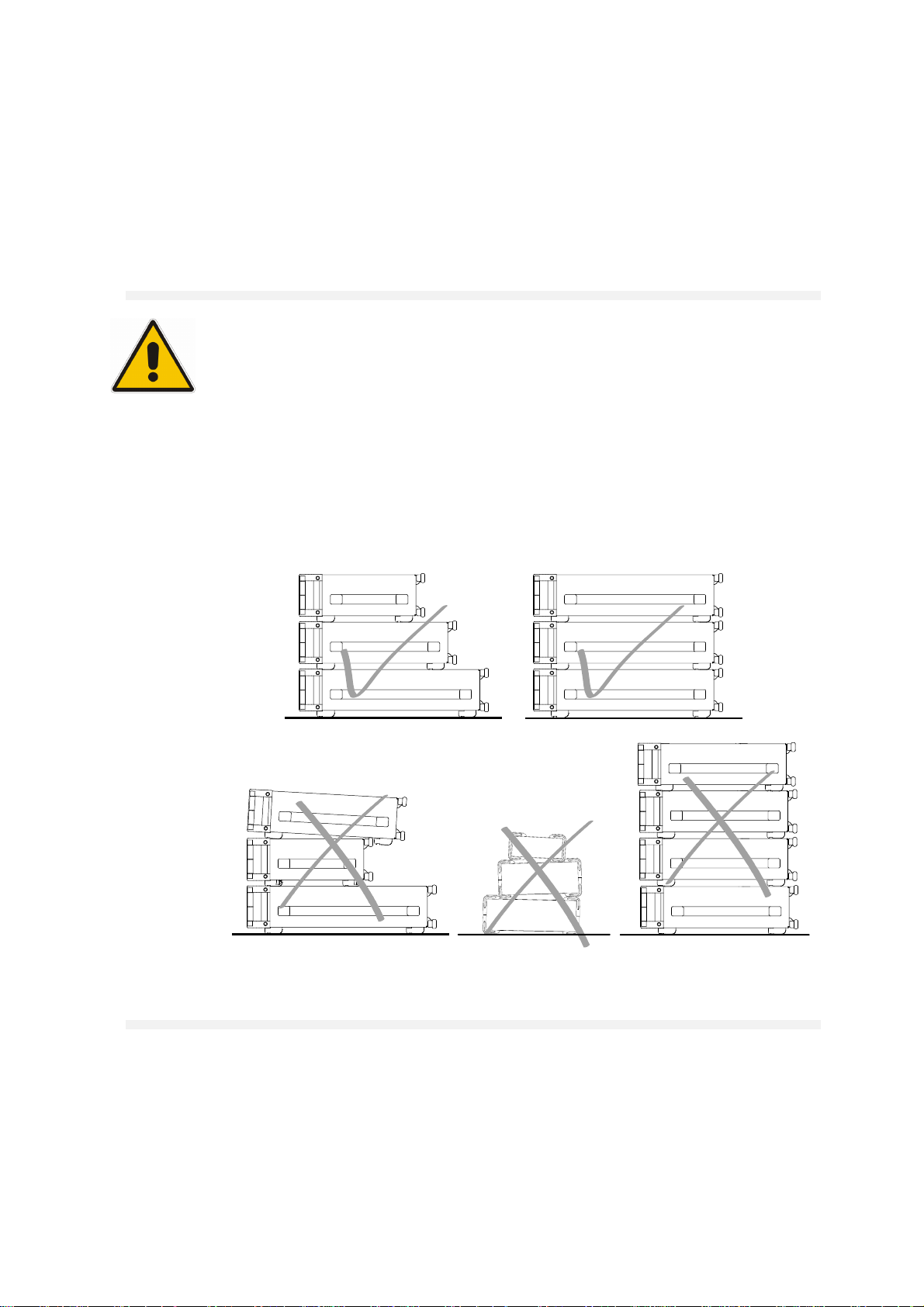
Safety Instructions - Informaciones de seguridad
Informaciones de seguridad para el amontonamien-
to de aparatos
ADVERTENCIA
Peligro de heridas
Los aparatos pueden desplazarse al ser amontonados.
Posicionar los aparatos sobre una superficie estable y lisa. Amontonar los aparatos
por orden de su tamaño. No amontonar nunca más de tres aparatos uno sobre el
otro. Los aparatos solamente deberán ser amontonados, si los piés y la caja del
aparato correspondiente hacen posible amontonarlos de forma horizontal. Si no se
cumplen estas condiciones, deberán ser montados los aparatos en una caja apta
para este propósito. De esta manera evitarán el riesgo de daños en personas y daños en el aparato.
orden no permitido piés incompatibles demasiados aparatos
amontonados
1171.0300.22 E/Esp-1
Page 18

Page 19

Certificate No.: 99042
This is to certify that:
C Certificate of Conformity
E
Equipment type
Order No. Designation
SMR20 1104.0002.20 Signal Generator 1 to 20 GHz
SMR27 1104.0002.27 Signal Generator 1 to 27 GHz
SMR30 1104.0002.30 Signal Generator 1 to 30 GHz
SMR40 1104.0002.40 Signal Generator 1 to 40 GHz
SMR-B1 1104.5485.02 Option: Reference Oscillator OCXO
SMR-B5 1104.3501.02/.03 Option: AM/FM/SCAN Modulator
SMR-B11 1104.4250.02 Option: Frequency Extension
SMR-B15 1104.4989.02 Option: RF Attenuator 20 GHz
SMR-B17 1104.5233.02 Option: RF Attenuator 40 GHz
SMR-B19 1104.6281.02 Option: Rear Connector
SMR-B20 1104.6381.02 Option: Rear Connector
SMR-B23 1104.5804.02 Option: IF Input 20 GHz
complies with the provisions of the Directive of the Council of the European Union on the
approximation of the laws of the Member States
- relating to electrical equipment for use within defined voltage limits
(73/23/EEC revised by 93/68/EEC)
- relating to electromagnetic compatibility
(89/336/EEC revised by 91/263/EEC, 92/31/EEC, 93/68/EEC)
Conformity is proven by compliance with the following standards:
EN61010-1 : 1993 + A2 : 1995
EN50081-1 : 1992
EN50082-2 : 1995
Affixing the EC conformity mark as from 1999
ROHDE & SCHWARZ GmbH & Co. KG
Mühldorfstr. 15, D-81671 München
Munich, 2000-08-24 Central Quality Management FS-QZ / Becker
1104.0002.01 CE E-4
Page 20

Page 21

DIN EN ISO 9001 : 2000
DIN EN 9100 : 2003
DIN EN ISO 14001 : 1996
DQS REG. NO 001954 QM/ST UM
Certified Quality System
Sehr geehrter Kunde,
Sie haben sich für den Kauf eines
Rohde & Schwarz-Produktes entschieden. Hiermit erhalten Sie ein nach
modernsten Fertigungsmethoden
hergestelltes Produkt. Es wurde nach
den Regeln unseres Managementsystems entwickelt, gefertigt und
geprüft.
Das Rohde & Schwarz Managementsystem ist zertifiziert nach:
DIN EN ISO 9001:2000
DIN EN 9100:2003
DIN EN ISO 14001:1996
Dear Customer,
you have decided to buy a Rohde &
Schwarz product. You are thus assured of receiving a product that is
manufactured using the most modern
methods available. This product was
developed, manufactured and tested
in compliance with our quality management system standards.
The Rohde & Schwarz quality management system is certified according to:
DIN EN ISO 9001:2000
DIN EN 9100:2003
DIN EN ISO 14001:1996
Cher Client,
vous avez choisi d‘acheter un produit
Rohde & Schwarz. Vous disposez
donc d‘un produit fabriqué d‘après
les méthodes les plus avancées. Le
développement, la fabrication et les
tests respectent nos normes de gestion qualité.
Le système de gestion qualité de
Rohde & Schwarz a été homologué
conformément aux normes:
DIN EN ISO 9001:2000
DIN EN 9100:2003
DIN EN ISO 14001:1996
QUALITÄTSZERTIFIKAT CERTIFICATE OF QUALITY CERTIFICAT DE QUALITÉ
1171.0200.11-01.00
Page 22

Page 23

Customer Support
Technical support – where and when you need it
For quick, expert help with any Rohde & Schwarz equipment, contact one of our
Customer Support Centers. A team of highly qualified engineers provides telephone
support and will work with you to find a solution to your query on any aspect of the
operation, programming or applications of Rohde & Schwarz equipment.
Up-to-date information and upgrades
To keep your Rohde & Schwarz equipment always up-to-date,
please subscribe to our electronic newsletter at
http://www.rohde-schwarz.com/www/response.nsf/newsletterpreselection
or request the desired information and upgrades via email from your Customer Support
Center (addresses see below).
Feedback
We want to know if we are meeting your support needs. If you have any comments
please email us and let us know CustomerSupport.Feedback@rohde-schwarz.com.
USA & Canada
East Asia
Rest of the World
Monday to Friday (except US public holidays)
8:00 AM – 8:00 PM
Tel. from USA 888-test-rsa (888-837-8772) (opt 2)
From outside USA +1 410 910 7800 (opt 2)
Fax +1 410 910 7801
E-mail Customer.Support@rsa.rohde-schwarz.com
Monday to Friday (except Singaporean public holidays)
8:30 AM – 6:00 PM Singapore Time (SGT)
Tel. +65 6 513 0488
Fax +65 6 846 1090
E-mail Customersupport.asia@rohde-schwarz.com
Monday to Friday (except German public holidays)
08:00 – 17:00 Central European Time (CET)
Tel. from Europe +49 (0) 180 512 42 42
From outside Europe +49 89 4129 13776
Fax +49 (0) 89 41 29 637 78
Eastern Standard Time (EST)
1171.0200.22-01.00
E-mail CustomerSupport@rohde-schwarz.com
Page 24

Page 25

R&S SMR User Documentation
Contents of User Documentation for Microwafe Signal Generator R&S SMR
The user documentation describes the Mikrowave-Signal Generator R&S SMR and all options. It includes a printed Quick Start Guide and a CD-ROM with the complete operating and service manual in
printable pdf-format.
Der R&S SMR selbst ist mit einer kontextsensitiven Online-Hilfe ausgestattet, die zu jeder Gerätefunktion eine Hilfeseite anbietet.
Quick Start Guide
The present quick start guide describes everything that is needed
to put the instrument into operation and to get familiar with the
generator. The quick start guide gives an introduction to remote
control and manual control via external monitor, mouse and keyboard.
The quick start guide is subdivided into the data sheet plus
3 chapters plus index:
The data sheet informs about specifications and characteristics
of the instrument.
Help System
Chapter 1 Describes the control elements and connectors
on the front and rear panel as well as all procedures required for putting the instrument into
operation.
Chapter 2 Gives an introduction the operating concept and
typical applications of the R&S SMA.
Chapter 3 Describes key operating modes, the structure of
the graphical interface and the principles of
manual control.
Chapter 4 Contains an index for the quick start guide.
HELP
The help system is embedded in the instrument, offering quick,
context-sensitive reference to the information needed for operation
and programming. The help contains the complete user documentation for the R&S SMR including the contents of the present quick
start guide.
1104.3430.62 0.1 E-1
Page 26

User Documentation R&S SMA
Documentation CD-ROM
The CD-ROM provides the complete user documentation for the
Signal Generator:
- The complete operating manual and service manual in printable
form (*.pdf).
- The data sheet (brochure and specifications) in printable form.
Links to different useful sites in the R&S internet.
Optional Documentation
Operating Manual
The operating manual contains comprehensive information about
the instrument functions and remote control, in addition to the
chapters of the quick start guide. It includes information about
maintenance of the instrument and about error detection listing the
error messages which may be output by the instrument. It is subdivided into 10 chapters:
Chapter 1 describes the control elements and connectors on
the front and rear panel as well as all procedures
required for putting the instrument into operation.
Chapter 2 gives an introduction to the operating concept and
typical applications of the R&S SMR.
Chapter 3 describes key operating modes, the structure of the
graphical interface and the principles of manual
control.
Chapter 4 forms a reference for manual control of the
R&S SMR and contains a detailed description of all
instrument functions and their application. The
chapter also lists the remote control command corresponding to each instrument function.
Kapitel 5 describes the basics for programming the
R&S SMR, command processing and the status
reporting system.
Chapter 6 lists all the remote-control commands defined for
the instrument.
Chapter 7 contains program examples for a number of
typical applications of the R&S SMR.
Chapter 8 describes preventive maintenance and the charac-
teristics of the instrument’s interfaces.
Chapter 9 gives the status messages and a list of error mes-
sages that the R&S SMR may generate.
Chapter 10 contains an index for the operating manual.
1104.3430.62 0.2 E-1
Page 27

R&S SMR User Documentation
Service Manual Instrument
The service manual - instrument informs on how to check compliance with rated specifications, on instrument function, repair, troubleshooting and fault elimination. It contains all information required for the maintenance of R&S SMR by exchanging modules.
In addition it describes how to perform a firmware update and how
to install options.
1104.3430.62 0.3 E1
Page 28

Page 29

R&S SMR Putting into Operation
1 Putting into Operation
This chapter contains all information about putting into operation (unpacking, connection to AC supply,
switching on and off), functional testing and installation of the instrument, preset settings and views of
the front and rear panel showing the controls and connectors needed for operation.
General Instructions
Before putting the SMR into operation, please make sure that
• the covers of the casing are put on and screwed,
• the ventilation openings are free,
• no signal voltage levels exceeding the permissible limits are applied at the inputs,
• the outputs of the instrument are not overloaded or connected incorrectly.
If these points are not observed, the instrument might be damaged.
Unpacking the Instrument
Take the instrument out of the shipping box and check whether the
items listed in the packing list and in the lists of accessories are all
included.
Remove the two protective caps from the front and rear of the SMR
remove protective cabs
Should the instrument be damaged, immediately notify the forwarder who shipped the instrument to you
and keep the box and packing material.
For further transport or shipment of the SMR the original packing should also be used. It is
recommended to keep at least the two protective caps for front and rear side in order to prevent
damage to the controls and connectors.
and carefully check the instrument for damage.
Setting up the Instrument
For applications in the laboratory or on a work bench, it is recommended that the support feet on the
bottom of the instrument be extended. For the LCD display, this provides the optimum viewing angle
which typically ranges from perpendicular to the display front to approximately 30° below.
WARNING
1134.9108.12 E-1 1.1
The feet must be fully folded in or out. Only in this way can the stability of SML be
guaranteed and reliable operation be ensured. With the feet out, the weight of other
units put onto SML must not exceed 30 kg. The units must be secured against
slipping (eg by locking the feet of the unit at the top side of the enclosure).
When shifting the unit with the feet out, the feet might collapse and fold in. To avoid
injuries, the unit must therefore not be shifted with the feet out.
Page 30

Putting into Operation R&S SMR
Supply Voltage
The SMR can be operated at a.c. systems from 100 to 120 V and 200 to 240 V at system frequencies
from 50 to 60 Hz. The power supply socket is situated at the rear of the instrument. The instrument
automatically sets itself to the voltage applied within the permissible voltage ranges. It is not necessary
to set the instrument to a certain supply voltage.
How to Ensure EMC
In order to avoid electromagnetic interference, the instrument may only be operated when it is closed
and with all shielding covers fitted. Only appropriate shielded signal and control cables may be used.
Power Fuses
The SMR is protected against short circuits by means of two fuses according to nameplate of the power
supply. The fuses are situated in the draw-out fuse holder which is inserted close to the power supply
socket (see below).
Power supply socket
Fuse holder
Power supply socket at the rear of the instrument
Switching On/Off the Instrument
O
I
On/Off switch at the front of the instrument
Initial Status
Upon switching on, the instrument automatically assumes the status which was set when it was
switched off.
If the instrument need not to be operated from the initial status any further, a defined default status
should be established by pressing the [PRESET] key prior to further settings.
Frequency accuracy after switching on when the oven-controlled reference oscillator is fitted
(option SMR-B1)
The reference oscillator needs some minutes of warm-up time to reach its nominal frequency. During
this period of time, the output frequency does not yet reach its final value either. In the status line in the
header field of the display the message "OVEN COLD" is displayed for this time.
Switch on: Press switch.
The instrument is ready for operation.
Switch off: Release switch.
RAM With Battery Back-Up
The SMR has a static read-write memory (CMOS-RAM) with battery back-up, in which 50 different
complete settings of the instrument can be stored (cf. Chapter 3, section "Storing and Calling of
1134.9108.12 E-1 1.2
Page 31

R&S SMR Putting into Operation
Instrument Settings"). In addition, all data and/or lists the user enters himself, such as for list mode,
memory sequence, and user correction of the level, are stored in the RAM. Further, all data of the
calibrations running within the instrument in the SMR are stored in the RAM (cf. Chapter 4, section
"Calibration" and Service Manual Instrument). A lithium battery with a service life of approx. 5 years
serves to supply the RAM with power. When the battery is discharged, the data stored will be lost.
Exchanging the battery is described in the Service Manual Instrument.
Preset Setting
A defined setting status is achieved by pressing the [PRESET] key.
Preset Status:
RF frequency 10 GHz
RF level -20 dBm
Reference frequency internal, adjustment off
Offsets 0
Modulations switched off
Transient-free level setting switched off, level attenuator mode: Auto
Internal level control level Alc: On
User correction level Ucor: Off
LF output switched off
Sweep switched off
List mode switched off
Memory sequence switched off
Suppression of indications system security: unaltered
Protection of calibration data protection lock: unaltered
Settings stored unaltered
Data, lists etc. stored unaltered
IEC-bus address unaltered
All parameters and circuit states, even those of operating modes which are not activated, are preset by
means of Preset. The presettings going beyond the above list can be seen from the menu
representations as of Chapter 4 which each indicate the Preset setting status.
Functional Test
On switching on the instrument and permanently during operation, the SMR carries out a self test. The
ROM contents as well as the battery of the non-volatile RAM are checked. The most important
instrument functions are automatically monitored during operation. If an error is detected, the message
"Err" is displayed in the status line. For further identification of the error, press the [ERROR] key.
Thereupon a description of the error is displayed (cf. Chapter 9, section "Error Messages"). Return to
the menu exited by pressing the [BACK] key. If required, internal test points can be polled by the user
and the results be read out and displayed. Cf. Service Manual Instrument.
Mounting into a 19" Rack
CAUTION
The SMR can be mounted into a 19" rack by means of rack adapter ZZA-94 (stock no. 396.4905.00).
The mounting instructions are attached to the adapter.
Ensure free air inlet at the perforation of the side walls and air outlet at the rear of the
instrument in rack mounting.
1134.9108.12 E-1 1.3
Page 32

Front Panel R&S SMR
PULSE
Explanation of Front and Rear Panel
Elements of the Front Panel
1
EXT 1
EXT 2
EXT1 Input external modulation signal alternatively for
AM, FM, ASK and FSK.
EXT2 Input external modulation signal alternatively for
AM and FM.
PULSE Input for triggering the pulse generator or for
direct control of the pulse modulation.
2 DISPLAY
Cf. Chapter 3 for the design of the display.
3
Parameter field
Parameters RF frequency and RF level can be entered
directly by means of the parameter keys, alternatively to
menu operation. Further, complete instrument settings can
be stored and called.
Fig. 1-1 Front panel view
FREQ Opens the setting of the RF frequency via value
input or variation by means of a rotary knob. The
current menu is maintained. Return to the menu
by means of the [BACK] key. (Setting of the RF
frequency also in the FREQUENCY menu).
LEVEL Opens the setting of the RF level via value input
or variation by means of a rotary knob. The
current menu is maintained. Return to the menu
by means of the [BACK] key. (Setting of the RF
level also in the LEVEL menu).
SAVE Opens the storing of the current instrument
setting. Memory selection is effected by entering a
number (1 to 50) and is finished by means of the
[x1/ENTER] key.
RCL Opens the calling of an instrument setting stored.
Memory selection is effected by entering a
number (1 to 50) and is finished by means of the
[x1/ENTER] key.
Cf. Chapter 3, Sections "Use of [FREQ] and
[LEVEL] Keys", "RF Frequency", "RF Level" and
"Storing and Calling of Instrument Settings".
1134.9108.12 E-1 1.4
Page 33

R&S SMR Front Panel
4 DATA INPUT
Numeric input field
Numeric values, decimal point and minus sign can be
entered by means of the digital keys.
0...9 Enters the digit.
-/ Enters the minus sign.
Deletes the last input (digit, sign or decimal point)
Unit keys with enter function
Enters the decimal point
- key [BACKSPACE]
The unit keys terminate the input of values and specify the
multiplication factor for the respective basic unit.
The basic units are displayed next to the input field while
numbers are entered. In the case of level settings, the unit
keys specify the unit.
G/n dBµV Selects giga/nano, with RF level dBµV.
M/µ µV Selects mega/micro, with level µV.
k/m MV Selects kilo/milli, with level mV.
1x
Enter dB(m) Terminates entries in the basic unit
and value inputs without unit.
Selects with level dBm.
Selects with level offset and level step
width dB.
In order to change to another level unit, simply press the
unit key desired. Parameter LEVEL must be activated, e.g.
by pressing the [LEVEL] key.
Cf. Chapter 3, Section "Change Unit of Level".
Fig. 1-1 Front panel view
1134.9108.12 E-1 1.5
Page 34

Front Panel R&S SMR
5 MENU/VARIATION
Menu keys
The menu keys access the menus and settings within the
menus.
SELECT Acknowledges the choice marked by
the menu cursor.
BACK Returns the menu cursor to the next
higher menu level.
Moves the digit cursor to the left by one
position in the marked value indication.
Moves the menu cursor to the left by
one position in a 1-out-of-n selection.
Moves the digit cursor to the right by
one position in the marked value
indication.
Moves the menu cursor to the right by
one position in a 1-out-of-n selection.
Fig. 1-1 Front panel view
Rotary knob
The rotary knob moves the menu cursor over the positions
of a menu level to choose from, or varies the value of a
parameter. The variation is either effected in steps of one or
in a step width that can be specified at will.
Furthermore, by pressing the rotary knob when the cursor
marks a menu position, the lower menu level or the setting
menu is displayed (cf. function of [SELECT] key).
Cf. Chapter 2, Section "Sample Setting for First
Users" and Chapter 3, Section "Basic Operating
Steps".
1134.9108.12 E-1 1.6
Page 35

R&S SMR Front Panel
EXT ALC
6 FUNCTION
HELP* Indicates context-sensitive auxiliary text.
STATUS* Indicates the instrument status.
MOD
ON/OFF Switches on/off the modulation selected in
Utilities - ModKey.
RF
ON/OFF Switches on/off the RF signal.
Cf. Chapter 4, Sections "The Help System", "Status",
and Chapter 3, Section "Use of [MOD ON/OFF] and
[RF ON/OFF] keys".
* Exit the menus using the [BACK] key.
7
LF
LF Output LF signal of the internal LF-
generator.
PULSE/VIDEO Output of pulse generator or video output
(only with Option SMR-B14).
EXT ALC Input detection voltage of an external level
detector.
Cf. Chapter 4, Section "Switch On/Off Internal Level
Control", Section "Pulse Modulation" and Section
"[RF ON/OFF] Key".
8
PRESET Establishes a defined instrument status.
ERROR* Indicates error and caution messages.
LOCAL Switches the instrument from the REMOTE
mode (remote control) to the LOCAL mode
(manual control).
Cf. Chapter 1, Section "Preset Settings", Chapter 9,
"Error Messages" and Chapter 6, "Remote Control".
* Exit the menus using the [BACK] key.
Fig. 1-1 Front panel view
1134.9108.12 E-1 1.7
Page 36

Front Panel R&S SMR
9 QUICK SELECT
The menu-quick-selection keys permit fast access to two
menus selected.
ASSIGN Stores the current menu as menu1 when
the MENU1 key is pressed afterwards or
as menu2 when the MENU2 key is
pressed afterwards.
MENU1 Activates menu1 stored.
MENU2 Activates menu2 stored.
Cf. Chapter 3, Section "Quick Selection of Menu
(QUICK SELECT)".
10 ON/OFF SWITCH
The On/Off switch switches the instrument on ("I") or off
("O").
Cf. Chapter 1, Section "Switching On/Off the
Instrument".
Fig. 1-1 Front panel view
1134.9108.12 E-1 1.8
Page 37

R&S SMR Rear Panel
Elements of the Rear Panel
1
230 Vac
REF
REF
2
3
REF Output of the internal 10-MHz-reference signal
4
with reference internal.
Input for external reference frequency 10 MHz with
reference external. LF Output LF signal of the
OPTION INCL.
SCPI
5
625
Cf. Chapter 4, Sections "LF Output" and
internal LF-generator.LF Output LF signal
of the internal LF-generator.
"Internal/External Reference Frequency (REF OSC)".
6
2
®
US
C
LR114196
1
7
Power supply connector and
fuse holder
Cf. Chapter 1, Section “Power Fuses”.
Fig. 1-2 Rear panel view
3 AUX
Interface for direct control of additional, external devices.
Pin Designation Assignment
1 MARKER Marker signal output for sweep mode.
2 BLANK Blanking signal input for sweep mode.
3 TRIGGER Trigger input for sweep, memory
sequence and list modes.
4 STOP Input for stopping the sweep.
5 Z-AXIS combined MARKER/BLANK signal.
6 - 9 GROUND
1134.9108.12 E-1 1.9
Page 38

Rear Panel R&S SMR
STOP
4
230 Vac
2
3
RS-232 RS-232-C interface
4
used for software update and remote control. The
pin assignment corresponds to the pin assignment of a PC.
OPTION INCL.
SCPI
625
Cf. Chapter 5, Section "Interface RS-232-C".
5
5
6
IEEE 488
SCPI
625
IEC 625 IEC-bus (IEEE 488)
®
US
C
LR114196
IEEE 488 Interface for Remote Control
7
Cf. Chapter 5 "Remote Control".
1
6
ZAX IS
MARKER
BLANK TRIGGER
Fig. 1-2 Rear panel view
MARKER Marker signal output for sweep mode.
BLANK Blanking signal input for sweep mode.
TRIGGER Trigger input for sweep, memory
sequence and list modes.
STOP Input for stopping the sweep.
Z-AXIS combined MARKER/BLANK signal.
1134.9108.12 E-1 1.10
Page 39

R&S SMR Rear Panel
SYNC
TRIG / STOP
7
230 Vac
2
3
SYNC Output SYNC signal for pulse modulation.
4
Cf. Chapter 4, Sections "Pulse Modulation"
and "PULSE/VIDEO Output".
OPTION INCL.
SCPI
625
8
5
X AXI S
6
V / GHz
X-AXIS Output voltage ramp 0 to 10 V in the sweep
operating mode.
V/GHz Output of frequency-proportional voltage.
Selectable from 0.5 V/GHz to 1 V/GHz.
®
US
C
LR114196
TRIG/STOP Input to trigger sweep, memory sequence,
7
list mode and to stop the sweep.
1
Cf. Chapter 4, Sections "Sweep Inputs" and "Sweep
Outputs".
Fig. 1-2 Rear panel view
1134.9108.12 E-1 1.11
Page 40

Page 41

R&S SMR Sample Setting for First Users
2 Short Tutorial
he present chapter contains a short tutorial with sample settings allowing the users to operate
T
immediately the instrument.
Sample Setting for First Users
Setting frequency and level of the RF output signal
First frequency and level of the RF output signal are set via keys [FREQ] and [LEVEL] in the DATA
INPUT field:
- frequency 2.5 GHz
- level 10 dBm
Operating steps Explanations
PRESET
FREQ
LEVEL
BACK
MENU / V ARIAT ION
Reset the instrument to the defined
state.
DATA INPUT
.52
DATA INPUT
01
G
n
x1
ENTER
SELECT
[dBµV]
dB(m)
Set the frequency to 2.5 GHz.
The menu cursor marks the
permanent frequency indication.
Set the level to 10 dBm.
The menu cursor marks the
permanent level indication.
Reset the menu cursor to the menu
field.
1134.9108.62 E-1 2.1
Page 42

Sample Setting for First Users R&S SMR
AM modulation of the output signal
The output signal is to be amplitude-modulated next.
- AM modulation depth 30 %
- AM signal 1-kHz sine
Operating steps Explanations
MENU / VARIATION
MENU / VARIATION
MENU / VARIATION
.
Modulation
.
.
AM
.
.
AM Depth
.
MENU / VARIATION
SELECT
MENU / VARIATION
SELECT
MENU / VARIATION
SELECT
Select menu Modulation using rotary
knob.
Press [SELECT] key or rotary knob.
The submenu is displayed.
Select submenu AM.
Press [SELECT] key or rotary knob.
The AM setting menu is displayed.
Select parameter AM Depth using
rotary knob.
Press [SELECT] key or rotary knob.
The menu cursor marks the setting
value.
DATA INPUT
x1
ENTER
BACK
30
.
0
MENU / VARIATION
MENU / V ARIATION
.
AM Source
SELECT
.
1134.9108.12 E-1 2.2
Enter modulation depth 30 % and
acknowledge using [x1/Enter] key.
Reset menu cursor to AM Depth
using [BACK] key.
Select AM Source using rotary knob.
Press [SELECT] key or rotary knob.
A pop-up menu displays the current
1-out-of-n selection.
Page 43

R&S SMR Sample Setting for First Users
The AM modulation setting is
Operating steps Explanations
MENU / VARIATION
BACK
MENU / VARIATION
MENU / VARIATION
.
LFGen
.
.
LFGen Freq
.
.
1k
.
MENU / VARIATION
SELECT
MENU / VARIATION
SELECT
MENU / VARIATION
SELECT
Select LF generator as modulation
source using rotary knob.
The selection mark marks LFGen.
Press [SELECT] key or rotary knob.
The cursor is set back to AM Source.
Press [BACK] key.
Select parameter LFGen Freq using
rotary knob.
Press [SELECT] key or rotary knob.
The menu cursor marks the current
frequency selection.
Set the frequency of the LF generator
to 1 kHz.
The selection mark marks 1 kHz.
Press [SELECT] key or rotary knob.
completed.
The indications on the display are
represented in Fig. 2-1.
Fig. 2-1 Display for AM setting
1134.9108.62 E-1 2.3
Page 44

Sample Setting for First Users R&S SMR
Setting the step width
Subsequently to the above setting, 4.2 GHz as new RF frequency and 12 kHz as the step width for the
RF frequency variation are set in the following.
Operating steps Explanations
B
ACK
ENU / VARIATION
M
MENU / VARIATION
Frequency
Frequency
DATA INPUT
.24
BACK
BACK
MENU / VARIATION
Reset the menu cursor to the main
menu in 3 steps.
Select menu Frequency using rotary
knob.
.
SELECT
.
Press [SELECT] key or rotary knob.
The frequency setting menu is
displayed.
MENU / VARIATION
.
SELECT
.
Select parameter Frequency.
Press [SELECT] key or rotary knob.
The menu cursor marks the setting
value.
Enter frequency 4.2 GHz.
G
n
[dBµV]
Press [SELECT] key or rotary knob.
The menu cursor is set back to
Frequency.
BACK
MENU / VARIATION
MENU / VARIATION
.
Knob Step User
SELECT
.
DATA INPUT
k
m
mV
BACK
2
1
1134.9108.12 E-1 2.4
Press [BACK] key. The menu cursor
is set back to Frequency.
Select parameter Knob Step User
using rotary knob.
Press [SELECT] key or rotary knob.
Enter step width 12 kHz.
Press [BACK] key. The menu cursor
is set back to Knob Step User.
Page 45

R&S SMR Sample Setting for First Users
Operating steps Explanations
MENU / VARIATION
MENU / VARIATION
.
Knob Step
.
.
User
.
MENU / VARIATION
SELECT
BACK
Select parameter Knob Step using
rotary knob.
Press [SELECT] key or rotary knob.
A pop-up menu displays the available
settings.
Select User (user-defined step width)
using rotary knob.
This results in step width 12 kHz
being used in the case of variation
using the rotary knob.
Press [BACK] key. The menu cursor
is set back to Knob Step.
Fig. 2-2 Display after pattern setting
1134.9108.62 E-1 2.5
Page 46

Page 47

R&S SMR Design of the Display
3 Manual Operation
his chapter shows the design of the display and describes the manual control of the microwave signal
T
generator, for example calling up of menus, selection and editing of parameters, use of the list editor
and the SAVE/RECALL function. This chapter also contains an overview of menus showing the
functions available for the instruments and its options.
It is useful to read the sample settings for first users in Chapter 2, "Short Tutorial".
Design of the Display
(1)
(2)
(3)
Fig. 3-1 Design of the display
(1) Header field
(2) Status line
(3) Menu fields
The header field of the display indicates frequency and level of the RF output
signal. In the RF-sweep operating mode, the start and stop frequencies are
displayed in two lines one above the other. The start and stop levels are indicated in
the LEVEL-sweep operating mode correspondingly. With User Correction On, the
current frequency and the corresponding correction value are indicated in two lines.
The status line indicates at the left the menu path of the current menu and at the
right the operating mode and operating state of the instrument. Error messages and
notes for caution are also displayed in the status line.
The indication fields below the status line are reserved for the menu
representations. The image contents of these fields change as a function of the
menu selected.
The lowest menu level shows the setting menu with the current settings of the
selected menu. Settings are made in select or input windows which open when the
current setting is activated.
Menu cursor The menu cursor shows the user at which position in the menu he
Digit cursor As a bright field, the digit cursor marks the position which can be
is. The position of the menu cursor is evident from the inverse
notation of the term (white characters on a black background).
varied by means of the rotary knob in a value indication.
1134.9108.62 E-1 3.1
Page 48

Basic Operating Steps R&S SMR
Basic Operating Steps
To operate the instrument, menus are called in the display. All setting possibilities and the current
setting status are evident from the menus. All settings can be made by accessing the menus.
RF frequency and RF level can also be set without menu operation using keys [FREQ] and [LEVEL].
RF signal and modulation can also be switched on/off without menu operation using keys [RF ON/OFF]
and/or [MOD ON/OFF].
Calling the menus
Accessing the menus is effected using rotary knob [VARIATION], [SELECT] key and [BACK] key.
Rotary knob
[SELECT] key
[BACK] key
Settings are accessed in the setting menus ending with the right-hand display margin.
Rotary knob [VARIATION] moves the menu cursor over the positions of a menu level
to be selected.
If a scrollbar is visible at the right-hand margin of a menu, the menu is larger than
the screen window. If the menu cursor is moved to the margin of the screen window,
the covered lines become visible.
If the rotary knob is pressed after a position has been selected, the lower menu level
or the respective settings are called. The rotary knob hence has the same function
as the [SELECT] key.
If the rotary knob is pressed while [BACK] is selected, the menu cursor wraps back
to the menu last called.
The [SELECT] key acknowledges the selection marked by means of the menu
cursor. Depending on the position, the next lower menu level or the the respective
setting is called.
The [BACK] key
- returns the menu cursor to the next higher menu level; the menu cursor is shifted
to the left into the preceding column of the menu structure,
- resets the menu cursor from frequency or level value indication in the header field
into the menu field to the menu called last,
- closes the display pages called using keys [STATUS], [HELP] and [ERROR]
again.
Fig. 3-2 Modulation - AM Menu
1134.9108.62 E-1 3.2
Page 49

R&S SMR Basic Operating Steps
Selection and Change of Parameters
Select parameter Set the menu cursor to the name of the parameter desired using the rotary
knob, e.g. to AM Depth in the AM menu, cf. Fig. 3-2.
Change setting
value
Select parameter.
Press [SELECT] key or rotary knob.
The menu cursor changes from the parameter selected in the left-hand
column of the setting menu to the setting value on the right, e.g. from AM
Depth to 30%, cf. Fig. 3-2.
Via value inputs
Using rotary knob
Press the first digit of the new value or minus sign.
The old value is deleted, the entry is indicated in the marked field.
Enter further digits.
Terminate the input using a unit key or, in the case of inputs in the base unit
or in the case of inputs without unit, using the [1x/Enter] key.
Press [BACK] key or mark selection BACK using rotary knob and then press
rotary knob.
The menu cursor wraps back to the appropriate parameter.
Set the digit cursor (bright field) to the position of the setting value to be
varied using keys [] [].
Turn rotary knob.
The value is varied in steps of 1.
Note: RF frequency and RF level can also be varied in a step width
which can be defined arbitrarily, using the rotary knob. In the
respective setting menu (Frequency or Level), the step width is
entered as Knob Step User and the Knob Step set from Decimal
to User. To point to the fact that the step width has been
converted to the value programmed, the bright field as a symbol
of the digit cursor disappears in the respective value indication.
1134.9108.62 E-1 3.3
Page 50

Basic Operating Steps R&S SMR
1-out-of-n selection Select parameter.
Press [SELECT] key or rotary knob.
A pop-up menu displays a selection of settings.
Set the menu cursor to the position desired within the 1-out-of-n selection
using the rotary knob or cursor keys [] [].
Press [SELECT] key or rotary knob.
The setting is made.
The pop-up menu is closed and the current setting is indicated at the right
margin of the display.
Press [BACK] key or mark selection BACK using rotary knob and then press
rotary knob.
The menu cursor wraps back to the next higher menu level.
Quick Selection of Menu (QUICK SELECT)
The keys of the QUICK SELECT control field are used to call selected menus quickly by one keystroke.
Store menus Establish the desired operating status of the current menu.
Press [ASSIGN] key.
Press [MENU1] or [MENU2] key.
The current menu is stored as menu1 or menu2. That is to say, 2 menus
can be stored in total.
Call menus Press [MENU1] or [MENU2] key.
Menu1 or menu2 stored is displayed. Exactly the operating status which was
current at the point of time of storing is reconstructed.
1134.9108.62 E-1 3.4
Page 51

R&S SMR Basic Operating Steps
Use of [FREQ] and [LEVEL] Keys
RF frequency and RF level can be set without menu operation as well using direct keys [FREQ] and
[LEVEL].
[FREQ] / [LEVEL] keys Press [FREQ] or [LEVEL] key.
The frequency or the level indication in the header field of the display is
marked. The current menu at the display is maintained.
Alter the value via a value input or the rotary knob.
Press [BACK] key or rotary knob.
The menu cursor wraps to the position marked last in the menu.
Use of [RF ON/OFF] and [MOD ON/OFF]
RF signal and modulation can be switched on/off without menu operation as well using keys
[RF ON/OFF] and/or [MOD ON/OFF] (cf. Sections "[RF ON/OFF] Key" and "[MOD ON/OFF] Key").
[RF ON/OFF] key Press [RF ON/OFF] key.
The RF output signal is switched on/off.
IEC/IEEE-bus short command: :OUTP:STAT ON
[MOD ON/OFF] key Press [MOD ON/OFF] key.
Modulation is switched on/off.
A direct IEC-bus command is not available. The modulations have to be
switched on and off in the respective modulation submenus.
Changing Unit of Level
For the level, the unit of the value set can be changed without a new value input.
Change level unit Activate Level parameter.
- Press [LEVEL] key or
- set menu cursor in the level menu to the setting value of the Amplitude
parameter.
Press the unit key with with the desired level unit.
The level is indicated in the desired unit.
1134.9108.62 E-1 3.5
Page 52

Basic Operating Steps R&S SMR
Correction of Input
Digits can be corrected by one of the following keys before the input is confirmed by the [Enter] key:
Key [-/
[
[FREQ]/[LEVEL] keys
]
BACK] key
The backspace key deletes the value entered digit by digit. When the last
digit is deleted, the previous value is displayed.
Pressing the [BACK] key deletes the entire entry and results in the previous
value being indicated again.
For a subsequent new input in the setting menu, the menu cursor is to be set
to the setting value again using the [SELECT] key.
For a subsequent new input via the [FREQ] or [LEVEL] keys, the respective
key has to be pressed again.
In the case of a frequency or level input by means of the [FREQ] or [LEVEL]
keys, pressing the [FREQ] and/or [LEVEL] key again deletes the entire input.
1134.9108.62 E-1 3.6
Page 53

R&S SMR List Editor
List Editor
The SMR offers the facility of generating lists for automatic sequences (list mode, memory sequence) or
for user-defined level correction (Ucor). The lists consist of elements (pairs of values) which are defined by
an index and at least one parameter per index. Each list is assigned a separate name and selected by
means of this name. Access to the lists is made in the associated menus. For example, sequences of
frequency and level value pairs can be accessed in the List menu. How to generate and edit lists is
explained in detail in this section by the example of the List mode (List menu, see Fig. 3-3).
Menu selection: List
Fig. 3-3 List menu
The settings for Mode, Reset List, Current Index etc are not relevant for the general description of the
list editor. They are described in greater detail in chapter 4 in section "List Mode".
The Select List, Delete List and Edit List lines are always displayed. They are intended for the selection
and deletion of lists and for the calling of editing functions.
Select List
Delete List
Edit List
Opens a window in which a list out of 10 lists can be selected. In this line, the
currently active list is displayed (see section "Select List").
Opens a window from which a list can be selected whose contents are to be
deleted (see section "Delete List").
Selection of editing functions for list editing. When this item is selected, a pop-up
menu with the following editing functions opens (see section "Edit List"):
Insert Insertion of elements into a list
Fill Filling of a list with elements
Edit/View Editing of individual elements of a list
Delete Deletion of elements of a list
1134.9108.62 E-1 3.7
Page 54

List Editor R&S SMR
Attenuator Mode
Atten Fixed Range
Auto Normal setting. The mechanically switched attenuator switches in
steps of 10 dB at fixed points.
IEC/IEEE bus command :OUTP:AMOD AUTO
Fixed Level settings are made without switching the attenuator (see
section "Non-Interrupting Level Setting").
IEC/IEEE bus command :OUTP:AMOD FIX
Indicates the level range of non-interrupting level setting in "Attenuator Mode
Fixed".
1134.9108.62 E-1 3.8
Page 55

R&S SMR List Editor
Select List
Mark the desired list using the rotary knob (see Fig. 3-4).
Press the [SELECT] key or the rotary knob.
The selected list is included in the instrument setup. The selection window is closed. The selected list
s displayed under Select List.
i
Selection: Select List
Fig. 3-4 Select List window
LIST0
0100
The currently selected list, in this case List0, is marked in the selection
window.
The length of the list, in this case 100 elements, is indicated in the column
right of the list designation.
Delete List
Mark the desired list using the rotary knob (see Fig. 3-5).
Press the [SELECT] key or the rotary knob.
The following query will appear:
"Are you sure? Press SELECT to confirm BACK to cancel".
Press the [SELECT] key or the rotary knob.
The contents of the list will be deleted. If the query is answered by pressing the [BACK] key, the
contents of the list will be retained. The selection window is automatically closed upon answering the
query.
Selection: Delete List
Fig. 3-5 Delete List window
1134.9108.62 E-1 3.9
Page 56

List Editor R&S SMR
Edit List
When Edit List is selected, a pop-up menu with the editing functions opens.
Insert editing function (see Fig. 3-6)
The Insert function inserts a desired number of elements with constant or linearly increasing/decreasing
values ahead of the element with the indicated start index. All elements already existing from the start
index are shifted so that they come at the end of the range of elements to be inserted.
Elements are inserted in a list according to the following procedure:
When Insert has been selected, the menu cursor is on the Insert At menu item.
Press the [SELECT] key or the rotary knob.
The menu cursor is on the value for At.
Vary the index value by means of the rotary knob or enter an index value using the numerical keys
and the [ENTER] key.
Press the [SELECT] key or the rotary knob.
The menu cursor is on the value for Range.
Vary the Range value by means of the rotary knob or enter a value using the numerical keys and the
[ENTER] key.
Press the [SELECT] key or the rotary knob.
The menu cursor is on the value for Start Frequency.
Vary the start value for the frequency by means of the rotary knob or enter a value using the
numerical keys and the [ENTER] key.
Press the [SELECT] key or the rotary knob.
The menu cursor is on the value for Increment Frequency.
Vary the value of the increment by means of the rotary knob or enter a value using the numerical keys
and the [ENTER] key.
Press the [SELECT] key or the rotary knob.
The menu cursor is on the value for Power.
Vary the start value for the power by means of the rotary knob or enter a value using the numerical
keys and the [ENTER] key.
Press the [SELECT] key or the rotary knob.
The menu cursor is on the value for Increment Power.
Vary the value of the increment by means of the rotary knob or enter a value using the numerical keys
and the [ENTER] key.
The cursor is on Execute. Press the [SELECT] key or the rotary knob to execute the insertion. The
menu cursor goes back to Edit List.
Upon pressing the [BACK] key, the editing window is exited without any change being made. The menu
cursor goes back to Edit List.
1134.9108.62 E-1 3.10
Page 57

R&S SMR List Editor
Selection: Insert
Fig. 3-6 Edit function Insert
Insert At
Range
Start Frequency
Increment Frequency
Power
Increment Power
Execute
Input of start index.
Number of elements to be inserted.
Input of start value for the frequency.
Input of increment between two successive frequency values. If 0 is entered as
an increment, identical values will be inserted.
Input of start value for the power.
Input of increment between two successive power values. If 0 is entered as an
increment, identical values will be inserted.
Starts the insertion. After the execution of the function, the menu cursor goes
back to Edit List.
1134.9108.62 E-1 3.11
Page 58

List Editor R&S SMR
Fill editing function (see Fig. 3-7)
The Fill function overwrites a parameter with constant or linearly increasing/decreasing values within a
defined range. If the [BACK] key is pressed, the editing window will be exited without any change being
made.
If the fill range extends beyond the end of the list, the list is automatically extended.
Filling of a list is done in the same way as the insertion of elements in a list, see "Insert editing function".
Selection: Fill
Fig. 3-7 Fill editing function
Fill At
Range
Parameter
Start Frequency
Increment Frequency
Power
Increment Power
Execute
Input of start index.
Number of elements to be included.
Selection of parameters (frequency, power) to be filled. This menu option is not
offered if a list contains only elements with one parameter.
Input of start value for the selected parameter. This option is offered only if
Frequency is selected as a parameter.
Input of increment between two successive values. If 0 is entered as an
increment, the list will be filled with identical values. This option is offered only
if Frequency is selected as a parameter.
Input of start value for the selected parameter. This option is offered only if
Power is selected as a parameter.
Input of increment between two successive values. If 0 is entered as an
increment, the list will be filled with identical values. This option is offered only
if Power is selected as a parameter.
Starts the filling procedure. After the execution of the function, the menu cursor
goes back to Edit List.
1134.9108.62 E-1 3.12
Page 59

R&S SMR List Editor
Edit/View editing function (see Fig. 3-8)
The Edit/View function allows viewing of a complete list or editing individual values of a list.
f the cursor is on a value in the left column of the list, the Edit/View mode can be exited by pressing the
I
[BACK] key. The menu cursor goes back to Edit List.
There is no storage function for the list. This means that any modification of the list will be transferred to
the internal data set and will be effective on exiting the Edit/View function.
Selection: Edit
Fig. 3-8 Edit editing function
List
Free
Len
Selection of index
Editing of parameters
Indication of list number
Available space. Free 1900, for example, means that there is free space for a
total of 1900 pairs of values (elements) in the list memory.
Occupied space. Len 0100, for example, means that the current list occupies
100 elements in the list memory.
Select an index by means of the rotary knob or enter an index value by
means of the numerical keys.
Select the parameter (frequency, power) to be edited by means of the
[SELECT] key or the rotary knob.
Vary the numerical value by means of the rotary knob or enter a numerical
value using the numerical keys and the [ENTER] key.
Upon pressing the [BACK] key, the menu cursor goes back to the column
left of the current column or to the Edit List menu.
1134.9108.62 E-1 3.13
Page 60

List Editor R&S SMR
Delete editing function (see Fig. 3-9)
The Delete function deletes the elements of the indicated range. After a delete no gap is left in the list
but the remaining elements move up. If the indicated range extends beyond the end of the list, the
elements until the end of the list are deleted.
The inputs for deleting elements from a list are the same as for inserting elements into a list, see "Insert
editing function".
Upon pressing the [BACK] key, the editing window will be exited without any change being made. The
menu cursor goes back to Edit List.
Selection: Delete
Fig. 3-9 Delete editing function
Delete At
Range
Execute
Input of first element to be deleted in a list
Number of elements to be deleted
Starts the deletion. After the execution of the function, the menu cursor goes
back to Edit List.
1134.9108.62 E-1 3.14
Page 61

R&S SMR SAVE/RECALL – Storing/Calling of Instrument Settings
SAVE/RECALL – Storing/Calling of Instrument Settings
50 complete instrument settings can be stored in memory locations 1 to 50.
Operating Steps Explanations
SAVE
RCL
DATA INPUT
1
DATA INPUT
1
2
2
x1
ENTER
x1
NTER
E
dB(m)
dB(m)
Store current instrument setting in
memory location 12.
Call instrument setting of memory
location 12.
The digital display during a save or recall entry is faded in a window.
If an instrument setting is stored in which a sweep was switched on, the sweep is started using the
recall.
The parameter Exclude From Recall in the Frequency and Level-Level menus determines whether the
saved RF frequency and RF level are loaded when an instrument setting is loaded, or whether the
current settings are maintained.
Store IEC-bus command: "*SAV 12"
Call IEC-bus command: "*RCL 12"
Note: The contents of lists, as they are used for the List mode or for user correction (Ucor), is not
saved in the SAVE memory. It is stored under the respective list name and can be called. If
instrument settings are called which go back to list data such as level setting using Ucor,
the current list contents is used. If this has been altered, it is not identical to the list
contents at the point of storing any more.
1134.9108.62 E-1 3.15
Page 62

Menu Summary R&S SMR
Menu Summary
Frequency
Level
Modulation
Digital Mod
LF Output
Pulse Output
Sweep
List
Level
ALC
Ucor
EMF
AM
FM
Pulse
ASK
FSK
(Option SMR-B5)
(Option SMR-B5)
(Option SMR-B5)
(Option SMR-B5)
(Option SMR-B5)
(Option SMR-B14)
Freq
Level
LFGen (Option SMR-B5)
Display
Utilities
Help
1134.9108.62 E-1 3.16
System
Ref Osc
Protect
Calib
Diag
Test
ModKey
Aux I/O
Setup
GPIB
RS232
Security
Language
Config
TPoint
Param
Ref Osc
Level
MainboardB
LFGen
Loop Gain
Page 63

R&S SMR Index
4 Index
his chapter contains the index for the present operating manual.
T
A
Attenuator ........................................................................... 3.8
AUX interface...................................................................... 1.9
C
Call
instrument settings ..................................................... 3.15
menu ............................................................................ 3.4
Cursor
digit cursor.................................................................... 3.1
menu cursor ................................................................. 3.1
D
Decimal point ...................................................................... 1.5
Delete
List................................................................................ 3.9
List entry..................................................................... 3.14
Digit cursor.......................................................................... 3.1
Display
design........................................................................... 3.1
E
Edit
List.............................................................................. 3.10
List entry..................................................................... 3.13
EMC...................................................................................
EXT ALC input.................................................................... 1.7
1.2
F
Fill
List entry..................................................................... 3.12
Frequency
accuracy....................................................................... 1.2
indication ...................................................................... 3.1
Front panel.......................................................................... 1.4
Fuse holder......................................................................... 1.9
H
Header field (display).......................................................... 3.1
I
IF input.............................................................................. 1.11
Initial Status ........................................................................ 1.2
Input
correction...................................................................... 3.6
EXT ALC ...................................................................... 1.7
EXT1/2 ......................................................................... 1.4
frequency...................................................................... 3.5
IF ................................................................................ 1.11
level .............................................................................. 3.5
PULSE.......................................................................... 1.4
REF............................................................................... 1.9
RF ............................................................................... 1.11
TRIG/STOP ................................................................1.11
Insert
List entry ..................................................................... 3.10
Instrument settings
call...............................................................................3.15
store............................................................................ 3.15
Interface
RS-232-C.................................................................... 1.10
K
Key
]....................................................................... 1.5, 3.6
[-/
[ASSIGN] ............................................................... 1.8, 3.4
[BACK]................................................................... 3.2, 3.6
]
..........................................................................
[BACK
[FREQ]............................................................ 1.4, 3.5, 3.6
]
..............................................................................
[G/n
[LEVEL]...........................................................1.4, 3.5, 3.6
µ]
..............................................................................
[M/
[MENU 1/2] ............................................................ 1.8, 3.4
[MOD ON/OFF]......................................................1.7, 3.5
[PRESET] ..................................................................... 1.3
[RCL].................................................................... 1.4, 3.15
[RF ON/OFF] .........................................................1.7, 3.5
[SAVE] ................................................................. 1.4, 3.15
[SELECT]...................................................................... 3.2
[SELECT
Backspace .................................................................... 3.6
ERROR......................................................................... 1.7
HELP ............................................................................1.7
k/m ................................................................................ 1.5
LOCAL.......................................................................... 1.7
PRESET ....................................................................... 1.7
STATUS........................................................................1.7
unit key .........................................................................1.5
X1/Enter........................................................................ 1.5
]
......................................................................
1.6
1.5
1.5
1.6
L
Level
indication.......................................................................3.1
setting (non-interrupting)............................................... 3.8
unit change ................................................................... 3.5
LF output ...................................................................... 1.7, 1.9
List
Delete............................................................................3.9
Edit.............................................................................. 3.10
Select............................................................................ 3.9
List entry
Delete..........................................................................3.14
Edit.............................................................................. 3.13
Fill ............................................................................... 3.12
Insert........................................................................... 3.10
1104.3430.62 E-1 4.1
Page 64

Index R&S SMR
M
Memory
locations ..................................................................... 3.15
Memory CMOS-RAM.......................................................... 1.3
Menu
access .......................................................................... 3.2
call ................................................................................ 3.4
fields ............................................................................. 3.1
Modulation - AM........................................................... 3.2
store ............................................................................. 3.4
summary..................................................................... 3.16
Menu cursor........................................................................ 3.1
Message OVEN COLD....................................................... 1.2
N
Non-interrrupting level setting ............................................. 3.8
Numeric input field .............................................................. 1.5
Numeric values ................................................................... 1.5
O
On/Off switch ...................................................................... 1.8
Operation
general instructions ...................................................... 1.1
putting into operation.................................................... 1.1
Output
LF .......................................................................... 1.7, 1.9
PULSE/VIDEO .................................................... 1.7, 1.11
REF .............................................................................. 1.9
SYNC ......................................................................... 1.11
V/GHz......................................................................... 1.11
X-AXIS........................................................................ 1.11
P
Parameter
select............................................................................ 3.3
Power fuses........................................................................ 1.2
Power supply ...................................................................... 1.2
Power supply connector ..................................................... 1.9
Presettings.......................................................................... 1.3
PULSE input ....................................................................... 1.7
PULSE/VIDEO output....................................................... 1.11
Putting into Operation
EMC ............................................................................. 1.2
unpacking..................................................................... 1.1
Q
Quick selection.................................................................... 3.4
R
Rear panel........................................................................... 1.9
Recall
instrument settings...................................................... 3.15
REF
input/output................................................................... 1.9
RF input............................................................................. 1.11
Rotary knob........................................................... 1.6, 3.2, 3.3
RS-232-C interface............................................................ 1.10
S
Sample setting.....................................................................2.1
Save
instrument settings...................................................... 3.15
Scrollbar .............................................................................. 3.2
Select
List ................................................................................ 3.9
Selection
1-out-of-n ...................................................................... 3.4
quick selection of menu ................................................3.4
Status line (display) ............................................................. 3.1
Store
instrument settings...................................................... 3.15
menu............................................................................. 3.4
SYNC output ..................................................................... 1.11
T
TRIG/STOP input.............................................................. 1.11
U
Unpacking .........................................................................1.1
V
V/GHz output..................................................................... 1.11
Value
change.......................................................................... 3.3
inputs ............................................................................3.3
X
X-AXIS output....................................................................1.11
1104.3430.62 E-1 4.2
Page 65

For your
User Documentation
CD-ROM
 Loading...