

Page 1
S Y N
QUICK START GUIDE
GUIDE DE DÉMARRAGE RAPIDE
Page 2
S Y
N
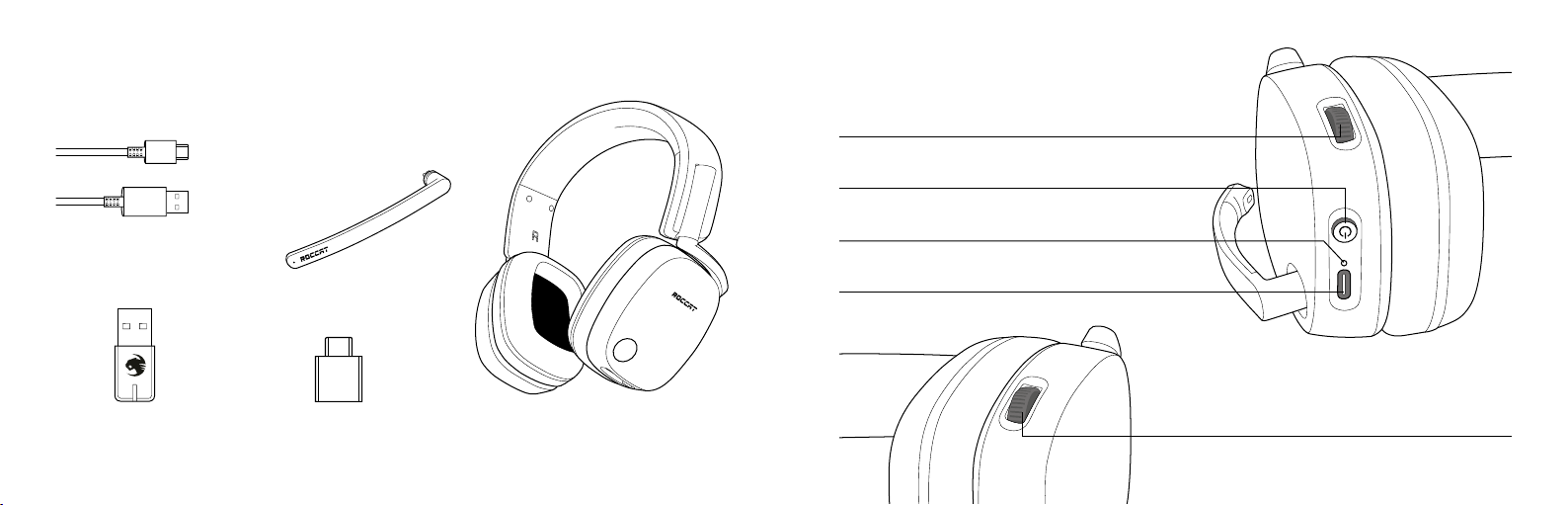
PACKAGE CONTAINS
CONTENU DE LA BOÎTE
Removable Microphone
Microphone amovible
HEADSET CONTROLS
COMMANDES SUR CASQUE
Volume Control
Réglage du volume
Power O n / Of f
Allumer / éteindre
USB Charging Cable
Câble de chargement USB
USB-A Transmitter
Transmetteur USB-A
LED Indicator
Indicateur lumineux
USB Char ge & Update Po rt
Port U SB pour l e chargemen t et la mi se à jour
USB-C Adapter
Adaptateur USB- C
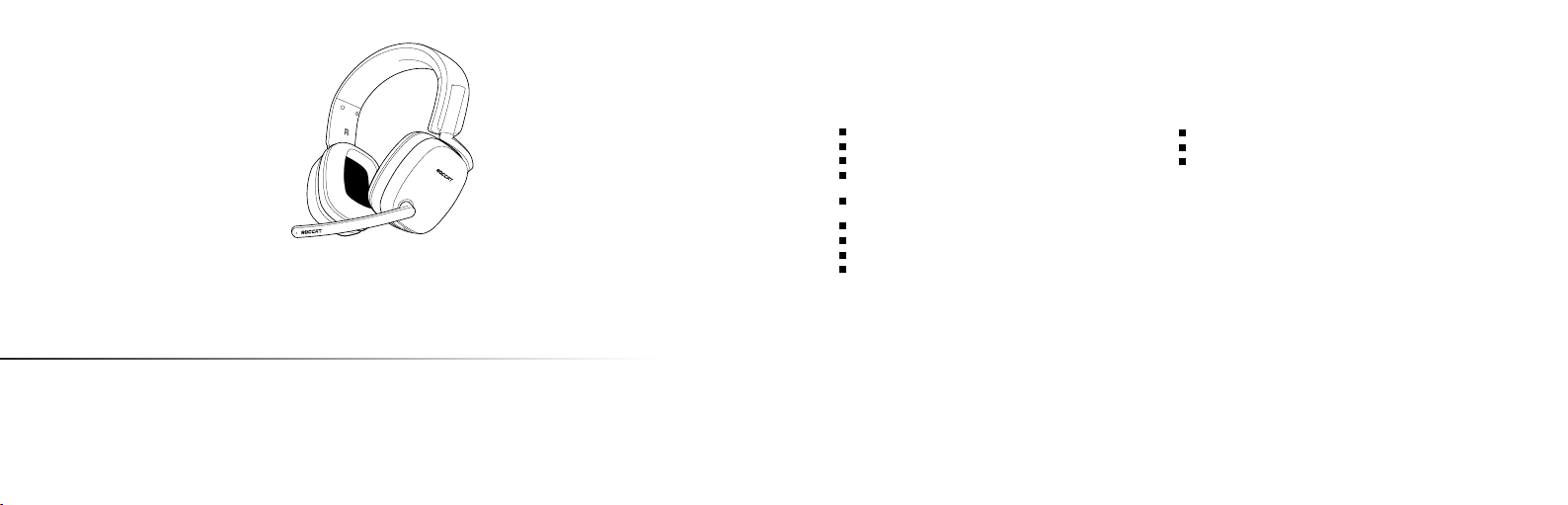
Syn Pr o Air Gaming He adse t
Casqu e de jeu Syn Pro A ir
Variable Mic Monitoring
Réglage du retour microphone
Page 3
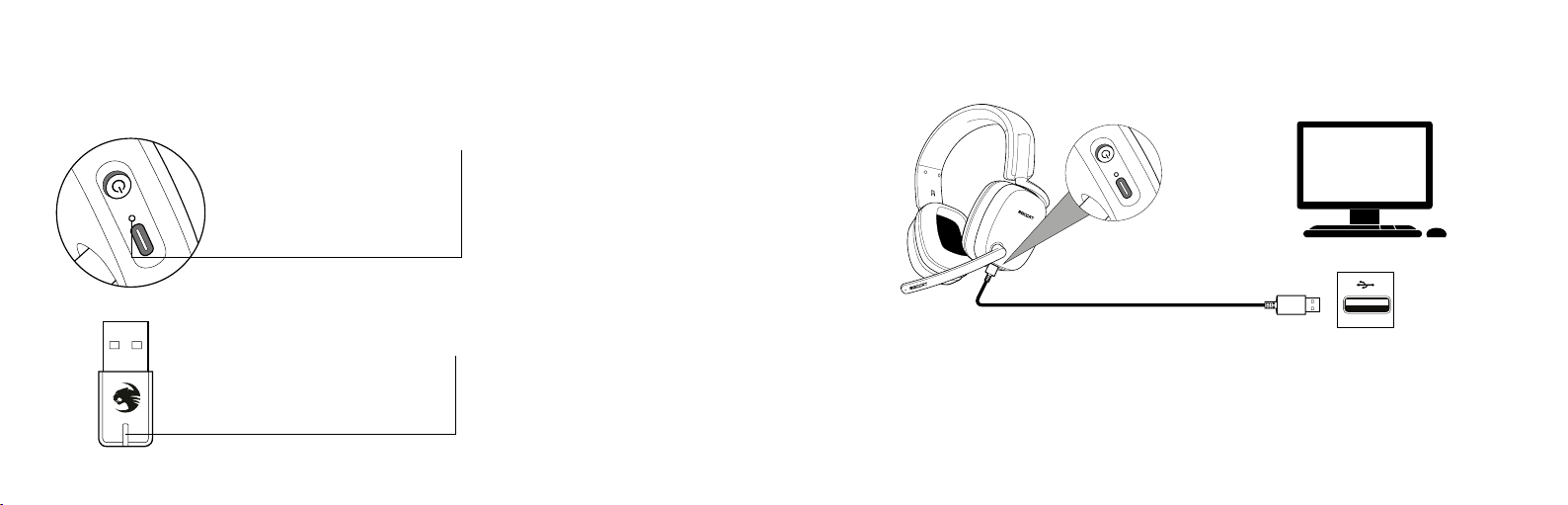
LED INDICATIONS
INDICATIONS LUMINEUSES
CHARGING | CHARGEMENT
Connection Status LED
Solid White = Headset Connected
Double Blink White = Headset Pairing
Pulsing White = Headset On / Full Battery
Solid Red = Headset Charging
Pulsing Red = Low Battery
LED OFF* = Headset Off
* W hen the headset is off and charging, the Solid Red
LED will turn off when the bat tery is full
Connection Status LED
Solid White = Headset Connected
Double Blink White = Headset Pairing
Pulsing Red = Microphone Muted
Indicateur d’état
Blanc fixe = Casque connecté
Blanc clignotant = Appairage du casque
Blanc respirant = Casque allumé / Batterie pleine
Rouge fixe = Chargement du casque
Rouge respirant = Batterie faible
Pas de lumière* = Casque éteint
* L orsque le casque est éteint et branché, la LED de couleur
rouge fixe s’éteindra lorsque la batt erie est pleine.
Indicateur d’état
Blanc fixe = Casque connecté
Blanc clignotant = Appairage du casque
Rouge respirant = Microphone muet
SY
N
The Syn uses a 24+ hour rechargeable battery. Make sure to
charge it regularly.
Headset Storage
Always charge your headset before storing it for any extended
period of time (greater than 3 months) . Never store the unit in
temperatures above 113°F/45°C
PC
Le Syn dispose d‘une batterie rechargeable d‘une autonomie de
24 heures. Assurez-vous de la charger régulièrement.
Rangement du casque:
Toujours charger votre casque avant de le ranger pour une
longue durée (plus de 3 mois). Ne stockez jamais le casque à
des températures supérieures à 45°C.
Page 4
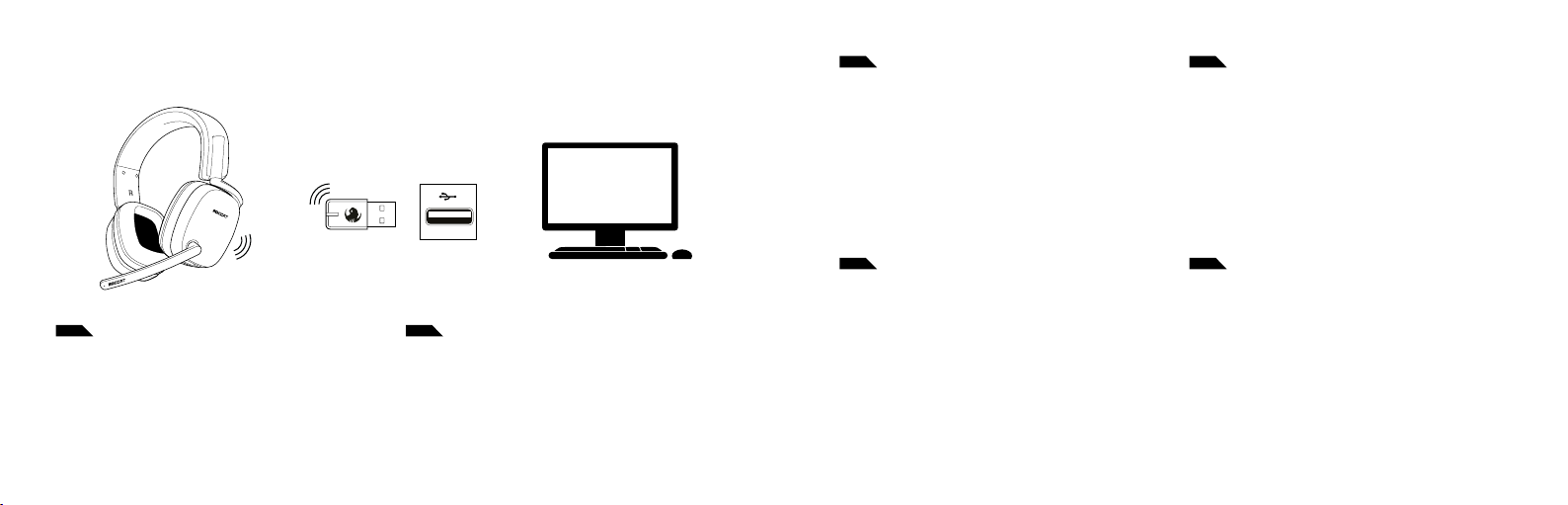
PC SETUP |
EN DE
1. Plug the Sy n Transmit ter in a USB slot o n your PC
2. Hold t he Power But ton for 2 seco nds to turn on t he headset
(the transmitter and headset are automatically paired)
3. Righ t click the spea ker icon in your t oolbar and sel ect “Open
Sound Settings”
4. Sele ct “Syn” from the “C hoose Your Output Dev ice” drop- down
menu
5. Open the dr iver soft ware to cus tomize your set tings
CONFIGURATION POUR PC
S
YN
PC
1. Schließe den Sender des Syn an einen USB-Port an deinem
PC an
2. Halte den Einschaltknopf an deinem Headset für 2 Sekunden
gedrückt (Sender und Headset werden automatisch gekoppelt)
3. Klicke mit re chts a uf das Lautsprec hersymbol in deiner Symb olleiste und öffne die Soundeinstellungen
4. Wähle bei „Ausgabegerät auswählen“ im Dropdownmenü das
Syn aus
5. Öffne die Treiber-Software, um deine Einstellungen anzupassen
FR ES
1. Bra nchez l’émet teur du Syn d ans un port USB d e votre PC
2. Maintenez le bouton d’alimentation appuyé pendant 2 secondes
pour all umer le casque (l ’émetteur et le ca sque sont appa irés
automatiquement)
3. Fai tes un clic dro it sur l’ icône en forme de haut -parleur dans
votr e barre d’out ils et cliquez sur ‘Ouvrir les para mètres de so n’
4. Séle ctionnez le S yn dans le menu déroulant ‘Ch oisir votre
périphérique de sortie’
5. Ouvrez le logiciel de pilotes pour personnaliser vos options
IT SE
1. Collega il tra smettitore d elle Sy n a una porta USB del tu o PC
2. Tieni pr emuto il pulsant e di alimenta zione per 2 seco ndi per
accendere le c uffie (il trasme ttitor e e le cuffie v engono assoc iati
automaticamente)
3. Fai clic con il pulsante destro del mouse sull’icona dell’altoparlante nell a barra degli s trument i e seleziona “Apr i imposta zioni audio”
4. Sele ziona “Syn” dal menu a di scesa “Scegli dispo sitivo di ou tput”
5. Av via il soft ware dei dri ver per pers onalizzar e le tue impos tazioni
1. Enchufa el tr ansmisor Sy n en una ranura US B de tu PC
2. Manté n pulsado el bot ón de encendid o durante 2 segundos
para en cender los aur icular es (el transmi sor y los a uricu lares se
emparejan automáticamente)
3. Haz cl ic con el botón d erecho en el icono de al tavo z de tu barra
de herramientas y selecciona “Abrir configuración de sonido”
4. En el menú desplegable “Elige el dispositivo de salida”, selecciona
“Syn”
5. Abr e el softw are de contr olador para pe rsonaliza r la configuración
1. Anslu t Syn Transmit ter till en USB-po rt på din dator
2. Håll in st römknapp en i 2 seku nder fö r att slå på headset et
(sändaren och headsetet parkopplas då automatiskt)
3. Högerklicka på högtalarikonen i verktygsfältet och välj Öppna
Ljudinställningar
4. Välj “Syn” från menyn Välj utdataenhet
5. Öppna drivru tinsprogramvaran för att anpassa dina inställningar
Page 5
SY
N
TECHNICAL FACTS
Keep your ROCCAT® product up to date with
the latest software and firmware
Download now for Windows® 10 at:
WWW.ROCCAT.COM/DOWNLOADS
TECH SPE CS
Direc t wireless c onnection v ia USB-A tr ansmitter
20Hz – 20k Hz speaker fr equency response
2.4GHz transmitter frequency response
Au dio contro ls: pow er button, mast er volume whee l,
mic mut e, mic monito r wheel
Rechargeable 24h batter y (average 1+ week play time
based on typical ~3h use p er day)
50mm speakers with neodymium magnets
Removable unidirectional microphone
Athletic fabric headband with foam cushioning
Over-ear design featuring memory foam
Should you need assistance …
Our supp ort team is r eady to hel p you with any t echnical qu estions.
Just se nd an e-mail t o support @roccat .com or visi t our websit e at:
WWW.ROCCAT.COM/SUPPORT
SYSTEM REQUIREMENTS
Windows® 10 (software su pport)
USB 2.0 (or hig her)
Internet c onnec tion (for dri ver soft ware)
Page 6
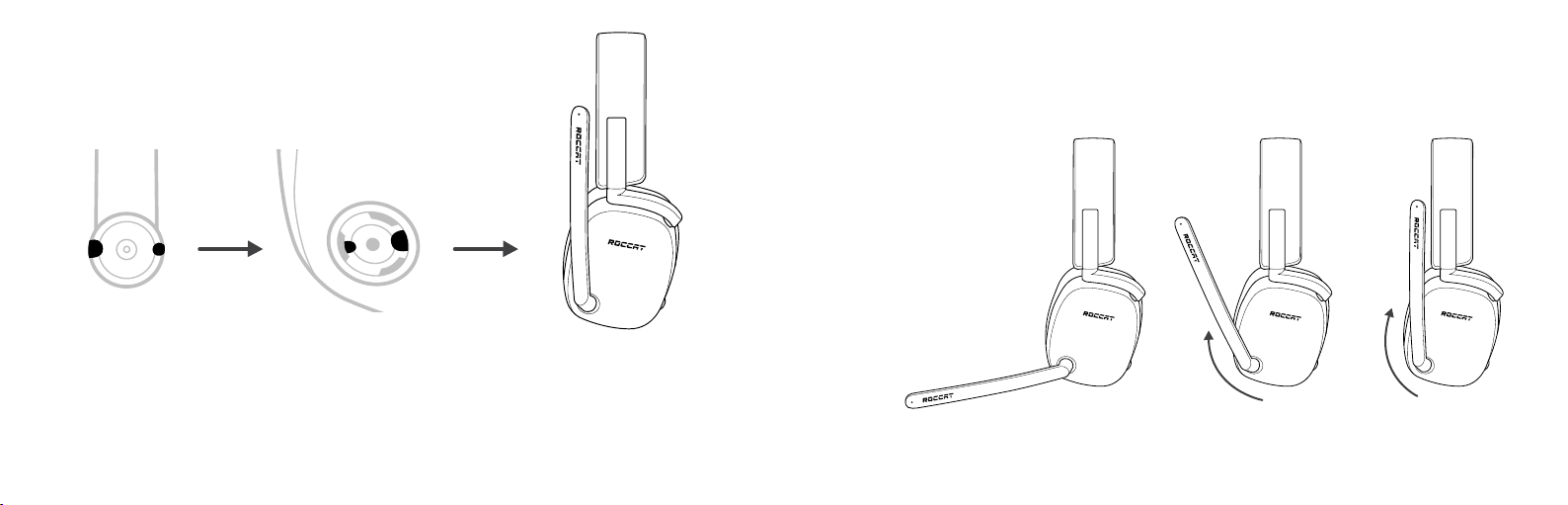
MICROPHONE ATTACHMENT
FIXATION DU MICROPHONE
MICROPHONE FLIP-TO-MUTE OPERATION
FONCTIONNEMENT DU MICROPHONE CONCERNANT LA MISE EN SOURDINE
Microphone Mute
Flip up mic to mute. There is an audbile
tone when the mic is muted or unmuted.
Mode muet
S
Y
N
Relevez le microphone pour le désactiver.
Vous entendrez un son lorsque le microphone est désactivé ou activé.
1. R emove the Micr ophone Cover f rom the lef t ear cup.
2. Align the Removable Microphone with the microphone
slot on t he left ear cu p.
3. Pr ess rmly unt il the Removab le Micropho ne click s into
the microphone slot.
1. Retirez le capuchon de microphone situé sur l’écouteur gauche.
2. Alignez le microphone amovible à la fente dédiée au microphone
sur l’éco uteur gauch e.
3. Appuyez fermemen t jusqu’à ce que le microphone amovible
s’enclenche dans la fente dédiée au microphone.
S Y N
Mic Unmuted
Micro activé
S Y N
Mic Mut ed
Micro désactivé
S Y N
Mic Mut ed
Micro désactivé
Page 7

REGULATORY COMPLIANCE STATEMENT S FOR THE SYN PRO AIR RX & TX
LOCAL RESTRICTIONS ON RADIO USAGE
Caution: Due to the f act that the fr equencies used b y wireless devic es may not yet be har monized in all coun tries, these radi o products are d esigned for use onl y in specific
countr ies, and are not allo wed to be operat ed in countries o ther than those o f designated use. A s a user of these prod ucts, you are re sponsible for ensu ring that the pr oducts
are used o nly in the countr ies for which the y were intended a nd for verify ing that they are c onfigured wi th the correc t selection of fr equency and chan nel for the coun try of use.
Any dev iation from the p ermissible powe r and frequenc y settings for th e country of use i s an infringemen t of national law an d may be punished as su ch.
To determin e whether you ar e allowed to use you r wireless netw ork device in a spec ific country, pl ease check to see if t he radio type nu mber that is print ed on the identif ication label
of your de vice is listed in the m anufactur er‘s OEM Regulato ry Guidance doc ument at the follo wing URL http:// www.turtleb each.com/h omologation or c ontact Turtle Be ach directly.
FEDERAL COMMUNICATIONS COMMISSION (FCC) COMPLIANCE NOTICES
This sec tion includes the f ollowing FCC st atements fo r the Syn:
• FCC IDs: XGB -15150 & XGB-15153
• Class B Interference Statement
• RF Radiati on Exposure & Ha zard Warning
• Non-Modification Statement
CLASS B INTERFERENCE STATEMENT
This equi pment has been tes ted and found to c omply with the li mits for a Class B digi tal device, purs uant to Part 15 of the F CC Rules. These limi ts are designed to p rovide
reason able protecti on against harmf ul interfer ence in a resident ial installation. T his equipment ge nerates, uses, and c an radiate radi o frequency ene rgy and, if not ins talled
and used in a ccordance wi th the instruc tions, may cause ha rmful interf erence to radi o communicatio ns. However, there is n o guarantee tha t interfere nce will not occur i n a
partic ular installati on. If this equipmen t does cause harm ful interfer ence to radio or t elevision rece ption, which can b e determined by t urning the equipm ent off and on, th e user
is encour aged to try to co rrect the int erference by o ne or more of the fo llowing measur es:
• Reorien t or relocate th e receiving ant enna.
• Increa se the separatio n between the eq uipment and rec eiver.
• Connec t the equipment in to an outlet on a cir cuit differe nt from that to w hich the recei ver is connecte d.
• Consult t he dealer or an expe rienced radio /TV techn ician for help.
FCC CAUTION:
This dev ice complies wit h Part 15 of the FCC Rules. O peration is subj ect to the follow ing two conditi ons: (1) Thi s device may not ca use harmful int erference, an d (2) this device
must acc ept any interf erence recei ved, including int erference th at may cause unde sired operatio n.
RF RADIATI ON EXPOSURE & HA ZARD STATEMENT
To ensure com pliance with FC C RF exposure req uirements, this d evice must be inst alled in a locatio n such that the ant enna of the devic e will be greater t han 2 cm (0.8 in.)
from all p ersons. Using highe r gain antennas an d types of ante nnas not covere d under the FCC cer tification o f this product is n ot allowed. Install ers of the radio an d end users
of the pr oduct must adher e to the installa tion instruct ions provided i n this manual. This tr ansmitter mus t not be co-loca ted or operate d in conjunction w ith any other an tenna
or transmitter.
NON-MODIFICATION STATEMENT
Use only t he supplied inter nal antenna. Una uthorized ant ennas, modifica tions, or attac hments could da mage the Syn Pro A ir RX & TX Models an d violate FCC reg ulations. Any
changes o r modificatio ns not expressly a pproved by the pa rty responsi ble for complianc e could void the use r‘s authority t o operate this e quipment. Pleas e contact Turtle Be ach
for a list of a pproved 2.4 GHz an tennas.
This pro duct is compliant w ith the Consum er Product Saf ety Improvem ent Act of 2008, P ublic Law 110-314 (CPSIA)
CANADIAN ICES STATEMENTS
IC: IC: 38 79A-1515 0 and 3879A -15153
This dev ice complies wit h ICES-003 and RS S-247 of Industr y Canada.
Operat ion is subject to th e following two c onditions:
1. This device m ay not cause inte rference, and
2. This dev ice must accept an y interfere nce, including int erference t hat may cause unde sired operatio n of the device.
Ce disposi tif est confor me aux normes NMB 003 et CNR-247 d’In dustrie Canada .
1. L’ut ilisation de ce dispo sitif est autor isée seulement au x conditions sui vantes :
2. il ne doit pas p roduire de bro uillage et l’utilisa teur du dispositi f doit être prêt à a ccepter tout b rouillage radio électrique reç u, même si ce brouilla ge est susceptibl e de
compromettre le fonctionnement du dispositif.
This equi pment complies wi th Industry Ca nada radiation e xposure limits s et forth for an u ncontrolled en vironment.
Cet équip ement est confo rme à l’expositio n aux rayonneme nts Industry C anada limites ét ablies pour un env ironnement no n contrôlé.
To prevent r adio interfer ence to the licen sed service (i.e. co -channel Mobile S atellite syst ems) this device i s intended to be op erated indoor s and away from w indows to prov ide
maximu m shielding. Equipme nt (or its transmi t antenna) tha t is installed outd oors is subject t o licensing and not su pported by Sy n Pro Air RX & TX Mod els.
Pour évi ter les interf érences radio a u service agréé ( c.-à-d. Les systè mes par satellit e mobile co-cana l), cet appareil est d estiné à foncti onner à l‘intéri eur et à l‘extérie ur des
fenêtr es pour assurer u n blindage maxima l. L‘équipe ment (ou son ante nne d‘émission) i nstallé à l‘exté rieur est soumis à l‘o ctroi de licenc es et n‘est pas pris en ch arge par les
modèles S yn Pro Air RX et T X.
RF RADIATI ON EXPOSURE & HA ZARD STATEMENT
To ensure com pliance with RSS -102 RF ex posure requir ements, this dev ice must be install ed in a location suc h that the anten na of the device wi ll be greater tha n 2 cm (0.8
in.) away f rom all persons. Usi ng higher gain ante nnas and types of a ntennas not co vered under the I C certificat ion of this produc t is not allowed. Ins tallers of the rad io and end
users of t he product must a dhere to the ins tallation inst ructions prov ided in this manual. T his transmitt er must not be co- located or oper ated in conjunc tion with any ot her
antenna or transmitter.
EXPOS ITION AUX RADIATI ONS RF & MENTION DE DAN GER
Pour assu rer la conform ité avec les exige nces RSS-102 d‘exposi tion aux RF (Radio Fr équences), cet ap pareil doit êtr e installé dans un en droit ou l‘anten ne de l‘appareil se ra
située à un e distance de plus d e 2 cm (0.8 po) de toutes p ersonnes. L’utilisati on d‘antennes à gai n plus élevé et les ty pes d‘antennes q ui ne sont pas couv erts en vertu d e la
certi fication IC de ce p roduit n‘est pas au torisée. Les inst allateurs de la ra dio et les utilisat eurs du produit f inal doivent se co nformer aux in structions d‘ installation f ournies
dans ce man uel. Cet émette ur ne doit pas être c o-implanté ou ex ploité en conjon ction avec tou te autre ante nne ou transmet teur.
Page 8
EUROPEAN UNION AND EUROPEAN FAIR TRADE ASSOCIATION (EFTA) REGULATORY COMPLIANCE
This equi pment may be opera ted in the count ries that compr ise the member co untries of the Eur opean Union and t he European Fair Tra de Association. T hese countrie s, listed
below, are referred to as The European Community throughout this document:
AUSTR IA, BELGIUM, BULG ARIA, CYPRU S, CZECH REPUBLI C, DENMARK, ES TONIA, FINLA ND, FRANCE,, GERM ANY, GREECE, HUNGA RY, IREL AND, ITALY, LATVIA, LIT HUANIA, LUX EMBOURG, MALTA, NE THERLANDS, P OLAND, PORT UGAL, ROMAN IA, SLOVAKIA, S LOVENIA, SPAIN, S WEDEN, UNITE D KINGDOM, ICEL AND, LICHTEN STEIN,
NORWAY, SWITZERLA ND
Declaration of Conformity
Markin g by this symbol:
indicat es compliance wi th the Essential R equirements o f the EMC Directi ve of the Europea n Union
(2014/3 0/EU). This equi pment meets the f ollowing conf ormance stan dards:
Safet y: EN 60950 -1:2006 + A11:2009 + A1:2010 + A12:2011 + A2:2 013(T-M ark License),
IEC 6095 0-1:2005 ( 2nd Ed.) + Am 1:2009 + Am 2:2013 (CB Sc heme Certific ate),
EN 62368 -1: 2014 + A11 (T-Mark Lic ense), IEC 62368-1: 2014 (CB Sche me Certific ate),
EN 50332 -1:2013, EN 50332- 2:2013, EN71-3:2 013
EMC: EN 55032:2 015; CIS PR 32:2015,
EN 30 148 9-1 V2 .1.1(2 017- 02 ), E N3 014 89 -17 V 3.1.1 (20 16- 11)
Radio: EN 300 328 v2.1.2 (2019-07 )
SAR: EN 62311:2008
Enviro nmental: RoHS 2015/ 863 amending Ann ex II to 2011/65/EU, W EEE 2012/19/EU,
REACH 20 06/1907/EC, Packa ging 94/62 /EC, Batter y 2006/66/ EC,
Toys Safety Directive 2009/48/EC
Please vi sit the following U RL for a complete c opy of the Declar ation of Confo rmity:
http://www.turtlebeach.com /homologation
EN 61000-4 -2: 2009, EN 61000- 4-3: 2006 + A1: 2008 + A2: 2010, EN 61000 -4-8: 2010
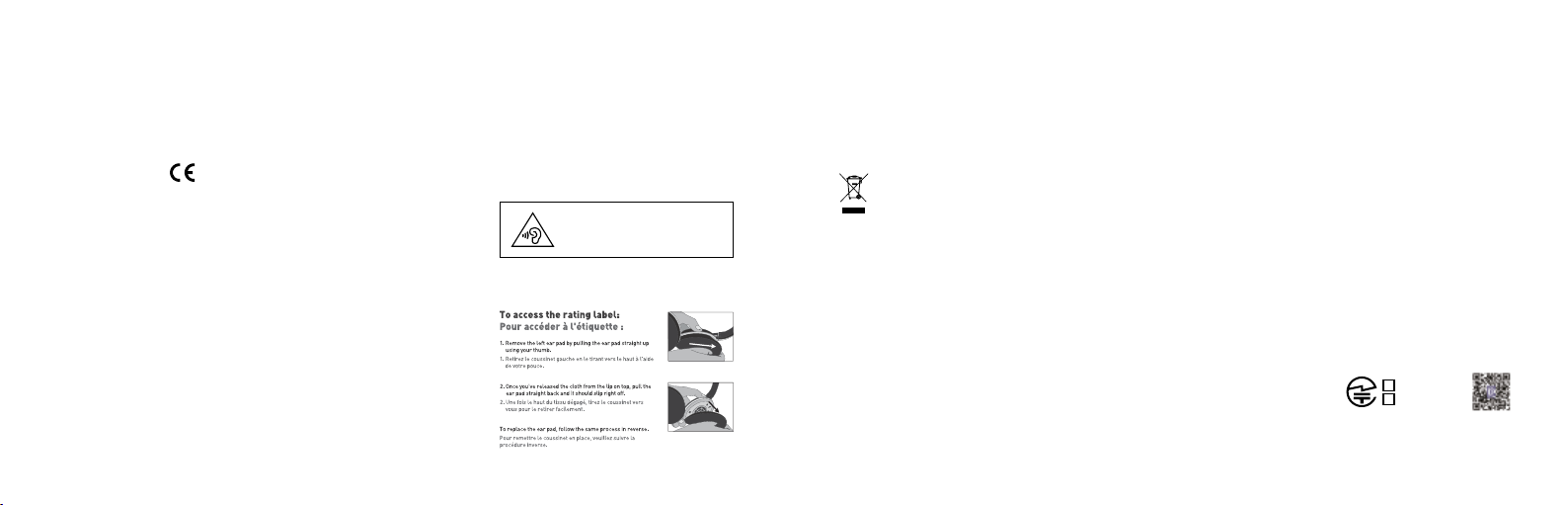
Warning: To prevent possible hearing
damage, do not listen at high volume
levels for long periods.
Warning!
This is a Clas s B product. In a dom estic environm ent, this produ ct may cause radio i nterferen ce, in which case, the u ser may be requir ed to take appro priate measur es.
Achtung!
Dieses ist e in Gerät der Funk störgrenz wertklasse B. In W ohnbereichen k önnen bei Betri eb dieses Geräte s Rundfunkst örungen auft reten, in welch en Fällen der Benut zer für
entsprechende Gegenmaßnahmen verantwortlich ist.
Attention!
Ceci est un p roduit de Classe B. D ans un environn ement domestiq ue, ce produit risq ue de créer des int erférences r adioélectriq ues, il appartien dra alors à l’utili sateur de
prendre les mesures spécifiques appropriées.
This sym bol on the produc t or its packagin g indicates tha t this product mus t not be disposed of w ith your other h ousehold waste. I nstead, it is your r esponsibility
to dispos e of your waste equi pment by handing i t over to a designat ed collection poi nt for the recyc ling of waste elect rical and elect ronic equipmen t. The separate
collect ion and recycling o f your waste equi pment at the time o f disposal will help co nserve natur al resources and e nsure that it is re cycled in a manner t hat protect s
human hea lth and the envir onment. For mo re informatio n about where y ou can drop off yo ur waste for rec ycling, please con tact your local a uthority, or wh ere you
purchased your product.
Voyetra Tur tle Beach Inc. is obli gated as a produc er with a main acti vity of selling und er The Produc er Responsibilit y Obligations (Pa ckaging Waste) Reg ulations 2007. To fulfil
our obliga tion we are regis tered with Com ply Direct and th eir Recycling Room. H ere you will find ad vice and infor mation on packa ging waste manag ement, recyclin g symbols
and the wa ste hierarchy p rinciples of redu ce, reuse and rec ycle.
https://www.comply direct.com/the-recycling-room/
Mexican IFT-008 Statement
“La oper ación de este equi po está sujeta a las si guientes dos con diciones: (1) es posible que es te equipo o disposi tivo no cause int erferencia pe rjudicial y (2) est e equipo o
disposit ivo debe acepta r cualquier inter ferencia, inc luyendo la que pued a causar su opera ción no deseada.”
201-210157
R
201-210156
VOYETR A TURTLE BEAC H, INC. | 44 SOUTH BR OADWAY, 4TH FL OOR, WHITE PL AINS NY 10601, USA
© 2021 Voyetra Turtle Beach, Inc. All rights reserved. Any product names mentioned in this manual may be trademarks or registered trademarks and are
the property of their respective owners. Information contained herein is subject to change without notice. Voyetra Turtle Beach, Inc shall not be made liable
for any errors that may appear in this manual. This publication or parts of it may not be reproduced without the express consent of the publisher.
R
ID009
426-201-004-005
Page 9

WWW.ROCCAT.COM
 Loading...