

Page 1
IMP OR TANT
DOCUMENT
QUICK-INSTALLATION GUIDE
SPECIFICATIONS
© 2014 ROCCAT GmbH. All rights reserved. Any product names mentioned in this manual may be trademarks
or registered trademarks and are the property of their respective owners. Information contained herein is
subject to change without notice. ROCCAT GmbH shall not be made liable for any errors that may appear in this
manual. This publication or parts of it may not be reproduced without the express consent of the publisher.
ROCCAT GmbH
Otto vo n Bahrenpark, Paul-Des sau-Str. 3G, 22761 Hamburg, Germany
SYSTEM REQUIREMENTS
Windows® X P, Vist a® 32/64 bit,
Windows® 7 32/64 bi t
Windows® 8/Windows® 8 Pro
USB 2.0 Port
Internet connection (for driver installation)
PACKAGE CONTAINS
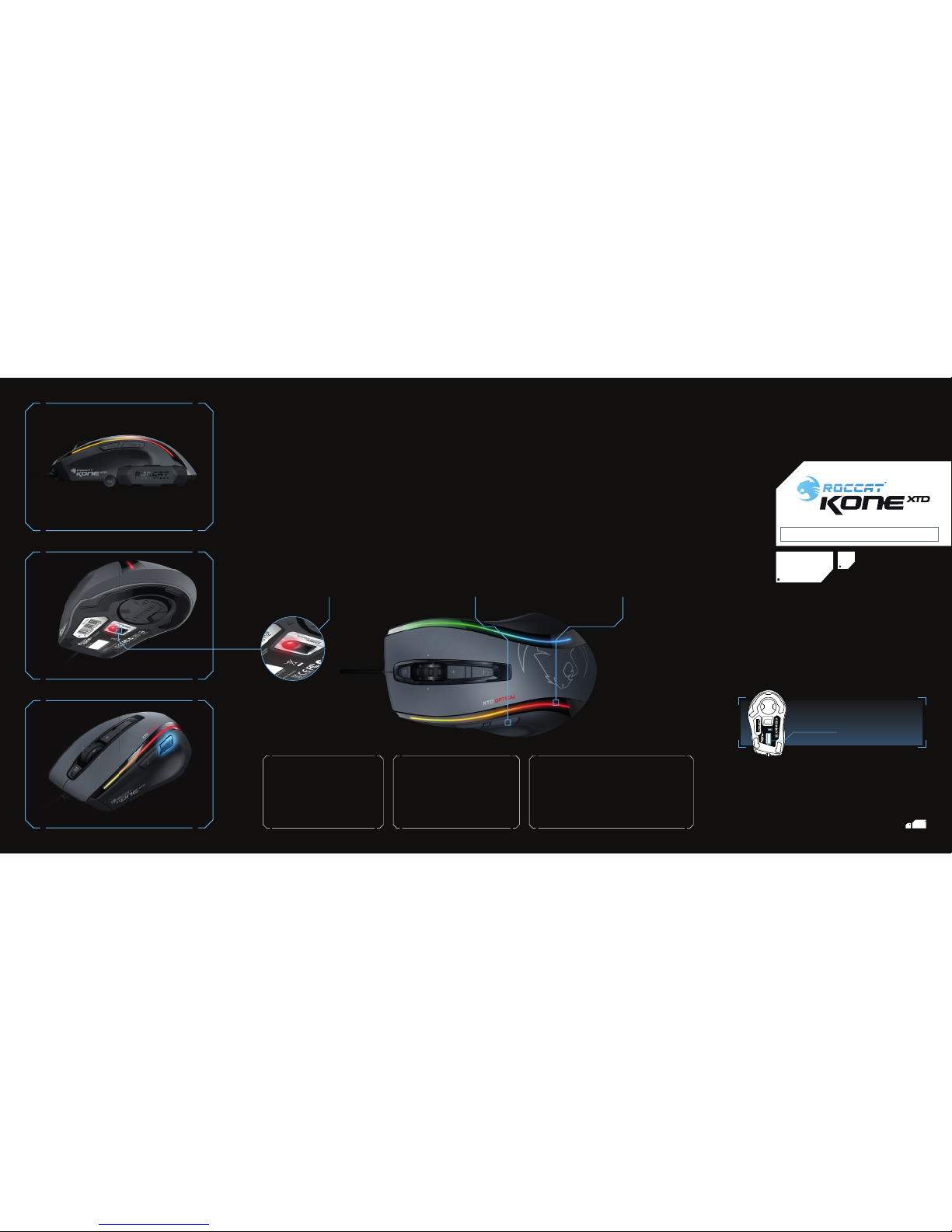
ROCCAT™ Kone XTD Optical
Max Customization Gaming Mouse
Weight System (4x5g) with hard case
Quick-Installation Guide
TECH SPECS
Pro-Opt ic Sensor (R5)
with up 640 0 DPI
1000Hz polling rate
1ms response t ime
12500fps, 11.25 megapixel
50G acceleration
5.08m /s (200ips) max speed
16-bit data c hannel
72MHz Turbo Core V2
32-bit Arm ba sed MCU
576kB on-board memory
Adjustable angle snapping
Adjustable Lift-off distance
1.8 m braided USB cable
Pro-Optic Sensor (R5)
The Pro-Op tic (R5) sensor with DPI adjustab le
up to 6400dpi o ffers superb track ing, transmitting e ven the fastest of mouse m ovements
with no lag, for in credible precision and gaming
control. Wi th a 1000Hz pollin g rate and optical
scanning, accura te up to 50G acceleration, the
sensor reac ts precisely to your mous e pad,
further improv ing tracking. The DCU (Distance
Control Uni t) lets you adjust lift -off distance,
maximizing your command capabilit ies.
Easy-Shift[+]™ & ROCCAT™ Driver
The Kone XTD Opt ical features world f amous
Easy-Shi ft[+]™ technology, which let s you set
two funct ions for each mouse butt on and the
scroll wheel – g iving you the power to pack a
massive amoun t of quickly-accessi ble control
into a clean, unclu ttered space. And the includ ed
ROCCAT™ Driver sof tware lets you e asily program
and fi ne tune a multitud e of settings – and gives
you sound feedba ck with most changes – so you
can game exact ly how you like.
16.8 Million-Color Lighting System
The Kone XTD Op tical is more than just a gamin g
mouse: It’s a fully-customizable atmosphere boos ter
that adds to t he mood of every gaming se ssion.
That’s because i t boasts a large rear ROCCAT™
logo that you ca n illuminate in your choice of 16.8
million vibran t colors. You can even program the
logo to “brea the” or rotate in your choi ce of shades
– eye-ca tching effects tha t enhance your gaming
experience a nd look excellent with your o ther
ROCCAT™ gear.
CONGRATULATIONS, WARRIOR!
You’re now the proud owner o f the ROCCAT™ Kone XTD Optica l – Core Performance Gamin g Mouse. With legendary Kon e blood pumping
through its ve ins, the Kone XTD Optical d elivers a powerful Ne xt Gen combo of core ess entials every skirm isher needs to rack up vic tory
after vic tory. It’s powered by a killer per formance package loaded wi th the latest Pro -Optic (R5) optical sens or and a mighty 32-bit Turbo
Core V2 72MHz ARM MCU process or – all working in perfec t harmony to deliver unrivaled ba ttle performance. Ad d to that a wealth of
ergonomic features designed for long-play comfor t and a suite of the world’s most advanced gaming software for max customization and
it’s easy to see wh y the Kone XTD Optical is go od enough to be called a Kone.
OPTICAL
Should you need assis tance …
Our support t eam is ready to help wi th any technical quest ions.
Just send an e- mail to support@ro ccat.org. Or visit our webs ite at:
WWW.ROCCAT.ORG/SUPPORT
Made in China
Max Customization
Gaming Mouse
OPTICAL
T36145
N12642
Designed at
ROCCAT Studios, Germany
MSIP-REM-ROA-KONEXTD-O
P/N: GM1811-00A01
ROC-11-811
EAN
PLEASE USE YOUR PROD UCT’S
SERIAL NUMBER
(
LOCATED ON THE BOT TOM LABEL
) FOR
REGISTRATION. SIGN IN AT:
WWW.ROCCAT.ORG/REGISTER
Page 2
ROCCAT™ EASY-SHIFT[+]™
TECHNOLOGY
GREATLY INCREASE YOUR MOUSE FUNCTIONS
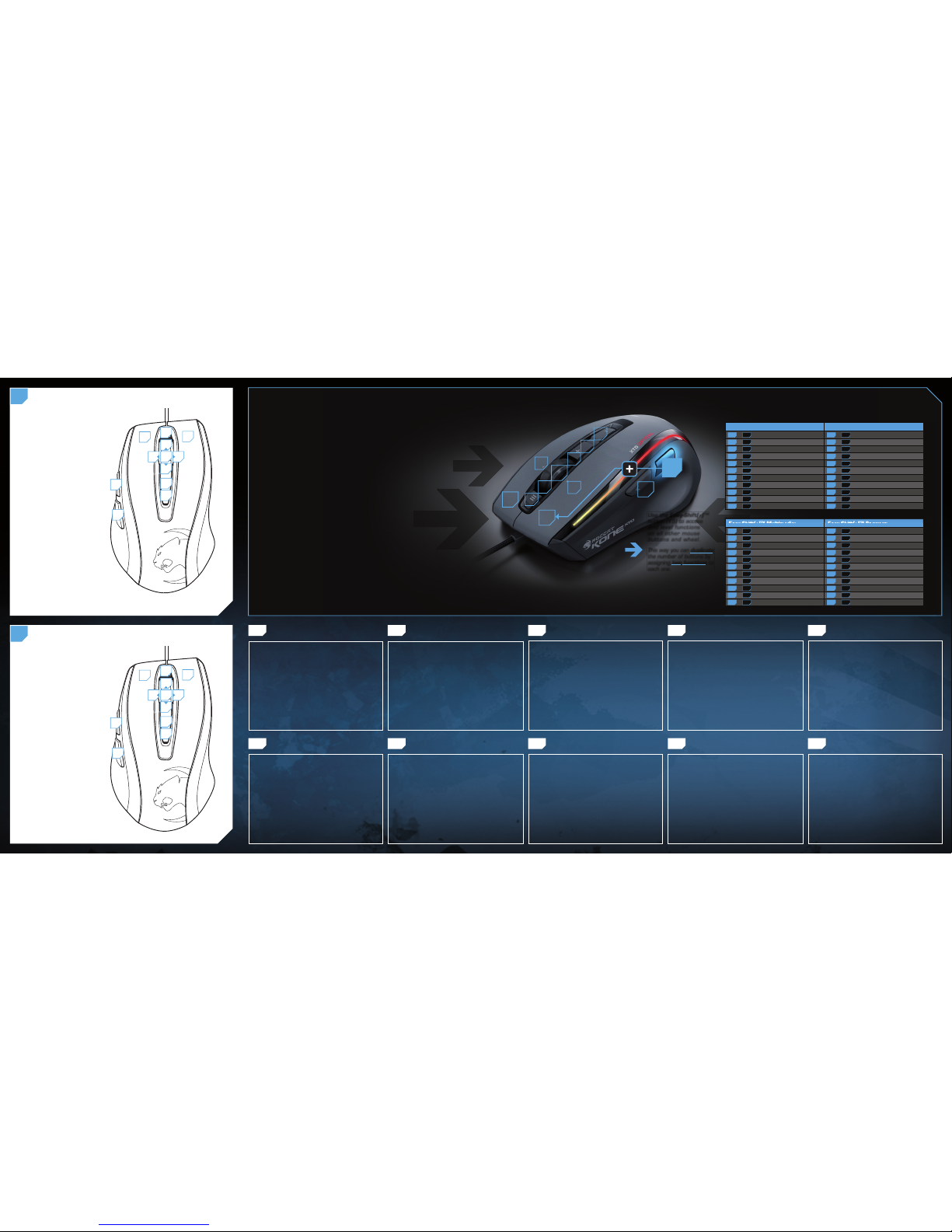
Ingenious Easy-Shift[+]™ technology lets you assign two functions to
each of your mouse buttons and the scroll wheel – putting a huge
amount of easily-wielded power right at your fi ngertips. The Kone
XTD Optical’s Easy-Shift[+]™ button works just like the shift key on a
keyboard. Simply hold it down and simultaneously press one of the
other mouse buttons – or the scroll wheel (including up and down)
– and you execute a second function. This incredibly handy feature
increases the number of available functions from 9 to 16.
GET EVEN MORE MACRO MIGHT
Easy-Shift[+]™ also lets you control powerful driver functions right
from your mouse – giving you quick control over things like your
multimedia options. For example, you can launch your media player,
switch music tracks and adjust volume – all with the simple press
of a mouse button or scroll of your mouse wheel. With the Kone
XTD Optical, fl awless ergonomics and maximum functionality
coexist in perfect harmony.
(no driver installed)
DEFAULT BUTTON ASSIGNMENT: EASY-SHIFT[+]™
B
(no driver installed)
DEFAULT BUTTON ASSIGNMENT
A
1. ROCCAT™ Kone XTD Optical USB fi şini boş bir USB
girişine tak.
2. Bilgisayarı başlat ve internete bağlan.
3. Web tarayıcının adres satırına “www.roccat.org/support”
URL adresini gir ve Enter tuşuna bas.
4. Sol navigasyon çubuğundaki “ROCCAT™ Kone XTD Optical”
üzerine tıkla. Açılan sayfadan en yeni sürücü yazılımını indir.
5. Sürücü kurulumunu başlat ve ekrandaki diğer talimatları
takip et.
TR
1. Sätt ROCCAT™ Kone XTD Optical USB-kontakt i en ledig
USB-port.
2. Starta datorn och koppla upp dig på Internet.
3. Skriv in följande URL i adressfältet på din webbläsare:
www.roccat.org/support. Tryck på Enter.
4. Klicka på ROCCAT™ Kone XTD Optical i det vänstra navigationsfältet. Ladda ner den senaste programvaran med
drivrutin på den sida som öppnas.
5. Starta installationen av drivrutin och följ anvisningarna
på skärmen.
SE
1. Соедини USB-штекер ROCCAT™ Kone XTD Optical со
свободным USB-портом.
2. Запусти компьютер и выйди в интернет.
3. Введи в адресной строке браузера адрес
„www.roccat.org/support“ и нажми Enter.
4. Нажми на левой навигационной панели пункт
„ROCCAT™ Kone XTD Optical“. Загрузи с открывшейся
страницы самые последние драйвера.
5. Запусти инсталляцию драйвера и следуй дальнейшим
указаниям на экране.
RU
1. Podłącz wtyk USB ROCCAT™ Kone XTD Optical do wolnego
złącza USB.
2. Uruchom komputer i nawiąż połączenie z Internetem.
3. W wierszu adresowym przeglądarki wpisz adres URL
„www.roccat.org/support“ i naciśnij Enter.
4. W lewym pasku nawigacji kliknij punkt
„ROCCAT ™ Kone XTD Optical“. Z nowo otwartej strony
pobierz najnowsze sterowniki.
5. Rozpocznij instalację sterowników i postępuj zgodnie z
instrukcjami na ekranie.
PL
1. Relie la fi che USB de la souris ROCCAT™ Kone XTD
Optical à une prise USB libre.
2. Démarre ton ordinateur et connecte-toi à Internet.
3. Entre dans la barre d’adresse de ton navigateur l’URL
« www.roccat.org/support » et appuie sur Enter.
4. Clique dans le menu de navigation de gauche sur
« ROCCAT™ Kone XTD Optical ». Télécharge la dernière
version du pilote sur la page qui s’ouvre alors.
5. Lance l’installation du pilote et suis les instructions qui
s’affi chent à l’écran.
FR
1. Liitä ROCCAT™ Kone XTD Optical:n USB-pistoke
vapaaseen USB-liitäntään.
2. Käynnistä tietokoneesi ja luo Internet-yhteys.
3. Kirjoita verkkoselaimesi osoiteriville seuraava URL-osoite
„www.roccat.org/support“ ja paina Enter.
4. Napsauta vasemmassa navigaatiopalkissa kohtaa
„ROCCAT™ Kone XTD Optical“. Lataa avautuvalta sivulta
uusin ajuriohjelmisto.
5.
Käynnistä ajurin asennus ja noudata näytöllä näkyviä lisäohjeita.
FI
1. Enchufa el conector USB del ROCCAT™ Kone XTD Optical
a un puerto libre USB.
2. Inicia tu ordenador y establece la conexión de Internet.
3. Escribe en tu navegador Web la siguiente URL:
www.roccat.org/support y pulsa Enter.
4. En la barra izquierda de navegación haz clic en el
punto “ROCCAT™ Kone XTD Optical”. En la página que se
abre a continuación descárga el software de controlador
más actualizado.
5. Inicia la instalación del controlador y sigue las instrucciones que aparecen en pantalla.
ES
1. Plug the USB connector on your ROCCAT™ Kone XTD
Optical into any free USB port.
2. Boot your computer and connect to the internet.
3. Enter ‘www.roccat.org/support’ in your browser and
hit the return key.
4. In the navigation bar on the left, go to ‘ROCCAT™ Kone
XTD Optical’. Download the latest driver from the web
page that opens.
5. Start the driver installation process and follow the
on-screen instructions.
EN
1. Forbind ROCCAT™ Kone XTD Optical’s USB-stik med et
ledigt USB-interface.
2. Start din computer og forbind den med Internettet.
3. Indtast følgende URL i adresselinjen af din webbrowser
„www.roccat.org/support“ og tryk så Enter.
4. Klik i venstre navigantionslinje på punkt „ROCCAT™ Kone
XTD Optical“. Frau den åbnede side overfører du den
nyeste driversoftware.
5. Start driver-installationen og følg anvisningerne på
billedskærmen.
DK
1. Verbinde den USB-Stecker der ROCCAT™ Kone XTD
Optical mit einer freien USB-Schnittstelle.
2. Starte deinen Computer und stelle eine Verbindung mit
dem Internet her.
3. Gebe in die Adresszeile deines Webbrowsers die folgende
URL ein „www.roccat.org/support“ und drücke Enter.
4. Klicke in der linken Navigationsleiste auf den Punkt
„ROCCAT™ Kone XTD Optical“. Lade dir auf der sich
öffnenden Seite die neueste Treiber-Software herunter.
5. Starte die Treiber-Installation und folge bitte den weiteren
Anweisungen auf dem Bildschirm.
DE
INSTRUCTIONS INSTRUKCJA
ИНСТРУКЦИИ
INSTRUKTIONER TALIMATLAR
ANLEITUNG INSTRUKTIONER INSTRUCTIONS INSTRUCCIONES OHJEET
EASY-S HIFT[+] ™ EXAMPLE S:
Use the Easy-Shift[+]™
button (#5) to access
2nd level functions
on all other mouse
buttons and wheel.
This way you can duplicate
the number of buttons by
assigning two functions to
each one.
Easy-Shift[+]™ Multimedia: Easy-Shift[+]™ Browser:
5 + 1 = Play or pause 5 + 1 = Page back
5 + 2 = Stop playback 5 + 2 = Page forward
5 + 3 = Mute volume 5 + 3 = New tab
5 + 4 = Switch to full screen & back 5 + 4 = New window
5 + 6 = Play the previous item 5 + 6 = Switch to previous tab
5 + 7 = Play the next item 5 + 7 = Switch to next tab
5 + 8 = Volume up 5 + 8 = Volume up
5 + 9 = Volume down 5 + 9 = Volume down
5 + 10 = Play faster than normal speed 5 + 10 = Switch to full screen & back
5 + 11 = Play slower than normal speed 5 + 11 = Minimize window
5 + 12 = Rewind 5 + 12 = Print page
Easy-Shift[+]™ WoW: Easy-Shift[+]™ CS:
5 + 1 = Mount up 5 + 1 = Throw HE
5 + 2 = Dismount 5 + 2 = Throw fl ash
5 + 3 = Autorun 5 + 3 = Throw smoke
5 + 4 = Use trinket 5 + 4 = Show scores
5 + 6 = Your macro #1 5 + 6 = Buy CT equipment
5 + 7 = Your macro #2 5 + 7 = Buy T equipment
5 + 8 = Pet attack 5 + 8 = Primary weapon
5 + 9 = Pet follow 5 + 9 = Secondary weapon
5 + 10 = Your macro #3 5 + 10 = Team radio #1
5 + 11 = Your macro #4 5 + 11 = Team radio #2
5 + 12 = Use hearthstone 5 + 12 = Team radio #3
1 = Left mouse button
2 = Right mouse button
3 = Middle mouse button &
universal scroll
4 = Page forward (Browser)
5 = Easy-Shift[+]™ button
6 = Tilt left
7 = Tilt right
8 = Mouse wheel up
9 = Mouse wheel down
10 = DPI up
11 = DPI down
12 = Open “My computer”
(Windows)
1
2
3
4
5
10
11
12
8
9
76
5+1 = Page back (Browser)
5+2 = Page forwar d (Browser)
5+3 = Mute volume
5+4 = Page back (Browser)
5+5 = Disabled
5+6 = Previous track
5+7 = Next track
5+8 = Volume up
5+9 = Volume down
5+10 = Sensitivity up
5 +11 = Sensitivity down
5+12 = Open ROCCAT™ driver
(needs to be installed)
1
2
3
4
5
10
11
12
8
9
76
1
2
3
8
9
5
4
10
11
12
6
7
X
T
D
O
P
T
I
C
A
L
X
T
D
O
P
T
I
C
A
L
 Loading...