

Page 1
ROC-14-160
Made in China
EAN
T36145
N12642
KCC-REM-ROA-KAVEXTD
CONGRATUL ATIONS!
5.1 | DIGITAL
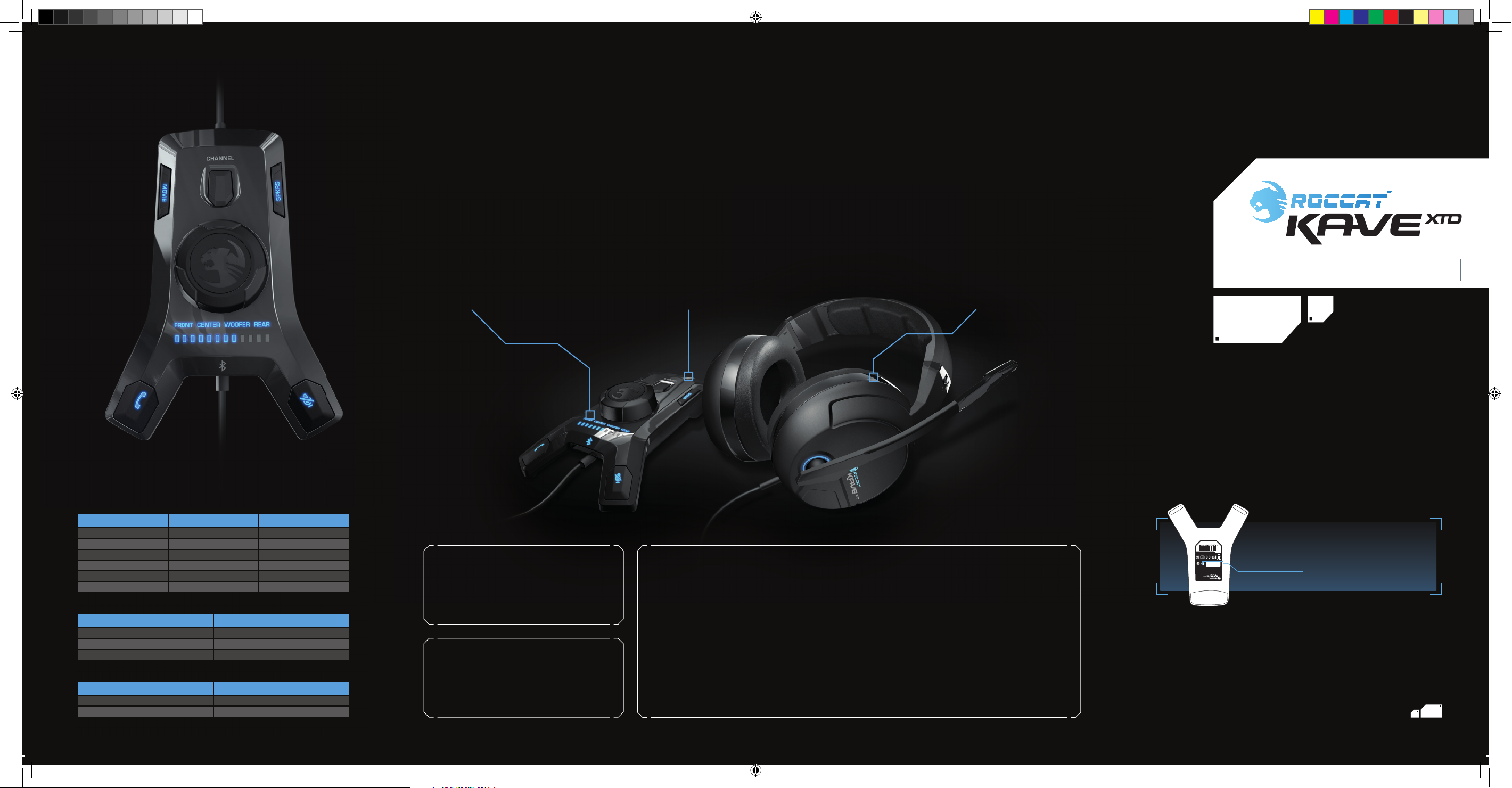
You are now the proud owner of the ROCCAT™ Kave XTD Digital – Premium 5.1 Surround Headset with USB Remote & Sound Card.
With true 5.1 surround sound, supreme comfort, robust design and a desktop remote featuring a high-quality inbuilt sound card
and Bluetooth® smartphone pairing technology, the Kave XTD is the total audio solution for gamers.
CALL BUTTON GUIDE*
USB Remote & Sound Card
Featuring a high-quality inbuilt sound card,
the Kave XTD remote gives you total audio
control at your fi ngertips. With 5.1 speaker
ports, you can hook your existing sound
system up and switch between output
modes easily. Completed by a game/movie
mode toggle, volume master controls, stylish
LED lighting and tons more, the remote
works as your audio command center.
Bluetooth® Pairing
Also featured in the Kave XTD remote is
patented ROCCAT™ Bluetooth® technology
which lets you to pair your BT-enabled smar tphone to your headset, allowing you to make
and receive calls without having to leave the
action. Saving you time and keeping you
focused on your game, you can chat to your
friends through your headset while you keep
on fragging.
High-comfort Surround Sound
With two 40mm driver units and one 30mm
vibrator unit per ear cup, the Kave XTD
provides fully-immersive surround sound
audio. With hand-sewn leatherette ear
cushions and plush headband padding,
supreme comfort is complemented by a
light yet robust and battle-proof design.
A detachable microphone with mute LED
rounds off your perfect gaming headset.
QUICK-INSTALLATION GUIDE
I M P O R TA N T
DOCUMENT
manual. This publication or parts of it may not be reproduced without the express consent of the publisher.
subject to change without notice. ROCCAT GmbH shall not be made liable for any errors that may appear in this
or registered trademarks and are the property of their respective owners. Information contained herein is
© 2013 ROCCAT GmbH. All rights reserved. Any product names mentioned in this manual may be trademarks
Otto von Bahrenpark, Paul-Dessau-Str. 3G, 22761 Hamburg, Germany
ROCCAT GmbH
Status Call Button Action Function
Standby Press and hold (4s) Initiate pairing
Incoming call Press once Accept call
Incoming call Press and hold (2s) Reject call
On a call Press once End call
Paired/Standby Press and hold (2s) Call back
Paired/Standby Press once Initiate call
Status
Not paired Off
Paired On
Pairing Blinking
Bluetooth® LED Illumination
Status Call Button LED
On a call On
Idle Off
* full functionalit y dependent on fi nalizing BT® pairing
ROC-14-160_EU-AM_Kave-XTD_QIG_19-06-2013.indd 1 28.08.2013 12:44:23
SPECIFICATIONS
PACKAGE CONTAINS
ROCCAT™ Kave XTD Digital –
Premium 5.1 Surround Headset
Desktop USB Remote with Inbuilt Sound Card
Driver CD-ROM
Quick-Installation Guide
SYSTEM REQUIREMENTS
Free USB 2.0 port (50 0mA) for power supply
Windows® 7 32 / 64 bit,
Windows® 8 / Windows® 8 Pro
For phone feat ure*: Bluetooth
compatible with Bluetooth® 1.1, 1.2, 2.0 (+EDR) and 2.1
*only works wi th installed device dri ver
®
3.0, backw ard
TECH SPECS
CENTER/FRONT/REAR DRIVER UNITS
frequency response: 20~20.000Hz
max. SPL at 1KHz: 115±3dB
max. input power: 50mW
driver diameter: 40mm
driver uni t mat erial: Neodymium magnet
impedance: 32Ω
VIBRATION DRIVER UNITS
frequency response: 20~100Hz
max. input power: 300mW
driver diameter: 30mm
MICROPHONE
frequency response: 10~10.000Hz
driver diameter: 4x1.5mm
sensi tivity at 1KHz: -32±-2dB
impedance: 2.2kΩ + 15 %
directivity: omni-directional
GENERAL
weigh t (headset only): 335gr
cable length: 3.6m
WWW.ROCCAT.ORG/REGISTER
Designed at ROCCAT Studios, Germany
XXXXXXXXXX
P/N: GH4160-00A01
with USB Remote & Sound Card
Premium 5.1 Surround Headset
) FOR
REGISTRATION. SIGN IN AT:
LOCATED ON THE BOTTOM LABEL
(
PLEASE USE YOUR PRODUCT’S SERIAL NUMBER
WWW.ROCCAT.ORG/SUPPORT
Just send an e-mail to [email protected]. Or visit our website at:
Our support team is ready to help with any technical questions.
Should you need assistance …
Page 2
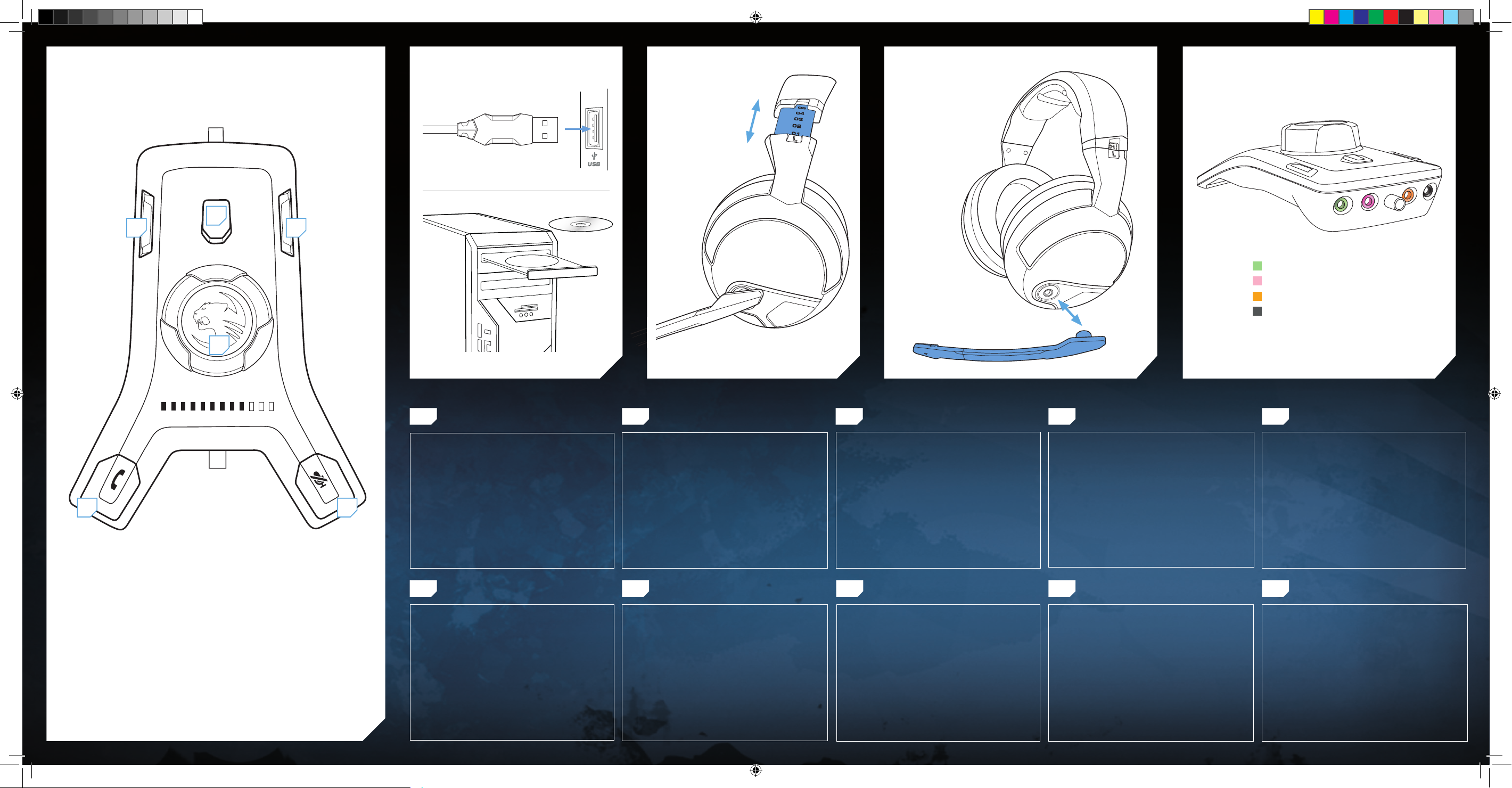
DESKTOP REMOTE
1
ADJUSTMENT ATTACH/DETACH MIC 5.1 SPEAKER PORTSCONNECTION/INSTALLATION*
2
3
= Front speakers
= Microphone
= Subwoofer/center speaker
= Rear speakers
4
*device driver mus t be ins talled for full func tionality
5 6
1 = Movie/game mode toggle
2 = Channel toggle
3 = Output mode toggle
4 = Volume/mute control
5 = Call button
6 = Microphone mute button
DE
BITTE BEACHTEN: UM DAS KAVE XTD MIT
ALLEN FUNKTIONEN NUTZEN ZU KÖNNEN,
MUSS DER TREIBER INSTALLIERT SEIN.
1. Stecke den USB-Stecker in einen freien USB-Anschluss
deines Computers.
2. Lege die Installations-CD-ROM ein oder lade den Treiber
von roccat.org/support herunter.
3. Installiere den Treiber.
4. Starte deinen Computer nach der Installation des
Treibers neu.
FR
INFORMATION : INSTALLEZ LE PILOTE POUR
PROFITER PLEINEMENT DES CAPACITÉS DU
KAVE XTD.
1. Branchez le connecteur USB à un port USB libre de votre PC.
2. Insérez le disque d’installation ou téléchargez le pilote à
partir de roccat.org/support.
3. Installez le pilote.
4. Redémarrez votre PC après la fin de l’installation du
pilote.
DK
BEMÆRK: FOR AT OPNÅ FULD KAVE XTD OPLEVELSE SKAL DRIVEREN VÆRE INSTALLERET.
1. Sæt USB-stikket i en fri USB-port på din computer.
2. ndsæt installationen CD-ROM eller download driveren fra
roccat.org/support.
3. Installér driveren.
4. Genstart din computer, når installationen af driveren er
afsluttet.
PL
Uwaga: by w pełni korzystać ze wszystkich zalet kave XtD, należy Upewnić się,
że sterownik jest zainstalowany.
1. Umieść wtyk USB w wolnym gnieździe USB komputera.
2. Umieść instalacyjną płytę CD w napędzie lub pobierz sterow
nik ze strony roccat.org/support.
3. Zainstaluj sterownik.
4. Uruchom ponownie komputer po zakończeniu instalacji
sterownika.
PLEASE NOTE: TO ENJOY THE FULL KAVE XTD
EXPERIENCE PLEASURE ENSURE THE DRIVER
IS INSTALLED.
1. Plug the USB connector into any free USB port on your
computer.
2. Insert the installation CD-ROM or download the driver
from roccat.org/support.
3. Install the driver.
4. Reboot your computer after the driver installation has
completed.
PT
TENHA EM ATENÇÃO: PARA DESFRUTAR DA
TOTAL EXPERIÊNCIA KAVE XTD, CERTIFIQUESE DE QUE O DRIVER ESTÁ INSTALADO.
1. Ligue a cha USB em qualquer porta USB livre do seu
computador.
2. Insira o CD-ROM de instalação ou faça donwload do driver
em roccat.org/support.
3. Instale o driver.
4. Reinice o seu computador após ter completado a instalação
do driver.
NOTA: PARA DISFRUTAR DE TODA LA EXPERIENCIA QUE OFRECE KAVE XTD ASEGÚRESE
DE QUE EL CONTROLADOR ESTÉ INSTALADO.
1. Enchufe el conector USB a cualquier puerto USB libre de
su ordenador.
2. Inserte el CD ROM de instalación o descargue el controla-
dor de roccat.org/support.
3. Instale el controlador.
4. Reinicie su ordenador una vez finalizada la instalación del
controlador.
RU
Для информации: Для использования
всех возможностей kave XtD нужно
установить Драйвер.
1. Вставьте USB-коннектор в свободный USB-порт
компьютера.
2. Вставьте установочный компакт-диск в дисковод или
загрузите драйвер с roccat.org/support.
3. Установите драйвер.
4. Перезагрузите компьютер после завершения установки
драйвера.
FIEN ES
HUOMAA: VARMISTA, ETTÄ AJURI ON ASENNETTU, JOTTA VOISIT NAUTTIA TÄYDESTÄ
KAVE XTD -KOKEMUKSESTA.
1. Liitä USB-liitin tietokoneesi vapaaseen USB-liitäntään.
2. Aseta asennus-CD-ROM tietokoneeseen tai lataa ajuri
osoitteesta roccat.org/support.
3. Asenna ajuri.
4. Käynnistä tietokoneesi uudelleen, kun ajurin asennus on
suoritettu loppuun.
SE
OBSERVERA: FÖR ATT KUNNA UTNYTTJA
FUNKTIONERNA HOS KAVE XTD FULLT UT
MÅSTE DRIVRUTINEN INSTALLERAS.
1. Sätt USB-kontakten i en ledig USB-port på din dator.
2. Lägg in CD-skivan för att installera eller ladda ner drivruti nen från roccar.org/support.
3. Installera drivrutinen.
4. Starta om datorn när drivrutinen installerats.
ROC-14-160_EU-AM_Kave-XTD_QIG_19-06-2013.indd 2 28.08.2013 12:44:24
Page 3

Federal Communication Commission interference statement
This equipment has been tested and found to comply with the limits for a Class B digital device, pursuant to part 15 of the FCC rules.
These limits are designed to provide reasonable protection against harmful interference in a residential installation. This equipment
generates, uses and can radiate radio frequency energy and, if not installed and used in accordance with the instructions, may cause
harmful interference to radio communications. However, there is no guarantee that interference will not occur in a particular installation.
If this equipment does cause harmful interference to radio or television reception, which can be determined by turning the equipment off
and on, the user is encouraged to try to correct the interference by one or more of the following measures:
-Reorient or relocate the receiving antenna.
-Increase the separation between the equipment and receiver.
-Connect the equipment into an outlet on a circuit different from that to which the receiver is connected.
-Consult the dealer or an experienced radio/TV technician for help.
This device complies with Part 15 of the FCC Rules. Operation is subject to the following two conditions:
(1)•this device may not cause harmful interference and
(2)•this device must accept any interference received, including interference that may cause undesired operation
The equipment complies with RF exposure limits set forth for an uncontrolled environment. The antenna(s) used for this transmitter
must not be co-located or operating in conjunction with any other antenna or transmitter.
You are cautioned that changes or modifications not expressly approved by the party responsible for compliance could void your
authority to operate the equipment.
䚨 ⱨ㉔㉘⽸⏈ 㤸䑀䝰㐔 ᴴ⏙㉥㢨 㢼㡰⦐ 㢬⮹㙼㤸Ḱ Ḵ⥜═ ㉐⽸㏘⏈ 䚔 ㍌ 㛺㏩⏼␘.
Article 12
Without permission, any company, firm or user shall not alter the frequency,increase the power, or change the characteristics and
functions of the originaldesign of the certified lower power frequency electric machinery.
Article 14
The application of low power frequency electric machineries shall not affect the navigation safety nor interfere a legal communication,
if an interference is found,the service will be suspended until improvement is made and the interference nolonger exists.
 Loading...