

Page 1
QUICK START GUIDE
GUÍA DE INICIO RÁPIDO
Page 2
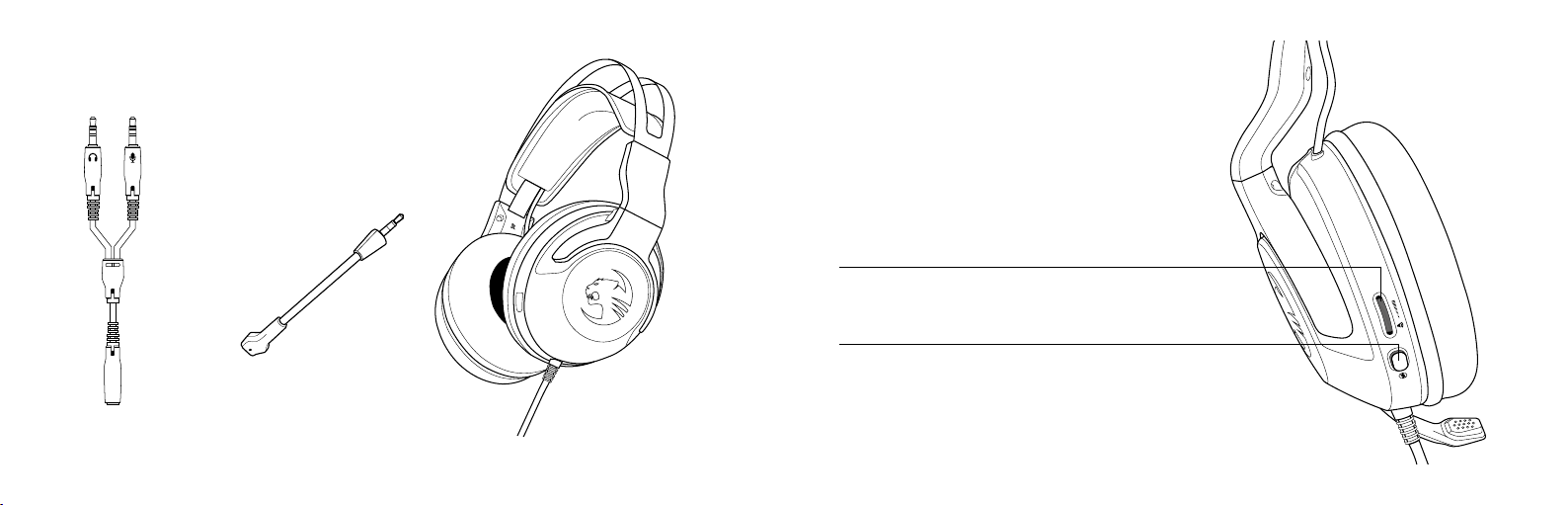
PACKAGE CONTAINS
EL PAQUETE CONTIENE
Removable Microphone
Micrófono conectable
HEADSET CONTROLS
CONTROLES DE LA DIADEMA
Volume Control
Control de volumen
Mic Mut e On/Off
Encender/silenciar el micrófono
PC Spli tte r Cable
Cable d e deriv ación pa ra PC
Elo X St ereo Ga ming Hea dset
Diadema para ju ego Elo X St ereo
Page 3
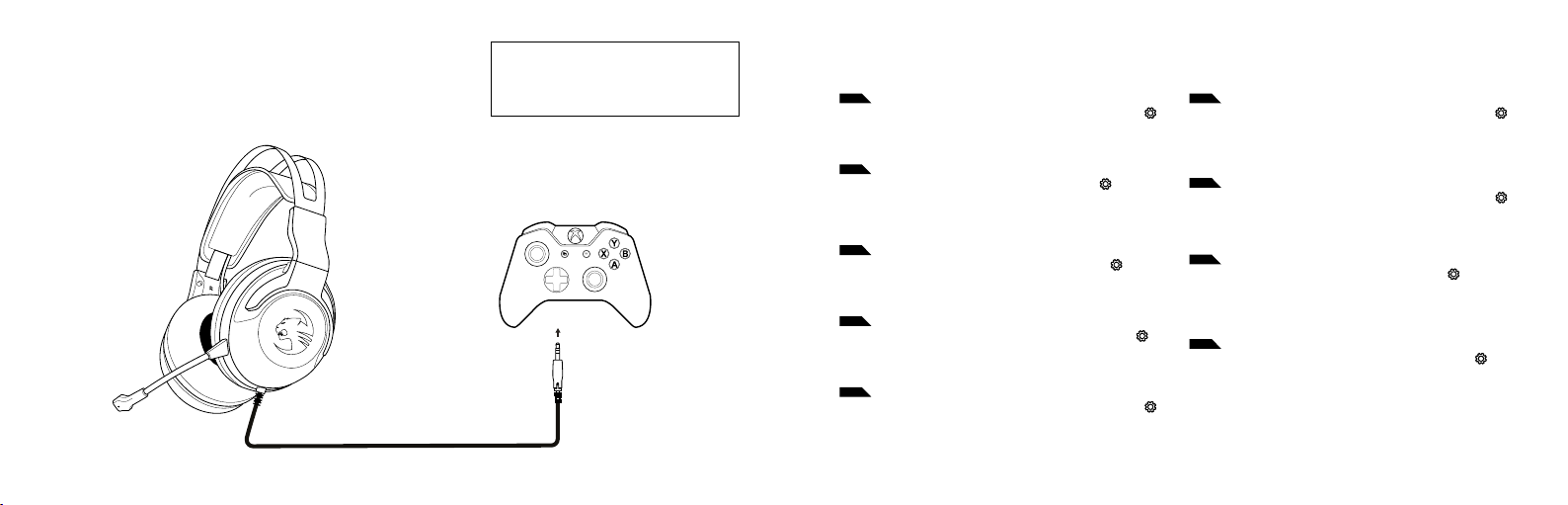
XBOX ONE SETUP
CONFIGURACIÓN PARA XBOX ONE
For new Xbox console setup instructions, go to:
Para con ocer las nuevas i nstruc ciones para la
configuración con Xbox, visita:
turtlebeach.com/Xboxsetup
VOLUME SETUP | CONFIGURATION DU VOLUME
EN
1. Press th e Xbox Butt on on your cont roller and nav igate to Se ttings ( )
2. Select Audio
3. Se t Headset Volu me to maximum
4. Set Headset chat Mixer to your prefer red Game/Chat Balance
5. Se t Mic Monitor ing to your pr eferred le vel
ES
1. Pulsa el bo tón de Xbox en el m ando y ve a Confi guración ( )
2. Selecciona Sonido
3. Co nfigura el vo lumen de los aur iculares al má ximo
4. Conf igura el mezc lador de chat de l os auricular es a tu equilibr o de
juego y cha t favorit o
5. Co nfigura el mo nitor de micr ófono a tu niv el preferi do
IT
1. Premi il pul sante Xbox s ul control ler e vai alle Impo stazioni ( )
2. Seleziona Audio
3. Imp ostare il v olume delle cuf fie al massi mo
4. Impost are il mixer per la chat sul bilanciamento gioco/chat preferito
5. Imp ostare il c ontrollo mi crofono sul l ivello pref erito
SE
1. Tryck på Xbox -knappen på h andkontro llen och gå till i nställning ar ( )
2. Välj Ljud
3. St äll in headsetv olymen till maximal nivå
4. S täll in headse tets chat tmix till ö nskad balans me llan spel och cha tt
5. St äll in mikrofonå terspelning till önskad nivå
NL
1. Press th e Xbox Butt on on your cont roller and nav igate to Se ttings ( )
2. Select eer Audio
3. Se t Headset Volu me to maximum
4. Set Headset chat Mixer to your prefer red Game/Chat Balance
5. Se t Mic Monitor ing to your pr eferred le vel
DE
1.
Drücke die Xbox-Taste deines Controllers und navigiere zu den Einstellungen
2. Wähle Audio
3. S tellen Sie die He adset-L autstä rke auf das Max imum ein
4. Stellen Sie den Headset-Chat mixer auf Ihr bevorzugte s Verhältnis
zwis chen Spiel- un d Chat-La utstärk e ein
5. S tellen Sie den Mi kromonit or auf Ihre bev orzugte L autstä rke ein
FR
1. Appuye z sur la touch e Xbox de vot re manett e et ouvre z l’onglet Par amètres
2. Sélect ionnez Audio
3. Pa ramétrez l e volume du casq ue au maximum
4. Paramét rez le mélangeur de tchat du casque selon vos préférences
5. Pa ramétrez l e contrôle d u micro selon vo s préféren ces
PT
1. Prime o b otão Xbox no c omando e seleci ona Definiçõ es ( )
2. Selecionar Áudio
3. Co loca o volume do s auriculare s no máximo
4. Conf igura o edit or de som de chat do s auricular es para o equilí brio
entr e som de jogo/chat que pr eferires
5. Co loca a monito rização de mi crofone no ní vel que pref erires
DK
1. Tryk på Xbox- knappen på di n controll er, og gå ind i Indsti llinger ( )
2. Væl g lyd
3. Sk ru helt op for h eadset-l ydstyr ken
4. Inds til chat- mixeren for h eadsett et til din fore trukne fo rdeling
mellem s pil og chat
5. Sæ t mikrofo nfølsomhed en til dit for etrukne ni veau
( )
( )
Page 4
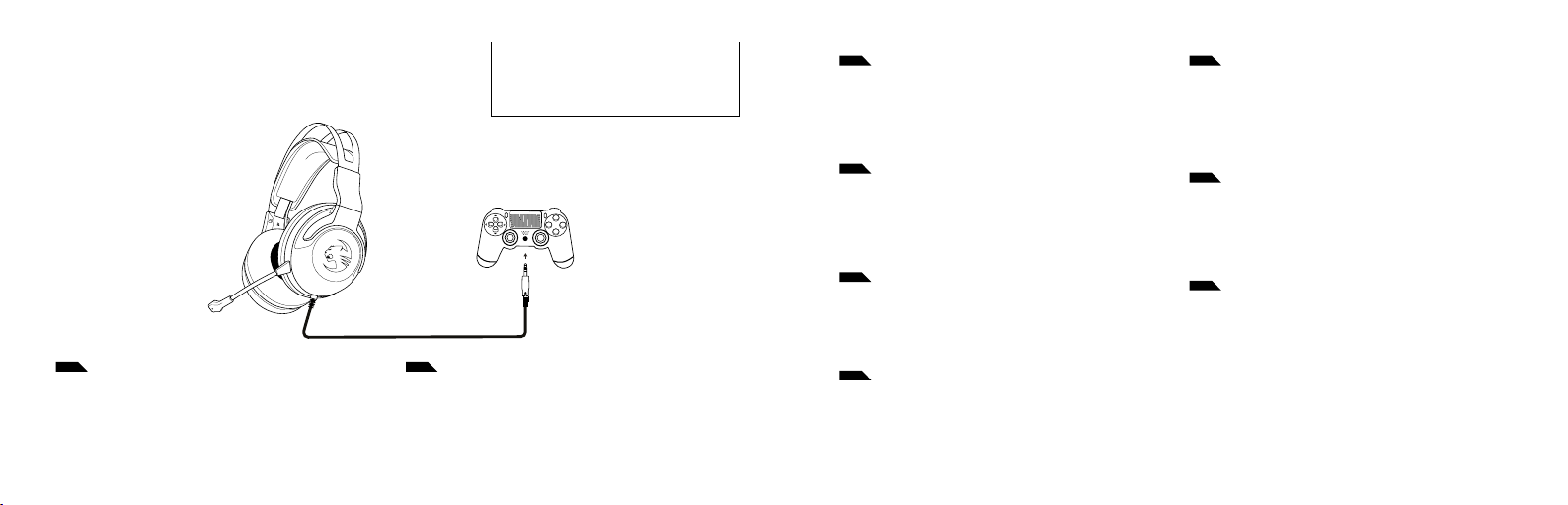
PS4™ SETUP
CONFIGURACIÓN PARA PS4™
EN
1. Go to Se ttings >> Dev ices >> Audio Dev ices
2. Se t Input & Outp ut Device to H eadset Conn ected to Con troller
3. Se t Output to H eadphones to A ll Audio
4. Set Volume Control (Headphones) level to maximum
5. Sele ct Adjust Micr ophone Leve l and follow th e on-scree n instruct ions
to calibrate your microphone
DE
1. Wählen Sie Einstellungen >> Geräte >> Audiogeräte
2. Wählen Sie unter Eingabe- und Ausgabe-Gerät das mit dem Controller
verbundene Headset aus
3. S tellen Sie die Au sgabe an Kopf hörer auf Ges amter Sound e in
4. S tellen Sie die L autstär keregelun g (Kopfhörer) a uf Maximum ei n
5. Wählen S ie die Option z ur Einstell ung des Mikro fonpegels un d folgen
Sie den Anweisungen zur Kalibrierung Ihres Mikrofons
For PlayStation® 5 setup i nstruc tions, go to:
Para con ocer las nuevas i nstruc ciones para la
configuración con PlayStation® 5, visit a:
turtlebeach.com/PS5setup
1. Ve a Confi guración >> Dis positivo s >> Dispositi vos de sonido
2. Conf igura los Dis positivo s de entrada y de s alida a auricu lares conec tados al mando
3. Co nfigura la sa lida de los auric ulares a tod os los sonidos
4. Conf igura el nive l del contro l de volumen (casc os) al máximo
5. Sele cciona Ajus tar el nivel de l micrófono y s igue las instr ucciones par a
calibrar el micrófono
IT
1. Selez ionare Impos tazioni >> Dis positiv i >> Dispositi vi audio
2. Sele zionare come d ispositi vo di ingress o e di uscita le cu ffie coll egate
al controller
3. Imp ostare l’op zione Riprod uci l’audio tra mite cuff ie su Tutto l’audi o
4. Imp ostare il li vello di Con trollo del vo lume (cuffie) al m assimo
5. Sele zionare l’opz ione Regola il li vello del micr ofono e segui re le istruz ioni a sche rmo per calibr are il microf ono
SE
1. Gå till Inställningar >> Enheter >> Ljudenheter
2. S täll in In- och u tdataenh et till Headse t anslute t till handkon troll
3. St äll in Utdat a till hörlurar till Allt ljud
4. St äll in volymkon troll (hörlurar) till maximal nivå
5. Välj Jus tera mikr ofonnivå o ch följ instr uktioner na på skärmen f ör att
kalibrera din mikrofon
NL
1. Ga naar Instellingen > Apparaten > Audioapparaten
2. Stel Invoer- en uitv oerapparaat in op Headset aangesloten op controller
3. S tel de uitvo er in op Hoofdt elefoon na ar alle audio
4. St el Volumebediening (hoofdtelefoon) in op maximaal
5. Sele cteer Micro foonnive au aanpassen en v olg de instr ucties in bee ld
om je micr ofoon te kal ibreren
FRES
1. Ouvrez Paramètres >> Périphériques >> Périphériques audio
2. Dans Périphérique d’entrée et Périphérique de sortie, sélectio nnez
Casque branché à la manette
3. Da ns Sortie ve rs le casque, sé lectionne z Tout a udio
4. Le niv eau de volume du p aramètre R églage du volum e (cas que) doit
être au maximum
5. Sélectionnez Régler le niveau du microphone et suivez les instruct ions
à l’écran pour régler votre microphone
PT
1. Dirija -se a Defin ições » Dispos itivos » Dis positivo s de Áudio
2. Sele cione os auscul tadores li gados ao comand o como o disposi tivo de
entrada e saída de áudio
3. Se lecione “Todo o Áud io” em “Enviar áu dio para os ausc ultadore s”
4. De fina o “Cont rolo de volume (au scultador es)” para o máx imo
5. Sele cione “Ajustar n ível do micro fone” e siga as ins truções de
calibração no ecrã
DK
1. Gå til Indstillinger >> Enheder >> Lydenheder
2. Ind stil Input & O utput Devi ce til Headse t Connecte d to Contro ller
3. Væl g Send til hoved telefone r for Al lyd
4. Ind stil lyds tyrken (ho vedtelef oner) til det ma ksimale niv eau
5. Vælg Ti lpas mikrof onlydst yrke, og føl g instruk tionerne på sk ærmen for
at kalibrere din mikrofon
Page 5
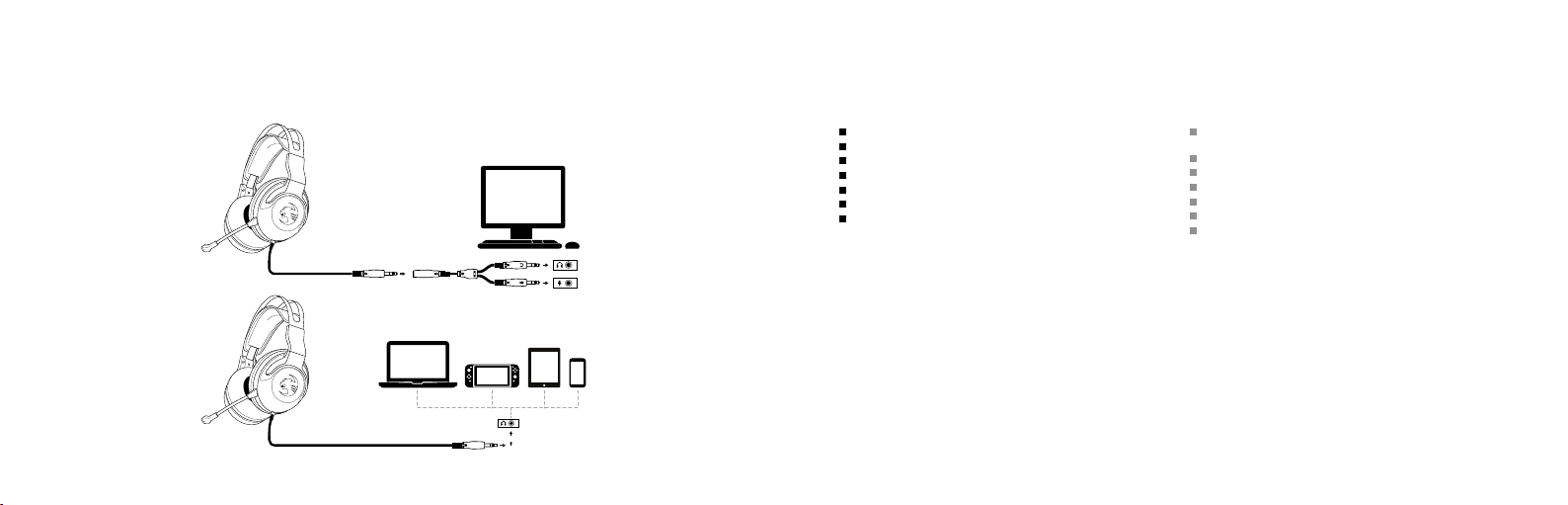
PC/MAC®, NINTENDO SWITCH™ & MOBILE SETUP
CONFIGURACIÓN PARA PC, MAC®, NINTENDO SWITCH™
TECHNICAL FACTS DATOS TÉCNICOS
TECH SPECS
3.5mm or pink/green PC splitter cable connection
20Hz – 20k Hz speaker fr equency response
50mm speakers with neodymium magnets
Audio co ntrols: master volume wheel, mic mu te
Removable unidirectional microphone
Leat herette headban d with foam cu shioning
Over-ear design featuring memory foam
ESPECIFICACIONES TÉCNICAS
Con exión para cable de 3.5 mm o c onexión ros a/verde para cable
de derivación para PC
Respue sta de frec uencia de 20 Hz – 20 kHz en los al tavoces
Bocinas de 50 mm con i manes de neodim io
Controles de audio: rueda de volumen central, silenciar micrófono
Micrófono unidireccional acoplable
Banda de cuero sintético con acolchamiento de espuma
Diseño que envuelve la oreja y cuenta con memory foam
Should you need assistance …
Our supp ort team is r eady to hel p you with any t echnical qu estions.
Just se nd an e-mail t o support @roccat .org or visi t our websit e at:
WWW.ROCCAT.ORG/SUPPORT
Si necesitas ayuda …
Nuest ro equipo de s oporte es tá listo p ara ayudar te con cualq uier
pregu nta técni ca. Solo enví ales un corr eo electró nico a
suppor t@rocc at.org o vi sita nues tro sitio w eb:
WWW.ROCCAT.ORG/SUPPORT
Page 6

REGULATORY COMPLIANCE STATEMENTS FOR THE ELO X STEREO
FEDERAL COMMUNICATIONS COMMISSION (FCC) COMPLIANCE NOTICES
CLASS B INTERFERENCE STATEMENT
This equi pment has been tes ted and found to c omply with the li mits for a Class B digi tal device, purs uant to Part 15, Subpa rt B of the FCC Rules. T hese limits are d esigned
to prov ide reasonable p rotection aga inst harmful in terference i n a residential ins tallation. This e quipment gener ates, uses, and can ra diate radio fr equency energ y and, if not
installe d and used in accor dance with the in structions, ma y cause harmfu l interferen ce to radio commu nications. How ever, there is no guara ntee that inte rference will n ot
occur in a p articular inst allation. If this eq uipment does cau se harmful inte rference to r adio or televisio n reception, whi ch can be determ ined by turning th e equipment off a nd
on, the use r is encouraged to t ry to correc t the interfe rence by one or mor e of the followin g measures:
• Reorien t or relocate th e receiving ant enna.
• Increa se the separatio n between the eq uipment and rec eiver.
• Connec t the equipment in to an outlet on a cir cuit differe nt from that to w hich the recei ver is connecte d.
• Consult t he dealer or an expe rienced radio /TV techn ician for help.
FCC CAUTION:
This dev ice complies wit h Part 15 of the FCC Rules. O peration is subj ect to the follow ing two conditi ons: (1) This de vice may not caus e harmful inte rference, and ( 2) this device
must acc ept any interf erence recei ved, including int erference th at may cause unde sired operatio n.
This pro duct is compliant w ith the Consum er Product Saf ety Improvem ent Act of 2008, P ublic Law 110-314 (CPSIA)
CANADIAN ICES STATEMENTS
Canadian Department of Communications Radio Interference Regulations
This digit al apparatus d oes not exceed the C lass B limits for rad io-noise emissio ns from a digital ap paratus as set ou t in the Radio Inte rference Regu lations of the Ca nadian
Department of Communications. This Class B digital apparatus complies with Canadian ICES-003.
Règlemen t sur le brouillage r adioélectriqu e du ministère des C ommunicatio ns
Cet appa reil numérique r especte les limit es de bruits radi oélectriques v isant les apparei ls numériques de cla sse B prescrite s dans le Règlement su r le brouillage rad ioélectrique d u ministère des Co mmunications d u Canada. Cet appar eil numérique de l a Classe B est
confo rme à la norme NMB- 003 du Canada.
TURTLE B EACH CORPOR ATION | 11011 VIA FRONT ERA, SUITE A, S AN DIEGO, CA 92127
© 2020 Turtle Beach Corporation. All rights reserved. Any product names mentioned in this manual may be trademarks or registered trademarks and are the property
of their respective owners. Information contained herein is subject to change without notice. Turtle Beach Corporation shall not be made liable for any errors that may
appear in this manual. This publication or parts of it may not be reproduced without the express consent of the publisher.
EUROPEAN UNION AND EUROPEAN FAIR TRADE ASSOCIATION (EFTA) REGULATORY COMPLIANCE
Declaration of Conformity
Markin g by this symbol:
indicat es compliance wi th the Essential R equirements o f the EMC Directi ve of the Europea n Union (2014/30 /EU). This equip ment meets the f ollowing confo rmance standa rds:
Safet y: EN 50332 -2:2015, EN71-3:2013
Emissions: EN 55032:2 015+AC:20 16, EN550 35:2017+AC:2019-11, AN/NZ S CISPR32:2015
Immunity: EN55024:2010+A1:2015, AN/NZS CISPR24:2010+A1:2015
The pro ducts are licen sed, as required, f or additional co untry specifi c standards fo r the Internat ional Marketpl ace.
Additional issued licenses available upon request.
Enviro nmental: REACH 20 06/1907/EC,
RoHS 2015/ 863 amending Ann ex II to Directiv e 2011/65 /EU,
WEEE 2012 /19/ EU, Packaging 94 /62/EC, Toys Sa fety Directi ve 2009/48/ EC
Please vi sit the following U RL for a complete c opy of the Declar ation of Confo rmity:
http://www.turtlebeach.com /homologation
This sym bol on the produc t or its packagin g indicates tha t this product mus t not be disposed of w ith your other h ousehold waste. I nstead, it is your r esponsibility
to dispos e of your waste equi pment by handing i t over to a designat ed collection poi nt for the recyc ling of waste elect rical and elect ronic equipmen t. The separate
collect ion and recycling o f your waste equi pment at the time o f disposal will help co nserve natur al resources and e nsure that it is re cycled in a manner t hat protect s
human hea lth and the envir onment. For mo re informatio n about where y ou can drop off yo ur waste for rec ycling, please con tact your local a uthority, or wh ere you
purchased your product.
Turtle Bea ch Europe Ltd is obl igated as a produc er with a main acti vity of selling un der The Produc er Responsibilit y Obligations (Pa ckaging Waste)
Regulat ions 2007. To ful fil our obligation w e are register ed with Comply Di rect and their Rec ycling Room. Here y ou will find advic e and informat ion
on packa ging waste manag ement, recyclin g symbols and the w aste hierarch y principles of red uce, reuse and rec ycle.
https://www.comply direct.com/the-recycling-room/
Class B
この装置は、情報処理装置等電波障害自主
規制協議会(VCCI)の基準に基づくクラスB
情報技術装置です。この装置は、家庭環境
で使用することを目的としていますが、こ
の装置がラジオやテレビジョン受信機に近
接して使用されると、受信障害を引き起こ
すことがあります。取扱説明書に従って正
しい取り扱いをして下さい。
ID001
426-192-004-005
Page 7

WWW.ROCCAT.ORG
 Loading...