

Page 1
1
Version1.0
Page 2

2
Table of contents
1. Safety instructions ......................................................................................................... 3
2. Operating determination ................................................................................................ 4
3. Fixture exterior view ...................................................................................................... 5
4. Installation....................................................................................................................... 6
4.1 Connection to the mains ............................................................................................6
4.2 Rigging the xture ...................................................................................................... 7
4.3 DMX-512 connection ..................................................................................................9
4.4 Ethernet connection ................................................................................................. 10
4.5 Wireless DMX operation ..........................................................................................12
5. Remotely controllable functions ................................................................................. 13
6. Control menu map ........................................................................................................ 14
7. Control menu ............................................................................................................... 17
7.1 Tab " Address" ......................................................................................................... 18
7.2 Tab "Information"...................................................................................................... 19
7.3 Tab "Personality" ...................................................................................................... 21
7.4 Tab "Manual Control" ............................................................................................... 22
7.5 Tab "Stand-alone" ...................................................................................................23
7.6 Tab "Service"............................................................................................................ 24
8. RDM ...............................................................................................................................26
9. Error and information messages ................................................................................ 27
10. Flight Case Parking Position .................................................................................... 28
11. Technical Specications............................................................................................ 29
12. Maintenance and cleaning ......................................................................................... 31
13. Photometric diagrams................................................................................................ 33
Robin DL4F
Page 3

3
CAUTION!
Keep this device away from rain and moisture!
Unplug mains lead before opening the housing!
FOR YOUR OWN SAFETY, PLEASE READ THIS USER MANUAL CAREFULLY
BEFORE YOU INITIAL START - UP!
1. Safety instructions
Every person involved with installation and maintenance of this device have to:
- be qualied
- follow the instructions of this manual
CAUTION!
Be careful with your operations.
With a high voltage you can suffer
a dangerous electric shock when touching the wires!
This device has left our premises in absolutely perfect condition. In order to maintain this condition and to ensure a safe operation, it is absolutely necessary for the user to follow the safety instructions and warning notes
written in this manual.
Important:
The manufacturer will not accept liability for any resulting damages caused by the non-observance of this
manual or any unauthorized modication to the device.
Please consider that damages caused by manual modications to the device are not subject to warranty.
Never let the power-cord come into contact with other cables! Handle the power cord and all connections with
the mains with particular caution!
Make sure that the available voltage is not higher than stated on the rear panel.
WARNING! This unit does not contain an ON/OFF switch. Always disconnect power input cable
to completely remove power from unit when not in use or before cleaning or servicing the unit.
Make sure that the power-cord is never crimped or damaged by sharp edges. Check the device and the powercord from time to time.
Always disconnect from the mains, when the device is not in use or before cleaning it. Only handle the powercord by the plug. Never pull out the plug by tugging the power cord.
This device falls under protection class I. Therefore it is essential to connect the yellow/green conductor to
earth.
The electric connection, repairs and servicing must be carried out by a qualied employee.
Do not connect this device to a dimmer pack.
During the initial start-up some smoke or smell may arise. This is a normal process and does not necessarily
mean that the device is defective.
Do not touch the device’s housing bare hands during its operation (housing becomes hot)!
For replacement use fuses of same type and rating only.
Warning! Risk Group 2 LED product according to EN 62471
LED light emission. Risk of eye injury. Do not look into the beam at short distance of
the of the product. Do not view the light output with optical instruments or any device
that may conncentrate the beam.
The light source contains blue LEDs.
Page 4

4
2. Operating determination
This device is a moving head for creating decorative effects and was designed for indoor use only.
This device is for professional use only. It is not for household use.
If the device has been exposed to drastic temperature uctuation (e.g. after transportation), do not switch it on
immediately. The arising condensation water might damage your device. Leave the device switched off until
it has reached room temperature.
Do not shake the device. Avoid brute force when installing or operating the device.
Never lift the xture by holding it at the projector-head, as the mechanics may be damaged. Always hold the
xture at the transport handles.
When choosing the installation-spot, please make sure that the device is not exposed to extreme heat, moisture
or dust. There should not be any cables lying around. You endanger your own and the safety of others!
The minimum distance between light output and the illuminated surface must be more than 3 meters.
Make sure that the area below the installation place is blocked when rigging, derigging or servicing the xture.
Always x the xture with an appropriate safety rope. Fix the safety rope at the correct holes only.
Only operate the xture after having checked that the housing is rmly closed and all screws are tightly fas-
tened.
The maximum ambient temperature 45°C must never be exceeded.
CAUTION!
The lens has to be replaced when it is obviously damaged,
so that its function is impaired, e. g. due to cracks or deep scratches!
Operate the device only after having familiarized with its functions. Do not permit operation by persons not
qualied for operating the device. Most damages are the result of unprofessional operation!
Please use the original packaging if the device is to be transported.
Please consider that unauthorized modications on the device are forbidden due to safety reasons!
If this device will be operated in any way different to the one described in this manual, the product may suffer
damages and the guarantee becomes void. Furthermore, any other operation may lead to dangers like shortcircuit, burns, electric shock, burns etc.
Page 5
5
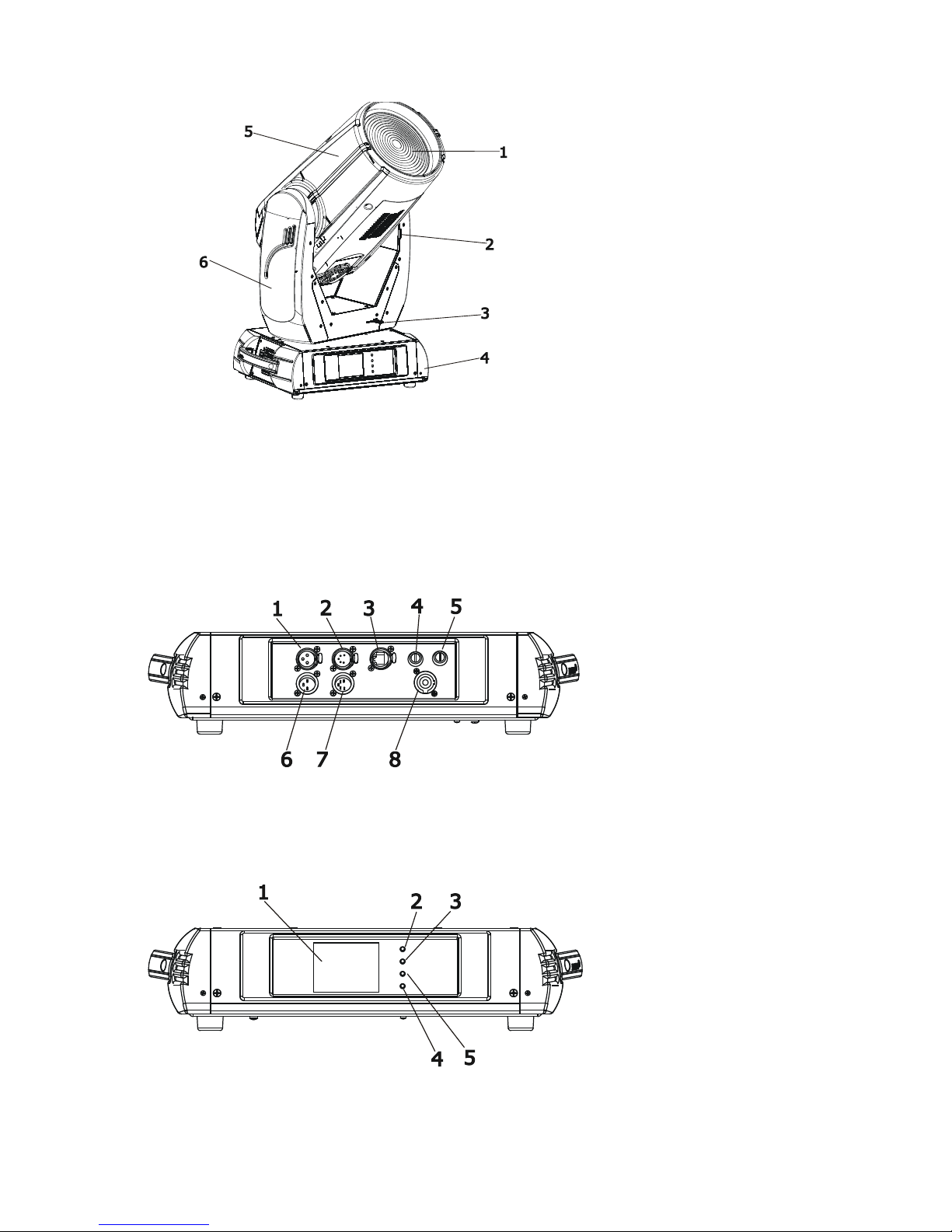
3. Fixture exterior view
Rear panel of the base:
1 - 3-pin DMX output
2 - 5-pin DMX output
3 - Ethernet input-RJ45
4 - Fuse - live
5 - Fuse - neutral
6 - 3-pin DMX input
7 - 5-pin DMX input
8 - PowerCon
Front panel of the base:
1 - QVGA touch screen
2 - ESCAPE button
3 - NEXT button
4 - ENTER/DISPLAY ON button
5 - PREV button
The head should be locked for transportation- the tilt lock latch (2) and the pan lock latch (3) have to be in the
locked positions. To unlock the head, move these latches to unlock positions before operating the xture.
1 - Front lens
2 - Tilt lock
3 - Pan lock
4 - Base
5 - Moving head
6 - Arm
The ENTER/DISPLAY ON button also serves for switching the display on when the xture is disconnected
from the mains.
Page 6
6
4. Installation
Fixtures must be installed by a Qualied electrician in accordance with all
national and local electrical and construction codes and regulation.
4.1 Connection to the mains
For protection from electric shock, the xture must be earthed!
The Robin DL4F is equipped with auto-switching power supply that automatically adjusts to any 50-60Hz AC
power source from 100-240 Volts.
Install a suitable plug on the power cord, note that the cores in the power cord are coloured according to the
following table. The earth has to be connected!
If you have any doubts about proper installation, consult a qualied electrician.
Core (EU) Core (US) Connection Plug Terminal Marking
Brown Black Live L
Light blue White Neutral N
Yellow/Green Green Earth
Page 7
7
4.2 Rigging the xture
The installation of the xture has to be built and constructed in a way that it can hold 10 times the weight for 1
hour without any harming deformation.
The installation must always be secured with a secondary safety attachment, e.g. an appropriate catch net.
This secondary safety attachment must be constructed in a way that no part of the installation can fall down if
the main attachment fails.
When rigging, derigging or servicing the xture staying in the area below the installation place, on bridges,
under high working places and other endangered areas is forbidden.
The operator has to make sure that safety-relating and machine-technical installations are approved by an expert
before taking into operation for the rst time and after changes before taking into operation another time.
The operator has to make sure that safety-relating and machine-technical installations are approved by an
expert after every four year in the course of an acceptance test.
The operator has to make sure that safety-relating and machine-technical installations are approved by a skilled
person once a year.
The projector should be installed outside areas where persons may walk by or be seated.
IMPORTANT! OVERHEAD RIGGING REQUIRES EXTENSIVE EXPERIENCE, including (but not limited to)
calculating working load limits, installation material being used, and periodic safety inspection of all installation
material and the xture. If you lack these qualications, do not attempt the installation yourself, but instead use
a professional structural rigger. Improper installation can result in bodily injury or damage to property.
The xture has to be installed out of the reach of people.
If the xture shall be lowered from the ceiling or high joists, professional trussing systems have to be used. The
xture must never be xed swinging freely in the room.
Caution: Fixtures may cause severe injuries when crashing down! If you have doubts concerning the safety of
a possible installation, do not install the moving head!
Before rigging make sure that the installation area can hold a minimum point load of 10 times the xture’s
weight.
Danger of re !
When installing the device, make sure there is no highly inammable
material (decoration articles, etc.) in a distance of min. 0.5 m.
CAUTION!
Use 2 appropriate clamps to rig the xture on the truss.
Follow the instructions mentioned at the bottom of the base.
Make sure that the device is xed properly! Ensure that the
structure (truss) to which you are attaching the xtures is secure.
The xture can be placed directly on the stage oor or rigged in any orientation on a truss without altering its
operation characteristics .
For securing a xture to the truss install a safety wire that can hold at least 10 times the weight of the xture.
Use only safety wire with screw-on carabine. Pull the safety wire through the carrying handles and around the
truss as shown on the pictures below.
Note: If the safety wire is too long, whip it several times around the trusss in order to attach the xture tight.
In case of an accident, the way of the falling xture will be short.
.
Page 8
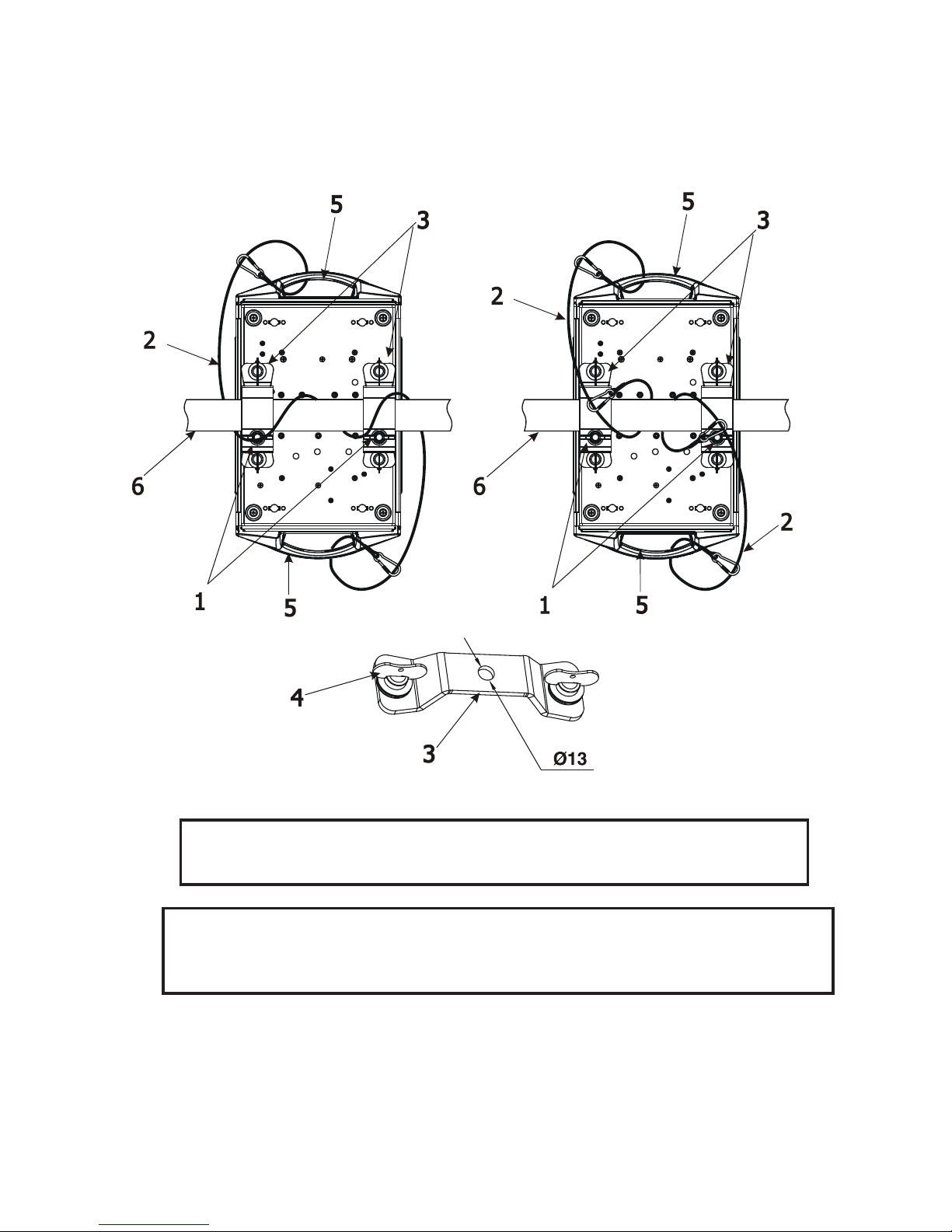
8
Truss installation
1.Bolt each clamp (1) to the omega holder (3) with M12 bolt and lock nut through the hole in the holder.
2.Fasten the omega holders on the bottom of the base by inserting both quick-lock fasteners (4) into the holes
of the base and tighten fully clockwise.
3. Pull the safety wire (2) through the carrying handles (5) and around the truss (6) as shown on the pictures
below.
Securing the xture via one safety wire Securing the xture via two safety wires
When installing xtures side-by-side,
avoid illuminating one xture with another!
DANGER TO LIFE!
Before taking into operation for the rst time,the installation has to be approved
by an expert!
1-Clamps
2-Safety wire
3-Omega holder
4-Quick-lock fastener
5-Carrying handles
6-Truss
Page 9
9
4.3 DMX-512 connection
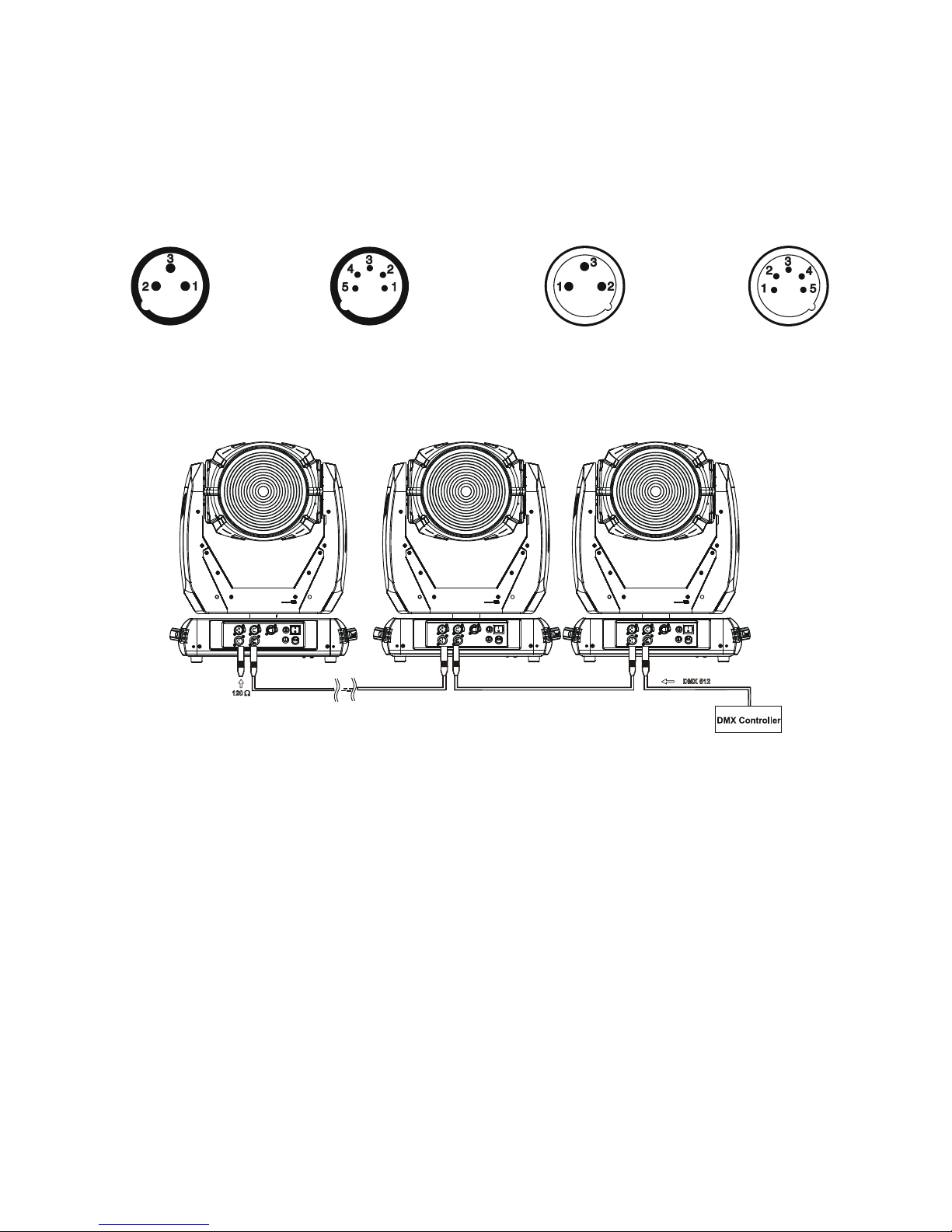
The xture is equipped with both 3-pin and 5-pin XLR sockets for DMX input and output.The sockets are wired
in parallel.
Only use a shielded twisted-pair cable designed for RS-485 and 3-pin or 5-pin XLR-plugs and connectors in
order to connect the controller with the xture or one xture with another.
DMX - output DMX-input
XLR mounting-sockets (rear view): XLR mounting-plugs (rear view):
If you are using the standard DMX controllers, you can connect the DMX output of the controller directly with
the DMX input of the rst xture in the DMX-chain. If you wish to connect DMX-controllers with other XLR-outputs, you need to use adapter-cables.
Building a serial DMX-chain:
Connect the DMX-output of the rst xture in the DMX-chain with the DMX-input of the next xture. Always
connect one output with the input of the next xture until all xtures are connected.
Caution: At the last xture, the DMX-cable has to be terminated with a terminator. Solder a 120 Ω resistor
between Signal (–) and Signal (+) into a 3-pin XLR-plug and plug it in the DMX-output of the last xture.
1 - Shield
2 - Signal (-)
3 - Signal (+)
4 - Not connected
5 - Not connected
1 - Shield
2 - Signal (-)
3 - Signal (+)
4 - Not connected
5 - Not connected
Page 10
10
4.4 Ethernet connection
The xtures on a data link are connected to the Ethernet with ArtNet communication protocol.The control software running on your PC (or light console) has to support Art-Net protocol.
Art-Net communication protocol is a 10 Base T Ethernet protocol based on the TCP/IP.Its purpose is to allow
transfer of large amounts of DMX 512 data over a wide area using standard network technology.
IP address is the Internet protocol address.The IP uniquely identies any node (xture) on a network.
The Universe is a single DMX 512 frame of 512 channels.
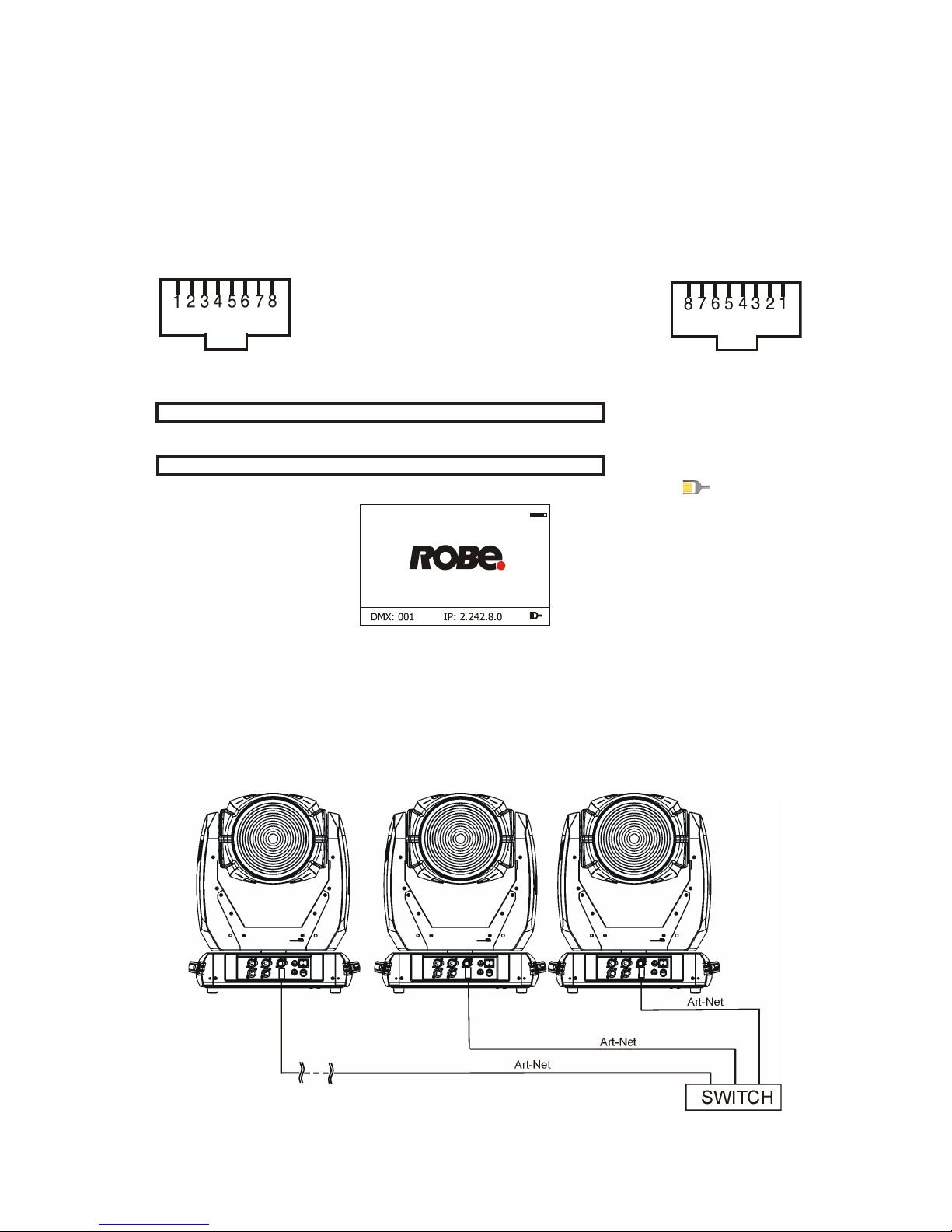
The Robin DL4F is equipped with 8-pin RJ- 45 socket for Ethernet input.Use a network cable category 5 (with
four “twisted” wire pairs) and standard RJ-45 plugs in order to connect the xture to the network.
RJ-45 socket (front view): RJ-45 plug (front view):
1- TD+ 5- Not connected
2- TD- 6- RX-
3- RX+ 7- Not connected
4- Not connected 8- Not connected
Patch cables that connect xtures to the hubs or LAN sockets are wired 1:1,that is,pins with the same numbers
are connected together:
1-1 2-2 3-3 4-4 5-5 6-6 7-7 8-8
If only the xture and the computer are to be interconnected,no hubs or other active components are needed.
A cross-cable has to be used:
1-3 2-6 3-1 4-8 5-7 6-2 7-5 8-4
If the xture is connected with active Ethernet socket (e.g. switch) the network icon will appear at the
bottom right corner of the screen:
Direct Ethernet operation
Connect the Ethernet inputs of all xtures with the Ethernet network.
Option “Artnet (gMaI or gMA2)" has to be selected from “Ethernet Mode” menu on the xture.
Set IP address (002.xxx.xxx.xxx / 010.xxx.xxx.xxx) and the Universe.
(DMX address=131) (DMX address=30) (DMX address=1)
IP addres=002.168.002.004 IP addres=002.168.002.003 IP addres=002.168.002.002
Universe=1 Universe=1 Universe=1
An advised PC setting: IP address: 002.xxx.xxx.xxx / 010.xxx.xxx.xxx (Different from xture IP addresses)
NET mask: 255.0.0.0
Page 11
11
Ethernet / DMX operation
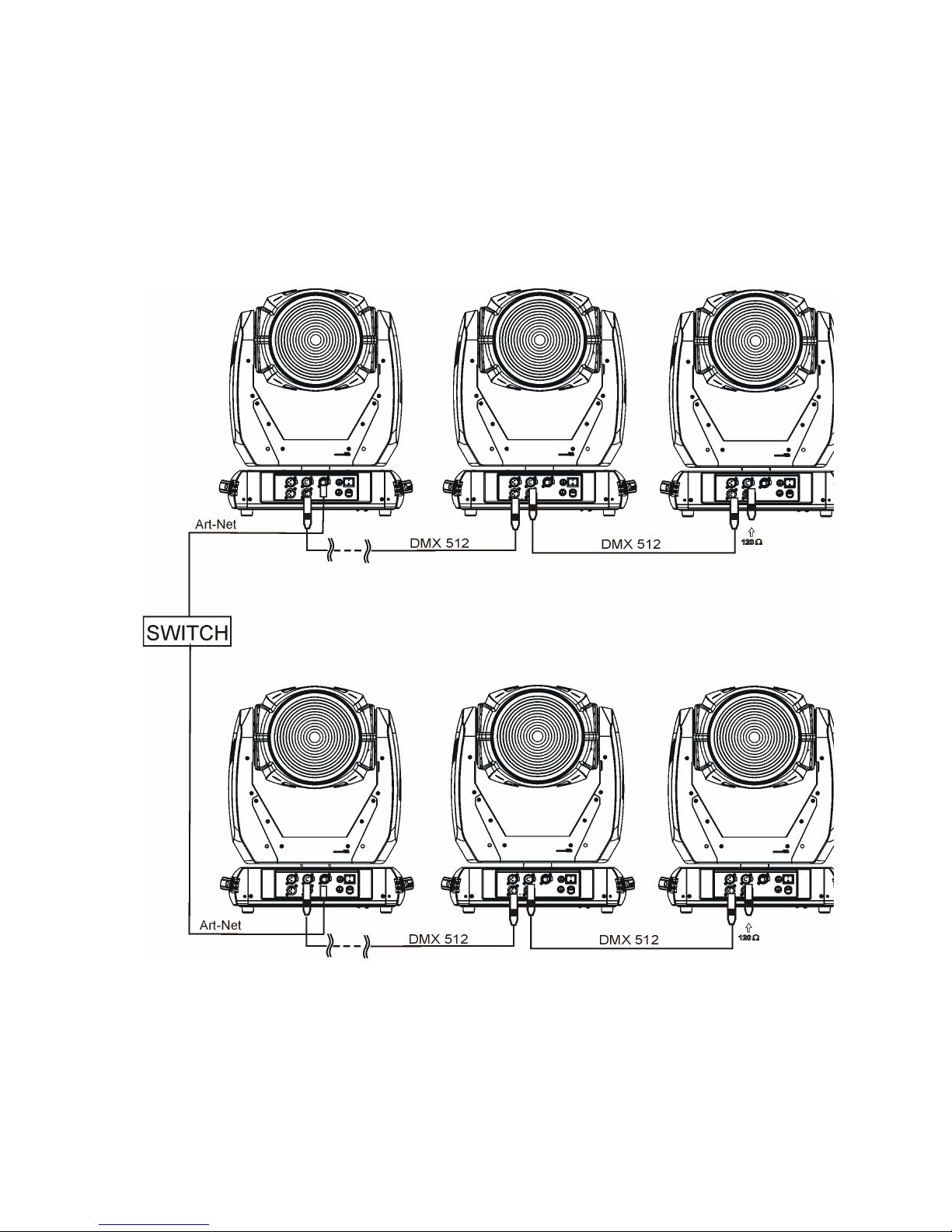
Options “Art2DMX” has to be selected from the “Ethernet Mode” menu on the rst xture (connected to the
Ethernet) in the xture chain,next xtures have standard DMX setting.
Connect the Ethernet-input of the rst xture in the data chain with the network. Connect the DMX output of
this xture with the input of the next xture until all xtures are connected to the DMX chain.
Caution: At the last xture, the DMX chain has to be terminated with a terminator. Solder a 120 Ω resistor
between Signal (–) and Signal (+) into a XLR-plug and connect it in the DMX-output of the last xture.
Example:
DMX address=1 DMX address=30 DMX address=131
IP addres=002.168.002.002
Universe=0
DMX address=1 DMX address=30 DMX address=131
IP addres=002.168.002.003
Universe=1
Page 12

12
4.5 Wireless DMX operation
The wireless version of the Robin DL4F Wash is equipped with the Lumen Radio CRMX module and antenna
for receiving DMX signal. CRMX module operates on the 2.4 GHz band.
The item " Wireless " from the menu "DMX Input" allows you to activate receiving of wireless DMX (Personality--> DMX Input -->Wireless.). First two options from the "DMX Input" menu are stated in DMX chart as well
(channel Power/Special functions , range of 10-19 DMX). If DMX input option is changed by DMX command,
the change is permanently written into xture´s memory.
DMX range of 10-19 switching xture to the wired/wireless operation is active only during rst 10 seconds after switching the xture on.
After switching the xture on, the xture checks both modes of receiving DMX in the following order:
1. For the rst ve seconds, the xture receives DMX signal from the wired input. If the Power/Special functions
channel is set at some DMX input option, the xture will receive DMX value according to this option. If DMX input
option is set to the wired input , this option is saved and checking procedure is nished. If DMX input option is
not set, the xture continues next 5 seconds in scanning wireless DMX signal-see point 2.
2. For the next 5 seconds the xture receives wireless DMX signal and again detects if the Power/Special
functions channel is set at some DMX input option, if not, the xture will take option which is set in the xture
menu "DMX Input".
To link the xture with DMX transmitter.
The xture can be only linked with the transmitter by running the link procedure at DMX transmitter .
After linking , the level of DMX signal ( 0-100 %) is displayed in the menu item “Wireless State“ (Information
-->Wireless State).
To unlink the xture from DMX transmitter.
The xture can be unlinked from receiver via the menu item “ Unlink Wireless Adapter“ (Information--> Wireless
State --> Unlink Wireless Adapter.).
Note: If the option "Wireless In/XLR Out" is selected (Personality--> DMX Input -->Wireless In/XLR Out), the
xture receives wireless DMX and sends the signal to its wired DMX output. The xture behaves as " Wireless/Wired" adapter.
Example:
Page 13
13
5. Remotely controllable functions
Virtual colour wheel
This wheel contains 236 colours including whites (2700K, 3200K, 4200K, 5600K and 8000K). Tungsten lamp
effect at whites 2700K and 3200K.
RGBW or CMY colour mixing system
The RGBW colour mixing system is based on red, green, blue and white high power LEDs. Option for switching
the xture to the CMY colour mixing system is available.
Zoom
Motorized zoom unit enables zoom between 5.5 °- 65°. The function Wide zoom allows zooming up to 75°.
Pan & Tilt
Pan/Tilt movement ranges 0-540°/0-280°.
Dimmer/Shutter unit
Smooth 0 - 100 % dimming is provided by the electronic control unit. This unit is also used for strobe effects
with variable speed.
Barndoors
The xture uses a barndoors module for creating different shapes, which also simulates barn door effects. The
module consists of four individually controllable blades and is rotatable by 180 degrees.
Barndoors macros
Pre-dened barndoors macros allow choice from 41 macro effects. Speed of each barndoors effect can be
controlled by the Barndoors macro speed channel.
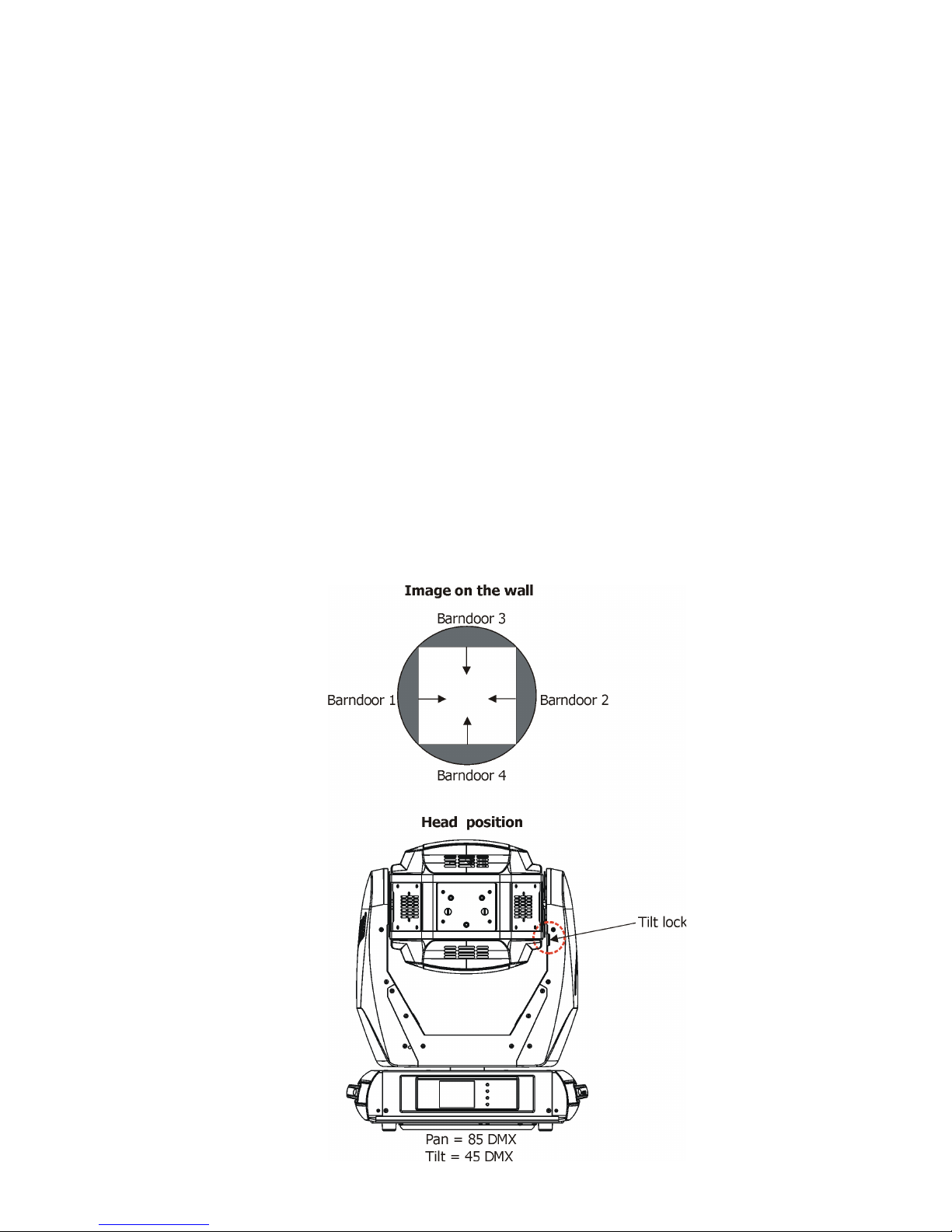
Barndoors identication:
Page 14
14
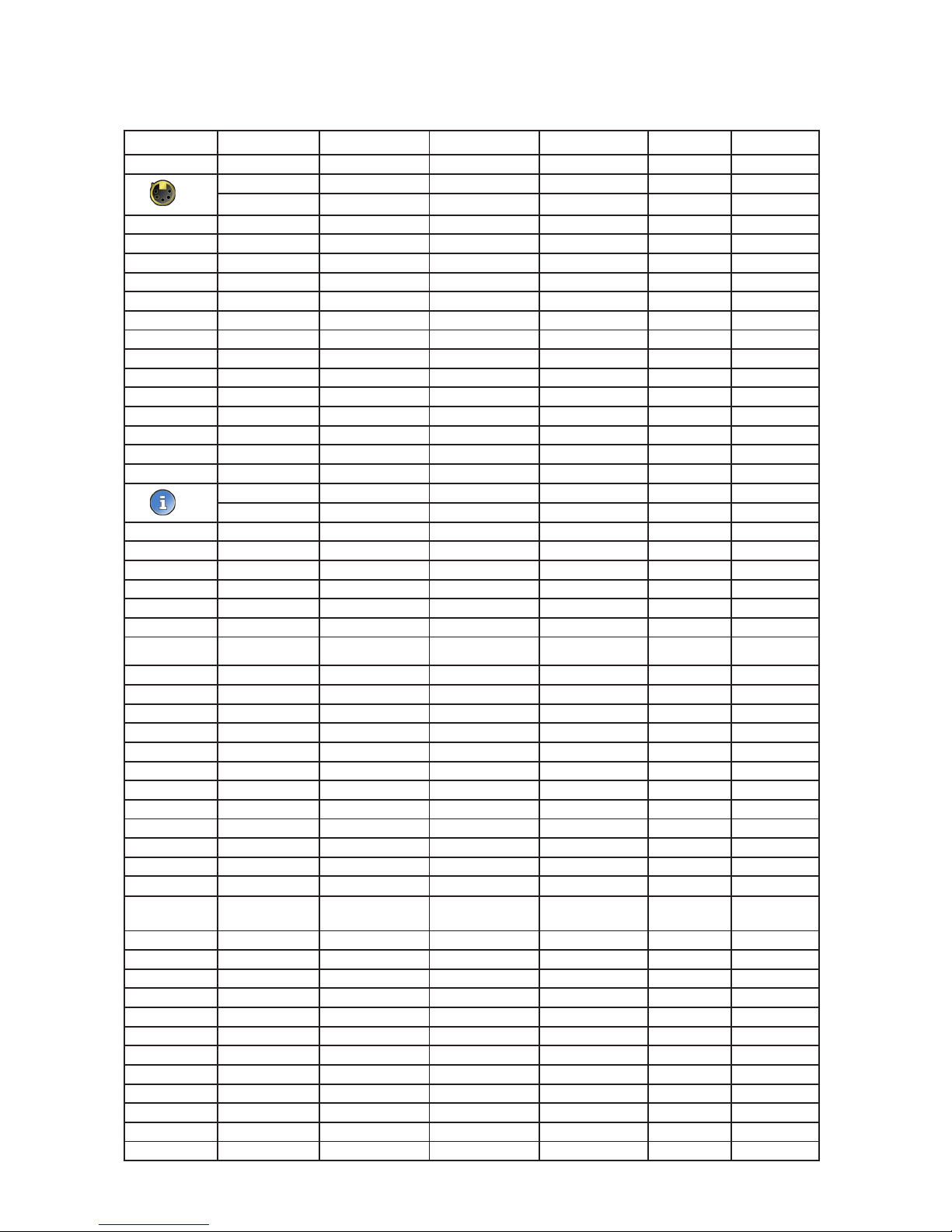
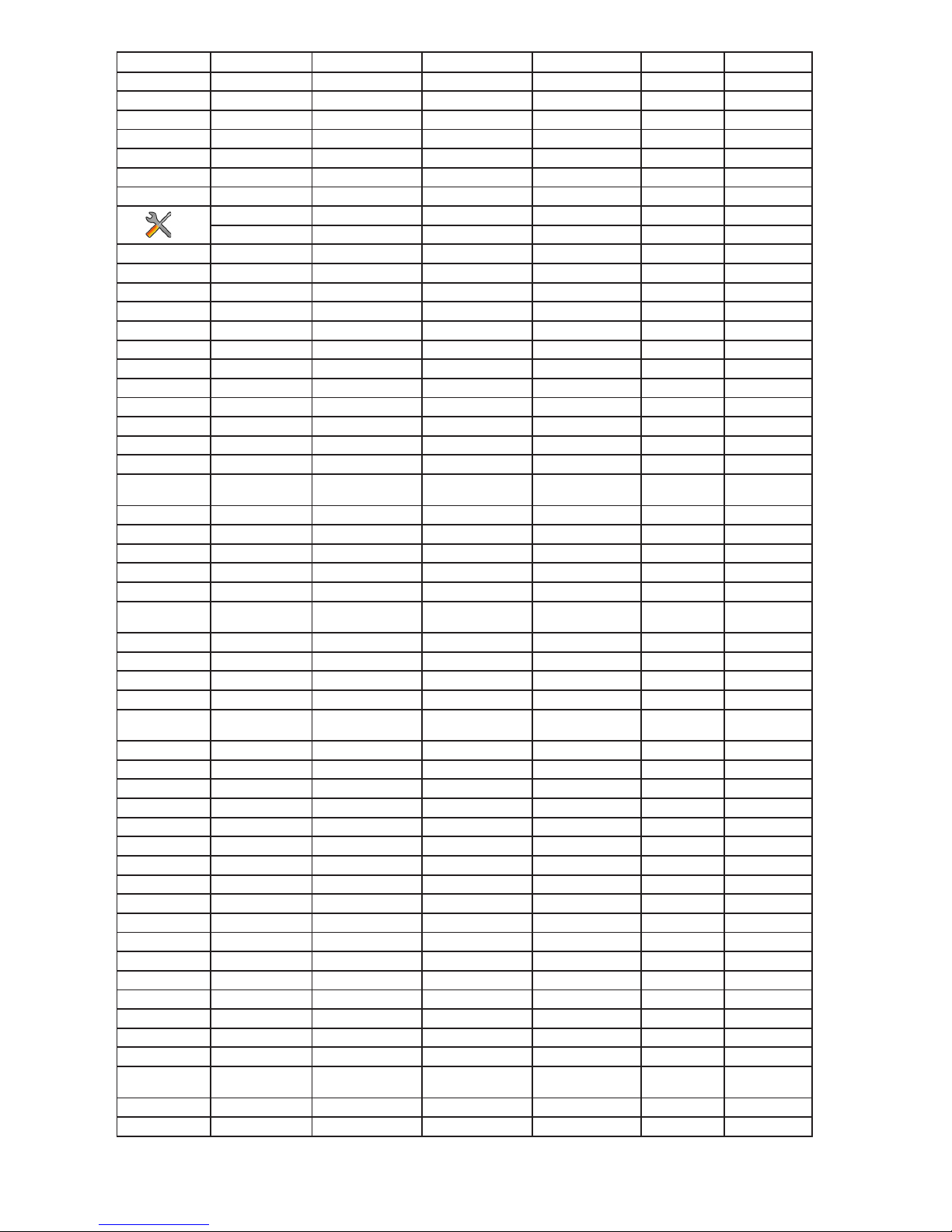
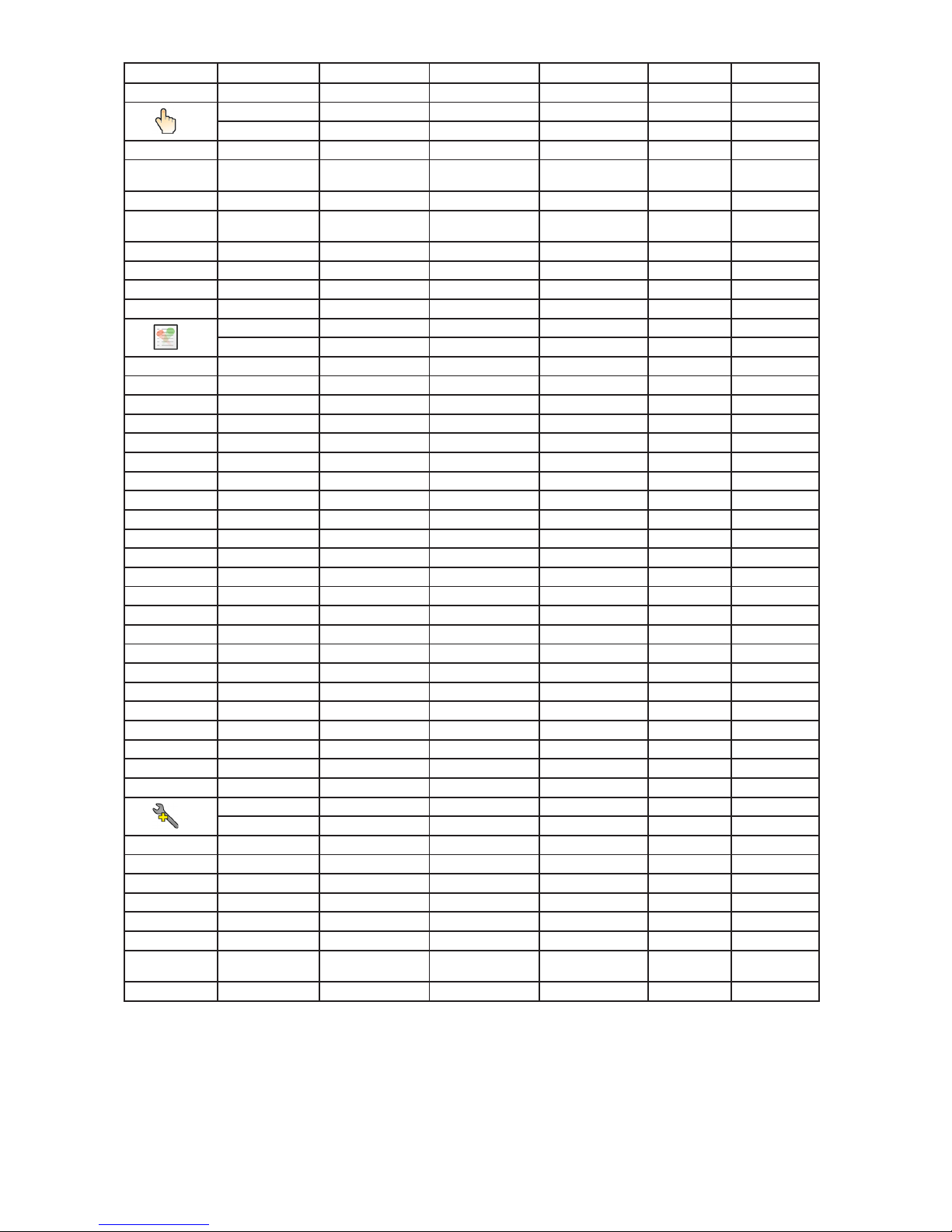
6. Control menu map
Default settings=Bold print
Tab Level 1 Level 2 Level 3 Level 4 Level 5 Level 6
Addressing Settings DMX Address 001-255
Ethernet Settings Ethernet Mode Disable
ArtNet
gMAI
gMA2
sACN
Ethernet To DMX Off, On
IP Address/Net Mask Default IP Address
Custom IP Address
Net Mask
ArtNet Universe 0-255
MANet settings MANetI/II Universe 01-256
MANet Session ID 01-32
sACN Settings sACN Universe 00001-32000
sACN Priority 0-255
Information Fixture Times Power On Time Total Hours
Resetable Hours
LEDs On Time Total Hours
Resetable Hours
Air Filters Elapsed Time
Alert Period 10-300
Fixture Temperatures
LEDs Temperature Current
Maximum NonRes.
Maximum Res.
LED s Boa rd Temp era ture
Current
Maximum NonRes.
Maximum Res.
Ambient Temperature
Current
Maximum NonRes.
Maximum Res.
Base Temperature Current
Maximum NonRes.
Maximum Res.
DMX Values Pan
:
Dimmer Fine
Wireless State Signal Qualityr
Unlink Wireless
Adapter
Software Versions Display System
Module M
Module L
Module I
Module OI
Product IDs Mac Address
RDM UID
RDM Label
View Logs Fixture Errors Pan Errors
:
Temp.Sensor Errors
Fixture States Power On
Page 15
15
Tab Level 1 Level 2 Level 3 Level 4 Level 5 Level 6
Power Off
Fixture Position
Fixture Temperatures LED Temperatures
Ambient Temperatures
Base Temperatures
Personality User Mode User A Settings
User B Settings
User C Settings
DMX Presets Mode 1
Mode 2
Mode 3
View Selected Preset
DMX Input Wired
Wireless
Wireless In/XLR Out
Pan/Tilt Settings Pan Reverse Off, On
Tilt Reverse Off, On
Pan/Tilt Feedback Off, On
Pan/Tilt mode Time
Speed
Mi cro ph o ne Se nsitivity
1-10-20
Blackout Settings Blackout During M.C. Off, On
Blackout while: Pan/Tilt moving Off, On
Theatre Mode Off
Auto
Silent 0-100%
Colour Ca lib rat ion
Mode
Off, On
Colour Mixing Mode
RGBW
CMY
White Point 8000K On
Off
Colour Compatible
Mode
On
Off
Init Effect Positions Pan 0-255
:
Dimmer Fine 0-255
Screen Settings Display Intensity 1-10
Screen Saver Delay Off-10min.
Touchscreen Lock Off-10min.
Recalibrate Touchscreen
Display Orientation Normal
Inverted
Auto
Temperature Unit °C,°F
Fan Mode Auto
High
Dimmer Curve Linear
Square Law
Date & Time Settings
Un l i n k Wi r e l e s s
Adapter *
Default Settings
Page 16
16
Tab Level 1 Level 2 Level 3 Level 4 Level 5 Level 6
Manual Control Reset Functions Reset All Systems
Pan/Tilt reset
Barndoors Reset
Zoom/Frost Res.
Preset Effect Control
Pan Position 1-Position 5
Dimmer Position 1- Position 5
Manual Effect Control
Pan 0-255
:
Dimmer Fine 0-255
Stand -Alone Test Sequences Dynamic Mode
Static Mode Pan 0-255
Tilt 0-255
Zoom 0-255
Focus 0-255
MusicTrigger Off, On
Preset Playback None
Test
Prg. 1
Prg. 2
Prg. 3
Play Program Play Program 1
Play Program 2
Play Program 3
Edit Program Edit Program 1 Start Step 1-100
End Step 1-100
Edit Program Steps Step 1 Pan 0-255
: :
: Dimmer Fine 0-255
: Step Time 0-25,5 sec.
Step 100 Pan 0-255
:
Dimmer Fine 0-255
Step Time 0-25,5 sec.
Service Adjust DMX Values Pan 0-255
:
Dimmer Fine 0-255
Calibrations Calibrate Effects Pan 0-255
:
Zoom 0-255
Calibrate colours Red 0-255
Green 0-255
Blue 0-255
Load Default Calibra-
tions
Update Software
Page 17
17
7. Control menu
The Robin DL4F Light is equipped with the QVGA Robe touch screen with battery backup which
allows to set the xture´s behaviour according to your needs, obtain information on its operation, test its various parts and lastly program it, if it has to be used in a stand-alone mode.
The xture´s menu can be controlled either by the control buttons or directly by touching the icon.
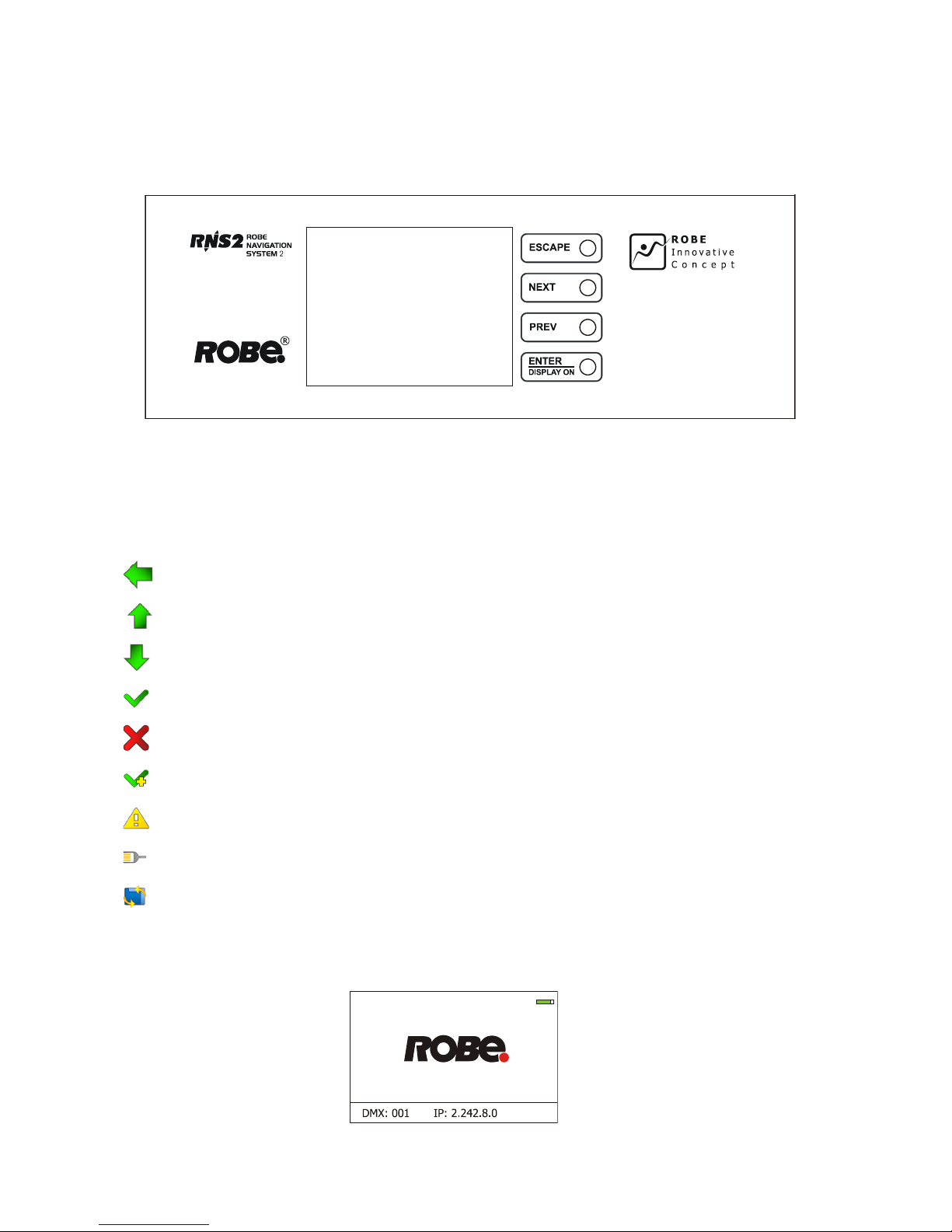
Control buttons on the front panel:
[ESCAPE] button used to leave the menu without saving changes.
[NEXT] , [PREV] buttons for moving between menu items and symbols, adjusting values.
[ENTER/Display On] button used to enter the selected menu (menu item) and to conrm adjusted value.
If the xture is disconnected from mains, the button switches the touch screen on.
Icons used in the touch screen menu:
- [back arrow] used to move back to the previous screen (menu).
- [up arrow] used to move up on the previous page.
- [down arrow] used to move down on the next page.
- [conrm] used to save adjusted values, to leave menu or to perform desired action.
- [cancel] used to leave menu item without saving changes.
- [conrm+copy] used to save adjusted values and copy them to the next prog. step.
- [warning icon] used to indicate some error which has occurred in the xture.
- [Ethernet] used to indicate Ethernet connected.
- [display turn] used to turn the display by 180°.
The menu page displays icons for each function that you can perform from the touch screen.
After switching the xture on, the touch screen shows the screen with the ROBE logo:
Page 18
18
Note: The green icon at the top right corner of the screen indicates the level of the display battery charging. If
the whole icon is green, the battery is fully charged while the red icon indicates exhausted battery. The battery
charges during xture operation, its charging lasts cca 6 hours.
We recommend that the xture should be in operation at least 7 hours per week to keep the battery fully char-
ged.
If you switch the xture on and this screen will not appear till 1 minute, switch the xture off and on again. If the
screen lights, the battery is exhausted. In case the screen still does not light, the battery is faulty.
This is also indicated by an error message "Faulty battery" and if such an error message appears the battery
should be replaced immediately. The lifetime of the battery is highly dependent on ambient temperature (and
consequently on base temperature). If the maximum ambient temperatures (as recorded and displayed in menu:
Information -> Fixture Temperatures -> Ambient Temperature -> Maximum NonRes.) are kept within the specied limits, the battery should last for at least two years. Shell the ambient temperatures exceed the specied
maximum temperature, the lifetime of the batteries could be considerably shortened even up to just one year
or less and also result in physical damage (battery leakage) or unreliable xture functions.
Damage caused by batteries failed due to exceeded maximum ambient temperature cannot be claimed under
warranty terms.
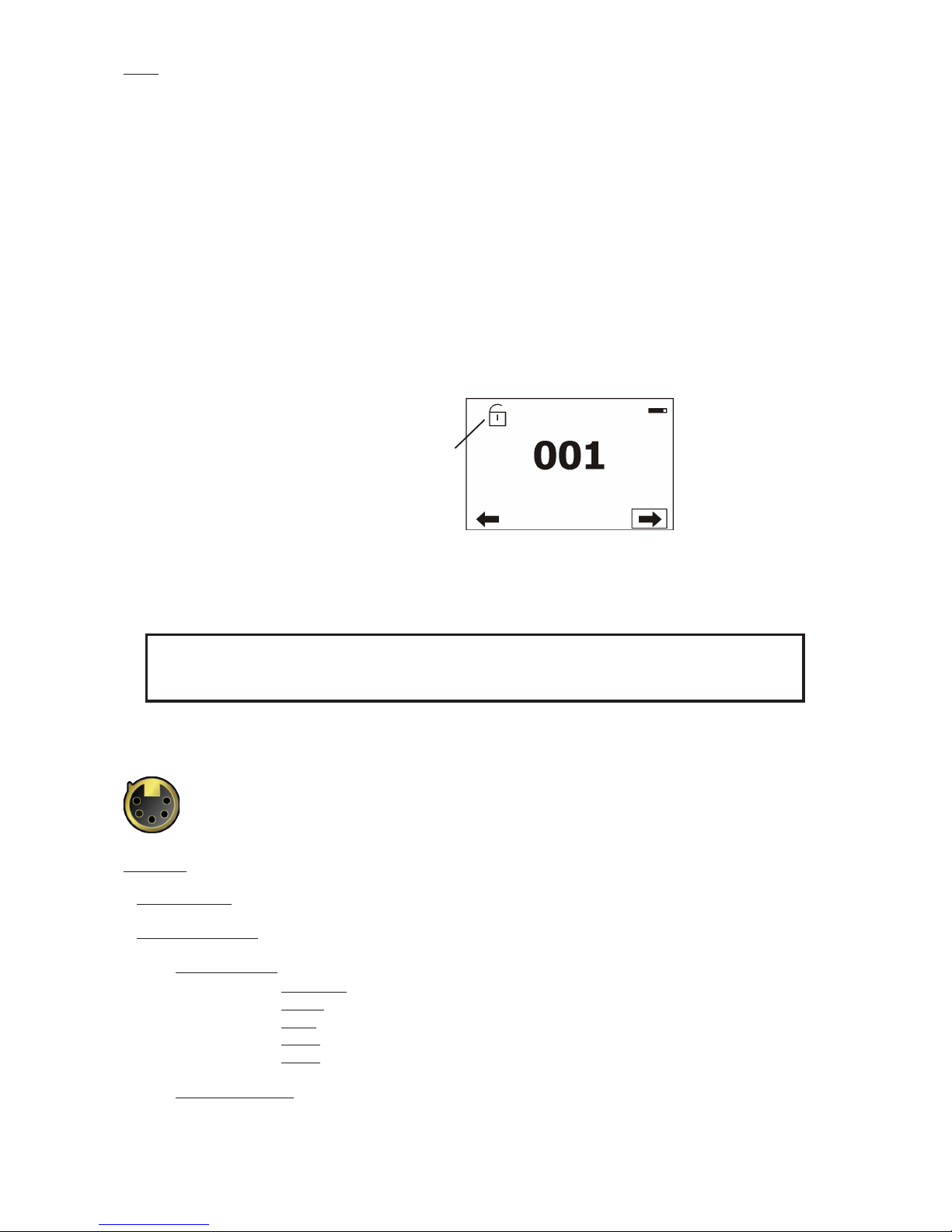
Touch any part of the screen or press the [ENTER/Display On] button to display the initial screen with the current stored DMX address:
Touch the green arrow at the bottom right corner of the screen or press the [ENTER/Display On] button to enter
the " Address" menu.
Each item (such as a Tab, menu item, text box, icon) may be selected from a screen by simply touching the
item in the list or by pressing the [NEXT] or [PREV] buttons to scroll through list items. With each press, the
next item is highlighted. Press [ENTER/Display On] to select the highlighted item.
Before rst xture operation, set current date and time in the menu "Date &Time
Setings" (menu path: Personality--> Date &Time Setings).
7.1 Tab " Address"
Settings - Select the menu to set desired xture address setting.
DMX Address - Select the menu to set the DMX start address.
Ethernet Settings - The menu allows all needed settings for the Ethernet operation
Ethernet Mode
Disable - The option disables Ethernet operation.
Artnet - Fixture
receives Artnet protocol
gMAI
- Fixture
receives MANet I protocol
gMA2
- Fixture
receives MANet 2 protocol
sACN
- Fixture
receives sACN protocol
Ethernet To DMX - Fixture receives
protocol
from the Ethernet input and sends DMX
data to its DMX output (xture works as an "Ethernet/DMX converter",
next xture can be connected
to its DMX output and you can build a standard DMX chain by connecting another xtures.
Only one xture has to be connected to the Ethernet.
Icon for
Flight Case Parking Position
Page 19

19
IP Address/Net Mask - Select this menu to set IP address. IP address is the Internet protocol
address.The IP uniquely identies any node (xture) on a network.
There cannot be 2 xtures with the same IP address on the network!
Default IP Address -Preset IP address, you can set up only rst byte of IP address
(2 or 10) e.g. 002.019.052.086.
Custom IP Address - The option enables to set up all bytes of IP address.
Net Mask - The option enables to set up all bytes of Net Mask.
ArtNet Universe - Use
this item to set a Universe (0-255). The Universe is a single DMX
512 frame
of 512 channels.
MANet Settings - Use this menu to set parameters for MANet operation.
MANet Universe I/II - The value of this item can be set in range 1-256.
MANet Session ID - The value of this item can be set in range 1-32.
sACN Settings - Use this menu to set parameters for sACN operation.
sACN Universe - The value of this item can be set in range 1-32000.
sACN Priority - The value of this item can be set in range 0-255.
7.2 Tab "Information"
Fixture Times - The menu provides readouts of xture and LED modele operation hours.
Power On Time Hours - Select this menu to read the number of xture operation hours.
Total Hours -
The item shows the total number of the operation hours since the
Robin DL4F
has been fabricated.
Resetable Hours -
The item shows the number of the operation hours that the
Robin DL4F
has been powered on since the counter was last reset.
In order to reset this counter to 0, touch the text box next to the item "Resetable Hours:"
LEDs On Time - Select this menu to read the number of LEDs operation hours for each colour (R,G,B,W).
In order to reset some counter to 0, touch the yellow text box next to desired colour.
Air Filters - Regular cleaning of the air lters is very important for the xture´s life and performance.
Bild-up of dust, dirt and fog uid residues reduces the xture´s light output and cooling ability.
The two items of this menu help you to keep cleaning period of the air lters.
Alert period - Cleaning schedule for the xture depends on the operating environment.
It is therefore impossible to specify accurate cleaning interval. This item allows
you to change the cleaning interval of the air lters. This "alert" value is 300 hours and it
is set as default. Inspect the xture within its 300 hours of operation to see whether cleaning
is necessary. If cleaning is required, clean all air lters and change the value in this menu
on acceptable level. Min. level of alert period is 10 hours, max. is 300 hours.
Elapsed Time - The item allows you to read the time which remains to cleaning air lters.
The time period is set in the menu mentioned above.
Expired time period is signalled by a negative mark (-) at the time value and a warning icon
on the display.
Clean the lters and reset this menu item (by touching the text box next to the item
"Elapsed Time").
Fixture Temperatures - The menu is used to view temperatures of the xture´s inside.
LEDs temperatures - The menu shows temperature on the LED PCBs (R-red LEDs, GW-green + white
LEDs, B-blue LEDs).
Cur. - A current temperature of the LED PCB.
Max. - A maximum temperature of the LED PCB since the xture has
been fabricated.
Max. Res. - A maximum temperature of the LED PCB since the counter
was last reset.
In order to reset some counter to 0, touch desired text box under item "Max.Res."
LEDs Board Temperature - The menu shows temperature in the xture head on the LEDs control PCB.
Page 20
20
Current - A current temperature on the LEDs control PCB.
Maximum NonRes. - A maximum temperature on the LEDs control PCB since
the xture has been fabricated.
Maximum Res. - A maximum temperature on the LEDs control PCB since the counter
was last reset.
In order to reset this counter to 0, touch the text box next to the item "Maximum Res."
Ambient Temperature - The menu shows temperature of the induced air on the fan in the xture base .
Current - A current temperature of the induced air in the xture base.
Maximum NonRes. - A maximum temperature of the induced air in the xture base since
the xture has been fabricated.
Maximum Res. - A maximum temperature of the induced air in the xture base since
since the counter was last reset.
In order to reset this counter to 0, touch the text box next to the item "Maximum Res."
Base Temperature - The menu shows temperature in the xture base (on the display PCB).
Current - A current temperature in the xture base.
Maximum NonRes. - A maximum temperature in the xture base since the xture has
been fabricated.
Maximum Res. - A maximum temperature in the xture base since the counter
was last reset.
In order to reset this counter to 0, touch the text box next to the item "Maximum Res."
DMX Values - The menu is used to read DMX values of each channel received by the xture.
Wireless State - The menu serves for reading of the wireless operation status.
Unlink Wireless Adapter - The item serves for unlinking the xture from the transmitter.
Software Version - Select this item to read the software version of the xture modules:
Display System - A display processor on the display board in the xture base
Module M - A pan/Tilt processor on the board in the xture arm
Module L - LEDs control processors on the board in the xture head.
Module I - A rot. gobo/stat. gobo/iris processor on the board in the xture head.
Module O - A focus/zoom/prism/frost/ processor on the board in the xture head.
Product IDs - The menu is used to read the MAC Address ,RDM UID and RDM Label.
View Logs - Use this menu to read xture´s data which have been recorded during xture operation. This
colected data allows easier troubleshooting.
Fixture Errors - Use this menu to read xture errors which have occured during xture operation.
There is a list of error folders:
Pan Errors Prism Errors
Tilt Errors Prism Rotation Errors
Dimmer 1 Errors Frost Errors
Dimmer 2 Errors Clean Air Filters
Colour Errors Overheated
Zoom Errors
Gobo Errors Temp. Sensor Errors
Gobo Carousel Errors Clean Air Filters
Static Gobo Errors
Iris Errors
Focus Errors
Fixture States - Recorded following actions: Fixture On, Fixture Off.
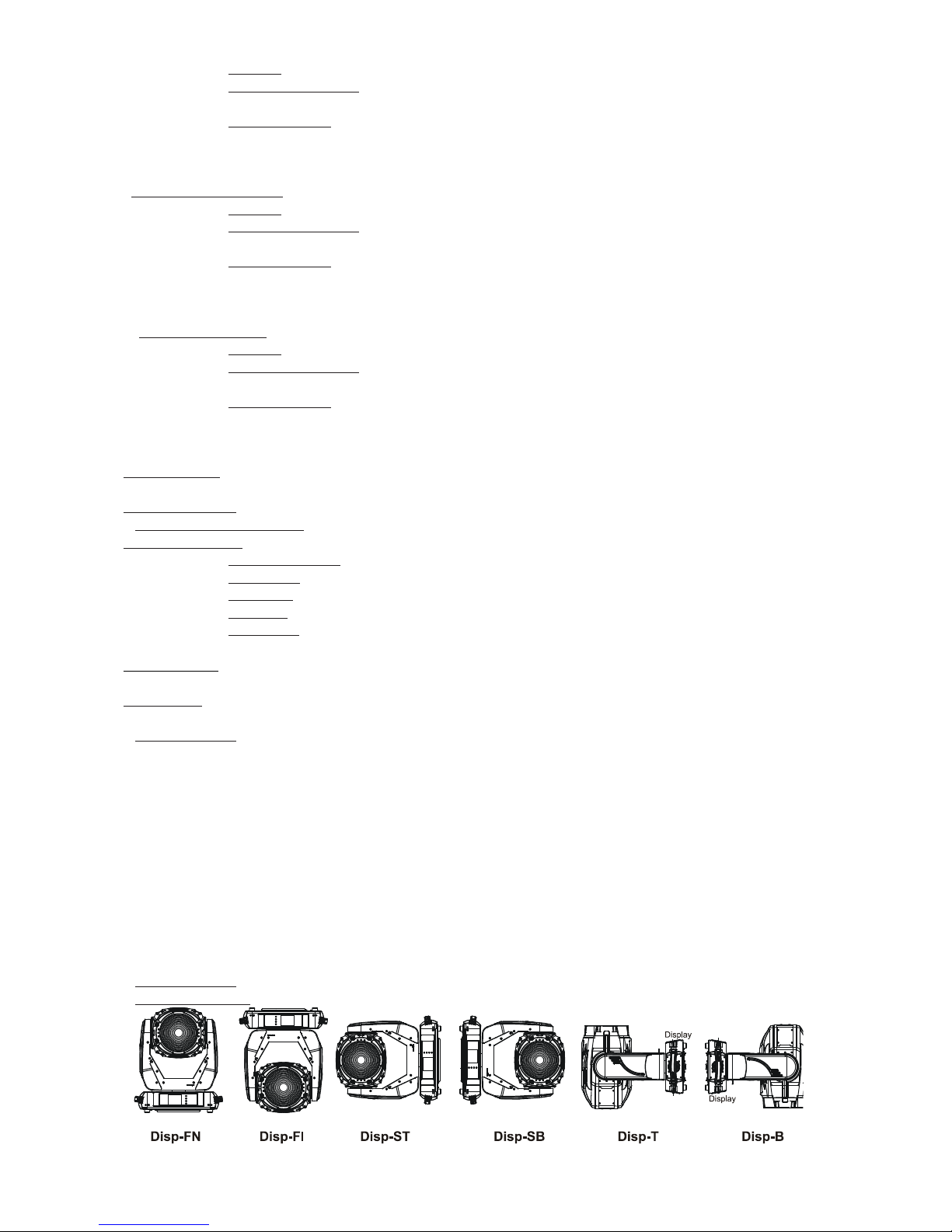
Fixture Position - Recorded installation positions of the xture:
Page 21

21
Fixture Temperatures - Recorded temperatures which have exceeded dened levels.
Note: The log buffer can contain 8000 records max. If the buffer is full, old data will be overwritten.
7.3 Tab "Personality"
User mode - The Robin DL4F allows you to recall up to 3 user settings. After switching the xture on for the
rst time, the User A settings is active. Now all changes made in the “Personality” menu , ”Addressing” menu
and the “Music Trigger“ and “ Preset Playback“ items from the “Stand-alone” menu are saved to the User A
settings. If you now select the User B settings, from this moment the changes made in these menus will be
saved to the User B settings. After switching the xture off and on, the User B setting is active. In this way you
may use the 3 xture operating behaviours.
User A Settings - the function recalls the user A settings.
User B Settings - the function recalls the user B settings.
User C Settings - the function recalls the user C settings.
DMX Preset - Use the menu to select desired channel mode.
Mode 1 - 29 control channels
Mode 2 - 23 control channels
Mode 3 - 21 control channels
View Selected Preset - Use the menu to display channels included in the selected mode.
DMX Input- Use the menu to select mode of receiving DMX signal.
Wired - DMX signal is received by means of the standard DMX cable.
Wireless - DMX signal is received by means of the inbuilt wireless module.
Wireless In/XLR Out- the xture receives wireless DMX and sends the signal to its wired DMX output.
The xture behaves as " Wireless/Wired" adapter.
The options "Wired" and "Wireless" are also stated in DMX chart (channel Power/Special functions).
Pan/Tilt Settings - Use the menu set behaviour of both pan and tilt movements.
Pan Reverse - The item allows to invert pan movement.
Tilt Reverse - The item allows to invert tilt movement.
Pan/Tilt Feedback - The item allows to return the mowing head to the required pan/tilt position after
changing the position by an external force if this option is set on.
Note. Be careful, the Pan/Tilt Feedback should be permanent On, the option Off is not suitable for standard
operation and the head of the xture can be damaged!
Pan/Tilt mode - Use this menu to set the mode of the pan/tilt movement
Time mode – The pan and tilt will move with different speeds and they will come at
the same time to the end point of their tracks (pan and tilt use their optimal speeds).
Time of the pan/tilt movement (25.5 sec. max.) is set by the channel "Pan/Tilt speed, Pan/Tilt
time".
Speed Mode - Both Pan and tilt will move with the same speed as adjusted at the channel
"Pan/Tilt speed, Pan/Tilt time".
Microphone Sensitivity - Enter the menu if you want to adjust the microphone sensitivity from 1 (max.) to 20
(min.).
Blackout Settings - Use the menu if you need to close the light output under certain conditions which are
described below
Blackout DMC - Blackout during movement correction. Set this option On if you wish to close light
output during the time when the head goes to its correct position, which has been changed by an
external force.
Active Blackouts - Use this menu if you wish to close the light output during effect changes.
Pan/Tilt Moving - The menu item enables to close light output while the pan/tilt coordinates
are changing.
Gobo Wheel Moving - The menu item enables to close light output while the rot. gobo
Theatre Mode - The mode reduces noise of the xture due to ne control of fans and reduced speed of move-
ment of pan and zoom module.
Page 22

22
Off - The option is disabled
Auto - Automatic regulation of fans noise level.
Silent - After selecting this item, the option "Fan Noise Level" is accessible where desired level of fans
noise can be set.
Colour Calibration Mode - If the function is on, the white output from the xture (and also mixed colours) is
more uniform. Each colour is dynamically corrected according to the value set in the menu "Calibrate Effects"
(Service-> Calibrations-> Calibrate Effects).
Colour Mixing Mode - This item allows switching into RGBW or CMY mode. In the CMY mode, the white(8bit)/
white (16) bit channels are not active.
White Point 8000K - If the function is on, via the CTO channel you can set desired white in range of 8000K2700K (0DMX-255DMX). Necessary condition is , that RGBW channels have to be full or set at the same DMX
values.
The CTO channel does not effect mixed colours except whites.
If you wish to "apply" CTO lter on mixed colours, set this menu item to Off.
Colour Compatible Mode - If this function is on, mixed colours are close to the Robin DLX Wash.
Init Effect Positions - Use the menu to set all effects to the desired positions at which they will stay after
switching the xture on without DMX signal connected.
Screen Settings - Use this menu to change the touch screen settings.
Display Intensity - The item allows to control the intensity of the screen (1-min., 10-max.).
Screen saver Delay - The item allows you to keep the screen on or to turn it off automatically after 1-10
minutes after last touch (or pressing any button on the control panel).
Touchscreen Lock - The item allows you to lock the screen after last touch (or pressing any button on the
control panel). The time delay can be set in range of 1-10 minutes.To unlock the screen, press the
[ENTER/Display On] button.
Recalibrate Touchscreen - The item starts calibration of the touchscreen. Follow the instructions on
the screen.
Display Orientation - The menu allows to change display orientation.
Normal - Standard display orientation if the xture is placed horizontally (e.g. on the ground).
Inverted - Inverted orientation (needed if the xture is hanging on the truss).
Auto - The option activates a gravitation sensor for automatic screen orientation.
Note: Auto option is set as default. You change the display orientation by touching the icon on the display,
an the option set in the "Display Orientation" menu is temporarily overriden.
Temperature unit - Use the menu item to change temperature unit from °C to °F.
Fan Mode - Use the menu to set the xture fans to max. power mode ("High") or to auto-control mode
("Auto").
Dimmer Curve - You can select desired dimmer curve: Linear or Square Law.
Date & Time Settings - Use this menu to set current date and time for the xture log system (menu "View
Logs"). Set this menu item before rst xture operation.
Default Settings - The menu item allows to set all xture parameters to the default (factory) values.
7.4 Tab "Manual Control"
Reset Functions - The menu allows to reset the xture either per function modules or all modules together.
Total Reset - The item resets all function modules.
Pan/Tilt Reset - The item resets a pan and tilt movement.
Barndoors Reset - The item resets a barndoor module.
Optics/Frost Res. - The item resets a zoom, focus, prism and a frost module.
Page 23
23
Preset Effect Control - Use the menu to show preset positions of each channel effect.
Manual Effect control - Use the menu to control all xture channels by means of the control panel.
7.5 Tab "Stand-alone"
Test Sequences -Use the menu to run a test/demo sequences without an external controller, which will show
you some possibilities of using Robin DL4F.
Dynamic Mode - This mode uses all Robin DL4F functions including pan/tilt movement and therefore
is good for a complete introduction of the xture.
Static Mode - This mode is suitable for projections on the wall, ceiling or ground without any pan/tilt movement. Adjust the pan, tilt and zoom to desired positions an start test sequences by touching the green icon.
Music Trigger - Use the item to activate the sound control of the running program via the built-in microphone.
Preset Playback - This menu allows you to select the program which will be played in a loop after switching
the xture on (the option is commonly used in a stand-alone operation without an external controller).
None - The option disables “Presetting playback” function.
Test - The option starts the test sequences.
Prog. 1 - The option starts user program No. 1.
Prog. 2 - The option starts user program No. 2.
Prog. 3 - The option starts user program No. 3.
Play program - Use the menu to run desired program in a loop.
Play Program 1 - The option starts user program No.1.
Play Program 2 - The option starts user program No. 2.
Play Program 3 - The option starts user program No. 3.
Edit Program - Use the menu to create or to edit desired program. The Robin DL4F offers 3 free programs,
each up to 100 steps.
Edit Program 1 - The option allows to edit user program No.1.
Edit Program 2 - The option allows to edit user program No.2.
Edit Program 3 - The option allows to edit user program No.3
To edit program:
1. Touch the item which you want to edit (“Edit Program 1” - “Edit Program 3”).
2. Touch the item "Edit Program Steps".
3. Touch the item "Step 1".
4 From the list of effects touch desired effect and set its value. Browse throw the list by touching the [up arrow]
and [down arrow] and set all desired effects.
An item "Step Time" (value of 0-25.5 sec.) is the time during which effects last in the current step
5. Save adjusted effects to the current step by touching the [conrm] or save and copy them to the following
step by touching the [conrm+copy]. By touching the text box "Preview" next to the current program step you
can view created scene.
6. Repeat the steps 4 and 5 for next program steps.
7. After editing desired program steps, adjust the length of the program by touching the text boxes "Start Step"
and "End Step".
Meaning of the icons used in the "Edit Program" menu:
- moves down on the next page - saves adjusted values and leaves menu
- moves up on the previous page - saves values to the current step and copy them to the
following prog. step
- leaves menu without saving values
There is a chart describing behaviour of items "Pan/Tilt Macro" and "P./T. Macro Speed".
Page 24
24
DMX
0 - 9
10 - 31
32 - 63
64 - 95
96 - 127
128 - 159
160 - 191
192 - 223
224 - 255
Pan/Tilt Macro
Disabled pan/tilt macro
Reserved
Figure of circle (from small to large)
Figure of horizontal eight (from small to large)
Figure of vertical eight (from small to large)
Figure of rectangle (from small to large)
Figure of triangle (from small to large)
Figure of star (from small to large)
Figure of cross (from small to large)
0
1 - 127
128 - 129
130 - 255
Pan/Tilt Macro Speed
No macro generation
Macro generation from fast to slow-forwards
No macro generation
Macro generation from slow to fast-backwards
7.6 Tab "Service"
Adjust DMX Values - The menu allows you to set all effects to desired positions before ne calibration of the
effects .
Calibrations - This menu enables ne calibration of xture effects and download default calibration values.
Calibrate Effects - The menu allows the ne adjustment of effects.
Pan- a pan position ne adjustment
Tilt - a tilt position ne adjustment
Barndoors - a rotation of the barndoors module
Zoom 1 - a zoom module
Zoom 2 - a zoom module
Calibration of the effects via the control board
1. Disconnect DMX controller from the xture and enter the "Calibrate Effects" menu.
2. Use the [up arrow] and [down arrow] to nd "Pan" and touch it to enter the ne effect adjustment screen.
3. Set desired value and save it by touching the [conrm].
4. Repeat steps 2 and 3 for next item
5. After calibrating all effects, touch the [conrm] to save all adjusted values and reset the xture.
Calibrate Colours - The menu serves for adjusting of LEDs saturation to achieve colour temperature
of 5600K for white output.
Red - a red LEDs saturation ne adjustment
Green - a green LEDs saturation ne adjusment
Blue - a blue LEDs saturation ne adjustmentt
Calibration of the white colours via DMX controller
1. Connect DMX controller to the xture , open shutter and dimmer, set zoom at 128 DMX ,set the "Virtual Colour
Wheel" channel at 8000K. Aim the light beam on the lux meter (e.g. Minolta CL-200 Chroma meter) which is
placed at min distance of 2.5 from the xture.
2. The channel "Power" has to be set at 240 DMX (disable theatre mode) and the channel "CTC" at 0 DMX.
3. Set the menu item "Colour Calibration Mode" to On (Personality-> Colour Calibration Mode-> On).
4. Enter the menu "Calibrate Colours".
For example, DMX mode 3 is set in the xture.
5. Set the channel " Virtual Colour Wheel" (ch.5) at 8000K
6. Set the channel "White" (ch.30) from the calibration protocol at 255DMX and by means of the channels "Red",
"Green", "Blue" (ch.27, 28,29) adjust the 8000K colour temperature as exactly as possible (∆u´v´=+/-0.0005)
7. After adjusting of 8000K colour temperature, set the channel "CTC" (ch.10) at 1 for a few seconds until a
light blink will appear. After that, set this channel back to 0 DMX.
8. Set the channel " Virtual Colour Wheel" (ch.5) at 4200K.
9. Set the channel "White" (ch.30) from the calibration protocol at 200 DMX and by means of the channels
Page 25

25
"Red", "Green", "Blue" (ch.27, 28, 29) adjust the 4200K colour temperature as exactly as possible (∆u´v´=+/-
0.0005)
10 After adjusting of 4200K colour temperature, set the channel "CTC" (ch.10) at 1 for a few seconds until a
light blink will appear. After that, set this channel back to 0 DMX.
11. Set the channel " Virtual Colour Wheel" (ch.5) at 3200K.
12. Set the channel "White" (ch.30) from the calibration protocol at 60 DMX and by means of the channels
"Red", "Green", "Blue" (ch.27, 28, 29) adjust the 3200K colour temperature as exactly as possible (∆u´v´=+/-
0.0005)
13 After adjusting of 3200K colour temperature, set the channel "CTC" (ch.10) at 1 for a few seconds until a
light blink will appear. After that, set this channel back to 0 DMX.
14. Set the channel " Virtual Colour Wheel" (ch.5) at 2700K.
15. Set the channel "White" (ch.30) from the calibration protocol at 50 DMX and by means of the channels "Red",
"Green", "Blue" (ch.27, 28,29) adjust the 2700K colour temperature as exactly as possible (∆u´v´=+/-0.0005)
16 After adjusting of 2700K colour temperature, set the channel "CTC" (ch.10) at 1 for a few seconds until a
light blink will appear. After that, set this channel back to 0 DMX.
17. Set the channel "Power" at 241 DMX (enable theatre mode).
18. Set the channel " Virtual Colour Wheel" (ch.5) at 8000K.
Set the channel "White" (ch.30) from the calibration protocol at cca 60 DMX and by means of the channels
"Red", "Green", "Blue" (ch.27, 28, 29) adjust the 8000K colour temperature as exactly as possible (∆u´v´=+/-
0.0005).
Note: Sum of DMX values for green and white channel must be < 319 for correct operation of the Theatre
Mode.
19. After adjusting of 8000K colour temperature, set the channel "CTC" (ch.10) at 1 for a few seconds until a
light blink will appear. After that, set this channel back to 0 DMX.
20. Set the channel " Virtual Colour Wheel" (ch.5) at 5600K.
Set the channel "White" (ch.30) from the calibration protocol at cca 50 DMX and by means of the channels
"Red", "Green", "Blue" (ch.27, 28, 29) adjust the 5600K colour temperature as exactly as possible (∆u´v´=+/-
0.0005).
Note: Sum of DMX values for green and white channel must be < 319 for correct operation of the Theatre
Mode.
21. After adjusting of 5600K colour temperature, set the channel "CTC" (ch.10) at 1 for a few seconds until a
light blink will appear. After that, set this channel back to 0 DMX.
22. Set the channel " Virtual Colour Wheel" (ch.5) at 4200K.
Set the channel "White" (ch.30) from the calibration protocol at cca 60 DMX and by means of the channels
"Red", "Green", "Blue" (ch.27, 28, 29) adjust the 5600K colour temperature as exactly as possible (∆u´v´=+/-
0.0005).
Note: Sum of DMX values for green and white channel must be < 319 for correct operation of the Theatre
Mode.
23. After adjusting of 5600K colour temperature, set the channel "CTC" (ch.10) at 1 for a few seconds until a
light blink will appear. After that, set this channel back to 0 DMX.
24. Set the channel "Power" at 240 DMX (disable theatre mode).
25. Set the channel " Virtual Colour Wheel" (ch.5) at 5600K.
Set the channel "White" (ch.30) from the calibration protocol at 255 DMX and by means of the channels
"Red", "Green", "Blue" (ch.27, 28,29) adjust the 5600K colour temperature as exactly as possible (∆u´v´=+/-
0.0005).
26. After adjusting of 5600K colour temperature, press on xture display to save adjusted values and
reset the xture.
Calibration protocol:
Effect Mode 1 Mode 2 Mode 3
Pan channel 30 channel 24 channel 22
Tilt channel 31 channel 25 channel 23
Barndoors channel 32 channel 26 channel 24
Zoom 1 channel 33 channel 27 channel 25
Zoom 2 channel 34 channel 28 channel 26
Red channel 35 channel 29 channel 27
Green channel 36 channel 30 channel 28
Blue channel 37 channel 31 channel 29
White Channel 38 channel 32 channel 30
Page 26

26
Load Default Calibrations - The item loads default (factory) calibration values.
Updating software -
The menu item allows you to update software in the xture via either serial or USB port
of PC.
The following are required in order to update software:
- PC running Windows 95/98/2000/XP or Linux
- DMX Software Uploader
- Flash cable RS232/DMX No.13050624 (if you want to use a serial port of PC)
- Robe Universal Interface (if you want to use an USB port of PC)
Note 1: Software update should execute a qualied person. If you lack qualication, do not attempt the updateyourself and ask for help your ROBE distributor.
Note 2: DMX address, IP address, programs 1-3 and all items in the menu "Personality" will be set to their
default (factory) values.
To update software in the xture:
I. Installation of the DMX Software Uploader.
1. DMX Software Uploader program is available from the ROBE web site at WWW.robe.cz.
2. Make a new directory ( e.g. Robe_Uploader) on your hard disk and download the software to it.
3. Unpack the program from the archive. If the Robe xture is produced in both magnetic
and electronic ballast version, name of DMX Software Uploader is the same for both versions.
II.Fixture software updating.
1.Determine which of your ports is available on your PC and connect it:
- with the DMX input of the xture if you using the ash cable RS232/DMX
- with the DMX output of the Robe Universal Interface if you using the USB cable.
Disconnect the xture from the other xtures in a DMX chain. Turn both the computer and
the xture on. Make sure the lamp is switched off (only if the xture involves a lamp).
2. Switch the xture to the updating mode by touching the "Updating Software " item
Note: If you do not want to continue in software update, you have to switch off and on the xture
to escape from this menu.
We recommend to cancel all running programs before starting the Software Uploader.
3. Run the Software Uploader program. Select desired COM and then click on the Connect button.
(Select COM if the serial port is used or DreamBox1 if the USB port is used).
If the connection is OK, click on the “Start Uploading button“ to start uploading. It will take several
minutes to perform software update.
If the option "Incremental Update" is not checked, all processors will be updated (including
processors with the same software version).
If you wish to update only later versions of processors, check the “Incremental Update box“.
Avoid interrupting the process. Update status is being displayed in the Info Box window.
When the update is nished, the line with the text “The xture is successfully updated“ will appear in
this window and the xture will reset with the new software.
After updating, the xture, calibration of the LED driver may start (it depends on software version before
calibration). The calibration will last cca 5 minutes (time depends on LED module temperature), do not
interupt this process.
8. RDM
This xture supports RDM operation. RDM (Remote Device Management) is a bi-directional communications
protocol for use in DMX512 control systems, it is the new open standard for DMX512 device conguration and
status monitoring.
The RDM protocol allows data packets to be inserted into a DMX512 data stream without adversely affecting
existing non-RDM equipment. By using a special „Start Code,“ and by complying with the timing specications
for DMX512, the RDM protocol allows a console or dedicated RDM controller to send commands to and receive
messages from specic moving lights.
RDM allows explicit commands to be sent to a device and responses to be received from it.
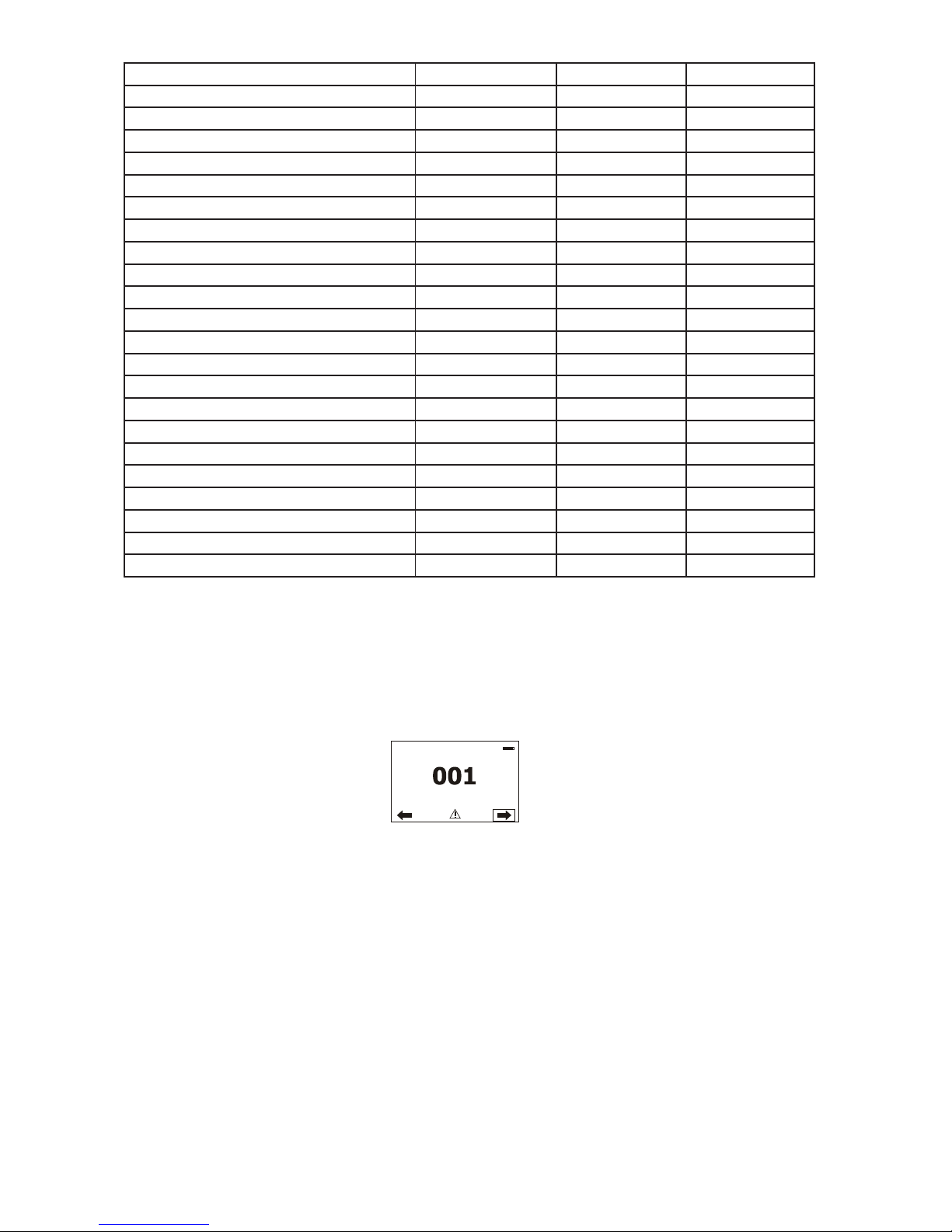
The list of commands for Robin DL4F is the following.
Parameter ID Discovery command SET command GET command
DISC_UNIQUE_BRANCH *
DISC_MUTE *
DISC_UN_MUTE *
DEVICE_INFO *
Page 27
27
SUPPORTED_PARAMETERS *
SOFTWARE_VERSION_LABEL *
DMX_START_ADDRESS * *
IDENTIFY_DEVICE * *
DEVICE_MODEL_DESCRIPTION *
MANUFACTURER_LABEL *
DEVICE_LABEL * *
SENSOR_DEFINITION *
SENSOR_VALUE *
DISPLAY_INVERT * *
DISPLAY_LEVEL * *
PAN_INVERT * *
TILT_INVERT * *
DEVICE_RESET *
DMX_PERSONALITY * *
DMX_PERSONALITY_DESCRIPTION *
STATUS_MESSAGES *
STATUS_ID_DESCRIPTION *
LAMP_STATE * *
LAMP_ON_MODE
1
* *
DEVICE_HOURS
2
*
LAMP_HOURS
2
*
LAMP_STRIKES
2
*
1
...Another options for this command (only for Robe´s xtures):
value PARAMETER_DATA=0x84 - lamp OFF by DMX value on DMX channel
value PARAMETER_DATA=0x88 - lamp OFF if DMX is not present
2
...Commands relative resetable values
9. Error and information messages
Occurred errors during xture operation are signalled by the yellow warning icon at the bottom line of the
screen:
Touch the warning icon or press the [ESCAPE] button to display error messages.
List of error and information messages:
Temper.Sensor Error
The message informs you that the communication betwen the head temperature sensor and the main processor failed.
Tilt Error 1 (Tilt Error 2)
This message will appear after the reset of the xture if the head´s magnetic-indexing circuit malfunctions (sensor failed or magnet is missing) or the stepping motor is defective or its driving IC on the PCB. The head is not
located in the default position after the reset.
Pan Error 1 (Pan Error 2)
This message will appear after the reset of the xture if the yoke´s magnetic-indexing circuit malfunctions (sensor failed or magnet is missing) or the stepping motor is defective or its driving IC on the PCB. The yoke is not
located in the default position after the reset of the xture.
Zoom Error 1 (Zoom Error 2 )
The messages will appear after the reset of the zoom module if the zoom lens is not located in the default
position.
Page 28
28
Faulty battery
The battery on the display board is exhausted and should be replaced immediately.
Clean Air Filters
The message informs that the item "Elapsed Time" in the "Fixture Information" menu is at 0 value. Clean air
lters and reset this counter.
Red 1 Short Error/ Red 2 Short Error/ Red 3 Short Error/ Red 4 Short Error
Some red LEDs in the light source have short circuit or are disconnected.
Blue 1 Short Error/ Blue 2 Short Error/ Blue 3 Short Error/ Blue 4 Short Error
Some blue LEDs in the light source have short circuit or are disconnected.
Green 1 Short Error/ Green 2 Short Error/ Green 3 Short Error/ Green 4 Short Error
Some green LEDs in the light source have short circuit or are disconnected.
White 1 Short Error/ White 2 Short Error/ White 3 Short Error/ White 4 Short Error
Some white LEDs in the light source have short circuit or are disconnected.
10. Flight Case Parking Position
To make easy inserting the Robin DL4F into ight case, the xture is equipped with the function Flight Case
Parking Position. The function automatically pulls the zoom tube into the head and both pan and tilt situates to
position suitable for manual pan/tilt lock before inserting the xture into a ight case. The Icon of this function is
placed at the top left corner of DMX address screen. Touch the icon to park/unpark the xture. After switching
the xture on, the ight case parking position is always off (if DMX command has not changed this setting).
The function is available when the xture is switched on only.
If the xture is in the parking position, after entering the menu Manual Control, the xture is temporarily "
unpark" and all menu items are active. Also program running and editing is available from menu Stand -alone
(and some menu items from menu Service).
The Flight Case Parking Position function is also available via DMX command on the channel Power/Special
functions, DMX range of 0-9. If you set parking position at On with DMX command and after that change it at
Off by touching the icon on display, the xture will stay in this position until you change it by touching icon or
changing DMX value on the channel Power/Special functions.
Note: Always check that the zoom tube is pulled in the head before inserting the xture into ight case.
If not, push the zoom tube into head by hand.
Page 29

29
11. Technical Specications
Electrical
Power supply:.........................electronic auto-ranging
Input voltage range:............... supply 100-240V, 50-60Hz
Live Fuse:...............................T 8 A
Neutral Fuse:..........................T 8 A
Max. power consumption* (RGBW=full):..............550W at 230V ( power factor= 0.97; I=2.4A)
*Allow for a deviation of +/-5%*Allow for a deviation of +/-5%
Optic
Light source: RGBW LED module
RGBW or CMY colour mixing
Min. LED life expectancy: 20.000 hours
Virtual colour wheel
237 colours including whites (2700K, 3200K, 4200K, 5600K and 8000K)
Halogen lamp effect at whites 2700K and 3200K
Rainbow effect with in both directions with variable speed
Zoom
Linear motorized zoom
Min. beam angle :5.5°
Max. beam angle: 60°(75° at Wide zoom mode)
Barndoors
Four individually controllable blades
Rotation 0°-180° (all blades together)
Strobe
Strobe effect with variable speed (0.3 - 20Hz)
Dimmer
Smooth dimmer from 0 - 100 %
Control
Graphic touch screen for xture setting and addressing
Gravitation sensor for auto screen positioning
Battery backup of the touch screen
Readout xture and LED module usage, receiving DMX values, temperatures, etc
Built-in analyzer for easy fault nding, error messages
Built-in demo sequences
Black-out while head moving, colour or gobo changing
Silent fans cooling,
Stand-alone operation
3 user editable programs, each up to 100 steps
Supported protocols: USITT DMX 512, RDM, ArtNet, MANet, MANet2, sACN
Support of RDM (Remote Device Management)
3 DMX modes (29, 23, 21 control channels)
Wireless DMX/RDM module (only for Wireles DMX version)
Compliance with USITT DMX-512 (1986 & 1990) and 512-A
Full DMX delity and frame integrity
Auto sensing of DMX frame rate and frame size
<5ms DMX latency
Operational frequency range of 2402-2480 MHz
Producer: LumenRadio
Page 30

30
Pan/Tilt
Pan movement range 540°
Tilt movement range 260°
16 bit movement resolution
Automatic Pan/Tilt position correction
Remotely controllable speed of pan/tilt movement for easy programming
Movement control: tracking and vector
Pan/tilt-lock mechanism
Connection
DMX data in/out: Locking 3-pin and 5-pin XLR
AC power input: Chassis connector Neutrik PowerCon, A-type, NAC3MPA
Cable connector Neutrik PowerCon, A-type, NAC3FCA , for power-in, (installed on
the power cord)
Rigging
Mounting points: 2 pairs of 1/4-turn locks
Mounting horizontally or vertically via 2 Omega brackets
Temperatures
Maximum ambient temperature : 45° C
Maximum housing temperature : 90° C
Minimum distances
Min. distance from ammable surfaces: 0.5 m
Min. distance to lighted object: 2 m
Total heat dissipation
Maximum: 1770 BTU/hr
Accessories
2 x Omega holder (No.99010420)
Optional accessories
Upgrade kit CRMX Univerzal 260 (No. 9903 0100)
Weight (net)
21.5 kg
Page 31
31
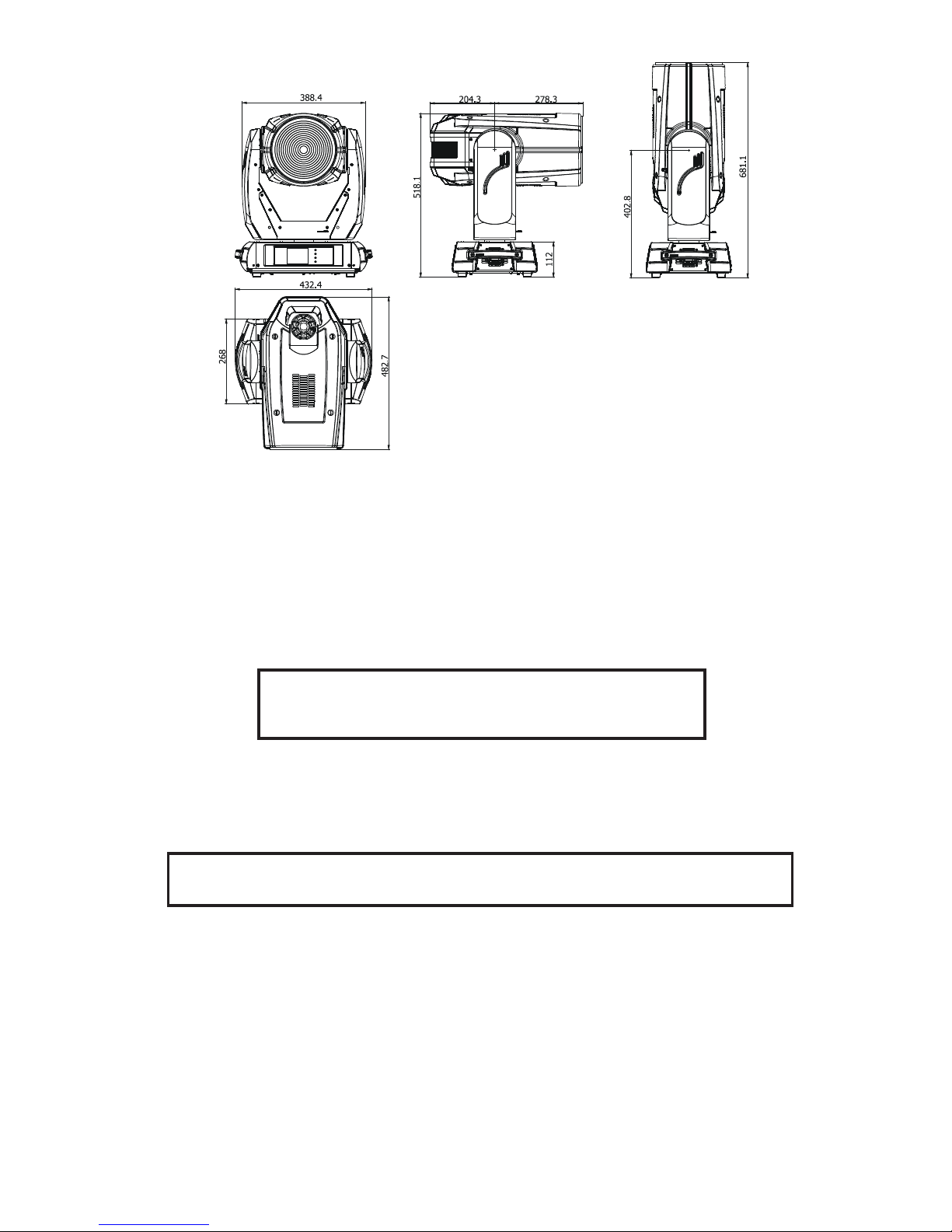
Dimensions (mm)
12. Maintenance and cleaning
It is absolutely essential that the xture is kept clean and that dust, dirt and smoke-uid residues must not build
up on or within the xture. Otherwise, the xture‘s light-output will be signicantly reduced. Regular cleaning will
not only ensure the maximum light-output, but will also allow the xture to function reliably throughout its life.
A soft lint-free cloth moistened with any good glass cleaning uid is recommended, under no circumstances
should alcohol or solvents be used!
DANGER !
Disconnect from the mains before starting any
maintenance work
The front objective lens will require weekly cleaning as smoke-uid tends to building up residues, reducing
the light-output very quickly. The cooling-fans should be cleaned monthly.
The interior of the xture should be cleaned at least annually using a vacuum-cleaner or an air-jet.
Gobo wheels and the internal lenses should be cleaned monthly.
Remove dust and dirt from the fans and cooling vents using a soft brush and vacuum-cleaner.
Important! Check the air lters periodically and clean before they become
clogged!
Clean the air lters placed in the xture´s covers and base. Use a vacuum cleaner, compressed air or you can
wash them and put back dry.
After replacing the air lters, reset the elapsed time counter in the menu "Information" (Information--->Air Filters---> Elapsed Time).
Replacing the fuse.
Before replacing the fuse, unplug mains lead.
1) Remove the fuse holder on the rear panel of the base with a tting screwdriver from the housing
(anti-clockwise).
2) Remove the old fuse from the fuse holder.
3) Install the new fuse in the fuse holder (only the same type and rating).
4) Replace the fuseholder in the housing and x it.
Page 32

32
Specications are subject to change without notice.
March 16, 2016
Page 33
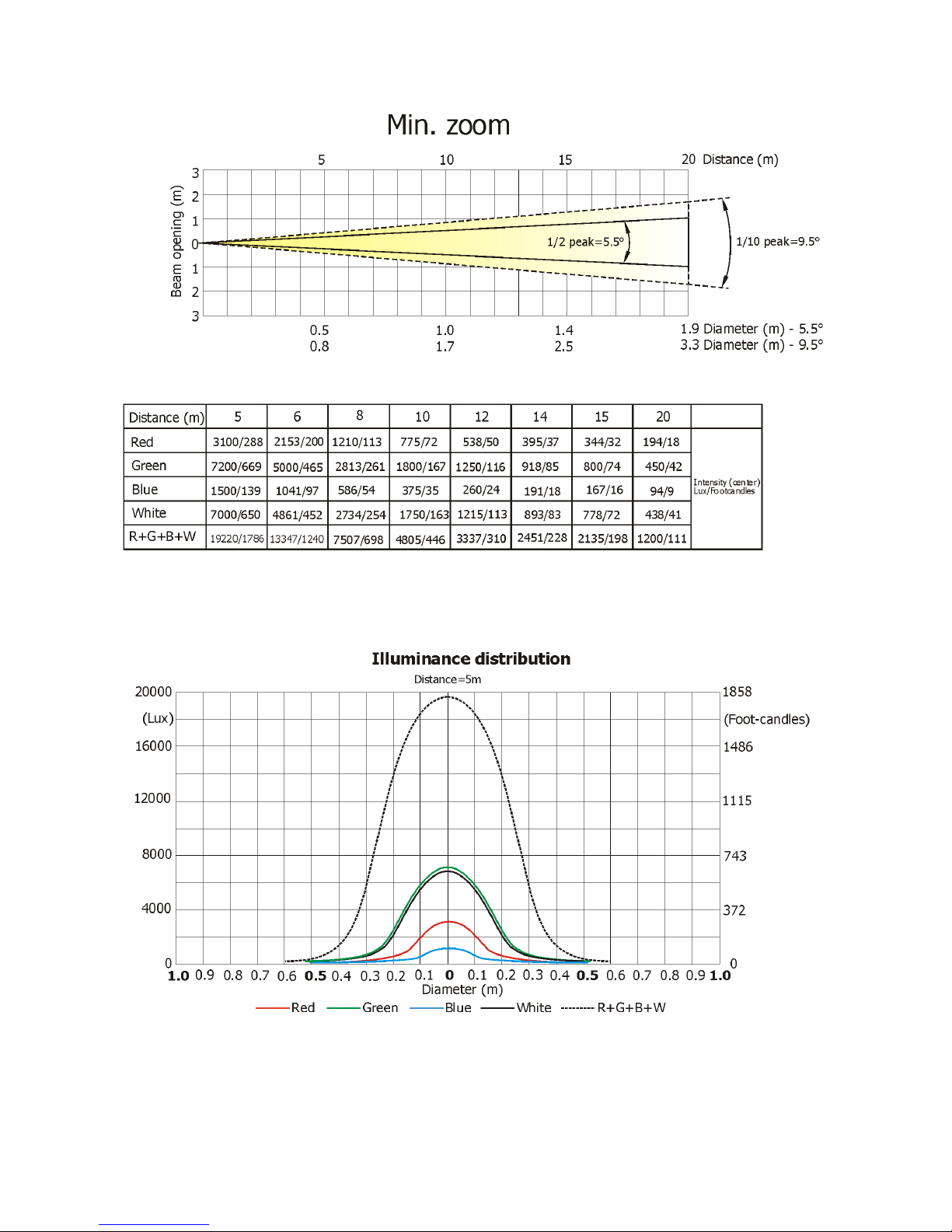
33
13. Photometric diagrams
Page 34
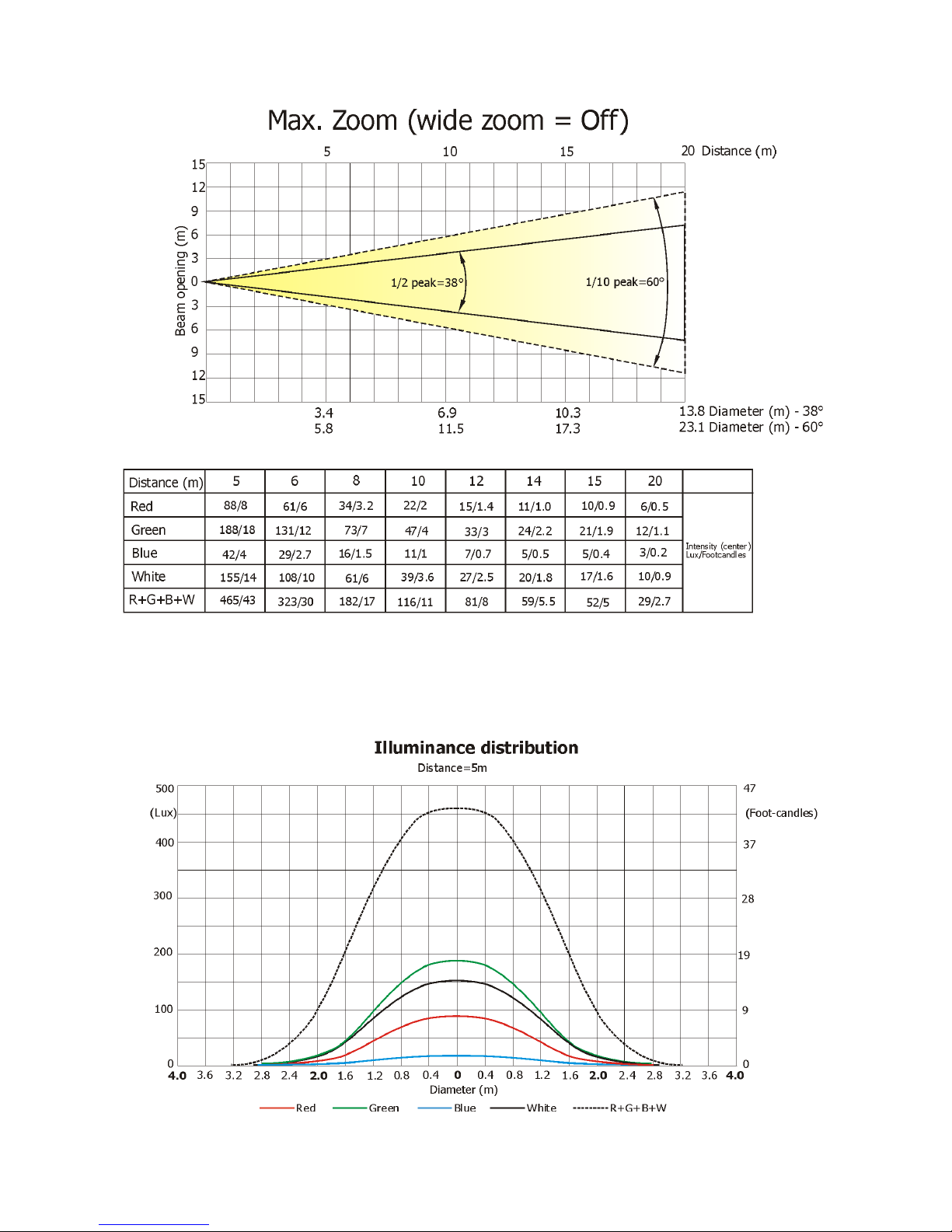
34
Page 35
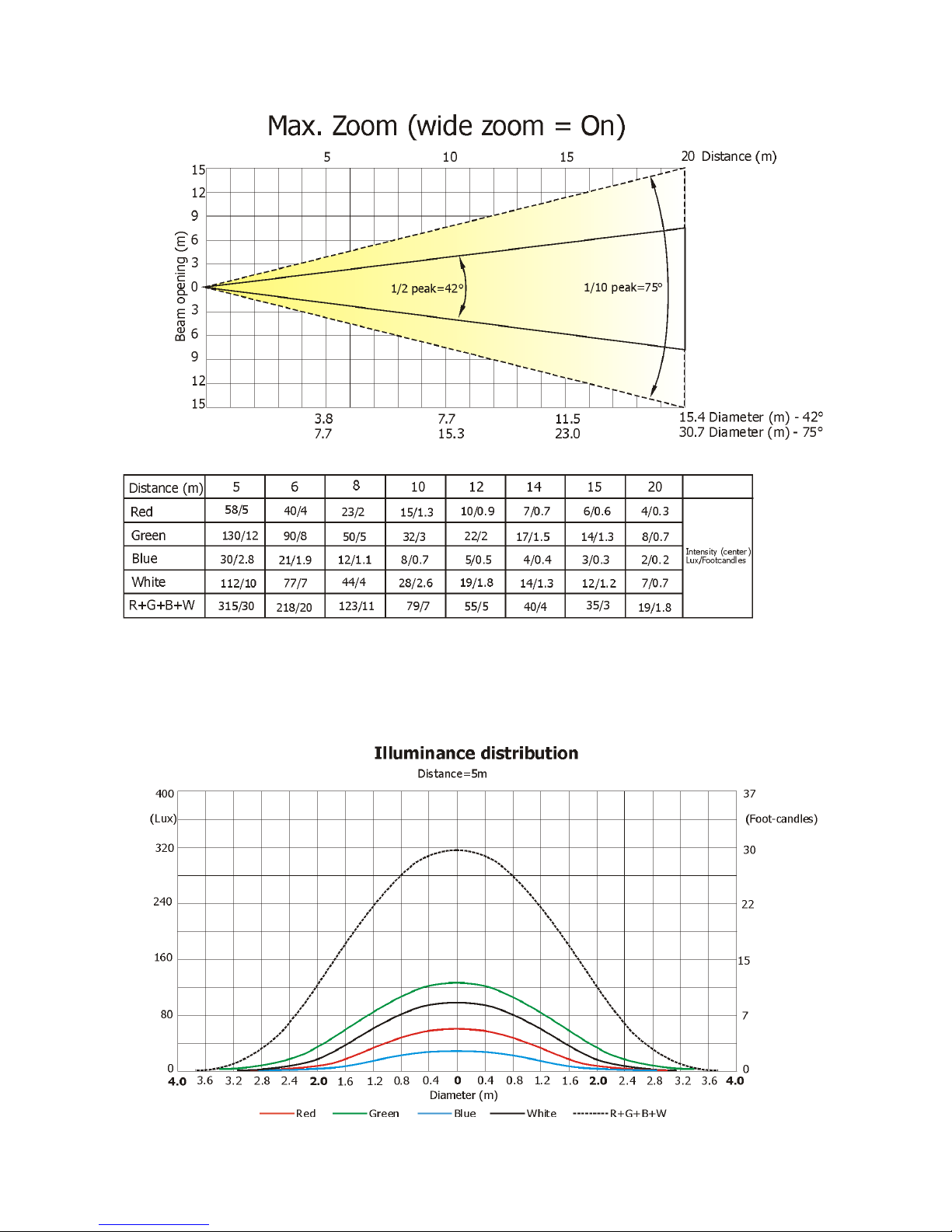
35
Page 36
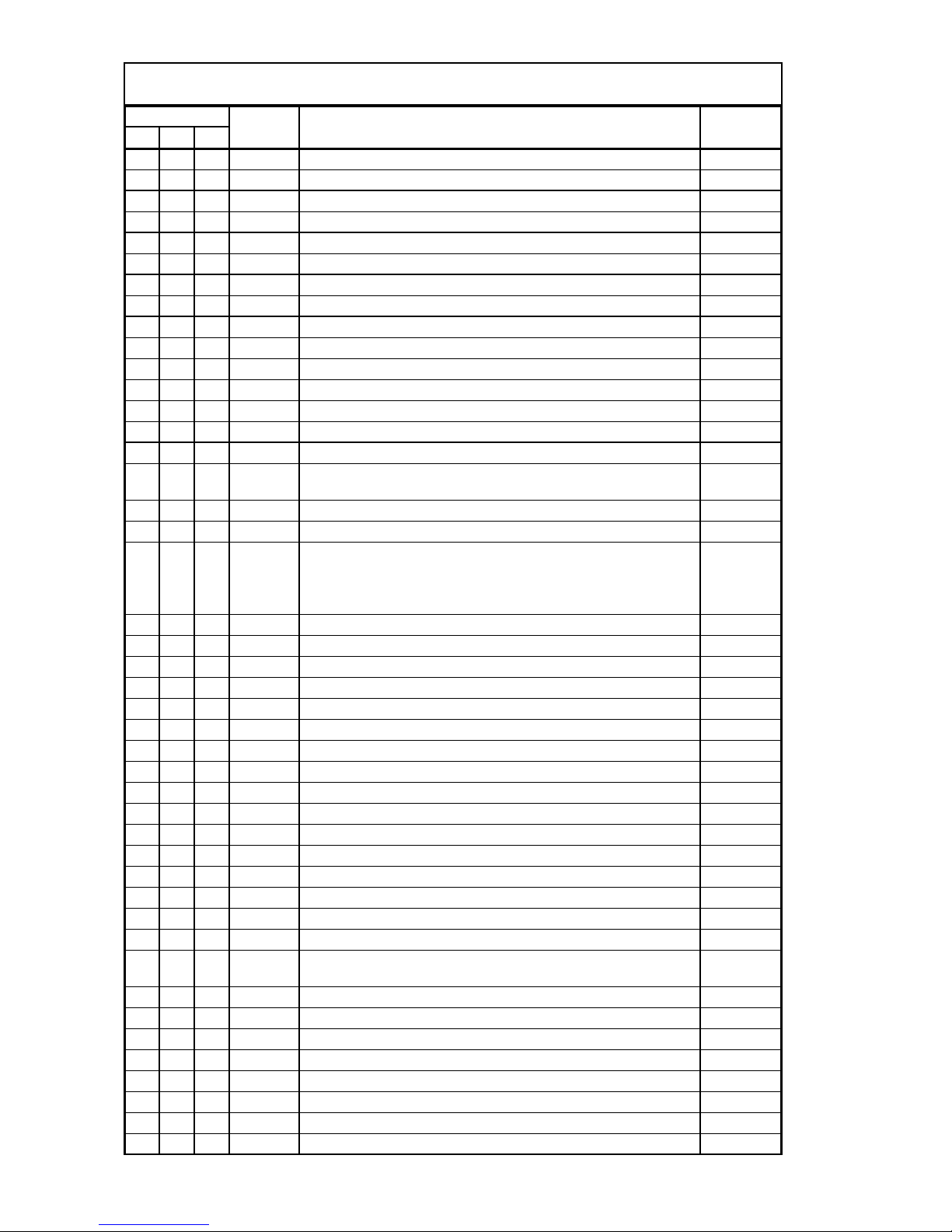
DMX protocol
1 2 3
1 1 1
Pan
0 - 255 Pan movement by 540°
proportional
2 2 *
Pan Fine
0 - 255 Fine control of pan movement
proportional
3 3 2
Tilt
0 - 255 Tilt movement by 260°
proportional
4 4 *
Tilt fine
0 - 255 Fine control of tilt movement
proportional
5 5 3
Pan/Tilt speed , Pan/Tilt time
0 Max. speed (tracking mode)
step
P./T. speed-set Speed Mode in menu: Pan/Tilt Mode
1 - 255 Speed from max. to min. (vector mode)
proportional
P./T. time - set Time Mode in menu: Pan/Tilt Mode
1 - 255 Time from 0.1 s to 25.5 sec.
proportional
6 6 4
Power/Special functions
To activate following functions, stop in DMX value for at least 3
seconds.
0 - 4 Flight Case Parking Position Off
step
5 - 9 Flight Case Parking Position On
step
To activate following functions, stop in DMX value for at least 3 s
and shutter must be closed at least 3 sec. („Shutter,Strobe”
channel 27/22/20 must be at range: 0-31 DMX). Corresponding
menu items are temporarily overriden).
10-14
DMX input: Wired DMX *
step
15-19
DMX input: Wireless DMX *
step
* function is active only10 seconds after switching the fixture on
20-24
White point 8000K ON
step
25-29
White point 8000K OFF
step
30-39
RGB colour mixing mode
step
40-49
CMY colour mixing mode
step
50 - 59 Pan/Tilt speed mode
step
60 - 69 Pan/Tilt time mode
step
70 - 79 Blackout while pan/tilt moving
step
80 - 89 Disabled blackout while pan/tilt moving
step
90-94 DL Colour compatible mode On
step
95-99 DL Colour compatible mode Off
step
100-104 Dimmer curve: Square law
step
105-109 Dimmer curve: Linear
step
110-129 Reserved
To activate following functions, stop in DMX value for at least 3
seconds.
130 - 139 Fixture reset (except pan/tilt)
140 - 149 Pan/Tilt reset
step
150 - 179 Reserved
180 - 189
Zoom//frost/ reset
step
190 - 199 Beam shaper reset
step
200 - 209 Total fixture reset
step
210 - 239 Reserved
240 Disable "Theatre mode"
step
Robin D4LF - DMX protocol - version 1.1
Mode/channel
DMX
Value
Function
Type of
control
Page 1
Page 37
DMX protocol
1 2 3
Mode/channel
DMX
Value
Function
Type of
control
241 "Theatre mode" -automatic control of fan noise
step
242 - 255 "Theatre mode" -fan noise control from min. to max.
proportional
7 7 5
Virtual colour wheel
0 No function
step
1-2 White 2700 K
step
3 White 2700 K (Halogen lamp mode**)
step
4-5 White 3200 K
step
6 White 3200 K (Halogen lamp mode**)
step
7-9 White 4200 K
step
10-12 White 5600 K
step
13-15 White 8000 K
step
16 Blue (Blue=full, Red+Green+White=0)
step
17-55 Red=0, Green->up,Blue =full, White=0
proportional
56 Light Blue (Red=0, Green=full, Blue =full, White=0)
step
57 - 95 Red=0, Green=full, Blue->down, White=0
proportional
96 Green (Red=0, Green=full, Blue =0, White=0)
step
97 – 134 Red->up, Green=full, Blue=0, White=0
proportional
135 Yellow (Red=full, Green=full, Blue=0, White=0)
step
136 - 174 Red=full, Green->down, Blue=0, White=0
proportional
175 Red(Red=full, Green=0, Blue=0, White=0)
step
176 -214 Red=full, Green=0, Blue->up, White=0
proportional
215 Magenta (Red=full, Green=0, Blue=full, White=0)
step
216 - 246 Red -> down, Green=0, Blue=full, White=0
proportional
247 Blue (Red=0, Green=0, Blue=full, White=0)
step
248-251 Rainbow effect (with fade time)from slow-> fast
proportional
252-255 Rainbow effect from slow-> fast
proportional
8 8 6
Red/Cyan (8 bit)***
0 - 255 Red or Cyan colour saturation control - coarse (0-100%)
proportional
9 * *
Red/Cyan (16bit)***
0 - 255 Red or Cyan colour saturation control - fine
proportional
10 9 7
Green/Magenta (8 bit)***
0 - 255 Green or Magenta colour saturation control - coarse (0-100%)
proportional
11 * *
Green/Magenta (16bit)***
0 - 255 Green or Magenta colour saturation control - fine
proportional
12 10 8
Blue/Yellow (8 bit)***
0 - 255 Blue or Yellow colour saturation control - coarse (0-100%)
proportional
13 * *
Blue/ Yellow (16bit)***
0 - 255 Blue or Yellow colour saturation control - fine
proportional
14 11 9
White (8 bit)
If RGBW mode is selected:
0-255
White colour saturation control - coarse (0-100%)
proportional
If CMY mode is selected:
0 - 255 No function
15 * *
White (16 bit)
0 - 255 White colour saturation control - fine (RGBW mode only)
proportional
16 12 10
CTC
If function "White Point 8000K" is ON
0-255
Col. temperature correction from 8000K to 2700K -for whites only
proportional
(0=8000K, 64=5600K, 128=4200K, 192=3200K, 0=2700K)
Page 2
Page 38
DMX protocol
1 2 3
Mode/channel
DMX
Value
Function
Type of
control
To get colour temperatures stated above, RGBW channels have to
be set at the same value (e.g. 255DMX) or RGB=0 and White
channel > 0 DMX
If function "White Point 8000K" is OFF
0-255 Colour temperature correction for mixed colours
proportional
17 13 11
Wide zoom
0 Wide zoom Off
step
1-100 Wide zoom On
step
101-255 Reserved
18 14 12
Zoom
0 - 255 Zoom from min. to max. beam angle
proportional
19 * *
Zoom - fine
0-255 Fine zooming
proportional
20 15 13
Barndoors rotation
0- 255 Rotation 0°--> 180°
proportional
21 16 14
Barndoor 1- movement
0- 255 Movemement Out-->In
proportional
22 17 15
Barndoor 2- movement
0- 255 Movemement Out-->In
proportional
23 18 16
Barndoor 3- movement
0- 255 Movemement Out-->In
proportional
24 19 17
Barndoor 4- movement
0- 255 Movemement Out-->In
proportional
25 20 18
Barndoors macros
0-3
No function
4-7
Macro 1
step
8-11
Macro 2
step
12-15
Macro 3
step
16-19
Macro 4
step
20-23
Macro 5
step
24-27
Macro 6
step
28-31
Macro 7
step
32-35
Macro 8
step
36-39
Macro 9
step
40-43
Macro 10
step
44-47
Macro 11
step
48-51
Macro 12
step
52-55
Macro 13
step
56-59
Macro 14
step
60-63
Macro 15
step
64-67
Macro 16
step
68-71
Macro 17
step
72-75
Macro 18
step
76-79
Macro 19
step
80-83
Macro 20
step
84-87
Macro 21
step
88-91
Macro 22
step
92-95
Macro 23
step
96-99
Macro 24
step
100-103
Macro 25
step
104-107
Macro 26
step
Page 3
Page 39
DMX protocol
1 2 3
Mode/channel
DMX
Value
Function
Type of
control
108-111
Macro 27
step
112-115
Macro 28
step
116-119
Macro 29
step
120-123
Macro 30
step
124-127
Macro 31
step
128-131
Macro 32
step
132-135
Macro 33
step
136-139
Macro 34
step
140-143
Macro 35
step
144-147
Macro 36
step
148-151
Macro 37
step
152-155
Macro 38
step
156-159
Macro 39
step
160-163
Macro 40
step
164-167
Macro 41
step
168-255
Reserved
26 21 19
Barndoors macro speed
0- 255 Speed from slow to fast.
proportional
27 22 20
Shutter/ strobe
0 - 31 Shutter closed
step
32 - 63 Shutter open
step
64 - 95 Strobe-effect from slow to fast
proportional
96 - 127 Shutter open
step
128 - 143 Opening pulse in sequences from slow to fast
proportional
144 - 159 Closing pulse in sequences from fast to slow
proportional
160 - 191 Shutter open
step
192 - 223 Random strobe-effect from slow to fast
proportional
224 - 255 Shutter open
step
28 23 21
Dimmer intensity
0 - 255 Dimmer intensity from 0% to 100%
proportional
29 * *
Dimmer intensity - fine
0 - 255 Fine dimming
proportional
** In the Halogen lamp mode the Dimmer channel imitates behaviour of the halogen lamp during dimming
*** Select RGB or CMY mixing mode on channel "Power/Special functions"
Page 4
Page 40
Virtual colour wheel - colour mixing chart
Scale*
Virtual Colour Wheel
Red
Green
Blue
White
DMX
DMX
DMX
DMX
DMX
Theatre mode off
1-3 (White 2700K) 255 176 8 20
4-6 (White 3200K) 255 201 12 100
7-9 (White 4200K) 249 243 28 200
10-12 (White 5600K) 165 255 36 255
13-15 (White 8000K)
172
25565255
Theatre mode on
1-3 (White 2700K) 255 176 8 20
4-6 (White 3200K) 255 201 12 100
7-9 (White 4200K) 248 253 31 35
10-12 (White 5600K) 209 255 46 63
13-15 (White 8000K)
171
2556161
16 0 0 255 0
17 0 3 255 0
18 0 6 255 0
19 0 9 255 0
20 0 12 255 0
21 0 15 255 0
22 0 18 255 0
23 0 21 255 0
24 0 24 255 0
25 0 27 255 0
26 0 30 255 0
27 0 36 255 0
28 0 41 255 0
29 0 46 255 0
30 0 52 255 0
31 0 58 255 0
32 0 64 255 0
33 0 68 255 0
34 0 74 255 0
35 0 80 255 0
36 0 86 255 0
37 0 92 255 0
38 0 98 255 0
39 0 104 255 0
40 0 110 255 0
41 0 119 255 0
42 0 129 255 0
43 0 138 255 0
44 0 147 255 0
45 0 156 255 0
46 0 165 255 0
47 0 174 255 0
48 0 183 255 0
49 0 192 255 0
50 0 201 255 0
51 0 210 255 0
52 0 219 255 0
53 0 228 255 0
54 0 237 255 0
55 0 246 255 0
56 0 255 255 0
57 0 255 246 0
58 0 255 237 0
Page 1
Page 41
Scale*
Virtual Colour Wheel
Red
Green
Blue
White
DMX
DMX
DMX
DMX
DMX
59 0 255 228 0
60 0 255 219 0
61 0 255 210 0
62 0 255 201 0
63 0 255 192 0
64 0 255 183 0
65 0 255 174 0
66 0 255 165 0
67 0 255 156 0
68 0 255 147 0
69 0 255 138 0
70 0 255 129 0
71 0 255 119 0
72 0 255 110 0
73 0 255 104 0
74 0 255 98 0
75 0 255 92 0
76 0 255 86 0
77 0 255 80 0
78 0 255 74 0
79 0 255 68 0
80 0 255 64 0
81 0 255 58 0
82 0 255 52 0
83 0 255 46 0
84 0 255 41 0
82 0 255 36 0
86 0 255 30 0
87 0 255 27 0
88 0 255 24 0
89 0 255 21 0
90 0 255 18 0
91 0 255 15 0
92 0 255 12 0
93 0 255 9 0
94 0 255 6 0
95 0 255 3 0
96 0 255 0 0
97 3 255 0 0
98 6 255 0 0
99 9 255 0 0
100 12 255 0 0
101 15 255 0 0
102 18 255 0 0
103 21 255 0 0
104 24 255 0 0
105 27 255 0 0
106 30 255 0 0
107 36 255 0 0
108 41 255 0 0
109 46 255 0 0
110 52 255 0 0
111 58 255 0 0
112 64 255 0 0
113 68 255 0 0
114 74 255 0 0
Page 2
Page 42
Scale*
Virtual Colour Wheel
Red
Green
Blue
White
DMX
DMX
DMX
DMX
DMX
115 80 255 0 0
116 86 255 0 0
117 92 255 0 0
118 98 255 0 0
119 104 255 0 0
120 110 255 0 0
121 119 255 0 0
122 129 255 0 0
123 138 255 0 0
124 147 255 0 0
125 156 255 0 0
126 165 255 0 0
127 174 255 0 0
128 183 255 0 0
129 192 255 0 0
130 201 255 0 0
131 210 255 0 0
132 219 255 0 0
133 228 255 0 0
134 240 255 0 0
135 255 255 0 0
136 255 246 0 0
137 255 237 0 0
138 255 228 0 0
139 255 219 0 0
140 255 210 0 0
141 255 201 0 0
142 255 192 0 0
143 255 183 0 0
144 255 174 0 0
145 255 165 0 0
146 255 156 0 0
147 255 147 0 0
148 255 138 0 0
149 255 129 0 0
150 255 119 0 0
151 255 110 0 0
152 255 104 0 0
153 255 98 0 0
154 255 92 0 0
155 255 86 0 0
156 255 80 0 0
157 255 74 0 0
158 255 68 0 0
159 255 64 0 0
160 255 58 0 0
161 255 52 0 0
162 255 46 0 0
163 255 41 0 0
164 255 36 0 0
165 255 30 0 0
166 255 27 0 0
167 255 24 0 0
168 255 21 0 0
169 255 18 0 0
170 255 15 0 0
Page 3
Page 43
Scale*
Virtual Colour Wheel
Red
Green
Blue
White
DMX
DMX
DMX
DMX
DMX
171 255 12 0 0
172 255 9 0 0
173 255 6 0 0
174 255 3 0 0
175 255 0 0 0
176 255 0 3 0
177 255 0 6 0
178 255 0 9 0
179 255 0 12 0
180 255 0 15 0
181 255 0 18 0
182 255 0 21 0
183 255 0 24 0
184 255 0 27 0
185 255 0 30 0
186 255 0 36 0
187 255 0 41 0
188 255 0 46 0
189 255 0 52 0
190 255 0 58 0
191 255 0 64 0
192 255 0 68 0
193 255 0 74 0
194 255 0 80 0
195 255 0 86 0
196 255 0 92 0
197 255 0 98 0
198 255 0 104 0
199 255 0 110 0
200 255 0 119 0
201 255 0 129 0
202 255 0 138 0
203 255 0 147 0
204 255 0 156 0
205 255 0 165 0
206 255 0 174 0
207 255 0 183 0
208 255 0 192 0
209 255 0 201 0
210 255 0 210 0
211 255 0 219 0
212 255 0 228 0
213 255 0 237 0
214 255 0 246 0
215 255 0 255 0
216 246 0 255 0
217 237 0 255 0
218 228 0 255 0
219 219 0 255 0
220 210 0 255 0
221 201 0 255 0
222 192 0 255 0
223 183 0 255 0
224 174 0 255 0
225 165 0 255 0
226 156 0 255 0
Page 4
Page 44
Scale*
Virtual Colour Wheel
Red
Green
Blue
White
DMX
DMX
DMX
DMX
DMX
227 147 0 255 0
228 138 0 255 0
229 129 0 255 0
230 119 0 255 0
231 110 0 255 0
232 104 0 255 0
233 98 0 255 0
234 91 0 255 0
235 84 0 255 0
236 77 0 255 0
237 70 0 255 0
238 63 0 255 0
239 56 0 255 0
240 49 0 255 0
241 42 0 255 0
242 35 0 255 0
243 28 0 255 0
244 21 0 255 0
245 14 0 255 0
246 7 0 255 0
247 0 0 255 0
248-255 (Rainbow effect)
****
****
****
****
* Colour scale as an illustration only
Page 5
Page 45

36
 Loading...