

Page 1
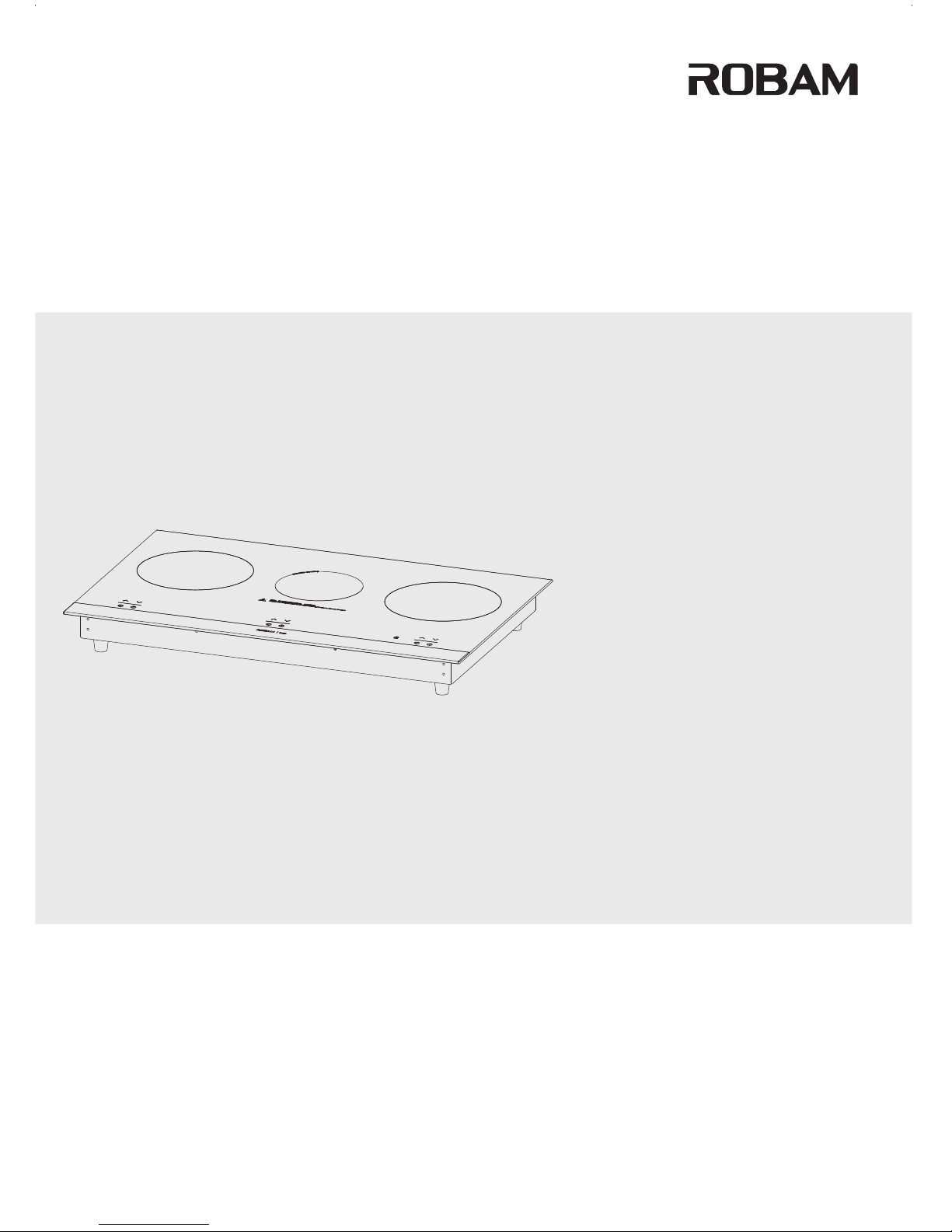
Operation Manual
CD32-W985
Multifunction Hob
CD2 -W9858
Page 2

1.Product Overview
2.Product Structure
3.Product Parameters
4.Product Feature
5.Notice
6. Use Instruction
7. Electrical Schematic Diagram
8. General Troubleshooting
9. Installation Instruction
10. Cleaning and Maintenance
11.Accessories
---- - - --- - - --- - - ---- - - --- - - --- - ---- - - ------ - - -
1
1
2
2
3
5
7
8
9
10
10
---- - - --- - - --- - - ---- - - --- - - --- - ---- - - --- - - ------ - - -
---- - - --- - - --- - - ---- - --- ----- - - -
---- - - --- - - --- - - ---- - - -- - - ---- - ------ - - -
---- - - --- - - --- - - ---- - - --- - - --- - - ---- -
---- - - --- - - --- - - ---- - - --- - - --- -
---- - - --- - - --- - - ---- - - --- - - --- - ---- - - --- - -- - --- - -
---- - - --- - - --- - - ---- - - --- - - --- - ---- - - --- - - --- - - ---- ----- - - -
---- - - --- - - --- - - ---- - - --- - - --- - ---- - - ------ - - -
---- - - --- - - --- - - ---- - - --- - - --- - ---- ----- - - -
---- - - --- - - --- - - ---- - - --- - - --- - ---- - - --- ----- - - -
Contents
Page 3
Product Overview
Dear users:
Let us take this opp ortunity to thanks for your buying of ROBAM multifunction hob. We recommen d
that before the i nstallation and using, ple ase read this man ual and save it for your future re ference.
ROBAM is a professional enterprise in China's hou sehold applia nces and kitche nware. It’s
famous with adv anced design,high efficiency, sa ving energy and safety.
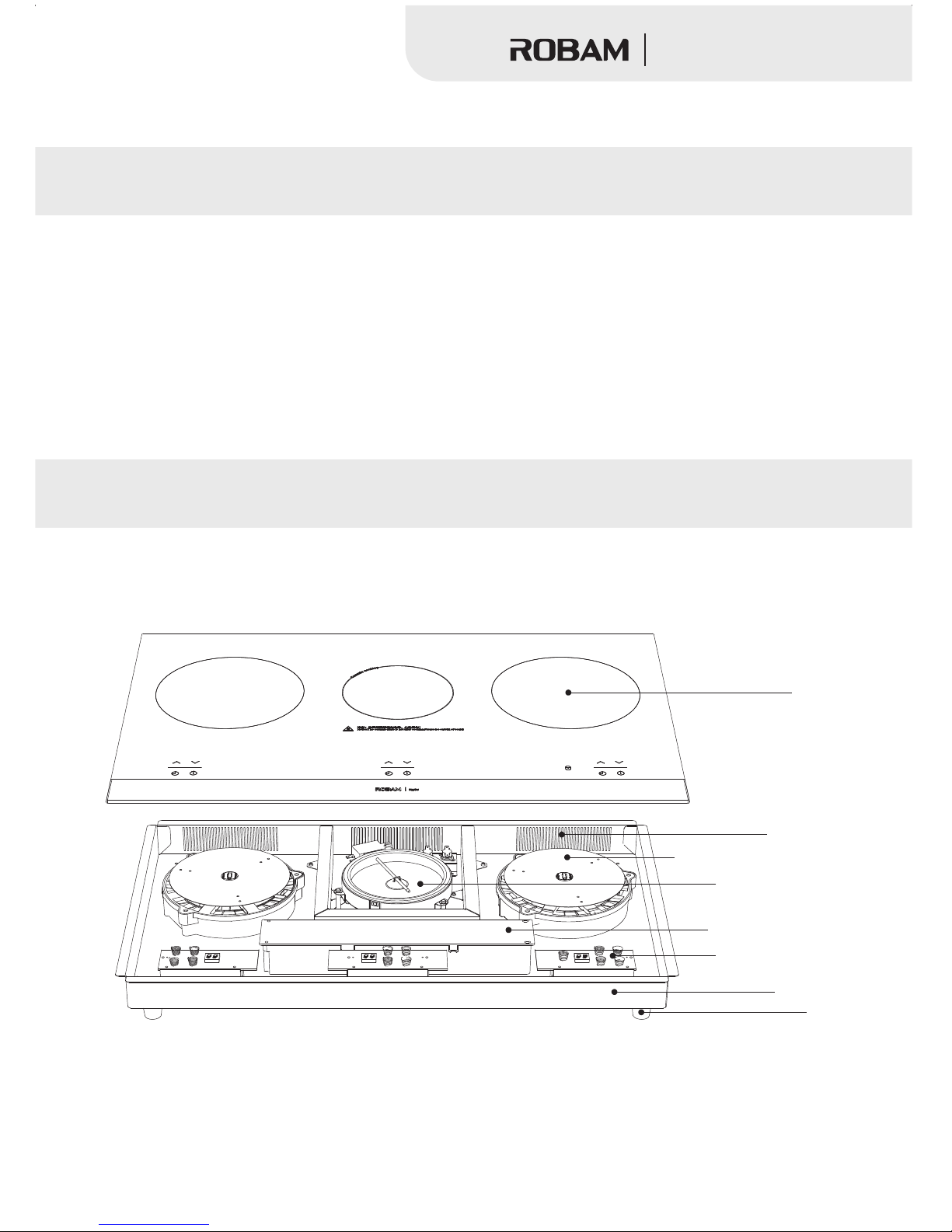
Product Structure
(The pi ctu re is j ust for your referen ce)
General struc ture diagram
Panel
Air Outlet
Induction coo ker head
ceramic cookt op
Power supply box
Touch Operation
Chassis
Mat
1
Multifunction Hob
Page 4
Marks: ROBAM re serves rights to change the de sign and specif ication.
Product Feature
ROBAM series of m ultifunction hob is develo ped on the base of ov erseas advanced technolo gy which
is available of m odern family. Our multifunction hob ha s fashionable s tyle and safe characterist ic.
1.Safe — have mul tiple protecting functio ns and safe to oper ate;
2.Friendly- environment— without flam e, smoke and bale ful oil, for example, CO;
3.Sanitatio n — ceramic glass panel with hig h rigidity, eas y to clean;
4.Convenien ce — use pattern control panel , simple to under stand;
5.High efficient — high he at effici ent, save energ y;
6.Credibili ty — credible feature and long l ife;
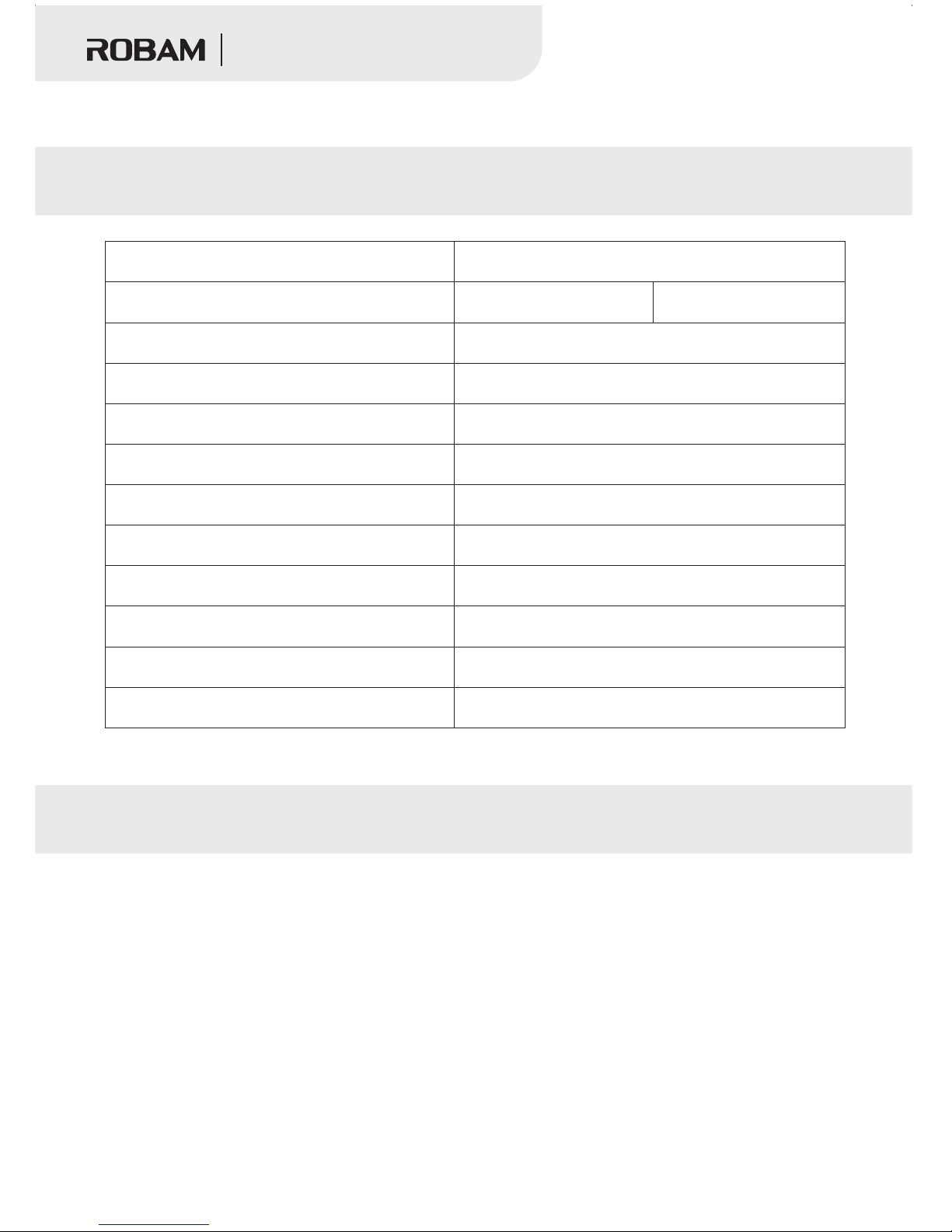
Product Parameters
Name
Item No.
Left burner max imum power
Middle burner m aximum power
Right burner ma ximum power
Rated Power
Dimension(m m)
Net Weight(kg)
Burners
Panel
Installatio n size(mm)
758×458
Temple glasses( microcrystal panel)
3
12
800×500×55
CD32-W985
2
CD2 -W9858
Multifunction Hob
Multifuncti on Hob
See the label
See the label
See the label
See the label
See the label
Power Supply
Page 5
Notice
NOTICE:
When you operat e our multifunction hob, ple ase pay much atte ntion to following notice ar ticles:
9W
85
100mm
100mm
1
00m
m
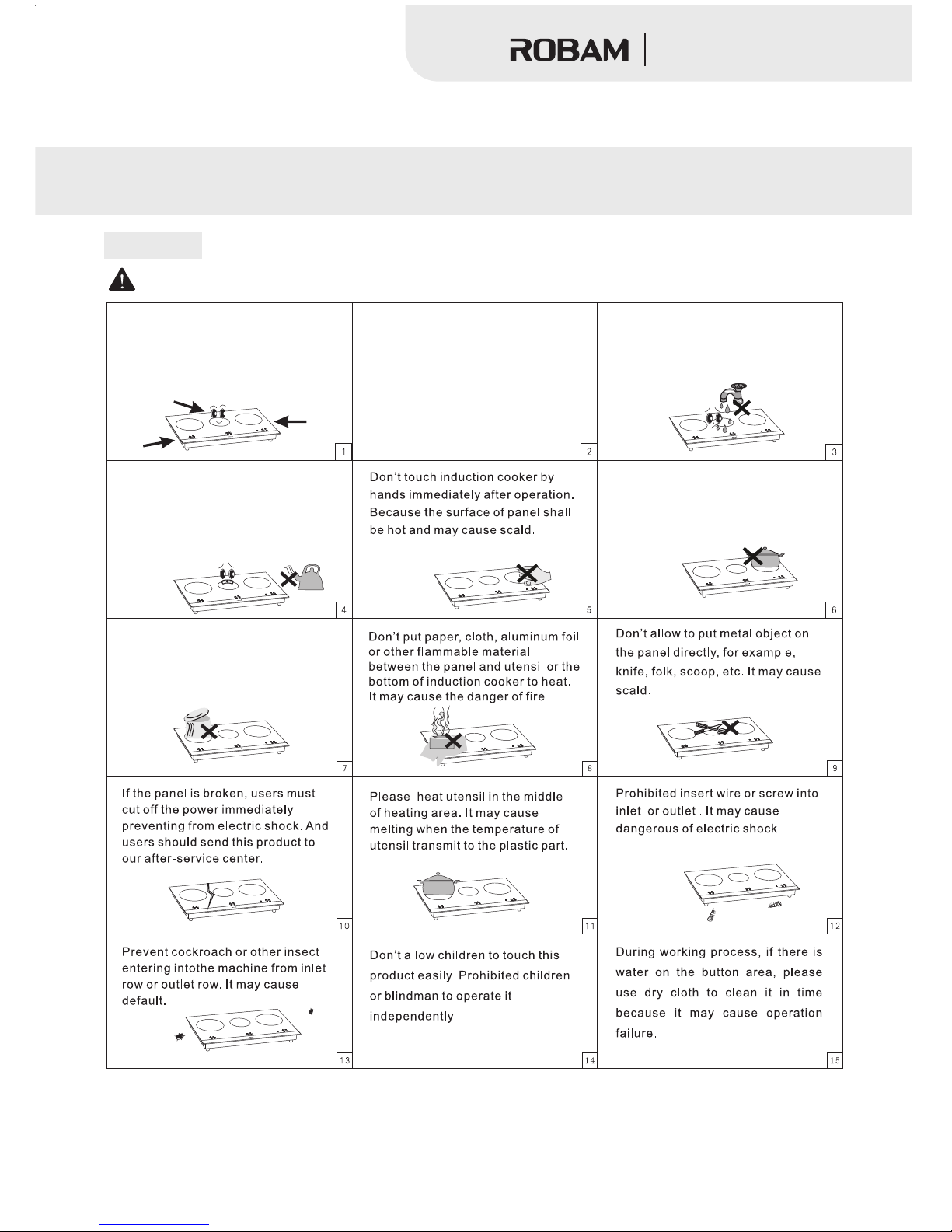
The product should be put horizontally.
Don’t allow to put it near wall or object.
The distance of each side should be
more than 100mm. The inlet and outlet
must keep expedite.
9W
85
Don’t use this product near water or
bath it by water directly. It may cause
troubles on inlet row or outlet row.
9W
85
dange rou s
Pleas e far away fro m gas hob or oth er
heate d utensil du ring worki ng. If the
tempe rature on en vironmen t becomes
too hig h, it may caus e the overhe ated
prote ction of ind uction coo ker, so it
will st op heating .
9W
85
dange rou s
Don’t allow to heat pan without
anything food, it may destroy this
product or pan.
9W85
dange rou s
For sealed packages of food, for
example, can, please open the cover
before heating preventing from
explosive danger because of
expansion.
9W
85
9W85
9W85
9W
85
9W85
9W85
dange rou s
9W85
3
State men t: Th e adverse conseque nce s cau sed by the violat ion o f the a bov e matters needi ng at ten tion in using risk, da mag e, et c.
Our com pan y is no t responsible for.
For UK pl ug, please u se specifi c
more th an 13A elect ric outlet
indep endently .For Fren ch plug,
pleas e use specif ic more than 1 6A
elect ric outlet i ndepende ntly.
Don' t use u niver sal socket w ith
other a ppliance s and ensure p lug
earth ed properl y.
Multifunction Hob
Page 6
※Notice:
1.The multifu nction hob under working pro cess, panel sur face temperature will beco me very hot,
don' t touc h it in order to avoid scald.
2. Please don’t p ut the product where childre n can easily touc h. Don’t allow children and th e blindman
to operate prod uct independent in order to av oid has the dange r.
3.During work ing process, if there is some wa ter on control pa nel, please use dry cloth to cle an it in
time, or it may cau se operation failure.
4. Please don’t t ouch the surface of ceramic ho b in one hour after f inished cooking food.
Statement: Th e adverse consequences cau sed by the violat ion of the above matters needi ng
attention in us ing risk, damage, etc. Our com pany is not respo nsible for.
5.This applia nce is not intended for use by per sons (includi ng children) wi th reduced physical,sensory
or mental capab ilities, or lack of experien ce and knowledg e, unless they have been given s upervision
or instructio n concerning use of the applia nce by a person res ponsible for their safety.
6.Children sh ould be supervised to ensure t hat they do not pla y with the appliance.
7.If the supply cord is damaged, i t must be replaced by the manufa cturer, its ser vice agent or similarly
qualified per sons in order to avoid a hazard.
8.WARNING: If th e surface is crac ked, switch off the appliance to avoid possibility of el ectric shock.
9.The appliance is not intende d to be operated by means of an external timer or sep arate remote-
control syste m.
10.Danger of fi re: Do not store items on the cook ing surface.
11.CAUTI ON: the cooking p rocess has to be supervised. A s hort term cooki ng process has to be
supervised co ntinuously.
12.WARNING: Un attended cooking on a hob with a f at or oil can be dang erous and may result in a fire.
4
Multifunction Hob
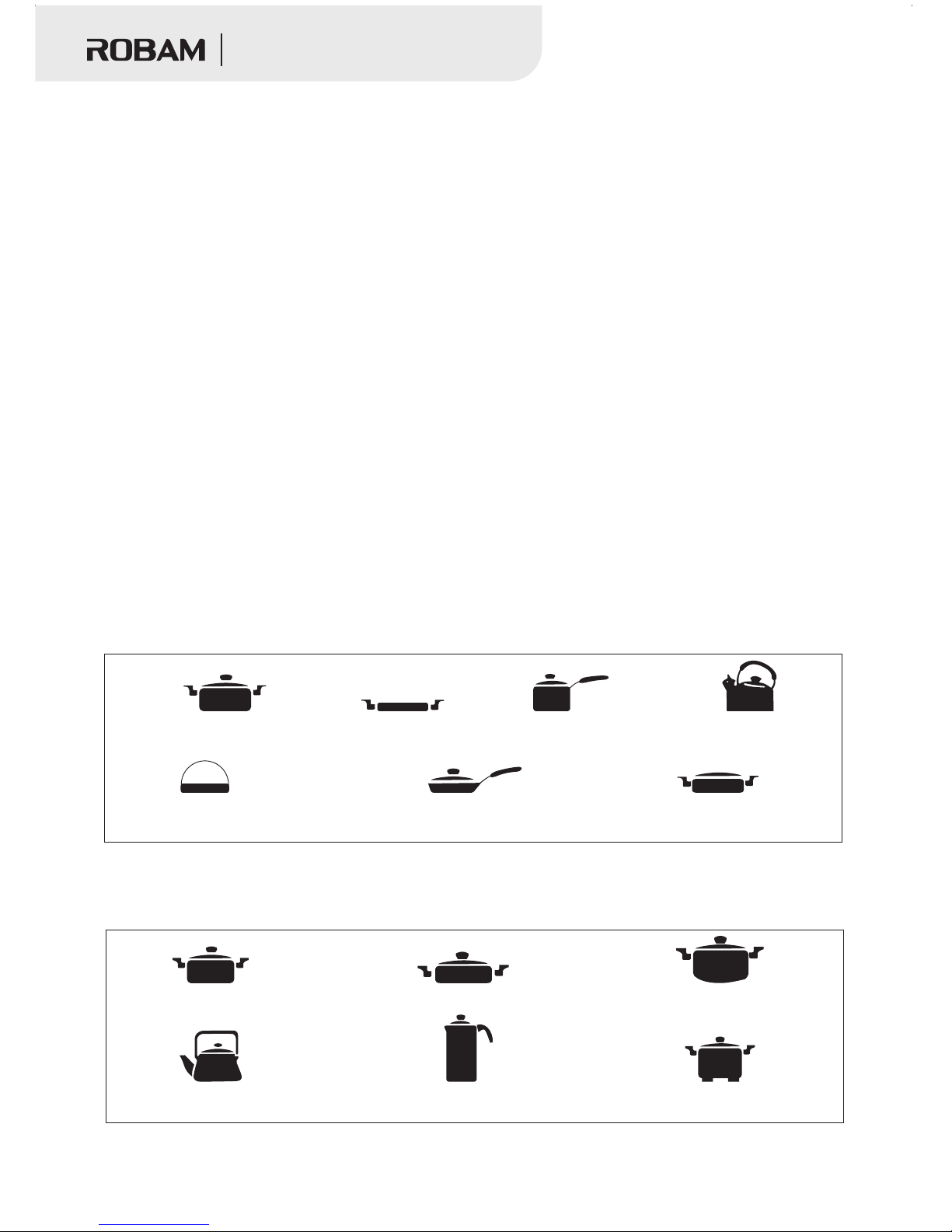
iron plate
specific pan ma de by
multiple mate rial
iron enamel tea pot
multiple magn etic induction
frying pan
multiple magn etic induction
soup pan
glass pan with arc bott om
aluminum pan
the diameter of b ottom is
less than 100mm
pan with feet
◆Suitable utensil and container
Iron material ( enamel, cast iron, stainle ss steel) or othe r multiple magnetic induct ion
diameter of fla t bottom should be more than 100 mm but less than 26 0mm.
utensil. The
specific stai nless steel pan
top quality of ir on pan
◆Unsuitable Utensil or container for induction cooker part
Pan made by ceram ic, glass , aluminum or copper . The diameter of p an’s bottom is less than
100mm.The bot tom of pan is not flat.
ceramic pan
Page 7
Use Instruction
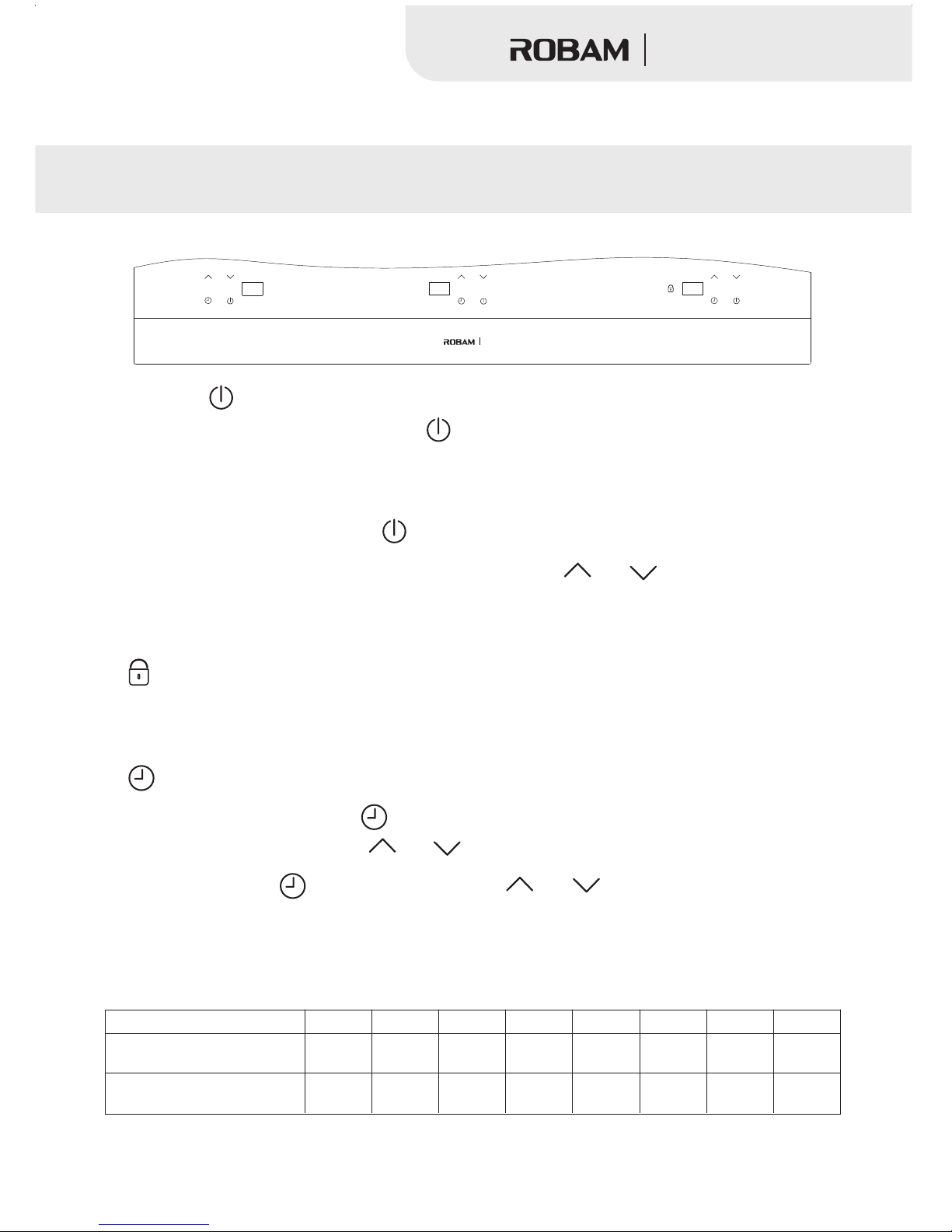
Operation menu introduction
W985
1. Power key “ ”:
A. Co nnected to the power, press the key the m achine is in standby situatio n for cook ing, the
motor f an to spin, the digital screen list “_ _”. If there have n o any operation in one minutes, the
machine will be c hange to power off situation automatically.
“ ”,
B. In any working s tate, press the key one time, the mac hine will power off;“ ”
When the appliance is in stand by situati on, press the key “ ” “ ”
the heating p rogram of P4 a utomaticall y, press to ad just time, po wer, temperature, add or minutes by
each time press ing.
or The applia nce will st art
2. Lo ck the working state, avoiding faulty opera tion.“ ”
In an y work ing si tuation, when press this k ey mo re than 2 mintues, the ap pliance will s tart t he lock
function ,If cu stomer want to cancel this fun ction, please press this key m ore than 3 minute s again.
3. Reservation f or turning off.“ ”
A.In any work state, press the key the function of reservatio n for t urning o ff is working when th e
digital scree n list"00". press the key “ ”or “ ”t o confirm the time you need, mea sured in minute .
“ ”,
B. whe n the func tion o f is working, press the key to adj ust timing according to the
cooking deman d , press this key one time, the tim er will increas e or reduce one minute.
“ ” “ ” or “ ”
Performance
1.Constant temperature control separated by 8 level, pow er rate a s the fol lowin g list, P 1,P2 fo r inter mitte nt heat ing.
Program
Electromagnetic
heating power
P1
400W
400W
P2
700W
500W
P3
1100W
600W
P4
1300W
700W
P5
1500W
800W
P6
1700W
900W
P7
1900W
1000W
P8
2100W
1100W
5
Ceramic heating power
Multifunction Hob
Page 8
●
● “ ”
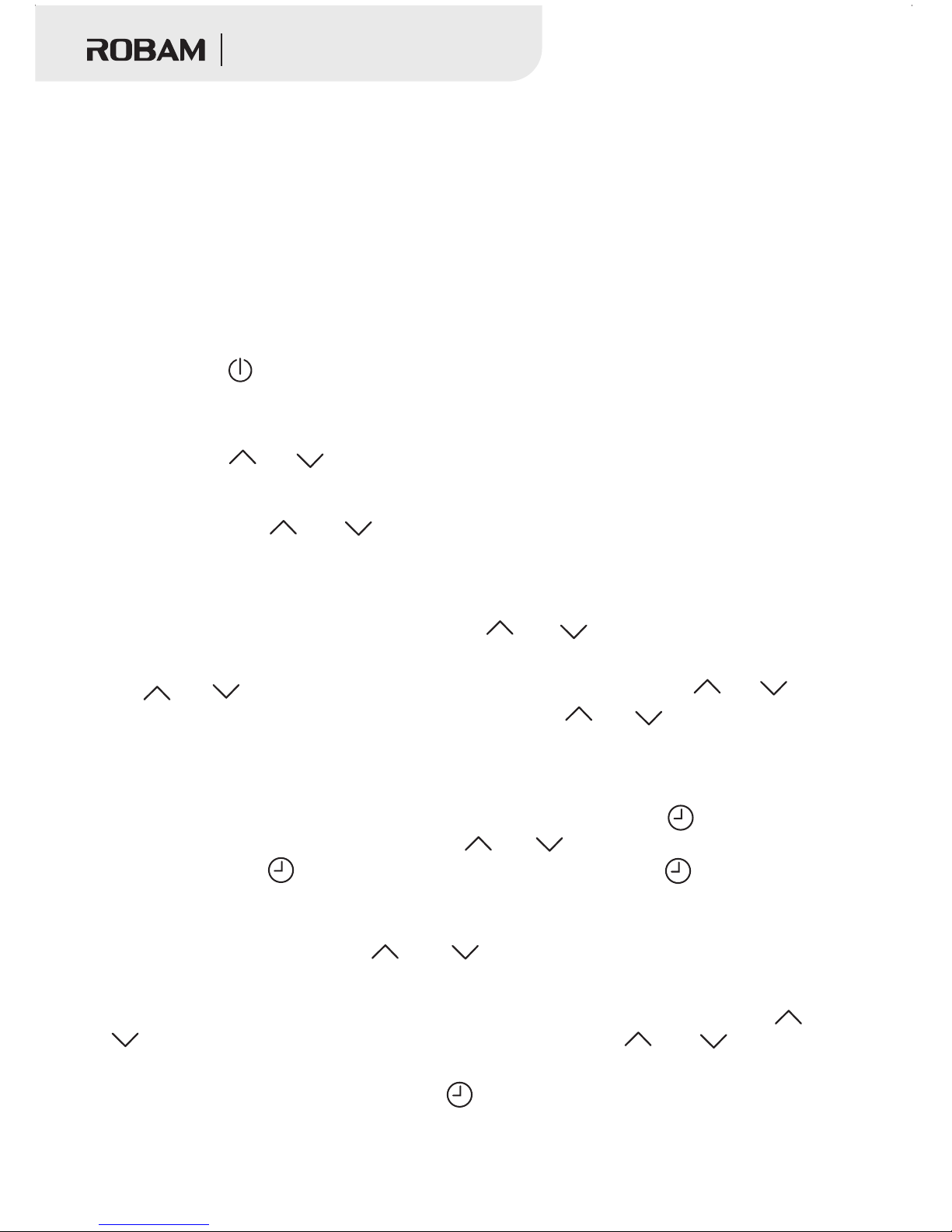
During the sett ing process, if you need to adju st or check the pow er, press the key or
“ ”, the digital tu be displays the present stat e and press the key “ ” or “ ” to adjust
the power, it wil l come back to the present setti ng time 3 seconds a fter finish adjusting.
Cancel the timi ng function: press the key three times, it will disp lay the present p ower.
“ ”
2.Have timing shutdown function: In working condition, you can set t he ti ming shutdown funct ion, the
timing time is up t o 99 minutes (can be set cycle).
Application
1.Turn on the power, the switch indica tor light flashes 1 time/sec . If without any ke y operation,the
switch indica tor light will not shine.
2.Function ac tivate
1)Press the key under the energ ized initial state, the buzz er makes a short so und and comes
into standby, t he digital tube statically d isplays “— —”. Without any key o peration, it will come back
to the energize d initial state.
2)Press the key “ ” or “ ”under the st ate of statical ly displaying “ ——”, the multifunct ion
comes into the he ating working condition. A t this point the pr oduct is heating in the power of P 4, then
you can press the k ey “ ” or “ ” to increa se or decrease th e power.
“ ”
hob
Introduction of the function
1.In the condit ion of displaying —— press the key or once, the gas h ob comes into the
“heating” wor king condition, the digita l tube displays “ P 4 ”,control the fire from P1 to P8 t hrough the
key “ ” or “ ”; in the working process , control the fir e through the key “ ” or “ ” until
the maximum or mi nimum firepower stall also p ressing the key “ ” or “ ” can increas e or
decrease the po wer.
“ ”, “ ” “ ”
2.Timing shutdown function:
●When the produc t is in the heating working condi tion, press the key once, the digit al
tube displays t he number “00”, press the key “ ” or “ ” t o set time, after finish setti ng
time, press the k ey “ ” again to make sure the time. If d o not press “ ” to confirm, the
digital tube wi ll shine the time 3 times and set th e time; at this poi nt, the digital tube display s
the left time of co untdown (if the timing ti me need to be adjus ted and the digital tube displays
the present tim ing, press the key “ ” or “ ” ) ; afte r finishing of countdown, al arms once
and comes into th e energized initial state;
“ ” “ ”
6
Multifunction Hob
Page 9
Child Lock Function
In heat ing condition, press the key seconds, the buzzer makes a sou nd, the indicator
light “ ” turn s on. The mac hine locked in current state, only press “ ” is useful and other
keys are invali d. If you want to unlock the child l ock, press the ke y “ ” 3 seconds.
“ ” 2
Turn off
After fini sh using, p ress the bu tton , the multifunction h ob will stop heating, after minute
running of the fun, it auto matically stop runni ng. If the multifu nction ho b is usin g too lon g time
without any mod ification, it will automat ically turn off in 1hour (except the tim ing function) .
“ ”
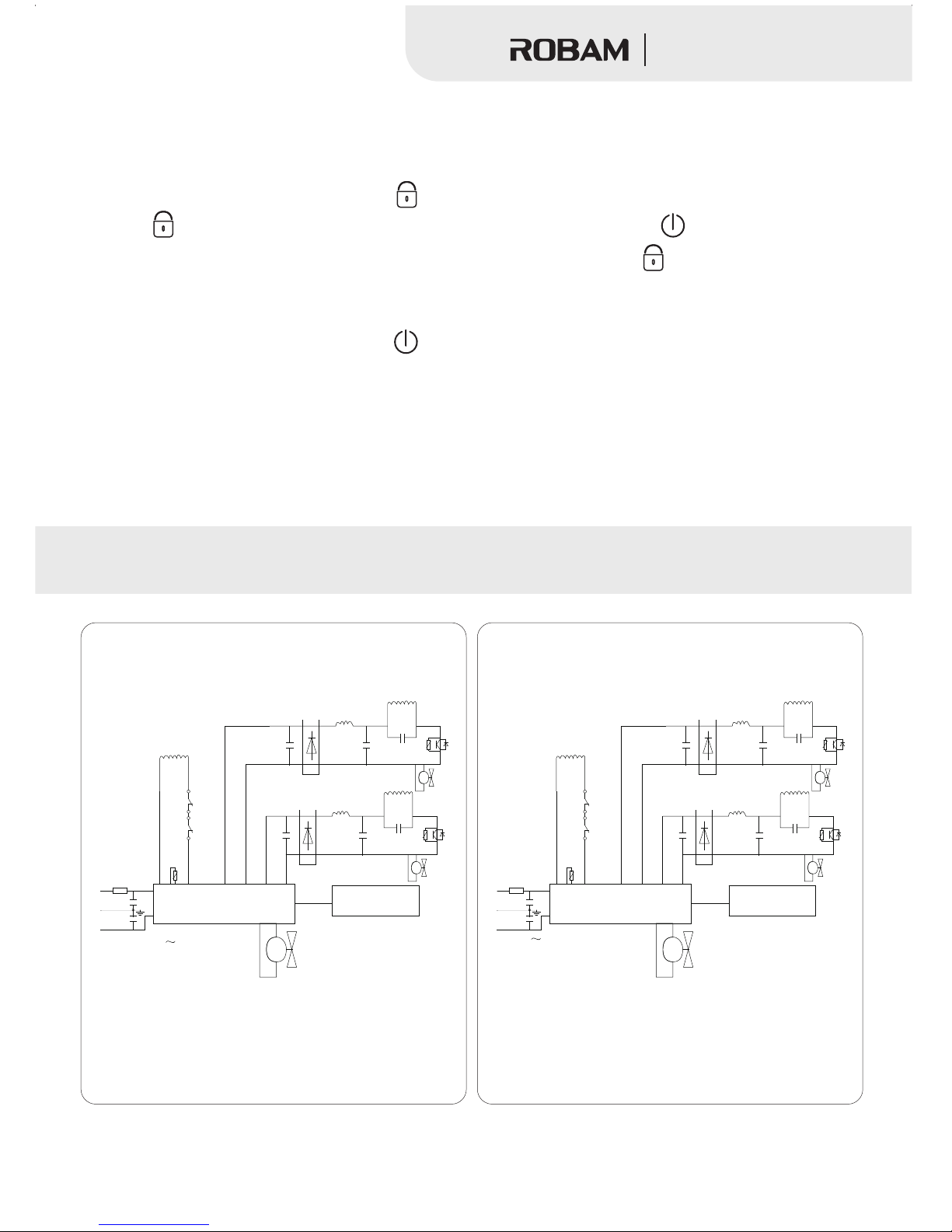
Electrical Schematic Diagram
7
Multifunction Hob
CD32-W985
CD28-W985
Pow er p l at e
Key board and
display board
L
E
N
220 V- 2 40 V
RL
K1
K2
RT2
C1B
D1B
C2B
L1B
L2B
C3B
Q1B
RT1B
L2A
C3A
Fan1B
Q1A
RT1A
L1A
C2 A
D1A
Fan1A
RF
Fan 2
C1A
220 V
Pow er p l at e
Key board and
display board
L
E
N
RL
K1
K2
RT2
C1B
D1B
C2B
L1B
L2B
C3B
Q1B
RT1B
L2A
C3A
Fan1B
Q1A
RT1A
L1A
C2 A
D1A
Fan1A
RF
Fan 2
C1A
Page 10
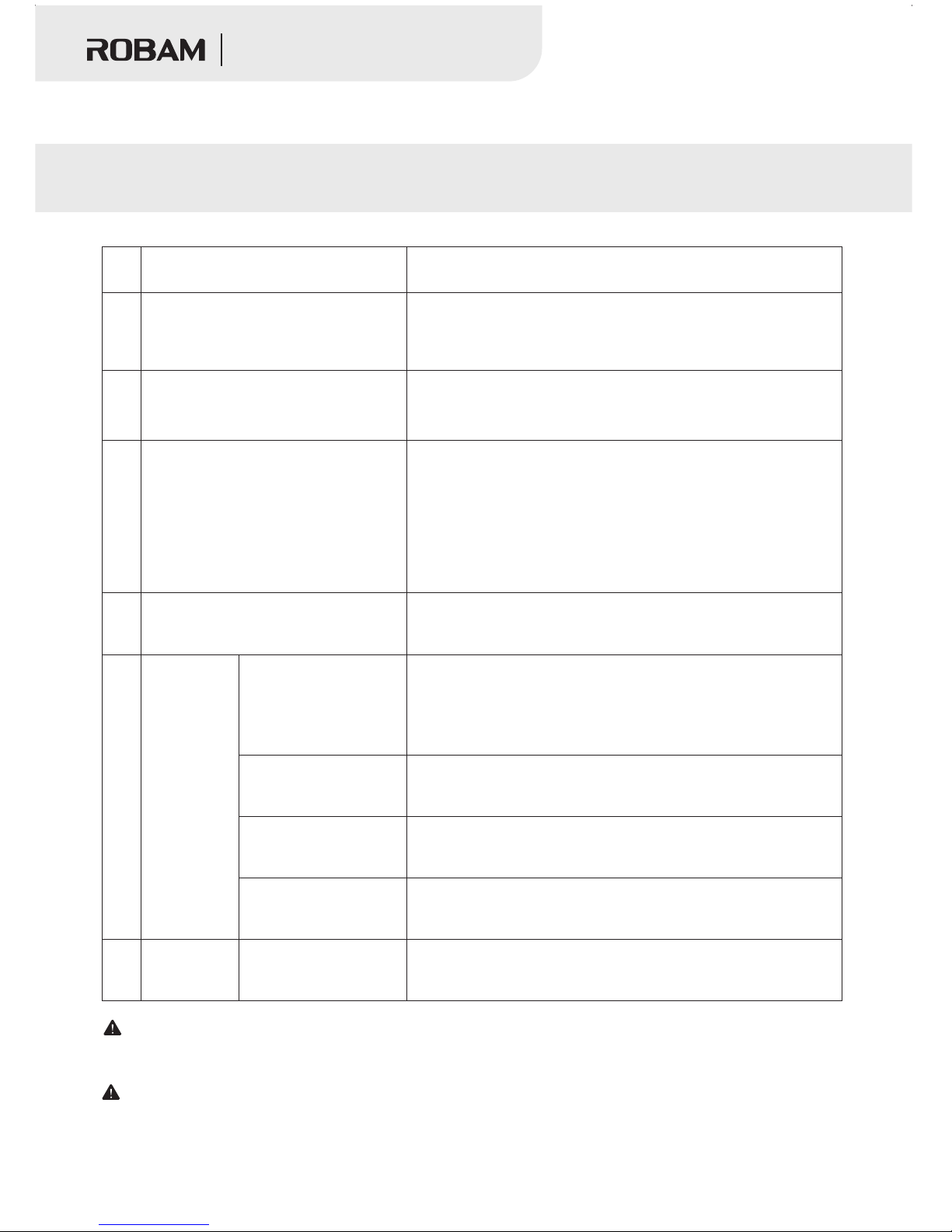
General Troubleshooting
The pow er cord i s 250V ~ 16 A (for Fre nch plu g) or , if the plug is damaged, in order to
avoid a hazard, it must be our company or our company’s maintenanc e depar tment o r simil arly qu alifi ed pers ons
to replace.
These p henom ena sti ll cann ot be exc luded o r not to re store t he faul ts, ple ase con tact ou r autho rized s ervic e
point or dealer, strictly prohibit non-pro fessi onals d isass emble t he mach ine.
250V ~ 13A (for UK plug)
No.
Common Faults
Problem Investigation
When Plug in the power plug, do not
hear the "ding" sound, and the light
does not turn on when press the
switch.
①Is the plug tight
②Whether blackout
③Whether the switch, socket, fuse and power supply are intact
The indicator light lights, but it does
not heat.
①Is the pot appropriate
②Whether in the reservation state
③Other reasons, please send to the authorized repai r outlets
Stopping heati ng duri ng the us e
①Is the surrounding temperature too high
②Are the intake port, exhaust port blocked
③Whether the setting time has come regularly
④Sometimes the protection device works, wait a few minutes
and then turn on the power and use
⑤Whether without any operation in 2 hours during the working
process
During the (f ixed te mpera ture) u sing
the temperature cannot be controlled
①Th e bo tt om o f th e po t is n ot f la t, o r th e ce nt er i s su nk
②Th e in di ca to r li gh t fo r se tt in g te mp er at ur e fu nc ti on i s on or
no t. .
The code
of faults
E0、E5、E6、
E7、Ed
E1
E2
E3、E4
H
Sweltering
Tip s
Send to the author ized repair outlets
※If the fault is caus ed by dry, please remove the cookware
and the panel can re sume work after cooling.
※If the internal co nnection is unsuccessful.
Strai ghten t he posi tion of t he pan or r epl ac e the a pp lic ab le
cookw are, it w ill res ume wor k.
Wai te for a mo ment, t emper ature r eturns to normal, it will
return to work.
When the power supply voltage is normal, it can automaticall y
resume operation.
Panel temperature of the electric auxiliary oven is t oo high , do
not touch the panel heating zone, caution hot.
1
2
3
4
5
6
8
Multifunction Hob
Page 11
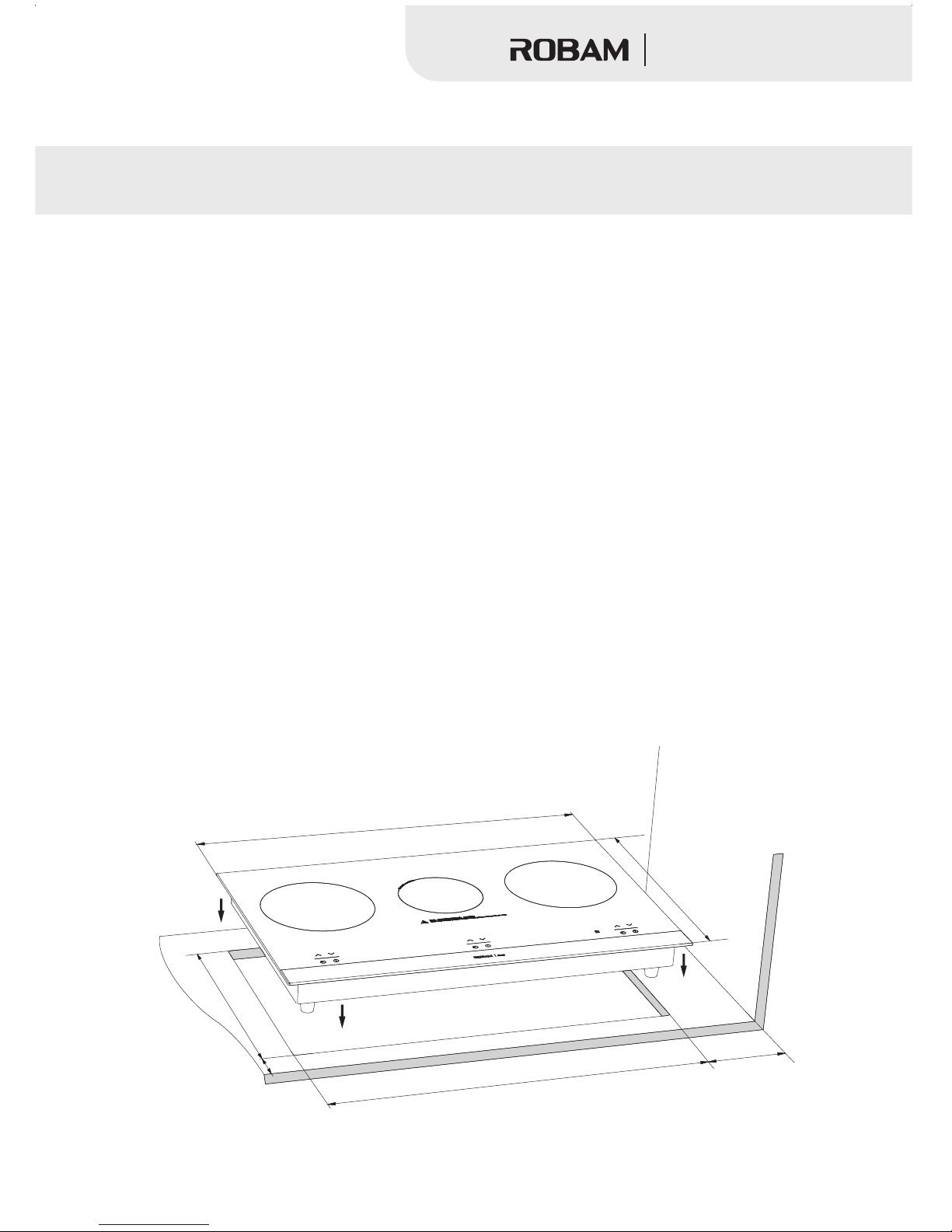
Installation Instruction
1.The t able top of kitchen cabinet should be keep horizonta l and clean. Make a aperture
dimension on th e table top of kitchen cabinet b efore instal lation. It need to clean the saw du st
before inst allation ,otherwise it will inte rface the component of multifunct ion hob ope ration
.Make sure w hole kitchen cabinet stabl e after making a ap erture dimension.
2.Keep distance no le ss than100mm from the air-taking hole to wall and keep space no l ess
than mm in ho rizontal ,please refe r to instructio n when install the hood .
3.Make a apertu re dimension on the kitchen cabin et which can compl y with requir ement of
ventilation a nd connect with air flow. (recommend size: wi dth200mm heig ht 200mm)
4.Make a aperture dimension on the table top according to the attached templet and make sure
the four vertical smooth aft er make a dimen sion. keep distance no less than 100mm from t he
bottom of induc tion to cabinet.
5.It should be sealed to keep hea t- resisting and swelled if making a aperture dimens ion on the
wooden top
6.The kitchen c abinet material should bea r 90 degree tempe rature
7.It needs to kee p distance no less than 40mm fro m side wall to aper ture hole
●We a re n ot r ecommend you to put induction cooker in the middle of two wall, if that happen ed
,please ma ke sure leave 200mm distance from one of the wall t o the aperture ho le.
8.Make sure fro m the top of oven to the top of table re ach to 70mm if want t o install the oven
9.Make sure the t hickness of table top no less th an 20mm if wan to ins tall the drawer
10.Make sure t o make a 80mm cutting from two side’ s board top to table top if t he dist ance fr om
two sides board s less than 758mm.
1000
Installation schematic diagram
5
0
0
8
0
0
>200
>60
7
5
8
+
2
-0
45
8
+
2
0
9
Multifunction Hob
Page 12

Cleaning and Maintenance
●Please cu t off the wire befor e clean the multifunc tion hob, and the clean should be done after
panel cooling .
●Do n t pu ll d own the plug directly under working state. The m ultifunctio n ho b should be turned
off firstly, then pull down the pl ug af ter fa n stop work ing. I t’ s helpful to prolong the life o f
product.
’
The method of clean the multifunction hobs
Body of product and control panel:
If the panel is dirty, please c lean it by wet w iper, if the oil is hard to clean , please clean it by
neutral clean ser firstly, an d then clean it by soft wiper.
Panel:
If the panel is dirty, please c lean it by wet w iper, if the oil is hard to clean , please clean it by
neutral clean ser firstly, an d then clean it by soft wiper.
Inlet and our let row surface:
Clean th e dust by cot ton stick. if there is some oil, users ca n clean it by brush with l ittle neutral
cleanser.
1.Don’ t cl ean the ma chine body, i nlet row a nd outlet row by organic solu tion, like oil or
benzene. P lease clea n the machi ne body, inlet a nd outlet r ow by soft brush or cle aner
regularly, if the dust is too m uch in the inlet row, it may shorte n the life of multi function hob.
2.Push cut off th e wi re e very time after using t he m ultifunction hob ,wait some mom ents until
the pan el is coolin g. Then clean the multifunct ion hob in time . If the smudginess is heated
by the bottom of pa n again and again , it will be hard to clean and ma ke panel change c olor.
3.Don’t allow to cl ean this product by steam clea nsers.
4.If the surface appear crack , pl ease turn off the mu ltifunction ho b an d stock working
immediately . It may cause electric shock.
Remarks
Accessories
1.One instruc tion book One carton boar d fro explanation the dimens ions of cut out are a 2.
Statement
If there is anything improvement on t he technolog y, we will make it up in the new manual
without special no tice. The modific ation of appearance or co lor must be co nfirmed on base of
actual object
10
Multifunction Hob
Page 13

 Loading...