

Page 1
rtc9212b.pm5
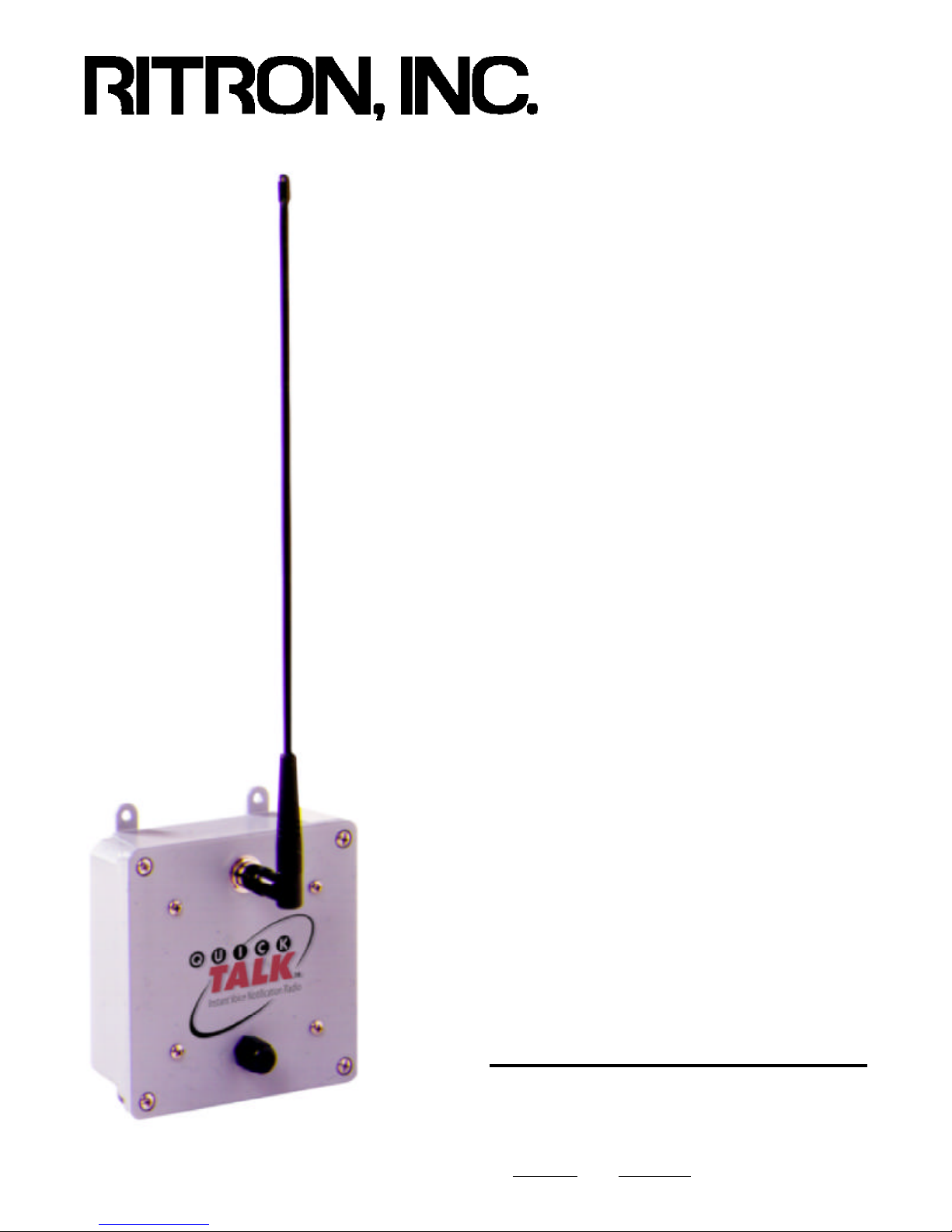
Quick Talk
Voice Notification
Radio Transmitter
Basic Owner's Manual
- CONSTRUCTION
- FACTORIES
- WAREHOUSES
- FARMS
- UTILITIES
- AIRPORTS
- STORES
- SECURITY
- LAW ENFORCEMENT
- SHIPPING
- APARTMENTS
- SPORTS
- HOTELS
- RESTAURANTS
- SCHOOLS
- TRANSPORTATION
Ritron Publication RQT-UM1 14500006 Revision B 02-12-1999
Copyright© 1999 RITRON, INC. — ALL RIGHTS RESERVED
RITRON®, PATRIOT®, JOBCOM® & Quiet Call® are registered trademarks of RITRON, INC.
Quick TalkTM is a trademark of RITRON, INC.
P.O. Box 1998, Carmel, IN 46032-1998 • 505 W. Carmel Dr., Carmel, IN 46032 • USA
PH: 317-846-1201; 1-800-USA-1-USA (1-800-872-1872) • FAX: 317-846-4978
Web: www.ritron.com • E-mail: [email protected]
Page 2

rtc9212b.pm5
TABLE OF CONTENTS
WHAT THIS MANUAL COVERS
DESCRIPTION PAGE
WHAT THIS MANUAL COVERS ii
WARNINGS AND CAUTIONS ii
ACCESSORIES AND OPTIONS ii
INTRODUCTION 1
General 1
Model Identification 1
FEATURES 1
Basic Features 1
Advanced Features 1
CONTROLS & CONNECTORS 2
PROGRAMMING 3
Frequently Asked Questions 3
Testing Your Programming Telephone 3
Transmitter Frequency 4
Quiet Call Coded Squelch Codes 5
Digital Quiet Call Squelch Codes 6
Testing Your Switch 7
Recording Voice Messages 8
Playing Back Voice Messages 8
Programming Voice Phrase Repetitions 9
Programming a Transmission Schedule 9
Limiting the Number of Transmissions 10
Resetting the unit to Factory Defaults 10
INSTALLATION 11
This manual (Ritron Item: RQT-UM1) covers basic operation of the Quick Talk Voice Notification Radio Transmitter.
For the majority of applications this is all you will need.
There are many more complex features of the Quick Talk
that are explained in the Advanced Features Manual
(Ritron Item: RQT-UM2).
In addition, the following application notes are available via
fax by calling Ritron at 317-846-1201, or on the Ritron
Website at "http://www.ritron.com".
App.Note # Description of Application Bulletin
RQT-AN01 Using 0-5 V and 4-20 mA Analog Inputs
RQT-AN02 Using Terminated Alarm Loops
RQT-AN03 Greater Range with Optional Antennas
RQT-AN03 Greater Ranges using Repeaters
RQT-AN04 Vehicle Detectors for the Quick Talk
RQT-AN05 Solar Power Panels for Quick Talk
RQT-AN06 Ritron Custom Engineering Services
RQT-AN07 Interfacing to High Power Radios
RQT-AN08 Quick Talk Agricultural Applications
RQT-AN09 Quick Talk Industrial Applications
RQT-AN10 Quick Talk Retail Business Applications
RQT-AN11 Security and Alarm Applications
RQT-AN12 Home and Sports Application
- - - - - - - WARNING - - - - - - -
IMPORTANT SAFETY INFORMATION
CARE AND MAINTENANCE 11
Low Battery Alert Message 11
Battery Replacement 11
F.C.C. LICENSING 12
WARRANTY 12
ACCESSORIES FOR QUICK TALK
These replacement and optional items are available from
Ritron and its authorized dealers.
Item Description
AFB-1545 Standard 19' Flexible Whip Antenna
ABD-1545 High Performance External Antenna
RAC-02BN Coaxial Cable for External Antenna, 20 ft.
RQT-UM2 Advanced Features Applications Manual
When using this unit, follow these basic safety instructions to reduce the risk of fire, electric shock or
personal injury.
1. Read and follow all instructions.
2. Disconnect the unit before cleaning. Do not use liquid
or aerosol cleaners.
3. Use only approved power sources for the unit.
4. During thunderstorms, avoid contact with this unit and
any external antenna system or wiring.
5. The Quick Talk switch and external power terminals are
connected internally to the antenna connector. If the
Quick Talk switch or power supply terminals are
connected to a high voltage a hazardous condition may
exist in that contact with the antenna may prove
injurious or even fatal.
6. In general, the switches you connect to the Quick Talk
should be independent dry contact switches and not a
part of any other "live" electrical circuit
7. If you are unsure whether your installation will be safe,
contact an experienced electrician or electronics
technician.
Page ii
Page 3

qtm9212a.pm5
ABOUT THE QUICK TALK VOICE NOTIFICATION TRANSMITTER
GENERAL INFORMATION
The Quick Talk is a radio transmitter that reports changes
in the status of switches by transmitting user-recorded
voice messages to two-way mobile or portable radios.
Quick Talk transmits your voice message when the switch
change occurs and at intervals you select.
Because you provide and connect the switches to your
Quick Talk units, they can report changes due to intrusion,
tamper, equipment malfunction, liquid level, machinery,
pressure, temperature, power, smoke or leakage.
The Quick Talk is easily programmed to transmit on your
existing or new radio frequency and also encodes the most
popular sub-audible coded squelch formats such as Quiet
Call® or Digital Quiet CallTM. This enables all of your
personnel with JOBCOM, PATRIOT or equivalent two-way
radios to hear the voice messages instantly, and to be
alerted to the current condition of each monitored location
or device.
Quick Talk is housed in a weather-resistant enclosure so
that it can be installed in a wide variety of indoor and
outdoor locations. You don't have to supply AC line power
to the Quick Talk because its six internal AA Alkaline
batteries will power the unit for about a year.
QUICK TALK MODELS AND FREQUENCIES
There are two separate Quick Talk models, one for each of
the most popular professional radio communications
bands. The model number appears on a label on the front
of the case and a second label is placed inside the case.
MODEL BAND FREQUENCY RANGE
RQT-150 VHF-FM 150 to 165 MHz
RQT-450 UHF-FM 450 to 470 MHz
Ritron manufactures mobile, portable and base station twoway radios and repeaters for use with Quick Talk, and
pioneered the use of Color Dots on radios to identify
frequencies. The factory-programmed, default frequencies
for Quick Talk are Blue Dot (154.570 MHz) for VHF units,
and Blue Star (467.925 MHz) for UHF units. The instructions on page 4 describe how easy it is for the owner to
change the Quick Talk transmit frequency to match that of
an existing radio system.
QUICK TALK FEATURES
DESCRIBED IN THIS BASIC FEATURES MANUAL:
- Internal radio transmitter (separate VHF and UHF models).
- User-recorded voice messages; total recording time of 16 seconds.
- Terminals for connection to user supplied switches.
- Included external antenna.
- Typical range of 1/2 mile. Longer range is possible using an optional antenna.
- Weather-resistant (but not waterproof or immersible) enclosure.
- Internal battery holder for six (6) AA Alkaline cells.
- Typical operating battery life of 1 year.
- Automatic Low Battery Message
- Limited One-year Factory Warranty .
- The following programmable features:
- Transmit Frequency
- Tone Coded Squelch Encoder (Quiet Call® Interference Eliminator).
- Digital Coded Squelch Encoder (Digital Quiet CallTM Interference Eliminator).
- Message transmission schedules and limits.
DESCRIBED IN THE ADVANCED FEATURES MANUAL:
- Use of the Second Switch Input Terminals.
- Analog Voltage (or 4-20 mA loop) Inputs
- Multiple Location Identification Messages
- Terminated Alarm Loop Inputs
- Modulation Select for Narrow Band Channels
- Connection and Use of an External 12 Volt DC Power Supply.
- Use of Solar Power Panels to Operate and Charge Internal NiCad Batteries
- Enabling and Disabling the Low Battery or External Power Failure Messages
- Battery Saver Options
For assistance, telephone RITRON at 1-800-872-1872 or go to "http://www.ritron.com".
Page 1
Page 4
qtm9212a.pm5
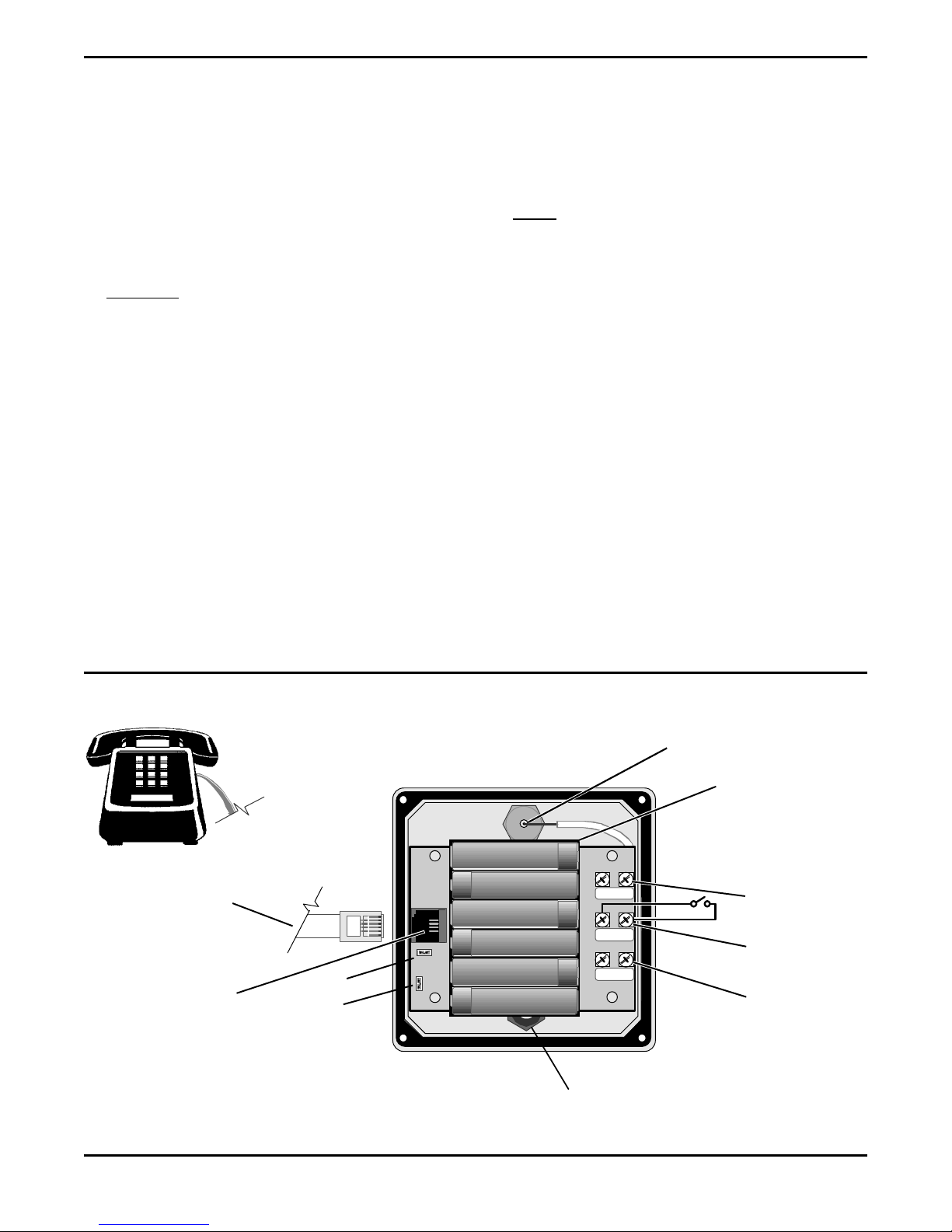
IDENTIFICATION OF CONTROLS AND CONNECTIONS
1 ANTENNA CONNECTOR
The antenna radiates radio signals. Before using Quick
Talk, make sure the antenna is fastened securely to this
connector.
2 TELEPHONE JACK
The modular telephone jack is for temporary connection
to a standard pulse or rotary mode telephone which is
used by the owner to program the Quick Talk voice
messages and other settings.
WARNING: Do not connect the Quick Talk to a line
from the telephone company; doing so will damage the
Quick Talk and void its warranty.
3 BATTERY HOLDER
This holds the six (6) standard "AA" alkaline cells
required to power the Quick Talk.
Always install a fresh set of alkaline batteries before
programming Quick Talk.
4 SWITCH TERMINALS
These terminals are for connection to two (2) external,
user-supplied switches (SW1 and SW2). This manual
covers applications that use Switch 1 only. Refer to the
Advanced Features Manual for information about using
the second switch.
5 EXTERNAL POWER TERMINALS
Refer to the Advanced Owner's manual for information
about connecting an external 12 Volt DC power supply
to these terminals.
6 WATERTIGHT STRAIN RELIEF CABLE FITTING
The cable to your external switches passes through this
fitting. When used with recommended cable sizes, the
strain relief fitting provides a watertight enclosure. Do
not overtighten the strain relief fitting.
NOTE: You may use Radio Shack Telephone Station
Wire, 6-conductor, solid 24-AWG In-wall Type CM, Cat.
No. 278-874, or round cable of equivalent diameter
(between 0.114 and 0.250 inches). If you cannot find
suitable wire, call Ritron at 1-800-872-1872.
7 TRANSMITTER BANDWIDTH SELECT JUMPER
Do not remove. See the Advanced Features Manual.
8 BATTERY TYPE SELECTOR
As described in the Advanced Features Manual, this
jumper controls charging of optional NiCad batteries.
FIGURE 1: CONTROL & CONNECTION LOCATIONS
USER SUPPLIED MODULAR
TELEPHONE CORD. TO
TELEPHONE SET ONLY.
DO NOT CONNECT TO A
TELEPHONE LINE.
2
Standard RJ11
Telephone Jack
Owner-supplied Standard Desk
Telephone Set, switched to Pulse
Dialling Mode
TO QUICK TALK
TELEPHONE JACK.
7
8
(Back of Quick Talk Cover Assem.)
+
+
+
+
+
—
SWIT
CH 2
+
+
—
SWIT
CH 1
+
+
6
—
EXT. PWR.
Strain Relief Fitting
(for wire to external Switch)
1
Antenna Connection
(Antenna shown on page 11.)
3
Battery Holder
4
Switch 2
Wiring Terminals
4
Switch 1
Wiring Terminals
5
External Power
Input Terminals
Page 2
For assistance, telephone RITRON at 1-800-872-1872 or go to "http://www.ritron.com".
Page 5

qtm9212a.pm5
PROGRAMMING YOUR QUICK TALK
FREQUENTLY ASKED QUESTIONS ABOUT QUICK TALK
Do I have to program my Quick Talk? You may not need
to program your Quick Talk at all. If you purchased a Quick
Talk factory programmed to your radio system frequency
(check the Color Dots on your radios and the Quick Talk)
and you do not use a form of Quiet Call coded squelch, you
can connect your switch to the terminals marked "SW#1"
install the batteries and start using Quick Talk. The factory
default voice messages are "Switch Open" and "Switch
Closed". Otherwise, yes you will need to use this manual.
Do I need to program everything? No. In many cases
the factory preprogrammed settings which are explained in
the instructions will meet your needs.
How do I program my Quick Talk? Quick Talk is designed to use a commonly available standard telephone set
to enter programming information and your custom voice
messages. However, the telephone must be capable of
"Pulse" operation and switched to that mode. The telephone is only used for programming and is disconnected
when the Quick Talk is operating normally.
What do I do if I don't find what I need in this manual?
Call Ritron. We are glad to help. For most applications, we
hope this manual covers everything you need to know.
However, the Quick Talk has even more capabilities and
features than are described here. The Advanced Owner's
Application Manual or the other Application Notes listed on
the inside cover may also help you. Again, just contact us.
We can make Quick Talk do just about anything.
Can I hurt the Quick Talk by programming it improperly? No. You just may need to erase everything and start
all over again. See page 10 to do this. So feel free to
experiment with the various features and configurations
possible.
Can my settings or messages get lost or erased if the
battery runs down or is disconnected? No. The settings
and voice messages you enter are stored in special
electronic memory devices in the Quick Talk that do not
require power to hold the information. This means that if
the Quick Talk batteries run down or you remove the
batteries, you will not need to reprogram the unit. All of
your settings and messages will be there for you to use
when you install fresh batteries.
What if I need more range? To increase the range of your
Quick Talk transmissions, we first suggest changing where
the unit is installed. Depending on the type of switch and
wire you connect to the Quick Talk, you could run the wire
to the switch for several hundred feet. This lets you install
the Quick Talk and its attached antenna at some unobstructed and elevated position for the best range. Also,
Ritron offers several optional "high gain" antennas. Finally,
we can provide a radio repeater which can increase the
range not only of your Quick Talk but all of the radios in
your system.
1. TEST THE TELEPHONE YOU WILL USE TO PROGRAM THE QUICK TALK
A telephone that only produces Touch Tones cannot
be used to program the Quick Talk.
Also most speaker phones, telephones with lighted
dials or special office telephones usually cannot be
used to program the Quick Talk.
a. Remove the screws from the front panel and open
the Quick Talk. Use care not to damage or disturb
any exposed internal components.
b. Install six new alkaline "AA" batteries in the Quick
Talk. Observe the polarity marks on the batteries
and the Quick Talk battery holder.
c. Check that your telephone is capable of "Pulse"
mode. Most modern telephones have a selection
switch that must be set to the "P" rather than the "T"
position in order to program the Quick Talk. In the
"Pulse" mode, each telephone digit generates a
rapid series of clicks rather than Touch Tones. The
telephone switch must be set to "P" (Pulse) to
program the Quick Talk.
d. Your telephone must have a cord with a standard
modular plug attached. Insert the plug into the
telephone jack inside the Quick Talk.
e. Test the telephone for suitability by plugging it into
the Quick Talk's Telephone Jack and dialing "0"
(Operator). You must hear a repeating busy signal
in the earpiece which indicates that the telephone is
acceptable for programming the Quick Talk.
d. If your telephone does not check out, try another
telephone.
Using the Telephone to Program Quick Talk
Programming the Quick Talk with the telephone consists of
dialing numbers that represent commands and settings.
These are explained in this manual.
If you make a dialing mistake while programming, hang up
the telephone, then pick it up and start over.
What the Tones (Beeps) in the Telephone Receiver
Mean
When you pick up the receiver, Quick Talk sounds a brief
acknowledgment tone. You must wait for this tone before
you dial any numbers.
After you dial in a command and setting, Quick Talk
responds with a confirmation tone. You may then hang up
or dial another command.
If Quick Talk does not understand your command because
you mis-dialed or the command is invalid, Quick Talk
sounds and repeats a series of longer tones until you hang
up. You may then try your command again.
When you dial the command for Quick Talk to record a
voice message, a series of three short tones cue you to
begin speaking.
For assistance, telephone RITRON at 1-800-872-1872 or go to "http://www.ritron.com".
Page 3
Page 6
qtm9212a.pm5
PROGRAMMING YOUR QUICK TALK TRANSMITTER FREQUENCY
What is my Radio System Frequency? Ritron invented
the system of Color Dots to simply identify radio system
frequencies for its Jobcom radios. The Color Dot is placed
on the bottom and on the inside of the enclosure of all
Jobcom radios. Other manufacturers also adopted this
plan. If your radios do not have a color dot there may be
another label somewhere indicating the receiver frequency
in megahertz (MHz). Also your assigned frequency is
shown on your F.C.C. Station License. Call your radio
dealer or Ritron for help if you cannot determine your
radio's receiver frequency.
Do I need to program my Quick Talk's transmitter
frequency? The original factory programmed transmit
frequency for your Quick Talk is marked on the outside of
the shipping box and indicated by a color dot on the inside
of the case. If this is your radio system frequency and the
Quick Talk has not been reprogrammed since it left the
factory, then you may skip this section and proceed to the
next.
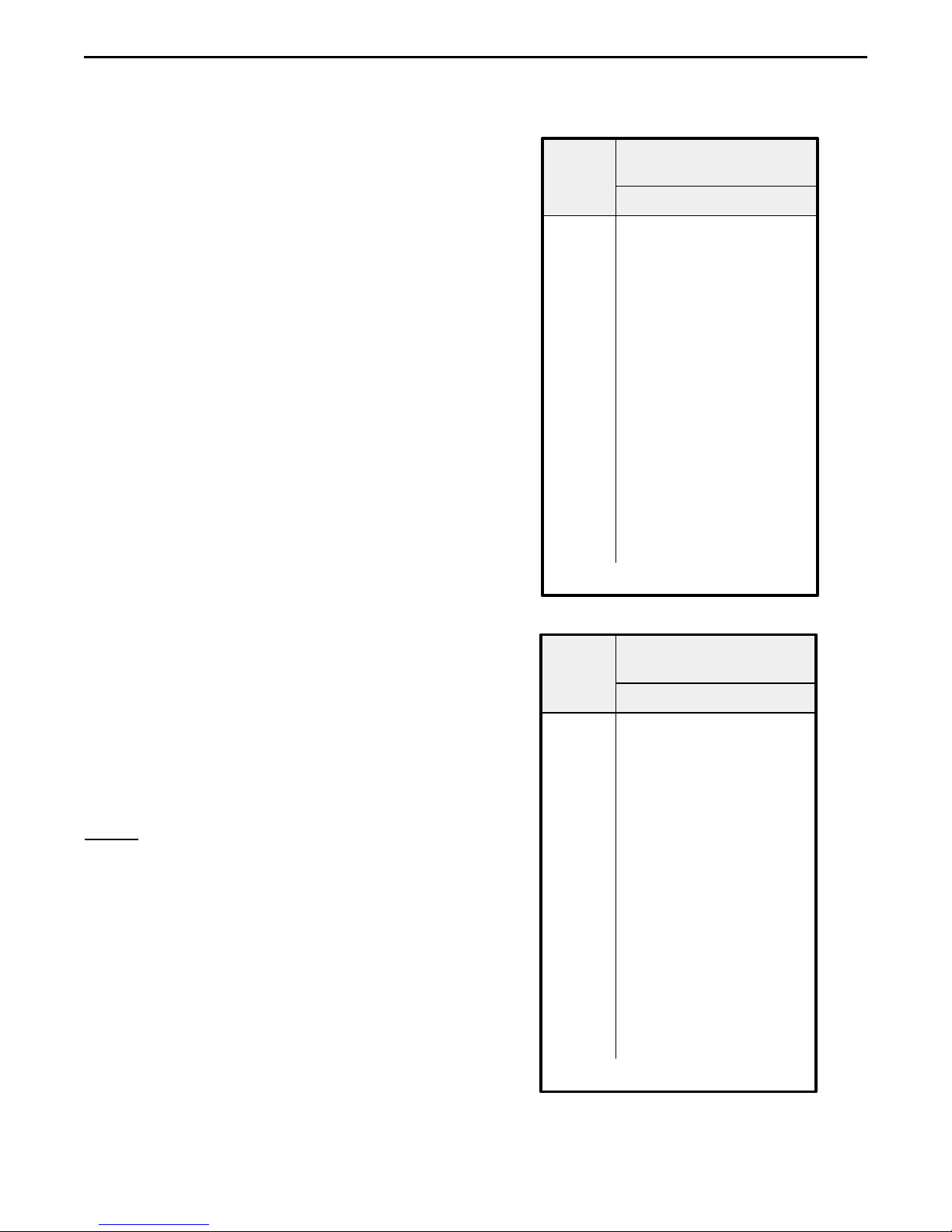
TO PROGRAM THE QUICK TALK TRANSMITTER
FREQUENCY:
a. Determine the frequency of your radio system.
b. Find your frequency in the appropriate table to the
right and determine its corresponding two digit code.
If your radio system frequency is not in the chart,
your Quick Talk must be programmed by a radio
dealer or Ritron.
c. Pick up the telephone receiver, and listen for the
acknowledge tone. Dial "11", then the digits of the
correct frequency code from the table.
For example if your Quick Talk is a VHF-FM RQT150 model and your radios operate on 154.570 MHz
(Blue Dot frequency), dial "11-02".
Or if your Quick Talk is an RQT-450 and the radios
operate on 467.925 MHz (Blue Star frequency), dial
"11-08".
d. Quick Talk will respond with a single beep to
indicate that it has set the transmitter to your radio
system frequency.
e. You may either hang up or continue programming.
NOTES:To avoid confusion later, you might consider
removing the Color Dot if you program your Quick
Talk to some other frequency.
If you make a dialing mistake while programming,
hang up the telephone, then pick it up and start
over.
What the Tones (Beeps) in Your Earpiece Mean:
- A single brief tone means your command is accepted and stored.
- A series of long repeating tones means your
command was not understood. Hang up and try
again.
- A series of three short tones cues you to begin
recording a message.
TABLE 1:TRANSMIT FREQUENCY CODES
QUICK
TALK
FREQ. CODE
01 154.600..... Green Dot
02 154.570..... Blue Dot
03 151.625..... Red Dot
04 151.955..... Purple Dot
05 151.925
06 154.540
07 154.515
08 154.655
09 151.685
10 151.715
11 151.775
12 151.805
13 151.835
14 151.895
15 154.490
16 151.655
17 151.745
18 151.865
QUICK
TALK
FREQ. CODE
01 467.7625 ..... J
02 467.8125 ..... K
03 464.5500 ..... Yellow Dot
04 464.5000 ..... Brown Dot
05 467.8500 Silver Star
06 467.8750 Gold Star
07 467.9000 Red Star
08 467.9250 Blue Star
09 469.2625
10 462.5750 White Dot
11 462.6250 Black Dot
12 462.6750 Orange Dot
13 464.3250
14 464.8250
15 469.5000
16 469.5500
17 463.2625
18 464.9125
19 464.6000
20 464.7000
VHF Business Band
( Model RQT-150 )
MHz Frequency Color
UHF Business Band
( Model RQT-450 )
MHz Frequency Color
Page 4
For assistance, telephone RITRON at 1-800-872-1872 or go to "http://www.ritron.com".
Page 7
qtm9212a.pm5
PROGRAMMING THE QUIET CALL SUB-AUDIBLE CODED SQUELCH
INTERFERENCE ELIMINATOR
What is Quiet Call Sub Audible Coded Squelch? The
Quick Talk radio transmitter is compatible with two
communications industry standard sub-audible signaling
formats: QC® (Quiet Call Interference Eliminator) and
DQCTM (Digital Quiet Call Interference Eliminator). Both
QC formats function to unlock receivers that are set to
require these codes in order to screen out interference
from other radio systems operating on your same
frequency.
QC® Quiet Call is Ritron’s trade name for what the
communications industry calls sub-audible (below the
range of human hearing) tone squelch or the CTCSS
(Continuous Tone Coded Squelch System). Other radio
manufacturers have other tradenames for what is
essentially the same system. A specific QC code may be
set in your Quick Talk and transmitted with voice messages
to unlock the receivers in your radio system.
DQCTM Digital Quiet Call is Ritron’s digital coded squelch,
works the same as QC, except it is a digital code
transmitted with voice messages.
Do I need to program my Quick Talk with a Quiet Call
Code? Your radio system may or may not use coded
signaling. If you set the Quick Talk to your radio frequency
and your radios do not receive its transmissions unless
their "monitor" or "test" button is pressed, then your system
probably uses Coded Squelch. Refer to the manual for one
of your radios or contact your radio dealer or Ritron if you
are unsure about this issue.
If your Quick Talk was previously programmed with a Quiet
Call code, it may be removed by following the procedure
below using the "No Tone" code of 44 as shown in the
table.
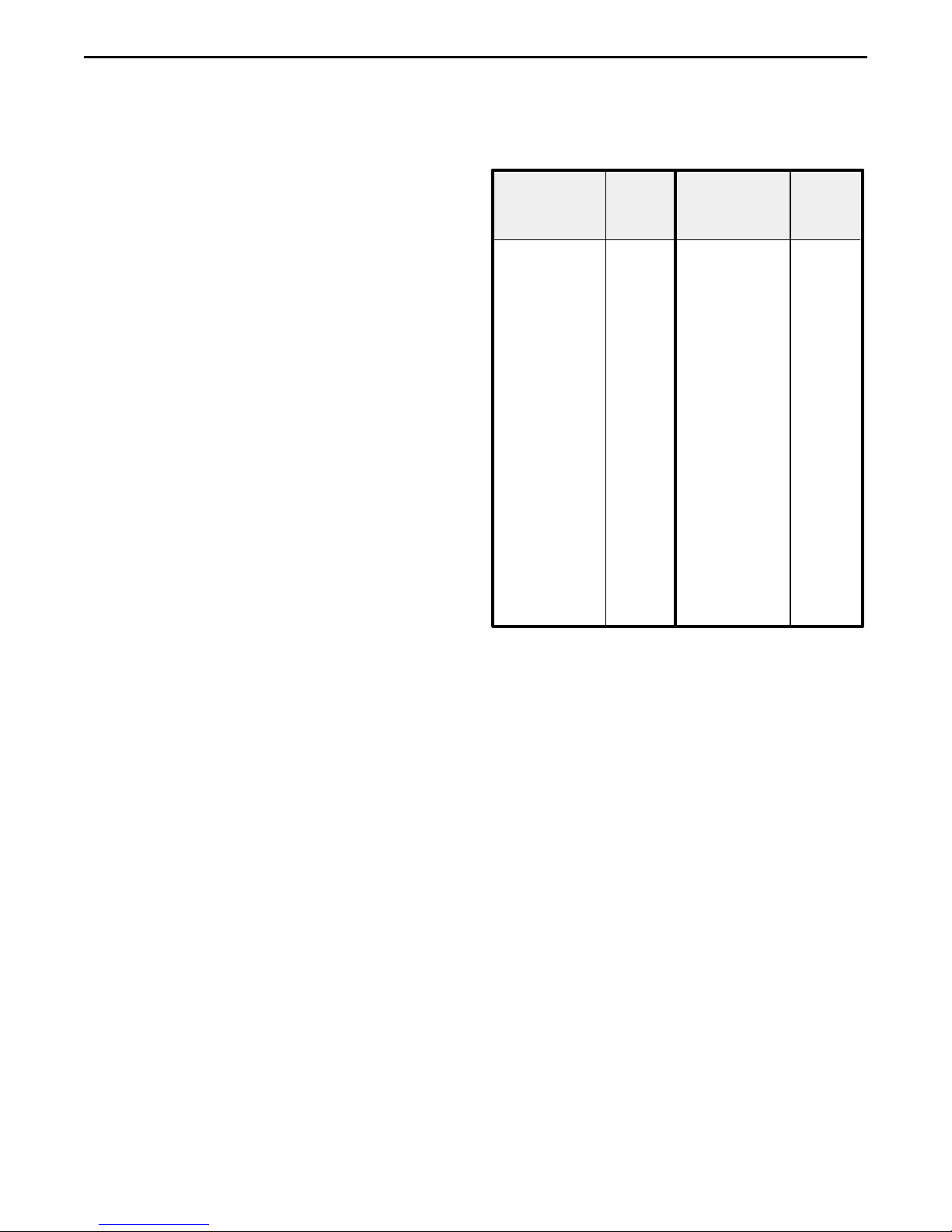
TABLE 2: QUIET CALL TONE CODES
QUICK
TALK
QC
CODE
01
02
03
04
05
06
07
08
09
10
11
12
13
14
15
16
17
18
19
20
21
22
23
24
25
26
Freq.
( Hz )
67.0
71.9
74.4
77.0
79.7
82.5
85.4
88.5
91.5
94.8
97.4
100.0
103.5
107.2
110.9
114.8
118.8
123.0
127.3
131.8
136.5
141.3
146.2
151.4
156.7
162.2
Other
Radio Brands
Tone
Code
XZ
XA
WA
XB
SP
YZ
YA
YB
ZZ
ZA
ZB
1Z
1A
1B
2Z
2A
2B
3Z
3A
3B
4Z
4A
4B
5Z
5A
5B
* Use Code 44 to select No Tone or for systems without a
Coded Squelch Interference Eliminator feature. Refer to
text at left.
QUICK
TALK
QC
CODE
27
28
29
30
31
32
33
34
35
36
37
38
39
40
41
42
43
*44
45
46
47
48
49
50
51
Freq.
( Hz )
167.9
173.8
179.9
186.2
192.8
203.5
210.7
218.1
225.7
233.6
241.8
250.3
69.4
159.8
165.5
171.3
177.3
No Tone
183.5
189.9
196.6
199.5
206.5
229.1
254.1
Other
Radio Brands
Tone
Code
6Z
6A
6B
7Z
7A
M1
- -
- -
- -
- -
- -
- -
- -
- -
- -
- -
- -
- -
- -
- -
- -
- -
- -
- -
- -
To Program A Quiet Call Sub-Audible Squelch Code:
a. Determine the Quiet Call code tone that your radio
system uses. If your system uses Digital Quiet Call,
go to the next page.
b. Select the desired Tone Code from Table 2 at right.
If your radio system does not use coded squelch,
use the "44" no-tone code. Write down this Quick
Call code.
c. Pick up the telephone receiver, and listen for the
acknowledge tone.
d. Dial "21", then the 2-digit QC Code for the selected
frequency.
For example, if your Quiet Call frequency is 136.5
Hz or code 21, dial: "21-21".
Quick Talk should respond with a confirmation tone.
e. You may either hang up or continue programming
additional features.
For assistance, telephone RITRON at 1-800-872-1872 or go to "http://www.ritron.com".
Page 5
Page 8
qtm9212a.pm5
PROGRAMMING DIGITAL QUIET CALL SUB-AUDIBLE CODED SQUELCH
INTERFERENCE ELIMINATOR
What is Digital Quiet Call? Digital Quiet Call (DQC) is a
digital sub-audible coded squelch system.
Do I need to program my Quick Talk with a Digital Quiet
Call code? If your radio system does not use Digital Quiet
Call (or other tradename equivalent) then you should skip
this section and go on to the next programming feature.
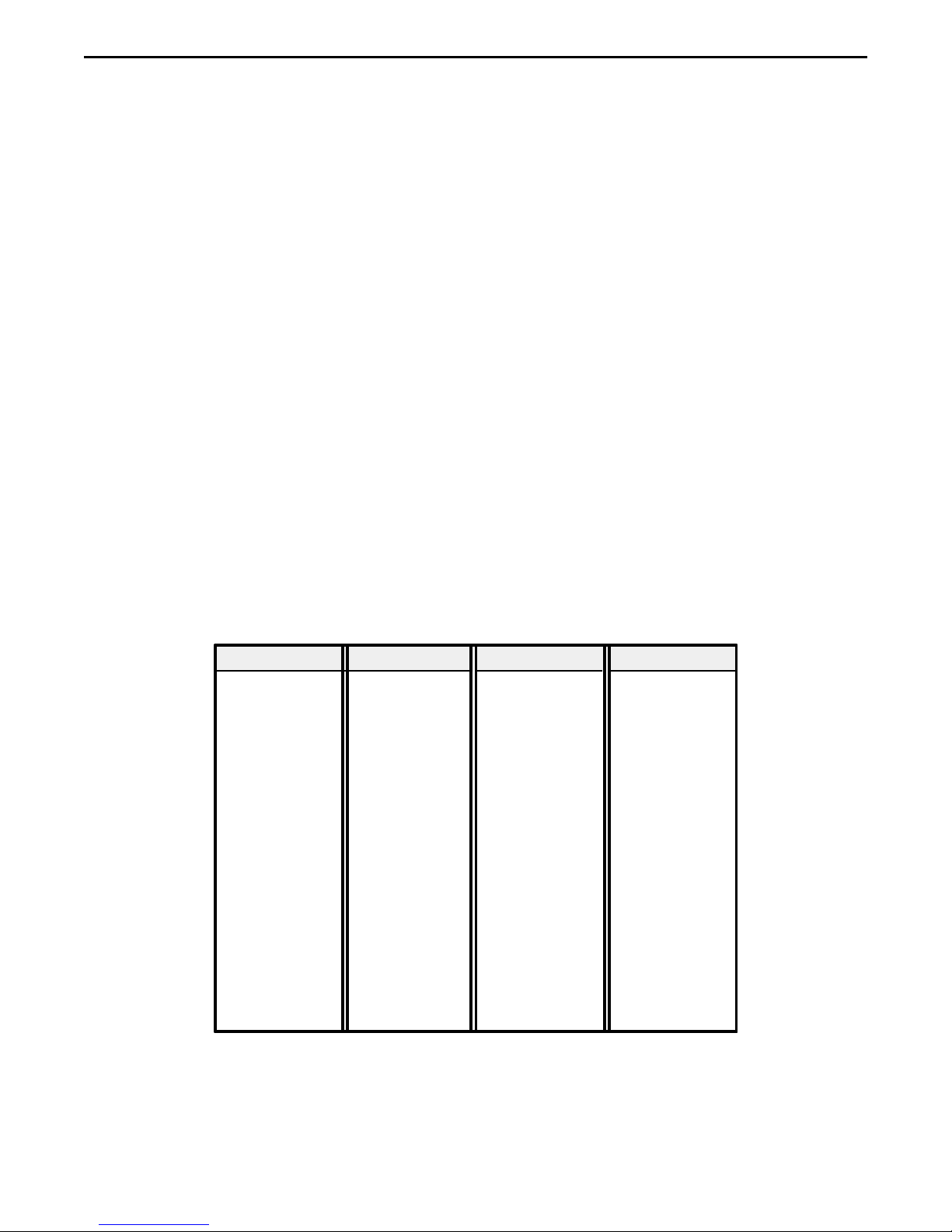
TO PROGRAM A DIGITAL QUIET CALL CODE:
a. Determine the specific Digital Quiet Call (DQC) code
used for your system. Make sure this code is listed
in Table 3 which shows all of the possible DQC
codes for the Quick Talk. If it is not there, call your
radio service provider or Ritron.
b. Write down your code.
c. Pick up the telephone receiver, and listen for the
acknowledge tone.
d. Dial "22" followed by the selected 3-digit DQC code.
For example if your DQC code is "131", dial "22-
131".
Wait for Quick Talk's Confirmation Beep.
e. You may either hang up or continue programming.
TABLE 3: DIGITAL QUIET CALL CODES
Normal Invert Normal Invert Normal Invert Normal Invert
023 .........047 143.........412 315 ........ 423 532 .........343
025 .........244 152......... 115 331 ........ 465 546 .........132
026 .........464 155......... 731 343 ........ 532 565 .........103
031 .........627 156......... 265 346 ........ 612 606 .........631
032 .........051 162......... 503 351 ........ 243 612 .........346
043 .........445 165......... 251 364 ........ 131 624 .........632
047 .........023 172......... 036 365 ........ 125 627 .........031
051 .........032 174......... 074 371 ........ 734 631 .........606
054 .........413 205......... 263 411 ........ 226 632 .........624
065 .........271 223......... 134 412 ........ 143 654 .........743
071 .........306 226......... 411 413 ........ 054 662 ......... 466
072 .........245 243......... 351 423 ........ 315 664 .........311
073 .........506 244......... 025 431 ........ 723 703 .........565
074 .........174 245......... 072 432 ........ 516 712 .........114
114 ......... 712 251......... 165 445 ........ 043 723 .........431
115 ......... 152 261......... 732 464 ........ 026 731 .........155
116 ......... 754 263......... 205 465 ........ 331 732 .........261
125 .........365 265......... 156 466 ........ 662 734 .........371
131 .........364 271......... 065 503 ........ 162 743 .........654
132 .........546 306......... 071 506 ........ 073 754 .........116
134 .........223 311 ......... 664 516 ........ 432
Page 6
For assistance, telephone RITRON at 1-800-872-1872 or go to "http://www.ritron.com".
Page 9
qtm9212a.pm5
TEST YOUR SWITCH'S OPEN AND CLOSED CONDITIONS
What is the purpose of testing my switch? In Quick
Talk's basic operating mode, you may record two (2) voice
messages for the Quick Talk to transmit. One message is
transmitted when the switch is Opened and the other is
transmitted when the switch is Closed. Each message
must be 8 seconds or less in length.
Before you record these messages, you must determine
how your switch works. This can be done using the factory
prerecorded messages in the Quick Talk. Use the following
procedure after you have programmed the Quick Talk with
your radio system frequency and any required sub-audible
squelch codes.
Do I need to test my switch? If you are certain of what
conditions cause your switch to open or close, you do not
need to perform this test. However, we recommend that
you perform this test because it confirms that you have
properly programmed the Quick Talk's transmitter
frequency (and if required by your radio, its Quiet Call
Interference Eliminator squelch code).
To Test Your Switch and Verify Reception of Messages
by Your Radios
1. Remove the batteries from the holder.
2. Review the safety precautions at the beginning
of this manual when connecting your switches.
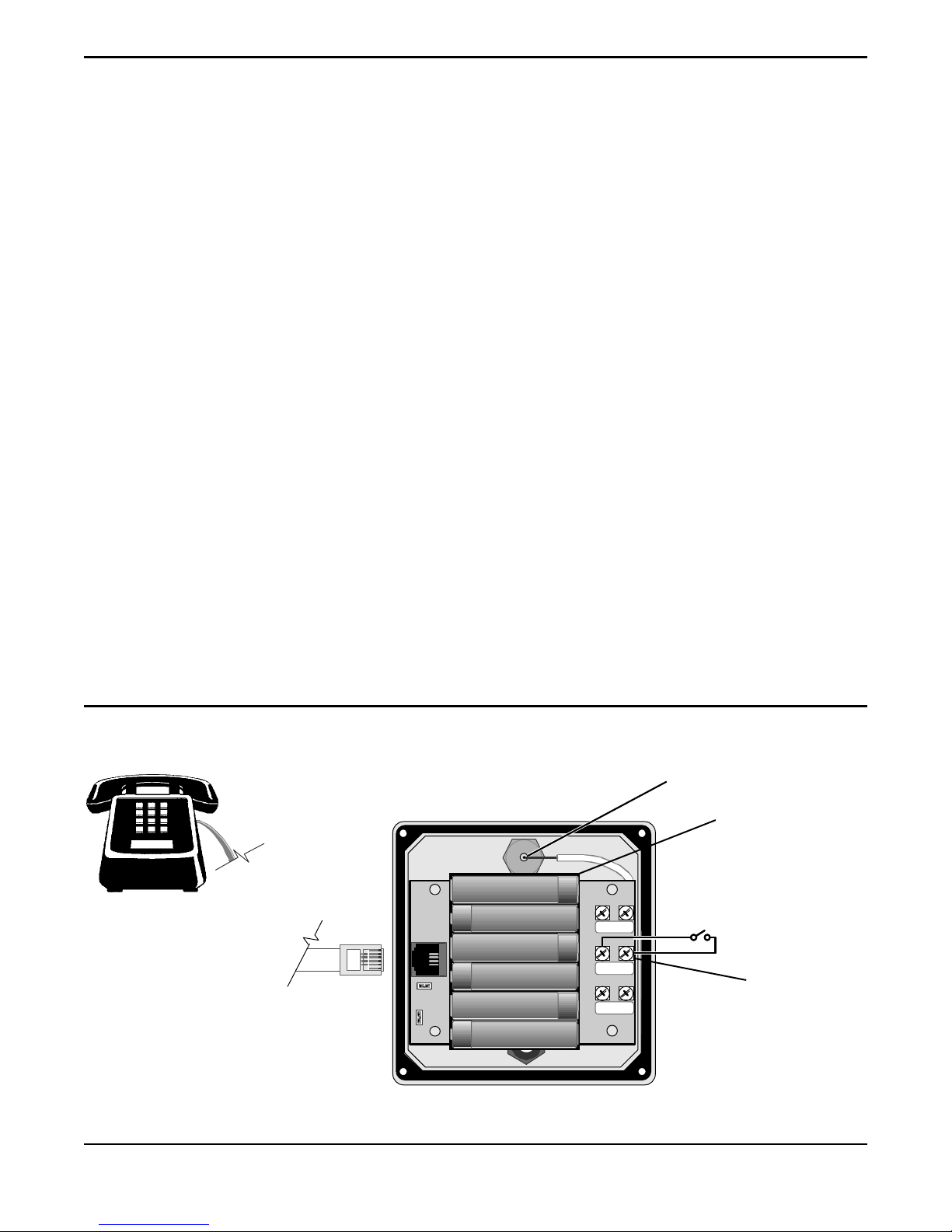
When you are sure your connections will be
safe, connect the switch you intend to use to the
Quick Talk terminals labeled Switch #1. See
Figure 2 below.
3. Reinstall the fresh AA Alkaline batteries in the
Quick Talk according to the polarity marks.
4. Activate your switch and listen to your two way radio
as the factory default messages are transmitted.
The message will be either "Switch One Open" or
"Switch One Closed." Write down the results of how
the transmitted message corresponds to the
condition of your switch. Deactivate the switch to
hear the other message transmitted and again, write
down the results.
5. From the results of Step 4, above, you should now
understand how your switch works and what its
open and closed states mean. This is essential
knowledge for programming a voice message for
each switch condition.
For example, if your switch is a magnetic reed
switch on a door, and the switch closes when the
door is opened, you can record the phrase "Door
three open" for the switch closed condition, and then
"Door three closed" for the switch open condition.
Note that magnetic reed switches are available
which work the opposite way.
We suggest that you do not record over the factory
prerecorded messages until you are sure of how
your switch works. If the factory programmed
messages have been erased, you will have to use
an electrician's continuity tester or similar instrument
to determine how your switch works.
FIGURE 2: CONNECTIONS FOR TESTING YOUR SWITCH
1
Antenna Connection
Owner Supplied Standard Desk
Telephone, switch to Pulse
Dialling Mode
TO QUICK TALK
TELEPHONE JACK.
TO TELEPHONE ONLY.
DO NOT CONNECT TO
A TELEPHONE LINE.
(Back of Quick Talk Cover Assem.)
+
+
+
+
+
—
SWITCH
+
+
2
+
SWITCH
1
+
EXT. PWR.
—
—
For assistance, telephone RITRON at 1-800-872-1872 or go to "http://www.ritron.com".
(Antenna shown on page 11.)
3
Battery Holder
Connect Your
Switch to These
Terminals
Page 7
Page 10

qtm9212a.pm5
RECORDING VOICE PHRASES FOR YOUR SWITCH CONDITIONS
What is the purpose of Recording Voice Phrases?
Recording your own voice phrases gives the Quick Talk's
messages unmistakable meaning and significance. The
standard factory prerecorded messages of "Switch Open"
and "Switch Closed" require the listener to know how the
switch works and what it does. When a user hears a
custom message like "Water Pump 3 Running Hot" or "Se
Habla Espan~ol" its meaning is clear.
Do I need to program Voice Phrases? If the factory
recorded messages of "Switch Open" and "Switch Closed"
are suitable for your application, you may skip this section.
Remember that the quality of your recorded voice message
will only sound as good or as poor as the telephone you
use. If your message has low audio, record it again,
speaking louder. If your message is distorted, try recording
it again, speaking softer. If you are dissatisfied with the
audio quality, try a different telephone set.
When the Quick Talk is transmitting it draws the maximum
power from its battery. It also can interfere with other
transmissions. Therefore, when you record a voice phrase
remember to hang up when you are done speaking.
Otherwise, the Quick Talk transmitter will be on for the full
8 seconds regardless of the actual length of the voice
message.
To Record Your Switch OPEN Condition Phrase
a. Pick up the telephone receiver, wait for the beep
and dial "311".
Quick Talk sounds three short tones to prompt you
to begin speaking . . .
b. Record a phrase no longer than 8 seconds describ-
ing the open condition of your switch.
For example say, "Pump motor temperature OK".
c. Hang up the telephone when you are done speak-
ing.
d. Pick up the telephone and dial "411". Your phrase
will be played back through the telephone receiver.
e. You may return to Step (a) above and record again
if you are not pleased with the results.
To Record Your Switch CLOSED Condition Phrase
a. Pick up the telephone receiver, wait for the beep
and dial "312".
Quick Talk sounds three tones to prompt you to
begin speaking . . .
b. Record a phrase no longer than 8 seconds long
describing the closed condition of your switch.
For example say, "Pump motor over temperature".
c. Hang up the telephone when you complete your
phrase.
d. Pick up the telephone and dial "412". Your phrase
will be played back through the telephone receiver.
e. You may return to Step (a) above and record again
if you are not pleased with the results.
PLAYING BACK THE OPEN AND CLOSED VOICE PHRASES
FOR YOUR SWITCH CONDITIONS
Play Back the Switch OPEN Condition Phrase
a. Pick up the telephone,
b. After the tone, dial "411". Quick Talk plays the
Switch Open condition phrase:
For example, "Pump motor temperature OK".
c. Wait for the confirmation beep then hang up the
telephone or continue programming.
Page 8
For assistance, telephone RITRON at 1-800-872-1872 or go to "http://www.ritron.com".
Play Back the Switch CLOSED Condition Phrase
a. Pick up the telephone,
b. After the tone, dial "412". Quick Talk plays the
Switch Closed condition phrase:
For example, "Pump motor running hot".
c. Wait for the confirmation beep then hang up the
telephone or continue programming.
Page 11

qtm9212a.pm5
PROGRAMMING HOW MANY TIMES YOUR
RECORDED VOICE PHRASES ARE
REPEATED IN EACH TRANSMISSION
PROGRAMMING A BROADCAST
SCHEDULE FOR SWITCH STATUS
TRANSMISSIONS
What is the purpose of setting the number of times the
Voice Phrase is repeated in each Quick Talk
Transmission? In each Quick Talk radio transmission
your previously recorded voice phrases can be repeated
from 1 to 9 times depending on the emphasis you wish to
put on the message. More important messages can have
the phrase repeated more than just once. For example, if
you previously recorded the message "Pump Motor Hot"
and then set the Quick Talk to repeat the phrase two (2)
times in each transmission, activating the switch will result
in the Quick Talk transmitting:
"...beep. Pump motor hot. Pump motor hot. beep..."
The beginning and ending beeps are added automati-cally
to attract special attention to Quick Talk transmissions.
Do I need to program this feature? The Quick Talk is
set at the factory to play each recorded voice phrase once
in each transmission. If this is sufficient for your
application you can skip to the next section. In that section
we explain how to have the transmission itself repeated at
different intervals.
To Program the Number of Times the Switch Open
Phrase is Repeated in Each Transmission:
1. Pick up the telephone receiver, listen for the tone.
2. Dial "711" then a single digit for how many times
you want the voice phrase repeated in each transmission. For example, to repeat the phrase three
times dial "711-3". Wait for the confirmation beep
after dialing.
3. Hang up the telephone or continue programming.
To Program the Number of Times the Switch Closed
Phrase is Repeated in Each Transmission:
1. Pick up the telephone receiver, listen for the tone.
2. Dial "712" then a single digit for how many times
you want the voice phrase repeated in each transmission. For example, to repeat the phrase one
time dial "712-1". Wait for the confirmation beep
after dialing.
3. Hang up the telephone or continue programming.
— TABLE 4 —
VOICE PHRASE REPEATS CODE
IN EACH TRANSMISSION NUMBER
1 time
.............................
2 times
3 times
4 times
5 times
6 times
7 times
8 times
9 times
............................
............................
............................
............................
............................
............................
............................
............................
1
2
3
4
5
6
7
8
9
What is the purpose of programming a Broadcast
Schedule for Switch Status Transmissions? You can
program an individual schedule of Quick Talk
transmissions for both the open and closed conditions of
your switch. For example, if the message for the switch
Open condition is "Pump motor temperature OK" you could
schedule the Quick Talk to transmit that message just once
every two hours to let you know that the Quick Talk is
operating properly. On the other hand, if the message for
the switch Closed is "Pump Motor Over Temperature" you
might schedule the Quick Talk to broadcast that message
every 2 minutes so that the condition would receive prompt
attention.
Do I need to program this feature? The Quick Talk is
set at the factory to transmit a switch status message once
each time the switch changes. If this is sufficient for your
application, you can skip to the next section.
To Program the Schedule of Voice Transmissions for
the Switch Open Condition:
1. Pick up the telephone receiver, listen for the tone.
2. Dial "511" then the one digit code number from
Table 5 below. The Factory Default is "511-1"
which means the transmission is sent just once
when the switch changes to this condition. Wait for
the confirmation beep after dialing.
3. Hang up the telephone or continue programming.
To Program the Schedule of Voice Transmissions for
the Switch Closed Condition:
1. Pick up the telephone receiver, listen for the tone.
2. Dial "512" then the one digit code number from
Table 5. The Factory Default is "512-1" which
means the transmission is sent just once when the
switch changes to this condition. Wait for the
confirmation beep after dialing.
3. Hang up the telephone or continue programming.
— TABLE 5 —
MESSAGE SCHEDULE CODE
Never send messages for this condition.. 0
On switch condition change only
Every 30 seconds
Every (1) minute
Every (2) minutes
Every (5) minutes
Every (10) minutes
Every (30) minutes
Every (1) hour
Every (2) hours
......................
.......................
......................
......................
.....................
.....................
.........................
........................
.........
1
2
3
4
5
6
7
8
9
For assistance, telephone RITRON at 1-800-872-1872 or go to "http://www.ritron.com".
Page 9
Page 12

qtm9212a.pm5
PROGRAMMING A LIMIT TO THE NUMBER OF SCHEDULED TRANSMISSIONS
What is the purpose of limiting the number of times a
scheduled voice message is transmitted? If you have
set the Quick Talk to transmit a switch status message at
some regular interval as described in the previous section,
you can set a limit to the number of times the message will
be transmitted at the scheduled interval.
For example, suppose you have a vehicle detector switch
that closes when it detects a vehicle present at the delivery
door of your building. Your recorded message might then
be "Vehicle Detected at Delivery Door".
You may want that message to be transmitted every two
minutes for up to about a quarter hour after a vehicle is
detected and then stop transmitting until the vehicle leaves.
In this case you would program the message schedule to
every 2 minutes and set the message limit as described
here to 8.
Now when a vehicle arrives the switch closes and the
message is transmitted every 2 minutes until it has been
sent 8 times over a span of 16 minutes.
After the vehicle leaves, the switch opens and when
another vehicle arrives the Quick Talk would again transmit
the message every 2 minutes for about a quarter of an
hour.
Do I need to program this feature? The Quick Talk is set
at the factory to transmit switch status messages without
any limit if a transmission schedule has been set as
described in the previous section. This means that if you
programmed the Quick Talk to transmit a status message
every 1 hour, it would continue to do so without any limit. If
this is sufficient for your application, you can skip to the
next section.
Set Scheduled Message Repeat Limit for Switch Open
a. From Table 6 below, select the code number for the
number of messages.
b. Lift the telephone receiver and dial "611", then dial
the selected Code Number. Quick Talk responds
with the single confirmation tone.
c. You may either hang up or continue programming.
Set Scheduled Message Repeat Limit for Switch Closed
a. From Table 6 below, select the code number for the
number of messages.
b. Lift the telephone receiver and dial "612", then dial
the selected Code Number.
c. You may either hang up or continue programming.
— TABLE 6 —
MESSAGE DIAL
SCHEDULED REPEAT LIMIT NUMBER
1 time
.............................
2 times
3 times
4 times
5 times
6 times
7 times
8 times
Repeat Forever, No Limit
............................
............................
............................
............................
............................
............................
............................
............
1
2
3
4
5
6
7
8
9
TO ERASE AND REPROGRAM THE QUICK TALK TO ITS
ORIGINAL FACTORY SETTINGS.
What is the purpose of erasing and reprogramming the
Quick Talk to its original factory settings? You can
erase all of your programming and return the Quick Talk to
its Factory Default Settings with this command.
Note that this command does not restore the Factory
Default recorded voice messages. Any recorded
messages may be lost after using this command and you
would need to record them again using the instructions in
this manual.
Do I need to use this feature? If you are unsure of how
the Quick Talk features are programmed and want to "start
all over again" you could use this feature.
Page 10
For assistance, telephone RITRON at 1-800-872-1872 or go to "http://www.ritron.com".
To Erase and Reprogram the Quick Talk Settings as
Originally Factory Programmed:
a. Pick up the telephone receiver, wait for the acknowl-
edgment tone.
b. If your Quick Talk is an RQT-150 VHF model,
Dial "978",
c. If your Quick Talk is an RQT-450 UHF model,
Dial "979",
d. After the confirmation tone, hang up telephone.
e. Play back your voices messages and re-record
them if necessary.
Page 13
qtm9212a.pm5
QUICK TALK INSTALLATION
WHEN YOU ARE FINISHED PROGRAMMING:
• Hang up and disconnect the telephone from the
internal jack on the Quick Talk assembly.
• Test the operation of the Quick Talk before putting it in
service. Activate the switch and listen to the message
received on your radio.
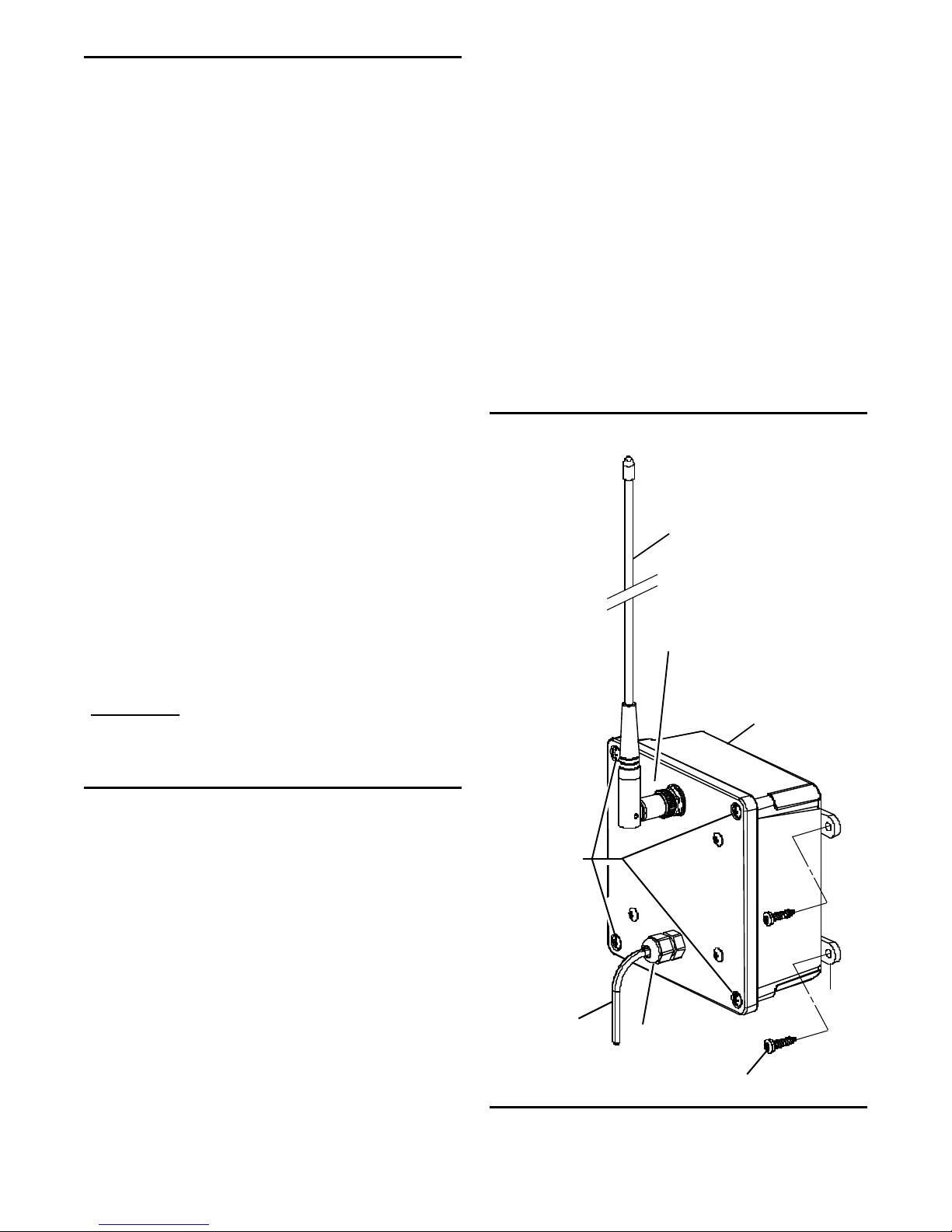
NOTE: Refer to Figure 3 at right.
• Replace the cover and (4) cover screws; snug down
but do not overtighten the screws. Excessive force
could break the plastic enclosure material.
• Attach and seal the antenna connection.
a. Insert, rotate and lock the antenna to the Quick Talk
antenna jack.
b. Orient the antenna to a vertical position.
c. Seal the antenna connection to hold the antenna in
its position, protect the antenna fittings, and
maintain water-resistance of the Quick Talk in wet
or outdoor environments.
Use Archer Connector Sealant, Radio Shack
Catalog Number 278-1645 or an equivalent. Wrap
the connection with the sealant tape and press it
securely in place. See package directions.
• Test for sufficient broadcast range when choosing
the location. For maximum range and coverage, install
the unit as high off the ground as possible. Be aware
that metal or wires near the antenna can block or
absorb radio transmissions. Choose a well-shaded
location.
• Position the unit as shown, and secure it in place with
screws through the enclosure flanges. Do not overtighten these screws. You may break the plastic
flanges.
Batteries: Use only fresh, new alkaline batteries when
programming Quick Talk. Acceptable brands and types
are: Duracell MX1500B, Eveready E91, Rayovac 815 or
equivalent. Refer to the Advanced Owner's Manual for
information about using rechargeable NiCad AA batteries
that are charged by an optional external 12 Volt DC power
supply.
Estimated Battery Life: Starting with a fresh set of AA
alkaline batteries, the RQT can transmit about 7,000 voice
messages over a period of one year before the batteries
need replacement.
Automatic Low Battery Alert Message: When the battery
voltage drops below about 6 Volts, the Quick Talk begins
transmitting a factory prerecorded message saying "Low
Batt" every 15 minutes. This is an indication that your
batteries should be replaced sometime in the next day or
so.
FIGURE 3: QUICK TALK
INSTALLATION
Antenna
(To be in vertical position)
Antenna Connection
(Apply sealant tape here.)
IMPORTANT: Contact a qualified technician or
electrician if you are not certain your
installation will work properly and
safely.
CARE AND MAINTENANCE
Moisture: When the antenna sealant and power cable
recommendations are followed, the Quick Talk is weather
tight in outdoor environments. Do not immerse the unit in
water.
Temperature: The Quick Talk is designed to operate
between -22 and +140 degrees Fahrenheit. Like all
electronic equipment, Quick Talk should not be subjected
to extreme heat. An ideal outdoor location is in a shaded
area.
Vibrations/Shocks: Though the Quick Talk is designed to
be rugged, it cannot be expected to survive extreme abuse.
Chemicals: Do not use harsh, corrosive or abrasive
chemicals to clean the Quick Talk case. Use only a cloth
moistened with water. Do not attempt to clean the electronic printed circuit board.
Cover screws (4)
Cable to
external switch
}}
Strain relief fitting
Enclosure
Mounting screws (4)
(User-supplied)
Enclosure
flange
For assistance, telephone RITRON at 1-800-872-1872 or go to "http://www.ritron.com".
Page 11
Page 14

qtm9212a.pm5
F.C.C. LICENSING AND REGULATIONS
The Rules and Regulations of the United States Federal Communications Commission (FCC) require you or your radio service
provider to have a license for your radio system before activating
the Quick Talk radio transmitter. If you already are operating a
licensed radio system, you most likely can add a Quick Talk
without any changes to that license.
The station licensee is responsible for ensuring that transmitter
power, frequency and modulation are within the limits specified by
the station license, and also for proper operation and maintenance
of the radio equipment. These responsibilities include checking
the transmitter frequency and modulation periodically, using
appropriate methods.
Ritron or your Ritron dealer can help you with all of these
requirements. You may also contact the FCC directly by any of the
following methods:
To obtain copies of FCC forms and instructions use the FCC FaxOn-Demand system at 1-202-418-0177. Request Document
000600.
For more information go to the FCC Internet Website at: "http/
www.fcc.gov".
SAFETY STANDARDS — The FCC has adopted a safety
standard for human exposure to radio frequency electromagnetic
energy emitted by FCC regulated equipment. The Quick Talk
conforms to the standards effective at the time of its equipment
authorization by the FCC. In general these standards recommend
that you:
• DO NOT allow the antenna to become very close to or
touch exposed parts of the body, especially the face or
eyes, while transmitting.
• DO NOT transmit near electrical blasting caps or in an
explosive atmosphere.
• DO NOT allow children to play with radio transmitters.
• BE AWARE of the conditions which cause the unit to
transmit.
SERVICE - Federal law prohibits you from making any internal
adjustments to the transmitter, and from changing transmit
frequencies unless you are specifically designated by the
licensee.
Do not adjust or tamper with components or the printed circuit
board in any manner not directed in this manual. Unauthorized
adjustments may render the unit inoperable; repair will be at
owner's expense.
If your radio equipment fails to operate properly, or you wish to
have the Ritron Quick Talk serviced, contact your authorized
dealer or call Ritron at 1-317-846-1201 and ask for the Repair
Department.
RITRON, INC. LIMITED WARRANTY
WHAT THIS WARRANTY COVERS: RITRON, INC. ("RITRON")
provides the following warranty against defects in materials and/or
workmanship in RITRON RQT-150 AND RQT-450 QUICK TALK
voice notification telemetry transmitters units under normal use and
service during the applicable warranty period (as stated below).
"Accessories" means antennas, chargers, wire, cable and items contained in the programming and programming/ service kits. For the
Quick Talk unit itself, during the first year from the original date of
purchase, and for Accessories, during the first 90 days from the
original date of purchase, RITRON will repair or replace the defective
product, at RITRON's option, parts and labor included at no charge.
WHAT THIS WARRANTY DOES NOT COVER: Any technical information provided with the covered product or any other products; Installation, maintenance or service of the product, unless this is covered by a separate written agreement with RITRON; Any products
not furnished by RITRON which are attached or used with the covered product, or defects or damage from the use of the covered
product with equipment that is not covered; Defects or damage,
including broken antennas, resulting from: - misuse, abuse, improper
maintenance, alteration, modification, neglect, accident or act of
God, - the use of covered products other than in normal and customary manner or, improper testing or installation; - Defects or damages
from unauthorized disassembly, repair or modification, or where
unauthorized dis-assembly, repair or modification prevents inspection
and testing necessary to validate warranty claims; - Defects or damages in which the serial number has been removed, altered or
defaced.
IMPORTANT: This warranty sets forth the full extent of RITRON's
express responsibilities regarding the covered products, and is given
in lieu of all other express warranties. What RITRON has agreed to
do above is your sole and exclusive remedy. No person is authorized
to make any other warranty to you on behalf of RITRON. Warranties
implied by state law, such as implied warranties of merchantability
and fitness for a particular purpose, are limited to the duration of this
limited warranty as it applies to the covered product. Incidental and
consequential damages are not recoverable under this warranty (this
includes loss of use or time, inconvenience, business interruption,
commercial loss, lost profits or savings). Some states do not allow
the exclusion or limitation of incidental or consequential damages, or
limitation on how long an implied warranty lasts, so the above limitations or exclusions may not apply to you. Because each covered
product system is unique, RITRON disclaims liability for range, coverage, or operation of the system as a whole under this warranty.
WHO IS COVERED BY THIS WARRANTY: This warranty is given
only to the purchaser or lessee of covered products when acquired
for use, not resale. This warranty is not assignable or transferable.
HOW TO GET WARRANTY SERVICE: To receive warranty service,
you must deliver or send the defective product, delivery costs and
insurance prepaid, within the applicable warranty period, to RITRON,
INC., 505 West Carmel Drive, Carmel, Indiana 46032, Attention:
Warranty Department. Please point out the nature of the defect in as
much detail as you can. You must retain your sales or lease receipt
(or other written evidence of the date of purchase) and deliver it along
with the product. If RITRON chooses to repair or replace a defective
product, RITRON may replace the product or any part or component
with reconditioned product, parts or components. Replacements are
covered for the balance of the original applicable warranty period. All
replaced covered products, parts or components become RITRON's
property.
RIGHTS TO SOFTWARE RETAINED: Title and all rights or licenses
to patents, copyrights, trademarks and trade secrets in any RITRON
software contained in covered products are and shall remain in
RITRON. RITRON nevertheless grants you a limited non-exclusive,
transferable right to use the RITRON software only in conjunction
with covered products. No other license or right to the RITRON software is granted or permitted.
YOUR RIGHTS UNDER STATE LAW: This warranty gives you
specific legal rights, and you may also have other rights which vary
from state to state.
WHERE THIS WARRANTY IS VALID: This warranty is valid only
within the United States, the District of Columbia and Puerto Rico.
Page 12
For assistance, telephone RITRON at 1-800-872-1872 or go to "http://www.ritron.com".
 Loading...