

Page 1
WARNING!
Read this Operator’s Manual carefully before using
this tool. Failure to understand and follow the contents of this manual may
result in electrical shock,
fire, and/or serious personal injury.
• Français – 13
• Español – 25
Operator’s Manual
F
Find Quality Products Online at: [email protected]
www.GlobalTestSupply.com
Page 2

Table of Contents
Introduction
Regulatory Statements ��������������������������������������������������������������������������������������������� 3
Safety Symbols ��������������������������������������������������������������������������������������������������������� 3
General Safety Rules
Work Area Safety ������������������������������������������������������������������������������������������������������ 4
Electrical Safety �������������������������������������������������������������������������������������������������������� 4
Personal Safety �������������������������������������������������������������������������������������������������������� 4
Equipment Use and Care ����������������������������������������������������������������������������������������� 5
Battery Use and Care ����������������������������������������������������������������������������������������������� 5
Pre-Operation Inspection ������������������������������������������������������������������������������������������ 6
Description
Specifications ����������������������������������������������������������������������������������������������������������� 7
Components ������������������������������������������������������������������������������������������������������������� 8
Operation
Installation ���������������������������������������������������������������������������������������������������������������� 8
Removal �������������������������������������������������������������������������������������������������������������������� 8
Key Functions ����������������������������������������������������������������������������������������������������������� 9
LED Behaviors ���������������������������������������������������������������������������������������������������������� 9
Power States����������������������������������������������������������������������������������������������������������� 10
Maintenance and Support
Support ������������������������������������������������������������������������������������������������������������������� 10
Transport and Storage �������������������������������������������������������������������������������������������� 10
Service and Repair ������������������������������������������������������������������������������������������������� 11
Disposal ������������������������������������������������������������������������������������������������������������������ 11
*Original Instructions – English
2 – English – CSx Via
Find Quality Products Online at: [email protected]
www.GlobalTestSupply.com
Page 3
Introduction
The warnings, cautions, and
instructions discussed in this
manual cannot cover all possi-
ble conditions and situations
that may occur. It must be understood by the operator that
common sense and caution are
factors that cannot be built into
this product, but must be supplied by the operator.
Regulatory Statements
The EC Declaration of Conformity
(890-011-320.10) will accompany
this manual as a separate booklet
when required.
Directive 2014/53/EU
Radio Operating Spectrum / Power
Bluetooth
Low
Energy
(BLE)
Wi-Fi
802.11
b/g/n
Wi-Fi
802.11
a/n/ac
harmful interference, and (2) this device
must accept any interference received, including interference that may cause undesired operation.
Contains Transmitter Modules: FCC ID:
TFB-1004 / IC: 5969A-1004 and FCC ID:
X8WBM832 / IC: 4100A-BM832
2400 – 2483.5 MHz 5.44 dBm
2400 – 2483.5 MHz 15.43 dBm
5470 – 5725 MHz 18.65 dBm
This device complies with Part 15
of FCC rules. Operation is subject
to the following two conditions:
(1) This device may not cause
Safety Symbols
In this manual and on the product, safety
symbols and signal words are used to communicate important safety information. This
section is provided to improve understanding of these signal words and symbols.
This is the safety alert symbol. It is
used to alert you to potential personal injury hazards. Obey all
safety messages that follow this
symbol to avoid possible injury or
death.
DANGER
DANGER indicates a hazardous situation
which, if not avoided, will result in death or
serious injury.
WARNING
WARNING indicates a hazardous situation
which, if not avoided, could result in death
or serious injury.
CAUTION
CAUTION indicates a hazardous situation
which, if not avoided, could result in minor
or moderate injury.
NOTICE
NOTICE indicates information that relates to the protection of property.
This symbol means read the oper-
ator’s manual carefully before
using the equipment. The manual
contains important information on
the safe and proper operation of
the equipment.
This symbol means always wear
safety glasses with side shields or
goggles when handling or using
this equipment to reduce the risk
of eye injury.
This symbol indicates the risk of
electrical shock.
This symbol indicates the risk of
fire.
CSx Via – English – 3
Find Quality Products Online at: [email protected]
www.GlobalTestSupply.com
Page 4
General Safety Rules
WARNING
Read all safety warnings and instructions. Failure to follow the warnings
and instructions may result in electrical
shock, fire, and/or serious injury.
SAVE THESE INSTRUCTIONS!
Work Area Safety
• Keep your work area clean and well lit.
Cluttered or dark areas invite accidents.
• Do not operate equipment in explo-
sive atmospheres, such as in the
presence of flammable liquids, gases,
or dust. Equipment can create sparks
which may ignite the dust or fumes.
• Keep children and bystanders away
while operating equipment. Distractions can cause you to lose control.
• Avoid traffic. Pay attention to moving ve-
hicles when using on or near roadways.
Wear high-visibility clothing or reflector
vests.
Electrical Safety
• Avoid body contact with earthed or
grounded surfaces such as pipes,
radiators, ranges, and refrigerators.
There is an increased risk of electrical
shock if your body is earthed or grounded.
• Do not expose equipment to rain or
wet conditions. Water entering equipment will increase the risk of electrical
shock.
• Keep all electrical connections dry
and off the ground. Touching equipment or plugs with wet hands can increase the risk of electrical shock.
• If operating equipment in a damp lo-
cation is unavoidable, use a ground
fault circuit interrupter (GFCI) protected supply. Use of a GFCI reduces the
risk of electrical shock.
Personal Safety
• Stay alert, watch what you are doing,
and use common sense when operating equipment. Do not use equipment
while you are tired or under the influence of drugs, alcohol, or medication.
A moment of inattention while operating
equipment may result in serious injury.
• Dress properly. Do not wear loose cloth-
ing or jewelry. Loose clothes, jewelry, and
long hair can be caught in moving parts.
• Practice good hygiene. Use hot, soapy
water to wash hands and other body
parts exposed to drain contents after
handling or using drain inspection equipment. To prevent contamination from
toxic or infectious material, do not eat or
smoke while operating or handling drain
inspection equipment.
• Always use appropriate personal pro-
tective equipment when handling and
using equipment in drains. Drains may
contain chemicals, bacteria, and other
substances that may be toxic, infectious,
and cause burns or other issues. Appropriate personal protective equipment always includes safety glasses and may
include a dust mask, hard hat, hearing
protection, drain cleaning gloves or mitts,
latex or rubber gloves, face shields, goggles, protective clothing, respirators, and
steel toed, non-skid footwear.
• If using drain cleaning equipment and
drain inspection equipment at the
same time, wear RIDGID drain cleaning gloves. Never grasp the rotating
drain cleaning cable with anything else,
including other gloves or a rag which can
become wrapped around the cable and
cause hand injuries. Only wear latex or
rubber gloves underneath RIDGID drain
cleaner gloves. Do not use damaged
drain cleaning gloves.
4 – English – CSx Via
Find Quality Products Online at: [email protected]
www.GlobalTestSupply.com
Page 5

Equipment Use and Care
• Do not force equipment. Use the cor-
rect equipment for your application. The
correct equipment does the job better
and more safely.
• Do not use equipment if the power
key does not turn it on and off when
a compatible, charged battery pack is
connected. Any equipment that cannot
be controlled with the power key is dangerous and must be repaired.
• Store idle equipment out of the reach
of children and do not allow persons unfamiliar with the equipment
or these instructions to operate the
equipment. Equipment can be danger-
ous in the hands of untrained users.
• Maintain equipment. Check for mis-
alignment or binding of moving parts,
missing parts, breakage of parts, and
any other condition that may affect the
equipment’s operation. If damaged, have
the equipment repaired before use. Many
accidents are caused by poorly maintained equipment.
• Do not overreach. Keep proper footing
and balance at all times. This enables
better control of the equipment in unexpected situations.
• Use the equipment and accessories
in accordance with these instructions,
taking into account the working conditions and the work to be performed.
Use of the equipment for operations different from those intended can result in a
hazardous situation.
• Keep handles dry, clean, and free from
oil and grease. Clean handles give better control of the equipment.
Battery Use and Care
• Use equipment only with specifically designed battery packs. Use of any
other battery packs may create a risk of
injury and/or fire.
• Recharge only with the charger spec-
ified by the manufacturer. A charger
suitable for one type of battery pack may
create a risk of fire when used with another battery pack.
• Do not cover charger while in use.
Proper ventilation is required for correct
operation. Covering charger while in use
could result in fire.
• Use and store batteries and chargers
in dry, appropriate temperature areas
according to their documentation. Ex-
treme temperatures and moisture can
damage batteries and result in leakage,
electrical shock, fire, or burns.
• Do not probe the battery with conduc-
tive objects. Shorting of battery terminals may cause sparks, burns, or electrical shock. When the battery pack is not
in use, keep it away from other metal objects, like paper clips, coins, keys, nails,
screws or any other small metal object
that can make a connection from one
terminal to the other. Shorting the battery
terminals may cause burns or a fire.
• Under abusive conditions, liquid may
eject from battery; avoid contact. If
contact occurs, flush with water. If liquid
contacts eyes, seek medical help. Liquid
ejected from the battery may cause irritation or burns.
• Properly dispose of batteries. Expo-
sure to high temperatures can cause the
batteries to explode; do not dispose of in
a fire. Some countries have regulations
concerning battery disposal. Follow all
applicable regulations.
CSx Via – English – 5
Find Quality Products Online at: [email protected]
www.GlobalTestSupply.com
Page 6

Pre-Operation Inspection
WARNING
To reduce the risk of serious injury from
electrical shock or other causes, and
to prevent damage to your equipment,
inspect all equipment and correct any
problems before each use.
To inspect all equipment, follow these steps:
1. Power off your equipment.
2. Disconnect and inspect all cords, cables, and connectors for damage or
modification.
3. Clean any dirt, oil, or other contamination from your equipment to ease
inspection and to prevent it from slipping from your grip during transportation or use.
4. Inspect your equipment for any broken, worn, missing, misaligned, or
binding parts, or any other condition
which might prevent safe, normal operation.
5. Refer to the instructions for all other
equipment to inspect and make sure
it is in good, usable condition.
6. Check your work area for the following:
• Adequate lighting.
• The presence of flammable liquids, vapors, or dust that may ignite. If present, do not work in area
until sources have been identified
and corrected. The equipment
is not explosion proof. Electrical
connections can cause sparks.
• A clear, level, stable, and dry
place for the operator. Do not use
the equipment while standing in
water.
7. Examine the job to be done and determine the correct equipment for the
task.
8. Observe the work area and erect barriers as necessary to keep bystanders
aw ay.
6 – English – CSx Via
Find Quality Products Online at: [email protected]
www.GlobalTestSupply.com
Page 7
Description
The RID GID® See Snake® CSx Via™* is
a flexible inspection solution for streaming, capturing, and sharing media using
a mobile device. With its integrated Wi-Fi
and Bluetooth, the CSx Via connects with
an iOS™, Android™, or Windows-powered device to enable inspections with the
SeeSnake HQx Live app or SeeSnake HQ
software for Windows. The CSx Via is powered by an 18 V rechargeable battery.
The CSx Via is compatible with most
RIDGID SeeSnake camera reels. The CSx
Via Mount accessory is required for using
the CSx Via with the SeeSnake Standard or
Mini camera reels.
The RIDGID SeeSnake HQx Dock is designed to optimize inspection viewing when
using HQx Live or HQ with a tablet. Use
as a free-standing unit or mount onto any
RIDGID SeeSnake Compact Series reel for
fast, easy setup.
Specifications
Weight (with cap) 0.38 kg [0.83 lb]
Dimensions
Length 149 mm [5.9 in]
Depth 106 mm [4.2 in]
Height 126 mm [5 in]
18 V Li-Ion or
Power Source
Connectivity
Bluetooth
Wi-Fi
Operating Environment
Temperature
Storage
temperature
Relative
humidity
Lucid 18.5 V
lithium polymer
battery
Bluetooth Low
Energy (BLE)
802.11 b/g/n
802.11 a/n/ac
-10°C to 50°C
[14°F to 122°F]
-20°C to 60°C
[-4°F to 140°F]
5 to 95 percent
*Patent pending
CSx Via – English – 7
Find Quality Products Online at: [email protected]
www.GlobalTestSupply.com
Page 8

Components
Battery Shoe
Transmitter ClipOn Terminal
Connector
Keypad
Operation
Installation
Note: Refer to the CSx Via Mount instructions for installing the CSx Via onto the
SeeSnake Standard or Mini camera reels.
1. Remove the SeeSnake System Cable
from the reel. Refer to your reel’s Operator’s Manual for instructions on removal.
2. Slide the battery into the CSx Via battery shoe.
3. Remove the shipping cap from the
CSx Via connector.
4. Align the arrow on the connector with
the unlock symbol
insert the CSx Via into the slip-ring
cavity.
5. Turn the CSx Via so that it locks into
place
.
NOTICE
Do not touch the contact
pins inside the slip-ring
dial. Stressing the contact pins can cause them
to break.
on the frame and
Serial
Number
Label
Removal
To remove the CSx Via, turn it so that the
arrow is aligned with the unlock symbol
and pull straight out.
8 – English – CSx Via
Find Quality Products Online at: [email protected]
www.GlobalTestSupply.com
Page 9
Performing an Inspection
The CSx Via can be used to perform an inspection using HQx Live, available on iOS
and Android devices, or SeeSnake HQ software for Windows devices.
To set up for an inspection, enable your device’s Wi-Fi and Bluetooth, open the app,
and connect to the CSx Via. Once connected, you can live stream inspection footage
and capture, view, and share media.
Visit the HQx Live and HQ support pages
on SeeSnake Support for additional instructions, including detailed connection instructions and media capturing and sharing.
LED Behaviors
The CSx Via uses its LEDs to communicate
booting and Wi-Fi connectivity status.
Wi-Fi LED Sonde LED
Power and Booting LEDs
Status LED
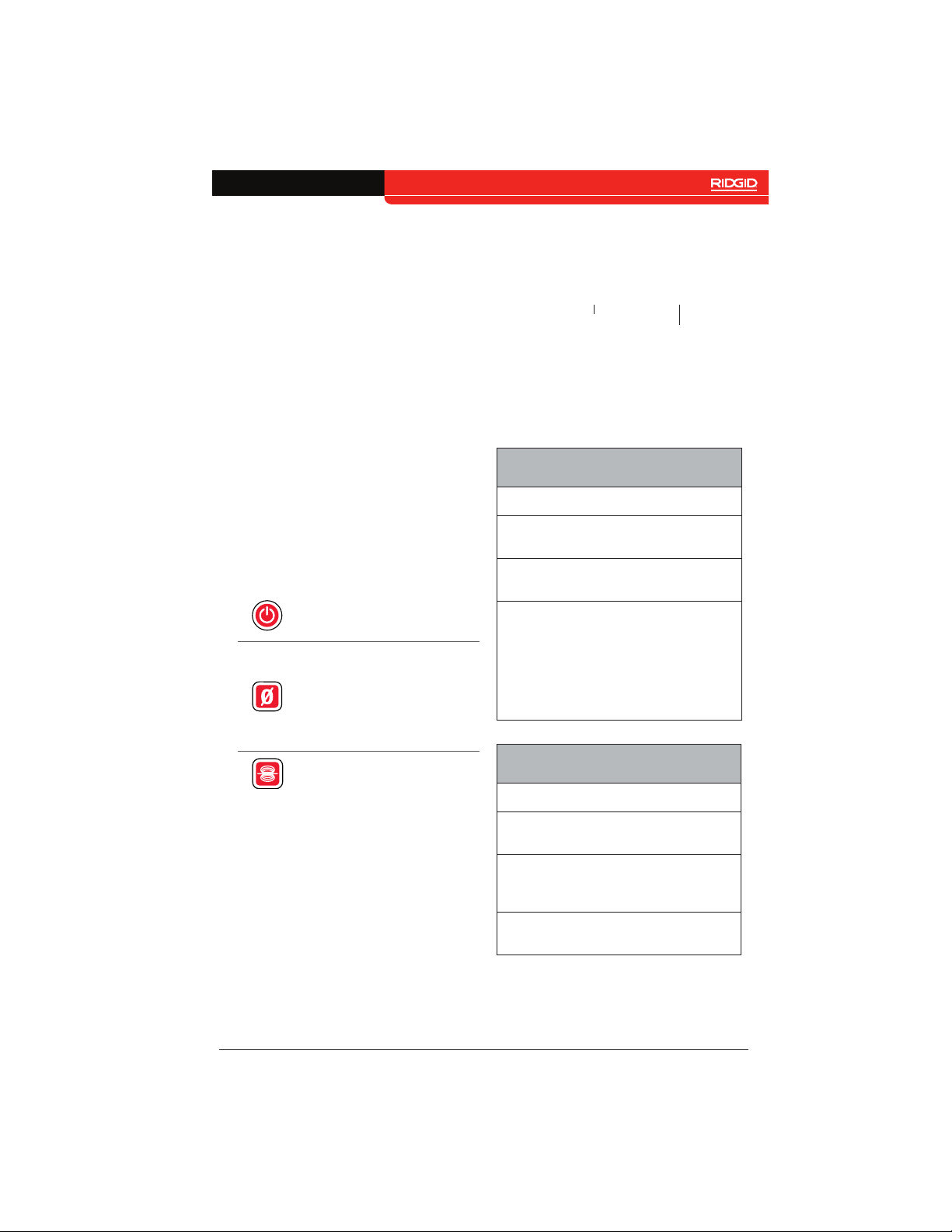
Key Functions
Power
Zero
Sonde
Power on and off.
Press to wake up while
in Standby Mode.
Press and hold to set
the system measurement to zero. Press
to start and stop temporary segment measurements.
Enable and disable
the sonde.
Booting
Restarting/
powering off
Recovery mode:
The CSx Via
will refresh its
firmware and
restart in the
event it does not
power on
Wi-Fi Connectivity LEDs
Status LED
Wi-Fi booting
Wi-Fi ready
Wi-Fi connected Wi-Fi LED solid
Both LEDs
alternate flashing
Both LEDs flash
simultaneously
Both LEDs flash
simultaneously
Wi-Fi LED flashes
rapidly
Wi-Fi LED flashes
steadily
CSx Via – English – 9
Find Quality Products Online at: [email protected]
www.GlobalTestSupply.com
Page 10
Power States
The CSx Via has three power states: on, off,
and Standby Mode, a low power state that
turns off the camera and its LEDs to conserve energy. The CSx Via enters Standby
Mode after a period of inactivity, or when
closing the app or exiting live view. To wake
up the CSx Via from Standby Mode, press
the Power key or open the app’s live view.
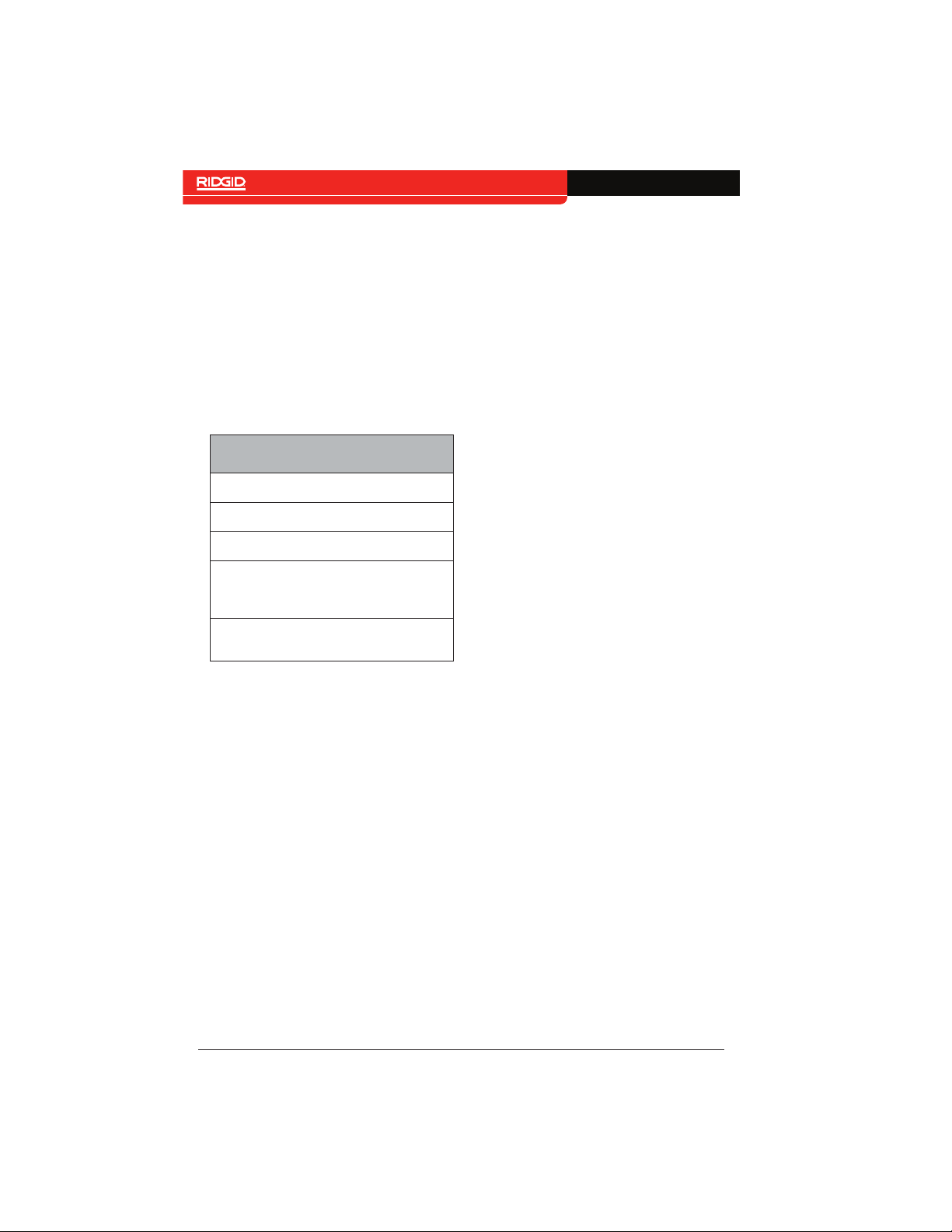
The CSx Via beeps to communicate different power states.
Power State Sounds
Power State Sound
Power on Single beep
Power off Long beep
Entering Standby
Mode
Wake up from
Standby Mode
Two beeps
Single beep
Maintenance and
Support
Transport and Storage
Store and transport your system with the following in mind:
• Store in a locked area out of the reach
of children and people unfamiliar with
its purpose.
• Store in a dry place to reduce risk of
electrical shock.
• Store away from heat sources such as
radiators, heat registers, stoves, and
other products (including amplifiers)
that produce heat.
• Storage temperature should be -20°C
to 60°C [-4°F to 140°F].
• Do not expose to heavy shocks or impacts during transport.
• Remove the battery before shipping
and before storing for extended periods of time.
10 – English – CSx Via
Find Quality Products Online at: [email protected]
www.GlobalTestSupply.com
Page 11

Service and Repair
Improper service or repair can cause the
CSx Via to be unsafe to operate.
Service and repair of the CSx Via must be
performed at a RIDGID Independent Authorized Service Center. To maintain the safety
of the unit, make sure a qualified repair person services your unit using only identical
replacement parts. Discontinue using the
CSx Via, remove the battery, and contact
service personnel under any of the following conditions:
• If liquid has been spilled or objects
have fallen into the equipment.
• If the equipment does not operate normally when operating instructions are
followed.
• If the equipment has been dropped or
damaged.
• If the equipment exhibits a distinct
change in performance.
For information on your nearest RIDGID Independent Service Center or any service or
repair questions:
Disposal
Parts of your system contain valuable materials that can be recycled. There are companies that specialize in recycling that may be
found locally. Dispose of the components in
compliance with all applicable regulations.
Contact your local waste management authority for more information.
EC Countries: Do not dispose of electrical equipment
with household waste!
According to the European Guideline 2012/19/EU for
Waste Electrical and Electronic Equipment and its implementation into national legislation, electrical equipment
that is no longer usable must
be collected separately and
disposed of in an environmentally correct manner.
Battery Disposal
EC Countries: Defective or used batteries
must be recycled according to the guideline
2006/66/EEC.
CSx Via – English – 11
Find Quality Products Online at: [email protected]
www.GlobalTestSupply.com
Page 12

 Loading...