

Page 1
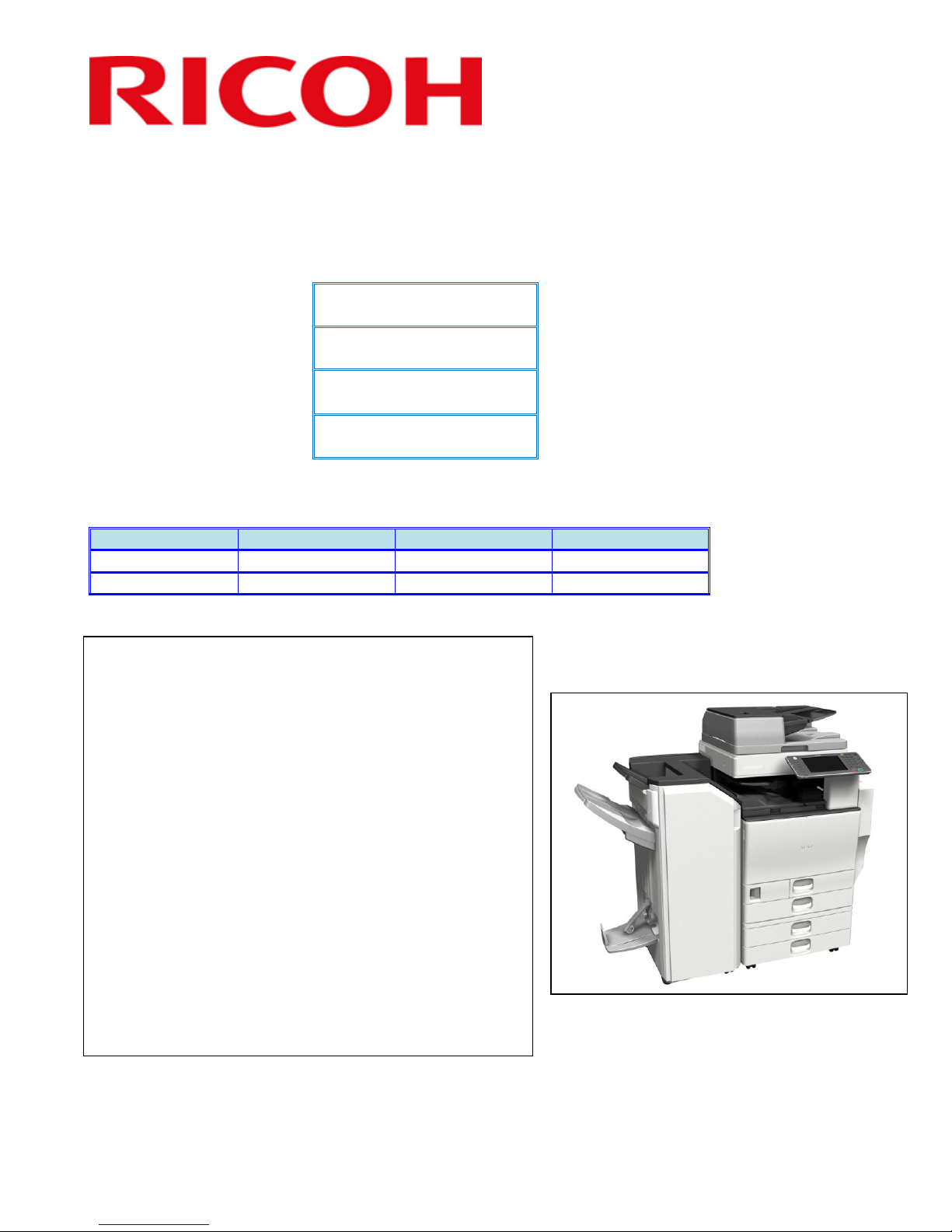
RICOH Americas Corporation Content ID# rfg051141
Model Type
Color MFP
Launch Date
2/20/2012
S/N Configuration
W51yfmxxxxx
W54yfmxxxxx
Product Code
D143/D144
Product Code
Lanier
Ricoh
Savin
D143
MP C4502
Aficio MP C4502
MP C4502
D144
MP C5502
Aficio MP C5502
MP C5502
The D143/D144 is the replacement for the
D088/D089 series.
The new D143/D144 will be launched to
enhance our competitiveness with the highly
strengthened GW+ controller specs, expanded
color space, shortened warm up time and
improved ECO spec.
RICOH decided to equip D143/D144 with our
most advanced controller, GW+, in order to
compete against others. D143/D144 will be
using the new “SPR-F” toner, which will
certainly improve the image quality. Moreover,
the warm up/recovery time will be reduced and
the total ECO spec including TEC value is
planned to be #1. Lastly, D143/D144 will be
adopting the new product design concept, IStyle (Intelligent Style), which will attract
customer with its design and suite to any office
environment.
Product Support Guide
D143/D144
Introduction
Brand/Model Name
Product Concept
Ver.1.0 Page 1 of 72 2/3/2012
Subject to change without notice
Page 2
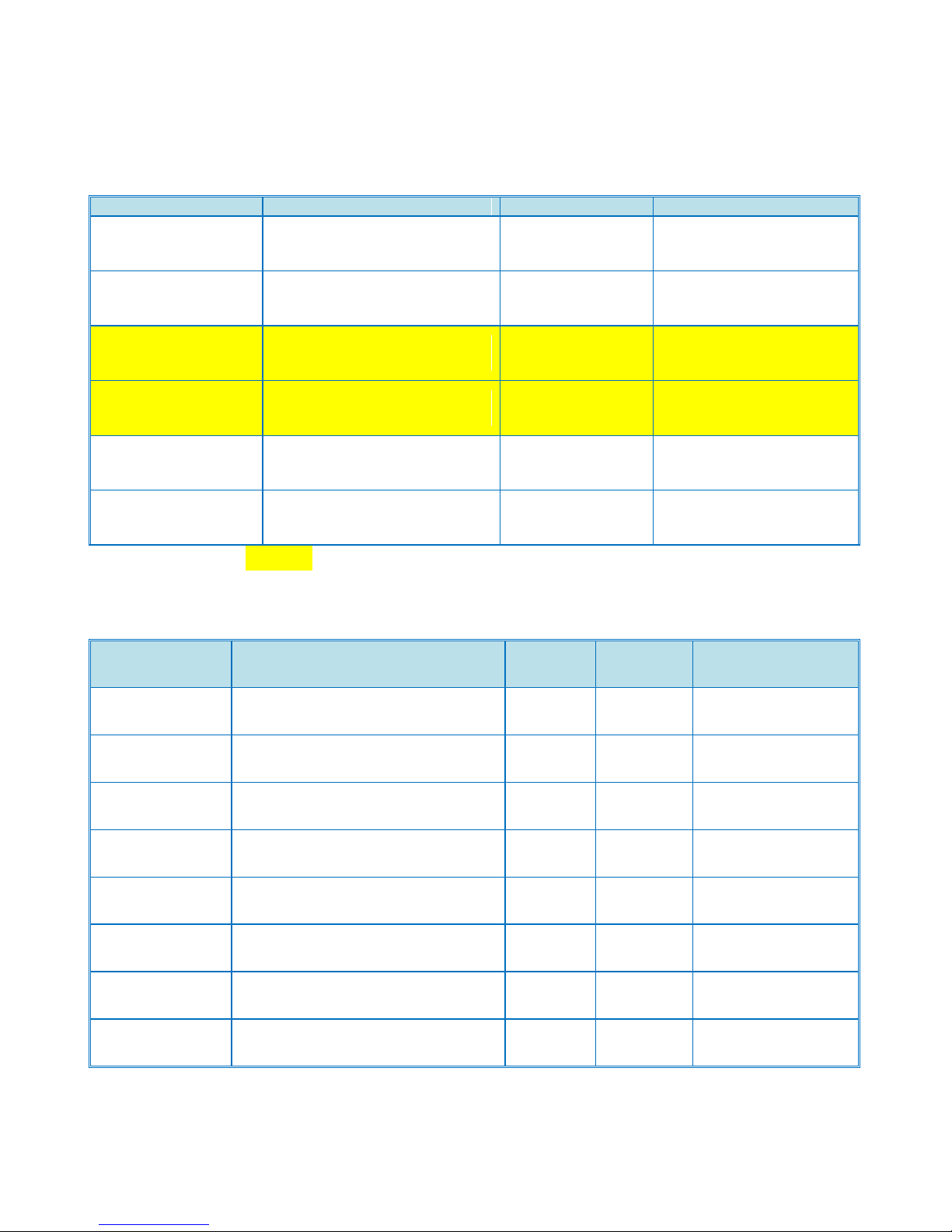
Order Number
Item
Model Name
EDP Code
Notes
Lanier
Ricoh
Savin
Aficio MP C4502
416072
Standard Mainframe
Configuration
Printer Scanner
Lanier
Ricoh
Savin
Aficio MP C5502
416076
Standard Mainframe
Configuration
Printer Scanner
Lanier
Ricoh
Savin
Aficio MP C4502G
416073
Printer Scanner
Government Version
Lanier
Ricoh
Savin
Aficio MP C5502G
416078
Printer Scanner
Government Version
Lanier
Ricoh
Savin
Aficio MP C4502A
416075
Printer Scanner
Single Pass DF Version
Lanier
Ricoh
Savin
Aficio MP C5502A
416077
Printer Scanner
Single Pass DF Version
Item
Description
Product
Code
EDP Code
Common / Unique
PostScript3 Unit
Type C5502
PostScript3 Unit Type C5502
D645-11
415998
C
Fax Option Type
C5502
Fax Option Type C5502
D645-19
415991
C
1-Bin Tray
BN3100
1-Bin Tray BN3100
D632
415986
C
Side Tray Type
C5502
Side Tray Type C5502
D635
415989
C
PictBridge
Camera Direct Print Card Type J
D645-15
416006
C
Paper Feed Unit
(550 x 2)
Paper Feed Unit PB3130 (550X2)
D580
415793
C
1000 x 2LCT
LCIT PB3140 Large Capacity
Cassette
D581
415795
C
Side LCT
LCIT RT3020
D631
415984
C
Main Frame
Product Support Guide
D143/D144
Note: Items in yellow are scheduled to launch 6/2012
Options
Ver.1.0 Page 2 of 72 2/3/2012
Subject to change without notice
Page 3
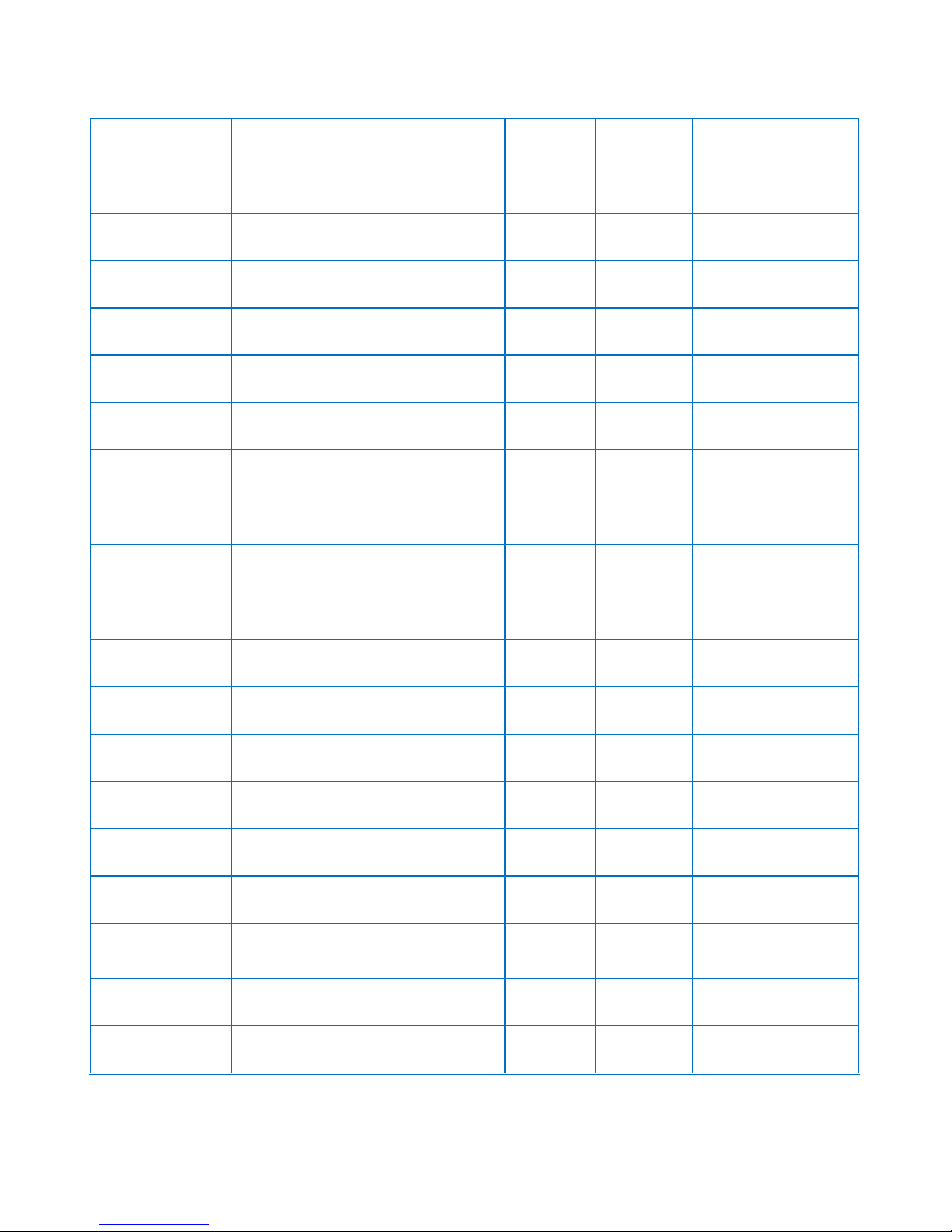
Product Support Guide
Envelope Feeder
Envelope Feeder EF3020
D638
416272
C
Card Reader
Bracket
Card Reader Bracket Type 3352
D593-61
415814
C
IPDS
IPDS Unit Type 5502
D645-07
416003
C
File Format
Converter
File Format Converter Type E
D377-04
414007
C
Internal Shift
Tray
Internal Shift Sort Tray (SH3060)
D633
415987
C
Fax Connection
Unit
Fax Connection Unit Type B
D645-19
416022
C
G3 Unit
G3 Interface Unit Type C5002
D643-11
415996
C
Platen Cover
Platen Cover Type 3352
D593
415809
C
Bridge Unit
Bridge Unit BU3060
D386
415988
C
Punch Kit for US
2/3 hole
Punch Unit Type 3260 NA
B702
412209
C
1,000 Sheet
Finisher
Finisher SR3090
D588
415804
C
2000 Sheets
Booklet Finisher
Finisher SR3110 Booklet Finisher
D637
416007
C
3000 Sheets
Finisher
Finisher SR3120
D636
416008
C
Wireless LAN
IEEE802.11a/g Unit (Wireless
Interface) Type J
D377-01
414008
C
Copy Data
Security Unit
Copy Data Security Unit Type G
D640
416391
C
Gigabit Ethernet
Gigabit Ethernet Board Type B
D377-21
414204
C
IEEE1284
IEEE1284 Interface Board
(Parallel)Type A
B679-17
411699
C
Optional
Counter
Interface Unit
Optional Counter Interface Unit
Type A
B870-11
413012
C
Key Counter
Bracket
Key Counter Bracket Type H
A674-05
412552
C
Hand Set
Handset Type 5502
D645-27
416324
U
D143/D144
Ver.1.0 Page 3 of 72 2/3/2012
Subject to change without notice
Page 4
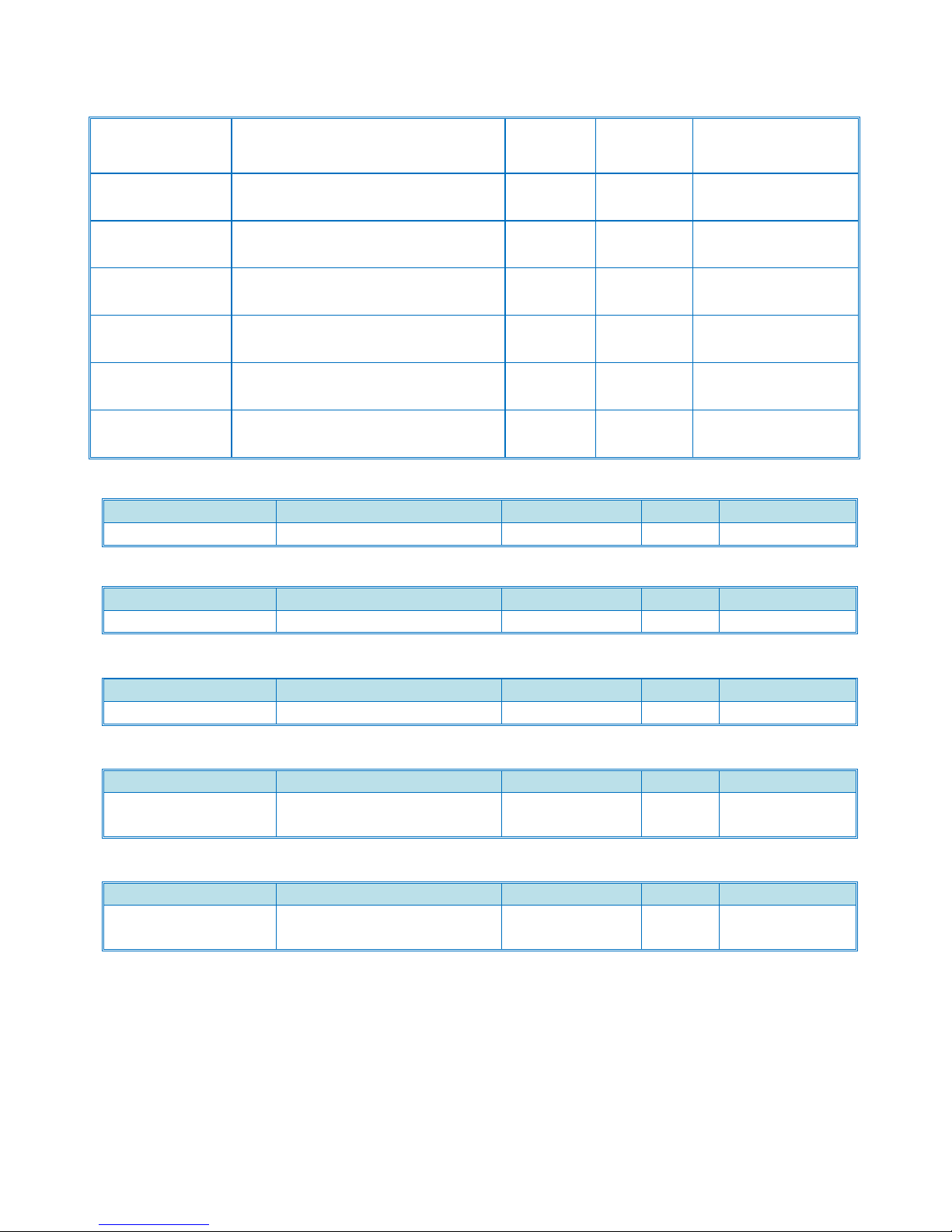
Fax 32MB SAF
Memory Unit
Type B
Fax 32MB SAF Memory Unit Type
B
G578
001342MIU
C
FAC52 Cabinet
FAC52 Cabinet
5K6123
416337
C
Browser Unit
Browser Unit Type F
D645-17
416002
U
ADF Handle
ADF Handle Type C
D593
416213
C
Bluetooth
Bluetooth (USB)
D566
415818
C
NetWare
Printing
SD Card for NetWare Printing Type
H
D645-23
416001
C
HotSpot MFP
Option Type E
HotSpot MFP Option Type E
TBA
TBA
Destination
Name
Product Code
EDP
Serial #
Generic
ARDF DF3070
D630
416021
TBA
Destination
Name
Product Code
EDP
Serial #
Generic
Envelope Feeder EF3020
D638
416272
W78yfmxxxx
Destination
Name
Product Code
EDP
Serial #
Generic
Paper Feed Unit PB3130
D580
415793
W57yfmxxxxx
Destination
Name
Product Code
EDP
Serial #
North America/
Latin America
LCIT PB3140
D581
415795
W58yfmxxxxx
Destination
Name
Product Code
EDP
Serial #
North America/
Latin America
LCIT RT3020
D631
415984
W61yfmxxxxx
ARDF
Product Support Guide
D143/D144
Envelope Feeder
2-Tray Paper Feed Unit
LCT (2000-Sheet)
LCT (1200-Sheet)
Ver.1.0 Page 4 of 72 2/3/2012
Subject to change without notice
Page 5
Destination
Name
Product Code
EDP
Serial #
Generic
BN 3100
D632
415986
W62yfmxxxxx
Destination
Name
Product Code
EDP
Serial #
Generic
SH3060
D633
415987
W89yfmxxxxx
Destination
Name
Product Code
EDP
Serial #
Generic
Side Tray Type C5502
D635
415989
W64yfmxxxxx
Destination
Name
Product Code
EDP
Serial #
North America/
Latin America/
Europe/Asia/
Taiwan/Australia/L
atin America
SR3090
D588
415804
W75yfmxxxxx
Destination
Name
Product Code
EDP
Serial #
Generic
Booklet Finisher SR3110
D637
416007
TBA
Destination
Name
Product Code
EDP
Serial #
Generic
Finisher SR 3120
D636
416008
TBA
Destination
Name
Product Code
EDP
Serial #
Generic
Bridge Unit BU3060
D634
415988
W63yfmxxxxx
Destination
Name
Product Code
EDP
Serial #
North America/
Latin America/
Fax Option Type C5502
D643-01
415991
W65yfmxxxxx
1 Bin Tray Unit
Shift Tray Unit
Side Tray
1000-Sheet Finisher
Product Support Guide
D143/D144
2000-Sheet Booklet Finisher
3000-Sheet Finisher
Bridge Unit
Fax Unit
Ver.1.0 Page 5 of 72 2/3/2012
Subject to change without notice
Page 6
Supplies/Yields
Item
Name
Order Code
Target Yield
Ricoh / Savin / Lanier
Toner Black
Print Cartridge Black Type
MP C4502, MP C5502
841679
31,000prints/bottle *1
Toner Yellow
Print Cartridge Yellow Type
MP C4502, MP C5502
841680
22,500prints/bottle
Toner Magenta
Print Cartridge Magenta Type
MP C4502, MP C5502
841681
22,500prints/bottle
Toner Cyan
Print Cartridge Cyan Type
MP C4502, MP C5502
841682
22,500prints/bottle
Developer
BK
D1449640
300k
C D1449660
240k
M D1449670
240k
Y D1449680
240K
Staple Set
Cartridge for
SR3110/3120/3090
Staple Type K
410801
5,000shots/staple
Staple Refill
Cartridge for
SR3110/3120/3090
Refill Staple Type K
410802
5,000shots/staple
Staple Set
Cartridge for
SR3110 (Saddle
Stitch)
Staple Type L
411240
2,000shots/staple
Staple Refill
Cartridge for
SR3110 (Saddle
Stitch)
Refill Staple Type L
411241
2,000shots/staple
Product Support Guide
D143/D144
*1: If EFI controller option is attached, the targeted yield is 29,000prints/bottle Supply Yield
Condition:
1) ISO/IEC19752 is used to measure the above toner yield.
2) The condition is standard temperature and humidity.
3) This yield number may change depending on the circumstances and printing conditions.
4) Starter AIO (included in a carton box of main unit): 6K pages / Cartridge.
Ver.1.0 Page 6 of 72 2/3/2012
Subject to change without notice
Page 7

Product Support Guide
Category
Item
Product Name
You Must Install
You Cannot Install
Original
Feeding
Platen Cover
Platen Cover Type 3352
-
ARDF
ARDF
ARDF DF3070
-
Platen Cover, Single
Pass DF model
ADF Handle
ADF Handle Type C
ARDF(only
DF3070)
Single Pass DF
model
Paper
Feeding
2 tray Paper
Bank
Paper Feed Unit PB3130
-
LCT
LCT
LCIT PB3140
-
2 tray Paper Bank
Side LCT
LCIT RT3020
2 tray Paper Bank
or LCT
- Envelope
Feeder
Envelope Feeder EF3020
-
Finishing
1 Bin Tray
1 Bin Tray BN 3100
-
-
Internal Shift
Tray
Internal Shift Tray SH3060
-
2000 Sheets Booklet
Finisher, 3000 Sheets
Finisher, 1000 Sheets
Finisher, Bridge Unit,
Side Tray
Side Tray
Side Tray Type C5502
2000 Sheets Booklet
Finisher, 3000 Sheets
Finisher, 1000 Sheets
Finisher, Bridge Unit,
Shift Tray
1000 Sheets
Finisher
Finisher SR3090
Bridge Unit and
Paper Bank or LCT
2000 Sheets Booklet
Finisher, 3000 Sheets
Finisher, Shift Tray,
Side Tray
3000 Sheets
Finisher
Finisher SR3120
Bridge Unit and
Paper Bank or LCT
2000 Sheets Booklet
Finisher, 1000 Sheets
Finisher, Shift Tray,
Side Tray
2000 Sheets
Booklet
Finisher
Booklet Finisher SR3110
Bridge Unit and
Paper Bank or LCT
1000 Sheets Finisher,
3000 Sheets Finisher,
Shift Tray, Side Tray
Option Compatibility
D143/D144
Ver.1.0 Page 7 of 72 2/3/2012
Subject to change without notice
Page 8

Product Support Guide
Punch Unit
Punch Kit PU3030NA/EU/SC
2000 Sheets
Booklet Finisher or
3000 Sheets
Finisher
-
Bridge Unit
Bridge Unit BU3060
2000 Sheets
Booklet Finisher or
1000 Sheets
Finisher or 3000
Sheets Finisher
Shift Tray, Side Tray
Fax
Fax Option
Fax Option Type C5502
-
-
G3 Unit
G3 Interface Unit Type C5502
Fax Option
-
FAX
Connection
Fax Connection Unit Type B
Fax Option (for
Center machine)
SAF Memory
Memory Unit Type B
Fax Option
-
Handset(Only
for RAC)
Hand Set Type 3352
Fax Option
FAX Stamp
Marker Type 30
Fax Option
-
Printer
Option
PostScript3
Postscript3 Unit Type C5502
-
EFI Controller
PictBridge
Camera Direct Print Card Type
J
-
EFI Controller
IPDS
IPDS Unit Type C5502
-
EFI Controller
Network
Option
Wireless LAN
Interface
IEEE 802.11a/g Interface Unit
Type J
-
Bluetooth, IEEE
1284, EFI Controller
Wireless LAN
Interface
IEEE 802.11g Interface Unit
Type K
-
Bluetooth, IEEE
1284,EFI Controller
IEEE 1284
Interface
IEEE 1284 Interface Board
Type A
-
Wireless LAN, EFI
Controller
Gigabit
Ethernet
Gigabit Ethernet Type B
-
EFI Controller
Bluetooth
Bluetooth Interface Unit Type D
-
Wireless LAN,
Security
Copy Guard
Security
Copy Data Security Unit Type
F
-
Others
Browser Unit
Browser Unit Type F
-
-
Netware
SD card for NetWare printing
Type H
EFI Controller
Optional
Counter
Interface
Optional Counter Interface
Unit Type A
-
EFI Controller
Key Counter
Bracket
Key Counter Bracket Type H
-
EFI Controller
File Format
Converter
File Format Converter Type E
-
-
D143/D144
Ver.1.0 Page 8 of 72 2/3/2012
Subject to change without notice
Page 9
Product Support Guide
Card Reader
Bracket
Card Reader Bracket Type
3352
-
Scanner
Accessibility
Option
Scanner Accessibility Option
Type C5502
-
Single Pass DF
model
D143/D144
Branding Information
Branding is required as the machines are shipped as a generic version.
Ricoh version machines: You must attach the model label (provided) to the front cover.
Savin/Lanier: You must attach the model label (provided) to the front cover and set the Plug and Play name with
SP 5-907.
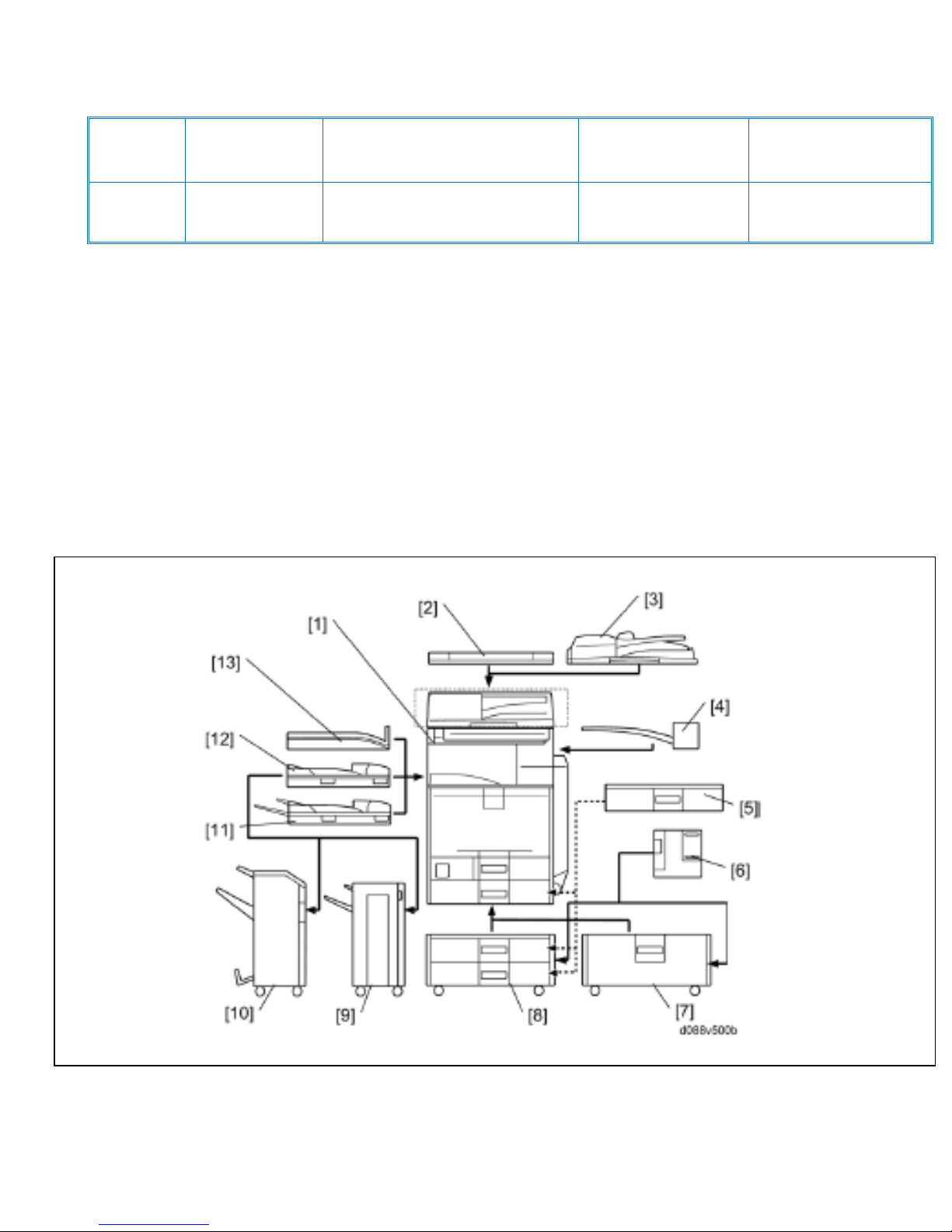
Configuration
Main Frame Configuration
Ver.1.0 Page 9 of 72 2/3/2012
Subject to change without notice
Page 10
Item
Machine code
Call Out
Remarks
Mainframe
D143/D144
1
Single pass ADF model has
ADF as standard
Platen Cover
D593
2
One from the two for all
models except the Single
Pass ADF model
ARDF
D630
3
2000(Booklet) / 3000 Sheet
Finishers
D637 / D636
4
One from 9 and 10, requires
11 and one from 7 and 8
Punch Unit 3/2/Holes
B702
-
Requires 10
Punch Unit 2/3/Holes
D570
-
Requires 10
1000 Sheet Finisher
D588
9
One from 9 and 10 requires
11 and one from 7 and 8
2000 Sheet LCT
D581
7
One from the two
2 Tray Paper Feed Unit
D580
8
1200 Sheet LCT
D631
6
Requires 7 or 8
Envelope Feeder
D638
5
Requires Tray 2 of the
Mainframe or 8
1 Bin tray
D632
4 - Bridge Unit
D634
12
One from the Three
Shift Tray
D633
13
Side Tray
D635
11
Scanner Accessibility
Option
D647
-
Card Reader Bracket
D593 - 61
-
-
ADF Handle Type C
D593
-
This is for use when a
person who uses a wheel
chair will lift the ADF up or
down
Optional Counter Interface
Unit
B870
-
Key Counter Bracket
A674
-
-
Product Support Guide
D143/D144
Ver.1.0 Page 10 of 72 2/3/2012
Subject to change without notice
Page 11
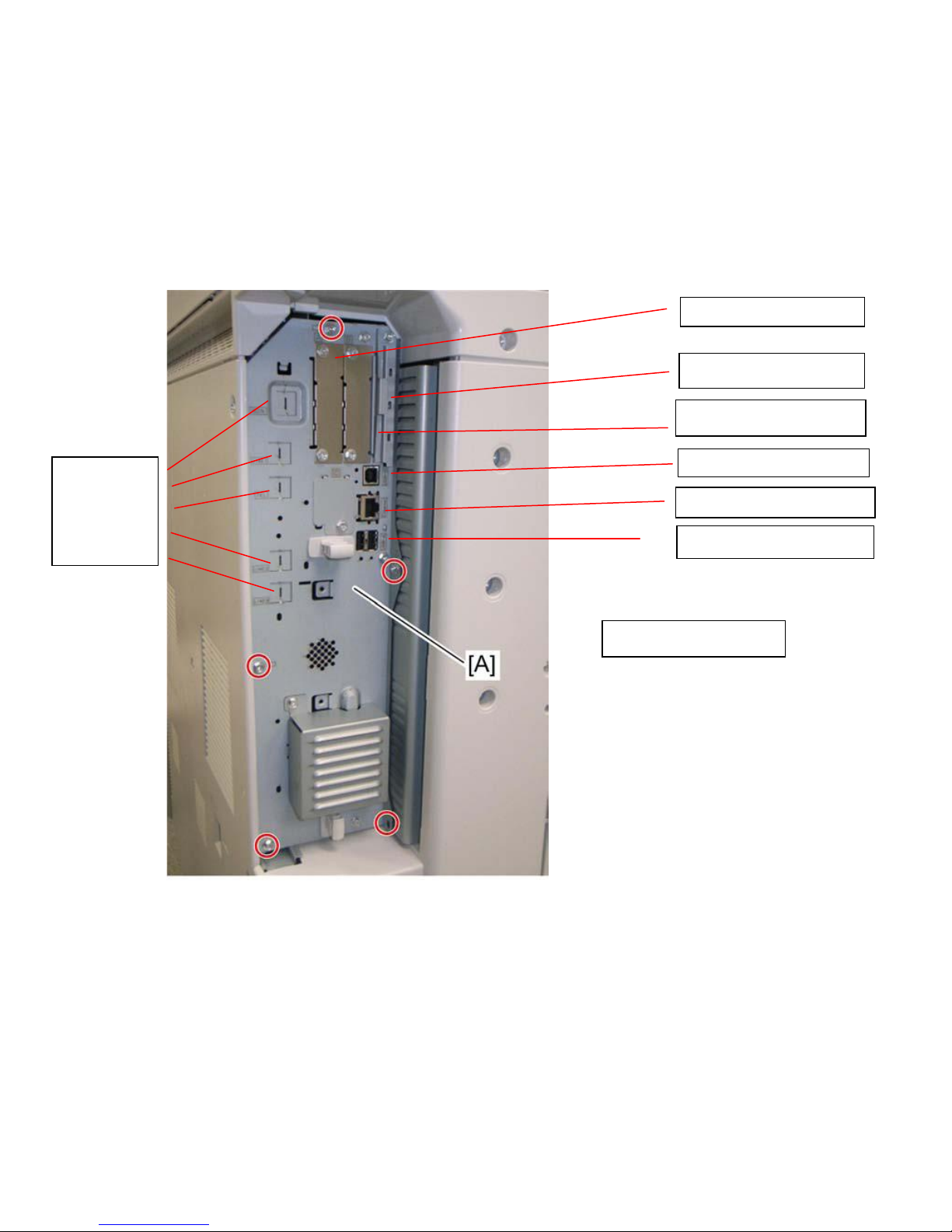
Product Support Guide
USB Host Interface
Ethernet
I/F Card Slot B
I/F Card Slot A
SD Card Slots
USB (print)
Fax Option
[A] Controller Box
D143/D144
MFP Options
MFP Option Board Slot / SD Card Assignments
Ver.1.0 Page 11 of 72 2/3/2012
Subject to change without notice
Page 12
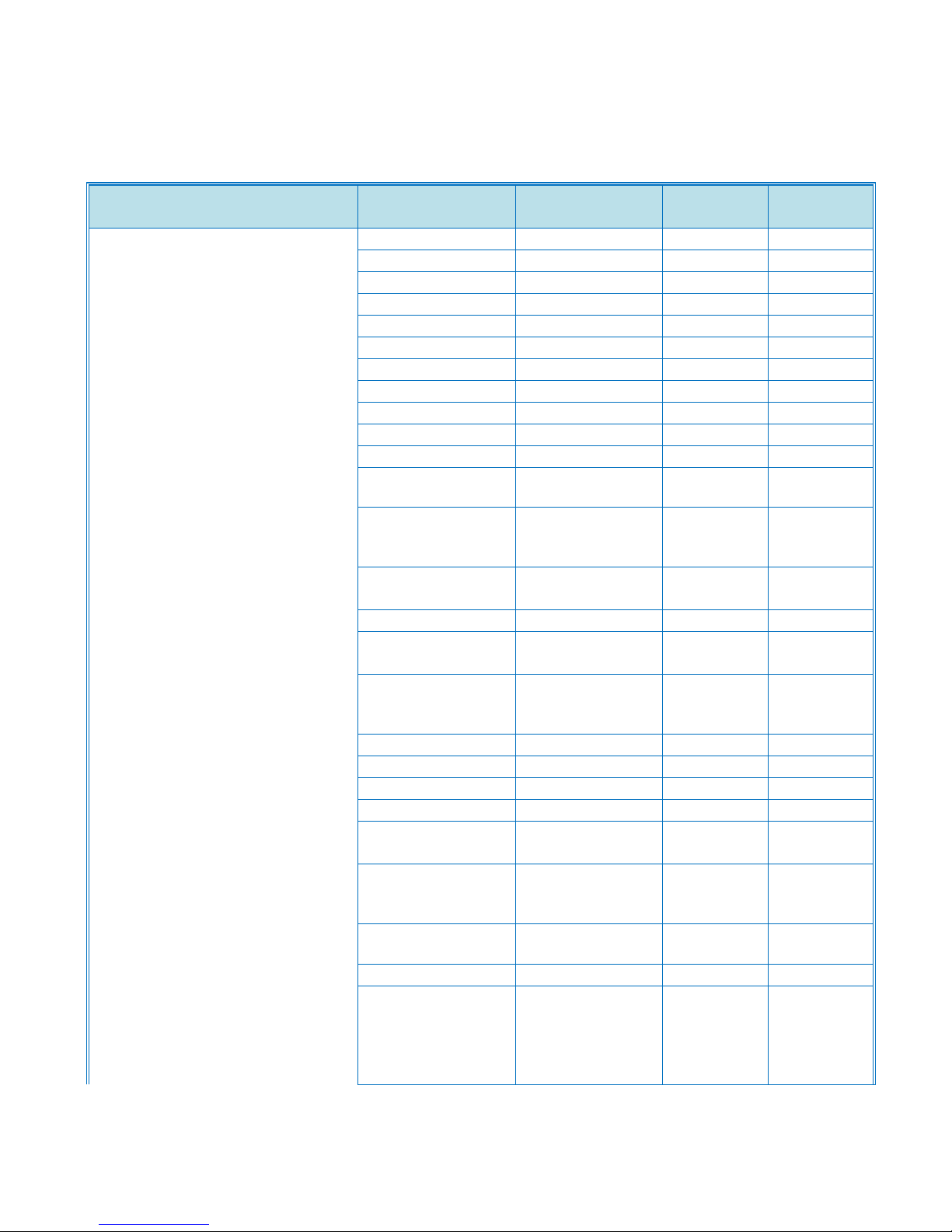
Product Support Guide
Mode
D088/D089
D143/D144
Printer Features
Sample Print
Yes
Yes
Locked Print
Yes
Yes
Hold Print
Yes
Yes
Scheduled Print
No
Yes
Stored Print
Yes
Yes
Store and Print
Yes
Yes
Black Over Print
Yes
Yes
CLP Simulation
Yes
Yes
PDF Direct Print
Yes
Yes
PictBridge
Yes
Yes
Mail to Print
Yes
Yes
Classification
Code
Yes
Yes
Bonjour
(Rendezvous)
Support
Yes
Yes
Windows Active
Directory Support
Yes
Yes
DDNS Support
Yes
Yes
PCL resident font
adoption
Yes
Yes
Tray-Parameter
Change from
WebImageMonitor
Yes
Yes
1200dpi Support
Yes
Yes
Mobile Driver
Yes
Yes
XPS Support
Yes
Yes
WS Printer
Yes
Yes
Wireless LAN
interface option *1
Yes
Yes
Media Direct Print
(Print from
USB/SD)
Yes
Yes
Auto Job
Promotion
No
Yes
AirPrint*2
No
TBA
*1 Not only
IEEE802.11b, but
also
IEEE802.11a/g
are supported.
D143/D144
Previous To Current Model Feature Comparison
Ver.1.0 Page 12 of 72 2/3/2012
Subject to change without notice
Page 13
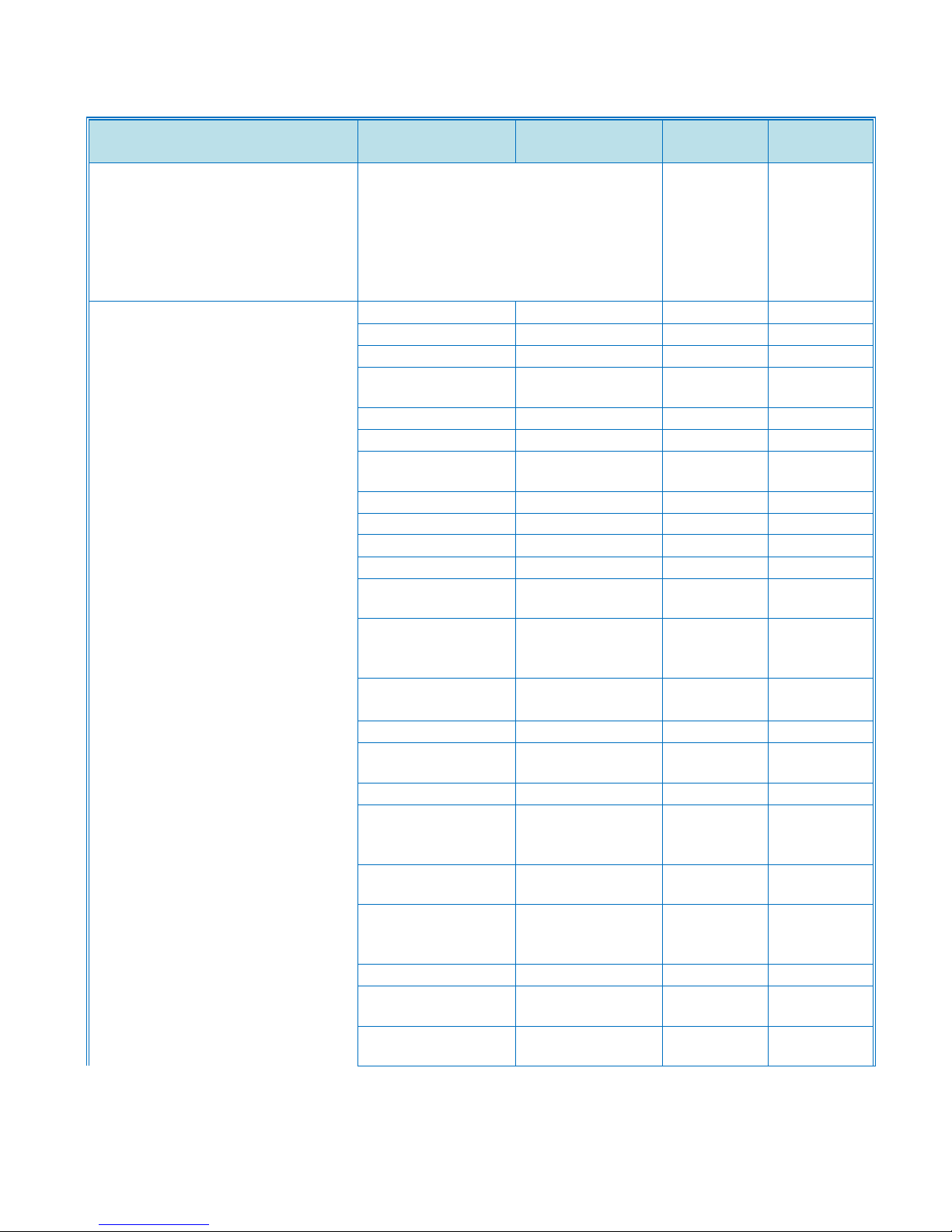
Product Support Guide
Mode
D088/D089
D143/D144
*2 To announce that this model
supports AirPrint function on external
sales materials such as brochures,
acquiring a certification from Apple is
required. And also, this function is
disabled until this model is certified by
Apple.
Scanner Features
Scan to USB/SD
Yes
Yes
WS-Scanner
Yes
Yes
Scan to E-mail
Yes
Yes
E-mail message
attached
Yes
Yes
Subject attached
Yes
Yes
SMTP Auth
Yes
Yes
POP before
SMTP
Yes
Yes
Scan to SMB
Yes
Yes
Scan to FTP
Yes
Yes
Scan to URL
Yes
Yes
Scan to NCP
Yes
Yes
Scanned file
naming
Yes
Yes
Reference #
Setting (ex.
SCAN0001)
Yes
Yes
Scan file type
selection
Yes
Yes
Single TIFF
Yes
Yes
Single JPEG
(Gray Scale)
Yes
Yes
Single PDF
Yes
Yes
Single High
Compression
PDF
Yes
Yes
Multi page
TIFF/PDF
Yes
Yes
Multi page High
Compression
PDF
Yes
Yes
LDAP Support
Yes
Yes
E-mail Address
search
Yes
Yes
FAX address
search
Yes
Yes
D143/D144
Ver.1.0 Page 13 of 72 2/3/2012
Subject to change without notice
Page 14
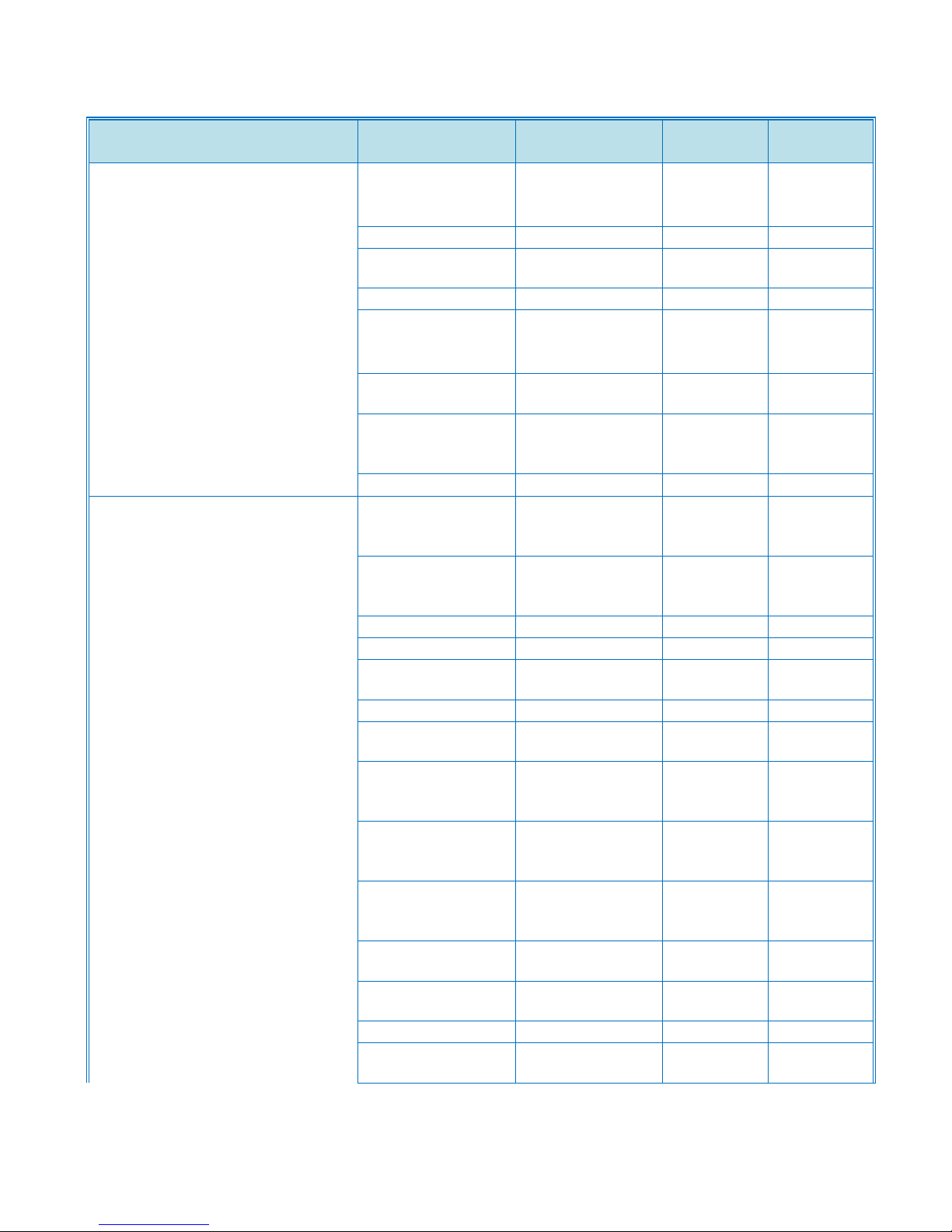
Product Support Guide
Mode
D088/D089
D143/D144
Preview before
transmission (TX
Preview)
Yes
Yes
PDF Encryption
Yes
Yes
Drop out Color
Send
Yes
Yes
Twain Scan
Yes
Yes
Universal Send
(Simultaneous
FAX & Scan)
Yes
Yes
Document Clipper
*1 No
No
(*1) Data
Processing / OCR
Package
FAX Features
Detection of
misplaced
document
Yes
Yes
Double-check of
destination
address
Yes
Yes
Direct SMTP
Yes
Yes
IP Fax (T.38)
Yes
Yes
Internet Fax
(T.37)
Yes
Yes
Forward to E-mail
Inbound fax
(G3/Internet)
Yes
Yes
G3 Fax
Transmission
result
Yes
Yes
G3 LAN Fax
Transmission
result
Yes
Yes
Internet fax
sending result
(to SMTP)
Yes
Yes
Fax to e-mail
result (to SMTP)
Yes
Yes
IP Fax sending
result
Yes
Yes
Journal
Yes
Yes
Fax from special
sender
Yes
Yes
D143/D144
Ver.1.0 Page 14 of 72 2/3/2012
Subject to change without notice
Page 15
Product Support Guide
Mode
D088/D089
D143/D144
Fax and forward
designated
receiver (SUB)
Yes
Yes
Fax forward to
folder
Yes
Yes
with E-mail
Notification
Yes
Yes
Paperless fax
(HDD received)
Yes
Yes
with E-mail
Notification
Yes
Yes
Lan-fax with cover
sheet editor
Yes
Yes
LDAP Support
Fax address
search
Yes
Yes
Max G3 lines 3
3
Universal Send
(Simultaneous
FAX & Scan)
Yes
Yes
DS stored data
sending
Yes
Yes
Security Features
HDD Data
Overwrite
Security*1
YES(std)
YES(std)
Option Type A
Option Type B
Option Type C
Option Type D
Option Type F
Option Type H
v
Option Type I
ISO/IEC15408
Certification
T.B.A
T.B.A
Authentication *2
Windows
Authentication
YES
YES
LDAP
Authentication
YES
YES
YES
YES
Basic
Authentication
YES
YES
D143/D144
Ver.1.0 Page 15 of 72 2/3/2012
Subject to change without notice
Page 16
Product Support Guide
Mode
D088/D089
D143/D144
User Code
Authentication
YES
YES
802.1.x Wired
Authentication
YES
YES
Encryption
Address Book
Encryption
YES
YES
Authentication
Pwd Encryption
YES
YES
SSL
communication
YES
YES
S/MIME
YES
YES
IPsec
communication
YES
YES
HDD Encryption
(*1)
YES
YES
Type A
v
Locked Print
password
Encryption
YES
YES
Others
Network
Protocol On/Off
YES
YES
IP filtering
(Access Control)
YES
YES
Mask Type for
Copying/Data
Security for
Copying *1
NO
YES
Copy Data
Security Unit
Option (*1)
NO
YES
Type A
Type C
Type E
Type F
v
Printout User
Trace *5
NO
NO
Alteration
Detection *5
NO
NO
Revival Copy *5
NO
NO
Upgraded Data
Security for
Copying
NO
NO
D143/D144
Ver.1.0 Page 16 of 72 2/3/2012
Subject to change without notice
Page 17
Product Support Guide
Mode
D088/D089
D143/D144
Quota
Setting/Account
Limit
YES
YES
Single Sign On
NO
NO
SMTP over SSL
YES
YES
Mandatory Security Information Print
NO
YES
(*1) Option
required for some
models.
(*2) Please refer
to "printer driver
specification" for
details of
compatible PDL.
(*3) Applicable for
Windows
Authentication
and LDAP
Authentication.
(*4) To be
provided as
optional function
package.
(*5) To be
provided as
Marking Package.
UI Features
UI Customization
NO
YES
My Operation
Panel
NO
YES
Remote Operation
Panel
NO
NO
MFP Full Browser
NO
YES
Operation Manual
on Operation
Panel
NO
NO
Workflow
improvement with
one-button
NO
YES
External USB
Keyboard
NO
YES
QWERTZ Layout
Keyboard
NO
YES
AZERTY Layout
YES
YES
D143/D144
Ver.1.0 Page 17 of 72 2/3/2012
Subject to change without notice
Page 18
Product Support Guide
Mode
D088/D089
D143/D144
Keyboard
(*1) Ad-C4.5 and
Al-C1 have this
feature with
special
customization.
Accessibility Features
Easy Touch Screen
YES
YES
Normal/Reverse Grip & Light drawing
YES
YES
Scanner Separation
YES*1
(Optional)
YES*1
(Optional)
Tilt Operation
Panel
NO
YES
Distinguishable LED
YES
YES
Single Hand Operation
YES
YES
Electronic Manual (CD manual)
YES
YES
*AP-C, A-C or AL-C only
Other Value Added Features
Hierarchy Document Management
(Document Server)
No
No
Import/Export of Preference Settings
NO
YES
Information Screen (Eco-Friendly Indicator)
NO
YES
D143/D144
Ver.1.0 Page 18 of 72 2/3/2012
Subject to change without notice
Page 19
Product Support Guide
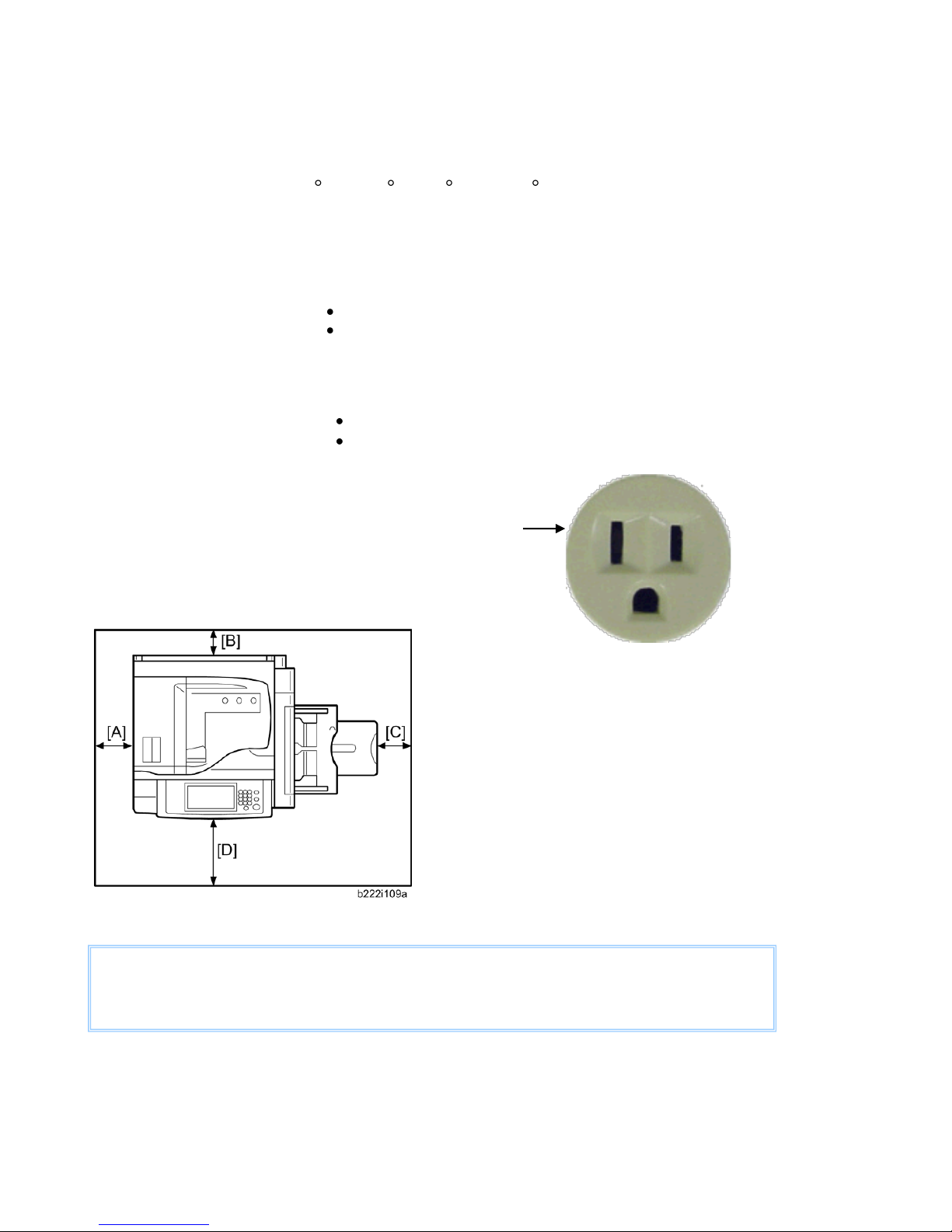
Temperature Range:
10 C to 32 C (50 F to 89.6 F)
Humidity Range:
15% to 80% RH
Ambient Illumination:
Less than 1,500 lux (do not expose to direct sunlight)
Ventilation:
3 times/hr/person
Ambient Dust:
Less than 0.075 mg/m3 (2.0 x 10⁻⁶oz/yd3)
Avoid areas exposed to sudden temperature changes:
Areas directly exposed to cool air from an air conditioner.
Areas directly exposed to heat from a heater.
Do not place machine where it will be exposed to corrosive gas or vapor.
Do not install the machine at any location over 2,500m (8,200 ft.) above sea level.
Place the machine on a strong and level base. Inclination on any side should be no more than 5mm (0.2”)
Do not place the machine where it may be subject to strong vibrations.
Machine level
Front to back: within 5mm (0.2”) of level
Right to left: within 5mm (0.2”) of level
A (Left)
Over 100 mm (3.9")
B (Rear)
Over 100 mm (3.9")
C (Right)
Over 550 mm (21.7")
D (Front)
Over 750 mm (29.5")
Dimensions (W x D x H): 22.8 x 28.98 x 41.9 (with 2-Tray Paper Bank and fall-prevention
material) Measurement Conditions: With bypass feed table closed
The recommended 750 mm (30”) front space is sufficient to
allow the paper tray to be pulled out. Additional the front
space is required to allow operators to stand at the front of
the machine.
D143/D144
Installation
Installation Requirements
Power Requirements
Input voltage level: 110 - 120 V, 60Hz: 12A
Do not place anything on power cord.
The required wall outlet is a NEMA 5-15R (receptacle)
Space
Foot Print
Ver.1.0 Page 19 of 72 2/3/2012
Subject to change without notice
Page 20
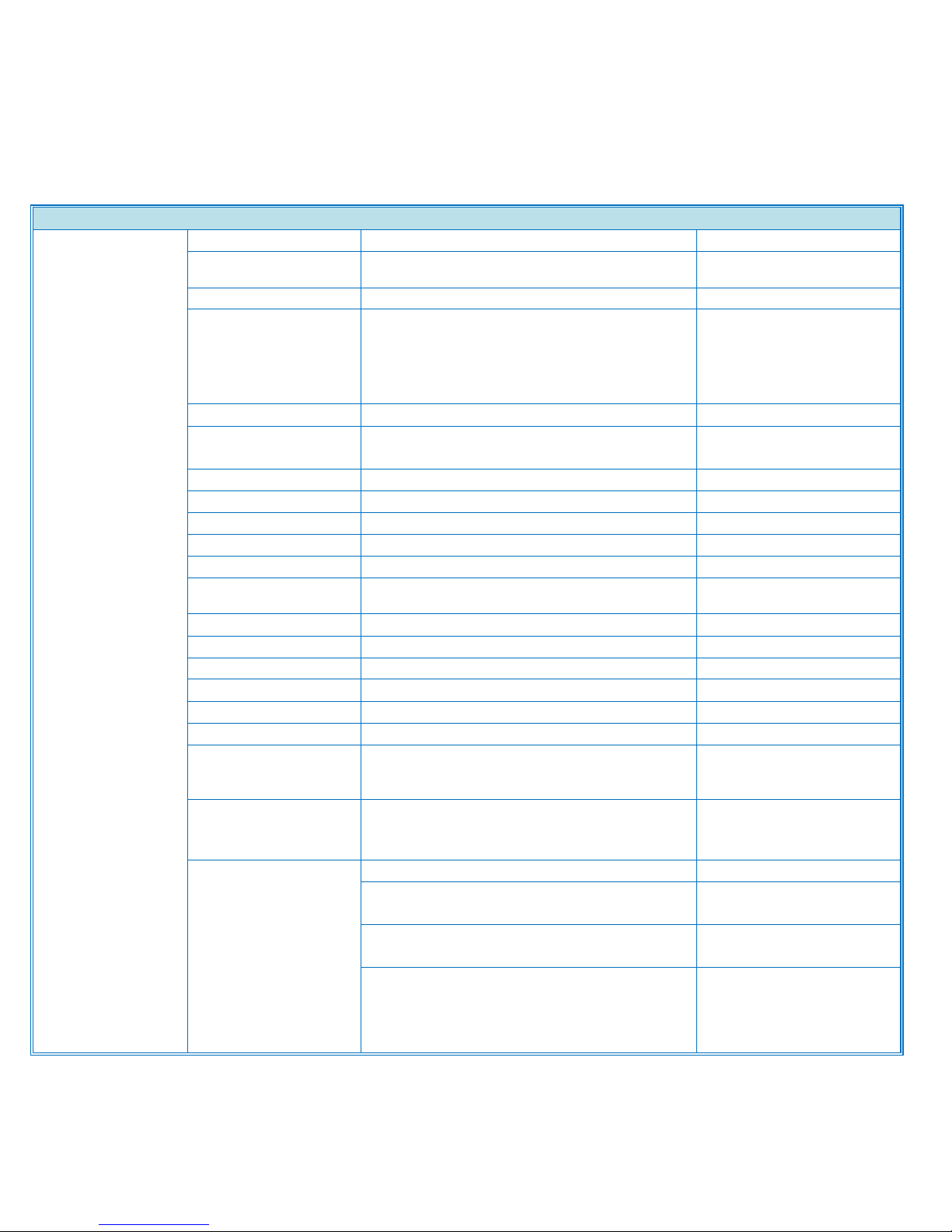
Power Consumption
Power
Consumption may
differ depending
on the conditions
and environment
of the machine.
Max Power
Full Option Max
Power
1,584 or less
Operating Power
(Guaranteed value)
900
(Nominal value)
Normal
DF(D143:690.9/D144:781.
4)
SPDF(D143:694.1/D144:7
66.2)
Ready Mode
(Guaranteed value)
240 or less
(Nominal value)
Normal DF 101
SPDF 120
Panel Off
(Guaranteed value)
-
(Nominal value)
-
Shift time(Default)
-
Recovery
-
Low Power
Power (Guaranteed value)
150 or less
(Nominal value)
Normal DF 86
SPDF 98
Shift time(Default)
-
Recovery (Guaranteed value)
10
(Guaranteed (Nominal value)
9.7
Sleep Mode
Power (Guaranteed value)
1.2 or less
(Nominal value)
10
Shift time(Default) S
1 min
Recovery (Guaranteed value)
Normal DF(D143:
15/D144:20)
SPDF(D143:15/D144:20)
(Nominal value)
Normal DF(D143:
15/C3d:18)
SPDF(D143:15/D144:18)
TEC (Typical
Electricity
Consumption)
D143 :normal DF
2,151
D143 : SPDF
2,150
D144 : normal DF
2,719
D144: SPDF
2,749
Power Consumption / Noise Emission
Power Consumption
Ver.1.0 Page 20 of 72 2/3/2012
Subject to change without notice
Product Support Guide
D143/D144
Page 21
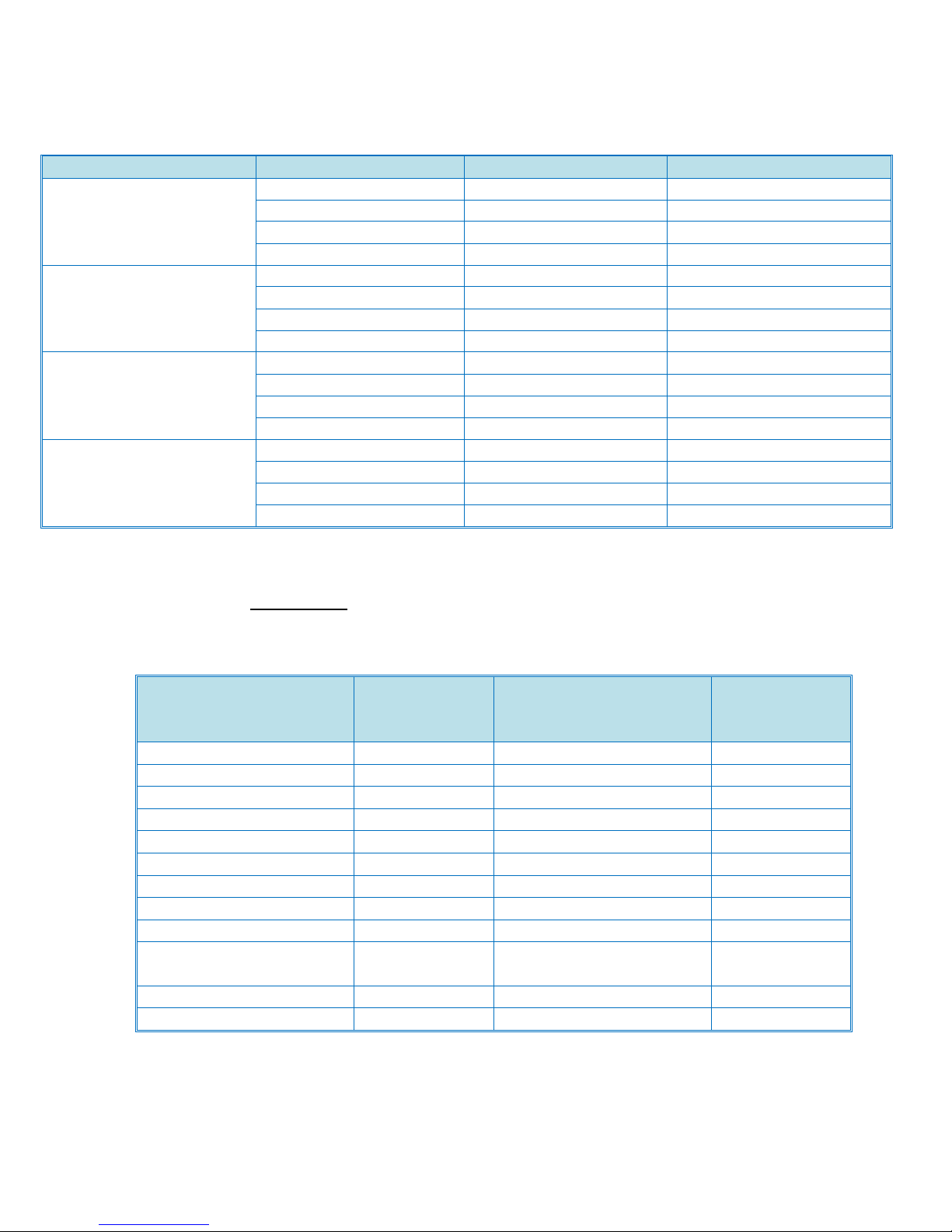
Noise Emission
Mode
Model
DB
Sound Power Level
(Mainframe Only)
Stand-by
D143
40 or less D144
40 or less
Copying
D143
71.8(BW), 71.5(FC) or less
D144
72.0(BW,FC) or less
Sound Power Level
(Full System)
Stand-by
D143
40 or less D144
40 or less
Copying
D143
75.8(BW), 75.5(FC) or less
D144
76.0(BW,FC) or less
Sound Pressure Level
(Mainframe Only)
Stand-by
D143
34 or less D144
34 or less
Copying
D143
65.8(BW), 65.5(FC) or less
D144
66.0(BW,FC) or less
Sound Pressure Level
(Full System)
Stand-by
D143
34 or less 69.8(BW),
D144
34 or less
Copying
D143
69.8(BW), 69.5(FC) or less
D144
70.0(BW,FC) or less
Peripherals
Installation
Time
(minutes)
Peripherals
Installation
Time
(minutes)
ARDF
15
Card Reader Bracket
10
2-Tray Paper Feed unit
10
PostScript3
5
LCT(2000 sheet)
10
Browser Unit
5
LCT(1200 sheet)
10
Bluetooth
5
1 bin Tray
10
Gigabit Ethernet
5
Internal Shift Tray
10
IEEE 1284
5
Bridge Unit
10
IEEE802.11a/ g
5
Side Tray
10
File Format Converter
10
1000-Sheet Finisher
15
IPDS
5
2000-Sheet Booklet
Finisher
15
PictBridge
5
3000-Sheet Finisher
15
FAX Option
15
Punch Unit
15
Envelope Feeder
10
Product Support Guide
D143/D144
Installation Times
Mainframe: 30 minutes
Peripherals:
Ver.1.0 Page 21 of 72 2/3/2012
Subject to change without notice
Page 22
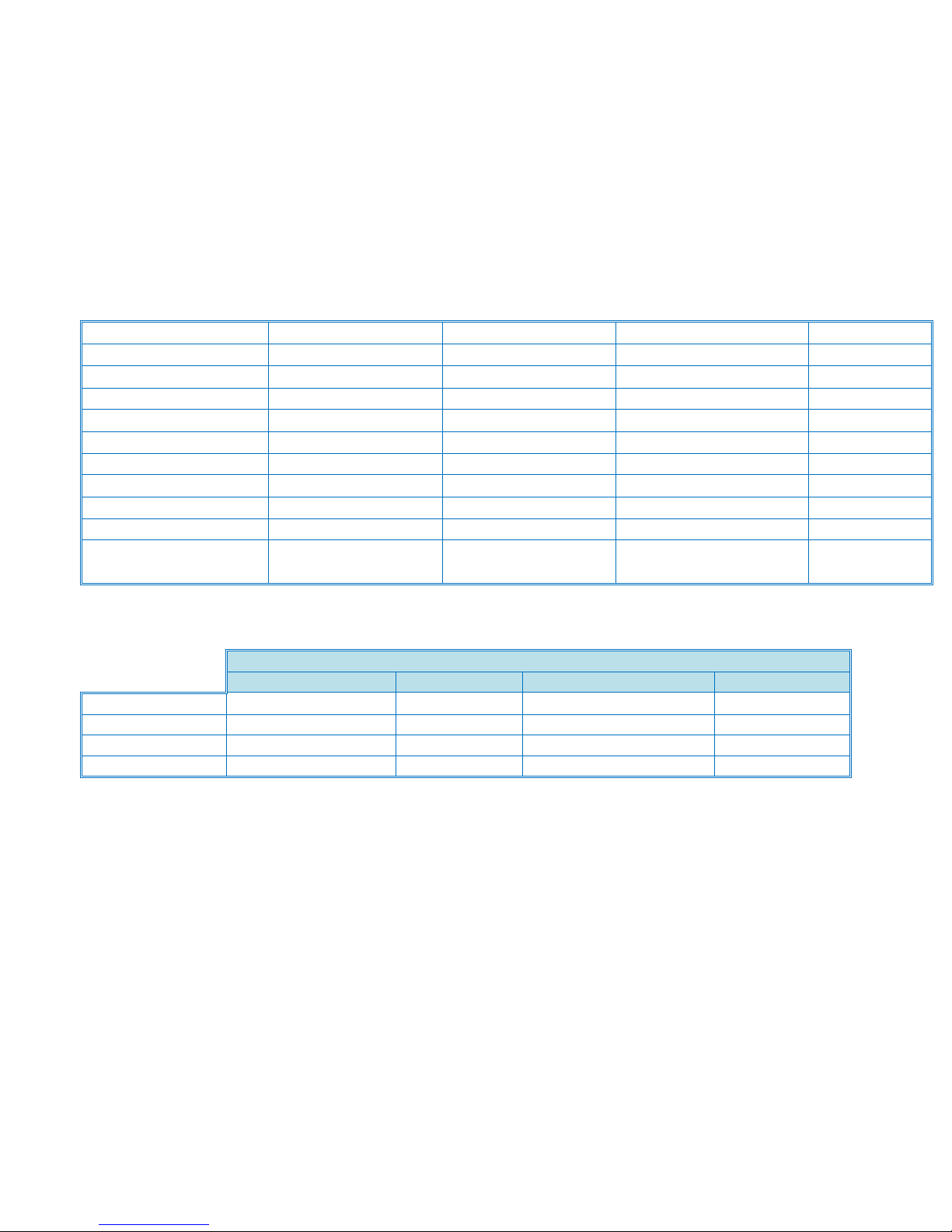
Storage Condition
Temperature
-30 ~ 40C
c
Humidity
Less than 85% RH
% RH
Storage Period
Max: 12 months
Max Stack
3 cartons
Transportation Condition
Temperature
-30 ~ 40C
c Humidity
15% ~ 95% RH
% RH
Max Stack
2 cartons
Installation environment
Temperature
10 ~ 32C
c Humidity
15% ~ 80% RH
% RH
Luminance
Less than 1500 lux
lux
Ventilation
More than 3
times/hr/people
times/hr/people
Conditions for Storage & Transportation
Temperature
Humidity
Storage Period
Stack Max
Toner (Bk)
under 45℃
15 ~ 80%
240 days
8 cartons
Toner (Y/M/C)
under 45℃
15 ~ 80%
240 days
10 cartons
Developer (Bk)
under 45℃
15 ~ 80%
240 days
20 cartons
Developer (Y/M/C)
under 50℃
15 ~ 80%
240 days
20 cartons
Remarks:
* Store in a dry, dark place where temperature does not exceed 45℃ on continuance storage/transportation conditions.
* Do not store more than 12 hours under the temperature between 41 and 45℃. (for Developer Y/M/C, between 41 and
50℃)
* Do not store more than a month under the temperature between 36 and 40℃.
* Do not store more than 14 days under the temperature 40℃ and the humidity 70%.. (except Developer Y/M/C)
* Ideal temperature of toner use is between 10℃ and 32℃
Storage/Transportation
Product Support Guide
D143/D144
Ver.1.0 Page 22 of 72 2/3/2012
Subject to change without notice
Page 23
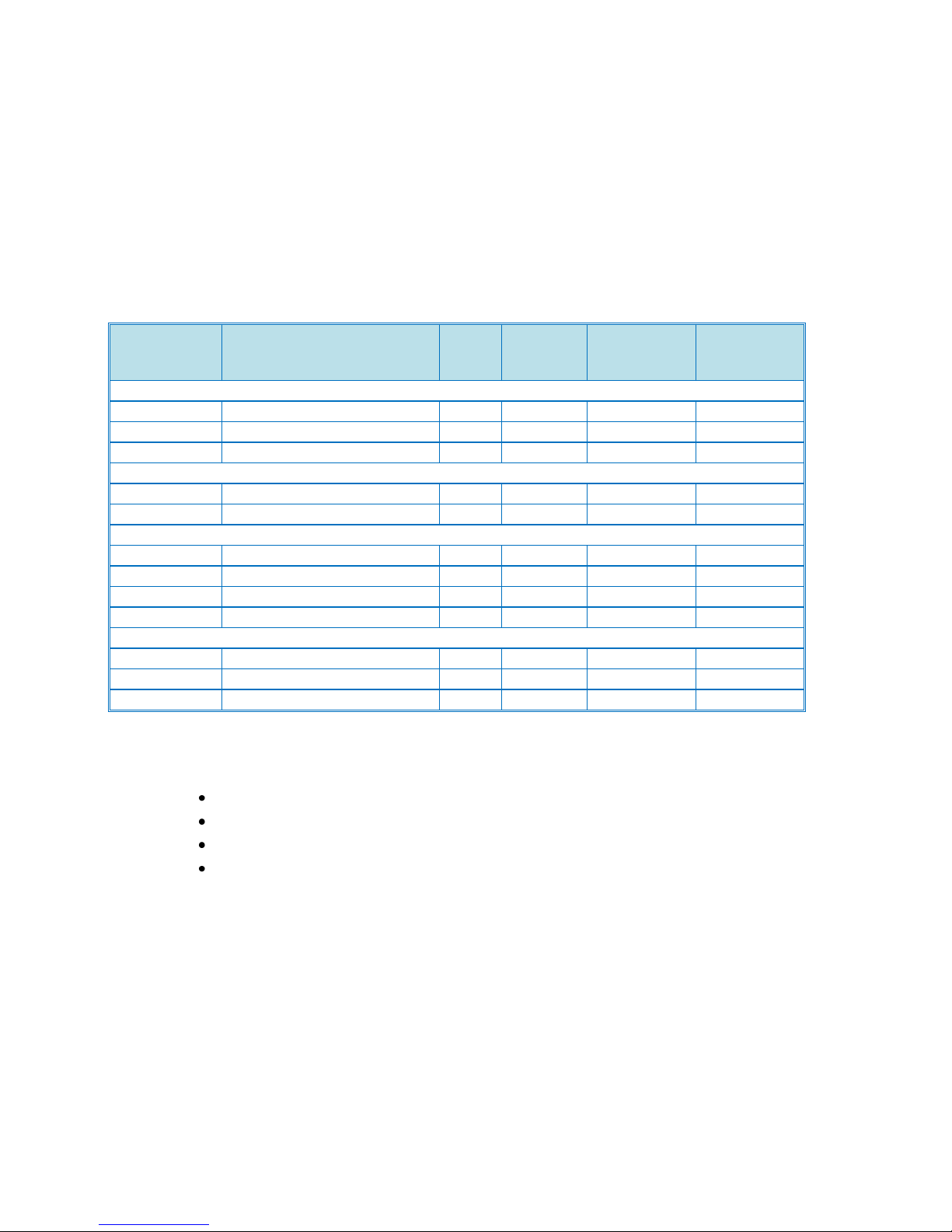
Product Support Guide
Part Number
Description
Q’ty/
Unit
Target
Yield
(Pages)
Yield affected
by P/J
(see Note 3)
Unique or
Common
PCDU
D1442250
Drum Unit-K
1
300k
Yes
U (Note 1)
D1442252
Drum Unit-CMY
1
150k
Yes
U (Note 1)
D1449640
Developer-K
1
300k
Yes
U (Note 1)
Transfer
D1446204
ITB Cleaning Unit
1
300k
Yes
U (Note 1)
D1440621
PTR Unit
1
300k
Yes
U (Note 1)
Fusing
D1444081
Fusing Belt Unit (116V)
1
300k
Yes
U
D1444082
Fusing Belt Unit (223V)
1
300k
Yes
U
D1444057
Pressure Roller
1
300k
Yes
U (Note 1)
Other
D0896509
Waste Toner Bottle (Note 2)
1
150k
No
U (Note 1)
TBA
Dust Filter
2
TBA
No
TBA
D143/D144
Parts / Special Tools / Maintenance
PM Parts / Yields
Mainframe
Unique/Common
U: Unique for this model
C: Common with listeD089
NOTE 1: These items are common with AT-C3.
NOTE 2: The yield figures in the above table are based on the following conditions:
A4 (LT) long-edge feed
5% image coverage ratio
Color ratio: 30%
4 print/job
NOTE 3: For most PM parts, the yield will depend on P/J (pages per job). For more details, see
“APPENDIX 1: PM UNIT YIELD” below.
Ver.1.0 Page 23 of 72 2/3/2012
Subject to change without notice
Page 24
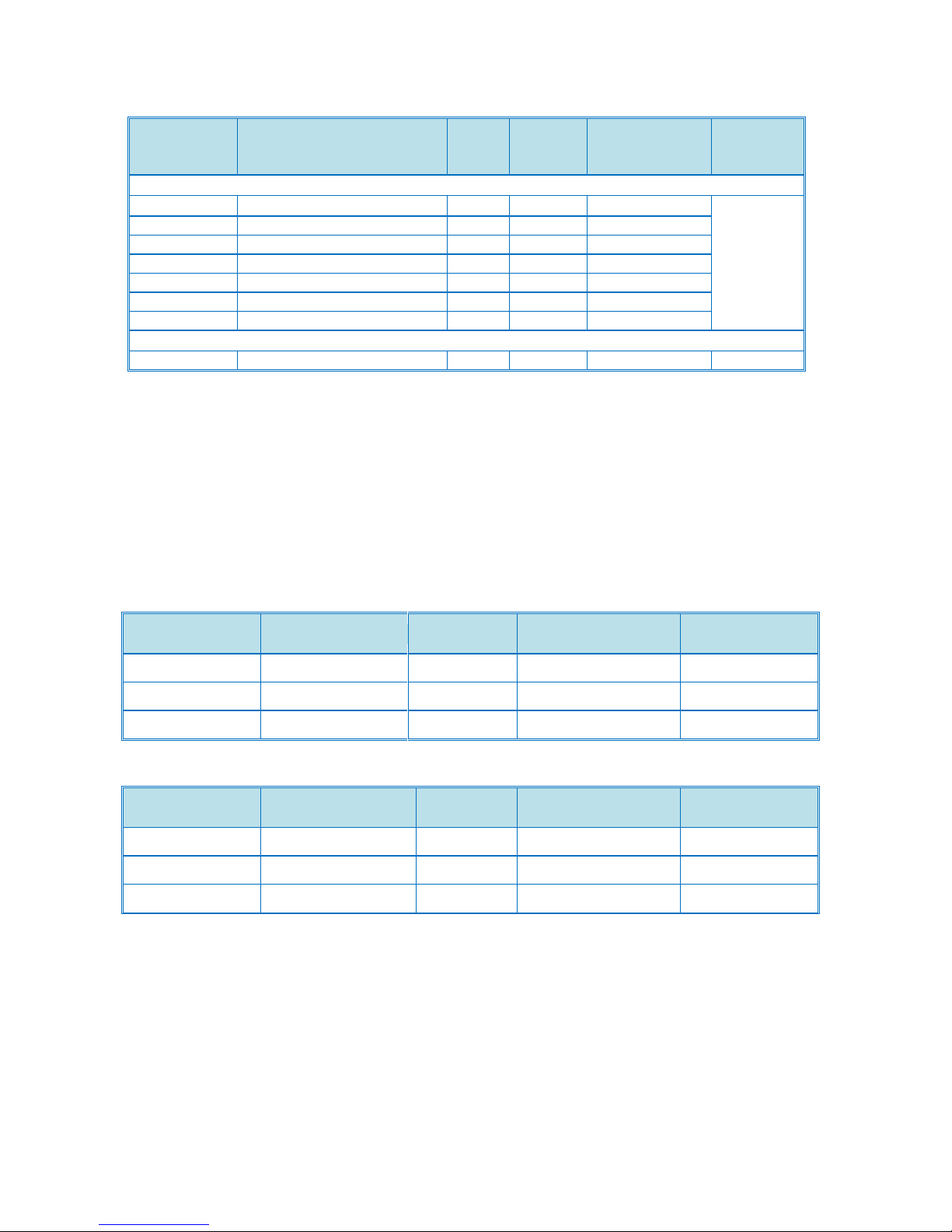
Product Support Guide
Part
Number
Description
Q’ty/
Unit
Expecte
d Yield
(Pages)
Yield affected
by P/J
(see Note 4)
Unique or
Common
PCDU
D1443010
Development Unit – K
1
600k
Yes
U
(Note 1
and 2)
D1443020
Development Unit - M
1
480k
Yes
D1443030
Development Unit - C
1
480k
Yes
D1443040
Development Unit - Y
1
480k
Yes
D1449660
Developer - M
1
240k
Yes
D1449670
Developer - C
1
240k
Yes
D1449680
Developer - Y
1
240k
Yes
Transfer
D1446011
ITB Unit
1
600k
Yes
U (Note 3)
Part Number
Description
Q’ty
/Unit
Expected Yield
(Originals)
Unique or
Common
A8061295
Paper Feed Belt
1
120k
C (AP-C2.5)
B8024361
Pick-up Roller
1
120k
C (AP-C2.5)
A8592241
Reverse Roller
1
120k
C (AP-C2.5)
Part Number
Description
Q’ty
/Unit
Expected Yield
(Originals)
Unique or
Common
A8051295
Paper Feed Belt
1
120k
C (AP-C2.5)
B4772225
Pick-up Roller
1
120k
C (AP-C2.5)
A8592241
Reverse Roller
1
120k
C (AP-C2.5)
NOTE 1: These items are common with AT-C3.
NOTE 2: The color development units and color developer are treated as EM parts, as the actual yield of these
units depends on the actual color ratio.
NOTE 3: The ITB Unit is also an EM part, as its expected yield is relatively long
NOTE 4: For above yield parts, the yield will depend on P/J (pages per job). For more details, see “APPENDIX 1:
PM UNIT YIELD” below.
D143/D144
Peripherals:
Auto Reverse Document Feeder: D630
Single Pass DF
Note: Due to their durability and extended service life, the paper feed belt, pick-up roller, and reverse roller
are treated as EM parts.
Ver.1.0 Page 24 of 72 2/3/2012
Subject to change without notice
Page 25
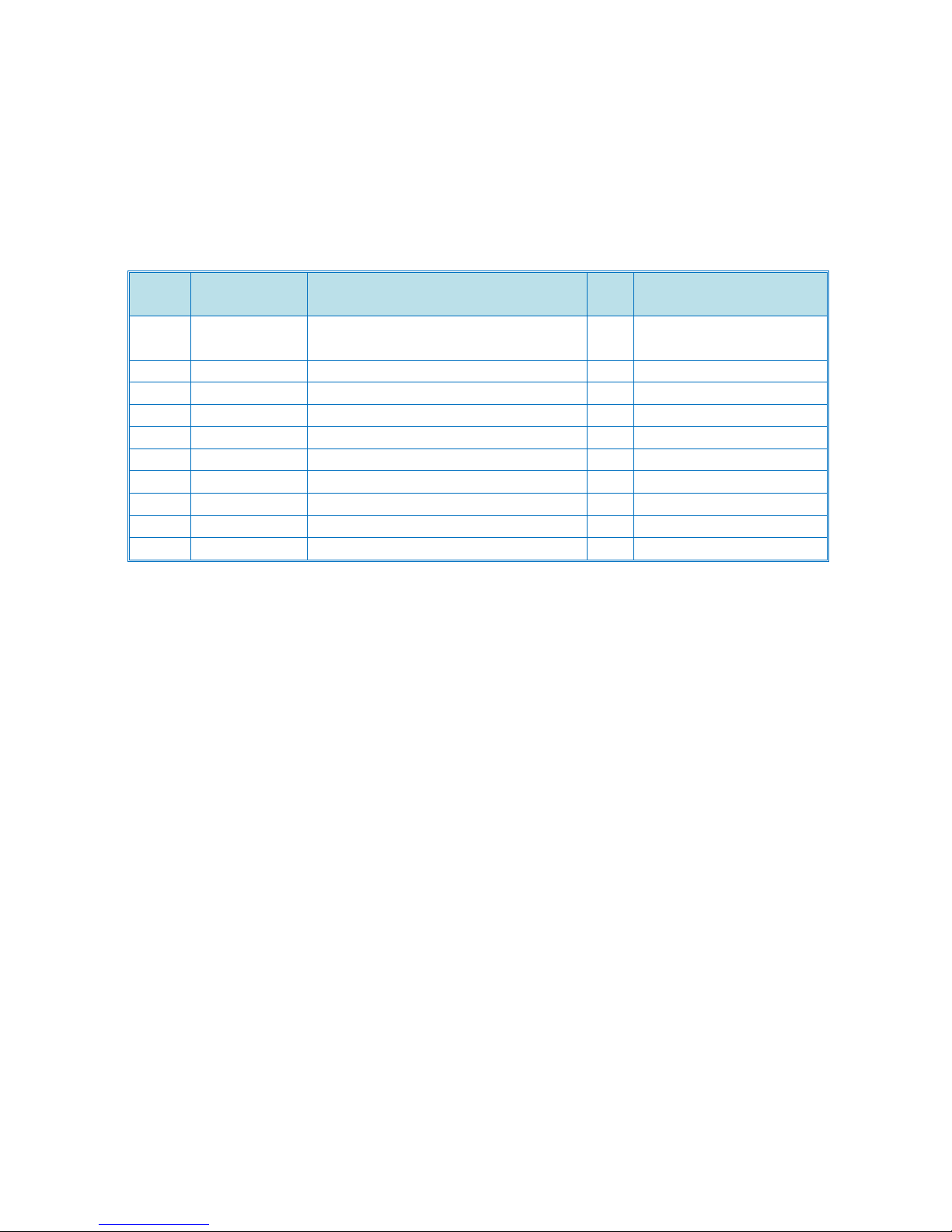
Product Support Guide
Item
Part
Number
Description
Q’ty
Unique or Common
1
A1849501
Scanner Positioning Pin
(2pcs/set)
1
C (General)
2
B6455010
SD Card
1
C (General)
3
52039502
Silicon Grease G-501
1
C (General)
4
A2579300
Grease Barrierta – S552R
1
C (General)
5
B6456705
PCMCIA Card Adapter
1
C (General)
6
G0219350
Loop-back Connector – Parallel
1
C (General)
7
C4019503
20X Magnification Scope
1
C (General)
8
A0929503
C4 Color Test Chart (3 pcs/set)
1
C (General)
9
B6795100
Plug - IEEE1284 Type C
1
C (General)
10
B1329700
Lubricant Powder
1
C (General)
D143/D144
Options
Special Tools & Lubricants
The following special tools should be prepared for maintenance of the new model in the field:
NOTE 5: Loop-back Connector – Parallel (item 6) requires Plug - IEEE1284 Type C (item 9).
NOTE 6: The color development units and color developer are treated as EM parts, as the actual yield of
these units depends on the actual color ratio.
Ver.1.0 Page 25 of 72 2/3/2012
Subject to change without notice
Page 26
Product Support Guide
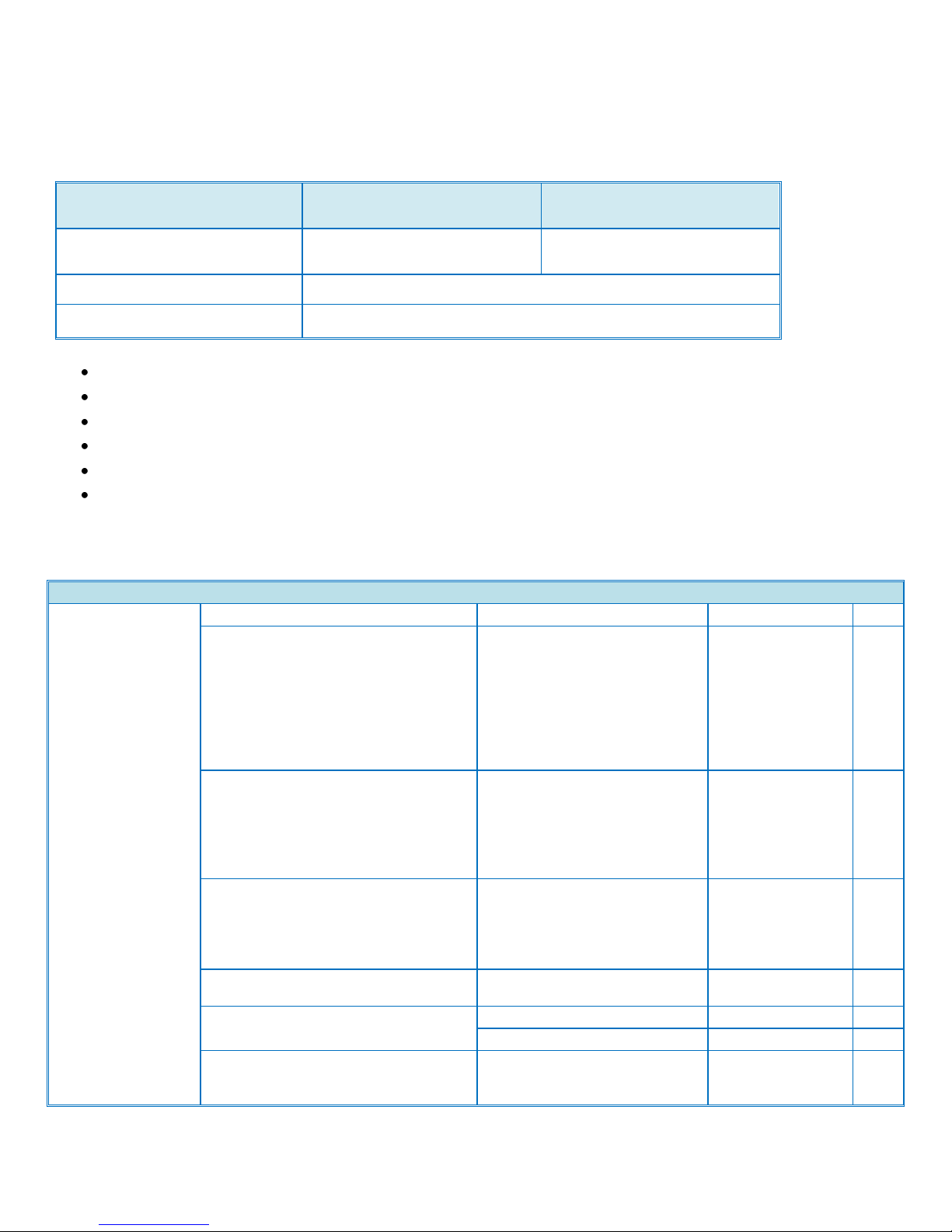
Model
D143
D144
Average Monthly Volume
10K
12K
Max. Monthly Volume
50K
PM Interval
150K
MainFrame
General Spec
Configuration
Desk Top
Scanning Element
One-dimensional
solid scanning
through CCD
*CIS sensor is
also used for
scanning back
side on SPDF
model
Printing Process
Dry Electrostatic
Transfer System
with Dual
Component
Development; 4Drum Method
Development
Dry twocomponent
magnetic brush
development
system
Fusing
QSU-DH Fusing
System
Max Image Area
297x432mm
mm 11"x17"
inch
First Copy Time (LT/A4 LEF, 1st tray)
Guaranteed value
D143: FC 5.8/BW
3.7, D144: FC
4.9/BW 3.1
sec
D143/D144
Target Reliability
The figures above are calculated based on the following:
PM is regularly performed.
Recommended paper types are used.
The machine is installed under operable environmental conditions
A4 (LT) short-edge feed
5% image coverage ratio
4P/J
Specifications / Documentation
Ver.1.0 Page 26 of 72 2/3/2012
Subject to change without notice
Page 27
Product Support Guide
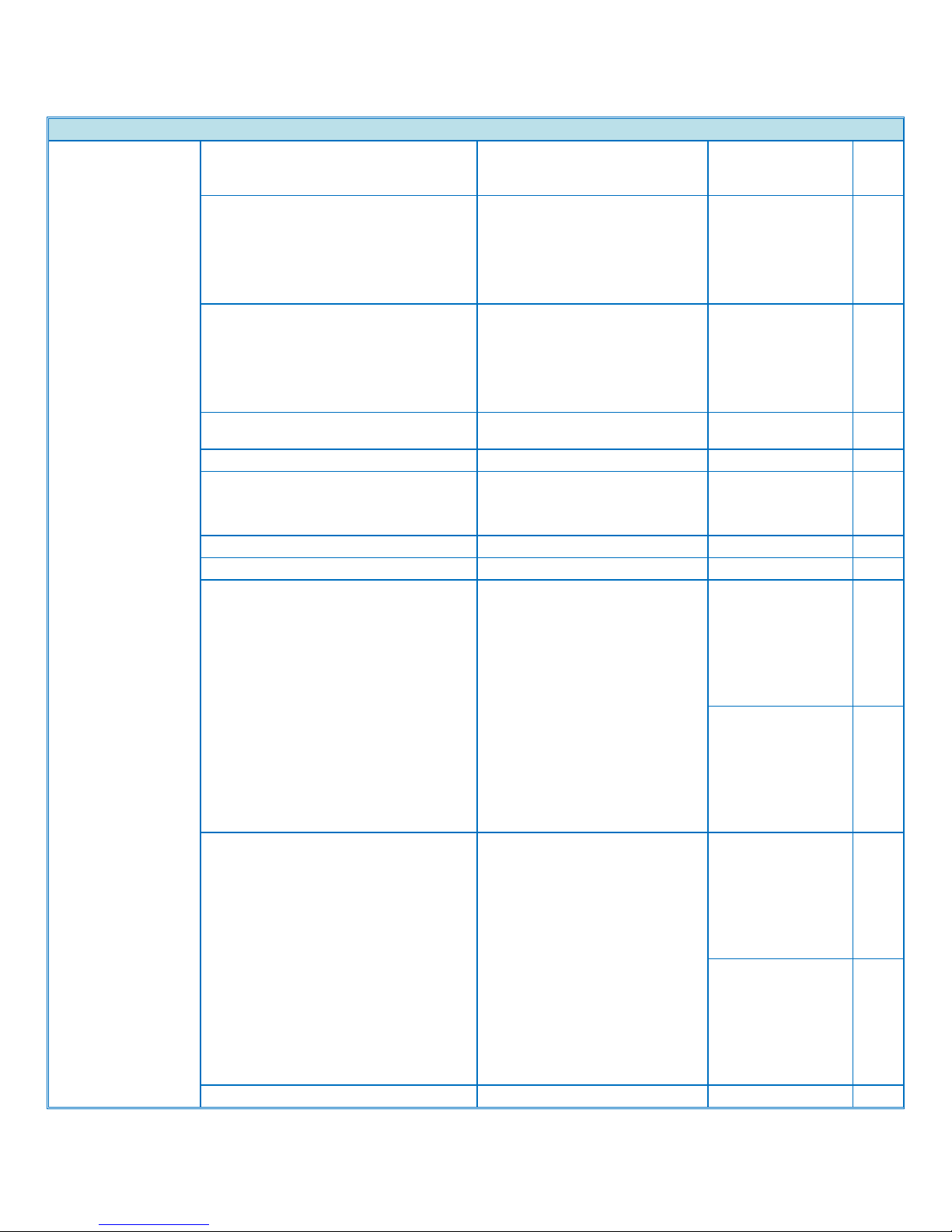
MainFrame
Nominal value
D143: FC 5.7/BW
3.6, D144: FC
4.8/BW 3.1
sec
Warm-up Time (From main switch)
US : Guaranteed value
Normal DF model
D143: 22.1 /
D144: 24.1
SPDF model
D143: 22.1 /
D144: 24.1
sec US : Nominal value
Normal DF model
D143: 19 / D144:
21
SPDF model
D143: 19 / D144:
21
sec
CPU
Intel Celeron-M
1.0GHz
GHz
RAM
2 GB
HDD
190GB *1
( 250GB x 1)
GB
Power Source
US
120V-127V 60Hz
V/Hz
Max Power Consumption
US
1,584W or less
W
Dimension(WxDxH)
670 x 682 x 760
(Standard), 670 x
766 x 1,020 (with
2-Tray Paper
Bank and fallprevention
material)
mm
26.4 x 27.0 x 30
(Standard), 26.4 x
30.2 x 40.2 (with
2-Tray Paper
Bank and fallprevention
material)
inch
Weight
Less than 130kg
(with normal
ARDF)
Less than 133kg
(with SPDF)
Less than 110kg
(without ARDF)
kg
Less than 287lbs
(with normal
ARDF)
Less than 293lbs
(with SPDF)
Less than 243lbs
(without ARDF)
lbs.
Simplified Display
Yes
D143/D144
Ver.1.0 Page 27 of 72 2/3/2012
Subject to change without notice
Page 28
Product Support Guide
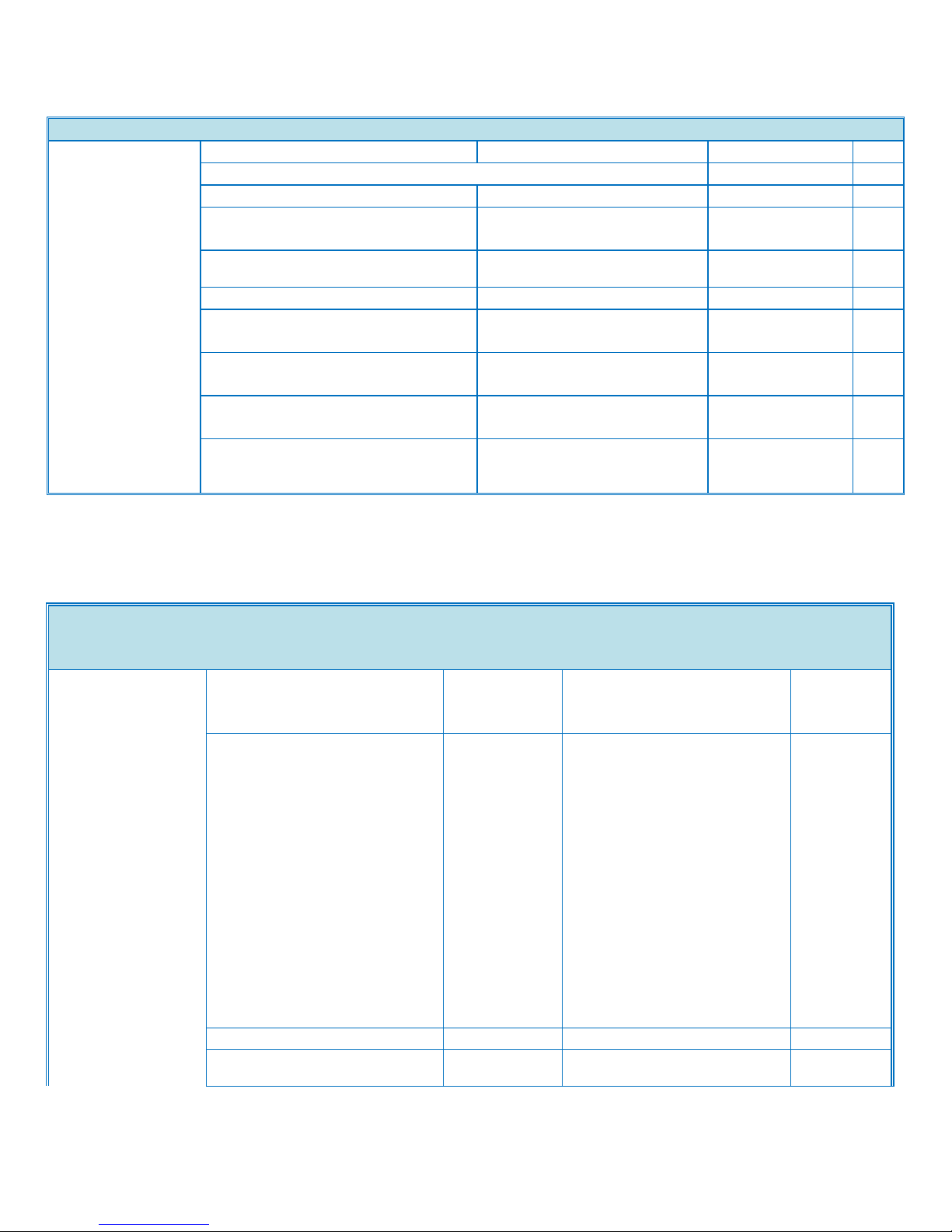
MainFrame
Login/Logout Button
Yes
SMC Report Print out (Logging Data)
Yes
NRS Option
Yes
Java VM
Standard
(ver10.01.05*)
MFP browser
Opt (version
1.01.0*)
Document Server
Yes
Auto Off Timer
Yes (1-240min)
Energy Saver Timer
Yes (1-240min)
Panel Off Timer
No
System Reset Timer
Yes (Default:
60sec. / 10999sec.)
Paper Handling
Paper Handling
Recommended Paper Size
1st Paper Tray
A4 LEF, 11"x8 ½ “ (LT) LEF
(A5 LEF and B5 LEF are able
to set by using SP mode.)
2/3/4 Paper
Tray
A3 SEF, B4 SEF, A4
LEF/SEF,
B5 SEF/LEF, A5 LEF,
11"x17"(DLT) SEF, 8 ½"x14"
(LG) SEF,
8 ½"x13" (Foolscap) SEF, 8
½"x11" (LT) LEF/SEF,
8¼"x14" (Government LG), 8
¼"x13" (Folio) SEF,
8"x13"(F/GL), 8"x10" (Eng
Quatro)
7 ¼"x10 ½" (Executive)
SEF/LEF, 1
LCT
A4 LEF, 8 ½"x11" (LT) LEF
Side LCT
A4 LEF, B5 LEF, 8 ½"x11"
(LT) LEF
D143/D144
Ver.1.0 Page 28 of 72 2/3/2012
Subject to change without notice
Page 29
Product Support Guide
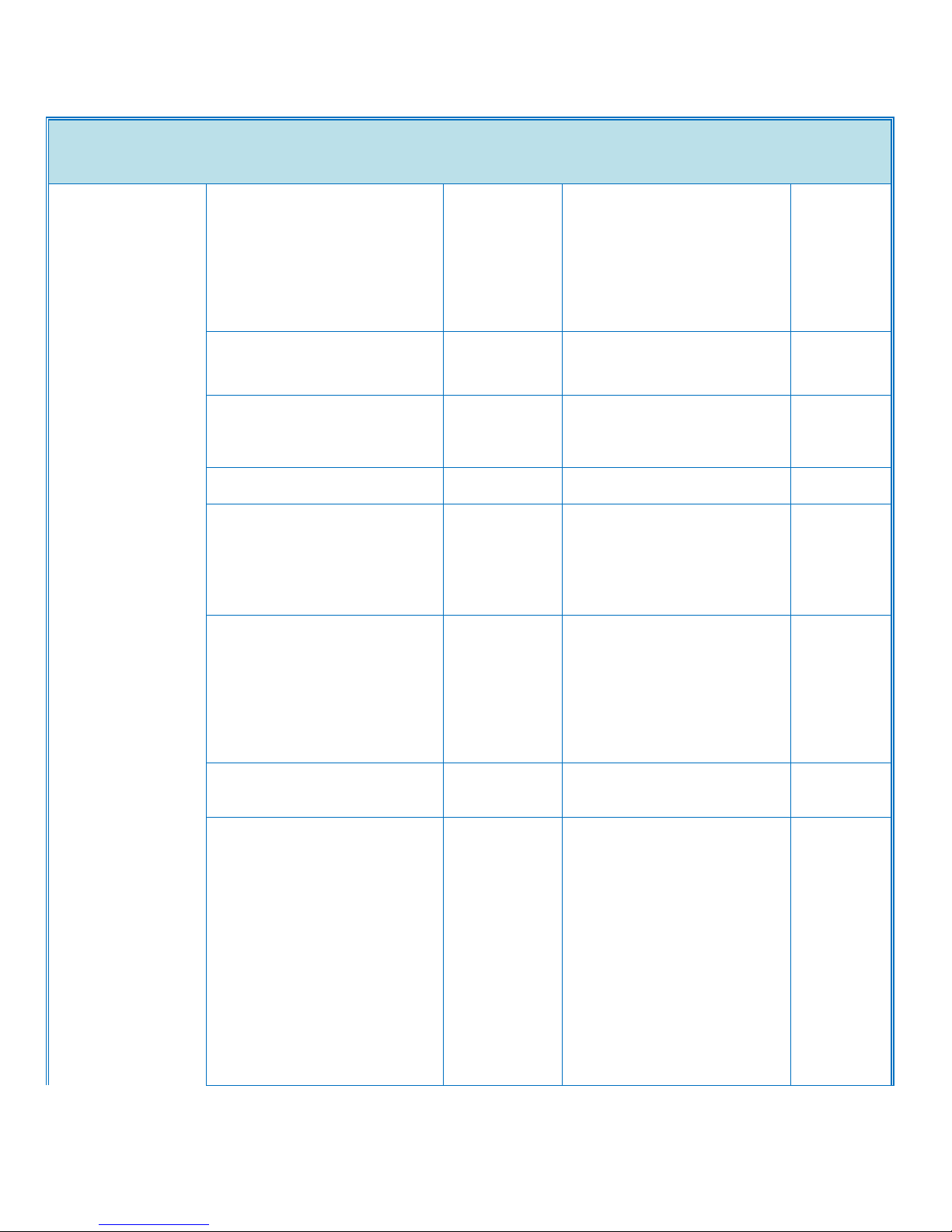
Paper Handling
Bypass Tray
12"x18"/305x458mm, A3/DLTA6SEF
<Custom Size Paper>
Width: 90-305mm, Length:
148-1260mm *2
Envelope Printing
Yes (from bypass or optional
Envelope Feeder)
Paper Feeding Capacity(LT/A4)
Std
550sheet x 2trays (less than
55.5mm)
Bypass Tray: 100sheets (less
than 10mm)
Max
4,400 sheets (with LCT, side
LCT)
Option
Paper Bank Unit: 550sheet x 2
trays
Or
LCT: 1,000sheet x 2
Side LCT: 1.200 sheets
Paper Output Capacity(LT/A4)
Std
Face Down: 500sheets(A4 or
smaller/80gms), 250sheets(B4
or larger/80gms)
*When Bridge Unit or Side
Tray is attached:
250sheets(A4 or
smaller/80gms), 125sheets(B4
or larger/80gms)
Max
3,625 sheets (with standard
250 sheets + 3,000 sheets
Finisher + 1 Bin tray)
Option
1 Bin Tray: 125 sheets
Or
Shift Sort Tray: 250 sheets
(Larger than A4/LT)
1000 sheets Finisher: 1000 +
250 sheets
Or
Booklet Finisher: 2,000 + 250
sheets
Or
Booklet Finisher: 3,000 + 250
sheets
D143/D144
Ver.1.0 Page 29 of 72 2/3/2012
Subject to change without notice
Page 30
Product Support Guide
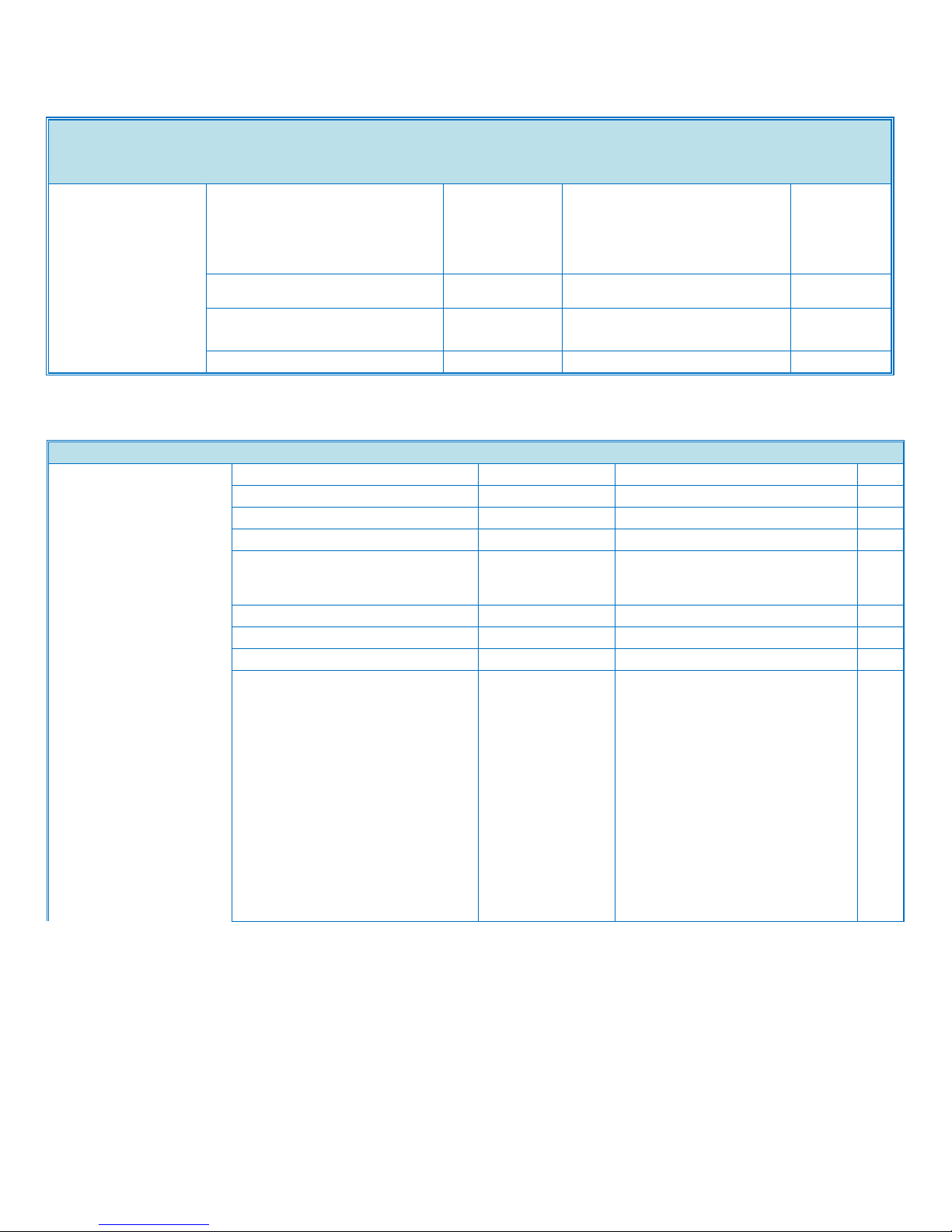
Paper Handling
Paper Weight
Std
Tray/Optional
550x2
Tray/Tandem
LCT
60-256
g/m2
Side LCT
60-216
g/m2
Bypass
60-300
g/m2
Duplex Unit
60-169
g/m2
Copier Spec
Copier Spec
CPM Black
D143: 45, D144 : 55
cpm
CPM Color
D143 : 45, D144 : 55
cpm
Copy Resolution
600dpi / 4bit
Multiple Copying
Up to 999 copies
Reproduction Ratio
US
400%, 200%, 155%, 129%,
121%, 100%, 93%, 85%, 78%,
73%, 65%, 50%, 25%
Zoom
From 25% to 400% in 1% step
Number of Copy Reservations
8
Image Density
Auto, Manual
Color Mode
Default = Black & White Mode
Auto Color Selection (ACS)
Full Color
Black & White
Single Color (Default: not
indicated)
Preset: 12 colors x4
Density (Default = Red),
User color: 15 colors x4
Density
Two Color (Default: not
indicated)
- Black and Other Color
- Red and Black
D143/D144
]
Ver.1.0 Page 30 of 72 2/3/2012
Subject to change without notice
Page 31

Copier Spec
Copier Spec (continued)
Copy Mode
Default = Auto Text & Photo
Separation
(Printed/Glossy/Copied)
Auto Text & Photo Separation
(Printed/Glossy/Copied)
Photo (Printed/Glossy/Copied)
Text
Map
Pale
Generation
Paper Selection
Default = Auto Paper Selection
(APS)
Auto Paper Selection (APS)
1st Tray
2nd Tray
3rd Tray (with Paper Bank)
4th Tray (with Paper Bank)
Tandem LCT*
Side LCT
Bypass Tray
Paper Type Capability
Std Tray
[Paper Type]
Plain Paper (No Display Paper
Type), Recycle Paper, Special
Paper 1-3, Color Paper,
Letterhead, Cardstock,
Preprinted Paper, Bond Paper,
High-gloss coated paper,
Envelope*, Coated*
[Thickness]
Thin Paper, Normal Paper,
Middle Thick, Thick Paper 1,
Thick Paper 2, Thick Paper 3
Bank, LCT
[Paper Type]
Plain Paper (No Display Paper
Type), Recycle Paper, Special
Paper 1-3, Color Paper,
Letterhead, Cardstock,
Preprinted Paper, Bond Paper,
High-gloss coated paper,
Envelope*, Coated
[Thickness]
Thin Paper**, Normal Paper,
Middle Thick, Thick Paper 1,
Thick Paper 2**, Thick Paper 3**
Ver.1.0 Page 31 of 72 2/3/2012
Subject to change without notice
Product Support Guide
D143/D144
Page 32
Product Support Guide
Copier Spec
Bypass Tray
[Paper Type]
Plain Paper (No Display Paper
Type), Recycle Paper, Special
Paper 1-3, Color Paper,
Letterhead, Cardstock,
Preprinted Paper, Bond Paper,
High-gloss coated paper,
Envelope, Coated, Label Paper,
OHP,
[Thickness]
Thin Paper, Normal Paper,
Middle Thick, Thick Paper 1,
Thick Paper 2,Thick Paper 3,
Thick Paper 4
Auto Tray Switch
Yes
Duplex
1 sided to 2 sided, 2sided to 2
sided(w/ARDF), Book to 2
sided, Front and Back to 2 sided
Book
Booklet
Yes
Magazine
Yes
Layout & Booklet
Yes
Series
Book to simplex
Yes
2 sided original
to simplex
Yes
Combine (Layout)
2 into 1 simplex
Yes
4 into 1 simplex
Yes
8 into 1 simplex
Yes
1 duplex into 1
simplex
Yes
2 duplex into 1
simplex
Yes
4 duplex into 1
simplex
Yes
4 into 1 duplex
Yes
8 into 1 duplex
Yes
16 into 1 duplex
Yes
2 duplex into 1
duplex
Yes
4 duplex into 1
duplex
Yes
8 duplex into 1
duplex
Yes
Shift/Erase/Margin Adjustment
Centering
Yes
Cornering
No
D143/D144
Ver.1.0 Page 32 of 72 2/3/2012
Subject to change without notice
Page 33

Product Support Guide
Copier Spec
Margin
Adjustment
1mm step (0-30mm)
Erase Center
1mm step (2-99mm)
Erase Border
1mm step (2-99mm)
Cover Sheet/Chapter/Slip Sheets
Front Cover
Copy or Blank (Default=Copy)
Front & Back
Cover
Copy or Blank (Default=Copy)
Chapter
Yes
Slip Sheets
Yes
Image Rotation
Yes (A4/LT and B5 size)
Electronic Sort
Without Shift
Sort
Yes
Rotate Sort
Yes
Shift Sort
Yes (only with Finisher)
Electronic Stack
Yes
Stapling
Yes (with Finisher)
Color Creation
Color Conversion
Yes
Color Erase
Yes
Color Overlay
Yes
Image Creation
Repeat
Yes
Double Copy
Yes
Mirror
Yes
Positive/Negative
Yes
Stamp/Numbering
Preset Stamp
Yes (8 Stamps)
User Stamp
Yes (4 Stamps can be
registered)
Date Stamp
Yes (5 styles)
Page Number
Yes (6 styles)
Bates Numbering
Yes (9 digits / zero suppression:
no)
Color Balance Adjustment
Yes
Color Balance Program
Yes
Auto Color Calibration(ACC)
Yes
Sharp/Soft
7 levels
Contrast
9 levels
Background Density Adjustment
9 levels
Under Color Removal(UCR) Adjustment
9 levels
Text & Photo Separation Sensitivity Adjustment
9 levels
Color Erase Sensitivity Adjustment
5 levels
Job Programs
25
User Code
8 digits / 1000 user codes
Interrupt Copy
Yes
D143/D144
Ver.1.0 Page 33 of 72 2/3/2012
Subject to change without notice
Page 34
Product Support Guide
Copier Spec
Auto Start
Yes
Job Preset
Yes(8 jobs)
Sample Copy
Yes
Printer Spec.
Printer Spec.
PDL
Std
PCL5c, PCL6(XL), PDF
Option
Adobe PostScript3, IPDS
Print Resolution
Max
1200 x 1200 dpi / 1bit
dpi
PCL5c
-300 x 300 dpi (available only with
B/W mode)
-600 x 600 dpi
<Gradation *5>
Fast (1bit) / Standard (2bit) / Fine
(4bit)
dpi
PCL6
-600 x 600 dpi
<Gradation *5>
Fast (1bit) / Standard (2bit) / Fine
(4bit)
-1200 x 1200 dpi
dpi
PS3
-600 x 600 dpi
<Gradation *5>
Fast (1bit) / Standard (2bit) / Fine
(4bit)
-1200 x 1200 dpi (1bit)
dpi
XPS *6
-600 x 600 dpi
<Printing Mode *5>
Standard (1bit) / Quality
Preference (2bit) / High Quality
(4bit)
-1200 x 1200 dpi
dpi
IPDS
-300 x 300 dpi
-600 x 600 dpi
dpi
Fonts
Std
PCL: Scalable 45 fonts +
International 13 fonts *7
PS3: 136 Roman fonts
Option
IPDS : 108 Roman fonts
D143/D144
Ver.1.0 Page 34 of 72 2/3/2012
Subject to change without notice
Page 35
Product Support Guide
Printer Spec.
Host Interfaces
Std
Ethernet (RJ-45 network port :
10Base-T
/100Base-TX), USB2.0 Type B,
USB2.0 Type A(2 port), Front
USB/SD Slot (1port)
Option
Ethernet (1000Base-T)
IEEE1284/ECP,
Wireless LAN (IEEE802.11a,b,g,
WPA support), Bluetooth
Network Protocol
TCP/IP (IP v4, IP v6), IPX/SPX*8
Standard MIB
MIB-II(RFC1213),
Host Resource(RFC1514), Printer
Mib(RFC1759),
Printer Port Monitor MIB
Private MIB
Ricoh Original
Network/Operating System
Windows XP/Vista/7/Server
2003/Server 2008/Server 2008R2
Netware 6.5*9
Unix; Sun Solaris, HP-UX, SCO
OpenServer, RedHat Linux, IBM
AIX
Mac OS X v.10.2 or later
SAP R/3, NDPS Gateway
IBM series/ AS/400-using OS/400
Host Print Transform
Scanner Spec
Scanner Spec
Color Scan
Std
Scanning Speed (normal DF)
B&W
67pages/minute (A4/LET LEF /
200dpi/300dpi ) Push Scan
ipm Color
67pages/minute (A4/LET LEF /
200dpi/300dpi) Push Scan
ipm
Scanning Speed (single pass
duplex DF)
B&W
85(simplex)/116(duplex)pages/minute
(A4/LET LEF / 200dpi/300dpi ) Push Scan
ipm
Color
85(simplex)/116(duplex)/pages/minute
(A4/LET LEF / 200dpi),
110(duplex)/pages/minute(A4/LET
LEF/300dpi) Push Scan
ipm
Scanning Resolution
Std
100 / 200 / 300 / 400 / 600/ 1200* dpi
dpi
Default
200dpi
dpi
D143/D144
Ver.1.0 Page 35 of 72 2/3/2012
Subject to change without notice
Page 36

Product Support Guide
Scanner Spec
Auto Size Detection
Contact
Glass
11"x17"(DLT) SEF, 8 ½"x14"(LG) SEF,
8 ½"x11"(LT) LEF/SEF, 8 1/2"×5
1/2"(HLT) LEF,
*SP mode adjustment is required : 8
1/2"×5 1/2"(HLT)SEF
(US Model)
ARDF *9
11"x17" (DLT)SEF, 8 ½"x14" (LG)SEF,
8 ½"x11"(LT) LEF/SEF,
5 ½"x8 ½"(HLT) LEF/SEF,
8 1/2"×13"(Foolscap) SEF
10"x14"SEF,
11"x15"SEF (detected the same as DLT
SEF,
Default = DLT SEF),
8"x10"SEF (detected the same as LT
SEF,
Default = LT SEF)
7 1/4"x10½"(EXE) LEF/SEF
Auto Size Detection
Contact
Glass
A3 SEF, B4 SEF, A4 LEF/SEF, B5
LEF/SEF, A5 LEF, 8 1/2"x13"(F) SEF,
*SP mode adjustment is required :
A5 SEF, 8"x13"(F) SEF, 8 1/4"x13"(Folio)
SEF, 8K SEF, 16K LEF/SEF
(EU/ASIA/CHINA Model)
ARDF *9
A3 SEF, B4 SEF, A4 LEF/SEF, B5
LEF/SEF,
A5 LEF/SEF, DLT SEF, LT SEF/LEF,
8"x13"(F) SEF (detected the same as
Foolscap SEF,
Default = Foolscap SEF), 8 ½"x13"
(Foolscap) SEF, 8 1/4"x13"(Folio) SEF
Scan Area
Main
Scan
297mm
mm
Sub
Scan
432mm
mm
sRGB Support
Std
Network Interface
Ethernet 10BASE-T / 100BASE-TX /
1000BASE-T, Wireless LAN
(IEEE802.11a,b,g, WPA support),
D143/D144
Ver.1.0 Page 36 of 72 2/3/2012
Subject to change without notice
Page 37
Product Support Guide
Scanner Spec
Protocol
Network: TCP/IP
Sending E-mail: SMTP, POP, IMAP4
Scan to Folder: SMB, FTP, NCP*
Web Services on Devices for Scanning
Compression Method
B&W
1bit(MH, MR, MMR, JBIG2*),
Grayscale(JPEG)
Color
JPEG
Scan Mode
BW Text/Line Art, BW Text, BW
Text/Photo, BW Photo, BW Grayscale,
FC Text/Photo, FC Glossy Photo,
ACS(Auto Color Selection)
Image Density
Auto Density Selection(Effective in
BW/Grayscale and FC scan mode)
Manual: 7 levels (Effective in
BW/Grayscale and FC scan mode)
Image Rotation
Yes
SADF/Batch Mode
Yes
Mixed Size Mode
Yes
Reduce and Enlarge
Yes
Split scan from Booklet type original
Yes
Digital Signature for PDF
Yes
File Format
Compression
On / Off
Data / Compression
Method
Single Page TIFF
On
BW 1bit / (MH, MR or
MMR)
Off
BW 1bit, BW
Grayscale or Full
Color
Multi Page TIFF
On
BW 1bit /(MH, MR or
MMR)
Off
BW 1bit, BW
Grayscale or Full
Color
Single Page JPEG
On
BW Grayscale or Full
Color / (JPEG)
Off -
Single Page PDF
On
BW 1bit / (MH, MR,
MMR or JBIG2),
BW Grayscale /
(JPEG), Full Color /
(JPEG)
Off
BW 1bit, BW
Grayscale or Full
Color
Multi Page PDF
On
BW 1bit / (MH, MR,
MMR or JBIG2),
BW Grayscale /
(JPEG), Full Color /
D143/D144
Ver.1.0 Page 37 of 72 2/3/2012
Subject to change without notice
Page 38
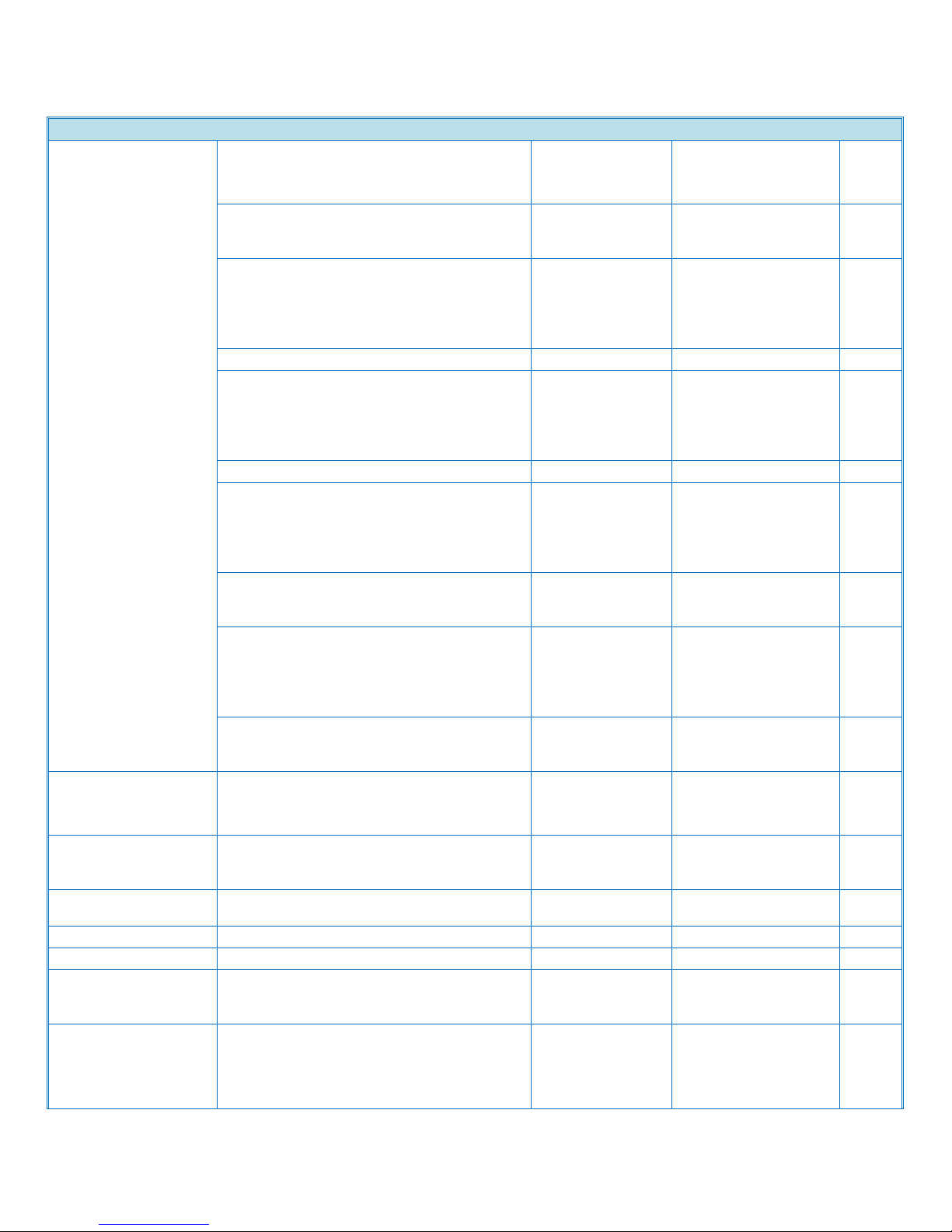
Product Support Guide
Scanner Spec
(JPEG)
Off
BW 1bit, BW
Grayscale or Full
Color
Single Page High Compression PDF
On
BW Grayscale /
(JPEG or
JPEG2000),
Full Color / (JPEG or
JPEG2000)
Off -
Multi Page High Compression PDF
On
BW Grayscale /
(JPEG or
JPEG2000),
Full Color / (JPEG or
JPEG2000)
Off -
Single Page PDF-A
On
BW 1bit / (MH, MR,
MMR or JBIG2),
BW Grayscale /
(JPEG), Full Color /
(JPEG)
Off
BW 1bit, BW
Grayscale or Full
Color
Multi Page PDF-A
On
BW 1bit / (MH, MR,
MMR or JBIG2),
BW Grayscale /
(JPEG), Full Color /
(JPEG)
Off
BW 1bit, BW
Grayscale or Full
Color
Scan to Email
Requirement (Mail Protocol, Transmission
Protocol, Protocol)
SMTP (Mail Server)
Gateway and TCP/IP
Authorization Function
SMTP authentication
POP before SMTP
authentication
Resolution
Std
100, 200, 300, 400,
600
dpi
Default
200
dpi
Max Email Address in HDD
2000
Register Group Address in HDD
Max. 100 Group
(Max. 500 addresses
in one group address)
Maintain Email Address in HDD
Direct input on
operation panel,
Web Image Monitor,
Smart Device Monitor
D143/D144
Ver.1.0 Page 38 of 72 2/3/2012
Subject to change without notice
Page 39
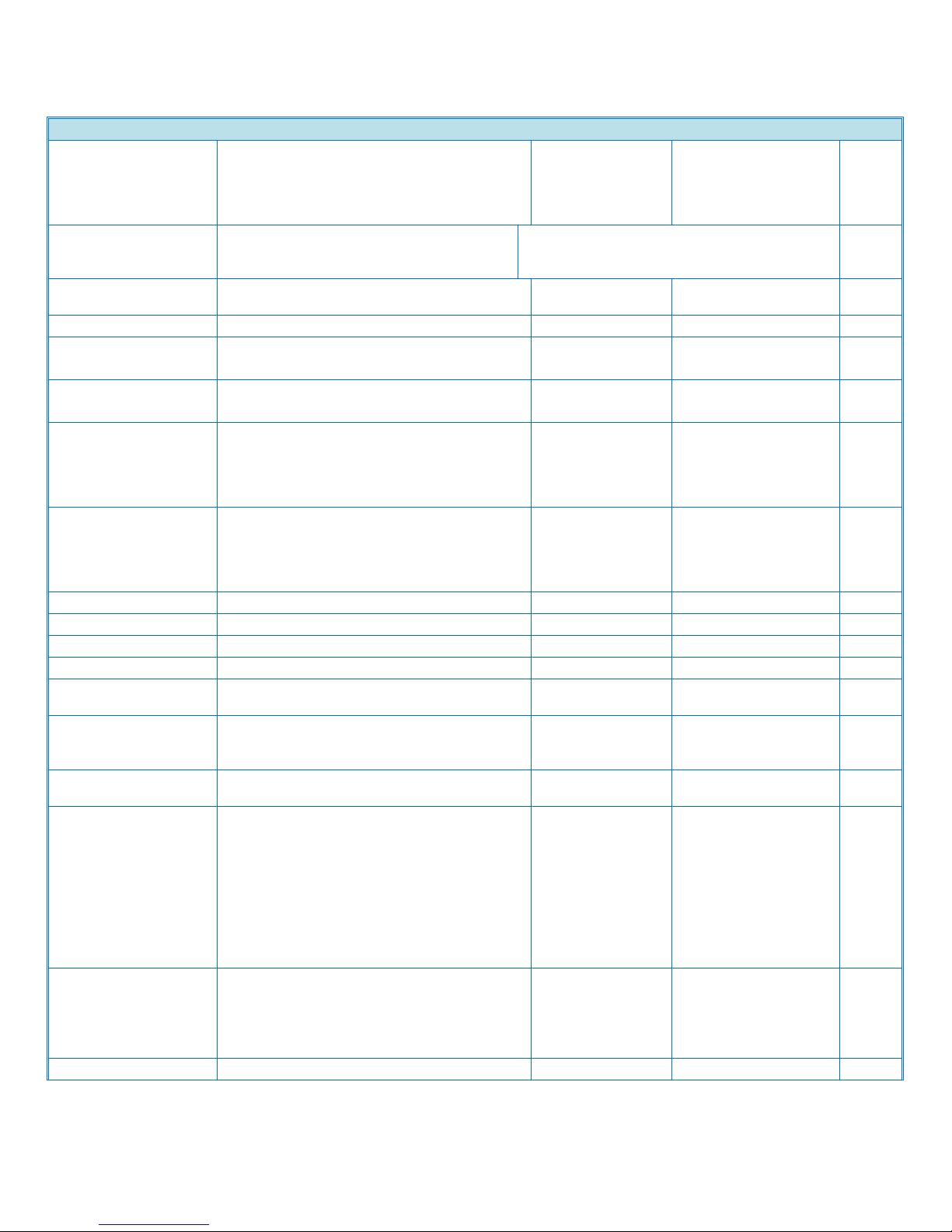
Product Support Guide
Scanner Spec
for Admin
Input of Destination E-mail Address via
Soft Key
Possible, Max. 100 destinations per job
Search method of Email Address in HDD
By name and E-mail
address
LDAP Search
Yes
Max Address Numbers Per Send
Max. 500 addresses
per send *10
Address Numbers Per Send
from HDD
Max 500 *10
direct input
Max 100 *11
via LDAP
Max 100 *11
Simultaneous Transmission
Max.550
Attention
To, cc, bcc
Email Size
with Restriction
128 - 102,400KB
w/o Restriction
725MB
Input Subject
Manual
Max. 128 Characters
via soft key
User Pre-register
22 subjects.
Max. 20 Characters
per a subject
Input Main Body Text
Manual
Max. 80 Characters
via keyboard
User Pre-register
5 BODY
MESSAGES. 80
CHARACTERS X 5
LINES PER A BODY
MESSAGE
Title name of the
body message: Max.
20 characters per a
name
Preset
Message: "This email included
attached file sent
from xxxx(machine
model name)."
Input File Name
Yes
D143/D144
Ver.1.0 Page 39 of 72 2/3/2012
Subject to change without notice
Page 40
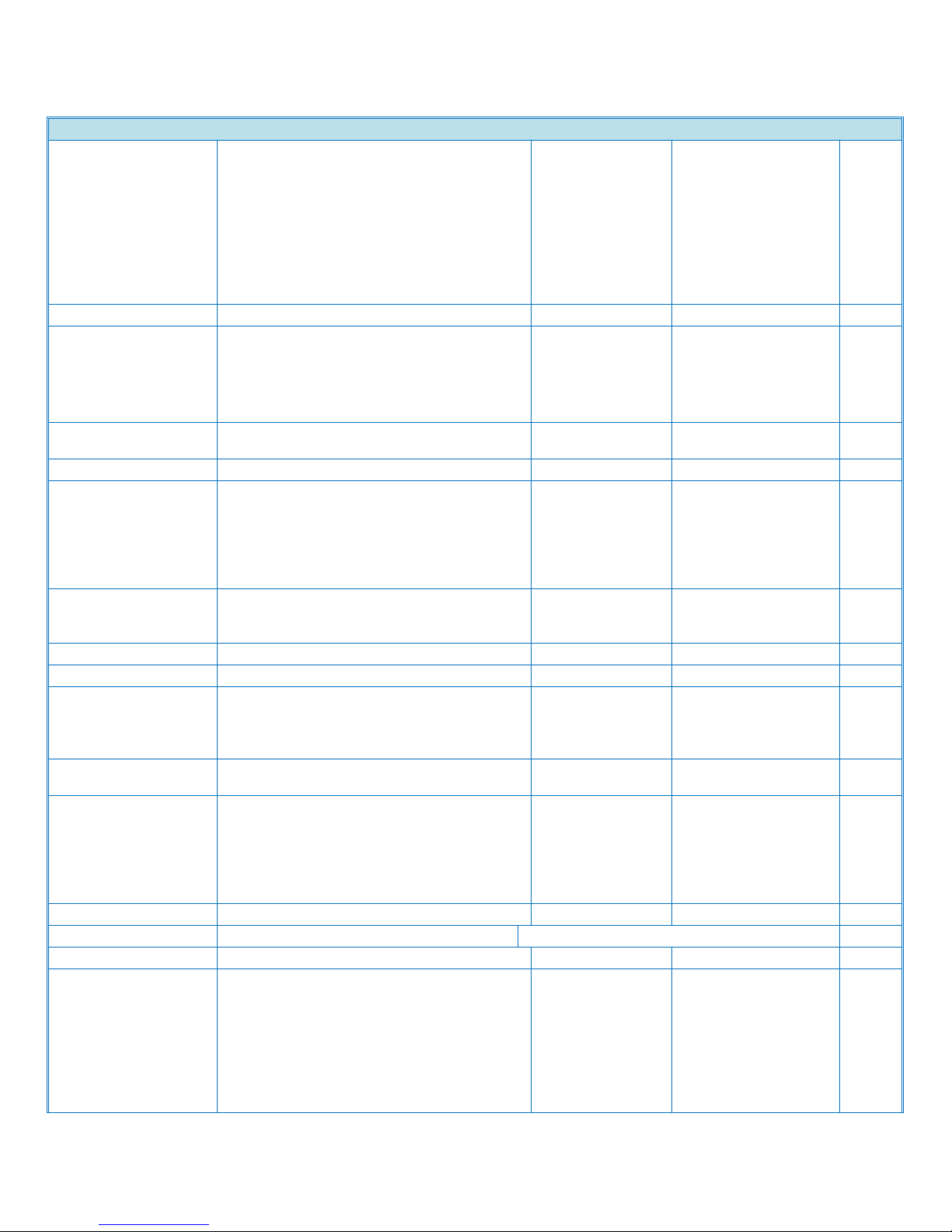
Product Support Guide
Scanner Spec
Scan to Email
(continued)
File Type
Single Page
TIFF/JPEG/PDF/PDF
-A/High Compression
PDF
Multi Page
TIFF/PDF/PDFA/High Compression
PDF
Program User Settings
Up to 25 programs
Divide and send Email
(If the file size exceed the max size.)
Yes (By page or size)
/ No, Default =
Yes(By size) *13
Resend
Yes / No, Default =
Yes
Scan to Folder
Protocol Support
SMB, FTP, NCP*
Security
Client folder log-in
(log-in name and
password),
Encryption of log-in
name and password
during transmission
Resolution
Std
100dpi, 200dpi,
300dpi, 400dpi,
600dpi
dpi
Default
200
dpi
Register client folder address in HDD
Max. 2,000 folders
Maintain client folder address in HDD
Direct input on
operation panel,
WebImageMonitor,
SmartDeviceMonitor
Direct addressing of destination client
folder via soft key
Yes
Search client folder
SMB: Browsing
directly to the
designated folders
FTP: By client folder
name
NCP: Browsing*
Home folder over LDAP
Yes
Max. client folder numbers per send
Max. 50 client folders / PCs per send
Simultaneous Transmission
Max.550
Group address
Max. 500 destinations
(Folder destination
must be less than 50)
e.g.
500 destinations (50
folders included) >OK
500 destinations (51
folders included)
D143/D144
Ver.1.0 Page 40 of 72 2/3/2012
Subject to change without notice
Page 41

Product Support Guide
Scanner Spec
>Failure
Input File Name
Yes
Scan to File size
2,000
MB
File Size when combined Scan to Folder
& Scan to E-mail
128 - 102,400kB, Default = 2,048KB (With
restriction)
725MB (Without restriction)
(Scan to E-mail file size applied).
File Type
Single Page
TIFF/JPEG/PDF/PDFA/High Compression PDF
Multi Page
TIFF/PDF/PDF-A/High
Compression PDF
Program User Settings
Up to 25 programs
Resend
Yes / No, Default = Yes
Network TWAIN
Driver
OS 32bit/64bit: Windows XP,
Vista, 7, Server2003/2008
64bit: Windows Server
2008R2
(Operates in 32-bit
compatibility mode on 64-bit
operating systems)
Scanning Speed
B&W
with normal DF:
Simplex(200dpi): with MLB
72(compressed), without MLB
72(compressed &
uncompressed)
Duplex(200dpi): with MLB
48(compressed), without MLB
49(compressed)/48(uncompr
essed)
with SPDF:
Simplex(200dpi): with MLB
81(compressed), without MLB
81(compressed), 80(without
compressed)
Duplex(200dpi): with MLB
120(compressed), without
MLB 120(compressed &
ipm
D143/D144
Ver.1.0 Page 41 of 72 2/3/2012
Subject to change without notice
Page 42

Product Support Guide
Scanner Spec
uncompressed)
Color
with normal DF:
Simplex(200dpi): with MLB
71(compressed), without MLB
71(compressed &
uncompressed)
Duplex(200dpi): with MLB
48(compressed), without MLB
48(compressed &
uncompressed)
with SPDF:
Simplex(200dpi): with MLB
80(compressed), without MLB
80(compressed)/81(uncompr
essed)
Duplex(200dpi): with MLB
121(compressed), without
MLB 121(compressed &
uncompressed)
ipm
Resolution
B&W
100 – 1200dpi (Black and
White / Grayscale)
dpi
Color
100 – 1200dpi (Full Color)
dpi
Scan Mode
Standard / Photo / OCR /
Filing
Image Adjustment
Brightness / Contrast /
Threshold /Gamma
Adjustment / Halftone Pattern
Endorser
Supported
Stamp
Date / Page Number / Text
D143/D144
Ver.1.0 Page 42 of 72 2/3/2012
Subject to change without notice
Page 43

Product Support Guide
Fax Spec
Fax Spec
Circuit
PSTN, PBX
Compatibility
ITU-T (CCITT) G3,
Resolution
Standard mode: 8 x 3.85
line/mm, 200 x 100dpi,
Detail mode: 8 x 7.7
line/mm, 200 x 200dpi,
Super Fine mode*: 8 x 15.4
line/mm, 16 x 15.4
line/mm, 400 x 400dpi
Compression Method
MH, MR, MMR, JBIG
Scanning Speed (Platen used)
0.70sec.(A4/LT SEF, 200
x 100 dpi),
Scan Page per Minute(normal DF used)
A4/LT SEF
Standard mode: 58 spm
Detail mode: 58 spm
Super Fine mode: 48 spm
spm
A4/LT LEF
Image Rotation
Standard mode: 68 spm
Detail mode: 63 spm
Super Fine mode: 34 spm
spm
Scan Page per Minute(SPDF used)
A4/LT SEF
Standard mode: 64 spm
Detail mode: 64 spm
Super Fine mode: 52 spm
spm
A4/LT LEF
Image Rotation
Standard mode: 70spm
Detail mode: 61spm
Super Fine mode: 33 spm
spm
Modem Speed
33.6K – 2,400bps (G3,
Standard with Automatic
Shift Down)
(33600, 31200, 28800,
26400, 24000, 21600,
19200, 16800, 14400,
12000, 9600, 7200, 4800,
2400 bps)
Transmission Speed
G3: Approx.2 seconds
(200x100 dpi, JBIG, ITUT
#1 chart TTI off, memory
transmission)
G3: Approx.3 seconds
(200x100dpi, MMR, ITUT
#1 chart, TTI off, memory
transmission)
SAF Memory Size
Std
4MB (Approx.320 pages)
MB
with Optional
28MB (Approx. 2,240
MB
D143/D144
Ver.1.0 Page 43 of 72 2/3/2012
Subject to change without notice
Page 44
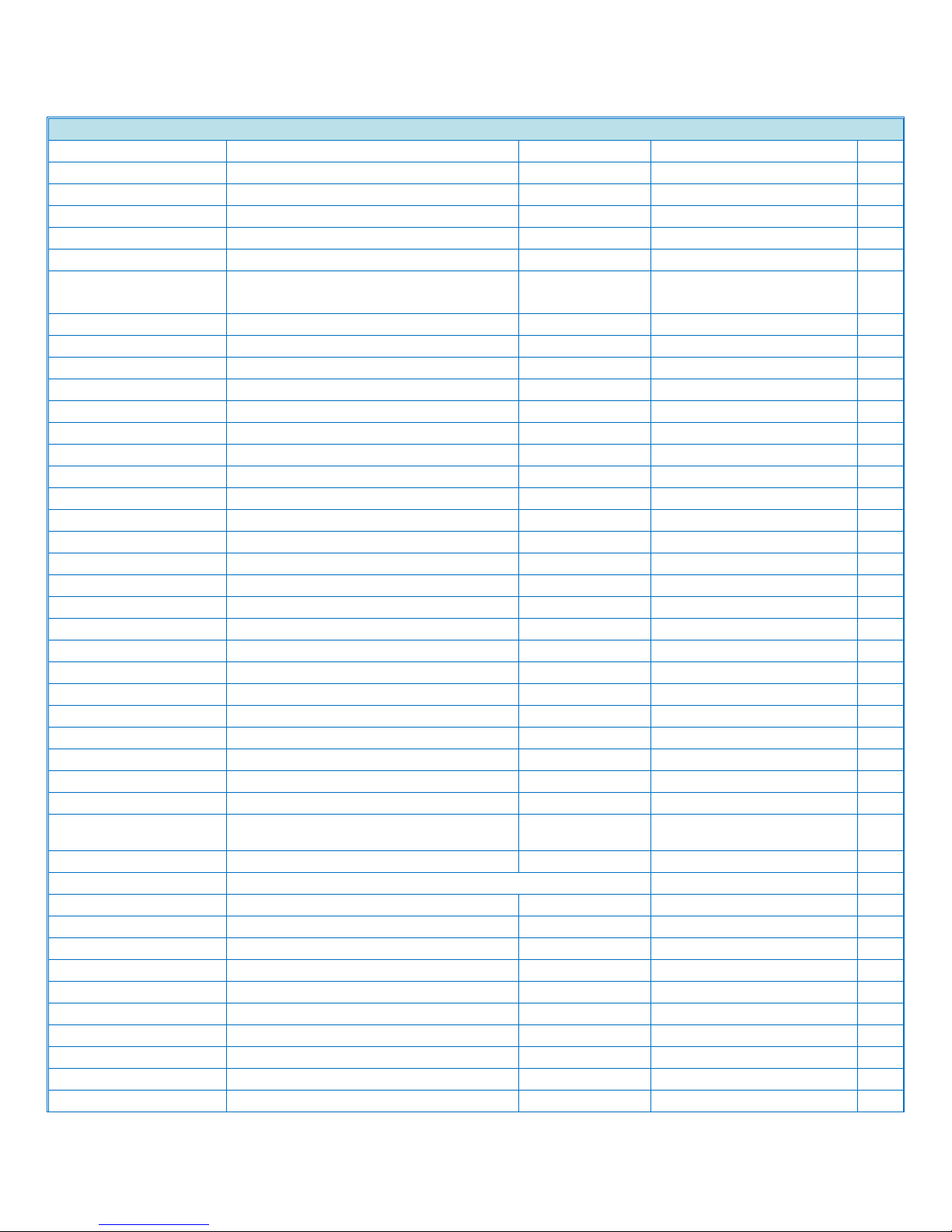
Product Support Guide
Fax Spec
Memory
pages)
Memory Backup
One hour
Smoothing
Standard (1bit)
TTI/RTI
Standard
CSI Standard
Quick dial/ Speed dial
Standard: 2,000 numbers
Group Dial
Standard: 100 groups
Program
Standard: 100 numbers
Redial
Standard
Direct Fax Number Entry
Standard
Dual access
Standard
User Code
Standard 1000 Codes
Page Counter
Standard
Auto Reduction
Standard
Wild Cards for Special Senders
Standard
Summer Time
Standard
Memory Lock ID Code
Standard
SID Code (Sender ID)
Standard
Programming by OMR
No
User Function Key
Standard (3 keys)
Energy Saver
Standard
Remaining Memory Indication
Standard
Clock Adjustment
Standard
User Parameter Settings
Standard
Remote FAX
Optional
Fax Transmission Spec
Immediate Transmission
Standard
Parallel Memory Transmission
Standard
Memory Transmission
Standard
Pulse/Tone Selection
Standard
Pause
Standard
Serial Broadcasting
Standard (Max. 500
numbers)
Preview before Transmission
Standard
Displaying the destination prior to transmission
Standard
Send Later
Standard
Error Correction Mode
Standard
Page Retransmission
Standard
Forwarding
Standard
Image Rotation
Standard
Book Fax
Standard
Closed Network Transmission
Standard
Double Sided Transmission
Standard
Handset/Telephone
Option
Telephone Connection
Option
D143/D144
Ver.1.0 Page 44 of 72 2/3/2012
Subject to change without notice
Page 45

Product Support Guide
Fax Spec
Automatic Voice Message
No
On Hook Dial
Standard
Tone Transmission
Standard
Chain Dialing
No
Reception Mode Selection
Standard
Automatic Fax/Phone change
No
Answering Machine interface
No
Auto Answer Delay Time
Standard (SP mode)
Busy Tone Detection
Standard
Silent Ringing Detection
No
Fax Reception Spec
Automatic Reception
Standard
Manual Reception
Standard
Substitute Reception
Standard
Authorized Reception
Standard
Multi Copy
Standard
Closed Network
Standard
Reception Time Printing
Standard
Center Mark
Standard
Checkered Mark
Standard
Night Timer (Weekly timer)
Standard
Printing by Specified Color
No
Toner Saving Mode
No
2 in 1 Reception
Standard
Duplex Reception
Standard
Internet Fax Spec
Requirement of Mainframe
G3 fax option is required.
Number of Address
2,000
Email Address Input
From LCD operation panel,
Web Image Monitor, Smart
Device Monitor for Admin
Attention
“to" or “bcc" (select only
one), max 500 attentions
Destination Combination
G3 Fax destination, IP Fax
destination, e-mail
destination, folder
destination
Network
Ethernet 10BASE-T /
100BASE-TX/ 1000BASET, Wireless LAN
(IEEE802.11a,b,g, WPA
support)
Transmit Function
E-mail
D143/D144
Ver.1.0 Page 45 of 72 2/3/2012
Subject to change without notice
Page 46
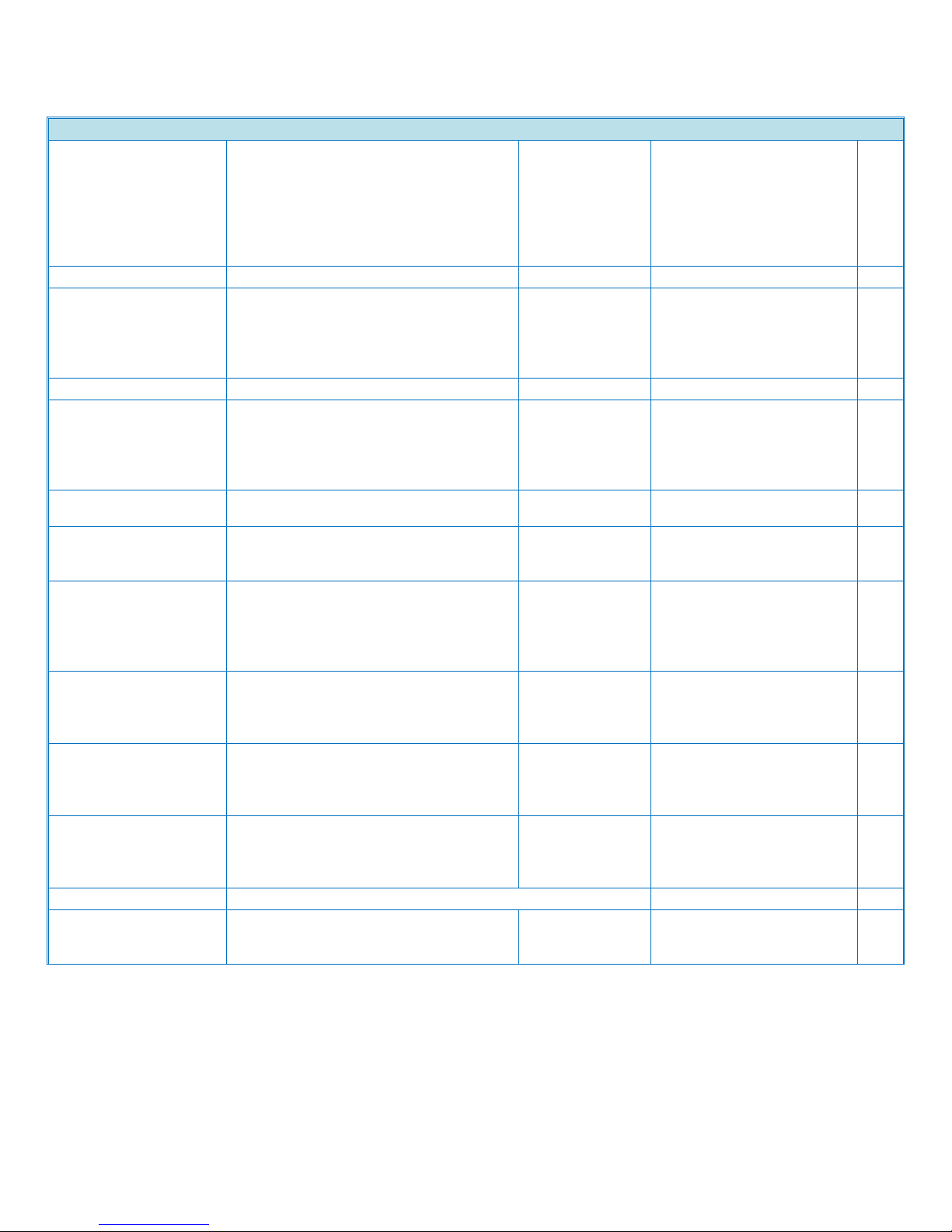
Product Support Guide
Fax Spec
Scan Line Density
200 x 100 dpi(Standard
character), 200 x 200
dpi(Detail character),
200 x 400 dpi(Fine
character: optional) *14 ,
400 x 400 dpi(Super Fine
character: optional) *14
Maximum Original Size
A3/DLT *14
Communication Protocol
Transmission
SMTP, TCP/IP
Reception
POP3, SMTP, IMAP4,
TCP/IP
IPv6 support
Yes
Email Format
Single/Multi-part, MIME
Conversion
Attached file forms: TIFFF(MH, MR *14, MMR*14
compression)
Authentication Method
SMTP-AUTH, POP before
SMTP, A-POP
Internet Communication
Send and receive e-mail
with a computer that has
an e-mail address
Email Send Functions
Automatic conversion of
sent documents to e-mail
format and e-mail
transmission. Memory
transmission only.
Email Receive Functions
Automatic detection and
printing of appended TIFFF(MH) files and ASCII text.
Memory reception only.
LAN Fax Spec
Paper Size
A3, DLT, B4, A4 (default
for EU/Asia model), Letter
(default for NA model),
Legal, B5, A5
Resolution
Super Fine (400 x 400 dpi)
Detail (200 x 200 dpi)
*default
Standard (200 x 100 dpi)
dpi
The Number of Selectable Address at one time
500
OS Windows XP, Server2003,
Vista, Server2008, 7,
Server2008R2
D143/D144
Ver.1.0 Page 46 of 72 2/3/2012
Subject to change without notice
Page 47

Product Support Guide
Fax Spec
LAN-Fax Editor Support Language
1.English, 2.German,
3.French, 4.Italian,
5.Spanish, 6.Dutch,
7.Swedish, 8.Norwegian,
9.Danish, 10.Finnish,
11.Hungarian, 12.Czech,
13.Polish, 14.Portuguese,
15.Russian, 16.Brazilian
Portuguese, 17.Greek,
18.Traditional Chinese,
19.Simplified Chinese
20.Catalan, 21.Turkish
Condition: OS need to
have the same language.
IP Fax Spec
Network
Ethernet 10BASE-T /
100BASE-TX/ 1000BASET, Wireless LAN
(IEEE802.11a,b,g, WPA
support)
Scan Line Density
Standard mode: 8 x 3.85
line/mm, 200 x 100dpi,
Detail mode: 8 x 7.7
line/mm, 200 x 200dpi,
Super Fine mode*: 8 x 15.4
line/mm, 16 x 15.4
line/mm, 400 x 400dpi
Original Size
Maximum A3 or 11" x 17"
(DLT)
Max Scanning Size
Standard: A3, 297mm x
432mm, Irregular: 297mm
x 1200mm
Transmission Protocol
Recommended: T.38, TCP,
UDP/IP communication,
SIP(RFC 3261 compliant),
H.323 v2
IPv6 support
No
Compatible Machines
IP-Fax compatible
machines
IP-Fax Transmission Function
Specify an IP address and
send faxes to an IP-Fax
compatible fax through a
network.
Also capable of sending
faxes from a G3 fax
connected to a telephone
line via a VoIP gateway.
D143/D144
Ver.1.0 Page 47 of 72 2/3/2012
Subject to change without notice
Page 48
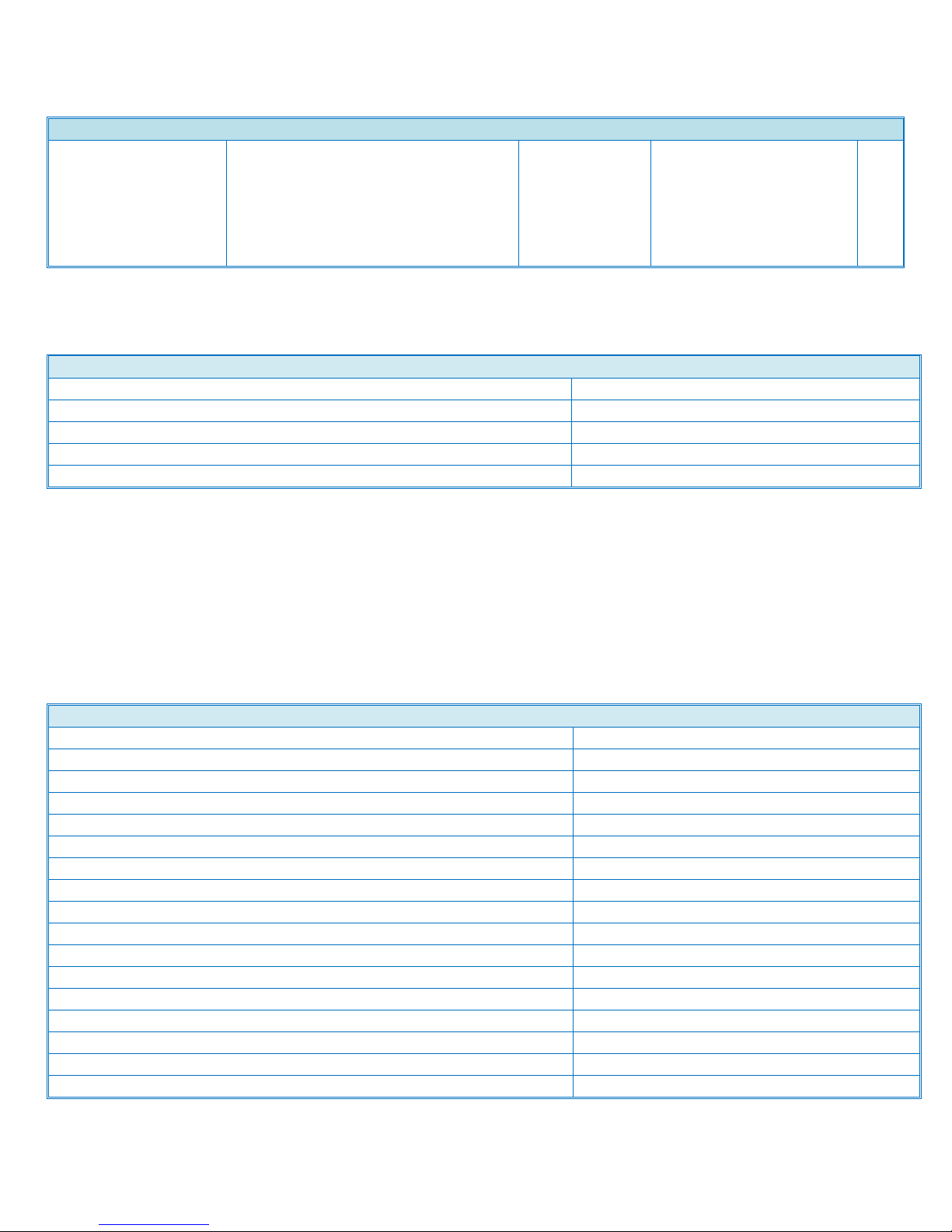
Product Support Guide
Fax Spec
IP-Fax Reception Function
Receive faxes sent from an
IP-Fax compatible fax
through a network.
Also capable of receiving
faxes from a G3 fax
connected to a telephone
line via a VoIP gateway
Document Server
HDD Capacity
190
Max Stored Documents
3,000
Max Pages Per Documents
2,000
Max Pages of All Stored Documents
9,000
Storage Period
1-180 days, or "no limit"
Security Specifications
Network User Authentication
Yes
IP Address Filtering
Yes
MAC Address Filtering
No
HDD Overwrite
Yes(std)
HDD Encryption
Yes(std)
Copy Guard Security
Yes
Secure Print
Yes
Encrypted Secure Print
Yes
Encrypted PDF Mode
Yes
Digitally signed PDF
Yes
IP Sec
Yes
Secure Sockets Layer(SSL)
Yes
SNMPv3
Yes
SMTP over SSL
Yes
IPv6
Yes
Transport Layer Security
Yes
Removable HDD
No
D143/D144
Ver.1.0 Page 48 of 72 2/3/2012
Subject to change without notice
Page 49
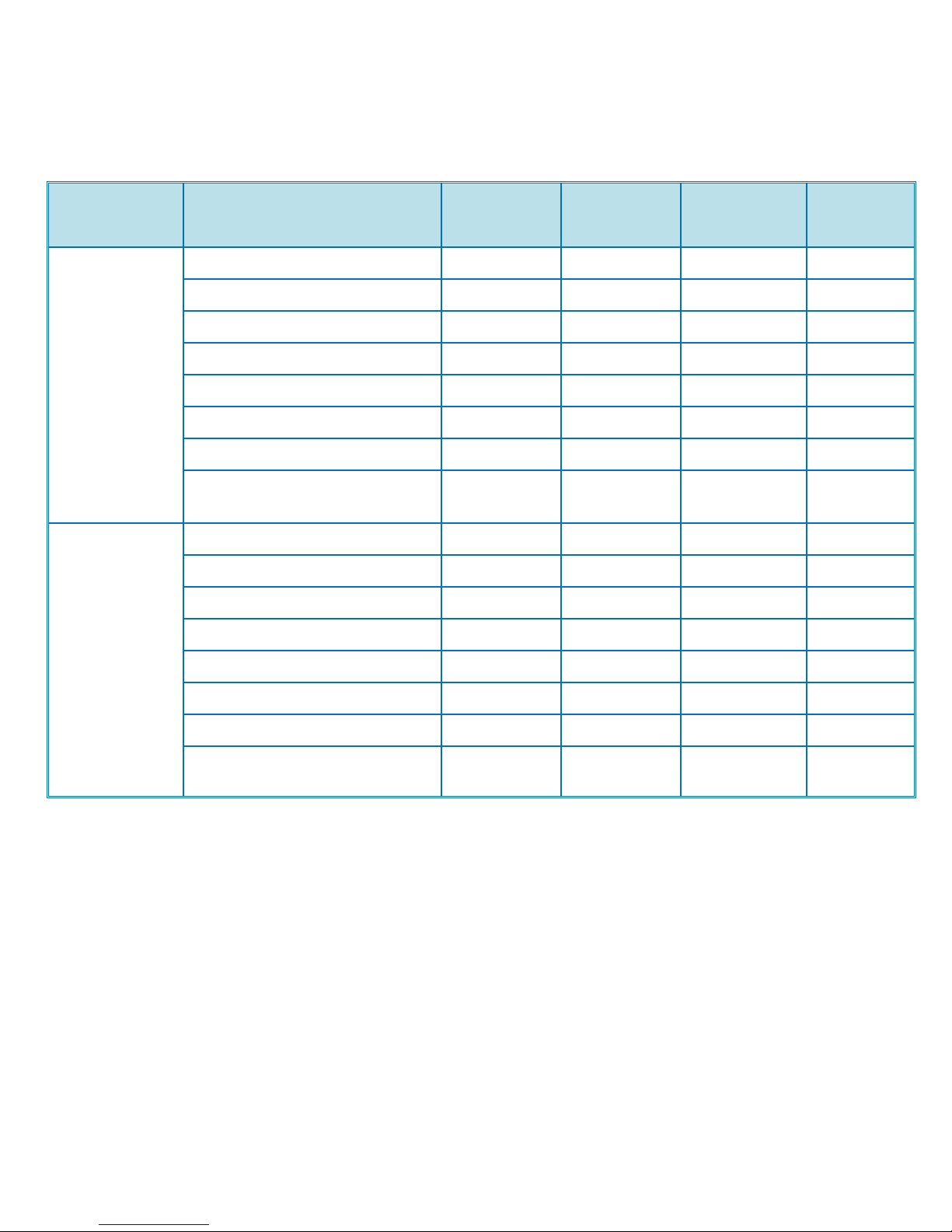
Product Support Guide
Model
Mode
gsm
lb. Bond
BK CPM
FC CPM
D143
Thin Paper
-52-59
-14~15
45
45
Plain Paper
-81
-22
45
45
Middle Thick
-105
-28
45
45
Thick Paper 1
-169
-45
25
25
Thick Paper 2
-220
-58
17.5
17.5
Thick Paper 3
-256
-68
17.5
17.5
Thick Paper 4
-300
-80
15
15
OHP, 1200dpi printing
High gloss paper
- - 17.5
17.5
D144
Thin Paper
-52-59
-14~15
55
55
Plain Paper
-81
-22
55
55
Middle Thick
-105
-28
55
55
Thick Paper 1
-169
-45
25
25
Thick Paper 2
-220
-58
17.5
17.5
Thick Paper 3
-256
-68
17.5
17.5
Thick Paper 4
-300
-80
15
15
OHP, 1200dpi printing
High gloss paper
- - 17.5
17.5
D143/D144
Ver.1.0 Page 49 of 72 2/3/2012
Subject to change without notice
Page 50
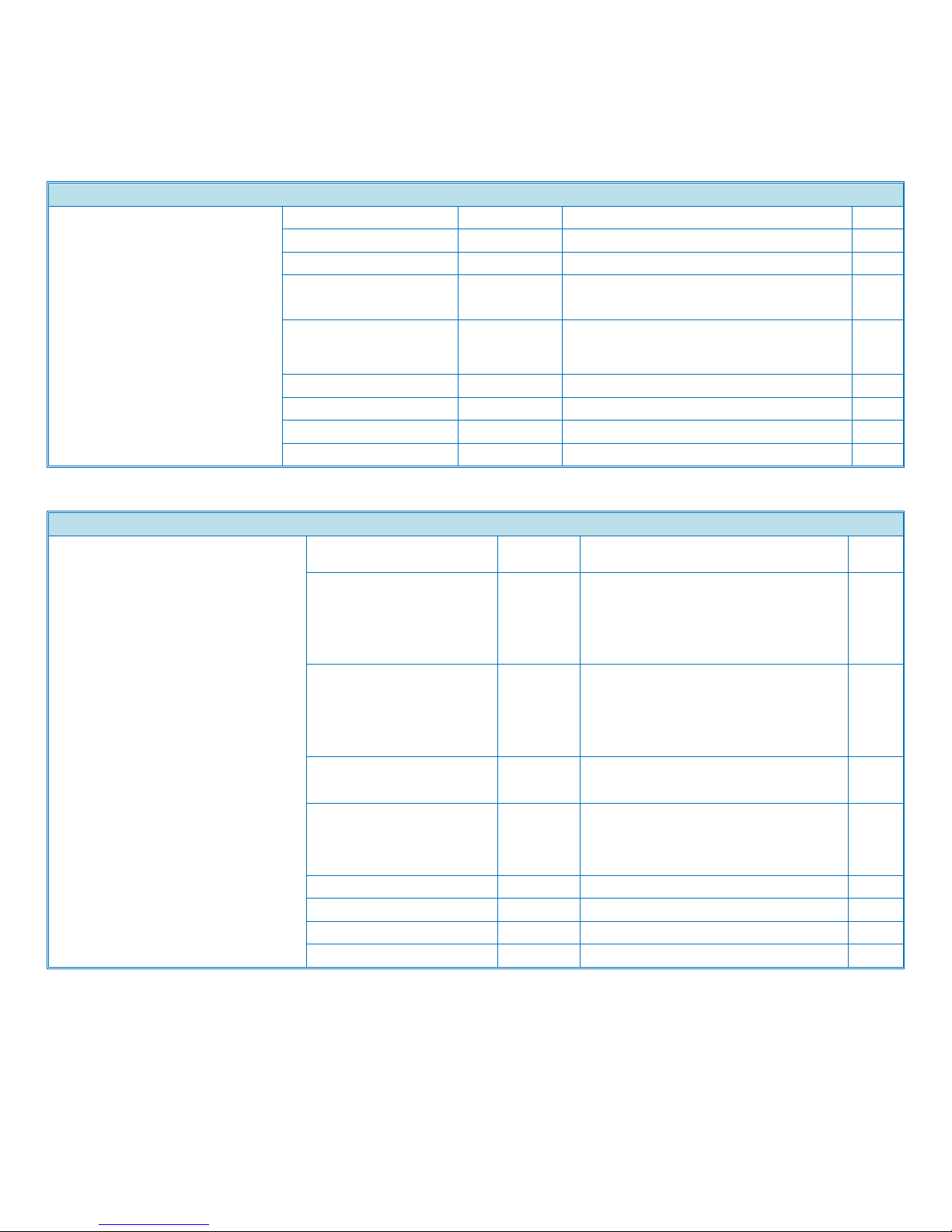
LCIT PB3140
1000 Sheet x 2 LCT
Paper Size
8 ½"x11"(LT) LEF / A4 LEF
Paper Weight
52- 256g/m2
g/m2
14 68lbs
lbs
Paper Output Capacity
2,000sheets(1000 sheets x 2 trays with
80g/m2 paper)
Power Consumption
Max: Less than 45W (for Print function)
Average: Less than 27W (for Print
function)
W
Dimension(WxDxH)
580(W) x 620(D) x 260(H)mm
mm
22.8"x24.4"x10.2"
inch
Weight
Less than 26kg
kg
Less than 57.3lbs
lbs.
Paper Feed Unit PB3130
2 Tray Paper Bank
Paper Size
A5 LEF – 11"x17"(DLT) SEF / A3
SEF
Paper Weight
52-256 g/m2
g/m2
14-68lbs
lbs
Paper Output Capacity
550sheets (550 sheets x 2 tray with
80g/m2 paper)
Power Consumption
Max: Less than 40W (for Print
function)
Average: Less than 25W (for Print
function)
W
Dimension(WxDxH)
580(W)x620(D)x260(H)mm
mm
22.8"x24.4"x10.2"
inch
Weight
Less than 26kg
kg
Less than 57.3lbs
lbs.
Options
Product Support Guide
D143/D144
Ver.1.0 Page 50 of 72 2/3/2012
Subject to change without notice
Page 51
Product Support Guide
Side LCT RT3020
Side LCT
Paper Size
8 ½"x11" LEF (LT)/ A4
LEF/B5LEF
Paper Weight
60-216g/m2 *169-216 g/m2
:paper type is limited
g/m2
16-57.5lbs *169-216 g/m2
:paper type is limited
lbs
Paper Output Capacity
1,200 sheets (80g/m2 paper)
Power Consumption
Less than 55W (Power is
supplied from mainframe)
W
Dimension(WxDxH)
540(W) x 384(D) x 290(H)mm
mm
21.3"x15.1"x11.4"
inch
Weight
less than 12kg
kg
less than 26.5lbs
lbs.
2000 Sheets Booklet Finisher SR3110
2000 Sheets Booklet Finisher
Paper Size
Proof Tray
5 ½"x8 ½"LEF/SEF(HLT) – 11"x17"
(DLT), 12"x18"
A6 SEF, B6SEF, A5SEF/LEF – A3
SEF
Shift Tray
5 ½"x8 ½"LEF/SEF(HLT) –
11"x17"(DLT), 12"x18"
A6 SEF, B6SEF, A5SEF/LEF – A3
SEF
Paper Weight
Proof Tray
52-163g/m2
g/m2
14-43lbs
lbs Shift Tray
52-256g/m2
g/m2
14-68lbs
lbs
Stack Capacity
Proof Tray
250 sheets (A4 / 8 ½"x11" or smaller
/ 80g/m2 / 20 lbs)
50 sheets (B4 / 8 ½"x14" or larger /
80g/m2 / 20lbs)
Shift Tray
2000 sheets (A4 LEF/ 8 ½"x11" (LT)
LEF)
1000 sheets (B5, B4SEF, A4 SEF,
A3 SEF, LT SEF, LG, DLT SEF,
12"x18")
500 sheets (A5LEF)
100 sheets (A6 SEF, A5 SEF, B6
SEF, HLT LEF/SEF)
D143/D144
Ver.1.0 Page 51 of 72 2/3/2012
Subject to change without notice
Page 52

Product Support Guide
2000 Sheets Booklet Finisher SR3110
Normal
Staple Sort
LT LEF, A4 LEF: 40 – 150 sets (50
– 13 sheets/set)
150 sets (2 – 12
sheets/set)
LT SEF, B5, A4 SEF: 20 - 100 sets
(50 - 10 sheets/set)
100 sets ( 2 – 9
sheets/set)
LG, DLT, B4, A3: 33 - 100 sets
(30 – 10 sheets/set)
100 sets ( 9 – 2
sheets/set)
Saddle
Stitch
Staple Sort
30 sets ( 2 - 5 sheets/set, all size
for saddle stitch)
15 sets ( 6 - 10 sheets/set, all size
for saddle stitch)
10 sets (11 - 15 sheets/set, all size
for saddle stitch)
Mixed Size
50 sets (2-30 sheets/set)
Combination(A3 SEF and A4 LEF),
(B4 SEF and B5 LEF), (DL SEF and
LT LEF)
Staple Capacity
Normal
Staple
[Single Size]
50 sheets (A4 / 8 ½"x11" (LT)or
smaller / 80g/m2 / 20 lbs)
30 sheets (B4 / 8 ½"x14"(LG) or
larger / 80g/m2 / 20lbs)
[Mixed Size]
30 sheets(A4 LEF and A3), (B5 LEF
and B4), (LT LEF and DLT)
Saddle
Stitch
Staple
15 sheets (80g/m2 / 20 lbs)
Staple Paper Size
Normal
Staple
8 ½"x11" (LT) – 11"x17"(DLT),
B5 LEF/SEF – A3 SEF
Saddle
Stitch
Staple
8 ½"x11" (LT) SEF, 8 ½"x14" (LG),
11"x17"(DLT) SEF, B5 SEF, A4
SEF, B4 SEF, A3 SEF
Staple Paper Weight
Normal
Staple
64-90g/m2,
2 cover sheets/set(163g/m2)
available
g/m2
17-24lbs
2 cover sheets/set(163g/m2)
available
lbs
Saddle
Stitch
Staple
64-90g/m2,
1 cover sheet/set(163g/m2)
available
g/m2
17-24lbs
1 cover sheet/set(163g/m2)
available
lbs
D143/D144
Ver.1.0 Page 52 of 72 2/3/2012
Subject to change without notice
Page 53
Product Support Guide
2000 Sheets Booklet Finisher SR3110
Staple Position
1 staple / 3 positions
2 staples / 2 positions
Staple Cartridge Capacity
[Normal Staple] 5,000pcs. /cartridge
[Saddle Stitch] 2,000pcs./cartridge
Power Consumption
96W
W
Dimension(WxDxH)
657x613x960mm
mm
25.9"x25.1"x37.8"
inch
Weight
Less than 47Kg
kg
Less than 103.6lbs
lbs.
Punch Unit(Option)
Paper Size
NA/2 Holes
[Paper size] SEF: HLT – DLT/ A5 –
A3, LEF: HLT, LT, A4-A5
NA/3 Holes
[Paper size] SEF: DLT, B4, A3,
LEF: LT, B5, A4
Paper Weight
NA/2 Holes
[Paper Weight] 52-163g/m2
g/m2
[Paper Weight] 14 – 43 lbs
lbs NA/3 Holes
[Paper Weight] 52-163g/m2
g/m2
[Paper Weight] 14 – 43 lbs
lbs
D143/D144
Ver.1.0 Page 53 of 72 2/3/2012
Subject to change without notice
Page 54
Product Support Guide
1000 Sheets Finisher SR3090
1000 Sheets Finisher
Paper Size
Proof
Tray
5 ½"x8 ½"LEF/SEF(HLT) –
11"x17"(DLT), A6 SEF - A3 SEF,
12"x18"
Shift
Tray
5 ½"x8 ½"LEF/SEF(HLT) –
11"x17"(DLT), A6 SEF - A3 SEF,
12"x18"
Paper Weight
Proof
Tray
52-260g/m2
g/m2
14-69lbs
lbs
Shift
Tray
52-163g/m2
g/m2
14-43lbs
lbs
Stack Capacity
Proof
Tray
250 sheets (A4 / 8 ½"x11" or smaller /
80g/m2 / 21.3lbs)
50 sheets (B4 / 8 ½"x14" or larger /
80g/m2 / 21.3lbs)
Shift
Tray
1000 sheets (A4 / 8 ½"x11" or smaller /
80g/m2 / 21.3lbs)
500 sheets (B4 / 8 ½"x14" or larger /
80g/m2 / 21.3lbs)
Normal
Staple
Sort
LT LEF, A4 LEF: 20-100 sets (50 – 10
sheets/set)
100 sets (2 – 9 sheets/set)
LT SEF, B5, A4 SEF: 10 - 50 sets (50 10 sheets/set)
100 sets ( 2 – 9 sheets/set)
12"x18", LG, DLT, B4, A3: 10 - 50 sets
(30 – 10 sheets/set)
50 sets ( 2– 9 sheets/set)
Staple Capacity
50 sheets (A4 / 8 ½"x11" or smaller /
80g/m2 / 21.3lbs)
30 sheets (B4 / 8 ½"x14" or larger /
80g/m2 / 21.3lbs)
Staple Paper Size
8 ½"x11"(LT) – 11"x17"(DLT), B5
LEF/SEF – A3 SEF, 12"x18"
Staple Paper Weight
64-90g/m2
g/m2
17-24lbs
lbs
Staple Position
1 staple / 2 positions
2 staples / 1 positions
Staple Cartridge Capacity
5,000pcs. /cartridge
Power Consumption
Less than 50W
W
Dimension(WxDxH)
270x520x790mm
mm
10.7"x20.5"x31.2"
inch
Weight
Less than 25Kg
kg
Less than 55.2lbs
lbs.
D143/D144
Ver.1.0 Page 54 of 72 2/3/2012
Subject to change without notice
Page 55
Product Support Guide
3000 Sheets Finisher SR3120
3000 Sheets Finisher
Paper Size
Proof
Tray
5 ½"x8 ½"LEF/SEF(HLT) – 11"x17"
(DLT), 12"x18"
A6 SEF, B6SEF, A5SEF/LEF – A3 SEF
Shift
Tray
5 ½"x8 ½"LEF/SEF(HLT) –
11"x17"(DLT), 12"x18"
A6 SEF, B6SEF, A5SEF/LEF – A3 SEF
Paper Weight
Proof
Tray
52-163g/m2
g/m2
14-43lbs
lbs
Shift
Tray
52-256g/m2
g/m2
14-68lbs
lbs
Stack Capacity
Proof
Tray
250 sheets (A4 / 8 ½"x11" or smaller /
80g/m2 / 20 lbs)
50 sheets (B4 / 8 ½"x14" or larger /
80g/m2 / 20lbs)
Shift
Tray
3000 sheets (A4 LEF/ 8 ½"x11" (LT)
LEF)
1500 sheets (B5, B4SEF, A4 SEF, A3
SEF, LT SEF, LG, DLT SEF, 12"x18")
500 sheets (A5LEF)
100 sheets (A6 SEF, A5 SEF, B6 SEF,
HLT LEF/SEF)
Normal
Staple
Sort
LT LEF, A4 LEF: 60 – 150 sets (50 –
20 sheets/set)
150 sets ( 2 – 19 sheets/set)
LT SEF, B5, A4 SEF: 30 - 100 sets (50 15 sheets/set)
100 sets ( 2 – 14
sheets/set)
LG, DLT, B4, A3: 33 - 100 sets (30 –
15 sheets/set)
100 sets ( 14 – 2
sheets/set)
Mixed
Size
50 sets (2-30 sheets/set)
Combination(A3 SEF and A4 LEF), (B4
SEF and B5 LEF), (DL SEF and LT LEF)
Staple Capacity
[Single Size]
50 sheets (A4 / 8 ½"x11" (LT)or smaller /
80g/m2 / 20 lbs)
30 sheets (B4 / 8 ½"x14"(LG) or larger /
80g/m2 / 20lbs)
[Mixed Size]
30 sheets(A4 LEF and A3), (B5 LEF and
B4), (LT LEF and DLT)
Staple Paper Size
8 ½"x11" (LT) – 11"x17"(DLT),
B5 LEF/SEF – A3 SEF
D143/D144
Ver.1.0 Page 55 of 72 2/3/2012
Subject to change without notice
Page 56
Product Support Guide
3000 Sheets Finisher SR3120
Staple Paper Weight
64-90g/m2,
2 cover sheets/set(163g/m2) available
g/m2
17-24lbs
2 cover sheets/set(163g/m2) available
lbs
Staple Position
1 staple / 3 positions
2 staples / 1 positions
Staple Cartridge Capacity
5,000pcs. /cartridge
Power Consumption
96W
W
Dimension(WxDxH)
657x613x960mm
mm
25.9"x25.1"x37.8"
inch
Weight
Less than 47Kg
kg
Less than 103.6lbs
lbs.
Punch Unit(Option)
Paper Size
NA/2
Holes
[Paper size] SEF: HLT – DLT/ A5 – A3,
LEF: HLT, LT, A4-A5
NA/3
Holes
[Paper size] SEF: DLT, B4, A3, LEF:
LT, B5, A4
EU/2
Holes
[Paper size] SEF: HLT – DLT/ A5 – A3,
LEF: HLT, LT, A4-A5
EU/4
Holes
[Paper size] SEF: DLT, B4, A3, LEF:
LT, B5, A4
SC/4
Holes
[Paper size] SEF: HLT – DLT/ A5 – A3,
LEF: HLT, LT, A4-A5
Paper Weight
NA/2
Holes
[Paper Weight] 52-163g/m2
g/m2
[Paper Weight] 14 – 43 lbs
lbs
NA/3
Holes
[Paper Weight] 52-163g/m2
g/m2
[Paper Weight] 14 – 43 lbs
lbs
EU/2
Holes
[Paper Weight] 52-163g/m2
g/m2
[Paper Weight] 14 – 43 lbs
lbs
EU/4
Holes
[Paper Weight] 52-163g/m2
g/m2
[Paper Weight] 14 – 43 lbs
lbs
SC/4
Holes
[Paper Weight] 52-163g/m2
g/m2
[Paper Weight] 14 – 43 lbs
lbs
D143/D144
Ver.1.0 Page 56 of 72 2/3/2012
Subject to change without notice
Page 57
Product Support Guide
1 Bin Tray BN3100
1 Bin Tray
Paper Size
5½" x 8½" SEF - 11" x 17", A5 LEF - A3 SEF,
Paper Weight
60-169 g/m2
g/m2
16 - 50 lbs
lbs
Paper Output Capacity
125 sheet with 80 g/m2 paper
Power Consumption
Max 12W (Power is supplied from mainframe)
W
Dimension(WxDxH)
565(W) x 410(D) x 115(H)mm
mm
22.2" x 16.1" x 4.6"
inch
Weight
Less than 2.5kg
kg
Less than 5.5lbs
lbs.
Internal Shift Tray SH3060
Internal Shift Tray
Paper Size
5½" x 8½" SEF - 12" x 18", A6 SEF - A3 SEF,
305mm x 432mm or smaller,
Max. 305mm x 1260mm by using SP mode
Paper Weight
52-300 g/m2 *221-300 g/m2 :paper type is limited
g/m2
14 - 80 lbs *221-300 g/m2 :paper type is limited
lbs
Paper Output Capacity
250 sheets (A4 / 8 ½"x11" or smaller, less than 80gms)
125 sheets (B4 / 8 ½"x14" or larger, less than 80gms)
Power Consumption
Max 10W (Power is supplied from mainframe)
W
Dimension(WxDxH)
423(W) x 468(D) x 114(H)mm
mm
16.7" x 18.4" x 4.5"
inch
Weight
Less than 2kg
kg
Less than 4.4lbs
lbs.
D143/D144
Ver.1.0 Page 57 of 72 2/3/2012
Subject to change without notice
Page 58

Product Support Guide
Side Tray Type C5502
Side Tray
Paper Size
<output to internal tray>
width: 90-305mm
length: 148-600mm
<output to left side>
width: 90-305mm
length: 148-432mm
Paper Weight
52-300 g/m2
g/m2
14 - 80 lbs
lbs
Paper Output
Capacity
<output to internal tray>
250 sheets with 80g/m2 paper (A4, LT)
125 sheets with 80g/m2 paper (B4, LG)
<output to left side>
125 sheets with 80g/m2 paper
Power
Consumption
Max 20W (Power is supplied from mainframe)
W
Dimension(WxDxH)
780(W) x 415(D) x 138(H)mm
mm
30.7" x 16.3" x 5.4"
inch
Weight
Less than 4.5kg
kg
Less than 9.9lbs
lbs.
D143/D144
Ver.1.0 Page 58 of 72 2/3/2012
Subject to change without notice
Page 59
Product Support Guide
Envelope Feeder EF3020
Envelope Feeder
Paper Size
A4, A5, A6, B5, B6, 8 ½ x 11 , 7
1/4
x 10 ½, 5 ½ x 8 ½ , 4
1/8
x 9 ½, 3
7/8
x 7 ½ , C5 Env , C6 Env , DL Env , Com10 Env
Paper Weight
52-256
g/m2
14-68
lbs
Paper Output Capacity
550 sheets (80g/m2, 20lb. bond)
Power Consumption
-
W
Dimension(WxDxH)
595(W) x 581(D) x 92(H)mm
mm
23.4" x 22.9" x 3.6"
inch
Weight
Less than 2.5kg
kg
Less than 5.5lbs
lbs.
ARDF DF3070
ARDF
Original Size
Simplex
5 ½"x 8 ½ " LEF/SEF(HLT) – 11"x17"(DLT)
/ A5 LEF/SEF - A3, B4 - B6
Vertical: 5.1"-11.7" / 128-297mm
Horizontal: 5.1"-49.6" / 128-1,260mm
(5.1"-17.0" / 128-432mm for copy & scanner
function)
Duplex
5 ½"x 8 ½ " LEF/SEF – 11"x17" / A5
LEF/SEF - A3
Original Weight
Simplex
40-128g/m2
g/m2
10-34lbs
lbs
Duplex
52-128g/m2
g/m2
14-34lbs
lbs
Stack Capacity
100 sheets with 22lbs / 81.4g/m2 paper or
Less than 12mm
Power Consumption
Less than 60 W
W
Dimension(WxDxH)
570(W)x520(D)x135(H)
mm
22.4"x20.5"x5.3"
inch
Weight
Less than 12kg
kg
less than 26.46lbs
lbs.
D143/D144
Ver.1.0 Page 59 of 72 2/3/2012
Subject to change without notice
Page 60
Product Support Guide
OS
Type
PCL5c
PCL6
PostScript3
XPS
Windows 2000
Professional
N N N
N
Server
N N N N
Advanced Server
N N N
N
Datacenter Server
N N N
N
Windows XP
Professional
Y Y Y N
Home Edition
Y Y Y
N
Windows Vista
Starter
N N N
N
Home Basic
Y Y Y Y
Home Premium
Y Y Y
Y
Business
Y Y Y
Y
Ultimate
Y Y Y Y
Enterprise
Y Y Y
Y
Windows 7
Starter
N N N
N
Home Basic
N N N N
Home Premium
Y Y Y
Y
Professional
Y Y Y
Y
Ultimate
Y Y Y Y
Enterprise
Y Y Y
Y
Windows Server 2003
Standard Edition
Y Y Y
N
Enterprise Edition
Y Y Y N
Datacenter Edition
N N N
N
Web Edition
N N N
N
Windows Server 2008
Standard Edition
Y Y Y Y
Enterprise Edition
Y Y Y
Y
Datacenter Edition
N N N
N
Web Edition
N N N N Windows Server 2008R2
Standard Edition
Y Y Y
Y
Enterprise Edition
Y Y Y
Y
Datacenter Edition
N N N N
Web Edition
N N N
N
*RPCS driver has been discontinued.
MFP Supported Environments
D143/D144
Ver.1.0 Page 60 of 72 2/3/2012
Subject to change without notice
Page 61
Product Support Guide
Point & Print
Windows OS
Drivers
Server
Client(Push to)
PCL5c/6
PS
XPS
Windows Server 2003
7 Y Y N
Vista
Y Y N XP Y Y N
W2K Pro
N N N
Windows Server 2008
7 Y Y Y
Vista
Y Y Y XP Y Y N
W2K Pro
N N N
Windows Server 2008R2
7 Y Y Y
Vista
Y Y Y XP Y Y N
W2K Pro
N N N
Windows 2000 Professional
7 N N N Server & Advanced Server
Vista
N N N XP N N N
W2K Pro
N N N
Windows XP Professional
7 Y Y N
Vista
Y Y N XP Y Y N
W2K Pro
N N N
Windows Vista
7 Y Y Y
Vista
Y Y Y XP Y Y N
W2K Pro
N N N
*RPCS driver has been discontinued.
D143/D144
Ver.1.0 Page 61 of 72 2/3/2012
Subject to change without notice
Page 62
Product Support Guide
Terminal Service and Citrix MetaFrame
Server
Driver
PCL5c/6
PS
Win Server 2008R2
Y Y Win Server 2008
Y Y Win Server 2003
Y Y Win 2000 Server
N N Win Server 2003 + MetaFrame
Y N Win 2000 Server + MetaFrame
N
N
Win Server 2003 + Citrix
PresentationServer4.0
Y
N
Win 2000 Server + Citrix
PresentationServer4.0
N
N
Win Server 2003 + Citrix
PresentationServer4.5
Y
Y
Win Server 2008 + XenApp5.0
Y
Y
Win Server 2008R2 + XenApp6.0
Y Y *RPCS driver has been discontinued.
*XPS driver is not supported in the environment of terminal service and Citrix MetaFrame.
*Even "Yes" is put in the cell, there is a case driver is not supported under the combination of FR and
Service Pack of Meta Frame.
*Following combinations of operating system and Citrix MetaFrame are supported.
Windows 2003 Server
1. Windows Terminal Service (RDP protocol)
2. Citrix PresentationServer4.5
Windows 2008 Server
1. Windows Terminal Service (RDP protocol)
2. Citrix XenApp5.0
Windows 2008R2 Server
1. Windows Terminal Service (RDP protocol)
2. Citrix XenApp6.0
Mac OS Environment
PostScript3
Printer Utility for Mac
Mac OS 8.6 or later, Mac OS X classic
N
N
Mac OS X Native: v.10.2 or later*1
Y N *1: Mac OS X v10.0.x and v.10.1.x are not supported.
D143/D144
Ver.1.0 Page 62 of 72 2/3/2012
Subject to change without notice
Page 63
Product Support Guide
UNIX Environment
Supported platforms for Unix filter
UNIX Platforms
Version
Sun Solaris
2.6/7/8/9/10
HP-UX
10.x/11.x/11i v2/11i v3
Red Hat Linux
Enterprise 4, 5, 6
SCO OpenServer
5.0.6/5.0.7/6.0
IBM AIX
5L Version /5.3, 6.1, 7.1
Novell Netware
Netware Server*
Supported Version
Netware 6.5
Client OS
Windows XP professional/Vista/2008/7
* Netware option is required.
SAP R/3 Environment (Device Type / Barcode & OCR Package)
Device Type will be provided from SAP itself in SAP Printer Vendor Program.
For the detailed specification, please refer to another announcement to be issued in the future.
Supported Barcode & OCR Fonts
Barcode Fonts
Code 128, Code 39, Code 93,
Codabar, 2 of 5
interleaved/Industrial/Matrix, MSI,
USPS, UPC/EAN
OCR Fonts
OCR A, OCR B
D143/D144
Ver.1.0 Page 63 of 72 2/3/2012
Subject to change without notice
Page 64

Software
Description
For GW Controller Font Manager
This software enables you to use screen fonts.
Smart Device Monitor for Admin
This software enables you to manage and monitor printers and other
devices over the network.
DeskTopBinder – SmartDeviceMonitor for
Client
This software enables you to access networked printers to print, monitor
or to receive notifications. With DeskTopBinder Lite you can connect
client computers to I/O devices enabling you to efficiently manage data.
Device Graphic Update Module
Device Graphic Update Module provides bitmap images used to
represent the various statuses of devices graphically within Smart Device
Monitor or Web Smart Device Monitor. Available on website.
Printer Utility for Mac
This is a utility for Macintosh that provides access to several network
printing administrative features.
PS Descriptions
PPD for Mac By interacting with the Adobe PostScript 3 controller in the
device, this PPD is able to produce an accurate representation of the
screen image.
Mac OS X PPD Installer
This PPD installer is used to install a PPD (Postscript Printer Description)
file on Mac OSX. PPD files contain descriptions of printer capabilities
such as paper sizes, number of input trays and duplexing. Once the PPD
file is installed on the system using the PPD installer, the PS driver that
comes bundled with Mac OS X can use the information in the PPD to
control the print device and enable full functionality. It supports the Mac
OS X 10.1 or later. Please see the Readme file for information about
compatibility with versions of Mac OS X.
LAN FAX Driver M10
This software enables you to fax documents directly from your computer.
The Address Book Editor and Cover Sheet Editor are installed as well.
This software requires the optional fax unit to be installed on the machine.
M10 Driver
PCL 6 Driver
Printer driver for B/W printing in Windows. It supports HP PCL XL
commands and is optimized for the Windows GDI. High performance
printing can be expected.
PCL 5e Driver
Printer driver for printing in Windows. It supports HP PCL 5e commands.
DDST Print Driver PCL5e
Printer driver for Windows: The user-friendly DDST driver rasterizes printdata on the Windows host that is submitting the job. Data is submitted to
the printer as PCL. This driver is only intended for use with DDST
products that support PCL printing.
Note: As this is a mini-driver, less functions are available than the PCL6
driver for DDST. This is downloaded from the web only
DDST Print Driver PCL6
Printer driver for Windows: The user-friendly DDST driver rasterizes printdata on the Windows host that is submitting the job. Data is submitted to
the printer as PCL. This driver is only intended for use with DDST
products that support PCL printing.
DDST TWAIN Driver
TWAIN scanner driver for network connections or USB.
Post Script Driver
By interacting with the Adobe PostScript 3 controller in the device, this
driver is able to produce an accurate representation of the screen image.
GW Controller Network TWAIN Driver
TWAIN scanner driver for network connections with new features
Combine/Series, compatible with SNMP V3and Network Connection Tool.
Utility Software
Product Support Guide
D143/D144
Ver.1.0 Page 64 of 72 2/3/2012
Subject to change without notice
Page 65
Printer Driver Features
Features
PCL5c/6
PostScript3
XPS
Windows
Mac OS X
v.10.2 or later
XP/Vista/7
Send to job Binding
N N N
N
Send to Document Server
Y Y Y
Y
Sample Print
Y Y Y
Y
Locked Print
Y Y Y Y Hold Print
Y Y Y
Y
Scheduled Print
Y*1 Y Y*2
N
Stored Print
Y Y Y Y Stored Print(Shared)
Y N N
N
Store and Print
Y Y Y
Y
Store and Print(Shared)
Y N N N Reduce/Enlarge(Zoom/Scaling)
Y*3 Y Y
Y
Reduce/Enlarge Centering
N N N
N
Fit to Paper Size
Y Y Y N Unauthorized Copy Control
Y*1 Y Y
N
Layout(N-up, Page per sheet)
Y Y Y
Y
Poster
N N N N Duplex
Y Y Y
Y
Booklet1
N N N
N
Booklet2(Magazine)
Y Y Y Y Non-Reduction Booklet
Y N N
N
Layout + Booklet
Y*1 Y Y
N
Watermark
Y Y Y N Overlay
N N N
N
Header/Footer
N N N
N
Adjust Image Position
N N N N Binding Margins
N N N
N
Collate
Y Y Y
Y
Punch
Y Y Y Y Staple
Y Y Y
Y
Cover Sheet(Front Cover)
Y N N
N
Front and Back Cover
Y N N N Slip Sheet
Y N N
Y
Print Driver Information
Product Support Guide
D143/D144
Ver.1.0 Page 65 of 72 2/3/2012
Subject to change without notice
Page 66

Product Support Guide
Banner Page Print
Y Y Y
N
Chaptering
Y N N
N
Rotate by 180 degrees
Y Y Y Y Reverse Order Print
N Y N Y Do not print Blank Pages
PCL5 : Y*4
PCL6 : N
N N N
Dithering
Y Y Y N Toner Saving
N Y Y
Y*5
Black Over Print
Y Y Y N Gray Reproduction
Y Y Y N CLP Color Simulation
Y Y Y N POP Display
N Y Y N Print Priority Setting :Quality
N N N
N
Print Priority Setting :Speed
N N N
N
Print Priority Setting :High Speed
N N N N User ID
Y Y Y
Y
User Code
Y Y Y
Y
User Authentication
Y N N N Encryption/Encoding
Y N N
N
Mirror image Print
N Y N
N
Negative Image Print
N N N N Edge to Edge Print
Y Y Y N Limitation Setting
PCL5 : Y
PCL6 : N
N N N
Classification Code
Y N N N *RPCS driver has been discontinued.
*1: This function is not supported for PCL5c driver.
*2: This function is available on Mac OS 10.5 or later.
*3: "Centering" feature cannot be selected from PCL driver. However PCL has this feature as the original function.
When printing with Reduce/Enlarge(Zoom) feature of PCL driver, the output will be automatically centered by the PCL's original centering
function.
*4: This feature cannot be set from printer driver but is set "On" at "PCL setting" of MFP.
*5: This function is available only when "Black and White" is selected.
D143/D144
Counters
User Tools / Counter Counter OK Print Start
User Tools / Counter Arrow Down System Settings OK Arrow up until
Administrator Tools OKArrow up until Display / Print Counter OK Print Start
Maximum 9 digits
Ver.1.0 Page 66 of 72 2/3/2012
Subject to change without notice
Page 67
Product Support Guide
SP Number
Counter
Counter
Value
SP8-581004
D: Color
6
SP8-581005
D: B&W
5
SP8-581006
C: Color
2
SP8-581007
C: B&W
3
B&W
1st
Color
5th
Color
2nd
B&W
3rd
B&W
4th
D143/D144
Auto Color Selection (ACS)
The following is the same as the ACS mechanism on the previous model.
In B&W mode, B&W pages printed after a color page is counted as black and white. In ACS mode, these pages are
counted as color mixed pages.
By default, once the ITB (image transfer belt) unit has moved into contact with all the color drums to print a color page, it
remains in this position throughout the end of the job, even if there are B&W pages following the color page. For
example, when sending 10 copies of 5 originals as one job and only the second page contains color data, the ITB unit
moves into contact with all the color drums just before printing the second page. It then remains in contact with the drums
until all 50 pages have been printed out.
In this example, the counters would then increment as shown in the table below.
D: Developments (Color = CMY drums, B&W = Bk drum)
C: Copies
The counters count up in the manner explained above, in order to accurately reflect the number of color and B&W
outputs made. This means that when printing B&W pages after a color page has been printed, the color counters do not
count up (even when the color drums and development units rotate). So the usage of the various drums is not reflected
accurately.
On this model, there is an SP mode (Sp2-907-001: ACS Setting) which makes it possible to move the ITB back to the
default position, separated from the four drums, in the middle of a job. The default is 0, which produces the same result
as with previous products which use ACS, i.e. once the ITB contacts the four drums to print a color page, it does not
separate from the drums until job end. All other values of this SP set the number of Bk sheets that need to pass the ITB
consecutively for the ITB to return to default position. For example, with a setting of 3, the ITB will separate from the
drums after three consecutive Bk sheets are printed (at that time, in the middle of the job). Changing the position of the
ITB takes a few seconds and increases the wear on the drums.
Ver.1.0 Page 67 of 72 2/3/2012
Subject to change without notice
Page 68

Product Support Guide
D143/D144
Paper
Recommended Throughput Material
TBA
Ver.1.0 Page 68 of 72 2/3/2012
Subject to change without notice
Page 69

Product Support Guide
Firmware SD Card
Firmware Type
browser
Browser option Type E
Data Erase Std
Data Erase Std
Engine
Engine
Language Install
Language
MediaPrint
MediaPrint
Network DocBox
Network DocBox
Network Support
Network Support
OpePanel.EXP
LCDC
PCL
PCL
Printer
Printer
RPCS
RPCS
PowerSaver
Power Saving Subsystem
Scanner
Scanner
System/Copy
System/Copy
Web Support
Web Support
Web Uapl
Web Uapl
D143/D144
Non Recommended Throughput Material
Refer to pages in the Operators Instructions Hardware Guide.
Do not use any of the following kinds of paper or a fault might occur:
Aluminum Foil, Carbon paper,
Conductive paper
Paper meant for an inkjet printer
Bent, folded, or creased paper
Torn paper
Thermal fax paper
Art paper
Paper with perforated lines
Hemmed-edge paper
Tab stock
Slippery paper
Perforated paper
Rough paper
Thin paper with little stiffness
Paper with a dusty surface
Special Paper
Not Applicable
Firmware Information
Firmware (File Names TBA)
Ver.1.0 Page 69 of 72 2/3/2012
Subject to change without notice
Page 70
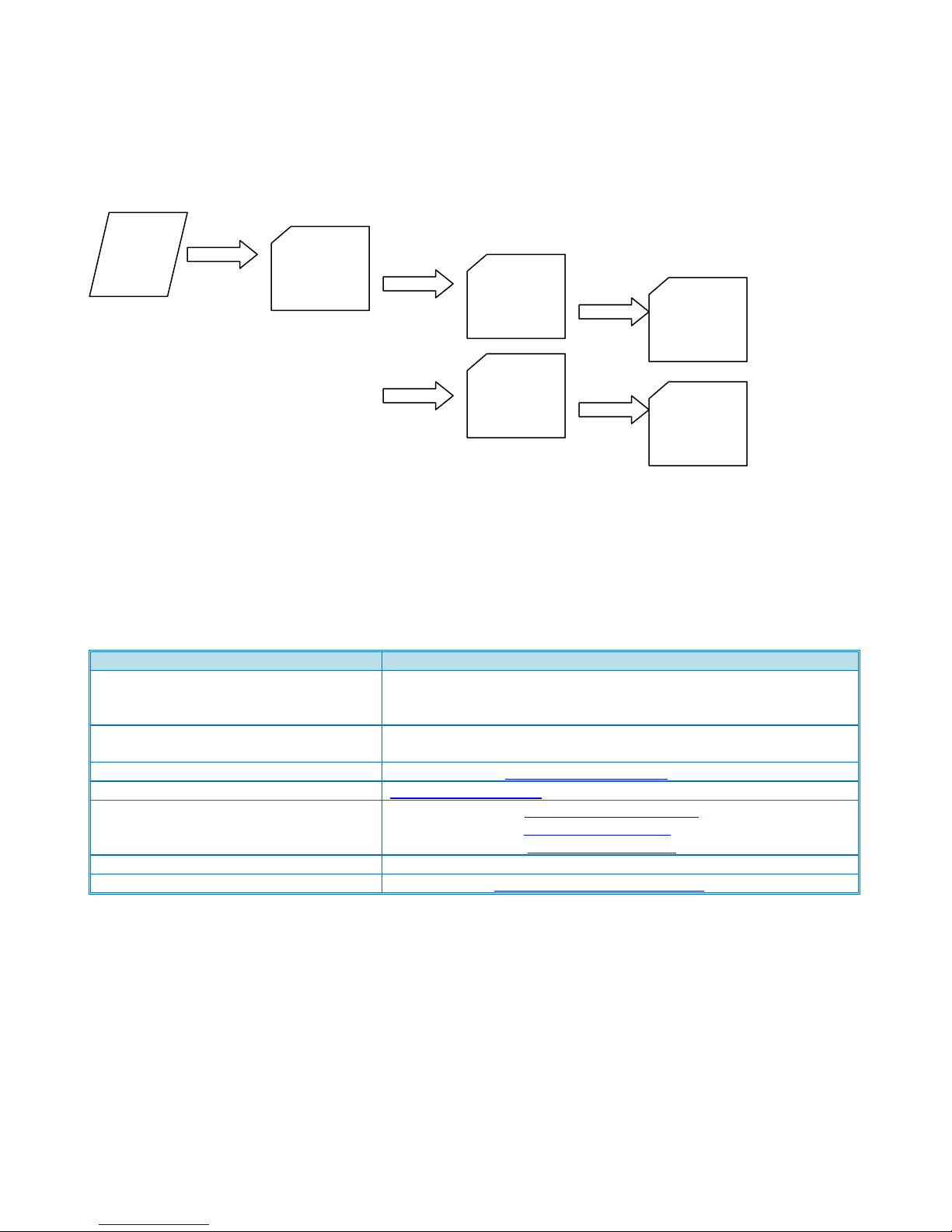
Name
Contact
Technical Services Call Center (Hotline)
Ricoh: (800) 537-4264
Savin: (800) 291-6044
Lanier: (800) 333-3147
Application Help Desk (Software
Issues)
Ricoh Phone Card: 2 Call - 000781MIU, 5 Call - 000900MIU
Savin Phone Card: 2 Call - 12992, 5 Call - 12993
Hytec Parts and Logistics Control
(800) 557-4264 http://www.nrc-usa.com
Technology Solutions Resource Center
http://www.tscweb.net
Headquarter Web Sites
Ricoh Corporation: http://www.ricoh-usa.com
Savin Corporation: http://www.savin.com
Lanier Corporation: http://www.lanier.com
Material Safety Data Sheets
(800) 336-MSDS (6737)
Ricoh University
973.882.2200. http://www.ricohuniversity.com
SD
Card
romdata
D143
Firmware
files
D144
Firmware
files
SD Card Arrangement
Product Support Guide
D143/D144
Contact Information
Ver.1.0 Page 70 of 72 2/3/2012
Subject to change without notice
Page 71

Product Support Guide
Description
EDP Code
RFG E-Source Number
D142/D144 Series Self-Paced Training Package
TBD
TBD
D142/D144 Service Manual
TBD
TBD
D142/D144 Parts Catalog
TBD
TBD
D142/D144 Point-to-Point
TBD
TBD
D143/D144
Training Information
Please refer to the http://www.ricohuniversity.com/ web site for the most up to date training information.
Please be aware that once a model or series is out of production, the Field Service Manual, Technical Service Bulletins
and Ricoh University should be referenced for the most current information. Check the TSC website and e-source.
MFP Update Certified Service Personnel
Ver.1.0 Page 71 of 72 2/3/2012
Subject to change without notice
Page 72

Revisions
1.0 Original
Product Support Guide
D143/D144
Ver.1.0 Page 72 of 72 2/3/2012
Subject to change without notice
 Loading...