

Page 1
Ricoh Aficio MP 2352/MP 2852/
MP 3352
Digital Imaging System
Your choice for more efficient workflow
execute
streamline
Page 2
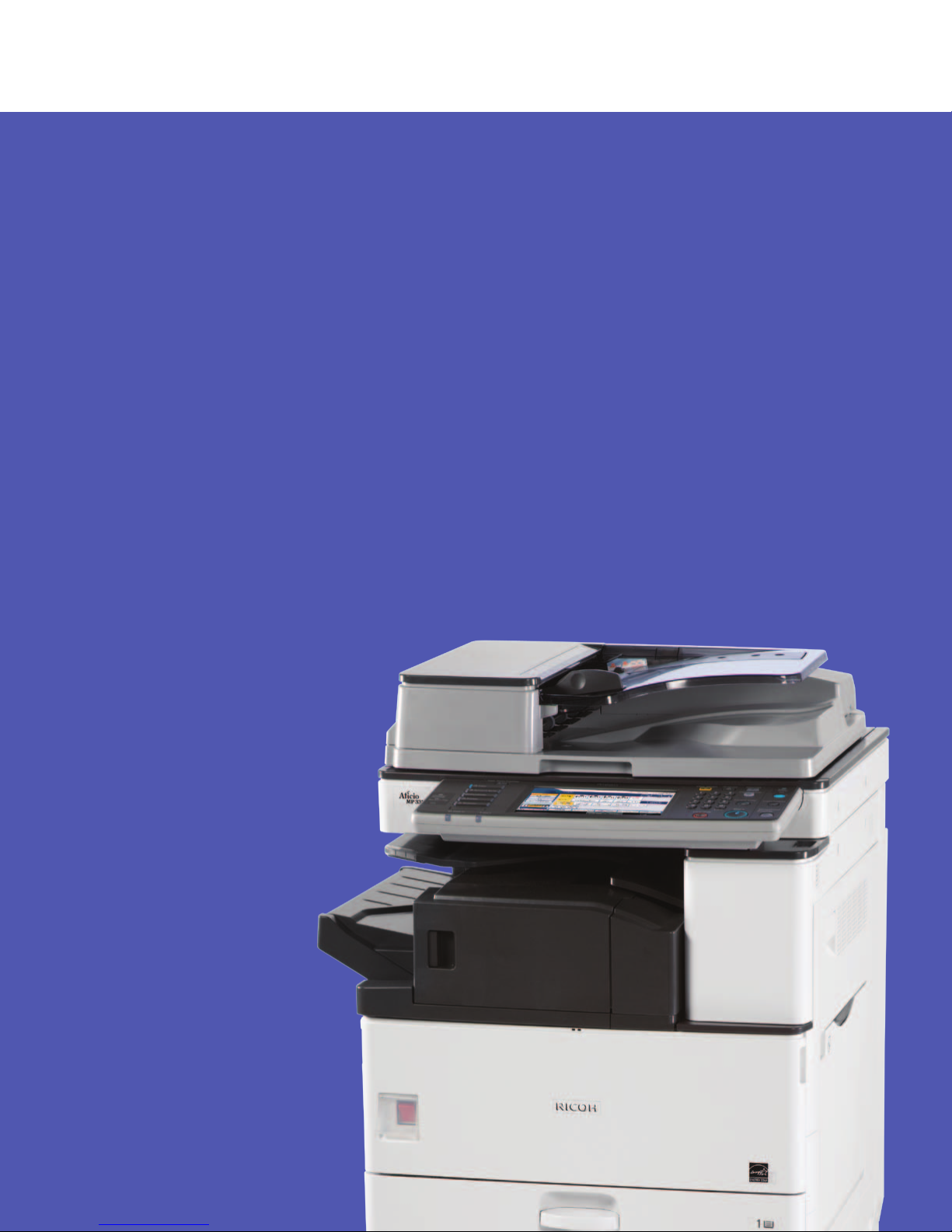
Ricoh Aficio MP 2352/MP 2852/MP 3352
Customize document management for any workflow.
Expectations are high. You’re facing more tasks, more
challenges—and less time. So why not demand more from your
multifunction system? The RICOH
MP 3352 offers unmatched versatility and innovative security
for superior productivity and efficiency. It provides copy, print,
scan and fax capabilities in a compact design so you can
produce a wide range of jobs with exceptional quality. Plus,
it incorporates a host of sustainable, eco-friendly features that
can enable fast-paced offices to save money while conserving
energy. Use it as your workhorse device to streamline workflow
®
Aficio® MP 2352/MP 2852/
from creation to finishing, or integrate it into a comprehensive
Managed Document Services (MDS) strategy and improve
productivity while reducing total cost of ownership.
The Ricoh Aficio MP 2352/
MP 2852/MP 3352 offers versatile
multifunction performance,
innovative security and advanced
distribution capabilities in a compact,
environmentally-friendly design.
Page 3
FlexibleCompactConvenientProductive
Enhance Productivity
Accomplish every task with incredible speed and
convenience. The Ricoh Aficio MP 2352/MP 2852/
MP 3352 offers all-in-one performance for fast,
cost-effective workflow.
• Deliver exceptional multifunction performance with printing, copying, color scanning
and faxing. The MP 2852/MP 3352 is available in two configurations—a standard
scan/print version and a highly-configurable copier version, which can also be
modified to print, scan or fax to suit your office environment. The MP 2352 is
available in a standard scan/print configuration.
• Generate up to 33 black-and-white pages-per-minute and proceed to the next
job quickly.
• Execute workflows seamlessly with a wide range of document distribution tools
that can be tailored for your office for maximum convenience.
• Reprint, refax or scan instantly with the Document Server. It stores up to 3,000
frequently-used documents to expedite workflow.
Share More Efficiently
With its wide range of scanning capabilities, this digital
imaging system enables quick electronic document
capture and convenient distribution options for
incredible flexibility, productivity and value.
• Capture documents in monochrome or in vibrant color and reduce file sizes with
high-compression PDF for faster transmission and printing without compromising
image quality.
• Distribute documents instantly with Scan-to-Email or automate document sharing
and archiving with Scan-to-Folder.
Employ Scan-to-URL for network flexibility. Users can store the document on the Hard
•
Disk Drive to reduce network traffic and view and download files via Web browser.
• Preview electronic documents as full-color thumbnails for accurate review that can
enhance efficiency while minimizing wasted supplies.
Deliver High-Quality Results
The Ricoh Aficio MP 2352/MP 2852/MP 3352 offers
powerful network printing to ensure fast-moving
workflows and affordable output.
• Simplify print jobs with the icon-driven, PCL6 user interface driver and optional
genuine Adobe
• Enjoy seamless integration with Windows, Macintosh, Unix and AS/400 environments
and a host of standard or optional interfaces to ensure that local network
requirements are met.
• Modify queues for print jobs at any time with the Job Function List feature and meet
even the most ambitious deadlines.
• Expedite jobs with PDF Direct Print. Users can print PDFs without opening Adobe
Acrobat or taxing the network.
• Avoid print bottlenecks with Auto Job Promote. This feature holds a job when a
resource is not available—such as a different paper size—and automatically prints
the next job in the queue.
®
PostScript3® drivers.
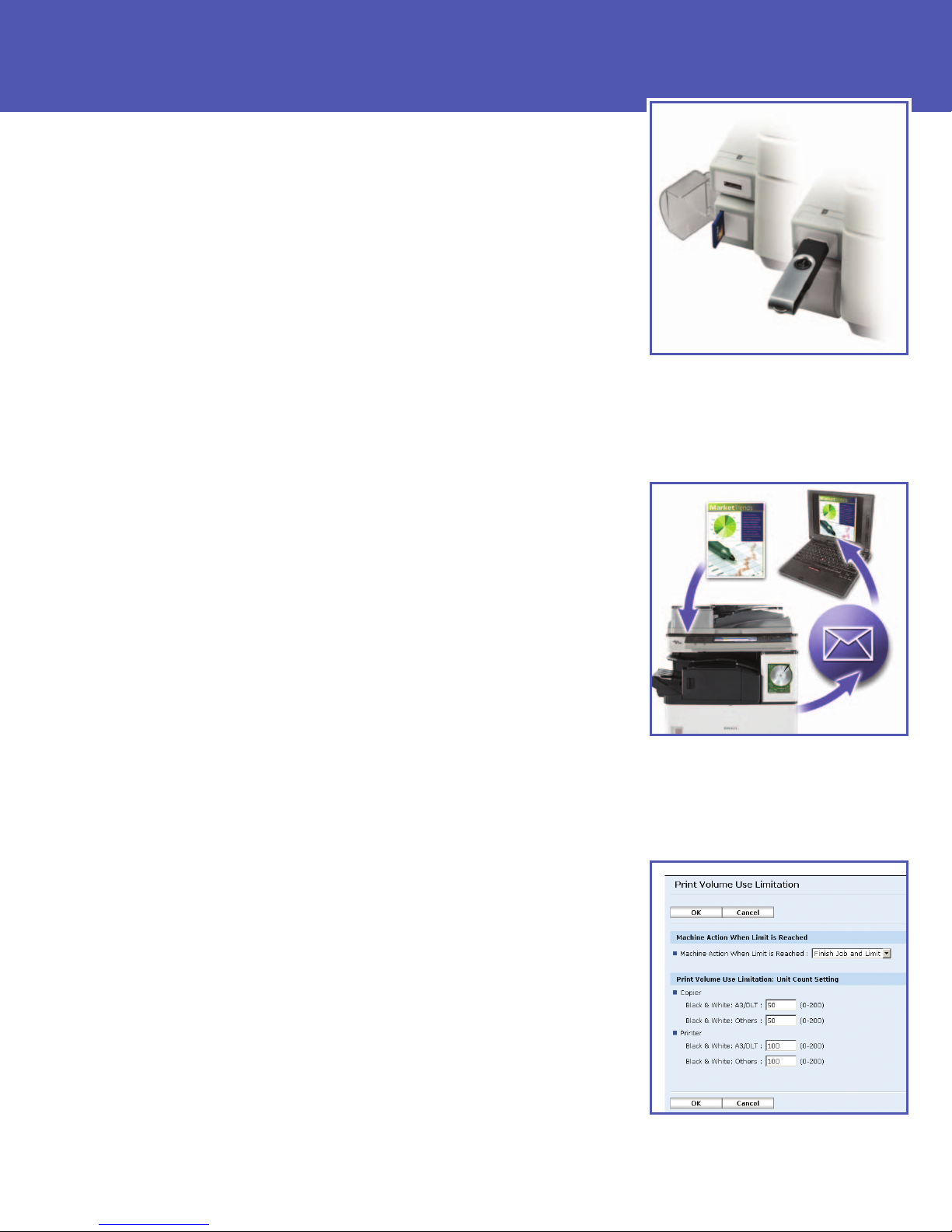
Load scanned documents to portable media
using Scan-to-Media capabilities with the
USB/SD card slot and print TIFF, PDF and JPG
files virtually anywhere.
Color scanning combined with innovative
Scan-To capabilities promotes cost-free
document distribution and less taxing
network traffic.
Set output limits for individuals and groups
with the Quota Setting feature to effectively
control print costs.
Page 4
Outstanding Efficiency in a Compact Design
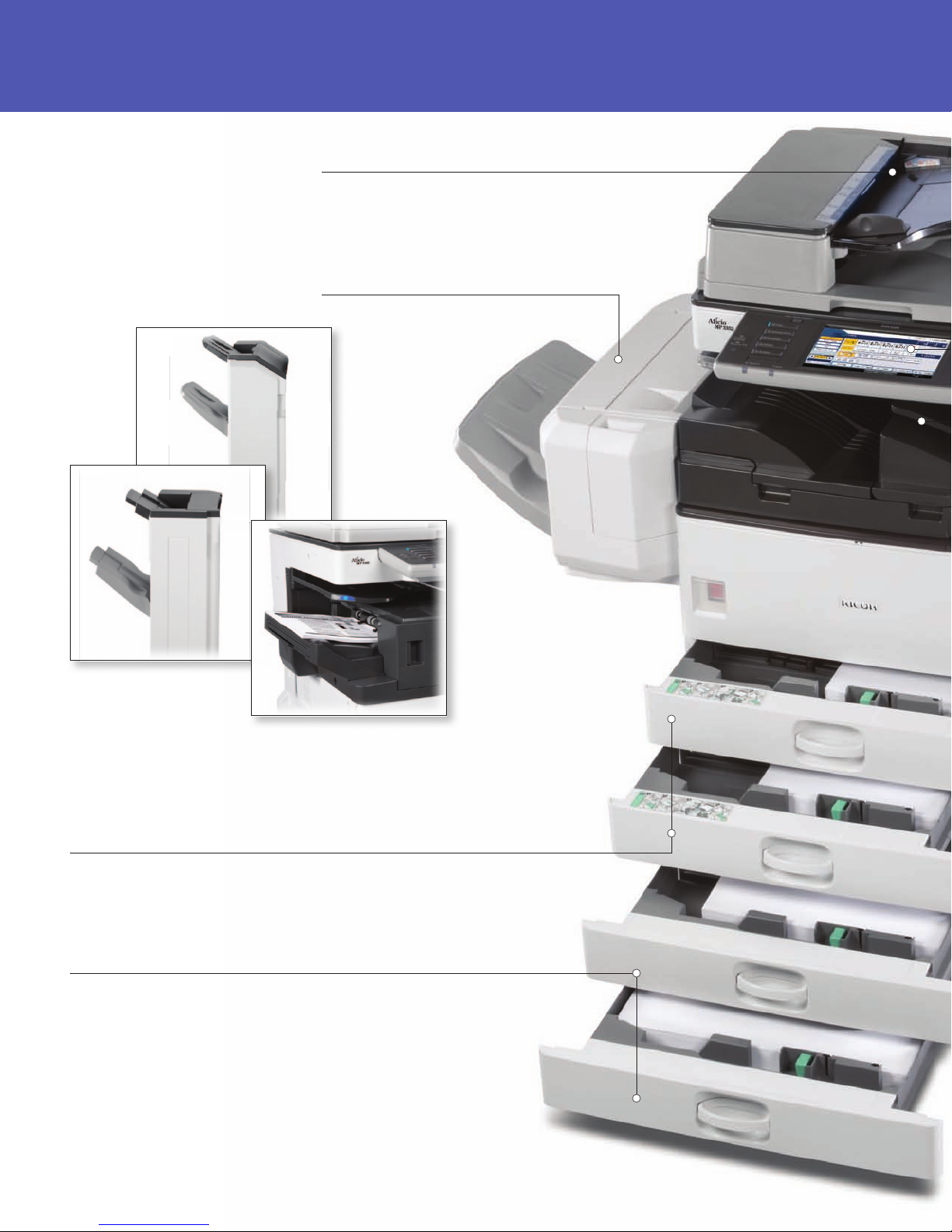
50-Sheet Automatic Reversing Document Feeder (standard)
(Optional for the MP 2852/MP 3352 copier only configurations)
Scan multi-page and mixed size originals quickly and easily.
500-Sheet External Finisher (optional)
Realize greater cost savings and productivity by printing
reports and presentations in-house.
1,000-Sheet Booklet Finisher
1,000-Sheet Finisher
500-Sheet Internal Finisher
Finish In-House with Style
Produce compelling, professionally finished documents and minimize outsourcing.
Choose from a variety of optional finishers to design a complete end-to-end document
production solution that meets your unique application demands.
1 x 500 and 1 x 550-Sheet Paper Trays (standard)
Front-facing, user-adjustable trays accommodate a wide
range of paper stocks and sizes, including envelopes.
1 x 550-Sheet Paper Tray* (optional)
Provides lower height making it easy for all users to access.
2 x 550-Sheet Paper Tray* (optional)
Add more paper capacity for larger jobs and uninterrupted printing and copying.
2,000-Sheet Large Capacity Tray* (optional)
Increase total system volume up to 3,150 sheets for less reloading.
(Letter-size/A4 only)
Cabinet Stand* (optional)
Add a convenient storage space for supplies when
the standard paper supply meets your needs.
*Cannot be combined with other optional paper sources.
Page 5
Ricoh Aficio MP 2352/MP 2852/MP 3352
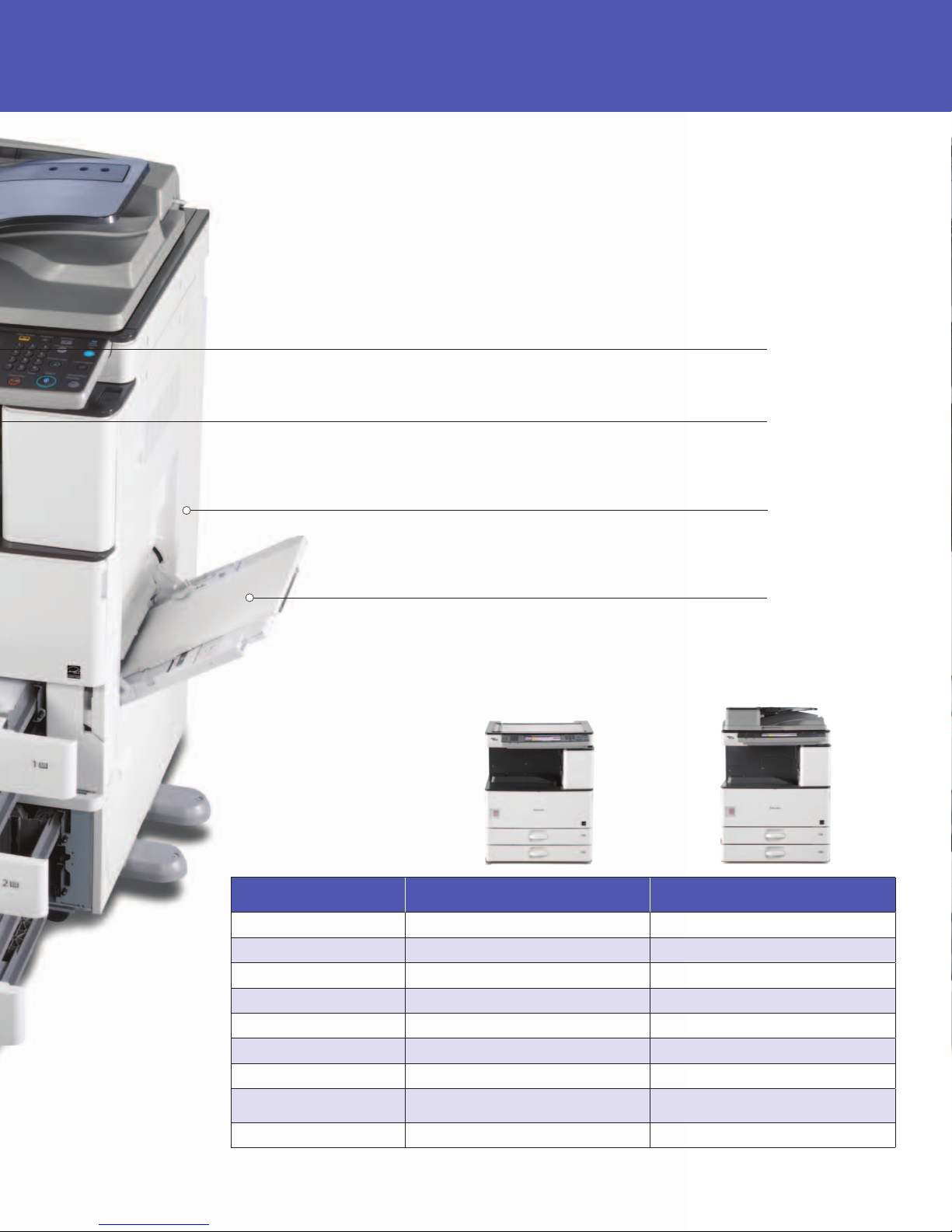
Intuitive 8.5" Color Control Panel
This easy-to-use control panel simplifies operations.
One-Bin Tray (optional)
Separate copy output from fax/print output.
Duplex Unit (standard)
Support environmental initiatives, cut paper use in half and
save on supply costs by printing double-sided documents.
100-Sheet Bypass Tray (standard)
Print envelopes, labels and transparencies on a variety of
paper types and sizes.
Choose the Configuration
that Best Meets Your
Office Requirements
Configuration Copier Copy / Print / Scan
Speeds Available 28 ppm, 33 ppm 23 ppm, 28 ppm, 33 ppm
ARDF Optional Standard
Print/Scan Connectivity Optional Standard
Fax Optional Optional
Security
System Memory (Std./Max.) 512 MB / 1 GB 1 GB/1 GB
Hard Disk Drive Optional Standard 120 GB
Personal Paperless
Document Manager (PPDM)
Java VM Card Optional Standard
Standard DataOverWriteSecurity & HDD Encryption*
Optional Standard 1 License
Standard DataOverWriteSecurity & HDD Encryption
*Hard Disk Drive required to enable these features.
Page 6
Ricoh Aficio MP 2352/MP 2852/MP 3352
Management Made Easy
Engineered for maximum convenience, the
Ricoh Aficio MP 2352/MP 2852/MP 3352
simplifies administrative tasks—including
system management, device monitoring and
troubleshooting.
• Access a wide range of system settings including supply levels and job
details, assign e-mail notification to key team members, cancel jobs and
reboot the system remotely with Web Image Monitor.
• Use Web SmartDeviceMonitor to configure, monitor and manage your
entire fleet of connected Ricoh devices—right from your desktop.
• Promote proactive maintenance with automated alerts for low supplies
and errors with Auto-Email Notification.
• Automate meter submissions, critical event notifications and remote
firmware updates with @Remote.
Advanced Document Security
Help ensure document integrity at every stage
of the creation and distribution process with
comprehensive security that protects your most
important information assets.
• Protect sensitive documents on the hard drive with the standard
DataOverwriteSecurity System (DOSS). It automatically overwrites the
hard drive to prevent retrieval of confidential information when enabled.
• Add a powerful layer of security with standard HDD Encryption and
encode stored documents for maximum protection from hackers.
• Safeguard critical data during transmission with Encrypted PDF
Transmission. Use it to scramble and encrypt transparent and vulnerable
data, including user name and password.
• Ensure accurate user authentication with a variety of methods, including
user codes, LDAP, Windows Authentication and card based authentication
solutions.
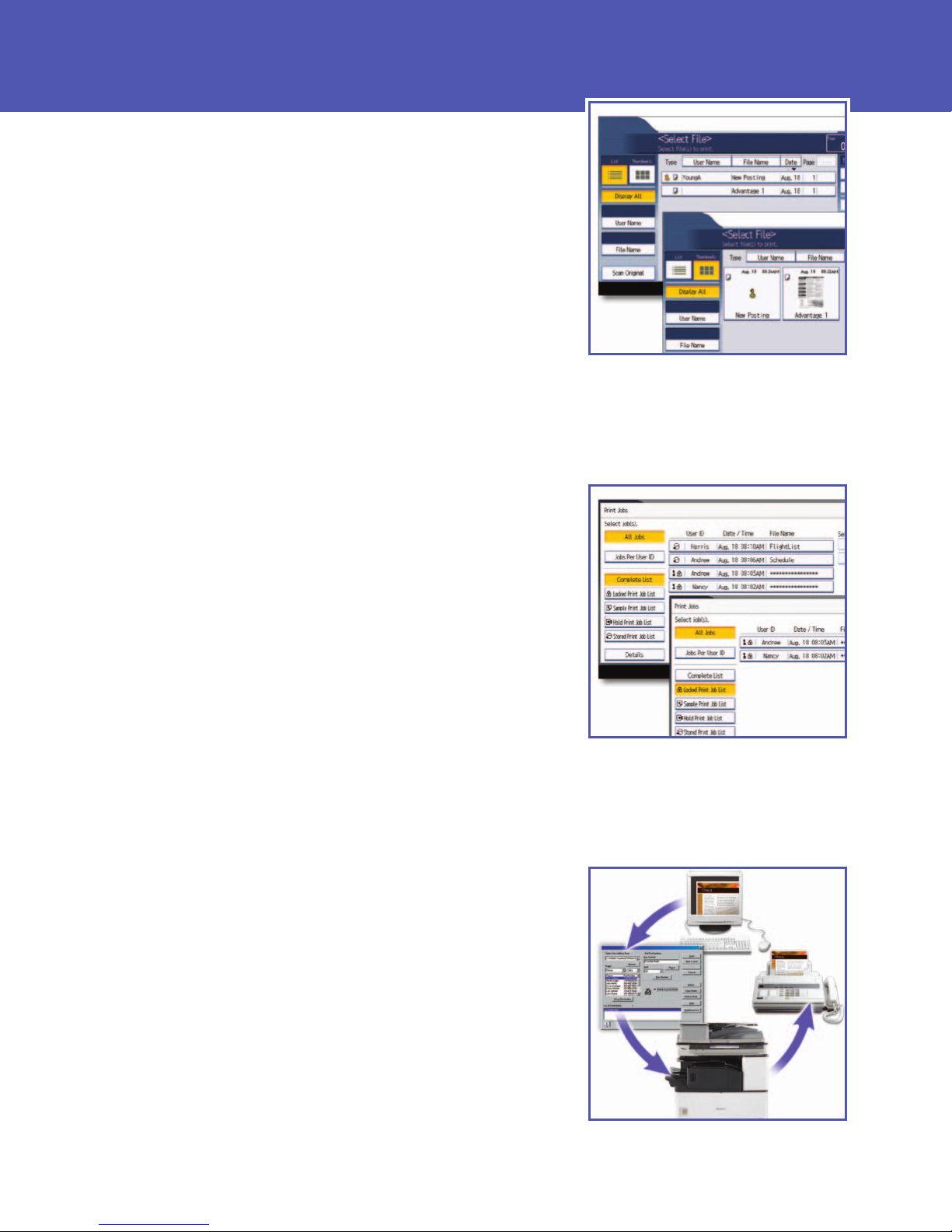
Store up to 3,000 frequently-used
documents in the Document Server for
instant reprinting, refaxing and scanning.
Minimize access to sensitive documents.
Locked Print allows users to delay printing
until they enter a password at the device.
Fast Fax Transmission
Handle any workload—whether it’s one page or
hundreds—with innovative faxing features that
simplify management and expedite delivery.
• Send and receive faxes electronically with Internet faxing, using either
a PC or conventional fax numbers via IP to save on transmission costs
and paper.
• Preview pages prior to transmission to decrease errors and detect blank
pages.
• Route inbound faxes to an e-mail address or network folder to ensure
timely, accurate delivery and distribution.
Fax documents right from your desktop to
maximize convenience and boost efficiency.
Page 7
PowerfulSecureSustainableProfessional
Enable Mobile Workers
Give mobile users an easy way to print documents
while on the go without compromising security.
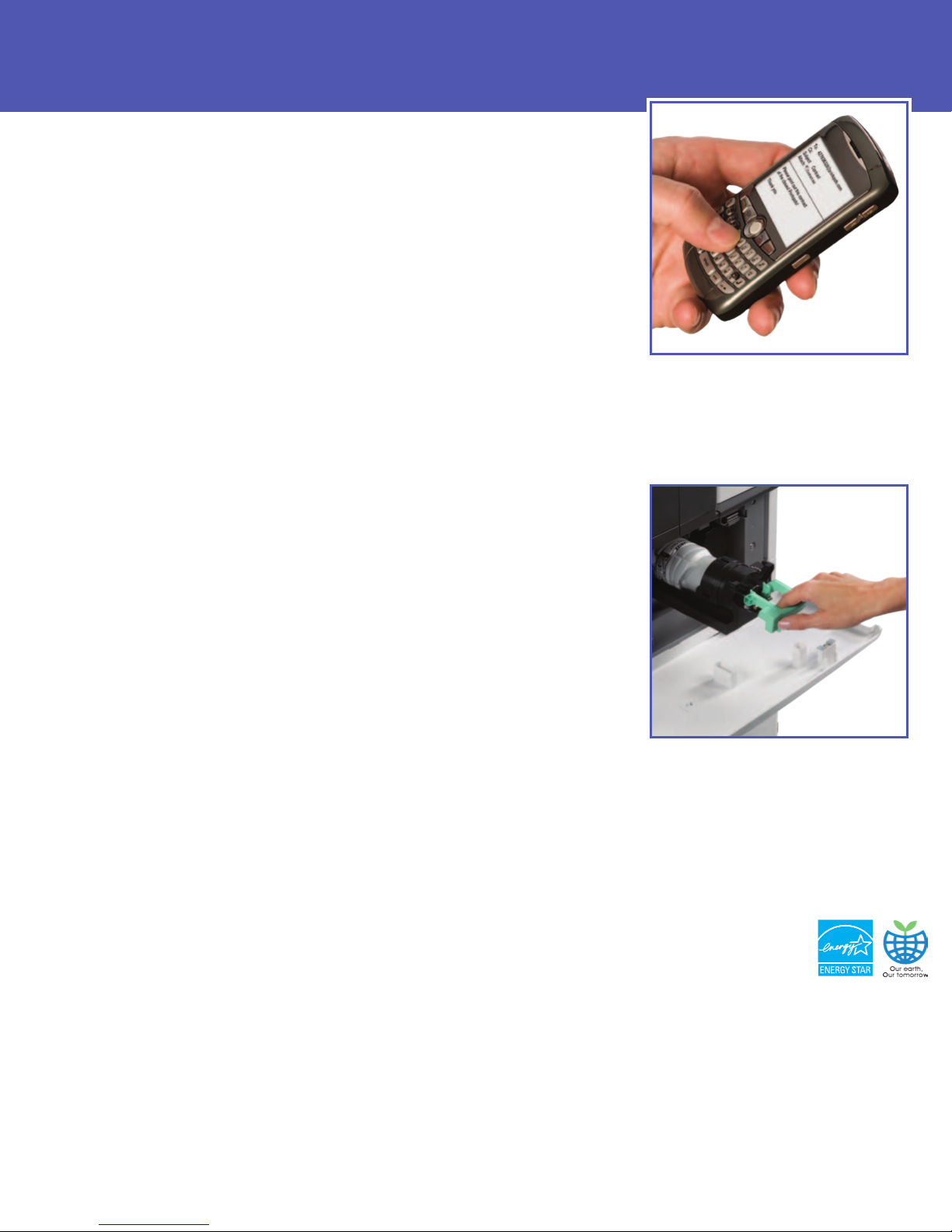
• Print documents, e-mails and Web content from anywhere with optional
HotSpot Printing. Users can forward documents to the MFP via PDAs or other
Internet-enabled devices without installing drivers or software.
• Accommodate visitors, such as employees visiting branch offices, with the Mailto-Print feature. This allows users to send emails with attachments directly to
the MFP to print PDF/JPG files automatically without installing print drivers.
Customize Workflows
The Ricoh Aficio MP 2352/MP 2852/MP 3352 offers
innovative tools that accommodate the unique
demands of your environment and streamline businesscritical activities.
• Customize MFP touch-screen menus directly from the PC quickly without IT
support and create secure, searchable PDFs from text files, spreadsheets and
scanned documents with Personal Paperless Document Manager (PPDM)
software.
• Expedite meta-data entry and integrate directly with many of the leading
Document Management Systems at the MFP with optional support for
GlobalScan NX, eCopy, NSi AutoStore and other applications with the optional
USB Keyboard.*
• Connect to optional Cloud applications such as DocumentMall. Documents can
be securely scanned to a folder in DocumentMall or downloaded for printing.
• Develop customized applications using Embedded Software Architecture, a
Java-compatible Software Development Kit (SDK).
Sustainable Efficiency
Conserve energy while boosting productivity. Ricoh
has incorporated a variety of environmentally-friendly
features that conserve time and money.
• Reduce paper consumption by printing double-sided documents—and reducing
output by up to half—with standard automatic duplexing.
• Start printing and copying quickly. The Ricoh Aficio MP 2352/MP 2852/MP 3352
warms up in as few as 14 seconds and recovers from Sleep Mode as quickly as
10 seconds.
• Save energy with fast first-copy times. This digital imaging system can produce
a first copy in as little as 4.5 seconds.
Print from mobile devices to HotSpotenabled MFPs and printers for fast,
convenient printing on the go.
High-yield consumables help minimize
operating costs and downtime. Genuine
Ricoh supplies foster optimal performance
and superior print quality.
The Total
Green Office
* Native embedded scanning is not supported.
Solution
Ricoh continues its longstanding commitment to
developing office solutions
with environmentally friendly
and superior energy- and
supply-saving features,
without compromising
productivity.
Page 8
Ricoh Aficio MP 2352/MP 2852/MP 3352
System Specifications
Engine/Copier Specifications
Scanning Element One-Dimensional Solid Scanning
Printing Process Single Laser Beam Scanning &
Electrophotographic Printing
Toner Dry, Dual Component
Copy Resolution 600 x 600 dpi
Quantity Indicator Up to 999
First Copy Time MP 2352: Less than 5.4 seconds
Warm-Up Time With Hard Disk Drive: Less than 20 seconds
System Memory Copier Basic: 512 MB RAM/1 GB RAM
(std./max.) + 120 GB HDD
Print/Scan: 1 GB RAM + 120 GB HDD
Original Type Book/Sheet/Object
Maximum Original Size Up to 11" x 17"
Copy Type Plain Paper, Transparencies, Letterhead,
Continuous Copying MP 2352: 23 copies/minute (LTR)
Speed MP 2852: 28 copies/minute (LTR)
MP 3352: 33 copies/minute (LTR)
Power Source 120V/60Hz/12A
TEC Value MP 2352: 1,773 Wh (Print/Scan)
Standard Paper 500 sheets x 1 tray, 550 sheets x 1 tray,
Capacity and 100-Sheet Bypass Tray
Maximum Paper 3,150 sheets
Capacity
Paper Size 5.5" x 8.5" to 11" x 17"
A6 to A3
Paper Weight 14 to 28 lb. Bond/52 to 105 g/m
Standard Output Tray 500 sheets (Letter)
Capacity 250 sheets (Legal, Ledger)
Maximum Output 1,600 sheets (Bridge Unit + 1 Bin + 1,000
Capacity Sheet Finisher)
Reduction Ratios 25%, 50%, 65%, 73%, 78%, 85%, 93%,
Enlargement Ratios 121%, 129%, 155%, 200%, 400%
Zoom 25% to 400% in 1% increments
Standard Features
Dimensions (WxDxH)
Copier Basic:
Print/Scan: 23.1" x 25.7" x 32.6"
Weight
Copier Basic:
Print/Scan: 165 lbs., 75 kg
Printer Specifications
Standard on Print/Scan Configuration / Option on Copier Basic Configuration
Print Speed MP 2352: 23 ppm (LTR)
MP 2852: 28 ppm (LTR)
MP 3352: 33 ppm (LTR)
CPU RM7035C 533 MHz
Standard Interfaces 10Base-T/100BaseTX Ethernet, USB 2.0
Optional Interfaces IEEE 802.11a/b/g Wireless LAN, Bluetooth,
Memory Capacity Shared with Copier
Network Protocol TCP/IP, IPX/SPX
Network Operating Windows Vista/7/XP/Server 2003/Server
Systems
143 lbs., 65 kg
Through CCD
MP 2852/MP 3352: Less than 4.5 seconds
Without Hard Disk Drive: Less than 14
seconds
Color Paper, Pre-Punched Paper, Envelopes,
Cardstock, Recycled
MP 2852: 2,100 Wh (Copier Basic)
MP 2852: 2,210 Wh (Print/Scan)
MP 3352: 2,455 Wh (Copier Basic)
MP 3352: 2,511 Wh (Print/Scan)
2
(Duplex)
2
14 to 42 lb. Bond/52 to 157 g/m
and Bypass)
(Tray 1, 2
100%
Auto Magnification, Auto Paper Select, Auto
Tray Switch, Booklet/Magazine Copy*,
Center/Border Erase, Chapters, Combine
Mode, Cover Insertion, Directional
Magnification, Document Server (3,000 File
Capacity)*, Duplex, Electronic/Rotate Sorting,
Full-Color VGA Touch Screen Control Panel,
Negative/Positive, OHP Slip Sheet, 8 Job
Presets*, 10 Job Programs, 500 User Codes,
Sample Copy, Series Copy, User Stamps*
23.1" x 25.7" x 27.9"
587 mm x 653 mm x 709 mm
587 mm x 653 mm x 829 mm
IEEE 1284 Parallel, Gigabit Ethernet
2008, Netware 6.5 or later, Unix; Sun Solaris,
HP-UX, SCO OpenServer, Red Hat Linux, IBM
AIX, Mac OS X 10.2 or later, SAP R/3, NDPS
Gateway, IBM iSeries/AS/400
Host Print Transform, Citrix Presentation
Server 4.5/Citrix Xen App 5.0
®
using OS/400
Utilities @Remote, SmartDeviceMonitor, Web
Page Description Standard PCL5e/6, Optional Adobe
Languages PostScript3
Print Resolution Up to 600 dpi
Fonts for PCL5e/6 45 Scalable Fonts, 6 Bitmap Fonts,
Fonts for PS3 136 PostScript Fonts
Standard Features Sample/Locked/Hold/Stored Print
Scanner Specifications
Standard on Print/Scan Configuration / Option on Copier Basic Configuration
Scanning Speed Embedded Scanning: 50/45 ipm
B&W/Color (@ 200 dpi)
Scanning Resolution 600 dpi
Scan Area Up to 11" x 17"
Standard Interfaces 10Base-T/100BaseTX Ethernet
Optional Interfaces IEEE 802.11a/b/g Wireless LAN, Gigabit
Protocol TCP/IP, NCP, SMB, SMTP, POP 3, LDAP, FTP
Memory Capacity Shared with Copier
File Types Single and Multi-Page TIFF/PDF, High
Standard Features Embedded Scan-to-Email/Folder/URL and
SmartDeviceMonitor, Web Image Monitor
®
, IPDS
13 International Fonts
Ethernet
Compression PDF, Single-Page JPEG
TWAIN, Color Scan
Fax Specifications (Option)
Circuit PSTN, PBX
Compatibility ITU-T G3
ResoIution 200 x 200/100 dpi
400 x 400 dpi (optional)
Compression Method MH, MR, MMR, JBIG
Scanning Speed 0.35 seconds (LEF)
Modem Speed 33.6 Kbps with Auto Fallback
Transmission Speed G3: 3 seconds per page
(MMR Compression)
G3: 2 seconds per page
(JBIG Compression)
SAF Memory 4 MB standard/28 MB maximum
Max Auto Dials 2,000
Group Dials 100 (max. 500 numbers per group)
Features Dual Access, Duplex Reception, Image
Optional Features
Security Features
Standard on Print/Scan Configuration / Option on Copier Basic Configuration
DOSS, HDD Encryption, S/MIME, IPsec Communication, Locked Print Password
Encryption, Address Book Encryption, SSL, User Authentication, Quota Setting/
Account Limit, SNMP v3, SMTP over SSL and PDF encryption
320 pages/2,240 pages
Rotation, 1 Hour Backup, LAN-Fax
Capability*, Internet Faxing (T.37)*,
IP Faxing (T.38)*, Fax Forwarding to
E-Mail/HDD/Folder*
Simultaneous Operation of up to 3 lines
(G3 x 3)
Hardware Accessories
PB3120 Paper Feed Unit (Option)
Paper Size 7.25" x 10.5" to 11" x 17"/A5 to A3
Paper Weight 14 to 42 lb. Bond/52 to 157 g/m
Paper Capacity 1 x 550 sheets
Dimensions (WxDxH) 22.8" x 24.4" x 4.7"
PB3130 Paper Feed Unit (Option)
Paper Size 7.25" x 10.5" to 11" x 17"/A5 to A3
Paper Weight 14 to 42 lb. Bond/52 to 157 g/m
Paper Capacity 2 x 550 sheets
Dimensions (WxDxH) 22.8" x 24.4" x 10.2"
PB3140 Large Capacity Tray (Option)
Paper Size 8.5" x 11"/A4
Paper Weight 14 to 28 lb. Bond/52 to 105 g/m
Paper Capacity 2,000 sheets x 1
Dimensions (WxDxH) 22.8" x 24.4" x 10.2"
One-Bin Tray BN3090 (Option)
Paper Size 5.5" x 8.5" to 11" x 17"/A5 to A3
Paper Weight 16 to 28 lb. Bond/60 to 105 g/m
Paper Capacity 100 sheets
500-Sheet Internal Finisher Type 3352
Paper Size 7.25" x 10.5" to 11" x 17"/A3, A4
Paper Weight
580 mm x 620 mm x 120 mm
580 mm x 620 mm x 260 mm
580 mm x 620 mm x 260 mm
14 lb. Bond to 140 lb. Index/52 to 256 g/m
2
2
2
2
Stack Capacity 500 Sheets (8.5" x 11" or smaller)
Staple Capacity 50 Sheets (8.5" x 11")
Staple Position Top 1, Bottom 1, Left 2, Top 2
Dimensions (WxDxH)
Punch Kit PU3020 NA 2 or 3 hole punch
(Option)
SR3070 500-Sheet Finisher (Option)
Paper Size 7.25" x 10.5" to 11" x 17"/A3, A4
Paper Weight 14 to 42 lb. Bond/52 to 157 g/m
Stack Capacity 500 sheets (8.5" x 11" or smaller)
250 sheets (8.5" x 14" or larger)
Staple Capacity 50 sheets (8.5" x 11")
30 sheets (8.5" x 14" or larger)
Staple Position Top Slant, Bottom Slant, Left 2, Top 2
Dimensions (WxDxH)
SR3090 1,000-Sheet Finisher (Option)
Paper Size (Upper Tray) 5.5" x 8.5" to 11" x 17"/A6 to A3
Paper Weight
(Upper Tray)
Stack Capacity
50 sheets (8.5" x 14" or larger)
Shift Tray: 1,000 sheets
(8.5" x 11" or smaller)
500 sheets (8.5" x 14" or larger)
Staple Capacity 50 sheets (8.5" x 11")
30 sheets (8.5" x 14" or larger)
Staple Position Top 1, Bottom 1, Left 2, Top 2
Dimensions (WxDxH)
270 mm x 520 mm x 790 mm
SR3100 Booklet Finisher (Option)
Paper Size (Upper Tray) 5.5" x 8.5" to 11" x 17"/A6 to A3
Paper Size (Shift Tray) 7.25" x 10.5" to 11" x 17"/A3, A4
Paper Weight 14 to 28 lb. Bond/52 to 105 g/m
(Upper Tray); 14 lb. Bond to 140 lb.
Stack Capacity Upper Tray: 100 sheets
(8.5" x 11" or smaller)
50 sheets (8.5" x 14" or larger)
Shift Tray: 1,000 sheets
(8.5" x 11" or smaller)
500 sheets (8.5" x 14" or larger)
Staple Capacity 50 sheets (8.5" x 11")
30 sheets (8.5" x 14" or larger)
Staple Position Top 1, Center, Left 2, Top 2
Saddle Stitch Capacity 1 set (10 sheets)
Saddle Stitch Position Center 2 Positions
Dimensions (WxDxH)
535 mm x 600 mm x 930 mm
Punch Kit PU3000 NA 2 or 3 hole punch
(Option)
ARDF DF3060
Standard on Print/Scan Configuration / Option on Copier Basic Configuration
Paper Size 5.5" x 8.5" to 11" x 17", A5 to A3
Simplex Paper Weight 11 to 34 lb. Bond/40 to 128 g/m
Stack Capacity 50 sheets
Dimensions (WxDxH)
550 mm x 496 mm x 120 mm
250 Sheets (8.5" x 14" or larger)
30 Sheets (8.5" x 14" or larger)
19.5" x 18.8" x 6.4"
495 mm x 477 mm x 161 mm
15.6" x 21.7" x 10.9"
396 mm x 551 mm x 275 mm
14 lb. Bond to 140 lb. Cover/52 to 260 g/m
Upper Tray: 250 sheets (8.5" x 11" or smaller)
10.7" x 20.5" x 31.2"
2
Index/52 to 256 g/m
(Shift Tray)
21.1" x 23.7" x 36.7"
21.7" x 19.5" x 4.7"
Additional Accessories
3L68-19 USB Keyboard, ADF Handle Type C, Bluetooth Interface
Unit Type D, Bridge Unit BU3050, Card Reader Bracket Type 3352,
Caster Table Type D, DataOverwriteSecurity Unit Type I
USB Keyboard, FAC 52 Cabinet, File Format Converter Type E, G3
Interface Unit Type 3352, Gigabit Ethernet Board Type A, Handset
Type 3352, Hard Disk Drive Type 3352
Unit Type J, IEEE 1284 Interface Board Type A, Internal Shift Tray
SH3050, IPDS Unit Type 3352, Key Counter Bracket Type H, Memory
Unit Type B 32 MB, Optional Counter Interface Unit Type A, Platen
Cover Type 3352
Type 3352
Keyboard Bracket
Note: Some accessories require additional equipment or may be prerequisites for
other options.
* Copier Basic Configuration requires additional accessories.
For maximum performance and yield, we recommend using genuine Ricoh parts
2
and supplies.
1
Copier Basic Configuration only.
2
ISO 15408 Certified.
1
, PostScript Unit Type 3352, Printer/Scanner Unit
1
, USB 2.0/SD Slot Type H, VM Card Type N1, VZ G106030
1
, IEEE 802.11 a/g Interface
2
2
2
2
, External
2
www.r icoh-usa.com
Ricoh Amer icas Corporation, F ive Dedrick Place, West Caldwell, NJ 07006
Ricoh® and the R icoh Logo are regi stered trademark s of Ricoh Company, Ltd. All other trademar ks are the prope rty of their re spective owner s. The content of this document, an d the
appearance, features and specif ications of Ricoh products and s ervices are subj ect to change fro m time to time wit hout notice. Produc ts are shown w ith optional featur es. While care
has been t aken to ensure the acc uracy of this infor mation, Ricoh makes no representatio n or warranties ab out the accuracy, co mpleteness or ad equacy of the info rmation contained
herein, and shall not be liable for any errors or omissions in thes e materials. Actu al results will va ry depending up on use of the pro ducts and ser vices, and the con ditions and facto rs
affecting performance. Th e only warranties for Ricoh product s and services are as set forth in the express w arranty stateme nts accompanying th em.
R3305
 Loading...