

Page 1
Bluetooth Headset
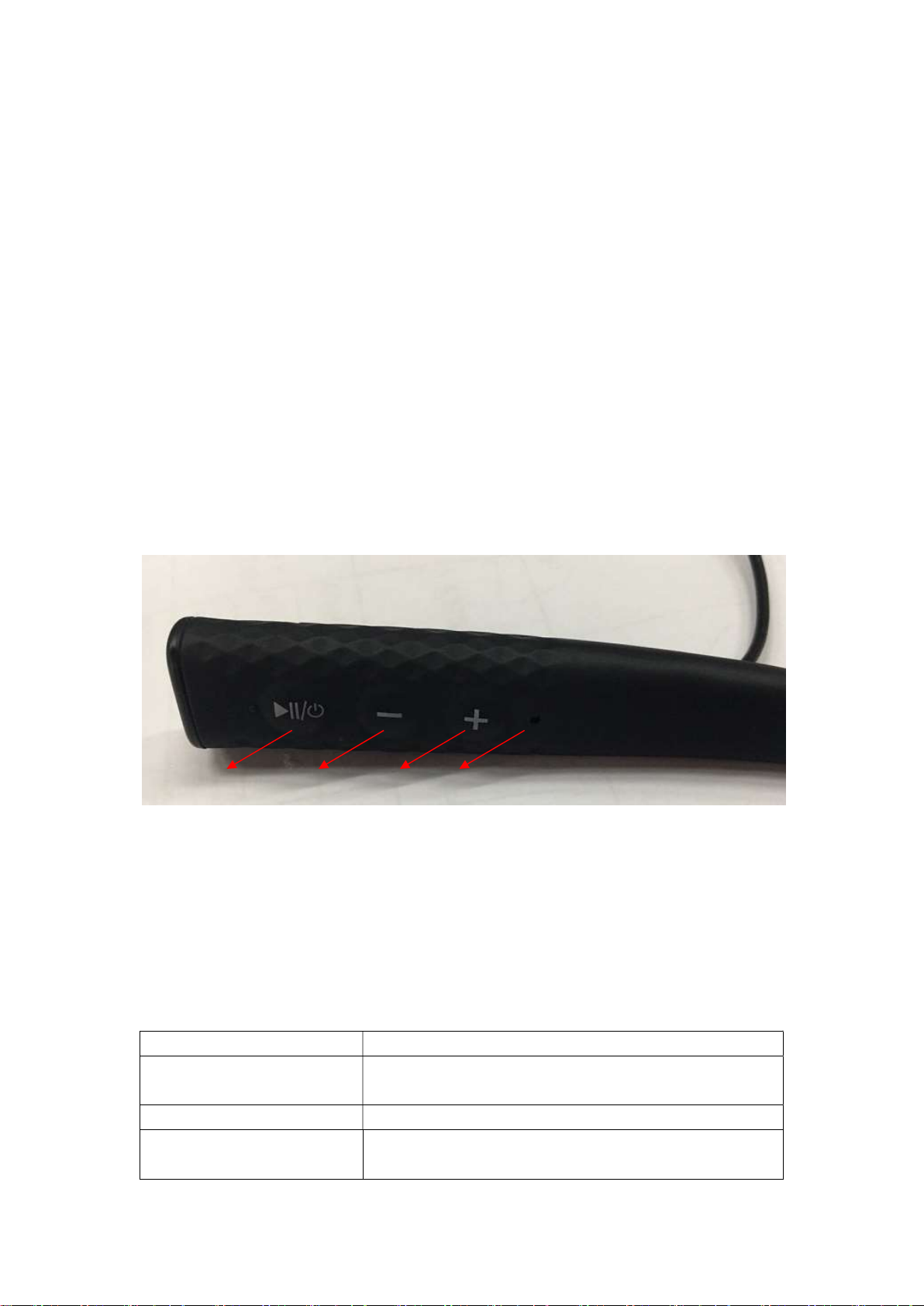
1 2 3 4
Model: A3B
Thank you for choosing the A3B Bluetooth Headset. Please read this manual carefully for future
reference. If you have any further assistance, please connect our customer support team via email behind this manual.
Package Content
1×Bluetooth Headset
1×USB Charging Cable
6×Ear Buds(two are already installed)
1×User Guide
Package Diagram
1. Multifunction Button(MFB)
2. Volume - / Previous Track Button
3. Volume + / Next Track Button
4. LED Indicator
Control Functions
Power On / Off Press and hold the MFB for 3 seconds
Pairing
Play / Pause Press the MFB once to play/pause.
Volume Increase /
Decrease
Power on until the LED Indicator flashes red and blue
alternately
Press the Volume + / Volume - Button once to
play/pause.
Page 2
Next / Previous Track
Press and hold the Volume + / Volume - Button for 2
seconds
Answer Phone Call When a call is incoming, press the MFB once
Hang Up Phone Call During a call, press the MFB once
Reject Phone Call
Redial
When a call is incoming, press and hold the MFB for 2
seconds
Press the MFB twice to re-dial the latest phone
number
Activate Voice Control Press and hold the MFB for 2 seconds
Press and hold the Volume + button and Volume –
Clear Pairing History
button for 5 seconds until the LED Indicator flashes
red once
Note:
When a call is coming, there is vibration promoted.
Specification
Bluetooth Version
Bluetooth File
Audio Codec
CSR8635 V4.1
Support HSP,HFP.A2DP,AVRCP
SBC ,MP3,AAC,Faststream decoder
Range 33 ft / 10m
Waterproof Rating IPX5
Charging Power DC 5V
Working Time 10H at 70% volume
Charging Time 5V 80mA about1.5H--2.5 H
Dimension 400*17*10mm
Weight 44g
LED Indicators
LED Indicator Status
Red LED on Charging
Blue LED on Fully charged
Flashes blue and red In Pairing mode
Flashes blue twice every
Paired with a Bluetooth device
6seconds
Slowly flashes red Low battery
Page 3

Note:
The earphones will not automatically connect to a
switched on, please read the next section on how to connect to your
device.
Bluetooth®
device when
How to Use
1. Charging
1) Connect the charging port with any USB charging adapter or active
computer USB port.
2) Charging will start automatically with the LED indicator turning red.
3) The earphones are fully charged when the LED indicator turns blue.
2. Pairing
Bluetooth®
1) Make sure the earphones and your
other (within 3 feet / 1 meter).
2) Press and hold the Multifunction Button for 5 seconds to bring the earphones
into pairing mode with the LED indicator flashing blue and red.
3) Activate the
Bluetooth®
For iOS: Settings > Bluetooth > On
For Android: Settings >Bluetooth: On > Scan for devices
4) Find “A3B” in the search results. Tap on the name to connect. Once
connected, the blue LED will flash twice every 5 seconds.
Note:
If a PIN code is required for pairing, try “0000” (four zeroes).
The Bluetooth earphones can remember previously paired devices.
3. Pairing with two devices at the same time
Although you can pair with two devices, only one of them can play music or make
Bluetooth®
connections:
function on your phone and search for nearby
Bluetooth®
device are next to each
phone calls with the headphone at any time. To pair with two devices:
1) Follow the previous instructions in the “Pairing” section to pair the A3B with
your first device.
Page 4
2) Turn off the
“Pairing” instructions again to pair and connect to your second device.
Bluetooth®
function of your first device and follow the
3) With the
two paired devices by pausing the music on the first device and playing music
on the second device.
Bluetooth®
function on both devices turned on, switch between the
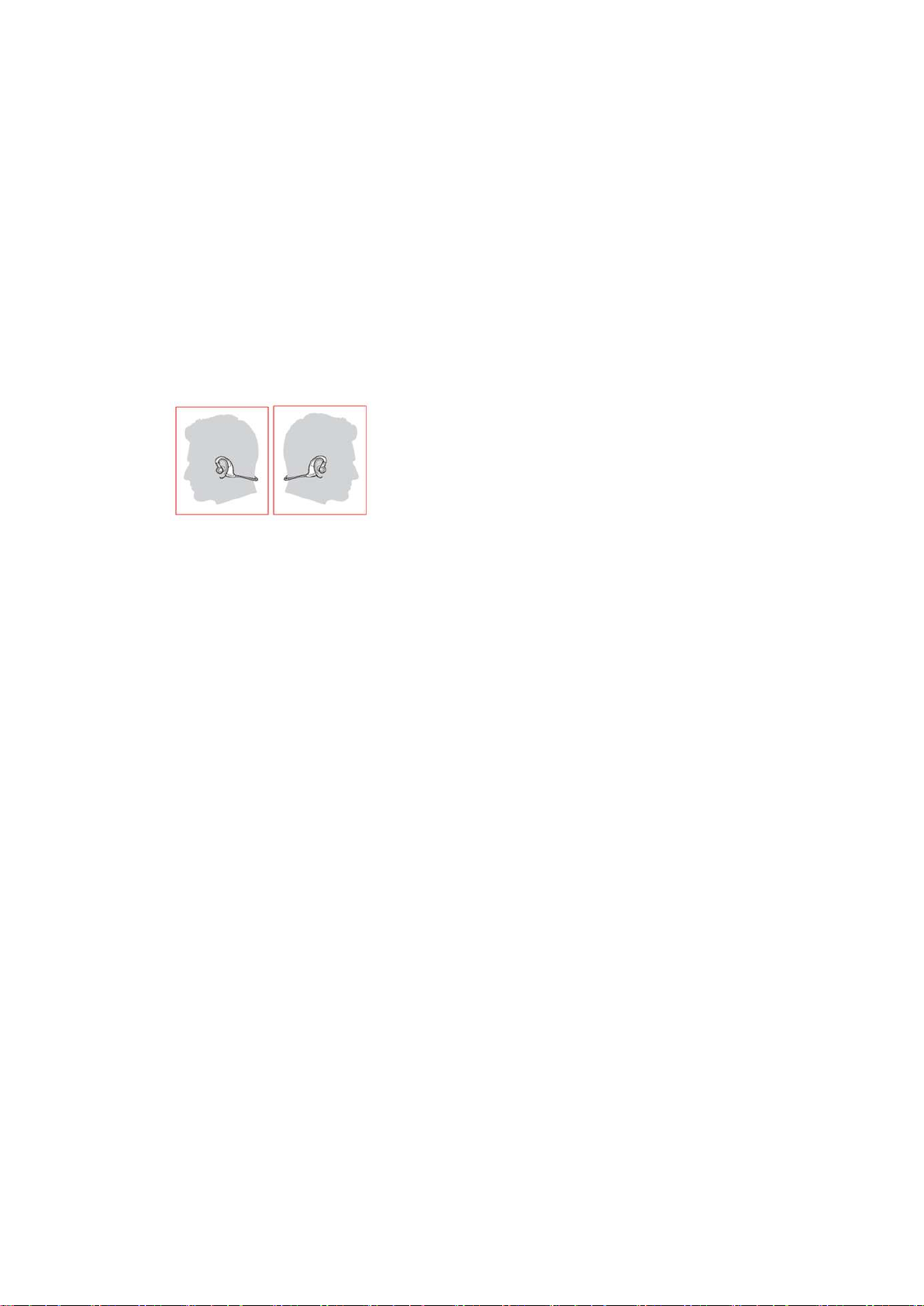
4. How to Wear
Please wear the earphones as shown in the diagram:
Note:
Please note the “L” and “R” markings on the earphones, they correspond
to your left side and right side respectively.
In addition to the earphones, two extra pairs of different sized ear buds are
included in the package. Please try them out and find the most comfortable fit
for you.
Troubleshooting
Q: My earphones will not switch on.
A: Please recharge it and make sure it has enough power. Plug the unit to a
charger and see if the power button becomes solid red.
Page 5

Q: Why can’t I pair the earphones with other
A: Please check the following points:
Bluetooth®
devices?
Make sure your
Make sure the earphones and your device are next to each other or within 3
feet / 1 meter.
You must get the earphones into pairing mode with the indicator flashing
blue and red.
Try to reboot your
Q: After connecting and pairing with my
music from the earphones.
A: Please check the following:
Bluetooth®
Bluetooth®
device supports A2DP.
device.
Bluetooth®
device, I cannot hear any
Your sound system is connected to the earphones (if the LED indicator
flashes blue once every 5 seconds, then they are connected).
Make sure the music volume is at audible level on both your
device and earphones.
Make sure your
Bluetooth®
device is playing music.
Bluetooth®
Care and Maintenance
Charge the earphones at least once every 6 months.
Keep the earphones away from heat and humidity.
Page 6

Do not put the product under direct sunlight or hot areas. High
temperatures will shorten the lifespan of the earphones and its battery.
Do not try to take the product apart.
Do not drop or knock your earphones on hard surfaces.
Do not use chemicals or detergents to clean the product.
Do not scrape the surface with sharp objects.
Warranty
TaoTronics earphones are covered by the TaoTronics Parts and Labor Warranty for
12 months from the date of their original purchase. If the device becomes defective,
please contact TaoTronics Support to launch warranty claim. We will instruct you on
how to return the defective unit back to us for repair and replacement.
The following are excluded from the TaoTronics warranty:
Device purchased as 2nd hand, used or from unauthorized sellers
Damage resulted from misuse and abusive action
Damage resulted from chemical, fire, radioactive substance, poison, liquid
Damage resulted from natural disaster
Damage caused to any 3rd party / person / object and beyond
No return will be accepted without seller authorization.
Page 7
Statement
We can only provide after sale services for products that are sold by Richen or
Richen authorized retailer and distributor. If you have purchased your unit from a
different place, please contact the seller for return and warranty issues.
FCC ID: RMZ-A3B
NOTE: This equipment has been tested and found to comply with the limits for a
Class B digital device, pursuant to part 15 of the FCC Rules. These limits are
designed to provide reasonable protection against harmful interference in a
residential installation. This equipment generates uses and can radiate radio
frequency energy and, if not installed and used in accordance with the instructions,
may cause harmful interference to radio communications. However, there is no
guarantee that interference will not occur in a particular installation. If this
equipment does cause harmful interference to radio or television reception, which
can be determined by turning the equipment off and on, the user is encouraged to
try to correct the interference by one or more of the following measures:
- Reorient or relocate the receiving antenna.
- Increase the separation between the equipment and receiver.
-Connect the equipment into an outlet on a circuit different from that to which the
receiver is connected.
-Consult the dealer or an experienced radio/TV technician for help
Changes or modifications not expressly approved by the party responsible for
compliance could void the user's authority to operate the equipment.
This device complies with Part 15 of the FCC Rules. Operation is subject to the
following two conditions:
(1) this device may not cause harmful interference, and(2) this device must accept
any interference received, including interference that may cause undesired operation.
 Loading...