

Page 1
Product: ReSound ENZO
2
Model: 88
Serial number (R):
_____________________________
Serial number (L):
_____________________________
Battery size: 13
My hearing aid information
Quick guide
ReSound ENZO
2
™
88
Page 2
Program button (A):
ACTION RESULT
SHORT push Program change
LONG push
Activate streaming
(if enabled by
professional)
Volume control (C):
ACTION RESULT
Press UP Volume increases
Press DOWN Volume decreases
PROGRAM WHEN TO USE BEEPS
1
1
2
2
3
3
4
4
Programs:
(if set up by your hearing care professional)
Page 3
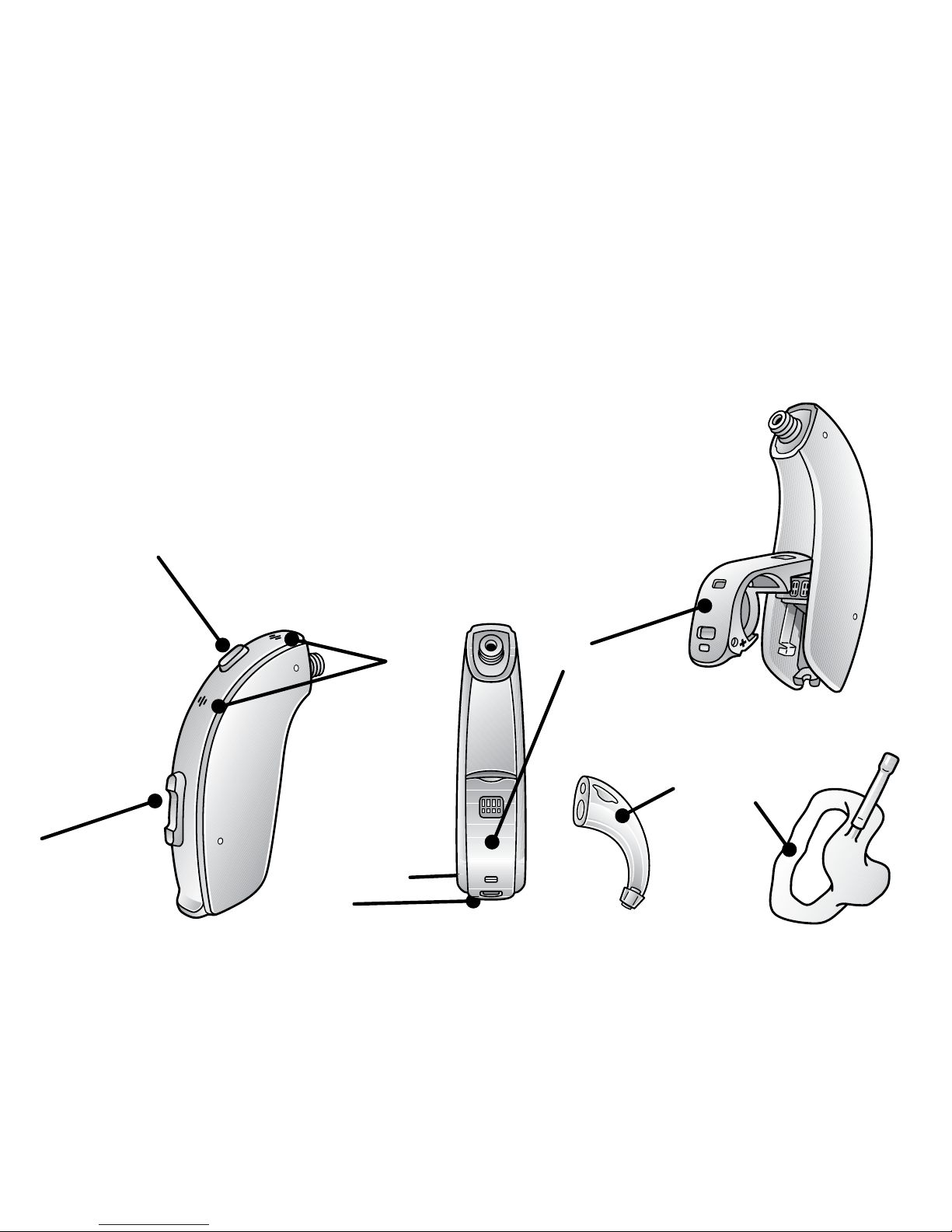
A. Program button
B. Microphones
C. Volume control
D. Battery door
E
A
C
B
F
Get to know your hearing aid
View ReSound’s hearing aid tutorial videos at youtube.com/resoundus.
E. Right/Left indicator
F. Groove for DAI/FM boot
G. Earhook
H. Earmold and
tubing
D
Traditional fitting
(earmold and tube)
6
1
5
4
3
2
8/9
10
7
8/9
11
12
13
14
18.c
18.b
9
4
3
8/9
10
7
8/9
11
12
13
14
18.c
18.b
9
H
G
Page 4
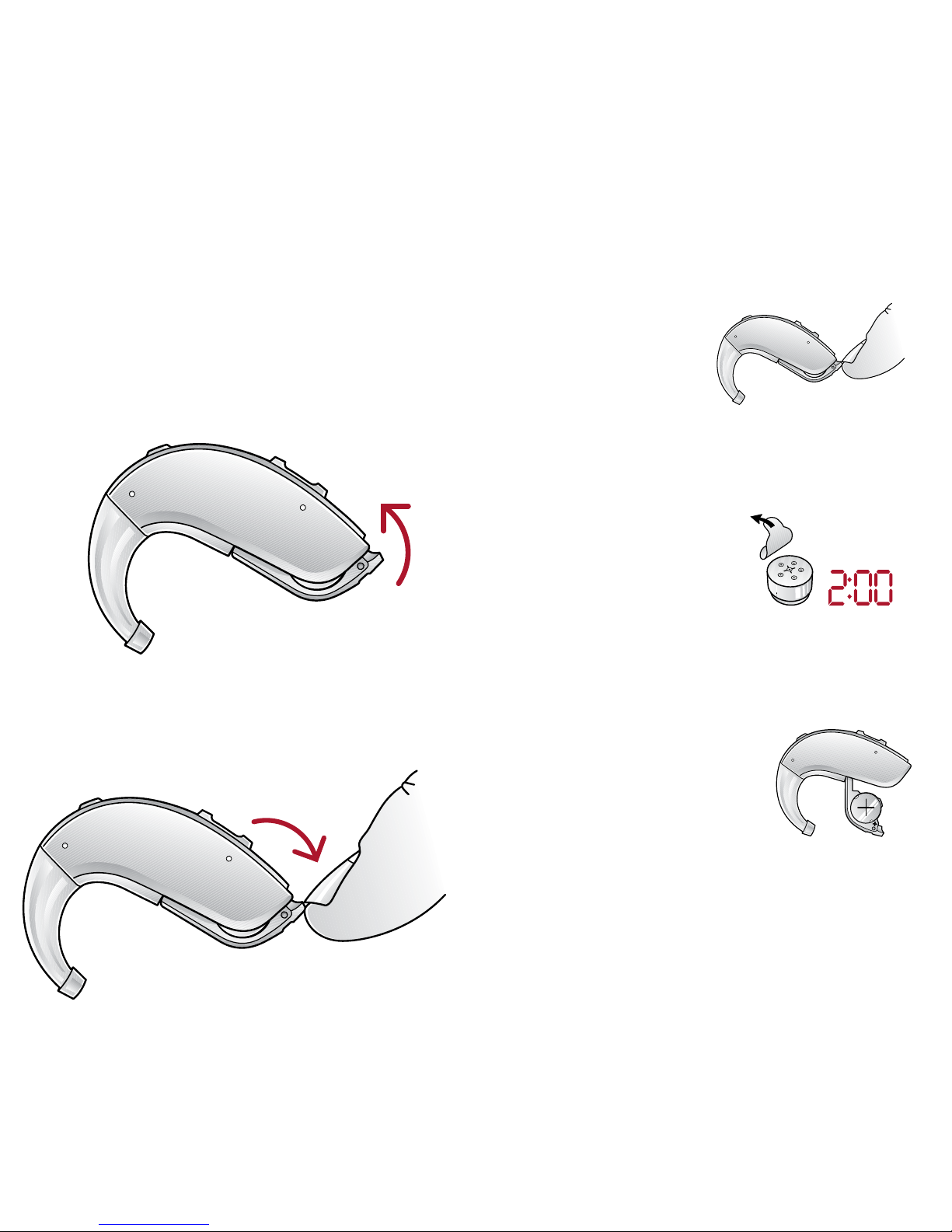
Getting Started: On/O function
ON: Insert battery & completely close
battery door (D). Program 1 will
be active.
OFF: Open the battery door (D). Use
fingertip to pull it all the way.
ON
OFF
What you need to know
Inserting/Replacing the battery:
1. Open the battery door (D)
completely
by using
your fingertip.
2. Remove protective sticker from
battery and wait 2 minutes before
inserting the
battery into the
hearing aid to
allow full activation of the battery.
3. Insert the new battery
with the positive
side (flat side) in
the correct
position, as shown.
4. Gently close the battery door. If it
doesn’t close easily, check to see
if the battery is upside down.
Page 5
Flight mode:
Some airlines prohibit the use of
wireless hearing aids (RF
transmitters) onboard. If required by
your airline, enable flight mode:
Disable wireless operation by
opening and closing the battery door
(D) three times within ten seconds
(open-close, open-close, open-close).
Your instruments will now be in
flight mode.
The hearing aids must function in
flight mode for 10 seconds before
wireless operation can be re-enabled.
To re-enable wireless operation,
open and close the battery door one
time and wait thirty seconds before
opening the battery door again to
avoid accidentally entering flight
mode again.
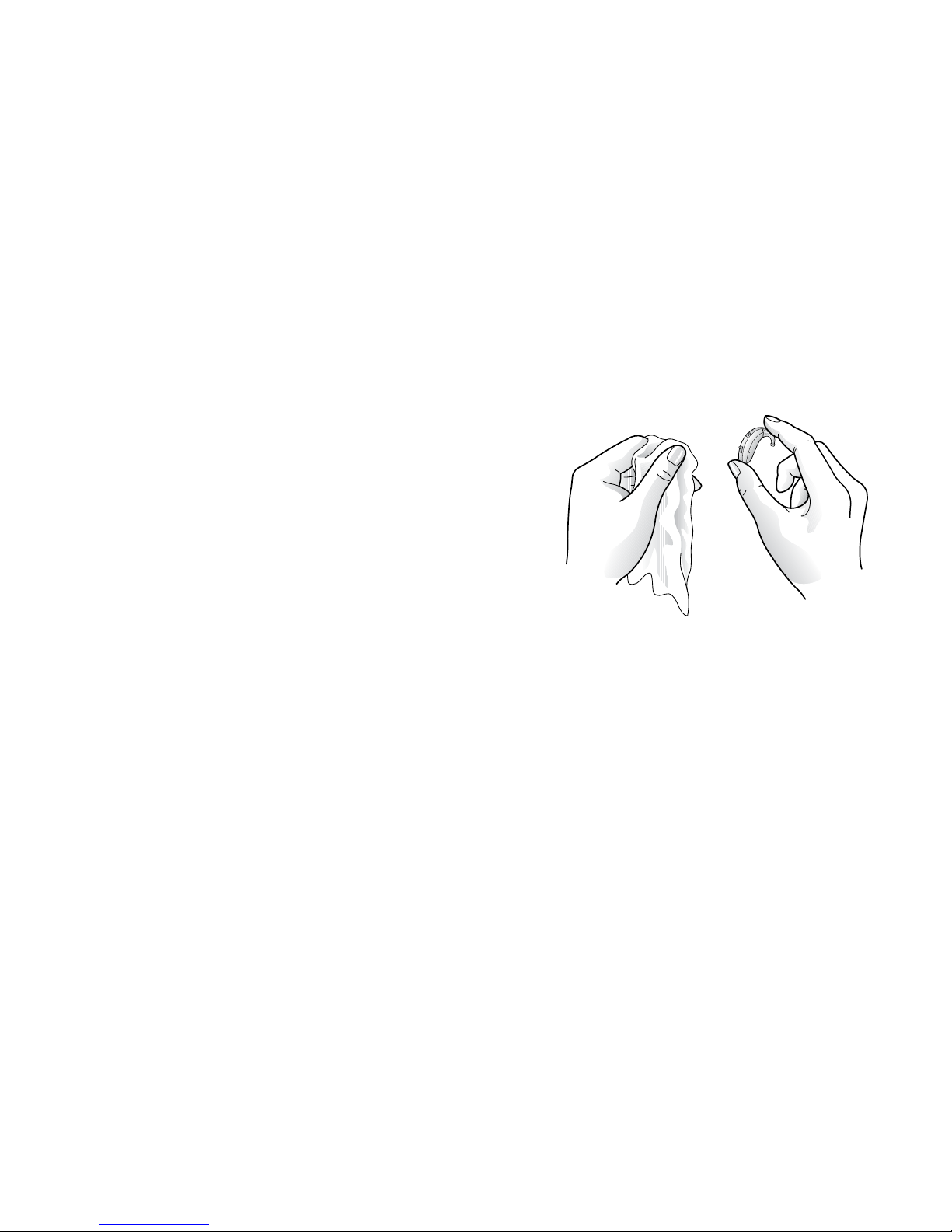
Daily: Clean your hearing aid.
Keep your hearing aids dry. Clean
the hearing aids using a soft cloth
or tissue.
Weekly: Clean tubes and earmold (H).
1. Remove earmolds and tubing
from hearing aid prior to cleaning.
2. Clean earmold using mild soap,
remove any residual.
3. After cleaning, dry earmolds
thoroughly, remove any residual
water and debris from the tubing
utilizing an air bulb and wire loop.
Regular care & maintenance
Page 6
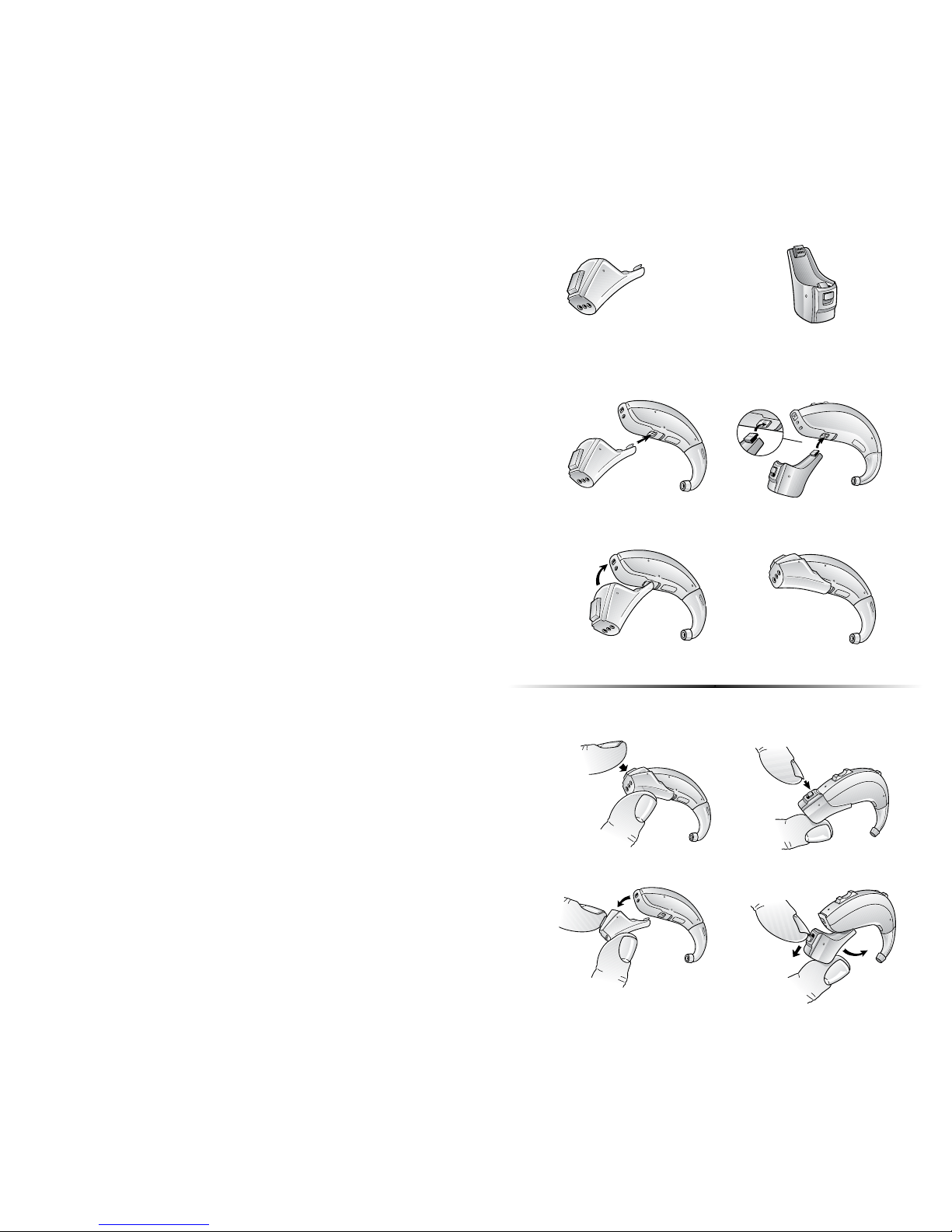
Connecting audio boot and
integrated FM
1. Align the tip of the audio boot or
integrated FM boot with
designated groove (F).
2. Once in place, move the boot in
the direction of the battery
compartment.
3. Gently click the boot onto the
hearing instrument.
Disconnecting audio boot and
integrated FM
1. Press and hold the button on
the front side of the audio boot.
For an FM boot, slide the latch
downward with your finger nail.
2. Gently remove the boot from the
hearing instrument.
Connecting/disconnecting
direct audio boot or Integrated FM
Direct Audio Integrated FM
1.
2.
1.
2.
3.
Page 7

Beep/tone indicators
View ReSound’s hearing aid tutorial videos at youtube.com/resoundus.
BEEP/TONE INDICATION ACTION REQUIRED
Ding, ding, ding, dong Low battery Change battery
Ding (5 or 10) Hearing aid is starting up After dings cease, hearing
aid is turned on
Ding-ding,
ding-ding, etc.
Hearing aid is in flight mode Use in flight mode if desired,
or open-close battery door to
exit flight mode
Ripple tone Hearing aid is in
streaming mode
Use with wireless accessory
or press multi-function
button to exit streaming
mode
Page 8

Troubleshooting
SYMPTOM CAUSE POSSIBLE REMEDY
No sound Battery door not closed
Dead battery
Battery door will not close
Blocked earmold or tube
Turn on by closing the battery door (D)
Replace battery
Insert battery properly
Clean earmold or tube (H)
Not loud enough Blocked earmold
Change in hearing, volume too low
Excessive ear wax
Clean earmold (H)
Consult your hearing care professional
Consult your hearing care professional
Excessive
whistling/feedback
Incorrect earmold placement
Excessive ear wax
If none of the above
Re-insert earmold carefully
Clean guard/consult your hearing care professional
Consult your hearing care professional
Wireless does not work Device may be in flight mode Open and close the battery compartment once. Wireless
operation will reactivate ten seconds later.
If there are any other problems not mentioned in this guide, please contact ReSound or your hearing care professional.
Page 9
400605011 Rev C 2016.11
400605011
ReSound Government Services
8001 E. Bloomington Freeway
Bloomington, MN 55420
1.800.392.9932
www.resound.com/veterans
For more information
Manufacturer according
to FDA
ReSound North America
8001 E. Bloomington Freeway
Bloomington, MN 55420
1.888.735.4327
resound.com
Manufacturer according
to Health Canada
ReSound Canada
303 Supertest Road
Toronto, Ontario M3J 2M4
1.888.737.6863
resound.com
Refer to the user guide included in
your hearing aid box.
Your hearing care professional can
be reached at:
View ReSound hearing aid tutorial
videos at youtube.com/resoundus.
 Loading...