

Page 1
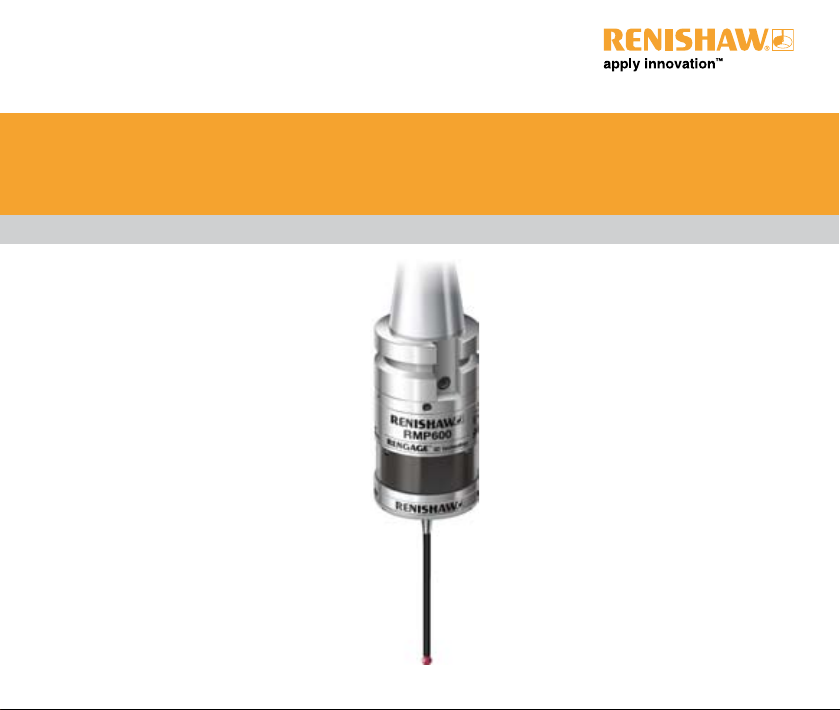
Quick-start guide
H-5312-8502-01-B
RMP600
Page 2

© 2007 Renishaw plc. All rights reserved.
This document may not be copied or reproduced in whole or in part, or transferred to any other media or language, by
any means, without the prior written permission of Renishaw.
The publication of material within this document does not imply freedom from the patent rights of Renishaw plc.
Disclaimer
Considerable effort has been made to ensure that the contents of this document are free from inaccuracies and
omissions. However, Renishaw makes no warranties with respect to the contents of this document and specifically
disclaims any implied warranties. Renishaw reserves the right to make changes to this document and to the product
described herein without obligation to notify any person of such changes.
Trademarks
RENISHAW® and the probe emblem used in the RENISHAW logo are registered trademarks of Renishaw plc in the UK
and other countries.
apply innovation, Trigger Logic and RENGAGE are trademarks of Renishaw plc.
Adobe® and Acrobat® are either registered trademarks or trademarks of Adobe Systems Incorporated in the United
States and/or other countries.
All other brand names and product names used in this document are trade names, service marks, trademarks, or
registered trademarks of their respective owners.
CAUTION: The RMP600 has a glass window. Handle with care if broken to avoid injury.
!
Part number: H-5312-8502-01-B
Issued: 07.2007
Page 3

Patents
Features of the RMP600, and other similar Renishaw probes, are subject to the following patents and/or
patent applications:
CN 1732488A
CN 1771425A
EP 0337669
EP 0390342
EP 0652413
EP 0695926
EP 1185838
EP 1373995
EP 1425550
EP 1457786
EP 1477767
EP 1477768
EP 1576560
EP 1613921
EP 1701234
EP 1734426
EP 872787 B
JP 2,945,709
JP 2,994,401
JP 2003-526,170
JP 2004-279,417
JP 2004-522,961
JP 2005-502,035
JP 2006/522931
JP 2006-313567
JP 2006-511860
JP 3,126,797
US 2004-0178771
US 2006/0215614A1
US 5,040,931
US 5,150,529
US 5,279,042
US 5,669,151
US 6,301,796 B1
US 6,776,344 B2
US 6,941,671 B2
US 7145468B2
WO 2006/134360
WO 2007/028964
WO 2006/100508
WO 2006/120403
3
Page 4

Preliminary information
C
EC DECLARATION OF CONFORMITY
Renishaw plc declares that the product:
Name Description
RMP600 Radio machine probe
has been manufactured in conformity with the following standards:
61010-1:2001
EN 301 489-17
EN 300 328
EN 50371
and that it complies with the requirements of the following
directives (as amended):
1999/5/EC - R&TTE Radio and telecommunications
terminal equipment
The above information is summarised from the full EC Declaration
of Conformity. A copy is available from Renishaw on request.
4
FCC
Information to user (FCC Section 15.19)
This device complies with Part 15 of the FCC rules. Operation is
subject to the following conditions:
1. This device may not cause harmful interference, and
2. This device must accept any interference received, including
interference that may cause undesired operation.
Information to user (FCC Section 15.21)
The user is cautioned that any changes or modifications not
expressly approved by Renishaw plc or authorised representative
could void the user’s authority to operate the equipment.
Page 5
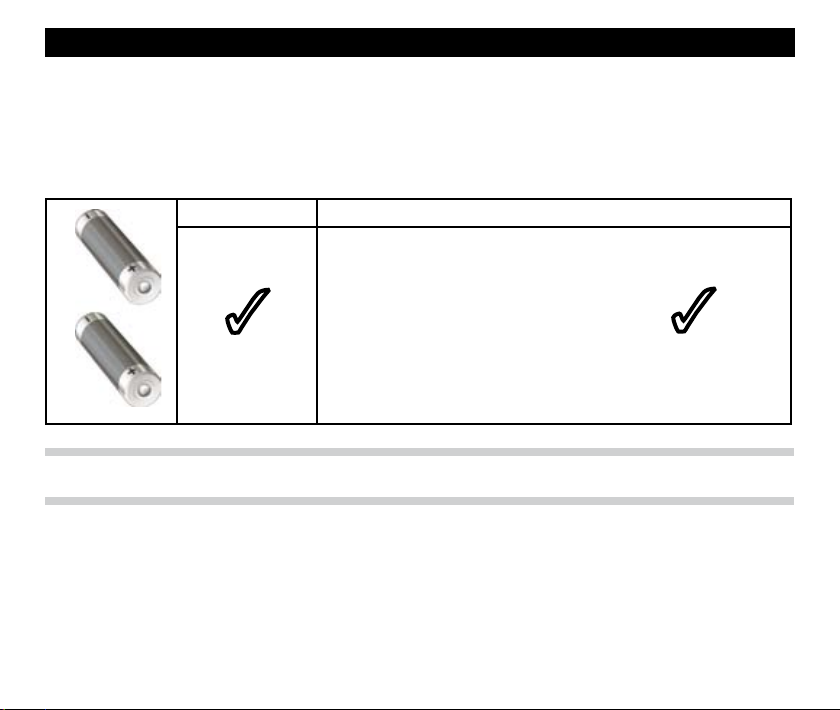
Battery specification
The RMP600 will operate with either 2 x AA alkaline batteries or 2 x lithium thionyl chloride batteries
(of the types approved and listed below).
AA alkaline x 2 Lithium thionyl chloride x 2
RS: 596-602, 201-9438
Radio shack: 23-037
Saft: LS 14500
3
Note: Maximum battery life is achieved when lithium thionyl chloride batteries are used.
Sonnenschein: SL-760/S
Tadrian: TL-5903/S, TL-2100/S
Xeno: XL-060F
3
5
Page 6
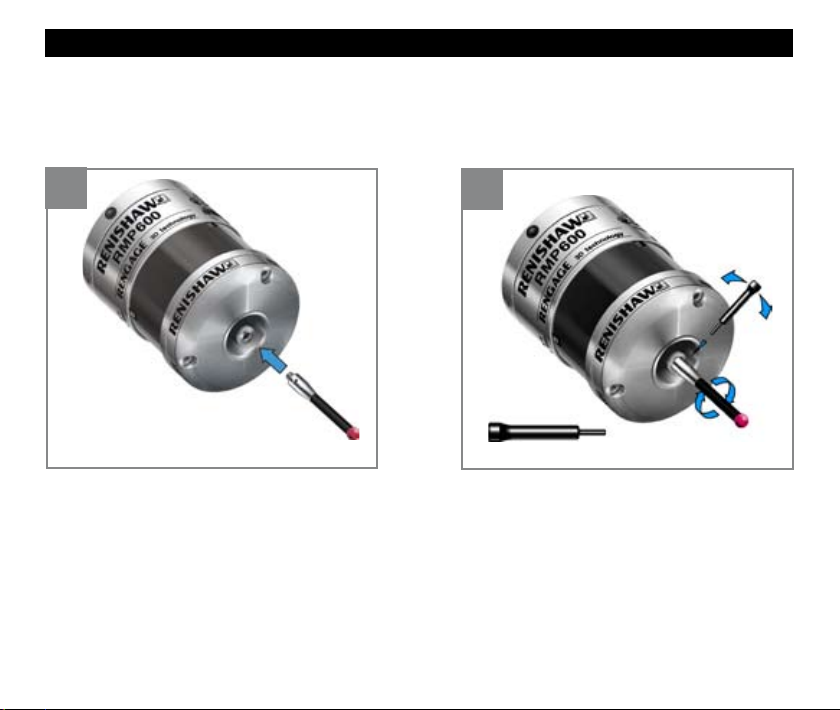
Fitting the stylus
1
6
2
M-5000-3707
Page 7
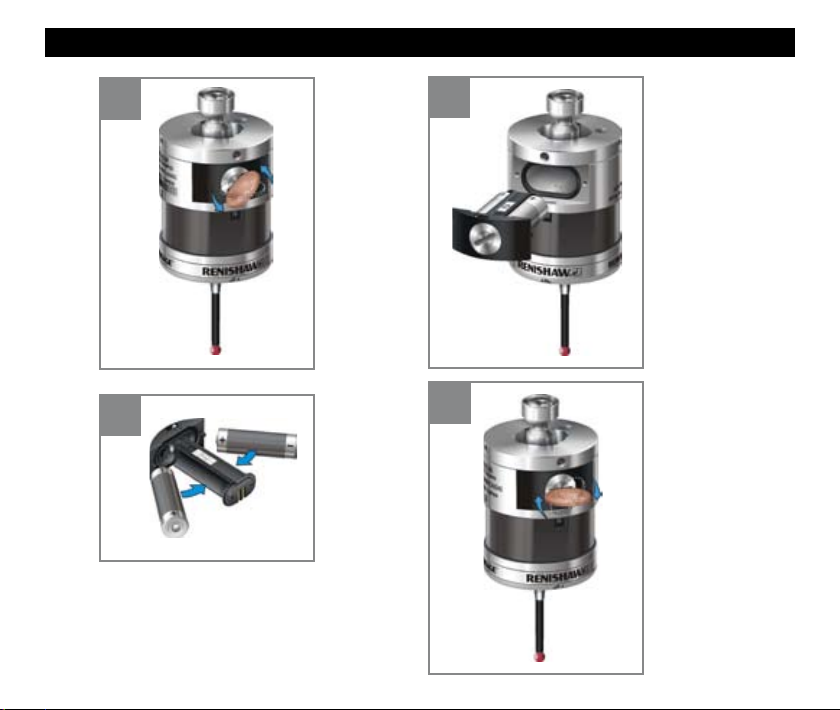
Installing the batteries
1
2
V
V Take care not to short the battery
contacts as this may be a fire hazard.
Ensure the contact strips are located
securely.
3
4
7
Page 8
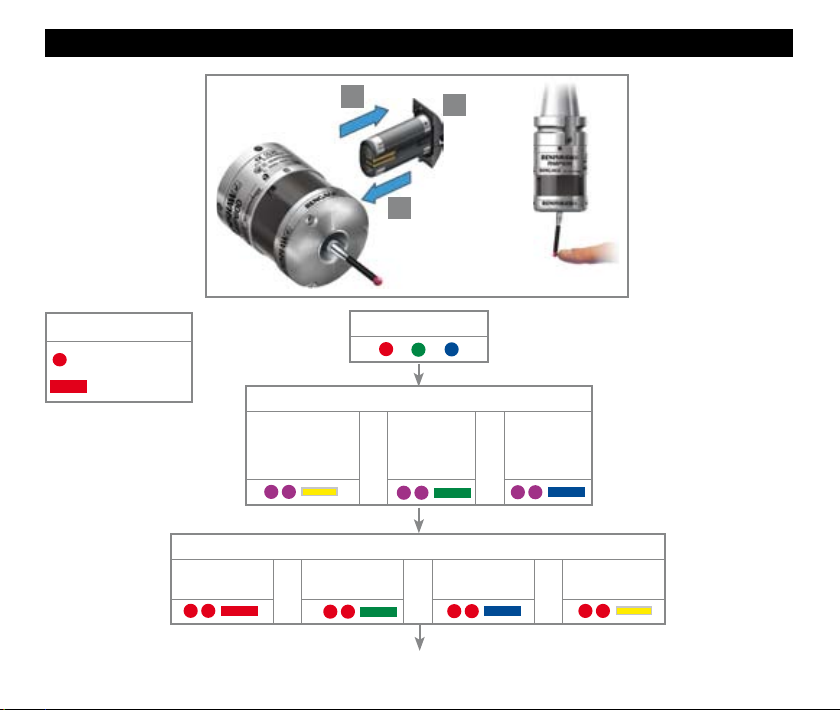
Reviewing the probe’s settings
Key to symbols
8
LED short flash
LED long flash
Radio off or
Spin off
1
3
LED check
Switch on method
Radio on
(omitted if multiple
probe mode was
selected)
Switch off method (omitted for shank on)
Short time out
12 s
or
Shank on
or
continued on next page
2
> 5 s
Medium time out
or
33 s
X
Spin on
or
Long time out
134 s
or
Page 9
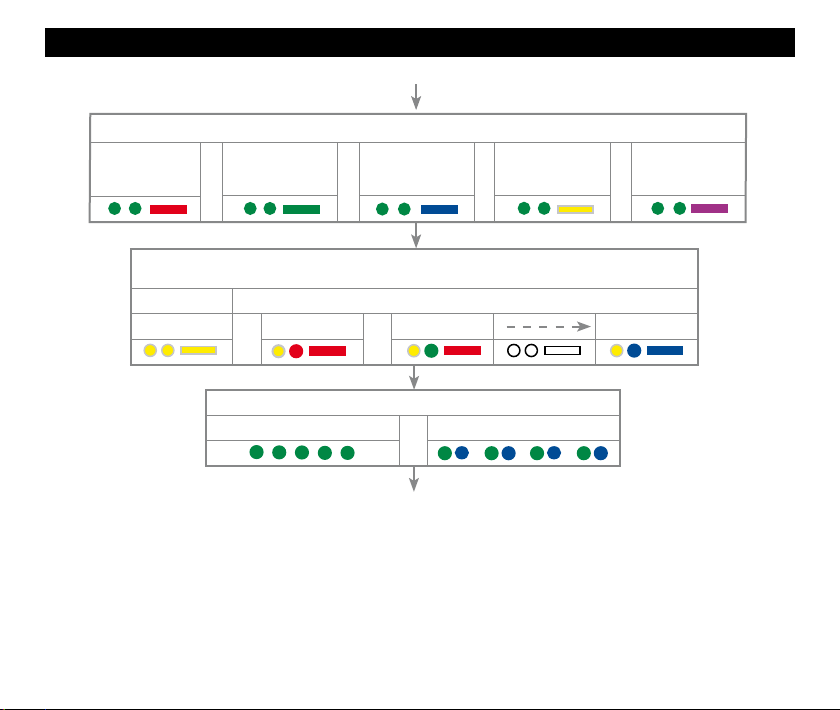
Reviewing the probe’s settings
Auto-reset off
Filter on
8 ms
Enhanced trigger filter setting and auto reset facility
or
Auto-reset off
Filter on
16 ms
(see ‘Multiple probe mode settings’ to view all 16 choices)
Mode off Mode on
or
Battery good
or
Auto-reset on
Filter on
8 ms
Multiple probe mode (omitted for radio-on)
Machine 1
Probe in standby mode (after 5 s)
Machine 2 Machine 16
or
Battery status
or
or
Auto-reset on
Battery low
Filter on
16 ms
or
Auto-reset off
Filter off
9
Page 10
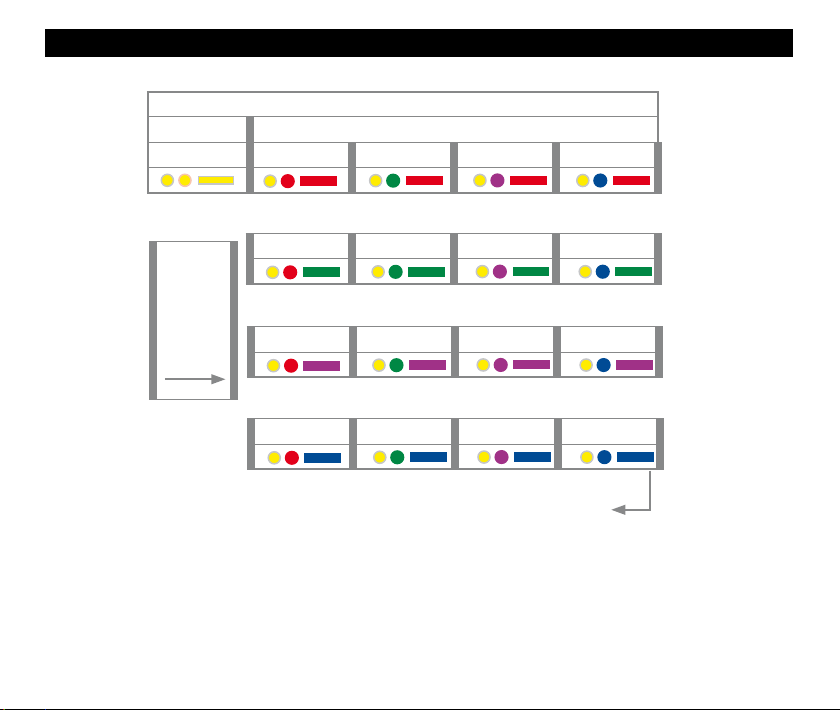
Multiple probe mode settings
Multiple probe mode
Mode off Mode on
Machine 1 Machine 2 Machine 3 Machine 4
10
Deflect
stylus
< 4 sec
to cycle
to next
setting
Machine 5 Machine 6 Machine 7 Machine 8
Machine 9 Machine 10 Machine 11 Machine 12
Machine 13 Machine 14 Machine 15 Machine 16
Return to mode off
Page 11
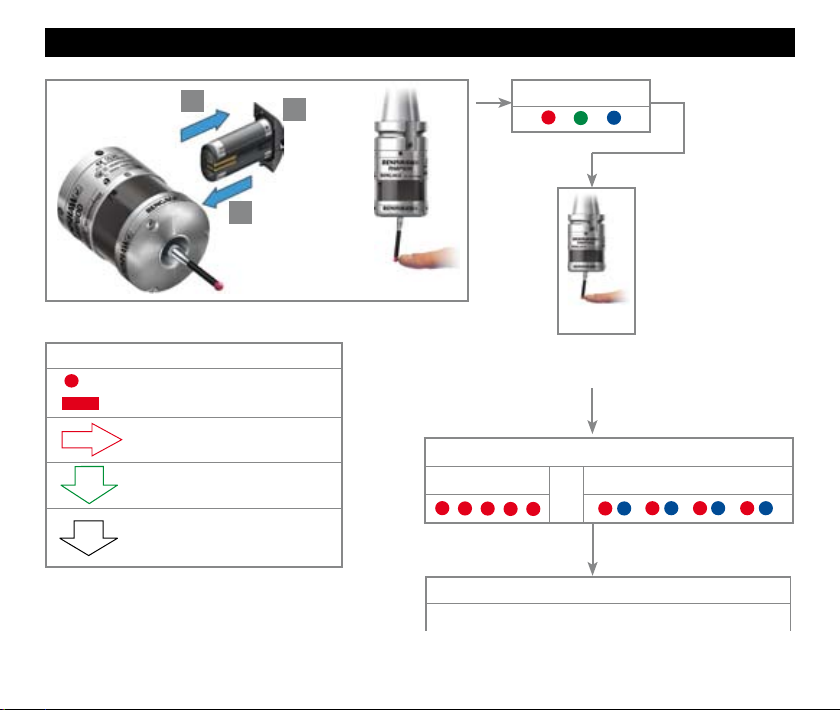
Placing the probe into configuration mode
1
3
Key to the symbols
LED short flash.
LED long flash.
Deflect the stylus < 4 seconds to
move to the next menu option.
Deflect the stylus > 4 seconds to
move to the next menu.
To exit , leave the stylus
untouched for >20 seconds.
2
> 5 s
LED check
X
3
Deflect the stylus and hold deflected until after the
battery status has been displayed at the end of the
Battery good
review sequence.
Battery status
Battery low
or
To change the switch off method
go to the next page
11
Page 12
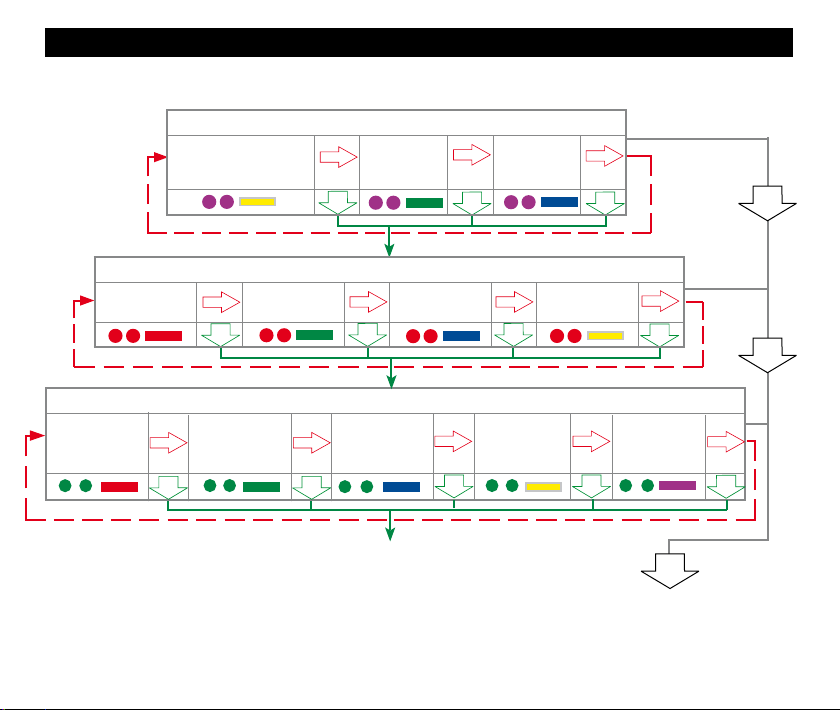
Radio off or
Spin off
Radio on
(omitted if multiple probe
mode was selected)
To change switch off method (omitted for shank on)
Short time out
12 s
Changing the probe settings
To change switch on method
Shank on Spin on
Medium time out
33 s
Long time out
134 s
Auto-reset off
Filter on
8 ms
12
To change enhanced trigger filter setting and auto-reset facility
Auto-reset off
Filter on
16 ms
Auto-reset on
Filter on
8 ms
Auto-reset on
Filter on
16 ms
continued on next page
Auto-reset off
Filter off
NEW SETTINGS
COMPLETE
Page 13
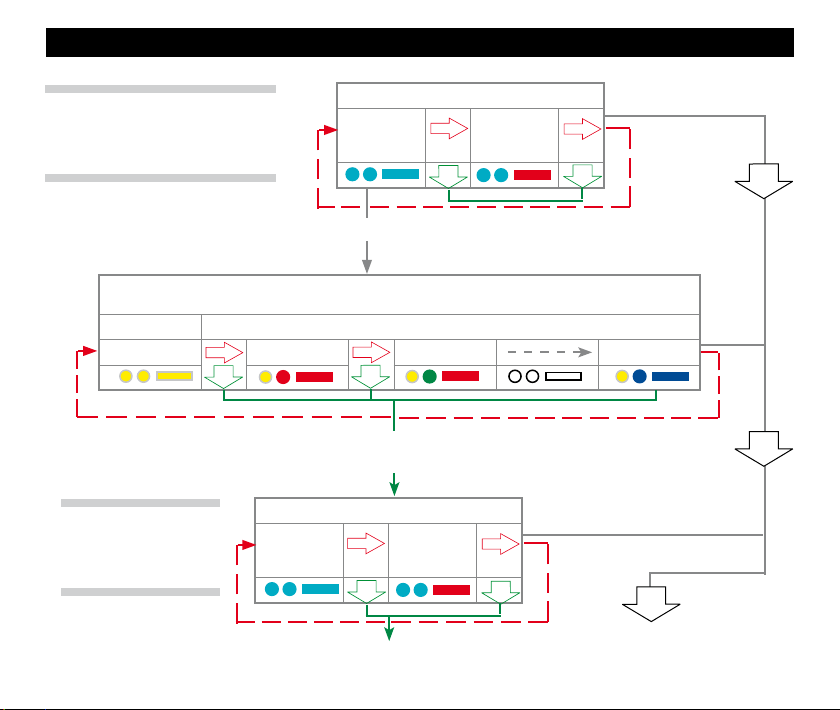
Changing the probe settings
Note: Once acquisition has been
successful, the RMP600 will revert to
‘Aquisition mode off’.
(see ‘Multiple probe mode settings’ to view all 16 choices)
Mode off Mode on
Note: If no changes are made in multiple probe mode, then deflecting the stylus for more than 4
Note: To partner a
RMP600 with a RMI
please see page 12.
Acquisition mode
Acquisition
mode
off
Cease triggering here, unless the multiple probe mode is required
Multiple probe mode (omitted for radio-on)
Machine 1 Machine 2 Machine 16
seconds will return the probe settings to
‘To change switch-on method’
Acquisition mode
Acquisition
mode
off
Return to ‘To change switch-on method’
Acquisition
mode
Acquisition
mode
on
in which case deflect stylus > 4 seconds
on
NEW SETTINGS
COMPLETE
13
Page 14
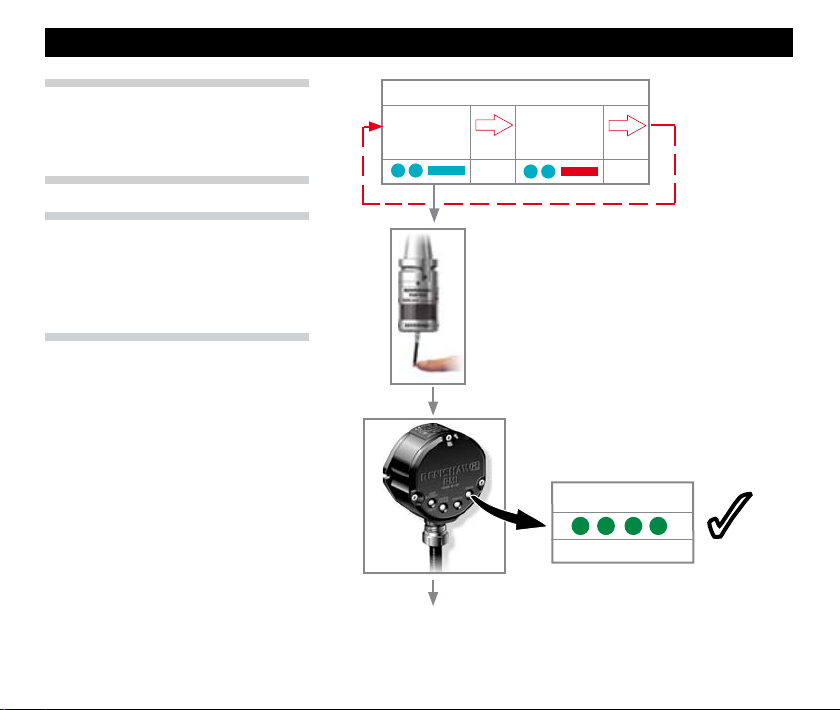
RMP600 - RMI partnership
Note: Unless the RMP600 is in ‘Multiple
probe’ mode, it will be necessary to
partner it with the RMI before use.
Note: In configuration mode, configure
settings as required and then enter
the ‘Acquisition mode’ menu. Select
‘Acquisition mode off’.
14
Acquisition mode
Acquisition
mode
off
Continuously deflect stylus whilst
switching on the RMI.
3
continued on next page
Acquisition
mode
on
SIGNAL LED
RMI in acquisition mode
3
Page 15
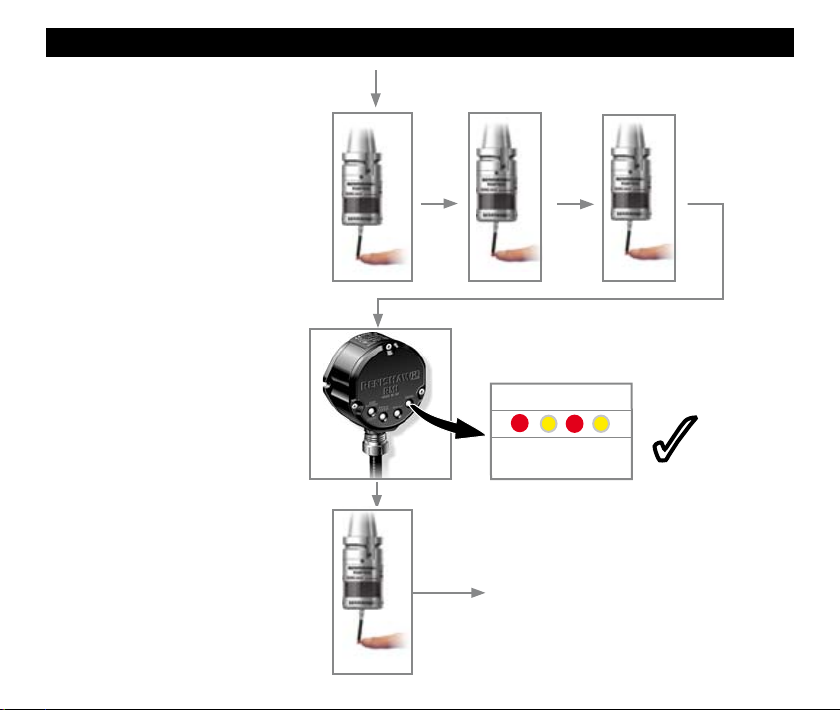
Release and deflect the stylus
to select ‘Acquisition mode on’.
RMP600 - RMI partnership
> 20 s
X
X
3
SIGNAL LED
New partner RMP
acquired
Probe in standby and system
ready for use.
X
3
15
Page 16
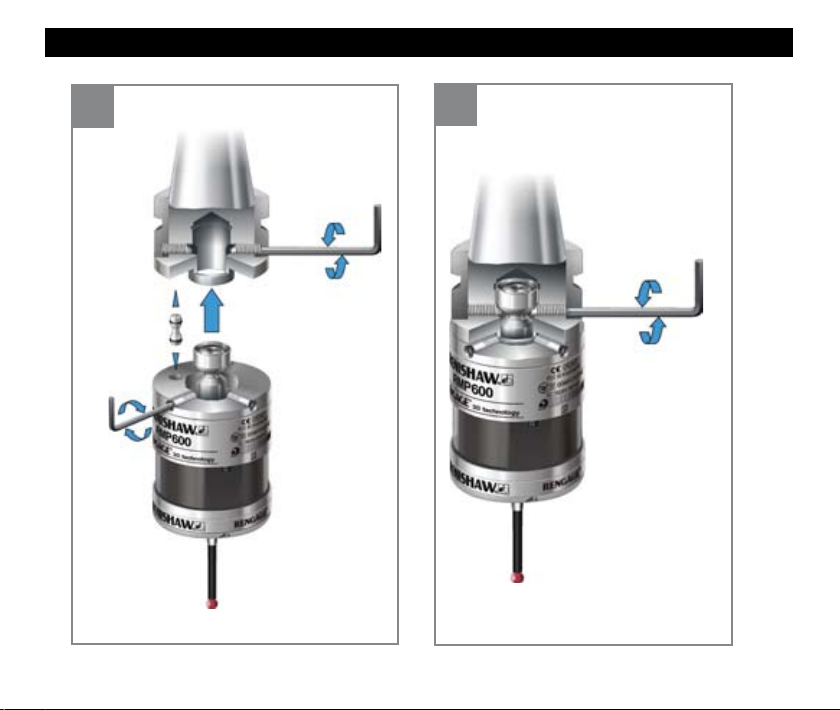
Mounting the probe to a shank
16
1
×2
×4
2
4 mm AF
2 - 3 Nm ×2
Page 17
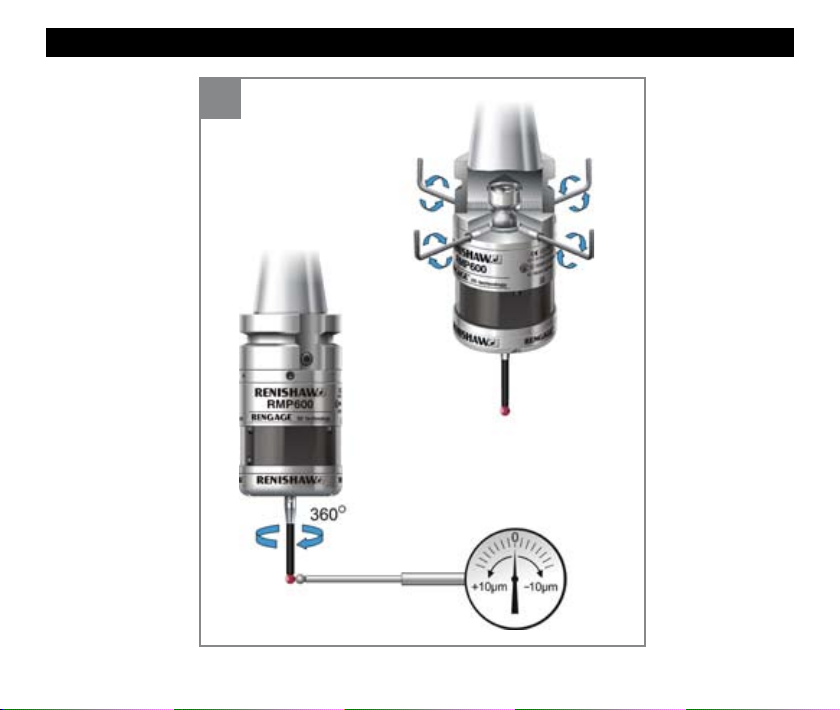
Stylus on-centre adjustment
1
2.5 mm AF
1 Nm ×4
+10 µm -10 µm
17
Page 18
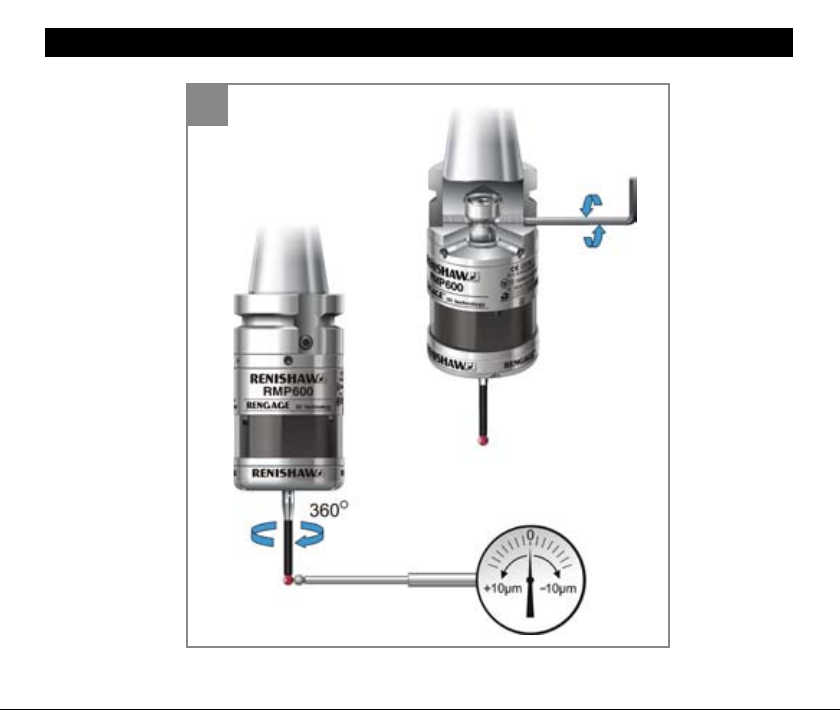
Stylus on-centre adjustment
2
4 mm AF
6 - 8 Nm ×2
+10 µm -10 µm
18
Page 19
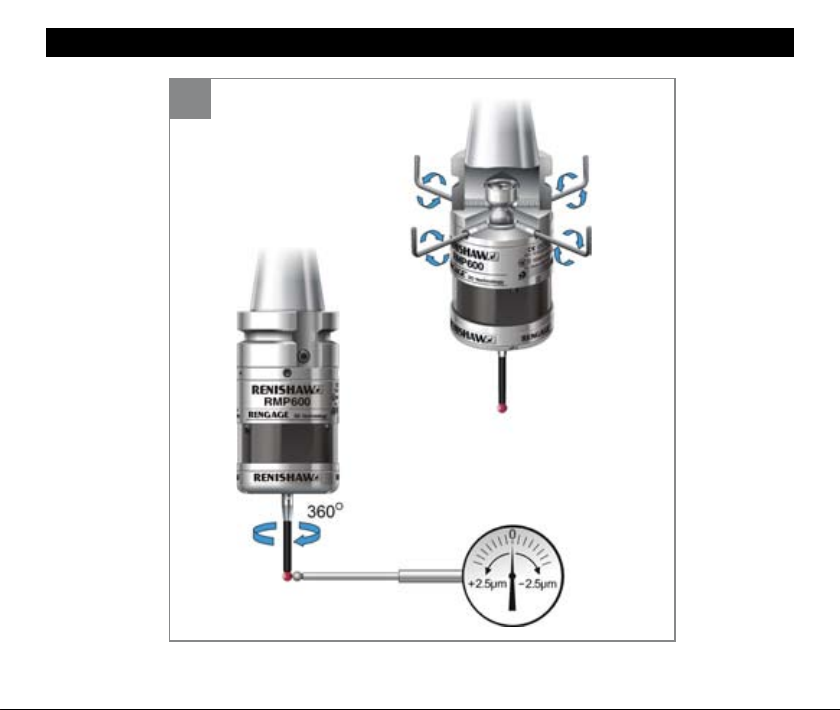
Stylus on-centre adjustment
3
2.5 mm AF
1.5 - 3.5 Nm ×4
+2.5 µm -2.5 µm
19
Page 20
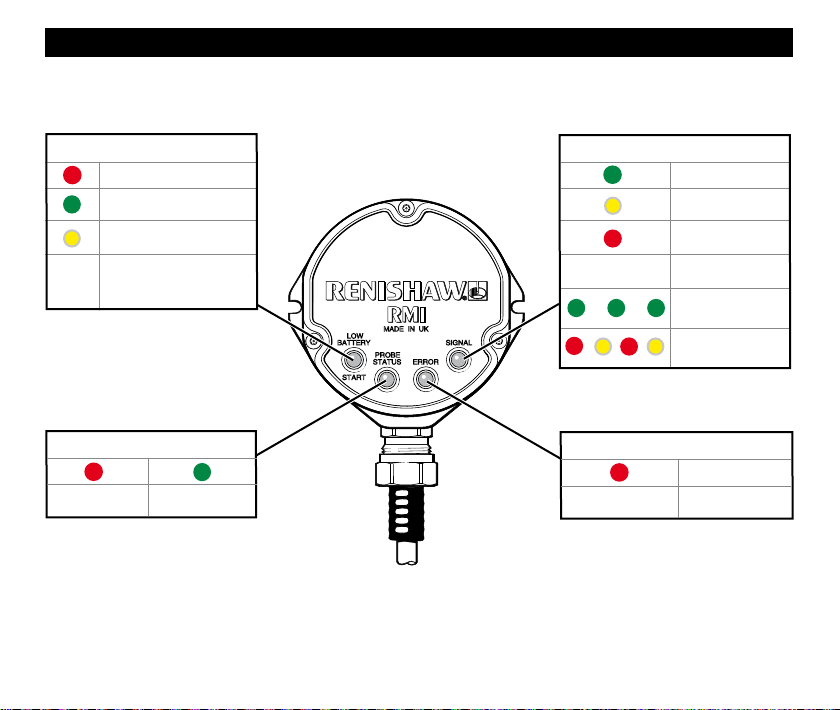
RMI visual diagnostics
LOW BATTERY/START LED
Battery low
M code start/stop in
progress
Battery low and M code
start/stop in progress
Battery is ok and no
OFF
M code start/stop in
progress
PROBE STATUS LED
Probe triggered Probe seated
20
SIGNAL LED
OFF
ERROR LED
Error No error
Signal excellent
Signal good
Signal poor
No signal
In acquisition mode
New partner RMP
acquired
OFF
Page 21
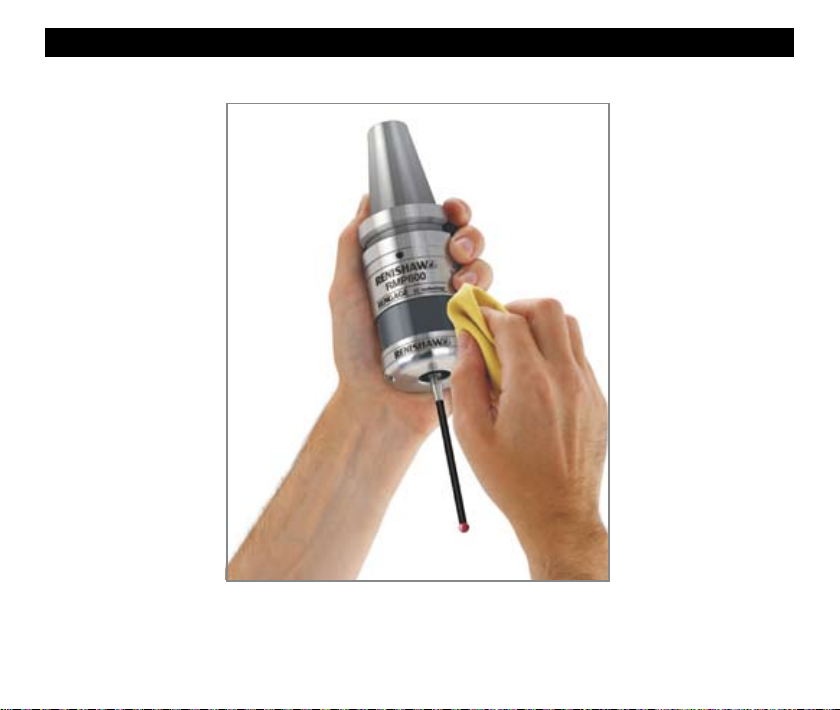
Renishaw receiver visual diagnostics
Cleaning
Use clean cloth
21
Page 22

Renishaw plc
New Mills, Wotton-under-Edge,
Gloucestershire, GL12 8JR
United Kingdom
www.renishaw.com
For worldwide contact details,
please visit our main website at
www.renishaw.com/contact
*H-5312-8502-01*
 Loading...