

Page 1
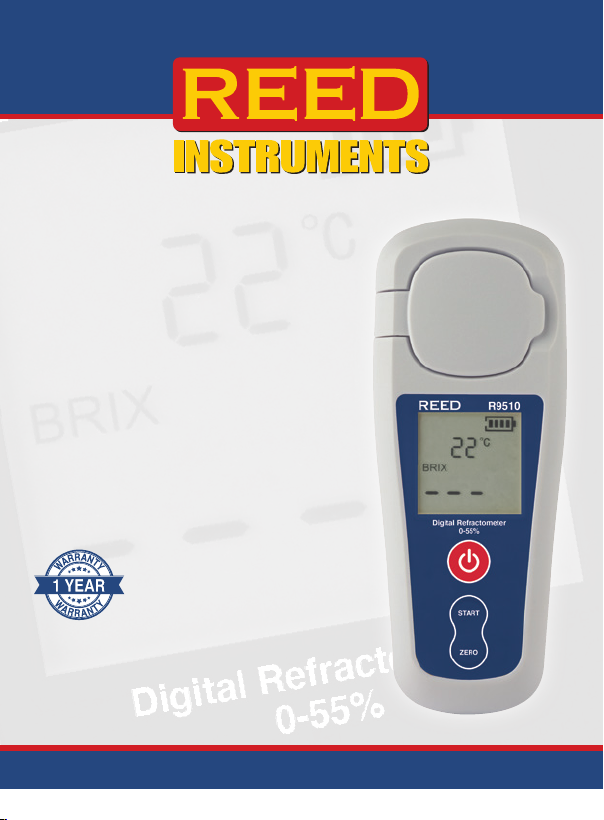
Digital
Refractometer
R9510
Instruction
Manual
www.GlobalTestSupply.com
Page 2

Table of Contents
Introduction ................................................................................................ 2
Product Quality .......................................................................................... 3
Safety ......................................................................................................... 3
Features ..................................................................................................... 3
Includes ..................................................................................................... 4
Specications ............................................................................................ 4
Instrument Description ............................................................................... 5
Display Description .................................................................................... 5
Operating Instructions ............................................................................ 6-7
Power ON/OFF ...................................................................................... 6
Zero Calibration .................................................................................... 6
Measuring Procedure ......................................................................... 6-7
Auto Power Off ..................................................................................... 7
Sample Well Maintenance .................................................................... 7
Charging the Battery .................................................................................. 7
Error Codes ................................................................................................ 8
Applications ............................................................................................... 8
Accessories and Replacement Parts ......................................................... 8
Product Care .............................................................................................. 8
Product Warranty ....................................................................................... 9
Product Disposal and Recycling ................................................................ 9
Product Support ........................................................................................ 9
Introduction
Thank you for purchasing your REED R9510 Digital Refractometer. Please
read the following instructions carefully before using your instrument. By
following the steps outlined in this manual your meter will provide years of
reliable service.
www.GlobalTestSupply.com
2
Page 3

Product Quality
This product has been manufactured in an ISO9001 facility and has been
calibrated during the manufacturing process to meet stated product
specications. If a certicate of calibration is required please contact the
nearest authorized REED distributor or authorized Service Center. Please
note an additional fee for this service will apply.
Safety
• Never attempt to repair or modify your instrument. Dismantling
your product may cause damage that will not be covered under the
manufacturer's warranty. Servicing should only be provided by an
authorized service center.
• When the unit needs to be washed, use water at a temperature not
exceeding 86°F (30°C).
• The prism must be cleaned thoroughly with a soft, clean damp cloth
after each use—failure to do so will result in inaccurate readings and
possible long term damage.
• Do not
• Do not scratch the prism surface.
• Do not leave the instrument in a location exposed to direct sunlight or
• Do not attempt to measure corrosive chemicals as it will damage
drop or use excessive force as it may result in damage to the meter.
near a heat source for an extended period of time.
theinstrument.
Features
• 0 to 55% Brix measurement range with 0.1% resolution
• Ergonomically designed for one-handed operation
• Dual LCD simultaneously displays % Brix and temperature
• Sapphire prism with abrasion and corrosion-resistant coating
• Automatic Temperature Compensation (ATC)
• Built-in Zero calibration
• Rechargeable battery
www.GlobalTestSupply.com
3
Page 4

Included
• Digital Refractometer
• USB Cable
• Cleaning cloth
• Solution/Sample applicator
Specifications
Measurement Range: Brix: 0 to 55%
Resolution: Brix: 0.1%
Accuracy: Brix: ±0.2%
Temperature Compensation Range:
Sample Volume: 0.3mL
Measurement Time: 3 seconds
Auto Shut-off: 2 minutes
Power Supply: 750mAh rechargeable Li-ion battery
Battery Life: 40 hours
Charge Time: 3.5 hours
Product Certications: CE, IP54
Dimensions: 5.5 x 2.2 x 1.38" (140 x 55 x 35mm)
Weight: 0.19lbs (84g)
Temperature:
50 to 104°F (10 to 40°C)
Temperature: 1°F (1°C)
Temperature: ±1°F (1°C)
50 to 104°F (10 to 40°C)
www.GlobalTestSupply.com
4
Page 5
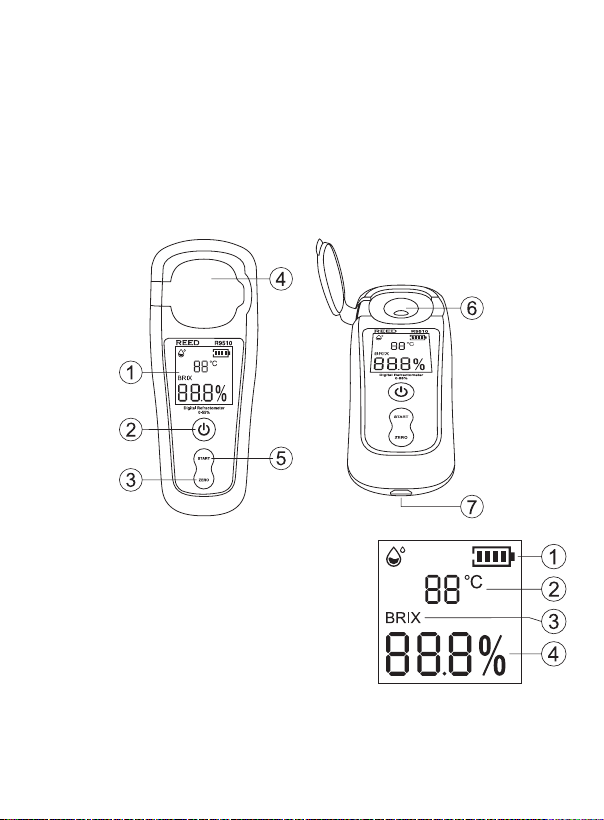
Instrument Description
1. LCD Display
2. Power Button
3. ZERO Button
4. Protective Cover
5. START Button
6. Sample Well
7. USB Interface
Display Description
1. Battery Status Indicator
2. Temperature Measurement Reading
3. % Brix Measurement Mode Indicator
4. % Brix Measurement Reading
www.GlobalTestSupply.com
5
Page 6
Operating Instructions
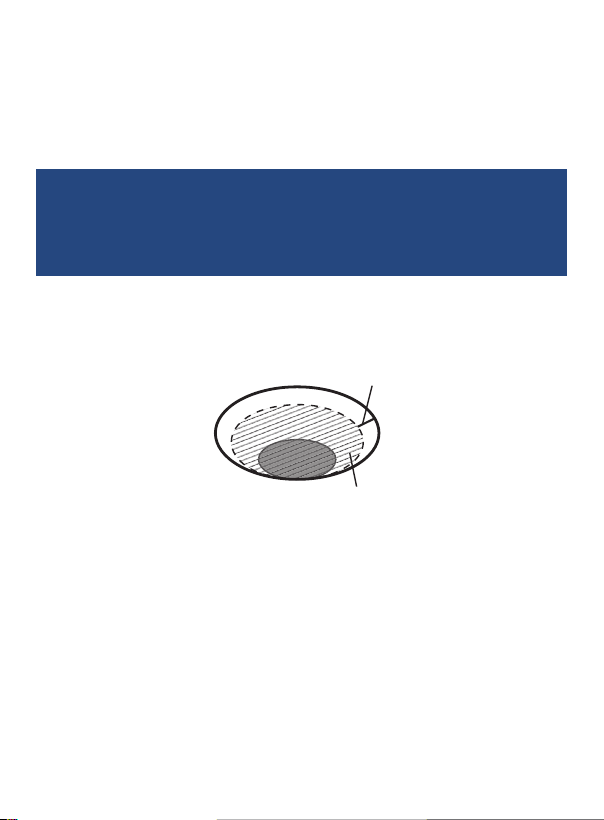
about 2mm
water about 0.3ml
Power ON/OFF
Turn the meter ON or OFF by holding down the Power button for
approximately 2seconds.
Zero Calibration
Before each use, perform a Zero calibration. The temperature of
the distilled or tap water used for zero calibration should be the
same as the ambient temperature. If the temperature is different,
allow the water to adjust to the ambient temperature before
Be sure that the measuring surface and well are clean as outlined under
the "Sample Well Maintenance" section.
1. Apply distilled water (minimum of 0.3ml) to the sample well as
shown below.
2. When ready, close the protective cover and press the ZERO button
twice to enter zero calibration mode.
3. A series of dashes ( – – – ) will appear on the display followed by
0.0%Brix which conrms that the zero calibration was successful.
4. The R9510 is now ready to use.
Measuring Procedure
1. Inspect the sample well to be sure that there is no residue remaining
from a previous measurement/calibration. If the sample well does
not appear to be clean, do not take a measurement and refer to the
"Sample Well Maintenance" section for details.
performing a zero calibration.
continued...
www.GlobalTestSupply.com
6
Page 7

2. Apply the measuring liquid to the sample well (minimum of 0.3ml).
Note: For accurate measurements, it is recommended to completely cover
the sample well surface.
The temperature of the measuring liquid should be the same as the
ambient temperature. If the temperature is different, allow the liquid
to adjust to the ambient temperature before taking a measurement.
3. When ready, close the protective cover and press the START button
to take a measurement.
4. A series of dashes ( – – – ) will appear on the display followed by the
measured Brix value
5. Remove the liquid sample by wiping it off with a tissue properly
clean the sample well as highlighted in the "Sample Well
Maintenance" section.
(%)
and the temperature value of the liquid sample.
Auto Power Off
To preserve battery life, the meter is programmed to turn off after
approximately 2 minutes of inactivity.
Sample Well Maintenance
Cleaning of the sample well should be performed immediately after each
sample reading. Never immerse the meter in any liquid. When the sample
well has been completely cleaned no residue should be present.
To properly clean the sample well use Isopropyl Alcohol followed by a
distilled water rinse and then thoroughly dry with the included cleaning
cloth, a residue free cloth or delicate task wipes.
Charging the Battery
1. Connect the R9510 via the included cable to a USB port on your PC
or into a wall outlet using a USB Power Adapter (not included) to
charge the Li-ion battery.
Note: The meter must remain powered off to properly charge via the
USBport on your PC.
2. Charge the meter until the battery indicator appears full and remove
the charging cable when done.
www.GlobalTestSupply.com
7
Page 8

Error Codes
Code Description
ERR1 Re-calibrate with distilled water.
ERR2 Measuring liquid exceeds the % Brix measuring range.
ERR3 No/inadequate measuring liquid present. Add measuring liquid.
ERR4 Incorrect measuring liquid used.
Applications
• Fruit and citrus industry
• Juice factories
• Vineyards
• Food preparation
• Consumer use
• Agriculture
Accessories and Replacement Parts
• CA-52A Soft Carrying Case
Don't see your part listed here? For a complete list of all accessories and
replacement parts visit your product page on www.REEDInstruments.com.
Product Care
To keep your instrument in good working order we recommend the following:
• Store your product in a clean, dry place.
• Charge the battery as needed.
• Clean your product with biodegradable cleaner. Do not spray the cleaner
directly on the instrument. Use on external parts only.
www.GlobalTestSupply.com
8
Page 9
Product Warranty
REED Instruments guarantees this instrument to be free of defects in
material or workmanship for a period of one (1) year from date of shipment.
During the warranty period, REED Instruments will repair or replace, at no
charge, products or parts of a product that proves to be defective because
of improper material or workmanship, under normal use and maintenance.
REED Instruments total liability is limited to repair or replacement of the
product. REED Instruments shall not be liable for damages to goods,
property, or persons due to improper use or through attempts to utilize the
instrument under conditions which exceed the designed capabilities. In
order to begin the warranty service process, please contact us by phone
at 1-877-849-2127 or by email at [email protected] to discuss
the claim and determine the appropriate steps to process the warranty.
Product Disposal and Recycling
Please follow local laws and regulations when disposing or recycling your
instrument. Your product contains electronic components and must be
disposed of separately from standard waste products.
Product Support
If you have any questions on your product, please contact your authorized
REED distributor or REED Instruments Customer Service by phone at
1-877-849-2127 or by email at [email protected].
Please visit www.REEDInstruments.com for the most
up-to-date manuals, datasheets, product guides and software.
Product specifications subject to change without notice.
All rights reserved. Any unauthorized copying or reproduction of
this manual is strictly prohibited without prior written permission
from REED Instruments.
www.GlobalTestSupply.com
9
Page 10

TEST & MEASURE
WITH CONFIDENCE
CHECK OUT OUR LATEST PRODUCTS!
www.REEDInstruments.com
www.GlobalTestSupply.com
 Loading...