

Page 1

Model
R8000
Distance
Measuring
Wheel
Instruction
Manual
www.GlobalTestSupply.com
Page 2

Table of Contents
Features ......................................................................................... 3
Applications ................................................................................... 3
Specications ................................................................................ 4
Instrument Description .................................................................. 5
Display Operation .......................................................................... 6
Operating Instructions ................................................................6-7
Unit of Measure Toggle ............................................................... 6
Storing Measurements ................................................................ 6
Reviewing Stored Measurements ................................................ 7
Clearing Internal Memory and Current Measurement .................. 7
www.GlobalTestSupply.com
2
Page 3

Features
• Measures in feet or meters
• Accuracy of ±0.5%
• Backlit LCD Display
• Ergonomically designed pistol grip for enhanced comfort
• Adds forward, subtracts in reverse
• Telescoping handle
• Internal memory stores up to 5 measurements
• Spring-loaded kick stand
• Includes soft carrying case and batteries
Applications
• Road distance measuring
• Construction sites
www.GlobalTestSupply.com
3
Page 4

Specifications
Measuring Distance: Up to 99,999.9 (m/ft)
Units of Measure: Meters, Feet
Accuracy: ±0.5%
Resolution: 0.1
Wheel Diameter: 12.5" (318mm)
Display: LCD
Backlit Display: Yes
Internal Memory: Yes (up to 5 data points)
Low Battery Indicator: Yes
Power Supply: 3 x AAA batteries
Product Certications: CE
Operating Temperature: 14 to 113°F (-10 to 45°C)
Storage Temperature: -4 to 122°F (-20 to 50°C)
Dimensions: 28.3 x 12 x 2.8" (720 x 318 x 70mm)
Weight: 40.92oz (2.6lbs)
www.GlobalTestSupply.com
4
Page 5
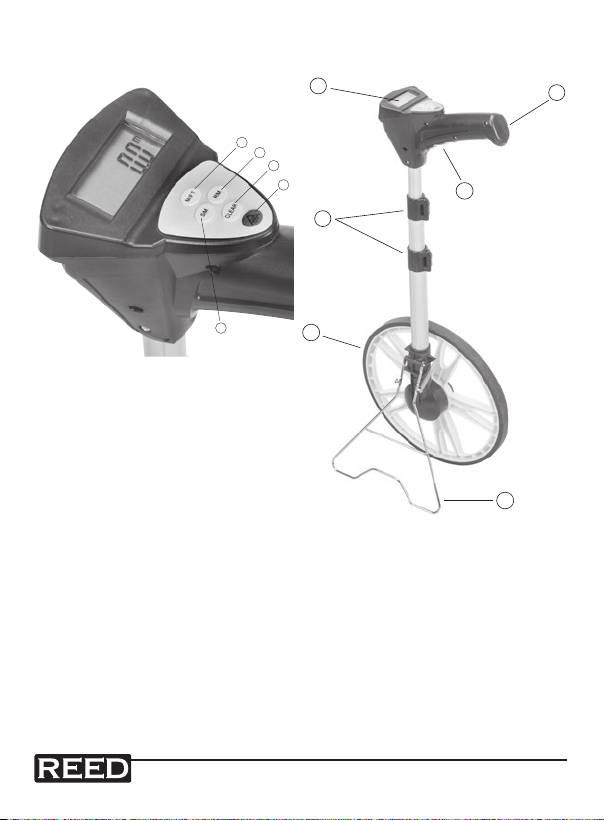
Instrument Description
7
6
8
9
10
11
1
2
3
4
5
1. Unit of Measure Toggle
2. Recall Memory
3. Clear Memory
4. On/Off
5. Store Measurement
6. LED Display
7. Handle
8. Battery Cover
9. Telescope Locks
10. Measuring Wheel
11. Stand
www.GlobalTestSupply.com
5
Page 6
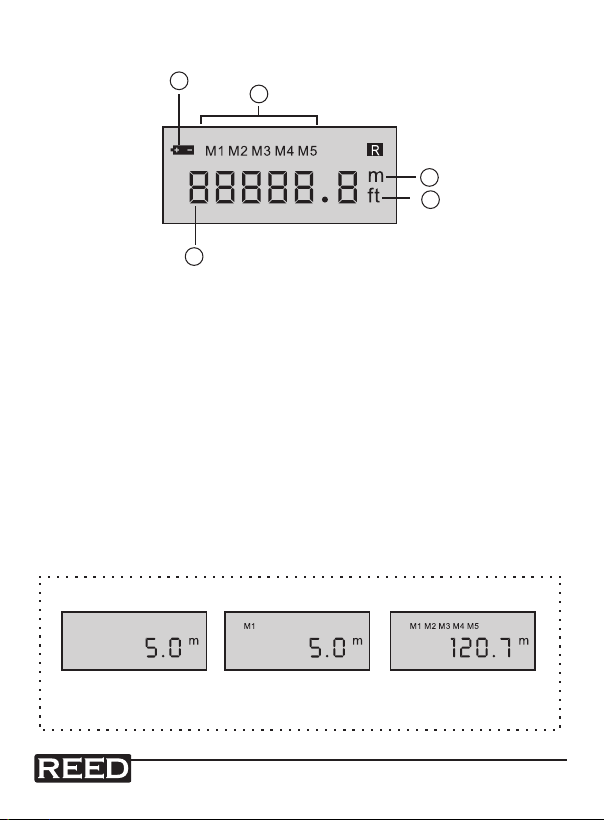
Display Description
2
3
4
5
6
1
2
3
4
5
1. Low Battery Indicator
2. Stored Memory Indicator
3. Meters
4. Feet
5. Measured Value
Operating Instructions
Unit of Measure Toggle
• Press the M/FT button to switch between meters and feet.
Storing Measurements
• The R8000 can store up to 5 measurements in memory. Once a
measurement has been taken, press the SM button to store
the measurement.
memory empty1 measurement stored 5 measurements stored
www.GlobalTestSupply.com
(memory full)
continued ...
6
Page 7
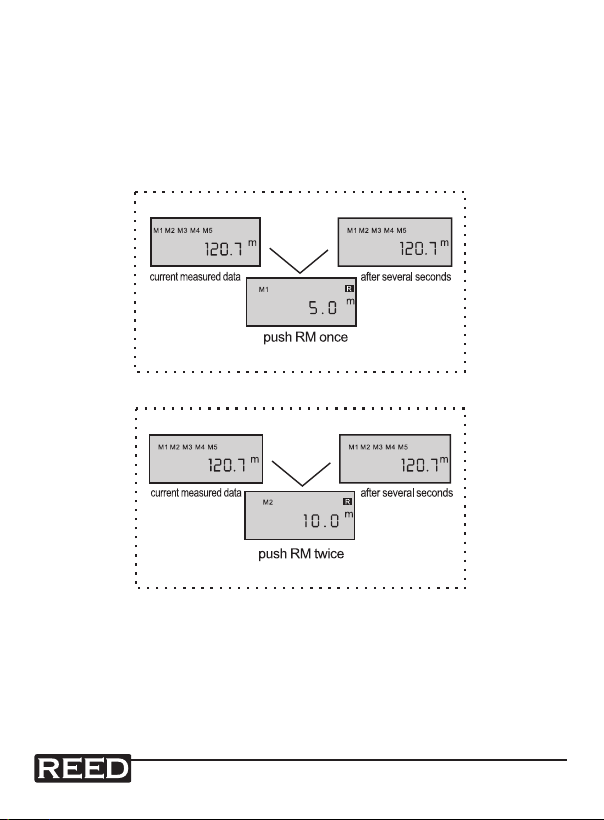
Reviewing Stored Measurements
• To recall stored memory, press the RM button. For example, if you
stored 5m in M1 and 1M in M2 while the current measured data is
120.7m, after you press RM once, it will display the data of M1. After
several seconds, it will display the current measured data again. If you
press the RM button twice, the data of M2 will appear. Continue
pressing RM to toggle through stored measurements.
Clearing Internal Memory and Current Measurement
• Press the ON/OFF to power off the instrument. When turned back on,
internal memory will be erased.
• Press the CLR button to clear the current measured data.
For service or information on this or any other REED product, contact
REED Instruments at [email protected].
www.GlobalTestSupply.com
7
Page 8

Notes _________________________________________
________________________________________________
________________________________________________
________________________________________________
________________________________________________
________________________________________________
________________________________________________
________________________________________________
________________________________________________
________________________________________________
________________________________________________
________________________________________________
________________________________________________
________________________________________________
________________________________________________
________________________________________________
________________________________________________
________________________________________________
www.GlobalTestSupply.com
8
 Loading...