

Page 1
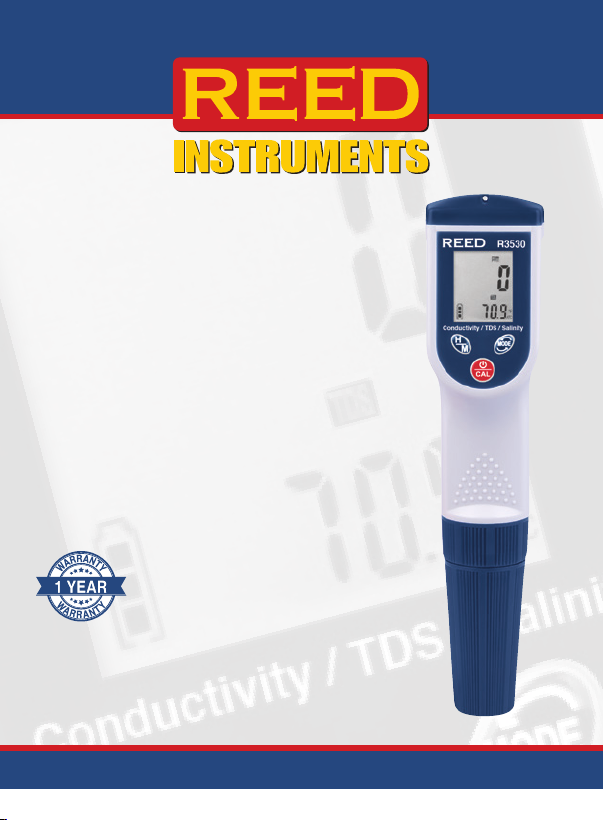
Conductivity/
TDS/Salinity
Meter
R3530
Instruction
Manual
www.GlobalTestSupply.com
Page 2

Table of Contents
Introduction ................................................................................................ 3
Product Quality .......................................................................................... 3
Safety ......................................................................................................... 3
Features ..................................................................................................... 4
Included ..................................................................................................... 4
Specications .........................................................................................4-5
Instrument Description ............................................................................... 6
Display Description .................................................................................... 7
Operating Instructions ..........................................................................8-10
Power ON/OFF ...................................................................................... 8
Measurement Modes ............................................................................. 8
Selecting the Temperature Unit of Measure .......................................... 8
Taking Measurements ............................................................................ 8
Data Hold ............................................................................................... 8
MAX/MIN Function ................................................................................ 9
Auto Power Off ...................................................................................... 9
Calibration ........................................................................................9-10
Battery Replacement ............................................................................... 10
Electrode Replacement ............................................................................ 10
Applications ............................................................................................. 10
Accessories and Replacement Parts ....................................................... 11
Product Care ............................................................................................ 11
Product Warranty ..................................................................................... 11
Product Disposal and Recycling .............................................................. 12
Product Support ...................................................................................... 12
www.GlobalTestSupply.com
Page 3

Introduction
Thank you for purchasing your REED R3530 Conductivity/TDS/Salinity
Meter. Please read the following instructions carefully before using your
instrument. By following the steps outlined in this manual your meter will
provide years of reliable service.
Product Quality
This product has been calibrated during the manufacturing process to
meet stated product specications. If a certicate of calibration is required
please contact the nearest authorized REED distributor or authorized
Service Center. Please note an additional fee for this service will apply.
Safety
Never attempt to repair or modify your instrument. Dismantling your
product, other than for the purpose of replacing batteries, may cause
damage that will not be covered under the manufacturer's warranty.
Servicing should only be provided by an authorized service center.
www.GlobalTestSupply.com
Page 4

Features
•
Measures conductivity, total dissolved solids (TDS) and salt levels
in a liquid
• Automatic temperature compensation
• Data hold and Min/Max functions
• User selectable °F or °C
• Waterproof housing meets IP57 standard
• Replaceable electrode module
• Low battery indicator and auto shut off
Included
• Conductivity Standard Solution, 1413μs
• Protective Cap
• Lanyard
• Allen Key & 2 replacement screws
• Hard Carrying Case
• Batteries
Specifications
Conductivity
Measuring Range: 0 to 2000μS
2.00 to 20.00mS
Accuracy: ±2% FS
Resolution: 1μS, 0.01mS
TDS (Total Dissolved Solids)
Measuring Range: 0 to 1300ppm
1.30 to 13.00ppt
Accuracy: ±2% FS
Resolution: 1ppm/0.01ppt
continued...
www.GlobalTestSupply.com
Page 5

Salinity
Measuring Range: 0 to 1000ppm
1.00 to 12.00ppt
Accuracy: ±2% FS
Resolution: 1ppm/0.01ppt
Temperature
Measuring Range: 32 to 194°F (0 to 90°C)
Accuracy: ±0.4°F (0.2°C) + 1 dgt
Resolution: ±0.1°F (±0.1°C)
General Specifications
Display: Dual Display, LCD
Data Hold: Yes
Min/Max: Yes
Auto Shut-off: Yes (after 10 minutes/off)
Low Battery Indicator: Yes
Power Supply: 4 x AAA Batteries
Product Certications: CE, IP57
Operating Temperature: 32 to 122°F (0 to 50°C)
Storage Temperature: 14 to 140°F (-10 to 60°C)
Operating Humidity Range: 10 to 80%
Dimensions: 7.7 x 1.6 x 1.4" (195 x 40 x 36mm)
Weight: 0.3lb (135g)
www.GlobalTestSupply.com
Page 6
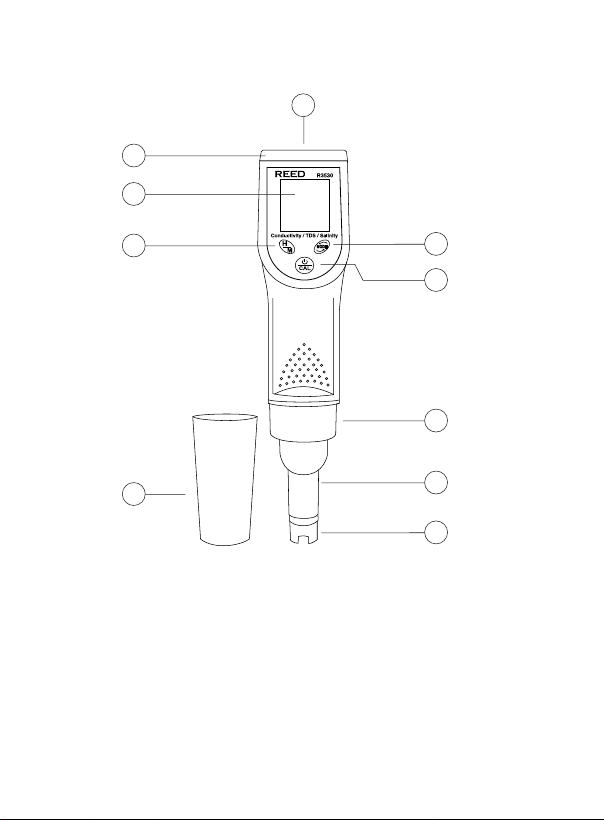
Instrument Description
2
3
1
4
5
1. Wrist Strap Anchoring Point
2. Battery Compartment
3. LCD Display
4. Hold/Max & Min Button
5. Protective Cap
www.GlobalTestSupply.com
10
9
8
7
6
6. Electrode Tip
7. Electrode Module
8. Electrode Collar
9. Power/Calibration Button
10. MODE Button
Page 7
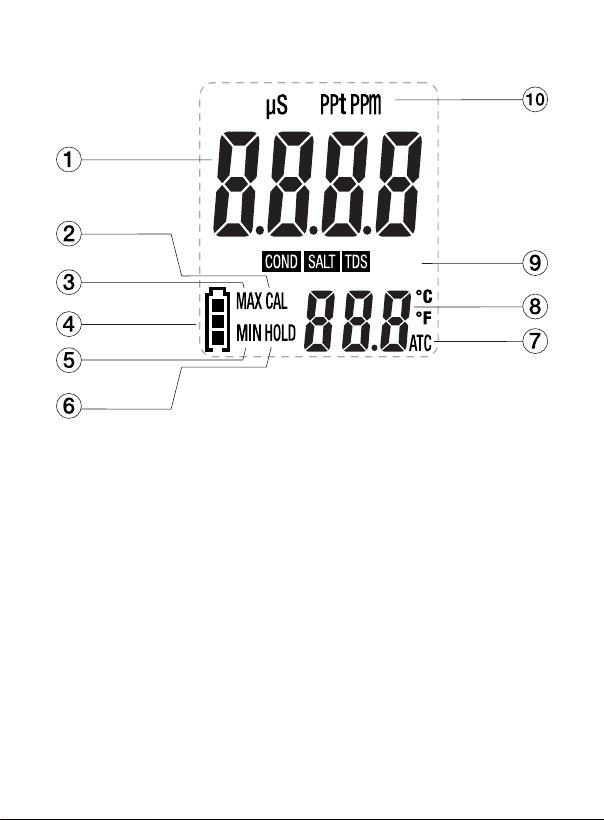
Display Description
1. Measurement
Reading Indicator
2. Calibration Mode Indicator
3. Maximum Reading Indicator
4. Battery Status Indicator
5. Minimum Reading Indicator
www.GlobalTestSupply.com
6. Data Hold Indicator
7. Automatic Temperature
Compensation (ATC) indicator
8. Temperature Unit of Measure
9. Function Mode Indicator
10. Unit of Measure Indicator
Page 8

Operating Instructions
Power ON/OFF
Turn the meter on or off by pressing the Power button.
Measurement Modes
The R3530 offers 3 measurement modes:
• Conductivity
• Total Dissolved Solids
• Salinity (Salt)
When the meter is on, press the MODE button to toggle between "COND"
for conductivity measurements, "TDS" for total dissolved solids
measurements & "SALT" for salinity measurements.
Selecting the Temperature Unit of Measure
When the meter is rst powered ON, the default scale setting is set
to Celsius (°C).
Press and hold the MODE button to toggle between °C and °F.
Note: The meter will automatically save the selected unit of measure as
the new default when powered off.
Taking Measurements
Submerge the electrode in the solution to be tested while stirring gently.
Wait for the measurements to stabilize. The applicable measurement value
automatically compensated for temperature is shown at the top of the
LCD Display whereas the secondary value below indicates the
temperature of the sample.
Note: When the applicable measurement value is over the measurement
range, the LCD display will indicate "---".
Note 2: The meter will auto-range to the proper range (μS/cm or mS/cm,
ppm or ppt) and then display the reading.
Data Hold
1. Press the hold button to freeze the current reading on the display.
2. While in this mode "Hold" will appear on the LCD display.
3. Press the hold button again to resume normal operation.
continued...
www.GlobalTestSupply.com
Page 9

MAX/MIN Function
1. Press and hold the Max/Min button to access the Maximum/
Minimum modes.
2. The MAX and MIN indicators will blink continuously. The Maximum
& Minimum values will automatically update in the Max/Min memory
while the current applicable measurements are displayed.
3. To view the Max/Min measurements during this mode press the
Max/Min button at any time to toggle through stored
measurements.
4. To exit Max/Min mode and resume normal operation, press and hold
the Max/Min button for approx. 3 seconds.
Auto Power Off
To preserve battery life, the meter is programmed to turn off after
approximately 10 minutes of inactivity.
Calibration
Meter accuracy should be performed on a periodic basis. If calibration
is required, a conductivity standard solution is required. The meter can
be calibrated in any of the three ranges. Standard solutions of 84µS/cm,
1413µS/cm (included) or 12.88mS/cm (12,880µS/cm) are used for the
automatic calibration recognition procedure.
Note: Calibration is always done in conductivity mode. Since salinity and
TDS values are calculated from conductivity values, this procedure also
calibrates the salinity and TDS ranges.
1. Fill a sample cup with the conductivity standard solution.
2. Turn the meter ON and insert the electrode into the solution so that
the tip of the electrode is fully immersed and stir at a moderate,
uniform rate. Tap or move the electrode in the sample to dislodge
any air bubbles.
3. Press and hold the CAL button (approximately 2 seconds) until
"CAL" appears in the lower display. The main display will
start ashing.
4. The meter will automatically recognize and calibrate to the
conductivity standard solution.
continued...
www.GlobalTestSupply.com
Page 10

5. The display will indicate "SA" followed by "End" and resume normal
operation when calibration is complete.
Note: "SA" will not appear if the meter fails calibration.
Battery Replacement
When the low battery icon appears on the LCD, the batteries must
be replaced.
1. Loosen both screws using the included Allen Key from the battery
compartment cap.
2. Remove the battery compartment cap.
3. Replace the four (4) "AAA" batteries.
4. Secure the battery compartment cap back using the two (2) screws.
Electrode Replacement
1. To remove the electrode, unscrew (Counter-Clockwise) and
completely remove the electrode collar.
2. Gently pull the electrode module to disconnect it from the meter rock
the electrode from side to side, pulling it downwards, until it
disconnects from the meter.
3. Carefully plug the replacement electrode into the meter socket,
ensuring proper connection.
4. Tighten the electrode collar back into place.
Applications
• Water conditioning
• General purpose conductivity and salinity measurement
• Aquariums
• Wastewater monitoring
• Beverage production
www.GlobalTestSupply.com
Page 11

Accessories and Replacement Parts
• R3530-ELECTRODE Replacement Conductivity/TDS/Salinity Electrode
• R1430 Conductivity Standard Solution, 1413µs, 500ml
• R3530-AK Replacement Allen Key and Screws
• CA-05A Soft Carrying Case
Don't see your part listed here? For a complete list of all accessories and
replacement parts visit your product page on www.REEDInstruments.com.
Product Care
To keep your instrument in good working order we recommend the following:
• Store your product in a clean, dry place.
• Change the battery as needed.
• If your instrument isn't being used for a period of one month or longer
please remove the battery.
• Clean your product and accessories with biodegradable cleaner. Do not
spray the cleaner directly on the instrument. Use on external parts only.
Product Warranty
REED Instruments guarantees this instrument to be free of defects in
material or workmanship for a period of one (1) year from date of shipment.
During the warranty period, REED Instruments will repair or replace, at no
charge, products or parts of a product that proves to be defective because
of improper material or workmanship, under normal use and maintenance.
REED Instruments total liability is limited to repair or replacement of the
product. REED Instruments shall not be liable for damages to goods,
property, or persons due to improper use or through attempts to utilize the
instrument under conditions which exceed the designed capabilities. In
order to begin the warranty service process, please contact us by phone at
1-877-849-2127 or by email at [email protected] to discuss the
claim and determine the appropriate steps to process the warranty.
www.GlobalTestSupply.com
Page 12

Product Disposal and Recycling
Please follow local laws and regulations when disposing or recycling your
instrument. Your product contains electronic components and must be
disposed of separately from standard waste products.
Product Support
If you have any questions on your product, please contact your authorized
REED distributor or REED Instruments Customer Service by phone at
1-877-849-2127 or by email at [email protected].
Please visit www.REEDInstruments.com for the most
up-to-date manuals, datasheets, product guides and software.
Product specifications subject to change without notice.
All rights reserved. Any unauthorized copying or reproduction of
this manual is strictly prohibited without prior written permission
from REED Instruments.
www.GlobalTestSupply.com
Page 13

TEST & MEASURE
WITH CONFIDENCE
www.GlobalTestSupply.com
Page 14
www.GlobalTestSupply.com
 Loading...