

Page 1

1
MR6051B UHF Bluetooth
Handheld Reader User Manual
(V1.0)
Page 2

MR6052B User Manual
2
CATALOG
1, Produce Presentation...................................................................................................................................................3
1.4 Photos.....................................................................................................................................................................4
2, Parameters....................................................................................................................................................................5
3 Quick Start.....................................................................................................................................................................5
3.1 ON/OFF................................................................................................................................................................. 5
3.2 LED........................................................................................................................................................................ 6
3.3 Tag Reading...........................................................................................................................................................6
3.4 Tag Data Display...................................................................................................................................................6
3.5 Bluetooth Function................................................................................................................................................6
3.6 Charging.................................................................................................................................................................6
3.7 Structure Description....................................................................................................................................... 7
SHENZHEN MARKTRACE CO.,LTD
Page 3

MR6052B User Manual
3
1.1 Product features
Support ISO18000-6C (EPC-GEN2) protocol.
;
Working Frequency: ISM902-928MHz or
ISM865-868MHz and ISM920-925MHz;
Focused on goods tracking and data
collecting;
Data Transmission: Bluetooth 2.0;
1.2 Produce description
MR6051B is a portable handheld RFID reader,
operation is simple, it Support Bluetooth to
transmit data.
1.3Applications
Animal tracking
Parking lot
Warehouse and logistics
Produce line
Assets management
902.75-927.25MHz
1, Produce Presentation
SHENZHEN MARKTRACE CO.,LTD
Page 4
MR6052B User Manual
4
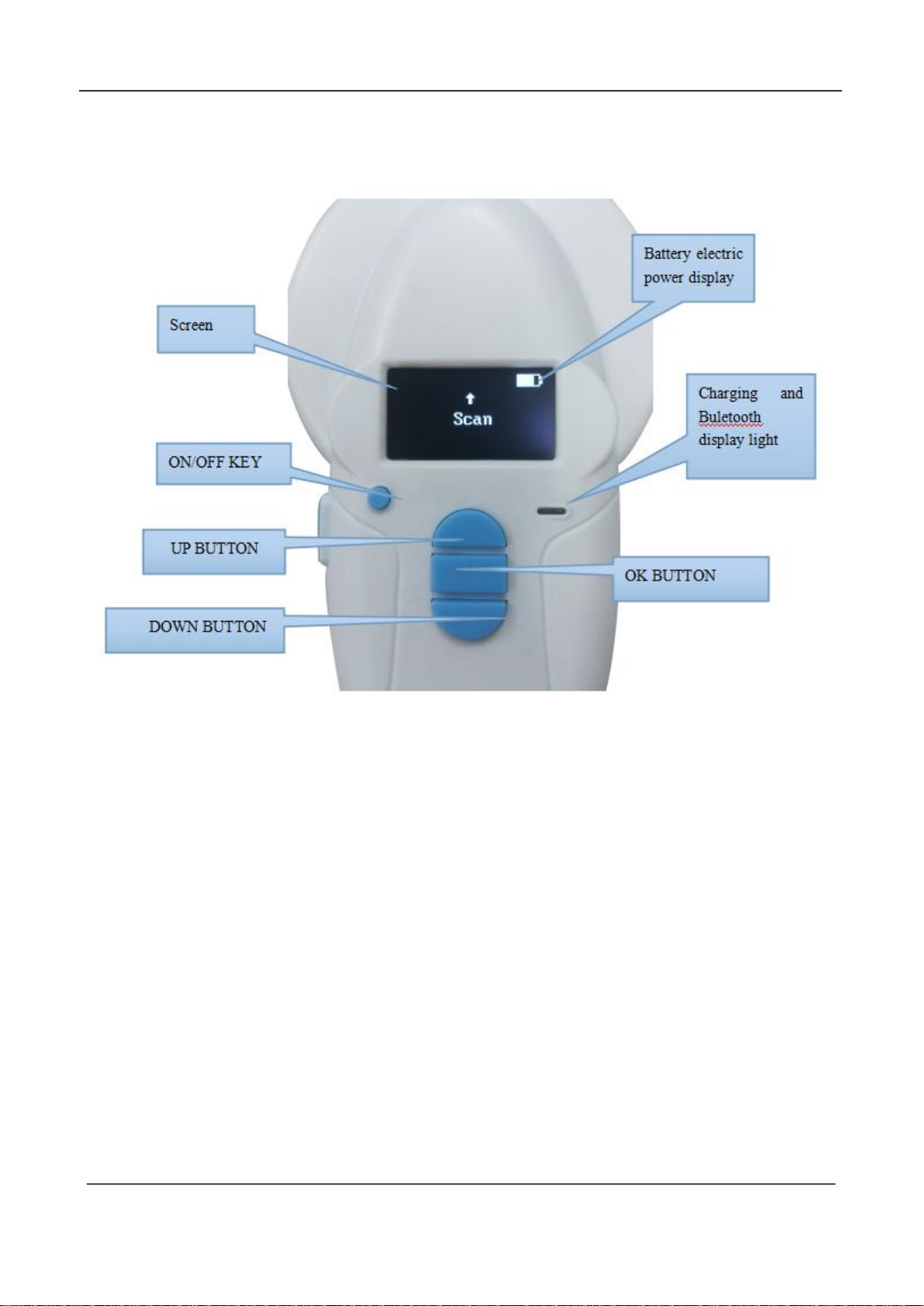
1.4 Photos
SHENZHEN MARKTRACE CO.,LTD
Page 5

MR6052B User Manual
5
Model
MR6052B
Working Frequency
ISM 902~928MHz or ISM 865~868MHz and and
ISM920-925MHz
Protocol
ISO18000-6C, EPC Gen2
RF Power
MAX 30dBm, software adjustable
Identify Distance
Up to 2 meters (maximum)
Indication
One buzzer inside
Data Interface
Bluetooth 2.0,USB 2.0
Bluetooth
Communication Distance
15 meters
Power Supply
3.7V 1400mAh lithium battery
Processor
ARM 32-bit Cortex™-M3 CPU Core
Memory
20KB (Store 500pcs 12bits EPC code)
Standby Time
9 hours
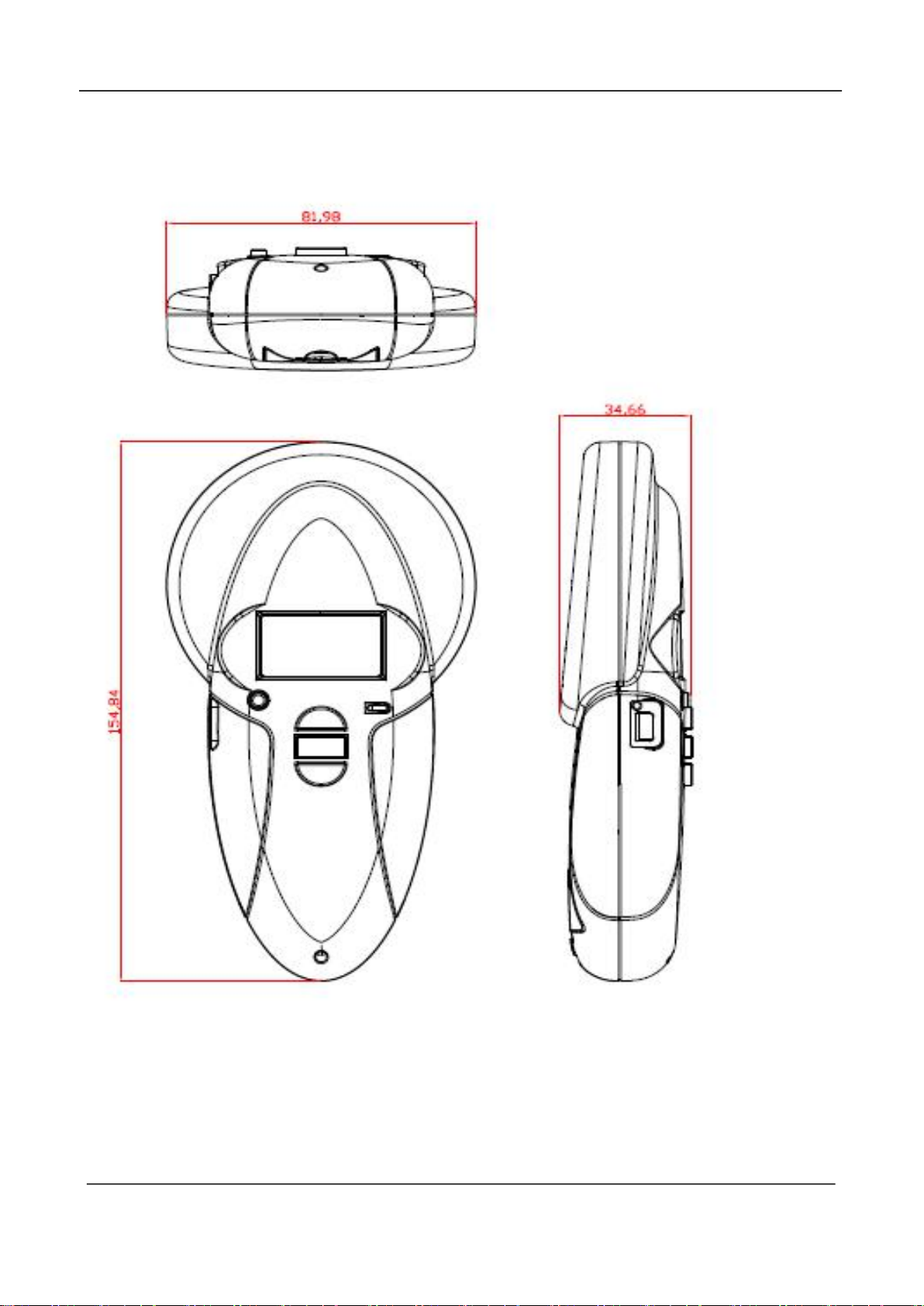
Size
150 mm * 80 mm X*35 mm
Temperature
-5~40℃
ISM 902.75-927.25MHz
2, Parameters
3 Quick Start
3.1 ON/OFF
Press on/off button will open reader, after open, blue LED will display; Press
on/off button 3 seconds will off reader, meanwhile buzzer will beep twice as off
indication.
Reader without any operating for 2 minutes will off automatically and buzzer
will beep twice as indication.
SHENZHEN MARKTRACE CO.,LTD
Page 6

MR6052B User Manual
6
*
length
EPC
0x0D 0x0A
3.2 LED
(1)LED1:Red LED means charging;
(2)LED2:Jade green LED means fully charged;
3.3 Tag Reading
Reader was open, choose Scan mode via navigation key, press OK key, reader start to reading. Reader in
reading, orange LED will display, read tag success, yellow green LED will display.
3.4 Tag Data Display
Reader connect to mobile phone or laptop via bluetooth, you can open bluetooth tool on
mobile phone or laptop, bluetooth tool will receive tag ID and display these IDs.
3.5 Bluetooth Function
Open reader, Enable Bluetooth via navigation key, after enable bluetooh, Blue LED will
display. In this time you can use mobile phone or laptop to match reader. Reader name is
“HC-06” and password is “1234” , Bluetooth connect success, blue LED will display always.
Bluetooth data output format::
for exampl:*C123456789012345678908EC7 EPC data in ACSII,C is the length of
EPC ,EPC is 12 bytes“123456789012345678908EC7”。
3.6 Charging
Plug USB can charging. Red LED means charging, jade green LED means fully charged.
SHENZHEN MARKTRACE CO.,LTD
Page 7
MR6052B User Manual
7
3.7 Structure Description
SHENZHEN MARKTRACE CO.,LTD
Page 8

8
FCC Statement
This equipment has been tested and found to comply with the limits for a Class B digital
device,pursuant to Part 15 of the FCC Rules. These limits are designed to provide
reasonable protection against harmful interference in a residential installation. This
equipment generates uses and can radiate radio frequency energy and, if not installed
and used in accordance with the instructions, may cause harmful interference to radio
communications. However, there is no guarantee that interference will not occur in a
particular installation. If this equipment does cause harmful interference to radio
or television reception, which can be determined by turning the equipment off and on,
the user is encouraged to try to correct the interference by one or more of the following
measures:
-- Reorient or relocate the receiving antenna.
-- Increase the separation between the equipment and receiver.
-- Connect the equipment into an outlet on a circuit different from that to which the
receiver is connected.
-- Consult the dealer or an experienced radio/TV technician for help.
Changes or modifications not expressly approved by the party responsible for compliance
could void the user's authority to operate the equipment.
This device complies with part 15 of the FCC Rules. Operation is subject to the following
two
conditions:
(1) This device may not cause harmful interference, and
(2) this device must accept any interference received, including interference that may
cause
undesired operation.
Page 9

9
 Loading...