

Page 1
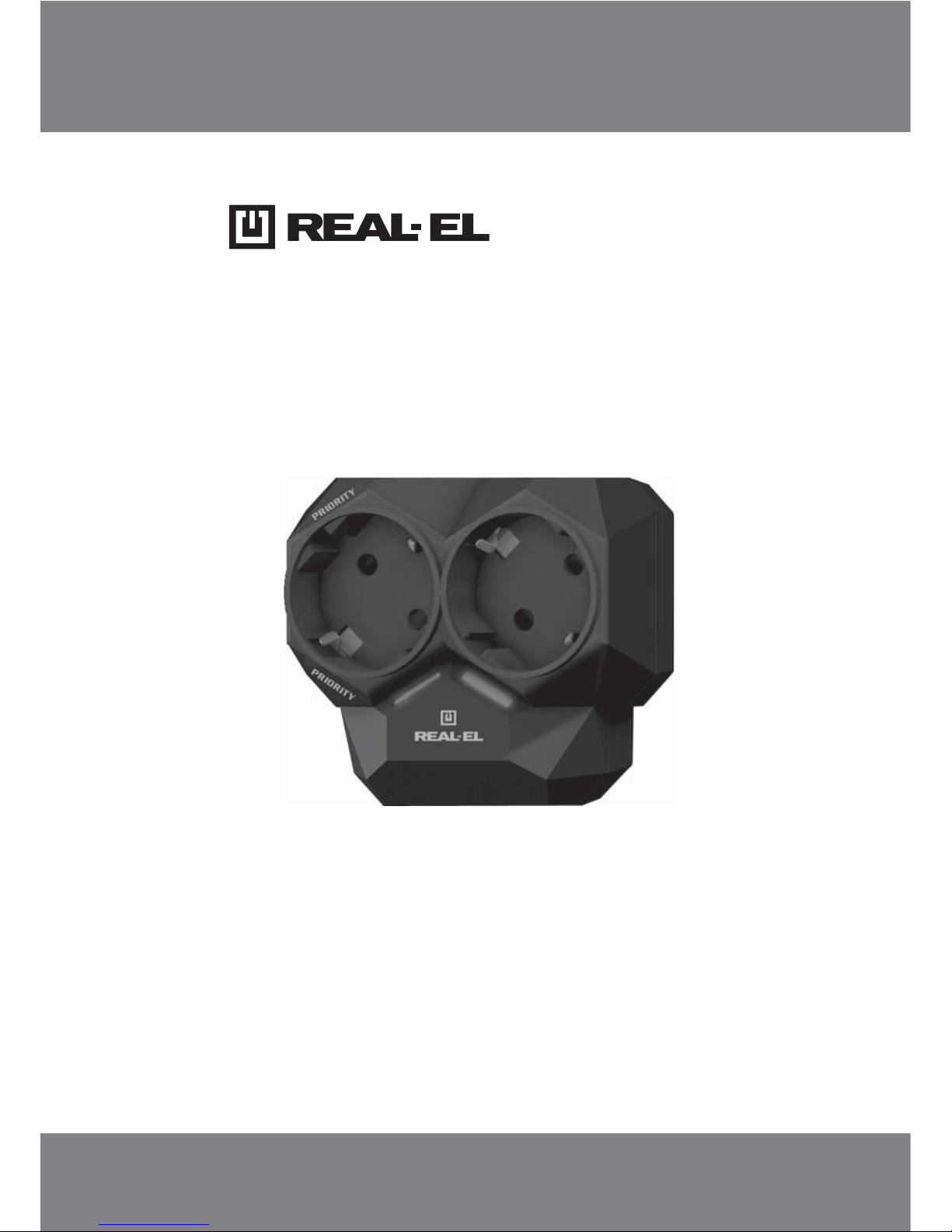
AR-01
AUTOMATIC NETWORK LOAD
CONTROLLER
USER’S MANUAL
Page 2

1
2
2
3
4
4
Technical support: www.real-el.com
1
User’s Manual
ENG
AR-01
CONTENTS
1. SAFETY PRECAUTIONS .........................................................................
2. PACKAGE CONTENTS ...........................................................................
3. TECHNICAL DESCRIPTION ....................................................................
4. CONNECTION AND OPERATION .............................................................
5. TROUBLESHOOTING ..........................................................................
6. TECHNICAL SPECIFICATIONS ................................................................
Congratulations on the purchase of TM REAL-EL automatic network load controller!
Please read this User's Manual before using the unit and retain this User's Manuall in a safe place for
future reference.
COPYRIGHT
© 2015. ENEL GROUP OU. This manual and information contained in it are copyrighted. All rights
reserved. All trademarks are the property of their legal holders.
NOTICE OF RESPONSIBILITY RESTRICTION
Despite the exerted efforts to make this Manual more exact, some discrepancies may occur. The
information in this Manual is given on “as is” terms. The author and the publisher do not bear any
liability to a person or an organization for loss or damage, which has arisen from the information contained in this Manual.
1. SAFETY PRECAUTIONS
Before using this device, be sure to read and understand safety rules:
• Do not connect the load with a capacity more than 3.6 kW to every socket of the device.
• The automatic network load controller (АNLС) is designed to operate inside premises only. The de-
vice operation in high humidity conditions is prohibited.
• АNLС operation with mechanical damages on its case is prohibited.
• Do not connect АNLС to sources with nonsinusoidal voltage, e.g. UPS.
• It is recommended to connect АNLС to a grounded socket.
• Room temperature during АNLС operation must be from +10 to +35 °С.
• Do not use abrasive materials or organic compounds (alcohol, petrol, solvents etc.) to clean АNLС.
• If signs of failures are detected (for example, the output voltage absence in sockets), mechanical
damages, excessive heating of the device or odor, it is necessary to unplug the device immediately
from the socket and address to a service center. See the list of authorized service centers on web-site
www.real-el.com.
• Do not open or repair the device by yourself. It must be repaired by the qualified personnel only.
Page 3
Technical support: www.real-el.com
2
ENG
AR-01
Network Load Controller
Features
• Joint operation of two powerful
household devices
• Increase of the mains output
capability
• Cost saving for the mains
modification
• Intelligent control system
• LED indication of active sockets
• Fast response time
• Permissible current of every
connected load is 16 A
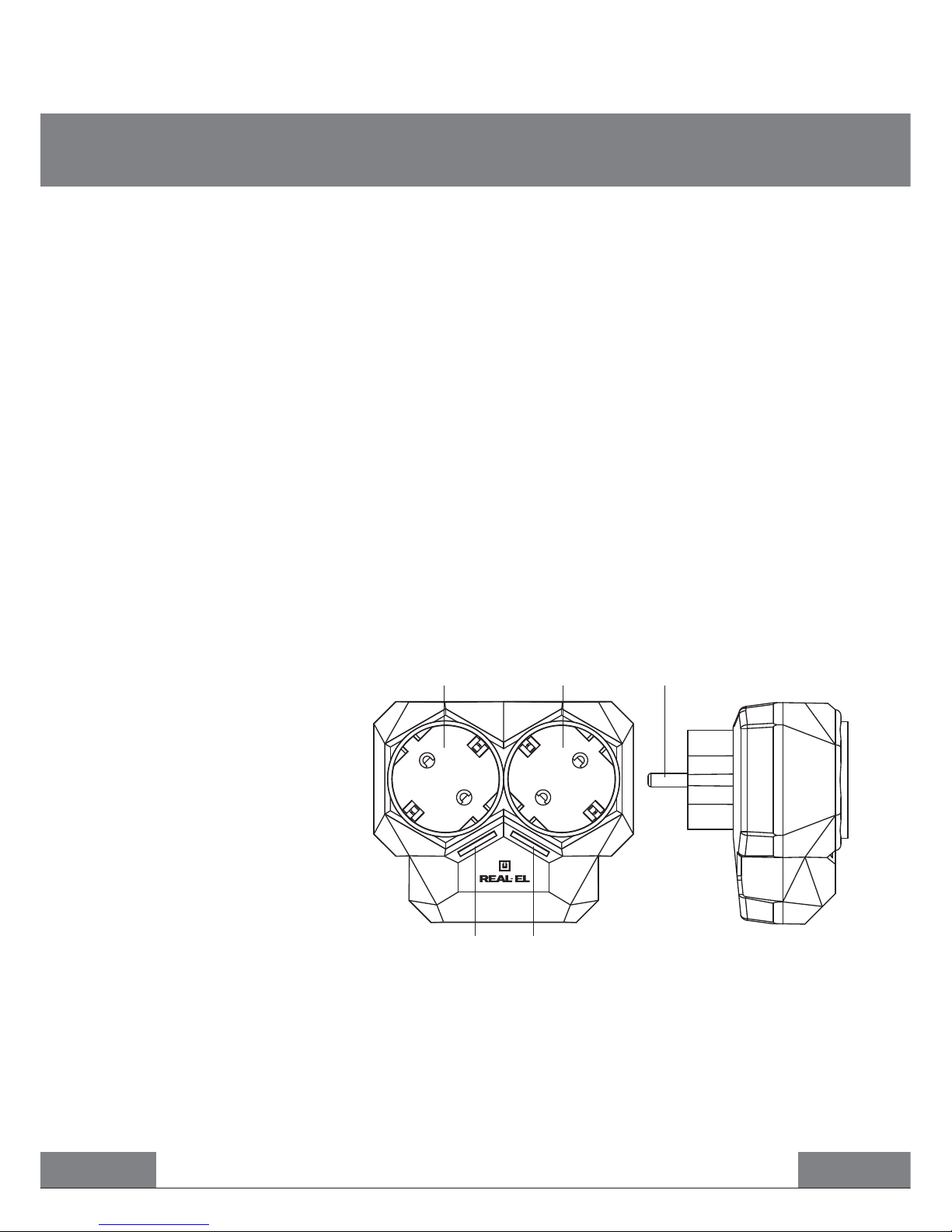
Design description
“Priority” socket
Socket to connect secondary
load
Connection plug to the power
supply network ~230 V
“Priority” socket indicator
Power supply socket indicator
2. PACKAGE CONTENTS
• Automatic network load controller – 1 pc
• User’s manual – 1 pc
• Warranty card – 1pc
3. TECHNICAL DESCRIPTION
Purpose
Automatic network load controller (АNLС) is designed to organize the joint operation of two independent electrical devices, the total power of which exceeds a limit of a permissible power of a power
supply line without automatic protection operation of the line and functional failure of the powered
devices. Principle of its operation consists in using pauses in operation of some household appliances (boiler, convector, iron etc.), which can be disconnected temporally. You can connect to the network (3.6 kW), for example, a washing machine and boiler with a capacity of 2.2 kW and 2 kW accordingly. Their simultaneous connection without АNLС will result in disconnecting an input circuit
breaker and the power supply network overload. АNLС reduces the load to wiring and promotes
operation safety of powerful household appliances. Therefore, the application of АNLС provides a con-
sumer with a simple connection method of additional electrical devices to the power supply network
with insufficient power.
Fig. 1. АNLС design
Front view Side view
PRIORITY
PRIORITY
Page 4
Technical support: www.real-el.com
3
User’s Manual
ENG
AR-01
Mains
socket
~230 V
4. CONNECTION AND OPERATION
Attention! The device must operate in the power supply network protected by an automatic
circuit breaker with the interrupting current not more than 16 А.
• Plug АNLС’s power cord into a standard socket of the home power supply system 230 V/50 Hz
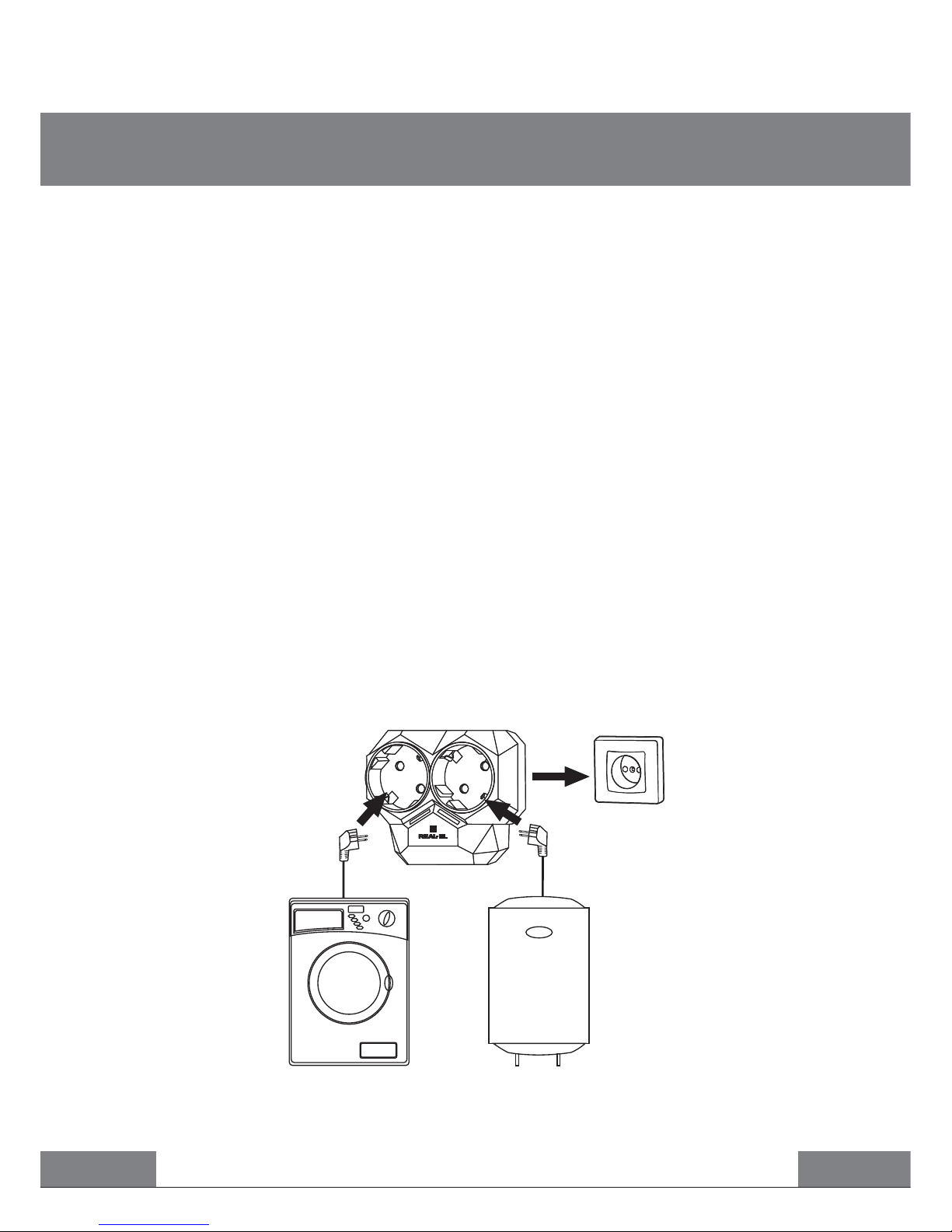
(see the tentative connection diagram in Fig. 2). Indicators and active.
• Connect one of household electric appliances to the second socket the operation of which is
uncritical to the short-time power supply failures (for example, electric water heater, electric convector, floor heating electrical system etc.).
• Connect an electrical device to the “Priority” socket , the operation of which is required at the
moment and the power supply failure to which is inadmissible (for example, automatic washing
machine and dishwashing machine, electric pump of the water supply system, electric kettle, microwave oven, hair dryer etc.).
• If a device connected to the “Priority” socket consumes more than 100 W, the power supply to
the second socket is disconnected automatically. At that, the indicator is not active. The power
supply to the second socket is recommenced automatically after 2 seconds after power reduction
consumed by a device plugged in the “Priority” socket below 100 W (sleep mode, timer mode etc.).
When the device connected to the “Priority” socket starts to operate at full capacity, the cycle recurs
once again.
• Example of АNLС operation is given in Fig. 2. A washing machine plugged in the “Priority” socket
is preset in the timer mode. While the timer of the washing machine does not start the washing mode,
the water heater plugged in the second socket will continue to operate. As soon as the washing
machine starts to operate, the second socket will be disconnected until the washing process is over
(when the second socket is disconnected, indicator is not active).
Fig. 2. Tentative connection diagram
АNLС
Washing machine Boiler
Page 5
Technical support: www.real-el.com
4
Network Load Controller
ENG
AR-01
If none of the above methods can solve the problem, please seek professional advice at your
nearest service center. Never attempt to repair the product by yourself.
Notes:
• Technical specifications given in this table are supplemental information and cannot give
occasion to claims.
• Technical specifications and package contents are subject to change without notice due
to the improvement of TM REAL-EL production
.
No voltage in the power
supply network.
АNLС is out of order.
АNLС is out of order.
Automatic network load
controller is not turned on.
АNLС is on, but voltage is absent
in sockets.
Excess heating of the device,
sparkling, burning odor.
Make sure that voltage is
available.
Address to a service-center.
Disconnect АNLС from the mains
socket and address to a
service-center.
CauseProblem Solution
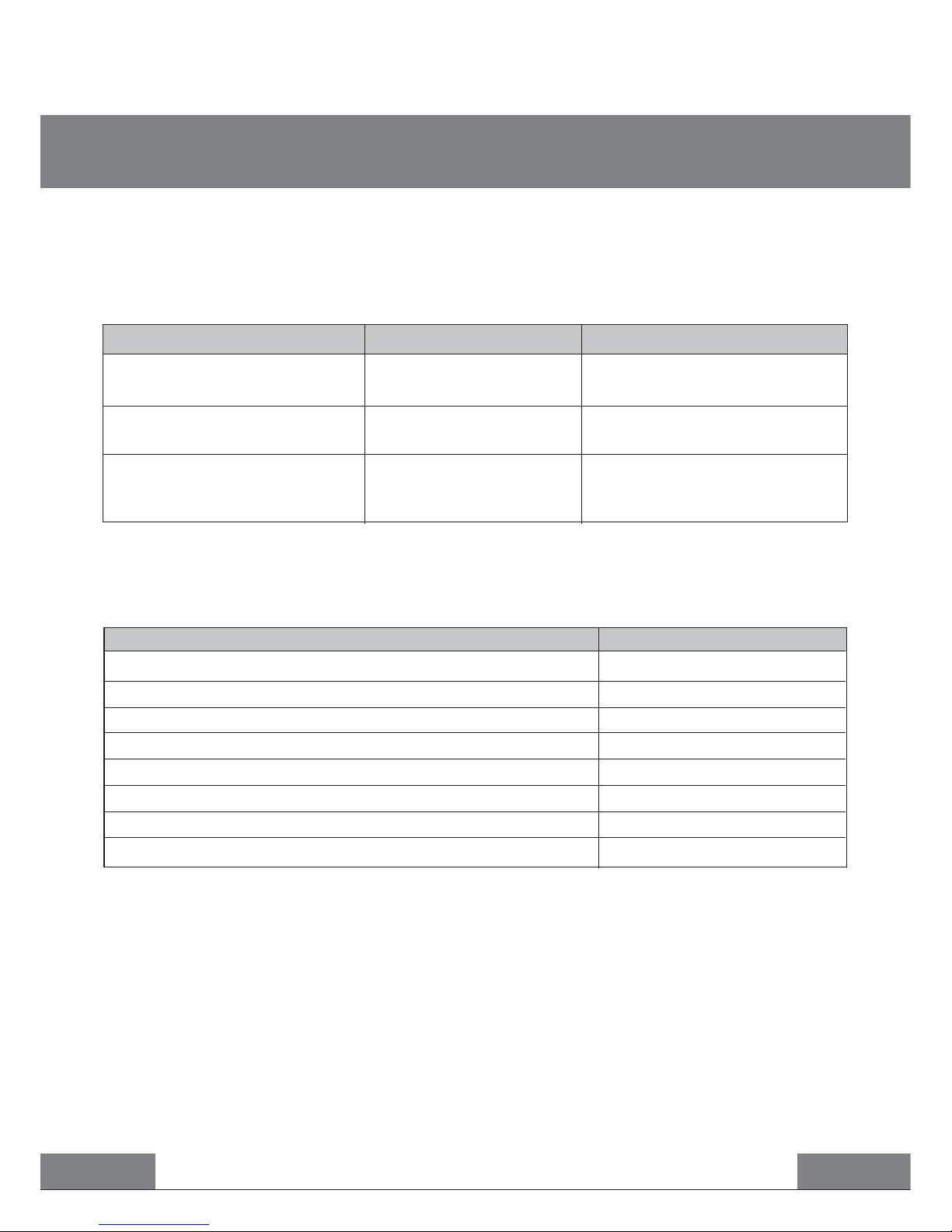
5. TROUBLESHOOTING
Attention! Do not overload АNLС’s sockets - it can lead to the out of order of the device.
Power consumption of devices connected to АNLС’s every socket must not exceed 3.6 kW.
Parameter
Rated voltage, V
Maximum load current for every socket, А
Maximum power for every socket, kW
Operation threshold according to power consumption, W
Turn-on delay time of the secondary load, sec
Turn-off time of the secondary load, sec
Dimensions, mm
Weight, g
Value
~230
16
3.6
100
not less than 2
not less than 0.3
94 × 80 × 81
13 0
6.
TECHNICAL SPECIFICATIONS
Page 6

Model: AR-01
Manufacturer: ENEL GROUP OU, Katusepapi tn 6, Lasnamäe district, Tallinn city,
Harju county, 11412, Estonia. Made in China.
® Registered Trademark of ENEL GROUP OU. Estonia.
 Loading...