

Page 1
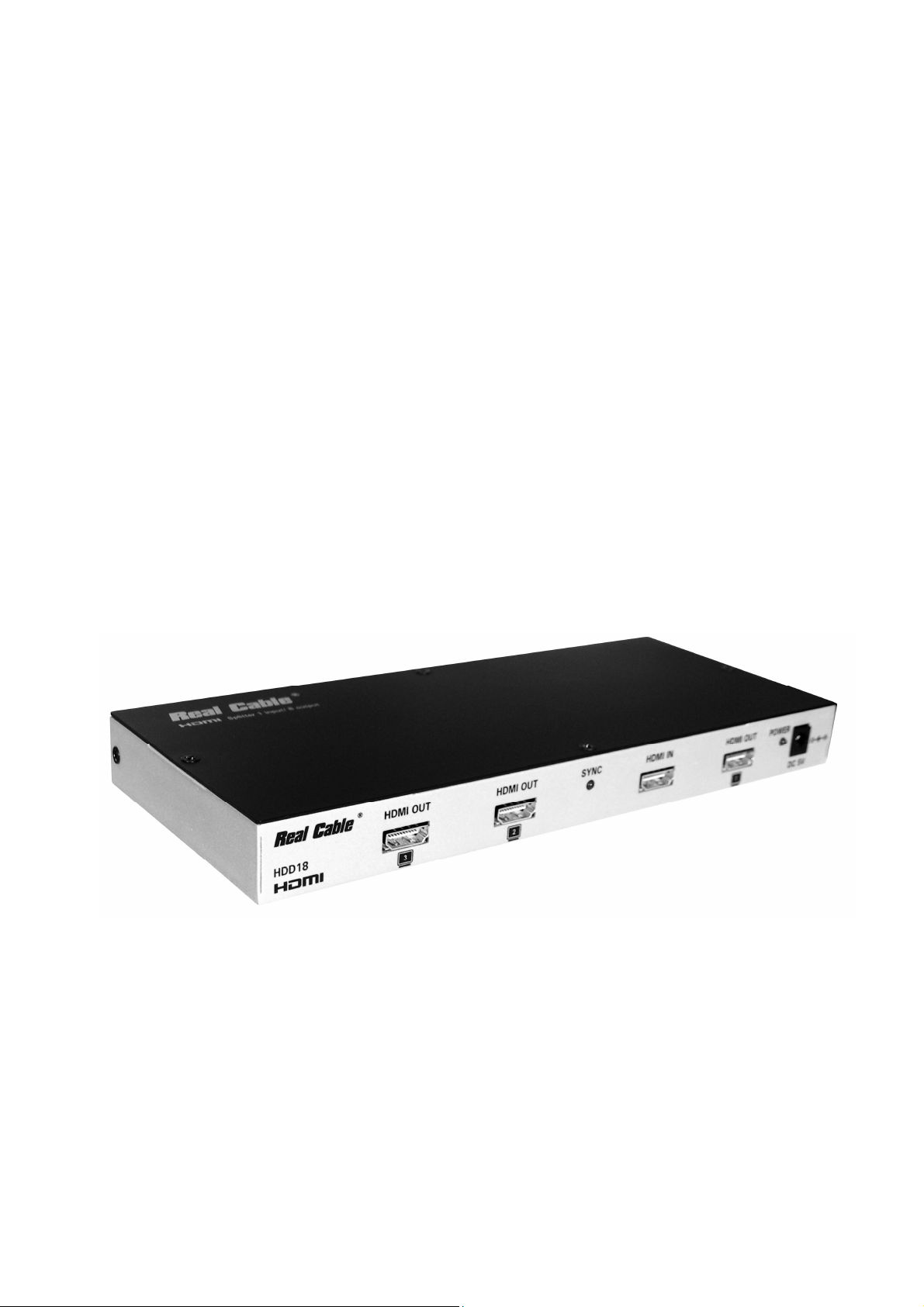
HDD18 Operating Manual 1.0
Distributeur HDMI
1 entrée / 8 sorties.
HDMI Splitter
Real Cable
®
1 input / 8 outputs
Model : HDD18
Manuel d’utilisation / Operating Manual
1/7
Page 2

HDD18 Operating Manual 1.0
Real Cable
1. Introduction:
Real Cable
Real Cable
Real Cable Real Cable
®®®®
HDD18 is a high performance HDMI distribution amplifier.
It allows you to connect up to 8 HDMI displays (HDTV, Projector, monitor…) to one single HDMI
source (DVD player, HD satellite receiver, game console….). The HDMI signal of the source is
present simultaneously on the 8 outputs, while respecting the HDCP protocol.
2. Features
• Full HD 1080p compatible.
• Splits a HDMI source up to 8 outputs without signal loss.
• Can be cascaded up to 3 layers.
• Integrated HDMI booster on all outputs: supports 15M cable on the input + 15M cable on
the outputs.
®
• “Plug and Play” installation.
• Simple operation: once the source is connected and the “sync.” LED on, all the 8 ouputs
are active.
• Supports DVI source and DVI display by using HDMI to/from DVI adaptor cable.
3. Installation:
3.1. Recommendations:
• Switch off all equipments (source, screen) before installing.
• Connect the power supply only after HDMI connections are fully achieved.
• Respect the indicated connections:
o Source (DVD player, HDTV receiver, PC…) on “HDMI IN”.
o Displays (HDTV, Projector…) on the output “HDMI OUT 1 to 8”
• Never use another power adaptor than the supplied one.
2/7
Page 3
HDD18 Operating Manual 1.0
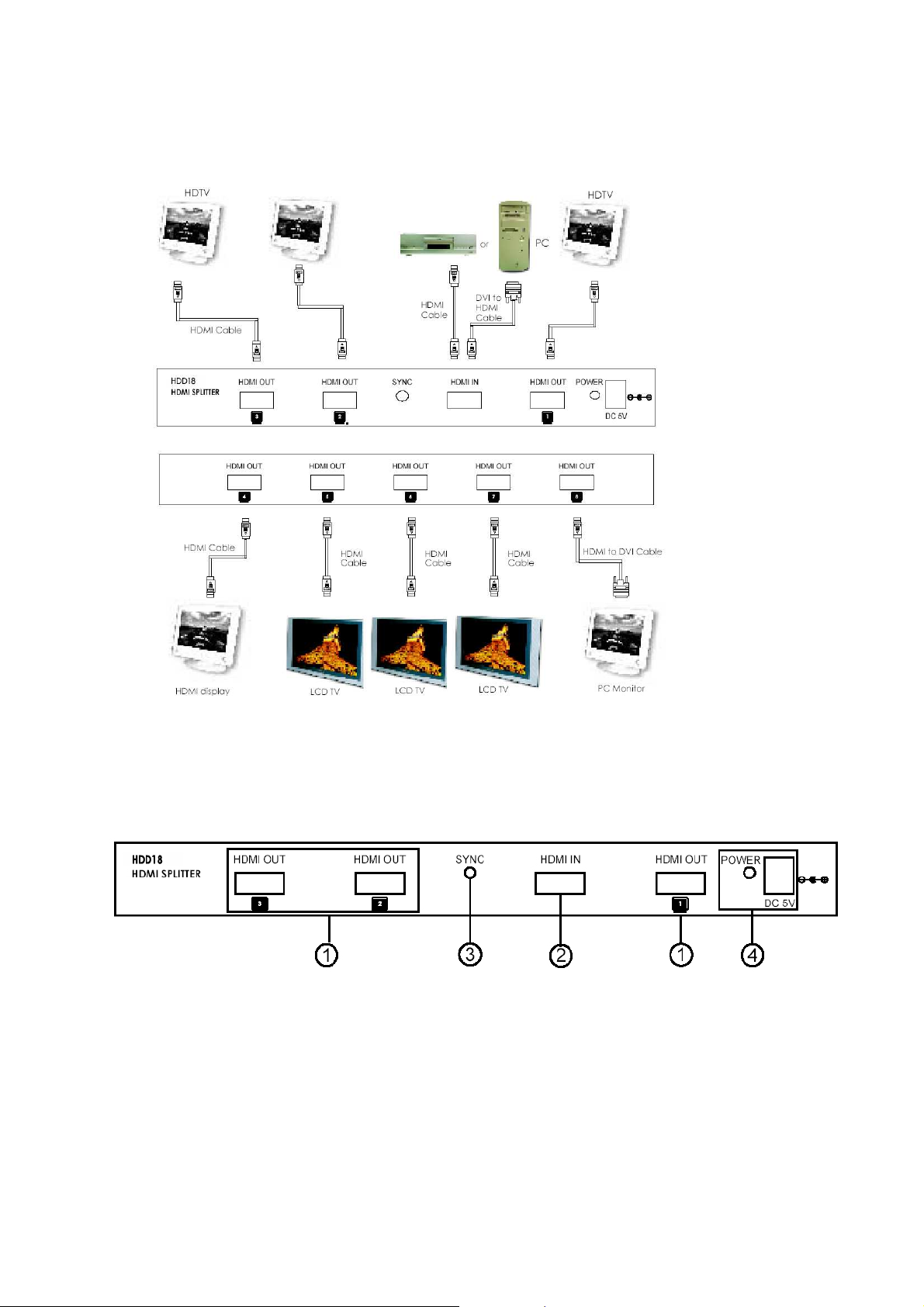
3.2. Diagram of connection (example)
Real Cable
®
4. Operation
4.1. . Front Panel
1. HDMI output 1/2/3: Connect to the HDMI input of your displays.
2. HDMI input: Connect to the HDMI or DVI output of your source equipment
such as DVD player, HD Satellite receiver, PC….
3. Sync LED: The LED will illuminate when the HDMI source signal is connected
to the input.
4. Power input: Plug the supplied 5VDC power supply into the unit.
The LED will illuminate when connected.
3/7
Page 4
HDD18 Operating Manual 1.0
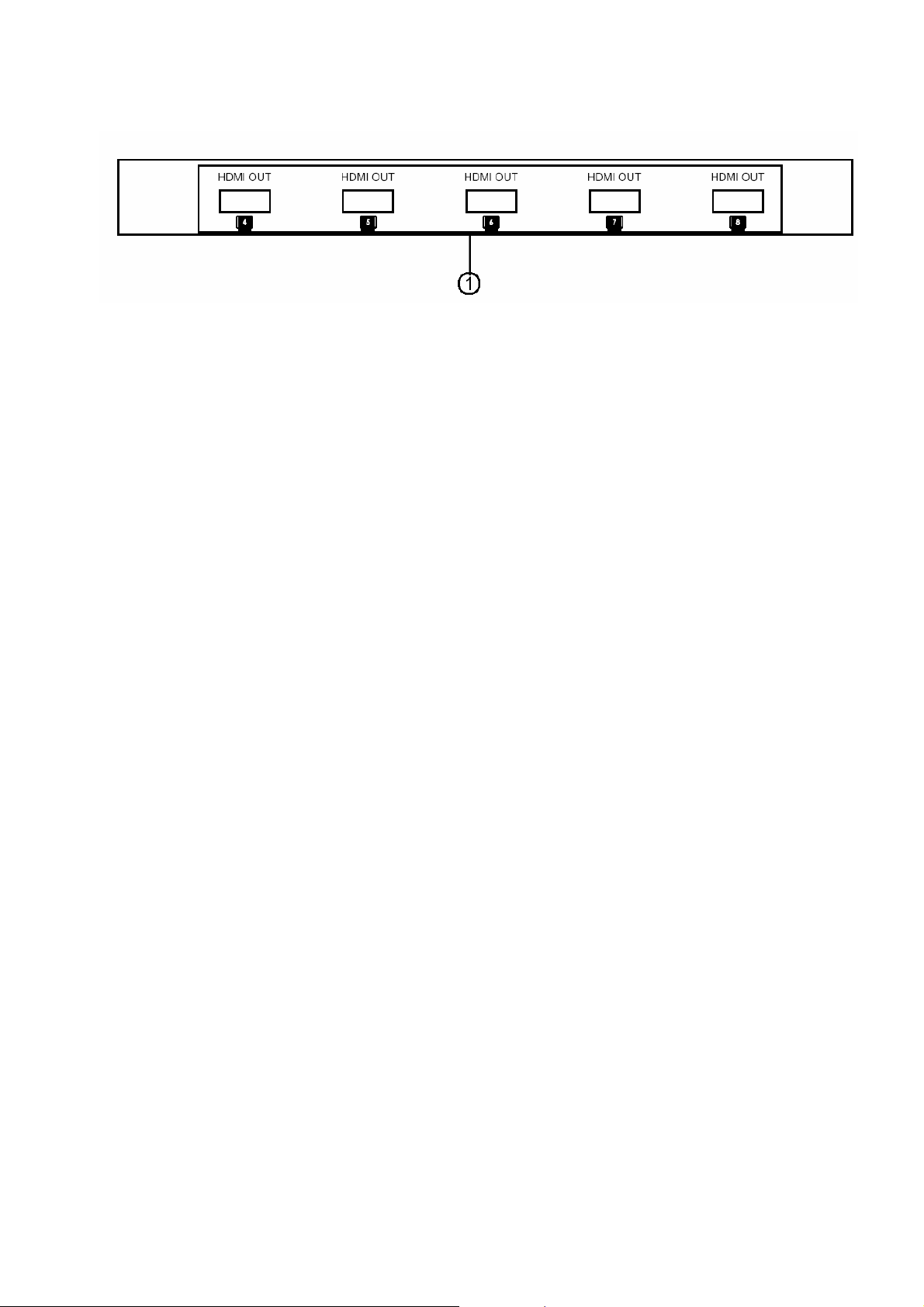
4.2. . Rear Panel
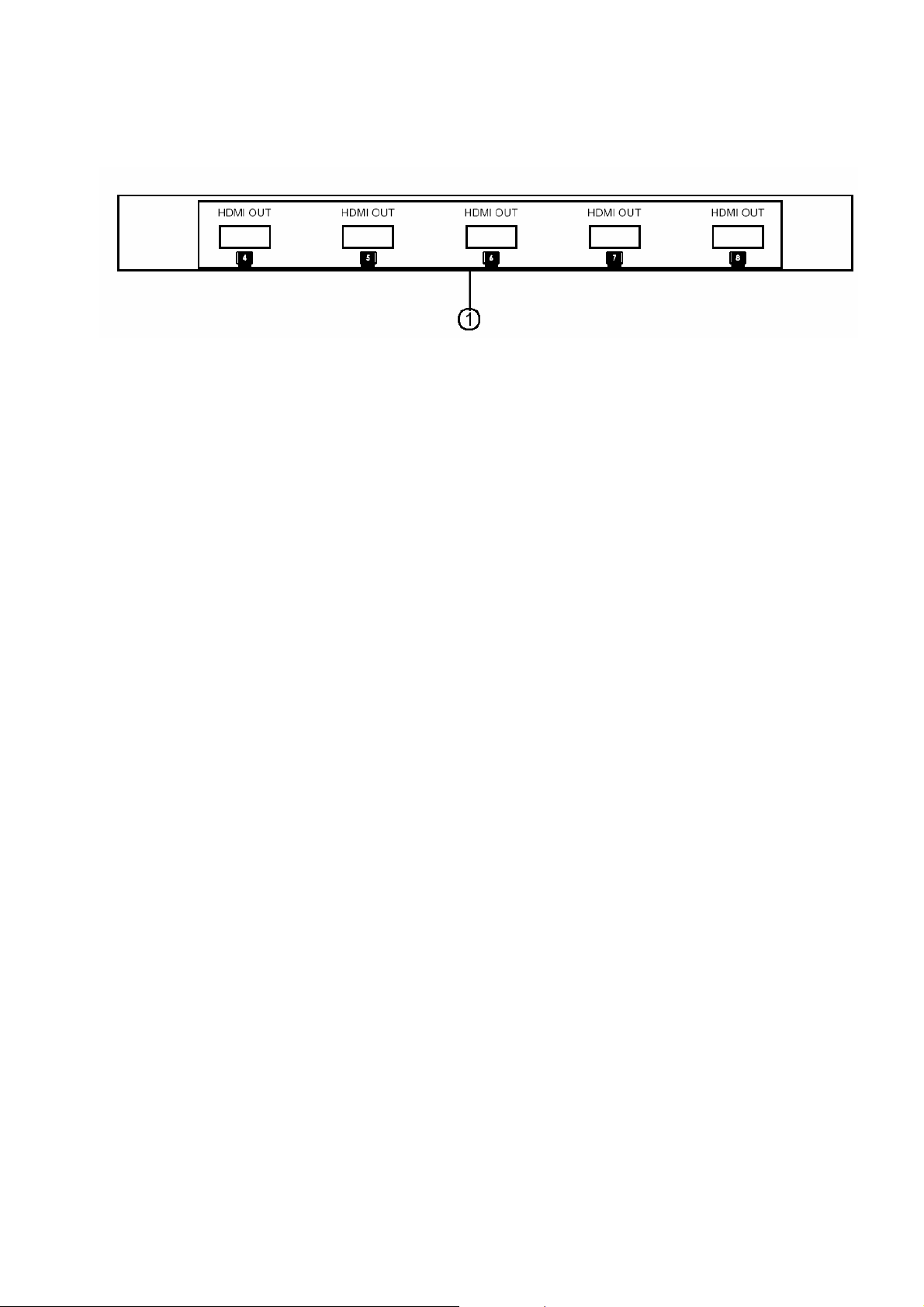
1. HDMI output 4/5/6/7/8: Connect each of these output ports to the HDMI input
of a HDMI display.
5. Specifications:
• HDMI 1.2, HDCP 1.1 and DVI 1.0 compliant
• High resolutions supported:
• PC: VGA, SVGA, XGA, SXGA, and UXGA (1600 x 1200)
• HDTV: 480i, 576i, 480p, 576p, 720p, 1080i, and 1080p
• Bandwidth : 1.65Gbps (single link)
• Input : 1 x femelle HDMI socket (Type A).
• Output : 8 x femelle HDMI sockets (Type A).
• Universal 5Vdc Power supply
• 24K gold plated connections
• Weight : 1kg
• Dimensions: 240(L) x 103(P) x 24(H)mm
Real Cable
®
4/7
Page 5

HDD18 Manuel d’utilisation 1.0
1. Introduction:
Real Cable
®
Le HDD18
Real Cable
®
est un distributeur HDMI de haute performance.
Il permet de connecter 8 écrans (TV HD, Projecteur, rétroprojecteur, moniteur) à une seule source
HDMI (Lecteur DVD, récepteur satellite HD, console de jeux…). Le signal est retransmis
simultanément sans aucune perte sur toutes les sorties, dans le respect du protocole de protection
HDCP.
2. Caractéristiques:
• Compatible Full HD 1080p.
• Répartition active de 1 source vers 8 diffuseurs sans perte.
• Peut être cascadé jusqu’à 3 niveaux (jusqu’à 512 diffuseurs en utilisant 73 distributeurs).
• Booster HDMI intégré sur toute les sorties : supporte jusqu’à 15M (entrée)+ 15M (sortie)
de câble HDMI.
• Installation « plug and play ».
• Utilisation simplifiée : une fois la source connectée et le voyant « sync. » allumé, les 8
sorties HDMI sont actives.
• Compatible avec les appareils équipés DVI HDCP en utilisant adaptateur ou câble
HDMI/DVI.
3. Installation:
3.1. Recommandations:
• Eteindre tous les équipements (sources, écrans) avant toute installation.
• Ne brancher l’alimentation qu’après avoir connecter les entrées/sorties HDMI.
• Respecter le sens de branchement:
o Source (DVD, Récepteur HD, console…) sur l’entrée « HDMI IN »
o Ecrans (HDTV, Projecteur…) sur les sorties « HDMI OUT 1 à 8 »
• Ne pas utiliser une autre alimentation externe que celle fournie d’origine.
5/7
Page 6
HDD18 Manuel d’utilisation 1.0
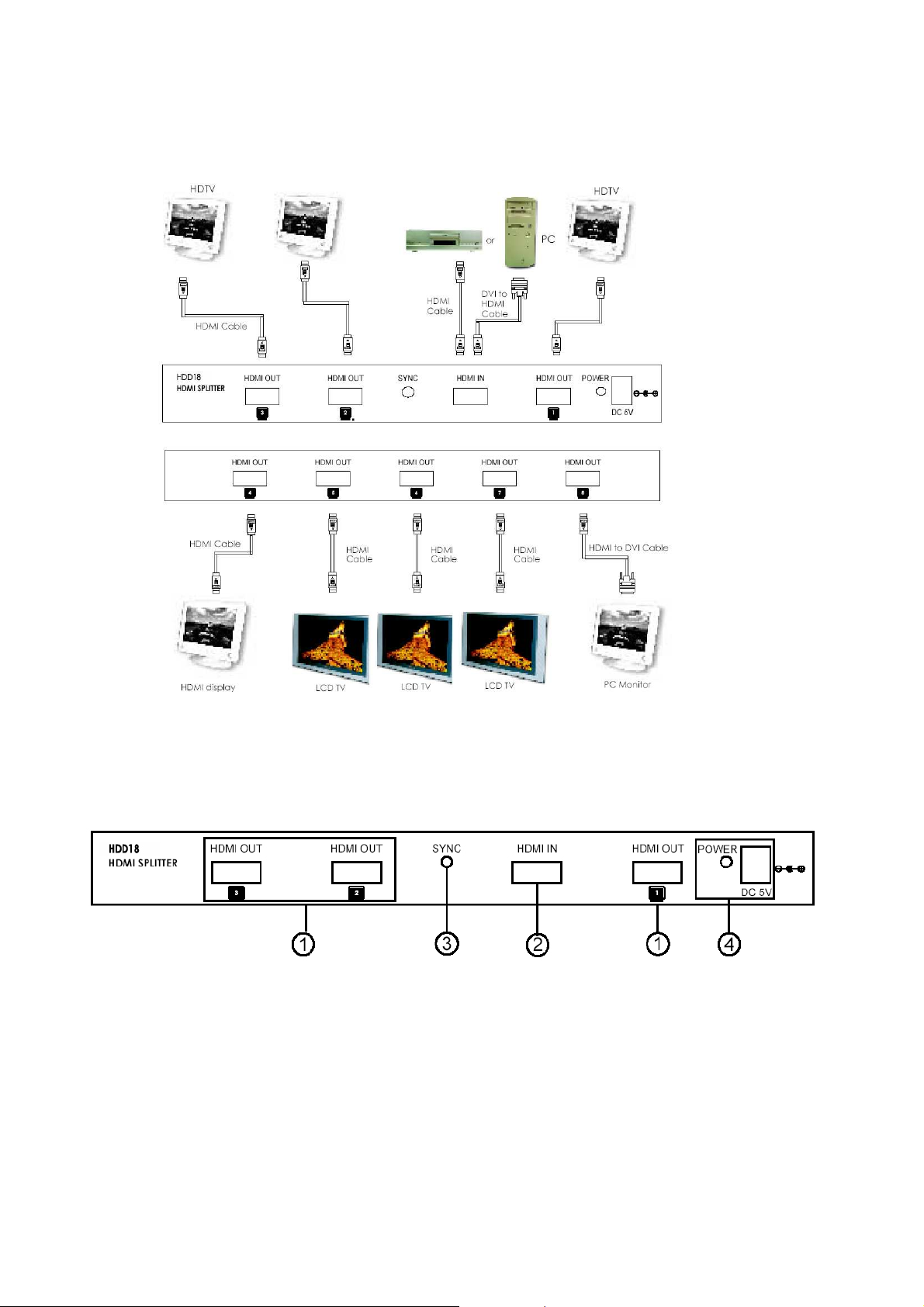
3.2. Schéma de branchement (exemple)
Real Cable
®
4. Utilisation
4.1. Face Avantl
1. Sorties HDMI OUT 1/2/3: connectez ces sorties aux entrées HDMI des écrans.
2. Entrée HDMI IN: connectez cette entrée à la sortie HDMI de la source.
3. Voyant de synchronisation SYNC : ce voyant s’illumine lorsque la source est connectée et
fonctionnelle.
4. Connecteur d’alimentation Power : connecter l’alimentation 5VDC fournie à cet endroit.
Le voyant Power s’allume lorsque l’alimentation est connectée et fonctionnelle.
6/7
Page 7
HDD18 Manuel d’utilisation 1.0
4.2. Face arrière
1. Sorties HDMI OUT 4/5/6/7/8: connectez ces sorties aux entrées HDMI des écrans..
5. Spécification techniques
• Conforme HDMI 1.2, HDCP 1.1 et DVI 1.0
• Haute résolutions supportées:
o PC: VGA, SVGA, XGA, SXGA, et UXGA (1600 x 1200)
o HDTV: 480i, 576i, 480p, 576p, 720p, 1080i, et 1080p
• Bande passante : 1.65Gbps (single link)
• Entrée : 1 x prise HDMI femelle (Type A).
• Sortie : 8 x prises HDMI femelles (Type A).
• Alimentation 5Vdc universelle
• Connections plaquées or 24K
• Poids : 1kg
• Dimensions: 240(L) x 103(P) x 24(H)mm
Real Cable
®
7/7
 Loading...