

Page 1
www.ravpower.com
ASIA PACIFIC
E-mail : [email protected](JP)
JP Importer: 株式会社SUNVALLEY JAPAN
Address: 〒104-0032 東京都中央区八丁堀3丁目18-6 PM京橋東9F
EUROPE
E-mail:
[email protected](UK)
[email protected](DE)
[email protected](FR)
[email protected](ES)
[email protected](IT)
EU Importer : ZBT International Trading GmbH
Address: Halstenbeker Weg 98C, 25462 Rellingen, Deutschland
NORTH AMERICA
E-mail : [email protected](US)
[email protected](CA)
Tel : 1-888-456-8468 (Monday-Friday: 9:00-17:00 PST)
US Distributor: SUNVALLEYTEK INTERNATIONAL INC.
Address : 46724 Lakeview Blvd, Fremont, CA 94538
MANUFACTURER
Manufacturer: Shenzhen NearbyExpress Technology Development Co., Ltd.
Address: 333 Bulong Road, Shenzhen, China, 518129
Learn more about the EU Declaration of Conformity:
https://www.ravpower.com/downloads-RP-PC034-CE-Cert.html
MADE IN CHIN A
20190912
RP-PC034_V2.6
Model: RP-PC034
RAVPower Turbo 15W Wireless Charger
User Guide
Page 2

CONTENTS
English
Deutsch
Français
Español
Italiano
日本語
02/04
05/07
08/10
11/13
14/16
17/ 1 9
Page 3
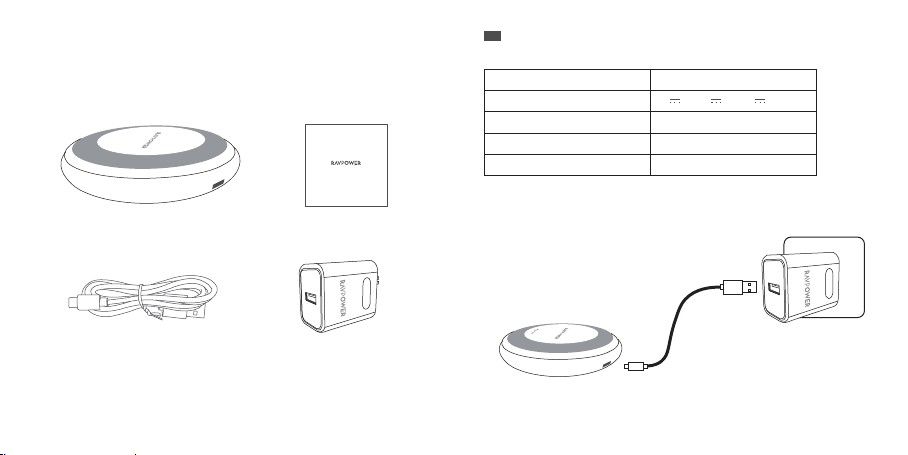
What’s in the Box
Lieferumfang┋Dans la boîte┋Qué hay en la Caja┋Contenuto della
Confezione┋セット 内 容
Model: RP-PC034
RAVPower Turbo 40W 4-Port Wall Charger
User Guide
EN
Specifications
Model
Input
Output
Dimensions (Charging Pad)
Weight (Charging Pad)
How to Charge Your Devices
1. Connect the cable to the adapter and plug it into a power outlet.
RP-PC034
5V 2A, 9V 2A, 12V 2A
15W Max
9.0 x 1.6 cm / 3.5 x 0.6 in
102 g / 3.6 oz
1.2 m / 3.9 ft Mirco USB Cable
Quick Charge 3.0 24W
USB Wall Charger
Note:
You can only charge the pad with the included adapter. Other adapters lower than 12V are not
compatible. .
01/02
Page 4
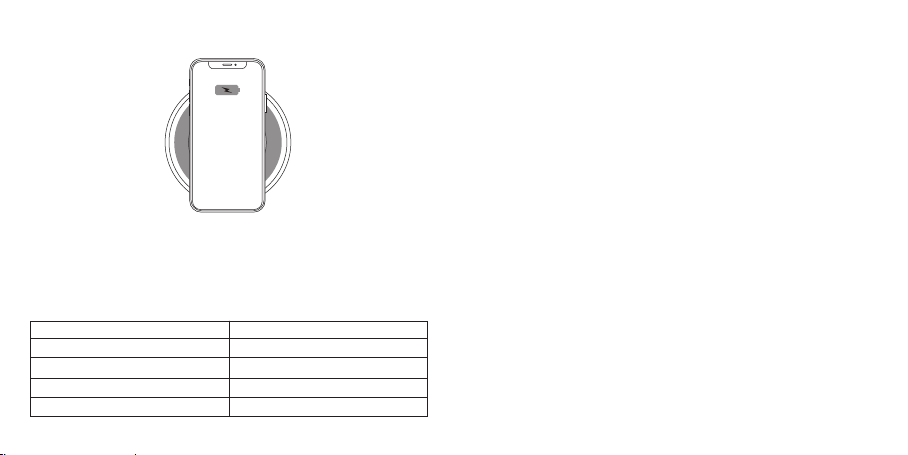
2. Place your phone or tablet on the charging pad.
Note:
· Phone cases more than 0.2 inch / 0.5 cm thick will not be detected. Remove before charging.
· If charging does not occur, adjust the phone so its receiver can be detected. Please note that
different model phones have their receivers in different positions.
3. When charging, the LED indicator will light up accordingly.
LED Indicator
Turns green for 5 seconds, then off
Turns solid green
Turns green for 10 seconds, then off
Flashes red every 0.5 second
Status
Connected to power
Fast charging a device
Device fully charged
Abnormal charging with no output
Note:
· Abnormal charging includes the conditions that metal foreign body exists between the coil
and load, or NTC over-temperature.
· When abnormalities are resolved, the LED indicator will stop flashing red and turn off.
Protections
The wireless charging pad is built with surge current, surge voltage, high temperature, short
circuit, and unsupported device detection protections.
Caution
· Only use the included RAVPower adapter to charge the pad.
· Make sure your phone is in direct contact with the charging pad when charging.
· Keep the charging pad away from metals or metal objects.
· Keep away from medical implants to avoid interference, consult a doctor before use.
· Stop using if the cable is ruptured or damaged.
· Keep away from extreme temperatures.
· Do not expose to liquids.
· For indoor use only.
· Do not dismantle.
· No dropping.
Customer Service
RAVPower products are covered by an 18-month limited warranty from the date of its original
purchase. If any problems occur, please contact our support team.
We can only provide after sales service for products that are sold by RAVPower or RAVPower
authorized retailers and distributors. If you have purchased your unit from a different place,
please contact your seller for return and warranty issues.
03/04
Page 5
DE
Technische Daten
Modell
Eingang
Ausgang
Abmessungen (Ladestation)
Gewicht (Ladestation)
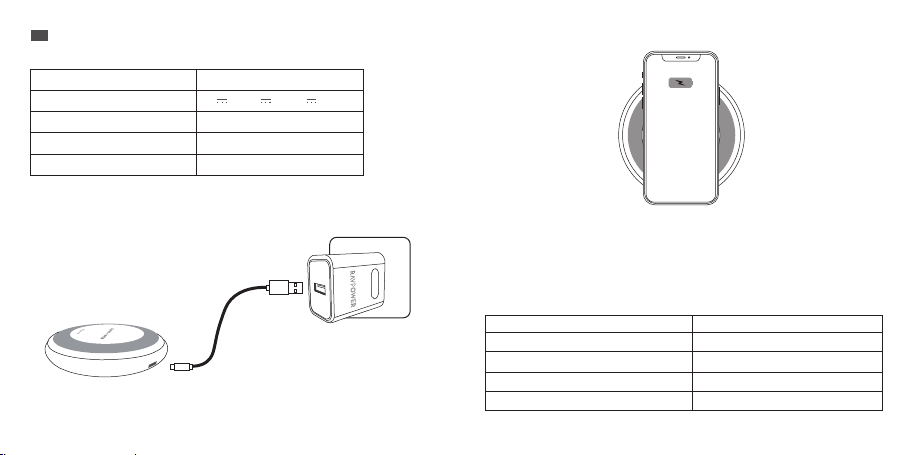
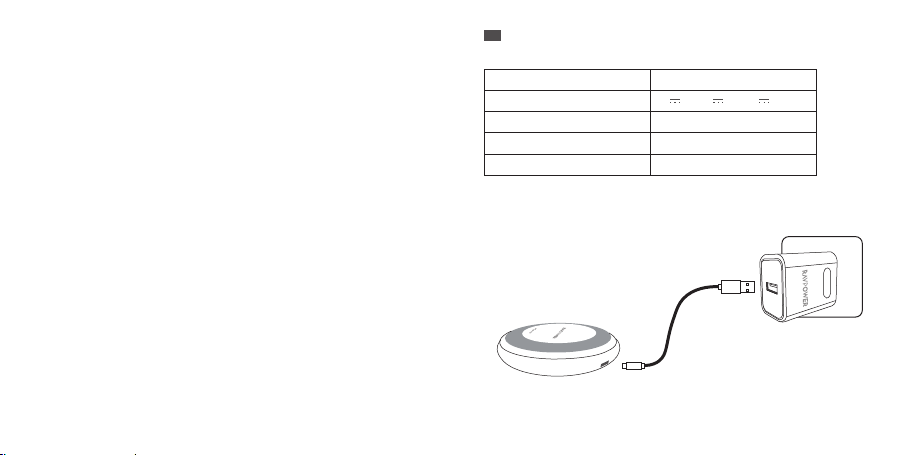
Laden Ihrer Geräte
1. Verbinden Sie das Kabel mit dem Adapter und stecken Sie es in eine Steckdose.
Hinweis:
Sie können die Ladestation nur mit dem beigelegten Adapter aufladen. Andere Adapter unter
12V funktionieren nicht.
RP-PC034
5V 2A, 9V 2A, 12V 2A
max. 15W
9 x 1,6 cm
102 g
2. Legen Sie Ihr Handy oder Tablet auf die Ladestation und der Ladeprozess beginnt automatisch.
Hinweis:
· Geräte mit Handyhüllen, die dicker als 0,5 cm sind, können nicht erkannt werden. Entfernen
Sie die Hülle vor dem Laden.
· Wenn das Handy nicht aufgeladen wird, ändern Sie die Position des Handys, bis der
Empfänger erkannt werden kann. Beachten Sie, dass sich der Empfänger je nach
Handymodell an einem anderen Ort befindet.
3. Die LED-Anzeige wird beim Ladeprozess entsprechend dem Gerätestatus leuchten/blinken .
LED Anzeige
Leuchtet 5 Sekunden lang grün, dann aus
Leuchtet grün
Leuchtet 10 Sekunden lang grün, dann aus
Blinkt einmal pro 0,5 Sekunden
Status
Verbunden mit einer Stromquelle
Lädt ein Gerät schnell auf
Gerät wird vollständig geladen
Ungewöhnliches Laden ohne Leistung
05/06
Page 6
Hinweis:
· Anormales Laden beinhaltet das Vorhandensein von Metallfremdkörpern zwischen der
Spule und der Last oder den Zustand, in dem der NTC überhitzt ist.
· Nachdem die Störung behoben ist, hört die LED-Anzeige auf, rot zu blinken und erlischt.
Schutz
Die kabellose Ladestation ist mit Schutz gegen Überstrom, Überspannung, Überhitzung, sowie
Kurzschluss und Erkennungsfunktion gegen nicht unterstützten Geräten ausgestattet.
Warnung
· Verwenden Sie ausschließlich den beigelegten Adapter, um die Ladestation aufzuladen.
· Stellen Sie sicher, dass Ihr Handy beim Aufladen direkt in Kontakt mit der Ladestation ist.
· Von Metallen oder metallenen Objekten fernhalten.
· Von medizinischen Implantaten fernhalten, um Störungen zu vermeiden. Konsultieren Sie
vor dem Gebrauch einen Arzt.
· Mit der Benutzung aufhören, wenn das Kabel beschädigt ist.
· Von hohen Temperaturen fernhalten.
· Von Feuchtigkeit fernhalten.
· Nur für den Innengebrauch geeignet.
· Nicht auseinander nehmen.
· Nicht fallenlassen.
Kundendienst
RAVPower Produkte sind ab dem Kaufdatum durch die18-monatige Garantie abgedeckt. Falls
das Produkt während dieser Zeit defekt sein sollte, kontaktieren Sie bitte unverzüglich den
Kundendienst per E-Mail unter [email protected].
Wir bieten unseren Kundendienst nur für Produkte an, die bei RAVPower oder einem von
RAVPower autorisierten Händler und Vertriebsdienstleister gekauft wurden. Falls Sie Ihr
Produkt bei einem anderen Händler gekauft haben, wenden Sie sich bezüglich des
Garantieanspruchs an den Verkäufer.
FR
Spécifications
Modèle
Entrée
Sortie
Dimensions (Base de recharge)
Poids (Base de recharge)
Comment recharger vos appareils
1. Branchez le câble à l’adaptateur et branchez-le à une prise électrique.
Note:
Vous ne pouvez charger la base qu’avec l’adaptateur inclus. Les autres adaptateurs inférieurs à
12V ne sont pas compatibles.
RP-PC034
5V 2A, 9V 2A, 12V 2A
15W Max
9.0 x 1.6 cm
102 g
07/ 08
Page 7
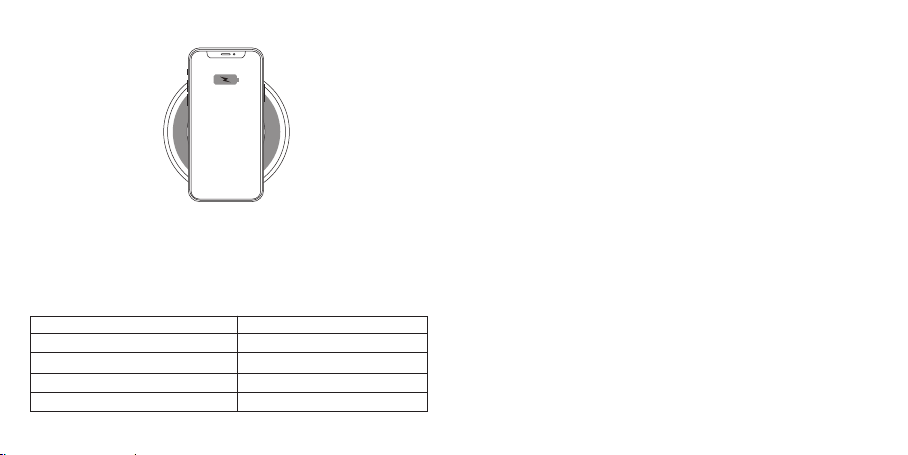
2. Placez votre téléphone ou tablette sur la base de recharge.
Note:
· Les téléphones avec une coque de plus de 0.2 inch / 0.5 cm d’épaisseur ne seront pas
détectés. Retirer la coque avant la recharge.
· Si la recharge ne se lance pas, ajustez le téléphone pour que son récepteur soit détecté.
Veuillez noter que la position du récepteur varie en fonction des modèles de téléphones.
3. Pendant la charge, le témoin lumineux LED s’allumera en fonction de son état.
Témoin LED
Vert pendant 5 secondes, puis éteint
Vert fixe
Vert pendant 10 secondes, puis éteint
Clignote en rouge toutes les 0,5 seconde
Statut
Branché à l'alimentation
Chargement rapide d'un appareil
Appareil entièrement chargé
Charge anormale sans sortie
Note:
· Une charge anormale inclut les conditions: un corps étranger en métal existe entre la bobine
et la charge, ou une surchauffe NTC.
· Une fois les anomalies résolues, le voyant cesse de clignoter en rouge et s’éteint.
Protections
la station de recharge sans fil est construit avec des protections de Courant de surtension, de
surtension, de haute température, de court-circuit et de détection de périphérique non prises
en charge.
Prudence
· Utilisez uniquement l’adaptateur RAVPower inclus pour recharger la station.
· Assurez-vous que votre téléphone est en contact direct avec la station de recharge pendant
la charge.
· Tenir la station éloignée des métaux ou des objets métalliques.
· Tenir à l'écart des implants médicaux pour éviter les interférence, consulter un médecin
avant de l'utiliser.
· Arrêter d’utiliser le câble s’il est rompu ou endommagé.
· Tenir éloigné des températures extrêmes.
· Ne pas exposer aux liquides.
· Pour un usage d’intérieur uniquement.
· Ne pas démonter.
· Ne pas faire tomber.
Service client
RAVPower fournit une garantie limitée de 18 mois pour ce produit, à compter de la date d’achat
initial. Si votre produit devenait défectueux, veuillez contacter l’équipe du Service Client par email.
Nous ne pouvons fournir de service après-vente que pour les appareils vendus par RAVPower ou
un de ses distributeurs ou revendeurs autorisés. Si vous avez acheté votre appareil depuis un
autre endroit, veuillez contacter le vendeur pour les questions de retour et de garantie.
09/10
Page 8
ES
Especificaciones
Modelo
Entrada
Salida
Dimensiones (Cargador Inalámbrico)
Peso (Cargador Inalámbrico)
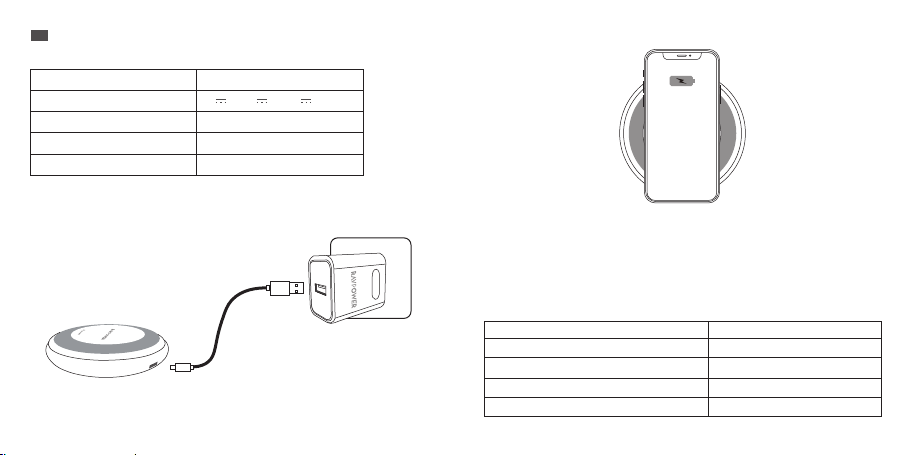
2.Coloque su teléfono o tablet en la base del cargador.
RP-PC034
5V 2A, 9V 2A, 12V 2A
15W Max
9.0 x 1.6 cm
102 g
Cómo cargar sus dispositivos
1.Conecte el cable al adaptador y conéctelo a una toma de corriente.
Nota:
Sólo puede cargar el cargador con el adaptador incluido. Otros adaptadores inferiores a 12V no
son compatibles.
Nota:
· No se detectarán de teléfonos con fundas de más de 0.2 pulgadas / 0.5 cm de espesor.
Retírela antes de cargar.
· Si no empieza la carga, ajuste el teléfono para que su receptor pueda ser detectado.
Tenga en cuenta que los diferentes modelos de teléfonos tienen sus receptores en
diferentes lugares.
3.Durante la carga, el indicador LED se encenderá en consecuencia.
Indicador LED
Se vuelve verde por 5 segundos, luego se apaga
Se vuelve verde sólido
Se vuelve verde por 10 segundos, luego se apaga
Parpadea en rojo cada 0.5 segundos
Estado
Conectado al poder
Carga rápida de un dispositivo
Dispositivo completamente cargado
Carga anormal sin salida
11/12
Page 9
Nota:
· La carga anormal incluye las condiciones de que exista un cuerpo extraño de metal entre la
bobina y la carga, o sobretemperatura NTC.
· Cuando se resuelven las anomalías, el indicador LED dejará de parpadear en rojo y se apagará.
Cómo cargar sus dispositivos
El cargador inalámbrico está construido con protección contra corriente de choque,
sobretensión, alta temperatura, cortocircuito y protecciones de detección de dispositivos no
soportadas.
Precaución
· Sólo use el adaptador de RAVPower incluido para cargar la base.
· Asegúrese de que su teléfono está en contacto directo con el cargador durante la carga.
· Mantenga el cargador lejos de metales u objetos metálicos.
· Manténgase alejado de los implantes médicos para evitar interferencias, consulte a un
médico antes de usarlo.
· Deje de usar si el cable se rompe o se daña.
· Mantenga alejado de temperaturas extremas.
· No exponga a los líquidos.
· Sólo uso en interiores.
· No desarme.
· Sin de caer.
Servicio al Cliente
RAVPower ofrece una garantía limitada de 18 meses para este producto desde la fecha de
compra original. Si su producto resulta defectuoso, póngase en contacto con nuestro equipo de
atención al cliente por correo electrónico.
Sólo podemos ofrecer servicios de postventa de los productos que se venden por RAVPower o
RAVPower autorizados minoristas y distribuidores. Si usted ha comprado su unidad desde un
lugar diferente, por favor póngase en contacto con el vendedor directamente para cuestiones de
retorno y de garantía.
IT
Specifiche Tecniche
Modello
Input
Output
Dimensioni (Pad di Ricarica)
Peso (Pad di Ricarica)
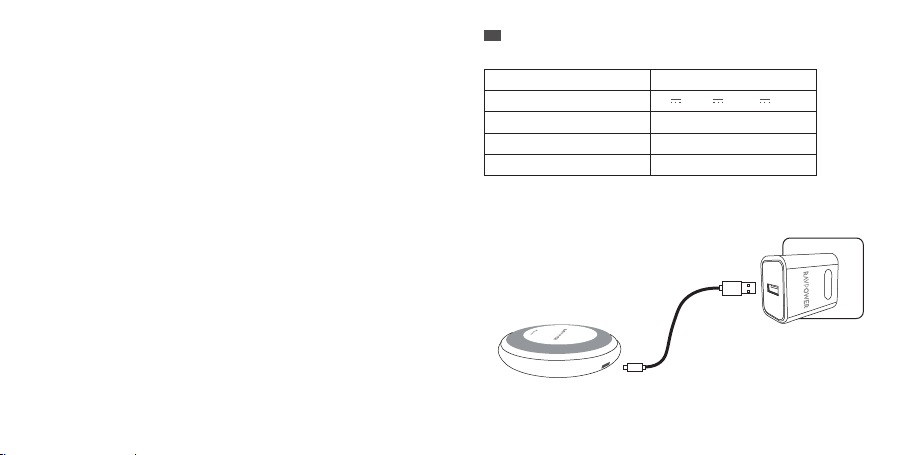
Come Ricaricare i Dispositivi
1. Connettere il cavo all’adattatore e connetterlo all’alimentazione.
Nota:
Il pad può essere alimentato esclusivamente tramite l’adattatore incluso. Adattatori inferiori a
12V non sono compatibili.
RP-PC034
5V 2A, 9V 2A, 12V 2A
15W Max
9.0 x 1.6 cm / 3.5 x 0.6 in
102 g / 3.6 oz
13/14
Page 10
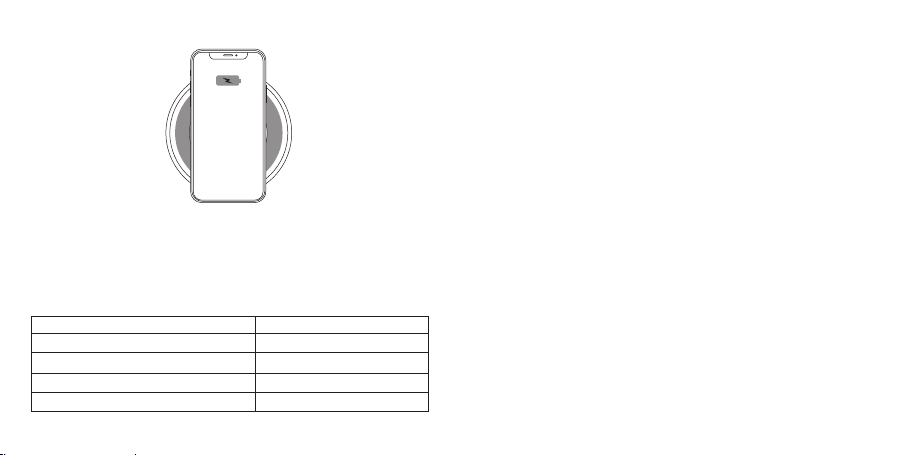
2. Posizionare il telefono o tablet sul pad di ricarica.
Nota:
· Custodie più spesse di 0.2 inch / 0.5 cm non permettono di ricaricare in modo wireless.
Rimuovere la custodia prima di ricaricare.
· Se la ricarica non si avvia, riposizionare il telefono in modo che il ricevitore sia individuato.
Notare che differenti modelli di telefoni possono avere i ricevitori posizionati ad altezze diverse.
Nota:
· Carica anomala include le condizioni di presenza di corpi estranei di metallo tra la bobina e
il carico o la sovratemperatura NTC.
· Quando si risolvono anomalie, l'indicatore LED smetterà di lampeggiare in rosso e si spegnerà.
Protezioni
Il pad di ricarica wireless è dotato di protezioni contro picco di corrente, picco dl voltaggio,
surriscaldamento e cortocircuito e un riconoscimento dei dispositivi non supportati.
Attenzione
· Utilizzare l’adattatore RAVPower incluso per alimentare il pad.
· Assicurarsi che il telefono sia in contatto diretto col pad durante la ricarica.
· Tenere il pad di ricarica lontano da metalli ed oggetti metallici.
· Tenere lontano da impianti per evitare interferenze e consultare un medico prima dell’utilizzo.
· Interromperne l’utilizzo nel caso in cui il cavo sia danneggiato.
· Tenere lontano da alte temperature.
· Non esporre a liquidi.
· Utilizzare esclusivamente in ambienti chiusi.
· Non smontare.
· Non far cadere.
3. Durante la ricarica, l’indicatore LED si accenderà in modo diverso a seconda dello stato.
Indicatore LED
Diventa verde per 5 secondi per poi spegnersi
Diventa verde fisso
Diventa verde per 10 secondi per poi spegnersi
Lampeggia in rosso ogni 0.5 secondi
Stato
Connesso all’alimentazione
Ricarica rapida di un dispositivo
Dispositivo completamente carico
Carica anomala senza uscita
Servizio Clienti
RAVPower fornisce per questo prodotto, una garanzia limitata di 18 mesi dalla sua data
d'acquisto. In caso di difetti del prodotto, si prega di contattare via email il nostro team di
supporto clienti.
Forniamo servizio di post vendita esclusivamente per prodotti venduti da RAVPower o da
distributori e rivenditori autorizzati RAVPower. Se acquistati da terzi, vi invitiamo a rivolgervi al
vostro venditore per casi attinenti alla restituzione del prodotto e questioni sulla garanzia.
15/16
Page 11
JP
仕様
型番
入力
出力
寸法(充電パッド)
重量(充電パッド)
※仕様および外観は、性能改良のため予告なしに変更する場合がございます。
デバイスを充電する方法
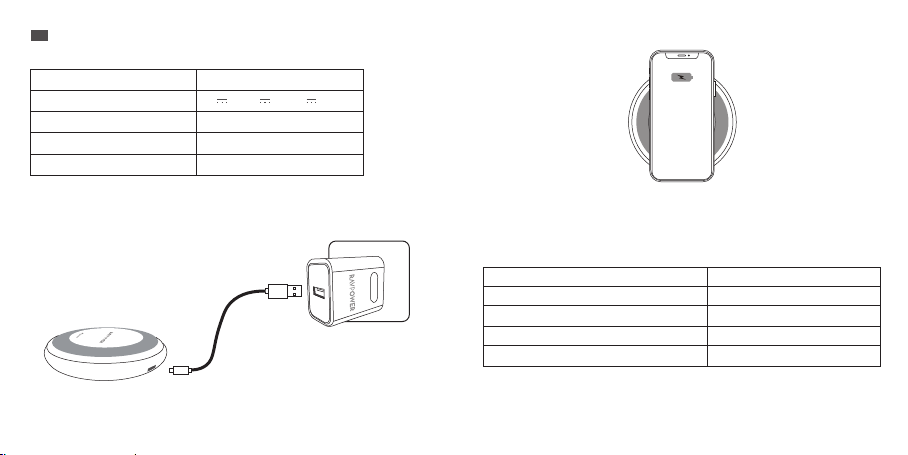
1.付属専用アダプターをワイヤレス充電パッド(MicroUSB口)と接続し、電源コンセントに接
続します。
ご注意:
· 急速充電するには付属専用アダプターをご利用ください。付属専用アダプター以外を使用
した場合、本製品が正常に動作しない場合がございます。ご了承ください。
RP-PC034
5V 2A,9V 2A,12V 2A
最大15W
90×15.7mm
約102g
2. 充電パッド(本製品本体)に対象となるスマートホンやタブレットを置きます。
ご注意:
· 充電できないことを防ぐため、充電する前に必ずスマートホン用ケースを取り外してください。
· 充電が開始されない場合は、ワイヤレス充電パッドから端末を取外し、約5秒後端末を再
度ワイヤレス充電パッドの中央に置き直してください。(※ご利用の端末により無線受信場
所が異なるため端末の置く位置を調整する必要がございます。)
3.充電されると、本体LEDインジケーターが点灯します。
LEDインジケータ
5秒間緑に点灯し、消灯
緑に点灯
10秒間緑に点灯し、消灯
LEDインジケータが0.5秒ごとに赤く点滅します
ご注意:
· 異常充電には、コイルと負荷の間に金属異物が存在する状態、またはNTCの過熱状態が含まれ
ます。
· 異常が解決されると、LEDインジケータが赤く点滅しなくなり、消灯します。
状態
電源に接続
ファストチャージャーモード
充電完了
出力のない異常充電
17/ 18
Page 12

安全保護
充電パッドにサージ電流対策、サージ電圧対策、過高温対策、ショート対策、異物探測機能を
搭載し、いつも充電器自体と端末を保護します。
その他ご注意
· 付属の充電アダプターは本充電パッド専用のため、互換性がありません。他の機器には使
用できませんのでご注意下さい。
· 充電するときは、充電パッドにスマートフォンやタブレット端末が直接触れていることを確
認してください。
· 充電パッドを金属や金属の物体から離してください。
· 植込み型心臓ペースメーカー及び除細動器などの医療用電気機器を装着されている方
は、本製品のご使用にあたり、医師と相談して下さい。
· ケーブルが破損した場合は使用を中止してください。
· 本製品を水につけたり、濡らさないようにしてください。また水に濡れた場合は使用しない
でください。発熱、発火、感電、破裂の原因になります。
· 屋内専用です。
· お客様による分解や改造・修理をしないでください。発火・破裂・故障・漏液・感電・傷害の
原因になります。
· 本製品に衝撃を与えないでください。事故、ケガ、故障の原因になります。
カスタマサービス
本製品はご購入日から18カ月の安心保障をご提供いたします。万が一、商品不具合のようでし
たら、ぜひ弊社までご連絡ください。商品状況に応じて返品、交換、修理及び返金と対応させて
いただきます。
RAVPowerに販売の権限を授けられた販売業者から購入された場合のみRAVPowerアフター
サービスをご提供いたします。
19
FCC Compliance
NOTE: This equipment has been tested and found to comply with the limits for a Class
B digital device, pursuant to part 15 of the FCC Rules. These limits are designed to
provide reasonable protection against harmful interference in a residential installation.
This equipment generates uses and can radiate radio frequency energy and, if not
installed and used in accordance with the instructions, may cause harmful interference
to radio communications. However, there is no guarantee that interference will not occur
in a particular installation. If this equipment does cause harmful interference to radio
or television reception, which can be determined by turning the equipment off and on,
the user is encouraged to try to correct the interference by one or more of the following
measures:
- Reorient or relocate the receiving antenna.
- Increase the separation between the equipment and receiver.
- Connect the equipment into an outlet on a circuit different from that to which the
receiver is connected.
- Consult the dealer or an experienced radio/TV technician for help
Changes or modifications not expressly approved by the party responsible for
compliance could void the user's authority to operate the equipment. This device
complies with Part 15 of the FCC Rules. Operation is subject to the following two
conditions:
(1) this device may not cause harmful interference, and
(2) this device must accept any interference received, including interference that may
cause undesired operation.
Page 13

RF Exposure Warning Statements:
This equipment complies with FCC radiation exposure limits set forth for an uncontrolled
environment.
This equipment shall be installed and operated with minimum distance 20cm between
the radiator & body.
WEEE Compliance
DO not to dispose of product as unsorted municipal waste and to collect such
WEEE separately, for proper treatment, recovery and recycling, please take this
product(s) to designated collection points where it will be accepted free of charge.
Please contact your local authority for further details of your nearest designated
collection station.
www.ravpower.com
Page 14

尺寸:80*80mm
骑马钉装订成册
材质:128克铜版纸
 Loading...