

Page 1
ENGLISH
- 1 -
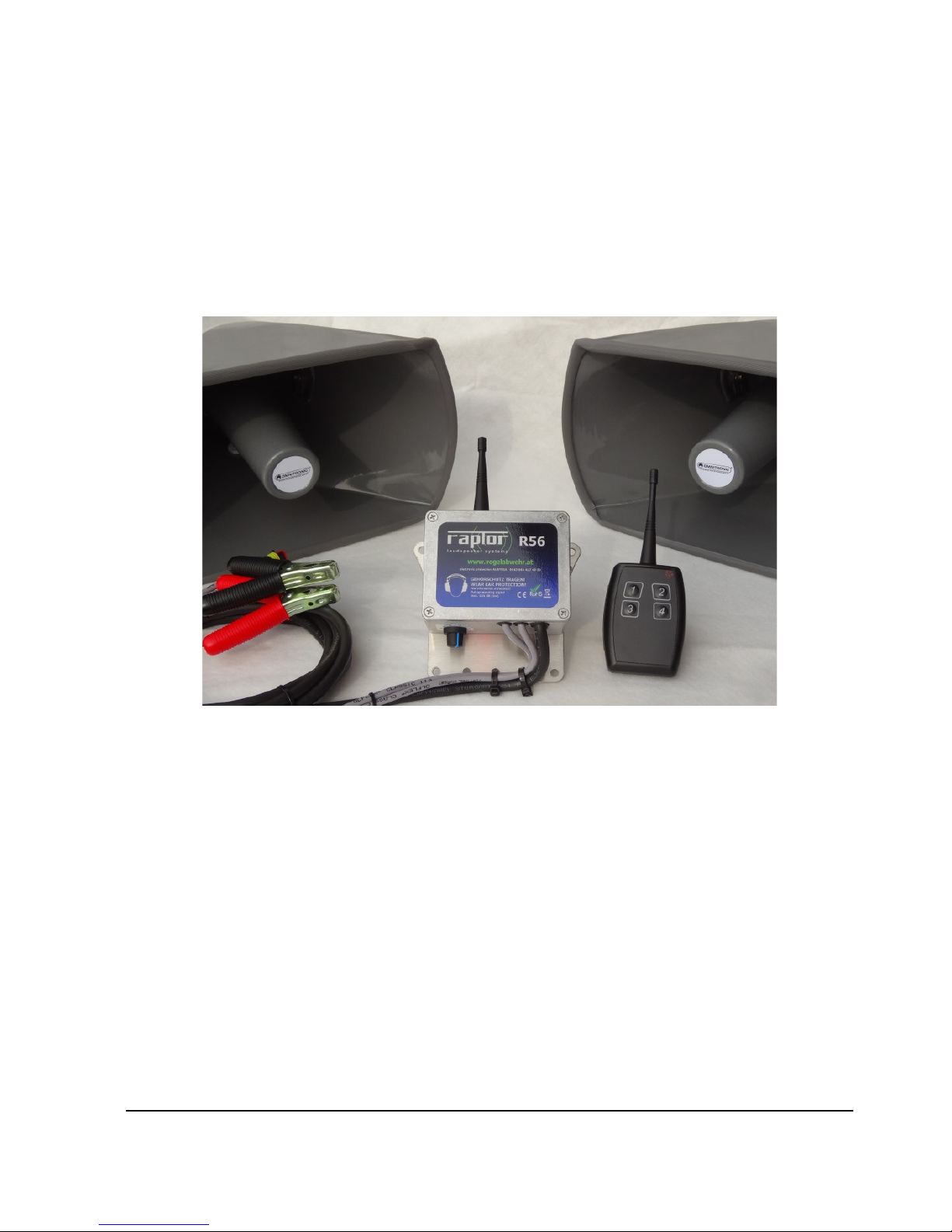
Additional Operating Manual
RAPTOR R56remote
Please carefully read the complete manual before initial operation and then keep on hand for
future reference (software 1127)
Page 2
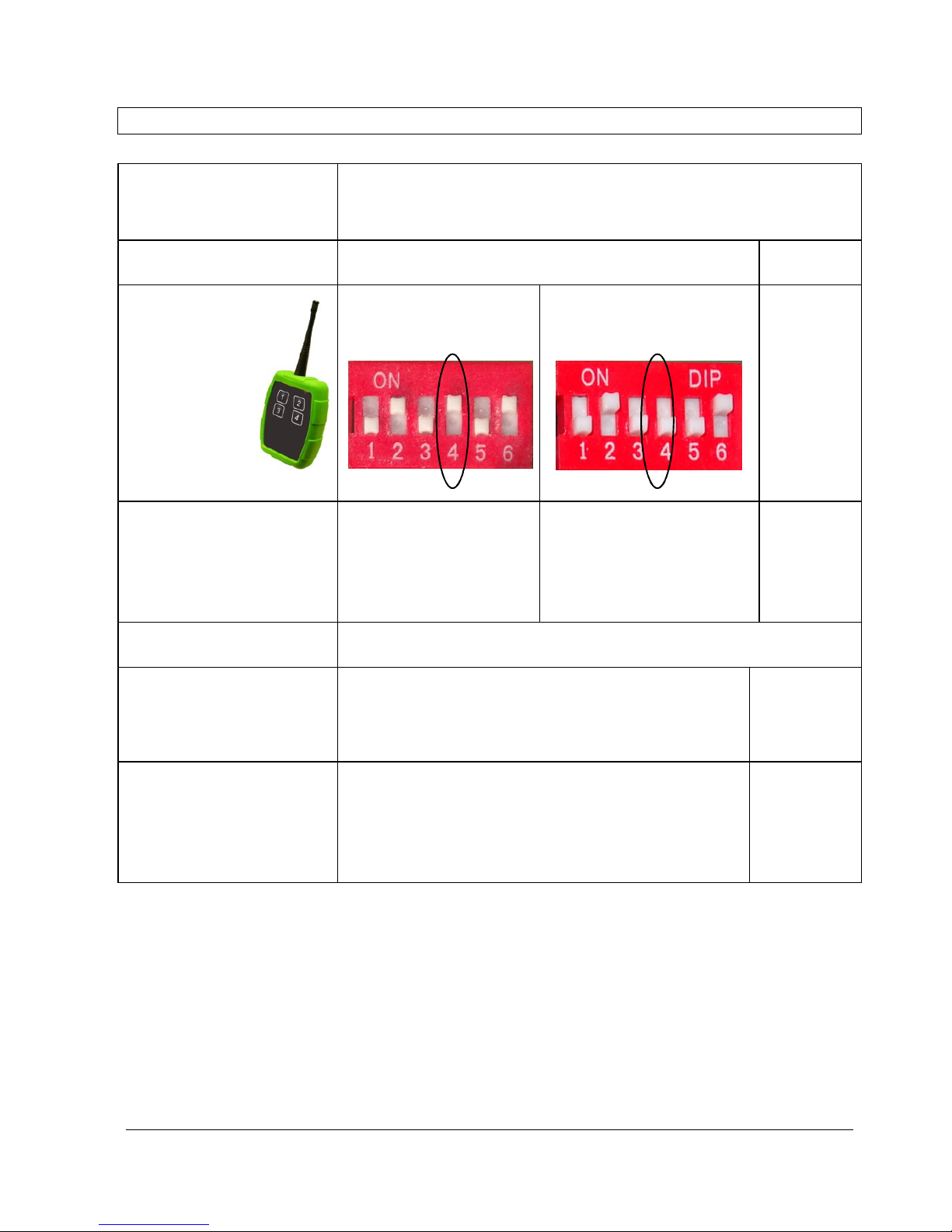
OPERATING MODES OVERVIEW
Behaviour of RAPTOR
(pre-set switches inside the housing)
During daylight At night
REMOTE ONLY
Switch4 UP
SLOW AUTOMATIC
switch 4 DOWN
No keypress
no Sounds
Automatic sounds from
morning to sunset,
Intervall 3x longer
(=„slow“) than defined by
the dial
no Sounds
1x short keypress 1x sound
Multiple short keypresses RAPTOR remembers the number of key-presses
and plays this number of sounds with a short
interval
Up to 3x
sounds
Long keypress (2seconds)
FAST AUTOMATIC mode is activated for appr. 2h.
The RAPTOR will confirm with a double-beep sound.
Every additional long keypress will add +2h
additionally. The Interval between the sounds is as
defined by the dial
1x Sound
Page 3
- 3 -
FOREWARD
The RAPTOR R56remote system offers important advantages over devices that only have
automatic activation:
Lower noise burden due to reduced activation frequency
Increased effectiveness if activated at the correct moment
Additionally, this model includes various automatic modes that can provide the user with all of the
advantages of a fully automated system.
When using multiple RAPTOR remote systems, the devices can be individually activated or
activated in groups. Through encrypted radio transmission, unintended or third-party activation is
virtually impossible.
USE
The RAPTOR remote devices are intended to protect agricultural and industrial areas from
damage from excessive numbers of animals. The distance from residential areas must be
appropriately chosen so that disruptive noise does not occur. The effect on the animals depends
on many external factors. Keeping 100% of the animals away cannot be guaranteed.
SAFETY GUIDELINES
Caution, high VOLUME (up to 125dB), use appropriate hearing protection and avoid
exposure to the direct line of sound! The warnings that refer to the high volume should
be used. Follow the local rules and regulations regarding noise. Use the device only in
outdoor areas.
• Any necessary repairs should be carried out only by qualified repair shops.
• The RAPTOR should be disconnected from the power source before doing maintenance
work and making adjustments.
• The device should not be used in areas inhabited by persons or livestock.
• Do not use or turn on damaged devices.
• Only use with original accessories and original special accessories.
• The device should be used only with a completely functional 12V battery. Place this battery in
a leak-proof container with a cover to protect from rain.
• The device should not be connected to a charger.
• The playback of animal sounds can attract animals (e.g., birds of prey). In most cases, this is
advantageous. However, if this is not desired (e.g., in airports), please have the sound chip
exchanged.
Page 4

- 4 -
OPERATOR
The operator has a central role and his or her skill and diligence are important variables for the
efficiency of the system. Especially with the
REMOTE ONLY“
mode, the operator must have a
good overview of the protected area and be aware of the positions of the devices.
The choice of elevated lookout points (raised stand) is also important in this mode. These lookouts
should be of an adequate height and there should not be any trees in the area that can create
blind spots.
If the areas to protect are not completely visible from a single point, the operator must move
between the individual lookout points. With skilled use of the
“FAST AUTOMATIC“
and
“SLOW
AUTOMATIC“
mode, a satisfactory degree of defence can be achieved to meet the specific
needs of the situation.
OPERATIONAL MODES
“REMOTE ONLY” –
Fully manual operation using remote control
(Switch 4 up, see diagrams on pages three and four)
A press of the button activates a short sounds.
The operator should observe the protected area with binoculars. When the birds approach
individual or multiple devices can be activated.
It is the most efficient if the system is activated while the birds are in flight.
Monitor their reaction with binoculars If the birds do not react (e.g., birds that have settled in
the area, or if the remote signal is not received) repeat the activation multiple times. If the settled
birds do not react to longer acoustic exposure, implement the necessary accompanying measures.
When operator is not present, the
“FAST AUTOMATIC
” mode can be activated (long press of
the button).
“SLOW AUTOMATIC
”– Mix of automatic and manual remote operation
(Switch 4 down, see diagrams on pages three and four)
The devices operate mainly automatically (automatic night-day operation) but with longer intervals.
This can be set directly on the RAPTOR and is three times longer than
“FAST AUTOMATIC“
.
The operator is only present during periods of increased bird concentration or potential damage
and can activate the sounds at any time during the pauses. Additionally, the operator can switch to
“FAST AUTOMATIC”
with a long press of the button.
Starting time settings for
“SLOW AUTOMATIC“
Use switches 5 and 6 to set the morning starting time.
Sta rt a t
su n r ise
Sta rt a p p r.
7:0 0
S ta rt a pp r .
6:1 5
Sta rt a p p r.
7:4 5
End time always at sunset
Page 5

- 5 -
1min
4
8min
3
2
5
15
30min
8
3min
“FAST AUTOMATIC”
- Remotely activated automatic operation
This automatic mode can be activated by a long press of the button on the remote (at least 1 sec.).
The device (or group of devices) then generates a loud double-beep to confirm that they are
operating in fast automatic mode.
Therefore, when activating the system, the operator should be in hearing distance of the RAPTOR
so as to be able to hear this acoustic feedback.
This mode is de-activated with:
a) a short press of the button or
b) at sunset
With fast automatic mode, situations of high potential damage by birds can be controlled even
when the operator is away.
The interval for
“FAST AUTOMATIC”
can be set using the dial on the underside of the RAPTOR.
The setting range depends on Switch 1 in the row of switches.
Adjustment dial range: 1 to 8 minutes Adjustment dial range: 3 to 30 minutes
(Note: With the
“SLOW AUTOMATIC”
mode the each interval is three times longer, i.e., up to 90
minutes.)
Page 6

- 6 -
Application examples for the different operational modes
Example 1: Industry or small airport
Industry often requires year-round bird control. This should be needs-based to avoid
acclimatisation. Furthermore, nearby residential areas should be taken into consideration.
RAPTOR remote devices are installed in selected locations and multiple remotes given to workers
in the outdoor areas. These workers can continue doing their normal tasks as well.
The devices are set to “
REMOTE ONLY
”. When a worker sees birds coming closer to the area he
or she can activate the device before the birds land so that they fly away again. This is the most
efficient timing. With repeated activation with correct timing the birds are conditioned to avoid the
area.
In migratory periods (spring, fall) there are often days during which entire flocks of birds only
partially react to individual activations of the devices. In these cases, a worker activates by remote
the “
FAST AUTOMATIC
” mode in order to allow him or her to return to his or her normal tasks.
After a few hours the flock has disappeared and the “
FAST AUTOMATIC
” mode can again be
deactivated.
In times where the industrial area does not have workers (e.g., holidays) the devices are set to
“SLOW
AUTOMATIC
” mode.
Example 2: Vineyards
A small winery wants a needs-based bird-control system for the months of July-October, but does
not want to engage a full-time worker for the task. The RAPTOR remote devices are set to
“SLOW AUTOMATIC”
mode with an interval of 9 minutes. This interval is usually sufficient. In
the month of September, the bird concentration is especially high. During this time, an employee
oversees the vineyards 1-2x per day. When birds are highly concentrated, the employee activates
the system remotely (e.g., from his car) to the 3x faster automatic mode “
FAST AUTOMATIC
”.
On a few days of the season, especially in the morning and evening hours large flocks of starlings
come through. In these critical periods an employee is positioned on an elevated lookout and can
use the remote to activate the system at very specific times and efficiently prevent the starlings
from settling in the vineyards.
Example 3: Wine-growing region with large vineyards
A field keeper watches over an area A in a noise-sensitive area. The RAPTOR remote devices are
set to “
REMOTE ONLY
”, the speakers are situated to point away from the residential areas. Each
device is programmed with its own address. When birds approach the operator activates one or
more devices and repeats the activation until the birds fly away.
If the field keeper must leave his post, the remote can be used to change the setting to “
FAST
AUTOMATIC
” mode. When the operator returns, he can deactivate the automatic mode with a
short press of the button.
The same operator has other areas to watch over that he cannot see from a single location. He
must constantly move between the areas
Area B is in a less noise-sensitive area. These devices are set in the “SLOW
AUTOMATIC
“”
mode with an interval of, for example, 9 min. All the devices in Area B have the same address
(=group), which means that all B devices are activated at the same time.
If the operator is in area B and sees a large flock of birds, he can activate the sounds with a short
press of the button at any time during the pauses.
If the operator sees that the pressure caused by the birds has increased, he can use the remote to
switch to “
FAST AUTOMATIC
” mode. This is three times faster. He can also easily set the
interval or activate the devices during the pauses using the remote.
Page 7
- 7 -
SETTLED BIRDS
Birds that have been settled in the area for a longer amount of time can be initially difficult to repel.
For one, the birds might barely react to the RAPTOR’s sounds since the birds are in a place that
they had determined to be safe. In this case, consistent and periodic use of the sounds is
recommended (e.g., every two minutes) until the birds leave.
Furthermore, additional measures are very efficient at the beginning. These should create a real
threat for the birds (e.g., shooting – if allowed and possible) and be followed by activation of the
devices (conditioning). Accompanying measures are especially important with birds that have
already nested and can be ended after a set time period.
If the unwanted birds are not familiar with the protected area (e.g., migrating birds),
additional measures are generally not required. However, additional measures can be
implemented to increase the effectiveness of the system.
SETTING UP THE ADDRESSES OF THE SENDERS AND RECEIVERS
The address settings are already pre-configured in the factory. Changes can be made if
necessary. The system offers many possibilities to adjust to certain specific needs. Once the
system is set up the operation is very simple.
Learning receiver to transmitter:
In principle every Button of an individual Transmitter transmits an unique code. The receiver has to
“learn” this code.
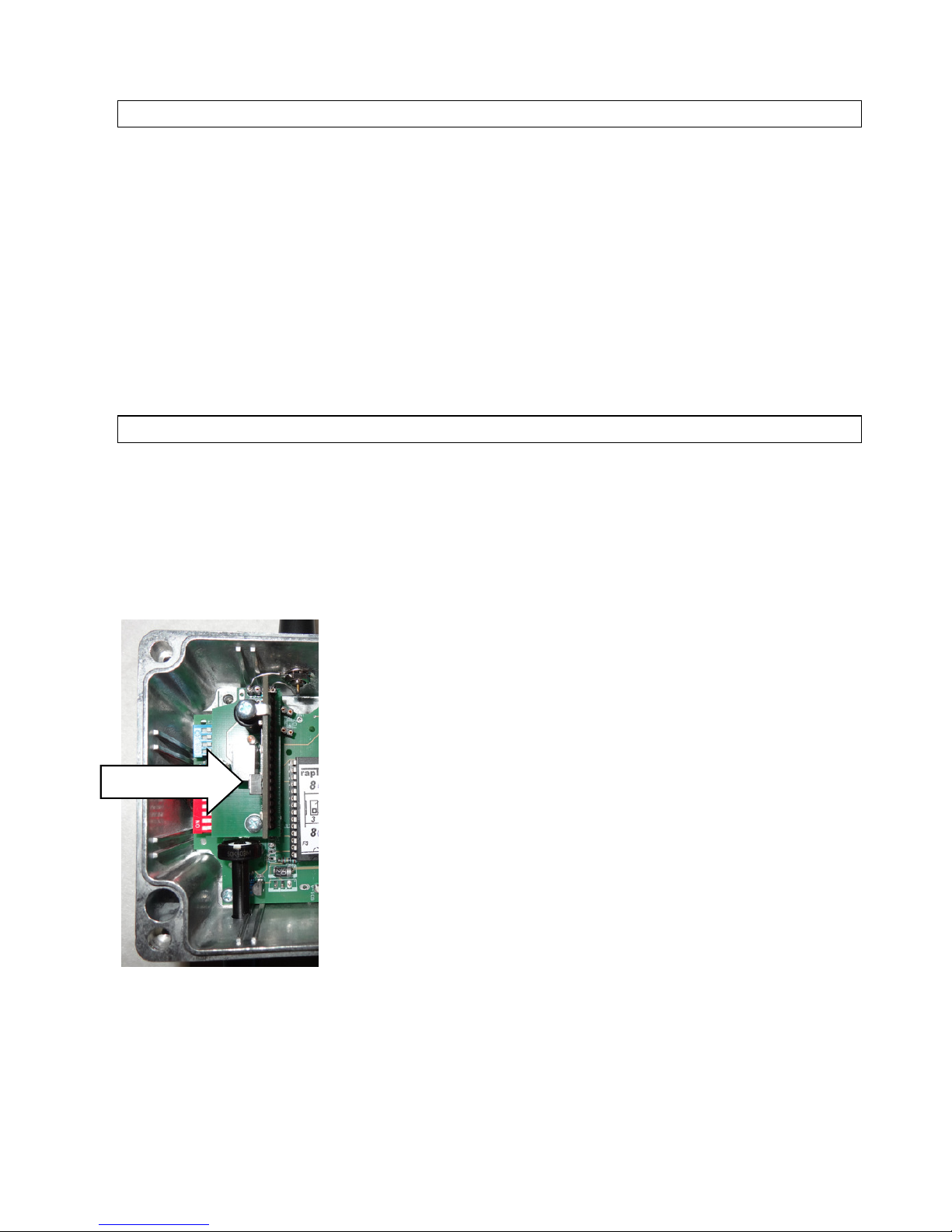
- Open the housing
- Set loudness to minimum or wear ear protection
- press briefly the button on the receiver module and at the very
same moment the Button on the Transmitter you want to have
corresponding
- Finished, the receiver has learned the transmitter buttons code
- (increase loudness again and close the housing)
Multiple RAPTORs can be learned to the same button of the
transmitter and will then activate as a group. It is also possible to
learn multiple remotes to the same receiver. Every receiver can
store up to 70 codes
Deleting the receivers code memory:
Press the button on the receiver more than 3 seconds.
Page 8
- 8 -
RADIO CONTACT
Operating frequency: 869,5 MHz. Transmission range under optimum conditions (visual contact,
no HF noise, no electro-magnetic fields):
For individual remote activation: max. 1000-2000m
For activating the “FAST AUTOMATIC” (2sec keypress) hearing distance is
recommended
Hold the sender antenna completely upright.
An interruption of the visual contact due to trees, etc., reduces the range by a small amount.
However, if the direct line between the sender and receiver is interrupted by a building or hill, etc.,
a much decreased range must be expected. Strong electro-magnetic fields, other senders set at a
869Mhz frequency, shielded spaces (e.g., remote control from a car) can also decrease the range.
Please note that the radio frequency used is in a range that is freely useable in most countries.
This simplifies the operation, but it also means that other radio senders can use this frequency and
could sporadically reduce the radio -range of the system. In practice, however, the operator would
observe the reaction of the birds anyway and if they would not react, he or she would just activate
the system again.
The radio signal is encrypted. This means that third-party activation is very unlikely.
MAINTENANCE
In important application areas: Daily check of the functioning of the radio activation.
Please check regularly...
... that the antenna is in the correct position and that it is free of ice and snow in the winter.
... the battery of the handheld senders
... that the signal range meets the requirements of the situation.
A detailed yearly General Check of the device is recommended.
Ing. Herbert Siegmund
electronic protection
Hausgärten 35-37
7141 Podersdorf
July 2016
 Loading...