

Page 1

RANGEMASTER REFRIGERATED WINE STORAGE UNIT
Installation
Operation
and
Maintenance
Instructions
Refrigerated
Wine Storage Unit with
Sentry System™ Refrigeration Monitor
RWS38
RWS60DX
RDZ60
Note: This appliance is intended to be used exclusively for
the storage of wine.
Page 2

TABLE OF CONTENTS
Unpacking your wine storage unit..........................
Removing the packaging......................
Warranty Registration .....................
Installing your wine storage unit................
Selecting the location..........................
Cabinet Clearances ...........................................
Leveling legs ......................................
Electrical Connection............................
Using Your Sentry System™ Control RWS38 &
RWS60DX ..................................................................5
Using Your Sentry System™ Control RDZ60
Dimensions for RWS38 ..................................................7
Recommended Rough in Opening Dimensions
for RWS38 ........................................................
Dimensions for RWS60DX...........................................
Recommended Rough in Opening Dimensions
for RWS60DX ..................................................
Dimensions for RDZ60................................................... 9
Recommended Rough in Opening Dimensions
for RDZ60 ..................................................................9
Features for model RWS38 ...................
Features for model RWS60DX................
Features for model RDZ60................
Care and Cleaning .................................
Cleaning condenser air flow.........................
Cleaning the cabinet...................................................13
Cleaning the interior......................................
Cleaning the wine shelves.............................
Cleaning the door gasket..............................
Removing the wine shelves............................
Replacing the light tubes............................................
Aligning the door..............................
Energy Saving Tips ........................................................16
Troubleshooting Guide.........................
Obtaining Service ..............................
Guarantee .........................................
......................
.............
....................
......................
.....................
...........
.....................
..................
..................
..................
................
................
....................
.........................
........................
.........
.2
................2
..3
..3
........
.3
...3
............4
........
.7
...
.8
........
...8
.......10
.......11
............12
....
..13
............
...........
............
............
.............
...13
...13
..13
..13
.13
.14
...........15
......17
..18
...18
2
6
1
NOTE
This appliance is not intended for use by persons (including
children) with reduced physical, sensory, or mental capabilities, or lack of experience and knowledge, unless they have
been given supervision or instruction concerning use of the
appliance by a person responsible for their safety.
This product contains the following fluorinated greenhouse gases.
• HFC245fa - GWP = 950
• HFC134a - GWP = 1300
Page 3
UNPACKING YOUR WINE STORAGE UNIT
Important Safety Instructions
Warnings and safety instructions appearing in this guide
are not meant to cover all possible conditions and situations
that may occur. Common sense, caution, and care must
be exercised when installing, maintaining, or operating this
appliance.
Recognize Safety Symbols,
Words, and Labels.
CAUTION-Hazards or unsafe practices which could
result in personal injury or property or product damage.
WARNING-Hazards or unsafe practices which could
result in personal injury.
NOTE
NOTE-Important information to make a problem free
installation.
Note to Customer
This merchandise was carefully packed and thoroughly
inspected before leaving our plant. Responsibility for its safe
delivery was assumed by the retailer upon acceptance of
the shipment. Claims for loss or damage sustained in transit
must be made to the retailer.
DO NOT RETURN DAMAGED MERCHANDISE TO THE
MANUFACTURER - FILE THE CLAIM WITH THE RETAILER.
If the unit was shipped or has been laying on its back for
any period of time allow the wine storage unit to sit upright
for a period of at least 24 hours before plugging in. This
will assure oil returns to the compressor. Plugging the wine
storage unit in immediately may cause damage to internal
parts.
Warranty Registration
It is important to register your product as soon as possible
after taking delivery of your wine storage unit. You can register online at www.rangemaster.co.uk.
The following information will be required when registering
your unit.
Model Number
Serial Number
Date of Purchase
Supplier’s name and address
Installer’s name and address
The model number and serial number can be found on the
data badge which is located inside the wine storage unit on
the left side toward the top of the cavity.
Remove Packaging
Your wine storage unit has been packed for shipment with
all parts that could be damaged by movement securely fastened. Cut the banding material at the bottom of the carton,
unfold the cartoning at the bottom and remove the carton
from the appliance. Remove the plastic bag, styrofoam
corner posts, and any tape holding the door closed and
internal components in place.
The owners manual is shipped inside the wine storage unit
in a plastic bag.
Important
Keep your carton packaging until your wine storage unit has
been thoroughly inspected and found to be in good condition. If there is damage, the packaging will be needed as
proof of damage in transit. Afterwards please dispose of all
items responsibly in particular the plastic bags which can be
a suffocation hazard.
Help Prevent Tragedies
Child entrapment and suffocation are not problems of the
past. Junked or abandoned refrigerators are still dangerous.
Even if they sit out for “just a few days”.
If you are getting rid of your old refrigerator, please follow
the instructions below to help prevent accidents.
Before you throw away your old refrigerator or freezer:
• Take off the doors or remove the drawers.
• Leave the shelves in place so children may not easily
climb inside.
2
Page 4
INSTALLING YOUR WINE STORAGE UNIT
Select Location
The proper location will ensure peak performance of your
appliance. We recommend a location where the unit will
be out of direct sunlight and away from heat sources. To
assure your product performs to specifications the recommended installation location temperature range is from
18 to 27°C for indoor built in units,18 to 32°C for indoor
freestanding units.
Cabinet Clearance
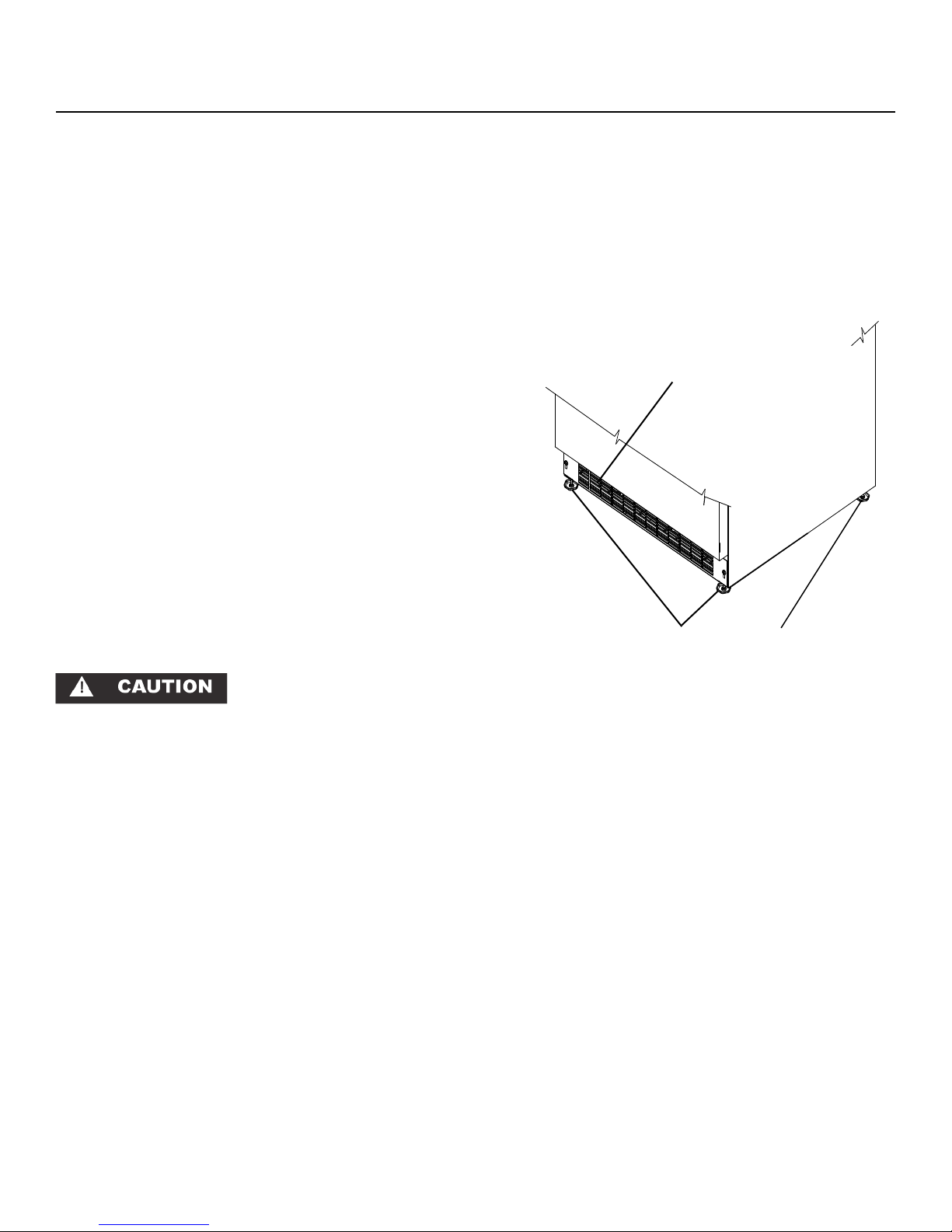
Ventilation is required from the bottom front section of the
unit. Keep this area open and clear of any obstructions.
Adjacent cabinets and counter top can be installed around
the unit as long as the grille and door access remain unobstructed.
Leveling Legs
Adjustable legs at the front and rear corners of the unit
should be set so the unit is firmly positioned on the floor and
level from side to side and front to back. Turn leveling legs
clockwise to raise unit, counterclockwise to lower it. (See
Figure 1).
Front Grille,
keep this
area open.
Front Grille
Do not obstruct the front grille. The openings within the front
grille provide air to flow into and exit from the refrigerator
condenser. For this reason it is important this area to not be
obstructed and be kept clean. Rangemaster does not recommend the use of custom made grilles as air flow may be
restricted because of inadequate openings. (See Figure 1).
Figure 1
Leveling Legs
3
Page 5
ELECTRICAL CONNECTION
Electrical Connection
Use nominal 230 VAC, 50 Hz only.
Do not use an extension cord with this appliance.
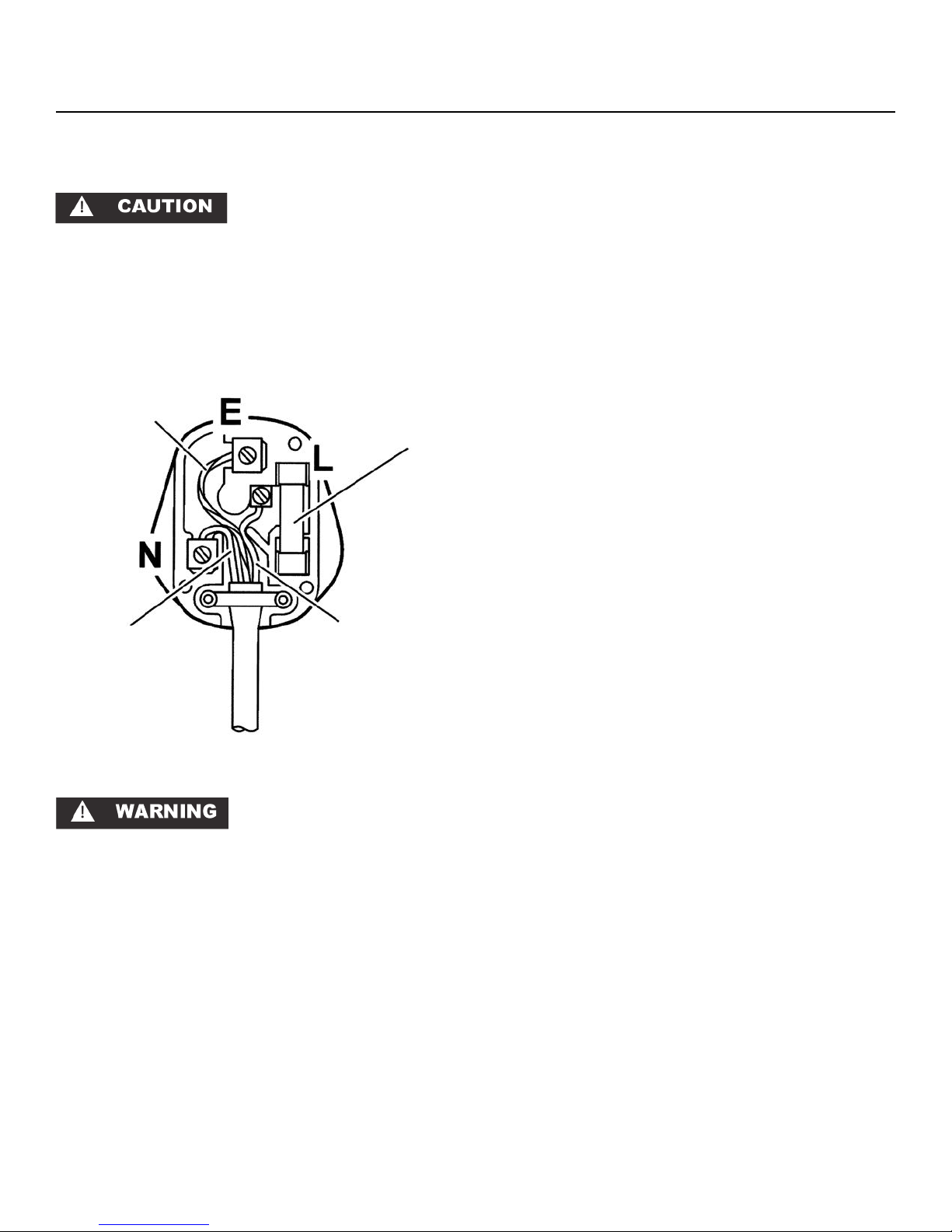
Green/Yellow
(earth)
Blue (neutral)
Fuse (13A)
Brown (live)
13A must be used and fitted with a 13A fuse “ASTA” approved to BS 1363.
If you replace the fuse, the cover must be refitted. If the
cover is lost, the plug must not be used until a replacement
has been obtained from your supplier. The color of the fuse
cover is that of the insert in the base of the fuse recess or
elsewhere on the plug. Always state this color when ordering a replacement cover.
If your appliance has a moulded plug, you do NOT have to
do the following assembly as shown in Figure 2. Appliances
with moulded plugs are ready to use as is.
IMPORTANT: The wires should be connected to the terminals of the plug as follows:
• Earth to the terminal marked E or coloured Green or
Green/Yellow.
• Neutral to the terminal marked N or coloured Blue.
• Live to the terminal marked L or coloured Brown.
When wiring the plug, ensure that all strands of wire are
retained in each terminal. The flexible main cable, plug and
socket must not be exposed to flue products or be allowed
to come in contact with a hot surface. The cable must not
be trapped or pulled taut when the appliance is pushed into
position.
THIS UNIT SHOULD NOT, UNDER ANY CIRCUMSTANCES,
BE UNEARTHED.
Figure 2
THIS APPLIANCE MUST BE EARTHED. All external wiring
must comply with the IEE Regulations for the Electrical Equipment of Buildings. Connections to the electrical supply can
be made with either a plug and socket or be permanently
wired via a double-pole switch.
The appliance is supplied with a 250VAC PVC (85 degrees
C) core cable (0.5mm x 2 metres long). Any replacement
cable fitted must follow this specification. The unit may be
supplied with either a moulded or rewirable plug. Should
the plug not fit the socket at the installation site, it should be
removed and replaced with the correct type of plug.
If a moulded plug is fitted which is not suitable, it must be
removed and disposed of. To avoid the risk of electrocution, a plug must not be left where a child may plug it into a
supply socket. It must not be used for any other appliance.
A three pin plug to BS 1363 with a capacity of not less than
4
Page 6
USING YOUR Sentry System™ CONTROL, MODELS RWS38 & RWS60DX
LED
ON
OFF
Press and Hold
13
C
Set
Warmer
Colder
Start Your Appliance
Please observe the following options when starting your appliance during initial plug-in.
1) If Sentry System™ LED is flashing amber (see Figure 3)
the appliance is on. Simply press and release “ON/
OFF” button to stop the flashing LED.
2) If the interior light is working but Sentry System™ display
is blank push and hold “ON/OFF” button for five (5)
seconds to start the appliance.
Once loaded with wine bottles, allow at least 24 hours for
the unit to stabilize before making any adjustments to the
initial temperature setting and minimize the door openings
during this time period.
Set Your Temperature Mode
This product can display either Fahrenheit or Celsius. To do
so, press the “°F/C” button on the display panel.
Viewing and Changing Current Temperature Settings
The temperature set point is initially set in the factory at 13
degrees C. The available temperature range of the unit is
from 4 to 18 °C. To view the set point push the “SET” button
once and the word “SET” and the current set-point will be
displayed. While “SET” icon is displayed push the “WARMER” or “COLDER” button for your desired temperature. Push
the “SET” key to exit set-point mode and activate your new
temperature settings, or after 10 seconds the new settings
will automatically be activated.
As with any refrigeration product, there is a slight temperature variance at different locations within the cabinet.
Interior Light and Switch
The interior light makes it easy to view your wine labels
and enhances the display of your collection. Pressing the
“LIGHT” key toggles between 2 modes of operation for
the internal lights: functional (default) mode and showcase
mode. If you are in functional (default) mode, the lights
will turn on only if the door is open. If you are in showcase
mode, the lights will be on whether or not the door is open.
Warning Alarms
Your wine storage unit has been fitted with a Sentry System™
refrigeration monitor. This monitor will let you know if your
storage unit is not functioning properly for optimum wine
storage and will alert you in the unlikely event there is an
unstable condition.
°F/C
Light
Sentry System™
Power Failure - Flashing Amber
High/Low Temp - Red
Press ON/OFF - Reset
Alarms OFF - Steady Amber
Figure 3
Door Ajar Alarm
If the door has been left open for over five (5) minutes, the
alarm will sound and the LED will flash green. This will stop
as soon as the door is closed.
High and Low Temperature
If your unit reaches temperatures outside normal operating
temperatures for your set point for more than one (1) hour,
an alarm will sound and the LED will flash red. This will
warn you that your wines have seen temperatures that may
not be conducive for long-term storage.
Power Failure
If your unit experiences a power failure, the LED will flash
amber until the alarm is reset.
Reset Alarms
Press the “ON/OFF” button for approximately one (1) second. This will reset all audible and display alarms.
Sabbath Mode
Your wine storage unit is equipped with a Sabbath Mode
feature. By activating this mode, you will be disabling all
displays, audible alarms, and lights.
To activate Sabbath Mode, press and hold the “SET” button
while pressing the “
°F/C” button four (4) times within seven
(7) seconds. Sabbath Mode will automatically deactivate
after 72 hours. If a power outage occurs during Sabbath
mode, unit will automatically re-enter Sabbath mode from
the beginning of the 72 hour period. You may exit Sabbath
mode at any time by repeating the enable process.
Advanced Sentry System™ features:
Sentry System™ continually monitors critical refrigeration
system components for proper operation. If component parameters exceed normal operation specifications, the display
will automatically flash the respective error code as follows:
E1-Compressor fault
E2-Condenser fan motor fault
E3-Evaporator thermistor sensor fault
E4-Display thermistor sensor fault
Please call a qualified service technician if any of these
codes are displayed.
5
Page 7

USING YOUR Sentry System™ CONTROL MODEL RDZ60
Hi / Low Temp Upper
Upper
ON
OFF
Press and Hold
Start Your Appliance
Please observe the following options when starting your appliance during initial plug-in.
1) If Sentry System™ LED is flashing amber (see Figure 4)
the appliance is on. Simply press and release “ON/
OFF” button to stop the flashing LED.
2) If the interior light is working but Sentry System™ display
is blank push and hold the “ON/OFF” button for five (5)
seconds to start your appliance.
Once loaded with wine bottles, allow at least 24 hours for
the unit to stabilize before making any adjustments to the
initial temperature setting and minimize the door openings
during this time period.
Set Your Temperature Mode
This product can display either Fahrenheit or Celsius. To do
so, press the “°F/C” key on the display panel.
Control Range
The unit is equipped with two individual refrigeration compartments each one independent of the other. The available
temperature range of each compartment is from 4 to 18 °C
(40 to 65°F). The control range allows flexibility of temperature preferences and provides the ideal wine storing and/or
serving temperatures. Optimum efficiencies regarding performance and energy consumption are achieved when the
lower compartment is chosen as the coldest compartment of
the two compartments.
Viewing and Changing Current Temperature Settings
The temperature set point is initially set in the factory at
13° C. To view the set point push the “SET” button once and
the word “SET” and the current set-point will be displayed
in the upper compartment. Push the “SET” key a second
time and the word “SET” and the current set-point will be
displayed in the lower compartment. While the “SET” icon
is displayed for a given chamber, push the “WARMER” or
“COLDER” key for your desired temperature. Push the
“SET” key to exit set-point mode and activate your new
temperature settings, or after 10 seconds the new settings
will automatically be activated. As with any refrigeration
product, there is a slight temperature variance at different
locations within the cabinet.
Interior Light and Switch
The interior light makes it easy to view your wine labels
and enhances the display of your collection. Pressing the
“LIGHT” key toggles between 2 modes of operation for
the internal lights: functional (default) mode and showcase
mode. If you are in functional (default) mode, the lights
will turn on only if the door is open. If you are in showcase
Lower
<SET>
SET
SET
Warmer
Colder
˚F/C
Light
Sentry System ™
ON OFF Door Ajar
Power Failure
Hi / Low Temp Lower
Press ON/OFF to Reset
Figure 4
mode, the lights will be on whether or not the door is open.
When in showcase mode, a light indicator is illuminated on
the display.
Warning Alarms
Your dual zone wine storage unit has been fitted with a
Sentry System™ refrigeration monitor. This monitor will let
you know that your storage unit is functioning properly for
optimum wine storage and will alert you in the unlikely event
there is an unstable condition.
Door Ajar Alarm
If the door has been left open for over five (5) minutes, the
alarm will sound and the message center will display an
amber “DOOR AJAR” message.
High and Low Temperature
If your unit reaches temperatures outside normal operating
temperatures for your set point for one (1) hour or greater,
an alarm will sound and the message center will display
either a red “HI/LOW TEMP UPPER” or a red “HI/LOW TEMP
LOWER” message. This will warn you that your wines have
seen temperatures that are out of range.
Power Failure
If your unit experiences a power failure, the message center
will display an amber “POWER FAILURE” message.
Reset Alarms
Press the “ON/OFF” button for approximately one second.
This will reset all audible and display alarms.
Sabbath Mode
By enabling this mode, you will be disabling the display,
Sentry System™ message center, audible alarms, and interior lights. To enable Sabbath Mode, press and hold the
“SET” key while pressing the “°F/C” key 4 times within 7 seconds. To disable Sabbath Mode, repeat the enable process.
The Sabbath Mode will automatically disable after 72 hours.
A power outage will not disable Sabbath Mode.
Advanced Sentry System™ features:
Sentry System™ continually monitors critical refrigeration
system components for proper operation. If component parameters exceed normal operation specifications, the display
will automatically flash the respective error code as follows:
E1-Compressor fault
E2-Condenser fan motor fault
E3-Upper compartment sensor fault
E4-Lower compartment sensor fault
Please call a qualified service technician if any of these
codes are displayed.
6
Page 8

DIMENSIONS FOR RWS38
375mm
419mm
857 to 883mm
927mm
627mm
578mm
INSTALLER: Please leave these instructions with the user.
DATA BADGE LOCATION: Front left-hand side of the
refrigerator compartment.
COUNTRY OF DESTINATION: GB/IE
Ratings
Electrical-voltage/frequency 220-240 V / 50Hz
Energy efficiency class
A (more efficient) to G (less efficient)
Climate class (SN=10-32°C,
N=16-32°C, ST=18-38°C, T=18-43°C
Temperature range
on a scale of
A
T
(from > to) 4.4 to 18.3°C
Gross capacity 85 litres
Net capacity 24 bottles
Energy consumption/year 121 kWh/yr
Energy consumption (EN153) 0.33 kWh/24 hrs
Max noise level 48 db(A)
76 to 102mm
538mm
ROUGH IN OPENING DIMENSIONS, FOR RWS38
876mm
*610mm
Electrical Requirements: 230 volts, 1.7 amps
running maximum. A three pin earthed receptacle is required.
Power outlet can be located in the back wall behind unit. Add 19mm to depth for thickness of
plug, or recess outlet 19mm into the wall. Power
outlet can also be installed in adjacent cabinetry
with a cutout for routing of power cord. Follow
all local building codes when installing electrical
and unit.
Product weight = 54 kg
381mm
7
* Depth dimension may vary depending on
each individual installation.
Page 9

DIMENSIONS FOR RWS60DX
607mm
651mm
857 to 883mm
76 to 102mm
1179mm
648mm
599mm
559mm
INSTALLER: Please leave these instructions with the user.
DATA BADGE LOCATION: Front left-hand side of the
refrigerator compartment.
COUNTRY OF DESTINATION: GB/IE
Ratings
Electrical-voltage/frequency 220-240 V / 50Hz
Energy efficiency class
A (more efficient) to G (less efficient)
Climate class (SN=10-32°C,
N=16-32°C, ST=18-38°C, T=18-43°C
Temperature range
on a scale of
B
T
(from > to) 4.4 to 18.3°C
Gross capacity 170 litres
Net capacity 54 bottles
Energy consumption/year 206 kWh/yr
Energy consumption (EN153) 0.56 kWh/24 hrs
Max noise level 50 db(A)
876mm
*610mm
610mm
ROUGH IN OPENING DIMENSIONS FOR RWS60DX
Electrical Requirements: 230 volts, 1.7 amps running maximum. A three pin earthed receptacle is
required.
Power outlet can be located in the back wall
behind unit. Add 19mm to depth for thickness of
plug, or recess outlet 19mm into the wall. Power
outlet can also be installed in adjacent cabinetry
with a cutout for routing of power cord. Follow
all local building codes when installing electrical
and unit.
Product weight =75 kg
* Depth dimension may vary depending on
each individual installation.
8
Page 10

DIMENSIONS FOR RDZ60
607mm
651mm
76 to 102mm
861 to 886mm
1168mm
636mm
547mm
INSTALLER: Please leave these instructions with the user.
DATA BADGE LOCATION: Front left-hand side of the
refrigerator compartment.
COUNTRY OF DESTINATION: GB/IE
Ratings
Electrical-voltage/frequency 220-240 V / 50Hz
Energy efficiency class on a scale of
A (more efficient) to G (less efficient)
Climate class
N=16-32°C, ST=18-38°C, T=18-43°C
Temperature range
(SN=10-32°C,
(from > to) 4.4 to 18.3°C
B
ST
Gross capacity 154 litres
Net capacity 44 bottles
Energy consumption/year 164 kWh/yr
Energy consumption (EN153) 0.45 kWh/24 hrs
Max noise level 49 db(A)
588mm
ROUGH IN OPENING DIMENSIONS FOR RDZ60
867mm
minimum
*610mm
Electrical Requirements: 230 volts, 1.7 amps running maximum. A three pin earthed receptacle is
required.
Power outlet can be located in the back wall
behind unit. Add 19mm to depth for thickness of
plug, or recess outlet 19mm into the wall. Power
outlet can also be installed in adjacent cabinetry
with a cutout for routing of power cord. Follow all
local building codes when installing electrical and
unit.
Product weight =62 kg
610mm
9
* Depth dimension may vary depending on
each individual installation.
Page 11

FEATURES FOR MODEL RWS38
Insert Wine Bottles
The six (6) roll-out shelves each hold four (4) bottles. See
Figure 5 for typical wine bottle spacing. Tall bottles should
not be loaded on the bottom rack because they may prevent
the door from closing.
Loading Tips and Suggestions
Position white wines on the middle or lower racks and red
wines on the upper racks (see Figure 6).
Keep wines that you plan to use for everyday drinking and
entertaining on the front half of the racks where labels are
completely visible. Place wines for aging or longer term
storing in the rear.
Roll-out Racks
The six (6) roll-out wine racks may be pulled out approximately 355 millimeters to facilitate adding or removing
bottles. Do NOT lean on or press down heavily on the wine
shelves. Doing so may damage the shelves and the wine
bottles stored on them. Pull the wine racks out gently and
carefully to minimize unsettling your wine collection. AVOID
pulling out more than one rack at any time to maintain
stability.
Front Bottles (Necks Facing Rear)
Rear Bottles (Necks Facing Front)
Figure 5
Single Bottle Racks
Since bottles are not stacked on top of each other, you can
easily view and access your inventory without disturbing
other bottles (see Figure 7).
Figure 6
Figure 7
10
Page 12

FEATURES FOR MODEL RWS60DX
Insert Wine Bottles
The six (6) roll-out shelves each hold eight (8) bottles. See
Figure 8 for typical wine bottle spacing. Tall bottles should
not be loaded on the bottom rack because they may prevent
the door from closing.
Loading Tips and Suggestions
Position white wines on the middle or lower racks and red
wines on the upper racks (see Figure 9).
Keep wines that you plan to use for everyday drinking and
entertaining on the front half of the racks where labels are
completely visible. Place wines for aging or longer term
storing in the rear.
Front Bottles (Necks Facing Rear)
Rear Bottles (Necks Facing Front)
Roll-out Racks
The six (6) roll-out wine racks may be pulled out approximately 355 millimeters to facilitate adding or removing
bottles. Do NOT lean on or press down heavily on the wine
shelves. Doing so may damage the shelves and the wine
bottles stored on them. Pull the wine racks out gently and
carefully to minimize unsettling your wine collection. AVOID
pulling out more than one rack at any time to maintain
stability.
Single Bottle Racks
Since bottles are not stacked on top of each other, you can
easily view and access your inventory without disturbing
other bottles (see Figure 10).
Figure 8
Figure 9
11
Figure 10
Page 13

Independent Storage Compartments
Both compartments can be set for either temperature range,
red or white, but for a more efficient energy usage and functionality of the unit, it is better to use the top compartment
for reds (warmer) and the bottom compartment for whites
(cooler).
Insert Wine Bottles
The five (5) upper shelves each hold eight (8) bottles in a
front to back fashion. See Figures 12 and 13 for typical
wine bottle spacing. The bottom shelf holds four (4) bottles
in a side to side fashion.
Roll-out Racks
The top five (5) roll-out wine racks may be pulled out approximately 355 mm to facilitate adding or removing bottles
and the bottom shelf may be pulled out approximately 196
mm. Do NOT lean on or press down heavily on the wine
shelves. Doing so may damage the shelves and the wine
bottles stored on them. Pull the wine racks out gently and
carefully to minimize unsettling your wine collection. AVOID
pulling out more than one rack at any time to maintain
stability.
FEATURES FOR MODEL RDZ60
Front Bottles (Necks Facing Rear)
Rear Bottles (Necks Facing Front)
Figure 11
Single Bottle Racks
Since bottles are not stacked on top of each other, you can
easily view and access your inventory without disturbing
other bottles (see Figure 13).
Vibration Neutralization System
The Vibration Neutralization System (VNS) is a unique threelayer design that protects your wine from damaging vibration without sacrificing cabinet capacity.
1. The compressor is isolated from the wine storage cavity,
virtually eliminating the transfer of vibration.
2. Vibration isolating mounts on the compressor offer a
second layer of protection from vibration transfer.
3. A vibration dampening mat inserted onto each shelf
absorbs any stray vibrations.
Figure 12
Figure 13
12
Page 14

CARE AND CLEANING
Condenser
The condenser underneath the cabinet does not require
frequent cleaning; however, satisfactory cooling depends on
adequate ventilation over this heat exchanger. It is recommended to annually clean the condenser by vacuuming and
brushing. To access the condenser, the unit must be pulled
out from the installation, and the lower machine compartment access cover removed.
Disconnect the power cord before removing the access
cover.
Be sure that nothing obstructs the required air flow openings
in front of the cabinet. At least once or twice a year, brush
or vacuum lint and dirt from the front grille area
(see page 3).
Cabinet
The stainless steel cabinet can be washed with either a stainless steel cleaner or a mild soap and water and thoroughly
rinsed with clear water. NEVER use abrasive scouring cleaners. Painted surfaces can be cleaned with mild soap and
water.
Interior
Wash interior compartment with mild soap and water. Do
NOT use an abrasive cleaner, solvent, polish cleaner, or
undiluted detergent.
Wine Shelves
The racks may be cleaned with mild soap and water and a
soft cloth. Do NOT use any abrasive cleaners. See below
for instructions for removing the wine shelves.
Door Gasket
The vinyl gasket may be cleaned with mild soap and water,
a bicarbonate of soda solution, or a mild scouring powder.
Figure 14
Plastic Block on
bottom front of slide
Removing the Wine Shelves.
Model RDZ60 (Dual Zone Wine Storage unit): Unload wine
from the shelf to be removed. Pull the shelf all the way out
until it stops. Lift up on the front of the shelf so the wheel on
the shelf clears the track fastened to the liner and pull the
shelf the rest of the way out.
All other models: Unload wine from the shelf to be removed.
Pull the shelf all the way out until it stops. At the front of the
drawer slide just under the shelf there is a plastic block (see
Figure 14). Push this block to the rear to release the slide.
Repeat on other side of the shelf. Lift the front of the shelf
and pull away from the slides to remove the shelf.
13
Reverse this procedure to install the shelf. Be sure to move
the plastic block to the forward position after installing the
shelf.
Page 15

CARE AND CLEANING
Light Tube Replacement
DISCONNECT THE POWER CORD BEFORE ATTEMPTING
LIGHT TUBE REPLACEMENT. Failure to do so may result in
an electrical shock that could severely injure you.
The RWS38 uses one, 6 watt light tube and the RWS60DX
and RDZ60 use two, 6 watt light tubes to illuminate the
interior of the wine storage unit. The light tube is a very reliable electrical component, but should it not function properly, please call the dealer you purchased your wine storage
unit from for a replacement light tube. Use only an original
equipment light tube from your dealer or Rangemaster.
It may be necessary to remove 1 or 2 shelves directly below
the light tube to gain access for removal. See page 13 for
instructions on removing the shelves.
Do NOT under any circumstance use a light tube that exceeds 10 watts!
two screws to secure it in place. Plug the wine storage unit
into the electrical socket. Check to see if the light tube operates properly. Your light tube’s replacement is complete.
For model RDZ60:
This product uses two, 6 watt light tubes to illuminate the
interior of the dual zone wine storage unit: one in the upper compartment and one in the lower compartment. The
upper compartment light tube is located behind the display
housing. The lower compartment light tube is located on
the underside of the divider that separates the compartments.
To replace the light tube, disconnect power to the unit. Use
a hex-head driver to remove the two hex-head screws holding the old light tube in place. Disconnect the electrical plug
from the cabinet’s electrical receptacle and discard the old
light tube. Reconnect the electrical plug of the new light
tube to the cabinet’s electrical receptacle. Make sure it is
secure and fully installed.
Using the hex-head driver and the two hex-head screws
secure the light tube in place. Plug the unit into the electrical socket. Check to see if the light tube operates properly.
Your light tube’s replacement is complete.
For Models RWS38 & RWS60DX
To replace a light tube, use a hex-head driver, remove the
two hex-head screws that hold a cover plate over the back
section of the light tube. Set the screws and cover plate
aside for reassembly later.
Using a small flat-blade screwdriver, gently lever the front
section of the light tube down to allow it to be pulled clear of
the light housing.
Disconnect the two insulated electrical connectors from the
cabinet’s electrical cable and discard the old light tube. Reconnect the electrical connector of the new light tube to the
cabinet’s electrical cable connectors. Make sure it is secure
and fully installed.
Carefully realign the light tube’s electrical terminal back into
the rear of the light enclosure channel making sure not to
crimp them. Gently insert the light tube along the length of
the light enclosure channel. Press the light tube gently into
the light enclosure channel. Only a small part of the light
tube should project below the ceiling of the wine storage
unit. DO NOT USE A HAMMER TO FIT THE LIGHT TUBE.
The light tubes are not covered by your warranty. Replacement tubes can be obtained from your dealer or from
Rangemaster.
In the Event of a Power Failure
If a power failure occurs, try to correct it as soon as possible.
Minimize the number of door openings while the power is
off so as not to adversely affect the unit’s temperature.
Disposal
When you dispose of this product, do so in a way sympathetic to the environment. For further information, contact
your local authority.
Place the light tube terminal cover plate back in the original
position on the light enclosure’s flange. Reuse the original
14
Page 16

CARE AND CLEANING
Door alignment
The door should be parallel to the sides and top of the
refrigerator. If alignment is necessary the door may be
adjusted by loosening the 2 screws which secure the hinge
adapter brackets to the door and adjusting the door side to
side. Use a 5/32” hex key for this procedure. (See Figure 15
below).
Remove the top
Hinge adapter screws loosen these to adjust door, on
the top and bottom of the
door.
hinge pin to remove the door.
7.1mm
minimum
Door must be
parallel to top
Figure 15
and sides of
refrigerator.
NOTE
NOTE: For door closer to work properly it is necessary
to maintain a minimum space of 7.1mm between door
and cabinet flange as shown. This space can be adjusted by adjusting the top and bottom hinge adapter.
15
Page 17

ENERGY SAVING TIPS
Energy Saving Tips
The following suggestions will minimize the cost of operating your refrigeration appliance.
1. Do not install your appliance next to a hot appliance,
(cooker, dishwasher, etc.). heating air duct, or other heat
sources.
2. Install product out of direct sunlight.
3. Assure the toe grille vents at front of unit beneath door
is not obstructed and kept clean to allow ventilation for
the refrigeration system to expel heat.
4. Plug your appliance into a dedicated power circuit. (Not
shared with other appliances).
5. When initially loading your new product, or whenever
large quantities of warm contents are placed within
refrigerated storage compartment, minimize door openings for the next 12 hours to allow contents to pull down
to compartment set-point temperature.
6. Maintaining a relatively full storage compartment will
require less appliance run time than an empty compartment.
7. Assure door closing is not obstructed by contents stored
in your appliance.
8. Allow hot items to reach room temperature before placing in product.
9. Minimize door openings and duration of door openings.
10. Use the warmest temperature control set-point that
meets your personal preference and provides the proper
storage for your stored contents.
11. For wine storage products:
a. When serving temperatures are not required, re turn the compartment(s) set-point to the ideal red
and white wine long term storage temperature of
13°C / 55°F.
b. For Dual-Zone product with two (2) independent
temperature controlled compartments, use the
lower compartment for the coldest storage /
serving temperature, (i.e.- red wines on top, white
wines in lower).
12. Minimize use of display lighting option on glass door
products, (light stays on with door closed).
13. When on vacation or away from home for extended pe-
riods, set the appliance to warmest acceptable tempera ture for the stored contents.
14. Set the control to the “off” position if cleaning the unit
requires the door to be open for an extended period of
time.
15) Annually clean condenser heat exchange coil located
in machine compartment underneath unit, (see “Care
and Cleaning” page 13).
16
Page 18

TROUBLESHOOTING YOUR WINE STORAGE UNIT
Before You Call for Service
If the unit appears to be malfunctioning, read through this
manual first. If the problem persists, check the troubleshooting guide below. Locate the problem in the guide and refer
to the cause and its remedy before calling for service. The
problem may be something very simple that can be solved
without a service call. Some remedies listed in the Troubleshooting Guide are very complex. Consulting or contracting
a qualified service technician may be necessary.
Electrocution Hazard - Never attempt to repair or perform
maintenance on the unit until the main electrical power has
been disconnected.
If You Do Need Service
If you do need service, contact your dealer or Rangemaster. In any correspondence, refer to the model number and
serial number of your unit which is located on the upper left
hand side of the wall liner. Retain your proof of purchase.
Please complete the appliance details below and keep them
safe for future reference. This information will enable us to
accurately identify your particular appliance and help us to
help you. Filling this in now will save you time and inconvenience if you later have a problem with your unit.
For Your Records
Date of purchase
Dealer’s Name
Dealer’s Address
Dealer’s Town
Dealer’s County
Dealer’s Post Code
Appliance Serial Number
Model Number
Problem Possible Cause Remedy
Unit not cold enough. • Control set too warm.
• Adjust temperature colder. (See
“Changing Current Settings” on
page 5 or 6) Allow 24 hours for
temperature to stabilize.
• Airflow to front grille blocked.
• Airflow must not be obstructed to
front grille. See “clearances” on
page 3.
• Excessive usage or prolonged door
openings.
• Door gasket not sealing properly.
• Allow temperature to stabilize for
at least 24 hours.
• Adjust or replace door gasket.
Unit too cold. • Control set too cold. • Adjust temperature warmer. (See
page 5 & 6 “changing current settings”). Allow 24 hours for temperature to stabilize.
No interior light inside cabinet. • Failed LED interior light assembly. • Contact a qualified Rangemaster
service technician.
Light will not go out when door is
closed.
• Door not activating light switch. • Verify cabinet is level, refer to page
3 for leveling instructions.
• Verify the door is aligned properly,
refer to page 15 for instructions.
Noise or Vibration. • Unit not level. • Level unit, see “Leveling Legs” on
Unit will not run. • Unit turned off.
17
• Power cord not plugged in.
• No power at outlet.
page 3.
• Turn unit on. See “Start your Appliance” on page 5 or 6.
• Plug in power cord.
• Check house circuit.
Page 19

OBTAINING SERVICE AND GUARANTEE
How to Obtain Service
In the unlikely event that you have a problem with your wine
storage unit, please refer to your User’s Documentation first
to check that you are using the unit correctly.
If you are still having difficulty, you can ring our Consumer
Services Centre on the number below, where one of our
coordinators will be pleased to advise you.
Rangemaster Consumer Services on 0870 789 5107
If you experience a technical failure and require an engineer
to call, please contact our service provider directly, on the
number below to make an appointment. Please have your
unit’s serial number on hand when you ring.
Service Provider on 0870 789 5107
Please note: If you request an engineer to visit and the fault
is not the responsibility of Rangemaster, our service provider
reserves the right to make a charge.
Appointments not kept by you may be subject to a charge.
Out of Warranty
We recommend that Rangemaster appliances are serviced
regularly throughout their life to maintain the best performance and efficiency.
Service work should only be carried out by technically
competent and suitably qualified personnel. For your own
safety, always ensure that work is carried out by an approved electrician.
Electricians can be found listed in the Yellow Pages.
Spare Parts
To maintain optimum and safe performance, we recommend that only genuine Rangemaster spare parts are used.
Guarantee
Free 1st Year Parts & Labour Guarantee
Covers goods for the period of 12 months from the date of
purchase subject of the below exclusions.
Terms and Conditions
The appliance -
• Has been correctly installed in accordance with current
legislation, relevant British Standards and Codes of
Practice by a competent person.
• Has been used solely in a domestic environment and for
domestic purposes. Guarantee only applies to normal
domestic use.
• Is in use in the UK/Channel Islands and has not been
taken abroad as a personal export. This offer is not
available in the Republic of Ireland.
• Has not been repaired by unauthorized persons, i.e.
other than organizations authorised to act on behalf of
Rangemaster Consumer Services.
• Offer only applied to new appliances, second hand appliances or reconditioned products are excluded.
• Has not been subject to misuse, accidental damage or
modification.
• This guarantee is not transferable.
• The guarantee covers any mechanical breakdown and
cosmetic deterioration associated with a manufacturing
defect.
• Proof and date of purchase will need to be established
to receive a service visit.
Exceptions: Items that are not included under the guarantee
include light tubes and other consumable accessories. Any
damage caused other than through normal use. Cosmetic
deterioration deemed to be normal wear and tear.
Costs will be incurred if a service call is arranged and no
fault is found.
These are available from your Rangemaster retailer and
from:
Cowley Components Ltd.
Masons Road
Stratford upon Avon
Warwickshire
CV37 9NR
Tel: 01789 269667
Fax: 01789 415623
This warranty is in addition to your Statutory Rights.
18
Page 20

Clarence Street, Royal Leamington Spa,
Warwickshire, CV31 2AD, England.
Tel: +44 (0) 1926 457400 Fax: +44 (0) 1926 450526
E-mail: consumers@rangemaster.co.uk
www.rangemaster.co.uk
All specifications and product designs subject to change without notice. Such revisions do not entitle
the buyer to corresponding changes, improvements, additions, replacements or compensation for
previously purchased products.
41011814 Rev F
6/3/13
 Loading...