

Page 1
Page 2

Page 3

Automatic High Beam — If Equipped
The Automatic High Beam system provides increased forward lighting
at night by automating high beam control through the use of a digital
camera mounted above the inside rearview mirror. This camera detects
vehicle specific light and automatically switches from high beams to
low beams until the approaching vehicle is out of view. This feature is
programmable through the Uconnect system.
NOTE:
For further information and applicable warnings and cautions, please refer
to your Owner’s Manual at
www.ramtrucks.com/en/owners/manuals.
LIGHTS
Page 4

PARKVIEW
Parkview Rear Back-Up Camera — If Equipped
You can see an on-screen image of the rear of your vehicle whenever the
transmission is shifted into REVERSE. The ParkView Rear Back-Up
Camera image will be displayed on the Uconnect Display, located on
the center stack of the instrument panel.
For further information and applicable warnings and cautions, please refer
to your Owner’s Manual at
www.ramtrucks.com/en/owners/manuals.
Page 5
CARGO FEATURES
Cargo Light With Bed Lights — If Equipped
• The cargo light and bed lights (if equipped) are turned on by pushing
on the cargo lights button located under the headlight switch.
• The cargo light and bed lights (if equipped) will also turn on for
approximately 60 seconds when a key fob unlock button is pushed,
as part of the Illuminated Entry feature.
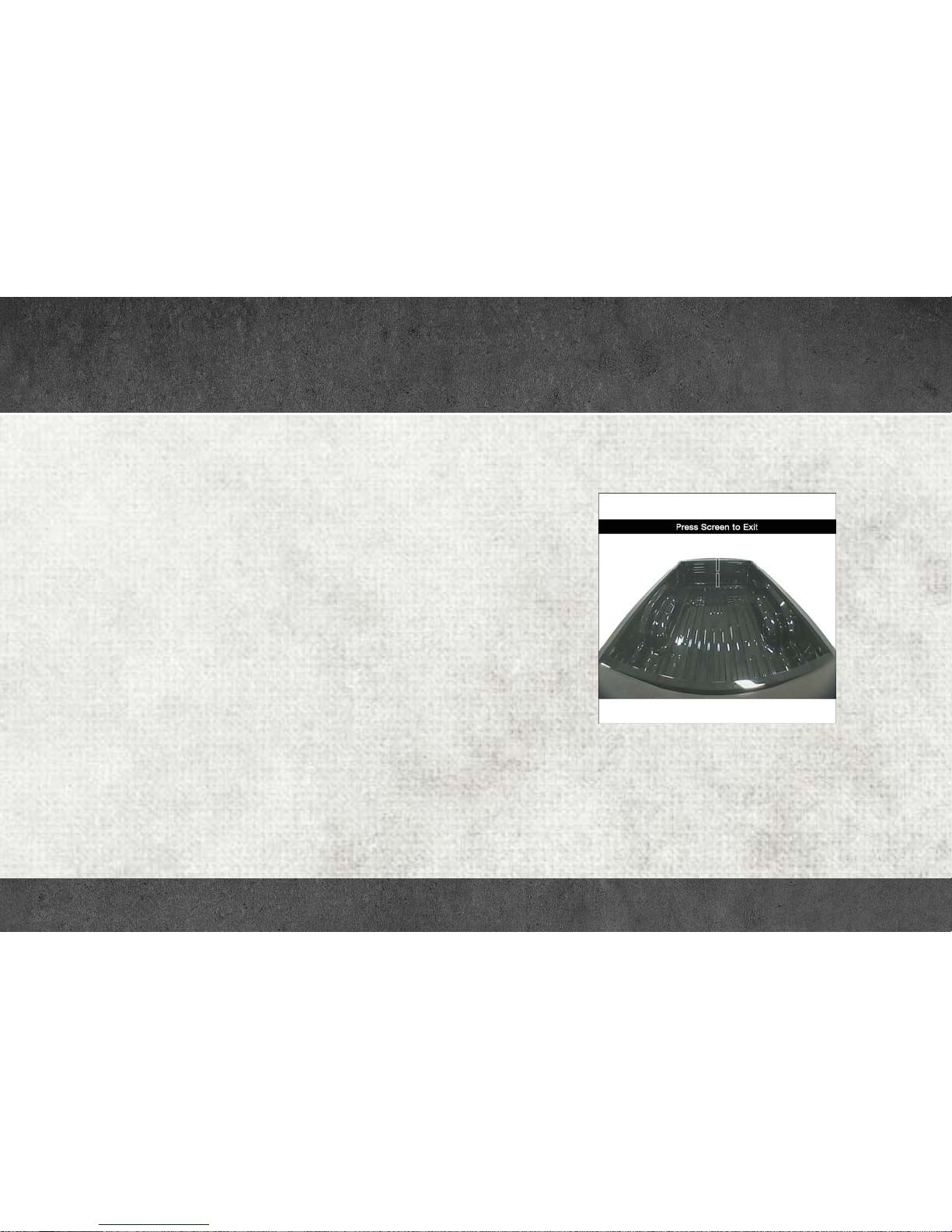
Cargo Camera — If Equipped
• Your vehicle may be equipped with a Cargo Camera that allows you
to see an image of the inside of the pickup box. The image will be
displayed on the Uconnect Display, located on the center stack of
the instrument panel.
• A display timer is initiated when the Cargo Camera image is
displayed. The image will continue to be displayed until the display
timer exceeds 10 seconds and the vehicle speed is above 8 mph
(13 km/h), or the image is deactivated by touching the Uconnect
display.
NOTE:
If the vehicle speed remains below 8 mph (13 km/h), the cargo camera
image will be displayed continuously until deactivated by touching the
Uconnect display.
• The Cargo Camera is located in the bottom center area of the Center
High-Mounted Stop Lamp (CHMSL).
NOTE:
If snow, ice, mud or any foreign substance builds up on the camera
lens, clean the lens, rinse with water and dry with a soft cloth. Do not
cover the lens.
Cargo Camera Display
For further information and applicable warnings and cautions, please refer
to your Owner’s Manual at
www.ramtrucks.com/en/owners/manuals.
Page 6

CARGO FEATURES
Bed Extender — If Equipped
The bed extender has three functional positions:
• Storage Position – maximizes the bed cargo area when not in use.
• Divider Position – managing your cargo and assisting in keeping
cargo from moving around the truck bed.
• Extender Position – extends the bed of the truck beyond the tail gate
an additional 15 inches for additional cargo room.
Page 7
KEYLESS ENTER-N-GO — PASSIVE ENTRY
Introduction To Keyless Enter-N-Go
The Keyless Enter-N-Go — Passive Entry system is an enhancement to
the vehicles key fob. This feature allows you to lock and unlock the
vehicle’s door(s) without having to push the key fob lock or unlock
buttons as well as starting and stopping the vehicle with the push of a
button.
NOTE:
The key fob may not be found if it is located next to a mobile phone, lap
top or other electronic device; these devices may block the key fob’s
wireless signal.
To Lock The Vehicle’s Doors:
With a valid Keyless Enter-N-Go key fob within 5 ft (1.5 m) of the driver
or passenger front door handles, push door handle lock button to lock
all doors.
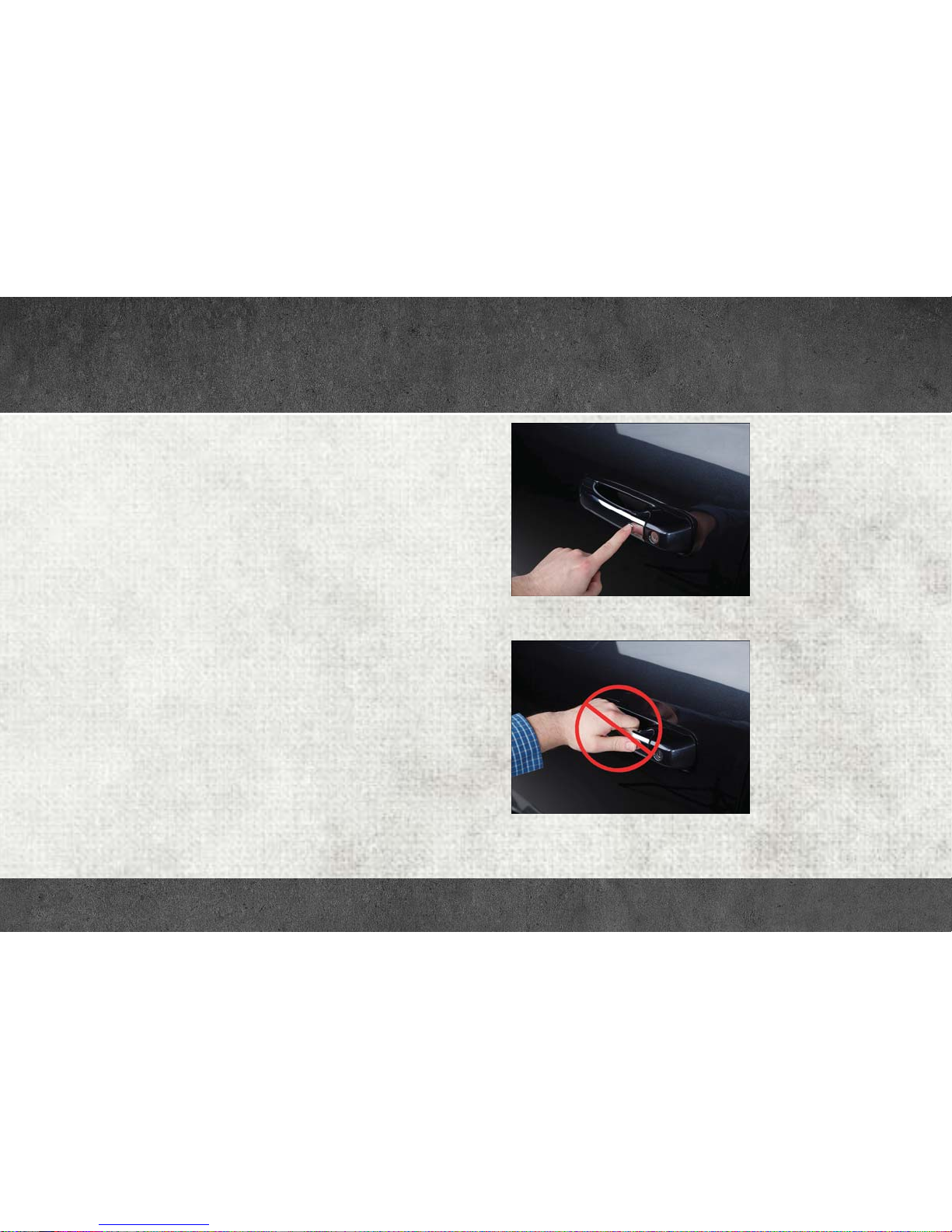
Do NOT grab the door handle, when pushing the door handle lock
button. This could unlock the door(s).
Push The Button To Lock
Do NOT Grab The Handle When Locking
Page 8
KEYLESS ENTER-N-GO — PASSIVE ENTRY
NOTE:
• After pushing the door handle lock button, you must wait two
seconds before you can lock or unlock the doors, using either
Passive Entry door handle. This is done to allow you to check if the
vehicle is locked by pulling the door handle without the vehicle
reacting and unlocking.
• The Passive Entry system will not operate if the key fob battery is
dead.
The vehicle doors can also be locked by using the key fob lock button
or the lock button located on the vehicles interior door panel.
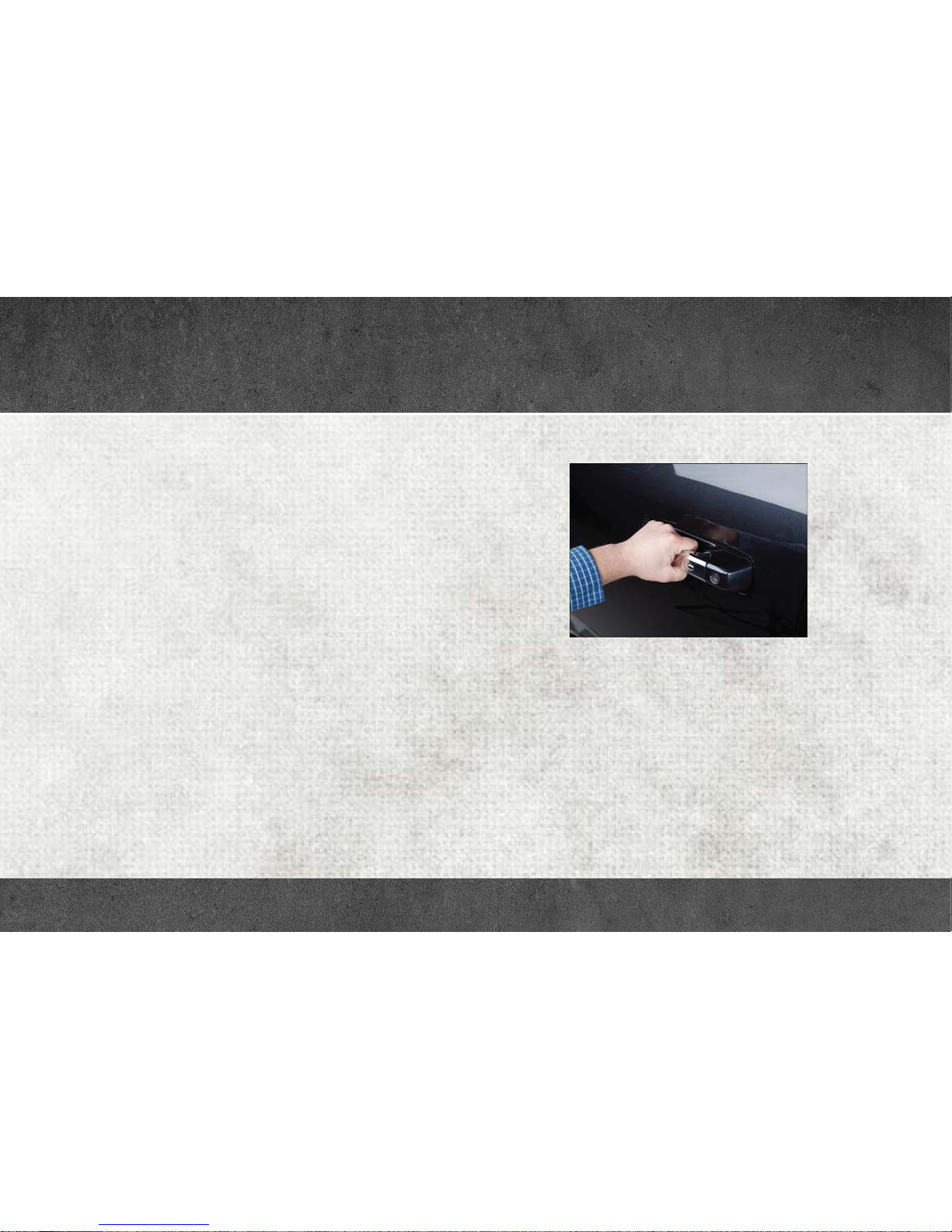
To Unlock From The Driver Or Passenger Side:
Grab The Door Handle To Unlock
With a valid Keyless Enter-N-Go key fob located outside the vehicle and
within 5 ft (1.5 m) of the driver or passenger side door handle, grab
either front door handle to unlock the door automatically.
For further information and applicable warnings and cautions, please refer
to your Owner’s Manual at
www.ramtrucks.com/en/owners/manuals.
Page 9
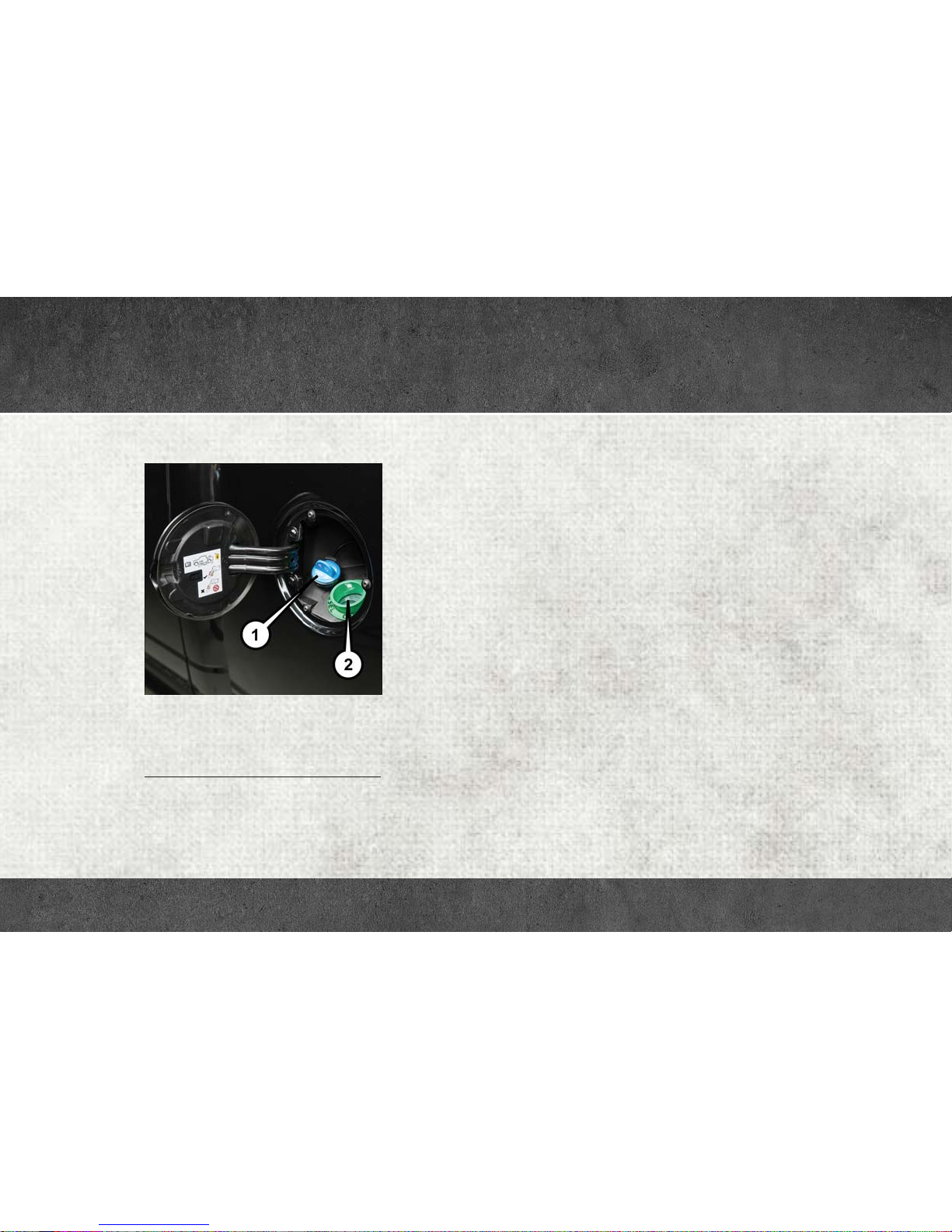
ADDING DIESEL FUEL AND DEF
Adding Diesel Fuel And Diesel Exhaust Fluid (DEF)
Fill Locations
1 — Diesel Exhaust Fluid (DEF) Fill
Location
2 — Diesel Fuel Fill Location
• Ensure appropriate fluid is added to the applicable fill port on the
vehicle. The smaller blue capped fill port is for DEF. The cap-less
green fill port is for diesel fuel only.
• If DEF or gasoline is accidentally added to the diesel fuel tank, DO
NOT START the engine. This will result in severe damage to your
engine, which is not covered by your New Vehicle Limited Warranty.
Have your RAM towed to your authorized dealer for service.
For further information and applicable warnings and cautions, please refer
to your Diesel Supplement at
www.ramtrucks.com/en/owners/manuals.
Page 10

RAM 1500 3.0L DIESEL
DIESEL ENGINE STARTING
• Your RAM is equipped with state-of-the-art ceramic glow plugs to
ensure quick starts.
• Some delay of engine cranking may occur while the glow plugs reach
operating temperature. The length of time will vary from 1 to
5 seconds depending on the engine and ambient temperatures.
• Remote start operation of your vehicle will also automatically activate the glow plugs as needed and no additional steps are required.
With Engine START/STOP Button
• To start your engine, press and hold the brake pedal while pressing
the ENGINE START/STOP button once.
• When the “Wait to Start” telltale goes out in the instrument cluster,
engine cranking will begin automatically.
Without Engine START/STOP Button (Keyed Ignition)
• Turn the ignition key to the “ON” position and wait for the “Wait to
Start” telltale to extinguish before cranking the engine.
For further information and applicable warnings and cautions, please refer
to your Diesel Supplement at
www.ramtrucks.com/en/owners/manuals.
OPERATING YOUR DIESEL ENGINE IN VERY COLD
ENVIRONMENTS
• A winter front or cold weather cover is to be used in ambient
temperatures below 32°F (0°C), especially during extended idle
conditions to reduce condensation build-up within the engine
crankcase. If a winter front or cold weather cover is to be used, a
percentage of the total grille opening area must be left uncovered to
provide sufficient air flow to the charge air cooler and automatic
transmission oil cooler. The percentage of opening must be increased with the increasing ambient air temperature and/or engine
load. If the cooling fan can be heard cycling frequently, increase the
size of the opening in the winter front. A suitable cold weather cover
is available from your MOPAR
• Climatized fuel or fuel treatment may be required for operation in
temperatures under -10°F (-23°C).
• Use of an engine block heater is recommended for routine operation
under -10°F (-23°C) and is required for cold starting under -20°F
(-28°C). If your vehicle is not equipped with the electrical cord for
the block heater, it is available from your MOPAR dealer.
• For further information and applicable warnings and cautions,
Please see your Diesel Supplement at
www.ramtrucks.com/en/owners/manuals for a complete description
and procedure for block heater use.
®
dealer.
Page 11

RAM 1500 3.0L DIESEL
Diesel Selective Catalytic Reduction (Scr)/Diesel
Particulate Filter (Dpf)
• Your RAM is equipped with an SCR system to reduce Nitrous Oxides
(NOx) exhaust emissions.
• The SCR system uses Diesel Exhaust Fluid (DEF) to convert NOx to
harmless gases prior to release from the exhaust system.
• It is recommended that DEF is refilled by your authorized RAM
dealer at every oil change interval or as required.
• A DEF level gauge is located on your instrument cluster.
• The DEF gauge may take up to 5 seconds to update after adding
a gallon or more of DEF to the DEF tank. If you have a fault
related to the DEF system, the gauge may not update to the new
level. See your authorized dealer for service.
• Also the DEF gauge may also not immediately update after a refill
if the temperature of the DEF fluid is below 12°F (-11°C). The
DEF line heater will usually warm up the DEF fluid and allow the
gauge to update after a period of run time. Under very cold
conditions, it is possible that the gauge may not reflect the new
fill level for several drives.
• Should you run your vehicle out of DEF, a minimum of 2 gallons
(7.6 liters) of DEF is required for the engine to restart.
• Never “top-off” the DEF tank after a normal DEF fill. If DEF is
spilled, it should be cleaned with mild soap and water to prevent
corrosion or damage to components and finished surfaces.
• Your RAM is also equipped with a Diesel Particulate Filter (DPF) that
removes diesel particulate matter or soot from the exhaust gas.
Automatic regeneration self-cleaning cycles occur when the correct
operating conditions are met.
• The instrument cluster display will indicate when a regeneration is
in progress and will provide instructions if any action is required.
• Please see your Diesel Supplement at
www.ramtrucks.com/en/owners/manuals for a complete description
of the SCR and DPF systems.
Diesel Particulate Filter (DPF) Messages
Your vehicle has the ability to alert you to additional maintenance
required on your vehicle or engine. The following messages may display
in your Instrument Cluster Display:
• Perform Service — Your vehicle will require emissions maintenance
at a set interval. To help remind you when this maintenance is due,
the Cluster will display “Perform Service”. When the “Perform
Service” message is displayed in the Instrument Cluster Display it is
necessary to have the emissions maintenance performed. The procedure for clearing and resetting the “Perform Service” indicator
message is located in the appropriate Service Information.
Page 12

RAM 1500 3.0L DIESEL
• Exhaust System — Regeneration Required Now— Exhaust Filter XX%
Full Safely Drive at Highway Speeds to Remedy will be displayed in
the Cluster if the exhaust particulate filter reaches 80% of its
maximum storage capacity. Under conditions of exclusive short
duration and low speed driving cycles, your diesel engine and
exhaust after-treatment system may never reach the conditions
required to remove the trapped PM. If this occurs, the “Exhaust
Filter XX% Full Safely Drive at Highway Speeds to Remedy” message will be displayed in the Instrument Cluster Display. If this
message is displayed, you will hear one chime to assist in alerting
you of this condition
• By simply driving your vehicle at highway speeds for as little as
45 minutes, you can remedy the condition in the particulate
filter system and allow your diesel engine and exhaust aftertreatment system to remove the trapped PM and restore the
system to normal operating condition.
• Exhaust System — Regeneration In Process Exhaust Filter XX% Full —
Indicates that the Diesel Particulate Filter (DPF) is self-cleaning.
Maintain your current driving condition until regeneration is completed.
• Exhaust System — Regeneration Completed — This message indicates
that the Diesel Particulate Filter (DPF) self-cleaning is completed. If
this message is displayed, you will hear one chime to assist in
alerting you of this condition.
• Exhaust Service Required — See Dealer Now — This message indi-
cates regeneration has been disabled due to a system malfunction.
At this point the engine Powertrain Control Module (PCM) will
register a fault code, the instrument panel will display a MIL light.
• Exhaust Filter Full — Power Reduced See Dealer — This message
indicates the PCM has derated the engine to limit the likelihood of
permanent damage to the after-treatment system. If this condition is
not corrected and a dealer service is not performed, extensive
exhaust after-treatment damage can occur. To correct this condition
it will be necessary to have your vehicle serviced by your local
authorized dealer.
For further information and applicable warnings and cautions, please refer
to your Diesel Supplement at
www.ramtrucks.com/en/owners/manuals.
VISIT THE RAM BRAND SITE FOR FURTHER INFORMATION
Download a FREE electronic copy of the Owner’s Manual and Warranty
Booklet by visiting:
www.ramtrucks.com/en/owners/manuals or
www.ramtrucks.com/en/warranty (U.S.);
owners.mopar.ca (Canada).
Page 13
RAM 2500/3500
2500/3500 AIR SUSPENSION SYSTEM
This air suspension system is a rear leveling ride height system. The
main purpose of this system is to maintain the truck’s rear ride height
level. There are two selectable heights that can be chosen based on
your operating conditions.
The system requires that the ignition be in ON/RUN position or the
engine running with zero vehicle speed for all user requested changes
and load leveling.
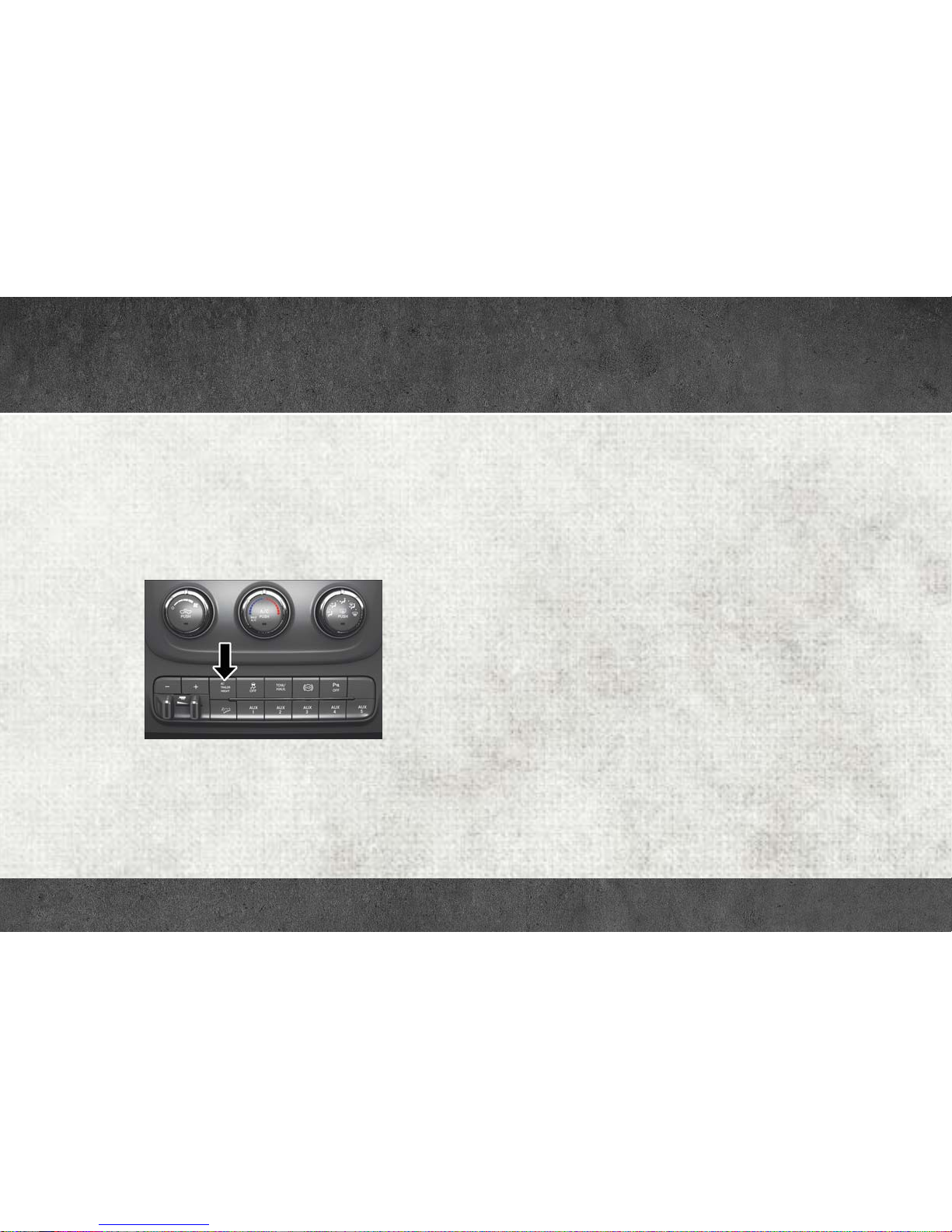
Alternate Trailer Height Button
Normal Ride Height (NRH) – This is the standard position of the
suspension and is meant for normal driving. It will automatically adjust
to maintain the rear ride height as conditions change.
Alternate Trailer Height (ATH) – Lowers the vehicle approximately 1 in
(25 mm) for a level truck, to be used as required while trailer towing. It
will automatically adjust to maintain the rear ride height as conditions
change.
NOTE:
• Most 3500 models will not lower to Alternate Trailer Height (ATH)
when unloaded.
• Refer to “Trailer Towing” in “Starting And Operating” in your
Owner’s Manual at www.ramtrucks.com/en/owners/manuals/ further
information.
Ignition OFF Behavior
For a predetermined amount of time after the ignition is off the air
suspension may adjust to maintain a proper appearance.
Page 14

RAM 2500/3500
Trailer Decoupling/Unloading
The air suspension system will maintain load level (lower/exhaust only)
for up to 10 minutes after the vehicle is turned off. This allows for easy
removal of a trailer and/or load from the back of the truck by maintaining the ride height. After 10 minutes, you will need to turn the ignition
to the RUN position for the air suspension to maintain the ride height.
If the air suspension system is disabled using the settings menu (Tire
Jack Mode, Transport Mode or Alignment Mode), the system will
remain disabled when the vehicle is turned off. Reactivating the air
suspension can be accomplished via the settings menu or by driving
the vehicle above 5 mph (8 km/h) for Tire Jack Mode or Alignment
Mode or 16 mph (26 km/h) for Transport Mode.
AUTOMATIC “SMART” EXHAUST BRAKE – (DIESEL ONLY)
• Automatic Exhaust Brake technology delivers smoother, less aggressive exhaust braking characteristics during downhill descents. Although it can apply full exhaust braking force if needed, Automatic
Exhaust Brake may not apply obvious braking if the vehicle speed is
not increasing. Automatic Exhaust Brake is intended to maintain
vehicle speed while Full Exhaust Brake is intended to reduce vehicle
speed.
• Automatic Exhaust Brake can be enabled by pushing the exhaust
brake button again any time after the normal Full Exhaust Brake has
been turned on. The “Exhaust Brake Indicator” in the instrument
cluster will change from yellow to green when Automatic Exhaust
Brake is enabled. Pushing the exhaust brake button again will toggle
the exhaust brake mode to off.
Page 15

RAM 2500/3500
Adding Diesel Exhaust Fluid (DEF)
The DEF gauge (located in the instrument cluster) will display the level
of DEF remaining in the tank.
Completely fill the DEF tank through the diesel exhaust fluid fill
location at every maintenance interval, or before if prompted by the
instrument cluster display.
The DEF tank on these vehicles is designed with a large amount of full
reserve. So, the level sensor will indicate a full reading even before the
tank is completely full. To put it another way, there’s additional storage
capacity in the tank above the Full mark that’s not represented in the
gauge. You may not see any movement in the reading – even after
driving up to 2,000 miles in some cases.
NOTE:
• Driving conditions (altitude, vehicle speed, load, etc.) will effect the
amount of DEF that is used in your vehicle.
• Another factor is that outside temperature can affect DEF consumption. In cold conditions – 12° F (-11° C) and below – the DEF gauge
needle can stay on a fixed position and may not move for extended
periods of time. This is a normal function of the system.
• Since DEF will begin to freeze at 12°F (-11°C), your vehicle is
equipped with an automatic DEF heating system. This allows the
DEF injection system to operate properly at temperatures below
12°F (-11°C). If your vehicle is not in operation for an extended
period of time with temperatures below 12°F (-11°C), the DEF in the
tank may freeze. If the tank is overfilled and freezes, it could be
damaged. Therefore, do not overfill the DEF tank. Extra care should
be taken when filling with portable containers to avoid overfilling.
Note the level of the DEF gauge in your instrument cluster. On
pickup applications, you may safely add a maximum of 2 gallons
(7.5 liters) of DEF from portable containers when your DEF gauge is
reading ½ full. On Chassis Cab applications, a maximum of 2 gallons (7.5 liters) may be added when the DEF gauge is reading ¾ full.
• There is an electric heater inside the DEF tank that automatically
works when necessary. And if the DEF supply does freeze, the truck
will operate normally until it thaws.
• Ensure the DEF cap is reinstalled prior to filling vehicle with diesel
fuel to avoid spilling diesel fuel into the DEF Filler.
Page 16

RAM 2500/3500
AUXILIARY SWITCHES
There can be up to five auxiliary switches located in the lower switch
bank of the instrument panel, which can all be used to power various
electronic devices and PTO (Power Take Off) – if equipped. Connections to the switches are found under the hood in the connectors
attached to the auxiliary Power Distribution Center.
The system has the ability to configure the functionality of the auxiliary
switches via the Instrument Cluster Display. All switches can now be
configured for ignition or battery power, saving or not saving the state
across a key cycle, and momentary or latching switch operation.
For further information on using the auxiliary switches, please refer to
the Ram Body Builders Guide by accessing www.rambodybuilder.com
and choosing the appropriate links.
For general questions on upfitting commercial vehicles, including:
• Loose rear park assist installation
• Programmable auxiliary switches
• PTO (Power Take Off) system
• Wiring diagrams
• Vehicle dimensions
• Snow plow installation
• Weight charts and trailer towing
Please consult the Body Builders Guide at www.rambodybuilder.com.
For further information, and applicable warnings and cautions, please refer
to your Owner's Manual at
www.ramtrucks.com/en/owners/manuals.
Page 17
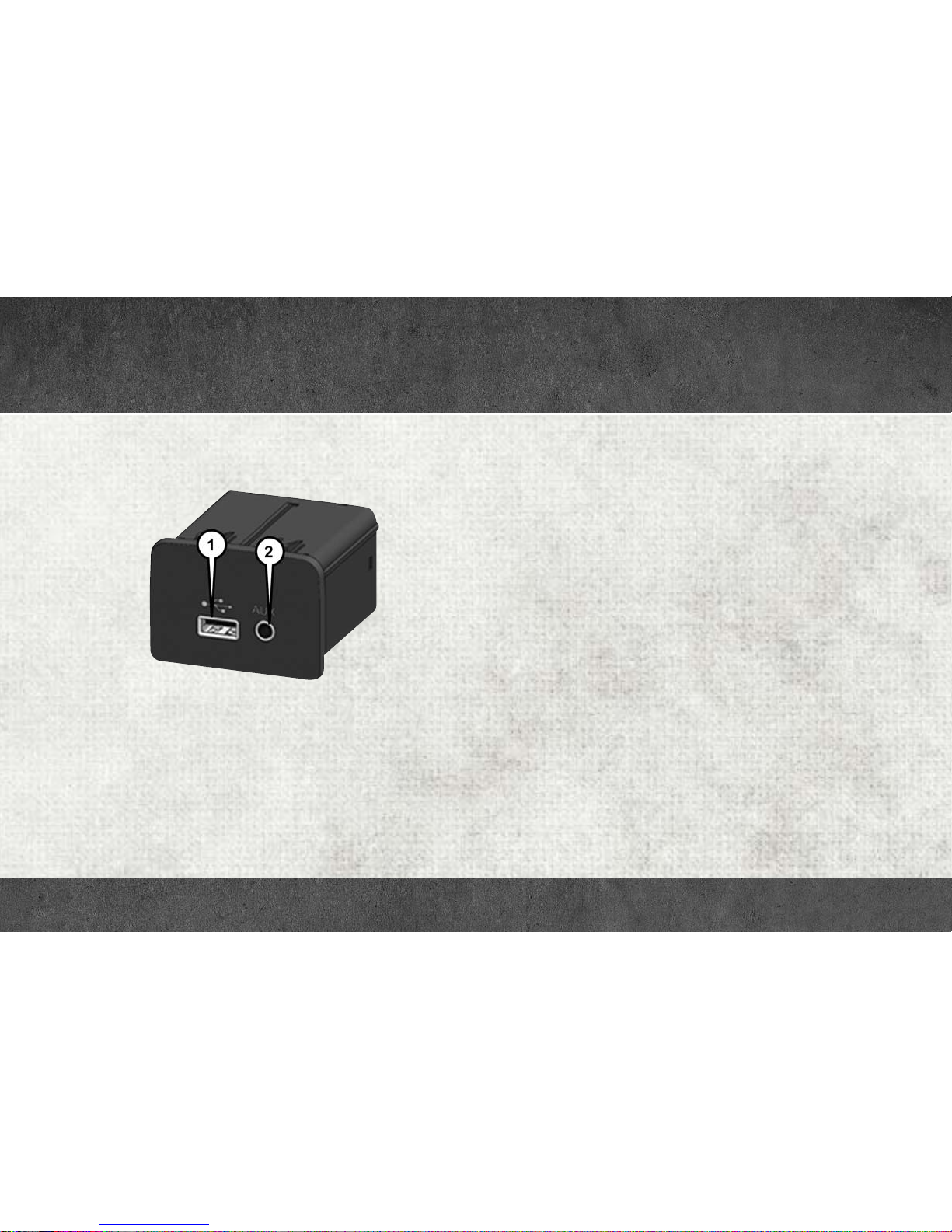
FRONT USB PORT/AUDIO JACK (AUX) PORT
USB Port
Uconnect Media Hub
1 — USB Port
2 — Audio/AUX Jack
This feature allows an iPod or external USB device to be plugged into
the USB port. The USB port supports certain iPod and iPhone devices.
The USB port also supports playing music from external USB devices.
Some iPod software versions may not fully support the USB port
features. Please visit Apple’s website for iPod software updates. Connect your iPod or compatible device using a USB cable connected to
the USB port. USB memory sticks with audio files can also be used.
Then, audio from the device can be played on the vehicle’s sound
system while providing the artist, track title, and album information on
the radio display (if available on device). When connected, the iPod/
USB device can be controlled using the radio or steering wheel audio
controls to play, skip to the next or previous track, browse, and list the
contents.
AUX/Audio Jack
The AUX/audio jack provides a means to connect a portable audio
device, such as an MP3 player, to the vehicle’s sound system. This
requires the use of a 3.5 mm stereo audio patch cable. AUX mode is
entered by pushing the Media button. Once in Media mode, select the
AUX button when the audio jack is connected. Volume on the connected device may need to be adjusted to optimize audio quality.
Page 18
UCONNECT ACCESS
Registration
To activate your Uconnect Access Account:
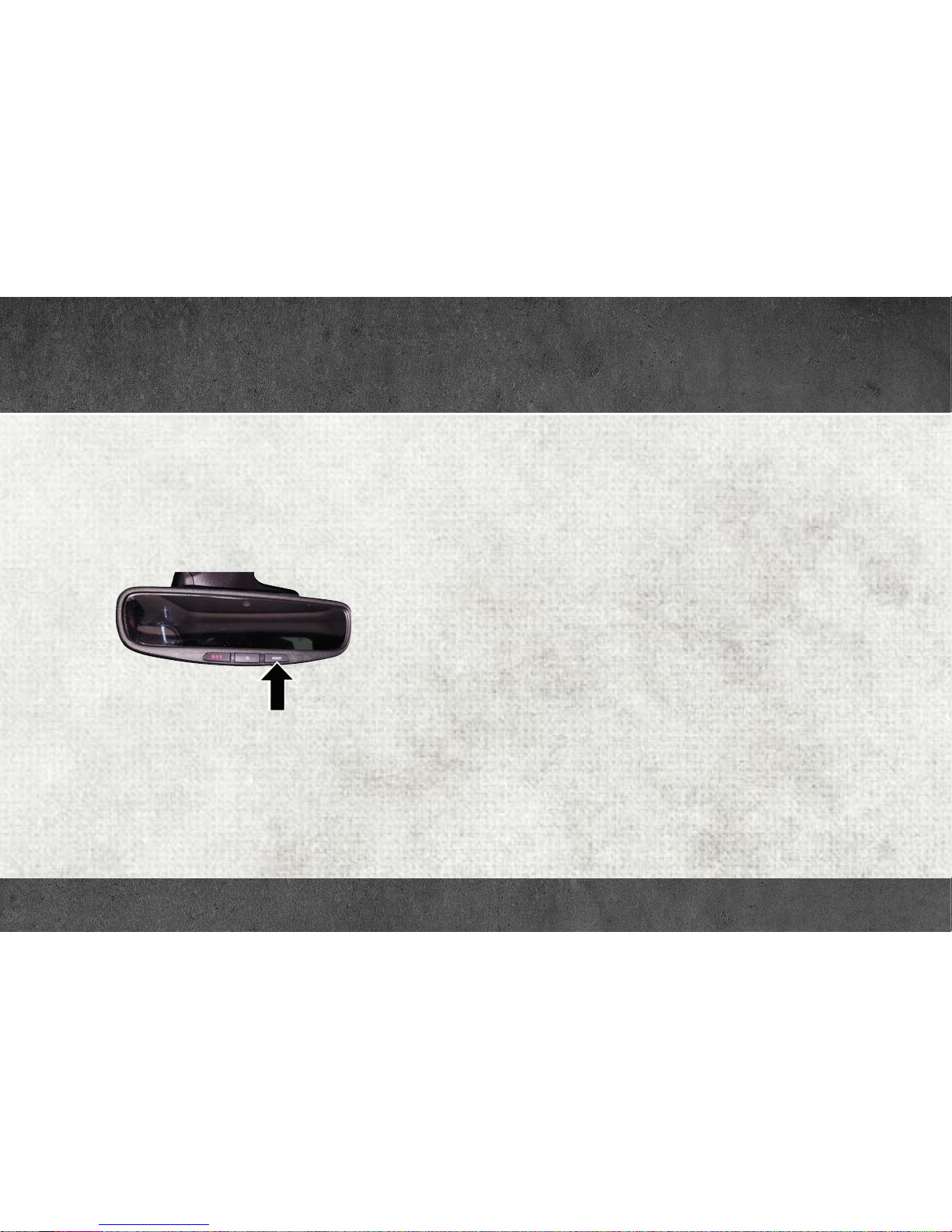
1. Push the ASSIST button on your rearview mirror or in the Apps
screen in the Uconnect System.
ASSIST Button
2. Select Uconnect Care on your Uconnect touchscreen.
3. A Uconnect Care agent will register your vehicle and handle all of
the details.
Download the Uconnect Access app from the Apple App Store or from
the Google Play Store to get the most out of your connected car
experience. To use the app:
1. Download the Uconnect Access App onto your compatible smartphone.
2. Log in to the app using the email and password you provided when
signing up for Uconnect Access.
3. Once you’re logged in and have accepted the terms and conditions,
you’ll be able to start your vehicle and lock/unlock its doors from
virtually anywhere!
Page 19

UCONNECT ACCESS
Services
In-Vehicle Services
Use Uconnect Access for a range of added services including:
• Place a call to a local 9-1-1 Operator for emergency assistance.
• Turn your vehicle into a 3G Wi-Fi Hotspot and connect your devices
to the internet.
• Listen to your text messages or send free-form text messages with
your voice while keeping your hands on the wheel, using the Voice
Texting feature. Requires a device that supports Bluetooth Message
Access Profile (MAP).
• Search for places to eat, shop, relax and play with Yelp, using your
voice or on-screen menu. Then navigate to them (navigation standard on Uconnect 8.4 NAV, optional on Uconnect 8.4).
• Get assistance from a Care representative using the ASSIST button
on your interior rearview mirror.
Remote Services
The Uconnect Access Mobile App helps you activate features from a
distance. The remote features are:
• Lock/unlock your doors from virtually anywhere.
• Start your car remotely.
• Sound the horn and flash the lights to help you find your car.
• Use Vehicle Finder to find where you parked.
• Use Send 'n Go to search for destinations on your phone and send
the address directly to your Uconnect Navigation.
• Place a Uconnect Care call for customer assistance.
Additional Services
• Receive monthly Vehicle Health Reports, and Alerts whenever a
problem is detected under the hood.
• Receive stolen vehicle assistance, using GPS technology to help
authorities locate your vehicle if it is stolen.
• Receive text or email notifications if your vehicle's security alarm
goes off.
For further information on Uconnect Access, refer to your Uconnect Owner’s
Manual Supplement at
www.ramtrucks.com/en/owners/manuals.
Page 20
UCONNECT ACCESS
Vehicle Finder and Send ‘N Go
Two of the most convenient features of the Uconnect Access mobile
app are Vehicle Finder and Send ‘n Go.
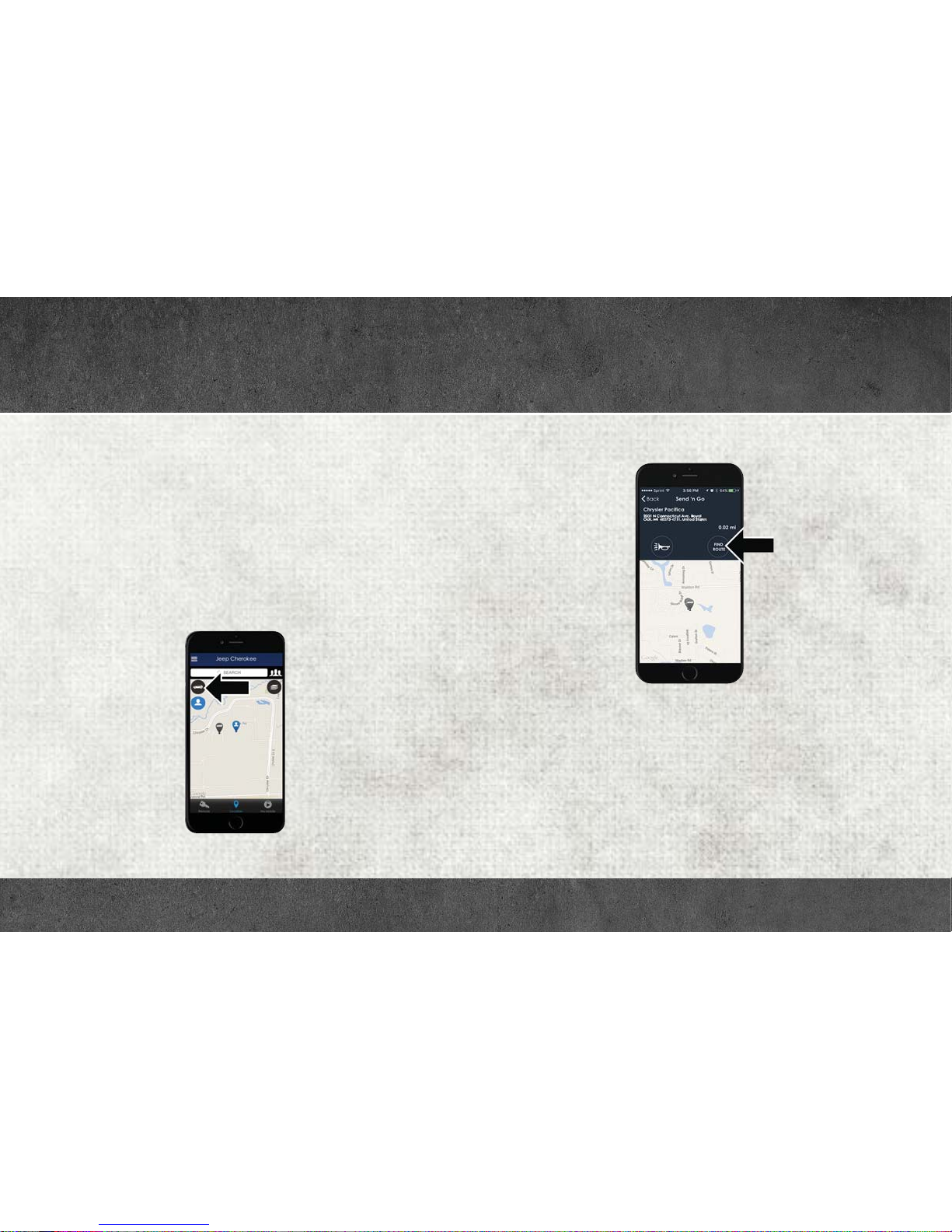
Vehicle Finder
Forget where you parked your car? Simply use the Uconnect Access app
on your smartphone and you'll be on track. You can also sound the
alarm and flash the lights to make finding your vehicle even easier. To
find your vehicle:
1. Press the Location tab on the Uconnect Access mobile app.
2. Select the Vehicle icon to determine the location of your vehicle.
Vehicle Icon
3. Select the location of the vehicle, and then the arrow appears. Press
the Find Route button that appears, once your vehicle is located.
Find Route Button
4. Select your preferred navigation app to route a path to your vehicle.
Page 21
UCONNECT ACCESS
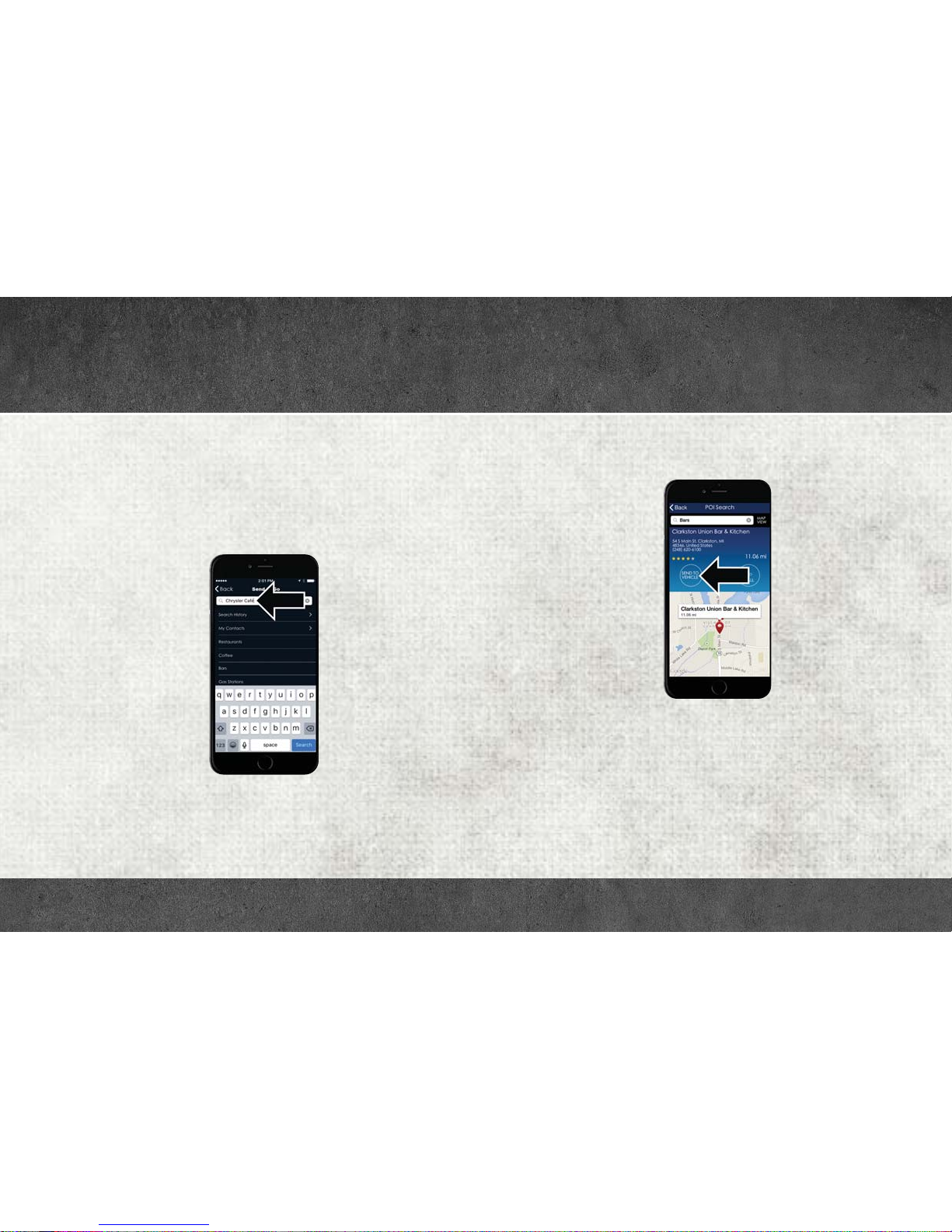
Send ‘n Go
Search for a destination on your mobile device and then send the route
to your Uconnect Navigation system. To send a route to your vehicle:
1. Press the Location tab on the Uconnect Access mobile app.
2. Either type in the destination you would like to navigate to, or search
through one of the categories provided.
Destination Search Bar
3. Select the destination you want to route to from the list that
appears.
4. Press the Send To Vehicle button, and then confirm the destination
by pressing “Yes,” to send the navigation route to the Uconnect
Navigation in your vehicle.
Send To Vehicle Button
5. Finally, confirm the route inside your vehicle by pressing the “Go
Now” option on the pop-up that appears on your Uconnect Touchscreen, when the vehicle is started.
Page 22
RAM TOOL BOX MOBILE APP
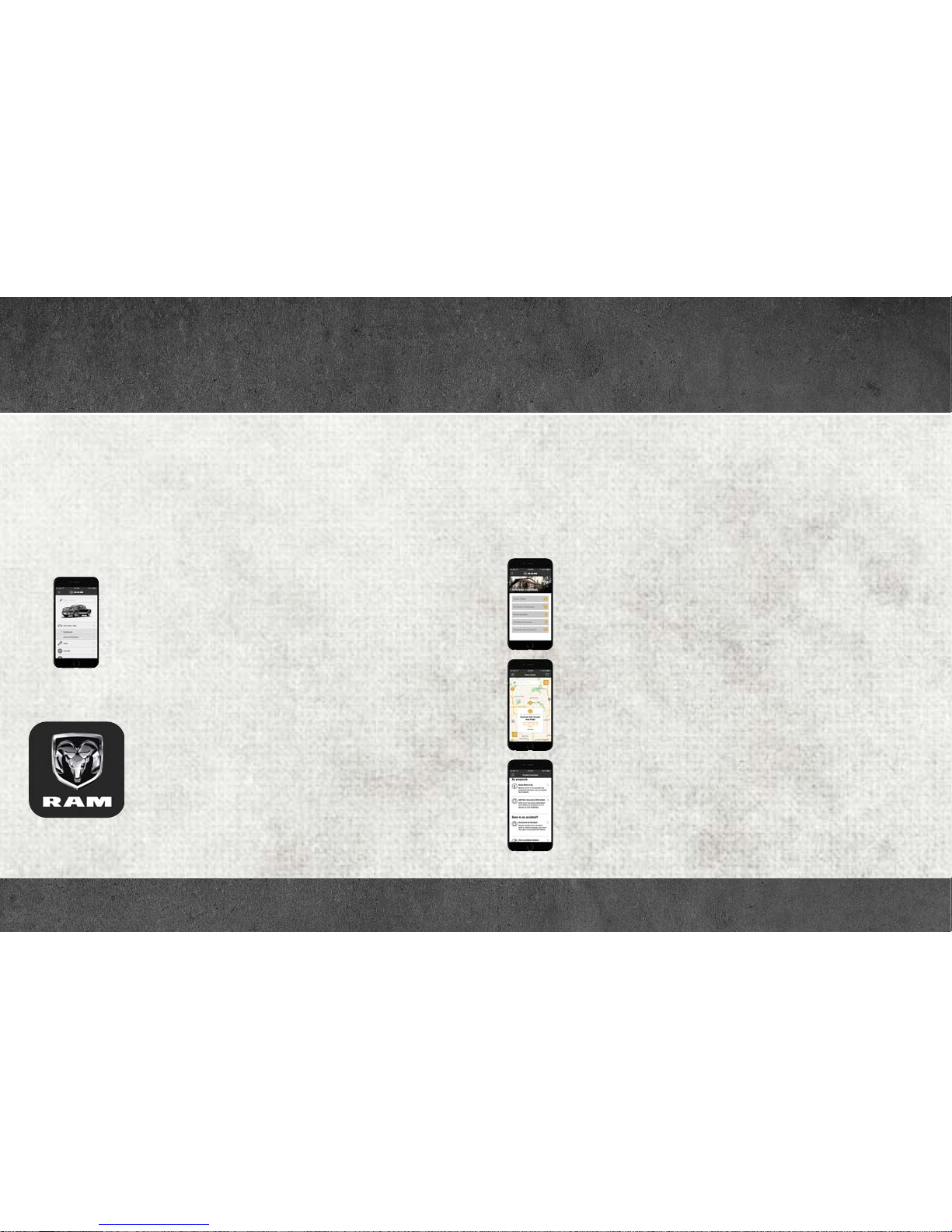
Key Features
• Owner Information For Your Vehicle
• Accident Assistant
• Parking Reminder
• Dealer Locator
• Brand Heritage
• Parts, Accessories, and Gear Store
To get this FREE application, go directly to the App Store or Google Play
Store and enter the search keyword “RAM TOOLBOX”.
The RAM TOOLBOX Application is the essential app for owners of Ram
brand vehicles. The app puts driver and lifestyle information right in
the palm of your hand, anywhere you go. Whether it’s providing
information about specific product features, taking a tour through your
vehicle’s heritage, knowing what steps to take following an accident, or
scheduling your next appointment, we know you’ll find the app an
important extension of your Ram vehicle. Simply download the FREE
app, select your make and model and enjoy the ride.
Page 23

RAM TOOL BOX MOBILE APP
Features/Benefits
• Available for free on iOS and Android smartphones and tablets.
• Select Ram brand vehicles from model year 2011 to current model
year.
• You can also add other Chrysler, Dodge, Jeep, FIAT, or Alfa Romeo
vehicles.*
• Easy access to vehicle information anywhere you go using categories, bookmarks, search and an A-Z index.
• Vehicle information such as operating instructions, maintenance,
service history, vehicle controls and emergency procedures.
• Find a dealer or an FCA-certified repair facility.
• Easily document and email an accident report.
• A parking reminder that allows you to drop a pin on your location and
navigate back to your vehicle.
• Contact customer care with one click.
• Access to vehicle heritage, parts and accessories and social media
networks.
• Schedule your next service appointment.
• Available in English and Spanish.
*App supports selected vehicles from model year 2011 to present.
To get this FREE application, go directly to the App Store or Google Play
Store and enter the search keyword “RAM TOOLBOX”.
Page 24
 Loading...