

Page 1
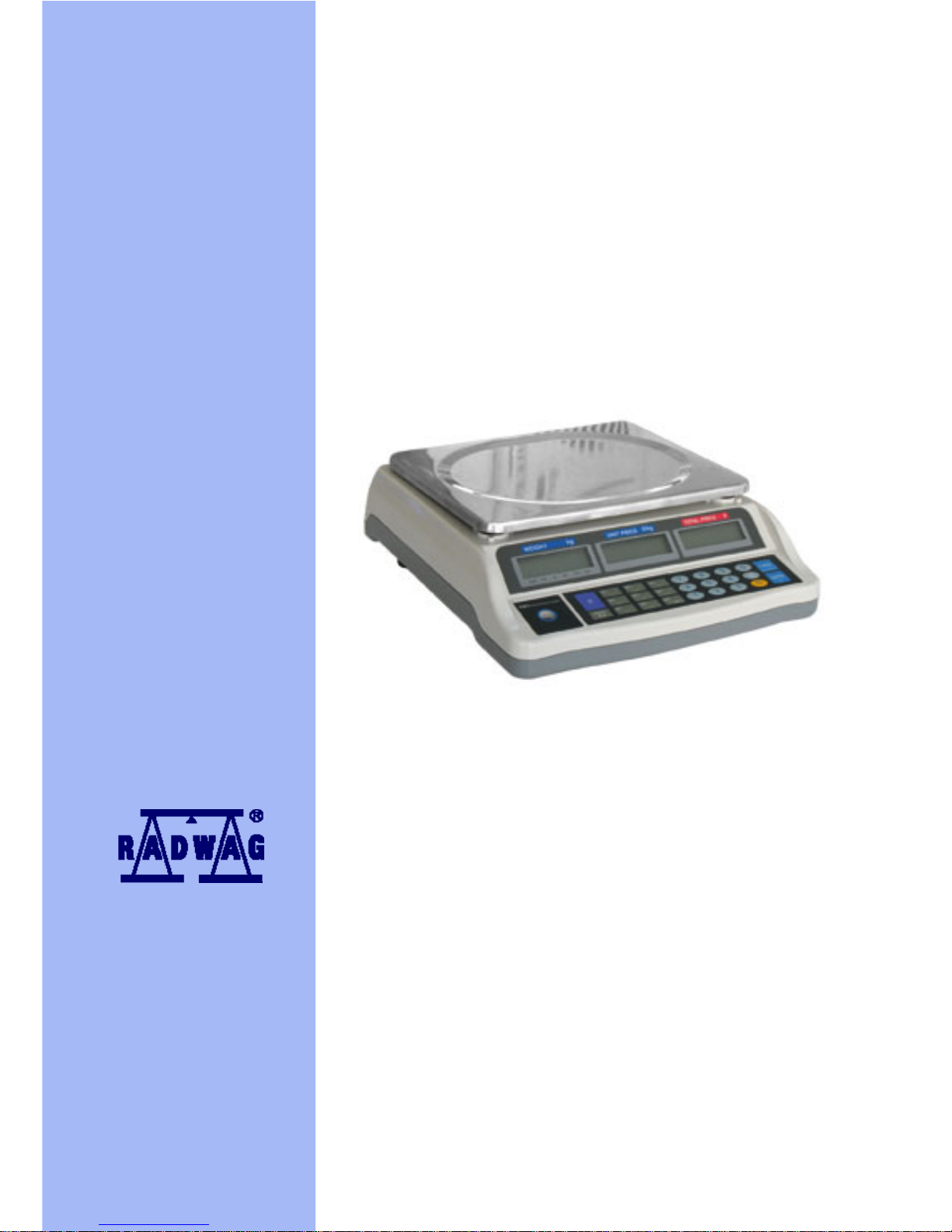
USER MANUAL
Counting scales – WTC/L series
MANUFACTURER OF ELECTRONIC WEIGHING INSTRUMENTS
RADWAG 26 – 600 Bracka 28 Street, POLAND
Radom, phone +4848 3848 800, phone/fax +4848 385 00 10,
Sales Department +4848 366 80 06
www.radwag.com
Page 2

- 2 -
TABLE OF CONTENT
1. APPLICATION – MAIN FUNCTIONS.........................................................................3
2. KEYBOARD...............................................................................................................3
2.1. Keyboard and display windo w............................................................................3
2.2. Additional markers..............................................................................................4
2.3. Function buttons and functions...........................................................................4
3. OPERATION..............................................................................................................5
3.1. Tarring................................................................................................................5
3.2. Zeroing...............................................................................................................5
4. COUNTING PIECES WITH SAME UNIT MASS........................................................6
4.1. Unit mass is known ............................................................................................6
4.2. By determination of single unit mass..................................................................6
5. SUMMING OF WEIGHING WHILE COUNTING PIECES..........................................7
6. PROGRAM VALUE WHILE COUNTING PIECES .....................................................9
7. READABILITY OF THE SCALE...............................................................................10
8. BACKLIGHT.............................................................................................................10
9. BATTERY CHARGING............................................................................................11
10. TECHNICAL PARAMETERS.................................................................................11
11. COMMUNICATES ON SCALE DISPLAY ..............................................................11
Page 3
1. APPLICATION – MAIN FUNCTIONS
Scales series WTC /L are designed for counting piec es with same unit mass. Counting
process can be realized as:
Specification of sample mass (one piece)
Calculation of sample mass from some determined amount of samples on the
weighing pan
TARE functions allows for determination of net mass of measured loads – tare range
equal to max capacity of the instrument – Max.
Functional possibilities
− Setting alarm function for counting (threshold)
− Change of scale readability
− Totalizing in counting pieces mode
− Counting pieces
2. KEYBOARD
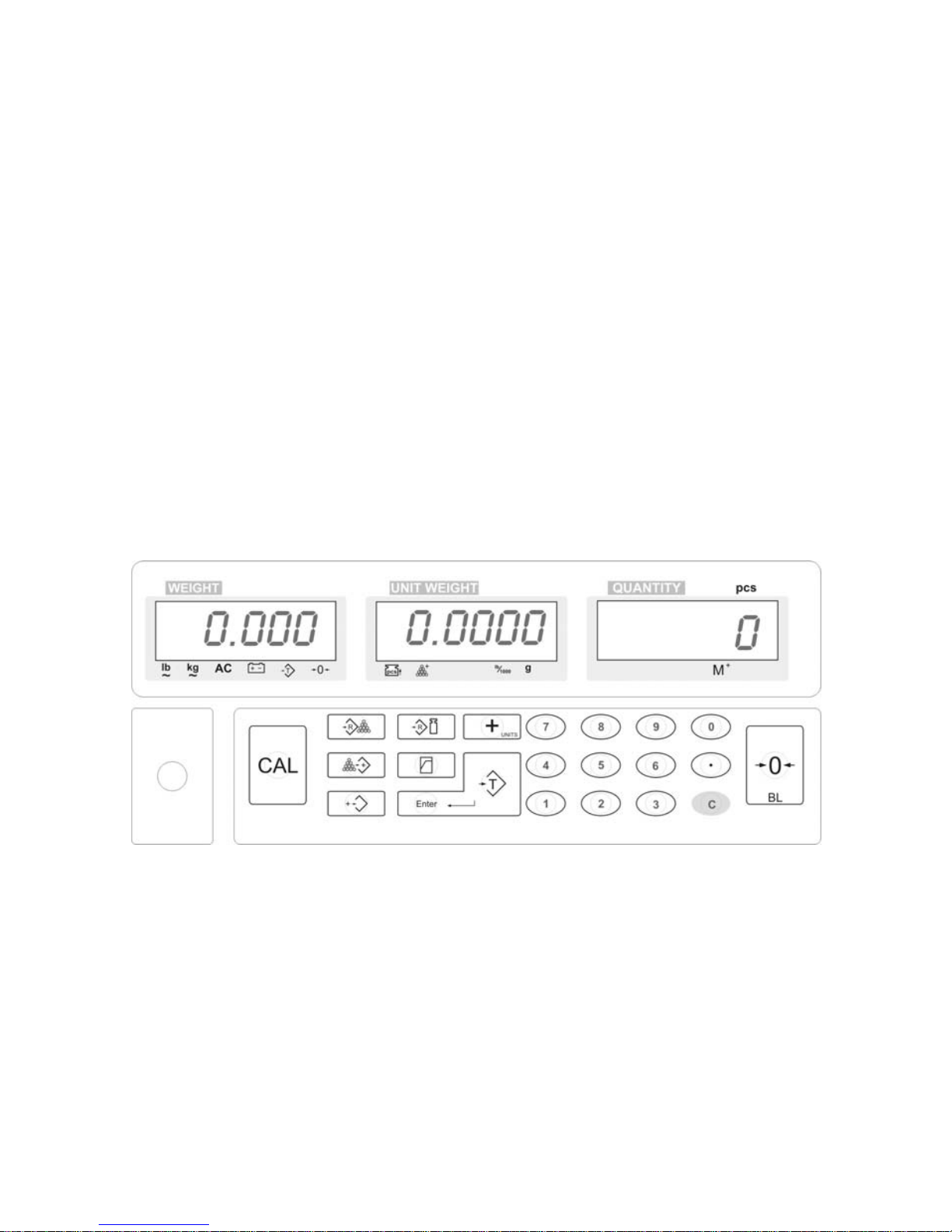
2.1. Keyboard and display window
Fig 1 – buttons and displays
Scales are equipped with three displays: mass, piece mass , quantity of pieces, and
functional keyboard with numeric and function keys.
- 3 -
Page 4
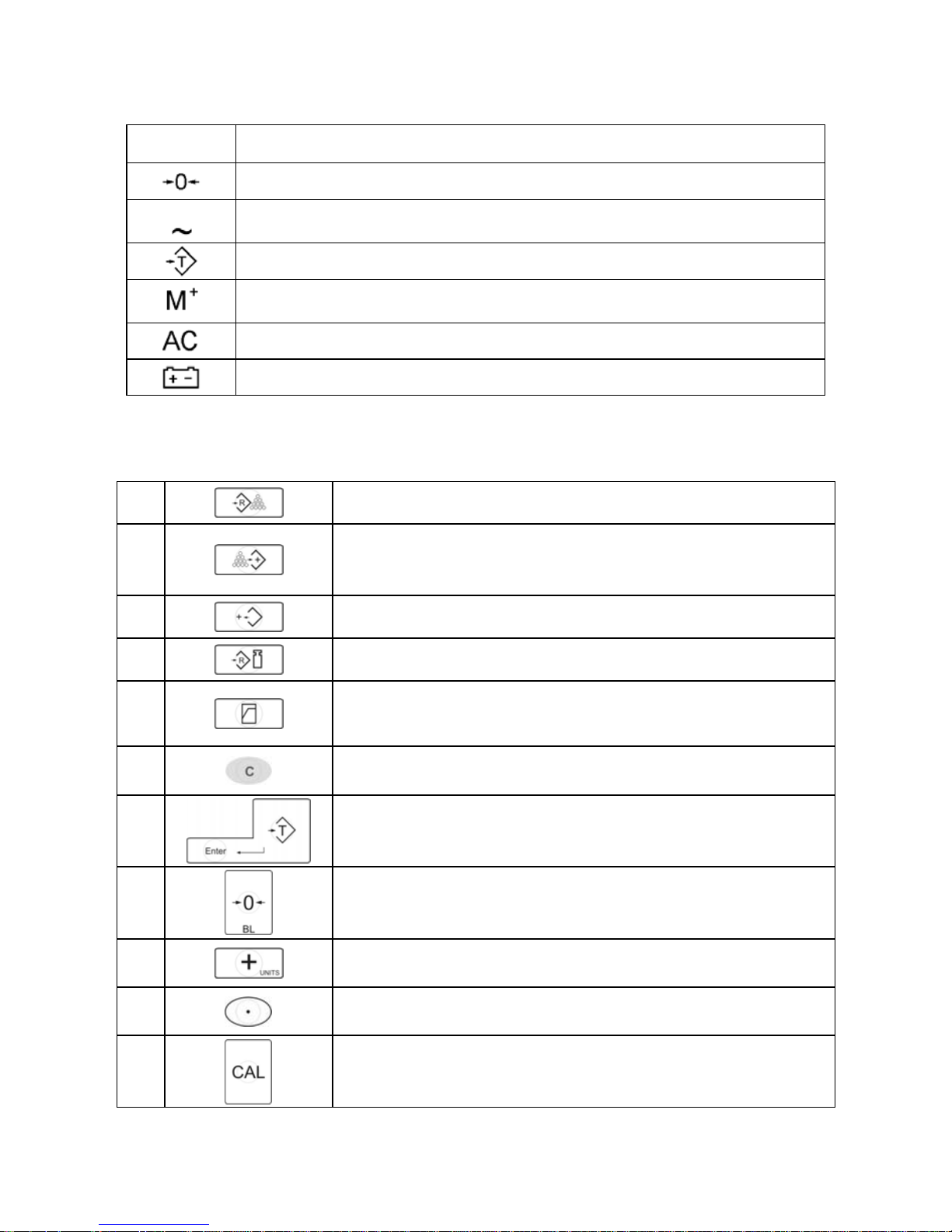
2.2. Additional markers
Character Description
Zero indication of scale
kg
Stable weighing result
TARE button applied – net indication
Display indicates total quantity of pi eces (sum) or function of
summing details is active
Scale powered from mains
Power supply from battery is low (please charge the battery)
2.3. Function buttons and functions
1.
Confirms quantity of pieces as reference mass
2.
Pressing this button, will cause the display to show in field
WEIGHT, message “total” – display of total sum of
counted pieces
3.
Deleting sum of counted pieces
4.
Confirms mass of single unit mass
5.
Possibility of setting a threshold for counting pieces mode
(after crossing this threshold, scale generates beep
signal)
6.
Deleting the value
7.
TARE button (for determination of net mass)
8.
ZERO button (setting zero point of the scale), switching
on/off scale’s backlight
9.
Summing of following weighing for counting mode or
change of readability of the scale
10.
Decimal point – for insertion of single unit mass value.
11.
Scale adjusting
- 4 -
Page 5
3. OPERATION
3.1. Tarring
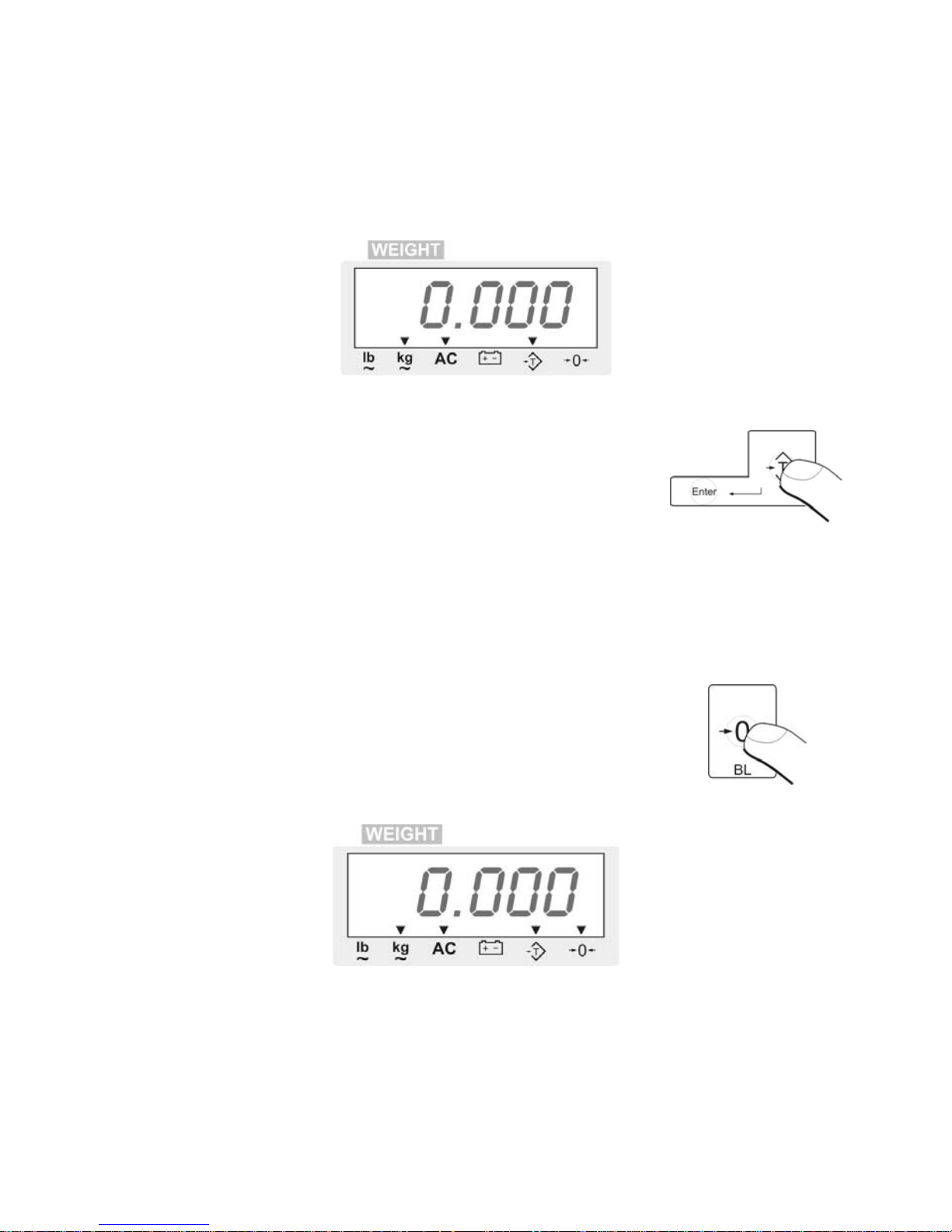
Place the package of the good(s) on the weighing pan. After stabilization of weighing
result, please press button TARE. Display will show ZERO indication. Lower part of the
display WEIGHT, the marker of tare application will be visible.
Fig 2 – tarring of scale indication
After taking the load off the weighing pan, the display will show
mass indication with negative (minus) sign in front of mass.
Press button TARE, so that indication goes back to zero. Tare
function will be canceled automatically.
Tarring is available in all weighing range of the scale.
3.2. Zeroing
It is available in range up to +/- 2% of maximal capacity of the scale.
Procedure:
− If the scale indication is lower than 2% Max
− Press button ZERO to zero indication
− Markers of zero indication and stable result are visible
Fig.. 3 – zeroing of scale indication
− After taking the load off the weighing pan, mass indication with negative
(minus) sign is visible on the display
− Press button ZERO, indication will go back to zero.
- 5 -
Page 6
4. COUNTING PIECES WITH SAME UNIT MASS
4.1. Single piece mass is known
In case unit mass of the counted objects is known, counting mode can be realized in
foll o wing wa y :
− Place on the weighing pan a container in which the pieces will be counted, and
press button TARE
− Using numeric keyboard, plea se insert unit mass. Use decimal point.
− Place counted pieces on the weighi ng pan of the scale
− Press button
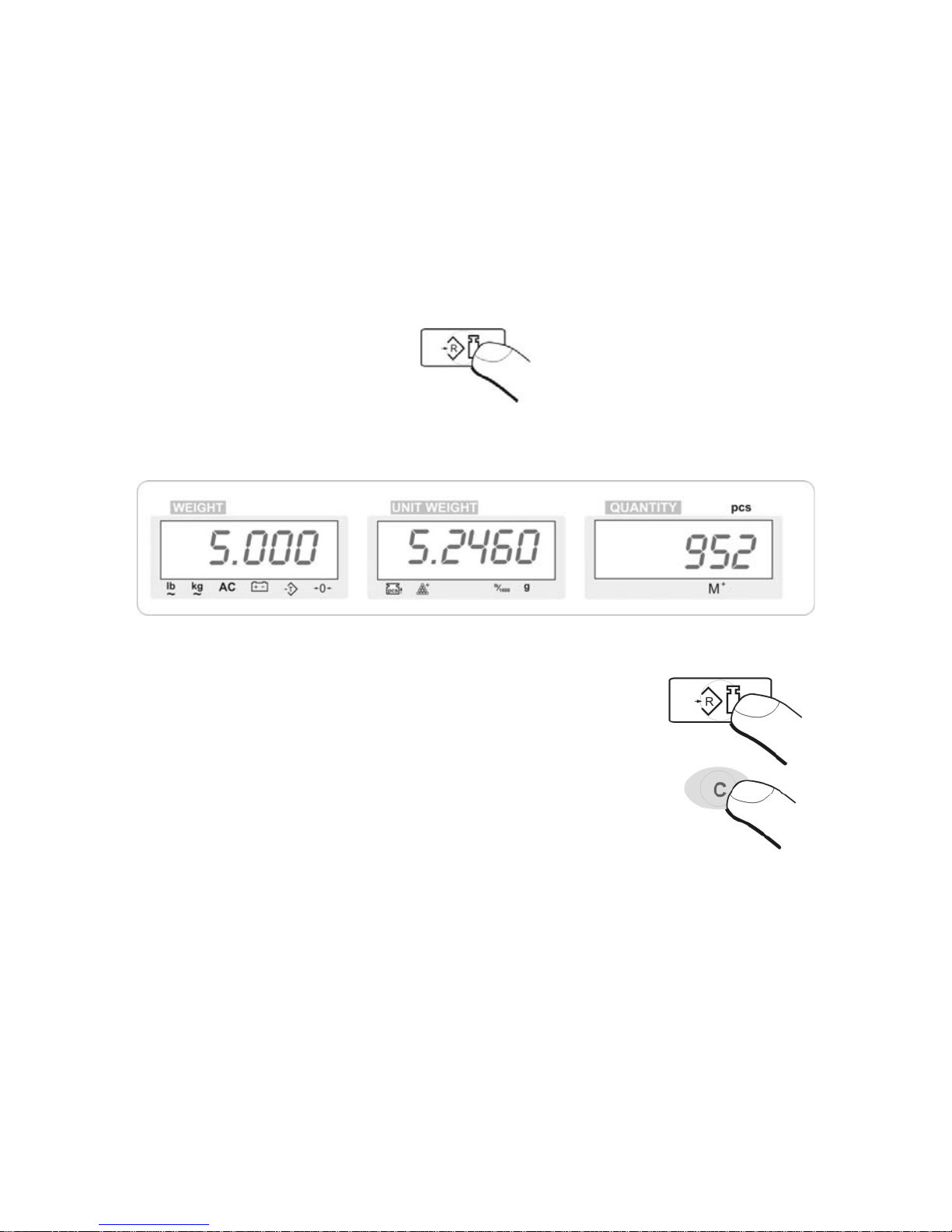
− Display described as QUANTITY will show quantity of pieces
− add following pieces, their quantit y will increase automatically.
Fig 4 – counting pieces
− take the weighed elements off the pan. In order to perform
another weighing / counting, insert another unit mass
and confirm it.
− Going back to weighing mode is possible after pressing button
for CANCELING
4.2. By determination of single unit mass
If unit mass of counted objects is not known, please act as described below:
− Place a container for counting pieces on the weighing pan, and press button
TARE
− Using numeric keyboard of the indicator, insert quantity of pieces (reference
mass), which will be used to calculate single piece mass
CAUTION:
reference mass has to be natural number.
- 6 -
Page 7
− Place counted pieces on the weight pan of the scale
− Press button
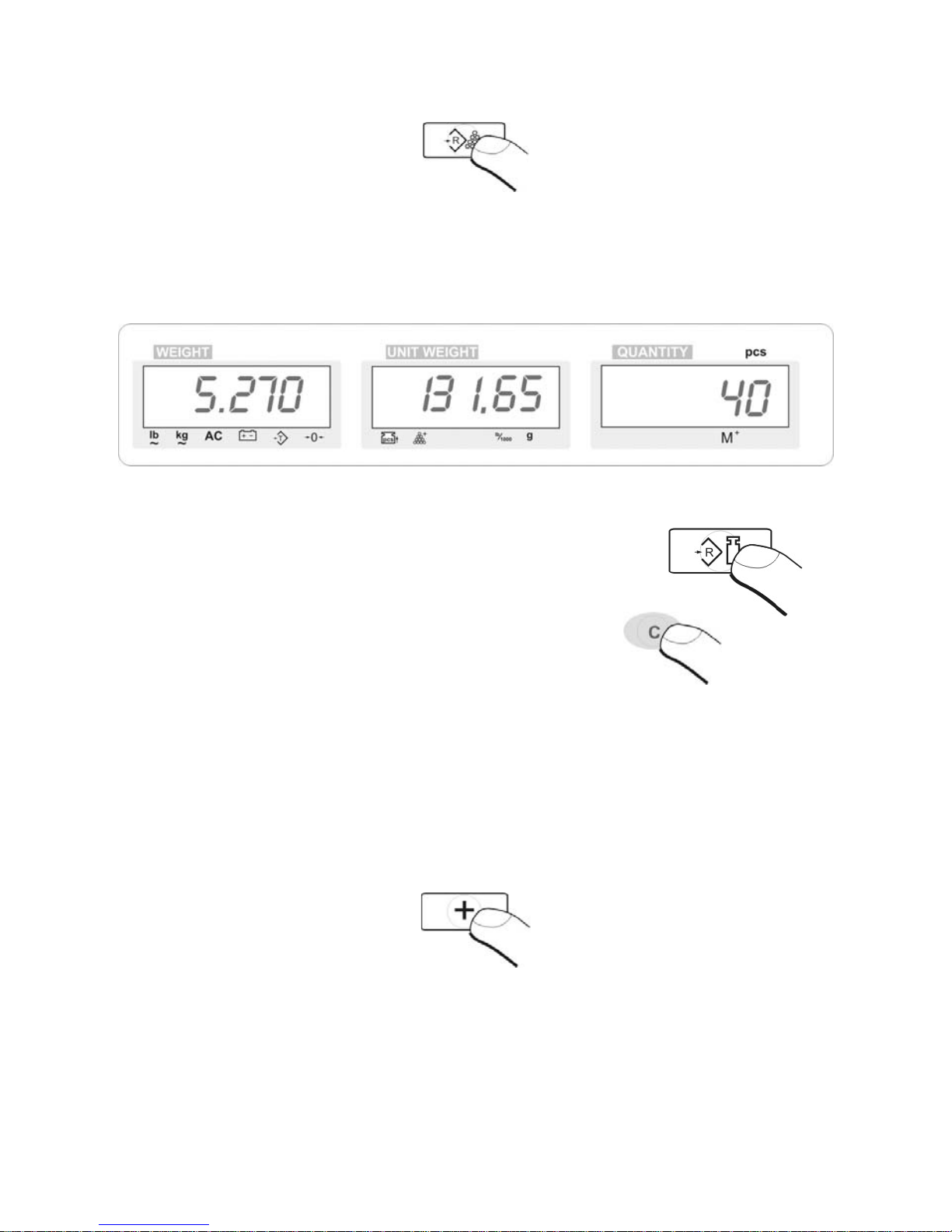
− Display described as UNIT WEIGHT will show unit mass of a sample
− Display described as QUANTITY will show quantity of details, used for calculation
of unit mass
− Add another details, their quantity will increase automatically.
Fig. 5 – counting pieces 2
− take the weighed elements off the pan. In order to perform
another weighing / counting, insert another unit mass
and proceed as described above.
− Going back to weighing mode is possible
after pressing button for CANCELING
5. SUMMING OF WEIGHING WHILE COUNTING PIECES
While counting pieces, it is possible to use summing function. Please follow below
procedure:
1. Start counting pieces as described in points 4.1. or 4.2.
2. when scale shows quantity of pieces, press button PLUS
3. for a moment, quantity of pieces visible in display window QUANTIT Y with be
invisible, it is a signal that value has been a ccepted. At the same time, display
described as QUANTITY will show marker of summing: (M
+
)
- 7 -
Page 8
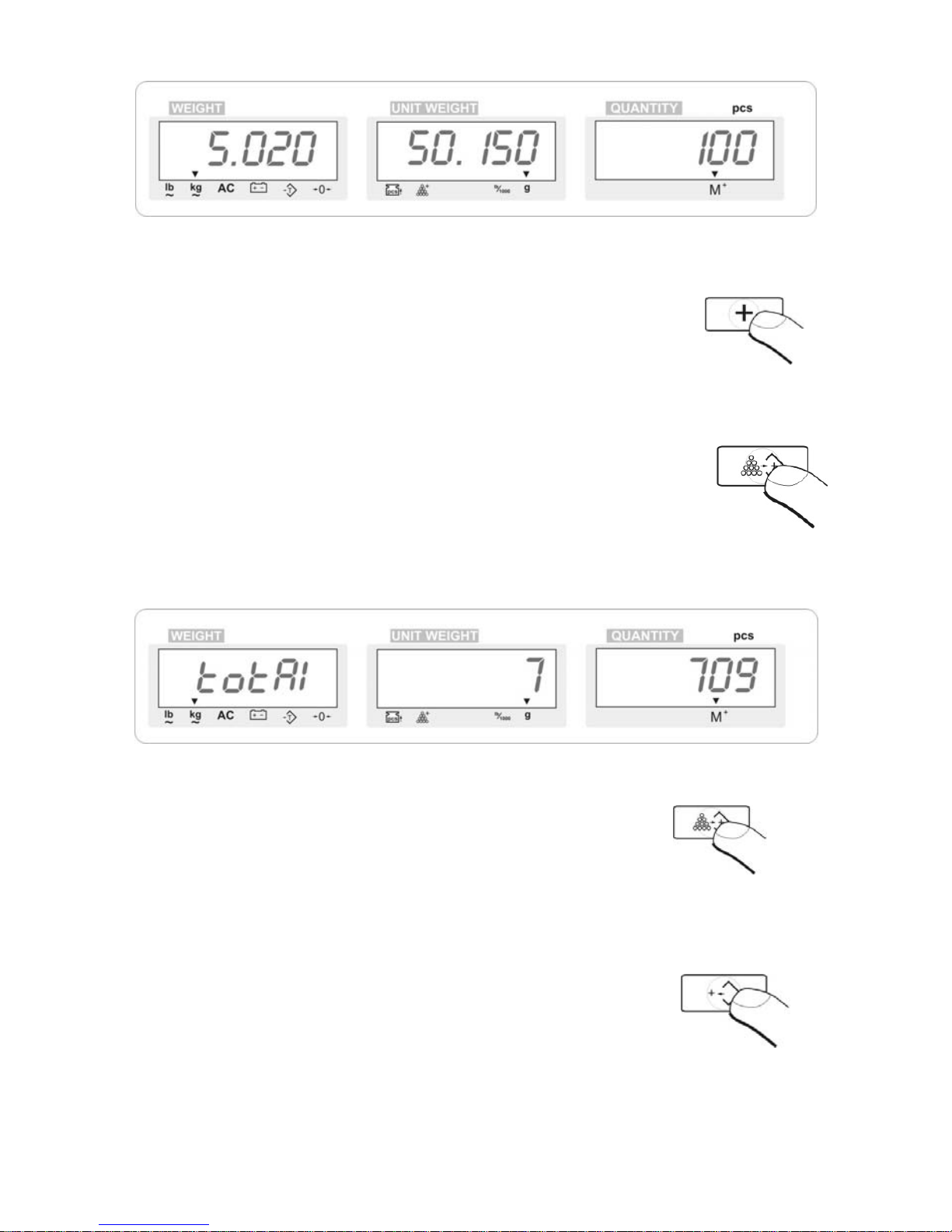
Fig. 6 – function for summing details
4. take the counted objects off the weighing pan (leave the container), scale will
go back to zero indication
5. put into the container another details, and press button PLUS
6. if the package needs to be changed, put it on the weighing pan, and press
button TARE. If the same package is still in use, and it is taken off the pan
together with the counted details, please tare the empty package again, after
placing it on the weighing pan of the scale.
- 8 -
7. In order to see quantity of summed details please press button
8. The display with show headline of the operation, quantity of
summed weighing (in field UNIT WEIGHT) and total quantity of deta ils (in field
QUANTITY).
Fig 7 – view of sum from a few weighings
9. Continuous summing of weighing is possible after
pressing button
10. Proceed according to points 5 – 7
CANCELING SUM OF COUNTED DETAILS
the moment, the sum of counted details is visible ( please see
drawing no. 8), and press button:
Scale will go back to weighing mode, sum marker will be no longer visible ( marker
over M
+
will disappear).
Page 9
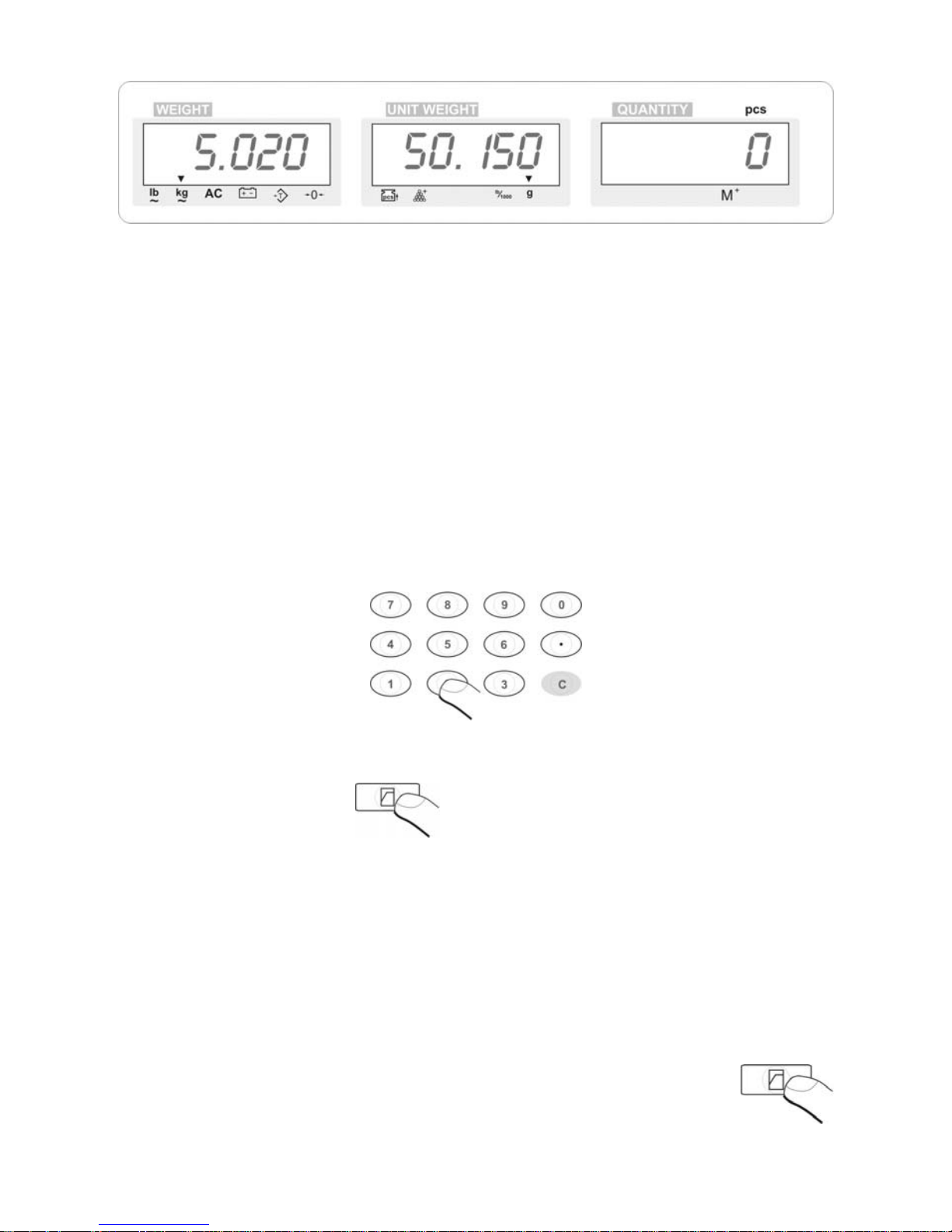
Fig. 8 – cancelling sum of counted details
6. PROGRAM VALUE WHILE COUNTING PIECES
While counting pieces mode, control of quantity takes place in visual way – user
should observe display status. For fast processes of quantity building, it is often
required to have some limited quantity which can not be e xc eeded in one package.
Software of the sale allows for insertion of such limited quantity of pieces, which
exceeding causes sounding of beep signal.
Procedure:
− Using numeric keyboard of the scale, insert value of the threshold for c ontrol
of counted details:
Fig. 9 – numeric functional keyboard of the scale
− Press button
− Inserted value will be stored and immediately switched off, display will go
back to previous state
− If while counting pieces, quantity of pieces is exceeded, scale will start to
generate ,,beep” sound
− Signal will be switched off, immediately after having appropriate quantity of
pieces (below the threshold limit).
CAUTION:
Value of the threshold can be set either in weighing mode or in counting details mode.
− in order to switch off control of weighed details, insert 0 (zero –
numeric keyboard) and press button
- 9 -
Page 10
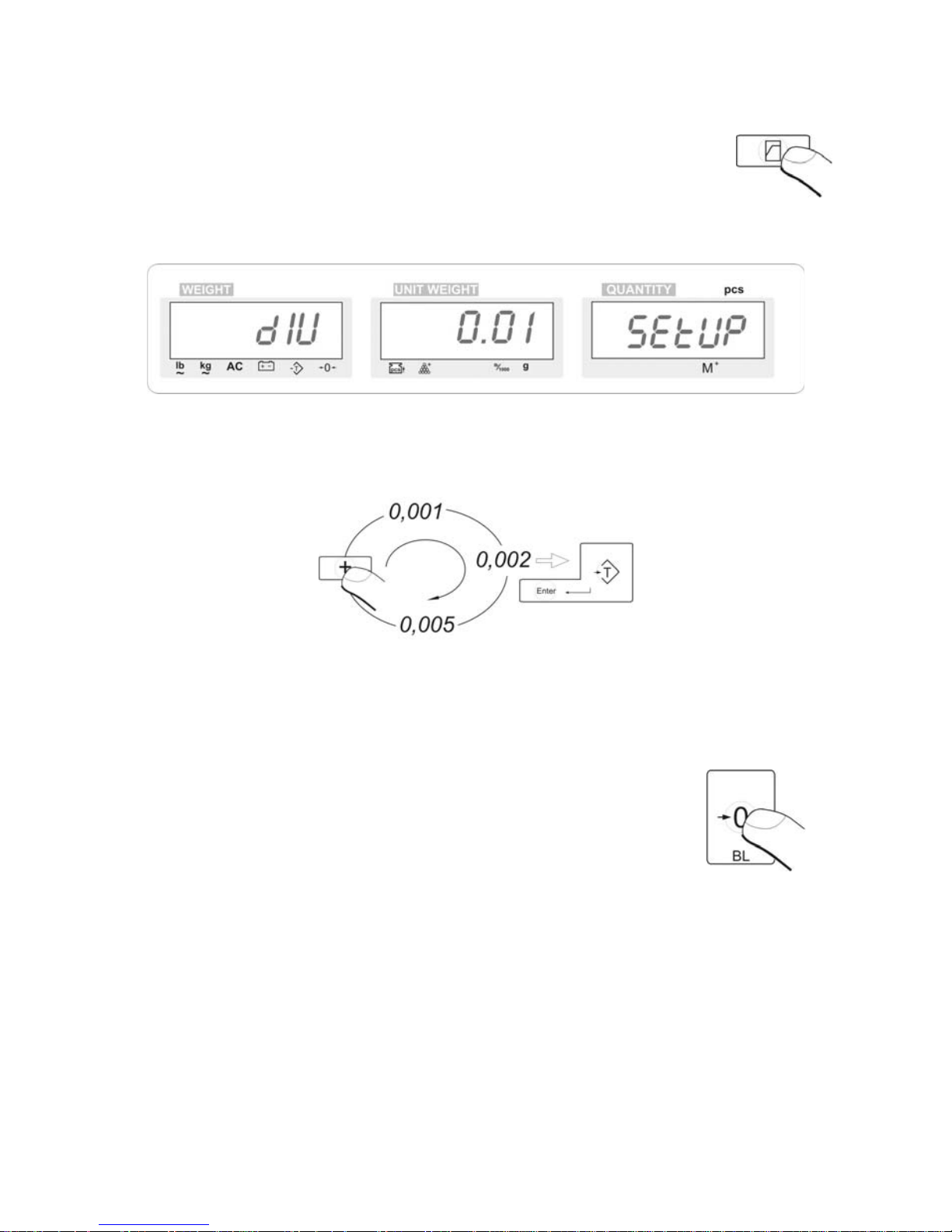
7. ACCURACY OF THE SCALE
− after switching the scale by pressing button ON/OFF, scale
performs auto-test, visible on the display of the instrument. W hile
this process, press button
− After cycle completion, scale status will look as below:
Fig 10 – choice of readability of the scale
− Press button PLUS multiple times, choose readability of the scale
− Confirm set value by pressing button TARE
− Scale will go back to weighing mode
8. BACKLIGHT
Switching on backlight :
− Press and hold button [ZERO] for 3 seconds
− Below values are accessible
o bl OFF (backlight off)
o bl ON (backlight on)
- 10 -
Page 11
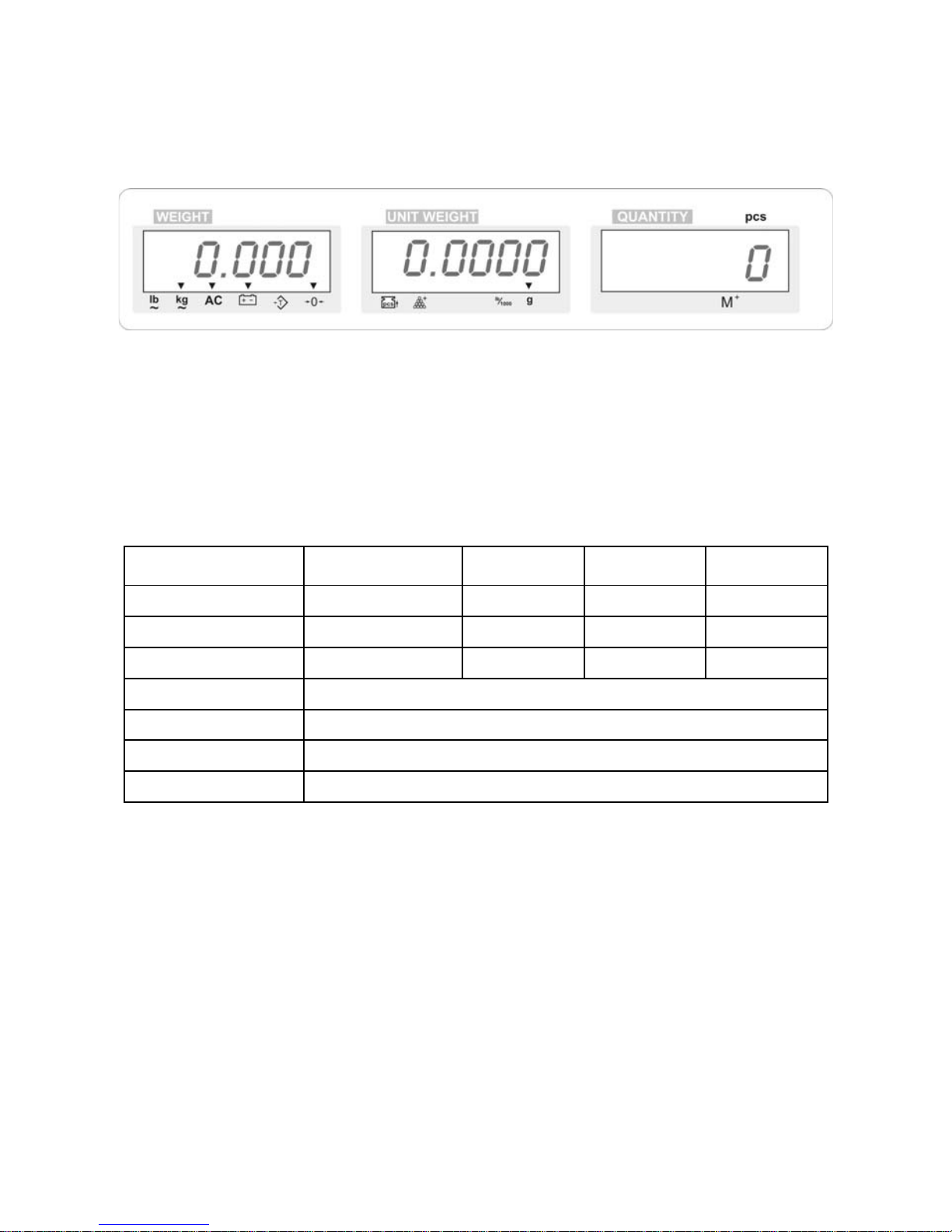
9. BATTERY CHARGING
Each scale is equipped with internal rechargeable battery. When the marker over the
battery icon is visible, please charge the battery.
Fig. 11 – battery charging
Connect the power adapter to indicator’s socket – process of battery charging will
begin. During charging, it is possible to operate the scale in normal way. When the
battery is charged, the marker will stop flashing.
10. TECHNICAL PARAMETERS
Scale type:
WTC
3 C1/L
WTC
6 C1/L
WTC
15 C1/L
WTC
30 C1/L
Maximal capacity. 3 kg 6 kg 15 kg 30 kg
Readability 0,1 g 0,2 g 0,5 g 1 g
Tare range -3 kg -6 kg -15 kg -30 kg
Pan size 250×300 mm
Working temperature -10° - +40° C
Power supply Battery and 230V AC / 9V DC, 800mA
Display LCD × 3 szt.
11. MESSAGES ON SCALE DISPLAY
FULL – exceeded the limit of counted pieces
(over 99 999)
Err No – incorrect data format while inserting reference mass (inserted value is not
natural number)
OVER – scale overloaded over the maximal capacity
- 11 -
Page 12
MANUFACTURER
OF ELECTRONIC WEIGHING INSTRUMENTS
ZAKŁAD MECHANIKI PRECYZYJNEJ ,,RADWAG”
26 – 600 Radom, ul. Bracka 28
POLAND
Office: phone. +48 48 38 48 800, phone./fax. + 48 48 385 00 10
www.radwag.com
- 12 -
 Loading...