

Page 1
21-1833.fm Page 1 Wednesday, May 17, 2000 8:30 AM
Voice Activated Audionic Earphone
OWNER’S MANUAL — Please read before using this equipment.
FEATURES
Your RadioShack Voice-Activated Audionic Earphone makes it easier and safer to use your handheld transceiver. The ultra-light weight speaker/
microphone combined with voice-activation makes
hands-free communications a breeze. You can continue your activities without interrupting your communication. Just connect the earphone’s plugs to
the jacks on your transceiver.
You can use this earphone with many of the
RadioShack handheld amateur radio, business
band, Family Radio Service, citizen's band, and
GMRS tranceivers that have external microphone
and speaker jacks.
The earphone is also compatible with Icom, Standard, Yaesu, and Alinco transceivers.
The earphone’s features include:
Voice Activation Control (VOX) — you can set the
earphone to automatically activate the transceiver
so you transmit only when you speak.
PREPARATION
Installing the Battery
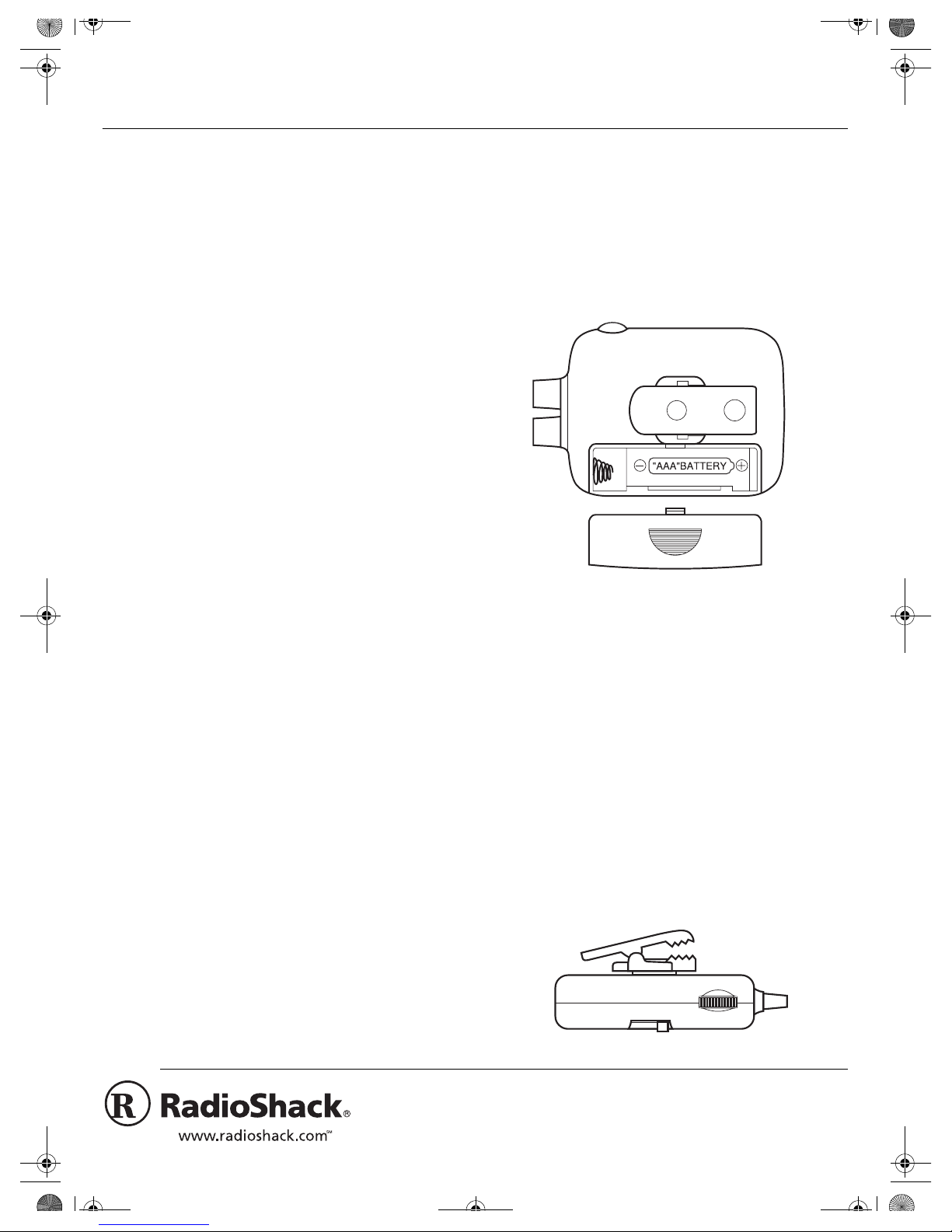
You need one AAA battery (not supplied) to operate
the earphone. F or the longest battery life, we recommend a RadioShack alkaline battery. Follow these
steps to install the battery.
VOX High/Low Positions —letsyouadjustthemicrophone's sensitivity to your voice level.
Push-To-Talk (PTT) Button — lets you manually
switch between transmitting and receiving.
Combination Mic/Earpiece —translatesyourvoice
into electrical signal for the transceiver during transmission, and acts as a normal earphone during reception.
Low-Power Circuitry — operates for more than
180 hours on one AAA alkaline battery (not supplied).
One Small and Two Large Replacement Earpieces — provide a comfortable fit for any size ear open-
ing.
1. Press down on the battery compartment cover
and slide away from the clip.
2. Install the battery in the compartment as indicated by the polarity symbols (+ and –) marked
inside.
3. Replace the cover.
Note: If you are using VOX and the transceiver does
not switch to transmit when you begin speaking, replace the battery.
Using the Clip
You can use the clip to attach the earphone's control
box to a pocket or belt.
© 2000 Tandy Corporation.
RadioShack and RadioShack.com are trademarks used by Tandy Corporation.
All Rights Reserved.
Page 2
21-1833.fm Page 2 Wednesday, May 17, 2000 8:30 AM
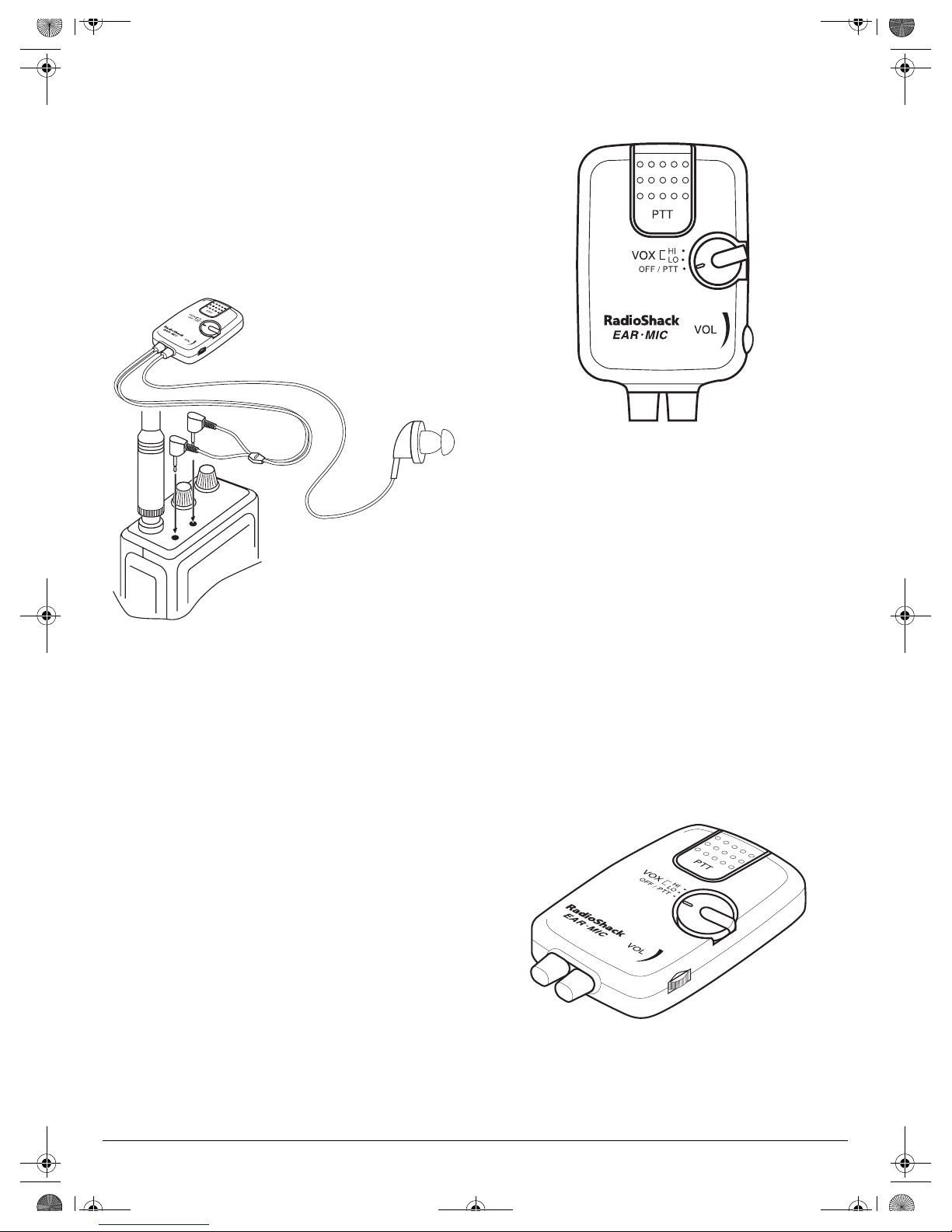
Connecting to the Transceiver
Note: To avoid accidental transmission, set the
function switch to
OFF/PTT
ceiver before you connect the earphone to the transceiver.
Insert the earphone's
transceiver's earphone jack. Then insert the earphone's
3
/32-inch microphone plug into the transceiv-
er's microphone jack.
andturnoffyourtrans-
1
/8-inch speaker plug into the
1. Set the function switch to
2. Press
to transmit and release it to receive.
PTT
OFF/PTT
.
3. When you finish operation, turn off the transceiver.
VOX Operation
OPERATION
You can manually switch between transmitting and
receiving (see "PTT (Push-to-Talk) Button Operation"), or use VOX to automatically transmit when
you talk, then receive when you stop talking (see
"VOX Operation").
Before you begin operation, set the transceiver's volume control to the center position, squelch control to
the on position, and turn on the transceiver.
Caution: Never position the earphone's cord or control box near the transceiver's antenna. If the cord or
the control box is too close to the antenna, the range
might be reduced or the control box might not correctly switch the transceiver between transmit and
receive.
1. Set the function switch to
VOX LOorHI
.
2. When you start talking, the transceiver is automatically set to transmit. When you stop talking,
the transceiver automatically switches to receive
after about 1 second.
3. When you finish operation, turn off the transceiver first, then turn off the earphone by setting
the function switch to
OFF/PTT
.
Volume Control
To adjust the level of receiving sound, rotate
VOL
.
PTT (Push-to-Talk Button) Operation
You can use the PTT button to manually switch between transmitting and receiving.
2
Page 3

21-1833.fm Page 3 Wednesday, May 17, 2000 8:30 AM
Notes:
• Because the earphone quickly switches the
transceiver to transmit as soon as you start talking, the receiving party might not hear the first
word you say. To ensure your entire message is
received, extend or repeat the first word of each
transmission.
• To transmit continuously during VOX operation,
even if you stop talking for a few seconds, hold
down
. When you release
PTT
, transmitting
PTT
stops after about 1 second of silence.
• Be sure to set the transceiver’s volume control
between the middle point and the maximum
point. The VOX function might not operate if you
set the transceiver’s volume control to a lower
point.
• If your transceiver receives noise or cross talk,
the VOX function might operate. In such a case,
press
to transmit as described in “PTT
PTT
(Push-To-Talk Button) Operation.”
Setting VOX Sensitivity
If background noise or wind is strong, set the function switch to
VOX LO
sensitivity. You might have to speak in a louderthan-normal voice to start transmitting.
to decrease the microphone's
SPECIFICATIONS
Power Supply ....................... 1.5 Volts (One AAA Battery)
Current Drain:
VOX Operation .....................................................5.0 mA
PTT Operation ....................... 6.6 mA with PTT Pressed
(No Drain at Receive Mode)
Battery Life ......... About 180 hours (with Alkaline Battery)
Speaker/Microphone:
Impedance ...................................................... 600 ohms
Sensitivity ........................... 115 dB SPL at 1 kHz / 1mW
Plug Size for Speaker ..........................
Plug Size for Microphone ...................3/32 Inch (2.5 mm)
VOX Sensitivity:
HI Position ........................................................ – 89 dBv
LO Position ........................................................ –76 dBv
VOX Activation
Time .............................1 Millisecond (switch to transmit)
VOX Recovery
Time ........................ About 1 Second (switch to receive)
Weight ......................................... 1.8 oz (without battery)
Specifications are typical; individual units might vary.
Specifications are subject to change and improvement
without notice.
1
/8 Inch (3.5 mm)
To increase the microphone's sensitivity, set the
function switch to
VOX HI
.
CARE
To enjoy your earphone for a long time:
• Keep the earphone dry. If it gets wet, wipe it dry
immediately.
• Use and store the earphone only in normal temperature environments.
• Handle the earphone gently and carefully. Do
not drop it.
• Keep the earphone away from dust and dirt.
• Wipe the earphone with a damp cloth occasionally to keep it looking new.
Modifying or tampering with the earphone’s internal
components can cause a malfunction and might invalidate its warranty. If your earphone is not performing as it should, take it to your local RadioShack
store for assistance.
3
Page 4
21-1833.fm Page 4 Wednesday, May 17, 2000 8:30 AM
This product is warranted by RadioShack against manufacturing defects in material and workmanship under normal use for ninety (90) days from the date of purchase from RadioShack companyowned stores and authorized RadioShack franchisees and dealers. EXCEPT AS PROVIDED
HEREIN, RadioShack MAKES NO EXPRESS WARRANTIES AND ANY IMPLIED WARRANTIES,
INCLUDING THOSE OF MERCHANTABILITY AND FITNESS FOR A PARTICULAR PURPOSE,
ARE LIMITED IN DURATION TO THE DURATION OF THE WRITTEN LIMITED WARRANTIES
CONTAINED HEREIN. EXCEPT AS PROVIDED HEREIN, RadioShack SHALL HAVE NO LIABILITY OR RESPONSIBILITY TO CUSTOMER OR ANY OTHER PERSON OR ENTITY WITH RESPECT TO ANY LIABILITY, LOSS OR DAMAGE CAUSED DIRECTLY OR INDIRECTLY BY USE
OR PERFORMANCE OF THE PRODUCT OR ARISING OUT OF ANY BREACH OF THIS WARRANTY, INCLUDING, BUT NOT LIMITED TO, ANY DAMAGES RESULTING FROM INCONVENIENCE, LOSS OF TIME, DATA, PROPERTY, REVENUE, OR PROFIT OR ANY INDIRECT,
SPECIAL, INCIDENTAL,OR CONSEQUENTIAL DAMAGES, EVEN IF RadioShack HAS BEEN ADVISED OF THE POSSIBILITY OF SUCH DAMAGES.
Some states do not allow limitations on how long an implied warranty lasts or the exclusion or limitation of incidental or consequential damages, so the above limitations or exclusions may not apply to
you.
In the event of a product defect during the warranty period, take the product and the RadioShack
sales receipt as proof of purchase date to any RadioShack store. RadioShack will, at its option, unless otherwise provided by law: (a) correct the defect by product repair without charge for parts and
labor; (b) replace the product with one of the same or similar design; or (c) refund the purchase
price. All replaced parts and products, and products on which a refund is made, become the property of RadioShack. New or reconditioned parts and products may be used in the performance of
warranty service. Repaired or replaced parts and products are warranted for the remainder of the
original warranty period. You will be c harged for repair or replacement of the product made after the
expiration of the warranty period.
This warranty does not cover: (a) damage or failure caused by or attributable to acts of God, abuse,
accident, misuse, improper or abnormal usage, failure to follow instructions, improper installation or
maintenance, alteration, lightning or other incidence of excess voltage or current; (b) any repairs
other than those provided by a RadioShack Authorized Service Facility; (c) consumables such as
fuses or batteries; (d) cosmetic damage; (e) transportation, shipping or insurance costs; or (f) costs
of product removal, installation, set-up service adjustment or reinstallation.
This warranty gives you specific legal rights, and you may also have other rights which vary from
state to state.
RadioShack Customer Relations, 200 Taylor Street, 6th Floor, Fort Worth, TX 76102
Limited Ninety-Day Warranty
WeServiceWhatWeSell
12/99
RadioShack
A Division of Tandy Corporation
Fort Worth, Texas 76102
21-1833
05A00
Printed in Hong Kong
 Loading...