

Page 1

O P E R A T I N G I N S T R U C T I O N S
Select-A-Charge Battery Chargers
models: SCP, SCPX, SCS, SCSX, SCX
For Industrial Use:
Designed for gel, wet cell, AGM, and Lithi um Ion batteries
(Lithium ion applications must be factory pr ogram m ed)
Quick Charge Corp.
800 658-2841
e-mail [email protected]
www.quickcharge.com
Made in the U.S.A
101712
Page 2

Page 3

If your charger is programmed for
Lithium Ion batteries the display will
read “FC” Final Charge instead of 80%
To discontinue charging, switch the power off, and disconnect
battery.
EQUALIZATION:
When using multiple batteries in a series string, cells become
uneven during charge and discharge cycles. At least once a month
perform two charge cycles back to back, this will give a chance for
cells that are lagging behind to catch up, and is important to overall
battery performance. NOTE: This only needs to be done when
using F2, F3, F4, settings, and a gassing/absorption setting of d0
or d2.
Page 4

SAFETY INFORMATION AC WIRING:
Before making AC connections, refer to the requirements on the
charger ID label. If your charger is not equipped with an AC plug,
for example, a 230 volt charger, have a qualified electrician install
one.
To reduce the risk of fire, use this charger only on branch circuits
that are protected by a circuit breaker or fuse, and that are adequate
to carry the power drawn by the charger. All wiring should be in
accordance with the National Electric Code, ANSI/NFPA 70, and
all local codes and ordinances.
This battery charger must be grounded to reduce the risk of electric
shock. 117 volt chargers are equipped with a grounding type plug,
230 volt chargers are shipped without a plug. Have a qualified
electrician install a properly grounded 3 wire plug.
DO NOT USE THIS CHARGER ON A TWO POLE
UNGROUNDED OUTLET OR ATTEMPT TO BREAK OFF
THE GROUND PRONG FOR USE ON A RECEPTACLE OR
EXTENSION CORD NOT HAVING A GROUND.
If an extension cord must be used, make sure it is in good
condition. Use a three conductor cord no smaller than the size
being used on the charger, and keep it as short as possible. The use
of an improper extension cord could result in a risk of a fire or
electric shock. Locate all cords so that they will not be stepped on,
tripped over, or otherwise subjected to damage or stress.
Page 5

OTHER SAFETY INFORMATION
Do not use charger if it shows signs of physical stress, or if DC
output leads or connector feel hot when used.
Do not disconnect the DC output clamps, or connector from the
batteries when the charger is on. The resulting arcing could cause
the batteries to explode.
Do not expose charger to rain.
The charger will become hot during use, provide adequate air flow
around it. Do not place charger on cloth or vinyl seats, blankets, or
around any other obstructive materials. Do not place charger
against walls, allow 12” of space on all sides.
BATTERY SAFETY & CARE INFORMATION
Always wear protective eye shields and clothing when working
with batteries. Batteries contain acids which can cause bodily
harm. Do not put wrenches or other metal objects across the
battery terminal or battery top. Arcing or explosion of the battery
can result. Do not wear jewelry when working around batteries.
Arcing can cause severe burns.
The tops of the batteries and battery hold downs must be kept clean
and dry at all times to prevent excessive self discharge and flow of
current between the battery post and frame.
With wet cell batteries, maintain the proper electrolyte level by
adding water when necessary. Never allow the electrolyte level to
fall below the top of the battery plates. Electrolyte levels fall
during discharge and rise during charging. Therefore, to prevent
the overflow of electrolyte when charging, add water only after
the batteries have been fully charged, or just enough to cover
the plates if discharged. Old batteries require more frequent
additions of water than do new batteries.
Do not over discharge batteries. Excessive discharge can cause
polarity reversal of individual cells resulting in complete battery
Page 6
failure. Re-charge batteries as soon as possible after a deep
discharge, but not if they are warm, allow a cooling down period.
Provide adequate ventilation when charging batteries. Chargers can
ignite flammable materials and vapors. Do not use near fuels,
grain, dust, solvents, or other flammables.
Do not charge batteries in excessively hot temperatures; wait till
the cool of the evening.
PRE CHARGE INFORMATION
Before connecting the charger to the batteries, make sure the
battery pack is of the same voltage rating of th e char ger . If you are
unsure, count the number of cells on the battery pack and multiply
by two. This figure should be the same as the DC voltage rating of
the charger. (see ratings label on charger)
Make sure the AC cord, DC output leads, terminals,
connectors, or clamps are all in good working condition. Do not
use the charger if there are any signs of stress or damage, or if
wires are cut or have damaged insulation. Using this charger with
any of these symptoms could result in a fire, property damage, or
personal injury. Have a qualified service person make the
necessary repairs. Repairs should not be made by people who are
not qualified.
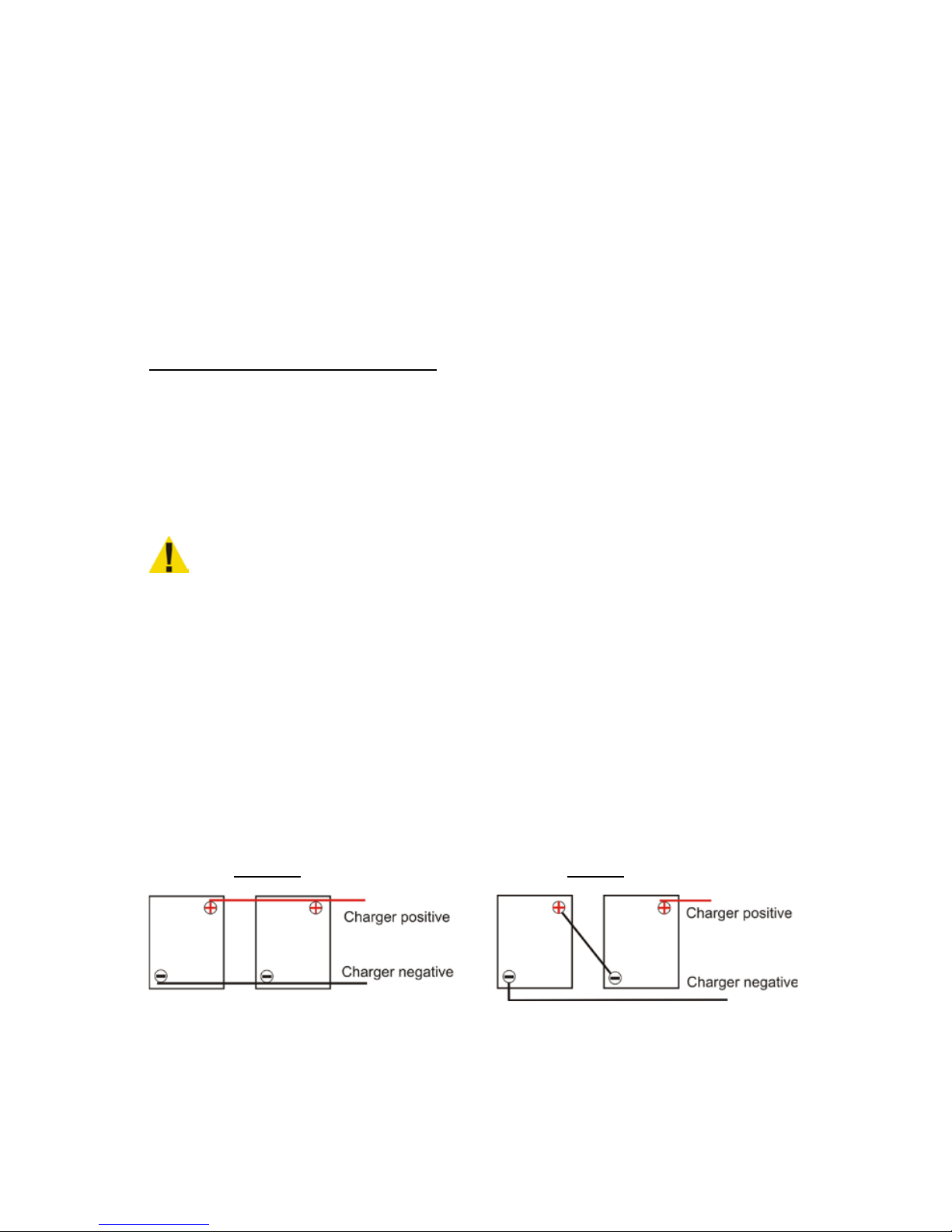
Illustration of series and parallel battery connections:
Parallel Series
When batteries are connected in
Parallel the bat tery amp hour
capacity is additive and the
voltage remains the s ame.
Example: two 180 amp hour
12 volt batteries would equal
12 volts and 360 amp hour capacity
When batteries are connected in
Series the voltage i s additive and
the battery amp hour
capacity remains the same.
Example: two 180 amp hour
12 volt batteries would equal
24 volts and 180 amp hour capacity
Page 7

REPROGRAMMING
There are 5 charge profiles, and 5 programming adjustments that
can be made to the profiles.
The profiles are:
F1 is a single stage float profile generally used for gel and starting
type batteries. There are no adjustments available to this profile.
F2 is a two stage profile for deep cycle wet cell batteries. Bulk
charging, a gassing cycle, then termination.
F3 is a three stage profile for deep cycle wet cell batteries. Bulk
charging, a gassing cycle, and maintenance.
F4 is a three stage profile for AGM batteries. Bulk charging,
absorption cycle, and maintenance.
F5 is for Lithium ion batteries and must be pre-programmed at the
factory.
The adjustments are:
d0 standard gassing/absorption cycle. Applicable to most
applications
d1 shortened gassing/absorption cycle. For frequent shallow
discharging, or frequent recharging of batteries with very little
discharge. Suitable for opportunity charging.
d2 lengthened gassing/absorption cycle. For batteries requiring
long gassing/absorption cycles. US Battery, and Full River are
two brands that benefit from longer charge cycles.
r0 when set to the F2 profile, charge will terminate, and will not
monitor the battery.
Page 8

r1 when set to the F2 profile, charge will terminate, and the battery
will be checked weekly, if the voltage falls to a predetermined
level, the charger will recycle and bring the battery(s) back up.
To change the profile: Be firm and deliberate when pressing the
button. Disconnect one charge lead. Plug the charger into AC
power. Press and hold the “Battery Voltage” button. The display
will flash the current setting. Press the button repeatedly, and stop
at the desired profile. The display will stop flashing and remember
the setting. Unplug AC power, and reconnect the battery. When
powered back up, the display will flash the changed setting, and
the charge cycle will begin.
To change the adjustments: Follow the above procedure, except
press the button twice to enter the d menu, press the button a third
time and hold to set the display flashing and to make a change. To
change the r setting, press the button three times to enter the r
menu, then a forth time, and hold to set the display flashing and to
make a change. A reprogramming video is available at
quickcharge.com on the Select-A-Charge pages.
Page 9

TROUBLESHOOTING
Symptom Cause Corrective Action
When plugged into AC
power the LED flashes
red/green, and a 0 on
display.
Connected reverse to
battery, or not connected
to battery.
Break in DC cord, or
connector.
Battery too dead to
charge.
Correct polarity, or
connect to battery. On
chargers having a black
and white wire, white is
positive.
Have a qualified person
make repair.
Replace.
When plugged into AC
power the display does
not come on.
No AC p ower.
Check cir cuit.
Check extension cord
for breaks or damage.
When I put a volt meter
across the output o f the
charger there is no
power coming out when
I plug it in.
The charger must be
connected to a battery to
turn on.
The batteries don’t
receive a full charge. On
wet cells, the specific
gravity will not rise to a
full reading after the
charge has completed.
The charger is too small
for the battery.
The charge profile is not
set correctly.
The cycle needs more
time.
The battery is defective.
Check tha t the charge r’s
output is about 10% of
the amp hour rating of
the battery.
Recheck the setting. If in
doubt, contact us.
Set gas/absorption to d2.
Replace.
On start up, the LE D
flashes red/yellow.
Charger and battery
voltage mi s matc h.
Connect the charger to a
battery(s) with the same
voltage rating.
Page 10

When powered up the
LED is solid red with a
yellow flash, and
displaying 02.
The battery is very low,
and the charger is in a
slow char ge phase u nt il
the voltage rises to a
safe level before full
turn on.
.
Leave connected, it may
take hours, but if the
voltage rises even a little
bit, it should recover,
and turn t he charger full
on. (Do not allow your
batteries to deep
discharge, it is the
number one cause of
premature battery
failure.)
The charger blows it’s
fuse, or branch circuit
fuse/circuit breaker as
soon as it’s switched on.
Charger is shorted.
Contact factory.
The charger blows the
branch circuit
fuse/circuit breaker a
short while after being
switched on.
The branch circuit is too
small.
Relocate charger to a
branch circuit with a
heavier rating, or
remove other loads on
the circuit.
Batteries use water, get
hot, or smell.
One or more dead cells.
Profile not set correctly.
Replace batteries. If
charging in a series
string, it is best to
replace all the batteries
rather tha n mix ne w
with old.
If shallow discharging,
check that the
gassing/absorption
profile is set to d1
After a full charge, the
batteries die quickly
The batteries are
sulfated.
Sometimes batteries can
be recovered. Leave the
charger on for some
hours, if t he voltage falls
and the current begins to
rise, it is a good sign
they can recover under
normal c harging.
Page 11

The cycle ends with Er
showing, and a
green/yellow flashi ng
LED.
An incompl ete cycle.
The batteries did not
reach minimum voltage
requirements, and the
charger bulk timed out.
The batteries are too big
for the charger.
The batteries have
defective cells, and
cannot make mi ni mu m
voltage.
NOTE: An occasional
short cycle is not a
problem. Just unplug the
charger and plug back in
to complete the cycle.
Page 12

QUICK CHARGE Select-a-Charge Battery Chargers
“LIMITED WARRANTY”
Quick Charge Corporation warrants this line of chargers for three (3) years from the d ate of
purchase. After the warranty period, chargers returned to the factory for repair will be charged a
minimum rate of $25.00. Charger will be returned, freight and repair charges, C.O.D. unless other
arrangements have been made. This warranty covers all defects in manufacture and
performance, provided the unit is operated in com plian ce with manufacture’s operating
instructions.
For repairs to be made at the Quick Charge factory, a charger and/or component(s) should be
sent, freight prepaid to Quick Charge at:
Quick Charge Corp.
1032 S.W. 22nd St.
Oklahoma City, OK. 73109
Quick Charge, will at it’s option, repair or replace the charger or component in question. The
repaired item will then be returned, freight prepaid by Quick Charge. This warranty is void if the
charger or component have been altered, changed, or repaired by anyone not authorized by
Quick C harge, or if the charg er or component, have been subjected to misuse, negligence, or
harsh environmental conditions. (Except thos e cha rger s design ed for such condition s)
If returning the charger to the factory is not practical, replacement p art s m ay be shipp ed to the
customer for field repa ir at no charge. On parts such as circuit boards, th e c ustomer will be
required to return the board suspected to be defective to Quick Charge, freight prepaid. If such
defective parts are not returned, the customer wil l be invo iced for t he repair pa rts. Field repairs
are made at the user’s own risk. “Authorization” by Quick Charge to repair refers to maintaining
the warranty only. Quick Charge assumes no responsibility or liability for field servicing, and shall
not be responsible for incurred travel or labor charges.
Quick Charge corporation shall not in any event be liable for the cost of any special, indirect or
consequential damages to anyone, product or thing. This warranty is in lieu of all other warranties
expressed or implied. Quick Charge neither assumes nor authorizes any representative or other
person to assume for us any liability in connection with the sale of this product.
 Loading...