

Page 1

101712
O P E R A T I N G I N S T R U C T I O N S
NPE, NPEXU, NO POLARITY Battery Chargers
For Industrial Use: A float charger designed for gel, and start i ng batteries
Quick Charge Corp.
800 658-2841
e-mail [email protected]
www.quickcharge.com
Made in the U.S.A
Page 2
QUICK START INSTRUCTIONS:
32
2.38
40
2.36
50
2.34
60
2.32
70
2.3
80
2.27
90
2.25
The No Polarity chargers do not have positive and negative
connections. The two clips may be connected to the battery(s)
either way. Move the switch to the OFF position. Before making
battery connections, be sure the charger voltage matches that of the
battery(s). Once conn ect ed , the green battery LED should lite. If
not, see the trouble shooting section before proceeding.
Plug the charger into AC power with the same ratings as that of the
charger. (See decal). Move the switch to the voltage that matches
the battery. The red LED should lite, and the ammeter should
deflect to the right or left of 0. As the battery becomes charged, the
meter will work its way back to 0. The charger may be left on, and
will maintain the battery(s).
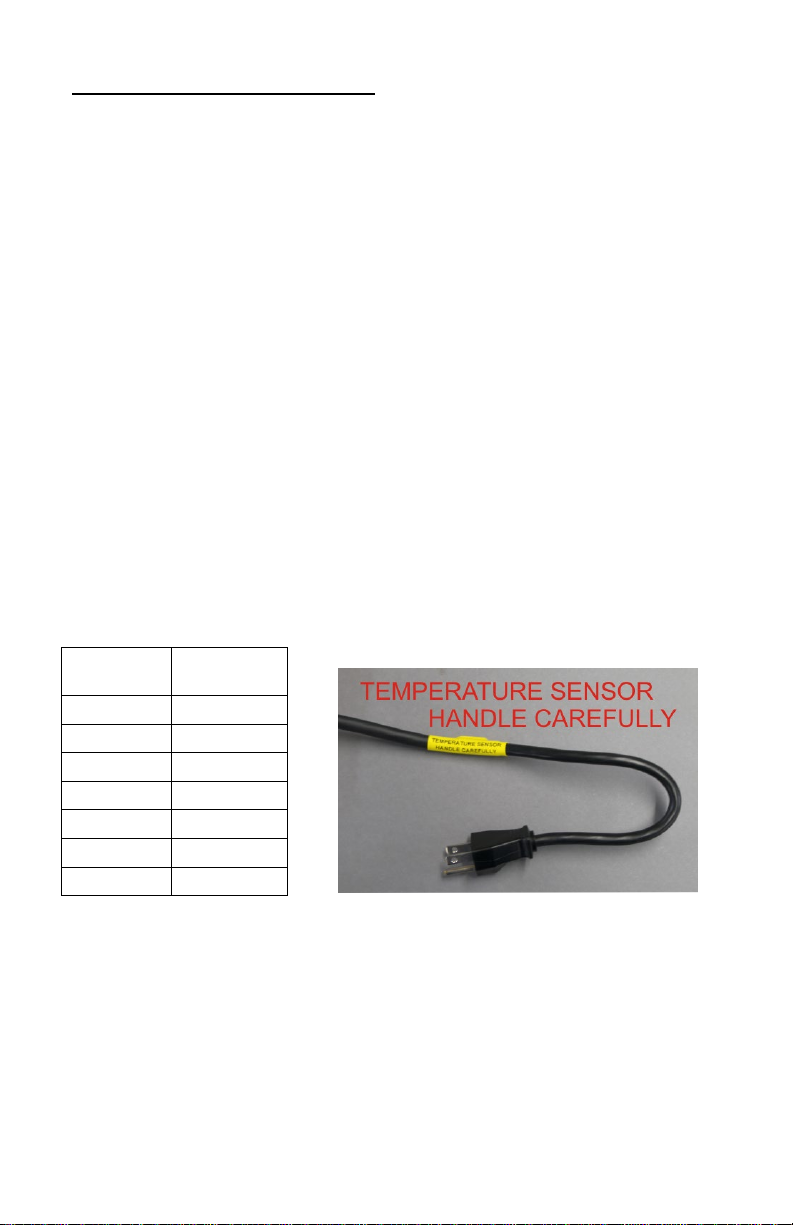
While the charger is on, it will adjust the voltage applied to the
battery depending on the air temperature. As it increases, the
charger will lower the voltage, as the temperature falls, the voltage
will rise. This optimizes battery life.
Temp. F
VPC
To discontinue charging, move switch to the OFF position.
Page 3
SAFETY INFORMATION AC WIRING:
Before making AC connections, refer to the requirements on the
charger ID label. If your charger is not equipped with an AC plug,
for example, a 230 volt charger, have a qualified electrician install
one.
To reduce the risk of fire, use this charger only on branch circuits
that are protected by a circuit breaker or fuse, and that are adequate
to carry the power drawn by the charger. All wiring should be in
accordance with the National Electric Code, ANSI/NFPA 70, and
all local codes and ordinances.
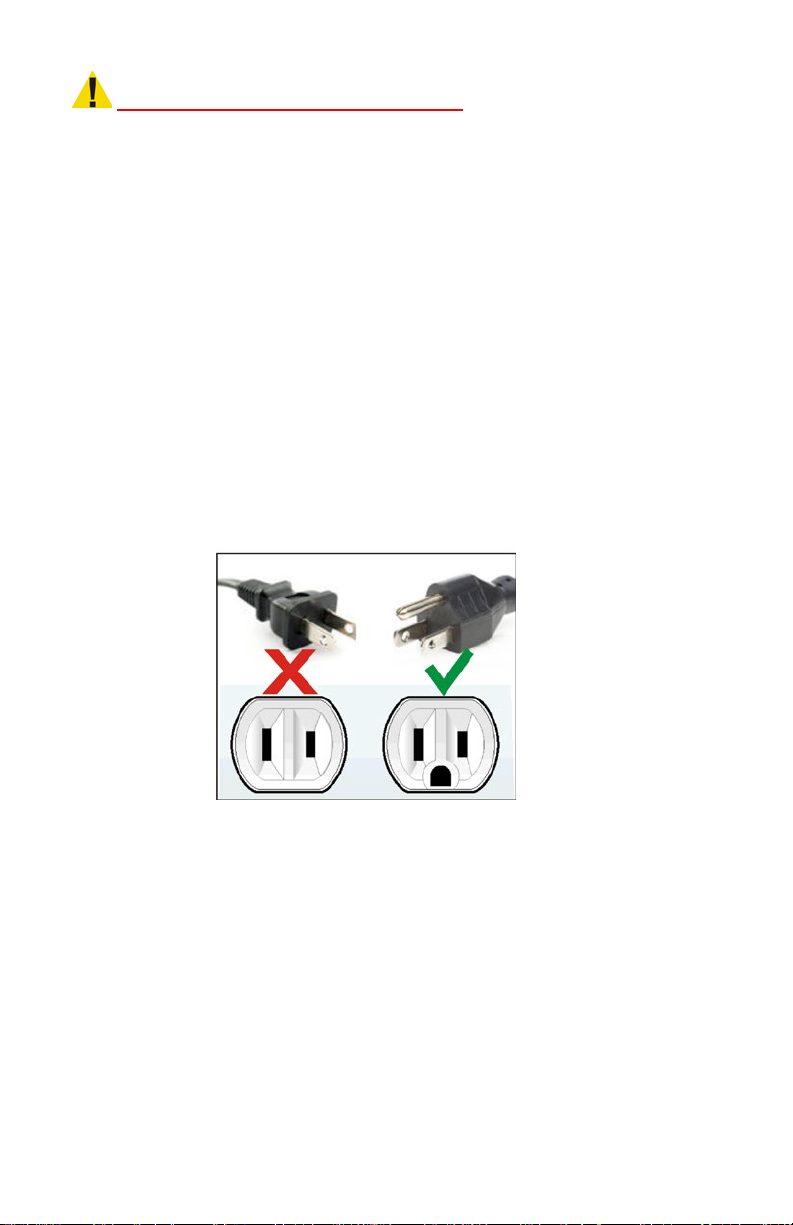
This battery charger must be grounded to reduce the risk of electric
shock. 117 volt chargers are equipped with a grounding type plug,
230 volt chargers are shipped without a plug. Have a qualified
electrician install a properly grounded 3 wire plug.
DO NOT USE THIS CHARGER ON A TWO POLE
UNGROUNDED OUTLET OR ATTEMPT TO BREAK OFF
THE GROUND PRONG FOR USE ON A RECEPTACLE OR
EXTENSION CORD NOT HAVING A GROUND.
If an extension cord must be used, make sure it is in good
condition. Use a three conductor cord no smaller than the size
being used on the charger, and keep it as short as possible. The use
of an improper extension cord could result in a risk of a fire or
electric shock. Locate all cords so that they will not be stepped on,
tripped over, or otherwise subjected to damage or stress.
Page 4

OTHER SAFETY INFORMATION
Do not use charger if it shows signs of physical stress, or if DC
output leads or connector feel hot when used.
Do not disconnect the DC output clamps, or connector from the
batteries when the charger is on. The resulting arcing could cause
the batteries to explode.
Do not expose charger to rain.
NEVER charge a battery at a higher voltage than what it is rated
for.
The charger will become hot during use, provide adequate air flow
around it. Do not place charger on cloth or vinyl seats, blankets, or
around any other obstructive materials. Do not place charger
against walls, allow 12” of space on all sides.
BATTERY SAFETY & CARE INFORMATION
Always wear protective eye shields and clothing when working
with batteries. Batteries contain acids which can cause bodily
harm. Do not put wrenches or other metal objects across the
battery terminal or battery top. Arcing or explosion of the battery
can result. Do not wear jewelry when working around batteries.
Arcing can cause severe burns.
The tops of the batteries and battery hold downs must be kept clean
and dry at all times to prevent excessive self discharge and flow of
current between the battery post and frame.
With wet cell batteries, maintain the proper electrolyte level by
adding water when necessary. Never allow the electrolyte level to
fall below the top of the battery plates. Electrolyte levels fall
during discharge and rise during charging. Therefore, to prevent
the overflow of electrolyte when charging, add water only after
the batteries have been fully charged, or just enough to cover
the plates if discharged. Old batteries require more frequent
additions of water than do new batteries.
Page 5
Do not over discharge batteries. Excessive discharge can cause
When batteries are con nected in
When batteries are con nected in
polarity reversal of individual cells resulting in complete battery
failure. Re-charge batteries as soon as possible after a deep
discharge, but not if they are warm, allow a cooling down period.
Provide adequate ventilation when charging batteries. Chargers can
ignite flammable materials and vapors. Do not use near fuels,
grain, dust, solvents, or other flammables.
Do not charge batteries in excessively hot temperatures; wait till
the cool of the evening.
PRE CHARGE INFORMATION
Before connecting the charger to the batteries, make sure the
battery pack is of the same voltage rating of the charger. If you are
unsure, count the number of cells on the battery pack and multiply
by two. This figure should be the same as the DC voltage rating of
the charger. (see ratings label on charger)
Make sure the AC cord, DC output leads, terminals,
connectors, or clamps are all in good working condition. Do not
use the charger if there are any signs of stress or damage, or if
wires are cut or have damaged insulation. Using this charger with
any of these symptoms could result in a fire, property damage, or
personal injury. Have a qualified service person make the
necessary repairs. Repairs should not be made by people who are
not qualified.
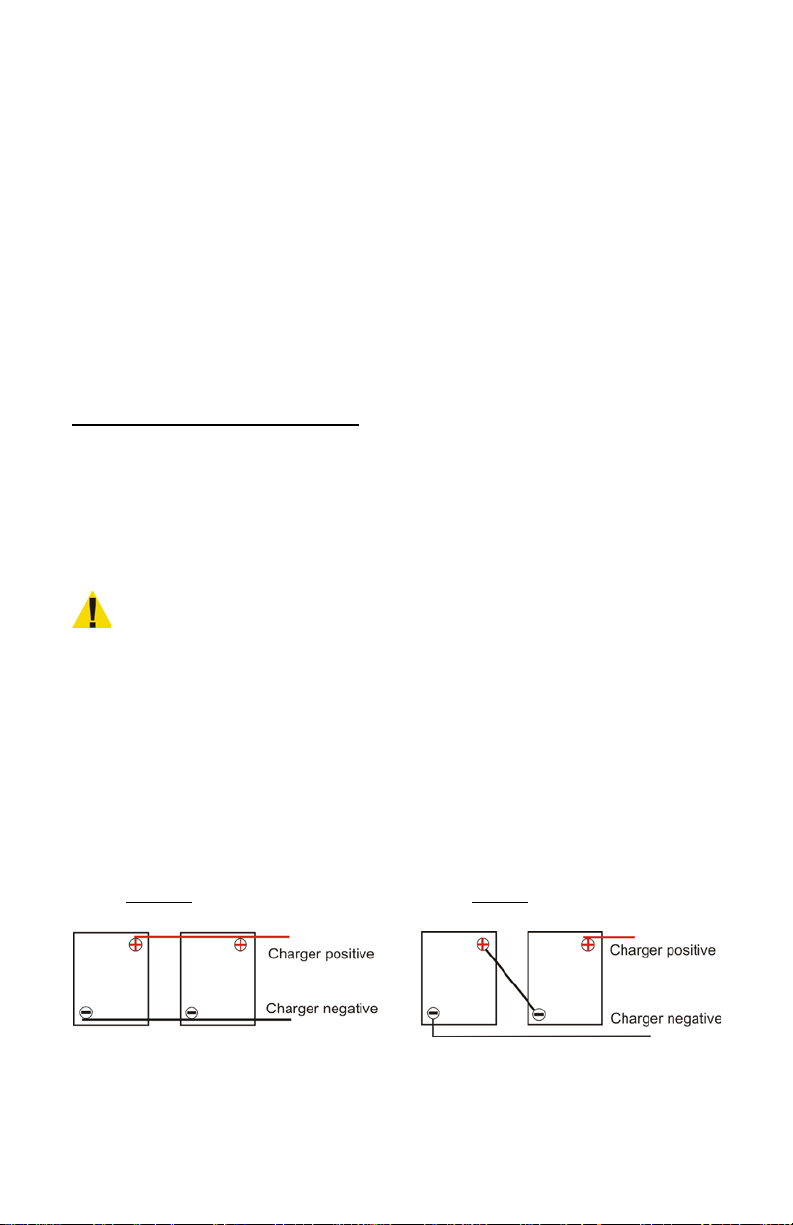
Illustration of series and parallel battery connections.
Parallel Series
Parallel the battery amp hour
capacity is additive an d the
voltage remains the same.
Example: two 180 amp hour
12 volt batteries would equal
12 volts and 360 amp hour capacity
Series the voltage is additive and
the battery amp hour
capacity remains the same.
Example: two 180 amp hour
12 volt batteries would equal
24 volts and 180 amp hour capacity
Page 6

TROUBLESHOOTING
No green LED when
Break in DC cord, or
Have a qualified person
recoverable.
When switche d on, the
The panel mount fuse is
Replace wit h one having
Symptom Cause Corrective Action
Connected to battery.
The charger does not see
the battery.
Both the green and red
LED do come on, but
the ammeter stays at 0.
connector.
Battery voltage too low
to turn the charger on.
Battery is sulfated, and
will not accept a charge.
make repair.
If the battery has too
low a voltage you may
need to “jump” the dead
battery with a charged
battery, connecting
positive to positive, and
negative to negative so
the charger has enough
voltage to turn on. Once
charging, and given time
to build the voltage, the
jumper battery can be
disconnected.
Leave the charger
connected and ON. Over
some hours, t he
ammeter ma y begin to
rise indicat ing current
flow. The amps will
build to the full capacity
of the charge r, then
work back to 0
NOTE: Batteries in this
condition may not be
red LED does not light,
and no amps read on
meter
blown.
There is no AC power
present at the plug.
the same rating.
Check that there is
power at the source. If
using an extension cord,
check that it is not
damaged.
Page 7

The charger blows it’s
fuse, or branch circuit
Charger is shorted
Contact factory.
The charger blows the
switched on.
The branch circuit is too
Relocate charger to a
the circuit.
Batteries use water, get
will not go any lower.
One or more dead cells.
Replace batteries. If
with old.
When I put a vo lt meter
I switch it on.
The charger must be
The batteries don’t
The charger is too small
about 80%.
Charger/battery
fuse/circuit breaker as
soon as it’s switched on.
branch circuit
fuse/circuit breaker a
short while after being
hot, or smell.
The ammeter hangs up
around a fe w amps and
across the o utput of the
charger there is no
power coming out when
receive a full charge. On
wet cells, the specific
gravity will not rise to a
full reading after the
charge has completed.
small.
connected to a battery to
turn on.
for the battery.
The charger is not
designed to fully charge
deep cycle batteries. It
will only charge them to
branch circuit with a
heavier rating, or
remove other loads on
charging in a s eries
string, it is best to
replace all the batteries
rather than mix ne w
mismatch. Contact us for
the proper charger.
Page 8

QUICK CHARGE NPE Battery Chargers
“LIMITED WARRANTY”
Quick Charge Corporation warrants the NPE line of chargers for three (3) years from the date of
purchase. After the warranty period, chargers returned to the factory for repair will be charged a
minimum rate of $25.00. Charger will be returned, freight and repair charges, C.O.D. unless other
arrangements have been made. This warranty covers all defects in manufacture and
performance, provided the unit is operated in compliance with manufacture’s operating
instructions.
For repairs to be made at the Quick Charge factory, a charger and/or component(s) should be
sent, freight prepaid to Quick Charge at::
Quick Charge Corp.
Quick Charge, will at it’s option, repair or replace the charger or component in question. The
repaired item will then be returned, freight prepaid by Quick Charge. This warranty is void if the
charger or component have been altered, changed, or repaired by anyone not authorized by
Quick Charge, or if the charger or c omponent, have been subjected to misuse, negligence, or
harsh environmental conditions. (Except those charger s designed for such conditions)
If returning the charger to the factory is not practical, replace m ent part s m ay be shipp ed to the
custome r for field re pair at no cha rge. On parts s uch as circui t boards, the c ustomer will be
required to return the board suspected to be defective to Quick Charge, freight prepaid. If such
defective parts are not returned, the customer will be invoiced for the repair parts. Field repairs
are made at the user’s own risk. “Authorization” by Quick Charge to repair refers to maintaining
the warranty only. Quick Charge assumes no responsibility or liability for field servicing, and shall
not be responsible for incurred travel or labor charges.
Quick Charge corporation shall not in any event be liable for the cost of any special, indirect or
consequential damages to anyone, product or thing. This warranty is in lieu of all other warranties
expressed or implied. Quick Charge neither assumes nor authorizes any representative or other
person to assume for us any liability in connection with the sale of this product.
1032 S.W. 22nd St.
Oklahoma City, OK. 73109
 Loading...