

Page 1
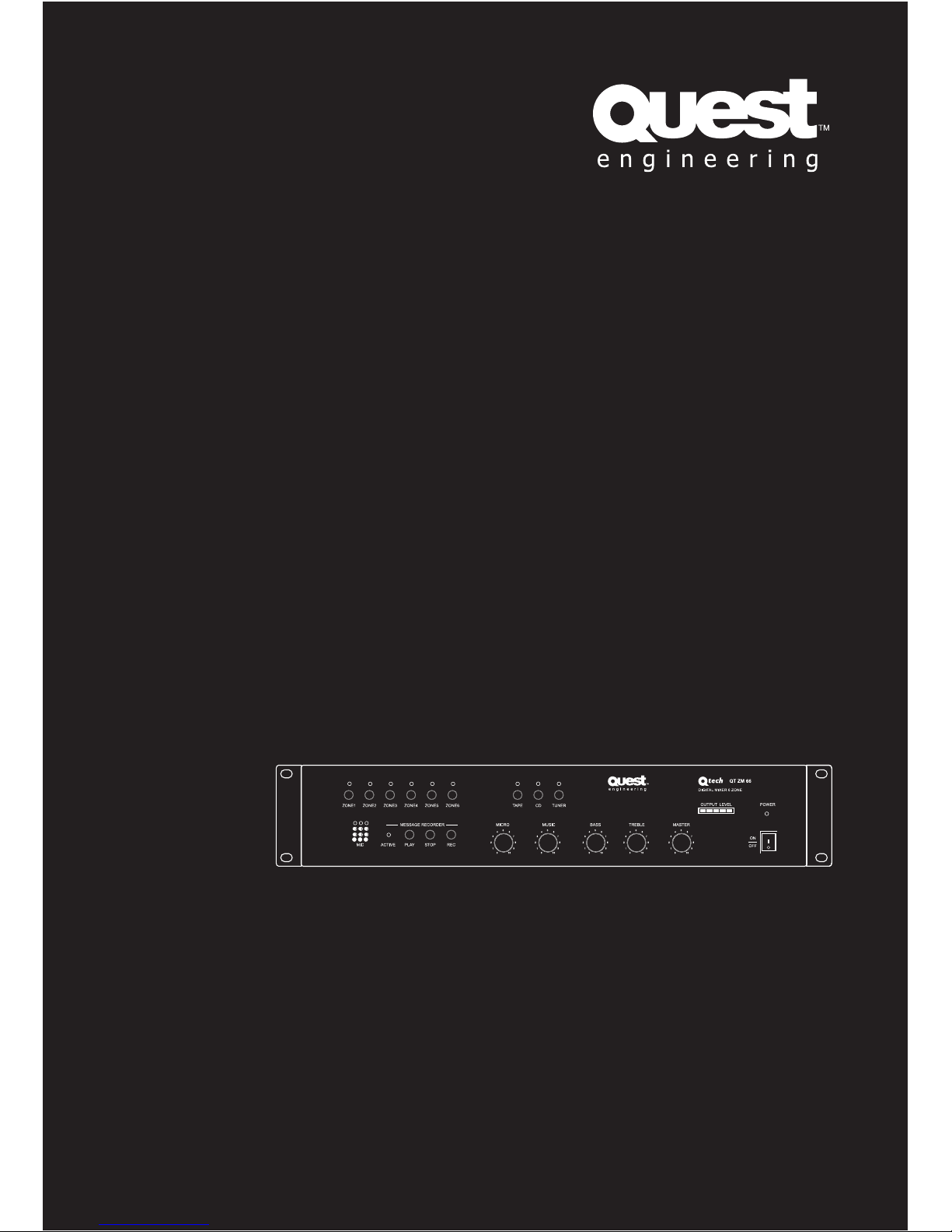
Q-Tech
Commercial Series
QT ZM66
Digital Mixer 6 Zone
User Manual
Page 2

Contents
Safety Precautions . . . . . . . . . . . . . . . . . . . . . . . . . . . . 1
General Description ............................4
Features .....................................4
Specifications . . . . . . . . . . . . . . . . . . . . . . . . . . . . . . . . 5
Front Panel Layout. . . . . . . . . . . . . . . . . . . . . . . . . . . . . 6
Rear Panel Layout . . . . . . . . . . . . . . . . . . . . . . . . . . . . 7
Connections. . . . . . . . . . . . . . . . . . . . . . . . . . . . . . . . . . 8
Applications ..................................10
Address Set ..................................12
Block Diagram ................................14
Dimensional Diagram ...........................15
Page 3
QT ZM66
User Manual
User Manual
Q-Tech Commercial Series
QT ZM66
1
Safety Precautions
Be sure to read the instructions in this section carefully before use.•
Make sure you observe the instructions in this manual as to the conventions of safety symbols.•
We also recommend you keep this instruction manual handy for future reference.•
Safety Symbol and Message Conventions
Safety symbols described below are used in this manual to prevent bodily injury and property
damage which could result from mishandling. Before operating your product, read this manual first
and understand the safety symbols and messages so you are thoroughly aware of the potential risks.
Indicates a potentially hazardous situation which, if
mishandled, could result in death or serious personal injury.
Indicates a potentially hazardous situation which, if
mishandled, could result in moderate or minor personal injury,
and/or property damage.
WARNING
CAUTION
Page 4
QT ZM66
User Manual
User Manual Q-Tech Commercial Series
QT ZM66
2
WARNING
When the Unit is in Use
Should the following irregularity be found •
during use, immediately switch off the
power, disconnect the power supply plug
from the AC outlet and contact your nearest
Quest dealer. Make no further attempt to
operate the unit in this condition as this
may cause fire or electric shock.
If you detect smoke or a strange smell •
coming from the unit.
If water or any metallic object gets into •
the unit
If the unit falls, or the unit case breaks•
If the power supply cord is damaged •
(exposure of the core, disconnection, etc.)
If it is malfunctioning (no tone sounds.)•
To prevent a fire or electric shock, never •
open nor remove the unit case as there are
high voltage components inside the unit.
Refer all servicing to your nearest Quest
dealer.
Do not place cups, bowls, or other •
containers of liquid or metallic objects on
top of the unit. If they accidentally spill into
the unit, this may cause a fire or electric
shock.
Do not insert nor drop metallic objects or •
flammable materials in the ventilation slots
of the unit’s cover, as this may result in fire
or electric shock.
When Installing the Unit
Do not expose the unit to rain or an •
environment where it may be splashed by
water or other liquids, as doing so may
result in fire or electric shock.
Use the unit only with the voltage •
specified on the unit. Using a voltage
higher than that which is specified may
result in fire or electric shock.
Do not cut, kink, otherwise damage nor •
modify the power supply cord. In addition,
avoid using the power cord in close
proximity to heaters, and never place
heavy objects -- including the unit itself -on the power cord, as doing so may result
in fire or electric shock.
Be sure to replace the unit’s terminal cover •
after connection completion. Because
high voltage is applied to the speaker
terminals, never touch these terminals to
avoid electric shock.
Be sure to ground to the earth terminal to •
avoid electric shock.
Page 5
QT ZM66
User Manual
User Manual
Q-Tech Commercial Series
QT ZM66
3
CAUTION
An all-pole mains switch with a contact separation of at least 3 mm in each pole shall be
incorporated in the electrical installation of the building.
When Installing the Unit
Never plug in nor remove the power •
supply plug with wet hands, as doing so
may cause electric shock.
When unplugging the power supply cord, •
be sure to grasp the power supply plug;
never pull on the cord itself. Operating the
unit with a damaged power supply cord
may cause a fire or electric shock.
When moving the unit, be sure to remove •
its power supply cord from the wall
outlet. Moving the unit with the power
cord connected to the outlet may cause
damage to the power cord, resulting in
fire or electric shock. When removing the
power cord, be sure to hold its plug to
pull.
Do not block the ventilation slots in the •
unit’s cover. Doing so may cause heat to
build up inside the unit and result in fire.
Avoid installing the unit in humid or dusty •
locations, in locations exposed to direct
sunlight, near heaters, or in locations
generating sooty smoke or steam as doing
otherwise may result in fire or electric
shock.
When the Unit is in Use
Do not place heavy objects on the unit •
as this may cause it to fall or break which
may result in personal injury and/or
property damage. In addition, the object
itself may fall off and cause injury and/or
damage.
Contact your Quest dealer as to cleaning. •
If dust is allowed to accumulate in the
unit over a long period of time, a fire or
damage to the unit may result.
If dust accumulates on the power supply •
plug or in the wall AC outlet, a fire may
result. Clean it periodically. In addition,
insert the plug in the wall outlet securely.
Switch off the power, and unplug the •
power supply plug from the AC outlet for
safety purposes when cleaning or leaving
the unit unused for 10 days or more. Doing
otherwise may cause a fire or electric
shock.
Page 6

QT ZM66
User Manual
User Manual Q-Tech Commercial Series
QT ZM66
4
General Description
The QT ZM66 is a digital 6 zone paging mixer which is capable of being used with one separate
power amplifier for each audio zone, or, by way of using two power amps. The individual power
amplifier per zone option switches line level, with the two power amp option allowing for the
switching of the 100v outputs to make paging announcements into individual zones, or all call.
Features
6 zones sources selection and control function•
Up to 6 QT ZM66M paging consoles may be used•
10 inputs and 10 outputs•
In built 3 message capacity, with 2 messages operated via dry contact closure, with the 3rd •
message operated from the paging console
Built in chime generator.•
3 inputs for BGM sources, with a mic input including 48v phantom power•
3 levels of priority•
In built message recording and BGM1.
Recorded messages2.
Paging and selection of paging zones overrides all other sources3.
Build-in voltage output indicator•
RS 485 COM port•
MAX load is 2000W•
Page 7
QT ZM66
User Manual
User Manual
Q-Tech Commercial Series
QT ZM66
5
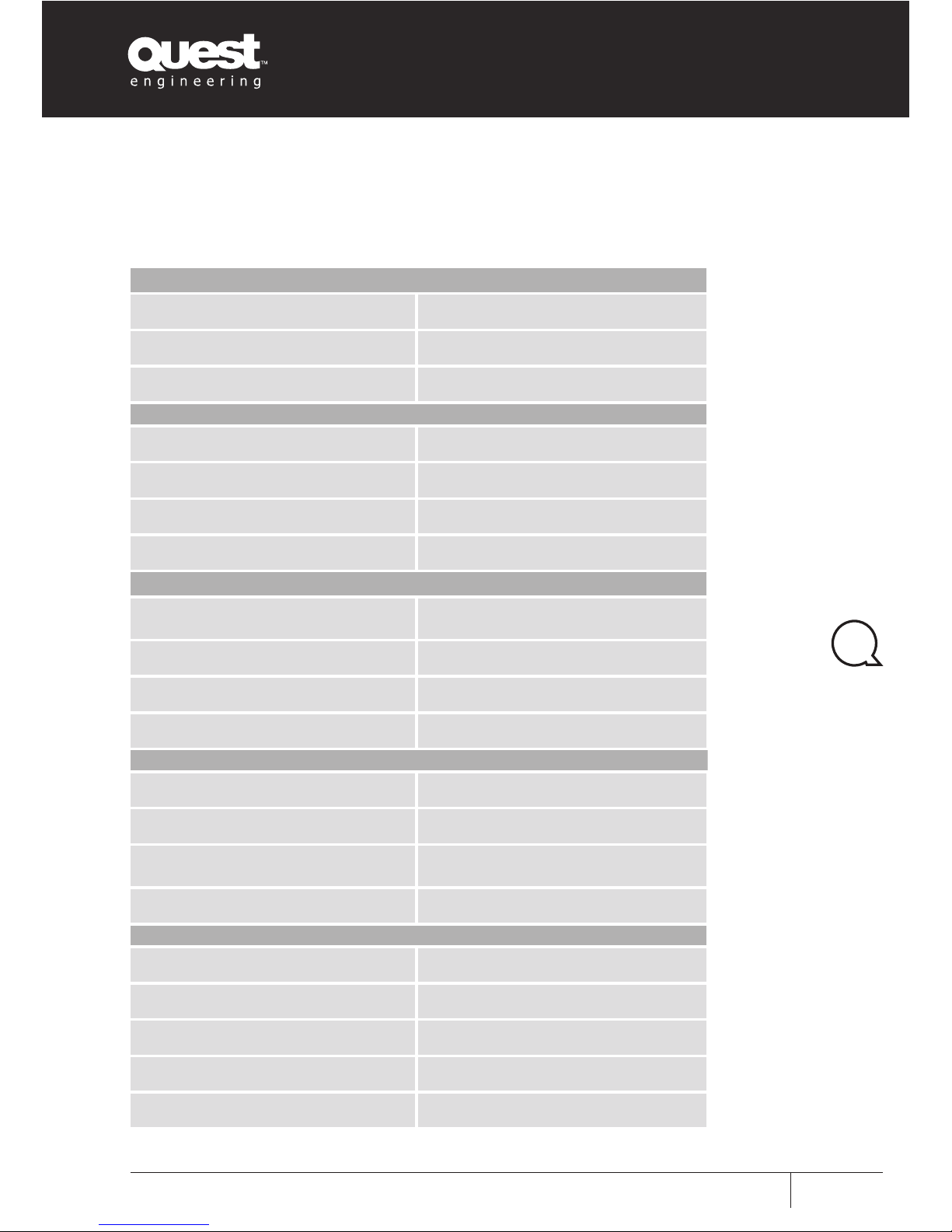
Console Input
Sensitivity -50 / -2 dB 2, 5 / 500 mV
S/N ratio >68dB
Frequency response 100/17.000Hz(-3dB)
1 Microphone input
Sensitivity -50 / -2 dB 2, 5 / 500 mV
S/N ratio >68dB
Frequency response 100/17.000Hz(-3dB)
Phantom power 48V
3 Auxiliary inputs
Tuner & Tape input sensitivity/
impedance
200 mV / 47 Kohm
CD input sensitivity / impedance 500 mV / 47 Kohm
S/N ratio >90 dB
Frequency response 40/20.000Hz(-3dB)
Control
Bass ±12dB
Treble ±12dB
Chime
2 tone active for contact free in
priority and BGM
Normal distortion >0.1%
Operating conditions
Main power supply 230 V/ 50 Hz
Dimension (mm) 484X322X88
Net Weight 6.58KG
Weight 6.58KG
Max number of microphone bases 6
Specifications
Page 8
QT ZM66
User Manual
User Manual Q-Tech Commercial Series
QT ZM66
6
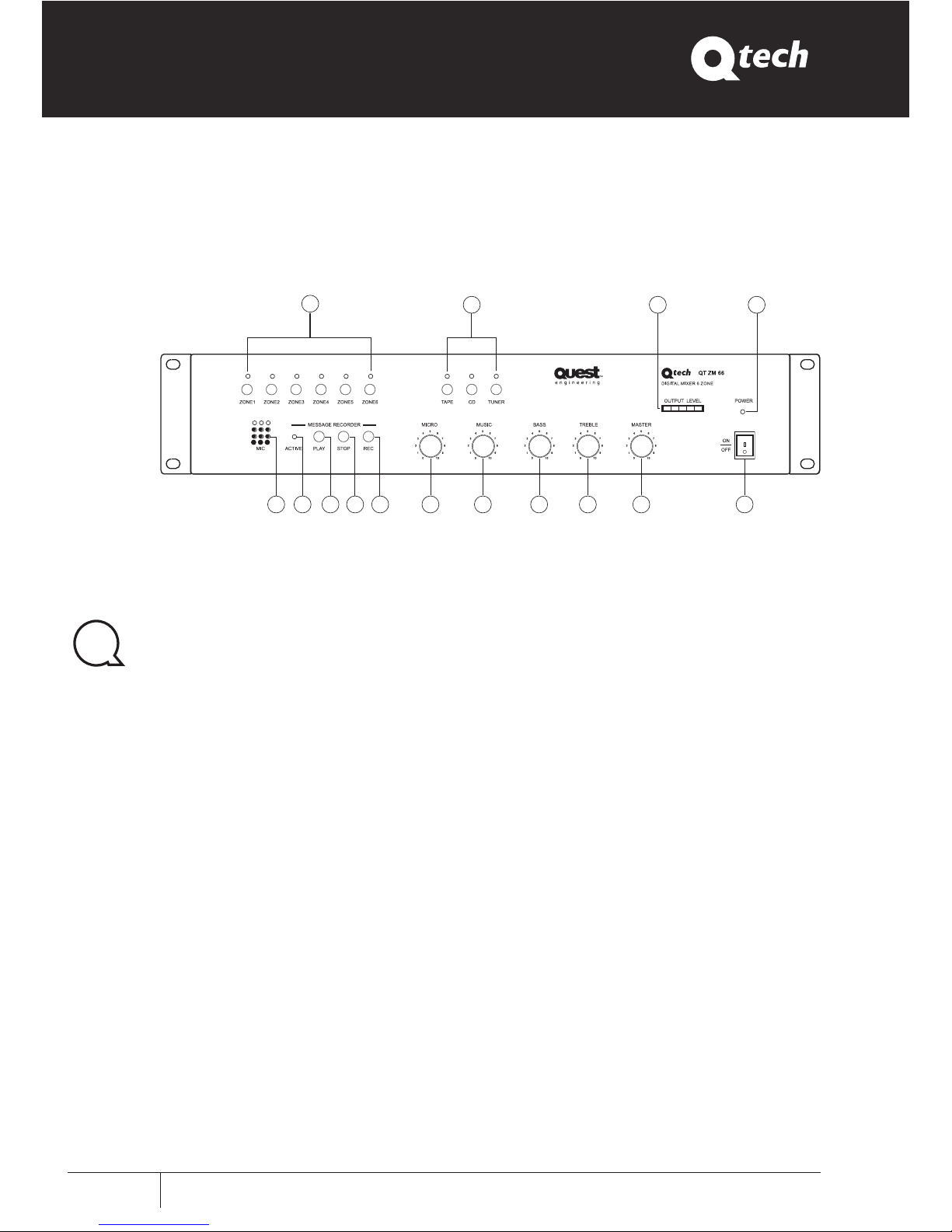
Front Panel Layout
ZONE(1~6)1.
6 buttons for selection of BGM into whichever
zones required
Audio2.
Input switches for source choice of input source
selection (Tape CD Tuner)
Output Level3.
Signal level indicator
Power4.
Power indicator
Power Switch5.
ON/OFF
Master6.
Master level control
Treble7.
Treble response. Rotate clockwise to increase
treble output and anti-clockwise to reduce it.
Bass8.
Bass response. Rotate clockwise to increase
bass output and anti-clockwise to reduce it.
Music9.
Music volume control
Micro10.
Microphone Volume Control
REC11.
Message record switch. Three messages of 60
seconds each may be recorded; for message
selection see switch(13) on rear Panel
Stop12.
End message recording switch
Play13.
Manual message replay switch
Active14.
Message playing indicator
MIC15.
Internal microphone for message recording
56789101112131415
1
2 3 4
Page 9
QT ZM66
User Manual
User Manual
Q-Tech Commercial Series
QT ZM66
7
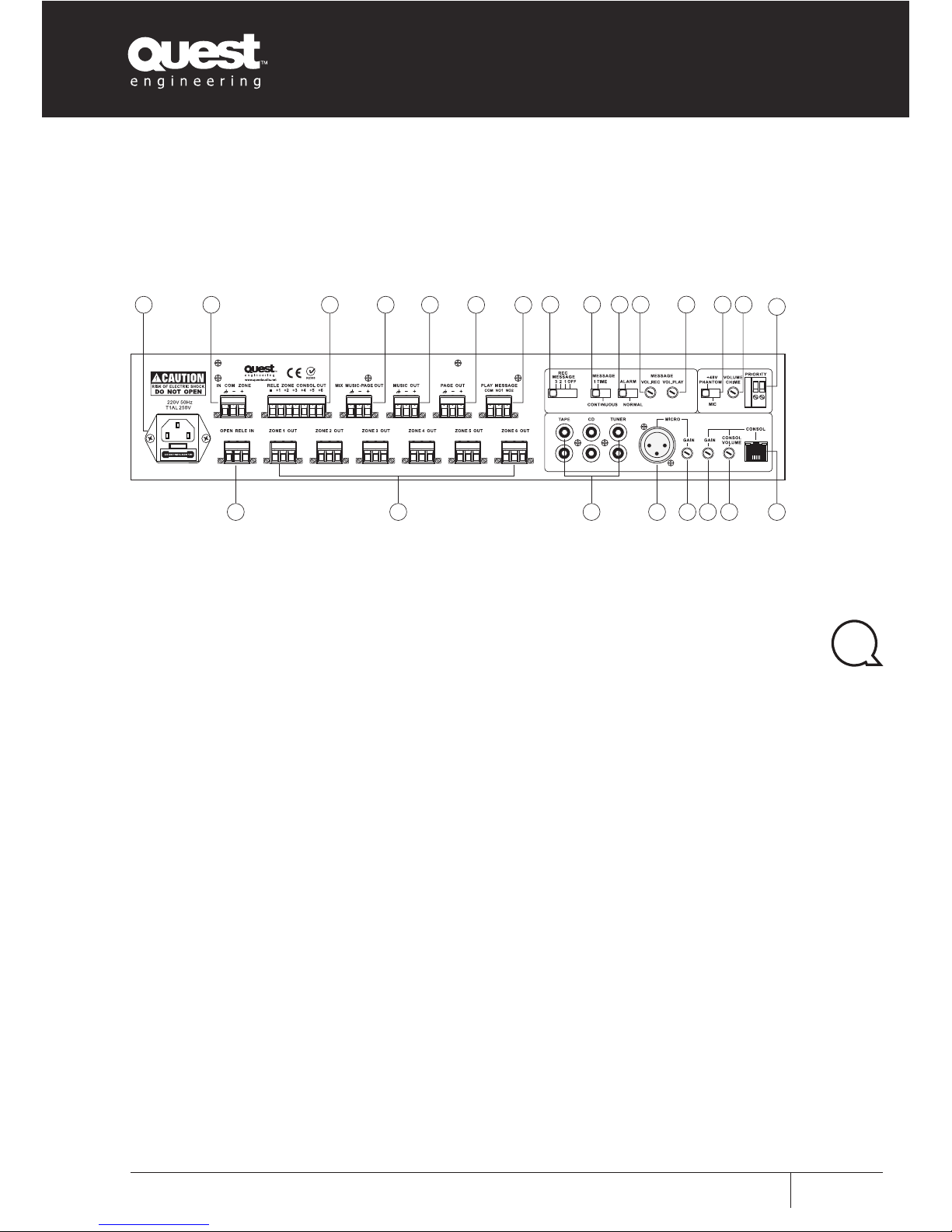
Rear Panel Layout
AC Inlet16.
Connect to the supplied power cord
IN Common relay music zone17.
Output Power Control Relay18.
Mixed output, music and paging19.
Music Signal Output20.
Paging Signal Output21.
Contact for playback of messages 22.
1 & 2
The third message is activated by Microphone
base directly
Message Selection Switch: OFF,1,2,323.
This is used to select the message to record
Message 1 selection mode switch24.
1 Time:
The recorded message plays only once.
Continuous:
The recorded message plays continuously till
the message contact is remotely closed
Alarm Selector switch25.
The mixer will operate without the QT ZM66M
paging console and announcements may be
made via a remote microphone in emergency
situations
Alarm:
The announcement is simultaneously
distributed in all the 6 zones
Normal:
The announcement is distributed only in the
zone selected with front panel buttons
Message record level26.
Message playback level27.
Phantom power select switch28.
Chime volume control29.
Priority control port for BGM and 30.
internal chime
Input RJ45 console31.
Max 6 microphone consoles in parallel
QT ZM66M input level control32.
QT ZM66 gain control33.
Microphone gain control34.
Microphone Input XLR Balanced35.
Audio Source Interface36.
OUT zone (1~6)37.
Output relay zone contacts38.
30
3132333435363738
16 17 18 19 20 21 22
23 24 25 26 2827 29
Page 10
QT ZM66
User Manual
User Manual Q-Tech Commercial Series
QT ZM66
8
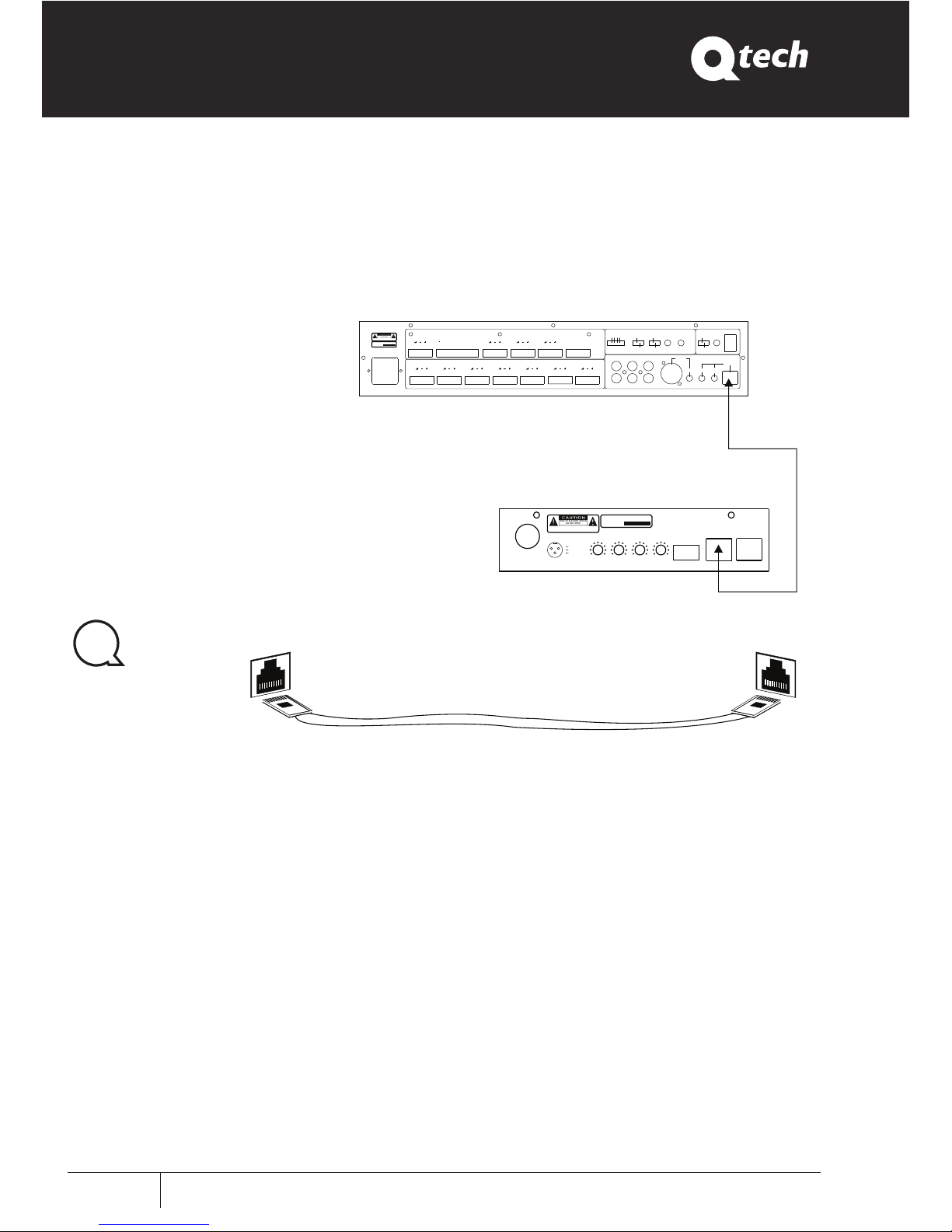
Connections
Network Connection Line
Paging Station
Digital Mixer 6 zone
POWER
24VDC
-10 +10 0 10-10 +10
CHIME
VOLUME
TREBLE
BASS VOLUM E ID CONSO L
LINE IN
0 10
1
2
3
1 GND
2 GND
3 +24 DC
RISK OF ELECT RIC S HOCK
DON OT O PEN
RISQUE DE CHOC E LECTR ICUS
-NE PAS QUVRIR
AVIS :
SERIAL NO
:
PUBLIC ADD RESS SY STEM
A
B
Network Line
~230V/5 0Hz
T1AL250 V
OPEN REL E I NPUT ZONE 1 OUT ZONE 2 OUT ZONE 3 OUT ZONE4 OUT ZONE5 OUT ZONE6 OUT
COM NO1 NO2
PLAY ME SSAGE
+1
RELE ZONE CONSOL OU T MIX MUSI C-PAGE OUT MUSIC O UT PAGE O UTIN COM ZONE
+2+3+4
+5
+6
PRIORITY
TAPE
CD T UNER MICRO
CONSOL
GAIN GAIN
CONSOL
VOLUME
VOLUME
CHIME
OFF
12
3
REC
MESSAGE
1TIME
CONTINUO S
MESSAGE
NORMAL
ALARM
VOL.PLAY
MESSAGE
VOL.REC
MIC
+48V
PHANTOM
RISKOFEL ECTRI C SH OCK
DONOTOPE N
RISQUEDE CHOC ELECT RICUS
-NEPAS Q UVRIR
AVIS:
SERIAL NO
:
PUBLICADDRE SS SYST EM
LINK OUT
A
B
Page 11
QT ZM66
User Manual
User Manual
Q-Tech Commercial Series
QT ZM66
9
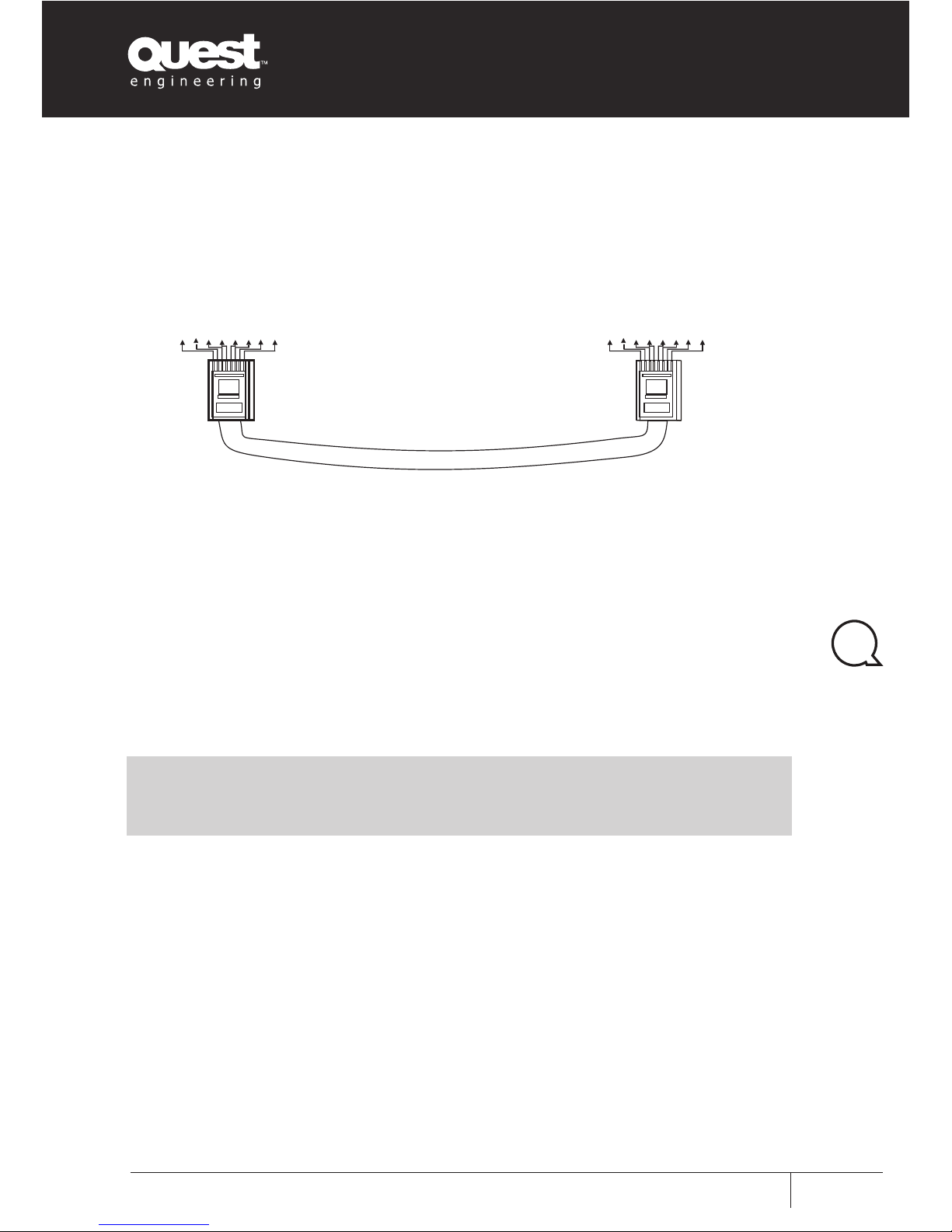
Net Production Line Method
Note: Network lines must adopt the five categories of twisted-pair with double-layer
shielding, RJ45 connectors must be used with shielded connector
A
B
1 2 3
4
5
6781 2 3
4
5
678
Blue1.
White Blue2.
Brown 3.
White Brown 4.
Orange 5.
White Orange6.
Green 7.
White Green8.
Blue1.
White Blue2.
Brown 3.
White Brown 4.
Orange 5.
White Orange6.
Green 7.
White Green8.
Page 12
QT ZM66
User Manual
User Manual Q-Tech Commercial Series
QT ZM66
10
Applications
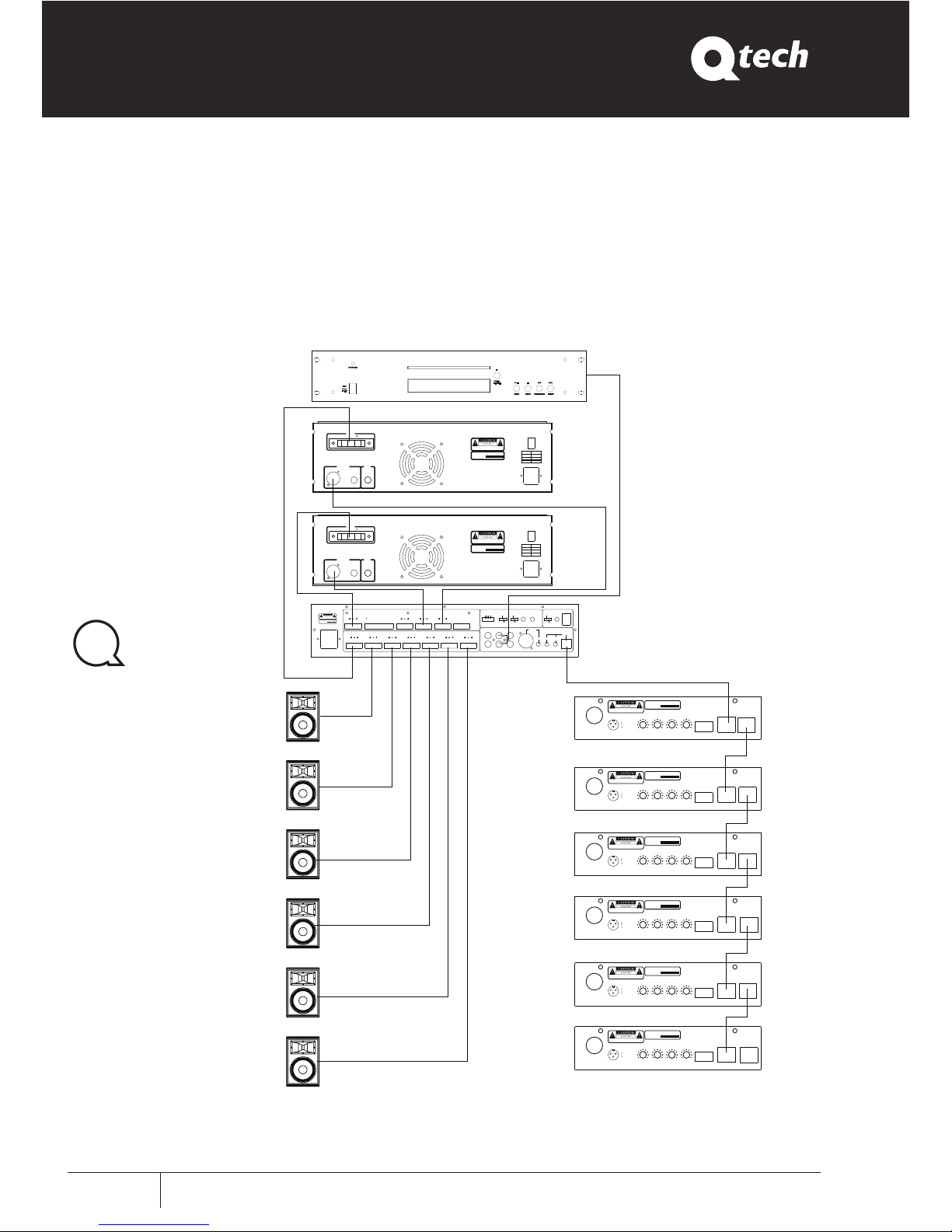
1 amplifier for music 1 amplifier for voice for 6 zone
Voice
Music
POWER
24VDC
-10
+10010
-10
+10
CHIME
VOLUME
TREBLE
BASS VOLU ME ID CO NSOL
LINE IN
0 10
1
2
3
1 GND
2 GND
3 +24D C
RISKOF ELECTRIC SHOCK
DONOT OPEN
RISQUE DE CHOC ELEC TRICU S
-NE PAS QUVRIR
AVIS :
SERIAL NO
:
PUBLIC ADDRE SS SYST EM
POWER
24VDC
-10 +10 0 10-10 +10
CHIME
VOLUME
TREBLE
BASS VOLU ME ID CO NSOL
LINE IN
0 10
1
2
3
1 GND
2 GND
3 +24D C
RISKOF ELECTRIC SHOCK
DONOT OPEN
RISQUE DE CHOC ELEC TRICU S
-NE PAS QUVRIR
AVIS :
SERIAL NO
:
PUBLIC ADDRE SS SYST EM
POWER
24VDC
-10 +10 0 10-10 +10
CHIME
VOLUME
TREBLE
BASS VOLU ME ID CO NSOL
LINE IN
0
10
1
2
3
1 GND
2 GND
3 +24D C
RISKOF ELECTRIC SHOCK
DONOT OPEN
RISQUE DE CHOC ELEC TRICU S
-NE PAS QUVRIR
AVIS :
SERIAL NO
:
PUBLIC ADDRE SS SYST EM
POWER
24VDC
-10 +10 0 10-10 +10
CHIME
VOLUME
TREBLE
BASS VOLU ME ID CO NSOL
LINE IN
0 10
1
2
3
1 GND
2 GND
3 +24D C
RISKOF ELECTRIC SHOCK
DONOT OPEN
RISQUE DE CHOC ELEC TRICU S
-NE PAS QUVRIR
AVIS :
SERIAL NO
:
PUBLIC ADDRE SS SYST EM
POWER
24VDC
-10 +10 0 10-10 +10
CHIME
VOLUME
TREBLE
BASS VOLU ME ID CO NSOL
LINE IN
0 10
1
2
3
1 GND
2 GND
3 +24D C
RISKOF ELECTRIC SHOCK
DONOT OPEN
RISQUE DE CHOC ELEC TRICU S
-NE PAS QUVRIR
AVIS :
SERIAL NO
:
PUBLIC ADDRE SS SYST EM
POWER
24VDC
-10 +10 0 10-10 +10
CHIME
VOLUME
TREBLE
BASS VOLU ME ID CO NSOL
LINE IN
0 10
1
2
3
1 GND
2 GND
3 +24D C
RISKOF ELECTRIC SHOCK
DONOT OPEN
RISQUE DE CHOC ELEC TRICU S
-NE PAS QUVRIR
AVIS :
SERIAL NO
:
PUBLIC ADDRE SS SYST EM
Compact disc
Zone 1
Zone 2
Zone 3
Zone 4
Zone 5
Zone 6
ZONE6 OUT
NO2
PLAY MESSA GE
PRIORITY
TAPE
CD TUNER MICRO
CONSOL
GAIN GA IN
CONSOL
VOLUME
VOLUME
CHIME
OFF
12
3
REC
MESSAGE
1TIME
CONTINUOS
MESSAGE
NORMAL
ALARM
VOL.PLAY
MESSAGE
VOL.REC
MIC
+48V
PHANTOM
~230V/50Hz
T1AL250V
OPEN REL E INPUT ZONE1OUT ZONE2 OUT ZONE3 OUT ZONE4 OUT ZONE5 OUT
COMNO 1
+1
RELE ZON E CONSOL OUT MIXMUSIC-PAGE OUT MUSIC OUT
PAGE OUTIN COM ZO NE
+2+3+4
+5
+6
RISKOFELECTRIC S HOCK
DONOTOPEN
RISQUEDEC HOC ELECTRICUS
-NEPASQUVR IR
AVIS:
SERIALNO
:
PUBLICADDRESS SYSTE M
LINK OUT
LINK OUT
LINK OUT
LINK OUT
LINK OUT
LINK OUT
INPUTS
LINK
GND
LIFT
100V 70 V 4~16
COM
OUTPUT
~230V/50H z
FUSE
T6.3AL250V
POWER
FUSE
350W
500W
650W
T8AL250V
T10AL250V
RISKOF ELECTRIC SHOCK
DONOT OPEN
RISQUE DE CHO C ELECTRIC US
-NE PAS QUVRIR
AVIS :
PUBLICADDRESSSYSTEM
SERIAL NO
:
INPUTS
LINK
GND
LIFT
100V 70 V 4~16
COM
OUTPUT
~230V/50H z
FUSE
T6.3AL250V
POWER
FUSE
350W
500W
650W
T8AL250V
T10AL250V
RISKOF ELECTRIC SHOCK
DONOT OPEN
RISQUE DE CHO C ELECTRIC US
-NE PAS QUVRIR
AVIS :
PUBLICADDRESSSYSTEM
SERIAL NO
:
Page 13
QT ZM66
User Manual
User Manual
Q-Tech Commercial Series
QT ZM66
11
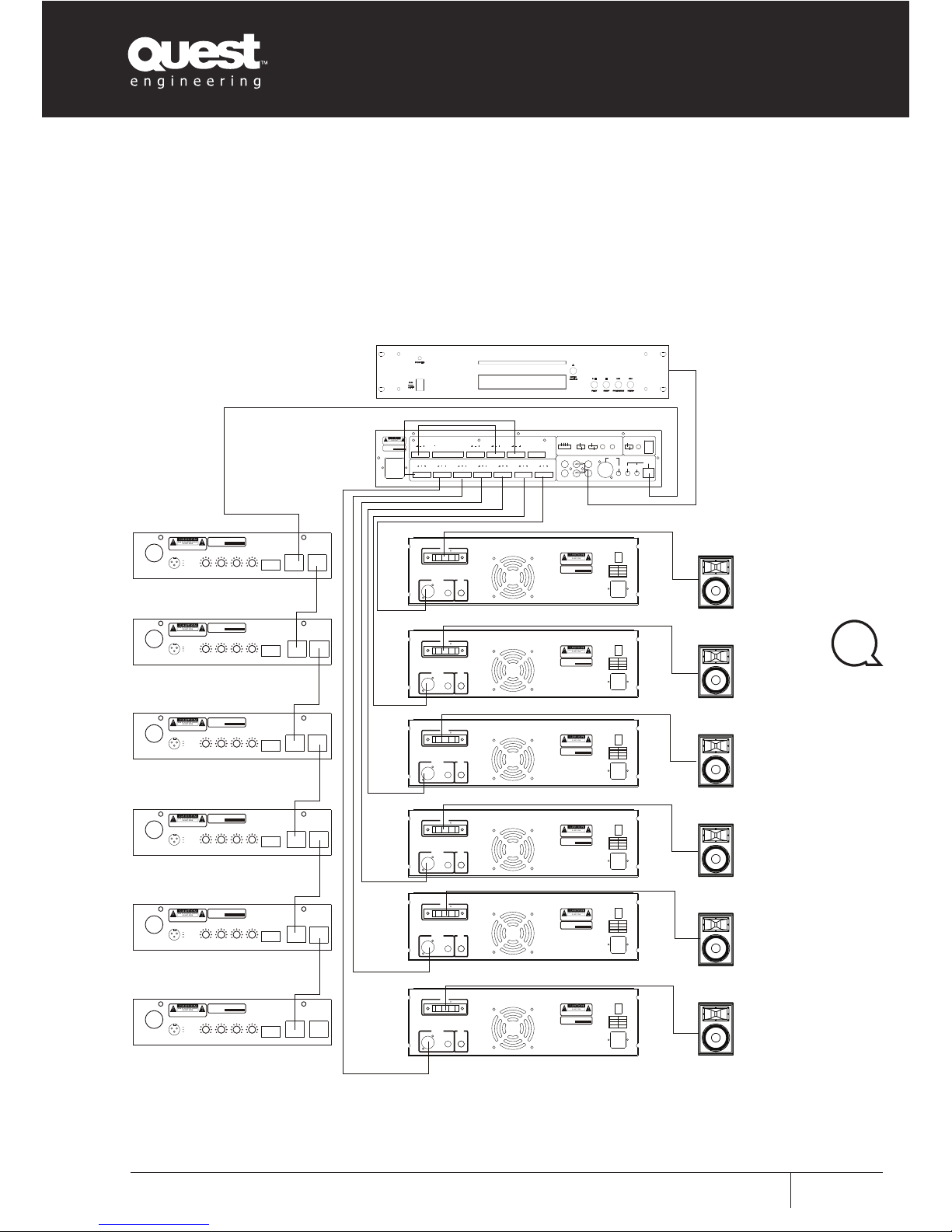
6 amplifier one for each zone
Compact disc
Zone 6
Zone 5
Zone 4
Zone 3
Zone 2
Zone 1
ZONE6 OUT
NO2
PLAY MESSA GE
PRIORITY
TAPE
CD TUNER MICRO
CONSOL
GAIN GAIN
CONSOL
VOLUME
VOLUME
CHIME
OFF
12
3
REC
MESSAGE
1TIME
CONTINUOS
MESSAGE
NORMAL
ALARM
VOL.PLAY
MESSAGE
VOL.REC
MIC
+48V
PHANTOM
~230V/50H z
T1AL250V
OPEN REL E INPUT ZONE1 OUT ZONE 2 OUT ZON E 3 OUT ZONE 4 OUT ZONE 5 OUT
COM NO1
+1
RELE ZON E CONSOL OUT MIXMUSIC-PAGE OUT MUSICOUT
PAGE OUTIN COM ZONE
+2+3+4
+5
+6
RISKOFEL ECTRI C SH OCK
DONOTOPE N
RISQUEDE CHOC ELECT RICUS
-NEPAS Q UVRIR
AVIS:
SERIAL NO
:
PUBLICADDRE SS SYST EM
POWER
24VDC
-10 +10 0 10-10 +10
CHIME
VOLUME
TREBLE
BASS V OLUME IDCO NSOL
LINE IN
0 10
1
2
3
1 GND
2 GND
3 +2 4DC
RISKOF ELECTRI C SHO CK
DONOT OPEN
RISQUE D E C HOC ELECT RICUS
-NE PAS QUVRIR
AVIS :
SERIAL NO
:
PUBLIC ADDRE SS SYST EM
POWER
24VDC
-10 +10 0 10-10 +10
CHIME
VOLUME
TREBLE
BASS V OLUME IDCO NSOL
LINE IN
0
10
1
2
3
1 GND
2 GND
3 +2 4DC
RISKOF ELECTRI C SHO CK
DONOT OPEN
RISQUE D E C HOC ELECT RICUS
-NE PAS QUVRIR
AVIS :
SERIAL NO
:
PUBLIC ADDRE SS SYST EM
POWER
24VDC
-10
+10010
-10
+10
CHIME
VOLUME
TREBLE
BASS V OLUME IDCO NSOL
LINE IN
0
10
1
2
3
1 GND
2 GND
3 +2 4DC
RISKOF ELECTRI C SHO CK
DONOT OPEN
RISQUE D E C HOC ELECT RICUS
-NE PAS QUVRIR
AVIS :
SERIAL NO
:
PUBLIC ADDRE SS SYST EM
POWER
24VDC
-10 +10 0 10-10 +10
CHIME
VOLUME
TREBLE
BASS V OLUME IDCO NSOL
LINE IN
0
10
1
2
3
1 GND
2 GND
3 +2 4DC
RISKOF ELECTRI C SHO CK
DONOT OPEN
RISQUE D E C HOC ELECT RICUS
-NE PAS QUVRIR
AVIS :
SERIAL NO
:
PUBLIC ADDRE SS SYST EM
POWER
24VDC
-10 +10 0 10-10 +10
CHIME
VOLUME
TREBLE
BASS V OLUME IDCO NSOL
LINE IN
0 10
1
2
3
1 GND
2 GND
3 +2 4DC
RISKOF ELECTRI C SHO CK
DONOT OPEN
RISQUE D E C HOC ELECT RICUS
-NE PAS QUVRIR
AVIS :
SERIAL NO
:
PUBLIC ADDRE SS SYST EM
POWER
24VDC
-10 +10 0 10-10 +10
CHIME
VOLUME
TREBLE
BASS V OLUME IDCO NSOL
LINE IN
0
10
1
2
3
1 GND
2 GND
3 +2 4DC
RISKOF ELECTRI C SHO CK
DONOT OPEN
RISQUE D E C HOC ELECT RICUS
-NE PAS QUVRIR
AVIS :
SERIAL NO
:
PUBLIC ADDRE SS SYST EM
LINK OUT
LINK OUT
LINK OU T
LINK OU T
LINK OU T
LINK OU T
INPUTS
LINK
GND
LIFT
100V 70V 4~16
COM
OUTPUT
~230V/50Hz
FUSE
T6.3AL250V
POWER
FUSE
350W
500W
650W
T8AL250V
T10AL250V
RISKOF ELECTRIC SHOCK
DONOT O PEN
RISQUE DE CHOC ELECT RICUS
-NE PAS QUVRIR
AVIS:
PUBLICADDRESSSYSTEM
SERIAL N O
:
INPUTS
LINK
GND
LIFT
100V 70V 4~16
COM
OUTPUT
~230V/50Hz
FUSE
T6.3AL250V
POWER FUSE
350W
500W
650W
T8AL250V
T10AL250V
RISKOF ELECTRIC SHOCK
DONOT O PEN
RISQUE DE CHOC ELECT RICUS
-NE PAS QUVRIR
AVIS:
PUBLICADDRESSSYSTEM
SERIAL N O
:
INPUTS
LINK
GND
LIFT
100V 70V 4~16
COM
OUTPUT
~230V/50Hz
FUSE
T6.3AL250V
POWER
FUSE
350W
500W
650W
T8AL250V
T10AL250V
RISKOF ELECTRIC SHOCK
DONOT O PEN
RISQUE DE CHOC ELECT RICUS
-NE PAS QUVRIR
AVIS:
PUBLICADDRESSSYSTEM
SERIAL N O
:
INPUTS
LINK
GND
LIFT
100V 70V 4~16
COM
OUTPUT
~230V/50Hz
FUSE
T6.3AL250V
POWER
FUSE
350W
500W
650W
T8AL250V
T10AL250V
RISKOF ELECTRIC SHOCK
DONOT O PEN
RISQUE DE CHOC ELECT RICUS
-NE PAS QUVRIR
AVIS:
PUBLICADDRESSSYSTEM
SERIAL N O
:
INPUTS
LINK
GND
LIFT
100V 70V 4~16
COM
OUTPUT
~230V/50Hz
FUSE
T6.3AL250V
POWER
FUSE
350W
500W
650W
T8AL250V
T10AL250V
RISKOF ELECTRIC SHOCK
DONOT O PEN
RISQUE DE CHOC ELECT RICUS
-NE PAS QUVRIR
AVIS:
PUBLICADDRESSSYSTEM
SERIAL N O
:
INPUTS
LINK
GND
LIFT
100V 70V 4~16
COM
OUTPUT
~230V/50Hz
FUSE
T6.3AL250V
POWER FUSE
350W
500W
650W
T8AL250V
T10AL250V
RISKOF ELECTRIC SHOCK
DONOT O PEN
RISQUE DE CHOC ELECT RICUS
-NE PAS QUVRIR
AVIS:
PUBLICADDRESSSYSTEM
SERIAL N O
:
Page 14
QT ZM66
User Manual
User Manual Q-Tech Commercial Series
QT ZM66
12
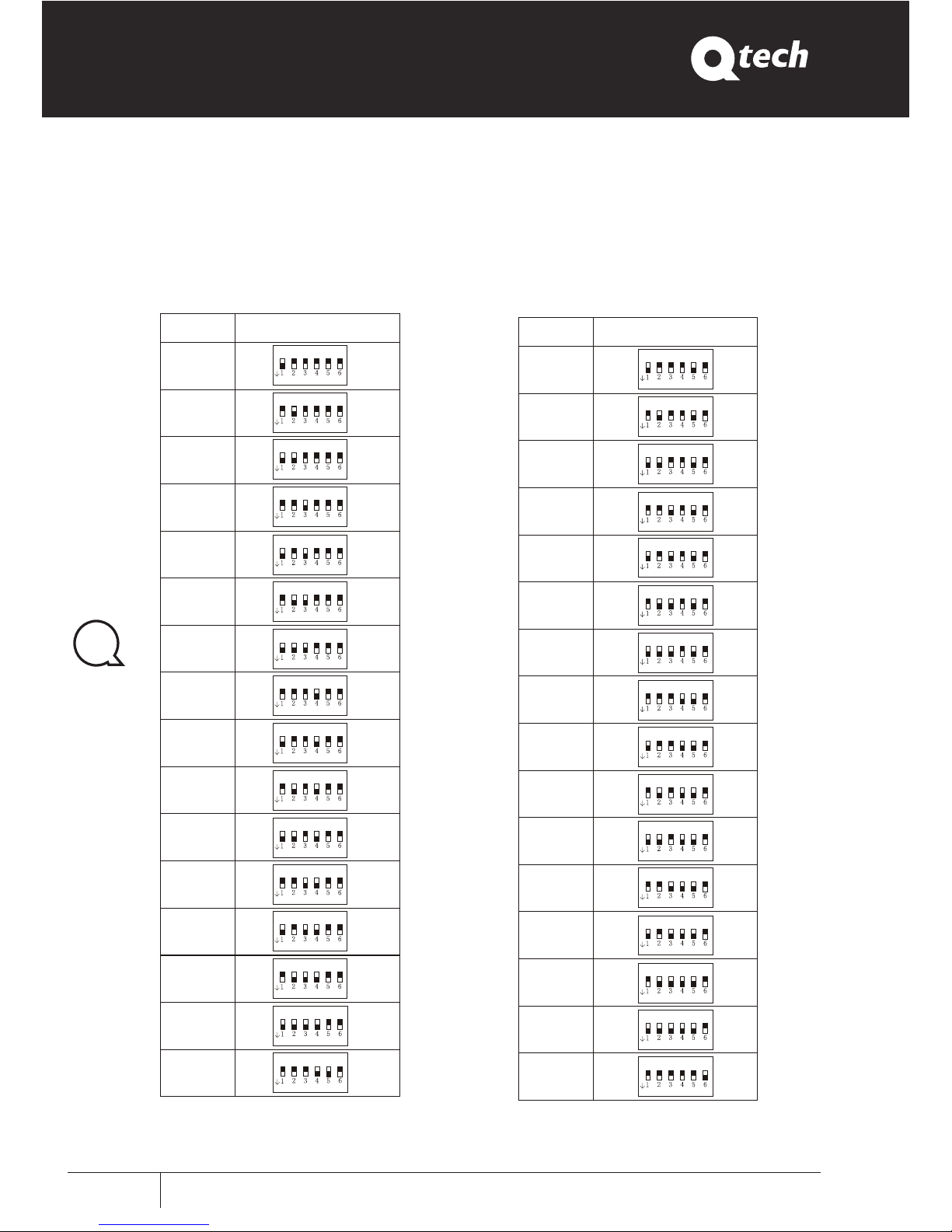
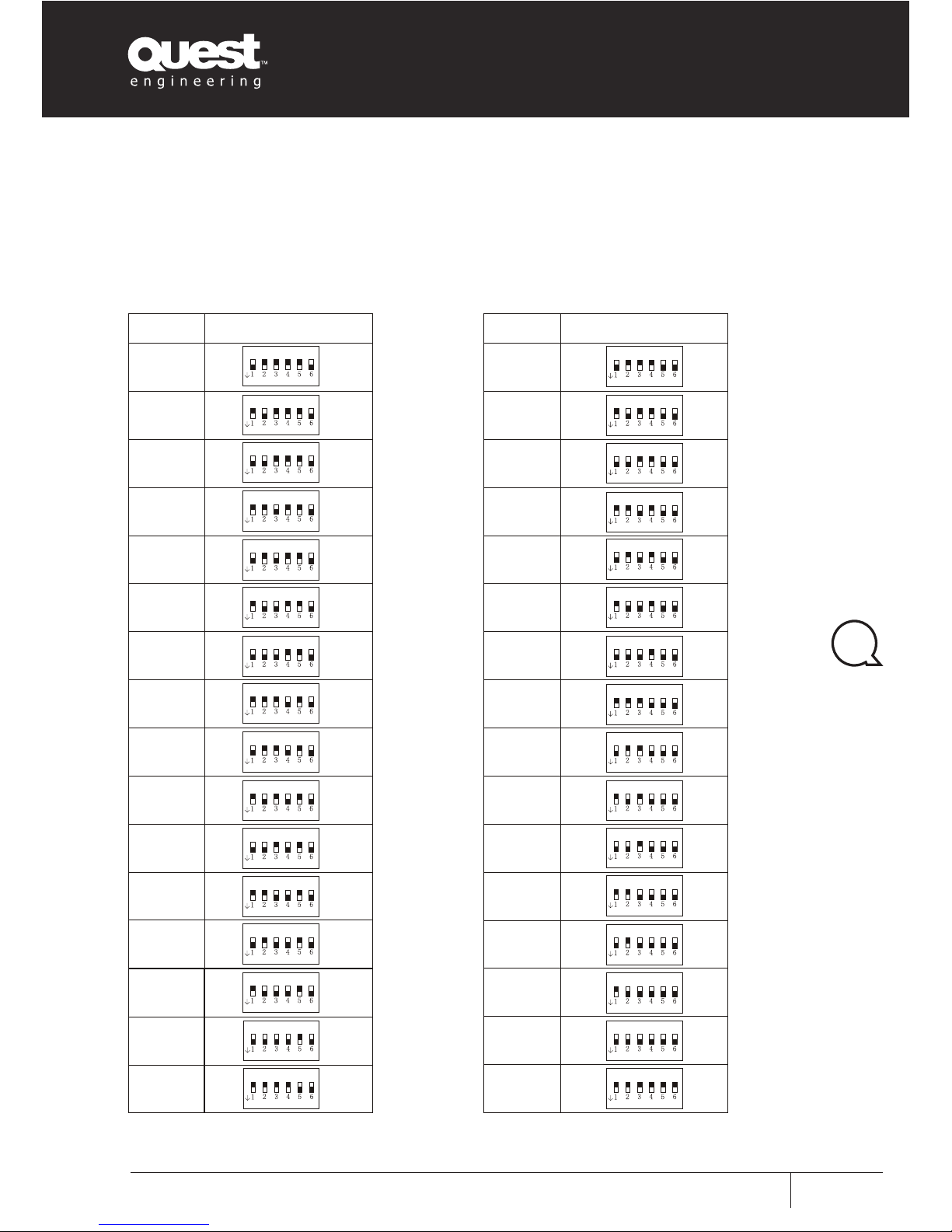
Address Set
ID Console Address Set
17
18
19
20
21
22
23
24
25
26
27
28
29
30
31
32
ADDR ESS DEFI NITIO N
ON
ON
ON
ON
ON
ON
ON
ON
ON
ON
ON
ON
ON
ON
ON
ON
ADDR ESS DEFIN ITION
1
2
3
4
5
6
7
8
9
10
11
12
13
14
15
16
ON
ON
ON
ON
ON
ON
ON
ON
ON
ON
ON
ON
ON
ON
ON
ON
17
18
19
20
21
22
23
24
25
26
27
28
29
30
31
32
ADDR ESS DEFI NITIO N
ON
ON
ON
ON
ON
ON
ON
ON
ON
ON
ON
ON
ON
ON
ON
ON
Page 15
QT ZM66
User Manual
User Manual
Q-Tech Commercial Series
QT ZM66
13
ADDR ESS DEFI NITIO N
33
34
35
36
37
38
39
40
41
42
43
44
45
46
47
48
ON
ON
ON
ON
ON
ON
ON
ON
ON
ON
ON
ON
ON
ON
ON
ON
49
50
51
52
53
54
55
56
57
58
59
60
61
62
63
64
ADDR ESS DEFI NITIO N
ON
ON
ON
ON
ON
ON
ON
ON
ON
ON
ON
ON
ON
ON
ON
ON
49
50
51
52
53
54
55
56
57
58
59
60
61
62
63
64
ADDR ESS DEFI NITIO N
ON
ON
ON
ON
ON
ON
ON
ON
ON
ON
ON
ON
ON
ON
ON
ON
Page 16
QT ZM66
User Manual
User Manual Q-Tech Commercial Series
QT ZM66
14
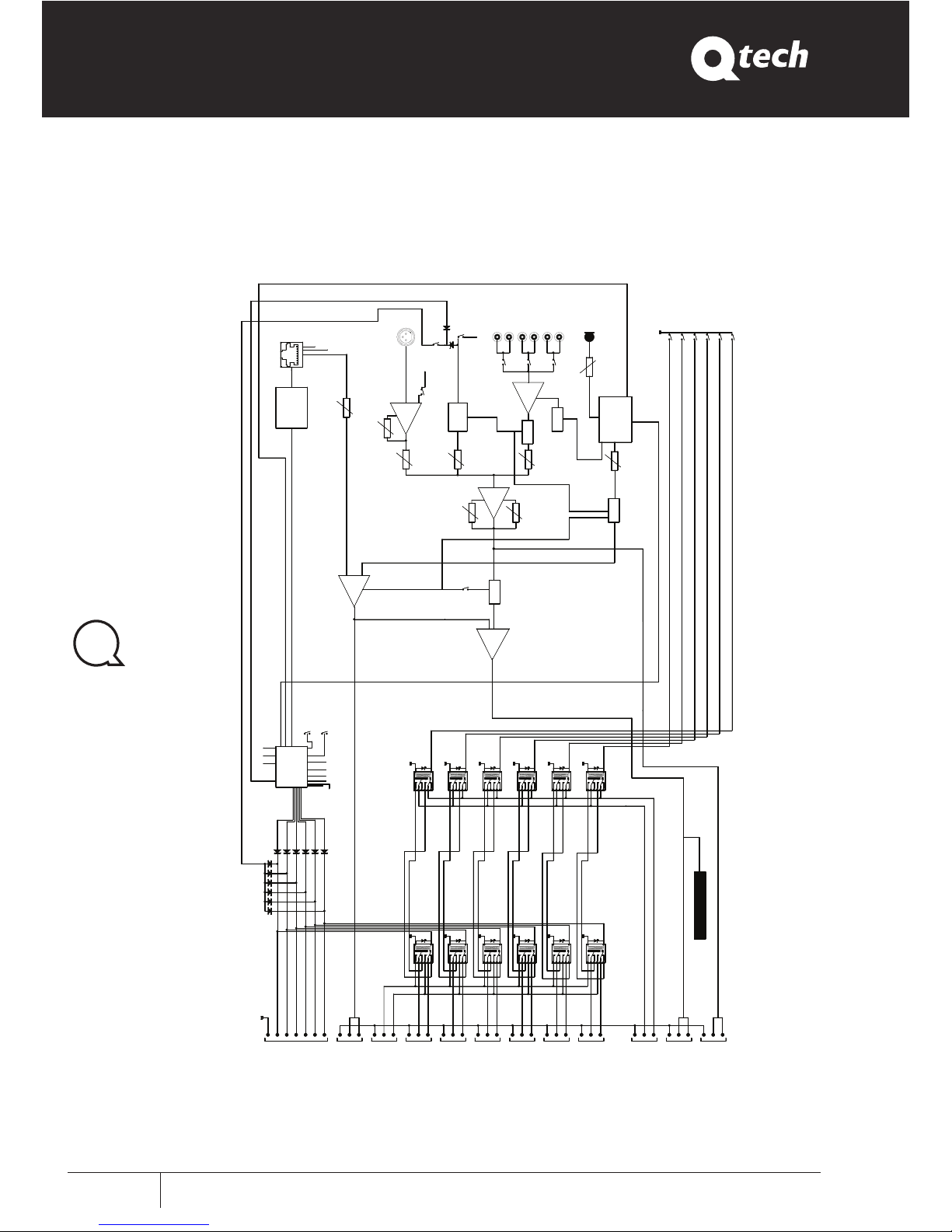
Block Diagram
VOLUME
CHIME
VOLUME
M1
1
8
CONSOL
GND
POWER
+24V
MAX485
CONTROL
SIGNAL
M1
NORMAL
ALARM
PRIORITY
VCC
GAIN
VOLUME
A2
+48V
PHANTOM
MICRO
CHIME
SIGNAL MESSAGE 1 - 2 - 3
BASS
A3
CONTROL
A5
MUT
E 4
ON/OFF
MUTE 4
A4
VOLUME
MUSIC
VOLUME
MESSAGE
PLAY
MESSAGE 3
VOLUME
REC
CD
TAPE
TUNER
M
IC
MUT
E 2
A1
MUTE 1
CONTROL
REC/PLAY
MES
SAGE
ZO
NE 3
ZONE 6
ZONE 5
ZONE 4
ZONE 2
ZONE 1
TREBLE
MUTE 3
CONT
ROL ISD4003
REC
OUT VCC
PLAY
MES
SAGE 1
PLAY
MESSAGE 2
PLAY STOP
MCU
OFF
1 2 3
1 TIME
CONTINUOS
RL1B
RL2B
OUT +24 V zone 4
OUT +24 V zone 3
OUT +24 V zone 2
OUT +24 V zone 1
OUT -24 V
c
om
OUT +24 V zone 6
OUT +24 V zone 5
O
UT RELE'
ZONE CONSOL
CONTACT(15)
COLD
GND
HOT
GND
COLD
COLD
COLD
COLD
HOT
HOT
HOT
GND
GND
GND
HOT
BALANCED
RL1A
RL2A
OUT ZONE 1
CONTACT(21)
OUT OPEN RELE'
CONTACT
(20)
OUT PAGE
0 dB
CONTACT(19)
OUT ZONE 2
CONTACT(21)
OUT ZONE 3
CONTACT(21)
LEVEL OUTPUT (VU METER)
RL3B
RL4B
RL5B
RL6B
GND
COLD
GND
HOT
COLD
COLD
COLD
HOT
GND
HOT
GND
HOT
R
L
3A
RL4A
RL5A
RL6A
OUT ZONE 4
CONTACT(21)
OUT ZONE 5
CONTACT(2
1)
OUT ZONE 6
C
O
N
TACT(21)
IN COM ZONE
CONTACT(16)
IN COM ZONE
CONTACT(16)
COLD
GND
HOT
GND
COLD
HOT
BALANCED
BALANCED
OUT MUSIC
0 dBCONTACT(18)
OUT MIX MUSIC-PAGE
0 dBC
O
N
TACT(17)
Page 17
QT ZM66
User Manual
User Manual
Q-Tech Commercial Series
QT ZM66
15
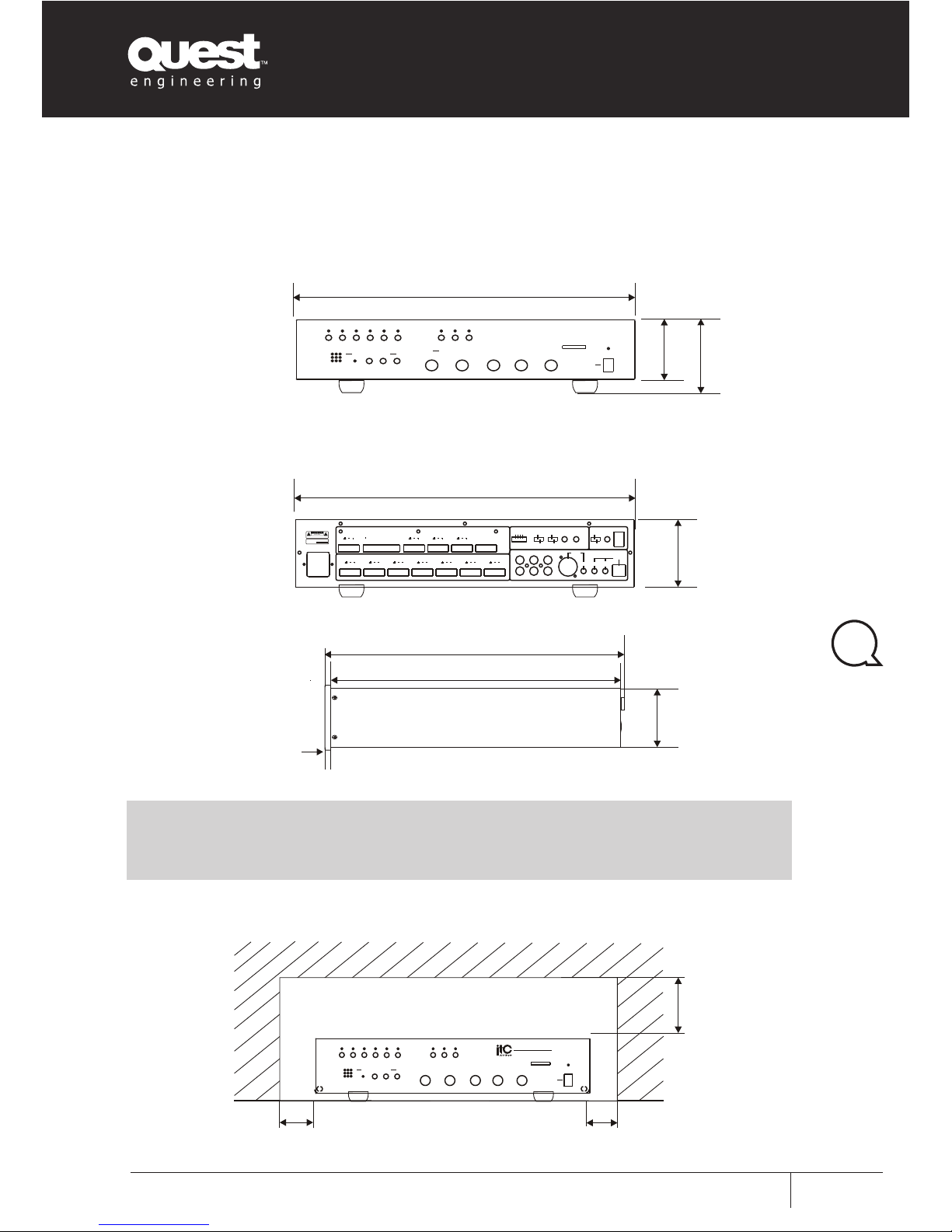
Dimensional Diagram
UNIT: mm
UNIT: mm
Keep all the unit’s sides over 10cm away from objects that may obstruct air flow to prevent
the unit’s internal temperature rising.
6
84
84
322
316
88
94
436
484
PRIORITY
TAPE
CD TUNER MICRO
CONSOL
~230V/50 Hz
T1AL250V
GAIN GAIN
CONSOL
VOLUME
VOLUME
CHIME
OFF
12
3
REC
MESSAGE
1TIME
CONTINUOS
MESSAGE
NORMAL
ALARM
VOL.PLAY
MESSAGE
VOL.REC
MIC
OPEN RELE IN PUT ZONE1 OUT ZONE2 OUT ZONE3 OUT ZONE4 OU T ZONE5 OUT ZONE 6 OUT
COM NO1 NO2
PLAY MESSAGE
+1
RELE ZONE CO NSOLO UT MIX MUSIC-PAGE OUT MUSIC OUT PAGE OU TIN COM ZONE
+48V
PHANTOM
+2+3+4
+5
+6
MAS TE R
0
1
2
3
4
5
6
7
8
9
10
TRE BL EB AS S
0
1
2
3
4
5
6
7
8
9
10
MUS IC
0
1
2
3
4
5
6
7
8
9
10
MIC RO
RE CST OP
PLA YACT IVEM IC
MES S AGE RE COR DE R
ZON E1 ZO NE 2 ZON E3 ZO NE 4 ZON E5 ZO NE 6 TUN ERC DTAPE
OUT PUT L EV EL P OWE R
0
+5-5
+4
+3
+2
+1
-4
-3
-2
-1
0
+5-5
+4
+3
+2
+1
-4
-3
-2
-1
ON
OFF
RISKOFELEC TRICSHOCK
DONOTOPEN
RISQUEDE CHOCELEC TRICUS
-NEPAS QUVRIR
AVIS:
SERIALN O
:
PUBLICADDRESS SYSTEM
100
Over
100
Over
Over
100
6
84
84
322
316
88
94
436
484
PRIORITY
TAPE
CD TUNER MICRO
CONSOL
~230V/50 Hz
T1AL250V
GAIN GAIN
CONSOL
VOLUME
VOLUME
CHIME
OFF
12
3
REC
MESSAGE
1TIME
CONTINUOS
MESSAGE
NORMAL
ALARM
VOL.PLAY
MESSAGE
VOL.REC
MIC
OPEN RELE IN PUT ZONE1 OUT ZONE 2 OUT ZONE3 OUT ZONE4 OU T ZONE5 OUT ZONE 6 OUT
COM NO1 NO2
PLAY MESSAGE
+1
RELE ZONE CO NSOLO UT MIX MUSIC-PAGE OUT MUSIC OUT PAGE OU TIN COM ZONE
+48V
PHANTOM
+2+3+4
+5
+6
MAS TE R
0
1
2
3
4
5
6
7
8
9
10
TRE BL EB AS S
0
1
2
3
4
5
6
7
8
9
10
MUS IC
0
1
2
3
4
5
6
7
8
9
10
MIC RO
RE CST OP
PLA YACT IVEM IC
MES S AGE RE COR DE R
ZON E1 ZO NE 2 ZON E3 ZO NE 4 ZON E5 ZO NE 6 TUN ERC DTAPE
OUT PUT L EV EL P OWE R
0
+5-5
+4
+3
+2
+1
-4
-3
-2
-1
0
+5-5
+4
+3
+2
+1
-4
-3
-2
-1
ON
OFF
MAS TER
0
1
2
3
4
5
6
7
8
9
10
TRE BL EBAS S
0
1
2
3
4
5
6
7
8
9
10
MUS IC
0
1
2
3
4
5
6
7
8
9
10
MIC RO
RE C
STO P
PLA YACTIVEMIC
MES SA GE R EC ORD ER
ZON E1 ZON E2 ZON E3 ZO NE 4 Z O NE 5 ZONE 6 TUN ERC DTAPE
OUT PUT L EVE L POWER
T-6 24 5
DIG ITA L M IXE R 6 Z ON E
0
+5
-5
+4
+3
+2
+1
-4
-3
-2
-1
0
+5
-5
+4
+3
+2
+1
-4
-3
-2
-1
ON
OFF
RISKOFELEC TRICSHOCK
DONOTOPEN
RISQUEDE CHOCELEC TRICUS
-NEPAS QUVRIR
AVIS:
SERIALN O
:
PUBLICADDRESS SYSTEM
AUDI O
Page 18

QT ZM66
User Manual
User Manual Q-Tech Commercial Series
QT ZM66
16
Page 19

QT ZM66
User Manual
User Manual
Q-Tech Commercial Series
QT ZM66
17
Page 20

www.questaudio.net
Quest Engineering Pty Ltd
86 Derby St. Pascoe Vale VIC 3055
Ph 613 9354 9133 | Fax 613 9354 9233
 Loading...