

Page 1
CLOCK/77 Amplifier
© QUANCOM Informationssysteme GmbH
Page 2

Copyright © QUANCOM Informationssysteme GmbH
Alle Angaben in diesem Handbuch sind nach sorgfältiger Prüfung zusammengestellt worden, gelten jedoch nicht
als Zusicherung von Produkteigenschaften. QUANCOM haftet ausschließlich in dem Umfang, der in den
Verkaufs- und Lieferbedingungen festgelegt ist. Weitergabe und Vervielfältigung dieses Handbuches und die
Verwertung seines Inhaltes sowie der zum Produkt gehörenden Software sind nur mit schriftlicher Erlaubnis von
QUANCOM gestattet. Änderungen, die dem technischen Fortschritt dienen, bleiben vorbehalten.
Wesseling, Oktober 2010 Version 4.3.1
Page 3

CLOCK/77 Amplifier
Inhaltsverzeichnis
Kapitel I
Kapitel II
Kapitel III
Kapitel IV
Overview
....................................................................................................................................11 Introduction
....................................................................................................................................12 Our experience is your profit
....................................................................................................................................13 Extend of Delivery
Card information
....................................................................................................................................21 General information
....................................................................................................................................22 Pin configuration
Block diagram
Annex
....................................................................................................................................41 Customer Communication and Help
....................................................................................................................................72 Technical Support Formular
....................................................................................................................................83 Documentation comment form
....................................................................................................................................94 Hardware and software configuration form
....................................................................................................................................105 Trademarks
1
2
3
4
© QUANCOM Informationssysteme GmbH
Page 4

1 Overview
1.1 Introduction
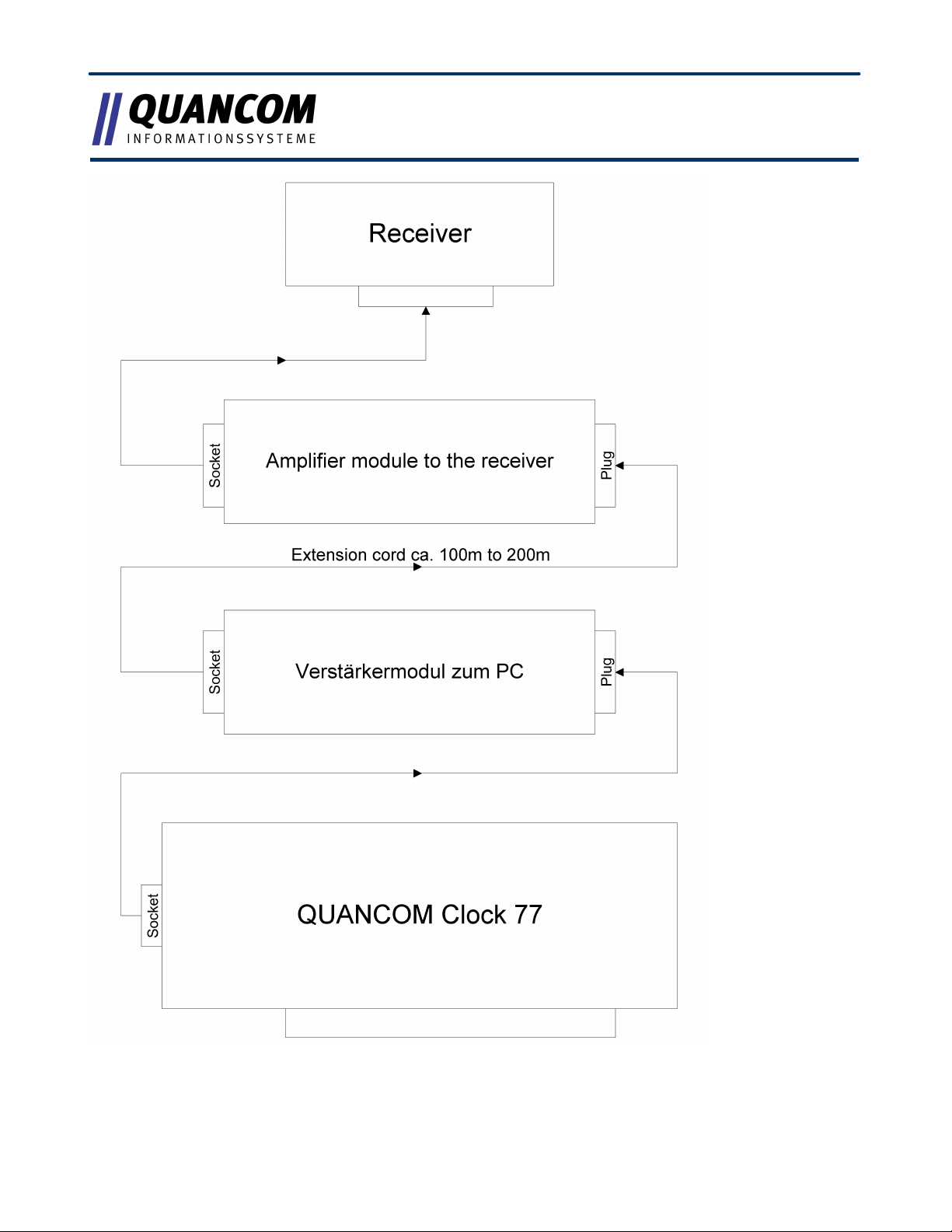
Congratulations on the purchase of its QUANCOM CLOCK77-Amplifiers! You are now able
to extend the cable length between the Clock77-receiver and the PC with a Clock77/ISA or
Clock77/PCI up to about 100m to 200m.
1.2 Our experience is your profit
QUANCOM is specialised in development of hard- and software. QUANCOM has become
one of the leading suppliers of measuring and automation technology in industry. At its
design centres QUANCOM has developed an impressive range of products.
1.3 Extend of Delivery
· Clock77-Amplifier (PC module)
· Clock77-Amplifier (receiver module)
· QUANCOM CD with user manual (pdf)
If a component is missing please contact your dealer. QUANCOM reserves the right to
change the extent of delivery without a preliminary announcement
1
© QUANCOM Informationssysteme GmbH
Page 5
2 Card information
Plug
Socket
PIN1 = GND
PIN 1 = GND
PIN 2 = DO
PIN 4 = DI+
PIN 9 = VCC
PIN 5 = DI-
PIN 9 = VCC
Plug
Socket
PIN1 = GND
PIN 1 = GND
PIN 4 = DO+
PIN 2 = DI
PIN 5 = DO-
PIN 9 = VCC
PIN 9 = VCC
2.1 General information
The signal is transformed by the two amplifier modules by the DCF77-receiver into a
differential data signal, which will transfer long data line over a 100m to 200m without
distribtion.
2.2 Pin configuration
Amplifier module to the PC:
Amplifier module to the receiver:
© QUANCOM Informationssysteme GmbH
2
Page 6
3 Block diagram
3
© QUANCOM Informationssysteme GmbH
Page 7

4 Annex
4.1 Customer Communication and Help
Did you need help? If you don ’t know how to go on during the installation
or operation of your QUANCOM board please
consult this user’s guide first.
! Tip ! You can find an ASCII – text – file README.TXT,
which includes changes made after printing of this
user’s manual on the QUANCOM installation CD.
! Important ! Informationen bereit: If you have further questions
please contact our support team. For this case
please prepare the following information:
· Exact type of the board.
· Version of the driver
· Version of the QLIB
· Operating system, hardware equipment and bus -
system
· Name and version of the program, which reports the
failure
· A detailed failure description. To make sure, please
try to reproduce the failure, and describe exactly,
Contact?
© QUANCOM Informationssysteme GmbH
which steps led to this failure.
The QUANCOM internet website www.quancom.de
4
Page 8

Per Fax
+49 22 36 / 89 92 - 49
Per E-Mail:
Adress:
QUANCOM INFORMATIONSSYSTEME GmbH
In der Flecht 14
50389 Wesseling
If you need urgent help call:QUANCOM Hotline
Germany:
0 22 36 / 89 92 - 20
Monday-Thursday
from 9:00 to 18:00
Friday
from 9:00 to 17:00
5
© QUANCOM Informationssysteme GmbH
Page 9

Actual drivers
Repair
You can find the latest version of QUANCOM
software on our internet website www.quancom.de .
You can also find a lot of information and "Frequently
asked questions (FAQ's)" there., please check if you
are using the latest software version of the
QUANCOM software before contacting the
QUANCOM support.
If you are not sure whether your QUANCOM board is
defective please call the QUANCOM Hotline:
Tel.: +49 22 36 / 89 92 – 20
Before sending us the QUANCOM board to be
repaired call:
Tel.: +49 22 36 / 89 92 – 20
If you send your QUANCOM board to us, please use
original package or any other suitable package, to
protect the contents against transport damage. You
also need to send us a copy of the original bill and
the RMA number.
You can shorten the repair time by sending us an
exact failure description, so that a faster failure
search is possible. Send your QUANCOM board
directly to the service department of QUANCOM
Informations-systeme GmbH.
© QUANCOM Informationssysteme GmbH
6
Page 10

4.2 Technical Support Formular
Name:
Company:
Address:
Phone:
Fax:
Computer brand / Processor:
Operating system:
Display adapter:
Mouse:
QUANCOM board:
Other adapters installed:
Hard disk (capacity, free):
The problem is:
List any error messages:
______________________________
______________________________
______________________________
______________________________
______________________________
______________________________
______________________________
______________________________
______________________________
______________________________
______________________________
______________________________
______________________________
______________________________
______________________________
______________________________
The following steps will reproduce the problem
______________________________
______________________________
______________________________
______________________________
______________________________
If you have internet access please enter the following URL in your browser:
http://www.quancom.de/quancom/qshop.nsf/techniksupport?OpenForm&eng
else photocopy this form and use the copy of this form as a reference for your current
configuration. Complete this form before contacting QUANCOM Informationssysteme GmbH
for technical support help and our applications engineers may answer your questions more
efficiently. If you are using any other QUANCOM hardware or software products please add
them to this configuration form. Include additional pages if necessary.
7
© QUANCOM Informationssysteme GmbH
Page 11

4.3 Documentation comment form
Title:
CLOCK/77 Amplifier
Edition date:
19.10.2010
Name:
Company:
Address:
Phone:
Fax:
Comment:
________________________________________________
________________________________________________
________________________________________________
________________________________________________
________________________________________________
________________________________________________
________________________________________________
________________________________________________
________________________________________________
________________________________________________
QUANCOM Informationsysteme GmbH would like you to comment on the documentation
supplied with our products. This information helps us to provide you with quality products to
meet your needs. Include additional pages if necessary.
In der Flecht 14
50389 Wesseling
Germany
© QUANCOM Informationssysteme GmbH
8
Page 12

4.4 Hardware and software configuration form
· QUANCOM Product
Name / Name of board:
Interrupt Level:
DMA Channel:
Base I/O Address:
Operating system:
· Other information
Computer brand and Model:
Processor:
Clock Frequency:
Type of Video Board Installed:
DOS Version:
Programming Language:
Programming Language Version:
· Other Boards in System
Base I/O Address of other Boards:
DMA Channels of other Boards:
Interrupt Level of other Boards:
__________________________________
__________________________________
__________________________________
__________________________________
__________________________________
__________________________________
__________________________________
__________________________________
__________________________________
__________________________________
__________________________________
__________________________________
__________________________________
__________________________________
__________________________________
This form allows you to record the settings of your hardware and software. Complete this
form each time you revise your software or hardware configuration, and use this form as a
reference for your current configuration. Completing this form accurately before contacting
QUANCOM Informationssysteme GmbH for technical support helps our application
engineers answer your questions more efficiently.
9
© QUANCOM Informationssysteme GmbH
Page 13

4.5 Trademarks
Linux is registered trade-mark of Linus Torvalds.
MS, MS-DOS, Microsoft, Visual Basic, Windows, Windows Vista/XP/2000/NT/ME/98/95 is
registered trade-mark of Microsoft Corporation.
XT and PS/2 are trade-marks and IBM, OS/2 and AT are registered trade-mark of
International Business Machines Corporation.
Intel, Pentium is registered trade-mark of Intel Corporation.
USB is registered trade-mark of USB Implementers Forum Inc.
JAVA is registered trade-mark of Sun Microsystems.
DELPHI and Pascal are registered trade-mark of Borland Corporation.
PCI is registered trade-mark of PCI Special Interest Group.
PCI Express is registered trade-mark of PCI-SIG.
National Instruments, LABVIEW is registered trade-mark of National Instruments
Corporation.
Agilent VEE is registered trade-mark of Agilent Technologies.
By other product- and company names, that are mentioned in this manual, it may deal with
trademarks of the respective owners.
© QUANCOM Informationssysteme GmbH
10
 Loading...