

Page 1
PRODUCT PARAME TE RS
Prod uct Nam e
Micr o USB Inp ut
Type C Inpu t
USB Ou tput
Wirel ess Output
Batt ery Cap acity
Batt ery Type
QI Com patib le Devi ces
Wate rproo f Ratin g
Prod uct Siz e
Prod uct Weigh t
PACK AG E CO NTENTS
1*S olar Po wer Ban k 1*Use r Manua l
1* 2A 11.8i n Cable 1 *Comp ass Rin g
Wirel ess Solar Po wer ban k
DC 5V 2.1A
DC 5V 2.1A
DC 5V 2.1A
DC 5V 1.0A
10,0 00mah
Poly mer Lit hium Ba ttery
All Qi -Enab led Dev ices
IPX4 ( Spl ash Pro of)
5.9* 3.1*0 .8in
9.6o z
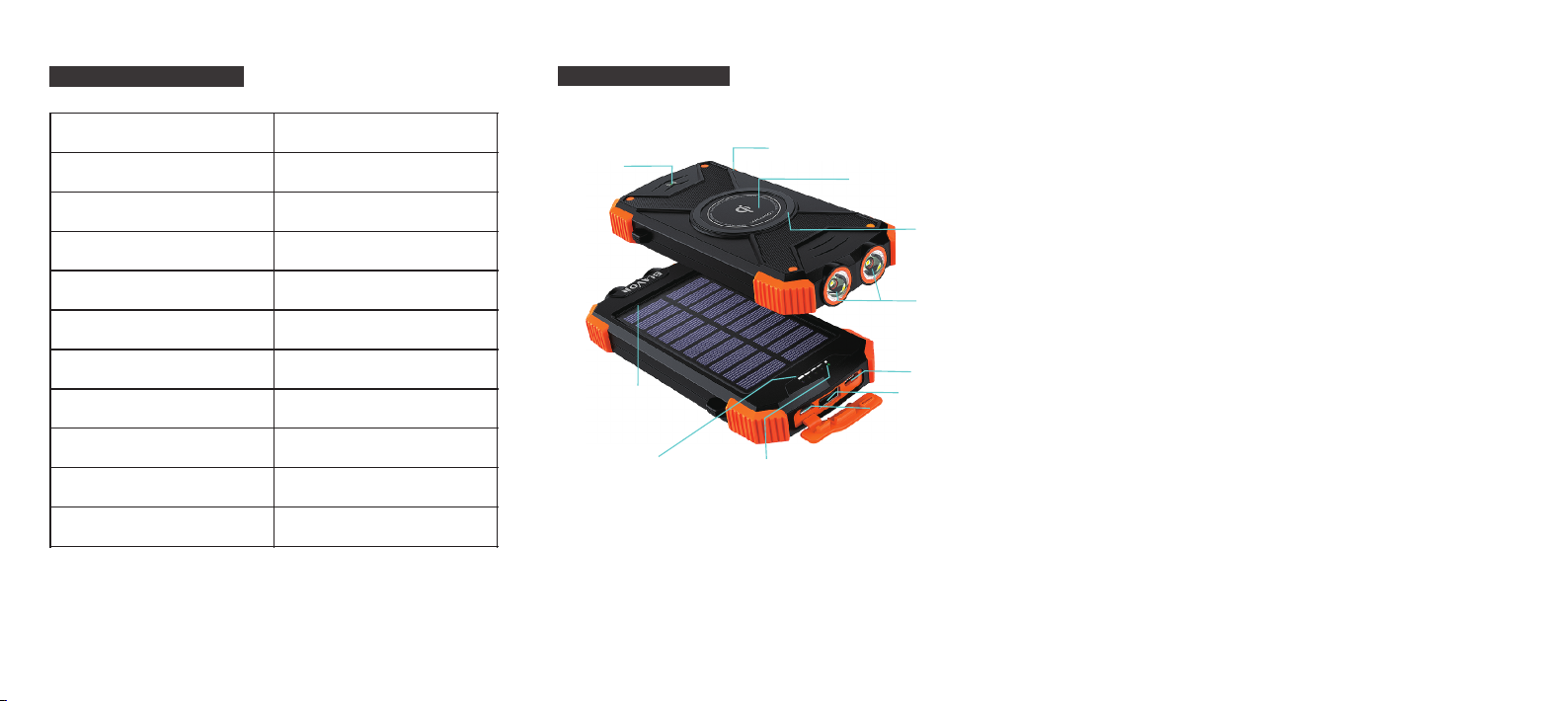
PRODUC T DETAIL S
pow er butt on
wir eless c hargi ng indi cator
①
⑪
sunlight receiving panel
⑩
battery power indicator
②
③
⑨
solar charg in g in di ca to r
wir eless c hargi ng area
ant i-sli p mat
④
dua l LED fla shlig ht
⑤
Type C i np ut
⑥
usb output
⑦
micro usb input
⑧
① wirel ess charg in g in di ca tor
Press the “p ow er b ut ton”, then th e “w ir el ess charging indica to r” a nd
“battery p ow er i nd icator”is g oi ng t o tu rn on, if no Qi-e na bl ed d evices
get close to t he q i wi re less charging area wi th in 2 0S , it will be off.
power button②
Press the “p ow er b ut ton”, then th e fu nc ti on of wireles s ch ar g ing and cabl e ou tp ut c harg in g turns on.
③ wirel ess charg in g area
The w ir eless charging fe at ur e on ly s uit for qi- en ab le d devices, pl s
figure out w he th er y our phone is Qi -e na bl ed before cha rgin g it .
anti-s li p ru bb er m at④
A circle of pr em iu m an ti-slip rub be r ma t is d esigned for p re ve nt ing
your phone f ro m fa ll ing off.
dual led f la sh li gh t⑤
Press the po we r bu tt on for at least 5 s ec on ds t o turn on/off the
flashlig ht s.
Type C i np ut⑥
DC 5V 2.1 A type C port is a new t ec h de si gned for futu re u se .
usb outp ut ⑦
DC 5V 2.1 A
⑧ micro u sb input
DC 5V 2.1 A
solar charging i nd ic at or⑨
Color-green, When the sunl ig ht i nt ensity is abo ve 2 5, 00 0lux and
the solar pa ne l ar e fu lly exposed t o th e su nl ight, so the so la r ch ar ge r
can charge itself wi th m ax 1 80 ma currency.
batter y po we r in di ca to r⑩
Color-blue, pres s th e “p ow er button”, t he i nd ic ator is going t o tu rn o n.
Fours ligh ts f ro m le ft to right rep re se nt 2 5%/50%/ 75% /1 00 % po wer
capacity, Wh en you charge the power b an k by m ic ro USB port, al l th e
indicato r li gh ts f lash in seque nc e ti ll i t’s fully charged.
sunlig ht recei vi ng p an el⑪
Minimum su nl ig ht i ntensity 25 ,0 00 LU X, 180ma charging c ur re nc y.
Page 2
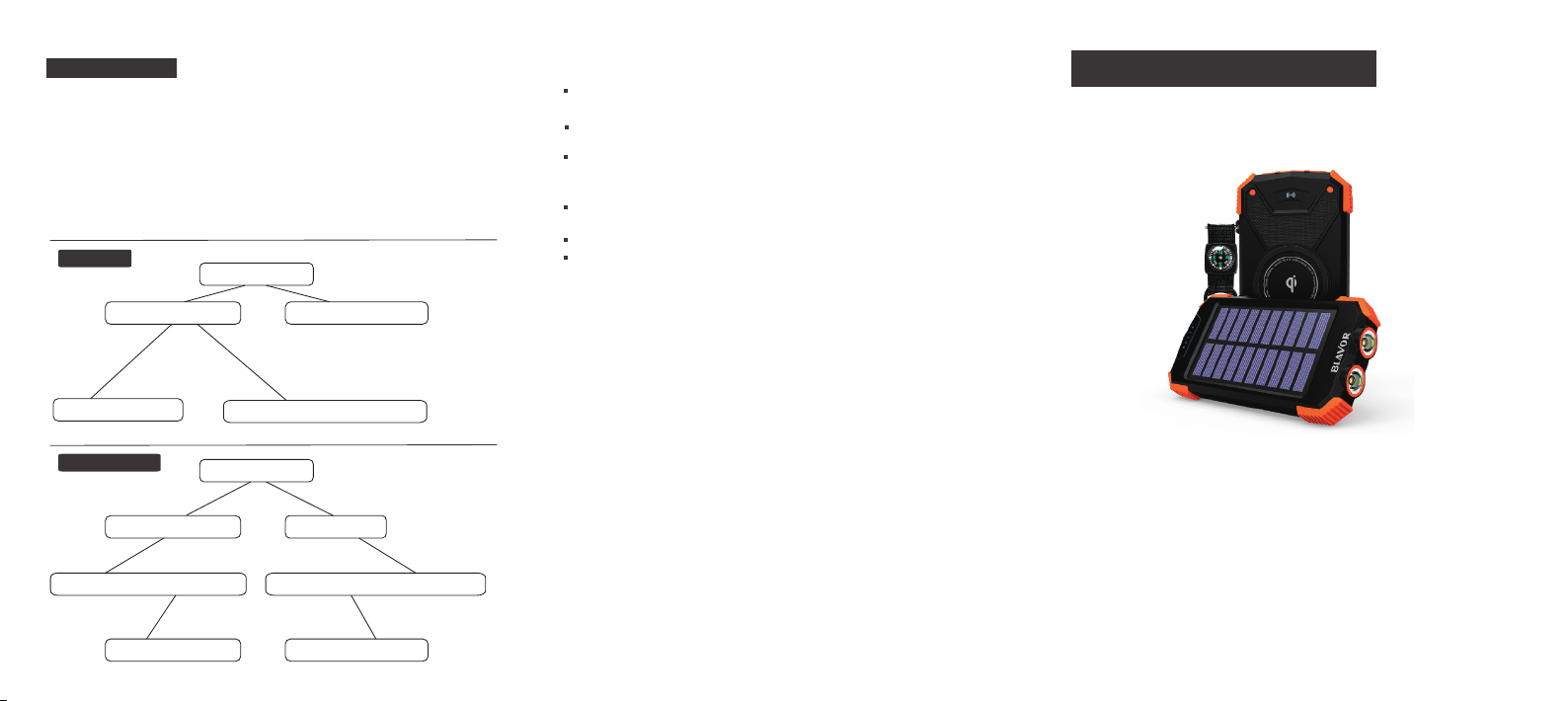
HOW TO USE
NOTE: In theory, it needs aro un d 56h ou rs to get the power bank
fully ch ar ge d with co ns tant mi ni mu m 25,00 0l ux sunlight . Yet it s
adviced to take the solar charging feat ur e as th e em erge nc y back- up
solution i ns te ad of m ai n po we r so urces due to sunl ig ht inte ns it y an d
panel conv er si on r ate.
Make su re that y ou r p ower bank i s fu ll y charge d by po we r o ut let
before startin g yo ur lon g jo ur ne y.
To Cha rg e
Che ck Batt ery Pow er
es
y
g
rgin
a
h
s C
es
l
e
Wir
Put D evice s on the Qi Ar ea
To Be Ch ar ge d
Con nect th e Power B ank wit h Power O utlet
Mic
Con nect th e Cable (Incl uded) w ith Your Pho ne
Low B atter y Power
ro U
SB C
no
Get i t Charge d by Powe r OutlePre ss Down P ower Bu tton
ha
rg
in
g
Cha rge by Sun lightCha rge by Powe r Outle t
Ful ly Expo sed to Mi nimum 2 5,000 LUX Sun light
PRODUC T MAINTE NA NC E
For longer b at te ry l ife span, mak e su re i ts c ompletely o ut o f po we r
capacity b ef or e cha
rg ing it.
If you are not u si ng t he d evice for a lon g ti me , ch arge i t by p ower
outlet at le as t ev er y six months.
Do not use wir el es s ch argi ng f unction w hi le c ha rg in g th e power
bank.
IMPORTANT NOTICE
The p ro duct is suit fo r 5V /2 V de vi ce s, or it will be in p ro te ct io n
status and wo n’t work.
Keep it away f ro m we t en vironment a nd c or ro sive substa nc es .
Do not try to re fi t, d is assemble it .
QUALIT Y WAR RA NT Y
All produc ts s ol d by B LAVOR en jo y 12 m onths warra nt y, the
guarante e pe ri od b egins from th e da te y ou p urchase it.
During the p er io d if t here are any pr ob le ms , w hich is verif ie d by o ur
engineer t ea m as n ot b eing damage d by m an -m ade factors , BL AVOR
is respons ib le f or i t and our team wi ll b e wi th y ou until its so lv ed .
CUSTO MER SERV IC E
BLAVOR offers ti me ly a nd con si de ra ble cu st omer s er vi ces, i f th er e
are any problem s, feel fre e to cont act us, we wil l get bac k to you
within 12h ou rs .
We’d love t o g et some f eedbacks from yo u, so it c ou ld he lp us
improve ou r pr od uc ts and custom er s er vi ces.
Thank you fo r ch oo si ng BLAVOR
USER MANUAL
NO: PN- W05
NAME:Qi Solar Power Bank
Gre en Indi cator L ight is O nBlu e Indic ator Li ghts Fl ash
C O N T A C T U S
Suppor t@ bl av or.com
 Loading...