

Page 1
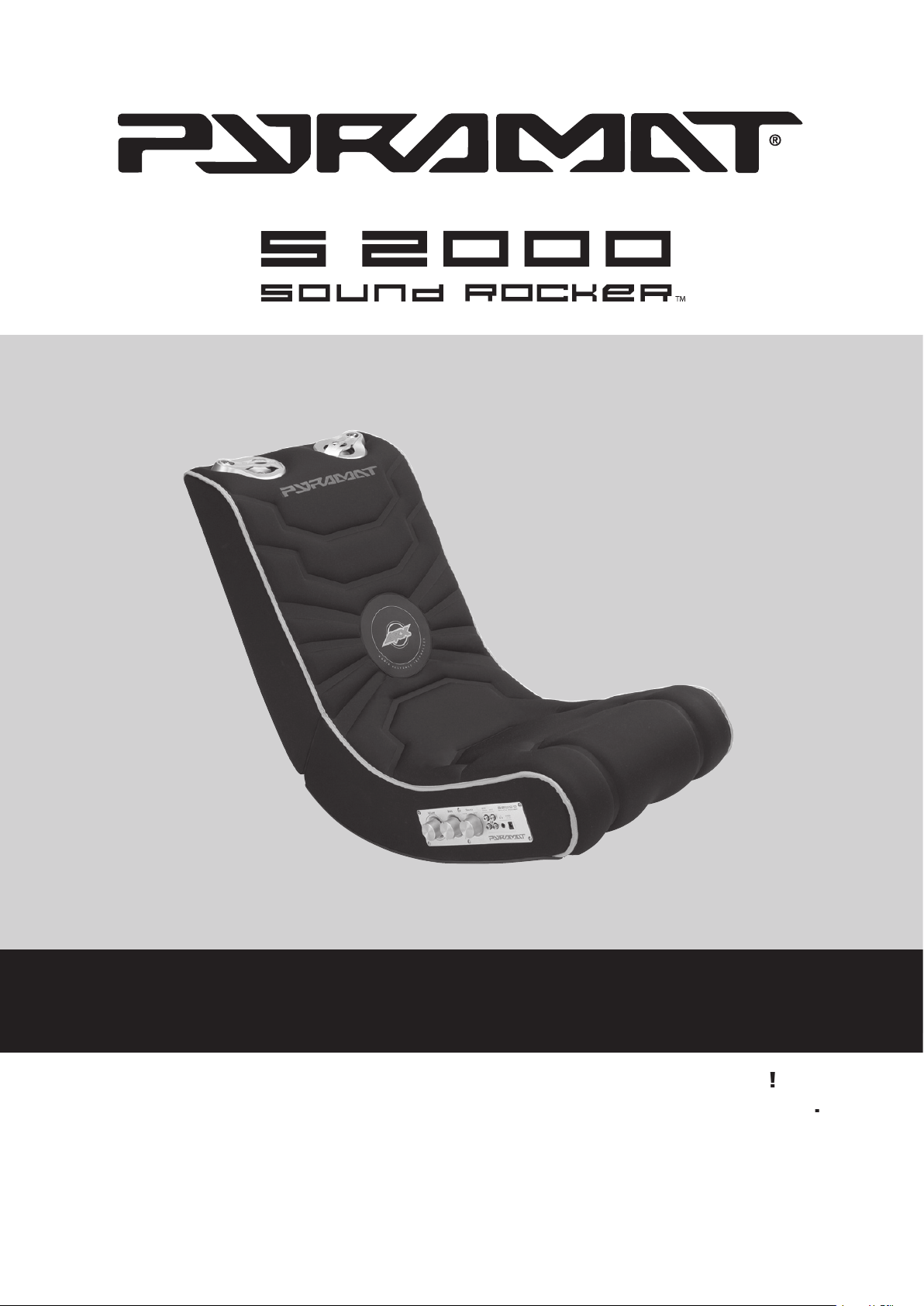
OWNER’S MANUAL
using
Page 2

WARNING:
The Pyramat Sound Rocker is intended
for indoor use only.
TO REDUCE THE RISK OF FIRE OR
The power adapter is not a toy.
common sense.
don’t use until totally dry.
The Sound Rocker is compatible with:
SAFETY WARNINGS
Warnings
.........................................................................
................................................
Troubleshooting Guide
Warranty
........................................................................
V
www.pyramat.com
send an e-mail
to
CONTENTS
Page 3
BEFORE YOU BEGIN
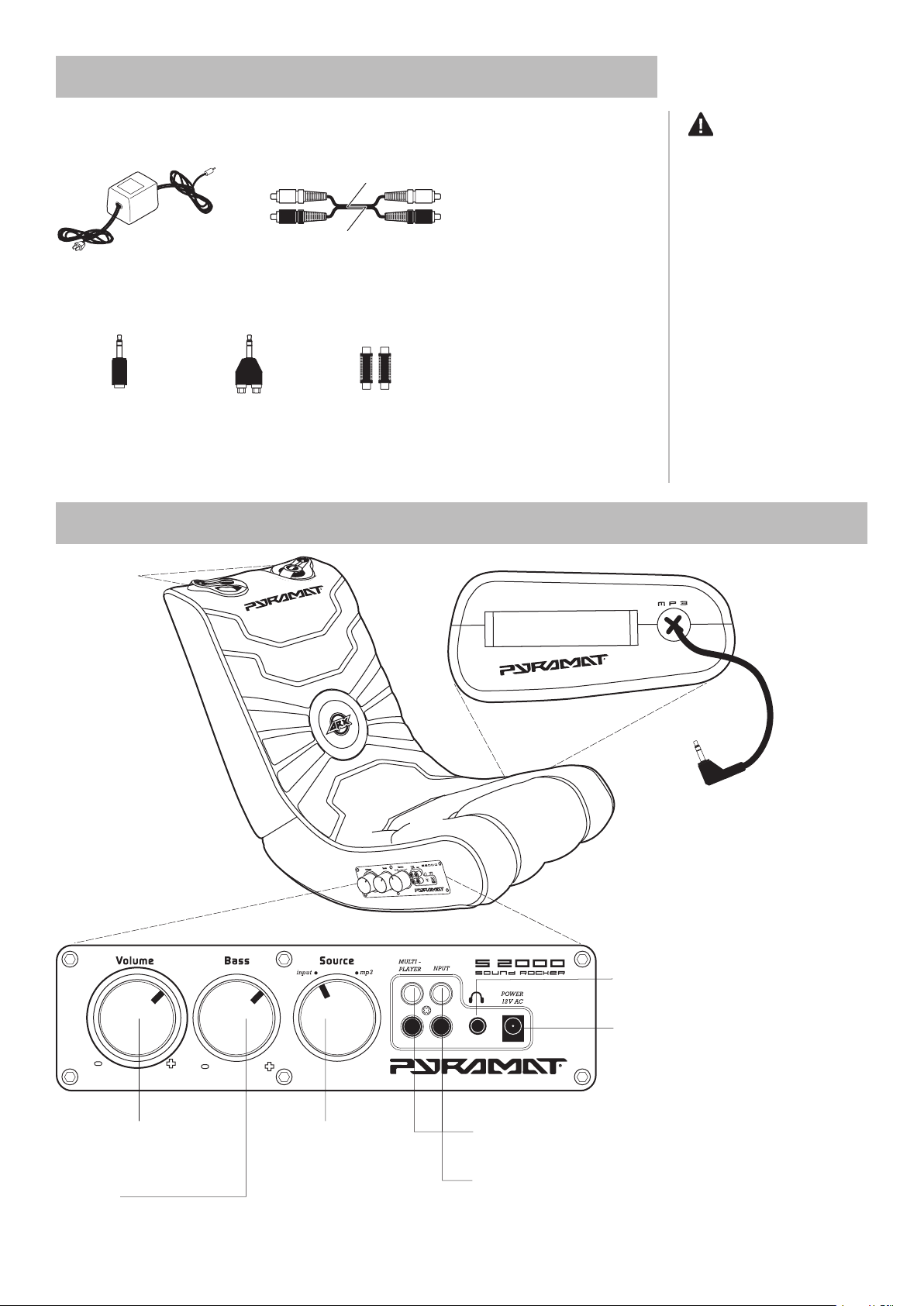
to RCA plug adapter
FEATURES
S
O U
N
D
F U
R
N
I T
U
R E
Volume/power knob
Twist to click on and power up
Twist to adjust the bass to your
4-inch speakers
for MP3 and portable CD players
CAUTION:
fi ngers clear of the folding seam
when opening the unit.
Replacement cables and mini
Page 4
SET-UP
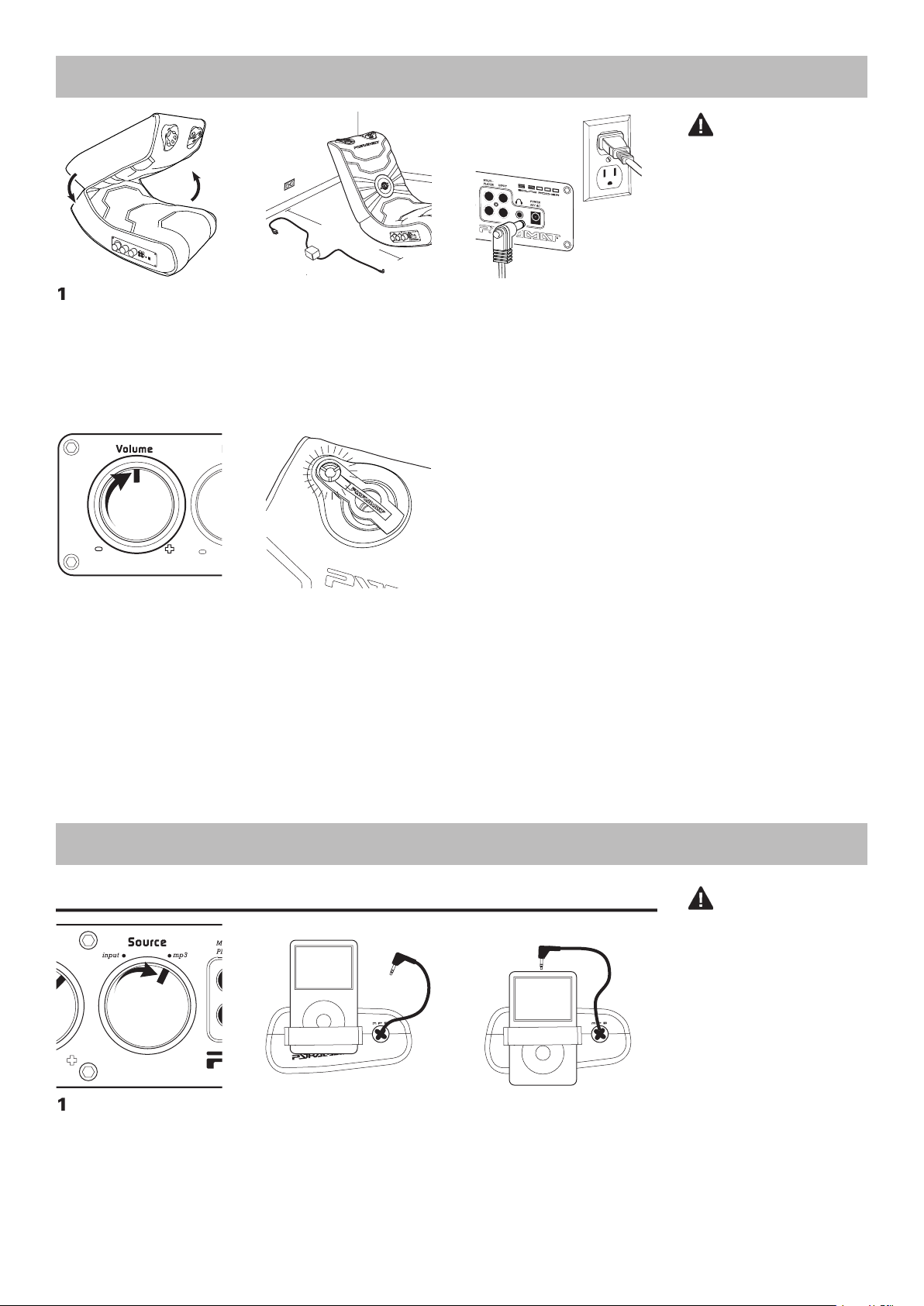
that the control panel is less than
Connect the 12-volt AC power
then to the power AC port on the
4
Twist the volume knob to click
Twist volume knob to p
for your audio/video device.
With the cord next to the
For audio devices with a
SO U N
D
F U
R
NI T
U
R
E
SO U N
D
F U
R
NI T
U
R
E
S
O
U
ND
F U
R
N
IT
U
RE
Turn the source knob on the
11 FE
E
T
OR LESS
VIDEO
GAME
CONSOLE
TV
AUDIO
OUTPUT
TV
DVD
VCR
SATELLITE
RECEIVER
STEREO
CONNECTION METHODS
CAUTION:
fi ngers clear of the folding seam
when folding or unfolding the
CAUTION:
Page 5
CONNECTION METHODS
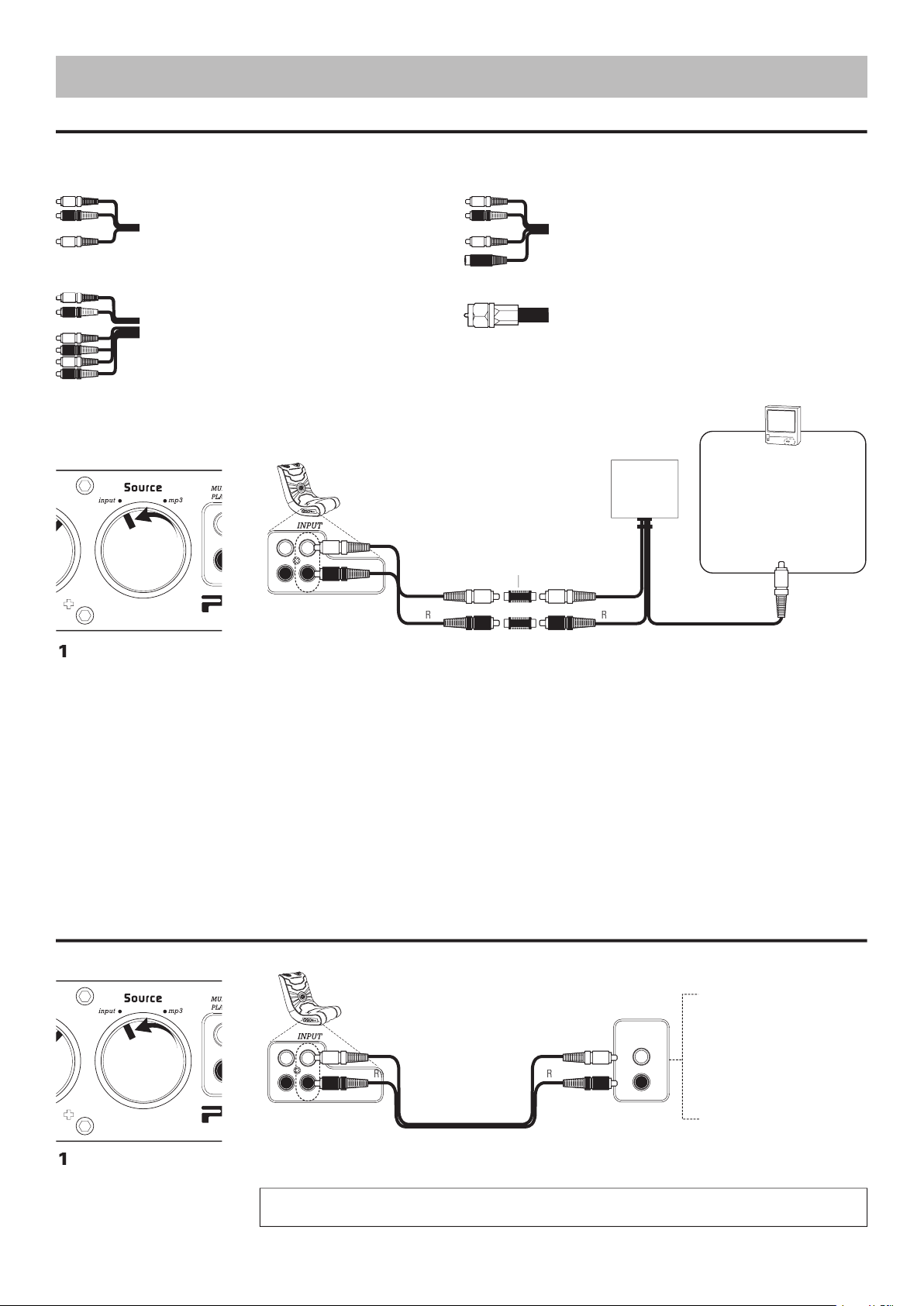
Video Game Console Connection
XBOX 360
, PLAYSTATION 2
, 3, GAMECUBE
There are four types of audio/video cables that come with video game consoles:
1.
2.
S-Video AV/RCA Cable
(red, white–audio; yellow, black–S-video)
3.
High Defi nition AV/RCA Cable
(
yellow, blue, red, green–video
Audio/Video Device Connection
TV, DVD PLAYER, VCR, SATELLITE RECEIVER,
Turn the source knob on the
the connection method for your
video game console.
the instructions from the video game console’s manufacturer to connect the video cable to your
television.
the video game console’s manufacturer to hook up the video game console through an intermediary device (such as a
TV, DVD, VCR, satellite receiver, etc.). Your intermediary device must have both a coaxial input jack (the standard jack
for cable TV) and an RCA audio output jack, or you can purchase an RCA replacement cable directly from the console
VIDEO
GAME
CONSOLE
TV
AUDIO
OUTPUT
TV
DVD
VCR
SATELLITE
RECEIVER
STEREO
Turn the source knob on the
front of most devices are AUDIO INPUT. SOUND WILL NOT PLAY FROM AN AUDIO INPUT SOURCE.
White
White
Yellow
White
White
4
The yellow RCA video cable
jack on the TV. Refer to
the
to connect any other video
Page 6
AUDIO
OUTPUT
VIDEO GAME
SYSTEM
TV
DVD
VCR
SATELLITE
RECEIVER
STEREO
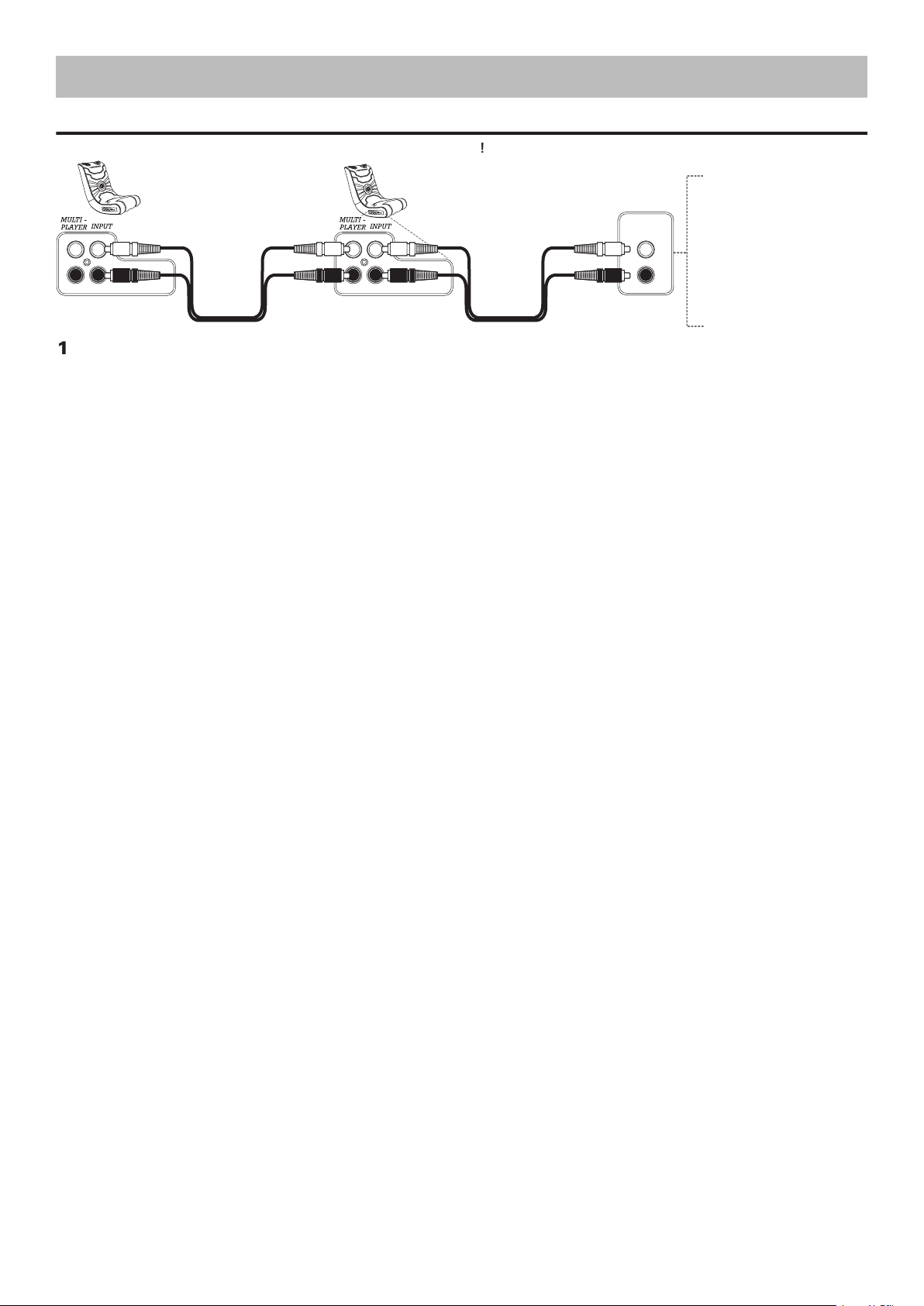
After connecting one Sound Rocker to an audio/video device, you can connect additional Sound Rockers together. Connect the supplied RCA audio cable to
the multi-player connection on the fi rst Sound Rocker and then to the input connection on the second Sound Rocker. Repeat to add more Sound Rockers.
CONNECTION METHODS
Page 7

from one source but not
Solution
The RCA audio cables are not
The AC power adapter is
The source knob on the control
Your video game console has a
Audio/video device has a single
The RCA cables (red and white) must be in the AUDIO INPUT ports.
volume knob on, the logo on the back of the rocker will illuminate.
Turn knob to input for video games and audio/video devices. Turn knob to
to the AUDIO INPUT jacks on the rocker.
VIDEO INPUT jack on the TV.
VCRs, an RCA “Y” adaptor (1 male to 2 male; not included) is needed to send
the signal to both Pyramat speakers. Please note: the use of this type of
the unit until the damaged power adapter has been replaced.
V
www.pyramat.com
send an e-mail
to
TROUBLESHOOTING GUIDE
Page 8

WARRANTY
workmanship for a period of 90 days from the date of
fi rst consumer purchase. This warranty is enforceable
This warranty covers all defects in materials and
workmanship, but DOES NOT COVER the following:
failure to follow the instructions contained in this
4. Products sold AS IS or WITH ALL FAULTS, or
Sound Rocker Limited Warranty
THIS WARRANTY IS THE EXCLUSIVE REMEDY OF THE
ANY INCIDENTAL OR CONSEQUENTIAL DAMAGES
WARRANTY ON THIS PRODUCT. EXCEPT TO THE
TO THE LENGTH OF THIS WARRANTY.
TO OBTAIN WARRANTY SERVICE
the dealer nearest you, please call or write:
this product or other Pyramat products, please visit our
website at
www.pyramat.com
this manual and write the serial number here.
Page 9

for
© Copyright 2006 Pyramat, LLC
If you have problems with your Sound Rocker,
DO NOT RETURN TO STORE.
Follow instructions in this manual.
Failure to follow these instructions may damage
your Sound Rocker and void your warranty.
www.pyramat.com
send an e-mail
to
 Loading...