

Page 1
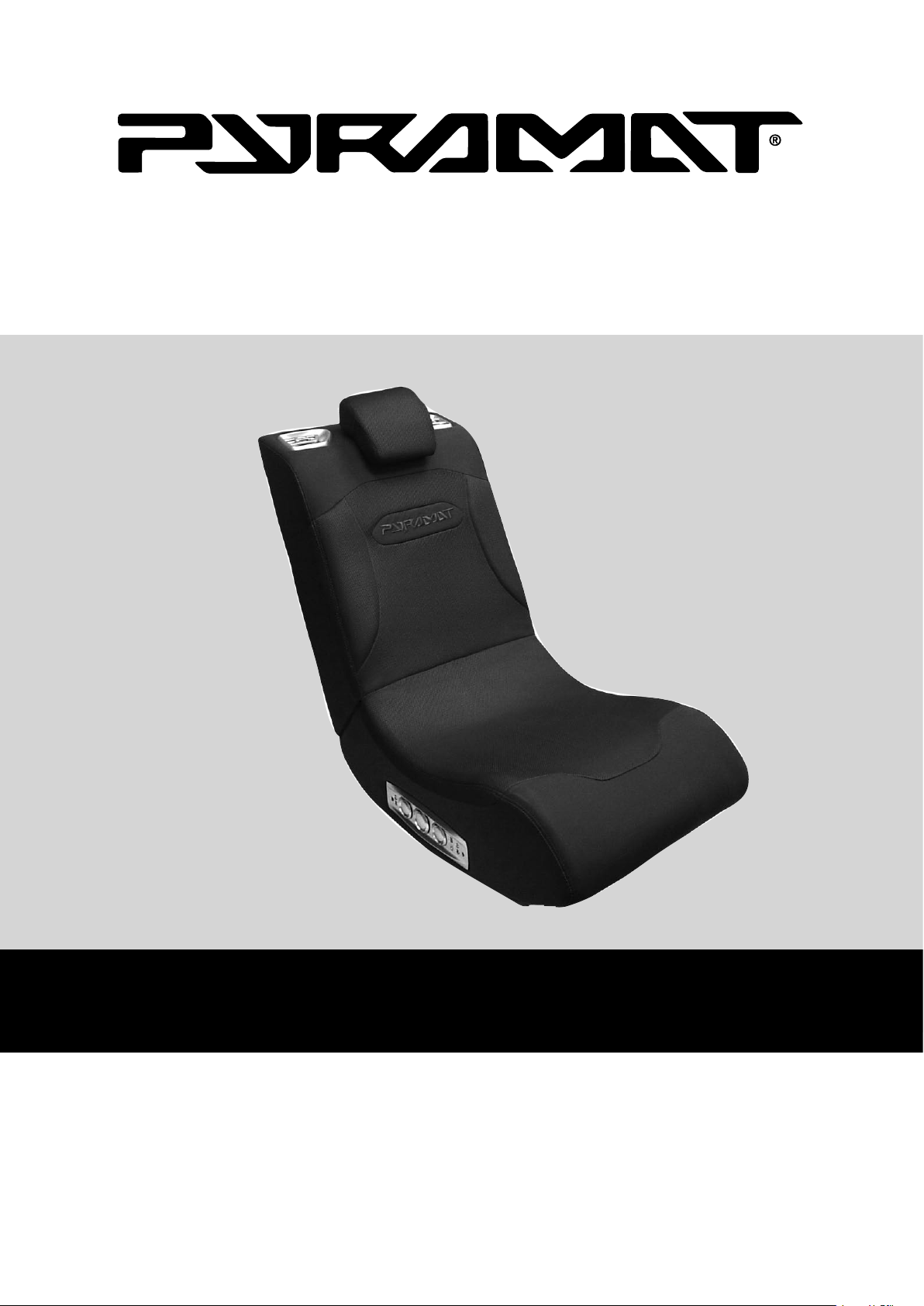
OWNER’S MANUAL
Read and understand this entire manual before using!
For assistance contact Pyramat. DO NOT RETURN TO STORE.
Item Number:
10175140
PM440
SOUND ROCKER
Page 2

WARNING: The Pyramat Sound Rocker is intended for indoor use only. TO REDUCE THE RISK OF FIRE OR
SHOCK HAZARD, DO NOT EXPOSE THIS PRODUCT TO RAIN OR MOISTURE.
• Do not expose to direct sunlight or extreme temperatures.
• Adult supervision is required for set-up.
• Use only with the supplied power adapter. The power adapter is not a toy.
• Excessive use of audio equipment at high volume may lead to hearing loss. Listen responsibly and use
common sense.
• Children under 13 should not use this product without parental supervision.
• DO NOT wash or soak the Sound Rocker with water. If cover becomes wet, disconnect power immediately and
don’t use until totally dry.
• To avoid injury or death from electrical shock, NEVER open the electrical cabinet or remove the cover.
The Sound Rocker is compatible with:
• All gaming consoles (including Xbox 360 and Playstation 3)
• MP3 players
• TVs, DVDs, VCRs
• Portable gaming devices (including Nintendo DS, Nintendo DS Lite, and PSP)
SAFETY WARNINGS
Safety Warnings ............................................................ 1
Before You Begin ........................................................... 2
Features ......................................................................... 2
Set-Up ............................................................................ 3
Direct Connection Methods ...................................... 4–5
Troubleshooting Guide ................................................... 6
Warranty ........................................................................ 7
1
Need Help? Visit our website at www.pyramat.com, send an e-mail to [email protected]
or call toll-free at 877-591-1012.
CONTENTS
Congratulations on the purchase of your Pyramat PM440 Sound Rocker. The Sound Rocker is a comfortable, rockable
chair that delivers a powerful audio experience designed to intensify your enjoyment of games, movies, music and
more. To ensure the best results, please read this manual completely before operating your Sound Rocker, and retain
it for future reference.
Page 3
Remove the foam separators from the Sound Rocker and take unit out of box.
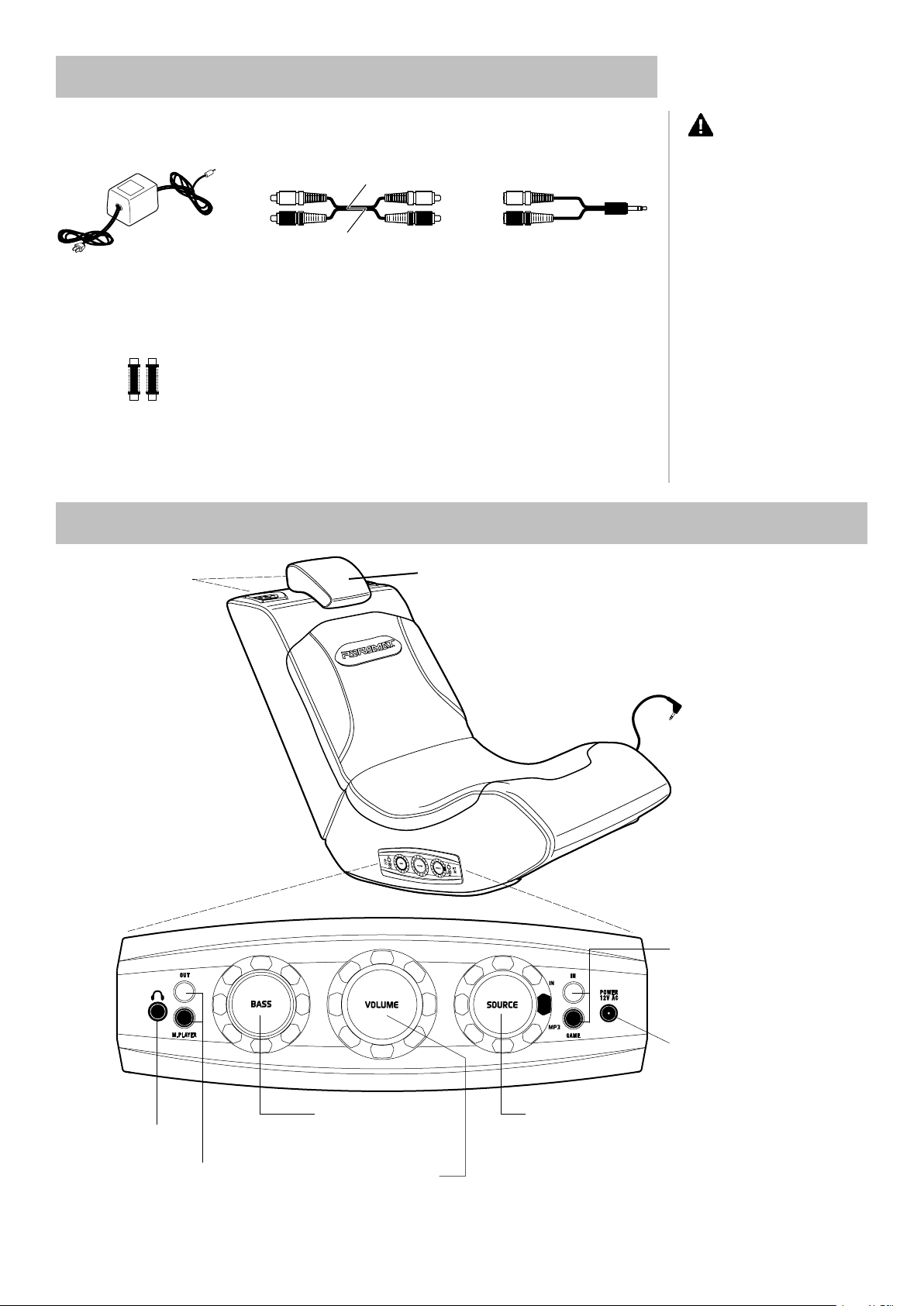
Check to make sure you have all the parts shown below and that all items are in good condition.
BEFORE YOU BEGIN
2
11 ft. red and white
RCA audio cable
11 ft. 12-volt AC power adapter
(2) RCA audio cable extenders
FEATURES
Control panel
Headphone port
Connect headphones here.
Multi-player RCA audio output ports
Connect up to four Sound Rockers together for
multi-user fun.
Speakers
Bass knob
Twist to adjust the bass to
your preference.
Volume/power knob
Twist to click on and power up
and adjust the volume level.
Source knob
Select IN for video games, home
theater, satellite receiver and
stereo receiver. Select MP3 for
MP3 and portable CD players
connected to the MP3 and
portable CD player plug.
Input RCA audio ports
Connect red and white RCA audio
cable here from game consoles, home
theater, satellite receiver and stereo
receiver.
Power AC port
Connect supplied 12-volt power
adapter here.
CAUTION: Keep
fingers clear of the folding seam
when opening the unit.
Note: Replacement cables and mini
adapters can be purchased at your
local audio accessory dealer.
MP3 and portable CD player plug
RCA to mini audio cable
Adjustable Headrest
Page 4
SET-UP
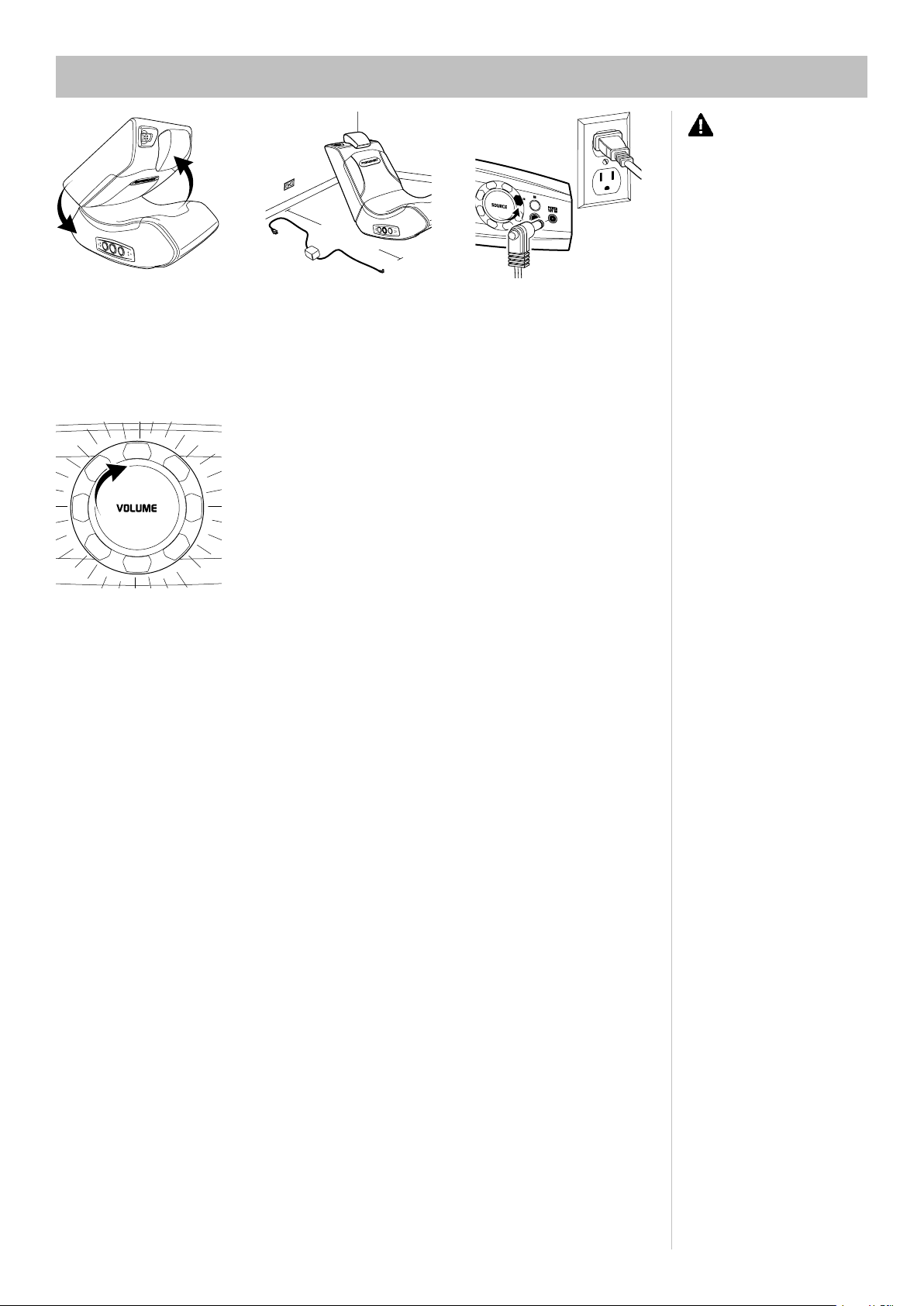
1 Unfold the top portion of the
Sound Rocker until the backrest
is flush with the seat portion.
2 Place the Sound Rocker so
that the control panel is less than
11 ft./3.5 meters from the power
source.
3 Connect the 12-volt AC power
adapter to the electrical outlet and
then to the power AC port on the
control panel.
4 Twist the volume knob on the
control panel to click on and test
the power. When the power is
on all the knobs light up.
Twist volume knob to power off
the Sound Rocker, then proceed
to the connection method shown
for your audio/video device.
11 FE
E
T
OR LESS
3
CAUTION: Keep
fingers clear of the folding seam
when folding or unfolding the
rocker.
Page 5
DIRECT CONNECTION METHODS
Video Game Console Connection
XBOX 360TM, PLAYSTATION 2TM, PLAYSTATION 3TM, GAMECUBE
TM
AND OTHERS
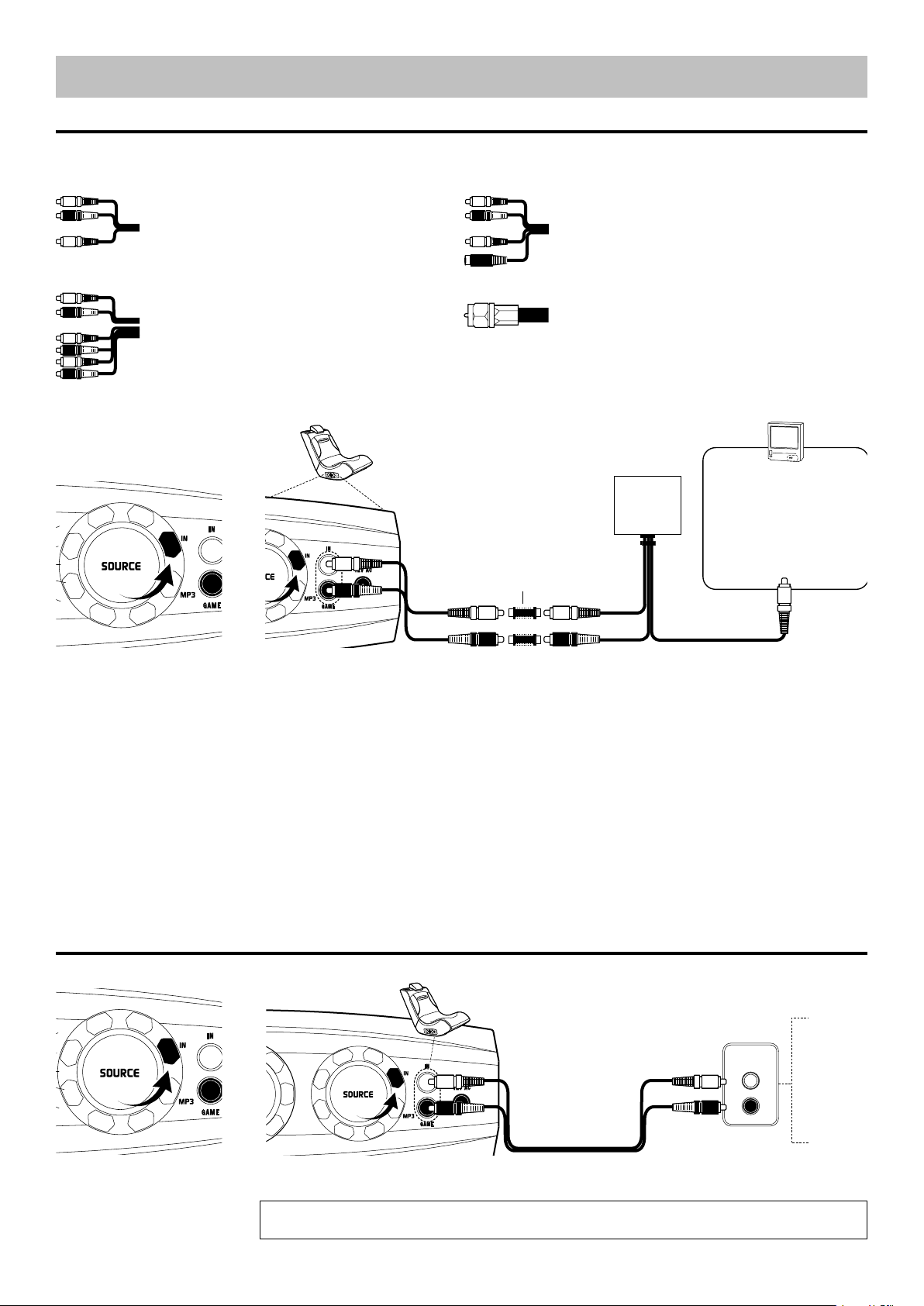
There are four types of audio/video cables that come with video game consoles:
1. Standard AV/RCA Cable 2. S-Video AV/RCA Cable
(red, white–audio; yellow–video) (red, white–audio; yellow, black–S-video)
3. High Definition AV/RCA Cable 4. Coaxial Connection
(red, white–audio; yellow, blue, red, green–video)
Audio/Video Device Connection
TV, DVD PLAYER, VCR, SATELLITE RECEIVER, STEREO
1 Turn the source knob on the
control panel to IN. Proceed to the
connection method for your video
game console.
2 RCA Audio Cable Connection
For standard AV/RCA Cable, S-Video AV/RCA Cable and High Definition AV/RCA Cable
Connect the RCA audio cable extenders to the red and white audio cable from the video game console. Connect the
supplied RCA audio cable to the video game console’s red and white audio cables and plug into the input jacks on the
Sound Rocker. Follow the instructions from the video game console’s manufacturer to connect the video cable to your
television.
OR
2 Coaxial Cable Connection
If your video game console has a coaxial cable instead of an RCA audio cable, then use the instructions provided by
the video game console’s manufacturer to hook up the video game console through an intermediary device (such as a
TV, DVD, VCR, satellite receiver, etc.). Your intermediary device must have both a coaxial input jack (the standard jack
for cable TV) and an RCA audio output jack, or you can purchase an RCA replacement cable directly from the console
manufacturer. Then follow the audio/video device connection instructions below to connect your Sound Rocker.
VIDEO
GAME
CONSOLE
TV
AUDIO
OUTPUT
TV
DVD
VCR
SATELLITE
RECEIVER
STEREO
1 Turn the source knob on the
control panel to IN.
2 Connect the supplied RCA audio cable from the red and white input jacks on the Sound Rocker to the red and white
AUDIO OUTPUT connection on your audio/video device.
Note: Connection must be made to an AUDIO OUTPUT source. The red and white audio connections on the
front of most devices are AUDIO INPUT. SOUND WILL NOT PLAY FROM AN AUDIO INPUT SOURCE.
RCA AUDIO CABLE
EXTENDERS
RedRed
WhiteWhite
Yellow
Red
White
4
(single black cable)
If you have this cable, you need to purchase the RCA
audio cable from the console manufacturer. Or, you
can connect the Sound Rocker through an intermediary
audio source such as a TV, DVD, VCR, etc. (see below).
The yellow RCA video cable
connects to the VIDEO INPUT
jack on the TV. Refer to the
instructions from the video
game console’s manufacturer
to connect any other video
cables to your TV.
Page 6
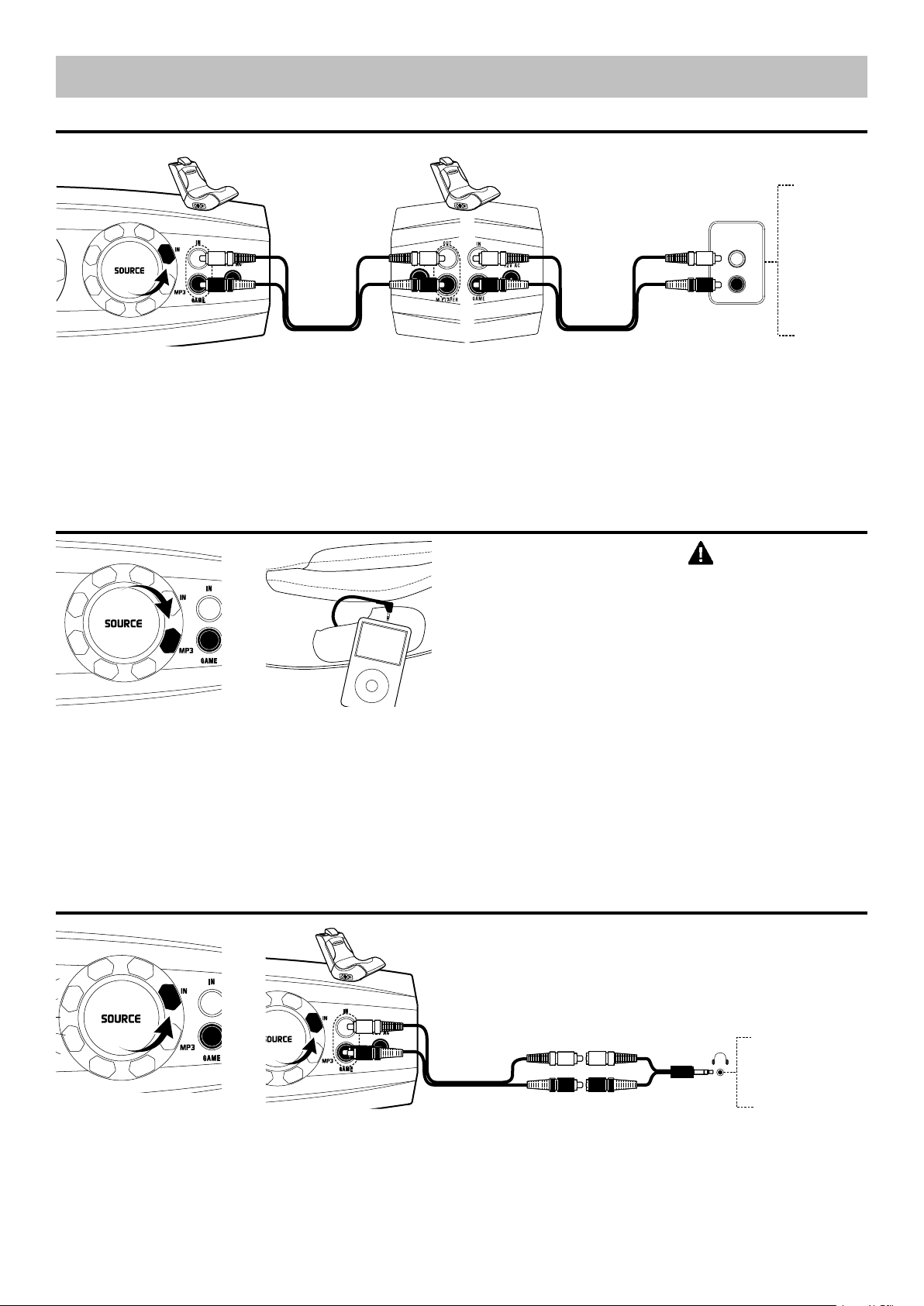
5
CONNECT UP TO FOUR SOUND ROCKERS TOGETHER FOR MULTI-USER FUN!
AUDIO
OUTPUT
VIDEO GAME
SYSTEM
TV
DVD
VCR
SATELLITE
RECEIVER
STEREO
1 After connecting one Sound Rocker to an audio/video device, you can connect additional Sound Rockers together.
Connect the supplied RCA audio cable to the multi-player connection on the first Sound Rocker and then to the input
connection on the second Sound Rocker. Repeat to add more Sound Rockers.
2 Connect the player to the Sound
Rocker with the cord inside the
pocket.
1 Turn the source knob on the
control panel to MP3.
CAUTION: Power
off all audio/video devices prior to
proceeding with the Sound Rocker
connection method.
DIRECT CONNECTION METHODS
Multi-User Connection
Portable Audio Device Connection
Handheld Game Device Connection
NINTENDO DS
NINTENDO DS LITE
PSP
2 Connect the supplied RCA audio cable from the red and white input jacks on the control panel to the red and white
RCA to mini cable and into the headphone jack on your handheld game device.
Note: If your handheld gaming device does not have a headphone jack it is not compatible with the Sound Rocker.
Red
Red
White
White
1 Turn the source knob on the
control panel to IN.
Page 7

6
Unable to hear sound
Unable to connect to the
gaming console
Sound only plays from one
speaker.
No sound will play from the
Sound Rocker.
Sound Rocker plays sound
from one source but not
another.
Missing or broken cables or
mini adapters.
Missing or broken power
adapter.
Problem Possible Cause Solution
The RCA audio cables are not
connected properly.
The AC power adapter is
disconnected from the electrical
outlet or the electrical outlet has
no power.
The source knob on the control
panel is in the wrong position.
Cables are incorrectly connected.
Your video game console has a
coaxial cable instead of an RCA
audio cable
RCA cables are incorrectly
connected.
Audio/video device has a single
MONO audio output (a common
problem when connecting to an
older TV or VCR).
RCA audio cables are incorrectly
connected.
Source knob is not on the correct
setting.
RCA cables are incorrectly
connected.
Check the connection on your audio/video device. The RCA cables should be
connected to the AUDIO OUTPUT jacks. Check the connection on your rocker.
The RCA cables (red and white) must be in the AUDIO INPUT ports.
Check the plug on the AC power adapter. When properly connected with the
volume knob on, the control panel and speakers will illuminate.
If the Sound Rocker still doesn’t power up, try another electrical outlet.
Turn knob to IN for video games and audio/video devices. Turn knob to MP3
for MP3 and portable CD players.
Check that the console’s RCA audio cables are connected to the Sound
Rocker’s RCA audio cables (red to red and white to white).
Check that the Sound Rocker RCA audio cables (red and white) are connected
to the AUDIO INPUT jacks on the rocker.
Check that the console’s RCA video cable (usually yellow) is connected to the
VIDEO INPUT jack on the TV.
If your video game console has an RCA audio cable, then connect the RCA
audio cable extenders to the red and white audio cables from the video game
console. Connect the supplied RCA audio cable to the video game console’s
red and white audio cables and plug into the input jacks on the Sound Rocker.
Use the instructions provided by the video game console’s manufacturer to
hook up the video game console to an intermediary device (such as a TV,
DVD, VCR, satellite receiver, etc.). Your intermediary device must have
both a coaxial input jack (the standard jack for cable TV) and an RCA audio
output jack.
Purchase an RCA replacement cable directly from the console manufacturer.
Check that all RCA audio connections are correct – red to red, white to white
If your audio source is mono only, as found mainly on older model TVs and
VCRs, an RCA “Y” adaptor (1 male to 2 male; not included) is needed to send
the signal to both Pyramat speakers. Please note: the use of this type of
adapter will not produce a true stereo sound. For optimal performance, it is
recommended that you connect your Pyramat product to stereo outputs only.
RCA audio cables (red and white) must be plugged in to AUDIO OUTPUT jacks
in the source device (TV, VCR, etc.). If you are plugging the cables to the jacks
in the front of your TV these are most likely AUDIO INPUT jacks.
See page 2 for the correct knob position for the device you are playing.
Check that all RCA audio connections are correct – red to red, white to white
Replace items immediately. Replacement cables and mini adapters can be
purchased at your local audio accessory dealer.
Replace immediately with an authorized Pyramat power adaptor. Do not use
the unit until the damaged power adapter has been replaced.
Need Help? Visit our website at www.pyramat.com, send an e-mail to [email protected]
or call toll-free at 877-591-1012.
TROUBLESHOOTING GUIDE
Page 8

WARRANTY
Pyramat warranties this product and any included
accessories against defects in material and
workmanship for a period of 90 days from the date of
first consumer purchase. This warranty is enforceable
only by the original purchaser. ALL DAMAGED OR
MISSING PARTS MUST BE REPORTED WITHIN 14
DAYS OF PURCHASE.
This warranty covers all defects in materials and
workmanship, but DOES NOT COVER the following:
1. Damage, deterioration or malfunction resulting from:
a. Acts of God, accident, misuse, abuse, negligence,
improper installation, maintenance or operation, or
failure to follow the instructions contained in this
manual.
b. Any shipment of the product (claims must be
presented to the carrier).
c. Repair, attempted repair or modification by anyone
other than the Pyramat Service Center.
2. Any unit which has been altered or on which the
serial number has been defaced, modified or removed.
3. Any unit used for industrial or commercial purposes.
4. Products sold AS IS or WITH ALL FAULTS, or
consumables (such as fuses or batteries).
5. Customer installation, set-up, adjustments or signal
reception problems.
Pyramat will repair or replace (at its discretion) units
covered by this warranty, without charge to the
consumer for labor or materials. CONSUMER IS
RESPONSIBLE FOR ANY INSTALLATION OR REMOVAL
CHARGES AND ANY INITIAL SHIPPING CHARGES.
However, we will pay the return shipping charges to
any destination within the United States if repairs are
covered by the warranty.
PM440 Sound Rocker Limited Warranty
REPAIR OR REPLACEMENT AS PROVIDED UNDER
THIS WARRANTY IS THE EXCLUSIVE REMEDY OF THE
CONSUMER. PYRAMAT SHALL NOT BE LIABLE FOR
ANY INCIDENTAL OR CONSEQUENTIAL DAMAGES
FOR BREACH OF ANY EXPRESS OR IMPLIED
WARRANTY ON THIS PRODUCT. EXCEPT TO THE
EXTENT PROHIBITED BY APPLICABLE LAW, ANY
IMPLIED WARRANTIES, INCLUDING WARRANTIES
OF MERCHANTABILITY AND FITNESS FOR A
PARTICULAR PURPOSE, ARE LIMITED IN DURATION
TO THE LENGTH OF THIS WARRANTY.
Some states do not allow the exclusion or limitation of
incidental or consequential damages, or allow limitations
on how long an implied warranty lasts, so the above
limitations may not apply to you.
TO OBTAIN WARRANTY SERVICE
For service assistance, product information, or to locate
the dealer nearest you, please call or write:
Pyramat Service Center
877-591-1012
[email protected]
For further information on how to order accessories for
this product or other Pyramat products, please visit our
website at www.pyramat.com.
IMPORTANT
For your records, save your original sales receipt with
this manual.
7
Page 9

8
Printed in China for:
Pyramat, LLC
PO Box 3610
Cerritos, CA 90703
© Copyright 2006 Pyramat, LLC
09182006
If you have problems with your Sound Rocker,
DO NOT RETURN TO STORE.
Follow instructions in this manual.
Failure to follow these instructions may damage
your Sound Rocker and void your warranty.
Need Help? Visit our website at www.pyramat.com, send an e-mail to [email protected]
or call toll-free at 877-591-1012.
 Loading...