

Page 1
USER’S MANUAL
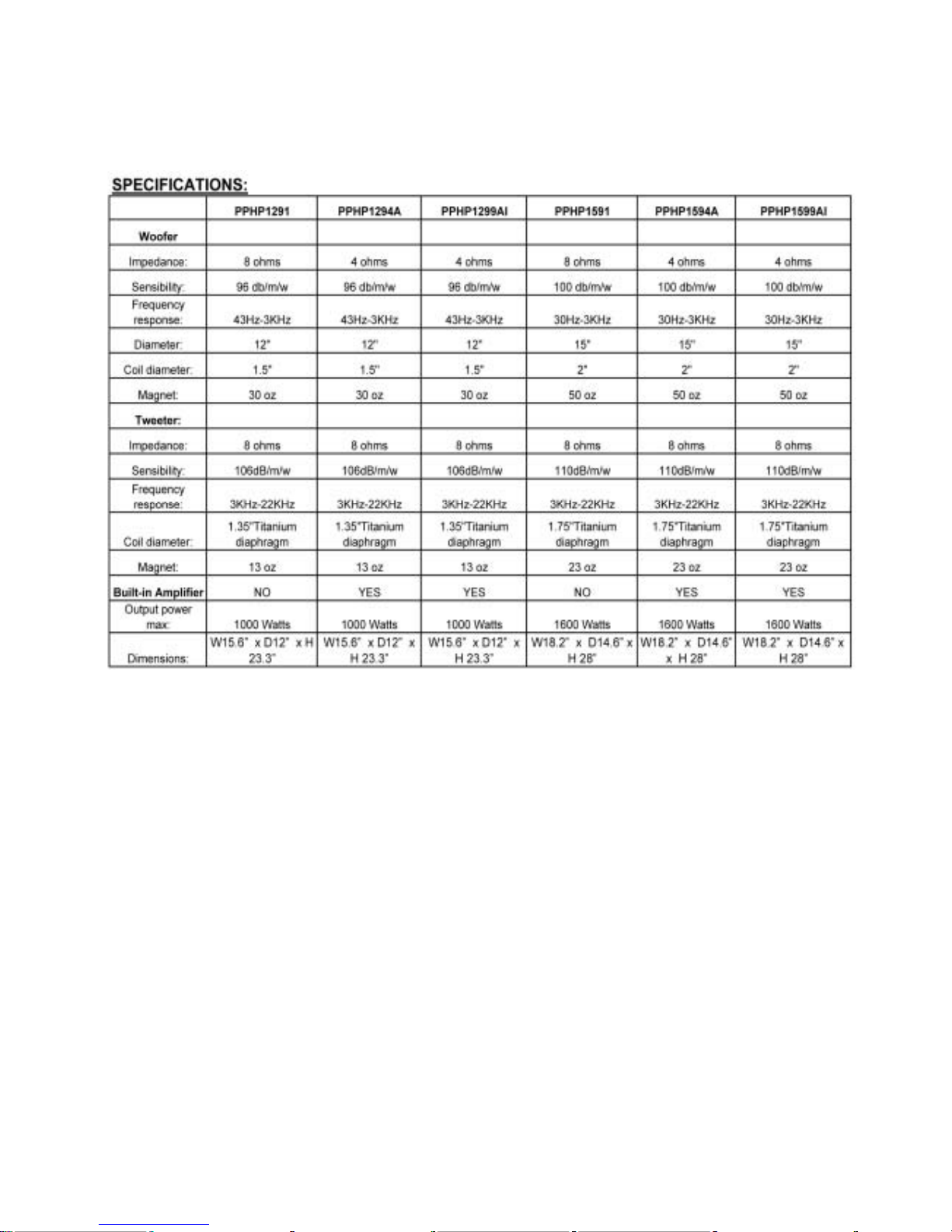
PPHP1291 PPHP1591
PPHP1294A PPHP1594A
PPHP1299AI PPHP1599AI
Page 2

Before using your new Speaker System Please review the
following instructions, for the safety and investment.
INSTRUCTIONS
Before connecting the speaker, make sure the system is off and the controls on the minimum
level. On the contrary the system could damage
1. - Plug the power cable to the AC outlet and to the system and to the speaker
2. - Plug the Microphone in the “MIC” input
3.- Connect (CD, DECK, MP3, DVD, etc) on “LINE IN” input
4.- Turn on the systems. A green LED will light up to indicate the speaker is on
5.- Set the volume on the low level on the MIC and the LINE IN input
6.- Increase the master volume (place on the right side of LINE OUT* connector)
7.- Set TREBLE and BASS controls to equalize the sound.
8.- A red LED will light up when the system detects overload power. You will must decrease
the volume.
CAUTIONS
Do not place the microphone against the speaker, it can cause feedback echo and it will
damage the system
EXTRA FUNCTIONS
6.3 and canon connectors marked as LINE OUT can handle an amplifier or even another
powered speaker cabinet ,in cascade. On the bottom of the speaker there is a hole to place
a stand.
Page 3

FEA TURES:
PPHP1291: 12” 1000 Watt 2 W ay Plastic Molded Speaker Cabinet
• 12'' Woofer
• 1.4'' Titanium Compression Driver
• 1/4” and Speakon Jacks input
• Frequency response: 50-20 KHz
• Power :1000 Watts
• Impedance: 8 ohm
• Crossover Frequency: 3.5K Hz
• 35mm Speaker Stand Mount
• Dimensions: W15.6” x D12” x H 23.3”
PPHP1294A: 12” 1000 Watt Powered 2 W ay Plas tic Molded Speaker Cabinet
• 12" Woofer
• 1.4" Titanium Compression Driver
• Dual XLR and 1/4" Mic Inputs
• XLR Stereo RCA Line Input
• XLR and 1/4" Line Outputs
• Master Volume, Bass Treble Controls
• Frequency response: 50-20 KHz
• Power Output: 1000 Watts
• Crossover Frequency: 3.5K Hz
• 35mm Speaker Stand Mount
• 110/220 Voltage Selectable
• Dimensions: W15.6” x D12” x H 23.3”
PPHP1299AI: 12” 1000 Watt Powered 2 Way Plastic Molded Speaker Cabinet w/Built in
MP3 & Ipod Dock
• Power Switch and Digital amplifier.
• 12" Woofer
• 1.4" Titanium Compression Driver
• MP3 control with LCD display
• USB Terminal
• IPOD DOCK
• XLR and 1/4" Mic Inputs
• XLR Stereo RCA Line Input
• XLR and 1/4" Line Outputs
• Volume, Bass Treble Controls
• Frequency response: 50-20 KHz
Page 4

• Power Output: 1000 Watts
• Crossover Frequency: 3.5K Hz
• 35mm Speaker Stand Mount
• 90-240V AC
• Dimensions: W15.6” x D12” x H 23.3”
PPHP1591: 15” 1600 Watt 2 Way Plastic Molded Speaker Cabinet
• 15'' Woofer
• 1.75'' Titanium Compression Driver
• 1/4'' and Speakon Jacks input
• Frequency response: 40-22 KHz
• Power : 1600 Watts
• Impedance: 8 ohm
• Crossover Frequency: 3.5K Hz
• 35mm Speaker Stand Mount
• Dimensions: W18.2” x D14.6” x H 28”
PPHP1594A: 15” 1600 Watt Powered 2 W ay Plas tic Molded Speaker Cabinet
• 15" Woofer
• 1.7" Titanium Compression Driver
• Dual XLR and 1/4" Mic Inputs
• XLR Stereo RCA Line Input
• XLR and 1/4" Line Outputs
• Master Volume, Bass Treble Controls
• Frequency response: 40-22 KHz
• Power Output: 1600 Watts
• Crossover Frequency: 3.5K Hz
• 35mm Speaker Stand Mount
• 110/220 Voltage Selectable
• Dimensions: W18.2” x D14.6” x H 28”
PPHP1599AI: 15” 1600 Watt Powered 2 Way Plastic Molded Speaker Cabinet w/Built in
MP3 & Ipod Dock
• Power Switch and Digital amplifier.
• 15" Woofer
• 1.75" Titanium Compression Driver
• MP3 control with LCD display
• USB Terminal
Page 5

• IPOD DOCK
• XLR and 1/4" Mic Inputs
• XLR Stereo RCA Line Input
• XLR and 1/4" Line Outputs
• Master Volume, Bass Treble Controls
• Frequency response: 40-22 KHz
• Power Output: 1600 Watts
• Crossover Frequency: 3.5K Hz
• 35mm Speaker Stand Mount
• 90-240V AC
• Dimensions: W18.2” x D14.6” x H 28”
CONTROLS
1a) Microphone 1 input
Allows you to connect a microphone with a 6,3mm connector
1b) Balanced microphone 1 input
Connector for a balanced microphone
1c) Microphone control
Use this control to set the volume level of the microphone 1
(6,3mm or balanced)
2a) Microphone 1 input
Allows you to connect a microphone with a 6,3mm connector
2b) Balanced microphone 1 input
Connector for a balanced microphone
2c) Microphone control
Use this control to set the volume level of the microphone 1
(6,3mm or balanced)
3a) RCA Line-In
Allows you to connect an external audio device (CD, radio, DVD, etc.), with RCA connectors.
3b) Cannon Line-In
Allows you to connect an external audio device (CD, radio, DVD, etc.), with a Cannon
connector.
3c) Control
Use this control to set the volume level of the Line-In signal
4) Volume contro l
Set the volume level
5 Treble
Page 6

Use it to set the treble level
6) Bass
Use it to set the bass level
7a) Signal output
Use this jack to connect other amplifier or even another powered speaker cabinet in cascade,
using a 6,3mm connector
7b) Signal output
Use this jack to connect other amplifier or even another powered speaker cabinet in cascade,
using a Cannon connector
8) AC 110/220 Voltage Selectable
9) AC power
Use it to connect the AC power cord
10) On/ Off power switch
Press to power on /off the speaker box
11a) Button
Use it to On/Off MP3 player controller
11b) USB connector
Use it to plug a USB device with MP3 file.
1 1c ) MP3 control
Use this control to set the volume level of the MP3.
12) MP3 player controll er
13) Ipod Dock
14)1/4” jack self-lock
15) speakon jack
Page 7
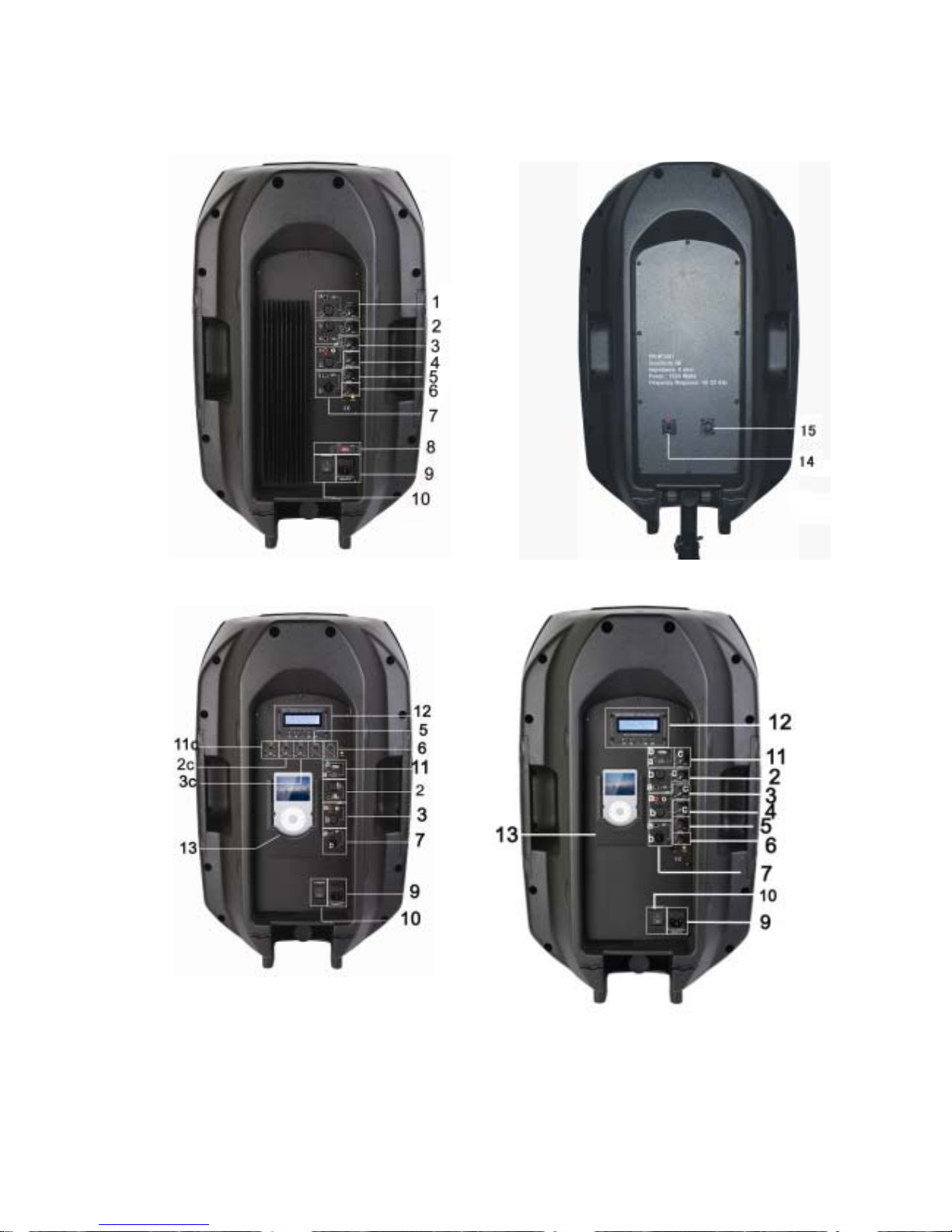
PPHP1294A/PPHP1594ABACK VIEW PPHP1291/PPHP1591 BACK VIEW
PPHP1299AI BACK VIEW PPHP1599AI BACK VIEW
Page 8
SPEAKER SYSTEMBRAND SPEAKERS
 Loading...