

Page 1
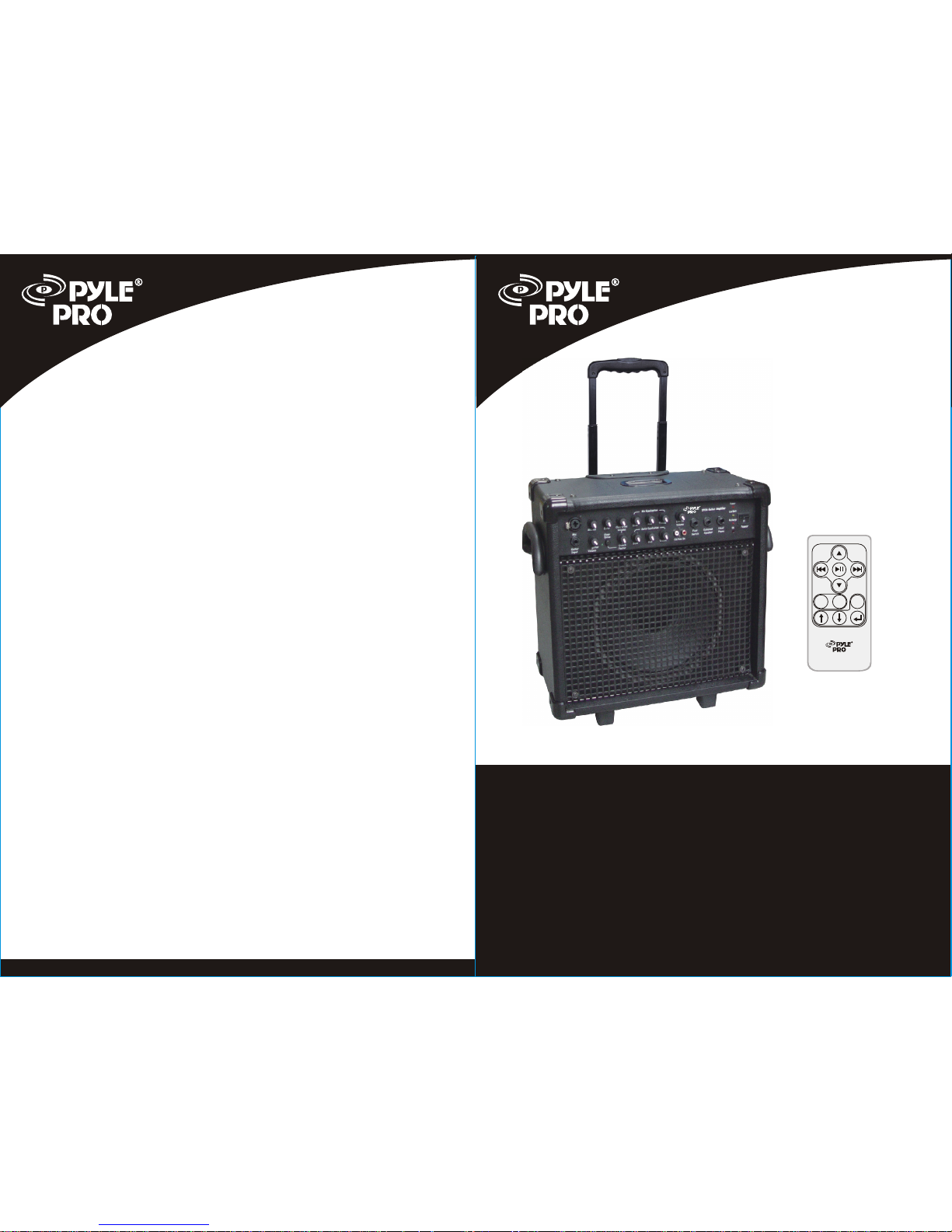
PPG-630I
www.pyleaudio.com
PPG-630I
iPOD
GUITAR
AMPLIFIER
MANUAL
iPOD
GUITAR
AMPLIFIER
MANUAL
PPG-630I
RND
RPT
Menu
Page 2
CONTENTS
CONTENTS
1
our PPG-630I iPod guitar amplifier. We are
confident you will have many years of use and enjoyment from our amp.
Our new range of amps are a culmination of years of development, work
and careful testing. Every product is designed to give you a great piece
of equipment that represents amazing value and features the highest
quality materials available today.
This manual will help you understand some of the great features of your
amp.
Thank you for purchasing
1.Introduction Pg1
2.Safety instruction Pg2
3.Parts description Pg3~Pg4
4.Troubleshooting Pg5
5.Specifications Pg5~Pg6
INTRODUCTION
10'' Full Range Speaker
400W Peak Power
Telescoping Handle & Caster Wheels
110/220 Voltage Switchable
Dimensions: 15.7''L x 8.9''W x 15.2''H
Weight: 34 lbs.
6
SPECIFICATIONS
Page 3
2
1. Read and follow instructions carefully. Store the instructions in a
safe place for future reference.
2. Do not tamper with the power cord.
3. Protect the unit from contact with liquids. Do not place objects filled
with liquid on the unit. Do not spray the unit with liquid cleaners.
Clean with a slightly dampened cloth, wiping the surfaces.
4. If the amplifier has sustained damage, discontinue use. Refer
immediately to qualified personnel.
5. Protect the unit from temperature extremes of excessive heat, rain
and moisture.
6. This amplifier is capable of achieving high volume levels, as such
there is potential for hearing damage if improperly used.
WARNING: TO REDUCE THE RISK OF ELECTRIC SHOCK DO
NOT OPEN THE UNIT. DO NOT DEFEAT THE GROUND PIN OF
THE POWER CORD.
CAUTION: TO REDUCE THE RISK OF ELECTRIC SHOCK DO
NOT EXPOSE THE UNIT TO RAIN OR MOISTURE.
CAUTION: THERE ARE NO USER SERVICEABLE PARTS INSIDE.
PLEASE REFER SERVICING TO QUALIFIED SERVICE PERSONNEL.
OPENING UNIT WlLL VOID WARRANTY
SAFETY INFORMATION
TROUBLESHOOTING
If you are having trouble with your amplifier, these instructions below may
help you before you call a service technician.
1. Check that the power cord is plugged into a power outlet.
2. Check that the power is turned on at the outlet. If you are at a gig, make
sure the stage power has been turned on.
3. Check that the control knobs have been sufficiently turned up.
4. Check that the instrument is correctly plugged into the amplifier, both at
The instrument and at the amplifier input.
5. Check the instrument lead -faulty leads are one of the most common
Causes of problems.
6. Check that the volume is turned up on the instrument.
If your amplifier still does not function, contact your local dealer or an
authorized service agent.
5
TROUBLESHOOTING
SPECIFICATIONS
1/4'' Guitar Input for Wired Connection
1/4''/XLR Combo Mic Input
Stereo RCA CD/Line Input with Volume Control
External Speaker and Headphone Outputs
Bass, Mid, Treble & Volume Controls on Guitar
Echo, Bass, Mid, Treble & Volume Controls on Mic
Overdrive with Footswitch Control
With iPod docking
Remote control for iPod
IR, Charge, Low Batt & Power LED Indicators
Unit Battery Life: Approx. 3 Hours
Page 4
3
PARTS DESCRIPTION
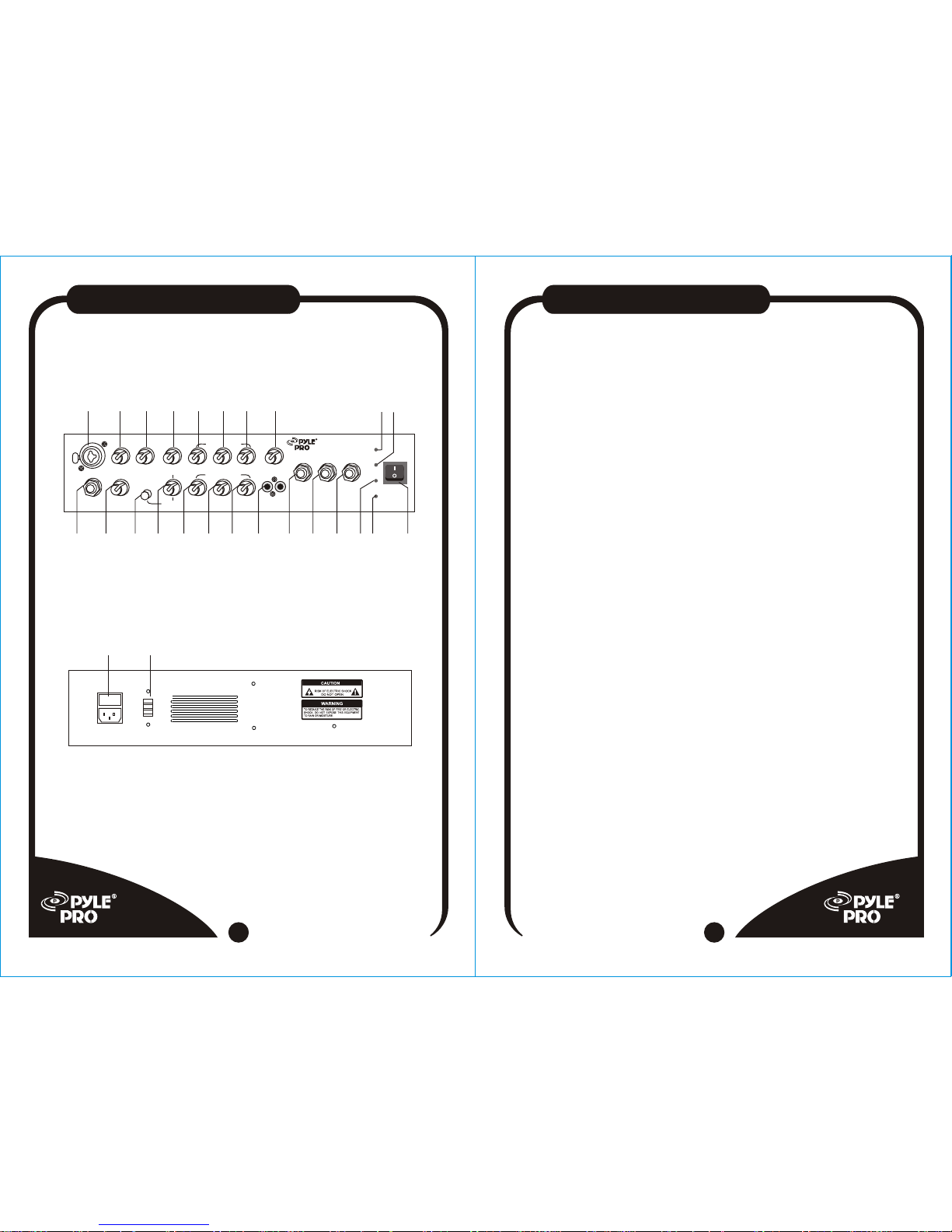
Front Panel
Rear Panel
Guitar
Input
Guitar
Volume
Bass
Mid
Treble
Cd/line In
Foot
Switch
External
Speaker
Head
Phone
Crunch
Factor
Power
Mic.vol Echo
Over
Drive
Bass
Mid
Treble
Mic Equalization
Guitar Equalization
Power
Low Batt
Recharge
IR
Mic
Overdrive
Volume
Line In
Volume
IPOD GUITAR AMPLIFIER
PPG-630I
1 2 3 4 5 6 7 8
9 10 11 12 13 14 15 16 17 18 19
20 21
22 23 24
AC INPUT
110V/220V SWITCH
25 26
AMPLIFIER
PARTS DESCRIPTION
4
1. Wired MIC input jack: suitable for either unbalanced 6.35mm plug or
XLR plug.
2. MIC volume control
3. MIC echo control
4. Over Drive volume: effective only when guitar over drive is in use.
5. MIC BASS control
6. MIC MID control
7. MIC TREBLE control
8. Line input volume control
9. Wired guitar input jack
10. Guitar volume control
11. Guitar over drive: push button to engage
12. Guitar crunch factor control
13. Guitar BASS control
14. Guitar MID control
15. Guitar TREBLE control
16. RCA CD/Line input jack
17. Foot switch
18. External speaker output jack
19. Headphone output jack
20. Power LED
21. Low battery LED
22. Recharge LED
23. IR indicator
24. Main Power switch
25. AC input jack
26. AC 110V/220V switch
 Loading...