

Page 1
Page 2
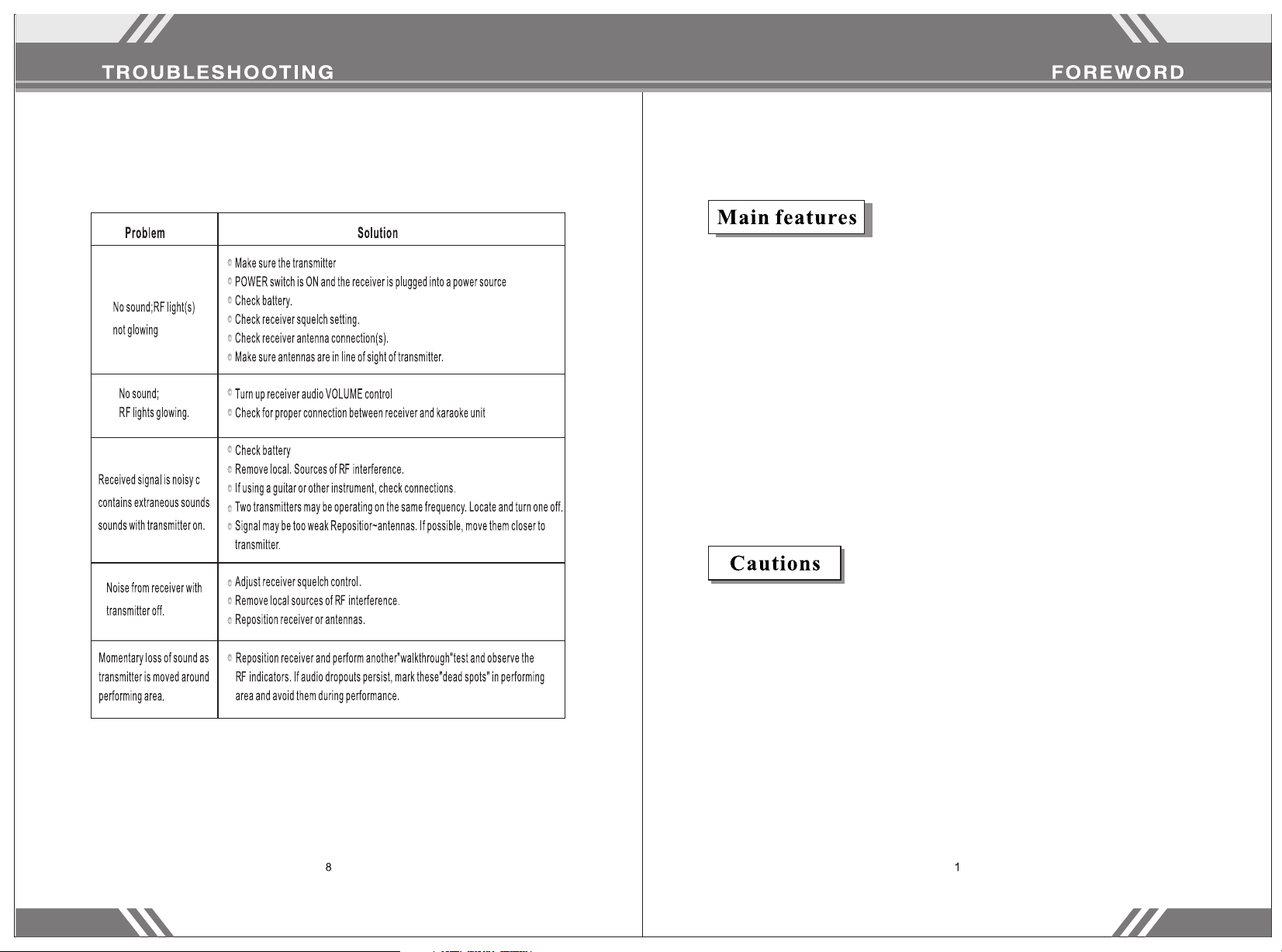
Some common problems and their solutions are prin ted below.
Thanks for purchasing our wireless meeting micr ophone. P lease rea d
these instructions carefully so that y ou fully un derstan d how to
operate this microphone. Store these instruct ions in a saf e place for
future reference.
- Uses VHF 170-270 MHZ frequency to avoid interference.
- Uses multilevel high frequency and midfrequency
narrowband filters to avoid interference.
- Quartz crystal oscillating circuits guarantee a steady
frequency.
- Audio compression and expansion technology to increase the
dynamic range and lower feedback.
- Uniform cardioid pickup pattern isolates the main sound
source –your voice – and minimizes background noise
- Effective, built-in spherical wind and pop filter
- Longest operating distance: ~100 yards.
- Best effective distance: ~50 yards.
1. Ensure the host receiver has a solid connection wi th the
microphone before use.
2. Do not drop, throw, or otherwise damage your equipm ent to
ensure its longevity.
3. Keep away from water – this microphone is not waterp roof.
4. Keep away from electromagnetic fields, high vo ltage pow er
sources, and large metal objects.
5. Switch off the transmitter when changing the b attery.
6. Take out the battery if you do not plan on using the micro phone for
a long time.
7. Unplug the receiver if you do not plan on using it for a lon g time.
8. This equipment is not user-repairable. Con tact the ma nufactu rer if
equipment fails.
Page 3

1. Please take note of the following workflow diagr am for refe rence on
connecting this machine.
2. Make sure your system is set to the correct p ower (110 V). The n set
the volume of your sound equipment.
3. Adjust the mix so that the users of MIC 1 and MIC 2 so und good
together.
4. Unplug the machine if you will not be using it for a long ti me.
- Keep the machine at least 3 feet above the gro und and 3 fee t
away from walls.
- Pull the antenna upright.
- Your equipment will operate best if there is no physica l barrier
between the microphone and the receiving antenn a.
- Keep the receiver away from digital equipment, su ch as CD
players, computers, or other radio equipment.
Page 4

Page 5

The light on the microphone indicates that the batt ery has pow er and
that the microphone is functioning.
 Loading...