

Page 1

Page 2
PDJSIU100
iPod player with DJ Scratch
Features:
with 2nd to 5th Generation iPods and mp3 players
MAC or PC by using the freeware recording software Audacity
available at www.audacity.de.
moving from one to another, or to cue up a new song
headphones
included)
iPod/MP3 Player/USB:
signal sources: iPod * 1, MP3 player * 1,
USB input * 1
Sound effects of Flanger、Echo、Trans、Pan、Filter Compatible
Microphone and main out cue and mix
USB output for easily transferring music from the unit to your
Select from five different Effects Programs
Switch headphones between Main and Cue
Switch between original audio output and mix sound effect
Use the Cross-Fade to blend your 2 music sources while
Simultaneous occurrence of a fade-in and a fade-out
Cue channel lets you monitor the faded Source through your
JOG wheel simulates the scratch feature on a DJ turntable
Edit music to a computer through USB cable (software not
The unit can be used with five different combinations of
iPod will be charged when inserted into the unit
1 2
PDJSIU100 PDJSIU100
Page 3
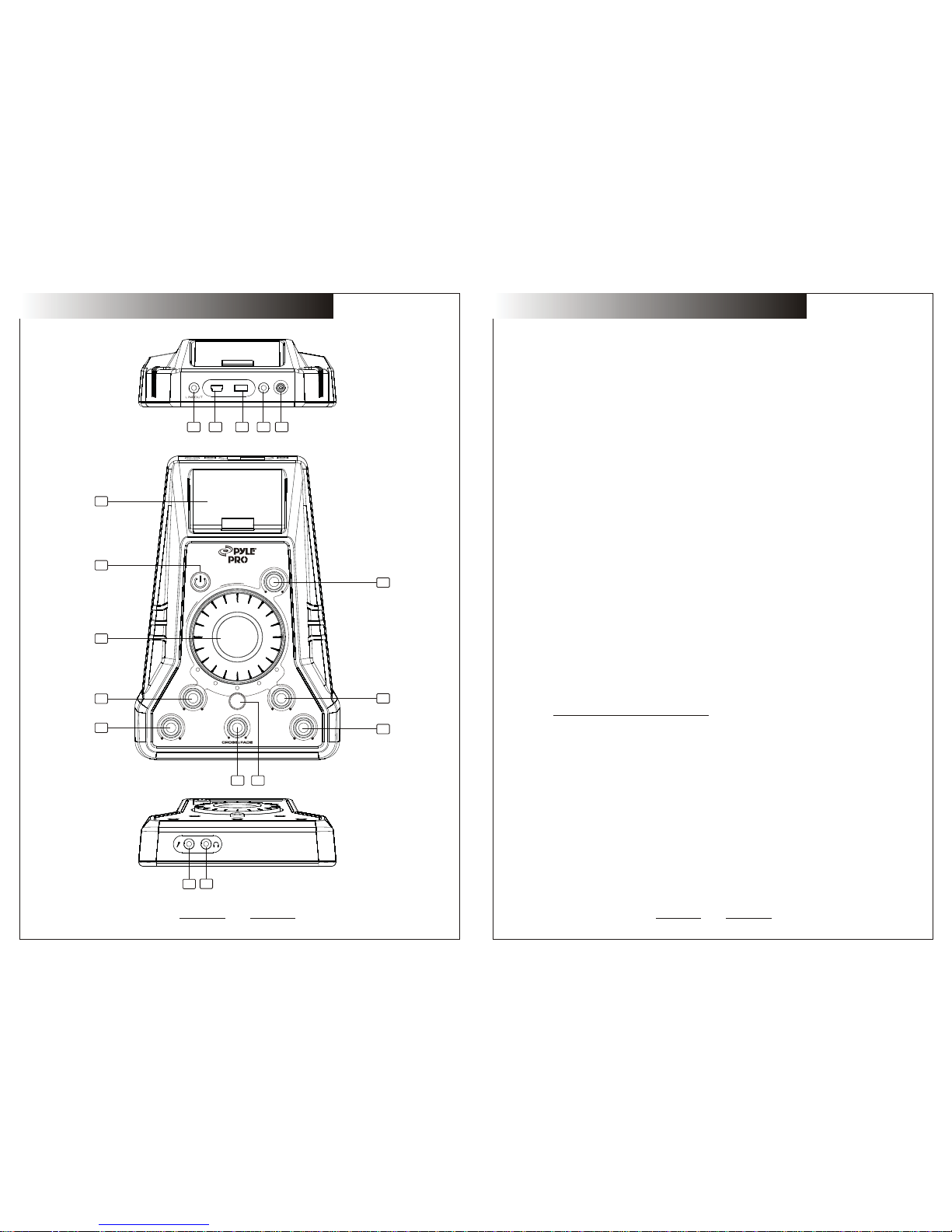
11.USB SOCKET
USB output for easily transferring music from to your MAC or PC by the unit
using the freeware recording software Audacity available at
Http://audacity.sourceforge.net/download
IMPORTANT
Use of controls or adjustments or performance of procedures other than those
specified herein may result in hazardous radiation exposure.
FUNCTION
1.POWER BUTTON
Press the power switch to turn the unit on.To switch the POWER off press the
POWER switch again.
2.SCRATCH JOG WHEEL
Dial the jog for SCRATCH function.
3.MAINOUT LEVEL
Adjust master level
output.
5.CUE LEVEL CONTROL
16.HEADPHONE JACKS
Used to connect for audio monitoring with headphones.
4.DJ MIC
Adjust microphone level.
7.REPLACEABLE CROSSFADER
15.MIC INPUT
Plug microphone plug in here.
13.INPUT
Plug in the line level device such as tape deck.
10.LINE OUT
The audio for each iPod player is an output for these jacks.
6.EFX SEL
Used
to turn the effector on or off and choose effector(Flangle, Filter,
Trans, Pan, Echo)
Pressing it for 2seconds,the DSP function will be turned off.
8.TIME KNOB
Used to adjust the time parameter of the effector.
9.DEPTH KNOB
Used to adjust the depth parameter of the effector
14. DC CONNECTOR
The connector for attached
power selector.
12.CH A INPUT SELECTOR
-Switch to “AUXA”, choosing iPod/AUXA input
-Switch to “USB”, choosing USB input
Achieves clean segues between the two input channels.Hard left selects AUX.
“Hard right”selects iPod.with the crossfader centered,both assigned channels
are live use the crossfader for fast and seamless segues from one selected
channel to the other.
17.iPod PORT
Insert the iPod.
1413
12
11
10
16
15
1
2
4
5
67
17
AUX A
5V DC
USB
USB
AUX A
3
4
9
3
8
Flanger
Filter
Trans
Pan
Echo
T IM E DEP T H
MIC CU E
EFX SEL
R
C
T
A
C
H
S
MAIN OUT
IP OD
AUX
PDJSIU100 PDJSIU100
 Loading...