

Page 1

OWNERSMANUAL'
PleaseReadtheManualFirstbeforeOperation
PT590AU
5.1Channel350WattsBuilt-InAM/FMRadio/
USB/SDCardHDMIAmplifierReceiver
WWW.PYLEAUDIO.COM
Page 2

TableofContents
ImportantSafetyInformation
ForCustomers
Caution
SystemFeatures
FrontPanelFunction
FrontPanelDisplayWindow
RealPanelConnectors
UsingtheRemoteControl
BatteryInstallation
Note
BasicOperation
Turnon/offthePower
MasterVolumeControl
SideLeftChannelVolumeControl
SideRightChannelVolumeControl
CenterChannelVolumeControl
SubwooferVolumeControl
HowtoAdjustTreble
HowtoAdjustBass
HowtoPlayHDMI
HowtoPlayAUX
HowtoPlayUSB/SD
SelectUSB/SDInputMode
USB/SDControl
HowtoPlayTuner
SelectProgram
ListentothePresetProgram
MemoryProgram
HowtoMute
IntroductionofDSPControlKey
IntroductionofSourceOutputSelectorArea
TroubleShooting
1
1
1
2
2
3
4
5
Page 3

ImportantSafetyInformation
ForCustomers
ThankyouforpurchasingtheHDMIreceiver.Westronglyrecommendthatyoucarefullystudytheoperating
instructionsbeforeattemptingtooperatetheunitandthatyounotethelistedsafetyinformation.
Caution
Youarecautionedthatchangesormodificationsnotexpresslyapprovedinthismanualcouldvoidyourauthorityto
operatethisequipment.
Toreducetheriskoffireorelectricshock,donotexposethisapparatustorainormoisture.
Topreventfire,donotcovertheventilationoftheapparatuswithnewspapers,table-cloths,curtainsandetc.Do
notplacelightedcandlesontheapparatus.
Topreventfireorshockhazard,donotplaceobjectsfilledwithliquid,suchasvases,ontheapparatus.
Donotinstalltheapplianceinaconfinedspace,suchasabookcaseorbuilt-incabinet.
Installthissystemsothatthepowercordcanbeunpluggedfromthewallsocketimmediatelyintheeventof
trouble.
Batteriesorbatteriesinstalledapparatusshallnotbeexposedtoexcessiveheatsuchassunlightorfire.
SystemFeatures
5.1ChannelAmplifier.
4HDMIInputPortand1HDMIOutputPortforHDMIReceiverandHDMISwitcher.
OneKeySwitchFunctionBetweenHDMIReceiverandHDMISwitcher.
Built-InAM/FMRadio.
Built-InUSBandSDAudio.
2MICInput,TrebleandBassofMICAdjustable,IndependentMICVolumeControl.
OverCurrentProtection,ShortCircuitProtectionAndOverVoltageProtection.
12PresetRadioStation.
FullRemoteControl.
VFDDisplay.
PowerOutput:300WattsLRChannel(4Ohm)50WforCenter,SurroundLandSurroundR(4Ohm).
InoutSelector:4in1outHDMISelector,3StereoRCASelector,1AM/FMRadio,1USB/SD,2MicrophoneInput.
Output:5ChannelSpeakerOutputTerminalforL,R,Center,SL,SR,And1lineOutforSubwoofer.
TotalPowerConsumption:350W.
FrontPanelFunction
1
6
7
5432
1098
11
12 13 14 15 16 17 18 19 20 21 22
1.Tunerbandadjustmentknob.
2.AUXinputselector.
1/AUX2/AUX3
3.FM/AM
4.USB/SDinputselector.
5.HDMI1inputselector.
6.VFDdisplaywindow.
7.HDMI2inputselector.
inputselector.
8.HDMI3inputselector.
9.HDMI4inputselector.
10.Mutecontrolselector.
11.Mastervolumeadjustmentknob.
12.Poweron/offselector.
13.Micecho
14.Mictrebleadjustmentknob.
adjustmentknob.
.1.
15.Micbassadjustmentknob.
16.Mic1inputsocket.
17.Mic2inputsocket.
18.Mic1volumeadjustmentknob.
19.Mic2volumeadjustmentknob.
20.Micvolumeadjustmentknob.
21.SD/MMCcardinputsocket.
22.USBinputsocket.
Page 4
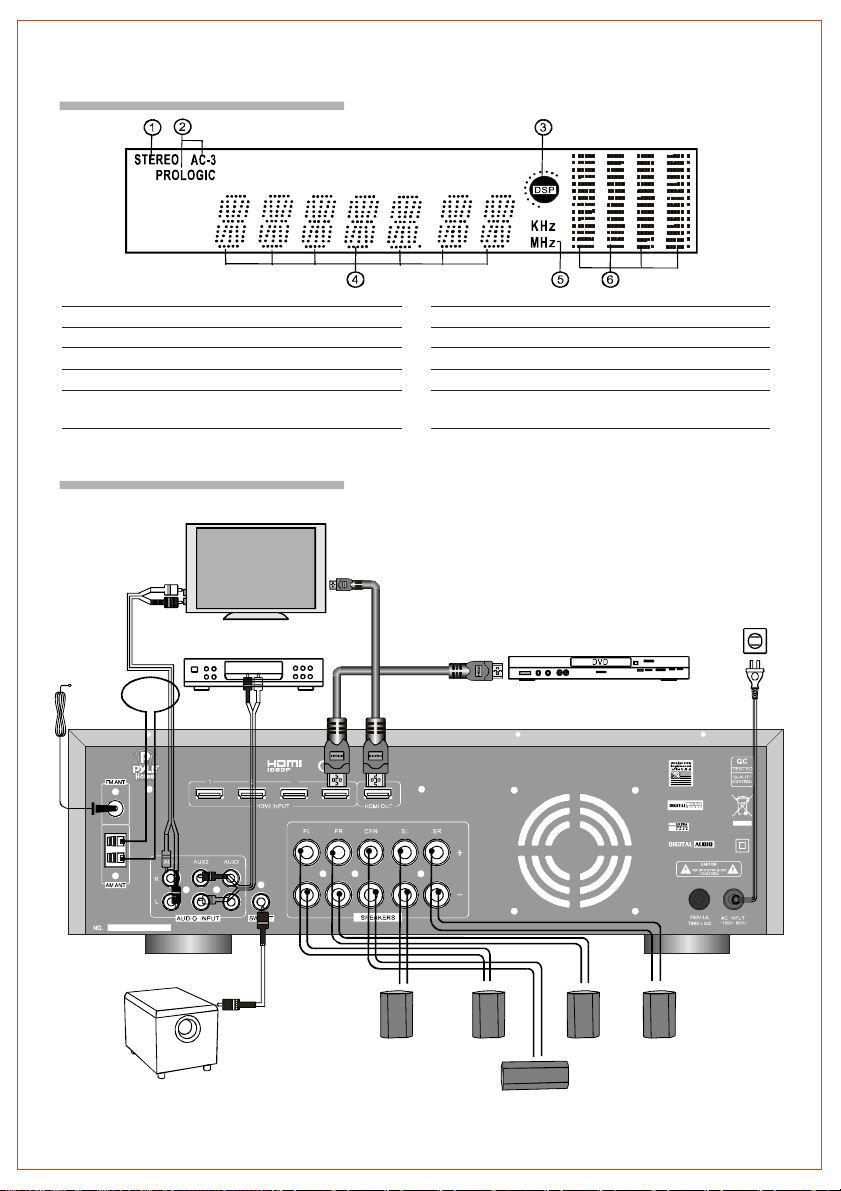
FrontPanelDisplayWindow
Name Function
1.STEREO AUX/TUNER/USB/SDINPUT Lightupwheninput.AUX1/2/3,FM/AM,USB/SD
2.AC-3PROLOGIC HDMIINPUT Lightupwheninput.5.1channelorHDMI1/2/3/4
3.DSP DSPSTATEICON LightupwhenplayDSPeffect.
4.DIGITALDISPLAY Lightuptodisplayvalueofcurrentinputmode.
5.KHzMHz KHzMHzICON Lightupwhentunerinputisselectedandindicatesthe
6.SPECTRUMDISPLAY Lightuptodisplaythespectrumofdifferentchannel.
valueonthedisplayforKHz/MHz.
RealPanelConnectors
TVorvideodisplay
Power
Stereoinput
DVDorHDMIsource
PT590AU
DIGITALHDMIRECEIVER
Subwoofer
3 4
Speakersystem
Sideleft Frontleft Frontright Sideright
Center
.2.
Page 5
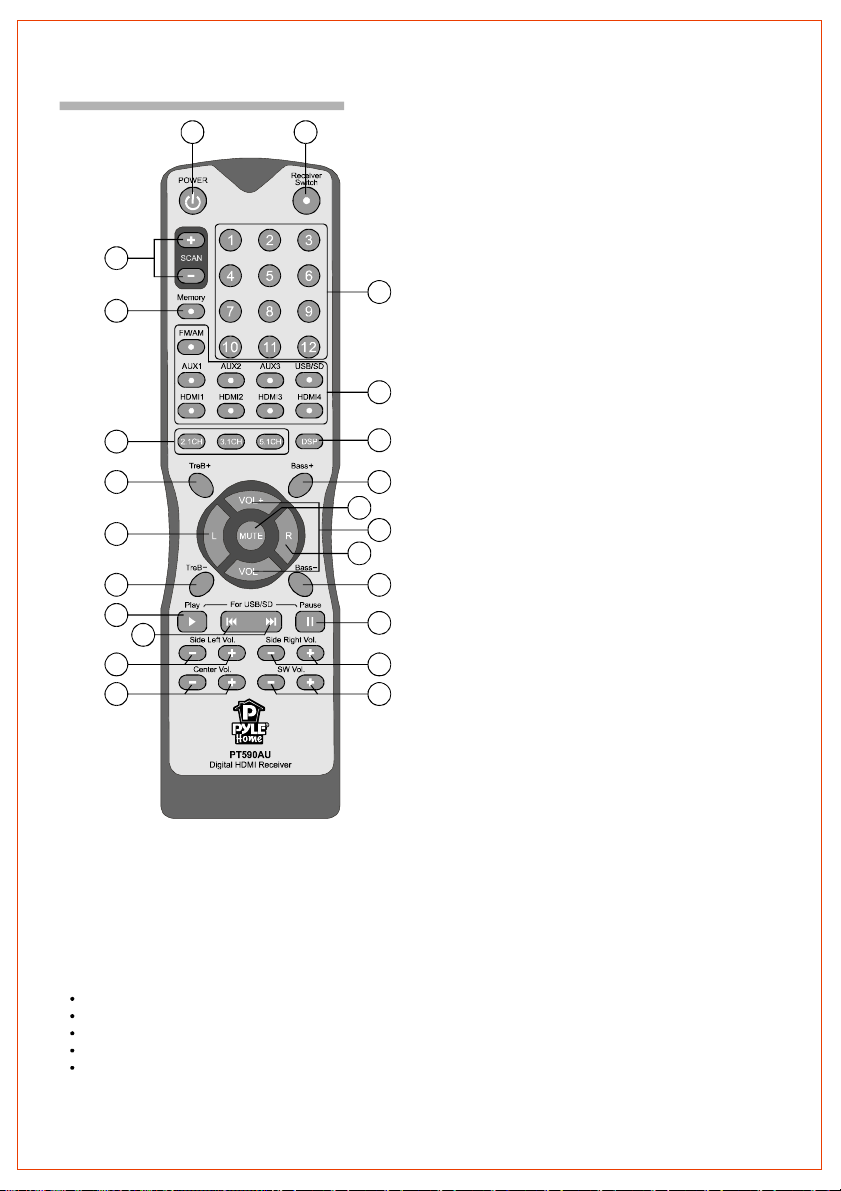
UsingtheRemoteControl
11
12
1 2
1.Poweron/offcontrolselector
2.HDMIaudioswitchselector
3.Tunerbandcontrolselector
4.Tunermemoryselector
3
4
5
6
17
7
19
8
9
10
13
14
15
16
18
20
21
22
23
5.Channelsourceoutputselector
6.Treblevolumeincreaseselector
7.Leftbalanceselector
8.Treblevolumedecreaseselector
9.USB/SDplayselector
10.USB/SD-skipselector
11.Sideleftvolumeadjustmentselector
12.Centervolumeadjustmentselector
13.Tunernumberselector
14.Inputmodeselector
15.DSPcontrolselector(live,hall,church)
16.Bassvolumeincreaseselector
17."Mutemode"controlselector
18.Mastervolumecontrolselector
19.Rightbalanceselector
20.Bassvolumedecreaseselector
21.USB/SDpauseselector
22.Siderightvolumeadjustmentselector
23.Subwoofervolumeadjustmentselector
BatteryInstallation
1.Onthebackoftheremotecontrol,pushthetabandliftoffthebatterycover.
2.Obtaintwo(2)fully-chargedAAAbatteries.Matchthe+and-marksonthebatteriestothe+andmarksinthebatterycase,theninsertthenewbatteries.
3.Alignthecoverkeyswiththecaseholesandpressthecoverbackintoplace.Thetabshouldclickwhenthe
coverislocked.
4.TesttheunitbypressingPOWERoranymodekey.Ifthebatteriesareinsertedcorrectly,theselectedmodekey
willblinkonce.
Note
Donotleavetheremotecontrolinanextremelyhotorhumidplace.
Donotuseanewbatterywitholdones.
Donotmixmanganesebatterieswithotherkindsofbatteries.
Donotexposetheremotesensortodirectsunlightorlightingapparatuses.Doingsomaycauseamalfunction.
Ifyoudonotintendtousetheremotecontrolforanextendedperiodoftime,removethebatteriestoavoid
possibledamagefrombatteryleakageandcorrosion.
""""""""
.3.
Page 6
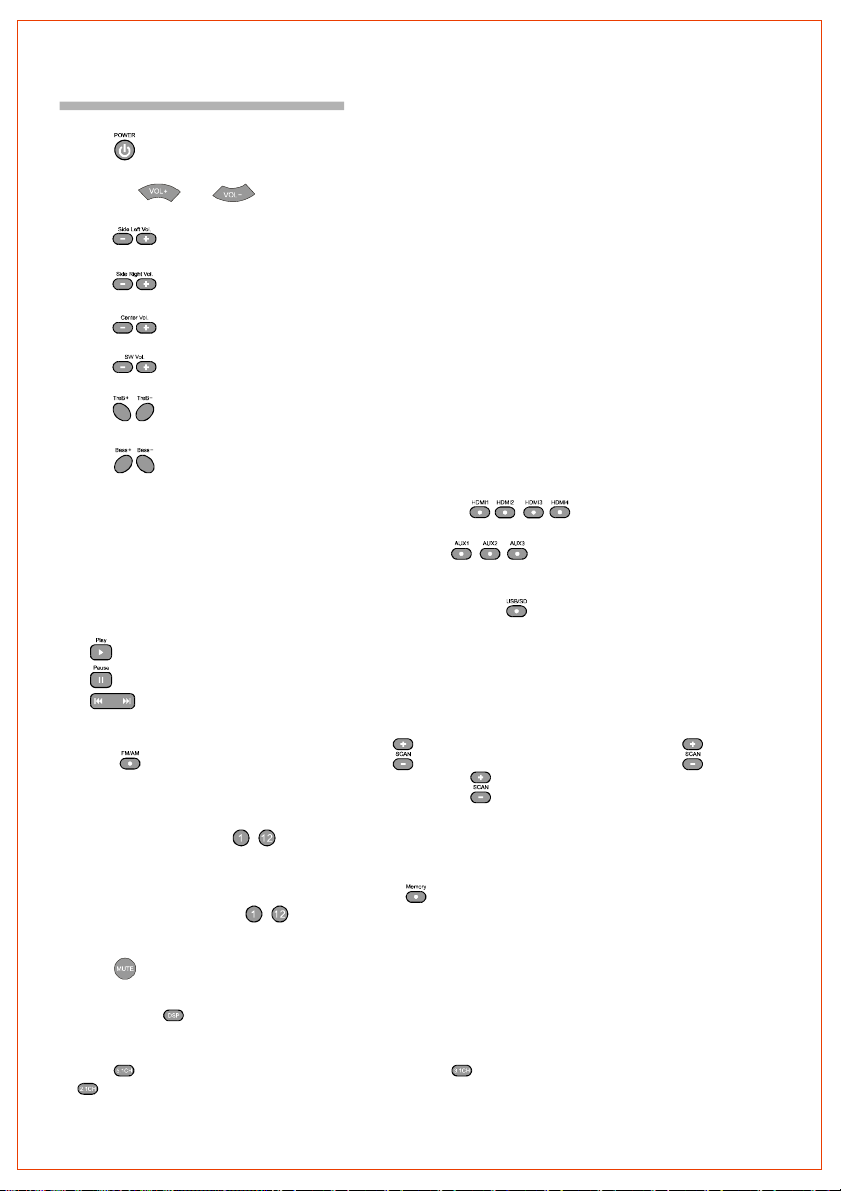
BasicOperation
Turnon/offthePower
Press""keytocontrolthepoweronandoff.
MasterVolumeControl
PresstheorKeytoadjustthemainchannelvolume.""""
SideLeftChannelVolumeControl
Presskey,screendisplaytheSLvolume,press-ADJUST+keytoadjustsideleftchannelvolume.""""
SideRightChannelVolumeControl
Presskey,screendisplaytheSRvolume,press-ADJUST+keytoadjustsiderightchannelvolume.""""
CenterChannelVolumeControl
Presskey,screendisplaytheCENvolume,press-ADJUST+keytoadjustcenterchannelvolume.""""
SubwooferVolumeControl
Presskey,screendisplaytheSWvolume,press-ADJUST+keytoadjustsubwooferchannelvolume.""""
HowtoAdjustTreble
Presskeytoadjustthetrebleoutputofthemainchannel.""
HowtoAdjustBass
Presskeytoadjustthebassoutputofthemainchannel.""
HowtoPlayHDMI
MakesureHDMI1/2/3/4connectionlinesarecorrect,Pressthe///keytoplayHDMI.""
HowtoPlayAUX
MakesureAUX1/2/3connectionlinesarecorrect,Pressthe//keytoplayAUX.""
HowtoPlayUSB/SD
1.SelectUSB/SDInputMode
MakesureUSBorSDcardinserttotheUSB/SDsocket,PressthekeytoselectUSB/SDinputmode.""
2.USB/SDControl
"":ControltheUSB/SDplay.
"":ControltheUSB/SDpause.
"":ControltheUSB/SDskip.
HowtoPlayTuner
1.SelectProgram
UsekeytoselectFM/AMband.Pressthekeytoadjustthebandoftuner.Pressthekeyfor2
""""""
seconds,theFMwillsearchautomatically.Youcanpressthekeyoncetostopthefunction
2.ListentothePresetProgram
Pressthenumberkeysscreenwill
displaytheradioprogram'sfrequencyinthememoryarea.
3.MemoryProgram
Whenyoureceiveaclearradioprogram,pressthekeyfirst,andthenthescreendisplaystheMemory
icon.Pressoneofthe12numberkeyontheremotecontroltoselectthememorystation.Ifyouwant
toextractthechannelyousaved,justpressthenumberkeyyouselected.
"-"toselecttheradioprogramthatyoualreadysaved.Onceselected,
""""
"-"
HowtoMute
Presskeytoturnsoundoff/on.Pressagaintorestoretheaudiototheoriginallevel.""
IntroductionofDSPControlKey
Pressthekeyrepeatedlytoswitchtodifferentoperations:Live,HallorChurch.Alltheabovefunctionscan
givedifferentsoundeffects.
""
IntroductionofSourceOutputSelectorArea
Presskeytoreceive5.1channel(defaultmode);Presskeytoreceive3.1channel(SL,SRmute);Press
""""
keytoreceive2.1channel(SL,SR,CENmute).
""
"" .
.4.
Page 7
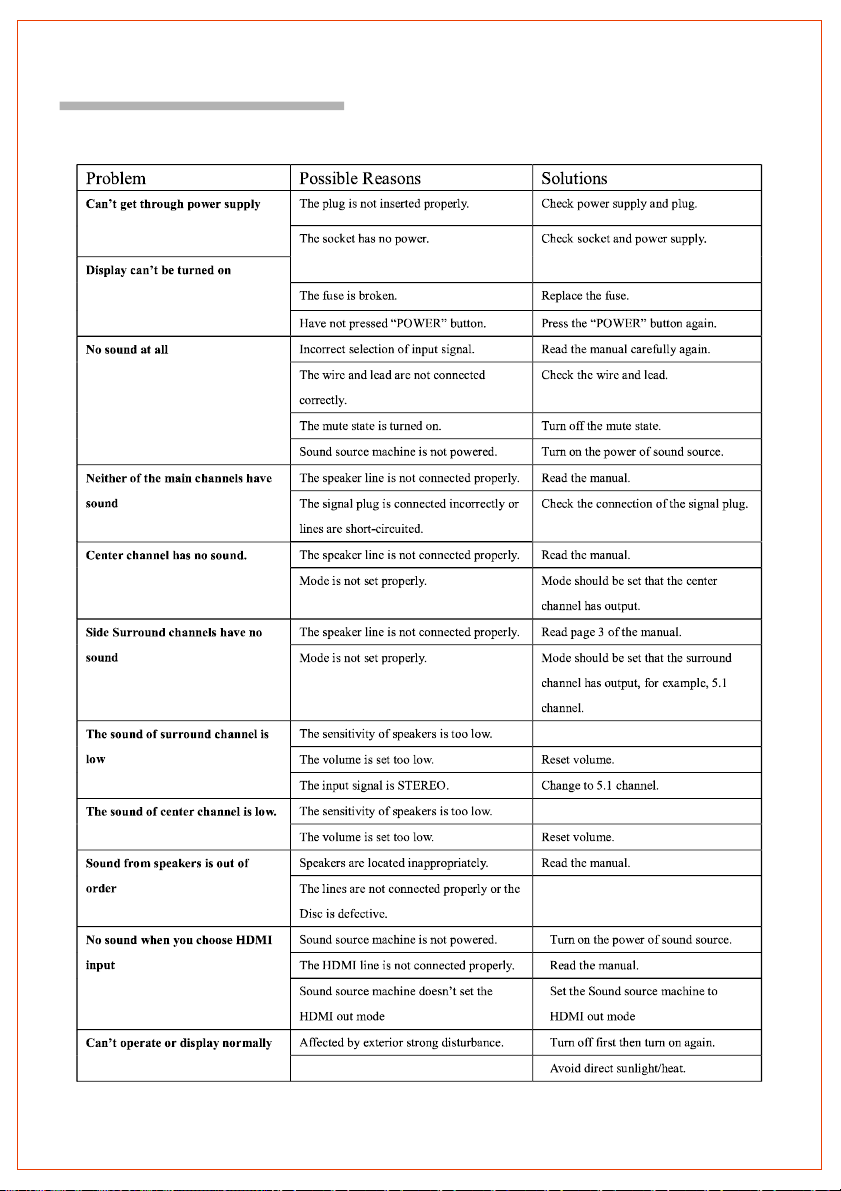
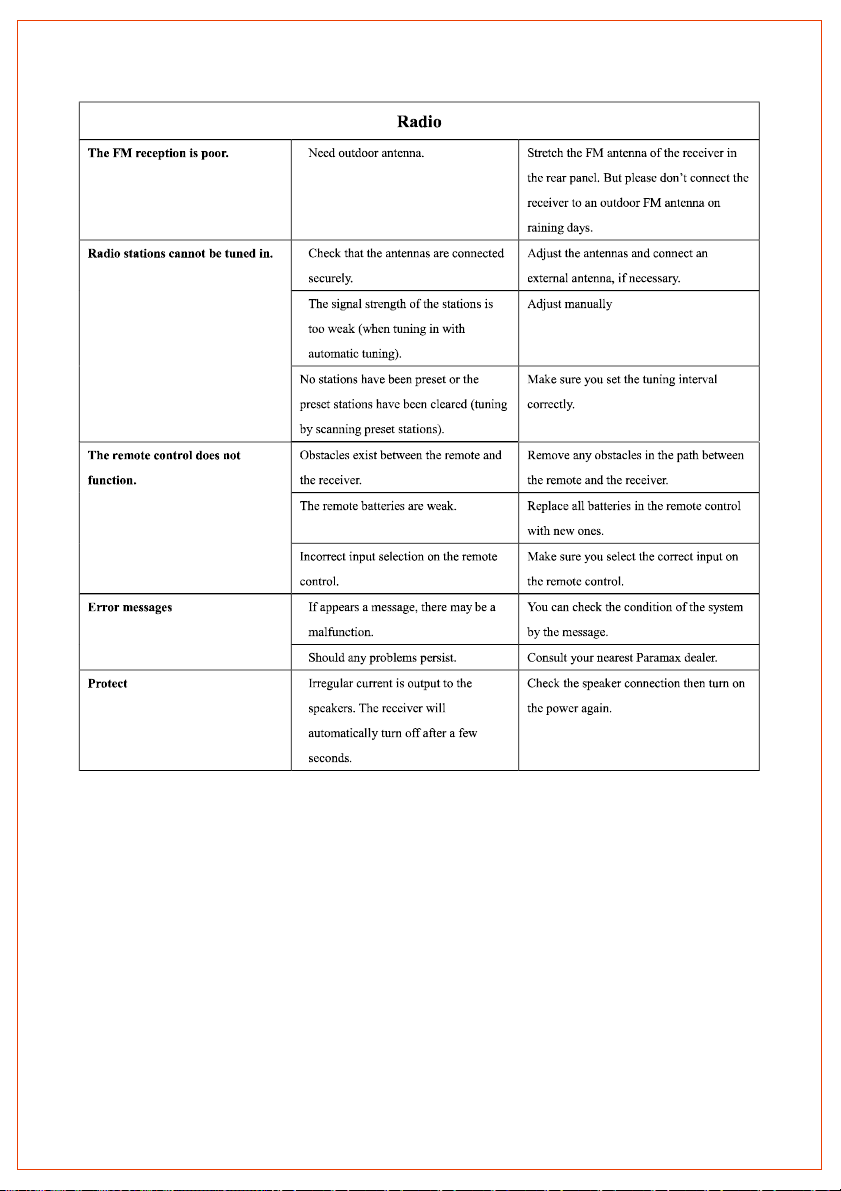
TroubleShooting
Usethischarttohelpyousolveoperationalproblems.Ifthereareanyproblemsthatcannotbesolved,
pleasecontactServiceCenter.
.5.
Page 8
 Loading...