

Page 1
In-Wall/Wall Pla te Stereo Amplifier with Bl uetooth/Aux(3 .5mm) /
Microphone ( 1/4") Inpu t, USB Charge & USB/SD Card Read er
Specificat ion
1.Rated Outpu t Power………………………… ….. 2CHx3 0Watts( RMS, 8 Oh m)
Max Output Pow er……………… ……………….2CHx10 0Watts(RMS, 8 O hm)
2.Rated Input L evel/Impedanc e
Audio Input… ………………………………………………….. ...230mV/47Ko hm
Microphone I nput……………………… …………………… ……...7mV/600O hm
3.Tone Control
Bass F=100Hz ……………………………………………………… ………..+10dB
Treble F=10Kh z…………………………………………………… …….….. +10dB
4.Separatio n
Master Chann el ……………………………… …………………… …..…...≥45dB
5.Frequency R esponse
Master Chann el F=20Hz-20KHz …………………… …………………….+1.5 dB
6.Signal To Noise
Master Chann el ……………………………… ………..……… ………......≥81dB
7.Speaker Sys tem
Master Chann el ……………………………… …………………… ...4Ohm/8Ohm
8.Input Power … …………………… ………….………..AC 110/60 Hz; 230V/50Hz
9.Power Consu mption………………… …………………… …………..……. 200W
10. Unit Size( WxHxD) Inch………… …………………… ……12.60"x2.95 "x7.48"
11. Unit Weig ht……………… ………………………………… ……….…….....8. 8lb
TEL: 718.535 .1800 FAX: 71 8.236.2400
1600 63RD STRE ET, BROOKLYN NY 11204
PT506BT
Stereo Power ed Ampli fier with Bluetoo th/AUX (3.5mm)/
Micrphone (1 /4") Input /FM Tuner/U SB Charge & US B/SD
Card Reader
with Bluetooth
Page 2
Stereo Power ed Ampli fier with Bluetoo th/AUX (3.5mm)/ Micrphon e (1/4")
Input/FM Tuner/U SB Charge & USB/SD Ca rd Reader
Stereo Power ed Ampli fier with Bluetoo th/AUX (3.5mm)/ Micrphon e (1/4")
Input/FM Tuner/U SB Charge & USB/SD Ca rd Reader
Instruction
Pyle's Bluetooth Stereo Amplifier is the p erfect solution for all of your audio
needs. Using the latest sound amplific ation tec hnology and an impressive
200 Watt power output, this receiv er is desig ned to deliver pure stereo
sounds from a wide range of connected musi c sources . Built-in Bluetooth
audio receiver ability allows you to str eam your music wirelessly and it
works with all of your favorite devices (l ike Smartphones, Tablets, Laptops,
Computers, etc. ) Enjoy full ra nge stere o sound reproduction when
streaming audio with a wireless range of u p to 30’ feet. Additional system
features include FM Radio with LCD displ ay, USB Fl ash Drive Reader, SD
Card Reader, (2) 1/4" Microphone Inputs , Push Typ e Speaker Terminal
connectors, RCA Stereo Inputs, RCA Subwo ofer Outp ut, and along with an
Aux (3.5mm) jack to connect eve n more exte rnal devices. Take control of
your sound with the Pyle PT506BT Bluet ooth Ster eo Amp Receiver.
Bluetooth Operation Instr uction:
External devices which have a built-in Bluetooth feature can be
connected to this amplifier wireless ly to play th rough the amplifier’s
speakers.
1.At first be sure that the amplifier is powe red on, and t urn the
volume to the MINI position. And it’s be tter to pul l the Bluetooth
Antenna on at the back panel for better rece iving.
2.Press the BT/Line button switch in on the front panel, you will
hear the voice “POWER ON” and also “PAIRIN G”, and the n the
unit is automatically ready to pair with y our exter nal device.
3.Turn on the Bluetooth of your exter nal devic es like Sma rtphone,
Computer, and others, etc.
4.Search for available Bluetooth devi ces withi n range of your
external device and wait for your device t o select “BT -RY” on
the pairing devices lists.
5.And seconds later when you heard a voice “ Your Dev ice is
Connected”, then the Bluetooth pairi ng is succe ss.
6.You can now play music on your external device th rough the
amplifier.
01 02
Features and Controls:
FRONT PANEL
1 2 3 4
10
BACK PANEL
11 12 13 14 15 16
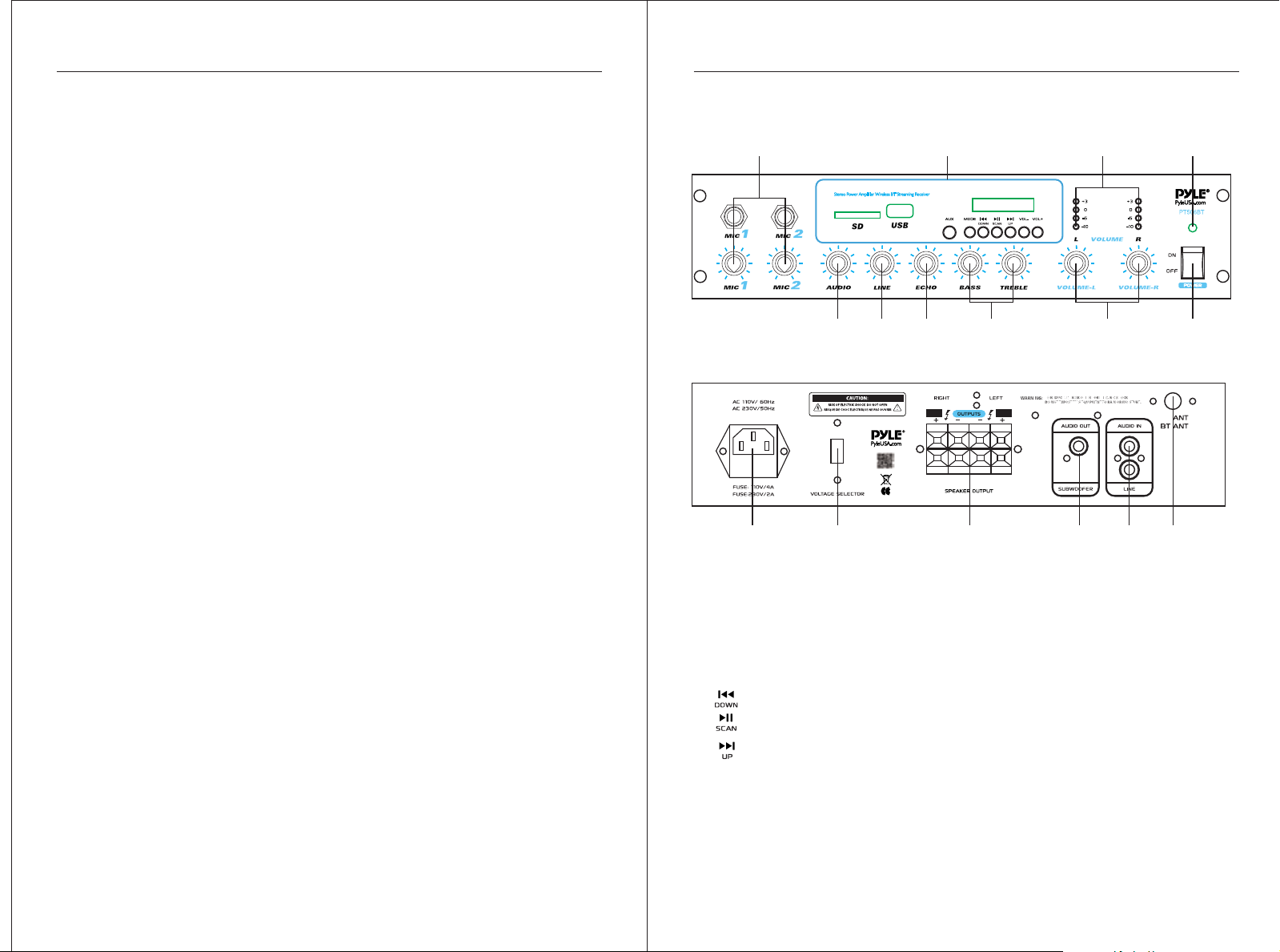
1.1/4"MIC1 & MIC2 Input Ja cks w/ Separate Volume Control
2.BT/ USB/ SD /FM/AUX Function Control
USB/ SD Ports and USB Port Doubles as Device Charge Port(5V/1 A)
AUX: 3. 5mm AUX Input
MODE: BT/USB/SD/ AUX/ FM Switch
: Button Doubles as Previous So ng and FM Fre quency Down
: Button Doubles as Play/Pause and FM Scan
: Button Doubles as Next Song and F M Frequen cy Up
VOL+/VOL-:Button for Volum e + and Volume -
3.LED Output ( L & R) Level Indicators
4.Power On/Off LED Indicator
The Indicator Lights when the Amplif ier is Turned On .
5.Power On/Off
56789
FM
Page 3
Stereo Power ed Ampli fier with Bluetoo th/AUX (3.5mm)/ Micrphon e (1/4")
Input/FM Tuner/U SB Charge & USB/SD Ca rd Reader
Stereo Power ed Ampli fier with Bluetoo th/AUX (3.5mm)/ Micrphon e (1/4")
Input/FM Tuner/U SB Charge & USB/SD Ca rd Reader
6.MASTER ( L & R) Volume Control
Separate Left and Right Channel Volume Co ntrol Let You Con trol the
Level of Each Channel, and it doesn’t Affect the Vol ume of Micr ophone.
7.TREBLE/BASS Controls
Allow You to Boost or Attenuate Bass and Treb le for Desi red Sound.
8.ECHO Control
Allow You Adjust the MIC Echo Level
9.LINE Control
Allow You Adjust the LINE Input level
10.AUDIO Control
Allow You Adjust the Input level of BT/USB/ SD/A UX/FM
11.Power Plug
Connect to AC 110V/60Hz, & AC 230V/ 50Hz Outlet
12.Voltage Selector
110V/ 60Hz and AC 230V/ 50Hz swit ch
13.Speaker Output (Push Type Speaker Terminal)
Lets you easily connect speaker wires di rectly to t he amplifier. The
speaker impedance can be ranged from 4-8 Ohm for the general
stereo output.The total speaker impedance must be at least 4- Ohm
per channel at stereo mode.
14. Subwoofer RCA Output Jack
15. LINE RCA Stereo Audio Input
16. AM/FM Antenna
Connection Diagram
+ + + ++ +
FM
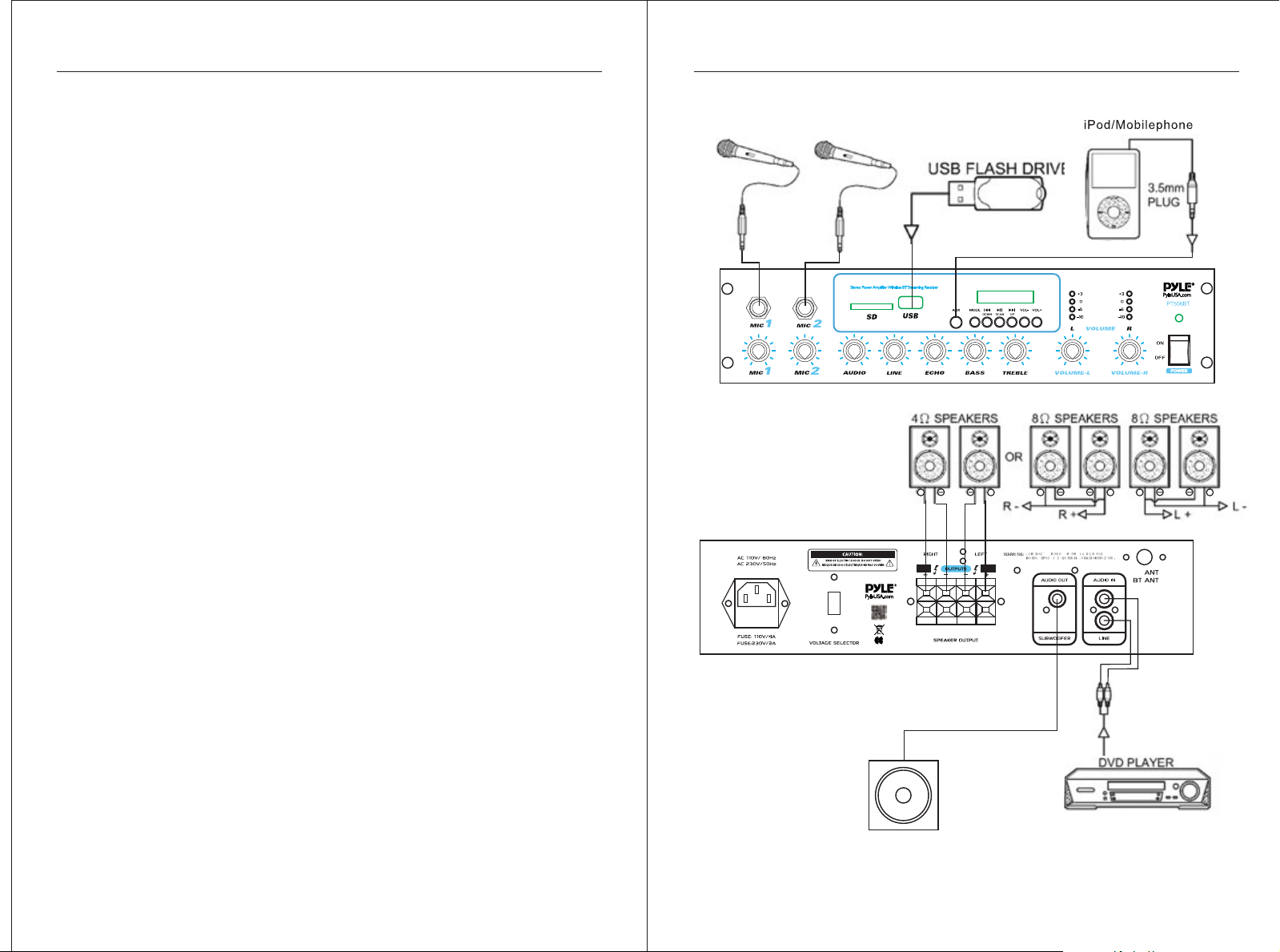
Aux (3.5mm) Input Connectio n & Operation:
Once the unit is powered on, any de vice conn ected to the wall plate’s
Aux (3.5mm) jack, via audio connection ca ble, will play automatically.
As soon as the wall plate detects audio tran smissio n via Aux Input, it
will play -overriding any Bluetooth co nnected a udio signal transmission.
03 04
SUBWO OFER
Page 4

Stereo Power ed Ampli fier with Bluetoo th/AUX (3.5mm)/ Micrphon e (1/4")
Input/FM Tuner/U SB Charge & USB/SD Ca rd Reader
Stereo Power ed Ampli fier with Bluetoo th/AUX (3.5mm)/ Micrphon e (1/4")
Input/FM Tuner/U SB Charge & USB/SD Ca rd Reader
Features:
•Compact Tabletop St ereo Amplif ier Receiver
•Built-in Bl uetooth for Wirel ess Audio Stre aming
Compatible w ith All Your F avorite Bluetoo th Devices (iPhon es,
Androids, Sma rtphones, iPads , Tablets, PC, etc.)
•Luxury LCD Di splay with Functi on & ID3 TAG Information
•Aux (3.5mm) Au dio Input Connect or to Connec t External Device s
•USB Flash Dri ve Reader for Digit al Audio File P layback
•USB Port Doub les as Device Charg e Port
•RCA (L/R) LINE I nput Connector
•RCA Subwoofe r Output Connecto r
•(4) Pairs of Pu sh Typ e Speaker Output Co nnectors
•(2) 1/4'' Mic rophone Input Con nector Jac ks
•Tone(Treb le & Bass), Ma ster(L&R),Aud io, Line, MIC Echo, & M IC Volume
Adjustable
•Switchabl e Audio Input( BT/USB/SD/FM/ AUX) Selec tion
•Built in Shor t Circuit and Over Vol tage Prote ction
•Power ON/OF F Switch
•Perfect for H ome /Office Appli ance/ Ca nteen/S hop
Bluetooth Co nnectivity:
•Works with All of Your Fav orite Blue tooth Devices
• (iPhones, And roids, Smartpho nes, iPad, Tablet, PC, etc .)
•Bluetooth N etwork Name: ‘BT-RY’
•Bluetooth N etwork Password : Not Requir ed
•Bluetooth Ve rsion: 4.0
•Wireless Ra nge up to 30’+ ft.
Technical Spec s:
•Maximum Pow er Output: 2CHx10 0 Watt @ 4 Ohm
•Rated Outpu t Power 2CHx30Wa tts( RMS, 8 Oh m)
•Bluetooth W ireless Operati on Range: Up t o 30' Feet
•Frequency R esponse: 20Hz - 20K Hz
•Signal to Noi se Ratio: 81dB
•T.H.D.: <0.1%
•Radio Stati on Memory: 30 Stati on Presets
•Digital Fil etype Compatibi lity: MP3, W MA
•Maximum USB /SD Flash Support : 64GB
•Power Suppl y: 115 V/60Hz & 230V/50H z
:
≥
Help & Troubles hooting
If you experie nce any of the follow ing difficulties whi le using the u nit, use this
trouble shoo ting guide to help yo u remedy the p roblem, should an y problem
persist, con sult your nearest d ealer.
Problem Possible Cause & S olution
*Ensure the po wer cord is securel y connecte d.
No Power
No Sound
Microphone N o Sound
*Ensure all ca bles and wir es are securely
connected
*Connect a differ ent source device t o see if the
buzzing pers ists. If doe s not, the problem ma y
Severe Hum or No ise
be with the orig inal devic e.
* Connect your d evice to a different inp ut to the
amplifier
* The volume is set too h igh and the loudspe akers
distort
*Plug a different d evice into the elec trical outlet to
verify that th e outlet is wo rking correctly
*The wrong inp ut was selected on th e amplifie r
*Music maste r volume control is s et to minimu m
* Fuse defecti ve
*Speakers an d speaker cables ar e either not
connected, l oose or malfuncti oning.
*The microph one is not turned on
*The microph one cable is either l oose or not
functionin g
*The microph one volume for that c hannel is se t
to minimum
*The microph one is not function ing correc tly
05 06
 Loading...