

Page 1
PT272AUBT
Questions? Issues?
We are here to help!
Phone: (1) 718-535-1800
Email: [email protected]
Hybrid Amplifier Receiver
Home Theater Stereo System, Wireless BT Streaming,
MP3/USB/SD Readers, AM/FM Radio, 300 Watt
Page 2
Please read these operating instructions carefully before use.
They will acquaint you fully with its features.
This product adopts highly advanced digital techniques, high powered, four
-channel outputs to be the media center of your living room. It includes an
AM/FM tuner, MP3/Wireless BT input headphone jack. This Pyle Pro hybrid
amplier also has sub-out and pre-outs for a variety of applications.
WARNING: TO REDUCE THE RISK OF FIRE OR ELECTRIC
SHOCK. DON'T EXPOSE THIS EQUIPMENT TO RAIN OR
MOISTURE.
TO REDUCE THE RISK OF FIRE OR ELECTRIC
SHOCK AND ANNOYING INTERFERENCE, USE
THE RECOMMENDED ACCESSORIES ONLY.
THIS DEVISE IS INTENDED FOR CONTINUOUS
OPERATION!
*Designs and specications are subject to change without notice.
FEATURES
PRE-Amp with AM/FM Tuner
•
• CPU management of all functions, remote sensor
• Digital uorescent output displays all the functions
• Separate gain control of pre-amp and subwoofer
• AM/FM Quartz synthesized Tuner, auto station seek and store, 50 stations
storage, with both manuaI and automatic tuning
• BT/MP3 Input
• Digital karaoke system
• Over heat, over current protection
• Wireless BT receiver features that make listening to music more convenient
1. Before you can use a Wireless BT device, it must be paired and connected.
Make sure that Wireless BT is activated on your device before you begin the
pairing process.
2. If a username and password is required, search for Wireless BT Network Name:
PT272AUBT and enter the necessary login “0000”
PRECAUTIONS
1. Power Source: The unit should be connected to a power supply AC-110/60Hz,
AC-220V/50Hz.
2. Ventilation: The unit should be situated so that its location or position does
not interfere with its proper ventilation. Place the unit at least 10cm away from
the walls.
3. Water and moisture: The unit should not be used near water-for example,
near a swimming pool, in a wet basement, etc.
4. Electric Shock: If a metal objects, such as a hair pin or a needle, comes into
contact with the inside of this appliance, a dangerous electric shock may result.
For families with children, never permit children to put anything, especially
metal, inside this unit.
5. Enclosure Removal: Do not open the unit as this might result in damage to
the circuitry or electrical shock. If a foreign object should get into the unit,
contact your dealer or service company.
6. Abnormal Smell: If an abnormal smell or smoke is detected, immediately turn
the power OFF and pullout the power cord. Contact your dealer or nearest
service station.
How to replace the preset radio stations?
Use the remote control to set the radio stations.
NOTE: The preset radio stations can’t be deleted, BUT CAN BE REPLACED.
Operations Steps:
1. Press TUNER MODE on the remote control
2. Pres AM/FM, and select FM
3. Press PRE/NEXT to select the stations you don’t want to keep;
4. Press TUNING again choose the radio stations you want to save
5. Press MEMORY to save the new stations
In this way, you can replace the preset radio stations.
www.PyleUSA.com
1
www.PyleUSA.com
2
Page 3
OPERATION
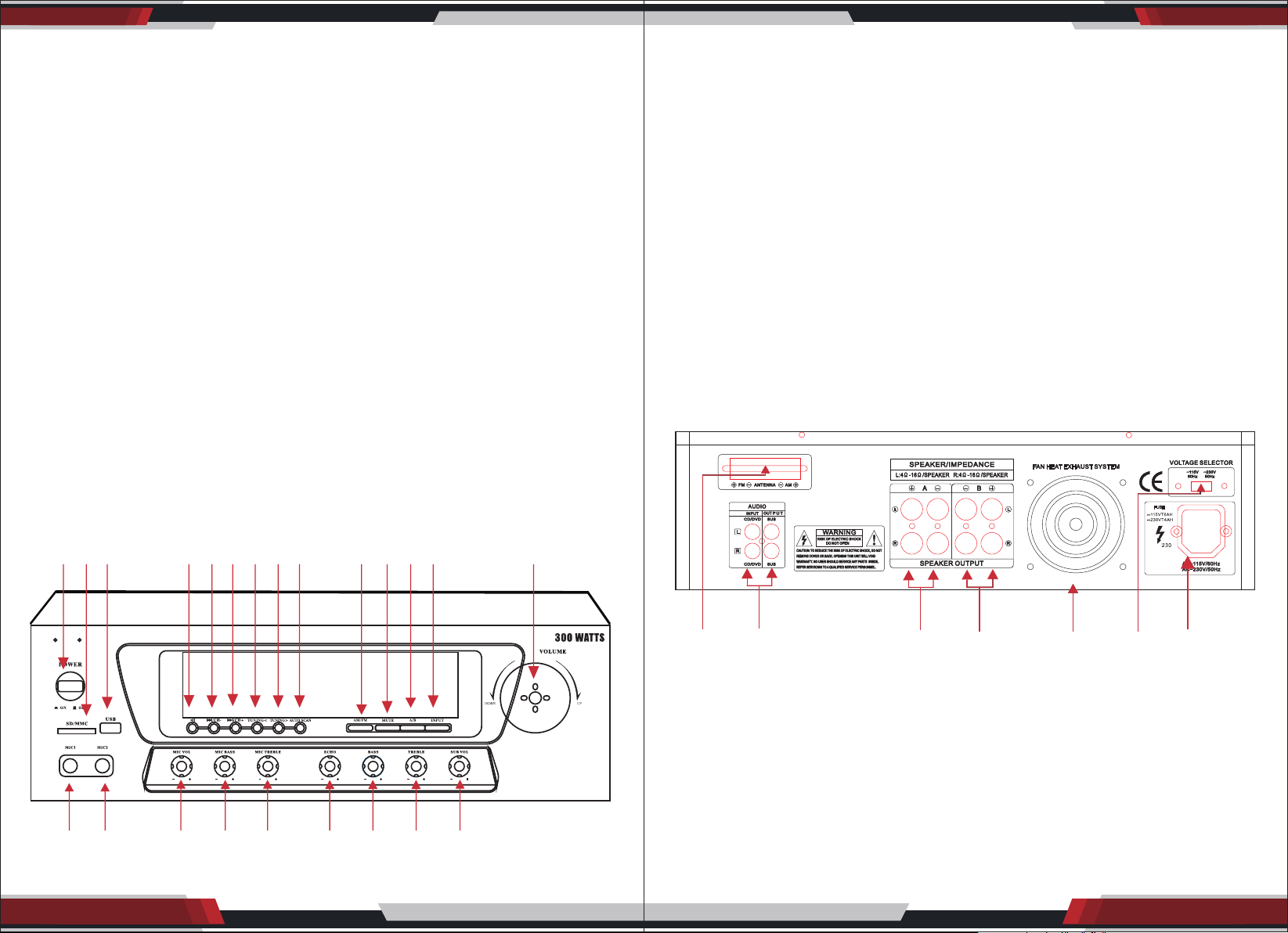
1. POWER
Use this button to turn ON or OFF the speakers.
Caution: Make sure that all connections are properly connected and the main
volume is set to minimum level before turning ON the unit.
2. INPUT SELECT
Select the input source: CD/DVD, USB, Radio, Wireless BT Streaming
3. MICROPHONE VOLUME: MIC VOL
Adujst "MIC VOL" knob to increase or decrease the karaoke volume
4. ECHO
Adjust "ECHO" to get a satiable echo eect.
5. TREBLE/BASS
Turn TREBLE/BASS knob to adjust treble/bass tone master channel.
1. POWER SWITCH
Press to power unit ON/OFF
2. SD/MMC CARD READER
3. USB READER
4. PLAY/PAUSE
5. PREV
Used to select the Previous station
which have been kept in system
6. NEXT
Used to select the next station
which have been kept in system
7. TUNING <
8. TUNING >
9. AUTOSCAN
Auto search for radio station
11. AM/FM SELECTOR
12. MUTE
13. A/B SPEAKERS OUTPUT SELECTOR
14. INPUT SELECTOR
15. VOLUME CONTROL
16. SUB.VOL CONTROL
17. TREBLE
18. BASS
19. ECHO
20. MIC. TREBLE
21. MIC. BASS
22. MIC. VOL
23. MIC 2 INPUT
24. MIC 1 INPUT
6. MASTER VOLUME
You can adjust MASTER VOLUME from turn right volume up , turn left volume
down.
CONTROLS & FUNCTIONS
FRONT PANEL
1 2 3 4 5 6 7 8 9 11 12 13 14 15
24 23 22 21 20 19 18 17 16
BACK PANEL
www. Py le U SA . co m
1 2 3 4 5 6 7
1. TUNER ANT: Connect for AM and FM antennas.
2. AUDIO INPUT JACKS:
Connect the audio ouput jacks of DVD/CD AUX to these jacks.
3. A SPEAKER OUTPUT TERMINALS:
Connect your speaker system to these terminals.
4. B SPEAKER OUTPUT TERMINALS:
Connect other speaker system(s) to these terminals.
5. COOLING FAN
6. VOLTAGE SELECTOR SWITCH: Slide to select correct voltage 110V or 220V.
7. POWER CORD: Connect to AC 110V/60Hz and 220V/50Hz outlet.
www.PyleUSA.com
3
www.PyleUSA.com
4
Page 4
REMOTE CONTROL
Remote Controller 0peration
1. Remote controller should be operated within 6 meter and the scope of 30° in
front of receiver.
2. Make sure that there is no big obstacle between remote controller and
machine.
3. Remote sensor should be far away from the light, high amounts of light can
aect its performance.
www. Py le U S A. co m
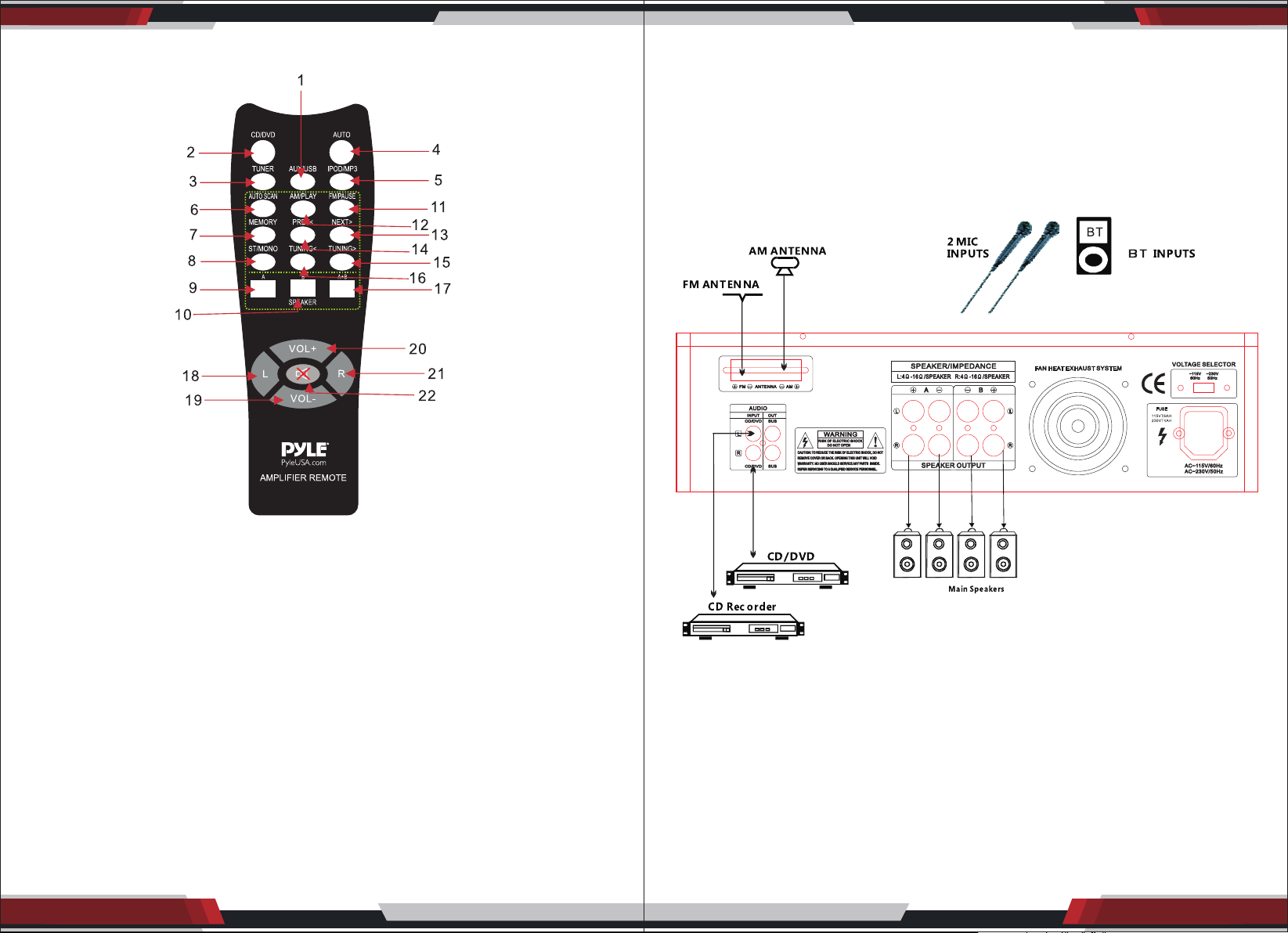
1. AUX/USB Selector
2. CD/DVD Selector
3. TUNER Selector
4. AUTO: Automatically search
the single source when power ON
5. MP3/BT Selector
6. AUTOSCAN: AM/FM auto scan
selector scan and store stations
automatically. Can store 50 stations
7. MEMORY: After a station has been
found you can store the station by
pressing the MEMORY botton and
the screen will display SAVE.
8. ST/MONO: Stereo and mono selector.
9. SPEAKER A selector
www.PyleUSA.com
5
10. SPEAKER B selector
11. FM/PAUSE selector
12. AM/PLAY selector
13/14. NEXT> PREV<
Next station & Previous selector
15/16. TUNING> TUNING<
Adjust the strong signal of
the stations
17. A+B SPEAKER selector
18/21. L/R
Left/Right balance control
19/20. VOL- VOL+
Master volume increase
and decrease
22. MUTE selector
www.PyleUSA.com
6
Page 5

SAFETY INSTRUCTIONS
1. Make sure that all connections are properly connected and the main volume is
set to minimum level before turning ON the unit.
2. When more than one pair of speakers are used, (specially the main speaker
output) make sure that the speakers used are of the same wattage and
impedance, otherwise the unit maybe damaged under high power or long
term operation.
3. To avoid humming sounds and unwanted noise, make sure that all the wires are
properly inserted.
4. For speaker cords, strip o the vinyl coating and twist the wire tip. Push down
the pink jack or loosen the screw terminal, before inserting the wire tip, then
fasten it and tighten the screw. Be careful not to let the wires stick out of the
terminal otherwise this may cause short circuit when wires of dierent terminal
PT272AUBT
Hybrid Amplier Receiver
Home Theater Stereo System, Wireless BT Streaming,
MP3/USB/SD Readers, AM/FM Radio, 300 Watt
Features:
• Home Theater Amplier Receiver System
• Ability to Connect External Devices & Speakers
• Built-in BT for Wireless Music Streaming
• MP3 Digital Audio File Support
• USB Flash & SD Memory Card Readers
• AM/FM Radio with LCD Display
• (2) 1/4’’ Microphone Inputs
• RCA (L/R) Audio Input/Output
• Banana Binding Post Speaker Output Jacks
• Front Panel Button Control Center
• Echo, Bass, Treble, Sub, Mic Volume Adjustable
• Includes Remote Control & Power Cable
contact each other.
5. After the unit is turned ON, adjust the main volume to the desired level same
with bass and treble volume, etc.
Wireless BT Connectivity:
• Instantly Receives Wireless Music Streaming
• Works with all of Your Favorite Devices
(iPhone, Android, Smartphone, iPad, Tablet, etc.)
• Wireless BT Version: 3.0
• Wireless BT Network Name: PT272AUBT
• Wireless BT Password Required: ‘0000’ (4 Zeroes)
Technical Specs:
• MAX Power Output: 300 Watt
• 30 Watt x 2 @ 8 Ohm
• 60 Watt x 2 @ 4 Ohm
• Frequency Response: 40-15kHz (+/-2dB)
• T.H.D.: <1%
• Signal-to-Noise Ratio: 76dB
• Input Sensitivity: 400mV Aux, 6mV Mic
• Radio Station Memory: 50 Presets
• Tuner: Quartz Synthesizer
• Maximum USB/SD Card Support Size: Up to 32 GB
• Digital Media File Support: MP3, WMA
• Battery Operated Remote, Requires (2) x ‘AAA’, Not Included
• Power: 110/220V, Switchable
• Dimensions (L x W x H): 19.0’’ x 11.8’’ x 3.2’’ -inches
www.PyleUSA.com
7
www.PyleUSA.com
8
 Loading...