

Page 1
Page 2

Before you use this Home Theater Wireless BT Streaming Receiver Amplier,
we recommend that you carefully read through this manual.
Please keep the instruction manual for future reference.
FEATURES:
• Stereo Amplier with A/B Speaker Output
• FM Radio with Digital Display Screen
• USB Flash Drive Reader Function
• Auto Scan, Memory, Radio Station, Previous/Next Control
• Volume/Balance/Treble/Bass Gain Control for Main Channel
• Volume/Bass/Treble/Echo Control for Microphone
• Two Microphone Input Jacks
• Two RCA Input Source
WIRELESS BT STREAMING:
• Built-in BT for Wireless Music Streaming
• Simple & Hassle-Free Pairing
• Works with All of Today’s Latest Devices
(Smartphones, Tablets, Laptops, Computers, etc.)
• Wireless BT Version: 4.2
• Wireless BT Network Name: ‘PT250BA’
• Wireless Range: Up to 32’ ft
WHAT'S IN THE BOX:
• Home Theater Wireless BT Streaming Receiver Amplier
• Remote Control
• FM Antenna
TECHNICAL SPECS:
• Power Supply: 50W x 2 @ 8 Ohm, 100W x 2 @ 4 Ohm
• Power Output: 110/220V Power Switch
• Remote Control Battery Operated, requires (2) x 'AAA' Batteries (Not Included)
• Product Dimensions (L x W x H): 17'' x 11.5'' x 4.7'' -inches
www.PyleUSA.com
2
Page 3

SAFETY INSTRUCTIONS
1. Make sure that all connections are properly connected and the main volume is
set to minimum level before turning ON the unit.
2. When more than one pair of speakers are used, (specially the main speaker
output) make sure that the speakers used are of the same wattage and
impedance, otherwise the unit maybe damaged under high power or long
term operation.
3. To avoid humming sounds and unwanted noise, make sure that all the wires
are properly inserted.
4. For speaker cords, strip off the vinyl coating and twist the wire tip. Push down
the pink jack or loosen the screw terminal, before inserting the wire tip, then
fasten it and tighten the screw. Be careful not to let the wires stick out of the
terminal otherwise this may cause a short circuit when wires of different
terminal contact each other.
5. After the unit is turned ON, adjust the main volume to the desired level same is
true with the bass and treble volume, etc.
PRECAUTIONS
1. Power source: The unit should be connected to a power supply AC-110V/60Hz
or AC-220V/50HZ.
2. Ventilation: The unit should be situated so that its location or position does
not interfere with its proper ventilation. Place the unit at least 10cm away from
the walls.
3. Water and moisture: The unit should not be used near water-for example,
near a swimming pool in a wet basement, etc.
4. Electric shock: If a metal object, such as hair pin or needle comes into contact
inside this unit, a dangerous electric shock may result. For families with children,
never permit children to put anything, especially metal, inside this unit.
5. Enclosure removal: Never remove the enclosure. If the internal parts are
touched accidentally, a serious electric shock might occur.
6. Abnormal smell: if an abnormal smell or smoke is detected, immediately turn
the power OFF and pull out the power cord. Contact your dealer or nearest
service station.
www.PyleUSA.com
3
Page 4
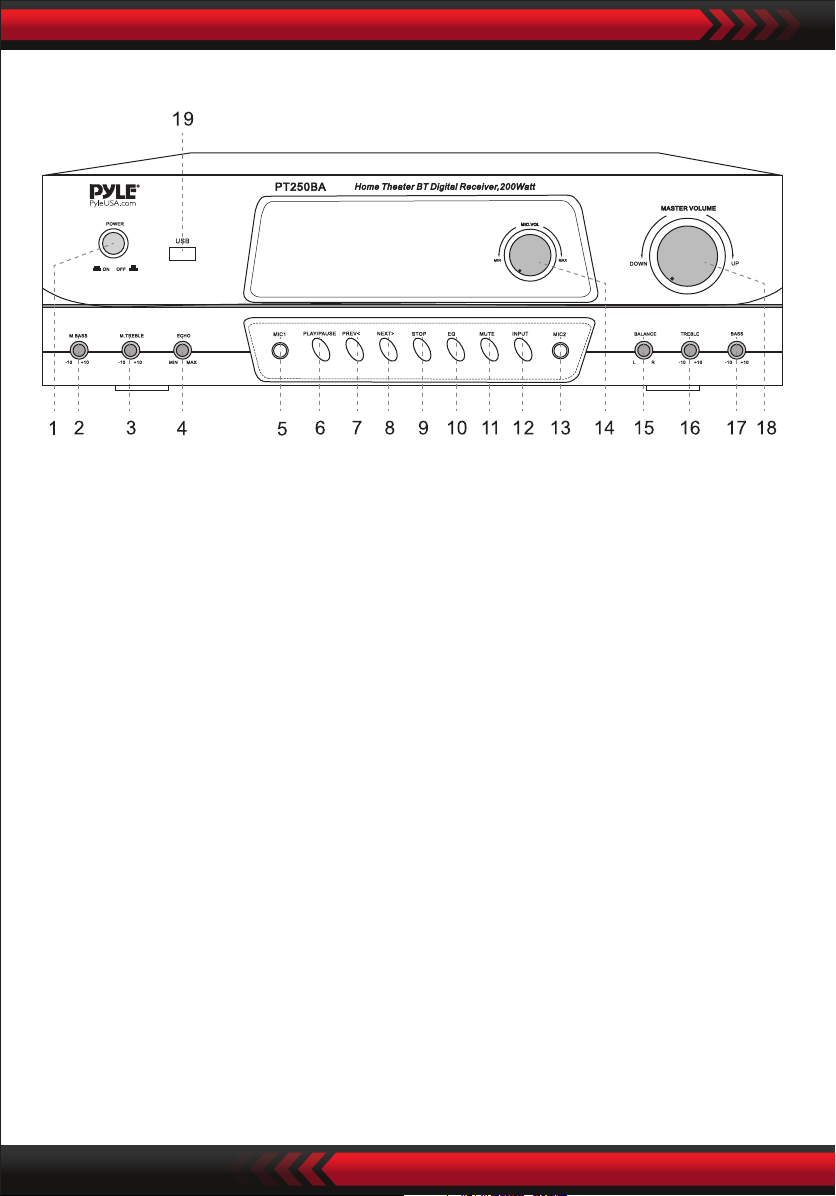
FRONT PANEL
1. POWER SWITCH: Press to switch the power unit ON or OFF.
2. MIC BASS: Adjusts the bass of MIC.
3. MIC TREBLE: Adjusts the treble of MIC.
4. ECHO CONTROL: Turn the knob to adjust the MIC echo level.
5. MIC INPUT JACK 1: KARAOKE MIC connect to this jack.
6. PLAY/PAUSE: USB/BT play/pause and Tuner Scan
7. PREV<: When it is TUNER,it means the preview station;
When it is USB, it means the preview song.
8. NEXT>: When it is TUNER, it means the next station; When it is USB, it means
the next song.
9. USB Play STOP
10. USB Tone EQ Selector
11. Signal MUTE key
12. INPUT Selector: Selector IPOD/M P3, DVD/CD, USB, BT, FM Signal.
13. MIC INPUT JACK 2: KARAOKE MIC connect to this jack.
14. MIC VOLUME: Adjusts the volume level. Turn the knob clockwise to increase
the MIC volume.
15. BALANCE CONTROL: Turn the knob to adjust the master balance level.
16. TREBLE CONTROL: Turn the knob to adjust the master treble level.
17. BASS CONTROL: Turn the knob to adjust the master bass level.
18. MASTER VOLUME CONTROL: Adjusts the volume level.
Turn the knob clockwise to increase the volume.
19. USB JACK
www.PyleUSA.com
4
Page 5
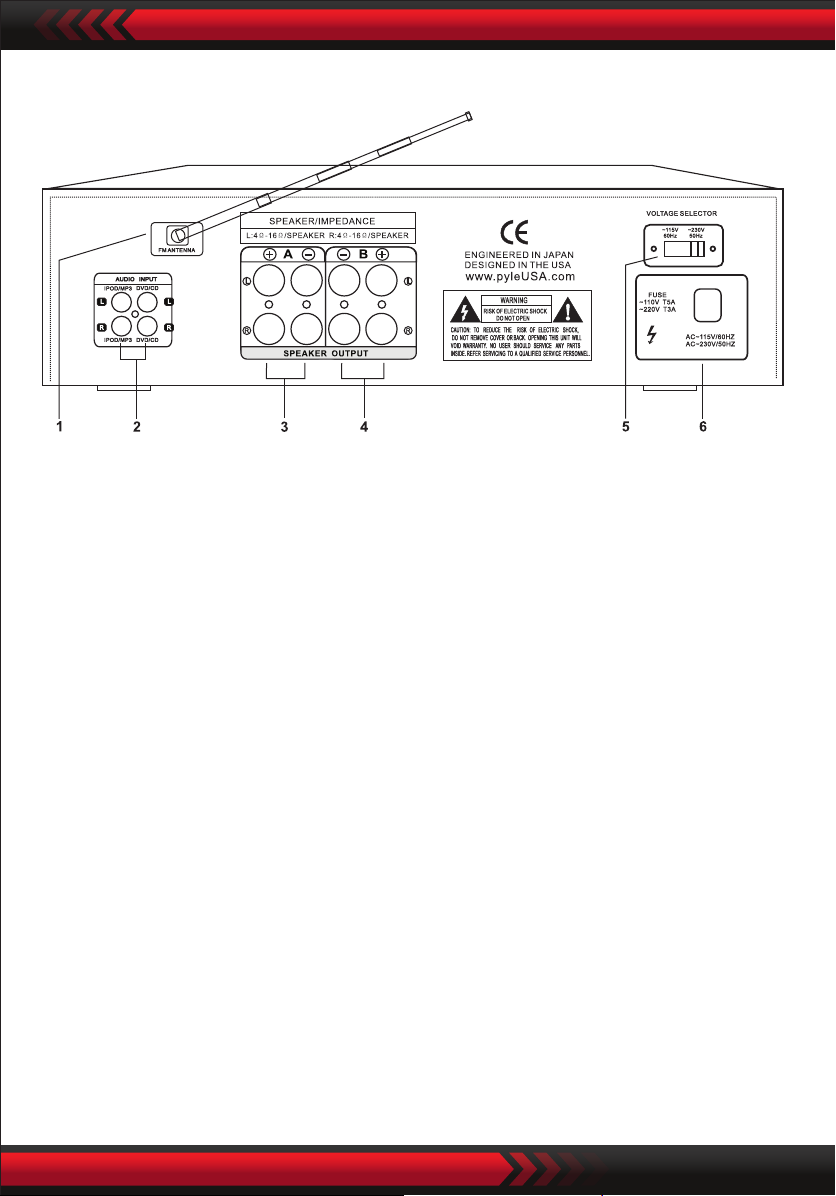
REAR PANEL AND WIRELESS BT FUNCTION
1. TUNERANT: Connect for FM antennas.
2. AUDIO INPUT JACKS: Connect the audio output jacks of IPOD/MP3, DVD/CD
to these jacks.
3. A SPEAKER OUTPUT TERMINALS: Connect your speaker system to these
terminals.
4. B SPEAKER OUTPUT TERMINALS: Connect your the other speaker system(s)
to these terminals.
5. 110V/220V SWITCH: According to power voltage, push this button to the
station of the110V or 220V.
6. POWER LINE: Connect to AC 110V/60Hz and 220V/50Hz outlet.
ATTENTION:
When you want to listen to the radio, press input key to select tuner (FM) and then
press scan button and hold for 3 seconds to seek for the station.
WIRELESS BT STREAMING OPERATION
Press 12 “INPUT” button Selector “BLUE” input sources. When there is “ding-dong”
sound it means the unit on BT input status. Then you can use your BT device such
as mobile phone to search for BT device named “PT250BA” to pair it. When the
pairing is completed there will be “ding-dong” sound as well, then you can play
music from your mobile phone on the amplier via Wireless BT streaming.
www.PyleUSA.com
5
Page 6
NOTES:
1. Available operation range of BT function of the unit is 10 meters.
Be sure there are no obstacles between the unit and your mobile phone or it
will affect the BT effect then cause the sound brokenly.
2. This operation only available for mobiles with BT function.
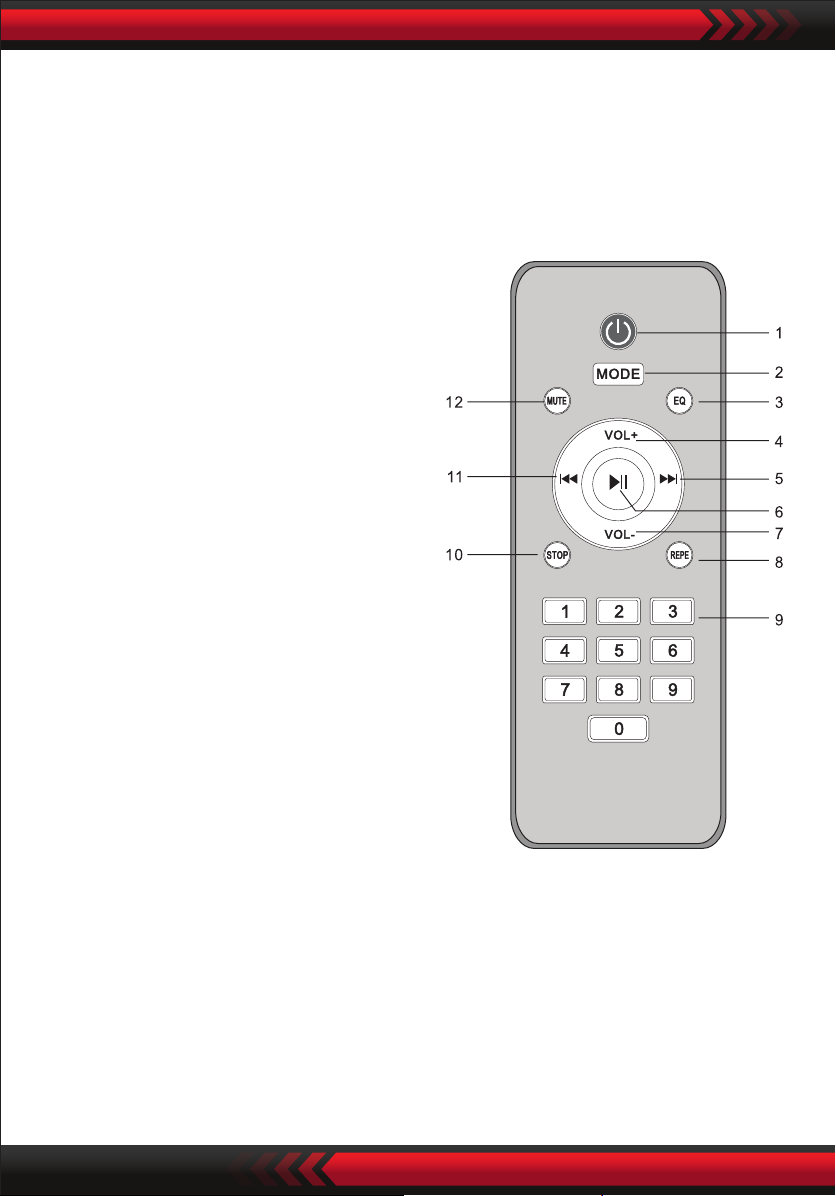
REMOTE CONTROLLER
1. USB Standby
2. MODE:
IPOD/MP3, DVD/CD, USB, BT, FM Signal
3. USB Tone EQ
4/7. VOL+ / VOL-
Master Volume Down And Up
5. USB/BT Play Next and Tuner CH+
6. USB/BT Play/Pause and Tuner Scan
8. USB Play Repeat
9. USB/FM Number buttons
10. USB Play STOP
11. USB/BT Play Next and Tuner CH-
12. Signal MUTE
REMOTE CONTROL OPERATION
1. Remote control should be operated within 6 meters and the scope of 30° in
front of receiver.
2. Make sure that there is no big obstacle between remote control and machine.
3. Remote sensor should be far away from the light, high amounts of light can
affect its performance.
www.PyleUSA.com
6
Page 7
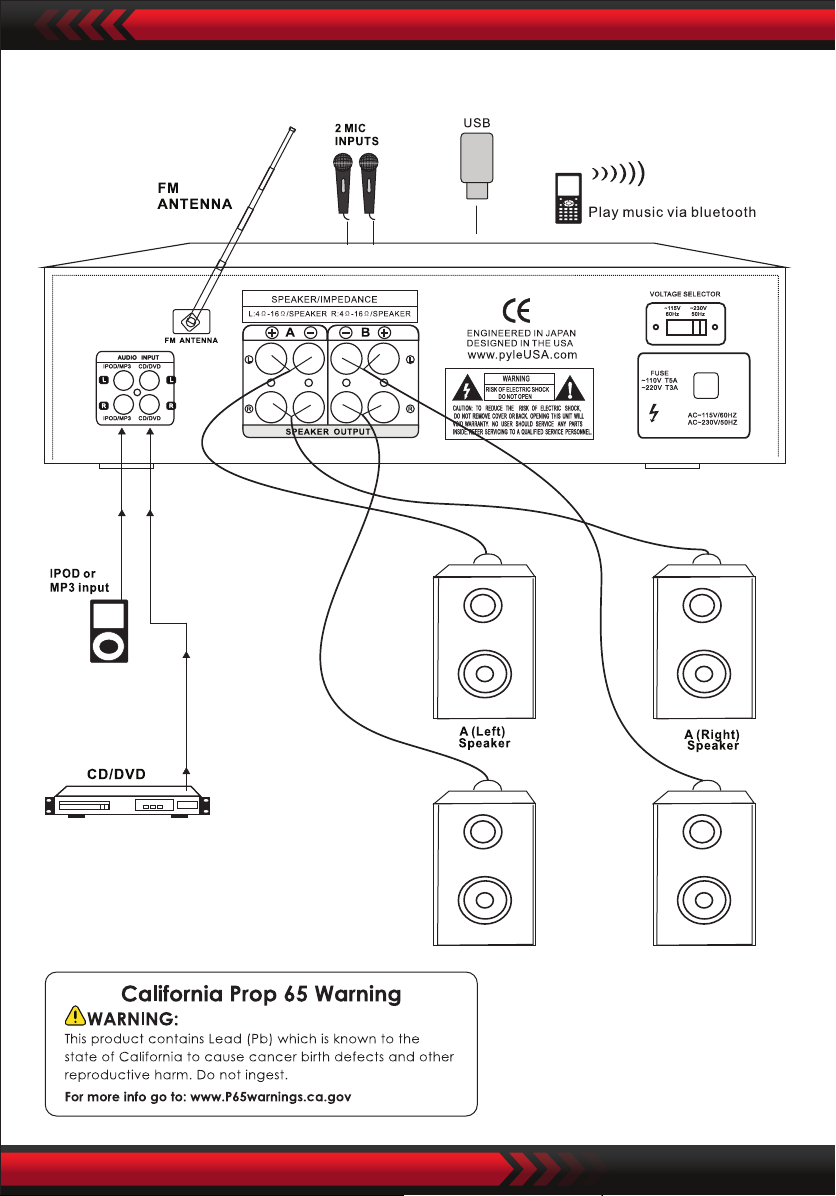
CONNECTING TO AMPLIFIER
www.PyleUSA.com
7
Page 8

 Loading...